C++ and Data Structures &
Algorithms
Week 1 and Week 2
Atomic Variables
 Atomic variables can only store one value at
a time.
int num;
float s;
 A value stored in an atomic variable cannot
be subdivided.
Chapter 0: C++ LANGUAGE
1. ADDRESS
2. POINTERS
3. ARRAYS
4. ADDRESS OF EACH ELEMENT IN AN ARRAY
5. ACCESSING & MANIPULATING AN ARRAY USING
POINTERS
6. ANOTHER CASE OF MANIPULATING AN ARRAY USING
POINTERS
7. TWO-DIMENSIONAL ARRAY
8. POINTER ARRAYS
9. STRUCTURES
10. STRUCTURE POINTERS
Chapter 0: C++ LANGUAGE
1. ADDRESS
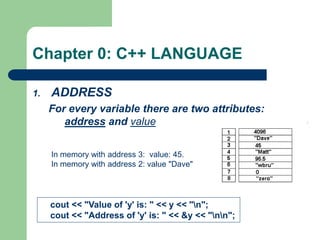
For every variable there are two attributes:
address and value
cout << "Value of 'y' is: " << y << "n";
cout << "Address of 'y' is: " << &y << "nn";
In memory with address 3: value: 45.
In memory with address 2: value "Dave"
Chapter 0: C++ LANGUAGE
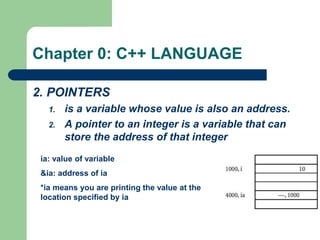
2. POINTERS
1. is a variable whose value is also an address.
2. A pointer to an integer is a variable that can
store the address of that integer
ia: value of variable
&ia: address of ia
*ia means you are printing the value at the
location specified by ia
Chapter 0: C++ LANGUAGE
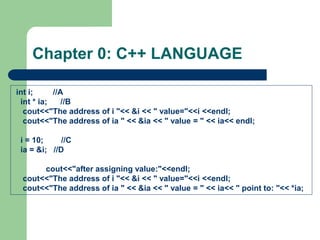
int i; //A
int * ia; //B
cout<<"The address of i "<< &i << " value="<<i <<endl;
cout<<"The address of ia " << &ia << " value = " << ia<< endl;
i = 10; //C
ia = &i; //D
cout<<"after assigning value:"<<endl;
cout<<"The address of i "<< &i << " value="<<i <<endl;
cout<<"The address of ia " << &ia << " value = " << ia<< " point to: "<< *ia;
Chapter 0: C++ LANGUAGE
Points to Remember
• Pointers give a facility to access the value of
a variable indirectly.
• You can define a pointer by including a *
before the name of the variable.
• You can get the address where a variable is
stored by using &.
Chapter 0: C++ LANGUAGE
3. ARRAYS
1. An array is a data structure
2. used to process multiple elements with the same data
type when a number of such elements are known.
3. An array is a composite data structure; that means it
had to be constructed from basic data types such as
array integers.
1. int a[5];
2. for(int i = 0;i<5;i++)
1. {a[i]=i; }
Chapter 0: C++ LANGUAGE
4. ADDRESS OF EACH ELEMENT IN AN
ARRAY
Each element of the array has a memory
address.
void printdetail(int a[])
{
for(int i = 0;i<5;i++)
{
cout<< "value in array “<< a[i] <<“ at address: “ << &a[i]);
}
Chapter 0: C++ LANGUAGE
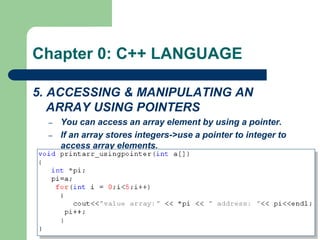
5. ACCESSING & MANIPULATING AN
ARRAY USING POINTERS
– You can access an array element by using a pointer.
– If an array stores integers->use a pointer to integer to
access array elements.
Chapter 0: C++ LANGUAGE
6. ANOTHER CASE OF MANIPULATING AN
ARRAY USING POINTERS
The array limit is a pointer constant : cannot
change its value in the program.
int a[5]; int *b;
a=b; //error
b=a; //OK
It works correctly even using
a++ ???
Chapter 0: C++ LANGUAGE
7. TWO-DIMENSIONAL ARRAY
int a[3][2];
Chapter 0: C++ LANGUAGE
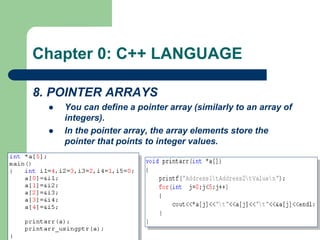
8. POINTER ARRAYS
 You can define a pointer array (similarly to an array of
integers).
 In the pointer array, the array elements store the
pointer that points to integer values.
Chapter 0: C++ LANGUAGE
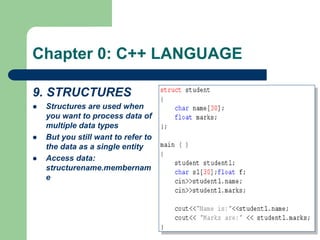
9. STRUCTURES
 Structures are used when
you want to process data of
multiple data types
 But you still want to refer to
the data as a single entity
 Access data:
structurename.membernam
e
Chapter 1: C++ LANGUAGE
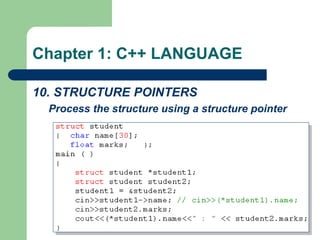
10. STRUCTURE POINTERS
Process the structure using a structure pointer
CHAPTER 2: FUNCTION & RECURSION
 1. FUNCTION
 2. THE CONCEPT OF STACK
 3. THE SEQUENCE OF EXECUTION DURING A
FUNCTION CALL
 4. PARAMETER PASSING
 5. CALL BY REFERENCE
 6. RESOLVING VARIABLE REFERENCES
 7. RECURSION
 8. STACK OVERHEADS IN RECURSION
 9. WRITING A RECURSIVE FUNCTION
 10. TYPES OF RECURSION
CHAPTER 2: FUNCTION & RECURSION
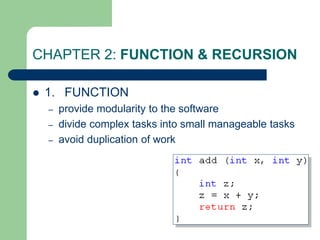
 1. FUNCTION
– provide modularity to the software
– divide complex tasks into small manageable tasks
– avoid duplication of work
Type of Function: return value &
parameters
 On return value
– Void Functions
– Return Function
 Example: void display(); int max(int a,int b);
 On Parameters
– value parameters
– reference parameters
 Exmple: void swap(int &a, int &b); int BinhPhuong(int n);
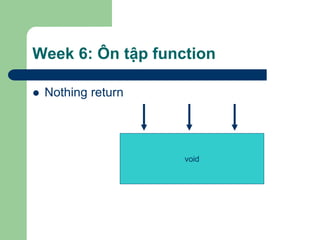
Week 6: Ôn tập function
 Nothing return
void
Week 6: Ôn tập function
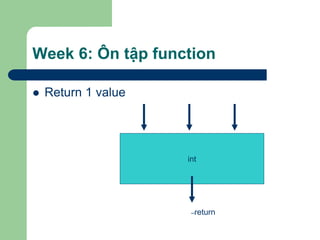
 Return 1 value
int
–return
Week 6: Ôn tập function
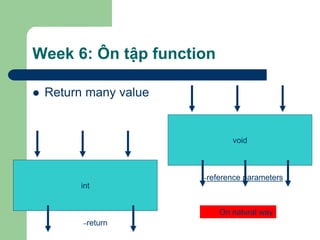
 Return many value
void
int
–reference parameters
–return
On natural way
CHAPTER 2: FUNCTION & RECURSION
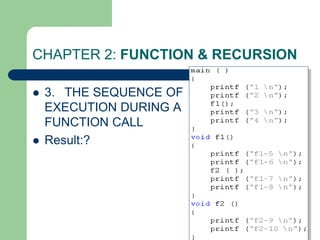
 3. THE SEQUENCE OF EXECUTION DURING A
FUNCTION CALL
– When the function is called, the current execution is
temporarily stopped and the control goes to the called
function. After the call, the execution resumes from the point
at which the execution is stopped.
– To get the exact point at which execution is resumed, the
address of the next instruction is stored in the stack. When
the function call completes, the address at the top of the
stack is taken.
CHAPTER 2: FUNCTION & RECURSION
 3. THE SEQUENCE OF EXECUTION
DURING A FUNCTION CALL
– Functions or sub-programs are implemented
using a stack.
– When a function is called, the address of the next
instruction is pushed into the stack.
– When the function is finished, the address for
execution is taken by using the pop operation.
CHAPTER 2: FUNCTION & RECURSION
 3. THE SEQUENCE OF
EXECUTION DURING A
FUNCTION CALL
 Result:?
CHAPTER 2: FUNCTION & RECURSION
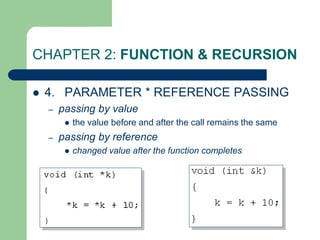
 4. PARAMETER * REFERENCE PASSING
– passing by value
 the value before and after the call remains the same
– passing by reference
 changed value after the function completes
CHAPTER 2: FUNCTION & RECURSION
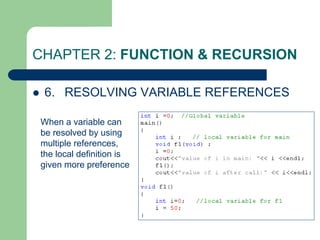
 6. RESOLVING VARIABLE REFERENCES
When a variable can
be resolved by using
multiple references,
the local definition is
given more preference
CHAPTER 2: FUNCTION & RECURSION
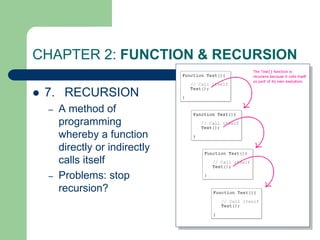
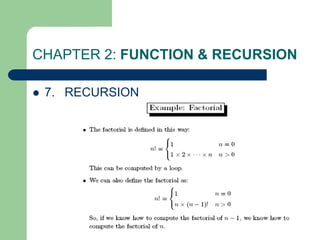
 7. RECURSION
– A method of
programming
whereby a function
directly or indirectly
calls itself
– Problems: stop
recursion?
CHAPTER 2: FUNCTION & RECURSION
 7. RECURSION
CHAPTER 2: FUNCTION & RECURSION
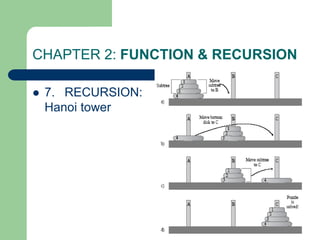
 7. RECURSION:
Hanoi tower
CHAPTER 2: FUNCTION & RECURSION
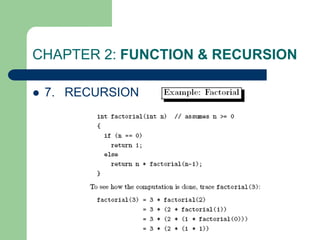
 7. RECURSION
CHAPTER 2: FUNCTION & RECURSION
 9. WRITING A RECURSIVE FUNCTION
– Recursion enables us to write a program in a
natural way. The speed of a recursive program
is slower because of stack overheads.
– In a recursive program you have to specify
recursive conditions, terminating conditions, and
recursive expressions.
CHAPTER 2: FUNCTION & RECURSION
 10. TYPES OF RECURSION
– LINEAR RECURSION
– TAIL RECURSION
– BINARY RECURSION
– EXPONENTIAL RECURSION
– NESTED RECURSION
– MUTUAL RECURSION
CHAPTER 2: FUNCTION & RECURSION
 10. TYPES OF RECURSION
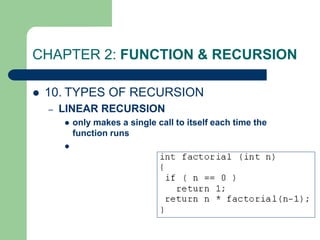
– LINEAR RECURSION
 only makes a single call to itself each time the
function runs

CHAPTER 2: FUNCTION & RECURSION
 10. TYPES OF RECURSION
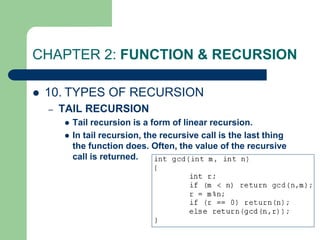
– TAIL RECURSION
 Tail recursion is a form of linear recursion.
 In tail recursion, the recursive call is the last thing
the function does. Often, the value of the recursive
call is returned.
CHAPTER 2: FUNCTION & RECURSION
 10. TYPES OF RECURSION
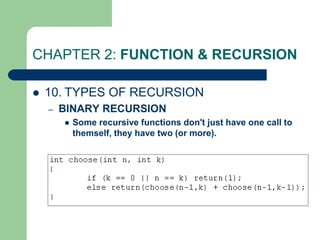
– BINARY RECURSION
 Some recursive functions don't just have one call to
themself, they have two (or more).
CHAPTER 2: FUNCTION & RECURSION
 10. TYPES OF RECURSION
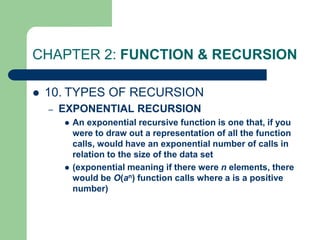
– EXPONENTIAL RECURSION
 An exponential recursive function is one that, if you
were to draw out a representation of all the function
calls, would have an exponential number of calls in
relation to the size of the data set
 (exponential meaning if there were n elements, there
would be O(an) function calls where a is a positive
number)
CHAPTER 2: FUNCTION & RECURSION
 10. TYPES OF RECURSION
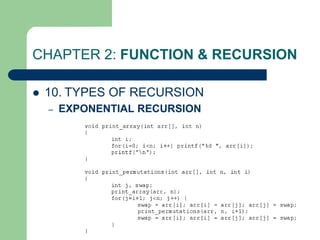
– EXPONENTIAL RECURSION
CHAPTER 2: FUNCTION & RECURSION
 10. TYPES OF RECURSION
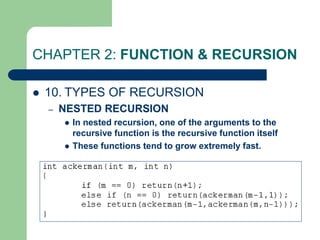
– NESTED RECURSION
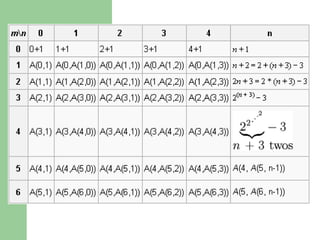
 In nested recursion, one of the arguments to the
recursive function is the recursive function itself
 These functions tend to grow extremely fast.
CHAPTER 2: FUNCTION & RECURSION
 10. TYPES OF RECURSION
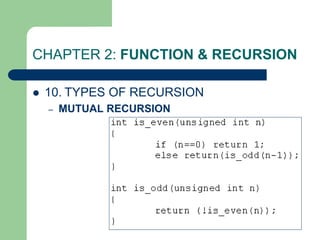
– MUTUAL RECURSION
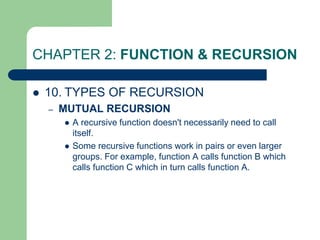
 A recursive function doesn't necessarily need to call
itself.
 Some recursive functions work in pairs or even larger
groups. For example, function A calls function B which
calls function C which in turn calls function A.
CHAPTER 2: FUNCTION & RECURSION
 10. TYPES OF RECURSION
– MUTUAL RECURSION
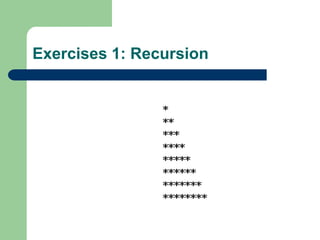
Exercises 1: Recursion
Exercises 2: Recursion
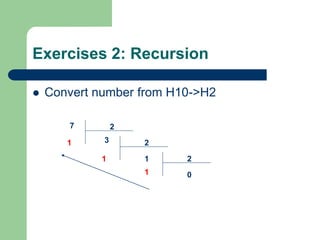
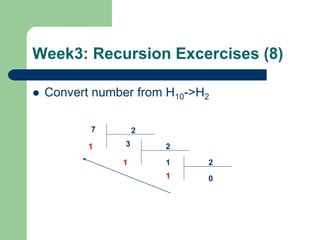
 Convert number from H10->H2
7 2
1 3 2
1 1 2
0
1
Week3: Recursion Excercises (1)
 E1. (44/174) Write a program to compute: S
= 1 + 2 + 3 + …n using recursion.
Week3: Recursion Excercises (2-3)
 E3(a). Write a program to print a revert
number Example: input n=12345. Print out:
54321.
 E3(b). Write a program to print this number
Example: input n=12345. Print out:
12345.
Week3: Recursion Excercises (4)
 E4. Write a recursion function to find the sum
of every number in a int number. Example:
n=1980 => Sum=1+9+8+0=18.
Week3: Recursion Excercises (5)
 E4. Write a recursion function to calculate:
– S=a[0]+a[1]+…a[n-1]
 A: array of integer numbers
Week3: Recursion Excercises (6)
 E4. Write a recursion function to find an
element in an array (using linear algorithm)
Week3: Recursion Excercises (7)
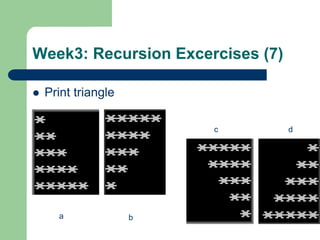
 Print triangle
a b
c d
Week3: Recursion Excercises (8)
 Convert number from H10->H2
7 2
1 3 2
1 1 2
0
1
Week3: Recursion Excercises (9)
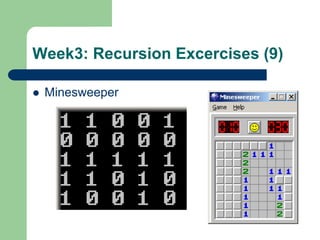
 Minesweeper
1. String: structure
 String
– is array of char
– Ending with null char 0 (size +1)
– Example: store 10 chars:
 char str[11];
– “Example”: string const. C/C++ add 0
automayically
1. String: declare
 Declare string
– Using array of chars
 char str[] = {‘H’,’e’,’l’,’l’,’o’,’0’}; //declare with null
 char str[] = “Hello”; //needn’t null
– Using char pointer
 char *str = “Hello”;
1. String: input
 char *gets(char *s);
– Read every char
– Until receive Enter
– Adding Automatically ‘0’
 cin>>s;
1. String: output
 int puts(const char *s);
 cout<<s;
1. String: Problem with buffer?
 Keyboard buffer
char szKey[] = "aaa";
char s[10];
do {
cout<<"doan lai di?";
gets(s);
} while (strcmp (szKey,s) != 0);
puts ("OK. corect");
 If user input: aaaaaaaaaaaaa???
1. String: functions
 #include <string.h>
 strcpy(s1, s2)
 strcat(s1, s2)
 strlen(s1)
 strcmp(s1, s2) -> (-1,0,1)
 strchr(s1, ch)
 strstr(s1, s2)
1. String: function examples
char s1[80], s2[80];
cout << "Input the first string: :";
gets(s1);
cout << "Input the second string: ";
gets(s2);
cout << "Length of s1= " << strlen(s1);
cout << "Length of s2= " << strlen(s2);
if(!strcmp(s1, s2))
cout << "These strings are equaln";
strcat(s1, s2);
cout << "s1 + s2: " << s1 << endl;;
strcpy(s1, "This is a test.n");
cout << s1;
if(strchr(s1, 'e')) cout << "e is in " << s1;
if(strstr(s2, "hi")) cout << "found hi in " <<s2;
2. File: Creating a new file
 #include <io.h>
 FILE *fp;
 fp=fopen(“d:test.txt", "wb"))
 fwrite(&Address, sizeof(TYPE), count, fp);
 fclose(fp);
2.File: Creating a new file
int Arr[3]
Arr
Fwrite(Arr, sizeof(int), 1, fp);
fwrite(Arr, sizeof(Arr), 1, fp);
Fwrite(&Arr[i], sizeof(int), 1, fp);
for (i=0;i<=3;i++)
2. File: Reading a file
 #include <io.h>
 FILE *fp;
 fp=fopen(“d:test.txt", “rb"))
 while (fwrite(&Address, sizeof(TYPE), count, fp))
 {
– …………….
 }
 fclose(fp);
CHAPTER 0: INTRODUTION
 What is Data Structures?
– A data structure is defined by
 (1) the logical arrangement of data elements,
combined with
 (2) the set of operations we need to access the
elements.
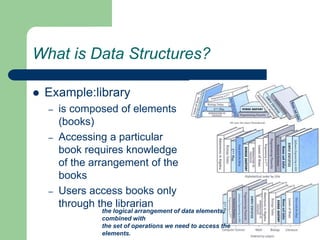
What is Data Structures?
 Example:library
– is composed of elements
(books)
– Accessing a particular
book requires knowledge
of the arrangement of the
books
– Users access books only
through the librarian
the logical arrangement of data elements,
combined with
the set of operations we need to access the
elements.
Basic Data Structures
 Structures include
– linked lists
– Stack, Queue
– binary trees
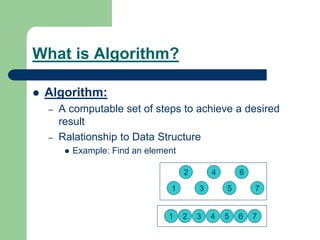
What is Algorithm?
 Algorithm:
– A computable set of steps to achieve a desired
result
– Ralationship to Data Structure
 Example: Find an element
1 2 3 4 5 6 7
1
2
3
4
5
6
7
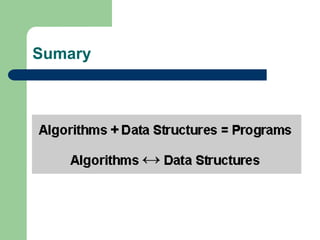
Sumary
SEARCHING TECHNIQUES and
Complexity of Algorithm
CHAPTER 3: SEARCHING TECHNIQUES
1. LINEAR (SEQUENTIAL) SEARCH
2. BINARY SEARCH
3. COMPLEXITY OF ALGORITHMS
SEARCHING TECHNIQUES
 To finding out whether a particular element is
present in the list.
 2 methods: linear search, binary search
 The method we use depends on how the
elements of the list are organized
– unordered list:
 linear search: simple, slow
– an ordered list
 binary search or linear search: complex, faster
1. LINEAR (SEQUENTIAL) SEARCH
 How?
– Proceeds by sequentially comparing the key with
elements in the list
– Continues until either we find a match or the end
of the list is encountered.
– If we find a match, the search terminates
successfully by returning the index of the element
– If the end of the list is encountered without a
match, the search terminates unsuccessfully.
1. LINEAR (SEQUENTIAL) SEARCH
void lsearch(int list[],int n,int element)
{ int i, flag = 0;
for(i=0;i<n;i++)
if( list[i] == element)
{ cout<<“found at position”<<i);
flag =1;
break; }
if( flag == 0)
cout<<“ not found”;
}
flag: what for???
1. LINEAR (SEQUENTIAL) SEARCH
int lsearch(int list[],int n,int element)
{ int i, find= -1;
for(i=0;i<n;i++)
if( list[i] == element)
{find =i;
break;}
return find;
}
Another way using flag
average time: O(n)
2. BINARY SEARCH
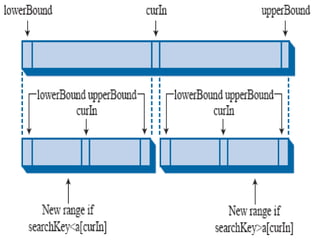
 List must be a sorted one
 We compare the element with the element
placed approximately in the middle of the list
 If a match is found, the search terminates
successfully.
 Otherwise, we continue the search for the
key in a similar manner either in the upper
half or the lower half.
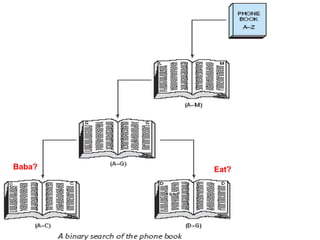
Baba? Eat?
void bsearch(int list[],int n,int element)
{
int l,u,m, flag = 0;
l = 0; u = n-1;
while(l <= u)
{ m = (l+u)/2;
if( list[m] == element)
{cout<<"found:"<<m;
flag =1;
break;}
else
if(list[m] < element)
l = m+1;
else
u = m-1;
}
if( flag == 0)
cout<<"not found";
}
average time: O(log2n)
BINARY SEARCH: Recursion
int Search (int list[], int key, int left, int right)
{
if (left <= right) {
int middle = (left + right)/2;
if (key == list[middle])
return middle;
else if (key < list[middle])
return Search(list,key,left,middle-1);
else return Search(list,key,middle+1,right);
}
return -1;
}
3. COMPLEXITY OF ALGORITHMS
 In Computer Science, it is important to measure the
quality of algorithms, especially the specific amount
of a certain resource an algorithm needs
 Resources: time or memory storage (PDA?)
 Different algorithms do same task with a different set
of instructions in less or more time, space or effort
than other.
 The analysis has a strong mathematical background.
 The most common way of qualifying an algorithm is
the Asymptotic Notation, also called Big O.
3. COMPLEXITY OF ALGORITHMS
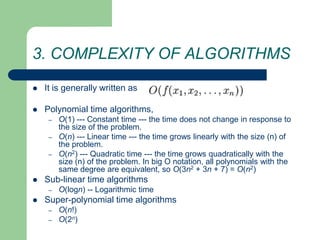
 It is generally written as
 Polynomial time algorithms,
– O(1) --- Constant time --- the time does not change in response to
the size of the problem.
– O(n) --- Linear time --- the time grows linearly with the size (n) of
the problem.
– O(n2) --- Quadratic time --- the time grows quadratically with the
size (n) of the problem. In big O notation, all polynomials with the
same degree are equivalent, so O(3n2 + 3n + 7) = O(n2)
 Sub-linear time algorithms
– O(logn) -- Logarithmic time
 Super-polynomial time algorithms
– O(n!)
– O(2n)
3. COMPLEXITY OF ALGORITHMS
 Example1: complexity of an algorithm
void f ( int a[], int n )
{
int i;
cout<< "N = “<< n;
for ( i = 0; i < n; i++ )
cout<<a[i];
printf ( "n" );
}
?
?
2 * O(1) + O(N)
O(N)
3. COMPLEXITY OF ALGORITHMS
 Example2: complexity of an algorithm
void f ( int a[], int n )
{ int i;
cout<< "N = “<< n;
for ( i = 0; i < n; i++ )
for (int j=0;j<n;j++)
cout<<a[i]<<a[j];
for ( i = 0; i < n; i++ )
cout<<a[i];
printf ( "n" );
}
?
?
2 * O(1) + O(N)+O(N2)
O(N2)
3. COMPLEXITY OF ALGORITHMS
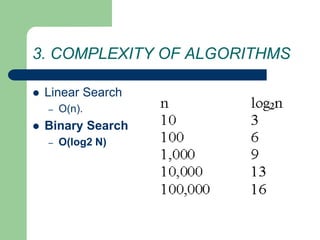
 Linear Search
– O(n).
 Binary Search
– O(log2 N)
Exercise
 Exercise:
– Write a small program
 Input the number of array
 Input array of integer
 Display array
 Input a value. Using linear search to find position of first
match item in array
– Using 3 function: enterarray, displayarray,linearfind
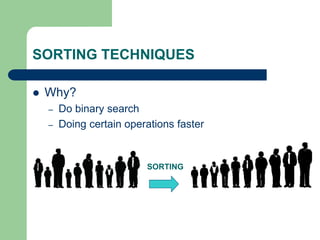
SORTING TECHNIQUES
 Why?
– Do binary search
– Doing certain operations faster
SORTING
SORTING TECHNIQUES
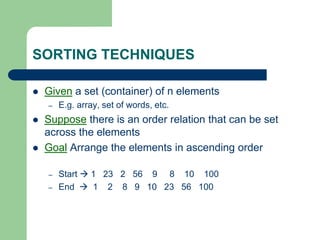
 Given a set (container) of n elements
– E.g. array, set of words, etc.
 Suppose there is an order relation that can be set
across the elements
 Goal Arrange the elements in ascending order
– Start  1 23 2 56 9 8 10 100
– End  1 2 8 9 10 23 56 100
SORTING TECHNIQUES
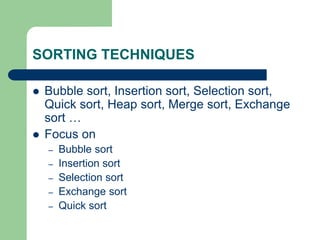
 Bubble sort, Insertion sort, Selection sort,
Quick sort, Heap sort, Merge sort, Exchange
sort …
 Focus on
– Bubble sort
– Insertion sort
– Selection sort
– Exchange sort
– Quick sort
SORTING TECHNIQUES
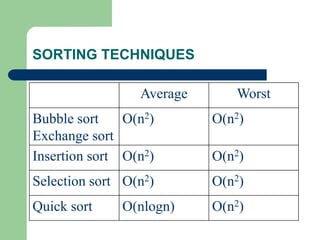
Average Worst
Bubble sort
Exchange sort
O(n2) O(n2)
Insertion sort O(n2) O(n2)
Selection sort O(n2) O(n2)
Quick sort O(nlogn) O(n2)
1.Bubble sort: idea
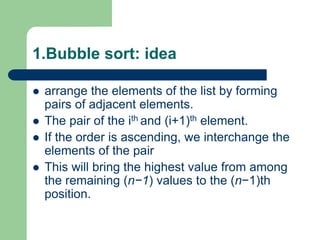
 arrange the elements of the list by forming
pairs of adjacent elements.
 The pair of the ith and (i+1)th element.
 If the order is ascending, we interchange the
elements of the pair
 This will bring the highest value from among
the remaining (n−1) values to the (n−1)th
position.
1.Bubble sort: idea
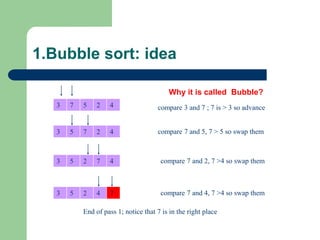
3 7 5 2 4 compare 3 and 7 ; 7 is > 3 so advance
3 5 7 2 4 compare 7 and 5, 7 > 5 so swap them
3 5 2 7 4 compare 7 and 2, 7 >4 so swap them
3 5 2 4 7 compare 7 and 4, 7 >4 so swap them
End of pass 1; notice that 7 is in the right place
Why it is called Bubble?
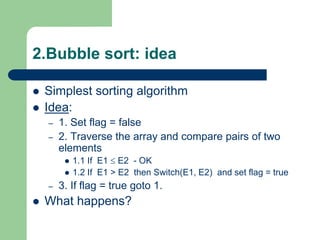
2.Bubble sort: idea
 Simplest sorting algorithm
 Idea:
– 1. Set flag = false
– 2. Traverse the array and compare pairs of two
elements
 1.1 If E1  E2 - OK
 1.2 If E1 > E2 then Switch(E1, E2) and set flag = true
– 3. If flag = true goto 1.
 What happens?
1.Bubble sort:algorithm idea
void bubbleSort (Array S, length n) {
boolean isSorted = false;
while(!isSorted)
{
isSorted = true;
for(i = 0; i<n; i++)
if(S[i] > S[i+1])
{
swap(S[i],S[i+1];)
isSorted = false;
}
}
1.Bubble sort: implement
void bsort(int list[], int n)
{
int count,j;
for(count=0;count<n-1;count++)
for(j=0;j<n-1-count;j++)
if(list[j] > list[j+1])
swap(list[j],list[j+1]);
}
2. Exchange Sorting
 Method : make n-1 passes across the data,
on each pass compare adjacent items,
swapping as necessary (n-1 compares)
 O(n2)
2. Exchange Sorting
void Exchange_sort(int arr[], int n)
{
int i,j;
for(i=0;i<n-1;i++)
for(j=i+1;j<n;j++)
if(arr[i] > arr[j])
swap(arr[i],arr[j]);
}
2. Exchange Sorting
 Notes:
– on each successive pass, do one less compare,
because the last item from that pass is in place
– if you ever make a pass in which no swap occurs,
the sort is complete
– There are some algorithms to improve
performance but Big O will remain O(n2)
3. Insertion Sort
 Strategy: divide the collection into two lists,
one listed with one element (sorted) and the
other with the remaining elements.
 On successive passes take an item from the
unsorted list and insert it into the sorted list
so the the sorted list is always sorted
 Do this until the unsorted list is empty
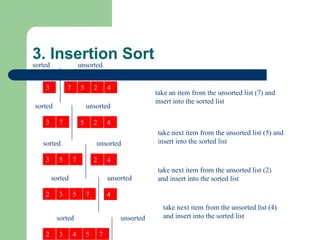
3. Insertion Sort
3 7 5 2 4
sorted unsorted
take an item from the unsorted list (7) and
insert into the sorted list
3 7 5 2 4
sorted unsorted
take next item from the unsorted list (5) and
insert into the sorted list
3 5 7 2 4
sorted unsorted
2 3 5 7 4
sorted unsorted
2 3 4 5 7
sorted unsorted
take next item from the unsorted list (2)
and insert into the sorted list
take next item from the unsorted list (4)
and insert into the sorted list
3. Insertion Sort
void insertionSort(int arr[], int n){
int j, key;
for(int i = 1; i < n; i++){
key = arr[i];
j = i - 1;
while(j >= 0 && arr[j] > key)
{ arr[j + 1] = arr[j];
j = j - 1;
}
arr[j + 1] = key;
}
}
3. Insertion Sort
 Note that each insertion could be O(n-1) and
there are n-1 insertions being done therefore
Big O is O(n2)
 This is very much like building an ordered
linked list except there is more data
movement
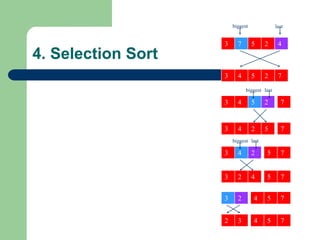
4. Selection Sort
 Strategy: make a pass across the data
looking for the largest item, swap the largest
with the last item in the array.
 On successive passes (n-1) assume the
array is one smaller (the last item is in the
correct place) and repeat previous step
4. Selection Sort
3 7 5 2 4
biggest last
3 4 5 2 7
3 4 5 2
biggest last
3 4 2 5
7
3 4 2 5
7
7
biggest last
3 2 4
3 2
2 3
5 7
5 7
4
5 7
4
4. Selection Sort
void selection_sort(int arr[], int n)
{int i, j, min;
for (i = 0; i < n - 1; i++)
{
min = i;
for (j = i+1; j < n; j++)
{ if (list[j] < list[min]) min = j; }
swap(arr[i],arr[min]);
}
}
4. Selection Sort
 Notice that in selection sort, there is the least
possible data movement
 There are still n-1 compares on sublists that
become one item smaller on each pass so,
Big O is still O(n2)
 This method has the best overall
performance of the O(n2) algorithms because
of the limited amount of data movement
5. Quick Sort
 This sorting method by far outshines all of the others
for flat out speed
 Big O is log2n
 there are problems, worst case performance is when
data is already in sorted order or is almost in sorted
order (we’ll analyze this separately)
 and there are solutions to the problems
 and there is an improvement to make it faster still
5. Quick Sort
 Sorting algorithms that rely on the “DIVIDE
AND CONQUER” paradigm
– One of the most widely used paradigms
– Divide a problem into smaller sub problems, solve
the sub problems, and combine the solutions
– Learned from real life ways of solving problems
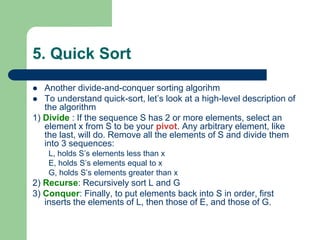
5. Quick Sort
 Another divide-and-conquer sorting algorihm
 To understand quick-sort, let’s look at a high-level description of
the algorithm
1) Divide : If the sequence S has 2 or more elements, select an
element x from S to be your pivot. Any arbitrary element, like
the last, will do. Remove all the elements of S and divide them
into 3 sequences:
L, holds S’s elements less than x
E, holds S’s elements equal to x
G, holds S’s elements greater than x
2) Recurse: Recursively sort L and G
3) Conquer: Finally, to put elements back into S in order, first
inserts the elements of L, then those of E, and those of G.
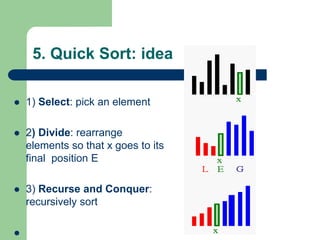
5. Quick Sort: idea
 1) Select: pick an element
 2) Divide: rearrange
elements so that x goes to its
final position E
 3) Recurse and Conquer:
recursively sort

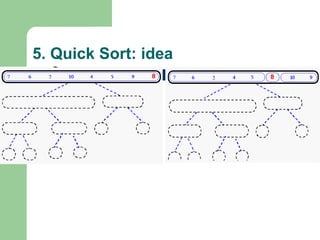
5. Quick Sort: idea
Quick Sort
23 17 5 12 19 24 4 27
8
26
14
33
3
11
34
43
23 17 5 12 19 24
4 27
8 26
14
33
3
11
34
43
23 17 5 12 19 24
4 27
8 26
14 33
3
11
34 43
23 17 5 12 19 24
4 27
8 26
14 33
3 11 34 43
23
17 5 12 19 24
4 27
8 26
14 33
3
11 34 43
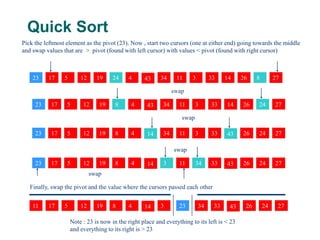
Pick the leftmost element as the pivot (23). Now , start two cursors (one at either end) going towards the middle
and swap values that are > pivot (found with left cursor) with values < pivot (found with right cursor)
swap
swap
swap
swap
Finally, swap the pivot and the value where the cursors passed each other
Note : 23 is now in the right place and everything to its left is < 23
and everything to its right is > 23
Quick Sort
23
17 5 12 19 24
4 27
8 26
14 33
3
11 34 43
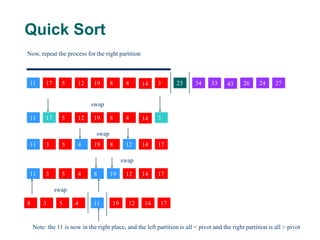
Now, repeat the process for the right partition
17 5 12 19 4
8 14 3
11
swap
17
5 12
19
4 8 14
3
11
swap
17
5 12
19
4 8 14
3
11
swap
17
5 12
19
4
8 14
3 11
swap
Note: the 11 is now in the right place, and the left partition is all < pivot and the right partition is all > pivot
Quick Sort (worst case)
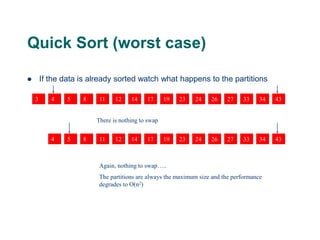
 If the data is already sorted watch what happens to the partitions
17
5 12 19
4 8 14
3 11 23 24 27
26 33 34 43
There is nothing to swap
17
5 12 19
4 8 14
11 23 24 27
26 33 34 43
Again, nothing to swap…..
The partitions are always the maximum size and the performance
degrades to O(n2)
Quick Sort
void quickSort(int Arr[], int lower, int upper)
{
int x = Arr[(lower + upper) / 2];
int i = lower; int j = upper;
do{
while(Arr[i] < x) i ++;
while (Arr[j] > x) j --;
if (i <= j)
{
swap(Arr[i], Arr[j]);
i ++; j --; }
}while(i <= j);
if (j > lower)
quickSort(Arr, lower, j);
if (i < upper)
quickSort(Arr, i, upper);
}
STACKS AND QUEUES
 STACKS: concept
 QUEUES : concept
 STACKS,QUEUES : implement
– Using array
– Using Linked List (next chapter)
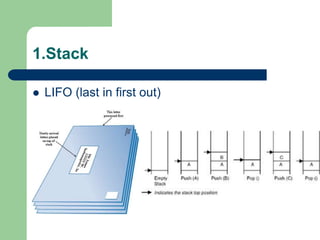
1.Stack
 LIFO (last in first out)
1.Stack
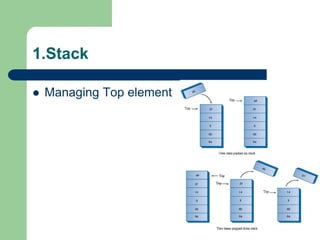
 Managing Top element
1.Stack: implement using array
#define MAX 10
void main()
{
int stack[MAX];
int top = -1;
push(stack,top, 10 );
pop(stack,top,value);
int value;
cout<<value;
}
1.Stack: implement using array
void push(int stack[], int &top, int value)
{
if(top < MAX )
{
top = top + 1;
stack[top] = value;
}
else
cout<<"The stack is full";
}
1.Stack: implement using array
void pop(int stack[], int &top, int &value)
{
if(top >= 0 )
{
value = stack[top];
top = top - 1;
}
else
cout<<"The stack is empty ";
}
2.QUEUE
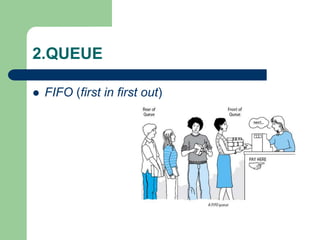
 FIFO (first in first out)
2.QUEUE: implement using array
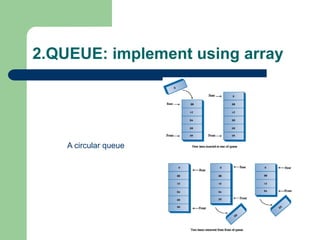
A circular queue
2.QUEUE: implement using array
#define MAX 10
void main()
{
int queue[MAX];
int bottom,top,count=0;
bottom=top=-1;
enqueue(queue,count,top, 100 );
int value;
dequeue(queue,count,bottom,top,value);
}
2.QUEUE: implement using array
void enqueue(int queue[],int &count, int &top, int value)
{
if(count< MAX)
{
count++;
top= (top +1)%MAX;
queue[top] = value;
}
else
cout<<"The queue is full";
}
2.QUEUE: implement using array
void dequeue(int queue[], int &count,int &bottom,int top, int
&value)
{
if(count==0)
{
cout<<"The queue is empty";
exit(0);
}
bottom = (bottom + 1)%MAX;
value = queue[bottom];
count--;
}
3. Application of stack, queue
 Stack: Expression evaluation
– a*(b–c)/d => abc–*d/
 Queue: priority queues
Exercise:
 Implement: 5 sort algorithms
 Implement stack, queue using array
– Menu with 4 choices
 Add, remove, display, exit
Linked List
 THE CONCEPT OF THE LINKED LIST
 SINGLE LINKED LIST
 DOUBLE LINKED LIST
 CIRCULAR LINKED LIST
THE CONCEPT OF THE LINKED LIST
 the size requirement need not be known at
compile time
 A linked list is a data structure that is used to
model such a dynamic list of data items, so
the study of the linked lists as one of the data
structures is important.
Array and LINKED LIST
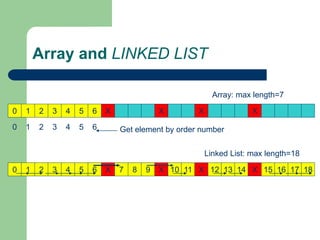
 ARRAY
– sequential mapping, elements are fixed distance apart
– makes insertion or deletion at any arbitrary position in an
array a costly operation
 Linked List
– not necessary that the elements be at a fixed distance apart
– an element is required to be linked with a previous element
of the list
– done by storing the address of the next element
Array and LINKED LIST
0 1 2 3 4 5 6 X X X X
Array: max length=7
0 1 2 3 4 5 6 X 7 8 9 X 10 11 X 12 13 14 X 15 16 17 18
Linked List: max length=18
0 1 2 3 4 5 6 Get element by order number
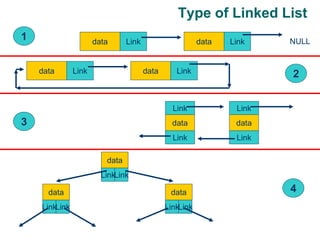
Type of Linked List
data Link data Link NULL
data Link data Link
data
Link
Link
data
Link
Link
data
LinkLink
data
LinkLink
data
LinkLink
1
2
3
4
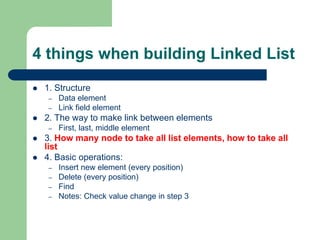
4 things when building Linked List
 1. Structure
– Data element
– Link field element
 2. The way to make link between elements
– First, last, middle element
 3. How many node to take all list elements, how to take all
list
 4. Basic operations:
– Insert new element (every position)
– Delete (every position)
– Find
– Notes: Check value change in step 3
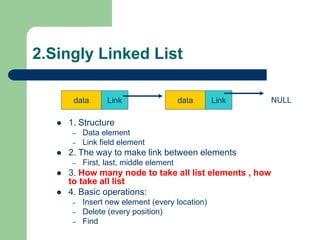
2.Singly Linked List
data Link data Link NULL
 1. Structure
– Data element
– Link field element
 2. The way to make link between elements
– First, last, middle element
 3. How many node to take all list elements , how
to take all list
 4. Basic operations:
– Insert new element (every location)
– Delete (every position)
– Find
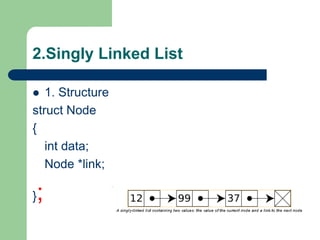
2.Singly Linked List
 1. Structure
struct Node
{
int data;
Node *link;
};
2.Singly Linked List
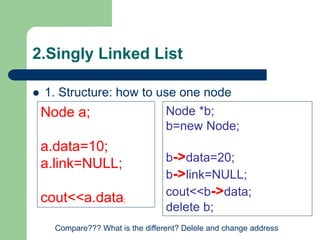
 1. Structure: how to use one node
Node a;
a.data=10;
a.link=NULL;
cout<<a.data;
Node *b;
b=new Node;
b->data=20;
b->link=NULL;
cout<<b->data;
delete b;
Compare??? What is the different? Delele and change address
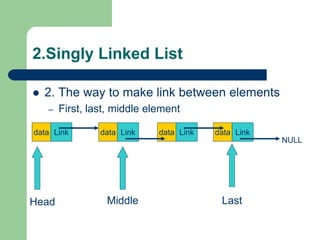
2.Singly Linked List
 2. The way to make link between elements
– First, last, middle element
data Link
NULL
data Link data Link data Link
Head Middle Last
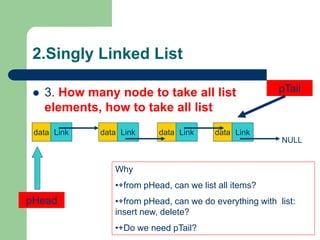
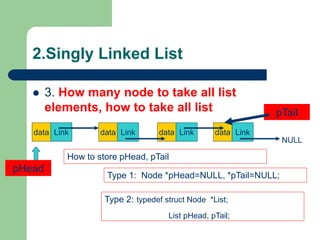
2.Singly Linked List
 3. How many node to take all list
elements, how to take all list
data Link
NULL
data Link data Link data Link
pHead
Why
•+from pHead, can we list all items?
•+from pHead, can we do everything with list:
insert new, delete?
•+Do we need pTail?
pTail
2.Singly Linked List
 3. How many node to take all list
elements, how to take all list
data Link
NULL
data Link data Link data Link
pHead
How to store pHead, pTail
pTail
Type 1: Node *pHead=NULL, *pTail=NULL;
Type 2: typedef struct Node *List;
List pHead, pTail;
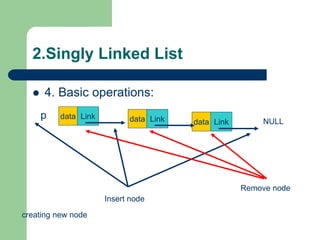
2.Singly Linked List
 4. Basic operations:
data Link NULL
p data Link
data Link
creating new node
Insert node
Remove node
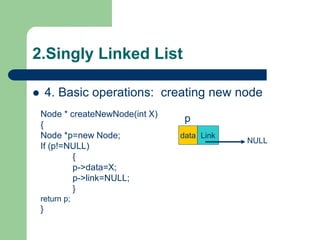
2.Singly Linked List
 4. Basic operations: creating new node
data Link
NULL
p
Node * createNewNode(int X)
{
Node *p=new Node;
If (p!=NULL)
{
p->data=X;
p->link=NULL;
}
return p;
}
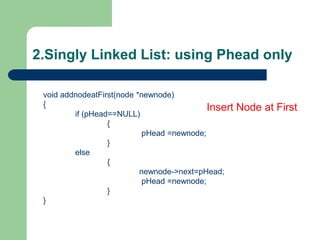
2.Singly Linked List: using Phead only
void addnodeatFirst(node *newnode)
{
if (pHead==NULL)
{
pHead =newnode;
}
else
{
newnode->next=pHead;
pHead =newnode;
}
}
Insert Node at First
2.Singly Linked List: using Phead only
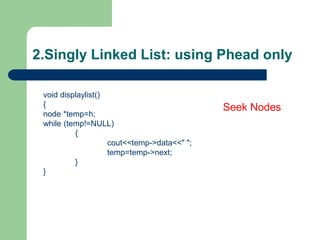
void displaylist()
{
node *temp=h;
while (temp!=NULL)
{
cout<<temp->data<<" ";
temp=temp->next;
}
}
Seek Nodes
2.Singly Linked List: using Phead only
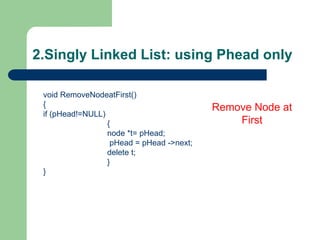
void RemoveNodeatFirst()
{
if (pHead!=NULL)
{
node *t= pHead;
pHead = pHead ->next;
delete t;
}
}
Remove Node at
First
2.Singly Linked List: using Phead only
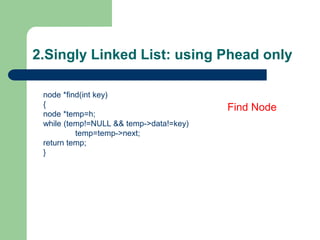
node *find(int key)
{
node *temp=h;
while (temp!=NULL && temp->data!=key)
temp=temp->next;
return temp;
}
Find Node
2.Singly Linked List: using Phead only
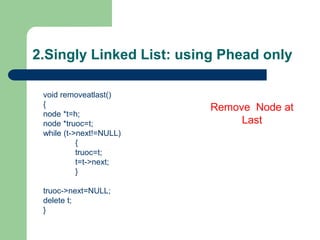
void removeatlast()
{
node *t=h;
node *truoc=t;
while (t->next!=NULL)
{
truoc=t;
t=t->next;
}
truoc->next=NULL;
delete t;
}
Remove Node at
Last
2.Singly Linked List: using Phead only
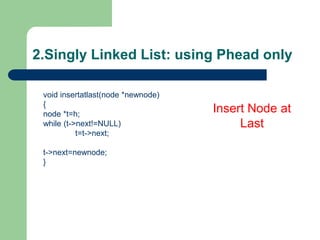
void insertatlast(node *newnode)
{
node *t=h;
while (t->next!=NULL)
t=t->next;
t->next=newnode;
}
Insert Node at
Last
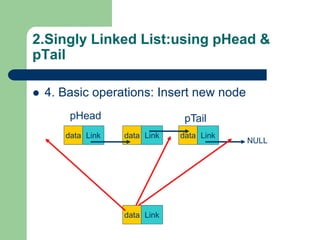
2.Singly Linked List:using pHead &
pTail
 4. Basic operations: Insert new node
data Link
data Link data Link data Link
NULL
pHead pTail
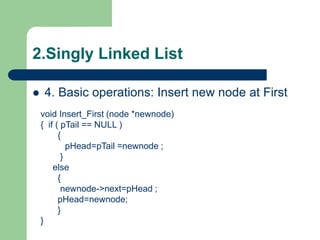
2.Singly Linked List
 4. Basic operations: Insert new node at First
void Insert_First (node *newnode)
{ if ( pTail == NULL )
{
pHead=pTail =newnode ;
}
else
{
newnode->next=pHead ;
pHead=newnode;
}
}
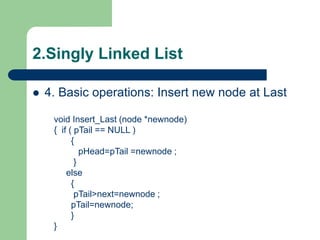
2.Singly Linked List
 4. Basic operations: Insert new node at Last
void Insert_Last (node *newnode)
{ if ( pTail == NULL )
{
pHead=pTail =newnode ;
}
else
{
pTail>next=newnode ;
pTail=newnode;
}
}
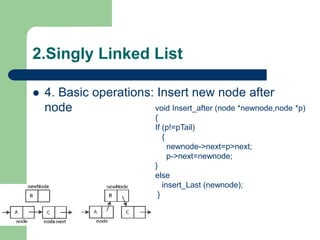
2.Singly Linked List
 4. Basic operations: Insert new node after
node void Insert_after (node *newnode,node *p)
{
If (p!=pTail)
{
newnode->next=p>next;
p->next=newnode;
}
else
insert_Last (newnode);
}
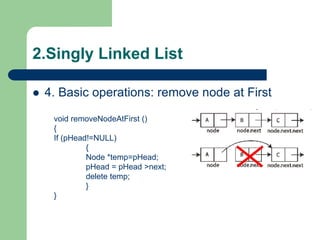
2.Singly Linked List
 4. Basic operations: remove node at First
void removeNodeAtFirst ()
{
If (pHead!=NULL)
{
Node *temp=pHead;
pHead = pHead >next;
delete temp;
}
}
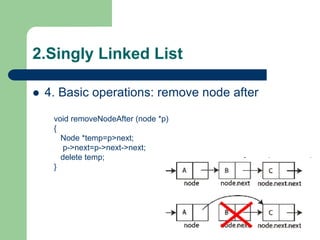
2.Singly Linked List
 4. Basic operations: remove node after
void removeNodeAfter (node *p)
{
Node *temp=p>next;
p->next=p->next->next;
delete temp;
}
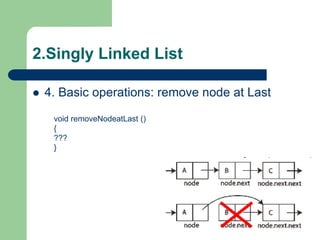
2.Singly Linked List
 4. Basic operations: remove node at Last
void removeNodeatLast ()
{
???
}
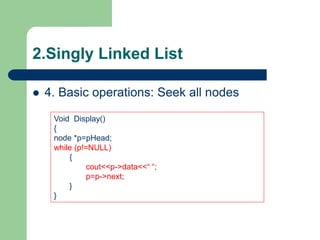
2.Singly Linked List
 4. Basic operations: Seek all nodes
Void Display()
{
node *p=pHead;
while (p!=NULL)
{
cout<<p->data<<“ “;
p=p->next;
}
}
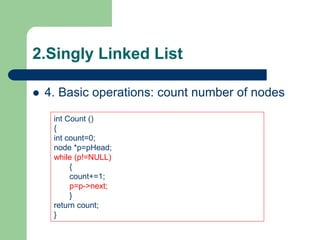
2.Singly Linked List
 4. Basic operations: count number of nodes
int Count ()
{
int count=0;
node *p=pHead;
while (p!=NULL)
{
count+=1;
p=p->next;
}
return count;
}
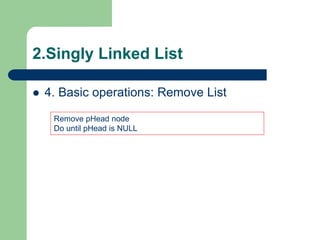
2.Singly Linked List
 4. Basic operations: Remove List
Remove pHead node
Do until pHead is NULL
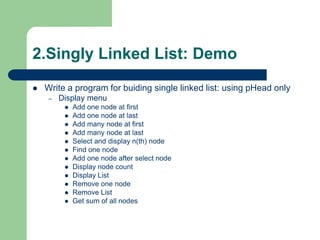
2.Singly Linked List: Demo
 Write a program for buiding single linked list: using pHead only
– Display menu
 Add one node at first
 Add one node at last
 Add many node at first
 Add many node at last
 Select and display n(th) node
 Find one node
 Add one node after select node
 Display node count
 Display List
 Remove one node
 Remove List
 Get sum of all nodes
Cont…
 Find node
 Single linked list: pHead and pTail
 Circular single linked list
 Double Linked List
Find Node
 Using While
 Using Loop
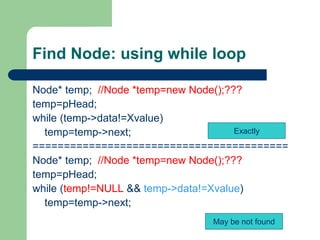
Find Node: using while loop
Node* temp; //Node *temp=new Node();???
temp=pHead;
while (temp->data!=Xvalue)
temp=temp->next;
=========================================
Node* temp; //Node *temp=new Node();???
temp=pHead;
while (temp!=NULL && temp->data!=Xvalue)
temp=temp->next;
Exactly
May be not found
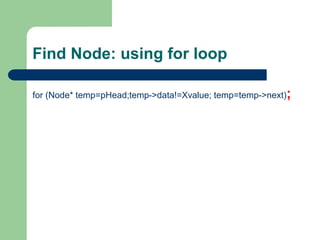
Find Node: using for loop
for (Node* temp=pHead;temp->data!=Xvalue; temp=temp->next);
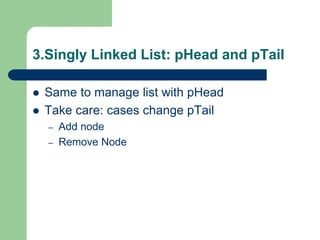
3.Singly Linked List: pHead and pTail
 Same to manage list with pHead
 Take care: cases change pTail
– Add node
– Remove Node
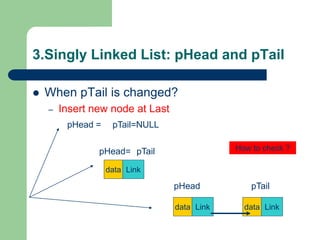
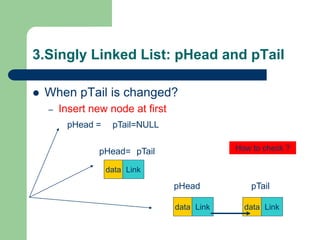
3.Singly Linked List: pHead and pTail
 When pTail is changed?
– Insert new node at first
data Link
pTail=NULL
pHead =
pHead= pTail How to check ?
data Link data Link
pHead pTail
3.Singly Linked List: pHead and pTail
 When pTail is changed?
– Insert new node at Last
data Link
pTail=NULL
pHead =
pHead= pTail How to check ?
data Link data Link
pHead pTail
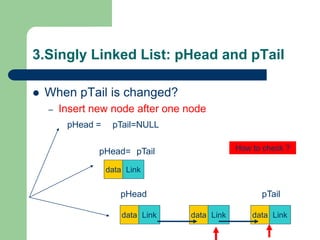
3.Singly Linked List: pHead and pTail
 When pTail is changed?
– Insert new node after one node
data Link
pTail=NULL
pHead =
pHead= pTail How to check ?
data Link data Link
pHead pTail
data Link
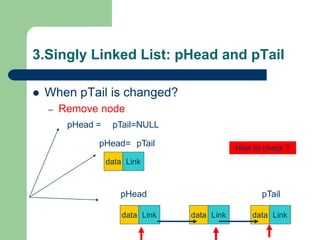
3.Singly Linked List: pHead and pTail
 When pTail is changed?
– Remove node
data Link
pTail=NULL
pHead =
pHead= pTail
How to check ?
data Link data Link
pHead pTail
data Link
3.Singly Linked List: pHead and pTail
 Example:
– Write function to insert at last
– Single linked list with pHead and pTail
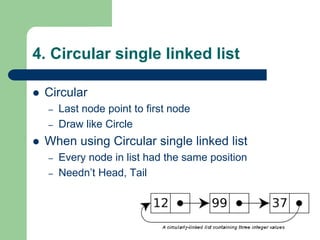
4. Circular single linked list
 Circular
– Last node point to first node
– Draw like Circle
 When using Circular single linked list
– Every node in list had the same position
– Needn’t Head, Tail
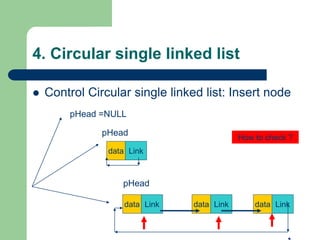
4. Circular single linked list
 Control Circular single linked list: Insert node
data Link
pHead =NULL
pHead
How to check ?
data Link data Link
pHead
data Link
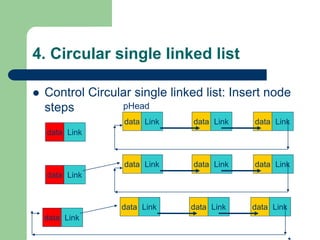
4. Circular single linked list
 Control Circular single linked list: Insert node
steps
data Link data Link
pHead
data Link
data Link
data Link data Link data Link
data Link
data Link data Link data Link
data Link
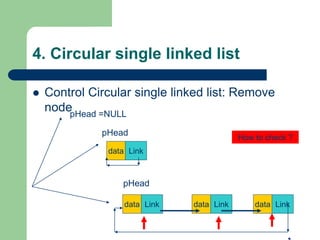
4. Circular single linked list
 Control Circular single linked list: Remove
node
data Link
pHead =NULL
pHead
How to check ?
data Link data Link
pHead
data Link
4. Circular single linked list
 Example:
– Write function to remove a node
– Circular single linked list with pHead and pTail
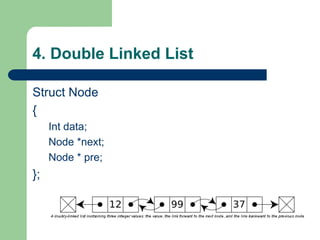
4. Double Linked List
Struct Node
{
Int data;
Node *next;
Node * pre;
};
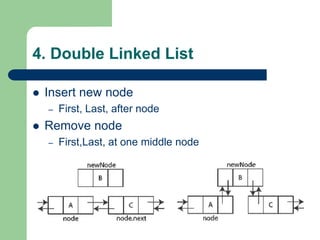
4. Double Linked List
 Insert new node
– First, Last, after node
 Remove node
– First,Last, at one middle node
data
data
data
4. Double Linked List
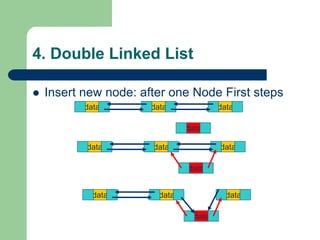
 Insert new node: after one Node First steps
data
data
data
data
data
data
data
data
data
4. Double Linked List
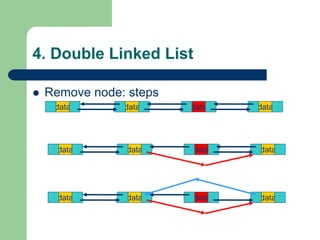
 Remove node: steps
data
data
data
data
data
data
data
data
data
data
data
data
4. Double Linked List
 Example
– Write function to remove first node (pHead)
– Write function to insert a node after another node
Tree
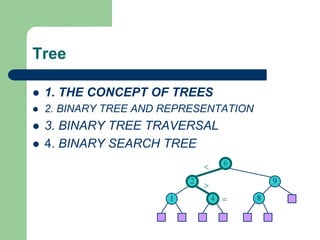
 1. THE CONCEPT OF TREES
 2. BINARY TREE AND REPRESENTATION
 3. BINARY TREE TRAVERSAL
 4. BINARY SEARCH TREE
6
9
2
4
1 8
<
>
=
1. THE CONCEPT OF TREES
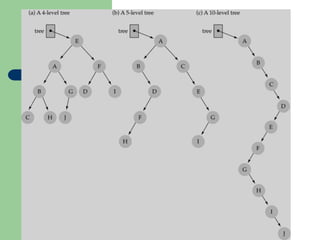
 A tree is a set of one or more nodes T:
– there is a specially designated node called a
root
– The remaining nodes are partitioned into n
disjointed set of nodes T1, T2,…,Tn, each of
which is a tree.
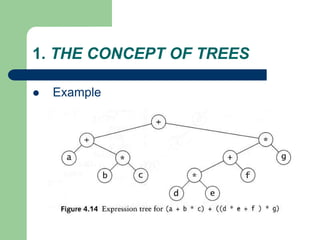
1. THE CONCEPT OF TREES
 Example
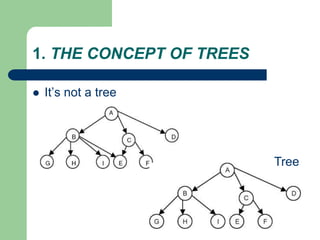
1. THE CONCEPT OF TREES
 It’s not a tree
Tree
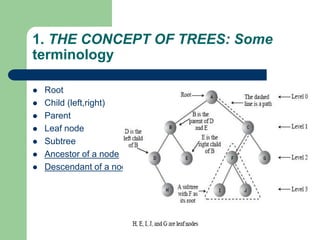
1. THE CONCEPT OF TREES: Some
terminology
 Root
 Child (left,right)
 Parent
 Leaf node
 Subtree
 Ancestor of a node
 Descendant of a node
1. THE CONCEPT OF TREES
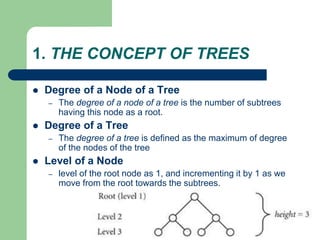
 Degree of a Node of a Tree
– The degree of a node of a tree is the number of subtrees
having this node as a root.
 Degree of a Tree
– The degree of a tree is defined as the maximum of degree
of the nodes of the tree
 Level of a Node
– level of the root node as 1, and incrementing it by 1 as we
move from the root towards the subtrees.
2. BINARY TREE AND REPRESENTATION
 BINARY TREE
– no node can have a degree of more than 2.
– The maximum number of nodes at level i will be
2i−1
– If k is the depth of the tree then the maximum
number of nodes that the tree can have is
– 2k − 1 = 2k−1 + 2k−2 + … + 20
2. BINARY TREE AND REPRESENTATION
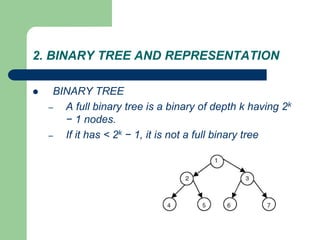
 BINARY TREE
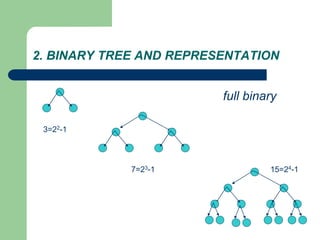
– A full binary tree is a binary of depth k having 2k
− 1 nodes.
– If it has < 2k − 1, it is not a full binary tree
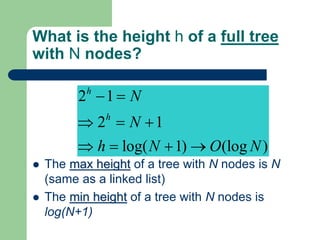
What is the height h of a full tree
with N nodes?
 The max height of a tree with N nodes is N
(same as a linked list)
 The min height of a tree with N nodes is
log(N+1)
2 1
2 1
log( 1) (log )
h
h
N
N
h N O N
 =
 = 
 =  
2. BINARY TREE AND REPRESENTATION
3=22-1
7=23-1 15=24-1
full binary
2. BINARY TREE AND REPRESENTATION
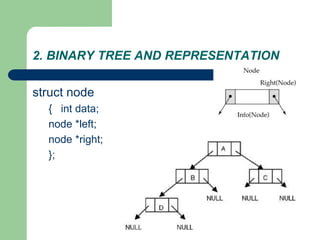
struct node
{ int data;
node *left;
node *right;
};
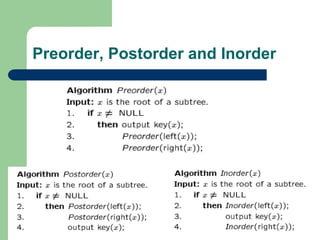
Tree traversal
 Used to print out the data in a tree in a certain order
– inorder (LDR )
– Postorder (LRD )
– preorder (DLR )
 Pre-order traversal
– Print the data at the root
– Recursively print out all data in the left subtree
– Recursively print out all data in the right subtree
Preorder, Postorder and Inorder
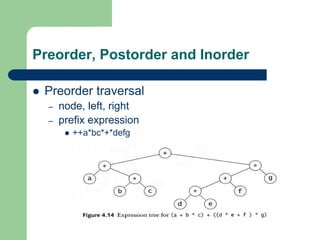
 Preorder traversal
– node, left, right
– prefix expression
 ++a*bc*+*defg
Preorder, Postorder and Inorder
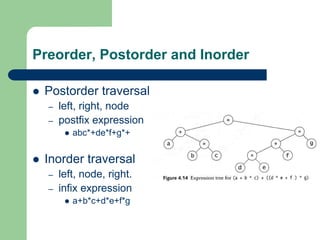
 Postorder traversal
– left, right, node
– postfix expression
 abc*+de*f+g*+
 Inorder traversal
– left, node, right.
– infix expression
 a+b*c+d*e+f*g
Preorder, Postorder and Inorder
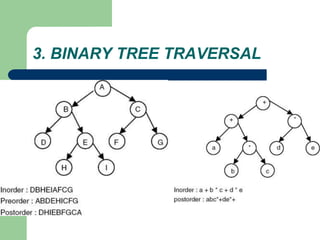
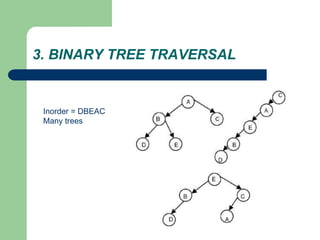
3. BINARY TREE TRAVERSAL
Inorder = DBEAC
Many trees
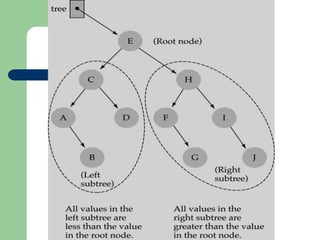
4. BINARY SEARCH TREE
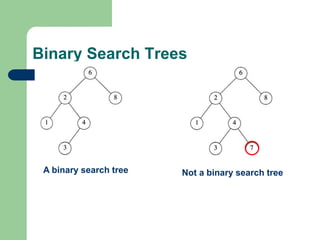
 A binary search tree
– is a binary tree (may be empty)
– every node must contain an identifier.
– An identifier of any node in the left subtree is less
than the identifier of the root.
– An identifier of any node in the right subtree is
greater than the identifier of the root.
– Both the left subtree and right subtree are binary
search trees.
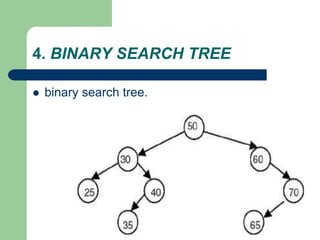
4. BINARY SEARCH TREE
 binary search tree.
Binary Search Trees
A binary search tree Not a binary search tree
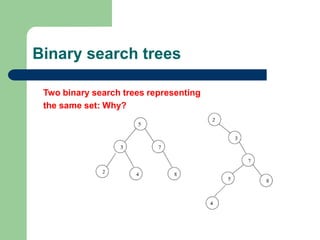
Binary search trees
Two binary search trees representing
the same set: Why?
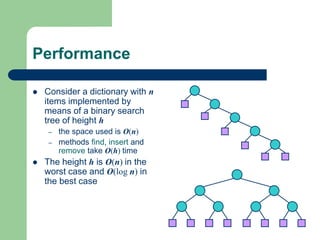
Performance
 Consider a dictionary with n
items implemented by
means of a binary search
tree of height h
– the space used is O(n)
– methods find, insert and
remove take O(h) time
 The height h is O(n) in the
worst case and O(log n) in
the best case
4. BINARY SEARCH TREE
 Why using binary search tree
– traverse in inorder: sorted list
– searching becomes faster
 But..
– Insert, delete: slow
 Important thing: Index in Database system
– Using the right way of Index property
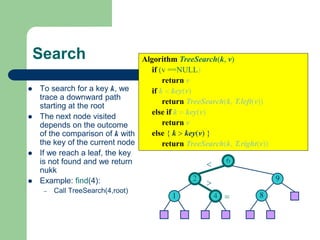
Search
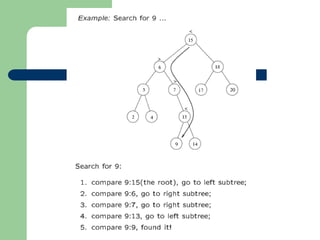
 To search for a key k, we
trace a downward path
starting at the root
 The next node visited
depends on the outcome
of the comparison of k with
the key of the current node
 If we reach a leaf, the key
is not found and we return
nukk
 Example: find(4):
– Call TreeSearch(4,root)
Algorithm TreeSearch(k, v)
if (v ==NULL)
return v
if k < key(v)
return TreeSearch(k, T.left(v))
else if k = key(v)
return v
else { k > key(v) }
return TreeSearch(k, T.right(v))
6
9
2
4
1 8
<
>
=
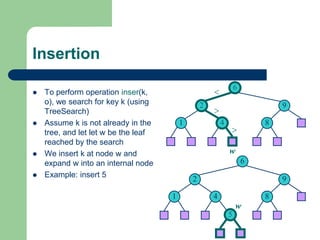
Insertion
 To perform operation inser(k,
o), we search for key k (using
TreeSearch)
 Assume k is not already in the
tree, and let let w be the leaf
reached by the search
 We insert k at node w and
expand w into an internal node
 Example: insert 5
6
9
2
4
1 8
6
9
2
4
1 8
5
<
>
>
w
w
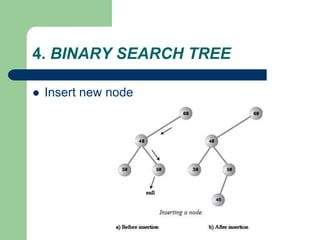
4. BINARY SEARCH TREE
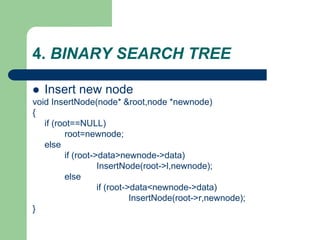
 Insert new node
4. BINARY SEARCH TREE
 Insert new node
void InsertNode(node* &root,node *newnode)
{
if (root==NULL)
root=newnode;
else
if (root->data>newnode->data)
InsertNode(root->l,newnode);
else
if (root->data<newnode->data)
InsertNode(root->r,newnode);
}
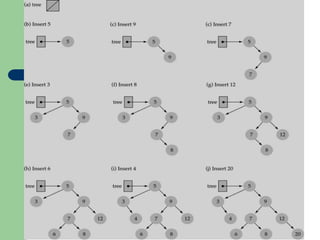
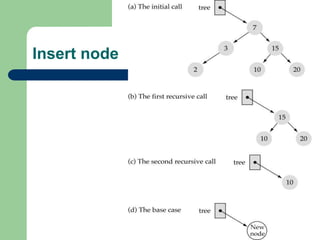
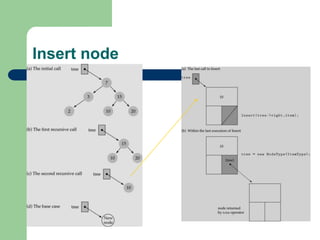
Insert node
Insert node
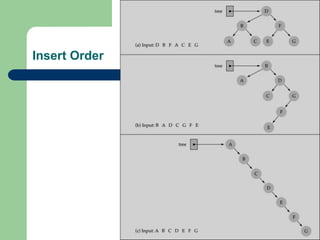
Insert Order
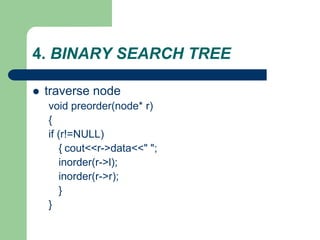
4. BINARY SEARCH TREE
 traverse node
void preorder(node* r)
{
if (r!=NULL)
{ cout<<r->data<<" ";
inorder(r->l);
inorder(r->r);
}
}
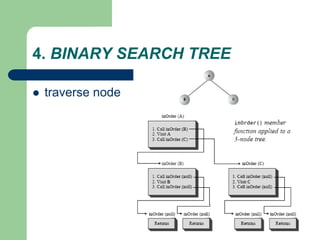
4. BINARY SEARCH TREE
 traverse node
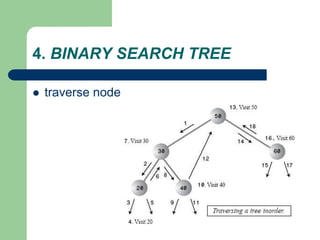
4. BINARY SEARCH TREE
 traverse node
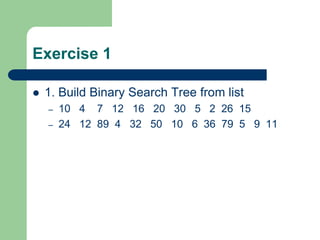
Exercise 1
 1. Build Binary Search Tree from list
– 10 4 7 12 16 20 30 5 2 26 15
– 24 12 89 4 32 50 10 6 36 79 5 9 11
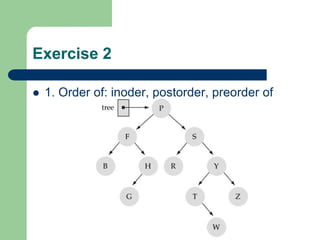
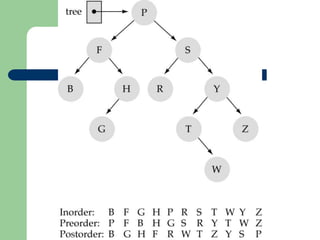
Exercise 2
 1. Order of: inoder, postorder, preorder of
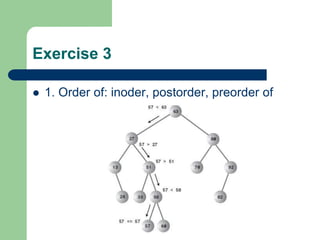
Exercise 3
 1. Order of: inoder, postorder, preorder of
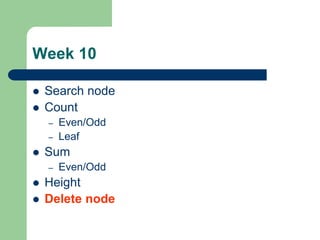
Week 10
 Search node
 Count
– Even/Odd
– Leaf
 Sum
– Even/Odd
 Height
 Delete node
1. SEACRCHING NODE
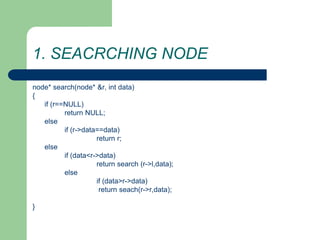
node* search(node* &r, int data)
{
if (r==NULL)
return NULL;
else
if (r->data==data)
return r;
else
if (data<r->data)
return search (r->l,data);
else
if (data>r->data)
return seach(r->r,data);
}
1. SEACRCHING NODE
node* search(node* &r, int data)
{
if ( (r==NULL) || (r->data==data) )
return r;
else
if (data<r->data)
return search (r->l,data);
else
if (data>r->data)
return seach(r->r,data);
}
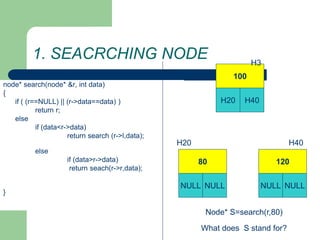
100
H20 H40
80
NULL NULL
H3
H20
120
NULL NULL
H40
Node* S=search(r,80)
What does S stand for?
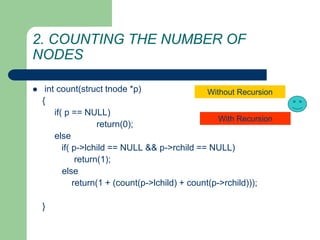
2. COUNTING THE NUMBER OF
NODES
 int count(struct tnode *p)
{
if( p == NULL)
return(0);
else
if( p->lchild == NULL && p->rchild == NULL)
return(1);
else
return(1 + (count(p->lchild) + count(p->rchild)));
}
With Recursion
Without Recursion
2. COUNTING THE NUMBER OF
NODES
 int count(struct tnode *p)
{
if( p == NULL)
return(0);
else
return(1 + (count(p->lchild) + count(p->rchild)));
}
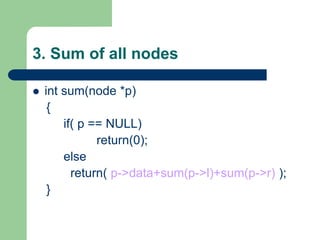
3. Sum of all nodes
 int sum(node *p)
{
if( p == NULL)
return(0);
else
return( p->data+sum(p->l)+sum(p->r) );
}
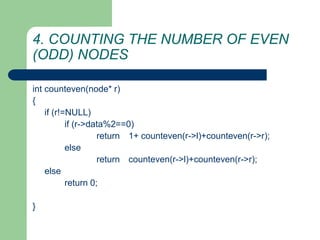
4. COUNTING THE NUMBER OF EVEN
(ODD) NODES
int counteven(node* r)
{
if (r!=NULL)
if (r->data%2==0)
return 1+ counteven(r->l)+counteven(r->r);
else
return counteven(r->l)+counteven(r->r);
else
return 0;
}
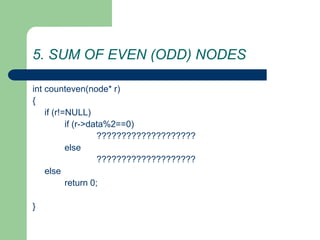
5. SUM OF EVEN (ODD) NODES
int counteven(node* r)
{
if (r!=NULL)
if (r->data%2==0)
????????????????????
else
????????????????????
else
return 0;
}
6. Count number of leaf nodes
 Exercise
– Count number of leaf nodes
6. Count number of leaf nodes
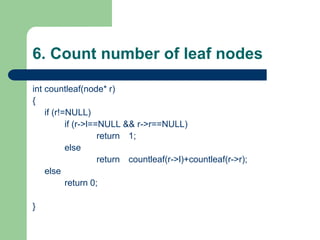
int countleaf(node* r)
{
if (r!=NULL)
if (r->l==NULL && r->r==NULL)
return 1;
else
return countleaf(r->l)+countleaf(r->r);
else
return 0;
}
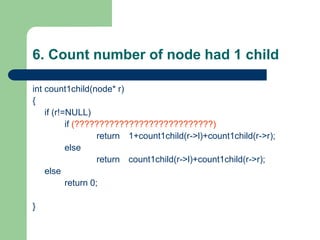
6. Count number of node had 1 child
int count1child(node* r)
{
if (r!=NULL)
if (????????????????????????????)
return 1+count1child(r->l)+count1child(r->r);
else
return count1child(r->l)+count1child(r->r);
else
return 0;
}
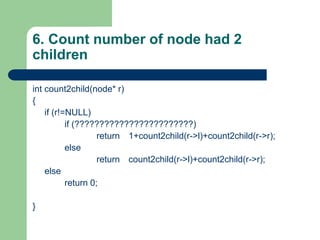
6. Count number of node had 2
children
int count2child(node* r)
{
if (r!=NULL)
if (????????????????????????)
return 1+count2child(r->l)+count2child(r->r);
else
return count2child(r->l)+count2child(r->r);
else
return 0;
}
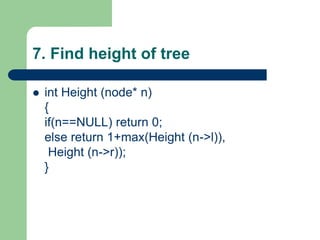
7. Find height of tree
 int Height (node* n)
{
if(n==NULL) return 0;
else return 1+max(Height (n->l)),
Height (n->r));
}
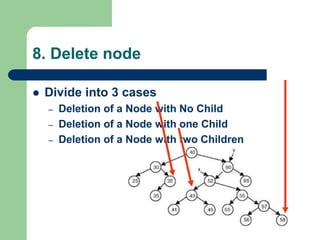
8. Delete node
 Divide into 3 cases
– Deletion of a Node with No Child
– Deletion of a Node with one Child
– Deletion of a Node with two Children
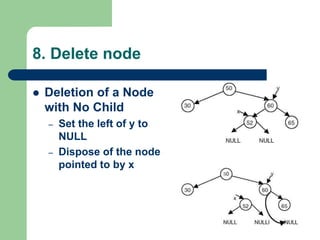
8. Delete node
 Deletion of a Node
with No Child
– Set the left of y to
NULL
– Dispose of the node
pointed to by x

C++ and Data Structure.ppt

  • 1.
    C++ and DataStructures & Algorithms Week 1 and Week 2
  • 2.
    Atomic Variables  Atomicvariables can only store one value at a time. int num; float s;  A value stored in an atomic variable cannot be subdivided.
  • 3.
    Chapter 0: C++LANGUAGE 1. ADDRESS 2. POINTERS 3. ARRAYS 4. ADDRESS OF EACH ELEMENT IN AN ARRAY 5. ACCESSING & MANIPULATING AN ARRAY USING POINTERS 6. ANOTHER CASE OF MANIPULATING AN ARRAY USING POINTERS 7. TWO-DIMENSIONAL ARRAY 8. POINTER ARRAYS 9. STRUCTURES 10. STRUCTURE POINTERS
  • 4.
    Chapter 0: C++LANGUAGE 1. ADDRESS For every variable there are two attributes: address and value cout << "Value of 'y' is: " << y << "n"; cout << "Address of 'y' is: " << &y << "nn"; In memory with address 3: value: 45. In memory with address 2: value "Dave"
  • 5.
    Chapter 0: C++LANGUAGE 2. POINTERS 1. is a variable whose value is also an address. 2. A pointer to an integer is a variable that can store the address of that integer ia: value of variable &ia: address of ia *ia means you are printing the value at the location specified by ia
  • 6.
    Chapter 0: C++LANGUAGE int i; //A int * ia; //B cout<<"The address of i "<< &i << " value="<<i <<endl; cout<<"The address of ia " << &ia << " value = " << ia<< endl; i = 10; //C ia = &i; //D cout<<"after assigning value:"<<endl; cout<<"The address of i "<< &i << " value="<<i <<endl; cout<<"The address of ia " << &ia << " value = " << ia<< " point to: "<< *ia;
  • 7.
    Chapter 0: C++LANGUAGE Points to Remember • Pointers give a facility to access the value of a variable indirectly. • You can define a pointer by including a * before the name of the variable. • You can get the address where a variable is stored by using &.
  • 8.
    Chapter 0: C++LANGUAGE 3. ARRAYS 1. An array is a data structure 2. used to process multiple elements with the same data type when a number of such elements are known. 3. An array is a composite data structure; that means it had to be constructed from basic data types such as array integers. 1. int a[5]; 2. for(int i = 0;i<5;i++) 1. {a[i]=i; }
  • 9.
    Chapter 0: C++LANGUAGE 4. ADDRESS OF EACH ELEMENT IN AN ARRAY Each element of the array has a memory address. void printdetail(int a[]) { for(int i = 0;i<5;i++) { cout<< "value in array “<< a[i] <<“ at address: “ << &a[i]); }
  • 10.
    Chapter 0: C++LANGUAGE 5. ACCESSING & MANIPULATING AN ARRAY USING POINTERS – You can access an array element by using a pointer. – If an array stores integers->use a pointer to integer to access array elements.
  • 11.
    Chapter 0: C++LANGUAGE 6. ANOTHER CASE OF MANIPULATING AN ARRAY USING POINTERS The array limit is a pointer constant : cannot change its value in the program. int a[5]; int *b; a=b; //error b=a; //OK It works correctly even using a++ ???
  • 12.
    Chapter 0: C++LANGUAGE 7. TWO-DIMENSIONAL ARRAY int a[3][2];
  • 13.
    Chapter 0: C++LANGUAGE 8. POINTER ARRAYS  You can define a pointer array (similarly to an array of integers).  In the pointer array, the array elements store the pointer that points to integer values.
  • 14.
    Chapter 0: C++LANGUAGE 9. STRUCTURES  Structures are used when you want to process data of multiple data types  But you still want to refer to the data as a single entity  Access data: structurename.membernam e
  • 15.
    Chapter 1: C++LANGUAGE 10. STRUCTURE POINTERS Process the structure using a structure pointer
  • 16.
    CHAPTER 2: FUNCTION& RECURSION  1. FUNCTION  2. THE CONCEPT OF STACK  3. THE SEQUENCE OF EXECUTION DURING A FUNCTION CALL  4. PARAMETER PASSING  5. CALL BY REFERENCE  6. RESOLVING VARIABLE REFERENCES  7. RECURSION  8. STACK OVERHEADS IN RECURSION  9. WRITING A RECURSIVE FUNCTION  10. TYPES OF RECURSION
  • 17.
    CHAPTER 2: FUNCTION& RECURSION  1. FUNCTION – provide modularity to the software – divide complex tasks into small manageable tasks – avoid duplication of work
  • 18.
    Type of Function:return value & parameters  On return value – Void Functions – Return Function  Example: void display(); int max(int a,int b);  On Parameters – value parameters – reference parameters  Exmple: void swap(int &a, int &b); int BinhPhuong(int n);
  • 19.
    Week 6: Ôntập function  Nothing return void
  • 20.
    Week 6: Ôntập function  Return 1 value int –return
  • 21.
    Week 6: Ôntập function  Return many value void int –reference parameters –return On natural way
  • 22.
    CHAPTER 2: FUNCTION& RECURSION  3. THE SEQUENCE OF EXECUTION DURING A FUNCTION CALL – When the function is called, the current execution is temporarily stopped and the control goes to the called function. After the call, the execution resumes from the point at which the execution is stopped. – To get the exact point at which execution is resumed, the address of the next instruction is stored in the stack. When the function call completes, the address at the top of the stack is taken.
  • 23.
    CHAPTER 2: FUNCTION& RECURSION  3. THE SEQUENCE OF EXECUTION DURING A FUNCTION CALL – Functions or sub-programs are implemented using a stack. – When a function is called, the address of the next instruction is pushed into the stack. – When the function is finished, the address for execution is taken by using the pop operation.
  • 24.
    CHAPTER 2: FUNCTION& RECURSION  3. THE SEQUENCE OF EXECUTION DURING A FUNCTION CALL  Result:?
  • 25.
    CHAPTER 2: FUNCTION& RECURSION  4. PARAMETER * REFERENCE PASSING – passing by value  the value before and after the call remains the same – passing by reference  changed value after the function completes
  • 26.
    CHAPTER 2: FUNCTION& RECURSION  6. RESOLVING VARIABLE REFERENCES When a variable can be resolved by using multiple references, the local definition is given more preference
  • 27.
    CHAPTER 2: FUNCTION& RECURSION  7. RECURSION – A method of programming whereby a function directly or indirectly calls itself – Problems: stop recursion?
  • 28.
    CHAPTER 2: FUNCTION& RECURSION  7. RECURSION
  • 29.
    CHAPTER 2: FUNCTION& RECURSION  7. RECURSION: Hanoi tower
  • 30.
    CHAPTER 2: FUNCTION& RECURSION  7. RECURSION
  • 31.
    CHAPTER 2: FUNCTION& RECURSION  9. WRITING A RECURSIVE FUNCTION – Recursion enables us to write a program in a natural way. The speed of a recursive program is slower because of stack overheads. – In a recursive program you have to specify recursive conditions, terminating conditions, and recursive expressions.
  • 32.
    CHAPTER 2: FUNCTION& RECURSION  10. TYPES OF RECURSION – LINEAR RECURSION – TAIL RECURSION – BINARY RECURSION – EXPONENTIAL RECURSION – NESTED RECURSION – MUTUAL RECURSION
  • 33.
    CHAPTER 2: FUNCTION& RECURSION  10. TYPES OF RECURSION – LINEAR RECURSION  only makes a single call to itself each time the function runs 
  • 34.
    CHAPTER 2: FUNCTION& RECURSION  10. TYPES OF RECURSION – TAIL RECURSION  Tail recursion is a form of linear recursion.  In tail recursion, the recursive call is the last thing the function does. Often, the value of the recursive call is returned.
  • 35.
    CHAPTER 2: FUNCTION& RECURSION  10. TYPES OF RECURSION – BINARY RECURSION  Some recursive functions don't just have one call to themself, they have two (or more).
  • 36.
    CHAPTER 2: FUNCTION& RECURSION  10. TYPES OF RECURSION – EXPONENTIAL RECURSION  An exponential recursive function is one that, if you were to draw out a representation of all the function calls, would have an exponential number of calls in relation to the size of the data set  (exponential meaning if there were n elements, there would be O(an) function calls where a is a positive number)
  • 37.
    CHAPTER 2: FUNCTION& RECURSION  10. TYPES OF RECURSION – EXPONENTIAL RECURSION
  • 38.
    CHAPTER 2: FUNCTION& RECURSION  10. TYPES OF RECURSION – NESTED RECURSION  In nested recursion, one of the arguments to the recursive function is the recursive function itself  These functions tend to grow extremely fast.
  • 40.
    CHAPTER 2: FUNCTION& RECURSION  10. TYPES OF RECURSION – MUTUAL RECURSION  A recursive function doesn't necessarily need to call itself.  Some recursive functions work in pairs or even larger groups. For example, function A calls function B which calls function C which in turn calls function A.
  • 41.
    CHAPTER 2: FUNCTION& RECURSION  10. TYPES OF RECURSION – MUTUAL RECURSION
  • 42.
  • 43.
    Exercises 2: Recursion Convert number from H10->H2 7 2 1 3 2 1 1 2 0 1
  • 44.
    Week3: Recursion Excercises(1)  E1. (44/174) Write a program to compute: S = 1 + 2 + 3 + …n using recursion.
  • 45.
    Week3: Recursion Excercises(2-3)  E3(a). Write a program to print a revert number Example: input n=12345. Print out: 54321.  E3(b). Write a program to print this number Example: input n=12345. Print out: 12345.
  • 46.
    Week3: Recursion Excercises(4)  E4. Write a recursion function to find the sum of every number in a int number. Example: n=1980 => Sum=1+9+8+0=18.
  • 47.
    Week3: Recursion Excercises(5)  E4. Write a recursion function to calculate: – S=a[0]+a[1]+…a[n-1]  A: array of integer numbers
  • 48.
    Week3: Recursion Excercises(6)  E4. Write a recursion function to find an element in an array (using linear algorithm)
  • 49.
    Week3: Recursion Excercises(7)  Print triangle a b c d
  • 50.
    Week3: Recursion Excercises(8)  Convert number from H10->H2 7 2 1 3 2 1 1 2 0 1
  • 51.
    Week3: Recursion Excercises(9)  Minesweeper
  • 52.
    1. String: structure String – is array of char – Ending with null char 0 (size +1) – Example: store 10 chars:  char str[11]; – “Example”: string const. C/C++ add 0 automayically
  • 53.
    1. String: declare Declare string – Using array of chars  char str[] = {‘H’,’e’,’l’,’l’,’o’,’0’}; //declare with null  char str[] = “Hello”; //needn’t null – Using char pointer  char *str = “Hello”;
  • 54.
    1. String: input char *gets(char *s); – Read every char – Until receive Enter – Adding Automatically ‘0’  cin>>s;
  • 55.
    1. String: output int puts(const char *s);  cout<<s;
  • 56.
    1. String: Problemwith buffer?  Keyboard buffer char szKey[] = "aaa"; char s[10]; do { cout<<"doan lai di?"; gets(s); } while (strcmp (szKey,s) != 0); puts ("OK. corect");  If user input: aaaaaaaaaaaaa???
  • 57.
    1. String: functions #include <string.h>  strcpy(s1, s2)  strcat(s1, s2)  strlen(s1)  strcmp(s1, s2) -> (-1,0,1)  strchr(s1, ch)  strstr(s1, s2)
  • 58.
    1. String: functionexamples char s1[80], s2[80]; cout << "Input the first string: :"; gets(s1); cout << "Input the second string: "; gets(s2); cout << "Length of s1= " << strlen(s1); cout << "Length of s2= " << strlen(s2); if(!strcmp(s1, s2)) cout << "These strings are equaln"; strcat(s1, s2); cout << "s1 + s2: " << s1 << endl;; strcpy(s1, "This is a test.n"); cout << s1; if(strchr(s1, 'e')) cout << "e is in " << s1; if(strstr(s2, "hi")) cout << "found hi in " <<s2;
  • 59.
    2. File: Creatinga new file  #include <io.h>  FILE *fp;  fp=fopen(“d:test.txt", "wb"))  fwrite(&Address, sizeof(TYPE), count, fp);  fclose(fp);
  • 60.
    2.File: Creating anew file int Arr[3] Arr Fwrite(Arr, sizeof(int), 1, fp); fwrite(Arr, sizeof(Arr), 1, fp); Fwrite(&Arr[i], sizeof(int), 1, fp); for (i=0;i<=3;i++)
  • 61.
    2. File: Readinga file  #include <io.h>  FILE *fp;  fp=fopen(“d:test.txt", “rb"))  while (fwrite(&Address, sizeof(TYPE), count, fp))  { – …………….  }  fclose(fp);
  • 62.
    CHAPTER 0: INTRODUTION What is Data Structures? – A data structure is defined by  (1) the logical arrangement of data elements, combined with  (2) the set of operations we need to access the elements.
  • 63.
    What is DataStructures?  Example:library – is composed of elements (books) – Accessing a particular book requires knowledge of the arrangement of the books – Users access books only through the librarian the logical arrangement of data elements, combined with the set of operations we need to access the elements.
  • 64.
    Basic Data Structures Structures include – linked lists – Stack, Queue – binary trees
  • 65.
    What is Algorithm? Algorithm: – A computable set of steps to achieve a desired result – Ralationship to Data Structure  Example: Find an element 1 2 3 4 5 6 7 1 2 3 4 5 6 7
  • 66.
  • 67.
    SEARCHING TECHNIQUES and Complexityof Algorithm CHAPTER 3: SEARCHING TECHNIQUES 1. LINEAR (SEQUENTIAL) SEARCH 2. BINARY SEARCH 3. COMPLEXITY OF ALGORITHMS
  • 68.
    SEARCHING TECHNIQUES  Tofinding out whether a particular element is present in the list.  2 methods: linear search, binary search  The method we use depends on how the elements of the list are organized – unordered list:  linear search: simple, slow – an ordered list  binary search or linear search: complex, faster
  • 69.
    1. LINEAR (SEQUENTIAL)SEARCH  How? – Proceeds by sequentially comparing the key with elements in the list – Continues until either we find a match or the end of the list is encountered. – If we find a match, the search terminates successfully by returning the index of the element – If the end of the list is encountered without a match, the search terminates unsuccessfully.
  • 70.
    1. LINEAR (SEQUENTIAL)SEARCH void lsearch(int list[],int n,int element) { int i, flag = 0; for(i=0;i<n;i++) if( list[i] == element) { cout<<“found at position”<<i); flag =1; break; } if( flag == 0) cout<<“ not found”; } flag: what for???
  • 71.
    1. LINEAR (SEQUENTIAL)SEARCH int lsearch(int list[],int n,int element) { int i, find= -1; for(i=0;i<n;i++) if( list[i] == element) {find =i; break;} return find; } Another way using flag average time: O(n)
  • 72.
    2. BINARY SEARCH List must be a sorted one  We compare the element with the element placed approximately in the middle of the list  If a match is found, the search terminates successfully.  Otherwise, we continue the search for the key in a similar manner either in the upper half or the lower half.
  • 73.
  • 75.
    void bsearch(int list[],intn,int element) { int l,u,m, flag = 0; l = 0; u = n-1; while(l <= u) { m = (l+u)/2; if( list[m] == element) {cout<<"found:"<<m; flag =1; break;} else if(list[m] < element) l = m+1; else u = m-1; } if( flag == 0) cout<<"not found"; } average time: O(log2n)
  • 76.
    BINARY SEARCH: Recursion intSearch (int list[], int key, int left, int right) { if (left <= right) { int middle = (left + right)/2; if (key == list[middle]) return middle; else if (key < list[middle]) return Search(list,key,left,middle-1); else return Search(list,key,middle+1,right); } return -1; }
  • 77.
    3. COMPLEXITY OFALGORITHMS  In Computer Science, it is important to measure the quality of algorithms, especially the specific amount of a certain resource an algorithm needs  Resources: time or memory storage (PDA?)  Different algorithms do same task with a different set of instructions in less or more time, space or effort than other.  The analysis has a strong mathematical background.  The most common way of qualifying an algorithm is the Asymptotic Notation, also called Big O.
  • 78.
    3. COMPLEXITY OFALGORITHMS  It is generally written as  Polynomial time algorithms, – O(1) --- Constant time --- the time does not change in response to the size of the problem. – O(n) --- Linear time --- the time grows linearly with the size (n) of the problem. – O(n2) --- Quadratic time --- the time grows quadratically with the size (n) of the problem. In big O notation, all polynomials with the same degree are equivalent, so O(3n2 + 3n + 7) = O(n2)  Sub-linear time algorithms – O(logn) -- Logarithmic time  Super-polynomial time algorithms – O(n!) – O(2n)
  • 79.
    3. COMPLEXITY OFALGORITHMS  Example1: complexity of an algorithm void f ( int a[], int n ) { int i; cout<< "N = “<< n; for ( i = 0; i < n; i++ ) cout<<a[i]; printf ( "n" ); } ? ? 2 * O(1) + O(N) O(N)
  • 80.
    3. COMPLEXITY OFALGORITHMS  Example2: complexity of an algorithm void f ( int a[], int n ) { int i; cout<< "N = “<< n; for ( i = 0; i < n; i++ ) for (int j=0;j<n;j++) cout<<a[i]<<a[j]; for ( i = 0; i < n; i++ ) cout<<a[i]; printf ( "n" ); } ? ? 2 * O(1) + O(N)+O(N2) O(N2)
  • 81.
    3. COMPLEXITY OFALGORITHMS  Linear Search – O(n).  Binary Search – O(log2 N)
  • 82.
    Exercise  Exercise: – Writea small program  Input the number of array  Input array of integer  Display array  Input a value. Using linear search to find position of first match item in array – Using 3 function: enterarray, displayarray,linearfind
  • 83.
    SORTING TECHNIQUES  Why? –Do binary search – Doing certain operations faster SORTING
  • 84.
    SORTING TECHNIQUES  Givena set (container) of n elements – E.g. array, set of words, etc.  Suppose there is an order relation that can be set across the elements  Goal Arrange the elements in ascending order – Start  1 23 2 56 9 8 10 100 – End  1 2 8 9 10 23 56 100
  • 85.
    SORTING TECHNIQUES  Bubblesort, Insertion sort, Selection sort, Quick sort, Heap sort, Merge sort, Exchange sort …  Focus on – Bubble sort – Insertion sort – Selection sort – Exchange sort – Quick sort
  • 86.
    SORTING TECHNIQUES Average Worst Bubblesort Exchange sort O(n2) O(n2) Insertion sort O(n2) O(n2) Selection sort O(n2) O(n2) Quick sort O(nlogn) O(n2)
  • 87.
    1.Bubble sort: idea arrange the elements of the list by forming pairs of adjacent elements.  The pair of the ith and (i+1)th element.  If the order is ascending, we interchange the elements of the pair  This will bring the highest value from among the remaining (n−1) values to the (n−1)th position.
  • 88.
    1.Bubble sort: idea 37 5 2 4 compare 3 and 7 ; 7 is > 3 so advance 3 5 7 2 4 compare 7 and 5, 7 > 5 so swap them 3 5 2 7 4 compare 7 and 2, 7 >4 so swap them 3 5 2 4 7 compare 7 and 4, 7 >4 so swap them End of pass 1; notice that 7 is in the right place Why it is called Bubble?
  • 89.
    2.Bubble sort: idea Simplest sorting algorithm  Idea: – 1. Set flag = false – 2. Traverse the array and compare pairs of two elements  1.1 If E1  E2 - OK  1.2 If E1 > E2 then Switch(E1, E2) and set flag = true – 3. If flag = true goto 1.  What happens?
  • 90.
    1.Bubble sort:algorithm idea voidbubbleSort (Array S, length n) { boolean isSorted = false; while(!isSorted) { isSorted = true; for(i = 0; i<n; i++) if(S[i] > S[i+1]) { swap(S[i],S[i+1];) isSorted = false; } }
  • 91.
    1.Bubble sort: implement voidbsort(int list[], int n) { int count,j; for(count=0;count<n-1;count++) for(j=0;j<n-1-count;j++) if(list[j] > list[j+1]) swap(list[j],list[j+1]); }
  • 92.
    2. Exchange Sorting Method : make n-1 passes across the data, on each pass compare adjacent items, swapping as necessary (n-1 compares)  O(n2)
  • 93.
    2. Exchange Sorting voidExchange_sort(int arr[], int n) { int i,j; for(i=0;i<n-1;i++) for(j=i+1;j<n;j++) if(arr[i] > arr[j]) swap(arr[i],arr[j]); }
  • 94.
    2. Exchange Sorting Notes: – on each successive pass, do one less compare, because the last item from that pass is in place – if you ever make a pass in which no swap occurs, the sort is complete – There are some algorithms to improve performance but Big O will remain O(n2)
  • 95.
    3. Insertion Sort Strategy: divide the collection into two lists, one listed with one element (sorted) and the other with the remaining elements.  On successive passes take an item from the unsorted list and insert it into the sorted list so the the sorted list is always sorted  Do this until the unsorted list is empty
  • 96.
    3. Insertion Sort 37 5 2 4 sorted unsorted take an item from the unsorted list (7) and insert into the sorted list 3 7 5 2 4 sorted unsorted take next item from the unsorted list (5) and insert into the sorted list 3 5 7 2 4 sorted unsorted 2 3 5 7 4 sorted unsorted 2 3 4 5 7 sorted unsorted take next item from the unsorted list (2) and insert into the sorted list take next item from the unsorted list (4) and insert into the sorted list
  • 97.
    3. Insertion Sort voidinsertionSort(int arr[], int n){ int j, key; for(int i = 1; i < n; i++){ key = arr[i]; j = i - 1; while(j >= 0 && arr[j] > key) { arr[j + 1] = arr[j]; j = j - 1; } arr[j + 1] = key; } }
  • 98.
    3. Insertion Sort Note that each insertion could be O(n-1) and there are n-1 insertions being done therefore Big O is O(n2)  This is very much like building an ordered linked list except there is more data movement
  • 99.
    4. Selection Sort Strategy: make a pass across the data looking for the largest item, swap the largest with the last item in the array.  On successive passes (n-1) assume the array is one smaller (the last item is in the correct place) and repeat previous step
  • 100.
    4. Selection Sort 37 5 2 4 biggest last 3 4 5 2 7 3 4 5 2 biggest last 3 4 2 5 7 3 4 2 5 7 7 biggest last 3 2 4 3 2 2 3 5 7 5 7 4 5 7 4
  • 101.
    4. Selection Sort voidselection_sort(int arr[], int n) {int i, j, min; for (i = 0; i < n - 1; i++) { min = i; for (j = i+1; j < n; j++) { if (list[j] < list[min]) min = j; } swap(arr[i],arr[min]); } }
  • 102.
    4. Selection Sort Notice that in selection sort, there is the least possible data movement  There are still n-1 compares on sublists that become one item smaller on each pass so, Big O is still O(n2)  This method has the best overall performance of the O(n2) algorithms because of the limited amount of data movement
  • 103.
    5. Quick Sort This sorting method by far outshines all of the others for flat out speed  Big O is log2n  there are problems, worst case performance is when data is already in sorted order or is almost in sorted order (we’ll analyze this separately)  and there are solutions to the problems  and there is an improvement to make it faster still
  • 104.
    5. Quick Sort Sorting algorithms that rely on the “DIVIDE AND CONQUER” paradigm – One of the most widely used paradigms – Divide a problem into smaller sub problems, solve the sub problems, and combine the solutions – Learned from real life ways of solving problems
  • 105.
    5. Quick Sort Another divide-and-conquer sorting algorihm  To understand quick-sort, let’s look at a high-level description of the algorithm 1) Divide : If the sequence S has 2 or more elements, select an element x from S to be your pivot. Any arbitrary element, like the last, will do. Remove all the elements of S and divide them into 3 sequences: L, holds S’s elements less than x E, holds S’s elements equal to x G, holds S’s elements greater than x 2) Recurse: Recursively sort L and G 3) Conquer: Finally, to put elements back into S in order, first inserts the elements of L, then those of E, and those of G.
  • 106.
    5. Quick Sort:idea  1) Select: pick an element  2) Divide: rearrange elements so that x goes to its final position E  3) Recurse and Conquer: recursively sort 
  • 107.
  • 108.
    Quick Sort 23 175 12 19 24 4 27 8 26 14 33 3 11 34 43 23 17 5 12 19 24 4 27 8 26 14 33 3 11 34 43 23 17 5 12 19 24 4 27 8 26 14 33 3 11 34 43 23 17 5 12 19 24 4 27 8 26 14 33 3 11 34 43 23 17 5 12 19 24 4 27 8 26 14 33 3 11 34 43 Pick the leftmost element as the pivot (23). Now , start two cursors (one at either end) going towards the middle and swap values that are > pivot (found with left cursor) with values < pivot (found with right cursor) swap swap swap swap Finally, swap the pivot and the value where the cursors passed each other Note : 23 is now in the right place and everything to its left is < 23 and everything to its right is > 23
  • 109.
    Quick Sort 23 17 512 19 24 4 27 8 26 14 33 3 11 34 43 Now, repeat the process for the right partition 17 5 12 19 4 8 14 3 11 swap 17 5 12 19 4 8 14 3 11 swap 17 5 12 19 4 8 14 3 11 swap 17 5 12 19 4 8 14 3 11 swap Note: the 11 is now in the right place, and the left partition is all < pivot and the right partition is all > pivot
  • 110.
    Quick Sort (worstcase)  If the data is already sorted watch what happens to the partitions 17 5 12 19 4 8 14 3 11 23 24 27 26 33 34 43 There is nothing to swap 17 5 12 19 4 8 14 11 23 24 27 26 33 34 43 Again, nothing to swap….. The partitions are always the maximum size and the performance degrades to O(n2)
  • 111.
    Quick Sort void quickSort(intArr[], int lower, int upper) { int x = Arr[(lower + upper) / 2]; int i = lower; int j = upper; do{ while(Arr[i] < x) i ++; while (Arr[j] > x) j --; if (i <= j) { swap(Arr[i], Arr[j]); i ++; j --; } }while(i <= j); if (j > lower) quickSort(Arr, lower, j); if (i < upper) quickSort(Arr, i, upper); }
  • 112.
    STACKS AND QUEUES STACKS: concept  QUEUES : concept  STACKS,QUEUES : implement – Using array – Using Linked List (next chapter)
  • 113.
  • 114.
  • 115.
    1.Stack: implement usingarray #define MAX 10 void main() { int stack[MAX]; int top = -1; push(stack,top, 10 ); pop(stack,top,value); int value; cout<<value; }
  • 116.
    1.Stack: implement usingarray void push(int stack[], int &top, int value) { if(top < MAX ) { top = top + 1; stack[top] = value; } else cout<<"The stack is full"; }
  • 117.
    1.Stack: implement usingarray void pop(int stack[], int &top, int &value) { if(top >= 0 ) { value = stack[top]; top = top - 1; } else cout<<"The stack is empty "; }
  • 118.
  • 119.
    2.QUEUE: implement usingarray A circular queue
  • 120.
    2.QUEUE: implement usingarray #define MAX 10 void main() { int queue[MAX]; int bottom,top,count=0; bottom=top=-1; enqueue(queue,count,top, 100 ); int value; dequeue(queue,count,bottom,top,value); }
  • 121.
    2.QUEUE: implement usingarray void enqueue(int queue[],int &count, int &top, int value) { if(count< MAX) { count++; top= (top +1)%MAX; queue[top] = value; } else cout<<"The queue is full"; }
  • 122.
    2.QUEUE: implement usingarray void dequeue(int queue[], int &count,int &bottom,int top, int &value) { if(count==0) { cout<<"The queue is empty"; exit(0); } bottom = (bottom + 1)%MAX; value = queue[bottom]; count--; }
  • 123.
    3. Application ofstack, queue  Stack: Expression evaluation – a*(b–c)/d => abc–*d/  Queue: priority queues
  • 124.
    Exercise:  Implement: 5sort algorithms  Implement stack, queue using array – Menu with 4 choices  Add, remove, display, exit
  • 125.
    Linked List  THECONCEPT OF THE LINKED LIST  SINGLE LINKED LIST  DOUBLE LINKED LIST  CIRCULAR LINKED LIST
  • 126.
    THE CONCEPT OFTHE LINKED LIST  the size requirement need not be known at compile time  A linked list is a data structure that is used to model such a dynamic list of data items, so the study of the linked lists as one of the data structures is important.
  • 127.
    Array and LINKEDLIST  ARRAY – sequential mapping, elements are fixed distance apart – makes insertion or deletion at any arbitrary position in an array a costly operation  Linked List – not necessary that the elements be at a fixed distance apart – an element is required to be linked with a previous element of the list – done by storing the address of the next element
  • 128.
    Array and LINKEDLIST 0 1 2 3 4 5 6 X X X X Array: max length=7 0 1 2 3 4 5 6 X 7 8 9 X 10 11 X 12 13 14 X 15 16 17 18 Linked List: max length=18 0 1 2 3 4 5 6 Get element by order number
  • 129.
    Type of LinkedList data Link data Link NULL data Link data Link data Link Link data Link Link data LinkLink data LinkLink data LinkLink 1 2 3 4
  • 130.
    4 things whenbuilding Linked List  1. Structure – Data element – Link field element  2. The way to make link between elements – First, last, middle element  3. How many node to take all list elements, how to take all list  4. Basic operations: – Insert new element (every position) – Delete (every position) – Find – Notes: Check value change in step 3
  • 131.
    2.Singly Linked List dataLink data Link NULL  1. Structure – Data element – Link field element  2. The way to make link between elements – First, last, middle element  3. How many node to take all list elements , how to take all list  4. Basic operations: – Insert new element (every location) – Delete (every position) – Find
  • 132.
    2.Singly Linked List 1. Structure struct Node { int data; Node *link; };
  • 133.
    2.Singly Linked List 1. Structure: how to use one node Node a; a.data=10; a.link=NULL; cout<<a.data; Node *b; b=new Node; b->data=20; b->link=NULL; cout<<b->data; delete b; Compare??? What is the different? Delele and change address
  • 134.
    2.Singly Linked List 2. The way to make link between elements – First, last, middle element data Link NULL data Link data Link data Link Head Middle Last
  • 135.
    2.Singly Linked List 3. How many node to take all list elements, how to take all list data Link NULL data Link data Link data Link pHead Why •+from pHead, can we list all items? •+from pHead, can we do everything with list: insert new, delete? •+Do we need pTail? pTail
  • 136.
    2.Singly Linked List 3. How many node to take all list elements, how to take all list data Link NULL data Link data Link data Link pHead How to store pHead, pTail pTail Type 1: Node *pHead=NULL, *pTail=NULL; Type 2: typedef struct Node *List; List pHead, pTail;
  • 137.
    2.Singly Linked List 4. Basic operations: data Link NULL p data Link data Link creating new node Insert node Remove node
  • 138.
    2.Singly Linked List 4. Basic operations: creating new node data Link NULL p Node * createNewNode(int X) { Node *p=new Node; If (p!=NULL) { p->data=X; p->link=NULL; } return p; }
  • 139.
    2.Singly Linked List:using Phead only void addnodeatFirst(node *newnode) { if (pHead==NULL) { pHead =newnode; } else { newnode->next=pHead; pHead =newnode; } } Insert Node at First
  • 140.
    2.Singly Linked List:using Phead only void displaylist() { node *temp=h; while (temp!=NULL) { cout<<temp->data<<" "; temp=temp->next; } } Seek Nodes
  • 141.
    2.Singly Linked List:using Phead only void RemoveNodeatFirst() { if (pHead!=NULL) { node *t= pHead; pHead = pHead ->next; delete t; } } Remove Node at First
  • 142.
    2.Singly Linked List:using Phead only node *find(int key) { node *temp=h; while (temp!=NULL && temp->data!=key) temp=temp->next; return temp; } Find Node
  • 143.
    2.Singly Linked List:using Phead only void removeatlast() { node *t=h; node *truoc=t; while (t->next!=NULL) { truoc=t; t=t->next; } truoc->next=NULL; delete t; } Remove Node at Last
  • 144.
    2.Singly Linked List:using Phead only void insertatlast(node *newnode) { node *t=h; while (t->next!=NULL) t=t->next; t->next=newnode; } Insert Node at Last
  • 145.
    2.Singly Linked List:usingpHead & pTail  4. Basic operations: Insert new node data Link data Link data Link data Link NULL pHead pTail
  • 146.
    2.Singly Linked List 4. Basic operations: Insert new node at First void Insert_First (node *newnode) { if ( pTail == NULL ) { pHead=pTail =newnode ; } else { newnode->next=pHead ; pHead=newnode; } }
  • 147.
    2.Singly Linked List 4. Basic operations: Insert new node at Last void Insert_Last (node *newnode) { if ( pTail == NULL ) { pHead=pTail =newnode ; } else { pTail>next=newnode ; pTail=newnode; } }
  • 148.
    2.Singly Linked List 4. Basic operations: Insert new node after node void Insert_after (node *newnode,node *p) { If (p!=pTail) { newnode->next=p>next; p->next=newnode; } else insert_Last (newnode); }
  • 149.
    2.Singly Linked List 4. Basic operations: remove node at First void removeNodeAtFirst () { If (pHead!=NULL) { Node *temp=pHead; pHead = pHead >next; delete temp; } }
  • 150.
    2.Singly Linked List 4. Basic operations: remove node after void removeNodeAfter (node *p) { Node *temp=p>next; p->next=p->next->next; delete temp; }
  • 151.
    2.Singly Linked List 4. Basic operations: remove node at Last void removeNodeatLast () { ??? }
  • 152.
    2.Singly Linked List 4. Basic operations: Seek all nodes Void Display() { node *p=pHead; while (p!=NULL) { cout<<p->data<<“ “; p=p->next; } }
  • 153.
    2.Singly Linked List 4. Basic operations: count number of nodes int Count () { int count=0; node *p=pHead; while (p!=NULL) { count+=1; p=p->next; } return count; }
  • 154.
    2.Singly Linked List 4. Basic operations: Remove List Remove pHead node Do until pHead is NULL
  • 155.
    2.Singly Linked List:Demo  Write a program for buiding single linked list: using pHead only – Display menu  Add one node at first  Add one node at last  Add many node at first  Add many node at last  Select and display n(th) node  Find one node  Add one node after select node  Display node count  Display List  Remove one node  Remove List  Get sum of all nodes
  • 156.
    Cont…  Find node Single linked list: pHead and pTail  Circular single linked list  Double Linked List
  • 157.
    Find Node  UsingWhile  Using Loop
  • 158.
    Find Node: usingwhile loop Node* temp; //Node *temp=new Node();??? temp=pHead; while (temp->data!=Xvalue) temp=temp->next; ========================================= Node* temp; //Node *temp=new Node();??? temp=pHead; while (temp!=NULL && temp->data!=Xvalue) temp=temp->next; Exactly May be not found
  • 159.
    Find Node: usingfor loop for (Node* temp=pHead;temp->data!=Xvalue; temp=temp->next);
  • 160.
    3.Singly Linked List:pHead and pTail  Same to manage list with pHead  Take care: cases change pTail – Add node – Remove Node
  • 161.
    3.Singly Linked List:pHead and pTail  When pTail is changed? – Insert new node at first data Link pTail=NULL pHead = pHead= pTail How to check ? data Link data Link pHead pTail
  • 162.
    3.Singly Linked List:pHead and pTail  When pTail is changed? – Insert new node at Last data Link pTail=NULL pHead = pHead= pTail How to check ? data Link data Link pHead pTail
  • 163.
    3.Singly Linked List:pHead and pTail  When pTail is changed? – Insert new node after one node data Link pTail=NULL pHead = pHead= pTail How to check ? data Link data Link pHead pTail data Link
  • 164.
    3.Singly Linked List:pHead and pTail  When pTail is changed? – Remove node data Link pTail=NULL pHead = pHead= pTail How to check ? data Link data Link pHead pTail data Link
  • 165.
    3.Singly Linked List:pHead and pTail  Example: – Write function to insert at last – Single linked list with pHead and pTail
  • 166.
    4. Circular singlelinked list  Circular – Last node point to first node – Draw like Circle  When using Circular single linked list – Every node in list had the same position – Needn’t Head, Tail
  • 167.
    4. Circular singlelinked list  Control Circular single linked list: Insert node data Link pHead =NULL pHead How to check ? data Link data Link pHead data Link
  • 168.
    4. Circular singlelinked list  Control Circular single linked list: Insert node steps data Link data Link pHead data Link data Link data Link data Link data Link data Link data Link data Link data Link data Link
  • 169.
    4. Circular singlelinked list  Control Circular single linked list: Remove node data Link pHead =NULL pHead How to check ? data Link data Link pHead data Link
  • 170.
    4. Circular singlelinked list  Example: – Write function to remove a node – Circular single linked list with pHead and pTail
  • 171.
    4. Double LinkedList Struct Node { Int data; Node *next; Node * pre; };
  • 172.
    4. Double LinkedList  Insert new node – First, Last, after node  Remove node – First,Last, at one middle node
  • 173.
    data data data 4. Double LinkedList  Insert new node: after one Node First steps data data data data data data data data data
  • 174.
    4. Double LinkedList  Remove node: steps data data data data data data data data data data data data
  • 175.
    4. Double LinkedList  Example – Write function to remove first node (pHead) – Write function to insert a node after another node
  • 176.
    Tree  1. THECONCEPT OF TREES  2. BINARY TREE AND REPRESENTATION  3. BINARY TREE TRAVERSAL  4. BINARY SEARCH TREE 6 9 2 4 1 8 < > =
  • 177.
    1. THE CONCEPTOF TREES  A tree is a set of one or more nodes T: – there is a specially designated node called a root – The remaining nodes are partitioned into n disjointed set of nodes T1, T2,…,Tn, each of which is a tree.
  • 178.
    1. THE CONCEPTOF TREES  Example
  • 179.
    1. THE CONCEPTOF TREES  It’s not a tree Tree
  • 180.
    1. THE CONCEPTOF TREES: Some terminology  Root  Child (left,right)  Parent  Leaf node  Subtree  Ancestor of a node  Descendant of a node
  • 181.
    1. THE CONCEPTOF TREES  Degree of a Node of a Tree – The degree of a node of a tree is the number of subtrees having this node as a root.  Degree of a Tree – The degree of a tree is defined as the maximum of degree of the nodes of the tree  Level of a Node – level of the root node as 1, and incrementing it by 1 as we move from the root towards the subtrees.
  • 182.
    2. BINARY TREEAND REPRESENTATION  BINARY TREE – no node can have a degree of more than 2. – The maximum number of nodes at level i will be 2i−1 – If k is the depth of the tree then the maximum number of nodes that the tree can have is – 2k − 1 = 2k−1 + 2k−2 + … + 20
  • 183.
    2. BINARY TREEAND REPRESENTATION  BINARY TREE – A full binary tree is a binary of depth k having 2k − 1 nodes. – If it has < 2k − 1, it is not a full binary tree
  • 184.
    What is theheight h of a full tree with N nodes?  The max height of a tree with N nodes is N (same as a linked list)  The min height of a tree with N nodes is log(N+1) 2 1 2 1 log( 1) (log ) h h N N h N O N  =  =   =  
  • 186.
    2. BINARY TREEAND REPRESENTATION 3=22-1 7=23-1 15=24-1 full binary
  • 187.
    2. BINARY TREEAND REPRESENTATION struct node { int data; node *left; node *right; };
  • 188.
    Tree traversal  Usedto print out the data in a tree in a certain order – inorder (LDR ) – Postorder (LRD ) – preorder (DLR )  Pre-order traversal – Print the data at the root – Recursively print out all data in the left subtree – Recursively print out all data in the right subtree
  • 189.
    Preorder, Postorder andInorder  Preorder traversal – node, left, right – prefix expression  ++a*bc*+*defg
  • 190.
    Preorder, Postorder andInorder  Postorder traversal – left, right, node – postfix expression  abc*+de*f+g*+  Inorder traversal – left, node, right. – infix expression  a+b*c+d*e+f*g
  • 191.
  • 192.
    3. BINARY TREETRAVERSAL
  • 193.
    3. BINARY TREETRAVERSAL Inorder = DBEAC Many trees
  • 194.
    4. BINARY SEARCHTREE  A binary search tree – is a binary tree (may be empty) – every node must contain an identifier. – An identifier of any node in the left subtree is less than the identifier of the root. – An identifier of any node in the right subtree is greater than the identifier of the root. – Both the left subtree and right subtree are binary search trees.
  • 196.
    4. BINARY SEARCHTREE  binary search tree.
  • 197.
    Binary Search Trees Abinary search tree Not a binary search tree
  • 198.
    Binary search trees Twobinary search trees representing the same set: Why?
  • 199.
    Performance  Consider adictionary with n items implemented by means of a binary search tree of height h – the space used is O(n) – methods find, insert and remove take O(h) time  The height h is O(n) in the worst case and O(log n) in the best case
  • 200.
    4. BINARY SEARCHTREE  Why using binary search tree – traverse in inorder: sorted list – searching becomes faster  But.. – Insert, delete: slow  Important thing: Index in Database system – Using the right way of Index property
  • 201.
    Search  To searchfor a key k, we trace a downward path starting at the root  The next node visited depends on the outcome of the comparison of k with the key of the current node  If we reach a leaf, the key is not found and we return nukk  Example: find(4): – Call TreeSearch(4,root) Algorithm TreeSearch(k, v) if (v ==NULL) return v if k < key(v) return TreeSearch(k, T.left(v)) else if k = key(v) return v else { k > key(v) } return TreeSearch(k, T.right(v)) 6 9 2 4 1 8 < > =
  • 202.
    Insertion  To performoperation inser(k, o), we search for key k (using TreeSearch)  Assume k is not already in the tree, and let let w be the leaf reached by the search  We insert k at node w and expand w into an internal node  Example: insert 5 6 9 2 4 1 8 6 9 2 4 1 8 5 < > > w w
  • 203.
    4. BINARY SEARCHTREE  Insert new node
  • 205.
    4. BINARY SEARCHTREE  Insert new node void InsertNode(node* &root,node *newnode) { if (root==NULL) root=newnode; else if (root->data>newnode->data) InsertNode(root->l,newnode); else if (root->data<newnode->data) InsertNode(root->r,newnode); }
  • 206.
  • 207.
  • 208.
  • 209.
    4. BINARY SEARCHTREE  traverse node void preorder(node* r) { if (r!=NULL) { cout<<r->data<<" "; inorder(r->l); inorder(r->r); } }
  • 210.
    4. BINARY SEARCHTREE  traverse node
  • 211.
    4. BINARY SEARCHTREE  traverse node
  • 212.
    Exercise 1  1.Build Binary Search Tree from list – 10 4 7 12 16 20 30 5 2 26 15 – 24 12 89 4 32 50 10 6 36 79 5 9 11
  • 213.
    Exercise 2  1.Order of: inoder, postorder, preorder of
  • 215.
    Exercise 3  1.Order of: inoder, postorder, preorder of
  • 216.
    Week 10  Searchnode  Count – Even/Odd – Leaf  Sum – Even/Odd  Height  Delete node
  • 217.
    1. SEACRCHING NODE node*search(node* &r, int data) { if (r==NULL) return NULL; else if (r->data==data) return r; else if (data<r->data) return search (r->l,data); else if (data>r->data) return seach(r->r,data); }
  • 219.
    1. SEACRCHING NODE node*search(node* &r, int data) { if ( (r==NULL) || (r->data==data) ) return r; else if (data<r->data) return search (r->l,data); else if (data>r->data) return seach(r->r,data); } 100 H20 H40 80 NULL NULL H3 H20 120 NULL NULL H40 Node* S=search(r,80) What does S stand for?
  • 220.
    2. COUNTING THENUMBER OF NODES  int count(struct tnode *p) { if( p == NULL) return(0); else if( p->lchild == NULL && p->rchild == NULL) return(1); else return(1 + (count(p->lchild) + count(p->rchild))); } With Recursion Without Recursion
  • 221.
    2. COUNTING THENUMBER OF NODES  int count(struct tnode *p) { if( p == NULL) return(0); else return(1 + (count(p->lchild) + count(p->rchild))); }
  • 222.
    3. Sum ofall nodes  int sum(node *p) { if( p == NULL) return(0); else return( p->data+sum(p->l)+sum(p->r) ); }
  • 223.
    4. COUNTING THENUMBER OF EVEN (ODD) NODES int counteven(node* r) { if (r!=NULL) if (r->data%2==0) return 1+ counteven(r->l)+counteven(r->r); else return counteven(r->l)+counteven(r->r); else return 0; }
  • 224.
    5. SUM OFEVEN (ODD) NODES int counteven(node* r) { if (r!=NULL) if (r->data%2==0) ???????????????????? else ???????????????????? else return 0; }
  • 225.
    6. Count numberof leaf nodes  Exercise – Count number of leaf nodes
  • 226.
    6. Count numberof leaf nodes int countleaf(node* r) { if (r!=NULL) if (r->l==NULL && r->r==NULL) return 1; else return countleaf(r->l)+countleaf(r->r); else return 0; }
  • 227.
    6. Count numberof node had 1 child int count1child(node* r) { if (r!=NULL) if (????????????????????????????) return 1+count1child(r->l)+count1child(r->r); else return count1child(r->l)+count1child(r->r); else return 0; }
  • 228.
    6. Count numberof node had 2 children int count2child(node* r) { if (r!=NULL) if (????????????????????????) return 1+count2child(r->l)+count2child(r->r); else return count2child(r->l)+count2child(r->r); else return 0; }
  • 229.
    7. Find heightof tree  int Height (node* n) { if(n==NULL) return 0; else return 1+max(Height (n->l)), Height (n->r)); }
  • 230.
    8. Delete node Divide into 3 cases – Deletion of a Node with No Child – Deletion of a Node with one Child – Deletion of a Node with two Children
  • 231.
    8. Delete node Deletion of a Node with No Child – Set the left of y to NULL – Dispose of the node pointed to by x