All about Buzz… Know Use Share BuzzMonitor Tutorial
What is the BuzzMonitor and why should I use it? The BuzzMonitor ( h ttp://buzzmonitor.worldbank.org ) tracks, in near-real time, what is said about the World Bank across blogs, podcasts, social sites, and mainstream media, in English, Arabic, French, Spanish, Chinese and Portuguese. Its main purpose is to assist in discovering new sites, blogs, and videos that communicate about the programs and projects that you work on.
Getting Started – Create an account
Things to do with… Read mentions by language, topics, media, region, sources etc Tag them using appropriate terms.  Find mentions by date, by topics etc. Use tag cloud to find  most discussed items. Share the important mentions by voting.
Read Mentions
Read Mentions
Read Mentions – New Features Use sentiment Score to know the tone of the posts
Tag Mentions – in User Tags
Tag Mentions– Understanding Yahoo & User tag. Yahoo Terms  – The yahoo terms in the Buzzmonitor are the tags that give a contextual reference to the postings and help us understand them better. User Terms  – The user terms are the tags that, we as the user of Buzzmonitor assign it to a posting/ entry according to our suitability and common understanding. They are generally in harmonization with the topics, terms units, regions, etc widely used in  the World Bank Group.
Find  Mentions – ‘Top Tags’
Find  Mentions – ‘Search Tab’  Type any term in the search tab, in right panel and see all related terms. Look for only user tags.
Find  Mentions – Top Navigation Top Navigation
Find Mentions – Left  Navigation
Find Mentions  - Using Tag ID Use Tag ID or number to identify topics. Type a search term , see a list of tag ids ( next to the terms ) in ‘Retrieve Tag’ page. Look for user tags only.
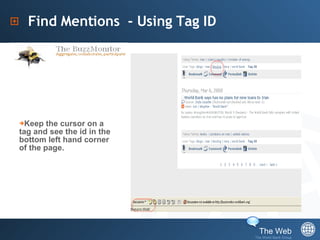
Find Mentions  - Using Tag ID Keep the cursor on a tag and see the id in the bottom left hand corner of the page.
Find Mentions  - Using Tag ID Type the tag ID or combinations of Tag IDs using plus sign ‘+’ in the address bar . Example- buzzmonitor.worldbank.org/tag/tag id +tag id
Vote Mentions and See results
Its all about tags. Classify Harmonize Retrieve
How to Tag? Tag- It is basically a category that specifies an entry or article in the  BuzzMonitor.
The User Term / Tag Common terms  used in the organization Widely understood  Expand scope of search Maintain uniformity
How to Tag- Mapping regions and networks Classify entries using Region, VPU/Network, Place and topic.
How to tag – Topic & VPU relation Identifying the topic
How to tag – Understanding topics and beyond. Using Specific Terms
How to Tag – Exceptions Tagging Corporate Tagging Names
How to Tag – Exceptions Tagging Events
How to Tag – Exceptions Tagging Publications / Reports
Making a Report – ‘Graphit’
Making a Report Collect all blogs/ news. Provide links to the source in BuzzMonitor/Original article. Place them in order of relevance or importance and analyze them as  how many comments, link to WB site , tone etc. Place them in order of influential blogs.
Finding influential Blogs Blogs are defined by Authority and Ranking.  Blog search engines like ‘ Technorati. com ’ rank blogs. Technorati Authority  is the number of blogs linking to a website in the last six months. The higher the number, the more Technorati Authority the blog has. Technorati Rank  is calculated based on how far you are from the top. The blog with the highest Technorati Authority is the #1 ranked blog. The smaller your Technorati Rank, the closer you are to the top.
In a nutshell…. Read the mentions to know the opinions. Use the data to compile and enhance your media outreach report. Identify the important issues . Early Crisis detection. Know the resources, useful sites. Create links  for marketing.
Last notes… There is no restriction on the number of terms  used while tagging. Basic aim is to map the articles under network, region and topics Finding a post interesting is purely subjective and in accordance with the current events. The idea behind using uniform tags is to widen the scope of search as well as narrow it down.
Buzz… –  It’s  Ours Thank you!! Have ideas? Share it. [email_address] [email_address] Suggest Develop Create

BuzzMonitor

  • 1.
    All about Buzz…Know Use Share BuzzMonitor Tutorial
  • 2.
    What is theBuzzMonitor and why should I use it? The BuzzMonitor ( h ttp://buzzmonitor.worldbank.org ) tracks, in near-real time, what is said about the World Bank across blogs, podcasts, social sites, and mainstream media, in English, Arabic, French, Spanish, Chinese and Portuguese. Its main purpose is to assist in discovering new sites, blogs, and videos that communicate about the programs and projects that you work on.
  • 3.
    Getting Started –Create an account
  • 4.
    Things to dowith… Read mentions by language, topics, media, region, sources etc Tag them using appropriate terms. Find mentions by date, by topics etc. Use tag cloud to find most discussed items. Share the important mentions by voting.
  • 5.
  • 6.
  • 7.
    Read Mentions –New Features Use sentiment Score to know the tone of the posts
  • 8.
    Tag Mentions –in User Tags
  • 9.
    Tag Mentions– UnderstandingYahoo & User tag. Yahoo Terms – The yahoo terms in the Buzzmonitor are the tags that give a contextual reference to the postings and help us understand them better. User Terms – The user terms are the tags that, we as the user of Buzzmonitor assign it to a posting/ entry according to our suitability and common understanding. They are generally in harmonization with the topics, terms units, regions, etc widely used in the World Bank Group.
  • 10.
    Find Mentions– ‘Top Tags’
  • 11.
    Find Mentions– ‘Search Tab’ Type any term in the search tab, in right panel and see all related terms. Look for only user tags.
  • 12.
    Find Mentions– Top Navigation Top Navigation
  • 13.
    Find Mentions –Left Navigation
  • 14.
    Find Mentions - Using Tag ID Use Tag ID or number to identify topics. Type a search term , see a list of tag ids ( next to the terms ) in ‘Retrieve Tag’ page. Look for user tags only.
  • 15.
    Find Mentions - Using Tag ID Keep the cursor on a tag and see the id in the bottom left hand corner of the page.
  • 16.
    Find Mentions - Using Tag ID Type the tag ID or combinations of Tag IDs using plus sign ‘+’ in the address bar . Example- buzzmonitor.worldbank.org/tag/tag id +tag id
  • 17.
    Vote Mentions andSee results
  • 18.
    Its all abouttags. Classify Harmonize Retrieve
  • 19.
    How to Tag?Tag- It is basically a category that specifies an entry or article in the BuzzMonitor.
  • 20.
    The User Term/ Tag Common terms used in the organization Widely understood Expand scope of search Maintain uniformity
  • 21.
    How to Tag-Mapping regions and networks Classify entries using Region, VPU/Network, Place and topic.
  • 22.
    How to tag– Topic & VPU relation Identifying the topic
  • 23.
    How to tag– Understanding topics and beyond. Using Specific Terms
  • 24.
    How to Tag– Exceptions Tagging Corporate Tagging Names
  • 25.
    How to Tag– Exceptions Tagging Events
  • 26.
    How to Tag– Exceptions Tagging Publications / Reports
  • 27.
    Making a Report– ‘Graphit’
  • 28.
    Making a Report– ‘Graphit’
  • 29.
    Making a ReportCollect all blogs/ news. Provide links to the source in BuzzMonitor/Original article. Place them in order of relevance or importance and analyze them as how many comments, link to WB site , tone etc. Place them in order of influential blogs.
  • 30.
    Finding influential BlogsBlogs are defined by Authority and Ranking. Blog search engines like ‘ Technorati. com ’ rank blogs. Technorati Authority is the number of blogs linking to a website in the last six months. The higher the number, the more Technorati Authority the blog has. Technorati Rank is calculated based on how far you are from the top. The blog with the highest Technorati Authority is the #1 ranked blog. The smaller your Technorati Rank, the closer you are to the top.
  • 31.
    In a nutshell….Read the mentions to know the opinions. Use the data to compile and enhance your media outreach report. Identify the important issues . Early Crisis detection. Know the resources, useful sites. Create links for marketing.
  • 32.
    Last notes… Thereis no restriction on the number of terms used while tagging. Basic aim is to map the articles under network, region and topics Finding a post interesting is purely subjective and in accordance with the current events. The idea behind using uniform tags is to widen the scope of search as well as narrow it down.
  • 33.
    Buzz… – It’s Ours Thank you!! Have ideas? Share it. [email_address] [email_address] Suggest Develop Create