USING BOFC APP
Bulk Profile Operations in
Salesforce
Table of Content
 Introduction to BOFC Profile Operations
 BOFC Profile Operations Features
 Compare (side by side) Multiple Profiles
 Compare Multiple Profiles Between Multiple Org
 Export Multiple Profiles in Salesforce
 Export Field Permissions for Multiple Profiles(in
XLS)
 Update Field Permissions for Multiple Profiles
 Compare Multiple Field Permissions for Multiple
Profiles
Introduction to BOFC Profile
Operations
 BOFC (Bulk Object Field Creator) is a native
force.com app for developers and admins
designed to perform Bulk CRUD operations
in a few clicks.
 For any Salesforce Admin or developer, there
is a requirement to mass compare/export
multiple Profiles (in same or multiple orgs). It
would be tedious job to copy and click each
Profile one by one using Salesforce Standard
process between multiple orgs. BOFC is the
best option to overcome this situation
BOFC Profile Operation
Features
 BOFC will help admins to perform below
multiple Profile Operations:
 Compare (side by side) Multiple Profiles
 Compare Multiple Profiles Between Multiple Org
 Export Field Permissions for Multiple Profiles(in
XLS)
 Update Field Permissions for Multiple Profiles
 Compare Multiple Field Permissions for Multiple
Profiles
Compare (side by side) Multiple
Profiles
 For any Salesforce Admin or developer, there is a requirement to Mass
Compare Multiple Profiles and Export in XLS. It would be tedious job to
copy and click each Profile one by one using Salesforce Standard
process.
 These type of work requests would take more effort and time, so one of
the best option to overcome this situation is by using the this app
exchange tool called Bulk Object Field Creator (BOFC)
Benefits of using BOFC Application for Comparing Multiple Profiles:
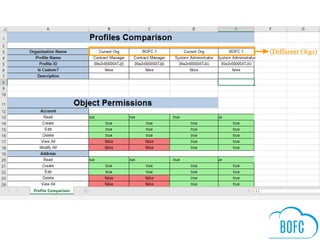
 Multiple Profiles can be compared in single click in single xls sheet (check
sample image for final result)
 Supports both Standard and Custom Profiles
 Export includes: Object access, App access, Tab access, User &
Administrative permissions, record type details, apex class access, visual
force page access, Field Permissions
 Easy, Simple, Clickable process to compare & export profiles
Compare Multiple Profiles Between
Multiple Salesforce Orgs
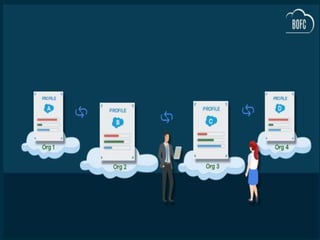
 For any Salesforce Admin or developer, there is a requirement to mass
compare multiple Profiles (in same or multiple orgs). It would be tedious
job to copy and click each Profile one by one using Salesforce Standard
process between multiple orgs.
 These type of work requests would take more effort and time, so one of the
best option to overcome this situation is by using the this appexchange tool
called Salesforce Bulk Object Field Creator (BOFC).
Benefits of using BOFC Application for Comparing Multiple Profiles:
 Multiple Profiles between multiple orgs can be compared in single click in
single xls sheet (check sample image for final result)
 Supports both Standard and Custom Profiles
 Export includes: Object access, App access, Tab access, User &
Administrative permissions, record type details, apex class access, visual
force page access, Field Permissions
 Easy, Simple, Clickable process to Compare & Export Multiple Profiles
Export Multiple Profiles Of
Salesforce
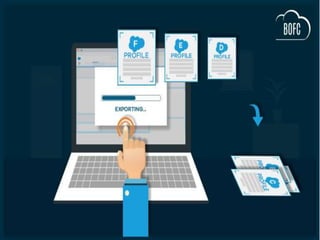
 For any Salesforce Admin or developer, there is a requirement to
mass export multiple Profiles in xls. It would be tedious job to copy
and click each Profile one by one using Salesforce Standard
process.
 These type of work requests would take more effort and time, so one
of the best option to overcome this situation is by using the this
appexchange tool called Bulk Object Field Creator (BOFC)
Benefits of using BOFC Application for Export Profiles:
 Multiple Profiles can be extracted in single click in single xls sheet
(with each tab for each profile)
 Supports both Standard and Custom Profiles
 Export includes: Object access, App access, Tab access, User &
Administrative permissions, record type details, apex class access,
visual force page access
 Easy, Simple, Clickable process to export profiles
Export Field Permissions for
Multiple Profiles (in XLS)
 For any Salesforce Admin or developer, if there is a requirement to
perform below actions for single or multiple objects for multiple profiles:
 Compare or Export Field Permissions (in XLS)
 For a developer, managing field permissions actions for single or multiple
objects in Salesforce is a tedious and time taking job. User would have to
open each fielder profiles one by one for an object using Salesforce
Standard process. These type of work requests would take much more
effort and time, but with our Salesforce Appexchange Bulk Object Field
Creator (BOFC) App user can (Compare or Export) field permissions for
multiple objects and for multiple profiles within same Salesforce org in few
clicks.
Benefits of using BOFC Application:
 Works for any kind of object (Standard or Custom)
 User can Compare or Exports Field permissions for single or multiple
objects in single click
 Simple drag & drop UI
Update Field Permissions for
Multiple Profiles
 For any Salesforce Admin or developer, if there is a requirement to
perform below actions for single or multiple objects for multiple profiles:
 Update Field Permissions (in XLS)
 For a developer, managing field permissions actions for single or multiple
objects in Salesforce is a tedious and time taking job. User would have to
open each field profiles one by one for an object using Salesforce
Standard process. These type of work requests would take much more
effort and time, but with our Salesforce Appexchange Bulk Object Field
Creator (BOFC) App user can Update field permissions for multiple
objects and for multiple profiles within same Salesforce org in few
clicks.
Benefits of using BOFC Application:
 Works for any kind of object (Standard or Custom)
 User can Update Field permissions for single or multiple objects in single
click
 Simple drag & drop UI
For More Queries
+91 9953170767
0129-4032277
support@tech9logy.com
Follow Us OnContact Us
www.bofc.io

Bulk Profile Operations in Salesforce using BOFC App

  • 1.
    USING BOFC APP BulkProfile Operations in Salesforce
  • 2.
    Table of Content Introduction to BOFC Profile Operations  BOFC Profile Operations Features  Compare (side by side) Multiple Profiles  Compare Multiple Profiles Between Multiple Org  Export Multiple Profiles in Salesforce  Export Field Permissions for Multiple Profiles(in XLS)  Update Field Permissions for Multiple Profiles  Compare Multiple Field Permissions for Multiple Profiles
  • 4.
    Introduction to BOFCProfile Operations  BOFC (Bulk Object Field Creator) is a native force.com app for developers and admins designed to perform Bulk CRUD operations in a few clicks.  For any Salesforce Admin or developer, there is a requirement to mass compare/export multiple Profiles (in same or multiple orgs). It would be tedious job to copy and click each Profile one by one using Salesforce Standard process between multiple orgs. BOFC is the best option to overcome this situation
  • 5.
    BOFC Profile Operation Features BOFC will help admins to perform below multiple Profile Operations:  Compare (side by side) Multiple Profiles  Compare Multiple Profiles Between Multiple Org  Export Field Permissions for Multiple Profiles(in XLS)  Update Field Permissions for Multiple Profiles  Compare Multiple Field Permissions for Multiple Profiles
  • 7.
    Compare (side byside) Multiple Profiles  For any Salesforce Admin or developer, there is a requirement to Mass Compare Multiple Profiles and Export in XLS. It would be tedious job to copy and click each Profile one by one using Salesforce Standard process.  These type of work requests would take more effort and time, so one of the best option to overcome this situation is by using the this app exchange tool called Bulk Object Field Creator (BOFC) Benefits of using BOFC Application for Comparing Multiple Profiles:  Multiple Profiles can be compared in single click in single xls sheet (check sample image for final result)  Supports both Standard and Custom Profiles  Export includes: Object access, App access, Tab access, User & Administrative permissions, record type details, apex class access, visual force page access, Field Permissions  Easy, Simple, Clickable process to compare & export profiles
  • 9.
    Compare Multiple ProfilesBetween Multiple Salesforce Orgs  For any Salesforce Admin or developer, there is a requirement to mass compare multiple Profiles (in same or multiple orgs). It would be tedious job to copy and click each Profile one by one using Salesforce Standard process between multiple orgs.  These type of work requests would take more effort and time, so one of the best option to overcome this situation is by using the this appexchange tool called Salesforce Bulk Object Field Creator (BOFC). Benefits of using BOFC Application for Comparing Multiple Profiles:  Multiple Profiles between multiple orgs can be compared in single click in single xls sheet (check sample image for final result)  Supports both Standard and Custom Profiles  Export includes: Object access, App access, Tab access, User & Administrative permissions, record type details, apex class access, visual force page access, Field Permissions  Easy, Simple, Clickable process to Compare & Export Multiple Profiles
  • 11.
    Export Multiple ProfilesOf Salesforce  For any Salesforce Admin or developer, there is a requirement to mass export multiple Profiles in xls. It would be tedious job to copy and click each Profile one by one using Salesforce Standard process.  These type of work requests would take more effort and time, so one of the best option to overcome this situation is by using the this appexchange tool called Bulk Object Field Creator (BOFC) Benefits of using BOFC Application for Export Profiles:  Multiple Profiles can be extracted in single click in single xls sheet (with each tab for each profile)  Supports both Standard and Custom Profiles  Export includes: Object access, App access, Tab access, User & Administrative permissions, record type details, apex class access, visual force page access  Easy, Simple, Clickable process to export profiles
  • 13.
    Export Field Permissionsfor Multiple Profiles (in XLS)  For any Salesforce Admin or developer, if there is a requirement to perform below actions for single or multiple objects for multiple profiles:  Compare or Export Field Permissions (in XLS)  For a developer, managing field permissions actions for single or multiple objects in Salesforce is a tedious and time taking job. User would have to open each fielder profiles one by one for an object using Salesforce Standard process. These type of work requests would take much more effort and time, but with our Salesforce Appexchange Bulk Object Field Creator (BOFC) App user can (Compare or Export) field permissions for multiple objects and for multiple profiles within same Salesforce org in few clicks. Benefits of using BOFC Application:  Works for any kind of object (Standard or Custom)  User can Compare or Exports Field permissions for single or multiple objects in single click  Simple drag & drop UI
  • 15.
    Update Field Permissionsfor Multiple Profiles  For any Salesforce Admin or developer, if there is a requirement to perform below actions for single or multiple objects for multiple profiles:  Update Field Permissions (in XLS)  For a developer, managing field permissions actions for single or multiple objects in Salesforce is a tedious and time taking job. User would have to open each field profiles one by one for an object using Salesforce Standard process. These type of work requests would take much more effort and time, but with our Salesforce Appexchange Bulk Object Field Creator (BOFC) App user can Update field permissions for multiple objects and for multiple profiles within same Salesforce org in few clicks. Benefits of using BOFC Application:  Works for any kind of object (Standard or Custom)  User can Update Field permissions for single or multiple objects in single click  Simple drag & drop UI
  • 16.
    For More Queries +919953170767 0129-4032277 support@tech9logy.com Follow Us OnContact Us www.bofc.io