Build Your First Web App 
with Friends 
Presented by: 
Abdul Qoyyuum Bin Haji Abdul Kadir 
Dated: 05/07/2014 
WWW.ANAK.IT
Before We Begin 
Download/Install the following applications: 
● Brackets.io - www.brackets.io 
● Dropbox - www.dropbox.com 
While you are downloading these applications 
and installing them, let’s move on. 
ANAK I.T BRUNEI DARUSSALAM | WWW.ANAK.IT
Short Discussion: Why 
Programming? 
1. Teaches us how to think logically. 
2. Teaches us how to fix (debug) 
3. To make money 
ANAK I.T BRUNEI DARUSSALAM | WWW.ANAK.IT
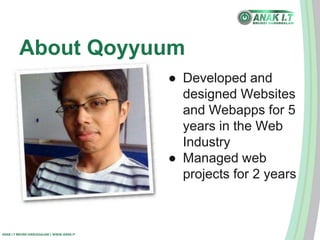
About Qoyyuum 
ANAK I.T BRUNEI DARUSSALAM | WWW.ANAK.IT 
● Developed and 
designed Websites 
and Webapps for 5 
years in the Web 
Industry 
● Managed web 
projects for 2 years
Objectives 
● Turn your CV into an online CV 
● Design your online CV pretty! 
● Make it interactive. 
ANAK I.T BRUNEI DARUSSALAM | WWW.ANAK.IT
The Setup 
1. Download or copy the setup zip file 
2. Put the folder on your desktop (or anywhere 
accessible on your machine) 
3. Point your Brackets.io to that folder by 
“Open Folder” option in the File menu. 
4. Resize your Brackets.io screen to the left. 
5. Click on the Live Preview button (the 
lightning bolt located on the top right of the 
Brackets window), and resize to the right. 
ANAK I.T BRUNEI DARUSSALAM | WWW.ANAK.IT
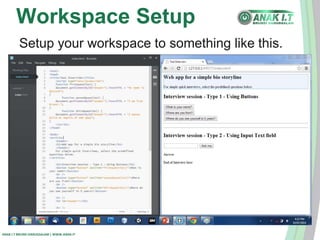
Workspace Setup 
Setup your workspace to something like this. 
ANAK I.T BRUNEI DARUSSALAM | WWW.ANAK.IT
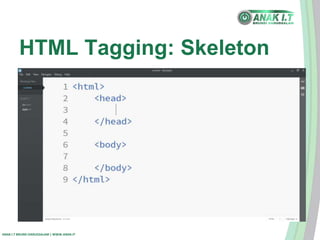
HTML Tagging: Skeleton 
ANAK I.T BRUNEI DARUSSALAM | WWW.ANAK.IT
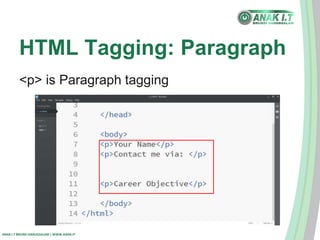
HTML Tagging: Paragraph 
<p> is Paragraph tagging 
ANAK I.T BRUNEI DARUSSALAM | WWW.ANAK.IT
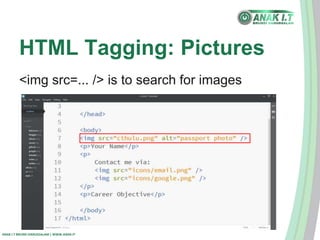
HTML Tagging: Pictures 
<img src=... /> is to search for images 
ANAK I.T BRUNEI DARUSSALAM | WWW.ANAK.IT
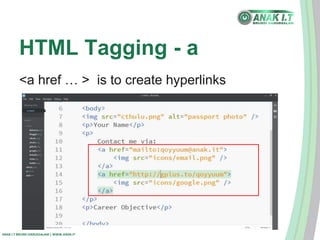
HTML Tagging - a 
<a href … > is to create hyperlinks 
ANAK I.T BRUNEI DARUSSALAM | WWW.ANAK.IT
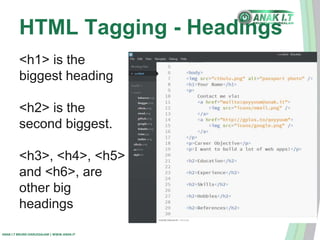
HTML Tagging - Headings 
<h1> is the 
biggest heading 
<h2> is the 
second biggest. 
<h3>, <h4>, <h5> 
and <h6>, are 
other big 
headings 
ANAK I.T BRUNEI DARUSSALAM | WWW.ANAK.IT
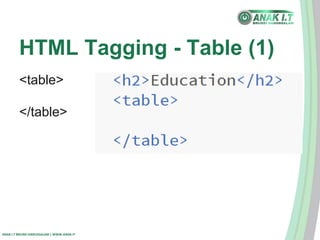
HTML Tagging - Table (1) 
<table> 
</table> 
ANAK I.T BRUNEI DARUSSALAM | WWW.ANAK.IT
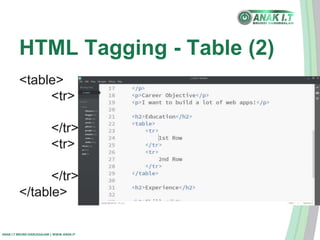
HTML Tagging - Table (2) 
<table> 
<tr> 
</tr> 
<tr> 
</tr> 
</table> 
ANAK I.T BRUNEI DARUSSALAM | WWW.ANAK.IT
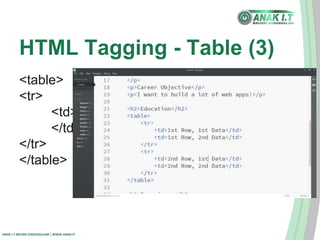
HTML Tagging - Table (3) 
<table> 
<tr> 
<td> 
</td> 
</tr> 
</table> 
ANAK I.T BRUNEI DARUSSALAM | WWW.ANAK.IT
HTML Tagging - Table (4) 
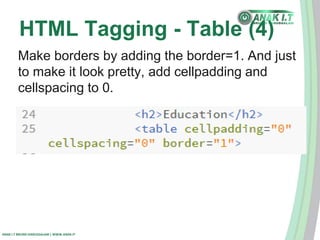
Make borders by adding the border=1. And just 
to make it look pretty, add cellpadding and 
cellspacing to 0. 
ANAK I.T BRUNEI DARUSSALAM | WWW.ANAK.IT
HTML Tagging - List (1) 
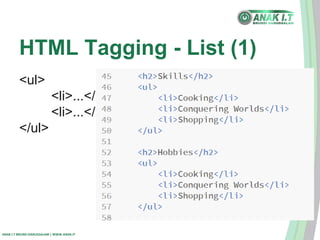
<ul> 
<li>...</li> 
<li>...</li> 
</ul> 
ANAK I.T BRUNEI DARUSSALAM | WWW.ANAK.IT
HTML Tagging - List (2) 
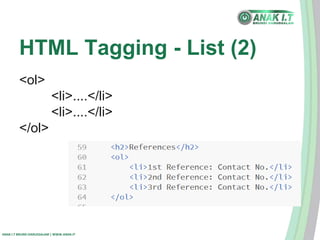
<ol> 
<li>....</li> 
<li>....</li> 
</ol> 
ANAK I.T BRUNEI DARUSSALAM | WWW.ANAK.IT
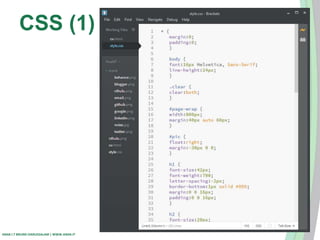
CSS 
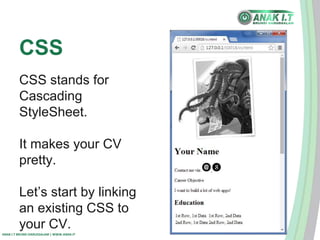
CSS stands for 
Cascading 
StyleSheet. 
It makes your CV 
pretty. 
Let’s start by linking 
an existing CSS to 
your CV. 
ANAK I.T BRUNEI DARUSSALAM | WWW.ANAK.IT
CSS (1) 
ANAK I.T BRUNEI DARUSSALAM | WWW.ANAK.IT
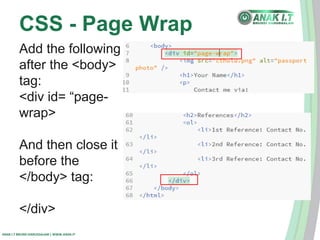
CSS - Page Wrap 
Add the following 
after the <body> 
tag: 
<div id= “page-wrap> 
And then close it 
before the 
</body> tag: 
</div> 
ANAK I.T BRUNEI DARUSSALAM | WWW.ANAK.IT
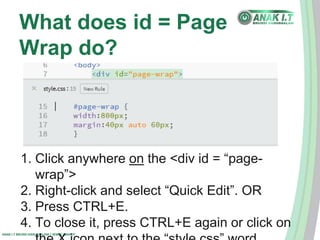
What does id = Page 
Wrap do? 
1. Click anywhere on the <div id = “page-wrap”> 
2. Right-click and select “Quick Edit”. OR 
3. Press CTRL+E. 
4. To close it, press CTRL+E again or click on 
ANAK I.T BRUNEI DARUSSALAM | WWW.ANAK.IT 
the X icon next to the “style.css” word.
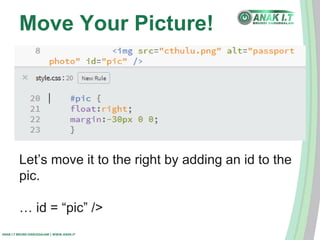
Move Your Picture! 
Let’s move it to the right by adding an id to the 
pic. 
… id = “pic” /> 
ANAK I.T BRUNEI DARUSSALAM | WWW.ANAK.IT
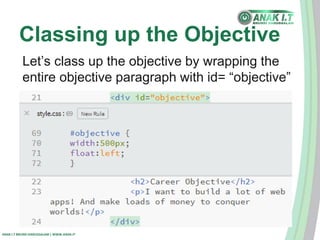
Classing up the Objective 
Let’s class up the objective by wrapping the 
entire objective paragraph with id= “objective” 
ANAK I.T BRUNEI DARUSSALAM | WWW.ANAK.IT
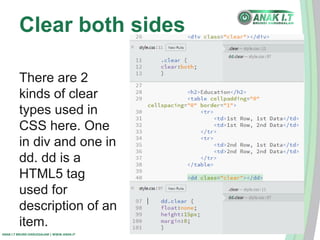
Clear both sides 
There are 2 
kinds of clear 
types used in 
CSS here. One 
in div and one in 
dd. dd is a 
HTML5 tag 
used for 
description of an 
item. 
ANAK I.T BRUNEI DARUSSALAM | WWW.ANAK.IT
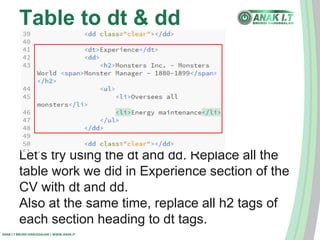
Table to dt & dd 
Let’s try using the dt and dd. Replace all the 
table work we did in Experience section of the 
CV with dt and dd. 
Also at the same time, replace all h2 tags of 
each section heading to dt tags. 
ANAK I.T BRUNEI DARUSSALAM | WWW.ANAK.IT
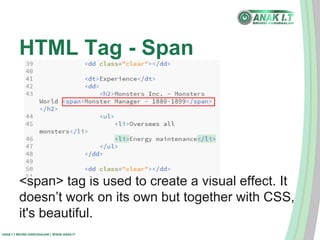
HTML Tag - Span 
<span> tag is used to create a visual effect. It 
doesn’t work on its own but together with CSS, 
it's beautiful. 
ANAK I.T BRUNEI DARUSSALAM | WWW.ANAK.IT
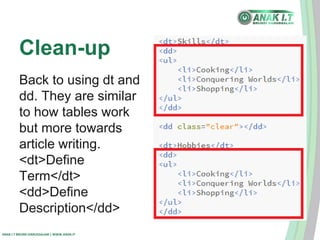
Clean-up 
Back to using dt and 
dd. They are similar 
to how tables work 
but more towards 
article writing. 
<dt>Define 
Term</dt> 
<dd>Define 
Description</dd> 
ANAK I.T BRUNEI DARUSSALAM | WWW.ANAK.IT
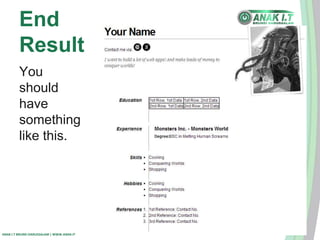
End 
Result 
You 
should 
have 
something 
like this. 
ANAK I.T BRUNEI DARUSSALAM | WWW.ANAK.IT
Intermission 
WWW.ANAK.IT 
BRB in 15 min
Javascript 
Javascript is the core of functionality and 
interactivity. It enables visitors/users to interact 
with your static page. 
So let’s add some interactivity with your CV by 
adding a basic AI. 
ANAK I.T BRUNEI DARUSSALAM | WWW.ANAK.IT
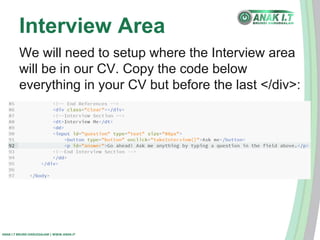
Interview Area 
We will need to setup where the Interview area 
will be in our CV. Copy the code below 
everything in your CV but before the last </div>: 
ANAK I.T BRUNEI DARUSSALAM | WWW.ANAK.IT
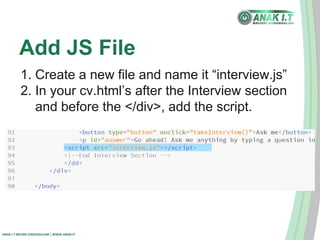
Add JS File 
1. Create a new file and name it “interview.js” 
2. In your cv.html’s after the Interview section 
and before the </div>, add the script. 
ANAK I.T BRUNEI DARUSSALAM | WWW.ANAK.IT
BIOS 
A regular webapp functions just like what a 
BIOS would do. BASICally, takes the INPUT, 
processes it, then gives the OUTPUT. This 
repeats for as long as the SYSTEM is still 
working. 
ANAK I.T BRUNEI DARUSSALAM | WWW.ANAK.IT
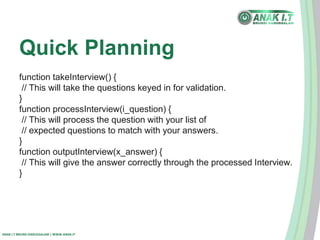
Quick Planning 
function takeInterview() { 
// This will take the questions keyed in for validation. 
} 
function processInterview(i_question) { 
// This will process the question with your list of 
// expected questions to match with your answers. 
} 
function outputInterview(x_answer) { 
// This will give the answer correctly through the processed Interview. 
} 
ANAK I.T BRUNEI DARUSSALAM | WWW.ANAK.IT
Ways to store questions 
There are 2 ways: 
1. Use a database and connect to it 
2. Use Javascript and create an Array 
ANAK I.T BRUNEI DARUSSALAM | WWW.ANAK.IT
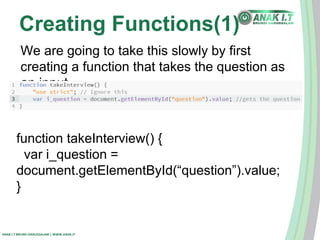
Creating Functions(1) 
We are going to take this slowly by first 
creating a function that takes the question as 
an input. 
function takeInterview() { 
var i_question = 
document.getElementById(“question”).value; 
} 
ANAK I.T BRUNEI DARUSSALAM | WWW.ANAK.IT
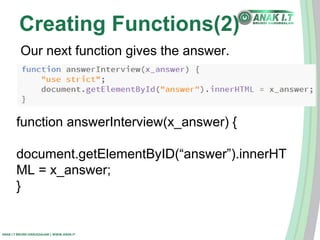
Creating Functions(2) 
Our next function gives the answer. 
function answerInterview(x_answer) { 
document.getElementByID(“answer”).innerHT 
ML = x_answer; 
} 
ANAK I.T BRUNEI DARUSSALAM | WWW.ANAK.IT
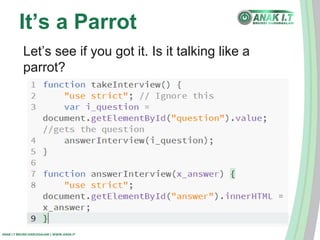
It’s a Parrot 
Let’s see if you got it. Is it talking like a 
parrot? 
ANAK I.T BRUNEI DARUSSALAM | WWW.ANAK.IT
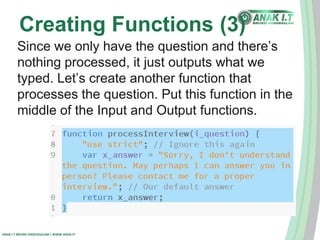
Creating Functions (3) 
Since we only have the question and there’s 
nothing processed, it just outputs what we 
typed. Let’s create another function that 
processes the question. Put this function in the 
middle of the Input and Output functions. 
ANAK I.T BRUNEI DARUSSALAM | WWW.ANAK.IT
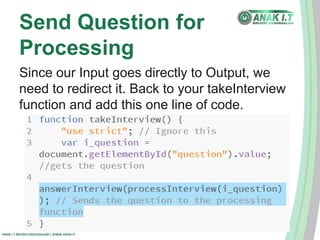
Send Question for 
Processing 
Since our Input goes directly to Output, we 
need to redirect it. Back to your takeInterview 
function and add this one line of code. 
ANAK I.T BRUNEI DARUSSALAM | WWW.ANAK.IT
Response Test & Debug 
Is it saying our default answer? If not, try 
debugging it with console.log. 
1. Right-click and “Inspect Element” in your 
browser. 
2. Select “Console” 
3. Type console.log(i_question) and press 
Enter. 
4. Try console.log(x_answer) and press Enter. 
ANAK I.T BRUNEI DARUSSALAM | WWW.ANAK.IT
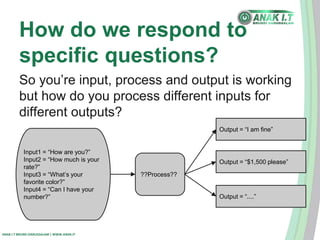
How do we respond to 
specific questions? 
So you’re input, process and output is working 
but how do you process different inputs for 
different outputs? 
Input1 = “How are you?” 
Input2 = “How much is your 
rate?” 
Input3 = “What’s your 
favorite color?” 
Input4 = “Can I have your 
number?” 
ANAK I.T BRUNEI DARUSSALAM | WWW.ANAK.IT 
??Process?? 
Output = “I am fine” 
Output = “$1,500 please” 
Output = “....”
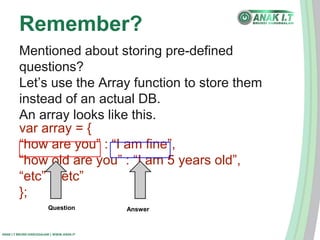
Remember? 
Mentioned about storing pre-defined 
questions? 
Let’s use the Array function to store them 
instead of an actual DB. 
An array looks like this. 
var array = { 
“how are you” : “I am fine”, 
“how old are you” : “I am 5 years old”, 
“etc” : “etc” 
}; 
Question Answer 
ANAK I.T BRUNEI DARUSSALAM | WWW.ANAK.IT
Q&A Series(1) 
Now that we have a working function, let’s think 
about some questions and answers. Inside the 
Pre-set-up files, there’s a file called “common-questions. 
ANAK I.T BRUNEI DARUSSALAM | WWW.ANAK.IT 
txt”. Open that up and think up of 
some answers. 
It doesn’t have to be real answers as you can 
edit them afterwards. You have 2 minutes.
Q&A Series(2) 
Let’s take 3 questions out of all those common 
questions and set up our answers next to them. 
Create another JS file and name it myDB.js 
ANAK I.T BRUNEI DARUSSALAM | WWW.ANAK.IT
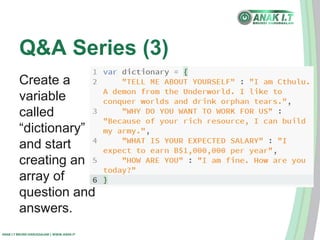
Q&A Series (3) 
Create a 
variable 
called 
“dictionary” 
and start 
creating an 
array of 
question and 
answers. 
ANAK I.T BRUNEI DARUSSALAM | WWW.ANAK.IT
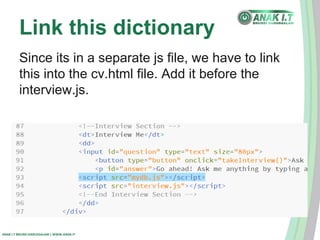
Link this dictionary 
Since its in a separate js file, we have to link 
this into the cv.html file. Add it before the 
interview.js. 
ANAK I.T BRUNEI DARUSSALAM | WWW.ANAK.IT
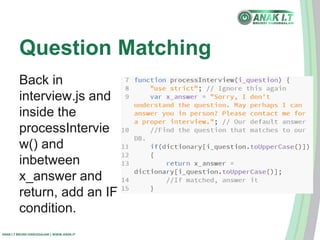
Question Matching 
Back in 
interview.js and 
inside the 
processIntervie 
w() and 
inbetween 
x_answer and 
return, add an IF 
condition. 
ANAK I.T BRUNEI DARUSSALAM | WWW.ANAK.IT
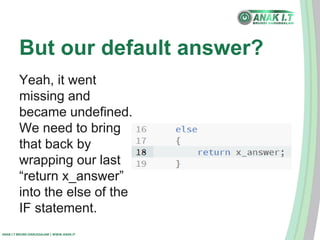
But our default answer? 
Yeah, it went 
missing and 
became undefined. 
We need to bring 
that back by 
wrapping our last 
“return x_answer” 
into the else of the 
IF statement. 
ANAK I.T BRUNEI DARUSSALAM | WWW.ANAK.IT
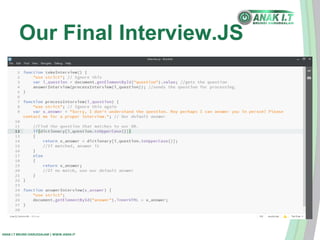
Our Final Interview.JS 
ANAK I.T BRUNEI DARUSSALAM | WWW.ANAK.IT
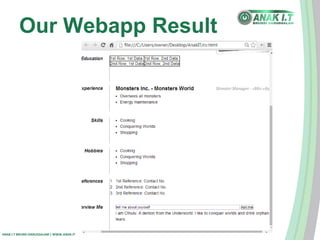
Our Webapp Result 
ANAK I.T BRUNEI DARUSSALAM | WWW.ANAK.IT
Add MORE! 
Go ahead and more 
questions to the 
myDB.js file and try 
more of them out. 
If you find something 
wrong, debug it! 
ANAK I.T BRUNEI DARUSSALAM | WWW.ANAK.IT
Save and Upload to 
Dropbox! 
1. Login/Register to Dropbox 
2. Upload your folder to your Dropbox Public 
folder. 
3. Share the public URL to your 
friends/family/potential employers/your 
school teacher/etc. 
4. Get feedback, improve it and apply for jobs! 
ANAK I.T BRUNEI DARUSSALAM | WWW.ANAK.IT
What you can do with 
HTML5 & CSS3 & JS? 
Examples of HTML5 & CSS3: 
● Post-it Notes - 
http://cdn.tutsplus.com/net/uploads/legacy/77 
1_sticky/step5.html?_ga=1.75595793.528516 
078.1403958594# 
● HTML5 Browser Game - 
http://browserquest.mozilla.org/ 
ANAK I.T BRUNEI DARUSSALAM | WWW.ANAK.IT

Build your first web app with friends

  • 1.
    Build Your FirstWeb App with Friends Presented by: Abdul Qoyyuum Bin Haji Abdul Kadir Dated: 05/07/2014 WWW.ANAK.IT
  • 2.
    Before We Begin Download/Install the following applications: ● Brackets.io - www.brackets.io ● Dropbox - www.dropbox.com While you are downloading these applications and installing them, let’s move on. ANAK I.T BRUNEI DARUSSALAM | WWW.ANAK.IT
  • 3.
    Short Discussion: Why Programming? 1. Teaches us how to think logically. 2. Teaches us how to fix (debug) 3. To make money ANAK I.T BRUNEI DARUSSALAM | WWW.ANAK.IT
  • 4.
    About Qoyyuum ANAKI.T BRUNEI DARUSSALAM | WWW.ANAK.IT ● Developed and designed Websites and Webapps for 5 years in the Web Industry ● Managed web projects for 2 years
  • 5.
    Objectives ● Turnyour CV into an online CV ● Design your online CV pretty! ● Make it interactive. ANAK I.T BRUNEI DARUSSALAM | WWW.ANAK.IT
  • 6.
    The Setup 1.Download or copy the setup zip file 2. Put the folder on your desktop (or anywhere accessible on your machine) 3. Point your Brackets.io to that folder by “Open Folder” option in the File menu. 4. Resize your Brackets.io screen to the left. 5. Click on the Live Preview button (the lightning bolt located on the top right of the Brackets window), and resize to the right. ANAK I.T BRUNEI DARUSSALAM | WWW.ANAK.IT
  • 7.
    Workspace Setup Setupyour workspace to something like this. ANAK I.T BRUNEI DARUSSALAM | WWW.ANAK.IT
  • 8.
    HTML Tagging: Skeleton ANAK I.T BRUNEI DARUSSALAM | WWW.ANAK.IT
  • 9.
    HTML Tagging: Paragraph <p> is Paragraph tagging ANAK I.T BRUNEI DARUSSALAM | WWW.ANAK.IT
  • 10.
    HTML Tagging: Pictures <img src=... /> is to search for images ANAK I.T BRUNEI DARUSSALAM | WWW.ANAK.IT
  • 11.
    HTML Tagging -a <a href … > is to create hyperlinks ANAK I.T BRUNEI DARUSSALAM | WWW.ANAK.IT
  • 12.
    HTML Tagging -Headings <h1> is the biggest heading <h2> is the second biggest. <h3>, <h4>, <h5> and <h6>, are other big headings ANAK I.T BRUNEI DARUSSALAM | WWW.ANAK.IT
  • 13.
    HTML Tagging -Table (1) <table> </table> ANAK I.T BRUNEI DARUSSALAM | WWW.ANAK.IT
  • 14.
    HTML Tagging -Table (2) <table> <tr> </tr> <tr> </tr> </table> ANAK I.T BRUNEI DARUSSALAM | WWW.ANAK.IT
  • 15.
    HTML Tagging -Table (3) <table> <tr> <td> </td> </tr> </table> ANAK I.T BRUNEI DARUSSALAM | WWW.ANAK.IT
  • 16.
    HTML Tagging -Table (4) Make borders by adding the border=1. And just to make it look pretty, add cellpadding and cellspacing to 0. ANAK I.T BRUNEI DARUSSALAM | WWW.ANAK.IT
  • 17.
    HTML Tagging -List (1) <ul> <li>...</li> <li>...</li> </ul> ANAK I.T BRUNEI DARUSSALAM | WWW.ANAK.IT
  • 18.
    HTML Tagging -List (2) <ol> <li>....</li> <li>....</li> </ol> ANAK I.T BRUNEI DARUSSALAM | WWW.ANAK.IT
  • 19.
    CSS CSS standsfor Cascading StyleSheet. It makes your CV pretty. Let’s start by linking an existing CSS to your CV. ANAK I.T BRUNEI DARUSSALAM | WWW.ANAK.IT
  • 20.
    CSS (1) ANAKI.T BRUNEI DARUSSALAM | WWW.ANAK.IT
  • 21.
    CSS - PageWrap Add the following after the <body> tag: <div id= “page-wrap> And then close it before the </body> tag: </div> ANAK I.T BRUNEI DARUSSALAM | WWW.ANAK.IT
  • 22.
    What does id= Page Wrap do? 1. Click anywhere on the <div id = “page-wrap”> 2. Right-click and select “Quick Edit”. OR 3. Press CTRL+E. 4. To close it, press CTRL+E again or click on ANAK I.T BRUNEI DARUSSALAM | WWW.ANAK.IT the X icon next to the “style.css” word.
  • 23.
    Move Your Picture! Let’s move it to the right by adding an id to the pic. … id = “pic” /> ANAK I.T BRUNEI DARUSSALAM | WWW.ANAK.IT
  • 24.
    Classing up theObjective Let’s class up the objective by wrapping the entire objective paragraph with id= “objective” ANAK I.T BRUNEI DARUSSALAM | WWW.ANAK.IT
  • 25.
    Clear both sides There are 2 kinds of clear types used in CSS here. One in div and one in dd. dd is a HTML5 tag used for description of an item. ANAK I.T BRUNEI DARUSSALAM | WWW.ANAK.IT
  • 26.
    Table to dt& dd Let’s try using the dt and dd. Replace all the table work we did in Experience section of the CV with dt and dd. Also at the same time, replace all h2 tags of each section heading to dt tags. ANAK I.T BRUNEI DARUSSALAM | WWW.ANAK.IT
  • 27.
    HTML Tag -Span <span> tag is used to create a visual effect. It doesn’t work on its own but together with CSS, it's beautiful. ANAK I.T BRUNEI DARUSSALAM | WWW.ANAK.IT
  • 28.
    Clean-up Back tousing dt and dd. They are similar to how tables work but more towards article writing. <dt>Define Term</dt> <dd>Define Description</dd> ANAK I.T BRUNEI DARUSSALAM | WWW.ANAK.IT
  • 29.
    End Result You should have something like this. ANAK I.T BRUNEI DARUSSALAM | WWW.ANAK.IT
  • 30.
  • 31.
    Javascript Javascript isthe core of functionality and interactivity. It enables visitors/users to interact with your static page. So let’s add some interactivity with your CV by adding a basic AI. ANAK I.T BRUNEI DARUSSALAM | WWW.ANAK.IT
  • 32.
    Interview Area Wewill need to setup where the Interview area will be in our CV. Copy the code below everything in your CV but before the last </div>: ANAK I.T BRUNEI DARUSSALAM | WWW.ANAK.IT
  • 33.
    Add JS File 1. Create a new file and name it “interview.js” 2. In your cv.html’s after the Interview section and before the </div>, add the script. ANAK I.T BRUNEI DARUSSALAM | WWW.ANAK.IT
  • 34.
    BIOS A regularwebapp functions just like what a BIOS would do. BASICally, takes the INPUT, processes it, then gives the OUTPUT. This repeats for as long as the SYSTEM is still working. ANAK I.T BRUNEI DARUSSALAM | WWW.ANAK.IT
  • 35.
    Quick Planning functiontakeInterview() { // This will take the questions keyed in for validation. } function processInterview(i_question) { // This will process the question with your list of // expected questions to match with your answers. } function outputInterview(x_answer) { // This will give the answer correctly through the processed Interview. } ANAK I.T BRUNEI DARUSSALAM | WWW.ANAK.IT
  • 36.
    Ways to storequestions There are 2 ways: 1. Use a database and connect to it 2. Use Javascript and create an Array ANAK I.T BRUNEI DARUSSALAM | WWW.ANAK.IT
  • 37.
    Creating Functions(1) Weare going to take this slowly by first creating a function that takes the question as an input. function takeInterview() { var i_question = document.getElementById(“question”).value; } ANAK I.T BRUNEI DARUSSALAM | WWW.ANAK.IT
  • 38.
    Creating Functions(2) Ournext function gives the answer. function answerInterview(x_answer) { document.getElementByID(“answer”).innerHT ML = x_answer; } ANAK I.T BRUNEI DARUSSALAM | WWW.ANAK.IT
  • 39.
    It’s a Parrot Let’s see if you got it. Is it talking like a parrot? ANAK I.T BRUNEI DARUSSALAM | WWW.ANAK.IT
  • 40.
    Creating Functions (3) Since we only have the question and there’s nothing processed, it just outputs what we typed. Let’s create another function that processes the question. Put this function in the middle of the Input and Output functions. ANAK I.T BRUNEI DARUSSALAM | WWW.ANAK.IT
  • 41.
    Send Question for Processing Since our Input goes directly to Output, we need to redirect it. Back to your takeInterview function and add this one line of code. ANAK I.T BRUNEI DARUSSALAM | WWW.ANAK.IT
  • 42.
    Response Test &Debug Is it saying our default answer? If not, try debugging it with console.log. 1. Right-click and “Inspect Element” in your browser. 2. Select “Console” 3. Type console.log(i_question) and press Enter. 4. Try console.log(x_answer) and press Enter. ANAK I.T BRUNEI DARUSSALAM | WWW.ANAK.IT
  • 43.
    How do werespond to specific questions? So you’re input, process and output is working but how do you process different inputs for different outputs? Input1 = “How are you?” Input2 = “How much is your rate?” Input3 = “What’s your favorite color?” Input4 = “Can I have your number?” ANAK I.T BRUNEI DARUSSALAM | WWW.ANAK.IT ??Process?? Output = “I am fine” Output = “$1,500 please” Output = “....”
  • 44.
    Remember? Mentioned aboutstoring pre-defined questions? Let’s use the Array function to store them instead of an actual DB. An array looks like this. var array = { “how are you” : “I am fine”, “how old are you” : “I am 5 years old”, “etc” : “etc” }; Question Answer ANAK I.T BRUNEI DARUSSALAM | WWW.ANAK.IT
  • 45.
    Q&A Series(1) Nowthat we have a working function, let’s think about some questions and answers. Inside the Pre-set-up files, there’s a file called “common-questions. ANAK I.T BRUNEI DARUSSALAM | WWW.ANAK.IT txt”. Open that up and think up of some answers. It doesn’t have to be real answers as you can edit them afterwards. You have 2 minutes.
  • 46.
    Q&A Series(2) Let’stake 3 questions out of all those common questions and set up our answers next to them. Create another JS file and name it myDB.js ANAK I.T BRUNEI DARUSSALAM | WWW.ANAK.IT
  • 47.
    Q&A Series (3) Create a variable called “dictionary” and start creating an array of question and answers. ANAK I.T BRUNEI DARUSSALAM | WWW.ANAK.IT
  • 48.
    Link this dictionary Since its in a separate js file, we have to link this into the cv.html file. Add it before the interview.js. ANAK I.T BRUNEI DARUSSALAM | WWW.ANAK.IT
  • 49.
    Question Matching Backin interview.js and inside the processIntervie w() and inbetween x_answer and return, add an IF condition. ANAK I.T BRUNEI DARUSSALAM | WWW.ANAK.IT
  • 50.
    But our defaultanswer? Yeah, it went missing and became undefined. We need to bring that back by wrapping our last “return x_answer” into the else of the IF statement. ANAK I.T BRUNEI DARUSSALAM | WWW.ANAK.IT
  • 51.
    Our Final Interview.JS ANAK I.T BRUNEI DARUSSALAM | WWW.ANAK.IT
  • 52.
    Our Webapp Result ANAK I.T BRUNEI DARUSSALAM | WWW.ANAK.IT
  • 53.
    Add MORE! Goahead and more questions to the myDB.js file and try more of them out. If you find something wrong, debug it! ANAK I.T BRUNEI DARUSSALAM | WWW.ANAK.IT
  • 54.
    Save and Uploadto Dropbox! 1. Login/Register to Dropbox 2. Upload your folder to your Dropbox Public folder. 3. Share the public URL to your friends/family/potential employers/your school teacher/etc. 4. Get feedback, improve it and apply for jobs! ANAK I.T BRUNEI DARUSSALAM | WWW.ANAK.IT
  • 55.
    What you cando with HTML5 & CSS3 & JS? Examples of HTML5 & CSS3: ● Post-it Notes - http://cdn.tutsplus.com/net/uploads/legacy/77 1_sticky/step5.html?_ga=1.75595793.528516 078.1403958594# ● HTML5 Browser Game - http://browserquest.mozilla.org/ ANAK I.T BRUNEI DARUSSALAM | WWW.ANAK.IT

Editor's Notes

  • #8 1. Set up a new folder anywhere on your machine. 2. Make a new file by clicking File and New. 3. Anything that you do in the Brackets.io will automatically be displayed in the Live Preview window.
  • #9 Create a new file and call it cv.html then type in the following HTML tag.
  • #13 Put in different sections and make them into h2 tags
  • #21 Add the existing style.css to your folder. It should look like this.
  • #23 After quickly editing, you will find the corresponding CSS to the HTML element. Feel free to experiment the attributes and CSS-properties of this CSS selector.
  • #25 Let’s class up the heading by adding “class = fn”
  • #26 Add one div class clear before Education and add one dd class clear after Education. Repeat adding <dd class= “clear”></dd> in between each section.
  • #29 Hence, since we replaced all the <h2> with <dt>. We need to wrap the content in each section with <dd>
  • #31 After finishing up on your CSS and
  • #38 Later we will add more, by using arrays and objects.
  • #39 Later we will add more, by using arrays and objects.