Dashboard Assistant
for Jira Cloud
Subscribe to Jira Dashboards with email reminders
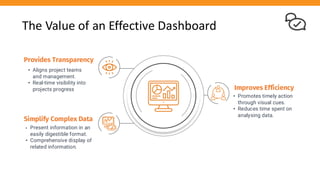
The Value of an Effective Dashboard
Provides Transparency
• Aligns project teams
and management.
• Real-time visibility into
projects progress
Simplify Complex Data
• Present information in an
easily digestible format.
• Comprehensive display of
related information.
Improves Efficiency
• Promotes timely action
through visual cues.
• Reduces time spent on
analysing data.
But they are useless
when nobody looks at them
No matter how nice they look
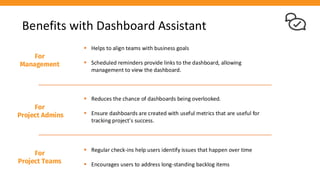
Benefits with Dashboard Assistant
▪ Helps to align teams with business goals
▪ Scheduled reminders provide links to the dashboard, allowing
management to view the dashboard.
For
Management
For
Project Admins
▪ Reduces the chance of dashboards being overlooked.
▪ Ensure dashboards are created with useful metrics that are useful for
tracking project's success.
For
Project Teams
▪ Regular check-ins help users identify issues that happen over time
▪ Encourages users to address long-standing backlog items
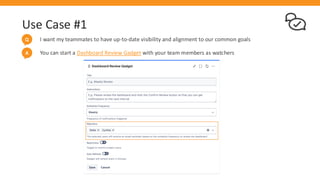
Use Case #1
I want my teammates to have up-to-date visibility and alignment to our common goals
Q
You can start a Dashboard Review Gadget with your team members as watchers
A
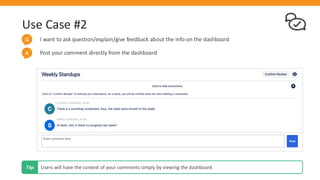
Use Case #2
I want to ask question/explain/give feedback about the info on the dashboard
Q
Users will have the context of your comments simply by viewing the dashboard
Tip:
Post your comment directly from the dashboard
A
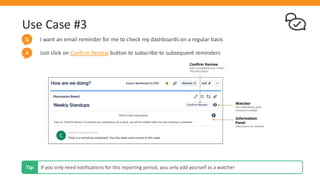
Use Case #3
I want an email reminder for me to check my dashboards on a regular basis
Q
If you only need notifications for this reporting period, you only add yourself as a watcher
Tip:
Just click on Confirm Review button to subscribe to subsequent reminders
A
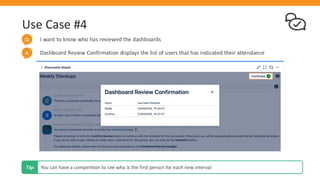
Use Case #4
I want to know who has reviewed the dashboards
Q
Dashboard Review Confirmation displays the list of users that has indicated their attendance
A
You can have a competition to see who is the first person for each new interval
Tip:
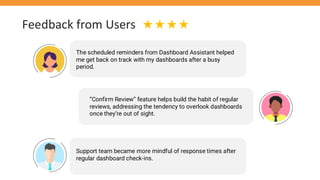
Feedback from Users
The scheduled reminders from Dashboard Assistant helped
me get back on track with my dashboards after a busy
period.
“Confirm Review” feature helps build the habit of regular
reviews, addressing the tendency to overlook dashboards
once they’re out of sight.
Support team became more mindful of response times after
regular dashboard check-ins.
Additional Resources
• Marketplace Listing
• User Guide
• Dashboard Reviews versus Filter Subscriptions
• Review Dashboard Design Template
• Register for a free License
• Our Service Desk
We welcome any feedback and suggestions for improvement
Tip:
Other Related Apps
Menu Gadget is a free Jira app that allows users to group related filters and
webpage links in their dashboards. Together with Dashboard Assistant, users can
discover and access related resources to work more efficiently.
Multiple Filters Chart Gadget make your dashboards more attractive and
informative with a collection of different chart types and advanced charting
features. It is possible to export a snapshot of the chart in PDF or PNG format.
Three Dimensional Date Gadget is a collection of gadgets for statistical reporting
by different date periods for simple trend analysis. Users can view reports by
month or week or even by sprints.

Brochure for Dashboard Assistant for Jira Cloud

  • 1.
    Dashboard Assistant for JiraCloud Subscribe to Jira Dashboards with email reminders
  • 2.
    The Value ofan Effective Dashboard Provides Transparency • Aligns project teams and management. • Real-time visibility into projects progress Simplify Complex Data • Present information in an easily digestible format. • Comprehensive display of related information. Improves Efficiency • Promotes timely action through visual cues. • Reduces time spent on analysing data.
  • 3.
    But they areuseless when nobody looks at them No matter how nice they look
  • 4.
    Benefits with DashboardAssistant ▪ Helps to align teams with business goals ▪ Scheduled reminders provide links to the dashboard, allowing management to view the dashboard. For Management For Project Admins ▪ Reduces the chance of dashboards being overlooked. ▪ Ensure dashboards are created with useful metrics that are useful for tracking project's success. For Project Teams ▪ Regular check-ins help users identify issues that happen over time ▪ Encourages users to address long-standing backlog items
  • 5.
    Use Case #1 Iwant my teammates to have up-to-date visibility and alignment to our common goals Q You can start a Dashboard Review Gadget with your team members as watchers A
  • 6.
    Use Case #2 Iwant to ask question/explain/give feedback about the info on the dashboard Q Users will have the context of your comments simply by viewing the dashboard Tip: Post your comment directly from the dashboard A
  • 7.
    Use Case #3 Iwant an email reminder for me to check my dashboards on a regular basis Q If you only need notifications for this reporting period, you only add yourself as a watcher Tip: Just click on Confirm Review button to subscribe to subsequent reminders A
  • 8.
    Use Case #4 Iwant to know who has reviewed the dashboards Q Dashboard Review Confirmation displays the list of users that has indicated their attendance A You can have a competition to see who is the first person for each new interval Tip:
  • 9.
    Feedback from Users Thescheduled reminders from Dashboard Assistant helped me get back on track with my dashboards after a busy period. “Confirm Review” feature helps build the habit of regular reviews, addressing the tendency to overlook dashboards once they’re out of sight. Support team became more mindful of response times after regular dashboard check-ins.
  • 10.
    Additional Resources • MarketplaceListing • User Guide • Dashboard Reviews versus Filter Subscriptions • Review Dashboard Design Template • Register for a free License • Our Service Desk We welcome any feedback and suggestions for improvement Tip:
  • 11.
    Other Related Apps MenuGadget is a free Jira app that allows users to group related filters and webpage links in their dashboards. Together with Dashboard Assistant, users can discover and access related resources to work more efficiently. Multiple Filters Chart Gadget make your dashboards more attractive and informative with a collection of different chart types and advanced charting features. It is possible to export a snapshot of the chart in PDF or PNG format. Three Dimensional Date Gadget is a collection of gadgets for statistical reporting by different date periods for simple trend analysis. Users can view reports by month or week or even by sprints.