Blender Tutorial Animation
Basics – Camera follow path
tracking to target
Assoc. Prof. Dr. Eng. Tihomir Dovramadjiev
Technical University of Varna
MTF, Department Industrial Design
tihomir.dovramadjiev@tu-varna.bg
● DOI: 10.13140/RG.2.2.18939.00808
● https://www.researchgate.net/publication/326977171_Blender_Tutorial_Animation_Basic
s-Camera_follow_path_tracking_to_target
2018 DrTAD 2
About Blender software
Blender is the free and open source 3D creation suite. It supports the
entirety of the 3D pipeline—modeling, rigging, animation, simulation,
rendering, compositing and motion tracking, even video editing and
game creation.
●https://www.blender.org/
●Modern accessible application of the system Blender in 3D design
practice.
https://www.researchgate.net/publication/312033613_Modern_accessibl
e_application_of_the_system_Blender_in_3D_design_practice
2018 DrTAD 3
Blender - Object Data / Path
Animation
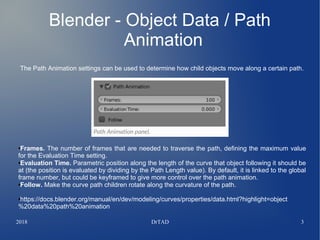
The Path Animation settings can be used to determine how child objects move along a certain path.
●Frames. The number of frames that are needed to traverse the path, defining the maximum value
for the Evaluation Time setting.
●Evaluation Time. Parametric position along the length of the curve that object following it should be
at (the position is evaluated by dividing by the Path Length value). By default, it is linked to the global
frame number, but could be keyframed to give more control over the path animation.
●Follow. Make the curve path children rotate along the curvature of the path.
●https://docs.blender.org/manual/en/dev/modeling/curves/properties/data.html?highlight=object
%20data%20path%20animation
2018 DrTAD 4
Blender - Object Data / Path
Animation - Active Spline
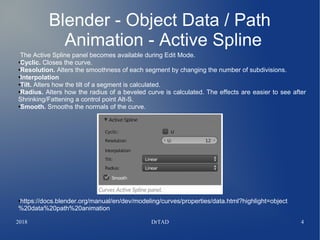
The Active Spline panel becomes available during Edit Mode.
●Cyclic. Closes the curve.
●Resolution. Alters the smoothness of each segment by changing the number of subdivisions.
●Interpolation
●Tilt. Alters how the tilt of a segment is calculated.
●Radius. Alters how the radius of a beveled curve is calculated. The effects are easier to see after
Shrinking/Fattening a control point Alt-S.
●Smooth. Smooths the normals of the curve.
●https://docs.blender.org/manual/en/dev/modeling/curves/properties/data.html?highlight=object
%20data%20path%20animation
2018 DrTAD 5
The Tutorial
2018 DrTAD 6
Blender Animation– The Scene
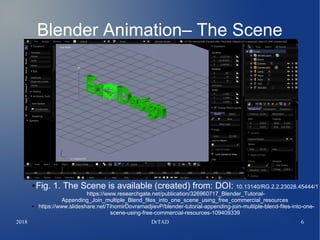
● Fig. 1. The Scene is available (created) from: DOI: 10.13140/RG.2.2.23028.45444/1
https://www.researchgate.net/publication/326960717_Blender_Tutorial-
Appending_Join_multiple_Blend_files_into_one_scene_using_free_commercial_resources
● https://www.slideshare.net/TihomirDovramadjievP/blender-tutorial-appending-join-multiple-blend-files-into-one-
scene-using-free-commercial-resources-109409339
2018 DrTAD 7
Blender Animation – Adding Curve
●
● Fig. 2. Adding Curve. Add > Curve > Circle
2018 DrTAD 8
Blender Animation – Scaling
●
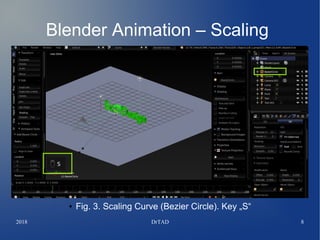
● Fig. 3. Scaling Curve (Bezier Circle). Key „S“
2018 DrTAD 9
Blender Animation – The Scene
●
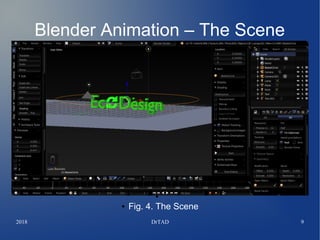
● Fig. 4. The Scene
2018 DrTAD 10
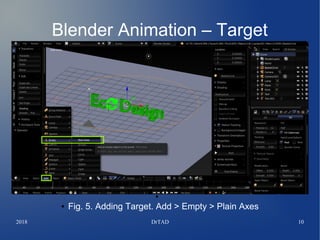
Blender Animation – Target
●
● Fig. 5. Adding Target. Add > Empty > Plain Axes
2018 DrTAD 11
Blender Animation – Target
●
● Fig. 6. Position of the Target (Empty - Plain Axes)
2018 DrTAD 12
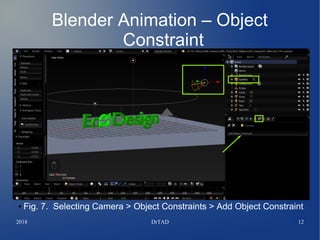
Blender Animation – Object
Constraint
● Fig. 7. Selecting Camera > Object Constraints > Add Object Constraint
2018 DrTAD 13
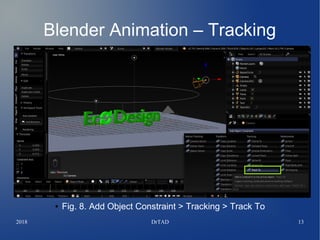
Blender Animation – Tracking
●
● Fig. 8. Add Object Constraint > Tracking > Track To
2018 DrTAD 14
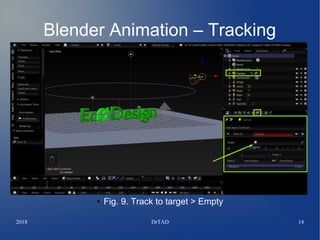
Blender Animation – Tracking
● Fig. 9. Track to target > Empty
2018 DrTAD 15
Blender Animation – Tracking
●
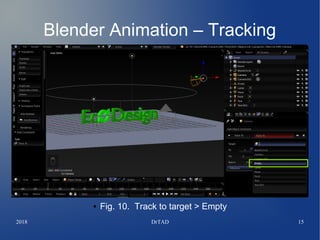
● Fig. 10. Track to target > Empty
2018 DrTAD 16
Blender Animation – Tracking
●
● Fig. 11. Track to target > Empty > Axe + Z
2018 DrTAD 17
Blender Animation – Camera View
●
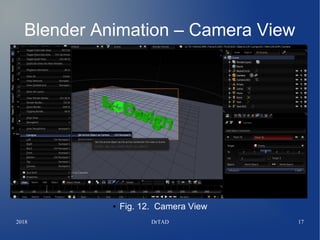
● Fig. 12. Camera View
2018 DrTAD 18
Blender Animation – Camera to path
●
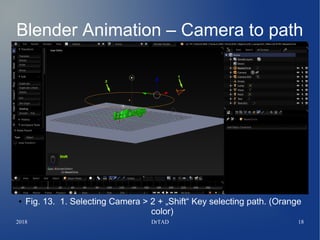
● Fig. 13. 1. Selecting Camera > 2 + „Shift“ Key selecting path. (Orange
color)
2018 DrTAD 19
Blender Animation – Follow path
●
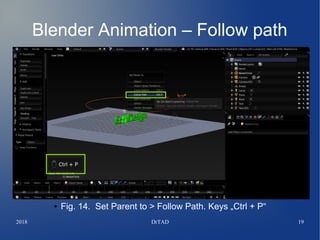
● Fig. 14. Set Parent to > Follow Path. Keys „Ctrl + P“
2018 DrTAD 20
Blender Animation – Bezier Circle
●
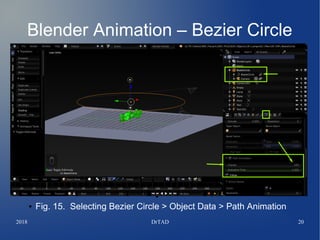
● Fig. 15. Selecting Bezier Circle > Object Data > Path Animation
2018 DrTAD 21
Blender Animation – Bezier Circle
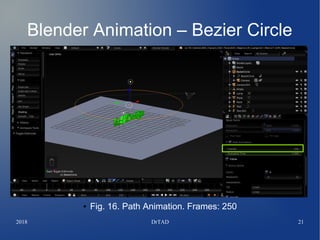
● Fig. 16. Path Animation. Frames: 250
2018 DrTAD 22
Variant 1
2018 DrTAD 23
Blender Animation – Output Render
- 1
● Fig. 17. Output Render > Output file name (Frame Range Start:1 to
End: 250) + FFmpeg video
2018 DrTAD 24
Blender Animation – Variant 1
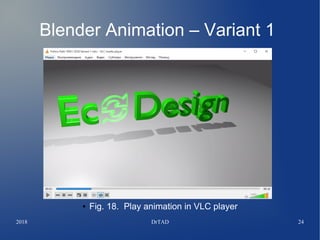
● Fig. 18. Play animation in VLC player
2018 DrTAD 25
Blender Animation – Variant 1
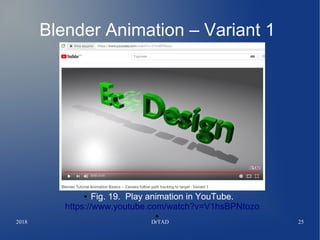
● Fig. 19. Play animation in YouTube.
https://www.youtube.com/watch?v=V1hsBPNtozo
●
2018 DrTAD 26
Variant 2
2018 DrTAD 27
Blender Animation – Output Render
- 2
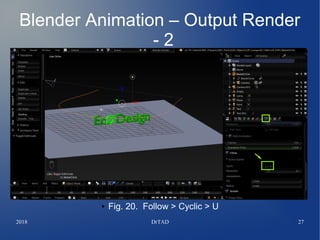
● Fig. 20. Follow > Cyclic > U
2018 DrTAD 28
Blender Animation – Variant 2
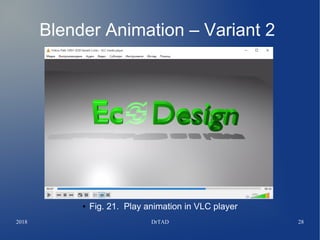
● Fig. 21. Play animation in VLC player
2018 DrTAD 29
Blender Animation – Variant 1
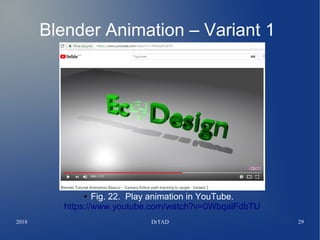
● Fig. 22. Play animation in YouTube.
https://www.youtube.com/watch?v=0WbqalFdbTU
2018 DrTAD 30
References
●Blender Software
https://www.blender.org/
●Modern accessible application of the system Blender in 3D design practice.
https://www.researchgate.net/publication/312033613_Modern_accessible_application_of_the_syste
m_Blender_in_3D_design_practice
●Object Data / Path Animation & Active Spline.
●https://docs.blender.org/manual/en/dev/modeling/curves/properties/data.html#path-animation
●Blender Tutorial - Appending / Join multiple Blend files into one scene using free commercial
resources. DOI: 10.13140/RG.2.2.23028.45444/1
●https://www.researchgate.net/publication/326960717_Blender_Tutorial-
Appending_Join_multiple_Blend_files_into_one_scene_using_free_commercial_resources
●https://www.slideshare.net/TihomirDovramadjievP/blender-tutorial-appending-join-multiple-blend-
files-into-one-scene-using-free-commercial-resources-109409339
● Blender Camera Follow Path Tutorial
https://www.youtube.com/watch?v=NZRtAtAvL6k
●How To Move Camera In Circular Way In Blender - Quick Tutorial
https://www.youtube.com/watch?v=63_nvGRHLIQ
●Blender Tutorial Animation Basics – Camera follow path tracking to target - Variant 1
https://www.youtube.com/watch?v=V1hsBPNtozo&feature=youtu.be
●Blender Tutorial Animation Basics – Camera follow path tracking to target - Variant 2
https://www.youtube.com/watch?v=0WbqalFdbTU&feature=youtu.be

Blender Tutorial Animation Basics - Camera follow path tracking to target

  • 1.
    Blender Tutorial Animation Basics– Camera follow path tracking to target Assoc. Prof. Dr. Eng. Tihomir Dovramadjiev Technical University of Varna MTF, Department Industrial Design tihomir.dovramadjiev@tu-varna.bg ● DOI: 10.13140/RG.2.2.18939.00808 ● https://www.researchgate.net/publication/326977171_Blender_Tutorial_Animation_Basic s-Camera_follow_path_tracking_to_target
  • 2.
    2018 DrTAD 2 AboutBlender software Blender is the free and open source 3D creation suite. It supports the entirety of the 3D pipeline—modeling, rigging, animation, simulation, rendering, compositing and motion tracking, even video editing and game creation. ●https://www.blender.org/ ●Modern accessible application of the system Blender in 3D design practice. https://www.researchgate.net/publication/312033613_Modern_accessibl e_application_of_the_system_Blender_in_3D_design_practice
  • 3.
    2018 DrTAD 3 Blender- Object Data / Path Animation The Path Animation settings can be used to determine how child objects move along a certain path. ●Frames. The number of frames that are needed to traverse the path, defining the maximum value for the Evaluation Time setting. ●Evaluation Time. Parametric position along the length of the curve that object following it should be at (the position is evaluated by dividing by the Path Length value). By default, it is linked to the global frame number, but could be keyframed to give more control over the path animation. ●Follow. Make the curve path children rotate along the curvature of the path. ●https://docs.blender.org/manual/en/dev/modeling/curves/properties/data.html?highlight=object %20data%20path%20animation
  • 4.
    2018 DrTAD 4 Blender- Object Data / Path Animation - Active Spline The Active Spline panel becomes available during Edit Mode. ●Cyclic. Closes the curve. ●Resolution. Alters the smoothness of each segment by changing the number of subdivisions. ●Interpolation ●Tilt. Alters how the tilt of a segment is calculated. ●Radius. Alters how the radius of a beveled curve is calculated. The effects are easier to see after Shrinking/Fattening a control point Alt-S. ●Smooth. Smooths the normals of the curve. ●https://docs.blender.org/manual/en/dev/modeling/curves/properties/data.html?highlight=object %20data%20path%20animation
  • 5.
  • 6.
    2018 DrTAD 6 BlenderAnimation– The Scene ● Fig. 1. The Scene is available (created) from: DOI: 10.13140/RG.2.2.23028.45444/1 https://www.researchgate.net/publication/326960717_Blender_Tutorial- Appending_Join_multiple_Blend_files_into_one_scene_using_free_commercial_resources ● https://www.slideshare.net/TihomirDovramadjievP/blender-tutorial-appending-join-multiple-blend-files-into-one- scene-using-free-commercial-resources-109409339
  • 7.
    2018 DrTAD 7 BlenderAnimation – Adding Curve ● ● Fig. 2. Adding Curve. Add > Curve > Circle
  • 8.
    2018 DrTAD 8 BlenderAnimation – Scaling ● ● Fig. 3. Scaling Curve (Bezier Circle). Key „S“
  • 9.
    2018 DrTAD 9 BlenderAnimation – The Scene ● ● Fig. 4. The Scene
  • 10.
    2018 DrTAD 10 BlenderAnimation – Target ● ● Fig. 5. Adding Target. Add > Empty > Plain Axes
  • 11.
    2018 DrTAD 11 BlenderAnimation – Target ● ● Fig. 6. Position of the Target (Empty - Plain Axes)
  • 12.
    2018 DrTAD 12 BlenderAnimation – Object Constraint ● Fig. 7. Selecting Camera > Object Constraints > Add Object Constraint
  • 13.
    2018 DrTAD 13 BlenderAnimation – Tracking ● ● Fig. 8. Add Object Constraint > Tracking > Track To
  • 14.
    2018 DrTAD 14 BlenderAnimation – Tracking ● Fig. 9. Track to target > Empty
  • 15.
    2018 DrTAD 15 BlenderAnimation – Tracking ● ● Fig. 10. Track to target > Empty
  • 16.
    2018 DrTAD 16 BlenderAnimation – Tracking ● ● Fig. 11. Track to target > Empty > Axe + Z
  • 17.
    2018 DrTAD 17 BlenderAnimation – Camera View ● ● Fig. 12. Camera View
  • 18.
    2018 DrTAD 18 BlenderAnimation – Camera to path ● ● Fig. 13. 1. Selecting Camera > 2 + „Shift“ Key selecting path. (Orange color)
  • 19.
    2018 DrTAD 19 BlenderAnimation – Follow path ● ● Fig. 14. Set Parent to > Follow Path. Keys „Ctrl + P“
  • 20.
    2018 DrTAD 20 BlenderAnimation – Bezier Circle ● ● Fig. 15. Selecting Bezier Circle > Object Data > Path Animation
  • 21.
    2018 DrTAD 21 BlenderAnimation – Bezier Circle ● Fig. 16. Path Animation. Frames: 250
  • 22.
  • 23.
    2018 DrTAD 23 BlenderAnimation – Output Render - 1 ● Fig. 17. Output Render > Output file name (Frame Range Start:1 to End: 250) + FFmpeg video
  • 24.
    2018 DrTAD 24 BlenderAnimation – Variant 1 ● Fig. 18. Play animation in VLC player
  • 25.
    2018 DrTAD 25 BlenderAnimation – Variant 1 ● Fig. 19. Play animation in YouTube. https://www.youtube.com/watch?v=V1hsBPNtozo ●
  • 26.
  • 27.
    2018 DrTAD 27 BlenderAnimation – Output Render - 2 ● Fig. 20. Follow > Cyclic > U
  • 28.
    2018 DrTAD 28 BlenderAnimation – Variant 2 ● Fig. 21. Play animation in VLC player
  • 29.
    2018 DrTAD 29 BlenderAnimation – Variant 1 ● Fig. 22. Play animation in YouTube. https://www.youtube.com/watch?v=0WbqalFdbTU
  • 30.
    2018 DrTAD 30 References ●BlenderSoftware https://www.blender.org/ ●Modern accessible application of the system Blender in 3D design practice. https://www.researchgate.net/publication/312033613_Modern_accessible_application_of_the_syste m_Blender_in_3D_design_practice ●Object Data / Path Animation & Active Spline. ●https://docs.blender.org/manual/en/dev/modeling/curves/properties/data.html#path-animation ●Blender Tutorial - Appending / Join multiple Blend files into one scene using free commercial resources. DOI: 10.13140/RG.2.2.23028.45444/1 ●https://www.researchgate.net/publication/326960717_Blender_Tutorial- Appending_Join_multiple_Blend_files_into_one_scene_using_free_commercial_resources ●https://www.slideshare.net/TihomirDovramadjievP/blender-tutorial-appending-join-multiple-blend- files-into-one-scene-using-free-commercial-resources-109409339 ● Blender Camera Follow Path Tutorial https://www.youtube.com/watch?v=NZRtAtAvL6k ●How To Move Camera In Circular Way In Blender - Quick Tutorial https://www.youtube.com/watch?v=63_nvGRHLIQ ●Blender Tutorial Animation Basics – Camera follow path tracking to target - Variant 1 https://www.youtube.com/watch?v=V1hsBPNtozo&feature=youtu.be ●Blender Tutorial Animation Basics – Camera follow path tracking to target - Variant 2 https://www.youtube.com/watch?v=0WbqalFdbTU&feature=youtu.be