TREE
What is Tree???
???
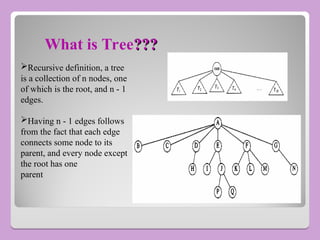
Recursive definition, a tree
is a collection of n nodes, one
of which is the root, and n - 1
edges.
Having n - 1 edges follows
from the fact that each edge
connects some node to its
parent, and every node except
the root has one
parent
General Tree
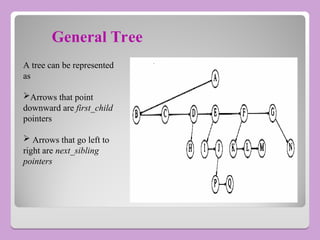
A tree can be represented
as
Arrows that point
downward are first_child
pointers
 Arrows that go left to
right are next_sibling
pointers
Trees
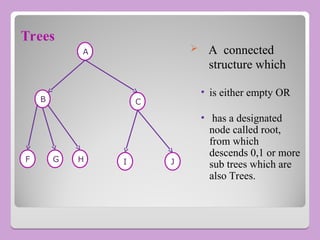
 A connected
structure which
• is either empty OR
• has a designated
node called root,
from which
descends 0,1 or more
sub trees which are
also Trees.
A
C
J
I
H
G
F
B
Terminologies
• Finite number of elements called nodes, & finite set of
directed lines called branches, that connect the nodes.
• Branch directed towards a node is an In-degree Branch.
• Branch directed away from the node is Out-degree Branch.
Continued...
• The node with out-degree Zero(0) is known as leaf or a
terminal node.
• Sum of number of In-degree and Out-degree node branches =
degree of node
• If Tree is not empty the first node is called as root.
• Nodes that are neither root nor a leaf are known as Internal
nodes.
• Node that has subtrees is the parent of the roots of the
subtrees.
• Roots of these subtrees are children of the Node.
• Children of the Same Parent are Siblings.
• Ancestors of a node are all the nodes along the path from the
root to the node.
Continued...
• Path is a sequence of nodes in which each node is adjacent to
the next one.
• Level of a node is its distance from the root.
• Root is at level Zero(0).
• Height(depth) of the Tree is the level of the leaf in the longest
path from the root.
Continued...
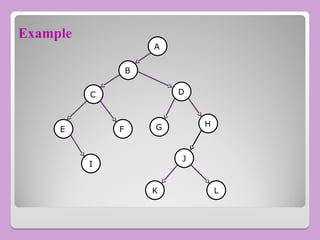
Example
A
B
C D
H
E
L
G
K
J
F
I
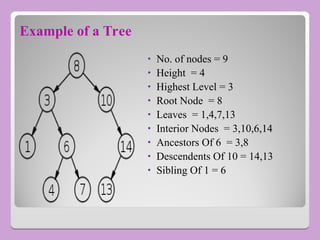
Example of a Tree
• No. of nodes = 9
• Height = 4
• Highest Level = 3
• Root Node = 8
• Leaves = 1,4,7,13
• Interior Nodes = 3,10,6,14
• Ancestors Of 6 = 3,8
• Descendents Of 10 = 14,13
• Sibling Of 1 = 6
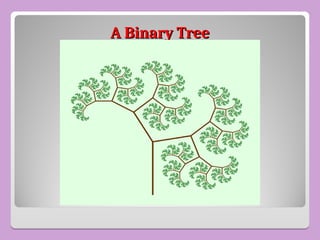
A Binary Tree
A Binary Tree
Binary Trees
 A finite set of vertices that is either
• Empty.
OR
• Consists of a root node together with two binary sub tree
which are disjoint from each other, and from the root and are
called the left and right sub tree.
• Node has either 0, 1 or at most 2 child.
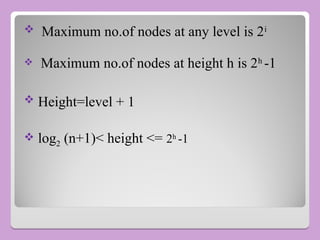
 Maximum no.of nodes at any level is 2i
 Maximum no.of nodes at height h is 2h
-1
 Height=level + 1
 log2 (n+1)< height <= 2h
-1
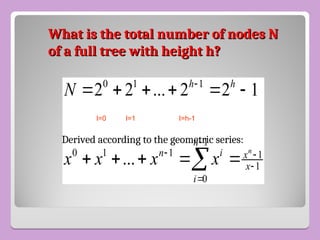
What is the total number of nodes N
of a full tree with height h?
0 1 1
1
0 1 1 1
1
0
2 2 ... 2 2 1
...
n
h h
n
n i x
x
i
N
x x x x


 


     
    

Derived according to the geometric series:
l=0 l=1 l=h-1
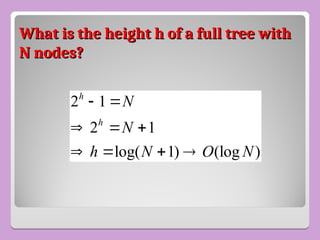
What is the height h of a full tree with
N nodes?
N nodes?
2 1
2 1
log( 1) (log )
h
h
N
N
h N O N
 
  
   
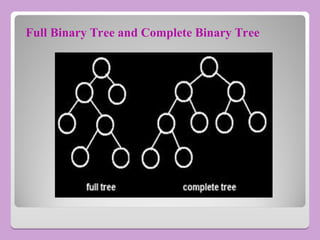
Full Binary Tree and Complete Binary Tree
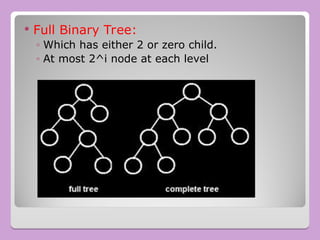
 Full Binary Tree:
◦ Which has either 2 or zero child.
◦ At most 2^i node at each level
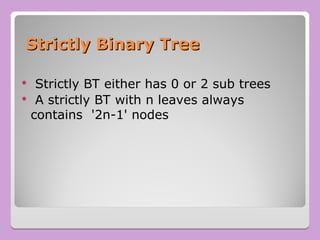
Strictly Binary Tree
 Strictly BT either has 0 or 2 sub trees
 A strictly BT with n leaves always
contains '2n-1' nodes
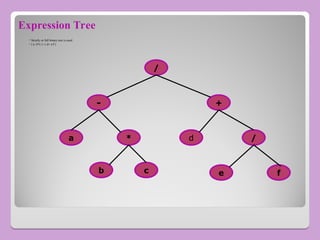
Expression Tree
 Strictly or full binary tree is used .
 ( a- b*c ) / ( d+ e/f )
/
+
-
/
d
*
a
b c f
e
BT Traversal
• Process of visiting each of the nodes in a tree and examine
the value there.
• Two kinds
• Depth-First Tree Traversal.
• Breadth-First Tree Traversal.
Depth First Tree Traversal
• Pre-Order : Root first, Left child, Right child.
• Post-Order : Left child, Right child, Root.
• In-Order : Left child, Root, Right child.
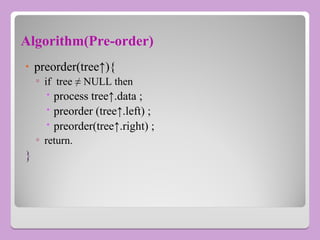
Algorithm(Pre-order)
• preorder(tree↑){
▫ if tree ≠ NULL then
 process tree↑.data ;
 preorder (tree↑.left) ;
 preorder(tree↑.right) ;
▫ return.
}
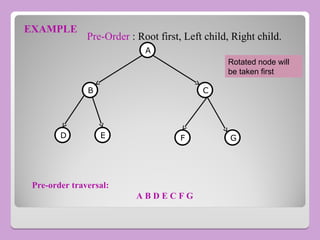
EXAMPLE
A
C
B
G
E
D F
Pre-order traversal:
A B D E C F G
Pre-Order : Root first, Left child, Right child.
Rotated node will
be taken first
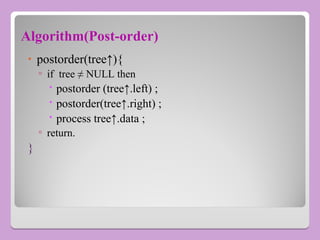
Algorithm(Post-order)
• postorder(tree↑){
▫ if tree ≠ NULL then
 postorder (tree↑.left) ;
 postorder(tree↑.right) ;
 process tree↑.data ;
▫ return.
}
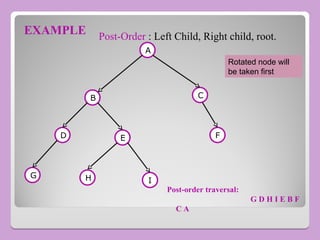
EXAMPLE
A
B C
E
D F
I
H
G
Post-order traversal:
G D H I E B F
C A
Post-Order : Left Child, Right child, root.
Rotated node will
be taken first
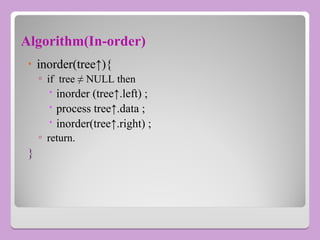
Algorithm(In-order)
• inorder(tree↑){
▫ if tree ≠ NULL then
 inorder (tree↑.left) ;
 process tree↑.data ;
 inorder(tree↑.right) ;
▫ return.
}
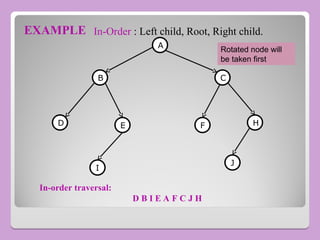
EXAMPLE
A
D
C
B
E F H
I
J
In-order traversal:
D B I E A F C J H
In-Order : Left child, Root, Right child.
Rotated node will
be taken first
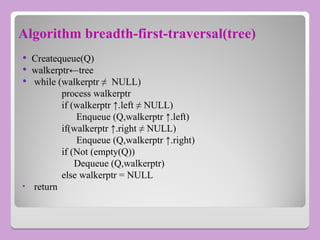
Algorithm breadth-first-traversal(tree)
 Createqueue(Q)
 walkerptr←tree
 while (walkerptr ≠ NULL)
process walkerptr
if (walkerptr ↑.left ≠ NULL)
Enqueue (Q,walkerptr ↑.left)
if(walkerptr ↑.right ≠ NULL)
Enqueue (Q,walkerptr ↑.right)
if (Not (empty(Q))
Dequeue (Q,walkerptr)
else walkerptr = NULL
• return
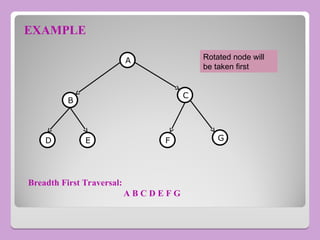
EXAMPLE
A
C
B
F G
E
D
Breadth First Traversal:
A B C D E F G
Rotated node will
be taken first
Threaded Binary Tree
 A binary tree with n nodes has 2n pointers out of which n+1 are always NULL,
So about half the space allocated for pointers is wasted
 We utilize this wasted space to contain some useful information
 A left NULL pointer can be used to store the address of inorder predecessor of
the node
 A right NULL pointer can be used to store the address of inorder successor of
the node.
 These pointers are called threads and a binary tree which implements these
pointers is called a Threaded Binary Tree
Threaded Binary Tree
 In a linked representation of binary tree,
there are more null links can be replaced
by pointers, called threads to other nodes.
A left null link of the node is replaced with
the address of its inorder predecessor ,
similarly a right null link of node is
replaced with the address of its inorder
successor.
Threaded Trees
Threaded Trees
 Binary trees have a lot of wasted space: the
leaf nodes each have 2 null pointers
 We can use these pointers to help us in inorder
traversals
 We have the pointers reference the next node
in an inorder traversal; called threads
 We need to know if a pointer is an actual link or
a thread, so we keep a boolean for each pointer
Threaded Binary Tree
 Threading Rules
◦ A 0 Right Child field at node p is replaced by a
pointer to the node that would be visited after
p when traversing the tree in inorder. That is, it
is replaced by the inorder successor of p.
◦ A 0 Left Child link at node p is replaced by a
pointer to the node that immediately precedes
node p in inorder (i.e., it is replaced by the
inorder predecessor of p).
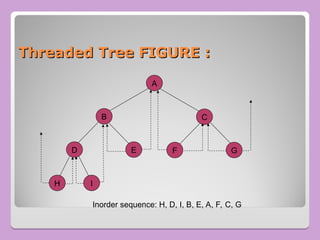
Threaded Tree FIGURE :
A
H I
B
D E
C
G
F
Inorder sequence: H, D, I, B, E, A, F, C, G
Threads
Threads
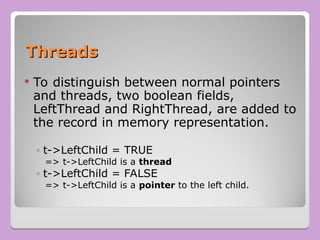
 To distinguish between normal pointers
and threads, two boolean fields,
LeftThread and RightThread, are added to
the record in memory representation.
◦ t->LeftChild = TRUE
=> t->LeftChild is a thread
◦ t->LeftChild = FALSE
=> t->LeftChild is a pointer to the left child.
Threads
Threads
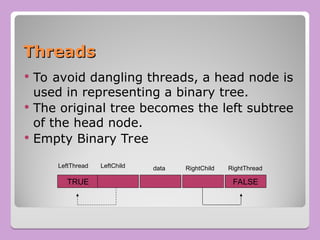
 To avoid dangling threads, a head node is
used in representing a binary tree.
 The original tree becomes the left subtree
of the head node.
 Empty Binary Tree
TRUE FALSE
LeftThread LeftChild RightChild RightThread
data
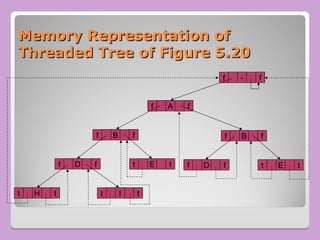
Memory Representation of
Threaded Tree of Figure 5.20
f - f
f A f
f B f
f D f
t H t t I t
t E t
f B f
f D f t E t
Inserting A Node to A
Threaded Binary Tree
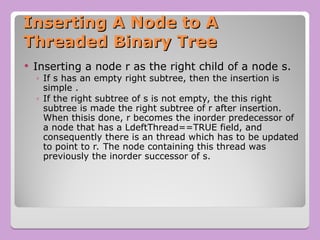
 Inserting a node r as the right child of a node s.
◦ If s has an empty right subtree, then the insertion is
simple .
◦ If the right subtree of s is not empty, the this right
subtree is made the right subtree of r after insertion.
When thisis done, r becomes the inorder predecessor of
a node that has a LdeftThread==TRUE field, and
consequently there is an thread which has to be updated
to point to r. The node containing this thread was
previously the inorder successor of s.
Insertion of r As A Right Child of s
in A Threaded Binary Tree
s
r
s
r
before after
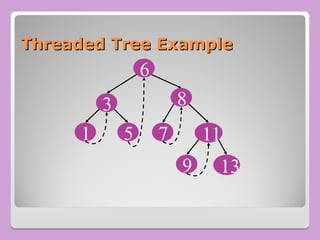
Threaded Tree Example
8
7
5
3
11
13
1
6
9
Threaded Tree Traversal
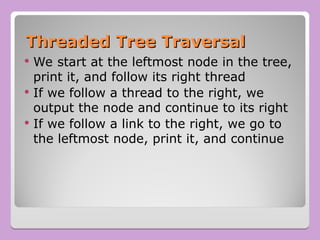
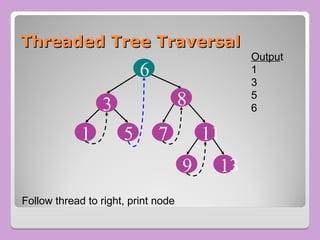
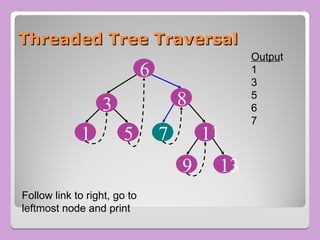
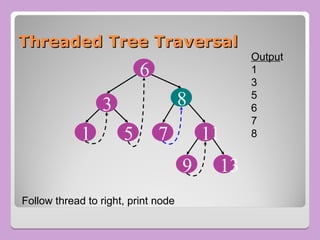
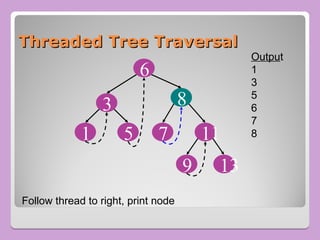
 We start at the leftmost node in the tree,
print it, and follow its right thread
 If we follow a thread to the right, we
output the node and continue to its right
 If we follow a link to the right, we go to
the leftmost node, print it, and continue
Threaded Tree Traversal
8
7
5
3
11
13
1
6
9
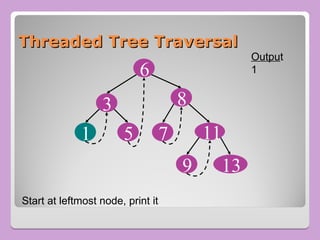
Start at leftmost node, print it
Output
1
Threaded Tree Traversal
8
7
5
3
11
13
1
6
9
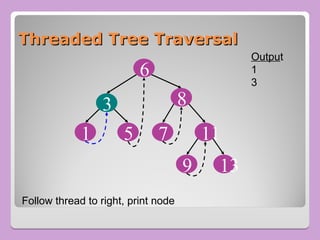
Follow thread to right, print node
Output
1
3
Threaded Tree Traversal
8
7
5
3
11
13
1
6
9
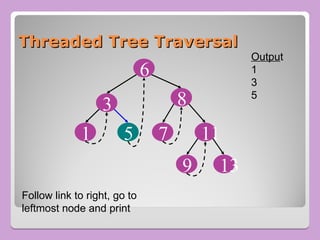
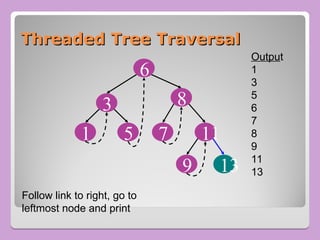
Follow link to right, go to
leftmost node and print
Output
1
3
5
Threaded Tree Traversal
8
7
5
3
11
13
1
6
9
Follow thread to right, print node
Output
1
3
5
6
Threaded Tree Traversal
8
7
5
3
11
13
1
6
9
Follow link to right, go to
leftmost node and print
Output
1
3
5
6
7
Threaded Tree Traversal
8
7
5
3
11
13
1
6
9
Follow thread to right, print node
Output
1
3
5
6
7
8
Threaded Tree Traversal
8
7
5
3
11
13
1
6
9
Follow thread to right, print node
Output
1
3
5
6
7
8
Threaded Tree Traversal
8
7
5
3
11
13
1
6
9
Follow link to right, go to
leftmost node and print
Output
1
3
5
6
7
8
9
11
13
Threaded Tree Traversal
8
7
5
3
11
13
1
6
9
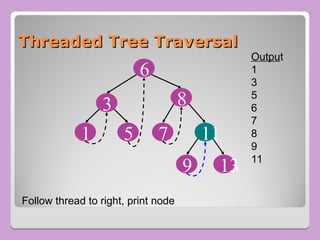
Follow thread to right, print node
Output
1
3
5
6
7
8
9
11
Threaded Tree Modification
 We’re still wasting pointers, since half of
our leafs’ pointers are still null
 We can add threads to the previous node
in an inorder traversal as well, which we
can use to traverse the tree backwards or
even to do postorder traversals
Binary Search Tree(Motivation)
• Insertion and Deletion in the middle of the array is very inefficient.
• Search Operation in an ordered linked lists is inefficient.
• To get the best of both, Binary Search Tree(BST) was introduced.
• The binary search tree is widely used data-structure for
information storage and retrieval as it supports many dynamic-set
operations including Search, Minimum, Maximum, Predecessor,
Successor, Insert and Delete.*
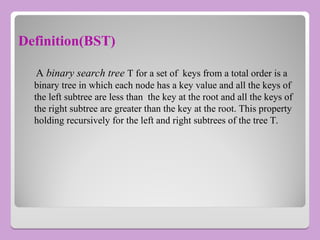
Definition(BST)
A binary search tree T for a set of keys from a total order is a
binary tree in which each node has a key value and all the keys of
the left subtree are less than the key at the root and all the keys of
the right subtree are greater than the key at the root. This property
holding recursively for the left and right subtrees of the tree T.
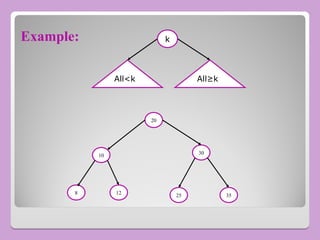
Example:
All<kA All≥kk
k
20
10 30
35
25
12
8
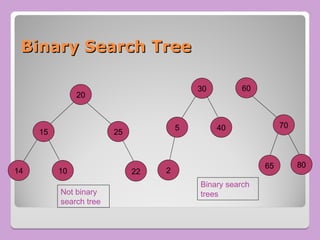
Binary Search Tree
Binary Search Tree
20
15 25
14 10 22
30
5 40
2
60
70
80
65
Not binary
search tree
Binary search
trees
Operations on BST
• Traversal
• Searching
• Insertion
• Deletion
BST Operation (Searching)
 Find Smallest element
 Find Largest element
 Find Requested element
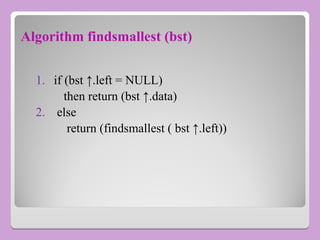
Algorithm findsmallest (bst)
1. if (bst ↑.left = NULL)
then return (bst ↑.data)
2. else
return (findsmallest ( bst ↑.left))
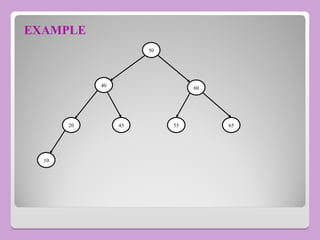
EXAMPLE
50
40 60
20 55 65
45
10
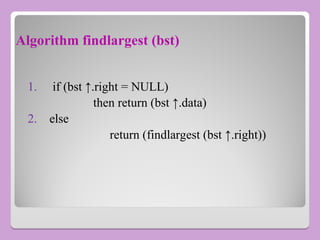
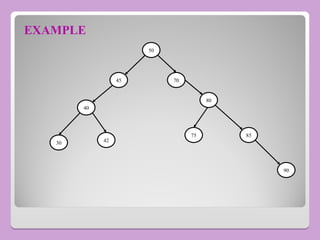
Algorithm findlargest (bst)
1. if (bst ↑.right = NULL)
then return (bst ↑.data)
2. else
return (findlargest (bst ↑.right))
EXAMPLE
50
45
40
42
75
80
90
85
30
70
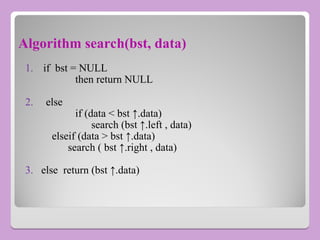
Algorithm search(bst, data)
1. if bst = NULL
then return NULL
2. else
if (data < bst ↑.data)
search (bst ↑.left , data)
elseif (data > bst ↑.data)
search ( bst ↑.right , data)
3. else return (bst ↑.data)
EXAMPLE
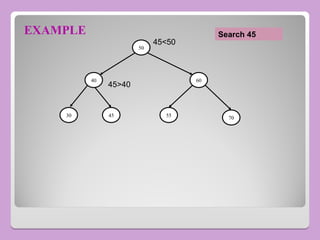
50
40
70
55
45
30
60
45<50
45>40
Search 45
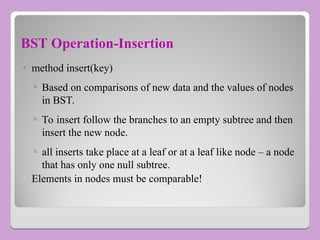
BST Operation-Insertion
• method insert(key)
▫ Based on comparisons of new data and the values of nodes
in BST.
▫ To insert follow the branches to an empty subtree and then
insert the new node.
▫ all inserts take place at a leaf or at a leaf like node – a node
that has only one null subtree.
• Elements in nodes must be comparable!
Algorithm
 Algorithm insert_bst(bst,data);
1) if bst = NULL;
A) then
a) new(P) ;
b) P↑.data←data ;
c) P↑.left←NULL ;
d) P↑.right←NULL ;
e) bst←P ;
f) return bst .
Continued…
B) Else
a) if (data < bst ↑.data)
then insert_bst (bst ↑.left,data)
b) if (data ≥ bst ↑.data)
then insert_bst(bst ↑.right,data)
C) return.
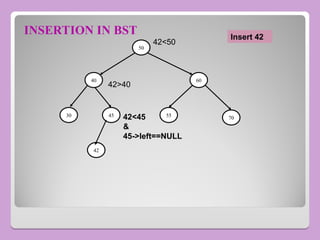
INSERTION IN BST
50
40
70
55
45
30
60
42<50
42>40
42
42<45
&
45->left==NULL
Insert 42
BST Operation-Deletion
 removes a specified item from the BST and adjusts the tree.
 uses a binary search to locate the target items.
 starting at the root it probes down the tree till it finds the target or
reaches a leaf node (target not in the tree)
 removal of a node must not leave a ‘gap’ in the tree.
Algorithm Deletion
• Algorithm delete_bst (bst , data)
1) if bst = NULL
then return NULL
2) if (data < bst ↑.data)
then return delete_bst (bst ↑.left, data)
3) elseif (data > bst ↑.data)
then return delete_bst (bst ↑.right, data)
Continued…
4) Else
// found the node to be deleted & test whether it’s a leaf node.
a) if (bst ↑.left = NULL)
a.1) dataptr←bst
a.2) bst←bst ↑.right
a.3) free(dataptr)
a.4) return ;
b) elseif ( bst ↑.right =NULL)
b.1) dataptr←bst
b.2) bst←bst ↑.left
Continued…
b.3) free(dataptr)
b.4) return
c) else
∕ ∕ Node to be deleted is not a leaf or leaf like
∕ ∕ node. Find the largest node in the left subtree
c.1) dataptr←bst ↑.left
c.2) while (dataptr ↑.right ≠ NULL)
c.2.1) dataptr← dataptr ↑.right
∕ ∕ Node found.Move the Data
c.3) bst ↑.data←dataptr ↑.data
c.4) return delete_bst ( bst ↑.left, dataptr ↑.data)
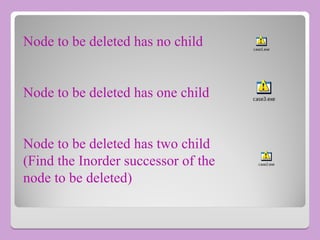
Node to be deleted has no child
Node to be deleted has one child
Node to be deleted has two child
(Find the Inorder successor of the
node to be deleted)
case1.exe
case3.exe
case2.exe
Reconstruction of Binary Tree
From given inorder and preorder we have to construct a tree
From given inorder and postorder we have to construct a tree
NOTE: The inorder traversal of binary search tree is always in ascending
order.
reconstruction.exe
Drawbacks of Binary Search Tree
• The Disadvantage of a Binary Search Tree is that its
Height can be as large as N.
• This means that the time needed to perform Insertion
and deletion and many other operations can be O(N)
in the worst case.
• Can be removed using Height Balanced Binary Tree
AVL tree
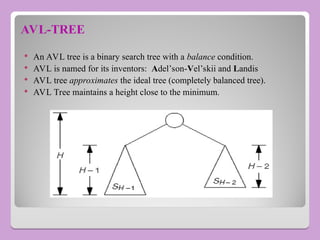
AVL-TREE
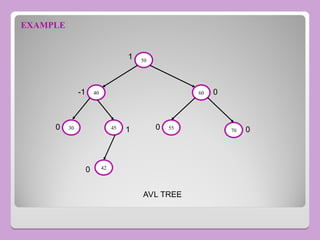
 An AVL tree is a binary search tree with a balance condition.
 AVL is named for its inventors: Adel’son-Vel’skii and Landis
 AVL tree approximates the ideal tree (completely balanced tree).
 AVL Tree maintains a height close to the minimum.
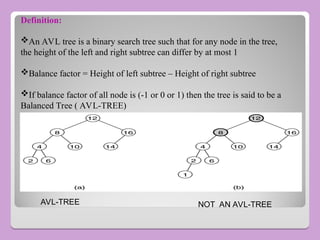
AVL-TREE NOT AN AVL-TREE
Definition:
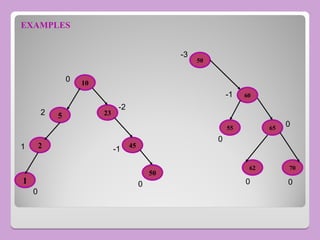
An AVL tree is a binary search tree such that for any node in the tree,
the height of the left and right subtree can differ by at most 1
Balance factor = Height of left subtree – Height of right subtree
If balance factor of all node is (-1 or 0 or 1) then the tree is said to be a
Balanced Tree ( AVL-TREE)
50
40
70
55
45
30
60
42
0
0
0
0 1
-1 0
1
AVL TREE
EXAMPLE
EXAMPLES
10
70
62
65
55
60
50
23
45
50
5
2
1
0
0
0
0 0
0
-1
-1
1
-2
2
0
-3
Rebalancing
 Suppose the node to be rebalanced is X. There are
4 cases that we might have to fix (two are the
mirror images of the other two):
1. An insertion in the left subtree of the left child of X,
2. An insertion in the right subtree of the left child of X,
3. An insertion in the left subtree of the right child of X,
or
4. An insertion in the right subtree of the right child of X.
 Balance is restored by tree rotations.
Single Rotation
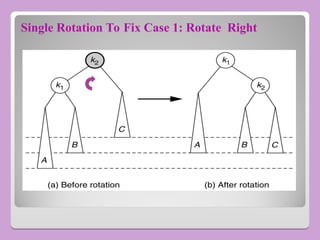
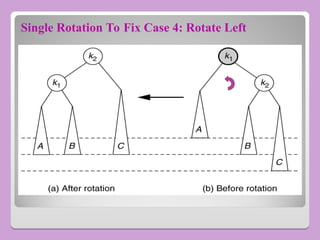
 A single rotation switches the roles of the parent and child
while maintaining the search order
 Single rotation handles the outside cases (i.e. 1 and 4)
 We rotate between a node and its child.
◦ Child becomes parent
◦ Parent becomes right child in case 1 and left child in case 4
 The result is a binary search tree that satisfies the AVL
property
Single Rotation To Fix Case 1: Rotate Right
Single Rotation To Fix Case 4: Rotate Left
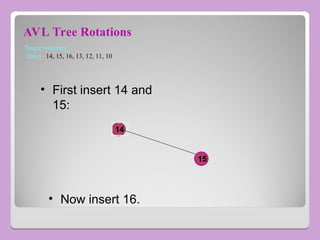
AVL Tree Rotations
Single rotations:
insert 14, 15, 16, 13, 12, 11, 10
14
15
• First insert 14 and
15:
• Now insert 16.
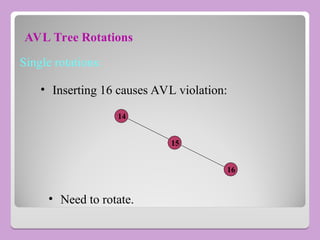
AVL Tree Rotations
Single rotations:
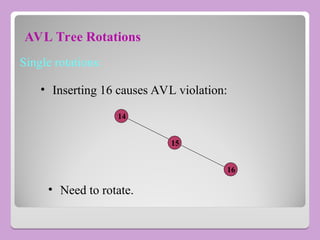
14
15
• Inserting 16 causes AVL violation:
• Need to rotate.
16
AVL Tree Rotations
Single rotations:
14
15
• Inserting 16 causes AVL violation:
• Need to rotate.
16
AVL Tree Rotations
Single rotations:
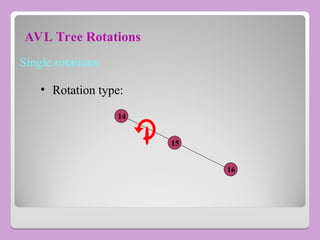
14
15
• Rotation type:
16
AVL Tree Rotations
Single rotations:
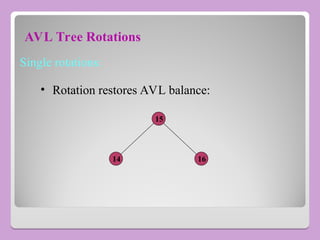
14
15
• Rotation restores AVL balance:
16
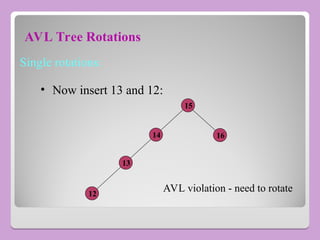
AVL Tree Rotations
Single rotations:
14
15
16
• Now insert 13 and 12:
13
12
AVL violation - need to rotate
AVL Tree Rotations
Single rotations:
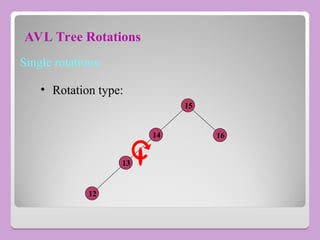
• Rotation type:
14
15
16
13
12
AVL Tree Rotations
Single rotations:
13
15
16
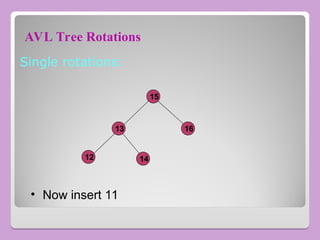
• Now insert 11
12 14
AVL Tree Rotations
Single rotations:
13
15
16
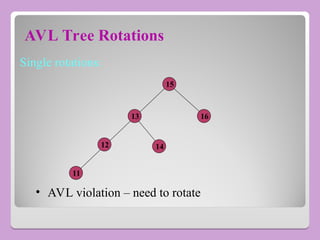
• AVL violation – need to rotate
12 14
11
AVL Tree Rotations
Single rotations:
13
15
16
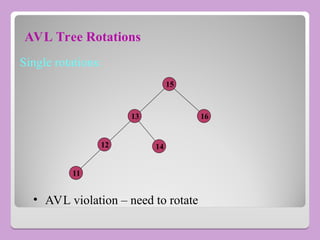
• AVL violation – need to rotate
12 14
11
AVL Tree Rotations
Single rotations:
• Rotation type:
13
15
16
12 14
11
AVL Tree Rotations
Single rotations:
13
15
16
12
14
11
• Now insert 10
AVL Tree Rotations
Single rotations:
13
15
16
12
14
11
10
AVL violation – need to rotate
AVL Tree Rotations
Single rotations:
13
15
16
12
14
11
10
• Rotation type:
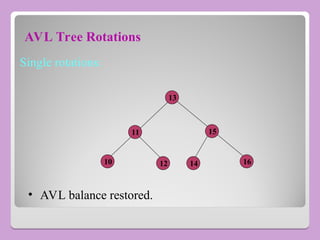
AVL Tree Rotations
Single rotations:
13
15
16
11
14
10 12
• AVL balance restored.
Binary search Tree and avl tree , treee.ppt

Binary search Tree and avl tree , treee.ppt

  • 1.
  • 2.
    What is Tree??? ??? Recursivedefinition, a tree is a collection of n nodes, one of which is the root, and n - 1 edges. Having n - 1 edges follows from the fact that each edge connects some node to its parent, and every node except the root has one parent
  • 3.
    General Tree A treecan be represented as Arrows that point downward are first_child pointers  Arrows that go left to right are next_sibling pointers
  • 4.
    Trees  A connected structurewhich • is either empty OR • has a designated node called root, from which descends 0,1 or more sub trees which are also Trees. A C J I H G F B
  • 5.
    Terminologies • Finite numberof elements called nodes, & finite set of directed lines called branches, that connect the nodes. • Branch directed towards a node is an In-degree Branch. • Branch directed away from the node is Out-degree Branch.
  • 6.
    Continued... • The nodewith out-degree Zero(0) is known as leaf or a terminal node. • Sum of number of In-degree and Out-degree node branches = degree of node • If Tree is not empty the first node is called as root. • Nodes that are neither root nor a leaf are known as Internal nodes.
  • 7.
    • Node thathas subtrees is the parent of the roots of the subtrees. • Roots of these subtrees are children of the Node. • Children of the Same Parent are Siblings. • Ancestors of a node are all the nodes along the path from the root to the node. Continued...
  • 8.
    • Path isa sequence of nodes in which each node is adjacent to the next one. • Level of a node is its distance from the root. • Root is at level Zero(0). • Height(depth) of the Tree is the level of the leaf in the longest path from the root. Continued...
  • 9.
  • 10.
    Example of aTree • No. of nodes = 9 • Height = 4 • Highest Level = 3 • Root Node = 8 • Leaves = 1,4,7,13 • Interior Nodes = 3,10,6,14 • Ancestors Of 6 = 3,8 • Descendents Of 10 = 14,13 • Sibling Of 1 = 6
  • 11.
    A Binary Tree ABinary Tree
  • 12.
    Binary Trees  Afinite set of vertices that is either • Empty. OR • Consists of a root node together with two binary sub tree which are disjoint from each other, and from the root and are called the left and right sub tree. • Node has either 0, 1 or at most 2 child.
  • 13.
     Maximum no.ofnodes at any level is 2i  Maximum no.of nodes at height h is 2h -1  Height=level + 1  log2 (n+1)< height <= 2h -1
  • 14.
    What is thetotal number of nodes N What is the total number of nodes N of a full tree with height h? of a full tree with height h? 0 1 1 1 0 1 1 1 1 0 2 2 ... 2 2 1 ... n h h n n i x x i N x x x x                   Derived according to the geometric series: l=0 l=1 l=h-1
  • 15.
    What is theheight h of a full tree with What is the height h of a full tree with N nodes? N nodes? 2 1 2 1 log( 1) (log ) h h N N h N O N         
  • 16.
    Full Binary Treeand Complete Binary Tree
  • 17.
     Full BinaryTree: ◦ Which has either 2 or zero child. ◦ At most 2^i node at each level
  • 18.
    Strictly Binary Tree StrictlyBinary Tree  Strictly BT either has 0 or 2 sub trees  A strictly BT with n leaves always contains '2n-1' nodes
  • 19.
    Expression Tree  Strictlyor full binary tree is used .  ( a- b*c ) / ( d+ e/f ) / + - / d * a b c f e
  • 20.
    BT Traversal • Processof visiting each of the nodes in a tree and examine the value there. • Two kinds • Depth-First Tree Traversal. • Breadth-First Tree Traversal.
  • 21.
    Depth First TreeTraversal • Pre-Order : Root first, Left child, Right child. • Post-Order : Left child, Right child, Root. • In-Order : Left child, Root, Right child.
  • 22.
    Algorithm(Pre-order) • preorder(tree↑){ ▫ iftree ≠ NULL then  process tree↑.data ;  preorder (tree↑.left) ;  preorder(tree↑.right) ; ▫ return. }
  • 23.
    EXAMPLE A C B G E D F Pre-order traversal: AB D E C F G Pre-Order : Root first, Left child, Right child. Rotated node will be taken first
  • 24.
    Algorithm(Post-order) • postorder(tree↑){ ▫ iftree ≠ NULL then  postorder (tree↑.left) ;  postorder(tree↑.right) ;  process tree↑.data ; ▫ return. }
  • 25.
    EXAMPLE A B C E D F I H G Post-ordertraversal: G D H I E B F C A Post-Order : Left Child, Right child, root. Rotated node will be taken first
  • 26.
    Algorithm(In-order) • inorder(tree↑){ ▫ iftree ≠ NULL then  inorder (tree↑.left) ;  process tree↑.data ;  inorder(tree↑.right) ; ▫ return. }
  • 27.
    EXAMPLE A D C B E F H I J In-ordertraversal: D B I E A F C J H In-Order : Left child, Root, Right child. Rotated node will be taken first
  • 28.
    Algorithm breadth-first-traversal(tree)  Createqueue(Q) walkerptr←tree  while (walkerptr ≠ NULL) process walkerptr if (walkerptr ↑.left ≠ NULL) Enqueue (Q,walkerptr ↑.left) if(walkerptr ↑.right ≠ NULL) Enqueue (Q,walkerptr ↑.right) if (Not (empty(Q)) Dequeue (Q,walkerptr) else walkerptr = NULL • return
  • 29.
    EXAMPLE A C B F G E D Breadth FirstTraversal: A B C D E F G Rotated node will be taken first
  • 30.
    Threaded Binary Tree A binary tree with n nodes has 2n pointers out of which n+1 are always NULL, So about half the space allocated for pointers is wasted  We utilize this wasted space to contain some useful information  A left NULL pointer can be used to store the address of inorder predecessor of the node  A right NULL pointer can be used to store the address of inorder successor of the node.  These pointers are called threads and a binary tree which implements these pointers is called a Threaded Binary Tree
  • 31.
    Threaded Binary Tree ThreadedBinary Tree  In a linked representation of binary tree, there are more null links can be replaced by pointers, called threads to other nodes. A left null link of the node is replaced with the address of its inorder predecessor , similarly a right null link of node is replaced with the address of its inorder successor.
  • 32.
    Threaded Trees Threaded Trees Binary trees have a lot of wasted space: the leaf nodes each have 2 null pointers  We can use these pointers to help us in inorder traversals  We have the pointers reference the next node in an inorder traversal; called threads  We need to know if a pointer is an actual link or a thread, so we keep a boolean for each pointer
  • 33.
    Threaded Binary Tree ThreadedBinary Tree  Threading Rules ◦ A 0 Right Child field at node p is replaced by a pointer to the node that would be visited after p when traversing the tree in inorder. That is, it is replaced by the inorder successor of p. ◦ A 0 Left Child link at node p is replaced by a pointer to the node that immediately precedes node p in inorder (i.e., it is replaced by the inorder predecessor of p).
  • 34.
    Threaded Tree FIGURE: Threaded Tree FIGURE : A H I B D E C G F Inorder sequence: H, D, I, B, E, A, F, C, G
  • 35.
    Threads Threads  To distinguishbetween normal pointers and threads, two boolean fields, LeftThread and RightThread, are added to the record in memory representation. ◦ t->LeftChild = TRUE => t->LeftChild is a thread ◦ t->LeftChild = FALSE => t->LeftChild is a pointer to the left child.
  • 36.
    Threads Threads  To avoiddangling threads, a head node is used in representing a binary tree.  The original tree becomes the left subtree of the head node.  Empty Binary Tree TRUE FALSE LeftThread LeftChild RightChild RightThread data
  • 37.
    Memory Representation of MemoryRepresentation of Threaded Tree of Figure 5.20 Threaded Tree of Figure 5.20 f - f f A f f B f f D f t H t t I t t E t f B f f D f t E t
  • 38.
    Inserting A Nodeto A Inserting A Node to A Threaded Binary Tree Threaded Binary Tree  Inserting a node r as the right child of a node s. ◦ If s has an empty right subtree, then the insertion is simple . ◦ If the right subtree of s is not empty, the this right subtree is made the right subtree of r after insertion. When thisis done, r becomes the inorder predecessor of a node that has a LdeftThread==TRUE field, and consequently there is an thread which has to be updated to point to r. The node containing this thread was previously the inorder successor of s.
  • 39.
    Insertion of rAs A Right Child of s Insertion of r As A Right Child of s in A Threaded Binary Tree in A Threaded Binary Tree s r s r before after
  • 40.
    Threaded Tree Example ThreadedTree Example 8 7 5 3 11 13 1 6 9
  • 41.
    Threaded Tree Traversal ThreadedTree Traversal  We start at the leftmost node in the tree, print it, and follow its right thread  If we follow a thread to the right, we output the node and continue to its right  If we follow a link to the right, we go to the leftmost node, print it, and continue
  • 42.
    Threaded Tree Traversal ThreadedTree Traversal 8 7 5 3 11 13 1 6 9 Start at leftmost node, print it Output 1
  • 43.
    Threaded Tree Traversal ThreadedTree Traversal 8 7 5 3 11 13 1 6 9 Follow thread to right, print node Output 1 3
  • 44.
    Threaded Tree Traversal ThreadedTree Traversal 8 7 5 3 11 13 1 6 9 Follow link to right, go to leftmost node and print Output 1 3 5
  • 45.
    Threaded Tree Traversal ThreadedTree Traversal 8 7 5 3 11 13 1 6 9 Follow thread to right, print node Output 1 3 5 6
  • 46.
    Threaded Tree Traversal ThreadedTree Traversal 8 7 5 3 11 13 1 6 9 Follow link to right, go to leftmost node and print Output 1 3 5 6 7
  • 47.
    Threaded Tree Traversal ThreadedTree Traversal 8 7 5 3 11 13 1 6 9 Follow thread to right, print node Output 1 3 5 6 7 8
  • 48.
    Threaded Tree Traversal ThreadedTree Traversal 8 7 5 3 11 13 1 6 9 Follow thread to right, print node Output 1 3 5 6 7 8
  • 49.
    Threaded Tree Traversal ThreadedTree Traversal 8 7 5 3 11 13 1 6 9 Follow link to right, go to leftmost node and print Output 1 3 5 6 7 8 9 11 13
  • 50.
    Threaded Tree Traversal ThreadedTree Traversal 8 7 5 3 11 13 1 6 9 Follow thread to right, print node Output 1 3 5 6 7 8 9 11
  • 51.
    Threaded Tree Modification ThreadedTree Modification  We’re still wasting pointers, since half of our leafs’ pointers are still null  We can add threads to the previous node in an inorder traversal as well, which we can use to traverse the tree backwards or even to do postorder traversals
  • 52.
    Binary Search Tree(Motivation) •Insertion and Deletion in the middle of the array is very inefficient. • Search Operation in an ordered linked lists is inefficient. • To get the best of both, Binary Search Tree(BST) was introduced. • The binary search tree is widely used data-structure for information storage and retrieval as it supports many dynamic-set operations including Search, Minimum, Maximum, Predecessor, Successor, Insert and Delete.*
  • 53.
    Definition(BST) A binary searchtree T for a set of keys from a total order is a binary tree in which each node has a key value and all the keys of the left subtree are less than the key at the root and all the keys of the right subtree are greater than the key at the root. This property holding recursively for the left and right subtrees of the tree T.
  • 54.
  • 55.
    Binary Search Tree BinarySearch Tree 20 15 25 14 10 22 30 5 40 2 60 70 80 65 Not binary search tree Binary search trees
  • 56.
    Operations on BST •Traversal • Searching • Insertion • Deletion
  • 57.
    BST Operation (Searching) Find Smallest element  Find Largest element  Find Requested element
  • 58.
    Algorithm findsmallest (bst) 1.if (bst ↑.left = NULL) then return (bst ↑.data) 2. else return (findsmallest ( bst ↑.left))
  • 59.
  • 60.
    Algorithm findlargest (bst) 1.if (bst ↑.right = NULL) then return (bst ↑.data) 2. else return (findlargest (bst ↑.right))
  • 61.
  • 62.
    Algorithm search(bst, data) 1.if bst = NULL then return NULL 2. else if (data < bst ↑.data) search (bst ↑.left , data) elseif (data > bst ↑.data) search ( bst ↑.right , data) 3. else return (bst ↑.data)
  • 63.
  • 64.
    BST Operation-Insertion • methodinsert(key) ▫ Based on comparisons of new data and the values of nodes in BST. ▫ To insert follow the branches to an empty subtree and then insert the new node. ▫ all inserts take place at a leaf or at a leaf like node – a node that has only one null subtree. • Elements in nodes must be comparable!
  • 65.
    Algorithm  Algorithm insert_bst(bst,data); 1)if bst = NULL; A) then a) new(P) ; b) P↑.data←data ; c) P↑.left←NULL ; d) P↑.right←NULL ; e) bst←P ; f) return bst .
  • 66.
    Continued… B) Else a) if(data < bst ↑.data) then insert_bst (bst ↑.left,data) b) if (data ≥ bst ↑.data) then insert_bst(bst ↑.right,data) C) return.
  • 67.
  • 68.
    BST Operation-Deletion  removesa specified item from the BST and adjusts the tree.  uses a binary search to locate the target items.  starting at the root it probes down the tree till it finds the target or reaches a leaf node (target not in the tree)  removal of a node must not leave a ‘gap’ in the tree.
  • 69.
    Algorithm Deletion • Algorithmdelete_bst (bst , data) 1) if bst = NULL then return NULL 2) if (data < bst ↑.data) then return delete_bst (bst ↑.left, data) 3) elseif (data > bst ↑.data) then return delete_bst (bst ↑.right, data)
  • 70.
    Continued… 4) Else // foundthe node to be deleted & test whether it’s a leaf node. a) if (bst ↑.left = NULL) a.1) dataptr←bst a.2) bst←bst ↑.right a.3) free(dataptr) a.4) return ; b) elseif ( bst ↑.right =NULL) b.1) dataptr←bst b.2) bst←bst ↑.left
  • 71.
    Continued… b.3) free(dataptr) b.4) return c)else ∕ ∕ Node to be deleted is not a leaf or leaf like ∕ ∕ node. Find the largest node in the left subtree c.1) dataptr←bst ↑.left c.2) while (dataptr ↑.right ≠ NULL) c.2.1) dataptr← dataptr ↑.right ∕ ∕ Node found.Move the Data c.3) bst ↑.data←dataptr ↑.data c.4) return delete_bst ( bst ↑.left, dataptr ↑.data)
  • 72.
    Node to bedeleted has no child Node to be deleted has one child Node to be deleted has two child (Find the Inorder successor of the node to be deleted) case1.exe case3.exe case2.exe
  • 73.
    Reconstruction of BinaryTree From given inorder and preorder we have to construct a tree From given inorder and postorder we have to construct a tree NOTE: The inorder traversal of binary search tree is always in ascending order. reconstruction.exe
  • 74.
    Drawbacks of BinarySearch Tree • The Disadvantage of a Binary Search Tree is that its Height can be as large as N. • This means that the time needed to perform Insertion and deletion and many other operations can be O(N) in the worst case. • Can be removed using Height Balanced Binary Tree AVL tree
  • 75.
    AVL-TREE  An AVLtree is a binary search tree with a balance condition.  AVL is named for its inventors: Adel’son-Vel’skii and Landis  AVL tree approximates the ideal tree (completely balanced tree).  AVL Tree maintains a height close to the minimum.
  • 76.
    AVL-TREE NOT ANAVL-TREE Definition: An AVL tree is a binary search tree such that for any node in the tree, the height of the left and right subtree can differ by at most 1 Balance factor = Height of left subtree – Height of right subtree If balance factor of all node is (-1 or 0 or 1) then the tree is said to be a Balanced Tree ( AVL-TREE)
  • 77.
  • 78.
  • 79.
    Rebalancing  Suppose thenode to be rebalanced is X. There are 4 cases that we might have to fix (two are the mirror images of the other two): 1. An insertion in the left subtree of the left child of X, 2. An insertion in the right subtree of the left child of X, 3. An insertion in the left subtree of the right child of X, or 4. An insertion in the right subtree of the right child of X.  Balance is restored by tree rotations.

  • 80.
    Single Rotation  Asingle rotation switches the roles of the parent and child while maintaining the search order  Single rotation handles the outside cases (i.e. 1 and 4)  We rotate between a node and its child. ◦ Child becomes parent ◦ Parent becomes right child in case 1 and left child in case 4  The result is a binary search tree that satisfies the AVL property
  • 81.
    Single Rotation ToFix Case 1: Rotate Right
  • 82.
    Single Rotation ToFix Case 4: Rotate Left
  • 83.
    AVL Tree Rotations Singlerotations: insert 14, 15, 16, 13, 12, 11, 10 14 15 • First insert 14 and 15: • Now insert 16.
  • 84.
    AVL Tree Rotations Singlerotations: 14 15 • Inserting 16 causes AVL violation: • Need to rotate. 16
  • 85.
    AVL Tree Rotations Singlerotations: 14 15 • Inserting 16 causes AVL violation: • Need to rotate. 16
  • 86.
    AVL Tree Rotations Singlerotations: 14 15 • Rotation type: 16
  • 87.
    AVL Tree Rotations Singlerotations: 14 15 • Rotation restores AVL balance: 16
  • 88.
    AVL Tree Rotations Singlerotations: 14 15 16 • Now insert 13 and 12: 13 12 AVL violation - need to rotate
  • 89.
    AVL Tree Rotations Singlerotations: • Rotation type: 14 15 16 13 12
  • 90.
    AVL Tree Rotations Singlerotations: 13 15 16 • Now insert 11 12 14
  • 91.
    AVL Tree Rotations Singlerotations: 13 15 16 • AVL violation – need to rotate 12 14 11
  • 92.
    AVL Tree Rotations Singlerotations: 13 15 16 • AVL violation – need to rotate 12 14 11
  • 93.
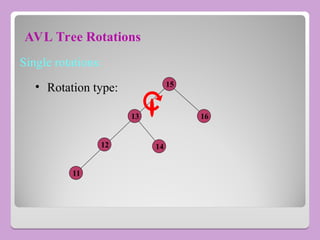
    AVL Tree Rotations Singlerotations: • Rotation type: 13 15 16 12 14 11
  • 94.
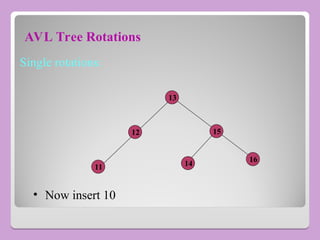
    AVL Tree Rotations Singlerotations: 13 15 16 12 14 11 • Now insert 10
  • 95.
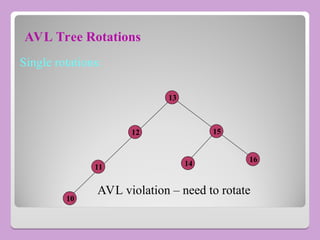
    AVL Tree Rotations Singlerotations: 13 15 16 12 14 11 10 AVL violation – need to rotate
  • 96.
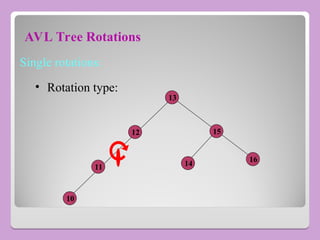
    AVL Tree Rotations Singlerotations: 13 15 16 12 14 11 10 • Rotation type:
  • 97.
    AVL Tree Rotations Singlerotations: 13 15 16 11 14 10 12 • AVL balance restored.