WordPress
Architecture and
Platform Capabilities
Mario Peshev
➔ CEO, WordPress Architect @ DevriX
➔ Former Java/PHP/Python Developer
➔ Consultant and Technical Lead for several SaaS Solutions
➔ Marketing and Project Management day-to-day activities
➔ @no_fear_inc on Twitter
About Me
@no_fear_inc , Mario Peshev
Scope of the training
1. Main principles of WordPress
2. Technical considerations and requirements
3. WordPress flow and architecture
4. WordPress Themes and Plugins
5. Stability, Performance, and Security
Introduction
@no_fear_inc , Mario Peshev
1. The most widespread CMS in the world that currently
powers over 27% of the Internet
2. Runs on the popular PHP/MySQL stack
3. Suitable for both small blogs, mid-sized applications
up to sites serving tens of millions of PV/month
4. Large ecosystem of themes, plugins, tools
What is WordPress?
@no_fear_inc , Mario Peshev
● 2001 - b2/cafelog
● 2003 - WordPress forked by Matt Mullenweg and Mike
Little
● 2004-2005 - themes and plugins
● 2007 - widgets, taxonomy system, speed
● 2010 - post types, menus, APIs, default theme
● 2016 - REST API
WordPress History
@no_fear_inc , Mario Peshev
Some use cases of WordPress
1. Standard blogs/sites
2. Online magazines and collaboration platforms
3. Large CMS applications
4. Software as a Service solutions
5. eCommerce platforms
6. Multisite networks
WordPress Applications
@no_fear_inc , Mario Peshev
As a programming environment
1. Scalable framework for high-traffic websites
2. Plenty of APIs (CPT, Taxonomies, Shortcodes, Options,
Settings, HTTP, Widgets, Rewrite, REST)
3. Hundreds of hooks for life cycle control
4. Extensibility and 3rd party integrations
WordPress Core
@no_fear_inc , Mario Peshev
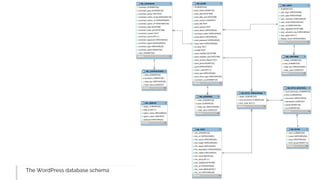
The WordPress database schema
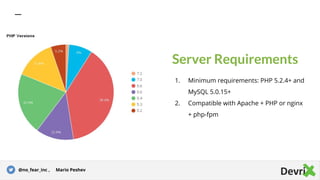
Server Requirements
1. Minimum requirements: PHP 5.2.4+ and
MySQL 5.0.15+
2. Compatible with Apache + PHP or nginx
+ php-fpm
@no_fear_inc , Mario Peshev
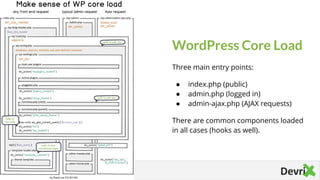
WordPress Core Load
Three main entry points:
● index.php (public)
● admin.php (logged in)
● admin-ajax.php (AJAX requests)
There are common components loaded
in all cases (hooks as well).
Tip
Tell the audience about
the problem through a
story, ideally a person.
@username Name Surname
WordPress Hooks
WordPress is extended through hooks
placed in the Core and within
themes/plugins.
➔ Actions
Change the standard life cycle
processing, output data, connect other
applications
➔ Filters
Update the state of an incoming value
used later on in the process
Actions
Defined with do_action() in Core
Called in plugins with add_action()
Provide the ability to inject custom
logic or update the WordPress flow
@no_fear_inc , Mario Peshev
Filters
Defined with apply_filters() in Core
Utilized through add_filter() calls
Allow for editing an expected variable
that is used later on in the flow
@no_fear_inc , Mario Peshev
The presentation layer
1. The main component providing the presentation layer
for a WordPress website
2. Best-case scenario, used exclusively for leveraging the
template hierarchy for data display
3. Premium themes often violate the simple rules
WordPress Themes
@no_fear_inc , Mario Peshev
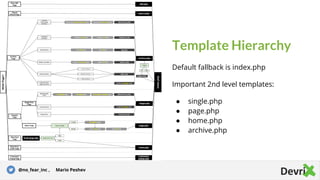
Template Hierarchy
Default fallback is index.php
Important 2nd level templates:
● single.php
● page.php
● home.php
● archive.php
Tip
Tell the audience about
the problem through a
story, ideally a person.
@no_fear_inc , Mario Peshev
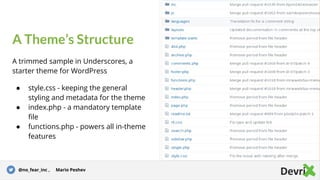
A Theme’s Structure
A trimmed sample in Underscores, a
starter theme for WordPress
● style.css - keeping the general
styling and metadata for the theme
● index.php - a mandatory template
file
● functions.php - powers all in-theme
features
Story for illustration purposes only@no_fear_inc , Mario Peshev
Extending a theme
1. Themes can work independently without a need of
extension
2. Extensibility should happen through child themes that
only override parent’s attributes
3. Look at theme frameworks as well
Parent/Child Themes
@no_fear_inc , Mario Peshev
Adding new features to WordPress
1. Features should be added exclusively through Plugins
2. Plugins leverage WordPress actions and filters in
order to change or extend the life cycle of WordPress
WordPress Plugins
@no_fear_inc , Mario Peshev
1. A theme can “technically” introduce new features
through functions.php
2. It’s a bad practice as this prevents clients from
switching themes without losing features
3. A common problem with a large percentage of
premium themes working as all-in-one
functions.php vs.
Plugins
@no_fear_inc , Mario Peshev
Sample WordPress Plugin
(demo)
The Core Pillars of
DevriX
The main Code Quality considerations for
WordPress engineers
➔ Stability
The ongoing stability across updates
and as the traffic grows
➔ Performance
Site load times and the ability to handle
high traffic
➔ Security
Secure and safe environment with data
protection in place
The main problems
1. A stable WordPress solution depends on solid code
base, reliable server infrastructure, right choice of
components
2. Bundling plugins and themes together may cause
various conflicts
3. Adding multi-purpose plugins will add up to load, too
Stability
@no_fear_inc , Mario Peshev
Across WordPress updates
1. WordPress Core gets 2-3 major updates a year
2. Plugins may get 5-50 updates annually
3. Combining general purposes solutions together could
cause various conflicts
4. This may lead to warnings and errors or data loss
Stability
@no_fear_inc , Mario Peshev
Clean code and WP Standards
1. Following the WordPress Coding Standards is
mandatory
2. Plenty of off-the-shelf plugins don’t comply with the
conventions or care about the WP load cycle
3. Regular tracking of queries, DB and data calls is
needed
Stability
@no_fear_inc , Mario Peshev
Automated tools and testers
1. Use tools such as PHP CodeSniffer, PHP MD, ES Lint,
JSHint, jsLint
2. Unit and integrational testing tools and scripts
3. Continuous Integration and pre-deployment hooks
Stability
@no_fear_inc , Mario Peshev
Staging and dev environments
1. Deployment environment should be distributed to
dev -> test (staging) -> production
2. Staging environment has to resemble production as
much as possible
3. Managed hosts often provide staging toolkits for
clone and sync
Stability
@no_fear_inc , Mario Peshev
Automated UI tests
1. Selenium could be used for recording features and
automated UI/test suites
2. BBC’s wraith can record states of a site and its pages
3. Test suites can be automated and included in a CI
deployment suite for screenshot comparison
Stability
@no_fear_inc , Mario Peshev
1. WordPress can handle hundreds of millions of views a
month
2. This does require a professional devops and web
development team following the standards and able
to scale in different scenarios
3. A small mistake can reduce the load time with
seconds
Performance
@no_fear_inc , Mario Peshev
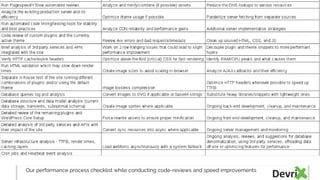
Our performance process checklist while conducting code-reviews and speed improvements
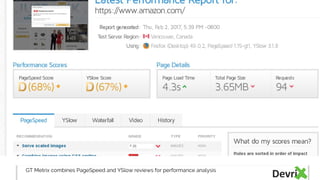
GT Metrix combines PageSpeed and YSlow reviews for performance analysis
Front-end for WordPress
1. Minifying/combining assets
2. Using SVGs and creating image sprites
3. Image compression
4. Async/deferred scripts
5. Remove unused CSS/JavaScript
Performance
@no_fear_inc , Mario Peshev
Back-end for WordPress
1. Detach actions and filters that are not used
2. Replace heavy plugins with lightweight ones or fork
3. Identify slower callbacks or repetitive functions
4. Offload third-party services through cache or local
callbacks
5. Optimize AJAX callbacks
Performance
@no_fear_inc , Mario Peshev
Database queries and schema
1. Consider RDBMS normalization or denormalization
2. Clean out transients, revisions, and other outdated
items
3. Reduce the number of DB queries at main pages
4. Analyze slow queries and optimize accordingly
5. Use EXPLAIN for questionable queries
Performance
@no_fear_inc , Mario Peshev
Server-level enhancements
1. Fine tuning the FPM processes and nginx workers
2. Enable logging and look for possible hidden warnings
and notices or CPU/IO/RAM spikes
3. Enable memcached/redis, gzip compression and
expire headers
4. Stress test for lower TTFB results and concurrency
Performance
@no_fear_inc , Mario Peshev
WordPress Core is secure by design if the right integration
is performed
Security issues usually arise from:
● Outdated software
● 3rd party plugins or themes
● Insecure servers
● Human errors (weak passwords, open Wi-Fi)
Security
@no_fear_inc , Mario Peshev
Main WP problems
1. Generic solutions are not audited for security
2. There is no guaranteed repository for safe plugins
3. Security could be handled through isolated server
management, automated updates, regular backups
policy, code and database auditing and code reviews
before adding a feature
Security
@no_fear_inc , Mario Peshev
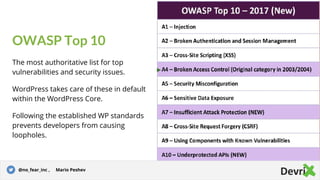
OWASP Top 10
The most authoritative list for top
vulnerabilities and security issues.
WordPress takes care of these in default
within the WordPress Core.
Following the established WP standards
prevents developers from causing
loopholes.
Story for illustration purposes only@no_fear_inc , Mario Peshev
Security Whitepaper
The Foundation and WordPress’ Security
team have released a whitepaper going
over the security state of WordPress in
details.Tip
Tell the audience about
the problem through a
story, ideally a person.
@no_fear_inc , Mario Peshev
Questions?
Tweets as @no_fear_inc
Mario Peshev on LinkedIn
nofearinc on WordPress.org
GitHubbing like mpeshev
Blogging at DevWP.eu
CEO @ DevriX.com

WordPress Architecture for Tech-Savvy Managers

  • 1.
  • 2.
    ➔ CEO, WordPressArchitect @ DevriX ➔ Former Java/PHP/Python Developer ➔ Consultant and Technical Lead for several SaaS Solutions ➔ Marketing and Project Management day-to-day activities ➔ @no_fear_inc on Twitter About Me @no_fear_inc , Mario Peshev
  • 3.
    Scope of thetraining 1. Main principles of WordPress 2. Technical considerations and requirements 3. WordPress flow and architecture 4. WordPress Themes and Plugins 5. Stability, Performance, and Security Introduction @no_fear_inc , Mario Peshev
  • 4.
    1. The mostwidespread CMS in the world that currently powers over 27% of the Internet 2. Runs on the popular PHP/MySQL stack 3. Suitable for both small blogs, mid-sized applications up to sites serving tens of millions of PV/month 4. Large ecosystem of themes, plugins, tools What is WordPress? @no_fear_inc , Mario Peshev
  • 5.
    ● 2001 -b2/cafelog ● 2003 - WordPress forked by Matt Mullenweg and Mike Little ● 2004-2005 - themes and plugins ● 2007 - widgets, taxonomy system, speed ● 2010 - post types, menus, APIs, default theme ● 2016 - REST API WordPress History @no_fear_inc , Mario Peshev
  • 6.
    Some use casesof WordPress 1. Standard blogs/sites 2. Online magazines and collaboration platforms 3. Large CMS applications 4. Software as a Service solutions 5. eCommerce platforms 6. Multisite networks WordPress Applications @no_fear_inc , Mario Peshev
  • 7.
    As a programmingenvironment 1. Scalable framework for high-traffic websites 2. Plenty of APIs (CPT, Taxonomies, Shortcodes, Options, Settings, HTTP, Widgets, Rewrite, REST) 3. Hundreds of hooks for life cycle control 4. Extensibility and 3rd party integrations WordPress Core @no_fear_inc , Mario Peshev
  • 8.
  • 9.
    Server Requirements 1. Minimumrequirements: PHP 5.2.4+ and MySQL 5.0.15+ 2. Compatible with Apache + PHP or nginx + php-fpm @no_fear_inc , Mario Peshev
  • 10.
    WordPress Core Load Threemain entry points: ● index.php (public) ● admin.php (logged in) ● admin-ajax.php (AJAX requests) There are common components loaded in all cases (hooks as well). Tip Tell the audience about the problem through a story, ideally a person. @username Name Surname
  • 11.
    WordPress Hooks WordPress isextended through hooks placed in the Core and within themes/plugins. ➔ Actions Change the standard life cycle processing, output data, connect other applications ➔ Filters Update the state of an incoming value used later on in the process
  • 12.
    Actions Defined with do_action()in Core Called in plugins with add_action() Provide the ability to inject custom logic or update the WordPress flow @no_fear_inc , Mario Peshev
  • 13.
    Filters Defined with apply_filters()in Core Utilized through add_filter() calls Allow for editing an expected variable that is used later on in the flow @no_fear_inc , Mario Peshev
  • 14.
    The presentation layer 1.The main component providing the presentation layer for a WordPress website 2. Best-case scenario, used exclusively for leveraging the template hierarchy for data display 3. Premium themes often violate the simple rules WordPress Themes @no_fear_inc , Mario Peshev
  • 15.
    Template Hierarchy Default fallbackis index.php Important 2nd level templates: ● single.php ● page.php ● home.php ● archive.php Tip Tell the audience about the problem through a story, ideally a person. @no_fear_inc , Mario Peshev
  • 16.
    A Theme’s Structure Atrimmed sample in Underscores, a starter theme for WordPress ● style.css - keeping the general styling and metadata for the theme ● index.php - a mandatory template file ● functions.php - powers all in-theme features Story for illustration purposes only@no_fear_inc , Mario Peshev
  • 17.
    Extending a theme 1.Themes can work independently without a need of extension 2. Extensibility should happen through child themes that only override parent’s attributes 3. Look at theme frameworks as well Parent/Child Themes @no_fear_inc , Mario Peshev
  • 18.
    Adding new featuresto WordPress 1. Features should be added exclusively through Plugins 2. Plugins leverage WordPress actions and filters in order to change or extend the life cycle of WordPress WordPress Plugins @no_fear_inc , Mario Peshev
  • 19.
    1. A themecan “technically” introduce new features through functions.php 2. It’s a bad practice as this prevents clients from switching themes without losing features 3. A common problem with a large percentage of premium themes working as all-in-one functions.php vs. Plugins @no_fear_inc , Mario Peshev
  • 20.
  • 21.
    The Core Pillarsof DevriX The main Code Quality considerations for WordPress engineers ➔ Stability The ongoing stability across updates and as the traffic grows ➔ Performance Site load times and the ability to handle high traffic ➔ Security Secure and safe environment with data protection in place
  • 22.
    The main problems 1.A stable WordPress solution depends on solid code base, reliable server infrastructure, right choice of components 2. Bundling plugins and themes together may cause various conflicts 3. Adding multi-purpose plugins will add up to load, too Stability @no_fear_inc , Mario Peshev
  • 23.
    Across WordPress updates 1.WordPress Core gets 2-3 major updates a year 2. Plugins may get 5-50 updates annually 3. Combining general purposes solutions together could cause various conflicts 4. This may lead to warnings and errors or data loss Stability @no_fear_inc , Mario Peshev

  • 24.
    Clean code andWP Standards 1. Following the WordPress Coding Standards is mandatory 2. Plenty of off-the-shelf plugins don’t comply with the conventions or care about the WP load cycle 3. Regular tracking of queries, DB and data calls is needed Stability @no_fear_inc , Mario Peshev
  • 25.
    Automated tools andtesters 1. Use tools such as PHP CodeSniffer, PHP MD, ES Lint, JSHint, jsLint 2. Unit and integrational testing tools and scripts 3. Continuous Integration and pre-deployment hooks Stability @no_fear_inc , Mario Peshev
  • 26.
    Staging and devenvironments 1. Deployment environment should be distributed to dev -> test (staging) -> production 2. Staging environment has to resemble production as much as possible 3. Managed hosts often provide staging toolkits for clone and sync Stability @no_fear_inc , Mario Peshev
  • 27.
    Automated UI tests 1.Selenium could be used for recording features and automated UI/test suites 2. BBC’s wraith can record states of a site and its pages 3. Test suites can be automated and included in a CI deployment suite for screenshot comparison Stability @no_fear_inc , Mario Peshev
  • 28.
    1. WordPress canhandle hundreds of millions of views a month 2. This does require a professional devops and web development team following the standards and able to scale in different scenarios 3. A small mistake can reduce the load time with seconds Performance @no_fear_inc , Mario Peshev
  • 29.
    Our performance processchecklist while conducting code-reviews and speed improvements
  • 30.
    GT Metrix combinesPageSpeed and YSlow reviews for performance analysis
  • 31.
    Front-end for WordPress 1.Minifying/combining assets 2. Using SVGs and creating image sprites 3. Image compression 4. Async/deferred scripts 5. Remove unused CSS/JavaScript Performance @no_fear_inc , Mario Peshev
  • 32.
    Back-end for WordPress 1.Detach actions and filters that are not used 2. Replace heavy plugins with lightweight ones or fork 3. Identify slower callbacks or repetitive functions 4. Offload third-party services through cache or local callbacks 5. Optimize AJAX callbacks Performance @no_fear_inc , Mario Peshev
  • 33.
    Database queries andschema 1. Consider RDBMS normalization or denormalization 2. Clean out transients, revisions, and other outdated items 3. Reduce the number of DB queries at main pages 4. Analyze slow queries and optimize accordingly 5. Use EXPLAIN for questionable queries Performance @no_fear_inc , Mario Peshev
  • 34.
    Server-level enhancements 1. Finetuning the FPM processes and nginx workers 2. Enable logging and look for possible hidden warnings and notices or CPU/IO/RAM spikes 3. Enable memcached/redis, gzip compression and expire headers 4. Stress test for lower TTFB results and concurrency Performance @no_fear_inc , Mario Peshev
  • 35.
    WordPress Core issecure by design if the right integration is performed Security issues usually arise from: ● Outdated software ● 3rd party plugins or themes ● Insecure servers ● Human errors (weak passwords, open Wi-Fi) Security @no_fear_inc , Mario Peshev
  • 36.
    Main WP problems 1.Generic solutions are not audited for security 2. There is no guaranteed repository for safe plugins 3. Security could be handled through isolated server management, automated updates, regular backups policy, code and database auditing and code reviews before adding a feature Security @no_fear_inc , Mario Peshev
  • 37.
    OWASP Top 10 Themost authoritative list for top vulnerabilities and security issues. WordPress takes care of these in default within the WordPress Core. Following the established WP standards prevents developers from causing loopholes. Story for illustration purposes only@no_fear_inc , Mario Peshev
  • 38.
    Security Whitepaper The Foundationand WordPress’ Security team have released a whitepaper going over the security state of WordPress in details.Tip Tell the audience about the problem through a story, ideally a person. @no_fear_inc , Mario Peshev
  • 39.
    Questions? Tweets as @no_fear_inc MarioPeshev on LinkedIn nofearinc on WordPress.org GitHubbing like mpeshev Blogging at DevWP.eu CEO @ DevriX.com