


Automated Web
Acceptance Testing with
        Behat
        Shashikant Jagtap
      Twitter : @Shashikant86
Overview



    Behat : BDD for PHP

    Mink: Web Acceptance Testing Framework

    Behat with Sauce Labs for cloud testing

    Relish for living documentation

    Building feature with Jenkins

    Useful Links
Behat : BDD for PHP


    Behat is a BDD framework for PHP applications.
                     http://behat.org/



    BDD approach



    Feature is defined in story format.



    Domain Specific Language used is 'Gherkin'.



    Behat is developed by Konstantin Kudryashov (@everzet)
Mink


    Mink is a acceptance test framework for PHP applications
                   http://mink.behat.org/

  Mink has different drivers for browser emulation. Bowser emulation
can be headless or with browser controllers.
Mink supports both selenium1 driver as well as webdriver.




    Mink has various API's that can used to control browser actions.
Full list of Mink API's can found here



                 http://mink.behat.org/api/
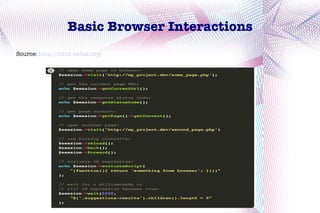
Basic Browser Interactions
Source: http://mink.behat.org/
Installations


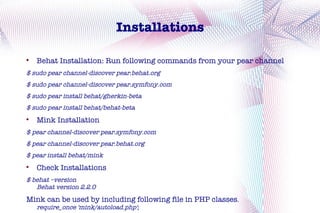
    Behat Installation: Run following commands from your pear channel
$ sudo pear channel-discover pear.behat.org
$ sudo pear channel-discover pear.symfony.com
$ sudo pear install behat/gherkin-beta
$ sudo pear install behat/behat-beta

    Mink Installation
$ pear channel-discover pear.symfony.com
$ pear channel-discover pear.behat.org
$ pear install behat/mink

    Check Installations
$ behat –version
   Behat version 2.2.0
Mink can be used by including following file in PHP classes.
    require_once 'mink/autoload.php';
Start Your Project

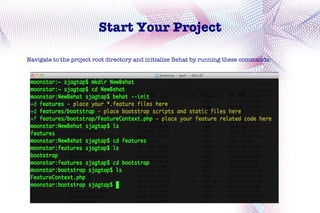
Navigate to the project root directory and initialize Behat by running these commands:
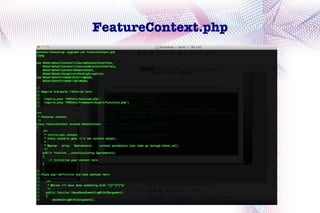
FeatureContext.php
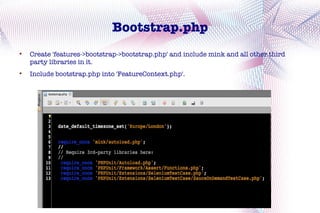
Bootstrap.php

    Create 'features->bootstrap->bootstrap.php' and include mink and all other third
    party libraries in it.

    Include bootstrap.php into 'FeatureContext.php'.
Behat.yml

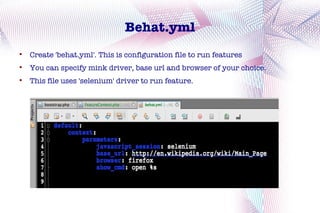
    Create 'behat.yml'. This is configuration file to run features

    You can specify mink driver, base url and browser of your choice.

    This file uses 'selenium' driver to run feature.
wikiSearch.feature

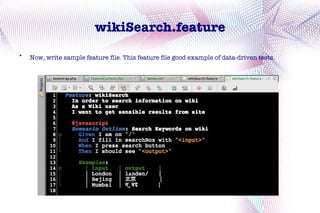
    Now, write sample feature file. This feature file good example of data-driven tests.
Get code for Step Definitions

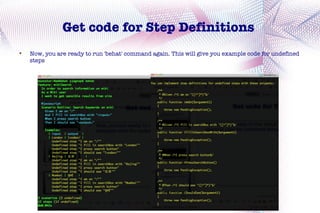
    Now, you are ready to run 'behat' command again. This will give you example code for undefined
    steps
Implement Step definitions


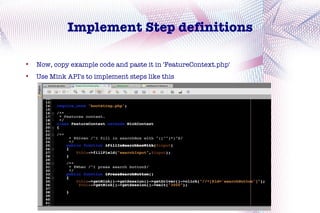
    Now, copy example code and paste it in 'FeatureContext.php'

    Use Mink API's to implement steps like this
Start your engine

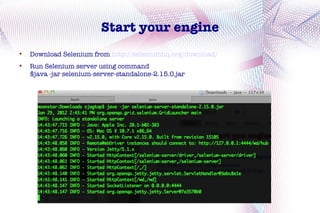
    Download Selenium from http://seleniumhq.org/download/

    Run Selenium server using command
    $java -jar selenium-server-standalone-2.15.0.jar
Watch your Test running
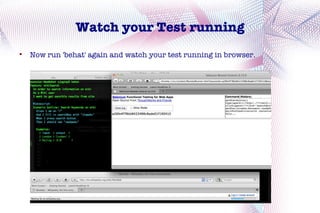

    Now run 'behat' again and watch your test running in browser.
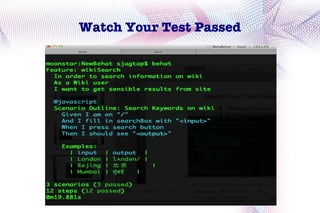
Watch Your Test Passed
Behat with Sauce Labs

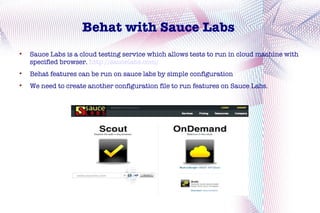
    Sauce Labs is a cloud testing service which allows tests to run in cloud machine with
    specified browser. http://saucelabs.com/

    Behat features can be run on sauce labs by simple configuration

    We need to create another configuration file to run features on Sauce Labs.
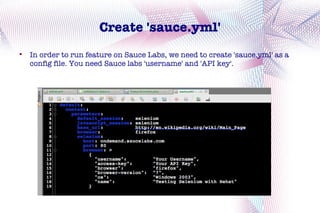
Create 'sauce.yml'

    In order to run feature on Sauce Labs, we need to create 'sauce.yml' as a
    config file. You need Sauce labs 'username' and 'API key'.
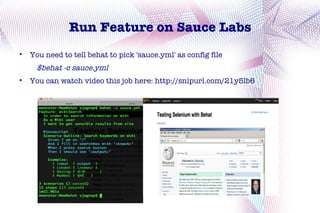
Run Feature on Sauce Labs

    You need to tell behat to pick 'sauce.yml' as config file
      $behat -c sauce.yml

    You can watch video this job here: http://snipurl.com/21y5lb6
Relish: Living Documentation


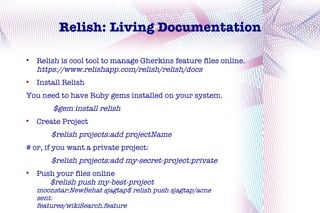
    Relish is cool tool to manage Gherkins feature files online.
    https://www.relishapp.com/relish/relish/docs

    Install Relish
You need to have Ruby gems installed on your system.
        $gem install relish

    Create Project
        $relish projects:add projectName
# or, if you want a private project:
        $relish projects:add my-secret-project:private

    Push your files online
       $relish push my-best-project
    moonstar:NewBehat sjagtap$ relish push sjagtap/acne
    sent:
    features/wikiSearch.feature
Relish


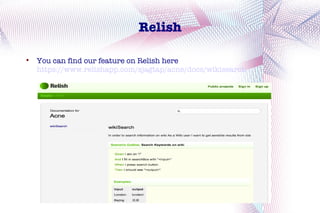
    You can find our feature on Relish here
    https://www.relishapp.com/sjagtap/acne/docs/wikisearch
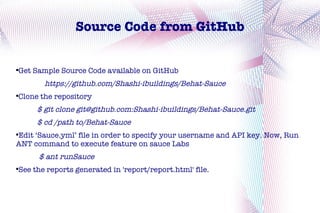
Source Code from GitHub


Get Sample Source Code available on GitHub



       https://github.com/Shashi-ibuildings/Behat-Sauce
Clone the repository



     $ git clone git@github.com:Shashi-ibuildings/Behat-Sauce.git
     $ cd /path to/Behat-Sauce
Edit ‘Sauce.yml’ file in order to specify your username and API key. Now, Run



ANT command to execute feature on sauce Labs
      $ ant runSauce
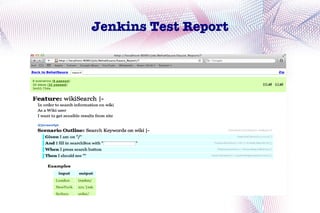
See the reports generated in 'report/report.html' file.

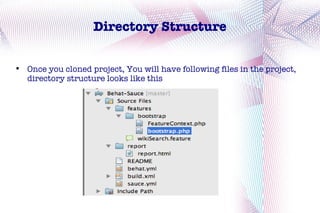
Directory Structure


    Once you cloned project, You will have following files in the project,
    directory structure looks like this
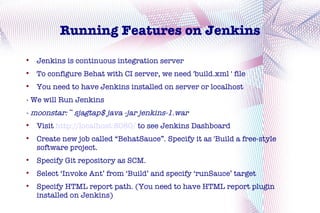
Running Features on Jenkins

    Jenkins is continuous integration server

    To configure Behat with CI server, we need 'build.xml ' file

    You need to have Jenkins installed on server or localhost
- We will Run Jenkins
- moonstar:~ sjagtap$ java -jar jenkins-1.war

    Visit http://localhost:8080/ to see Jenkins Dashboard

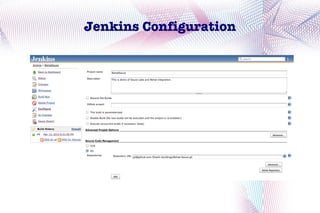
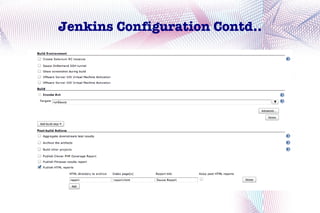
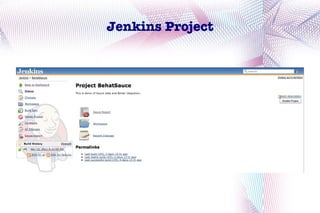
    Create new job called “BehatSauce”. Specify it as 'Build a free-style
    software project.

    Specify Git repository as SCM.

    Select ‘Invoke Ant’ from ‘Build’ and specify ‘runSauce’ target

    Specify HTML report path. (You need to have HTML report plugin
    installed on Jenkins)
Jenkins Configuration
Jenkins Configuration Contd..
Jenkins Project
Jenkins Test Report
Links


     Blogpost 'Adding Sauce To behat'
http://saucelabs.com/blog/index.php/2012/01/adding-sauce-to-behat/

     Video Demo
http://www.youtube.com/watch?v=Zu9mWuVvsUQ

     Source Code on GitHub
    https://github.com/Shashi-ibuildings/Behat-Sauce

     Relish Documentation
https://www.relishapp.com/sjagtap/acne

     My Blogs
http://lestbddphp.wordpress.com/

     About Me
    http://about.me/shashikantjagtap
Questions
Thank You

Behat sauce

  • 1.
    Automated Web Acceptance Testingwith Behat Shashikant Jagtap Twitter : @Shashikant86
  • 2.
    Overview  Behat : BDD for PHP  Mink: Web Acceptance Testing Framework  Behat with Sauce Labs for cloud testing  Relish for living documentation  Building feature with Jenkins  Useful Links
  • 3.
    Behat : BDDfor PHP  Behat is a BDD framework for PHP applications. http://behat.org/  BDD approach  Feature is defined in story format.  Domain Specific Language used is 'Gherkin'.  Behat is developed by Konstantin Kudryashov (@everzet)
  • 4.
    Mink  Mink is a acceptance test framework for PHP applications http://mink.behat.org/  Mink has different drivers for browser emulation. Bowser emulation can be headless or with browser controllers. Mink supports both selenium1 driver as well as webdriver.   Mink has various API's that can used to control browser actions. Full list of Mink API's can found here  http://mink.behat.org/api/
  • 5.
    Basic Browser Interactions Source:http://mink.behat.org/
  • 6.
    Installations  Behat Installation: Run following commands from your pear channel $ sudo pear channel-discover pear.behat.org $ sudo pear channel-discover pear.symfony.com $ sudo pear install behat/gherkin-beta $ sudo pear install behat/behat-beta  Mink Installation $ pear channel-discover pear.symfony.com $ pear channel-discover pear.behat.org $ pear install behat/mink  Check Installations $ behat –version Behat version 2.2.0 Mink can be used by including following file in PHP classes. require_once 'mink/autoload.php';
  • 7.
    Start Your Project Navigateto the project root directory and initialize Behat by running these commands:
  • 8.
  • 9.
    Bootstrap.php  Create 'features->bootstrap->bootstrap.php' and include mink and all other third party libraries in it.  Include bootstrap.php into 'FeatureContext.php'.
  • 10.
    Behat.yml  Create 'behat.yml'. This is configuration file to run features  You can specify mink driver, base url and browser of your choice.  This file uses 'selenium' driver to run feature.
  • 11.
    wikiSearch.feature  Now, write sample feature file. This feature file good example of data-driven tests.
  • 12.
    Get code forStep Definitions  Now, you are ready to run 'behat' command again. This will give you example code for undefined steps
  • 13.
    Implement Step definitions  Now, copy example code and paste it in 'FeatureContext.php'  Use Mink API's to implement steps like this
  • 14.
    Start your engine  Download Selenium from http://seleniumhq.org/download/  Run Selenium server using command $java -jar selenium-server-standalone-2.15.0.jar
  • 15.
    Watch your Testrunning  Now run 'behat' again and watch your test running in browser.
  • 16.
  • 17.
    Behat with SauceLabs  Sauce Labs is a cloud testing service which allows tests to run in cloud machine with specified browser. http://saucelabs.com/  Behat features can be run on sauce labs by simple configuration  We need to create another configuration file to run features on Sauce Labs.
  • 18.
    Create 'sauce.yml'  In order to run feature on Sauce Labs, we need to create 'sauce.yml' as a config file. You need Sauce labs 'username' and 'API key'.
  • 19.
    Run Feature onSauce Labs  You need to tell behat to pick 'sauce.yml' as config file $behat -c sauce.yml  You can watch video this job here: http://snipurl.com/21y5lb6
  • 20.
    Relish: Living Documentation  Relish is cool tool to manage Gherkins feature files online. https://www.relishapp.com/relish/relish/docs  Install Relish You need to have Ruby gems installed on your system. $gem install relish  Create Project $relish projects:add projectName # or, if you want a private project: $relish projects:add my-secret-project:private  Push your files online $relish push my-best-project moonstar:NewBehat sjagtap$ relish push sjagtap/acne sent: features/wikiSearch.feature
  • 21.
    Relish  You can find our feature on Relish here https://www.relishapp.com/sjagtap/acne/docs/wikisearch
  • 22.
    Source Code fromGitHub Get Sample Source Code available on GitHub  https://github.com/Shashi-ibuildings/Behat-Sauce Clone the repository  $ git clone git@github.com:Shashi-ibuildings/Behat-Sauce.git $ cd /path to/Behat-Sauce Edit ‘Sauce.yml’ file in order to specify your username and API key. Now, Run  ANT command to execute feature on sauce Labs $ ant runSauce See the reports generated in 'report/report.html' file. 
  • 23.
    Directory Structure  Once you cloned project, You will have following files in the project, directory structure looks like this
  • 24.
    Running Features onJenkins  Jenkins is continuous integration server  To configure Behat with CI server, we need 'build.xml ' file  You need to have Jenkins installed on server or localhost - We will Run Jenkins - moonstar:~ sjagtap$ java -jar jenkins-1.war  Visit http://localhost:8080/ to see Jenkins Dashboard  Create new job called “BehatSauce”. Specify it as 'Build a free-style software project.  Specify Git repository as SCM.  Select ‘Invoke Ant’ from ‘Build’ and specify ‘runSauce’ target  Specify HTML report path. (You need to have HTML report plugin installed on Jenkins)
  • 25.
  • 26.
  • 27.
  • 28.
  • 29.
    Links  Blogpost 'Adding Sauce To behat' http://saucelabs.com/blog/index.php/2012/01/adding-sauce-to-behat/  Video Demo http://www.youtube.com/watch?v=Zu9mWuVvsUQ  Source Code on GitHub https://github.com/Shashi-ibuildings/Behat-Sauce  Relish Documentation https://www.relishapp.com/sjagtap/acne  My Blogs http://lestbddphp.wordpress.com/  About Me http://about.me/shashikantjagtap
  • 30.
  • 31.