Build a Virtual Pet with JavaScript
November 2017
bit.ly/jspet-phx
1
Welcome to "Build a Virtual Pet with Javascript". The Wi-Fi network is X and the password is Y The website for this class is Z.
Speaker notes
Instructor
Dave Hoel
Full-stack Web Developer
Thinkful Graduate
TA's
Joe Previte
Digital Marketing Manager/Web Developer
2
Let me start with a little about me. My name is X and my background is Y
I am working with Thinkful to teach this class because Z
Speaker notes
About you
What's your name?
What's your goal?
What is your coding background?
3
I'd love to learn a little more about you guys. So can we go around the room and can everyone give us your name, what your goal is for attending
the class and your programming background?
Speaker notes
This is what we're making
4
Today we're building a simple virtual pet. We can click three different buttons to feed our pet, play with our bet, and have our pet do some exercise.
When we click on these buttons, we'll increase or decrease the weight or happiness of our pet.
Speaker notes
Agenda
Starter code review (5 min)
Learn key JavaScript concepts (20 min)
Build your app! (40 min)
Go over solutions (10 min)
Next steps (10 min)
5
I’ll start by walking you through the HTML/CSS starter code so you have a reference of what you’ll be working with. Then I’ll go over important
Javascript concepts that you’ll need to complete the app. You’ll then build the app during which time the TA’s and myself will be walking around to
help you guys out. At the end we’ll go over solutions and then cover next steps for continuing your learning.
Speaker notes
Starter code
http://bit.ly/virtual-pet-starter-code
6
Go ahead and go to this url to get the starter code. We’re using a online code editor called Glitch which will let us see the result of our code really
quickly.
On the README.MD file you should see an overview of the project and the challenges you'll need to complete. The files we’ll be using today on the
left are client.js and index.html. You can ignore style.css, server.js, package.json and .env. At the bottom of the Readme file we've added some
helpful links for further help on particular concepts.
Lets look at the index.html file to see how our app is structured. We have an image which includes a picture of our pet. We're displaying the pet's
name, weight, and level of happiness. Below that are three buttons. One to give the pet a treat, increasing it's weight and happiness. One is to play
with our pet, decreasing it's weight and increasing it's happiness. The third is exercise which decreases it's weight and happiness.
All of the code you’ll be writing will be in client.js but you may need to refer to the html and css file to solve some of the problems. Once you’ve
written some code, click the “Show Live” button at the top to open a new tab that will automatically update as you edit your code.
Speaker notes
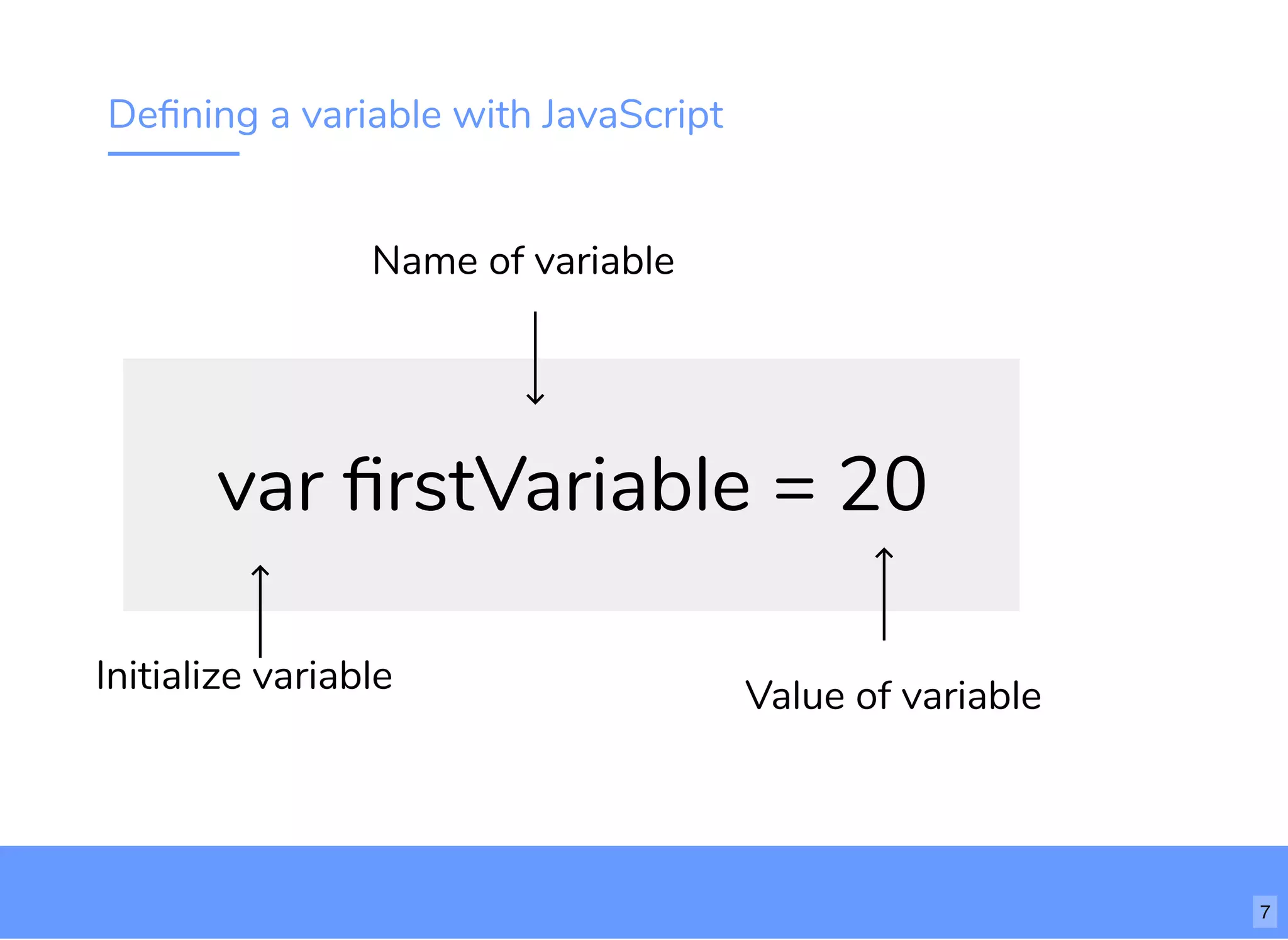
Defining a variable with JavaScript
var firstVariable = 20
Initialize variable
Name of variable
Value of variable
7
Let's start with reviewing variables in Javascript. Variables let us assign some value to a a string. We use variables to store information that we'll use
when our app is running.
To define a variable in Javascript, we start with the keyword "var". We then give our variable a name. The name should start with a letter. Try to
make sure your variable names are descriptive. It's ok if they are long.
Then we set that variable name equal to some value. That value can be any data structure in JS including numbers and strings.
Speaker notes
More about variables
8
Alright lets try writing this out. Add var firstVariable = 20. If we type firstVariable now, what is going to happen?
The number 20 is stored in the variable so every time we use that variable, we're referring to the 20.
With a number, we can also increment or decrement that number. Once we define the variable, we can re-define it as either more or less. So we
could do firstVariable = firstVariable + 1 to change our variable from 20 to 21. In this way, an equal sign in JS is different than in math. A single equal
sign means we're assigning a value, not saying two things are equal.
What other things can we store in a variable? In Javascript we can store pretty much everything in a variable. We can store booleans and strings as
well. Lets see examples of each of those.
Instead of a number, set firstVariable equal to a string. In JS, when we put a value in quotes, it assumes its a string. Let's console.log the string. We
can do the same with booleans.
Speaker notes
Introducing our pet "object"
Name
"Thinkpup"
Weight
6
Happiness
0
9
Lets say we want to store a bunch of different information in one variable, we can do that with a Javascript object. We'll be using a JS object
remember all the aspects of our virtual pet.
An object will basically have a list of "keys" and "values". So we can store all the information about our pet in one place. In this case, we'll have three
items in our "list". The name of our pet, which would be a string. The weight which would be a number. And how happy they are, which will also be a
number.
We can "get" and "set" our values by grabbing them from the object with the "key" which is always a string. In this case, our key for "Thinkpup" is
"name".
Speaker notes
Working with objects
10
Creating an object
Define an object with curly brackets. The "key" is always a string. The value can be whatever value we like. A Javascript object can hold all sorts of
values in one variable.
Retrieving a value
We can retrieve a value by saying pet_info.name or pet_info['name']
Changing a value
We can change a value by saying pet_inf['name'] = "Nala"
Speaker notes
Basic functions
11
A function lets you separate your code into bite-sized pieces which you can use over again.
When you write a function to use later, you are “declaring” it. When you use (or run) that function you are “calling” it.
To call a function, we simply write doSomething() and then the function is run.
Speaker notes
If, then, else
pet is hungry feed it
go to park
if true
if false
12
In all programming languages there exist a way to tell the computer that if X happens, do this, if y happens, do that. In Javascript we use if, then,
else statement. So we tell the computer, if this condition is true, say the pet is hungry, feed it. If it's not hungry (or that condition is false), go to the
park. After this, continue running the program.
Speaker notes
Conditionals example
13
This is how we'd write that concept in Javascript. We have an "if" keyword and then some condition that could either be True or False in
parentheses. If it's true, it would run the code in the first bracket. If it's not true, we'd run the code in the else block.
Speaker notes
Real developers use Google... a lot
14
With that you should be ready to start the challenges. One last note before we do the first challenge together.
Google is an everyday part of being a developer. A key part of becoming a developer is getting comfortable using Google to learn and look up things.
The more you code, the more you will use Google, not the other way around.
Speaker notes
Let's work on the first step together
http://bit.ly/tf-virtual-pet
15
Alright, with that let's start building our app.
On the left, you can see the files you'll be working on. The Readme will give you instructions. You'll be writing your code in client.js. You shouldn't
need to touch any of the other files.
After you write your code, it will automatically be saved. At any point you can hit "Show Live" to see a live version of your app.
Let's start the first step together. So in this first step, we want to create our pet_info object with three keys. How would we do that? Feel free to
name your pet whatever you like and set it's starting happiness and weight to whatever you like.
(Assign TA's to different sections of class)
Speaker notes
Solution
16
Alright. Let's go over the solutions to the main challenges.
For each of the functions, we're going to do a version of the same thing. We're going to first grab the value from our object and then assign it to that
value plus or minus some number.
For our third step, we want to make sure weight can't go below zero. To do this, we add a function that checks weight before we update it in the
HTML. If weight is below one, it should equal one.
Speaker notes
17
In addition to these free workshops which you should definitely continue coming to, there are a number of resources available online, we've already
mentioned a few. Google, google, google for general information, w3schools.com is a resource for all HTML and CSS tags along with JavaScript
documentation. And Code Academy and FreeCodeCamp will give you a bit of structure.
Speaker notes
18
But if you’re interested in an even more structured approach, and you're at the point where you are ready to become and actual employed web
developer, then bootcamps are your best options.
This graph is showing us that by 2020, that's just over 2yrs!, there will be 1.4 million computing jobs, but only 400,000 CS degree graduates to fill
those positions. This means that by 2020 there will be a need for 1 million computer science professionals, of which web developers are a very large
number.
Because traditional 4-year colleges and universities are not enough, bootcamps were created as a way of filling the talent gap. Bootcamps are
immersive programs specifically designed to make you employable as a web developer. Like a trade school, if you put the work in, you will gain the
skills needed to fill these positions.
On average bootcamps have a job-placement rate of 70%.
Speaker notes
19
Thinkful goes beyond the average bootcamp. We actually guarantee job placement within six months of graduation. Let me say that another way -
if you complete our bootcamp, and do you part in career services, you will land a job as a web developer within six months of graduating from your
bootcamp.
Currently, 80% or our grads are placed as full-time devs, and 92% are placed in other tech roles, with graduates landing tech jobs at both startups
and larger more established companies like Boeing, Google, IBM. 80% of our grads work as developer and engineers, while other grads break into
high-growth roles such as product + project management, QA engineering, and more.
All of these numbers are updated monthly by a third-party auditor and can be found on the first page on our website.
Speaker notes
20
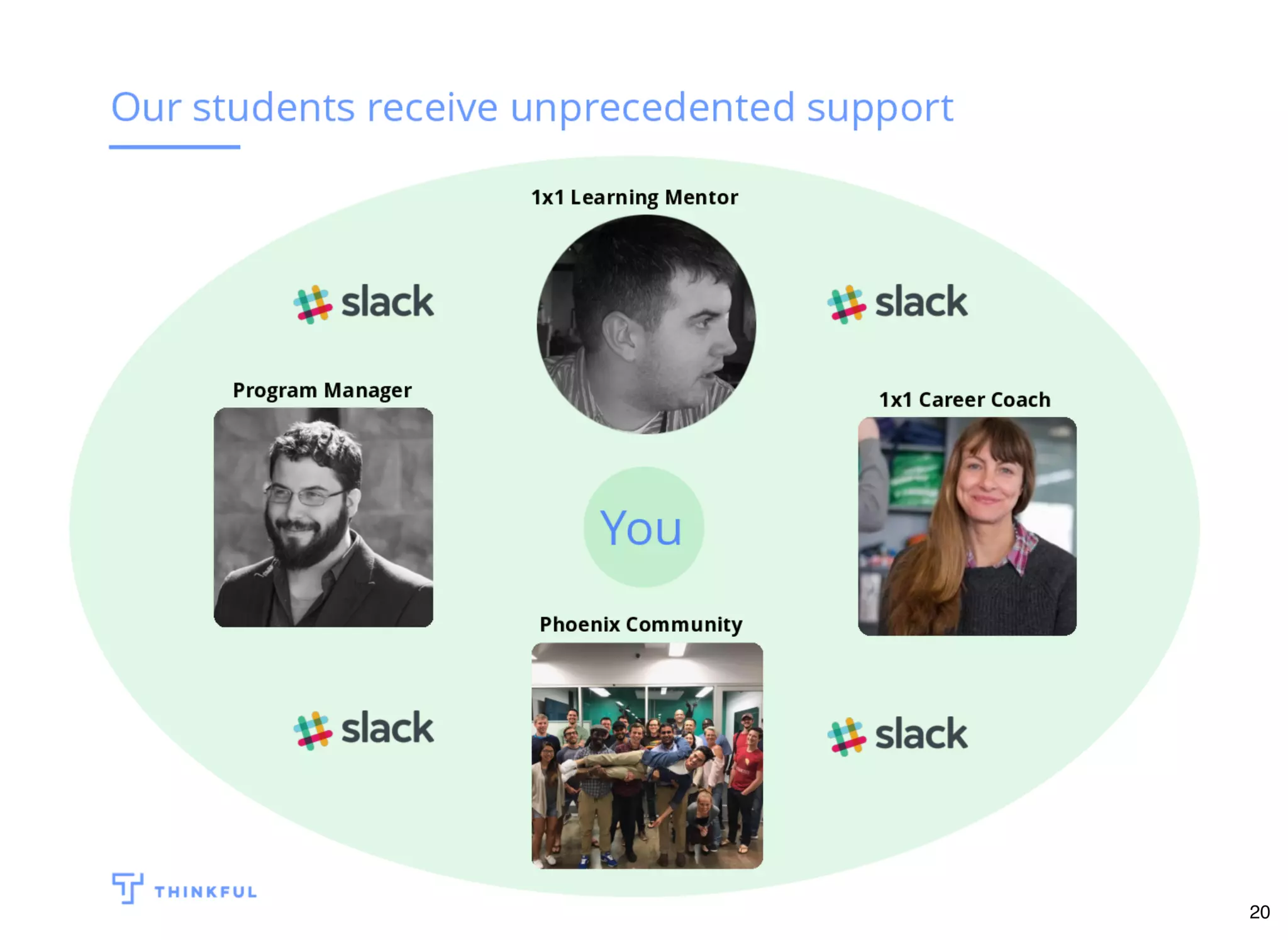
And this is why we are able to give you a guarantee...the unprecedented level of support you get as a Thinkful student.
Each student, whether full-time or flex, is matched with a personal mentor, to work through the program with. Our mentors have a minimum of 10
years of experience in their field, you meet with them for 1hr sessions three times per week, and they are your best friend throughout your
bootcamp. Once you graduate, you move into Career Services and are matched with a Career Services Coach, your after-graduation mentor, so to
speak. They will help you with your resume, do mock interviews with you, portfolio reviews, and guide you through the job seeking process. Then
you have a Program Manager, who's entire job is to make sure your relationship with these two other people is successful.
Then you have your local community - we host dinners for our local students and mentors, we call them Family Dinners, where students can present
what they're working on and get feedback from the mentors, talk about their experience with their bootcamp, commiserate, all over food and drinks
on Thinkful.
And then! You have access to our Thinkful Slack community: staff, mentors, and students all over the world are on our Slack group at all times.
Additionally, there are Q&A sessions and workshops that happens all day, every day of the week. Whenever you need help or just have a question,
mentors are available to work with you.
Speaker notes
21
So if this all sounds interesting to you and you want to try it out, I think you should. We’re offering a two-week trial. After the two-week trial you’ll
have the option to continue on with the full bootcamp. We offer a wide range of options for financing, including discounts and scholarships. This offer
is valid for one week from tonight. You can email or see before you leave to sign up. We’ll be around for a bit to answer any questions. Thank you.
Speaker notes

Bavpwjs1113

  • 1.
    Build a VirtualPet with JavaScript November 2017 bit.ly/jspet-phx 1
  • 2.
    Welcome to "Builda Virtual Pet with Javascript". The Wi-Fi network is X and the password is Y The website for this class is Z. Speaker notes
  • 3.
    Instructor Dave Hoel Full-stack WebDeveloper Thinkful Graduate TA's Joe Previte Digital Marketing Manager/Web Developer 2
  • 4.
    Let me startwith a little about me. My name is X and my background is Y I am working with Thinkful to teach this class because Z Speaker notes
  • 5.
    About you What's yourname? What's your goal? What is your coding background? 3
  • 6.
    I'd love tolearn a little more about you guys. So can we go around the room and can everyone give us your name, what your goal is for attending the class and your programming background? Speaker notes
  • 7.
    This is whatwe're making 4
  • 8.
    Today we're buildinga simple virtual pet. We can click three different buttons to feed our pet, play with our bet, and have our pet do some exercise. When we click on these buttons, we'll increase or decrease the weight or happiness of our pet. Speaker notes
  • 9.
    Agenda Starter code review(5 min) Learn key JavaScript concepts (20 min) Build your app! (40 min) Go over solutions (10 min) Next steps (10 min) 5
  • 10.
    I’ll start bywalking you through the HTML/CSS starter code so you have a reference of what you’ll be working with. Then I’ll go over important Javascript concepts that you’ll need to complete the app. You’ll then build the app during which time the TA’s and myself will be walking around to help you guys out. At the end we’ll go over solutions and then cover next steps for continuing your learning. Speaker notes
  • 11.
  • 12.
    Go ahead andgo to this url to get the starter code. We’re using a online code editor called Glitch which will let us see the result of our code really quickly. On the README.MD file you should see an overview of the project and the challenges you'll need to complete. The files we’ll be using today on the left are client.js and index.html. You can ignore style.css, server.js, package.json and .env. At the bottom of the Readme file we've added some helpful links for further help on particular concepts. Lets look at the index.html file to see how our app is structured. We have an image which includes a picture of our pet. We're displaying the pet's name, weight, and level of happiness. Below that are three buttons. One to give the pet a treat, increasing it's weight and happiness. One is to play with our pet, decreasing it's weight and increasing it's happiness. The third is exercise which decreases it's weight and happiness. All of the code you’ll be writing will be in client.js but you may need to refer to the html and css file to solve some of the problems. Once you’ve written some code, click the “Show Live” button at the top to open a new tab that will automatically update as you edit your code. Speaker notes
  • 13.
    Defining a variablewith JavaScript var firstVariable = 20 Initialize variable Name of variable Value of variable 7
  • 14.
    Let's start withreviewing variables in Javascript. Variables let us assign some value to a a string. We use variables to store information that we'll use when our app is running. To define a variable in Javascript, we start with the keyword "var". We then give our variable a name. The name should start with a letter. Try to make sure your variable names are descriptive. It's ok if they are long. Then we set that variable name equal to some value. That value can be any data structure in JS including numbers and strings. Speaker notes
  • 15.
  • 16.
    Alright lets trywriting this out. Add var firstVariable = 20. If we type firstVariable now, what is going to happen? The number 20 is stored in the variable so every time we use that variable, we're referring to the 20. With a number, we can also increment or decrement that number. Once we define the variable, we can re-define it as either more or less. So we could do firstVariable = firstVariable + 1 to change our variable from 20 to 21. In this way, an equal sign in JS is different than in math. A single equal sign means we're assigning a value, not saying two things are equal. What other things can we store in a variable? In Javascript we can store pretty much everything in a variable. We can store booleans and strings as well. Lets see examples of each of those. Instead of a number, set firstVariable equal to a string. In JS, when we put a value in quotes, it assumes its a string. Let's console.log the string. We can do the same with booleans. Speaker notes
  • 17.
    Introducing our pet"object" Name "Thinkpup" Weight 6 Happiness 0 9
  • 18.
    Lets say wewant to store a bunch of different information in one variable, we can do that with a Javascript object. We'll be using a JS object remember all the aspects of our virtual pet. An object will basically have a list of "keys" and "values". So we can store all the information about our pet in one place. In this case, we'll have three items in our "list". The name of our pet, which would be a string. The weight which would be a number. And how happy they are, which will also be a number. We can "get" and "set" our values by grabbing them from the object with the "key" which is always a string. In this case, our key for "Thinkpup" is "name". Speaker notes
  • 19.
  • 20.
    Creating an object Definean object with curly brackets. The "key" is always a string. The value can be whatever value we like. A Javascript object can hold all sorts of values in one variable. Retrieving a value We can retrieve a value by saying pet_info.name or pet_info['name'] Changing a value We can change a value by saying pet_inf['name'] = "Nala" Speaker notes
  • 21.
  • 22.
    A function letsyou separate your code into bite-sized pieces which you can use over again. When you write a function to use later, you are “declaring” it. When you use (or run) that function you are “calling” it. To call a function, we simply write doSomething() and then the function is run. Speaker notes
  • 23.
    If, then, else petis hungry feed it go to park if true if false 12
  • 24.
    In all programminglanguages there exist a way to tell the computer that if X happens, do this, if y happens, do that. In Javascript we use if, then, else statement. So we tell the computer, if this condition is true, say the pet is hungry, feed it. If it's not hungry (or that condition is false), go to the park. After this, continue running the program. Speaker notes
  • 25.
  • 26.
    This is howwe'd write that concept in Javascript. We have an "if" keyword and then some condition that could either be True or False in parentheses. If it's true, it would run the code in the first bracket. If it's not true, we'd run the code in the else block. Speaker notes
  • 27.
    Real developers useGoogle... a lot 14
  • 28.
    With that youshould be ready to start the challenges. One last note before we do the first challenge together. Google is an everyday part of being a developer. A key part of becoming a developer is getting comfortable using Google to learn and look up things. The more you code, the more you will use Google, not the other way around. Speaker notes
  • 29.
    Let's work onthe first step together http://bit.ly/tf-virtual-pet 15
  • 30.
    Alright, with thatlet's start building our app. On the left, you can see the files you'll be working on. The Readme will give you instructions. You'll be writing your code in client.js. You shouldn't need to touch any of the other files. After you write your code, it will automatically be saved. At any point you can hit "Show Live" to see a live version of your app. Let's start the first step together. So in this first step, we want to create our pet_info object with three keys. How would we do that? Feel free to name your pet whatever you like and set it's starting happiness and weight to whatever you like. (Assign TA's to different sections of class) Speaker notes
  • 31.
  • 32.
    Alright. Let's goover the solutions to the main challenges. For each of the functions, we're going to do a version of the same thing. We're going to first grab the value from our object and then assign it to that value plus or minus some number. For our third step, we want to make sure weight can't go below zero. To do this, we add a function that checks weight before we update it in the HTML. If weight is below one, it should equal one. Speaker notes
  • 33.
  • 34.
    In addition tothese free workshops which you should definitely continue coming to, there are a number of resources available online, we've already mentioned a few. Google, google, google for general information, w3schools.com is a resource for all HTML and CSS tags along with JavaScript documentation. And Code Academy and FreeCodeCamp will give you a bit of structure. Speaker notes
  • 35.
  • 36.
    But if you’reinterested in an even more structured approach, and you're at the point where you are ready to become and actual employed web developer, then bootcamps are your best options. This graph is showing us that by 2020, that's just over 2yrs!, there will be 1.4 million computing jobs, but only 400,000 CS degree graduates to fill those positions. This means that by 2020 there will be a need for 1 million computer science professionals, of which web developers are a very large number. Because traditional 4-year colleges and universities are not enough, bootcamps were created as a way of filling the talent gap. Bootcamps are immersive programs specifically designed to make you employable as a web developer. Like a trade school, if you put the work in, you will gain the skills needed to fill these positions. On average bootcamps have a job-placement rate of 70%. Speaker notes
  • 37.
  • 38.
    Thinkful goes beyondthe average bootcamp. We actually guarantee job placement within six months of graduation. Let me say that another way - if you complete our bootcamp, and do you part in career services, you will land a job as a web developer within six months of graduating from your bootcamp. Currently, 80% or our grads are placed as full-time devs, and 92% are placed in other tech roles, with graduates landing tech jobs at both startups and larger more established companies like Boeing, Google, IBM. 80% of our grads work as developer and engineers, while other grads break into high-growth roles such as product + project management, QA engineering, and more. All of these numbers are updated monthly by a third-party auditor and can be found on the first page on our website. Speaker notes
  • 39.
  • 40.
    And this iswhy we are able to give you a guarantee...the unprecedented level of support you get as a Thinkful student. Each student, whether full-time or flex, is matched with a personal mentor, to work through the program with. Our mentors have a minimum of 10 years of experience in their field, you meet with them for 1hr sessions three times per week, and they are your best friend throughout your bootcamp. Once you graduate, you move into Career Services and are matched with a Career Services Coach, your after-graduation mentor, so to speak. They will help you with your resume, do mock interviews with you, portfolio reviews, and guide you through the job seeking process. Then you have a Program Manager, who's entire job is to make sure your relationship with these two other people is successful. Then you have your local community - we host dinners for our local students and mentors, we call them Family Dinners, where students can present what they're working on and get feedback from the mentors, talk about their experience with their bootcamp, commiserate, all over food and drinks on Thinkful. And then! You have access to our Thinkful Slack community: staff, mentors, and students all over the world are on our Slack group at all times. Additionally, there are Q&A sessions and workshops that happens all day, every day of the week. Whenever you need help or just have a question, mentors are available to work with you. Speaker notes
  • 41.
  • 42.
    So if thisall sounds interesting to you and you want to try it out, I think you should. We’re offering a two-week trial. After the two-week trial you’ll have the option to continue on with the full bootcamp. We offer a wide range of options for financing, including discounts and scholarships. This offer is valid for one week from tonight. You can email or see before you leave to sign up. We’ll be around for a bit to answer any questions. Thank you. Speaker notes