▪
▪
▪
▪
▪
▪
▪
▪
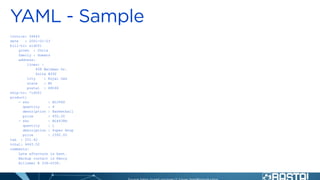
invoice: 34843
date : 2001-01-23
bill-to: &id001
given : Chris
family : Dumars
address:
lines: |
458 Walkman Dr.
Suite #292
city : Royal Oak
state : MI
postal : 48046
ship-to: *id001
product:
- sku : BL394D
quantity : 4
description : Basketball
price : 450.00
- sku : BL4438H
quantity : 1
description : Super Hoop
price : 2392.00
tax : 251.42
total: 4443.52
comments:
Late afternoon is best.
Backup contact is Nancy
Billsmer @ 338-4338.
▪
▪
▪
▪
▪
▪
▪
▪
▪
▪
▪
▪ →
▪
▪
▪
▪
▪
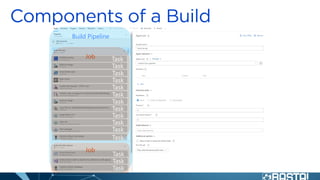
Build Pipeline
Job
Job
Task
Task
Task
Task
Task
Task
Task
Task
Task
Task
Task
Task
Task
Task
Task
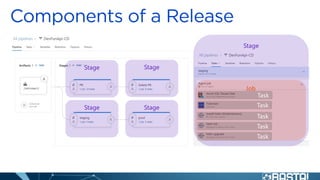
Stage
Job
Task
Task
Task
Task
Task
Stage Stage
Stage Stage
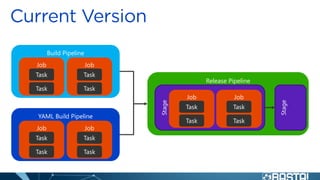
Release Pipeline
Stage
Build Pipeline
Job
Task
Task
Job
Task
Task
Stage
Job
Task
Task
Job
Task
Task
YAML Build Pipeline
Job
Task
Task
Job
Task
Task
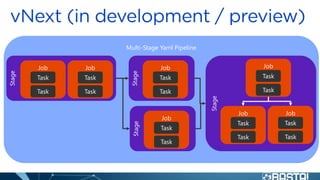
Multi-Stage Yaml Pipeline
Stage
Job
Task
Task
Job
Task
Task
Stage
Job
Task
Task
Stage
Job
Task
Task
Stage
Job
Task
Task
Job
Task
Task
Job
Task
Task
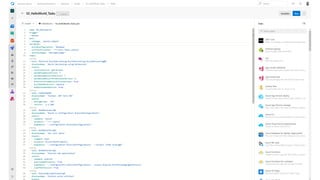
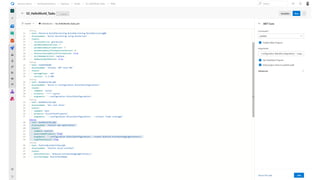
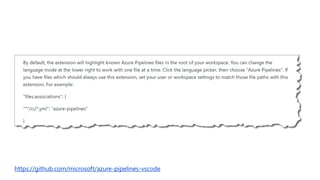
https://github.com/microsoft/azure-pipelines-vscode
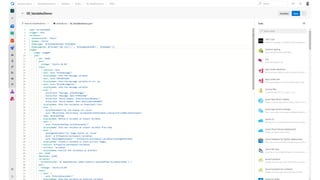
name: VariableDemo
trigger: none
variables:
MySampleVar01: 'Hello'
MyName: 'World'
MyMessage: '$(MySampleVar01) $(MyName)'
MyMessageTwo: $[format('{0} {1}!!!!', '$(MySampleVar01)', '$(MyName)')]
stages:
- stage: stage01
jobs:
- job: job01
pool:
vmImage: 'Ubuntu-16.04'
steps:
- checkout: none
- bash: echo "$(MyMessage)"
displayName: Show the message variable
- bash: echo "$MYMESSAGE"
displayName: Show the message variable as env var
- bash: echo "$(MyMessageTwo)"
displayName: Show the message variable
- pwsh: |
Write-Host "Message: $(MyMessage)"
Write-Host "Message: $env:MYMESSAGE"
Write-Host "Build Number: $(Build.BuildNumber)"
Write-Host "Build Number: $env:BUILD_BUILDNUMBER"
displayName: Show the variables as PowerShell Core
- bash: |
MyJobSharedVar="my job shared var value"
echo "##vso[task.setvariable
variable=MyJobSharedVar;isOutput=true]$MyJobSharedVar"
name: myVarDefStep
displayName: Define a variable as output variable
- bash: |
echo "$(myVarDefStep.MyJobSharedVar)"
displayName: Show the variable as output variable from step
- bash: |
MyStageSharedVar="my stage shared var value"
mkdir -p $(Pipeline.Workspace)/variables
echo "$MyStageSharedVar" > $(Pipeline.Workspace)/variables/MyStageSharedVar
displayName: Create a variable to share accross stages
- publish: $(Pipeline.Workspace)/variables
artifact: variables
displayName: Publish the variables as artifact
- job: job02
dependsOn: job01
variables:
MyJobSharedVar: $[ dependencies.job01.outputs['myVarDefStep.MyJobSharedVar'] ]
pool:
vmImage: 'Ubuntu-16.04'
steps:
- bash: |
echo "$(MyJobSharedVar)"
displayName: Show the variable as pipeline variable
- bash: |
echo "$MyJobSharedVar2"
env:
MyJobSharedVar2: $(MyJobSharedVar)
displayName: Show the variable as explicitly defined environment variable
- stage: stage02
dependsOn: stage01
jobs:
- job: job03
pool:
vmImage: 'Ubuntu-16.04'
steps:
- checkout: none
- download: current
artifact: variables
displayName: Download the variables artifact
- bash: |
MyStageSharedVar=$(cat $(Pipeline.Workspace)/variables/MyStageSharedVar)
echo "##vso[task.setvariable variable=MyStageSharedVar]$MyStageSharedVar"
displayName: Read the variables artifact files and create pipeline variables
- bash: |
echo "$(MyStageSharedVar)"
displayName: Show the variable as pipeline variable
- bash: |
echo "$MYSTAGESHAREDVAR"
displayName: Show the variable as environment variable
▪
▪
▪
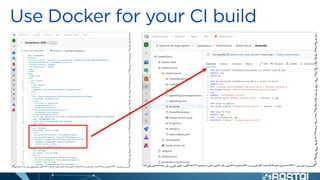
FROM microsoft/dotnet:2.1-aspnetcore-
runtime
WORKDIR /app
COPY output/app .
ENTRYPOINT ["dotnet", "HelloWorld.dll"]
FROM microsoft/dotnet:2.1-aspnetcore-runtime AS base
WORKDIR /app
EXPOSE 80
FROM microsoft/dotnet:2.1-sdk AS build
WORKDIR /src
COPY ["HelloWorld/HelloWorld.csproj", "HelloWorld/"]
RUN dotnet restore "HelloWorld/HelloWorld.csproj"
COPY . .
WORKDIR "/src/HelloWorld"
RUN dotnet build "HelloWorld.csproj" -c Release -o /app
FROM build AS publish
RUN dotnet publish "HelloWorld.csproj" -c Release -o /app
FROM base AS final
WORKDIR /app
COPY --from=publish /app .
ENTRYPOINT ["dotnet", "HelloWorld.dll"]
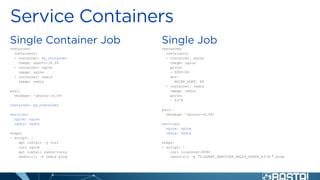
resources:
containers:
- container: my_container
image: ubuntu:16.04
- container: nginx
image: nginx
- container: redis
image: redis
pool:
vmImage: 'ubuntu-16.04'
container: my_container
services:
nginx: nginx
redis: redis
steps:
- script: |
apt install -y curl
curl nginx
apt install redis-tools
redis-cli -h redis ping
resources:
containers:
- container: nginx
image: nginx
ports:
- 8080:80
env:
NGINX_PORT: 80
- container: redis
image: redis
ports:
- 6379
pool:
vmImage: 'ubuntu-16.04'
services:
nginx: nginx
redis: redis
steps:
- script: |
curl localhost:8080
redis-cli -p "${AGENT_SERVICES_REDIS_PORTS_6379}" ping
resources:
containers:
- container: my_container
image: ubuntu:16.04
- container: pg11
image: postgres:11
- container: pg10
image: postgres:10
pool:
vmImage: 'ubuntu-16.04'
strategy:
matrix:
postgres11:
postgresService: pg11
postgres10:
postgresService: pg10
container: my_container
services:
postgres: $[ variables['postgresService'] ]
steps:
- script: |
apt install -y postgresql-client
psql --host=postgres --username=postgres --command="SELECT 1;"
BASTA 2019 - YAML Pipelines

BASTA 2019 - YAML Pipelines

  • 4.
  • 5.
    invoice: 34843 date :2001-01-23 bill-to: &id001 given : Chris family : Dumars address: lines: | 458 Walkman Dr. Suite #292 city : Royal Oak state : MI postal : 48046 ship-to: *id001 product: - sku : BL394D quantity : 4 description : Basketball price : 450.00 - sku : BL4438H quantity : 1 description : Super Hoop price : 2392.00 tax : 251.42 total: 4443.52 comments: Late afternoon is best. Backup contact is Nancy Billsmer @ 338-4338.
  • 6.
  • 7.
  • 16.
  • 17.
  • 18.
  • 19.
  • 29.
  • 35.
    name: VariableDemo trigger: none variables: MySampleVar01:'Hello' MyName: 'World' MyMessage: '$(MySampleVar01) $(MyName)' MyMessageTwo: $[format('{0} {1}!!!!', '$(MySampleVar01)', '$(MyName)')] stages: - stage: stage01 jobs: - job: job01 pool: vmImage: 'Ubuntu-16.04' steps: - checkout: none - bash: echo "$(MyMessage)" displayName: Show the message variable - bash: echo "$MYMESSAGE" displayName: Show the message variable as env var - bash: echo "$(MyMessageTwo)" displayName: Show the message variable - pwsh: | Write-Host "Message: $(MyMessage)" Write-Host "Message: $env:MYMESSAGE" Write-Host "Build Number: $(Build.BuildNumber)" Write-Host "Build Number: $env:BUILD_BUILDNUMBER" displayName: Show the variables as PowerShell Core - bash: | MyJobSharedVar="my job shared var value" echo "##vso[task.setvariable variable=MyJobSharedVar;isOutput=true]$MyJobSharedVar" name: myVarDefStep displayName: Define a variable as output variable - bash: | echo "$(myVarDefStep.MyJobSharedVar)" displayName: Show the variable as output variable from step - bash: | MyStageSharedVar="my stage shared var value" mkdir -p $(Pipeline.Workspace)/variables echo "$MyStageSharedVar" > $(Pipeline.Workspace)/variables/MyStageSharedVar displayName: Create a variable to share accross stages - publish: $(Pipeline.Workspace)/variables artifact: variables displayName: Publish the variables as artifact - job: job02 dependsOn: job01 variables: MyJobSharedVar: $[ dependencies.job01.outputs['myVarDefStep.MyJobSharedVar'] ] pool: vmImage: 'Ubuntu-16.04' steps: - bash: | echo "$(MyJobSharedVar)" displayName: Show the variable as pipeline variable - bash: | echo "$MyJobSharedVar2" env: MyJobSharedVar2: $(MyJobSharedVar) displayName: Show the variable as explicitly defined environment variable - stage: stage02 dependsOn: stage01 jobs: - job: job03 pool: vmImage: 'Ubuntu-16.04' steps: - checkout: none - download: current artifact: variables displayName: Download the variables artifact - bash: | MyStageSharedVar=$(cat $(Pipeline.Workspace)/variables/MyStageSharedVar) echo "##vso[task.setvariable variable=MyStageSharedVar]$MyStageSharedVar" displayName: Read the variables artifact files and create pipeline variables - bash: | echo "$(MyStageSharedVar)" displayName: Show the variable as pipeline variable - bash: | echo "$MYSTAGESHAREDVAR" displayName: Show the variable as environment variable
  • 43.
  • 45.
    FROM microsoft/dotnet:2.1-aspnetcore- runtime WORKDIR /app COPYoutput/app . ENTRYPOINT ["dotnet", "HelloWorld.dll"] FROM microsoft/dotnet:2.1-aspnetcore-runtime AS base WORKDIR /app EXPOSE 80 FROM microsoft/dotnet:2.1-sdk AS build WORKDIR /src COPY ["HelloWorld/HelloWorld.csproj", "HelloWorld/"] RUN dotnet restore "HelloWorld/HelloWorld.csproj" COPY . . WORKDIR "/src/HelloWorld" RUN dotnet build "HelloWorld.csproj" -c Release -o /app FROM build AS publish RUN dotnet publish "HelloWorld.csproj" -c Release -o /app FROM base AS final WORKDIR /app COPY --from=publish /app . ENTRYPOINT ["dotnet", "HelloWorld.dll"]
  • 46.
    resources: containers: - container: my_container image:ubuntu:16.04 - container: nginx image: nginx - container: redis image: redis pool: vmImage: 'ubuntu-16.04' container: my_container services: nginx: nginx redis: redis steps: - script: | apt install -y curl curl nginx apt install redis-tools redis-cli -h redis ping resources: containers: - container: nginx image: nginx ports: - 8080:80 env: NGINX_PORT: 80 - container: redis image: redis ports: - 6379 pool: vmImage: 'ubuntu-16.04' services: nginx: nginx redis: redis steps: - script: | curl localhost:8080 redis-cli -p "${AGENT_SERVICES_REDIS_PORTS_6379}" ping
  • 47.
    resources: containers: - container: my_container image:ubuntu:16.04 - container: pg11 image: postgres:11 - container: pg10 image: postgres:10 pool: vmImage: 'ubuntu-16.04' strategy: matrix: postgres11: postgresService: pg11 postgres10: postgresService: pg10 container: my_container services: postgres: $[ variables['postgresService'] ] steps: - script: | apt install -y postgresql-client psql --host=postgres --username=postgres --command="SELECT 1;"