I C T Y E A R 5I C T Y E A R 5
Basic LOGO Commands
UNIT 3 : PROGRAMMING IN LOGO
Basic LOGO CommandsBasic LOGO Commands
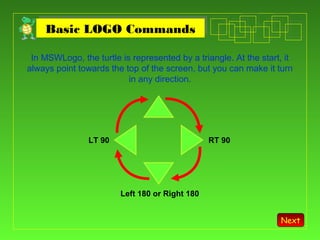
In MSWLogo, the turtle is represented by a triangle. At the start, it
always point towards the top of the screen, but you can make it turn
in any direction.
RT 90LT 90
Left 180 or Right 180
Next
Basic LOGO CommandsBasic LOGO Commands
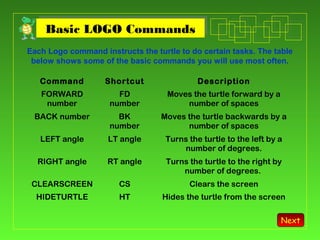
Each Logo command instructs the turtle to do certain tasks. The table
below shows some of the basic commands you will use most often.
Command Shortcut Description
FORWARD
number
FD
number
Moves the turtle forward by a
number of spaces
BACK number BK
number
Moves the turtle backwards by a
number of spaces
LEFT angle LT angle Turns the turtle to the left by a
number of degrees.
RIGHT angle RT angle Turns the turtle to the right by
number of degrees.
CLEARSCREEN CS Clears the screen
HIDETURTLE HT Hides the turtle from the screen
Next
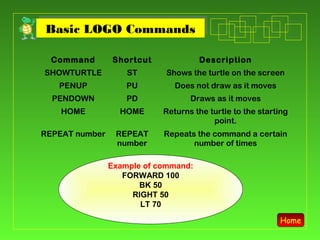
Basic LOGO CommandsBasic LOGO Commands
Command Shortcut Description
SHOWTURTLE ST Shows the turtle on the screen
PENUP PU Does not draw as it moves
PENDOWN PD Draws as it moves
HOME HOME Returns the turtle to the starting
point.
REPEAT number REPEAT
number
Repeats the command a certain
number of times
Example of command:
FORWARD 100
BK 50
RIGHT 50
LT 70
Home

Basic logo-command

  • 1.
    I C TY E A R 5I C T Y E A R 5 Basic LOGO Commands UNIT 3 : PROGRAMMING IN LOGO
  • 2.
    Basic LOGO CommandsBasicLOGO Commands In MSWLogo, the turtle is represented by a triangle. At the start, it always point towards the top of the screen, but you can make it turn in any direction. RT 90LT 90 Left 180 or Right 180 Next
  • 3.
    Basic LOGO CommandsBasicLOGO Commands Each Logo command instructs the turtle to do certain tasks. The table below shows some of the basic commands you will use most often. Command Shortcut Description FORWARD number FD number Moves the turtle forward by a number of spaces BACK number BK number Moves the turtle backwards by a number of spaces LEFT angle LT angle Turns the turtle to the left by a number of degrees. RIGHT angle RT angle Turns the turtle to the right by number of degrees. CLEARSCREEN CS Clears the screen HIDETURTLE HT Hides the turtle from the screen Next
  • 4.
    Basic LOGO CommandsBasicLOGO Commands Command Shortcut Description SHOWTURTLE ST Shows the turtle on the screen PENUP PU Does not draw as it moves PENDOWN PD Draws as it moves HOME HOME Returns the turtle to the starting point. REPEAT number REPEAT number Repeats the command a certain number of times Example of command: FORWARD 100 BK 50 RIGHT 50 LT 70 Home