Back to the future :
SQL 92 for Elasticsearch ?
@LucianPrecup
@nosqlmatters #nosql14
2014-09-04
whoami
• CTO of Adelean (http://adelean.com/, http://www.elasticsearch.com/about/partners/)
• Integrate search, nosql and big data
technologies to support ETL, BI, data mining,
data processing and data visualization use
cases.
2014-09-04 2@LucianPrecup @nosqlmatters #nosql14
Poll - How many of you …
• Know SQL ?
• Are familiar with the NoSQL theory ?
• Are familiar with Elasticsearch ?
• Lucene ? Solr ?
• Used a NoSQL database or product ?
• Are remembering SQL 92 ?
2014-04-30 @LucianPrecup @nosqlmatters #nosql14 3
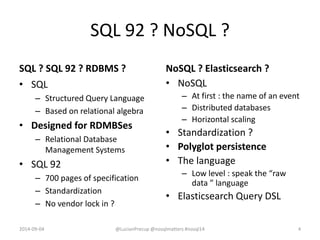
SQL 92 ? NoSQL ?
SQL ? SQL 92 ? RDBMS ?
• SQL
– Structured Query Language
– Based on relational algebra
• Designed for RDMBSes
– Relational Database
Management Systems
• SQL 92
– 700 pages of specification
– Standardization
– No vendor lock in ?
NoSQL ? Elasticsearch ?
• NoSQL
– At first : the name of an event
– Distributed databases
– Horizontal scaling
• Standardization ?
• Polyglot persistence
• The language
– Low level : speak the “raw
data ” language
• Elasticsearch Query DSL
2014-09-04 @LucianPrecup @nosqlmatters #nosql14 4
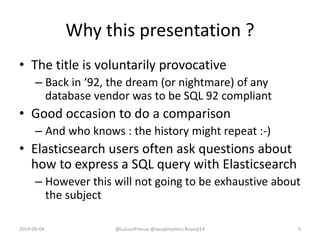
Why this presentation ?
• The title is voluntarily provocative
– Back in ‘92, the dream (or nightmare) of any
database vendor was to be SQL 92 compliant
• Good occasion to do a comparison
– And who knows : the history might repeat :-)
• Elasticsearch users often ask questions about
how to express a SQL query with Elasticsearch
– However this will not going to be exhaustive about
the subject
2014-09-04 @LucianPrecup @nosqlmatters #nosql14 5
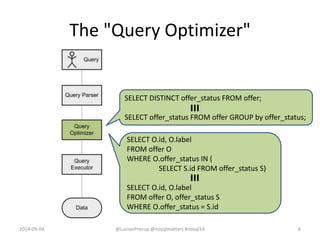
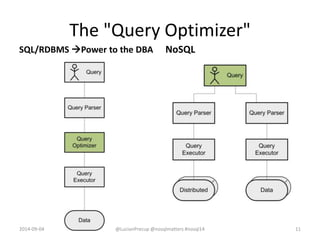
The "Query Optimizer"
2014-09-04 @LucianPrecup @nosqlmatters #nosql14 6
SELECT DISTINCT offer_status FROM offer;
SELECT offer_status FROM offer GROUP by offer_status;
≡
SELECT O.id, O.label
FROM offer O
WHERE O.offer_status IN (
SELECT S.id FROM offer_status S)
SELECT O.id, O.label
FROM offer O, offer_status S
WHERE O.offer_status = S.id
≡
The "Query Optimizer"
2014-09-04 @LucianPrecup @nosqlmatters #nosql14 7
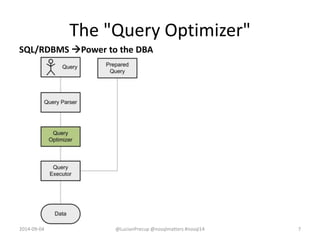
SQL/RDBMS Power to the DBA
The "Query Optimizer"
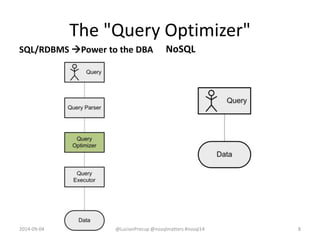
NoSQL
2014-09-04 @LucianPrecup @nosqlmatters #nosql14 8
SQL/RDBMS Power to the DBA
The "Query Optimizer"
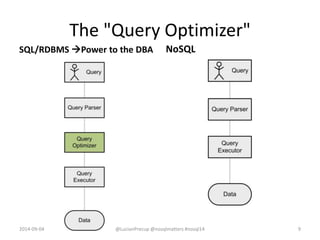
NoSQL
2014-09-04 @LucianPrecup @nosqlmatters #nosql14 9
SQL/RDBMS Power to the DBA
The "Query Optimizer"
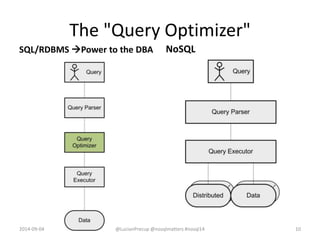
NoSQL
2014-09-04 @LucianPrecup @nosqlmatters #nosql14 10
SQL/RDBMS Power to the DBA
The "Query Optimizer"
SQL/RDBMS Power to the DBA
2014-09-04 @LucianPrecup @nosqlmatters #nosql14 11
NoSQL
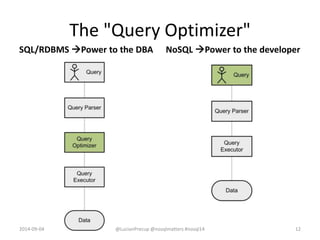
The "Query Optimizer"
SQL/RDBMS Power to the DBA NoSQL Power to the developer
2014-09-04 @LucianPrecup @nosqlmatters #nosql14 12
“With great power comes great responsibility”
• The developer has to :
– Deal with query optimization
– Deal with data storage
– Take care about data consistency
– …
• But the developer can do better than the
query optimizer  adjusting (the data) to the
(very) specific needs
2014-09-04 @LucianPrecup @nosqlmatters #nosql14 13
Great responsibility … with Elasticsearch
2014-09-04 @LucianPrecup @nosqlmatters #nosql14 14
"fields": ["@timestamp"],
"from": 0, "size": 1,
"sort": [{ "@timestamp": { "order": "desc" }}],
"query": { "match_all": {} },
"filter": { "and": [
{"term": {"account": "you@me.org"}},
{"term": {"protocol": "http"}}
]
}
"from": 0, "size": 0,
"query": { "filtered": {"query": {"match_all": {}},
"filter": { "bool": { "must": [
{"term": {"account": "you@me.org"}},
{"term": {"protocol": "http"}}
]}}}
},
"aggs": {"LastTimestamp": {"max": {"field": "@timestamp"}}}
≡
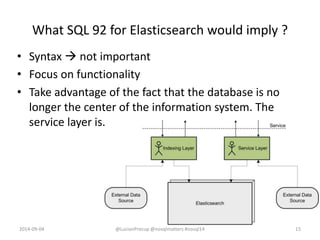
What SQL 92 for Elasticsearch would imply ?
• Syntax  not important
• Focus on functionality
• Take advantage of the fact that the database is no
longer the center of the information system. The
service layer is.
2014-09-04 @LucianPrecup @nosqlmatters #nosql14 15
Side by side - pagination
• Statement.execute()
• do while ResultSet.next()
– ResultSet.get()
• Otherwise: no standard
for pagination in SQL 92
• Pagination is at the core
of search engines
• Top n results are returned
fast and use cases usually
stop to that
2014-09-04 @LucianPrecup @nosqlmatters #nosql14 16
As we will use this
difference in some
choices
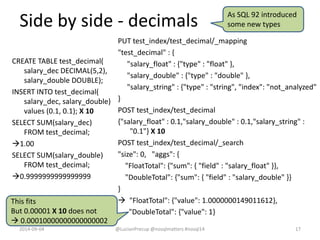
Side by side - decimals
CREATE TABLE test_decimal(
salary_dec DECIMAL(5,2),
salary_double DOUBLE);
INSERT INTO test_decimal(
salary_dec, salary_double)
values (0.1, 0.1); X 10
SELECT SUM(salary_dec)
FROM test_decimal;
1.00
SELECT SUM(salary_double)
FROM test_decimal;
0.9999999999999999
PUT test_index/test_decimal/_mapping
"test_decimal" : {
"salary_float" : {"type" : "float" },
"salary_double" : {"type" : "double" },
"salary_string" : {"type" : "string", "index": "not_analyzed"
}
POST test_index/test_decimal
{"salary_float" : 0.1,"salary_double" : 0.1,"salary_string" :
"0.1"} X 10
POST test_index/test_decimal/_search
"size": 0, "aggs": {
"FloatTotal": {"sum": { "field" : "salary_float" }},
"DoubleTotal": {"sum": { "field" : "salary_double" }}
}
 "FloatTotal": {"value": 1.0000000149011612},
"DoubleTotal": {"value": 1}
2014-09-04 @LucianPrecup @nosqlmatters #nosql14 17
As SQL 92 introduced
some new types
This fits
But 0.00001 X 10 does not
 0.00010000000000000002
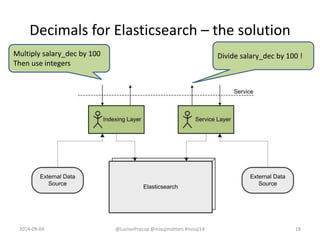
Decimals for Elasticsearch – the solution
2014-09-04 @LucianPrecup @nosqlmatters #nosql14 18
Multiply salary_dec by 100
Then use integers
Divide salary_dec by 100 !
Side by side – order by
• SELECT * FROM offer
ORDER BY price;
• SELECT (price_ex +
price_vat) AS price FROM
offer ORDER BY price;
• SELECT substring(concat(
value1, value2)) AS code
FROM table ORDER BY code
• "query": {"match_all": {}},
"sort": [{"price": {"order": "asc"}}]
• "function_score": {"boost_mode": "replace",
"script_score": {"script":
"doc['price_ex'].value + doc['price_vat'].value"}}
• Let’s do the computations at index time !
• Watch out for order by + pagination + distributed
2014-09-04 @LucianPrecup @nosqlmatters #nosql14 19
Order by - computations at index time
2014-09-04 @LucianPrecup @nosqlmatters #nosql14 20
Index substring(concat(
value1, value2)) as code
"sort": [{"code": {"order": "asc"}}]
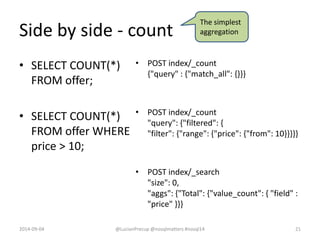
Side by side - count
• SELECT COUNT(*)
FROM offer;
• SELECT COUNT(*)
FROM offer WHERE
price > 10;
• POST index/_count
{"query" : {"match_all": {}}}
• POST index/_count
"query": {"filtered": {
"filter": {"range": {"price": {"from": 10}}}}}
• POST index/_search
"size": 0,
"aggs": {"Total": {"value_count": { "field" :
"price" }}}
2014-09-04 @LucianPrecup @nosqlmatters #nosql14 21
The simplest
aggregation
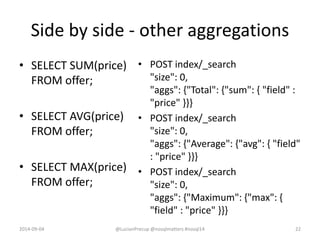
Side by side - other aggregations
• SELECT SUM(price)
FROM offer;
• SELECT AVG(price)
FROM offer;
• SELECT MAX(price)
FROM offer;
• POST index/_search
"size": 0,
"aggs": {"Total": {"sum": { "field" :
"price" }}}
• POST index/_search
"size": 0,
"aggs": {"Average": {"avg": { "field"
: "price" }}}
• POST index/_search
"size": 0,
"aggs": {"Maximum": {"max": {
"field" : "price" }}}
2014-09-04 @LucianPrecup @nosqlmatters #nosql14 22
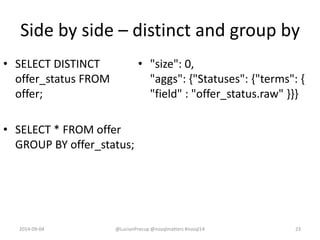
Side by side – distinct and group by
• SELECT DISTINCT
offer_status FROM
offer;
• SELECT * FROM offer
GROUP BY offer_status;
• "size": 0,
"aggs": {"Statuses": {"terms": {
"field" : "offer_status.raw" }}}
2014-09-04 @LucianPrecup @nosqlmatters #nosql14 23
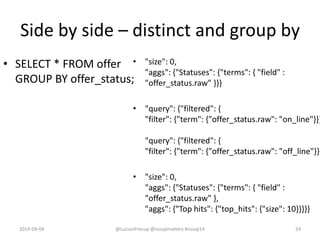
Side by side – distinct and group by
• SELECT * FROM offer
GROUP BY offer_status;
• "size": 0,
"aggs": {"Statuses": {"terms": { "field" :
"offer_status.raw" }}}
• "query": {"filtered": {
"filter": {"term": {"offer_status.raw": "on_line"}}}
"query": {"filtered": {
"filter": {"term": {"offer_status.raw": "off_line"}}}
• "size": 0,
"aggs": {"Statuses": {"terms": { "field" :
"offer_status.raw" },
"aggs": {"Top hits": {"top_hits": {"size": 10}}}}}
2014-09-04 @LucianPrecup @nosqlmatters #nosql14 24
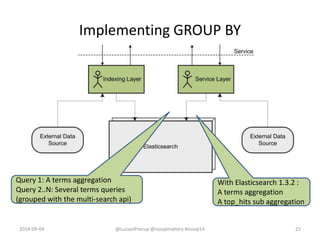
Implementing GROUP BY
2014-09-04 @LucianPrecup @nosqlmatters #nosql14 25
Query 1: A terms aggregation
Query 2..N: Several terms queries
(grouped with the multi-search api)
With Elasticsearch 1.3.2 :
A terms aggregation
A top_hits sub aggregation
Side by side – joins
Normalized database Elasticsearch document
{"film" : {
"id" : "183070",
"title" : "The Artist",
"published" : "2011-10-12",
"genre" : ["Romance", "Drama", "Comedy"],
"language" : ["English", "French"],
"persons" : [
{"person" : { "id" : "5079", "name" : "Michel
Hazanavicius", "role" : "director" }},
{"person" : { "id" : "84145", "name" : "Jean
Dujardin", "role" : "actor" }},
{"person" : { "id" : "24485", "name" : "Bérénice
Bejo", "role" : "actor" }},
{"person" : { "id" : "4204", "name" : "John
Goodman", "role" : "actor" }}
]
}}
2014-04-30 @LucianPrecup @nosqlmatters #nosql14 26
The issue with joins :-)
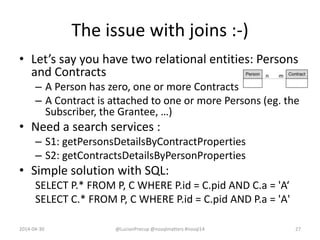
• Let’s say you have two relational entities: Persons
and Contracts
– A Person has zero, one or more Contracts
– A Contract is attached to one or more Persons (eg. the
Subscriber, the Grantee, …)
• Need a search services :
– S1: getPersonsDetailsByContractProperties
– S2: getContractsDetailsByPersonProperties
• Simple solution with SQL:
SELECT P.* FROM P, C WHERE P.id = C.pid AND C.a = 'A‘
SELECT C.* FROM P, C WHERE P.id = C.pid AND P.a = 'A'
2014-04-30 @LucianPrecup @nosqlmatters #nosql14 27
The issue with joins - solutions
• Solution 1
– Index Persons with Contracts together for S1
{"person" : { "details" : …, … , "contracts" : ["contract" :{"id" : 1, …}, …] }}
– Index Contracts with Persons together for S2
{"contract" : { "details" : …, …, "persons" : ["person" :{"id" : 1, "role" : "S", …}, …]}}
• Issues with solution 1:
– A lot of data duplication
– Have to get Contracts when indexing Persons and vice-versa
• Solution 2
– Elasticsearch’s Parent/Child
• Issues with solution 2:
– Works in one way but not the other (only one parent for n children, a 1 to n relationship)
• Solution 3
– Index Persons and Contracts separately
– Launch two Elasticsearch queries to get the response
– For S1 : First get all Contract ids by Contract properties, then get Persons by Contract ids (terms
query or mget)
– For S2 : First get all Persons ids by Person properties, then get Contracts by Person ids (terms
query or mget)
– The response to the second query can be returned “as is” to the client (pagination, etc.)
2014-04-30 @LucianPrecup @nosqlmatters #nosql14 28
Side by side - having
• SELECT *, SUM(price)
FROM offer
GROUP BY offer_status
HAVING AVG(price) > 10;
• "size": 0,
"aggs": {
"Status": {"terms": {"field": "offer_status"},
"aggs": {
"Average": {"avg": {"field": "price_ht"}}}}
}
• "query": {
"filtered": {"filter": {
"terms": {"offer_status": ["on_line"]}}}},
"aggs": {
"Status": {"terms": {"field": "offer_status"},
"aggs": {
"Total": {"sum": {"field": "price_ht"}}}}}
2014-09-04 @LucianPrecup @nosqlmatters #nosql14 29
Also specified
by SQL 92
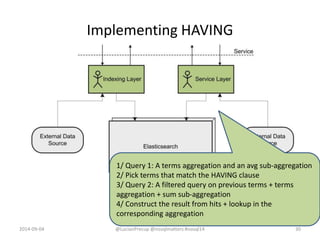
Implementing HAVING
2014-09-04 @LucianPrecup @nosqlmatters #nosql14 30
1/ Query 1: A terms aggregation and an avg sub-aggregation
2/ Pick terms that match the HAVING clause
3/ Query 2: A filtered query on previous terms + terms
aggregation + sum sub-aggregation
4/ Construct the result from hits + lookup in the
corresponding aggregation
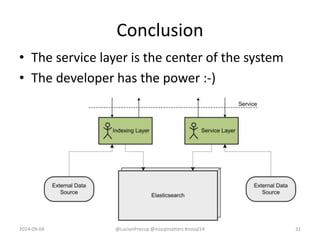
Conclusion
• The service layer is the center of the system
• The developer has the power :-)
2014-09-04 @LucianPrecup @nosqlmatters #nosql14 31
Thank you
Q & A

Back to the future : SQL 92 for Elasticsearch ? @nosqlmatters Dublin 2014

  • 1.
    Back to thefuture : SQL 92 for Elasticsearch ? @LucianPrecup @nosqlmatters #nosql14 2014-09-04
  • 2.
    whoami • CTO ofAdelean (http://adelean.com/, http://www.elasticsearch.com/about/partners/) • Integrate search, nosql and big data technologies to support ETL, BI, data mining, data processing and data visualization use cases. 2014-09-04 2@LucianPrecup @nosqlmatters #nosql14
  • 3.
    Poll - Howmany of you … • Know SQL ? • Are familiar with the NoSQL theory ? • Are familiar with Elasticsearch ? • Lucene ? Solr ? • Used a NoSQL database or product ? • Are remembering SQL 92 ? 2014-04-30 @LucianPrecup @nosqlmatters #nosql14 3
  • 4.
    SQL 92 ?NoSQL ? SQL ? SQL 92 ? RDBMS ? • SQL – Structured Query Language – Based on relational algebra • Designed for RDMBSes – Relational Database Management Systems • SQL 92 – 700 pages of specification – Standardization – No vendor lock in ? NoSQL ? Elasticsearch ? • NoSQL – At first : the name of an event – Distributed databases – Horizontal scaling • Standardization ? • Polyglot persistence • The language – Low level : speak the “raw data ” language • Elasticsearch Query DSL 2014-09-04 @LucianPrecup @nosqlmatters #nosql14 4
  • 5.
    Why this presentation? • The title is voluntarily provocative – Back in ‘92, the dream (or nightmare) of any database vendor was to be SQL 92 compliant • Good occasion to do a comparison – And who knows : the history might repeat :-) • Elasticsearch users often ask questions about how to express a SQL query with Elasticsearch – However this will not going to be exhaustive about the subject 2014-09-04 @LucianPrecup @nosqlmatters #nosql14 5
  • 6.
    The "Query Optimizer" 2014-09-04@LucianPrecup @nosqlmatters #nosql14 6 SELECT DISTINCT offer_status FROM offer; SELECT offer_status FROM offer GROUP by offer_status; ≡ SELECT O.id, O.label FROM offer O WHERE O.offer_status IN ( SELECT S.id FROM offer_status S) SELECT O.id, O.label FROM offer O, offer_status S WHERE O.offer_status = S.id ≡
  • 7.
    The "Query Optimizer" 2014-09-04@LucianPrecup @nosqlmatters #nosql14 7 SQL/RDBMS Power to the DBA
  • 8.
    The "Query Optimizer" NoSQL 2014-09-04@LucianPrecup @nosqlmatters #nosql14 8 SQL/RDBMS Power to the DBA
  • 9.
    The "Query Optimizer" NoSQL 2014-09-04@LucianPrecup @nosqlmatters #nosql14 9 SQL/RDBMS Power to the DBA
  • 10.
    The "Query Optimizer" NoSQL 2014-09-04@LucianPrecup @nosqlmatters #nosql14 10 SQL/RDBMS Power to the DBA
  • 11.
    The "Query Optimizer" SQL/RDBMSPower to the DBA 2014-09-04 @LucianPrecup @nosqlmatters #nosql14 11 NoSQL
  • 12.
    The "Query Optimizer" SQL/RDBMSPower to the DBA NoSQL Power to the developer 2014-09-04 @LucianPrecup @nosqlmatters #nosql14 12
  • 13.
    “With great powercomes great responsibility” • The developer has to : – Deal with query optimization – Deal with data storage – Take care about data consistency – … • But the developer can do better than the query optimizer  adjusting (the data) to the (very) specific needs 2014-09-04 @LucianPrecup @nosqlmatters #nosql14 13
  • 14.
    Great responsibility …with Elasticsearch 2014-09-04 @LucianPrecup @nosqlmatters #nosql14 14 "fields": ["@timestamp"], "from": 0, "size": 1, "sort": [{ "@timestamp": { "order": "desc" }}], "query": { "match_all": {} }, "filter": { "and": [ {"term": {"account": "you@me.org"}}, {"term": {"protocol": "http"}} ] } "from": 0, "size": 0, "query": { "filtered": {"query": {"match_all": {}}, "filter": { "bool": { "must": [ {"term": {"account": "you@me.org"}}, {"term": {"protocol": "http"}} ]}}} }, "aggs": {"LastTimestamp": {"max": {"field": "@timestamp"}}} ≡
  • 15.
    What SQL 92for Elasticsearch would imply ? • Syntax  not important • Focus on functionality • Take advantage of the fact that the database is no longer the center of the information system. The service layer is. 2014-09-04 @LucianPrecup @nosqlmatters #nosql14 15
  • 16.
    Side by side- pagination • Statement.execute() • do while ResultSet.next() – ResultSet.get() • Otherwise: no standard for pagination in SQL 92 • Pagination is at the core of search engines • Top n results are returned fast and use cases usually stop to that 2014-09-04 @LucianPrecup @nosqlmatters #nosql14 16 As we will use this difference in some choices
  • 17.
    Side by side- decimals CREATE TABLE test_decimal( salary_dec DECIMAL(5,2), salary_double DOUBLE); INSERT INTO test_decimal( salary_dec, salary_double) values (0.1, 0.1); X 10 SELECT SUM(salary_dec) FROM test_decimal; 1.00 SELECT SUM(salary_double) FROM test_decimal; 0.9999999999999999 PUT test_index/test_decimal/_mapping "test_decimal" : { "salary_float" : {"type" : "float" }, "salary_double" : {"type" : "double" }, "salary_string" : {"type" : "string", "index": "not_analyzed" } POST test_index/test_decimal {"salary_float" : 0.1,"salary_double" : 0.1,"salary_string" : "0.1"} X 10 POST test_index/test_decimal/_search "size": 0, "aggs": { "FloatTotal": {"sum": { "field" : "salary_float" }}, "DoubleTotal": {"sum": { "field" : "salary_double" }} }  "FloatTotal": {"value": 1.0000000149011612}, "DoubleTotal": {"value": 1} 2014-09-04 @LucianPrecup @nosqlmatters #nosql14 17 As SQL 92 introduced some new types This fits But 0.00001 X 10 does not  0.00010000000000000002
  • 18.
    Decimals for Elasticsearch– the solution 2014-09-04 @LucianPrecup @nosqlmatters #nosql14 18 Multiply salary_dec by 100 Then use integers Divide salary_dec by 100 !
  • 19.
    Side by side– order by • SELECT * FROM offer ORDER BY price; • SELECT (price_ex + price_vat) AS price FROM offer ORDER BY price; • SELECT substring(concat( value1, value2)) AS code FROM table ORDER BY code • "query": {"match_all": {}}, "sort": [{"price": {"order": "asc"}}] • "function_score": {"boost_mode": "replace", "script_score": {"script": "doc['price_ex'].value + doc['price_vat'].value"}} • Let’s do the computations at index time ! • Watch out for order by + pagination + distributed 2014-09-04 @LucianPrecup @nosqlmatters #nosql14 19
  • 20.
    Order by -computations at index time 2014-09-04 @LucianPrecup @nosqlmatters #nosql14 20 Index substring(concat( value1, value2)) as code "sort": [{"code": {"order": "asc"}}]
  • 21.
    Side by side- count • SELECT COUNT(*) FROM offer; • SELECT COUNT(*) FROM offer WHERE price > 10; • POST index/_count {"query" : {"match_all": {}}} • POST index/_count "query": {"filtered": { "filter": {"range": {"price": {"from": 10}}}}} • POST index/_search "size": 0, "aggs": {"Total": {"value_count": { "field" : "price" }}} 2014-09-04 @LucianPrecup @nosqlmatters #nosql14 21 The simplest aggregation
  • 22.
    Side by side- other aggregations • SELECT SUM(price) FROM offer; • SELECT AVG(price) FROM offer; • SELECT MAX(price) FROM offer; • POST index/_search "size": 0, "aggs": {"Total": {"sum": { "field" : "price" }}} • POST index/_search "size": 0, "aggs": {"Average": {"avg": { "field" : "price" }}} • POST index/_search "size": 0, "aggs": {"Maximum": {"max": { "field" : "price" }}} 2014-09-04 @LucianPrecup @nosqlmatters #nosql14 22
  • 23.
    Side by side– distinct and group by • SELECT DISTINCT offer_status FROM offer; • SELECT * FROM offer GROUP BY offer_status; • "size": 0, "aggs": {"Statuses": {"terms": { "field" : "offer_status.raw" }}} 2014-09-04 @LucianPrecup @nosqlmatters #nosql14 23
  • 24.
    Side by side– distinct and group by • SELECT * FROM offer GROUP BY offer_status; • "size": 0, "aggs": {"Statuses": {"terms": { "field" : "offer_status.raw" }}} • "query": {"filtered": { "filter": {"term": {"offer_status.raw": "on_line"}}} "query": {"filtered": { "filter": {"term": {"offer_status.raw": "off_line"}}} • "size": 0, "aggs": {"Statuses": {"terms": { "field" : "offer_status.raw" }, "aggs": {"Top hits": {"top_hits": {"size": 10}}}}} 2014-09-04 @LucianPrecup @nosqlmatters #nosql14 24
  • 25.
    Implementing GROUP BY 2014-09-04@LucianPrecup @nosqlmatters #nosql14 25 Query 1: A terms aggregation Query 2..N: Several terms queries (grouped with the multi-search api) With Elasticsearch 1.3.2 : A terms aggregation A top_hits sub aggregation
  • 26.
    Side by side– joins Normalized database Elasticsearch document {"film" : { "id" : "183070", "title" : "The Artist", "published" : "2011-10-12", "genre" : ["Romance", "Drama", "Comedy"], "language" : ["English", "French"], "persons" : [ {"person" : { "id" : "5079", "name" : "Michel Hazanavicius", "role" : "director" }}, {"person" : { "id" : "84145", "name" : "Jean Dujardin", "role" : "actor" }}, {"person" : { "id" : "24485", "name" : "Bérénice Bejo", "role" : "actor" }}, {"person" : { "id" : "4204", "name" : "John Goodman", "role" : "actor" }} ] }} 2014-04-30 @LucianPrecup @nosqlmatters #nosql14 26
  • 27.
    The issue withjoins :-) • Let’s say you have two relational entities: Persons and Contracts – A Person has zero, one or more Contracts – A Contract is attached to one or more Persons (eg. the Subscriber, the Grantee, …) • Need a search services : – S1: getPersonsDetailsByContractProperties – S2: getContractsDetailsByPersonProperties • Simple solution with SQL: SELECT P.* FROM P, C WHERE P.id = C.pid AND C.a = 'A‘ SELECT C.* FROM P, C WHERE P.id = C.pid AND P.a = 'A' 2014-04-30 @LucianPrecup @nosqlmatters #nosql14 27
  • 28.
    The issue withjoins - solutions • Solution 1 – Index Persons with Contracts together for S1 {"person" : { "details" : …, … , "contracts" : ["contract" :{"id" : 1, …}, …] }} – Index Contracts with Persons together for S2 {"contract" : { "details" : …, …, "persons" : ["person" :{"id" : 1, "role" : "S", …}, …]}} • Issues with solution 1: – A lot of data duplication – Have to get Contracts when indexing Persons and vice-versa • Solution 2 – Elasticsearch’s Parent/Child • Issues with solution 2: – Works in one way but not the other (only one parent for n children, a 1 to n relationship) • Solution 3 – Index Persons and Contracts separately – Launch two Elasticsearch queries to get the response – For S1 : First get all Contract ids by Contract properties, then get Persons by Contract ids (terms query or mget) – For S2 : First get all Persons ids by Person properties, then get Contracts by Person ids (terms query or mget) – The response to the second query can be returned “as is” to the client (pagination, etc.) 2014-04-30 @LucianPrecup @nosqlmatters #nosql14 28
  • 29.
    Side by side- having • SELECT *, SUM(price) FROM offer GROUP BY offer_status HAVING AVG(price) > 10; • "size": 0, "aggs": { "Status": {"terms": {"field": "offer_status"}, "aggs": { "Average": {"avg": {"field": "price_ht"}}}} } • "query": { "filtered": {"filter": { "terms": {"offer_status": ["on_line"]}}}}, "aggs": { "Status": {"terms": {"field": "offer_status"}, "aggs": { "Total": {"sum": {"field": "price_ht"}}}}} 2014-09-04 @LucianPrecup @nosqlmatters #nosql14 29 Also specified by SQL 92
  • 30.
    Implementing HAVING 2014-09-04 @LucianPrecup@nosqlmatters #nosql14 30 1/ Query 1: A terms aggregation and an avg sub-aggregation 2/ Pick terms that match the HAVING clause 3/ Query 2: A filtered query on previous terms + terms aggregation + sum sub-aggregation 4/ Construct the result from hits + lookup in the corresponding aggregation
  • 31.
    Conclusion • The servicelayer is the center of the system • The developer has the power :-) 2014-09-04 @LucianPrecup @nosqlmatters #nosql14 31
  • 32.

Editor's Notes

  • #5 TODO review this
  • #7 The *famous* Query Optimizer versus *the* developer
  • #8 The *famous* Query Optimizer versus *the* developer
  • #9 The *famous* Query Optimizer versus *the* developer
  • #10 The *famous* Query Optimizer versus *the* developer
  • #11 The *famous* Query Optimizer versus *the* developer
  • #12 The *famous* Query Optimizer versus *the* developer
  • #13 The *famous* Query Optimizer versus *the* developer