B2B Add-on implementation scenarios
PO. Part II Outbound EDI
Applies to: SAP NetWeaver Process Orchestration 7.31, 7.4, 7.5 and B2B add-on SP04
Summary: Previous blog about B2B add-on implementation give you step by step documentation to create
inbound interfaces and all links to start to create your B2B integration only using PO, without need of Seeburger or
any other additional software. As promise we are taking care now of Outbound scenarios, complexity is lower than
inbound scenarios... you don't need to use EdiSeprator channel.
.
Author: Document has been created by Integration Community team Federico Abait and Roberto Cantero
https://www.linkedin.com/groups/8483193
Table of Contents
B2B Add-on implementation scenarios PO. Part II Outbound EDI 0
Netweaver PO design and configuration 2
Step-by-Step procedure 2
Version
number
Purpose / Changes Author Date
1 Initial version Integration Community 20/04/2016
https://www.linkedin.com/groups/8483193
Netweaver PO design and configuration
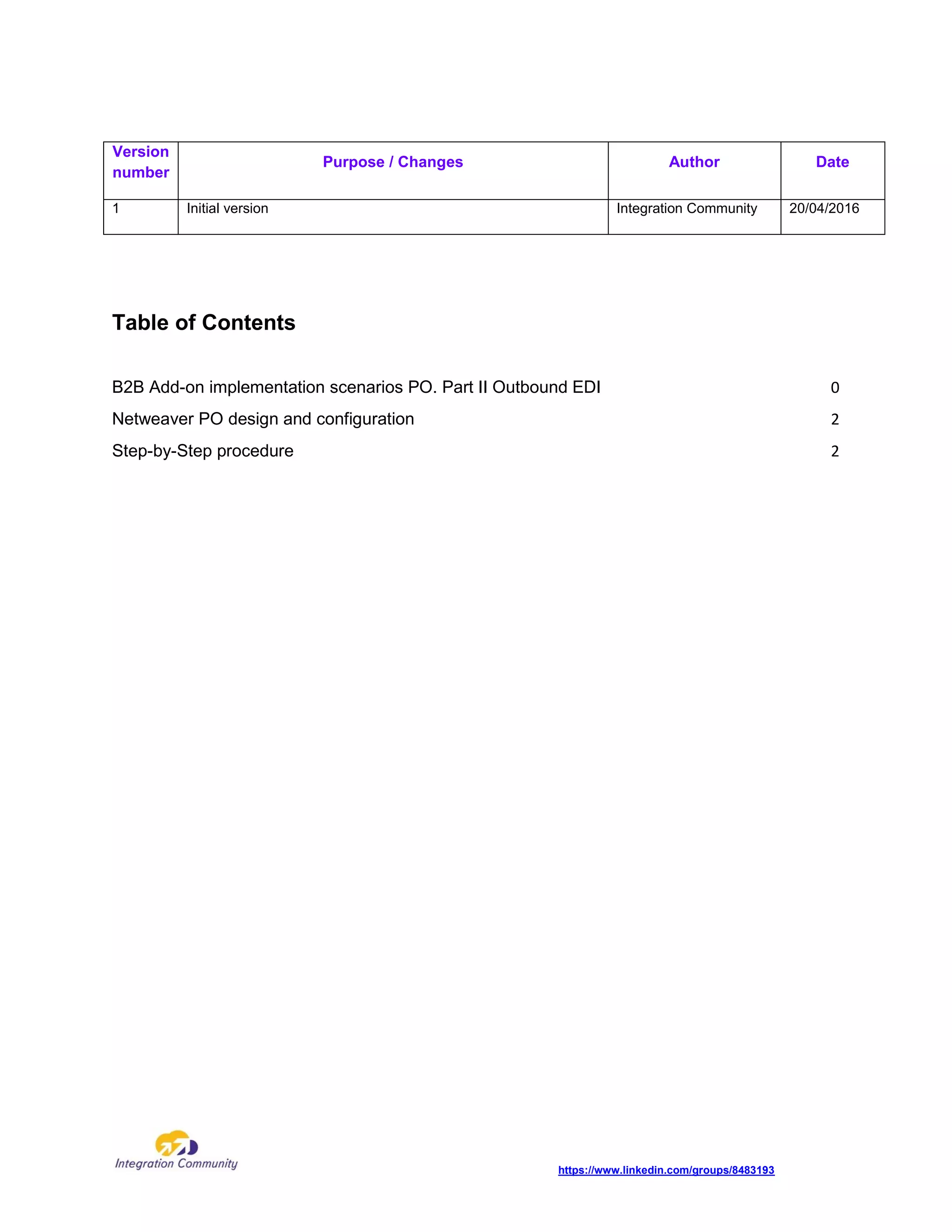
One interface should be created: from SAP ERP to 3erd Party (Asynchronous) with MDN.
Step-by-Step procedure
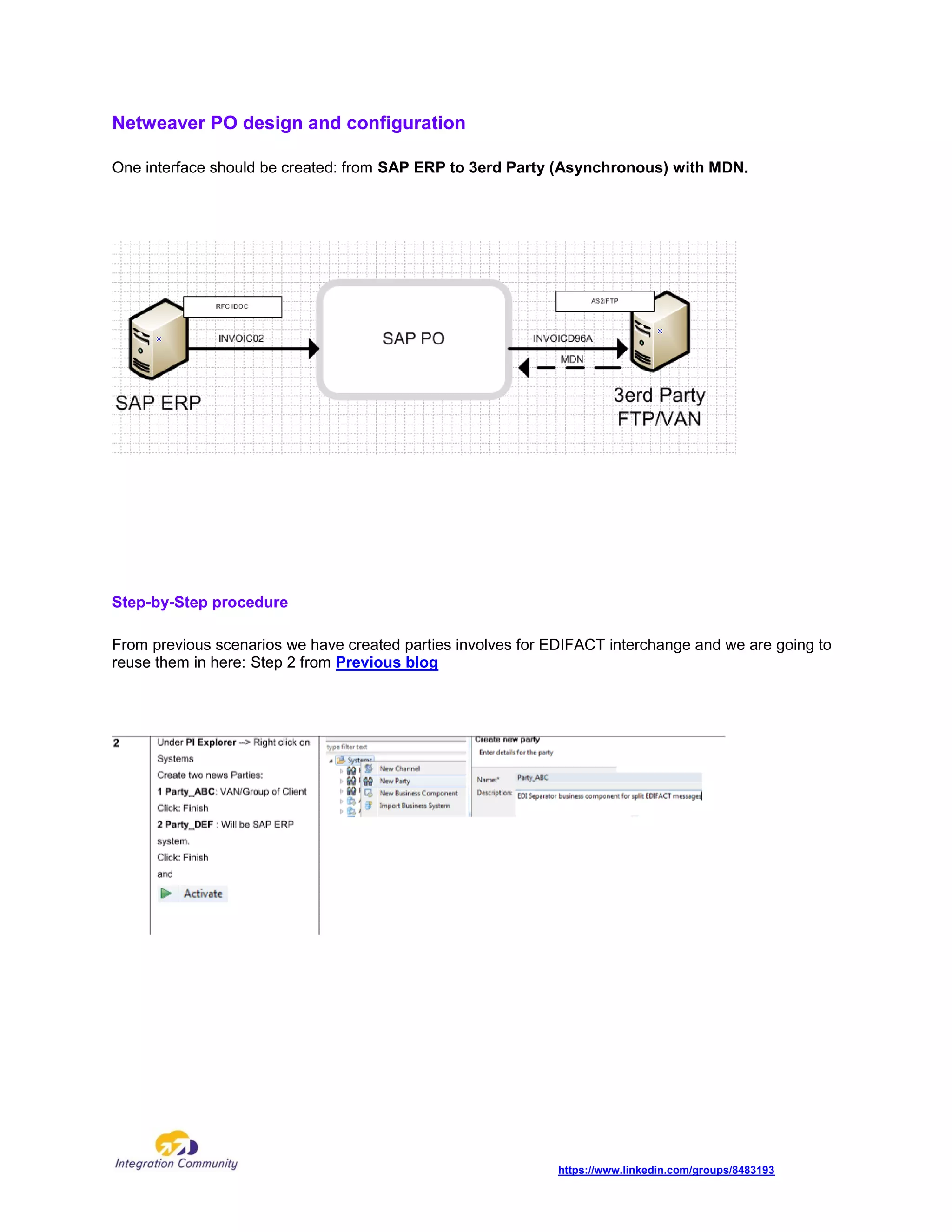
From previous scenarios we have created parties involves for EDIFACT interchange and we are going to
reuse them in here: Step 2 from Previous blog
https://www.linkedin.com/groups/8483193
Step Description Screenshot
NWDS and TPM configuration at Process Orchestration
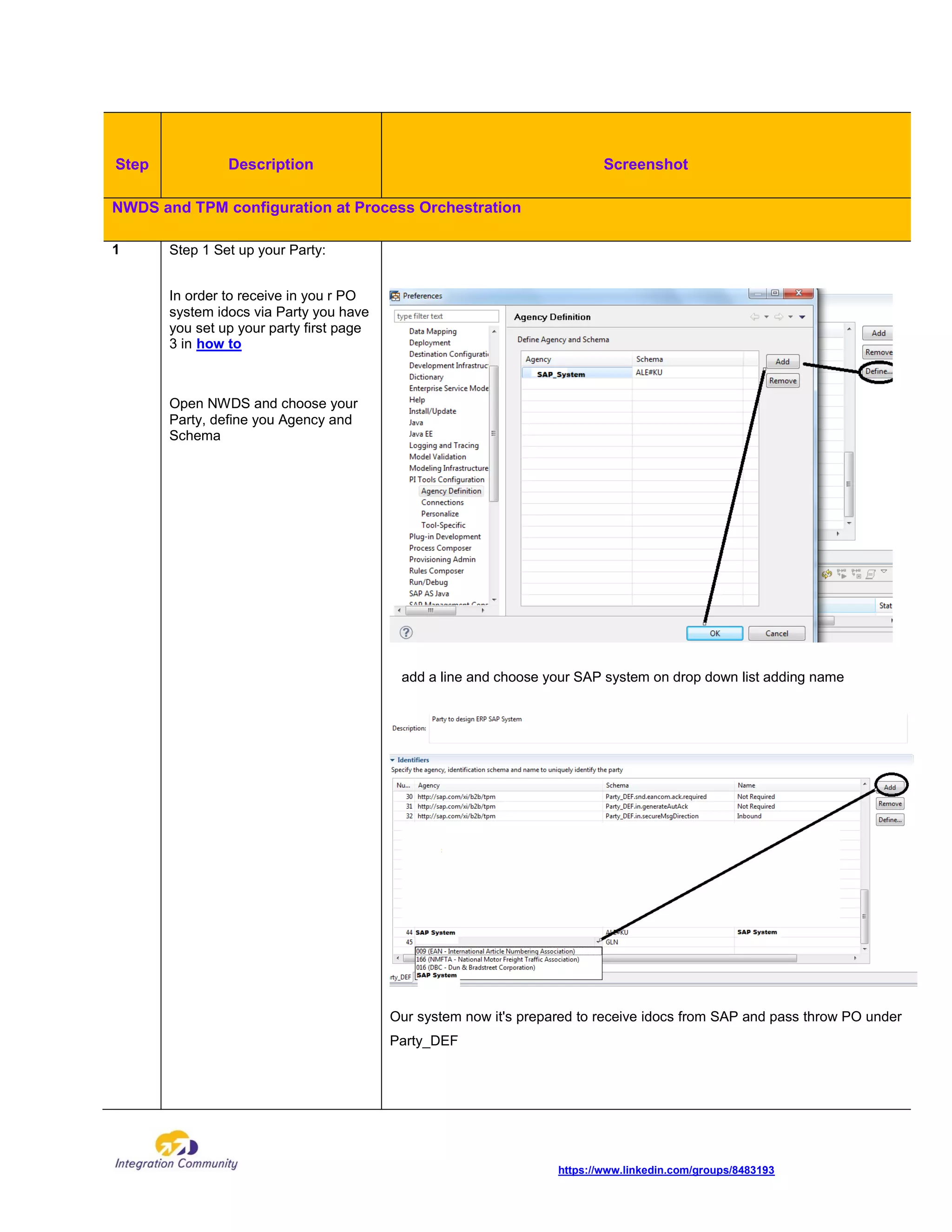
1 Step 1 Set up your Party:
In order to receive in you r PO
system idocs via Party you have
you set up your party first page
3 in how to
Open NWDS and choose your
Party, define you Agency and
Schema
add a line and choose your SAP system on drop down list adding name
Our system now it's prepared to receive idocs from SAP and pass throw PO under
Party_DEF
https://www.linkedin.com/groups/8483193
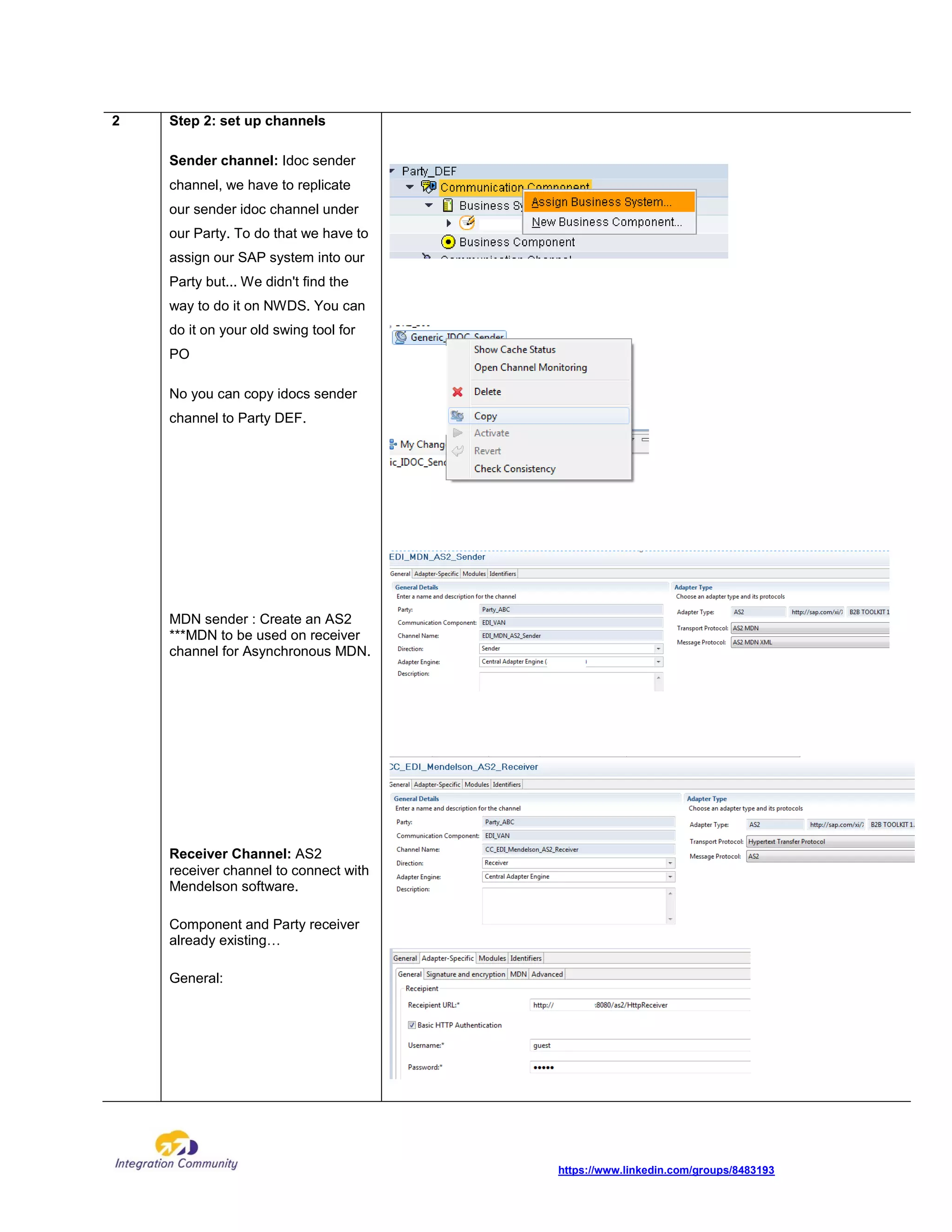
2 Step 2: set up channels
Sender channel: Idoc sender
channel, we have to replicate
our sender idoc channel under
our Party. To do that we have to
assign our SAP system into our
Party but... We didn't find the
way to do it on NWDS. You can
do it on your old swing tool for
PO
No you can copy idocs sender
channel to Party DEF.
MDN sender : Create an AS2
***MDN to be used on receiver
channel for Asynchronous MDN.
Receiver Channel: AS2
receiver channel to connect with
Mendelson software.
Component and Party receiver
already existing…
General:
https://www.linkedin.com/groups/8483193
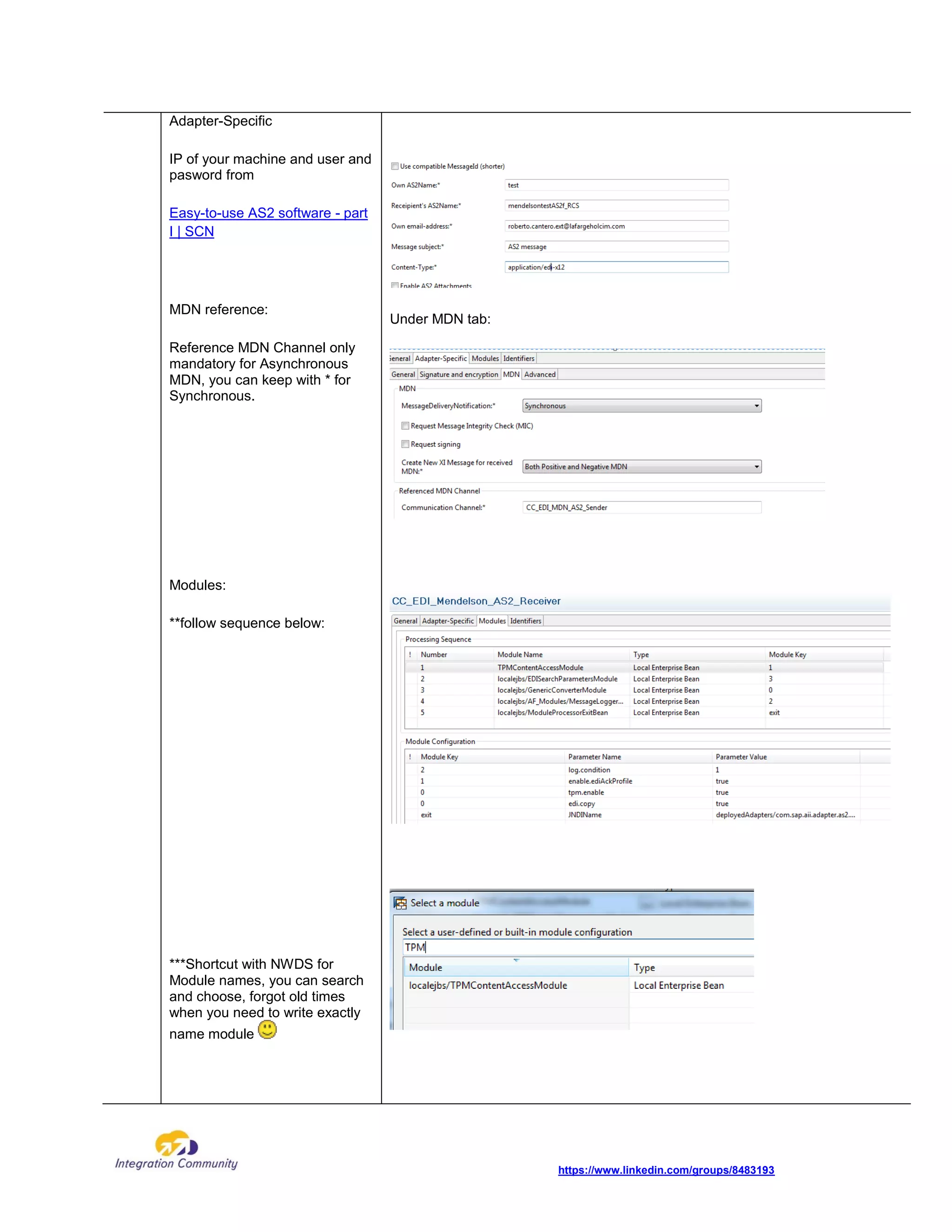
Adapter-Specific
IP of your machine and user and
pasword from
Easy-to-use AS2 software - part
I | SCN
MDN reference:
Reference MDN Channel only
mandatory for Asynchronous
MDN, you can keep with * for
Synchronous.
Modules:
**follow sequence below:
***Shortcut with NWDS for
Module names, you can search
and choose, forgot old times
when you need to write exactly
name module
Under MDN tab:
https://www.linkedin.com/groups/8483193
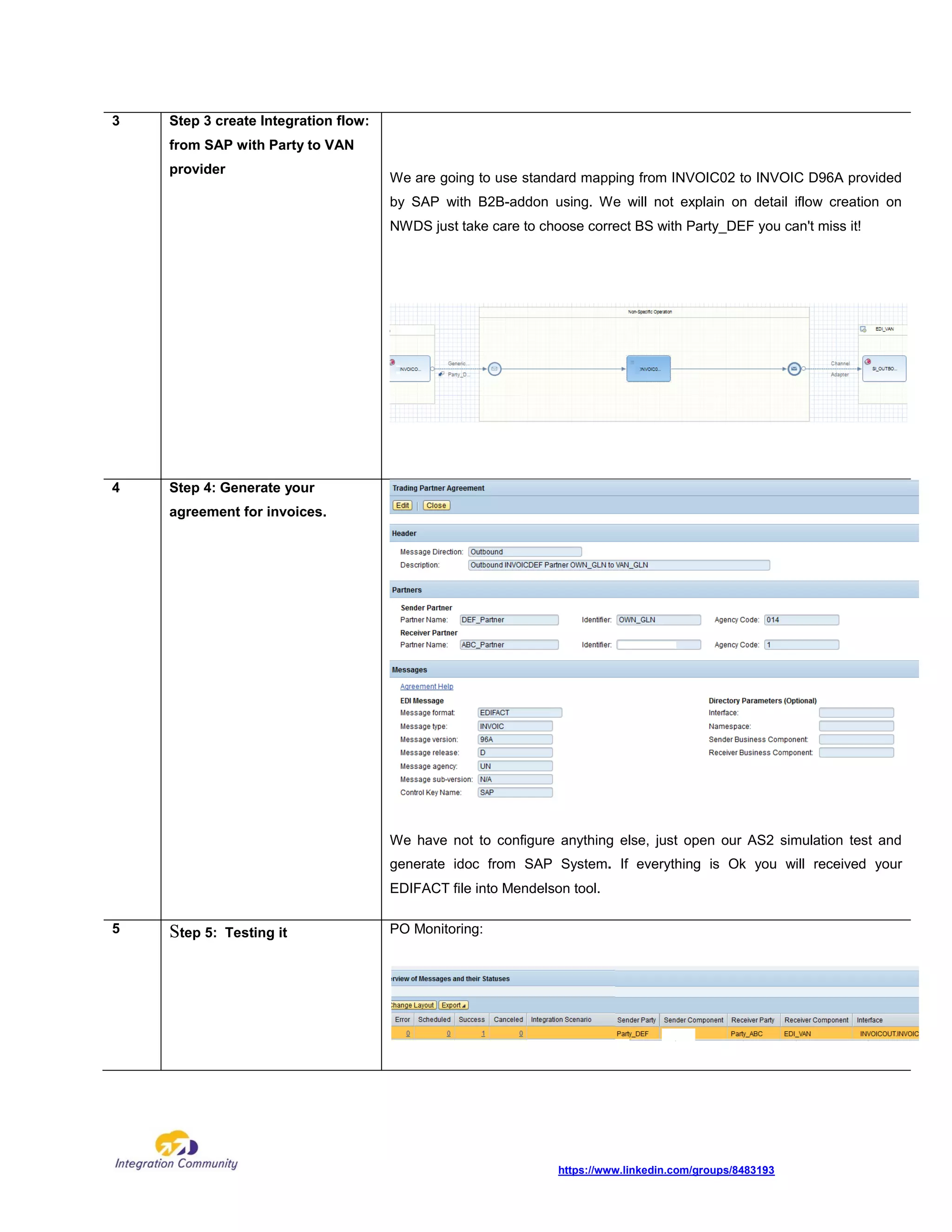
3 Step 3 create Integration flow:
from SAP with Party to VAN
provider
We are going to use standard mapping from INVOIC02 to INVOIC D96A provided
by SAP with B2B-addon using. We will not explain on detail iflow creation on
NWDS just take care to choose correct BS with Party_DEF you can't miss it!
4 Step 4: Generate your
agreement for invoices.
We have not to configure anything else, just open our AS2 simulation test and
generate idoc from SAP System. If everything is Ok you will received your
EDIFACT file into Mendelson tool.
5 Step 5: Testing it PO Monitoring:
https://www.linkedin.com/groups/8483193
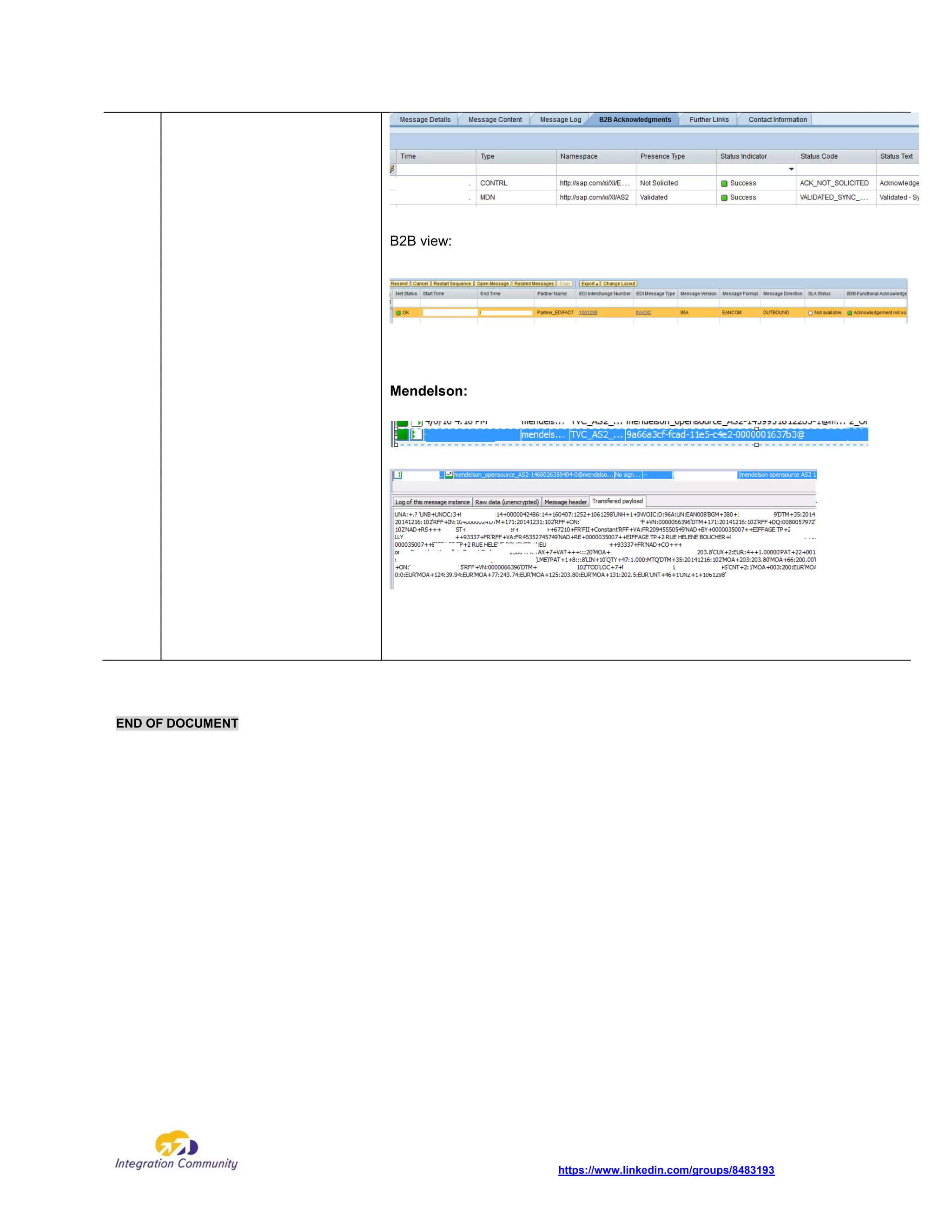
B2B view:
Mendelson:
END OF DOCUMENT

B2B Add-on implementation scenarios PO. Part II Outbound EDI

  • 1.
    B2B Add-on implementationscenarios PO. Part II Outbound EDI Applies to: SAP NetWeaver Process Orchestration 7.31, 7.4, 7.5 and B2B add-on SP04 Summary: Previous blog about B2B add-on implementation give you step by step documentation to create inbound interfaces and all links to start to create your B2B integration only using PO, without need of Seeburger or any other additional software. As promise we are taking care now of Outbound scenarios, complexity is lower than inbound scenarios... you don't need to use EdiSeprator channel. . Author: Document has been created by Integration Community team Federico Abait and Roberto Cantero
  • 2.
    https://www.linkedin.com/groups/8483193 Table of Contents B2BAdd-on implementation scenarios PO. Part II Outbound EDI 0 Netweaver PO design and configuration 2 Step-by-Step procedure 2 Version number Purpose / Changes Author Date 1 Initial version Integration Community 20/04/2016
  • 3.
    https://www.linkedin.com/groups/8483193 Netweaver PO designand configuration One interface should be created: from SAP ERP to 3erd Party (Asynchronous) with MDN. Step-by-Step procedure From previous scenarios we have created parties involves for EDIFACT interchange and we are going to reuse them in here: Step 2 from Previous blog
  • 4.
    https://www.linkedin.com/groups/8483193 Step Description Screenshot NWDSand TPM configuration at Process Orchestration 1 Step 1 Set up your Party: In order to receive in you r PO system idocs via Party you have you set up your party first page 3 in how to Open NWDS and choose your Party, define you Agency and Schema add a line and choose your SAP system on drop down list adding name Our system now it's prepared to receive idocs from SAP and pass throw PO under Party_DEF
  • 5.
    https://www.linkedin.com/groups/8483193 2 Step 2:set up channels Sender channel: Idoc sender channel, we have to replicate our sender idoc channel under our Party. To do that we have to assign our SAP system into our Party but... We didn't find the way to do it on NWDS. You can do it on your old swing tool for PO No you can copy idocs sender channel to Party DEF. MDN sender : Create an AS2 ***MDN to be used on receiver channel for Asynchronous MDN. Receiver Channel: AS2 receiver channel to connect with Mendelson software. Component and Party receiver already existing… General:
  • 6.
    https://www.linkedin.com/groups/8483193 Adapter-Specific IP of yourmachine and user and pasword from Easy-to-use AS2 software - part I | SCN MDN reference: Reference MDN Channel only mandatory for Asynchronous MDN, you can keep with * for Synchronous. Modules: **follow sequence below: ***Shortcut with NWDS for Module names, you can search and choose, forgot old times when you need to write exactly name module Under MDN tab:
  • 7.
    https://www.linkedin.com/groups/8483193 3 Step 3create Integration flow: from SAP with Party to VAN provider We are going to use standard mapping from INVOIC02 to INVOIC D96A provided by SAP with B2B-addon using. We will not explain on detail iflow creation on NWDS just take care to choose correct BS with Party_DEF you can't miss it! 4 Step 4: Generate your agreement for invoices. We have not to configure anything else, just open our AS2 simulation test and generate idoc from SAP System. If everything is Ok you will received your EDIFACT file into Mendelson tool. 5 Step 5: Testing it PO Monitoring:
  • 8.