Route53
HTTPS://WWW.FACEBOOK.COM/SAMTHECLOUDGUY/
HTTPS://WWW.YOUTUBE.COM/C/SAMTHECLOUDGUY
HTTPS://WWW.SLIDESHARE.NET/SAMTHECLOUDGUY/
1
Route53
 DNS service converts human friendly domain names to corresponding IP
address.
 Amazon Route 53 is a highly available and scalable cloud Domain Name
System (DNS) web service. It is designed to give developers and businesses
an extremely reliable and cost effective way to route end users to Internet
applications by translating names like “www.example.com” into the
numeric IP addresses like “192.0.2.1” that computers use to connect to
each other. Amazon Route 53 is fully compliant with IPv6 as well.
SaM's AWS Learning series!
2
Concepts to be familiar with!
 http://docs.aws.amazon.com/Route53/latest/DeveloperGuide/route-53-
concepts.html
 DNS: The domain name system, more commonly known as "DNS" is the
networking system in place that allows us to resolve human-friendly names
to unique addresses.
 Domain name: A domain name is the human-friendly name that we are
used to associating with an internet resource. For instance, "google.com" is
a domain name. Some people will say that the "google" portion is the
domain, but we can generally refer to the combined form as the domain
name.
SaM's AWS Learning series!
3
 Domain Registrar: Getting a domain name involves registering
the name you want with an organization called ICANN through a domain
name registrar. For example, if you choose a name like "example.com",
you will have to go to a registrar, pay a registration fee that costs around
US$10 to US$35 for that name.
 IP Address: An IP address is what we call a network addressable location.
Each IP address must be unique within its network. When we are talking
about websites, this network is the entire internet.
 Top-Level Domain:A top-level domain, or TLD, is the most general part of
the domain. The top-level domain is the furthest portion to the right (as
separated by a dot). Common top-level domains are "com", "net", "org",
"gov", "edu", and "io".
SaM's AWS Learning series!
4
 Hosts: Within a domain, the domain owner can define individual hosts,
which refer to separate computers or services accessible through a
domain. For instance, most domain owners make their web servers
accessible through the bare domain (example.com) and also through the
"host" definition "www" (www.example.com).
 Name Server: A name server is a computer designated to translate
domain names into IP addresses. These servers do most of the work in the
DNS system. Since the total number of domain translations is too much for
any one server, each server may redirect request to other name servers or
delegate responsibility for a subset of subdomains they are responsible for.
SaM's AWS Learning series!
5
 Zone File: A zone file is a simple text file that contains the mappings
between domain names and IP addresses. This is how the DNS system
finally finds out which IP address should be contacted when a user
requests a certain domain name.
 Records: Within a zone file, records are kept. In its simplest form, a record is
basically a single mapping between a resource and a name. These can
map a domain name to an IP address, define the name servers for the
domain, define the mail servers for the domain, etc.
SaM's AWS Learning series!
6
 SOA Records: The Start of Authority, or SOA, record is a mandatory record
in all zone files. It must be the first real record in a file (although $ORIGIN or
$TTL specifications may appear above). It is also one of the most complex
to understand.
 A and AAAA Records:Both of these records map a host to an IP address.
The "A" record is used to map a host to an IPv4 IP address, while "AAAA"
records are used to map a host to an IPv6 address.
 CNAME Records: CNAME records define an alias for canonical name for
your server (one defined by an A or AAAA record).
SaM's AWS Learning series!
7
 MX Records: MX records are used to define the mail exchanges that are
used for the domain. This helps email messages arrive at your mail server
correctly.
 NS Records: This record type defines the name servers that are used for this
zone.
 Hosted Zone,Alias Records,
 Zone apex record: An apex record is one at the root of a DNS zone.
Sometimes called "naked domains".
SaM's AWS Learning series!
8
Amazon Route 53 performs three main
functions:
 Register domain names – Your website needs a name, such as example.com.
Amazon Route 53 lets you register a name for your website or web application,
known as a domain name. For an overview, see Registering Domain Names.
 Route Internet traffic to the resources for your domain – When a user opens a
web browser and enters your domain name in the address bar, Amazon
Route 53 helps the Domain Name System (DNS) connect the browser with your
website or web application. For an overview, see Routing Internet Traffic to
Your Website or Web Application.
 Check the health of your resources – Amazon Route 53 sends automated
requests over the Internet to a resource, such as a web server, to verify that it's
reachable, available, and functional. You also can choose to receive
notifications when a resource becomes unavailable and choose to route
Internet traffic away from unhealthy resources. For an overview, see How
Amazon Route 53 Checks the Health of Your Resources.
SaM's AWS Learning series!
9
 Registered Domain name
 Instances/Resources to host your service/Application
 DNS service equipped with routing policy/protocol to suite your needs.
SaM's AWS Learning series!
10
Types of Routing Policy
1. Simple
2. Weighted
3. Latency-Based
4. Failover
5. Geo location
http://docs.aws.amazon.com/Route53/latest/DeveloperGuide/routing-
policy.html
SaM's AWS Learning series!
11
 https://www.facebook.com/samthecloudguy/
 https://www.youtube.com/c/SaMtheCloudGuy
 https://www.slideshare.net/samthecloudguy/
SaM's AWS Learning series!
12
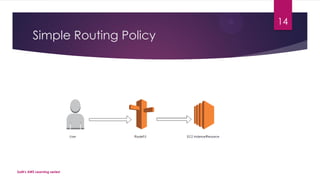
1.Simple Routing Policy
 Use a simple routing policy when you have a single resource that performs
a given function for your domain, for example, one web server that serves
content for the “example.com” website. In this case, Amazon Route 53
responds to DNS queries based only on the values in the resource record
set.
SaM's AWS Learning series!
13
Simple Routing Policy
SaM's AWS Learning series!
14
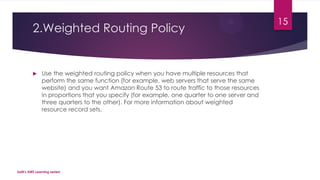
2.Weighted Routing Policy
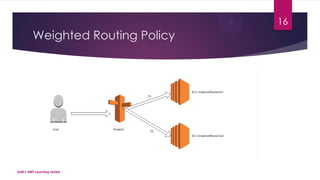
 Use the weighted routing policy when you have multiple resources that
perform the same function (for example, web servers that serve the same
website) and you want Amazon Route 53 to route traffic to those resources
in proportions that you specify (for example, one quarter to one server and
three quarters to the other). For more information about weighted
resource record sets.
SaM's AWS Learning series!
15
Weighted Routing Policy
SaM's AWS Learning series!
16
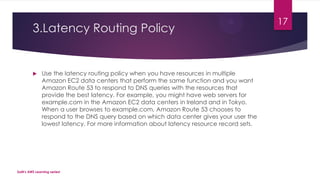
3.Latency Routing Policy
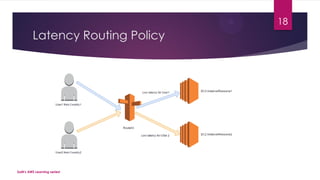
 Use the latency routing policy when you have resources in multiple
Amazon EC2 data centers that perform the same function and you want
Amazon Route 53 to respond to DNS queries with the resources that
provide the best latency. For example, you might have web servers for
example.com in the Amazon EC2 data centers in Ireland and in Tokyo.
When a user browses to example.com, Amazon Route 53 chooses to
respond to the DNS query based on which data center gives your user the
lowest latency. For more information about latency resource record sets.
SaM's AWS Learning series!
17
Latency Routing Policy
SaM's AWS Learning series!
18
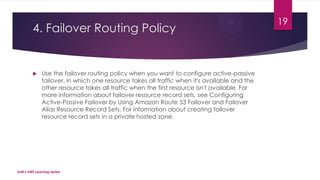
4. Failover Routing Policy
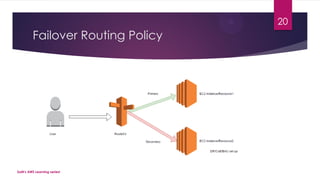
 Use the failover routing policy when you want to configure active-passive
failover, in which one resource takes all traffic when it's available and the
other resource takes all traffic when the first resource isn't available. For
more information about failover resource record sets, see Configuring
Active-Passive Failover by Using Amazon Route 53 Failover and Failover
Alias Resource Record Sets. For information about creating failover
resource record sets in a private hosted zone.
SaM's AWS Learning series!
19
Failover Routing Policy
SaM's AWS Learning series!
20
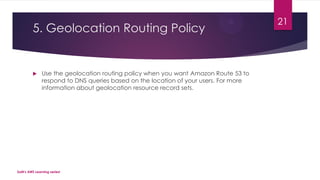
5. Geolocation Routing Policy
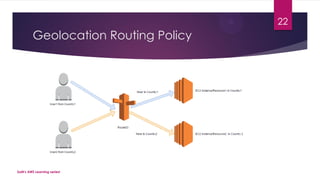
 Use the geolocation routing policy when you want Amazon Route 53 to
respond to DNS queries based on the location of your users. For more
information about geolocation resource record sets.
SaM's AWS Learning series!
21
Geolocation Routing Policy
SaM's AWS Learning series!
22
 https://aws.amazon.com/route53/
 http://docs.aws.amazon.com/Route53/latest/DeveloperGuide/routing-
policy.html
SaM's AWS Learning series!
23
Thank You
 Do Subscribe to the channel!
 Give us a thumbs up/like if you like this effort.
 Comment/message your queries and suggestions.
 See you in the next video!
 https://www.facebook.com/samthecloudguy/
 https://www.youtube.com/c/SaMtheCloudGuy
 https://www.slideshare.net/samthecloudguy/
SaM's AWS Learning series!
24

AWS tutorial-Part54:AWS Route53

  • 1.
  • 2.
    Route53  DNS serviceconverts human friendly domain names to corresponding IP address.  Amazon Route 53 is a highly available and scalable cloud Domain Name System (DNS) web service. It is designed to give developers and businesses an extremely reliable and cost effective way to route end users to Internet applications by translating names like “www.example.com” into the numeric IP addresses like “192.0.2.1” that computers use to connect to each other. Amazon Route 53 is fully compliant with IPv6 as well. SaM's AWS Learning series! 2
  • 3.
    Concepts to befamiliar with!  http://docs.aws.amazon.com/Route53/latest/DeveloperGuide/route-53- concepts.html  DNS: The domain name system, more commonly known as "DNS" is the networking system in place that allows us to resolve human-friendly names to unique addresses.  Domain name: A domain name is the human-friendly name that we are used to associating with an internet resource. For instance, "google.com" is a domain name. Some people will say that the "google" portion is the domain, but we can generally refer to the combined form as the domain name. SaM's AWS Learning series! 3
  • 4.
     Domain Registrar:Getting a domain name involves registering the name you want with an organization called ICANN through a domain name registrar. For example, if you choose a name like "example.com", you will have to go to a registrar, pay a registration fee that costs around US$10 to US$35 for that name.  IP Address: An IP address is what we call a network addressable location. Each IP address must be unique within its network. When we are talking about websites, this network is the entire internet.  Top-Level Domain:A top-level domain, or TLD, is the most general part of the domain. The top-level domain is the furthest portion to the right (as separated by a dot). Common top-level domains are "com", "net", "org", "gov", "edu", and "io". SaM's AWS Learning series! 4
  • 5.
     Hosts: Withina domain, the domain owner can define individual hosts, which refer to separate computers or services accessible through a domain. For instance, most domain owners make their web servers accessible through the bare domain (example.com) and also through the "host" definition "www" (www.example.com).  Name Server: A name server is a computer designated to translate domain names into IP addresses. These servers do most of the work in the DNS system. Since the total number of domain translations is too much for any one server, each server may redirect request to other name servers or delegate responsibility for a subset of subdomains they are responsible for. SaM's AWS Learning series! 5
  • 6.
     Zone File:A zone file is a simple text file that contains the mappings between domain names and IP addresses. This is how the DNS system finally finds out which IP address should be contacted when a user requests a certain domain name.  Records: Within a zone file, records are kept. In its simplest form, a record is basically a single mapping between a resource and a name. These can map a domain name to an IP address, define the name servers for the domain, define the mail servers for the domain, etc. SaM's AWS Learning series! 6
  • 7.
     SOA Records:The Start of Authority, or SOA, record is a mandatory record in all zone files. It must be the first real record in a file (although $ORIGIN or $TTL specifications may appear above). It is also one of the most complex to understand.  A and AAAA Records:Both of these records map a host to an IP address. The "A" record is used to map a host to an IPv4 IP address, while "AAAA" records are used to map a host to an IPv6 address.  CNAME Records: CNAME records define an alias for canonical name for your server (one defined by an A or AAAA record). SaM's AWS Learning series! 7
  • 8.
     MX Records:MX records are used to define the mail exchanges that are used for the domain. This helps email messages arrive at your mail server correctly.  NS Records: This record type defines the name servers that are used for this zone.  Hosted Zone,Alias Records,  Zone apex record: An apex record is one at the root of a DNS zone. Sometimes called "naked domains". SaM's AWS Learning series! 8
  • 9.
    Amazon Route 53performs three main functions:  Register domain names – Your website needs a name, such as example.com. Amazon Route 53 lets you register a name for your website or web application, known as a domain name. For an overview, see Registering Domain Names.  Route Internet traffic to the resources for your domain – When a user opens a web browser and enters your domain name in the address bar, Amazon Route 53 helps the Domain Name System (DNS) connect the browser with your website or web application. For an overview, see Routing Internet Traffic to Your Website or Web Application.  Check the health of your resources – Amazon Route 53 sends automated requests over the Internet to a resource, such as a web server, to verify that it's reachable, available, and functional. You also can choose to receive notifications when a resource becomes unavailable and choose to route Internet traffic away from unhealthy resources. For an overview, see How Amazon Route 53 Checks the Health of Your Resources. SaM's AWS Learning series! 9
  • 10.
     Registered Domainname  Instances/Resources to host your service/Application  DNS service equipped with routing policy/protocol to suite your needs. SaM's AWS Learning series! 10
  • 11.
    Types of RoutingPolicy 1. Simple 2. Weighted 3. Latency-Based 4. Failover 5. Geo location http://docs.aws.amazon.com/Route53/latest/DeveloperGuide/routing- policy.html SaM's AWS Learning series! 11
  • 12.
     https://www.facebook.com/samthecloudguy/  https://www.youtube.com/c/SaMtheCloudGuy https://www.slideshare.net/samthecloudguy/ SaM's AWS Learning series! 12
  • 13.
    1.Simple Routing Policy Use a simple routing policy when you have a single resource that performs a given function for your domain, for example, one web server that serves content for the “example.com” website. In this case, Amazon Route 53 responds to DNS queries based only on the values in the resource record set. SaM's AWS Learning series! 13
  • 14.
    Simple Routing Policy SaM'sAWS Learning series! 14
  • 15.
    2.Weighted Routing Policy Use the weighted routing policy when you have multiple resources that perform the same function (for example, web servers that serve the same website) and you want Amazon Route 53 to route traffic to those resources in proportions that you specify (for example, one quarter to one server and three quarters to the other). For more information about weighted resource record sets. SaM's AWS Learning series! 15
  • 16.
    Weighted Routing Policy SaM'sAWS Learning series! 16
  • 17.
    3.Latency Routing Policy Use the latency routing policy when you have resources in multiple Amazon EC2 data centers that perform the same function and you want Amazon Route 53 to respond to DNS queries with the resources that provide the best latency. For example, you might have web servers for example.com in the Amazon EC2 data centers in Ireland and in Tokyo. When a user browses to example.com, Amazon Route 53 chooses to respond to the DNS query based on which data center gives your user the lowest latency. For more information about latency resource record sets. SaM's AWS Learning series! 17
  • 18.
    Latency Routing Policy SaM'sAWS Learning series! 18
  • 19.
    4. Failover RoutingPolicy  Use the failover routing policy when you want to configure active-passive failover, in which one resource takes all traffic when it's available and the other resource takes all traffic when the first resource isn't available. For more information about failover resource record sets, see Configuring Active-Passive Failover by Using Amazon Route 53 Failover and Failover Alias Resource Record Sets. For information about creating failover resource record sets in a private hosted zone. SaM's AWS Learning series! 19
  • 20.
    Failover Routing Policy SaM'sAWS Learning series! 20
  • 21.
    5. Geolocation RoutingPolicy  Use the geolocation routing policy when you want Amazon Route 53 to respond to DNS queries based on the location of your users. For more information about geolocation resource record sets. SaM's AWS Learning series! 21
  • 22.
    Geolocation Routing Policy SaM'sAWS Learning series! 22
  • 23.
  • 24.
    Thank You  DoSubscribe to the channel!  Give us a thumbs up/like if you like this effort.  Comment/message your queries and suggestions.  See you in the next video!  https://www.facebook.com/samthecloudguy/  https://www.youtube.com/c/SaMtheCloudGuy  https://www.slideshare.net/samthecloudguy/ SaM's AWS Learning series! 24