An Introduction to
Mobile-UI Automated
   Testing Tools
            Craig Wilson
   Software Quality Engineer, EMC2
             @DarkOxygen
UI Automation

• Automated testing from end-user’s
  perspective
• Validate appearance and functionality
• Rudimentary performance analysis
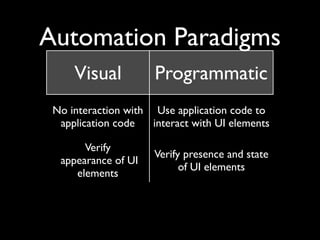
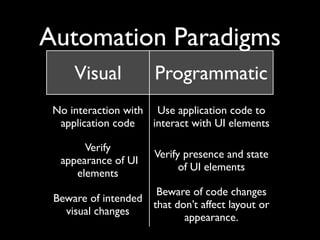
Automation Paradigms
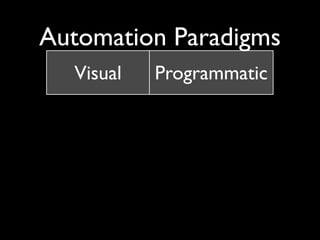
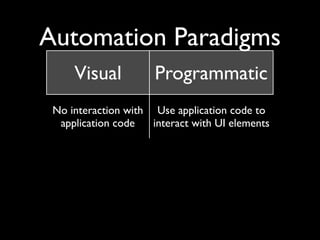
     Visual           Programmatic
 No interaction with Use application code to
  application code   interact with UI elements

       Verify
                      Verify presence and state
  appearance of UI
                            of UI elements
     elements
                     Beware of code changes
 Beware of intended
                    that don’t affect layout or
   visual changes
                           appearance.
Automation Paradigms
     Visual           Programmatic
 No interaction with Use application code to
  application code   interact with UI elements

       Verify
                      Verify presence and state
  appearance of UI
                            of UI elements
     elements
                     Beware of code changes
 Beware of intended
                    that don’t affect layout or
   visual changes
                           appearance.
Automation Paradigms
     Visual           Programmatic
 No interaction with Use application code to
  application code   interact with UI elements

       Verify
                      Verify presence and state
  appearance of UI
                            of UI elements
     elements
                     Beware of code changes
 Beware of intended
                    that don’t affect layout or
   visual changes
                           appearance.
Automation Paradigms
     Visual           Programmatic
 No interaction with Use application code to
  application code   interact with UI elements

       Verify
                      Verify presence and state
  appearance of UI
                            of UI elements
     elements
                     Beware of code changes
 Beware of intended
                    that don’t affect layout or
   visual changes
                           appearance.
The big question

How do I test on a physical
         device?
Not “can”, “how”
Not “can”, “how”

• Jailbreaking required
• Application code must be modified
• Functionality may be reduced
• As always, read the fine print
Device integration

• Multitouch gestures?
• Hardware controls?
 - Screen lock, volume, etc.
• Alert invocation?
 - New message, low battery, etc.
Other considerations
• Platform support
• Additional coding requirements
• Learning curve
• Compatibility with continuous integration
  processes
• Additional capabilities
Personal observations

• No clear “best-in-class” tool for all
  platforms
• Platform and device restrictions still
  prevalent
• iOS: Try Instruments first, then consider
  other tools
Questions?

Introduction to Mobile-UI Automated Testing Tools

  • 1.
    An Introduction to Mobile-UIAutomated Testing Tools Craig Wilson Software Quality Engineer, EMC2 @DarkOxygen
  • 2.
    UI Automation • Automatedtesting from end-user’s perspective • Validate appearance and functionality • Rudimentary performance analysis
  • 3.
  • 4.
    Automation Paradigms Visual Programmatic No interaction with Use application code to application code interact with UI elements Verify Verify presence and state appearance of UI of UI elements elements Beware of code changes Beware of intended that don’t affect layout or visual changes appearance.
  • 5.
    Automation Paradigms Visual Programmatic No interaction with Use application code to application code interact with UI elements Verify Verify presence and state appearance of UI of UI elements elements Beware of code changes Beware of intended that don’t affect layout or visual changes appearance.
  • 6.
    Automation Paradigms Visual Programmatic No interaction with Use application code to application code interact with UI elements Verify Verify presence and state appearance of UI of UI elements elements Beware of code changes Beware of intended that don’t affect layout or visual changes appearance.
  • 7.
    Automation Paradigms Visual Programmatic No interaction with Use application code to application code interact with UI elements Verify Verify presence and state appearance of UI of UI elements elements Beware of code changes Beware of intended that don’t affect layout or visual changes appearance.
  • 8.
    The big question Howdo I test on a physical device?
  • 9.
  • 10.
    Not “can”, “how” •Jailbreaking required • Application code must be modified • Functionality may be reduced • As always, read the fine print
  • 11.
    Device integration • Multitouchgestures? • Hardware controls? - Screen lock, volume, etc. • Alert invocation? - New message, low battery, etc.
  • 12.
    Other considerations • Platformsupport • Additional coding requirements • Learning curve • Compatibility with continuous integration processes • Additional capabilities
  • 13.
    Personal observations • Noclear “best-in-class” tool for all platforms • Platform and device restrictions still prevalent • iOS: Try Instruments first, then consider other tools
  • 14.

Editor's Notes

  • #2 \n
  • #3 \n
  • #4 - Use folder name truncation bug (in EMC Mobile) as example of difference between the verification methods\n- Programmatic verification can also be selective: verify text, state, location, etc.\n- Last points refer to what will change more: the appearance of your UI, or how you code it?\n\n
  • #5 - Use folder name truncation bug (in EMC Mobile) as example of difference between the verification methods\n- Programmatic verification can also be selective: verify text, state, location, etc.\n- Last points refer to what will change more: the appearance of your UI, or how you code it?\n\n
  • #6 - Use folder name truncation bug (in EMC Mobile) as example of difference between the verification methods\n- Programmatic verification can also be selective: verify text, state, location, etc.\n- Last points refer to what will change more: the appearance of your UI, or how you code it?\n\n
  • #7 - Use folder name truncation bug (in EMC Mobile) as example of difference between the verification methods\n- Programmatic verification can also be selective: verify text, state, location, etc.\n- Last points refer to what will change more: the appearance of your UI, or how you code it?\n\n
  • #8 \n
  • #9 - TestPlant’s “eggPlant” is an example for the first point.\n- FrogLogic’s “Squish” is example of second point, leads to build complexity.\n- Also bring up cloud solutions like DeviceAnywhere where you remotely access devices from a shared pool.\n
  • #10 - Instruments can do a lot of these\n- Gestures are very important for mobile!\n
  • #11 - Easy example for second point: Instruments, with its requirement for accessibility labels.\n- Learning curve isn’t just the scripting language, but also how the application is written.\n- examples of additional capabilities: screenshots, multiple scripting language support, movie recording, etc.\n
  • #12 \n
  • #13 \n