College of William & Mary - SEMERU - Department of Computer Science
Auto-completing Bug
Reports for Android
Applications
Kevin Moran,
Mario Linares-Vásquez,
Carlos Bernal-Cárdenas,
& Denys Poshyvanyk
ESEC/FSE’15
Centro Congressi Giovanni XXIII
Bergamo Italy, September 4th, 2015
&
SE ERU
1
2
2
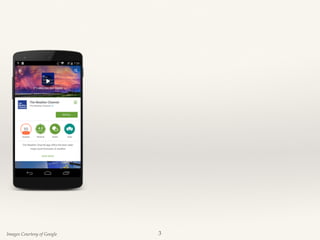
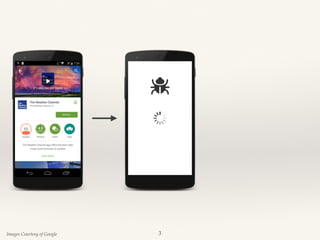
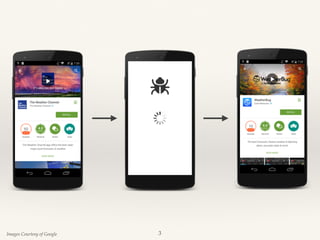
Images Courtesy of Google 3
Images Courtesy of Google
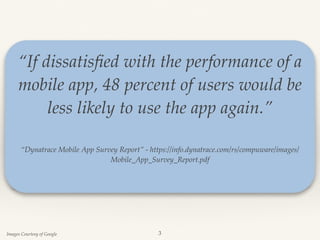
“If dissatisfied with the performance of a
mobile app, 48 percent of users would be
less likely to use the app again.”
“Dynatrace Mobile App Survey Report” - https://info.dynatrace.com/rs/compuware/images/
Mobile_App_Survey_Report.pdf 

3
Images Courtesy of Google
“If dissatisfied with the performance of a
mobile app, 48 percent of users would be
less likely to use the app again.”
“Dynatrace Mobile App Survey Report” - https://info.dynatrace.com/rs/compuware/images/
Mobile_App_Survey_Report.pdf 

Software maintenance, specifically the prompt
resolution of bug reports, is extremely
important to an application’s success in
competitive mobile marketplaces.
3
In-Field Failure Reproduction
❖ Allows for in-house debugging of field failures[1].
4
Application
Instrumenter
Instrumented
Application
Debugging
Information
about Program
Failure
Field Users
Application Developers
Wei Jin and Alessandro Orso. 2012. BugRedux: reproducing field failures for
in-house debugging. In Proceedings of the 34th International Conference on
Software Engineering (ICSE '12)
In-Field Failure Reproduction
❖ Allows for in-house debugging of field failures[1].
4
Application
Instrumenter
Instrumented
Application
Debugging
Information
about Program
Failure
Field Users
Application Developers
Wei Jin and Alessandro Orso. 2012. BugRedux: reproducing field failures for
in-house debugging. In Proceedings of the 34th International Conference on
Software Engineering (ICSE '12)
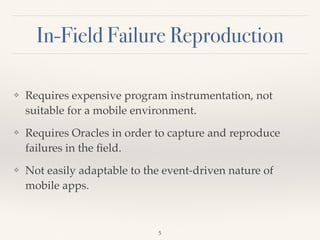
❖ Requires expensive program instrumentation, not
suitable for a mobile environment.
❖ Requires Oracles in order to capture and reproduce
failures in the field.
❖ Not easily adaptable to the event-driven nature of
mobile apps.
5
In-Field Failure Reproduction
6
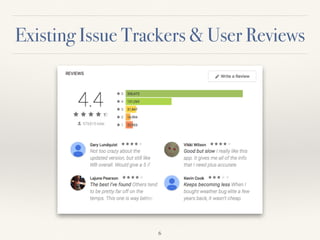
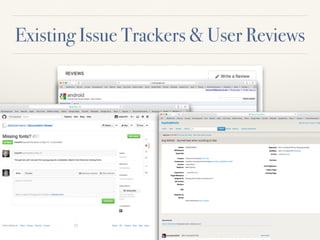
Existing Issue Trackers & User Reviews
6
Existing Issue Trackers & User Reviews
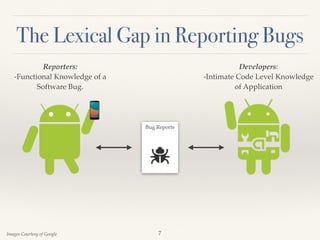
The Lexical Gap in Reporting Bugs
Reporters:
-Functional Knowledge of a
Software Bug.
Developers:
-Intimate Code Level Knowledge
of Application
Images Courtesy of Google
Bug Reports
7
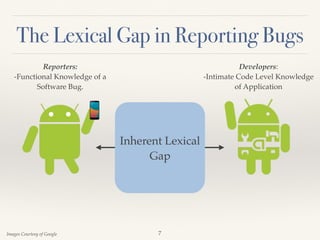
The Lexical Gap in Reporting Bugs
Reporters:
-Functional Knowledge of a
Software Bug.
Developers:
-Intimate Code Level Knowledge
of Application
Images Courtesy of Google
Bug Reports
Inherent Lexical
Gap
7
What Makes a Good Bug Report?
❖ Insufficient information in bug reports is one of the leading
causes of non-reproducible reports1
❖ Developers consider (i) steps to reproduce, (ii) stack traces,
and (iii) test cases/scenarios as the most helpful sources of
information in bug reports2
❖ Information needs are greatest earliest in a bug’s lifecycle3
1M. Erfani Joorabchi, M. Mirzaaghaei, and A. Mesbah. Works for me! characterizing non-reproducible bug reports. MSR
2014,
2Nicolas Bettenburg, Sascha Just, Adrian Schröter, Cathrin Weiss, Rahul Premraj, and Thomas Zimmermann. 2008. What
makes a good bug report? (SIGSOFT ’08/FSE-16),
3S. Breu, R. Premraj, J. Sillito, and T. Zimmermann. Information needs in bug reports: Improving cooperation between
developers and users. (CSCW)


8
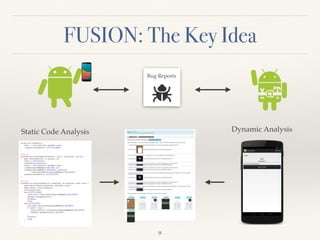
FUSION: The Key Idea
9
Bug Reports
Static Code Analysis Dynamic Analysis
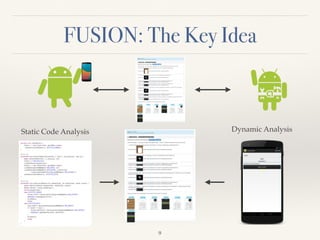
FUSION: The Key Idea
9
Bug Reports
Static Code Analysis Dynamic Analysis
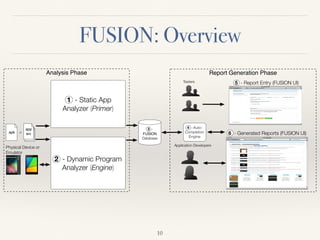
FUSION: Overview
10
Analysis Phase Report Generation Phase
2 - Dynamic Program
Analyzer (Engine)
.apk
1 - Static App
Analyzer (Primer)
3 -
FUSION
Database
or
app
src
Googlehttp://cs.wm.edu/semeru
FUSION
Googlehttp://cs.wm.edu/semeru
FUSION
Testers
Application Developers
4 - Auto-
Completion
Engine
Physical Device or
Emulator
5 - Report Entry (FUSION UI)
6 - Generated Reports (FUSION UI)
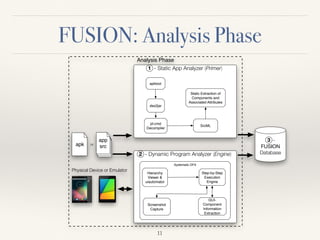
FUSION: Analysis Phase
Analysis Phase
2 - Dynamic Program Analyzer (Engine)
.apk
1 - Static App Analyzer (Primer)
3 -
FUSION
Database
apktool
dex2jar
jd-cmd
Decompiler
or
app
src
SrcML
Static Extraction of
Components and
Associated Attributes
Systematic DFS
Hierarchy
Viewer &
uiautomator
Step-by-Step
Execution
Engine
Screenshot
Capture
GUI-
Component
Information
Extraction
Te
Applica
C
Physical Device or Emulator
11
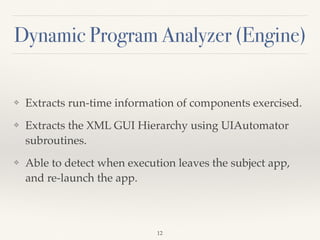
Dynamic Program Analyzer (Engine)
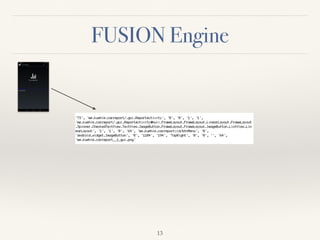
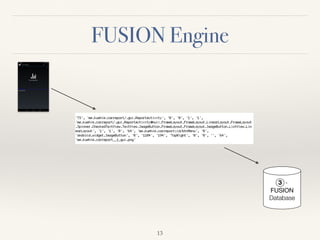
❖ Extracts run-time information of components exercised.
❖ Extracts the XML GUI Hierarchy using UIAutomator
subroutines.
❖ Able to detect when execution leaves the subject app,
and re-launch the app.
12
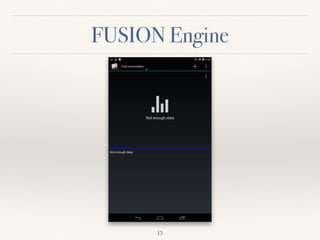
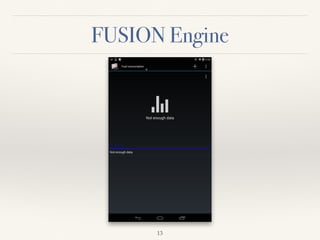
FUSION Engine
13
FUSION Engine
13
FUSION Engine
13
FUSION Engine
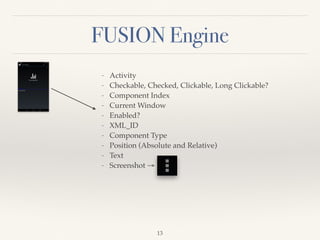
- Activity
- Checkable, Checked, Clickable, Long Clickable?
- Component Index
- Current Window
- Enabled?
- XML_ID
- Component Type
- Position (Absolute and Relative)
- Text
- Screenshot →
13
FUSION Engine
13
FUSION Engine
3 -
FUSION
Database
13
Overview of FUSION: Report Generation Phase
Report Generation Phase
3 -
FUSION
Database
Googlehttp://cs.wm.edu/semeru
FUSION
Googlehttp://cs.wm.edu/semeru
FUSION
Testers
Application Developers
4 - Auto-
Completion
Engine
5 - Report Entry (FUSION UI)
6 - Generated Reports (FUSION UI)
14
Overview of FUSION: Report Generation Phase
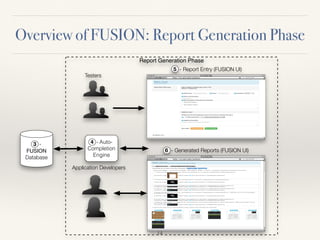
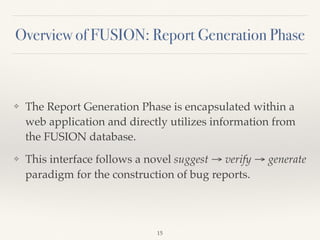
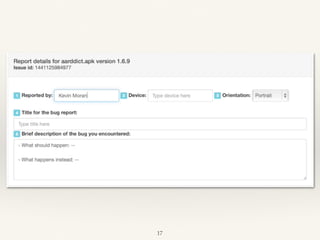
❖ The Report Generation Phase is encapsulated within a
web application and directly utilizes information from
the FUSION database.
❖ This interface follows a novel suggest → verify → generate
paradigm for the construction of bug reports.
15
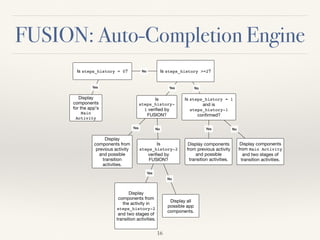
FUSION: Auto-Completion Engine
Is steps_history = 0?
Display
components
for the app’s
Main
Activity
Is steps_history >=2?No
Yes
Is
steps_history-
1 verified by
FUSION?
Is steps_history = 1
and is
steps_history-1
confirmed?
NoYes
Display
components from
previous activity
and possible
transition
activities.
Is
steps_history-2
verified by
FUSION?
Yes No
Display
components from
the activity in
steps_history-2
and two stages of
transition activities.
Display all
possible app
components.
Yes
No
Display components
from previous activity
and possible
transition activities.
Display components
from Main Activity
and two stages of
transition activities.
Yes No
16
FUSION: Auto-Completion Engine
Is steps_history = 0?
Display
components
for the app’s
Main
Activity
Is steps_history >=2?No
Yes
Is
steps_history-
1 verified by
FUSION?
Is steps_history = 1
and is
steps_history-1
confirmed?
NoYes
Display
components from
previous activity
and possible
transition
activities.
Is
steps_history-2
verified by
FUSION?
Yes No
Display
components from
the activity in
steps_history-2
and two stages of
transition activities.
Display all
possible app
components.
Yes
No
Display components
from previous activity
and possible
transition activities.
Display components
from Main Activity
and two stages of
transition activities.
Yes No
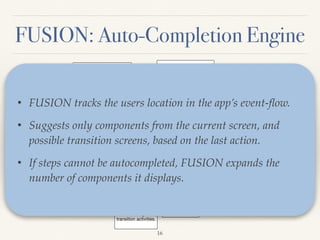
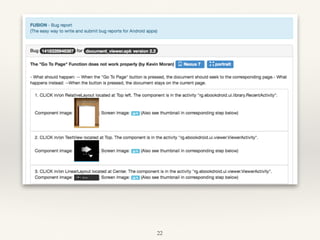
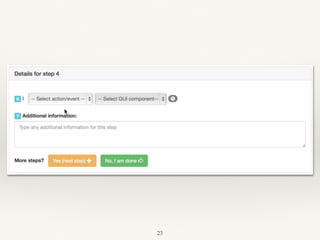
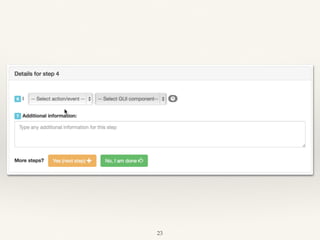
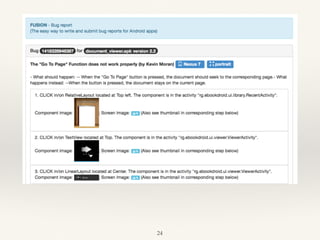
• FUSION tracks the users location in the app’s event-flow.
• Suggests only components from the current screen, and
possible transition screens, based on the last action.
• If steps cannot be autocompleted, FUSION expands the
number of components it displays.
16
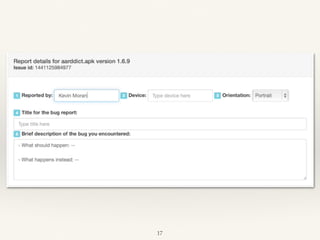
17
17
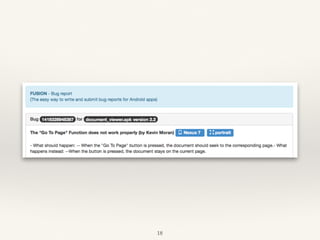
18
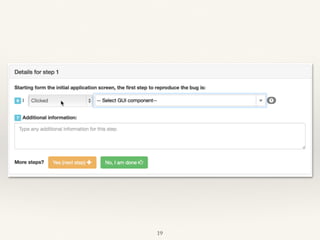
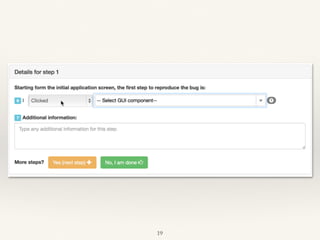
19
19
20
20
21
21
22
22
23
23
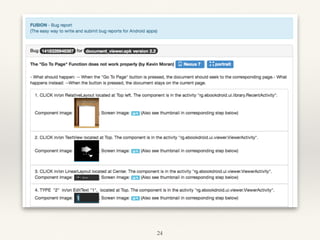
24
24
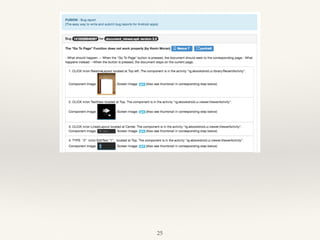
25
25
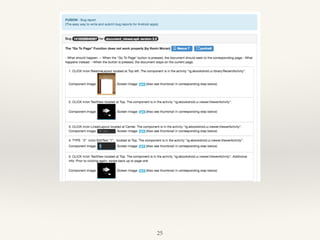
25
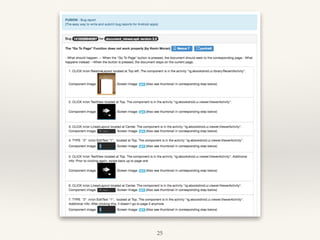
25
26
26
27
Empirical Evaluation
❖ Empirical study involving two software maintenance
tasks and 28 users:
1. Creating a bug report for a real app issue.
2. Reproducing the bug on a device from a report.
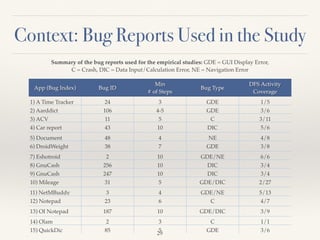
❖ We used 15 real-world Android application bugs and
compare FUSION to the Google Code Issue Tracker
(GCIT) as well as the Original Bug Reports.
28
Context: Bug Reports Used in the Study
App (Bug Index) Bug ID
Min

# of Steps
Bug Type
DFS Activity
Coverage
1) A Time Tracker 24 3 GDE 1/5
2) Aarddict 106 4-5 GDE 3/6
3) ACV 11 5 C 3/11
4) Car report 43 10 DIC 5/6
5) Document
Viewer
48 4 NE 4/8
6) DroidWeight 38 7 GDE 3/8
7) Eshotroid 2 10 GDE/NE 6/6
8) GnuCash 256 10 DIC 3/4
9) GnuCash 247 10 DIC 3/4
10) Mileage 31 5 GDE/DIC 2/27
11) NetMBuddy 3 4 GDE/NE 5/13
12) Notepad 23 6 C 4/7
13) OI Notepad 187 10 GDE/DIC 3/9
14) Olam 2 3 C 1/1
15) QuickDic 85 5 GDE 3/6
Summary of the bug reports used for the empirical studies: GDE = GUI Display Error,
C = Crash, DIC = Data Input/Calculation Error, NE = Navigation Error
29
Empirical Evaluation
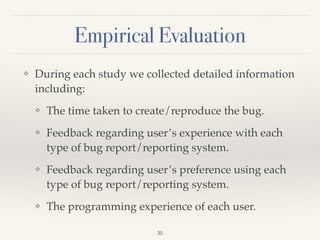
❖ During each study we collected detailed information
including:
❖ The time taken to create/reproduce the bug.
❖ Feedback regarding user’s experience with each
type of bug report/reporting system.
❖ Feedback regarding user’s preference using each
type of bug report/reporting system.
❖ The programming experience of each user.
30
Empirical Evaluation
❖ During each study we collected detailed information
including:
❖ The time taken to create/reproduce the bug.
❖ Feedback regarding user’s experience with each
type of bug report/reporting system.
❖ Feedback regarding user’s preference using each
type of bug report/reporting system.
❖ The programming experience of each user.
30
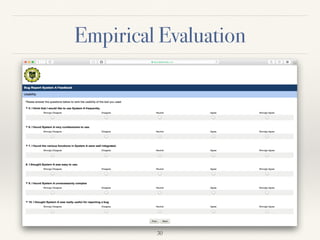
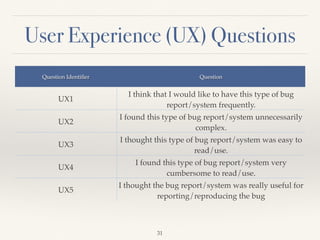
User Experience (UX) Questions
31
Question Identifier Question
UX1
I think that I would like to have this type of bug
report/system frequently.
UX2
I found this type of bug report/system unnecessarily
complex.
UX3
I thought this type of bug report/system was easy to
read/use.
UX4
I found this type of bug report/system very
cumbersome to read/use.
UX5
I thought the bug report/system was really useful for
reporting/reproducing the bug
User Preference (UP) Questions
32
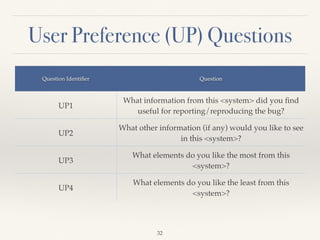
Question Identifier Question
UP1
What information from this <system> did you find
useful for reporting/reproducing the bug?
UP2
What other information (if any) would you like to see
in this <system>?
UP3
What elements do you like the most from this
<system>?
UP4
What elements do you like the least from this
<system>?
Research Questions
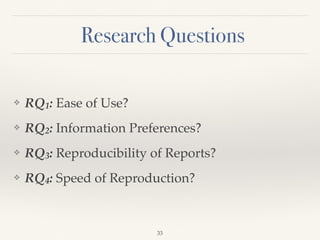
❖ RQ1: Ease of Use?
❖ RQ2: Information Preferences?
❖ RQ3: Reproducibility of Reports?
❖ RQ4: Speed of Reproduction?
33
Task1: Bug Report Creation
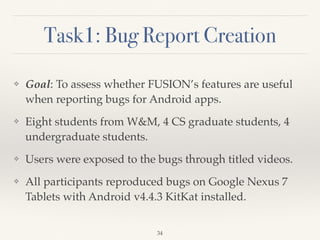
❖ Goal: To assess whether FUSION’s features are useful
when reporting bugs for Android apps.
❖ Eight students from W&M, 4 CS graduate students, 4
undergraduate students.
❖ Users were exposed to the bugs through titled videos.
❖ All participants reproduced bugs on Google Nexus 7
Tablets with Android v4.4.3 KitKat installed.
34
Bug Reporting Time Results: FUSION
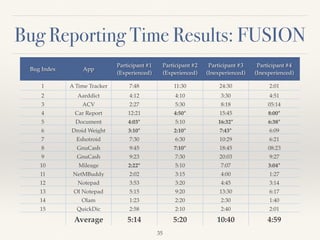
Bug Index App
Participant #1
(Experienced)
Participant #2
(Experienced)
Participant #3
(Inexperienced)
Participant #4
(Inexperienced)
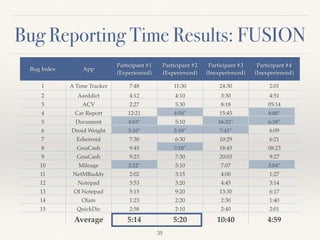
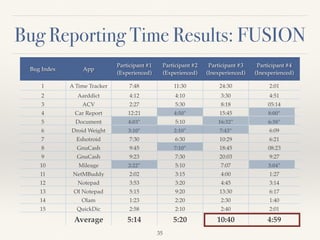
1 A Time Tracker 7:48 11:30 24:30 2:01
2 Aarddict 4:12 4:10 3:30 4:51
3 ACV 2:27 5:30 8:18 05:14
4 Car Report 12:21 4:50* 15:45 8:00*
5 Document
Viewer
4:03* 5:10 16:32* 6:38*
6 Droid Weight 3:10* 2:10* 7:43* 6:09
7 Eshotroid 7:30 6:30 10:29 6:21
8 GnuCash 9:45 7:10* 18:45 08:23
9 GnuCash 9:23 7:30 20:03 9:27
10 Mileage 2:22* 5:10 7:07 3:04*
11 NetMBuddy 2:02 3:15 4:00 1:27
12 Notepad 3:53 3:20 4:45 3:14
13 OI Notepad 5:15 9:20 13:30 6:17
14 Olam 1:23 2:20 2:30 1:40
15 QuickDic 2:58 2:10 2:40 2:01
Average 5:14 5:20 10:40 4:59
35
Bug Reporting Time Results: FUSION
Bug Index App
Participant #1
(Experienced)
Participant #2
(Experienced)
Participant #3
(Inexperienced)
Participant #4
(Inexperienced)
1 A Time Tracker 7:48 11:30 24:30 2:01
2 Aarddict 4:12 4:10 3:30 4:51
3 ACV 2:27 5:30 8:18 05:14
4 Car Report 12:21 4:50* 15:45 8:00*
5 Document
Viewer
4:03* 5:10 16:32* 6:38*
6 Droid Weight 3:10* 2:10* 7:43* 6:09
7 Eshotroid 7:30 6:30 10:29 6:21
8 GnuCash 9:45 7:10* 18:45 08:23
9 GnuCash 9:23 7:30 20:03 9:27
10 Mileage 2:22* 5:10 7:07 3:04*
11 NetMBuddy 2:02 3:15 4:00 1:27
12 Notepad 3:53 3:20 4:45 3:14
13 OI Notepad 5:15 9:20 13:30 6:17
14 Olam 1:23 2:20 2:30 1:40
15 QuickDic 2:58 2:10 2:40 2:01
Average 5:14 5:20 10:40 4:59
35
Bug Reporting Time Results: FUSION
Bug Index App
Participant #1
(Experienced)
Participant #2
(Experienced)
Participant #3
(Inexperienced)
Participant #4
(Inexperienced)
1 A Time Tracker 7:48 11:30 24:30 2:01
2 Aarddict 4:12 4:10 3:30 4:51
3 ACV 2:27 5:30 8:18 05:14
4 Car Report 12:21 4:50* 15:45 8:00*
5 Document
Viewer
4:03* 5:10 16:32* 6:38*
6 Droid Weight 3:10* 2:10* 7:43* 6:09
7 Eshotroid 7:30 6:30 10:29 6:21
8 GnuCash 9:45 7:10* 18:45 08:23
9 GnuCash 9:23 7:30 20:03 9:27
10 Mileage 2:22* 5:10 7:07 3:04*
11 NetMBuddy 2:02 3:15 4:00 1:27
12 Notepad 3:53 3:20 4:45 3:14
13 OI Notepad 5:15 9:20 13:30 6:17
14 Olam 1:23 2:20 2:30 1:40
15 QuickDic 2:58 2:10 2:40 2:01
Average 5:14 5:20 10:40 4:59
35
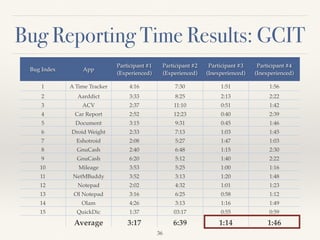
Bug Reporting Time Results: GCIT
Bug Index App
Participant #1
(Experienced)
Participant #2
(Experienced)
Participant #3
(Inexperienced)
Participant #4
(Inexperienced)
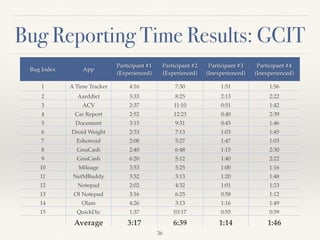
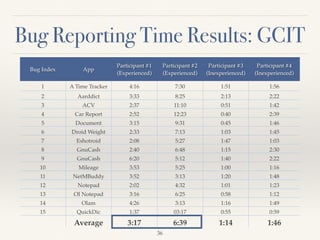
1 A Time Tracker 4:16 7:30 1:51 1:56
2 Aarddict 3:33 8:25 2:13 2:22
3 ACV 2:37 11:10 0:51 1:42
4 Car Report 2:52 12:23 0:40 2:39
5 Document
Viewer
3:15 9:31 0:45 1:46
6 Droid Weight 2:33 7:13 1:03 1:45
7 Eshotroid 2:08 5:27 1:47 1:03
8 GnuCash 2:40 6:48 1:15 2:30
9 GnuCash 6:20 5:12 1:40 2:22
10 Mileage 3:53 5:25 1:00 1:16
11 NetMBuddy 3:52 3:13 1:20 1:48
12 Notepad 2:02 4:32 1:01 1:23
13 OI Notepad 3:16 6:25 0:58 1:12
14 Olam 4:26 3:13 1:16 1:49
15 QuickDic 1:37 03:17 0:55 0:59
Average 3:17 6:39 1:14 1:46
36
Bug Reporting Time Results: GCIT
Bug Index App
Participant #1
(Experienced)
Participant #2
(Experienced)
Participant #3
(Inexperienced)
Participant #4
(Inexperienced)
1 A Time Tracker 4:16 7:30 1:51 1:56
2 Aarddict 3:33 8:25 2:13 2:22
3 ACV 2:37 11:10 0:51 1:42
4 Car Report 2:52 12:23 0:40 2:39
5 Document
Viewer
3:15 9:31 0:45 1:46
6 Droid Weight 2:33 7:13 1:03 1:45
7 Eshotroid 2:08 5:27 1:47 1:03
8 GnuCash 2:40 6:48 1:15 2:30
9 GnuCash 6:20 5:12 1:40 2:22
10 Mileage 3:53 5:25 1:00 1:16
11 NetMBuddy 3:52 3:13 1:20 1:48
12 Notepad 2:02 4:32 1:01 1:23
13 OI Notepad 3:16 6:25 0:58 1:12
14 Olam 4:26 3:13 1:16 1:49
15 QuickDic 1:37 03:17 0:55 0:59
Average 3:17 6:39 1:14 1:46
36
Bug Reporting Time Results: GCIT
Bug Index App
Participant #1
(Experienced)
Participant #2
(Experienced)
Participant #3
(Inexperienced)
Participant #4
(Inexperienced)
1 A Time Tracker 4:16 7:30 1:51 1:56
2 Aarddict 3:33 8:25 2:13 2:22
3 ACV 2:37 11:10 0:51 1:42
4 Car Report 2:52 12:23 0:40 2:39
5 Document
Viewer
3:15 9:31 0:45 1:46
6 Droid Weight 2:33 7:13 1:03 1:45
7 Eshotroid 2:08 5:27 1:47 1:03
8 GnuCash 2:40 6:48 1:15 2:30
9 GnuCash 6:20 5:12 1:40 2:22
10 Mileage 3:53 5:25 1:00 1:16
11 NetMBuddy 3:52 3:13 1:20 1:48
12 Notepad 2:02 4:32 1:01 1:23
13 OI Notepad 3:16 6:25 0:58 1:12
14 Olam 4:26 3:13 1:16 1:49
15 QuickDic 1:37 03:17 0:55 0:59
Average 3:17 6:39 1:14 1:46
36
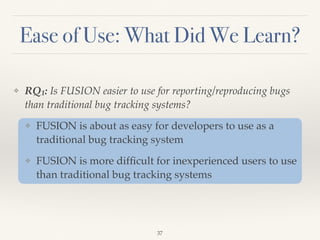
Ease of Use: What Did We Learn?
❖ RQ1: Is FUSION easier to use for reporting/reproducing bugs
than traditional bug tracking systems?
❖ FUSION is about as easy for developers to use as a
traditional bug tracking system
❖ FUSION is more difficult for inexperienced users to use
than traditional bug tracking systems
37
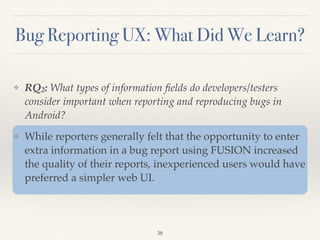
Bug Reporting UX: What Did We Learn?
❖ RQ2: What types of information fields do developers/testers
consider important when reporting and reproducing bugs in
Android?
❖ While reporters generally felt that the opportunity to enter
extra information in a bug report using FUSION increased
the quality of their reports, inexperienced users would have
preferred a simpler web UI.
38
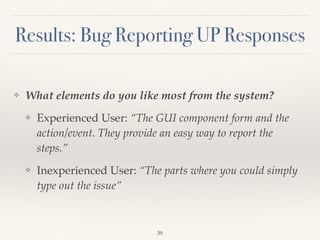
Results: Bug Reporting UP Responses
❖ What elements do you like most from the system?
❖ Experienced User: “The GUI component form and the
action/event. They provide an easy way to report the
steps.”
❖ Inexperienced User: “The parts where you could simply
type out the issue”
39
Design of Task 2: Bug Reproduction
❖ Goal: Evaluate the ability of FUSION to improve the
reproducibility of bug reports
❖ 20 participants, all CS graduate students
❖ 135 bug reports were evaluated (120 from Study 1, plus
the 15 original bug reports), each by two participants
❖ All participants reproduced bugs on Google Nexus 7
Tablets with Android v4.4.3 KitKat installed
40
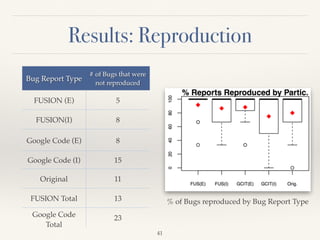
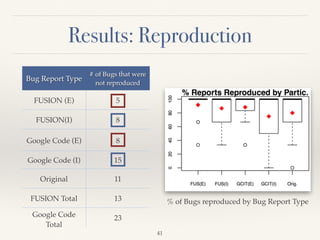
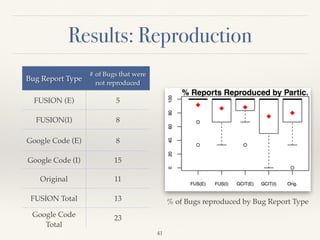
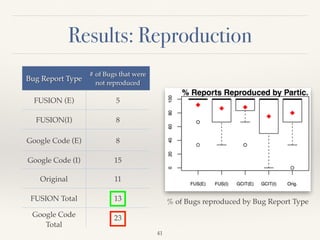
Results: Reproduction
Bug Report Type
# of Bugs that were
not reproduced
FUSION (E) 5
FUSION(I) 8
Google Code (E) 8
Google Code (I) 15
Original 11
FUSION Total 13
Google Code
Total
23
% of Bugs reproduced by Bug Report Type
41
Results: Reproduction
Bug Report Type
# of Bugs that were
not reproduced
FUSION (E) 5
FUSION(I) 8
Google Code (E) 8
Google Code (I) 15
Original 11
FUSION Total 13
Google Code
Total
23
% of Bugs reproduced by Bug Report Type
41
Results: Reproduction
Bug Report Type
# of Bugs that were
not reproduced
FUSION (E) 5
FUSION(I) 8
Google Code (E) 8
Google Code (I) 15
Original 11
FUSION Total 13
Google Code
Total
23
% of Bugs reproduced by Bug Report Type
41
Results: Reproduction
Bug Report Type
# of Bugs that were
not reproduced
FUSION (E) 5
FUSION(I) 8
Google Code (E) 8
Google Code (I) 15
Original 11
FUSION Total 13
Google Code
Total
23
% of Bugs reproduced by Bug Report Type
41
Reproducibility: What Did We Learn?
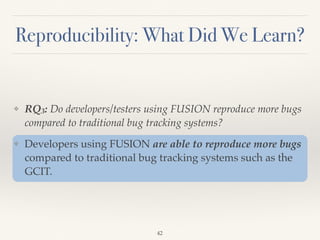
❖ RQ3: Do developers/testers using FUSION reproduce more bugs
compared to traditional bug tracking systems?
❖ Developers using FUSION are able to reproduce more bugs
compared to traditional bug tracking systems such as the
GCIT.
42
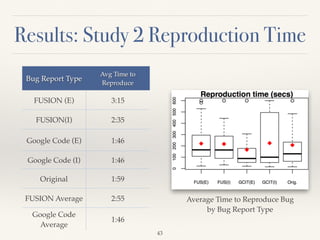
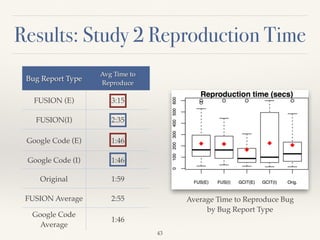
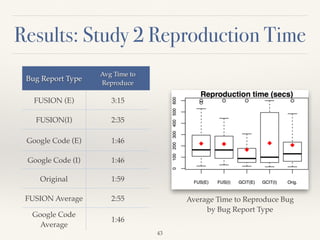
Results: Study 2 Reproduction Time
Bug Report Type
Avg Time to
Reproduce
FUSION (E) 3:15
FUSION(I) 2:35
Google Code (E) 1:46
Google Code (I) 1:46
Original 1:59
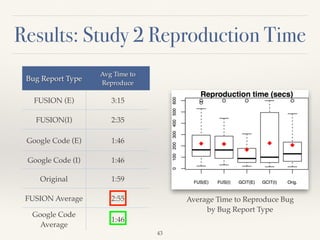
FUSION Average 2:55
Google Code
Average
1:46
Average Time to Reproduce Bug
by Bug Report Type
43
Results: Study 2 Reproduction Time
Bug Report Type
Avg Time to
Reproduce
FUSION (E) 3:15
FUSION(I) 2:35
Google Code (E) 1:46
Google Code (I) 1:46
Original 1:59
FUSION Average 2:55
Google Code
Average
1:46
Average Time to Reproduce Bug
by Bug Report Type
43
Results: Study 2 Reproduction Time
Bug Report Type
Avg Time to
Reproduce
FUSION (E) 3:15
FUSION(I) 2:35
Google Code (E) 1:46
Google Code (I) 1:46
Original 1:59
FUSION Average 2:55
Google Code
Average
1:46
Average Time to Reproduce Bug
by Bug Report Type
43
Results: Study 2 Reproduction Time
Bug Report Type
Avg Time to
Reproduce
FUSION (E) 3:15
FUSION(I) 2:35
Google Code (E) 1:46
Google Code (I) 1:46
Original 1:59
FUSION Average 2:55
Google Code
Average
1:46
Average Time to Reproduce Bug
by Bug Report Type
43
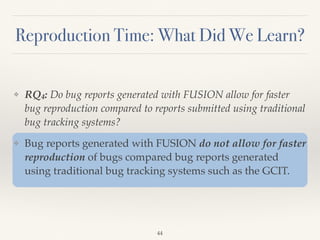
Reproduction Time: What Did We Learn?
❖ RQ4: Do bug reports generated with FUSION allow for faster
bug reproduction compared to reports submitted using traditional
bug tracking systems?
❖ Bug reports generated with FUSION do not allow for faster
reproduction of bugs compared bug reports generated
using traditional bug tracking systems such as the GCIT.
44
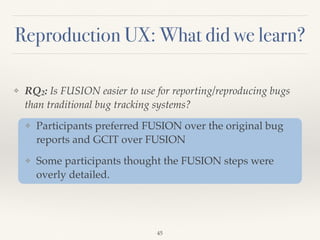
Reproduction UX: What did we learn?
❖ RQ2: Is FUSION easier to use for reporting/reproducing bugs
than traditional bug tracking systems?
❖ Participants preferred FUSION over the original bug
reports and GCIT over FUSION
❖ Some participants thought the FUSION steps were
overly detailed.
45
Results: Reproduction UP Responses
❖ What information from this type of Bug Report did you
find useful for reproducing the bug?
❖ “The detail[ed] steps to find where the next steps [were]
was really useful and speeded up things.”
❖ What elements did like least from this type of bug
report?
❖ “Sometimes the steps were too overly specific/detailed.”
46
47
Replication Package Contents
❖ Project Overview
❖ Live Instance of FUSION Web Reporting/Viewing
Interface
❖ Tools used for Implementation
❖ Full Dataset from Empirical Evaluation with Summary
of Results
48
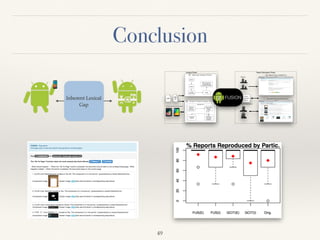
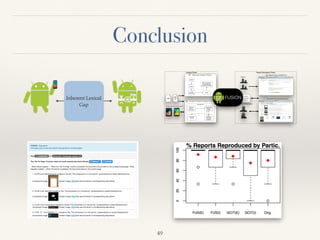
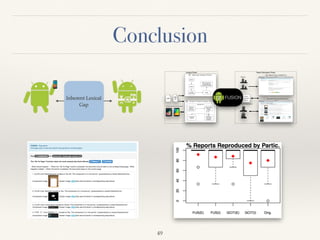
Conclusion
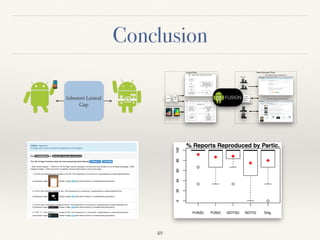
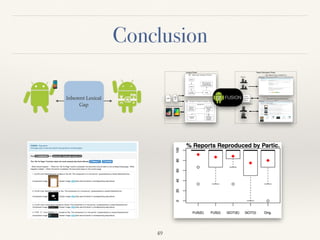
Analyze Phase Report Generation Phase
2 - Dynamic Program Analyzer (Engine)
.apk
1 - Static App Analyzer (Primer)
3 -
FUSION
Database
apktool
dex2jar
jd-cmd
Decompiler
or
app
src
SrcML
Static Extraction of
Components and
Associated Attributes
Systematic DFS
Hierarchy
Viewer &
uiautomator
Step-by-Step
Execution
Engine
Screenshot
Capture
GUI-
Component
Information
Extraction
Googlehttp://cs.wm.edu/semeru
FUSION
Googlehttp://cs.wm.edu/semeru
FUSION
Testers
Application Developers
4 - Auto-
Completion
Engine
Physical Device or Emulator
5 - Report Entry (FUSION UI)
6 - Generated Reports (FUSION UI)
49
Conclusion
Analyze Phase Report Generation Phase
2 - Dynamic Program Analyzer (Engine)
.apk
1 - Static App Analyzer (Primer)
3 -
FUSION
Database
apktool
dex2jar
jd-cmd
Decompiler
or
app
src
SrcML
Static Extraction of
Components and
Associated Attributes
Systematic DFS
Hierarchy
Viewer &
uiautomator
Step-by-Step
Execution
Engine
Screenshot
Capture
GUI-
Component
Information
Extraction
Googlehttp://cs.wm.edu/semeru
FUSION
Googlehttp://cs.wm.edu/semeru
FUSION
Testers
Application Developers
4 - Auto-
Completion
Engine
Physical Device or Emulator
5 - Report Entry (FUSION UI)
6 - Generated Reports (FUSION UI)
49
Conclusion
Analyze Phase Report Generation Phase
2 - Dynamic Program Analyzer (Engine)
.apk
1 - Static App Analyzer (Primer)
3 -
FUSION
Database
apktool
dex2jar
jd-cmd
Decompiler
or
app
src
SrcML
Static Extraction of
Components and
Associated Attributes
Systematic DFS
Hierarchy
Viewer &
uiautomator
Step-by-Step
Execution
Engine
Screenshot
Capture
GUI-
Component
Information
Extraction
Googlehttp://cs.wm.edu/semeru
FUSION
Googlehttp://cs.wm.edu/semeru
FUSION
Testers
Application Developers
4 - Auto-
Completion
Engine
Physical Device or Emulator
5 - Report Entry (FUSION UI)
6 - Generated Reports (FUSION UI)
49
Conclusion
Analyze Phase Report Generation Phase
2 - Dynamic Program Analyzer (Engine)
.apk
1 - Static App Analyzer (Primer)
3 -
FUSION
Database
apktool
dex2jar
jd-cmd
Decompiler
or
app
src
SrcML
Static Extraction of
Components and
Associated Attributes
Systematic DFS
Hierarchy
Viewer &
uiautomator
Step-by-Step
Execution
Engine
Screenshot
Capture
GUI-
Component
Information
Extraction
Googlehttp://cs.wm.edu/semeru
FUSION
Googlehttp://cs.wm.edu/semeru
FUSION
Testers
Application Developers
4 - Auto-
Completion
Engine
Physical Device or Emulator
5 - Report Entry (FUSION UI)
6 - Generated Reports (FUSION UI)
49
Conclusion
Analyze Phase Report Generation Phase
2 - Dynamic Program Analyzer (Engine)
.apk
1 - Static App Analyzer (Primer)
3 -
FUSION
Database
apktool
dex2jar
jd-cmd
Decompiler
or
app
src
SrcML
Static Extraction of
Components and
Associated Attributes
Systematic DFS
Hierarchy
Viewer &
uiautomator
Step-by-Step
Execution
Engine
Screenshot
Capture
GUI-
Component
Information
Extraction
Googlehttp://cs.wm.edu/semeru
FUSION
Googlehttp://cs.wm.edu/semeru
FUSION
Testers
Application Developers
4 - Auto-
Completion
Engine
Physical Device or Emulator
5 - Report Entry (FUSION UI)
6 - Generated Reports (FUSION UI)
49
Any Questions?
Thank you!
For more information please visit:
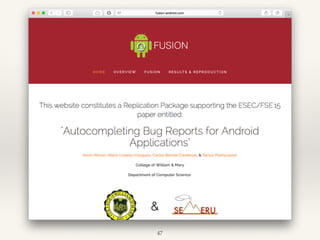
www.fusion-android.com
50

Auto-completing Bug Reports for Android Applications

  • 1.
    College of William& Mary - SEMERU - Department of Computer Science Auto-completing Bug Reports for Android Applications Kevin Moran, Mario Linares-Vásquez, Carlos Bernal-Cárdenas, & Denys Poshyvanyk ESEC/FSE’15 Centro Congressi Giovanni XXIII Bergamo Italy, September 4th, 2015 & SE ERU 1
  • 2.
  • 3.
  • 4.
  • 5.
  • 6.
  • 7.
    Images Courtesy ofGoogle “If dissatisfied with the performance of a mobile app, 48 percent of users would be less likely to use the app again.” “Dynatrace Mobile App Survey Report” - https://info.dynatrace.com/rs/compuware/images/ Mobile_App_Survey_Report.pdf 
 3
  • 8.
    Images Courtesy ofGoogle “If dissatisfied with the performance of a mobile app, 48 percent of users would be less likely to use the app again.” “Dynatrace Mobile App Survey Report” - https://info.dynatrace.com/rs/compuware/images/ Mobile_App_Survey_Report.pdf 
 Software maintenance, specifically the prompt resolution of bug reports, is extremely important to an application’s success in competitive mobile marketplaces. 3
  • 9.
    In-Field Failure Reproduction ❖Allows for in-house debugging of field failures[1]. 4 Application Instrumenter Instrumented Application Debugging Information about Program Failure Field Users Application Developers Wei Jin and Alessandro Orso. 2012. BugRedux: reproducing field failures for in-house debugging. In Proceedings of the 34th International Conference on Software Engineering (ICSE '12)
  • 10.
    In-Field Failure Reproduction ❖Allows for in-house debugging of field failures[1]. 4 Application Instrumenter Instrumented Application Debugging Information about Program Failure Field Users Application Developers Wei Jin and Alessandro Orso. 2012. BugRedux: reproducing field failures for in-house debugging. In Proceedings of the 34th International Conference on Software Engineering (ICSE '12)
  • 11.
    ❖ Requires expensiveprogram instrumentation, not suitable for a mobile environment. ❖ Requires Oracles in order to capture and reproduce failures in the field. ❖ Not easily adaptable to the event-driven nature of mobile apps. 5 In-Field Failure Reproduction
  • 12.
  • 13.
  • 14.
    The Lexical Gapin Reporting Bugs Reporters: -Functional Knowledge of a Software Bug. Developers: -Intimate Code Level Knowledge of Application Images Courtesy of Google Bug Reports 7
  • 15.
    The Lexical Gapin Reporting Bugs Reporters: -Functional Knowledge of a Software Bug. Developers: -Intimate Code Level Knowledge of Application Images Courtesy of Google Bug Reports Inherent Lexical Gap 7
  • 16.
    What Makes aGood Bug Report? ❖ Insufficient information in bug reports is one of the leading causes of non-reproducible reports1 ❖ Developers consider (i) steps to reproduce, (ii) stack traces, and (iii) test cases/scenarios as the most helpful sources of information in bug reports2 ❖ Information needs are greatest earliest in a bug’s lifecycle3 1M. Erfani Joorabchi, M. Mirzaaghaei, and A. Mesbah. Works for me! characterizing non-reproducible bug reports. MSR 2014, 2Nicolas Bettenburg, Sascha Just, Adrian Schröter, Cathrin Weiss, Rahul Premraj, and Thomas Zimmermann. 2008. What makes a good bug report? (SIGSOFT ’08/FSE-16), 3S. Breu, R. Premraj, J. Sillito, and T. Zimmermann. Information needs in bug reports: Improving cooperation between developers and users. (CSCW) 
 8
  • 17.
    FUSION: The KeyIdea 9 Bug Reports Static Code Analysis Dynamic Analysis
  • 18.
    FUSION: The KeyIdea 9 Bug Reports Static Code Analysis Dynamic Analysis
  • 19.
    FUSION: Overview 10 Analysis PhaseReport Generation Phase 2 - Dynamic Program Analyzer (Engine) .apk 1 - Static App Analyzer (Primer) 3 - FUSION Database or app src Googlehttp://cs.wm.edu/semeru FUSION Googlehttp://cs.wm.edu/semeru FUSION Testers Application Developers 4 - Auto- Completion Engine Physical Device or Emulator 5 - Report Entry (FUSION UI) 6 - Generated Reports (FUSION UI)
  • 20.
    FUSION: Analysis Phase AnalysisPhase 2 - Dynamic Program Analyzer (Engine) .apk 1 - Static App Analyzer (Primer) 3 - FUSION Database apktool dex2jar jd-cmd Decompiler or app src SrcML Static Extraction of Components and Associated Attributes Systematic DFS Hierarchy Viewer & uiautomator Step-by-Step Execution Engine Screenshot Capture GUI- Component Information Extraction Te Applica C Physical Device or Emulator 11
  • 21.
    Dynamic Program Analyzer(Engine) ❖ Extracts run-time information of components exercised. ❖ Extracts the XML GUI Hierarchy using UIAutomator subroutines. ❖ Able to detect when execution leaves the subject app, and re-launch the app. 12
  • 22.
  • 23.
  • 24.
  • 25.
    FUSION Engine - Activity -Checkable, Checked, Clickable, Long Clickable? - Component Index - Current Window - Enabled? - XML_ID - Component Type - Position (Absolute and Relative) - Text - Screenshot → 13
  • 26.
  • 27.
  • 28.
    Overview of FUSION:Report Generation Phase Report Generation Phase 3 - FUSION Database Googlehttp://cs.wm.edu/semeru FUSION Googlehttp://cs.wm.edu/semeru FUSION Testers Application Developers 4 - Auto- Completion Engine 5 - Report Entry (FUSION UI) 6 - Generated Reports (FUSION UI) 14
  • 29.
    Overview of FUSION:Report Generation Phase ❖ The Report Generation Phase is encapsulated within a web application and directly utilizes information from the FUSION database. ❖ This interface follows a novel suggest → verify → generate paradigm for the construction of bug reports. 15
  • 30.
    FUSION: Auto-Completion Engine Issteps_history = 0? Display components for the app’s Main Activity Is steps_history >=2?No Yes Is steps_history- 1 verified by FUSION? Is steps_history = 1 and is steps_history-1 confirmed? NoYes Display components from previous activity and possible transition activities. Is steps_history-2 verified by FUSION? Yes No Display components from the activity in steps_history-2 and two stages of transition activities. Display all possible app components. Yes No Display components from previous activity and possible transition activities. Display components from Main Activity and two stages of transition activities. Yes No 16
  • 31.
    FUSION: Auto-Completion Engine Issteps_history = 0? Display components for the app’s Main Activity Is steps_history >=2?No Yes Is steps_history- 1 verified by FUSION? Is steps_history = 1 and is steps_history-1 confirmed? NoYes Display components from previous activity and possible transition activities. Is steps_history-2 verified by FUSION? Yes No Display components from the activity in steps_history-2 and two stages of transition activities. Display all possible app components. Yes No Display components from previous activity and possible transition activities. Display components from Main Activity and two stages of transition activities. Yes No • FUSION tracks the users location in the app’s event-flow. • Suggests only components from the current screen, and possible transition screens, based on the last action. • If steps cannot be autocompleted, FUSION expands the number of components it displays. 16
  • 32.
  • 33.
  • 34.
  • 35.
  • 36.
  • 37.
  • 38.
  • 39.
  • 40.
  • 41.
  • 42.
  • 43.
  • 44.
  • 45.
  • 46.
  • 47.
  • 48.
  • 49.
  • 50.
  • 51.
  • 52.
  • 53.
  • 54.
    Empirical Evaluation ❖ Empiricalstudy involving two software maintenance tasks and 28 users: 1. Creating a bug report for a real app issue. 2. Reproducing the bug on a device from a report. ❖ We used 15 real-world Android application bugs and compare FUSION to the Google Code Issue Tracker (GCIT) as well as the Original Bug Reports. 28
  • 55.
    Context: Bug ReportsUsed in the Study App (Bug Index) Bug ID Min
 # of Steps Bug Type DFS Activity Coverage 1) A Time Tracker 24 3 GDE 1/5 2) Aarddict 106 4-5 GDE 3/6 3) ACV 11 5 C 3/11 4) Car report 43 10 DIC 5/6 5) Document Viewer 48 4 NE 4/8 6) DroidWeight 38 7 GDE 3/8 7) Eshotroid 2 10 GDE/NE 6/6 8) GnuCash 256 10 DIC 3/4 9) GnuCash 247 10 DIC 3/4 10) Mileage 31 5 GDE/DIC 2/27 11) NetMBuddy 3 4 GDE/NE 5/13 12) Notepad 23 6 C 4/7 13) OI Notepad 187 10 GDE/DIC 3/9 14) Olam 2 3 C 1/1 15) QuickDic 85 5 GDE 3/6 Summary of the bug reports used for the empirical studies: GDE = GUI Display Error, C = Crash, DIC = Data Input/Calculation Error, NE = Navigation Error 29
  • 56.
    Empirical Evaluation ❖ Duringeach study we collected detailed information including: ❖ The time taken to create/reproduce the bug. ❖ Feedback regarding user’s experience with each type of bug report/reporting system. ❖ Feedback regarding user’s preference using each type of bug report/reporting system. ❖ The programming experience of each user. 30
  • 57.
    Empirical Evaluation ❖ Duringeach study we collected detailed information including: ❖ The time taken to create/reproduce the bug. ❖ Feedback regarding user’s experience with each type of bug report/reporting system. ❖ Feedback regarding user’s preference using each type of bug report/reporting system. ❖ The programming experience of each user. 30
  • 58.
    User Experience (UX)Questions 31 Question Identifier Question UX1 I think that I would like to have this type of bug report/system frequently. UX2 I found this type of bug report/system unnecessarily complex. UX3 I thought this type of bug report/system was easy to read/use. UX4 I found this type of bug report/system very cumbersome to read/use. UX5 I thought the bug report/system was really useful for reporting/reproducing the bug
  • 59.
    User Preference (UP)Questions 32 Question Identifier Question UP1 What information from this <system> did you find useful for reporting/reproducing the bug? UP2 What other information (if any) would you like to see in this <system>? UP3 What elements do you like the most from this <system>? UP4 What elements do you like the least from this <system>?
  • 60.
    Research Questions ❖ RQ1:Ease of Use? ❖ RQ2: Information Preferences? ❖ RQ3: Reproducibility of Reports? ❖ RQ4: Speed of Reproduction? 33
  • 61.
    Task1: Bug ReportCreation ❖ Goal: To assess whether FUSION’s features are useful when reporting bugs for Android apps. ❖ Eight students from W&M, 4 CS graduate students, 4 undergraduate students. ❖ Users were exposed to the bugs through titled videos. ❖ All participants reproduced bugs on Google Nexus 7 Tablets with Android v4.4.3 KitKat installed. 34
  • 62.
    Bug Reporting TimeResults: FUSION Bug Index App Participant #1 (Experienced) Participant #2 (Experienced) Participant #3 (Inexperienced) Participant #4 (Inexperienced) 1 A Time Tracker 7:48 11:30 24:30 2:01 2 Aarddict 4:12 4:10 3:30 4:51 3 ACV 2:27 5:30 8:18 05:14 4 Car Report 12:21 4:50* 15:45 8:00* 5 Document Viewer 4:03* 5:10 16:32* 6:38* 6 Droid Weight 3:10* 2:10* 7:43* 6:09 7 Eshotroid 7:30 6:30 10:29 6:21 8 GnuCash 9:45 7:10* 18:45 08:23 9 GnuCash 9:23 7:30 20:03 9:27 10 Mileage 2:22* 5:10 7:07 3:04* 11 NetMBuddy 2:02 3:15 4:00 1:27 12 Notepad 3:53 3:20 4:45 3:14 13 OI Notepad 5:15 9:20 13:30 6:17 14 Olam 1:23 2:20 2:30 1:40 15 QuickDic 2:58 2:10 2:40 2:01 Average 5:14 5:20 10:40 4:59 35
  • 63.
    Bug Reporting TimeResults: FUSION Bug Index App Participant #1 (Experienced) Participant #2 (Experienced) Participant #3 (Inexperienced) Participant #4 (Inexperienced) 1 A Time Tracker 7:48 11:30 24:30 2:01 2 Aarddict 4:12 4:10 3:30 4:51 3 ACV 2:27 5:30 8:18 05:14 4 Car Report 12:21 4:50* 15:45 8:00* 5 Document Viewer 4:03* 5:10 16:32* 6:38* 6 Droid Weight 3:10* 2:10* 7:43* 6:09 7 Eshotroid 7:30 6:30 10:29 6:21 8 GnuCash 9:45 7:10* 18:45 08:23 9 GnuCash 9:23 7:30 20:03 9:27 10 Mileage 2:22* 5:10 7:07 3:04* 11 NetMBuddy 2:02 3:15 4:00 1:27 12 Notepad 3:53 3:20 4:45 3:14 13 OI Notepad 5:15 9:20 13:30 6:17 14 Olam 1:23 2:20 2:30 1:40 15 QuickDic 2:58 2:10 2:40 2:01 Average 5:14 5:20 10:40 4:59 35
  • 64.
    Bug Reporting TimeResults: FUSION Bug Index App Participant #1 (Experienced) Participant #2 (Experienced) Participant #3 (Inexperienced) Participant #4 (Inexperienced) 1 A Time Tracker 7:48 11:30 24:30 2:01 2 Aarddict 4:12 4:10 3:30 4:51 3 ACV 2:27 5:30 8:18 05:14 4 Car Report 12:21 4:50* 15:45 8:00* 5 Document Viewer 4:03* 5:10 16:32* 6:38* 6 Droid Weight 3:10* 2:10* 7:43* 6:09 7 Eshotroid 7:30 6:30 10:29 6:21 8 GnuCash 9:45 7:10* 18:45 08:23 9 GnuCash 9:23 7:30 20:03 9:27 10 Mileage 2:22* 5:10 7:07 3:04* 11 NetMBuddy 2:02 3:15 4:00 1:27 12 Notepad 3:53 3:20 4:45 3:14 13 OI Notepad 5:15 9:20 13:30 6:17 14 Olam 1:23 2:20 2:30 1:40 15 QuickDic 2:58 2:10 2:40 2:01 Average 5:14 5:20 10:40 4:59 35
  • 65.
    Bug Reporting TimeResults: GCIT Bug Index App Participant #1 (Experienced) Participant #2 (Experienced) Participant #3 (Inexperienced) Participant #4 (Inexperienced) 1 A Time Tracker 4:16 7:30 1:51 1:56 2 Aarddict 3:33 8:25 2:13 2:22 3 ACV 2:37 11:10 0:51 1:42 4 Car Report 2:52 12:23 0:40 2:39 5 Document Viewer 3:15 9:31 0:45 1:46 6 Droid Weight 2:33 7:13 1:03 1:45 7 Eshotroid 2:08 5:27 1:47 1:03 8 GnuCash 2:40 6:48 1:15 2:30 9 GnuCash 6:20 5:12 1:40 2:22 10 Mileage 3:53 5:25 1:00 1:16 11 NetMBuddy 3:52 3:13 1:20 1:48 12 Notepad 2:02 4:32 1:01 1:23 13 OI Notepad 3:16 6:25 0:58 1:12 14 Olam 4:26 3:13 1:16 1:49 15 QuickDic 1:37 03:17 0:55 0:59 Average 3:17 6:39 1:14 1:46 36
  • 66.
    Bug Reporting TimeResults: GCIT Bug Index App Participant #1 (Experienced) Participant #2 (Experienced) Participant #3 (Inexperienced) Participant #4 (Inexperienced) 1 A Time Tracker 4:16 7:30 1:51 1:56 2 Aarddict 3:33 8:25 2:13 2:22 3 ACV 2:37 11:10 0:51 1:42 4 Car Report 2:52 12:23 0:40 2:39 5 Document Viewer 3:15 9:31 0:45 1:46 6 Droid Weight 2:33 7:13 1:03 1:45 7 Eshotroid 2:08 5:27 1:47 1:03 8 GnuCash 2:40 6:48 1:15 2:30 9 GnuCash 6:20 5:12 1:40 2:22 10 Mileage 3:53 5:25 1:00 1:16 11 NetMBuddy 3:52 3:13 1:20 1:48 12 Notepad 2:02 4:32 1:01 1:23 13 OI Notepad 3:16 6:25 0:58 1:12 14 Olam 4:26 3:13 1:16 1:49 15 QuickDic 1:37 03:17 0:55 0:59 Average 3:17 6:39 1:14 1:46 36
  • 67.
    Bug Reporting TimeResults: GCIT Bug Index App Participant #1 (Experienced) Participant #2 (Experienced) Participant #3 (Inexperienced) Participant #4 (Inexperienced) 1 A Time Tracker 4:16 7:30 1:51 1:56 2 Aarddict 3:33 8:25 2:13 2:22 3 ACV 2:37 11:10 0:51 1:42 4 Car Report 2:52 12:23 0:40 2:39 5 Document Viewer 3:15 9:31 0:45 1:46 6 Droid Weight 2:33 7:13 1:03 1:45 7 Eshotroid 2:08 5:27 1:47 1:03 8 GnuCash 2:40 6:48 1:15 2:30 9 GnuCash 6:20 5:12 1:40 2:22 10 Mileage 3:53 5:25 1:00 1:16 11 NetMBuddy 3:52 3:13 1:20 1:48 12 Notepad 2:02 4:32 1:01 1:23 13 OI Notepad 3:16 6:25 0:58 1:12 14 Olam 4:26 3:13 1:16 1:49 15 QuickDic 1:37 03:17 0:55 0:59 Average 3:17 6:39 1:14 1:46 36
  • 68.
    Ease of Use:What Did We Learn? ❖ RQ1: Is FUSION easier to use for reporting/reproducing bugs than traditional bug tracking systems? ❖ FUSION is about as easy for developers to use as a traditional bug tracking system ❖ FUSION is more difficult for inexperienced users to use than traditional bug tracking systems 37
  • 69.
    Bug Reporting UX:What Did We Learn? ❖ RQ2: What types of information fields do developers/testers consider important when reporting and reproducing bugs in Android? ❖ While reporters generally felt that the opportunity to enter extra information in a bug report using FUSION increased the quality of their reports, inexperienced users would have preferred a simpler web UI. 38
  • 70.
    Results: Bug ReportingUP Responses ❖ What elements do you like most from the system? ❖ Experienced User: “The GUI component form and the action/event. They provide an easy way to report the steps.” ❖ Inexperienced User: “The parts where you could simply type out the issue” 39
  • 71.
    Design of Task2: Bug Reproduction ❖ Goal: Evaluate the ability of FUSION to improve the reproducibility of bug reports ❖ 20 participants, all CS graduate students ❖ 135 bug reports were evaluated (120 from Study 1, plus the 15 original bug reports), each by two participants ❖ All participants reproduced bugs on Google Nexus 7 Tablets with Android v4.4.3 KitKat installed 40
  • 72.
    Results: Reproduction Bug ReportType # of Bugs that were not reproduced FUSION (E) 5 FUSION(I) 8 Google Code (E) 8 Google Code (I) 15 Original 11 FUSION Total 13 Google Code Total 23 % of Bugs reproduced by Bug Report Type 41
  • 73.
    Results: Reproduction Bug ReportType # of Bugs that were not reproduced FUSION (E) 5 FUSION(I) 8 Google Code (E) 8 Google Code (I) 15 Original 11 FUSION Total 13 Google Code Total 23 % of Bugs reproduced by Bug Report Type 41
  • 74.
    Results: Reproduction Bug ReportType # of Bugs that were not reproduced FUSION (E) 5 FUSION(I) 8 Google Code (E) 8 Google Code (I) 15 Original 11 FUSION Total 13 Google Code Total 23 % of Bugs reproduced by Bug Report Type 41
  • 75.
    Results: Reproduction Bug ReportType # of Bugs that were not reproduced FUSION (E) 5 FUSION(I) 8 Google Code (E) 8 Google Code (I) 15 Original 11 FUSION Total 13 Google Code Total 23 % of Bugs reproduced by Bug Report Type 41
  • 76.
    Reproducibility: What DidWe Learn? ❖ RQ3: Do developers/testers using FUSION reproduce more bugs compared to traditional bug tracking systems? ❖ Developers using FUSION are able to reproduce more bugs compared to traditional bug tracking systems such as the GCIT. 42
  • 77.
    Results: Study 2Reproduction Time Bug Report Type Avg Time to Reproduce FUSION (E) 3:15 FUSION(I) 2:35 Google Code (E) 1:46 Google Code (I) 1:46 Original 1:59 FUSION Average 2:55 Google Code Average 1:46 Average Time to Reproduce Bug by Bug Report Type 43
  • 78.
    Results: Study 2Reproduction Time Bug Report Type Avg Time to Reproduce FUSION (E) 3:15 FUSION(I) 2:35 Google Code (E) 1:46 Google Code (I) 1:46 Original 1:59 FUSION Average 2:55 Google Code Average 1:46 Average Time to Reproduce Bug by Bug Report Type 43
  • 79.
    Results: Study 2Reproduction Time Bug Report Type Avg Time to Reproduce FUSION (E) 3:15 FUSION(I) 2:35 Google Code (E) 1:46 Google Code (I) 1:46 Original 1:59 FUSION Average 2:55 Google Code Average 1:46 Average Time to Reproduce Bug by Bug Report Type 43
  • 80.
    Results: Study 2Reproduction Time Bug Report Type Avg Time to Reproduce FUSION (E) 3:15 FUSION(I) 2:35 Google Code (E) 1:46 Google Code (I) 1:46 Original 1:59 FUSION Average 2:55 Google Code Average 1:46 Average Time to Reproduce Bug by Bug Report Type 43
  • 81.
    Reproduction Time: WhatDid We Learn? ❖ RQ4: Do bug reports generated with FUSION allow for faster bug reproduction compared to reports submitted using traditional bug tracking systems? ❖ Bug reports generated with FUSION do not allow for faster reproduction of bugs compared bug reports generated using traditional bug tracking systems such as the GCIT. 44
  • 82.
    Reproduction UX: Whatdid we learn? ❖ RQ2: Is FUSION easier to use for reporting/reproducing bugs than traditional bug tracking systems? ❖ Participants preferred FUSION over the original bug reports and GCIT over FUSION ❖ Some participants thought the FUSION steps were overly detailed. 45
  • 83.
    Results: Reproduction UPResponses ❖ What information from this type of Bug Report did you find useful for reproducing the bug? ❖ “The detail[ed] steps to find where the next steps [were] was really useful and speeded up things.” ❖ What elements did like least from this type of bug report? ❖ “Sometimes the steps were too overly specific/detailed.” 46
  • 84.
  • 85.
    Replication Package Contents ❖Project Overview ❖ Live Instance of FUSION Web Reporting/Viewing Interface ❖ Tools used for Implementation ❖ Full Dataset from Empirical Evaluation with Summary of Results 48
  • 86.
    Conclusion Analyze Phase ReportGeneration Phase 2 - Dynamic Program Analyzer (Engine) .apk 1 - Static App Analyzer (Primer) 3 - FUSION Database apktool dex2jar jd-cmd Decompiler or app src SrcML Static Extraction of Components and Associated Attributes Systematic DFS Hierarchy Viewer & uiautomator Step-by-Step Execution Engine Screenshot Capture GUI- Component Information Extraction Googlehttp://cs.wm.edu/semeru FUSION Googlehttp://cs.wm.edu/semeru FUSION Testers Application Developers 4 - Auto- Completion Engine Physical Device or Emulator 5 - Report Entry (FUSION UI) 6 - Generated Reports (FUSION UI) 49
  • 87.
    Conclusion Analyze Phase ReportGeneration Phase 2 - Dynamic Program Analyzer (Engine) .apk 1 - Static App Analyzer (Primer) 3 - FUSION Database apktool dex2jar jd-cmd Decompiler or app src SrcML Static Extraction of Components and Associated Attributes Systematic DFS Hierarchy Viewer & uiautomator Step-by-Step Execution Engine Screenshot Capture GUI- Component Information Extraction Googlehttp://cs.wm.edu/semeru FUSION Googlehttp://cs.wm.edu/semeru FUSION Testers Application Developers 4 - Auto- Completion Engine Physical Device or Emulator 5 - Report Entry (FUSION UI) 6 - Generated Reports (FUSION UI) 49
  • 88.
    Conclusion Analyze Phase ReportGeneration Phase 2 - Dynamic Program Analyzer (Engine) .apk 1 - Static App Analyzer (Primer) 3 - FUSION Database apktool dex2jar jd-cmd Decompiler or app src SrcML Static Extraction of Components and Associated Attributes Systematic DFS Hierarchy Viewer & uiautomator Step-by-Step Execution Engine Screenshot Capture GUI- Component Information Extraction Googlehttp://cs.wm.edu/semeru FUSION Googlehttp://cs.wm.edu/semeru FUSION Testers Application Developers 4 - Auto- Completion Engine Physical Device or Emulator 5 - Report Entry (FUSION UI) 6 - Generated Reports (FUSION UI) 49
  • 89.
    Conclusion Analyze Phase ReportGeneration Phase 2 - Dynamic Program Analyzer (Engine) .apk 1 - Static App Analyzer (Primer) 3 - FUSION Database apktool dex2jar jd-cmd Decompiler or app src SrcML Static Extraction of Components and Associated Attributes Systematic DFS Hierarchy Viewer & uiautomator Step-by-Step Execution Engine Screenshot Capture GUI- Component Information Extraction Googlehttp://cs.wm.edu/semeru FUSION Googlehttp://cs.wm.edu/semeru FUSION Testers Application Developers 4 - Auto- Completion Engine Physical Device or Emulator 5 - Report Entry (FUSION UI) 6 - Generated Reports (FUSION UI) 49
  • 90.
    Conclusion Analyze Phase ReportGeneration Phase 2 - Dynamic Program Analyzer (Engine) .apk 1 - Static App Analyzer (Primer) 3 - FUSION Database apktool dex2jar jd-cmd Decompiler or app src SrcML Static Extraction of Components and Associated Attributes Systematic DFS Hierarchy Viewer & uiautomator Step-by-Step Execution Engine Screenshot Capture GUI- Component Information Extraction Googlehttp://cs.wm.edu/semeru FUSION Googlehttp://cs.wm.edu/semeru FUSION Testers Application Developers 4 - Auto- Completion Engine Physical Device or Emulator 5 - Report Entry (FUSION UI) 6 - Generated Reports (FUSION UI) 49
  • 91.
    Any Questions? Thank you! Formore information please visit: www.fusion-android.com 50