Unit-1 IntroductiontaASP.NET
1.1 Whatis ASP.NET:
ASP.NET means "Active Server Pages" which is frontend language & it is established &
supported by Microsoft.
ASP.NET isa web application which allows the programmer to build dynamic web sites,
Web applications & web services. ASP.NET allows to develop web applications using a full
featured programming language such as Ct, VB.NET, Jscript orJH
ASP.NET is a web development platform, which provides the easiest & most accessible
way to build, deploy & run distributed web applications which can target for any device as
well as browser. In short, ASP.NET is used to produce interactive, data-driven web
applications over the internet.
ASP.NET works on top of the HTTP protocol, and uses the HTTP commands and policies to
set a browser-to-server two-sided communication and cooperation.
ASP.NET applications are compiled codes, written using the extensible and reusable
components or objects present in .Net framework. These codes can use the entire
hierarchy of classes in .Net framework.
ASP.NET consist of a large number of controls such as text boxes, buttons, labels & many
more for assembling, configuring & manipulating code to create HTML pages.
An ASP.NET web application is made of pages. When a user requests an ASP.NET page, the
IIS gives the processing of the page to the ASP.NET runtime system.
The ASP.NET runtime transforms the .aspx page into an instance of a class, which inherits
from the base class page of the Net framework. Therefore, each ASP.NET page is an
object and all its components i.e., the server-side controls are also objects.
1.2 .NET Framework 2.0:
NET is Software Platform. It is a language neutral environment for developing
applications. It also provides an execution environment and integration with various
programming languages for building, deploying and running web-based and standalone
enterprise applications. All aspects to manage the program execution like memory
allocation for data storage and instructions, granting and denying permission to the
application, managing execution of application and reallocation of memory for resources
which are not needed is managed easily in ASP.NET. It consists of class libraries and
reusable components.
The block diagram of .NET framework is as follows:
4.
Unit-1 Introductionto ASP.NET
VBC+ CH JScript J#
Common Language Specification
ASP.NET
Windows ADO.NET &
Web Forms Web Servlees Forms XML
Base Class Library
Common Language Runtlme
Operating System
Figure 1:.NET Framework
1.2.1 Programing Languages:
Net framework is designed for cross language compatiblity which means it supports
various programing languages like Visual Basic (VB), Visual Basic .Net (VB.Net), CH, JH etc.
So programmers/developers can choose any favourite programing language to build web
application.
1.2.2 Common Language Specification (CLS):
CLS is the collection of rules and constraints that every language compatible to .NET must
follow. It is one of the core components of the .Net Framework which helps to build
communication between different components written in different programming language
and reuse the common logics. Microsoft has defined three level of CLS compatibility as
follow:
Compliant Producer: The component developed in this type of language can be
used by any other language.
Consumer: In this category, the language can use classes produced in any other
language.
Extender: In this category, languages cannot use classes as in CONSUMER category
but can also extend classes using inheritance.
5.
Unit-1 Introduction toASP.NET
1.2.3Web Forms:
In ASP.NET, web forms are called web pages which help to develop web applications. It is
consist of two parts:
1. Template which contains HTML based layout information for all GUI controls.
2. Component which contains the logic behind the controls.
1.2.4 Web Services:
A web service is a web-based functionality that runs on Web Server. It is accessed using
the protocols of the web to be used by the web applications. They are the small unit of
code which is design to handle limited set of task. They are independent of operating
system and programming language.
1.2.5 Window Forms:
Windows Forms contain the graphical representation of any window displayed in the
application. It also provides integrated and unified way of developing Graphical User
Interface. It has rich variety of windows controls and user interface support like Text Box,
Button, Check Box, etc.
We can design the GUI by dragging the control directly on a form which made it possible
to design the win forms easily and quickly as Visual Studio .NET uses the 'system.Winform
namespace to draw the Graphical User Interface.
1.2.6 ADO.NET &XML:
It is the technology used for working with data and databases which is also known as Data
Access Layer. It provides access to data sources like SQL server, OLE DB, XML etc. The
ADO.NET allows connection to data sources for retrieving, manipulating, and updating
data.
1.2.7 Base Class Library (BCL):
.Net framework consists of classes, interfaces and value types that help in speeding up the
development process and provide access to the system functionality. The class library is a
collection of methods & functions that can be reusable types meant to be used by
managed code.
It is an object -oriented library that is used in component -based application. The Class
library is made up of a hierarchy of namespaces that expose classes, structure, interfaces,
enumerations and delegates. The nanespaces are logically defined by their functionality.
Most of the methods are split into either System. or Microsoft." namespaces. For
6.
Unit-1 Introduction toASP.NET
example, The System.Data namespace contains the functionality available for accessing
database.
1.2.8 Common Language Runtime (CLR):
It is the runtime environments which do both compile and run the application. So it is also
known as the heart of .NET framework. MSIL (Microsoft Intermediate Language) which is
language independent code, so CLR uses this code for the execution of the application.
The MSIL code is translated by IT (Just-in Time) compller.
1.2.9 Microsoft Intermediate Language (MSIL):
It is also known as Intermediate Language (1L) or Common Intermediate Language (CIL).
A.NET programming language does not compile the code into executable code; instead it
compiles the code into an intermediate code called Microsoft Intermediate Language
(MSIL) or Intermediate Language (L) or Common Intermediate Language (CIL).
This IL or MSIL or CiIL code is machine independent code which is then send to CLR which
converts this machine independent code into native code with the help of JIT (Just-in Time
Compiler) avalable in CLR.
1.3 Compile Code:
To serve the user request, ASP.NET must first compile the code. ASP.NET Code can be
written in any language supported by .NET framework. When code is compiled, it is first
converted into Microsoft Independent Language (MSIL). Then this independent language is
further converted into Machine Specificinstructions
Benefits of Compiled Code:
1. At code compilation time, it is checking for syntax error, type safety etc. Due to which
many errors can be eliminated and that is how it gives stability in code from the later stage.
2. Compile code is much faster than scripting languages. As they are similar to machine
code which makes the performance of the execution.
3. Compiled code is difficult to read. So that no one can convert compiled code to source
code again and that is how code becomes secure.
4. AS MSIL supports any .NET language, we are able to use assemblies which are written in
different language. For example, if you are writing an ASP.NET Web page in C4, you can add
a reference to a .dll file that was written in Visual Basic. Such interoperability functionality is
also used.
7.
5 Unit-1Introduction toASP.NET
ASP.NET2.0 provides two paths for structuring the cod of ASP.NET pages: Code Behind and
Code Inline
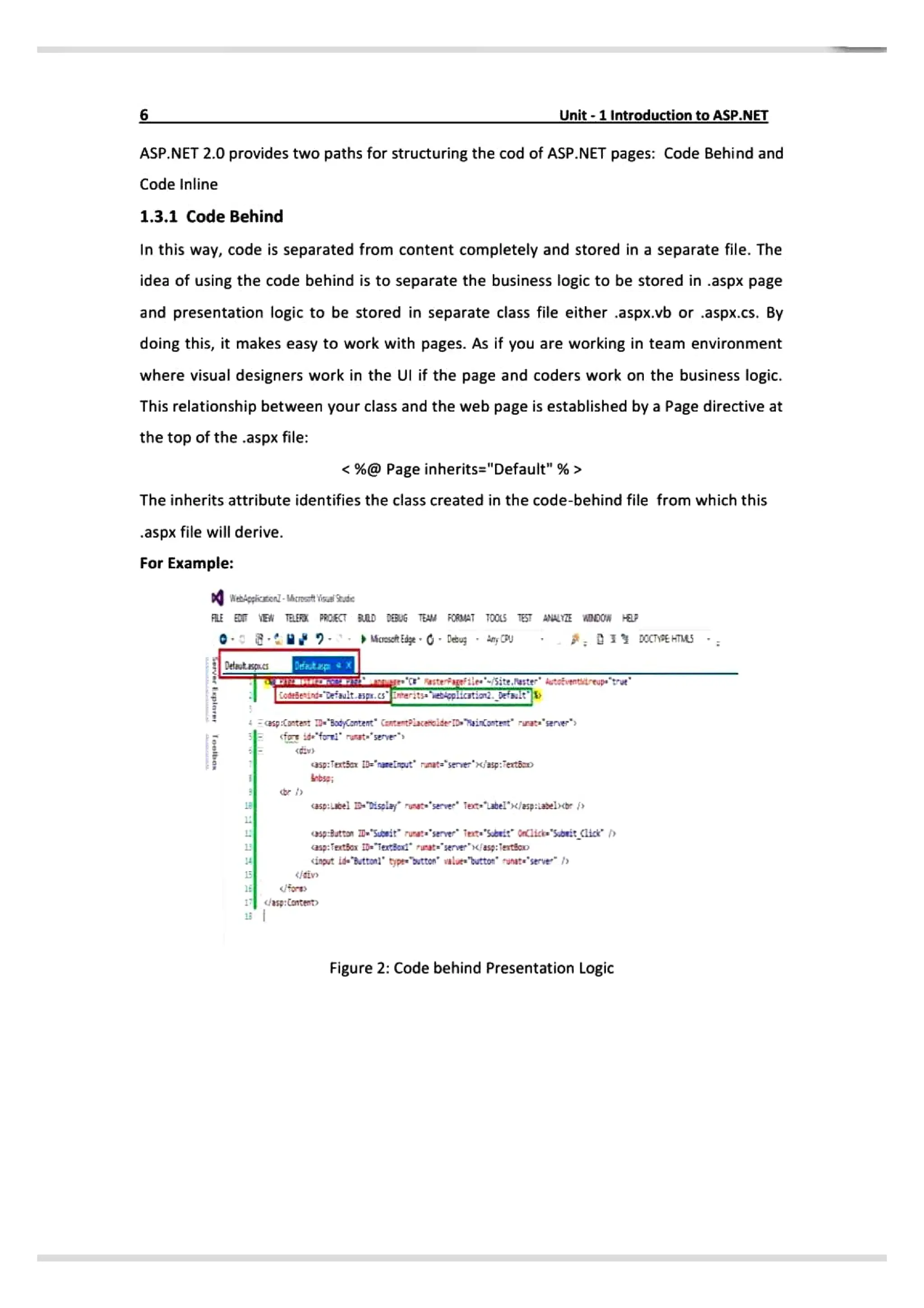
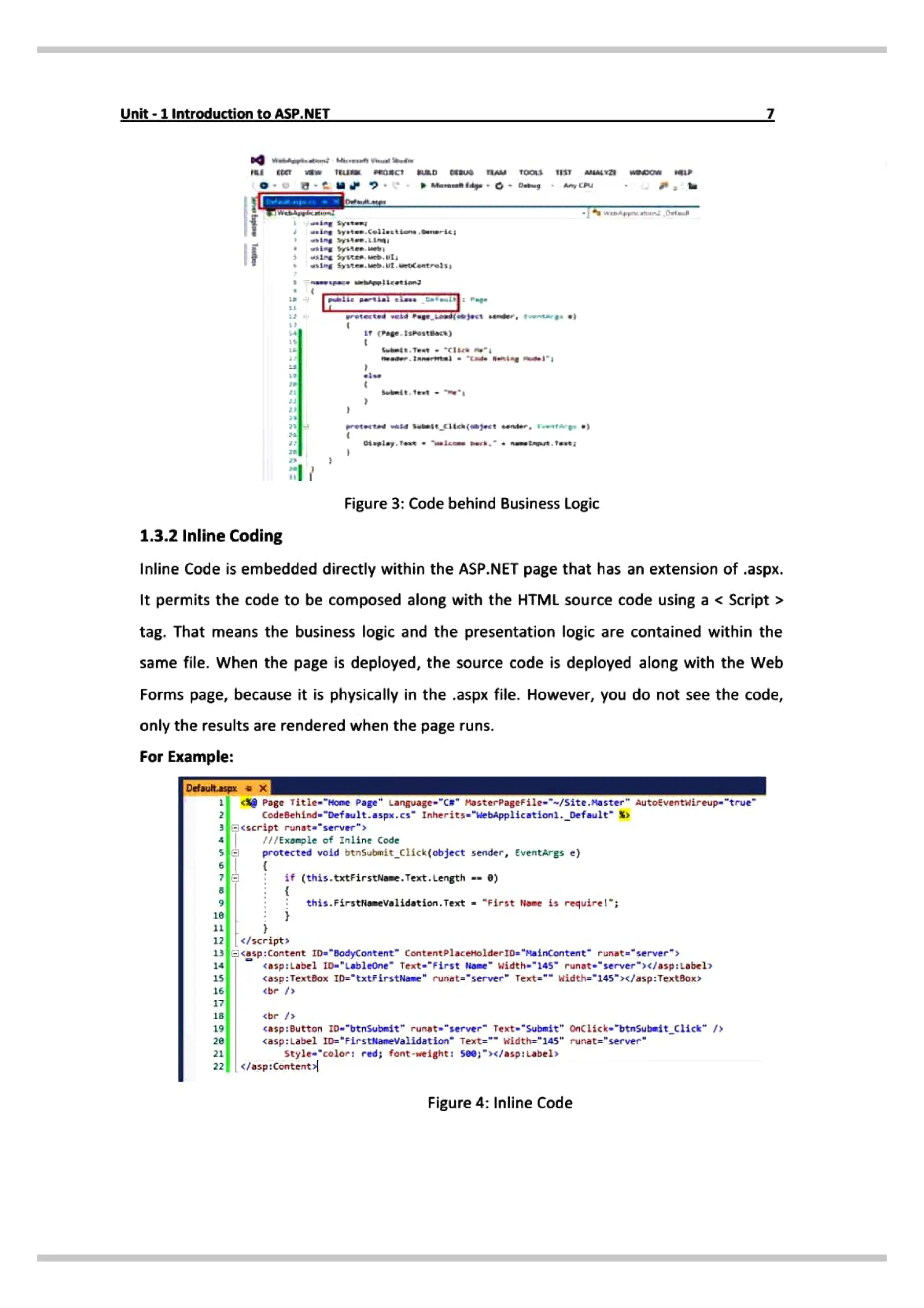
1.3.1 Code Behind
In this way, code is separated from content completely and stored in a separate file. The
idea of using the code behind is to separate the business logic to be stored in .aspx page
and presentation logic to be stored in separate class file either .aspx.vb or .aspx.cs. By
doing this, it makes easy to work with pages. As if you are working in team environment
where visual designers work in the Ul if the page and coders work on the business logic.
This relationship between your class and the web page is established by a Page directive at
the top of the .aspx file:
<%@ Page inherits="Default"%>
The inherits attribute identifies the class created in the code-behind file from which this
.aspx file will derive.
For Example:
WebAppicEenl-Mcrost VesalSeude
FAlE
EEN TELER PRCECT BRD DEBUG TEAM FORMAT TOOL5 TEST ANALYITE WDDOW
Mcrosot Edge ebug any
U
Detaut asp.cs Deatap
Eoedeind erauit.Esg.CSEeritsaiopiicstiond.betault
asp:{ontast =*3adCantent" Cantet?iacencide-TD» Nainantent' rurats'senver"
id foi runst="serve
asp:Tertšert="rareirut rinate"server" «jasp:Fertšo
5p:el isplay ruet seve fet-abel' asp:iabe)cor
sp:8utton D Supeit rurata"server et Sbeit iick So:tcisce p
asp:fexttos iDTextboxt runarserveriasg: Testšono
<ingut ide Buttonl" typewostton' valaes
button' runate"serve
for
/asp:Content
Figure 2: Code behind Presentation Logic
8.
Unit- 1Introduction toASP.NET
ET TEuu ROnC URD cEBUG AM Toos TIST MAY wpoW
syston;
ing syaten.celiutttons.eneric
wsiPg Syste, eb,I
Page.1skosteack)
Subndt.Teat cli ne
se ader.1Amernl "de Benine dl
ett wasd
Subeicita (mject ender. tAE *)
Figure 3: Code behind Business Logic
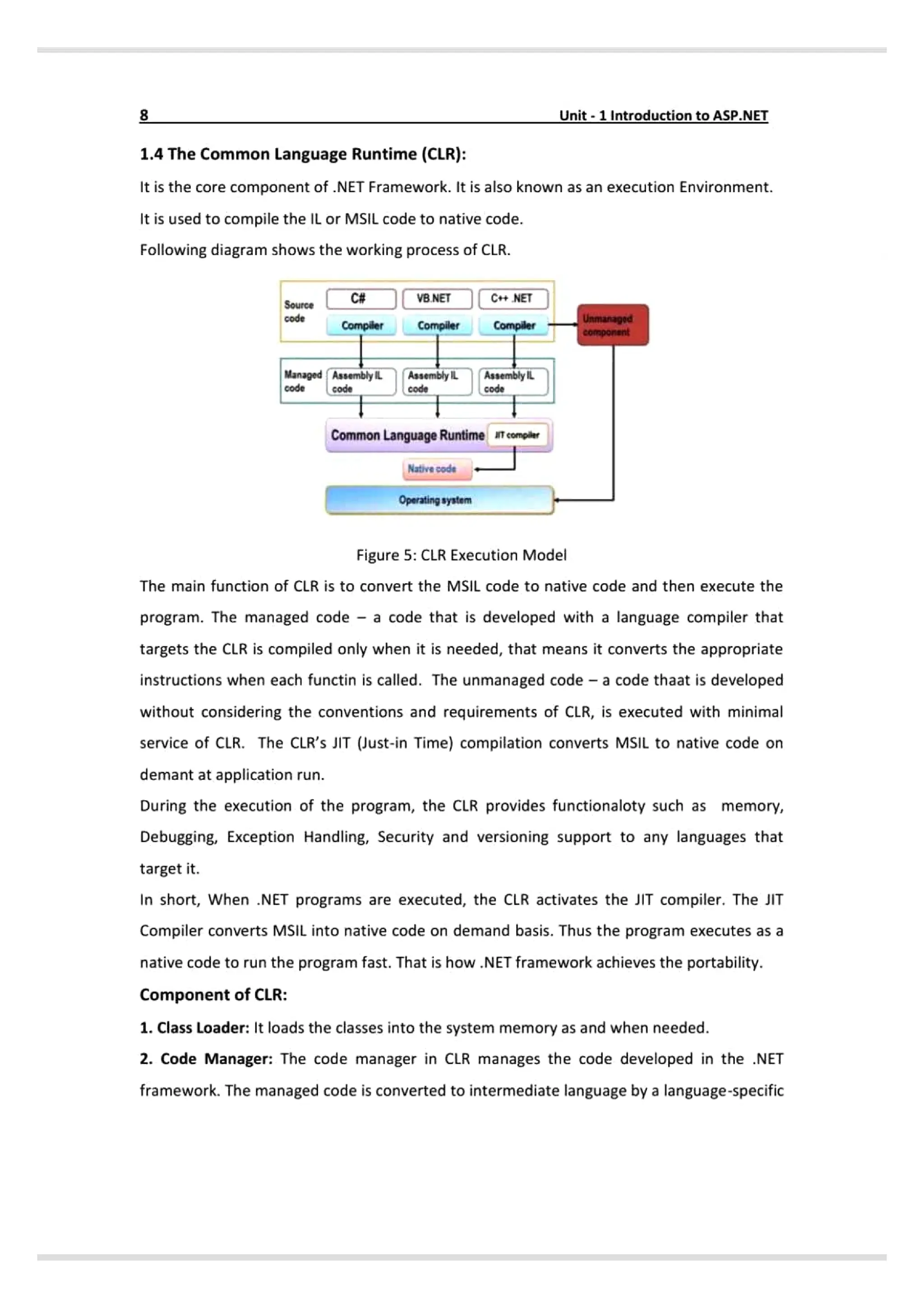
1.3.2 Inline Coding
Inline Code is embedded directly within the ASP.NET page that has an extension of .aspx.
It permits the codeto be composed along with the HTML source code using a < Script>
tag. That means the business logic and the presentation logic are contained within the
same file. When the page is deployed, the source code is deployed along with the Web
Forms page, because it is physically in the.aspx file. However, you do not seethe code,
only the results are rendered when the page runs.
For Example:
Defsult.a
Page Title-"Home Page Language-"C# MasterPageFile="~/site.Master AutoEventwireup="true
CodeBehind-"Default.aspx.cs" Inherits="WebApp1ication-
nle of Inline Code
protected void btnsubmit_click(object sender, EventArgs e)
if (this.txtFirstName. Text. Length =- 0)
this.FirstNiameValidation.Text "First None is require!";
12 /script
13asp:Content ID-"BodyContent" ContentPlaceHolderID= "HainContent" runat-"server "
14 asp:Label tD»"Lableone" Text-"First Nane width»"145" runat-"server">«/asp:Label»
TextBox ID="txtFirstName" runat-"server" Text" width="145">x/asp:TextBox>
ebr /»
5
br
casp:Button zD-"btnsubmit" runat "server" Text "Submit" onClick"btnSubmit_click" />
<asp:Label ID="FirstNameValidation" Text= width="145" runat="server"
tyle"color: red; font-weight: 5e0;"></asp:Labels
</asp: Content
Figure 4: Inline Code
9.
8 Unit-1 IntroductiontoASP.NET
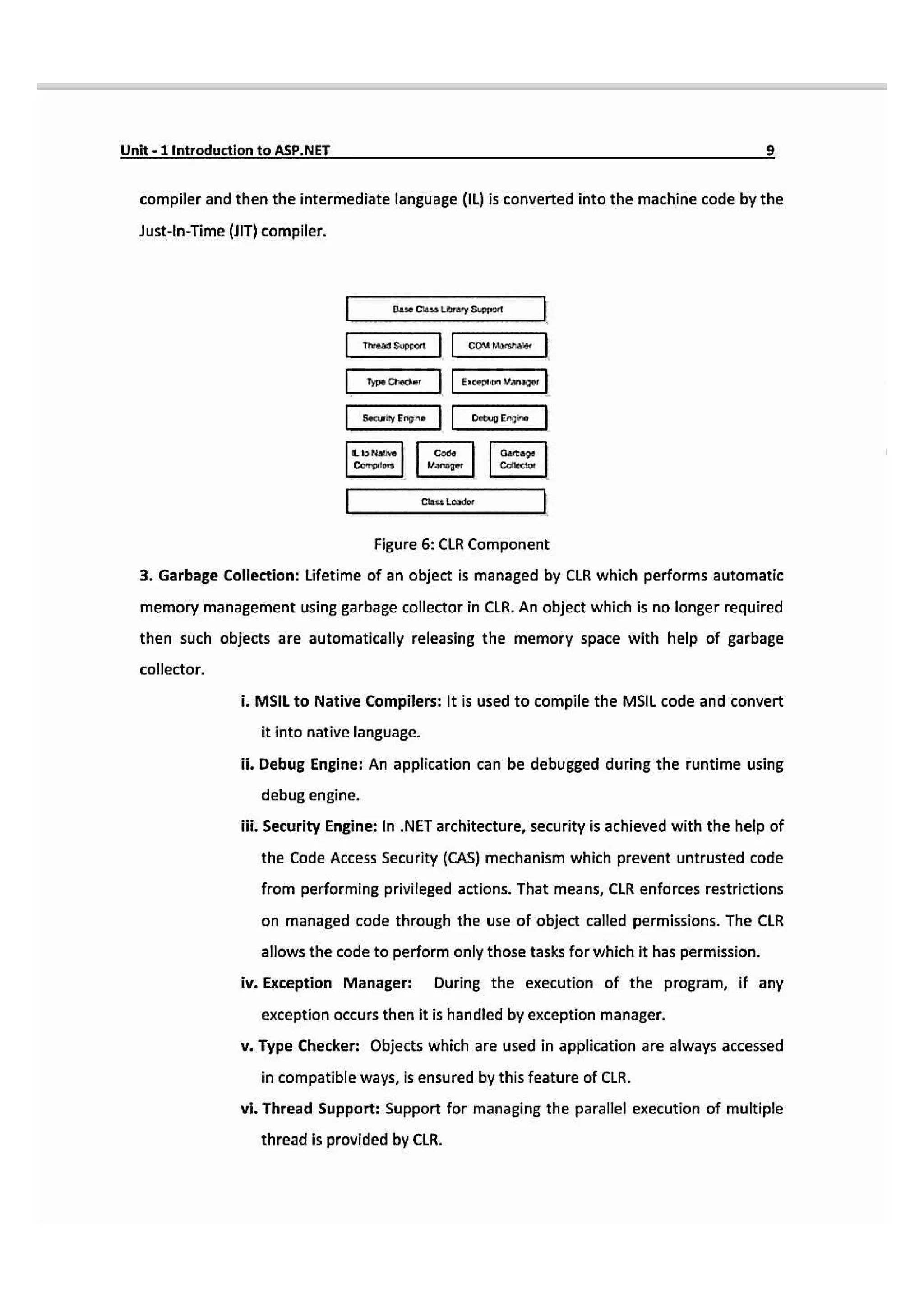
1.4The Common Language Runtime (CLR}:
It is the core component of .NET Framework. It is also known as an execution Environment.
It is used to compile the IL or MSIL code to native code.
Following diagram shows the working process of CLR.
C# VB.NETJC NET
Source
Unmanagod
omponsnt
code
Compiler Compiler Compiler
Managed AssemblylL AssemblyILAssemblyL
code Code code
Common Language Runtime iemple
Native code
Operating syatem
Figure 5: CLR Execution Model
The main function of CLR is to convert the MSIL code to native code and then execute the
program. The managed code a code that is developed with a language compilerthat
targets the CLR is compiled only when it is needed, that means it converts the appropriate
instructions when each functin is called. The unmanaged code - a code thaat is developed
without considering the conventions and requirements of CLR, is executed with minimal
service of CLR. The CLR's JIT (Just-in Time) compilation converts MSIL to native code on
demant at application run.
During the execution of the program, the CLR provides functionaloty such as memory,
Debugging, Exception Handling, Security and versioning support to any languages that
target it.
In short, When .NET programs are executed, the CLR activates the JIT compiler. The JIT
Compiler converts MSIL into native code on demand basis. Thus the program executes as a
native code to run the program fast. That is how NET framework achieves the portability.
Component of CLR:
1. Class Loader: It loads the classes into the system memory as and when needed.
2. Code Manager: The code manager in CLR manages the code developed in the .NET
framework. The managed code is converted to intermediate language by a language-specific
10.
Unit-1 Introduction toASP.NET
compiler and then the intermediate language (1L) is converted into the machine code by the
Just-In-Time (UIT) compiler.
Dase Cuss Library Suppet
Thread Support couMarshae
Type Crecker Exceptinaneger
Security Engn Debup Engn
Llo Nathve Coce Gatage
Collector
Coroiors Manager
Class Loader
Figure 6: CLR Component
8. Garbage Collection: Lifetime of an object is managed by CLR which performs automatic
memory management using garbage collector in CLR. An object which is no longer required
then such objects are automatically releasing the memory space with help of garbage
collector.
i. MSIL to Native Compilers: It is used to compile the MSIL code and convert
it into native language.
i. Debug Engine: An application can be debugged during the runtime using
debug engine.
ii. Security Engine: In .NET architecture, security is achieved with the help of
the Code Access Security (CAS) mechanism which prevent untrusted code
from performing privileged actions. That means, CLR enforces restrictions
on managed code through the use of object called permissions. The CLR
allows the code to perform only those tasks for which it has permission.
iv. Exception Manager: During the execution of the program, if any
exception occurs then it is handled by exception manager.
v. Type Checker: Objects which are used in application are always accessed
in compatible ways, is ensured by this feature of CLR.
vi. Thread Support: Support for managing the parallel execution of multiple
thread is provided by CLR.
11.
10- Unit-1 IntroductiontoASP.NEI
vii.COM Marshaller: It allows communication between the application and
COM Objects.
vii. Class Library Support: It provides Base Class Library classes when
application need at execution time.
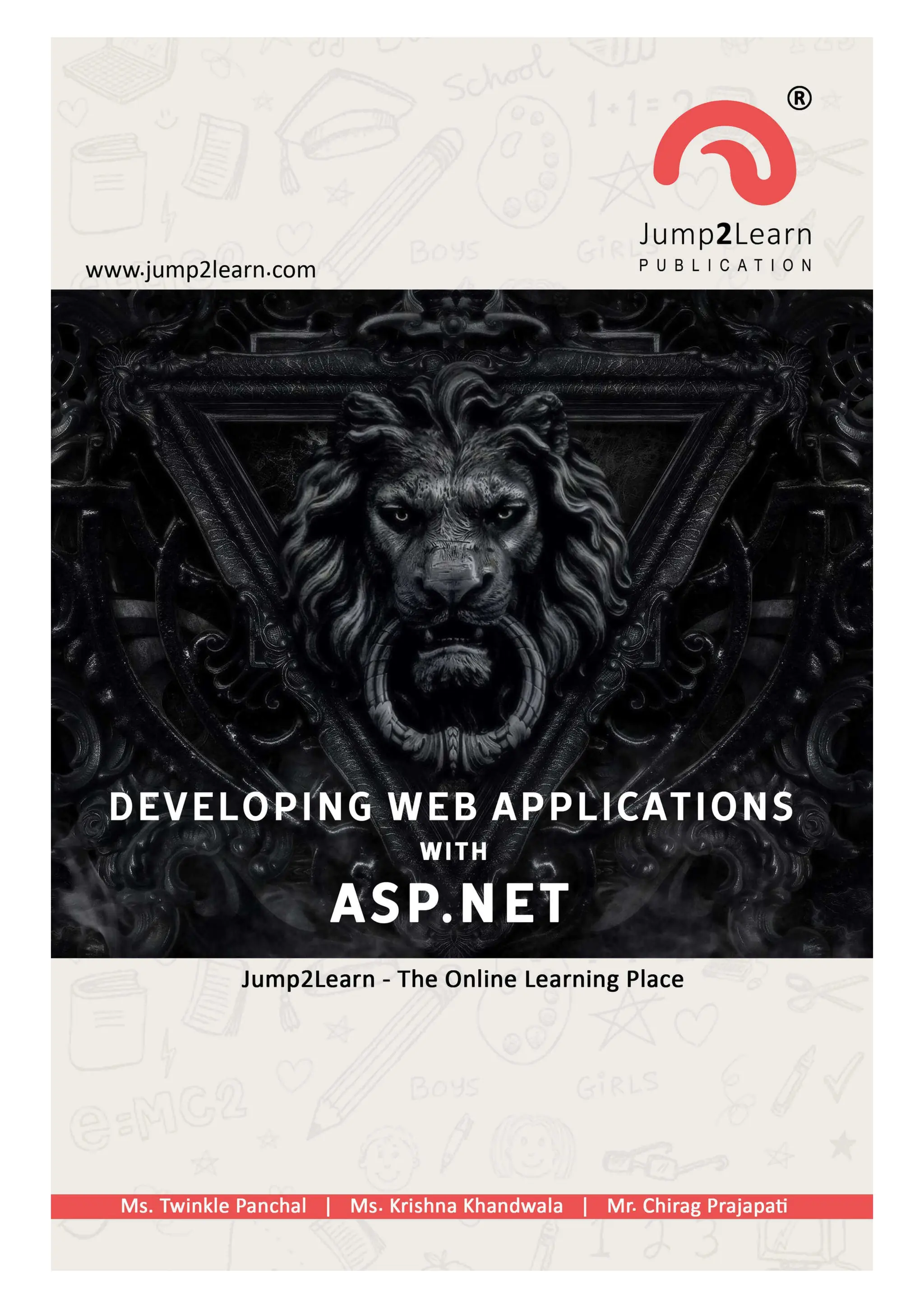
1.5 Object Oriented Concepts:
Object Oriented Programming (OOP) is a programming model where programs are
organized around objects, data field and methods which interact to design applications
and computer programs.
1.5.1 Class:
A class is a user-defined prototype from which objects are created. A class contains fields
& methods known as member function into single unit.
Syntax:
Access Modifier) <Class name> [:Base Class|Eimplements interface names]
[Statements
Here, access modifiers are Public, Private, Protected and internal.
For Example:
Public class student
fields, variables, methods, properties /
1.5.2 Fields:
Variables declare inside a class are called fields that can be accessed by creating an object
of the class and by using the dot syntax ().
For Example:
Public Class student
Public int roll_no=1;
Public string name="Yash;
static void Main(stringll args)
12.
Unit-1Introduction to ASP.NET
studentmyStud new student()
Console.Writeline{myStud.roll_no);
Console.Writeline(myStud.name);
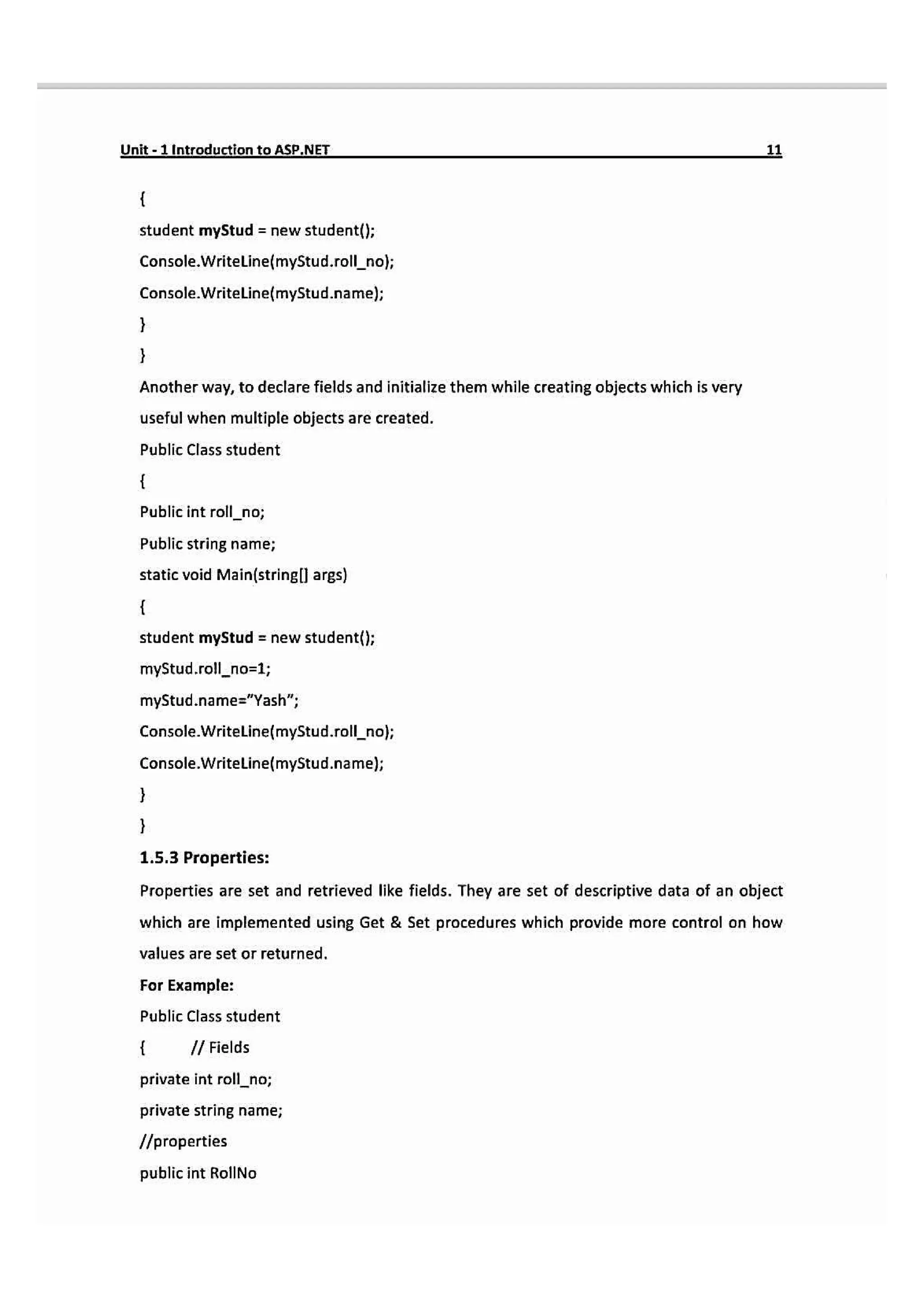
Another way, to declare fields and initialize them while creating objects which is very
useful when multiple objects are created.
Public Class student
Public int roll_no;
Public string name;
static void Main(stringll arg)
student myStud = new student();
myStud.rollno-1;
myStud.name="Yash";
Console.WriteLine(myStud.roll_no;
Console.Writeline(myStud.name);
1.5.3 Properties:
Properties are set and retrieved like fields. They are set of descriptive data of an object
which are implemented using Get & Set procedures which provide more control on how
values are set or returned.
For Example:
Public Class student
I Fields
private int roll_no;
private string name;
properties
public int RollNo
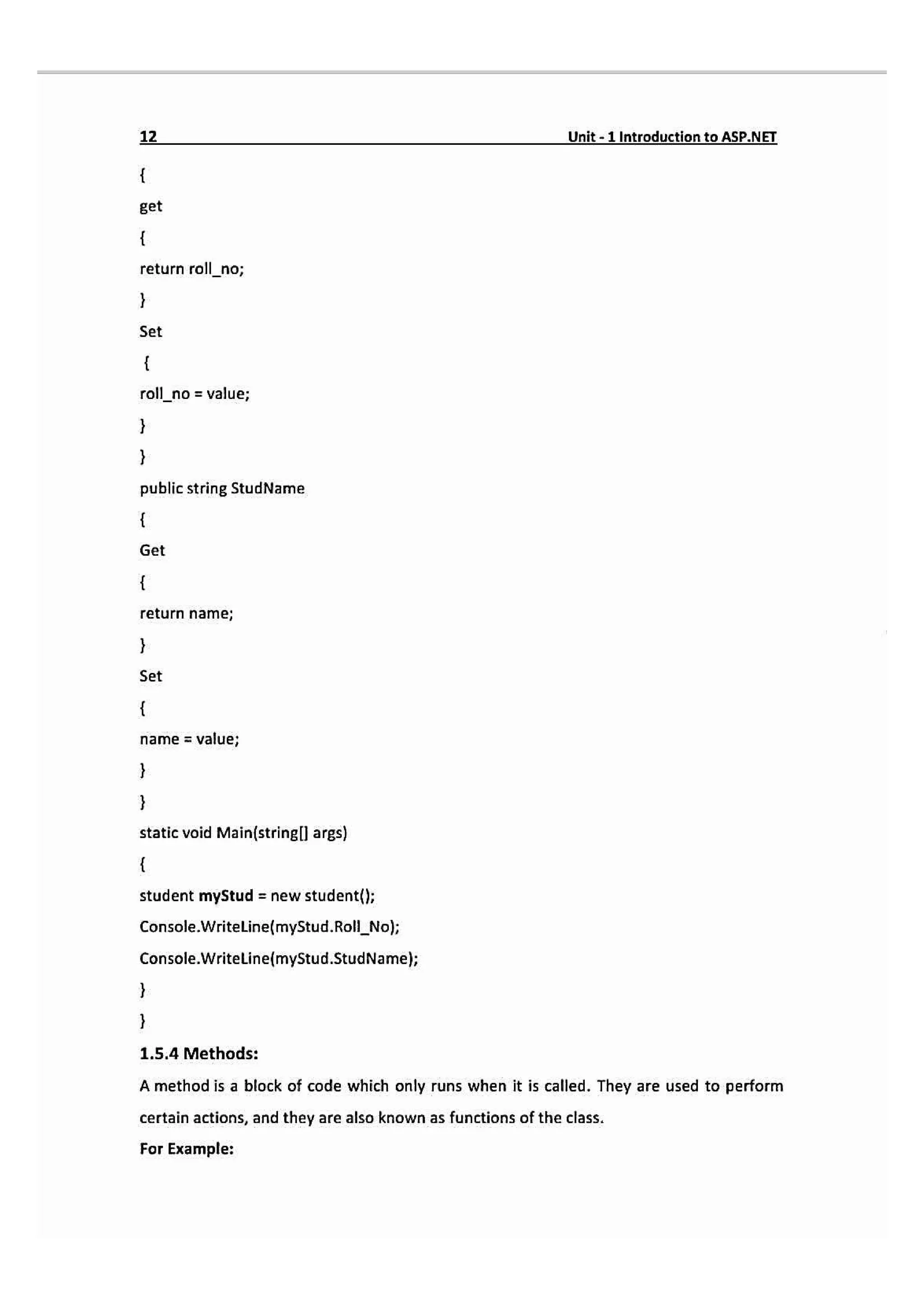
13.
12 Unit-1 IntroductlontoASP.NET
get
returnroll_no;
Set
roll_no = value;
public string StudName
Get
return name;
Set
name = value;
static void Main(stringl args)
student myStud = new student(};
Console.WritelLine(myStud.Roll_Nol;
Console.WriteLine(myStud.StudName);
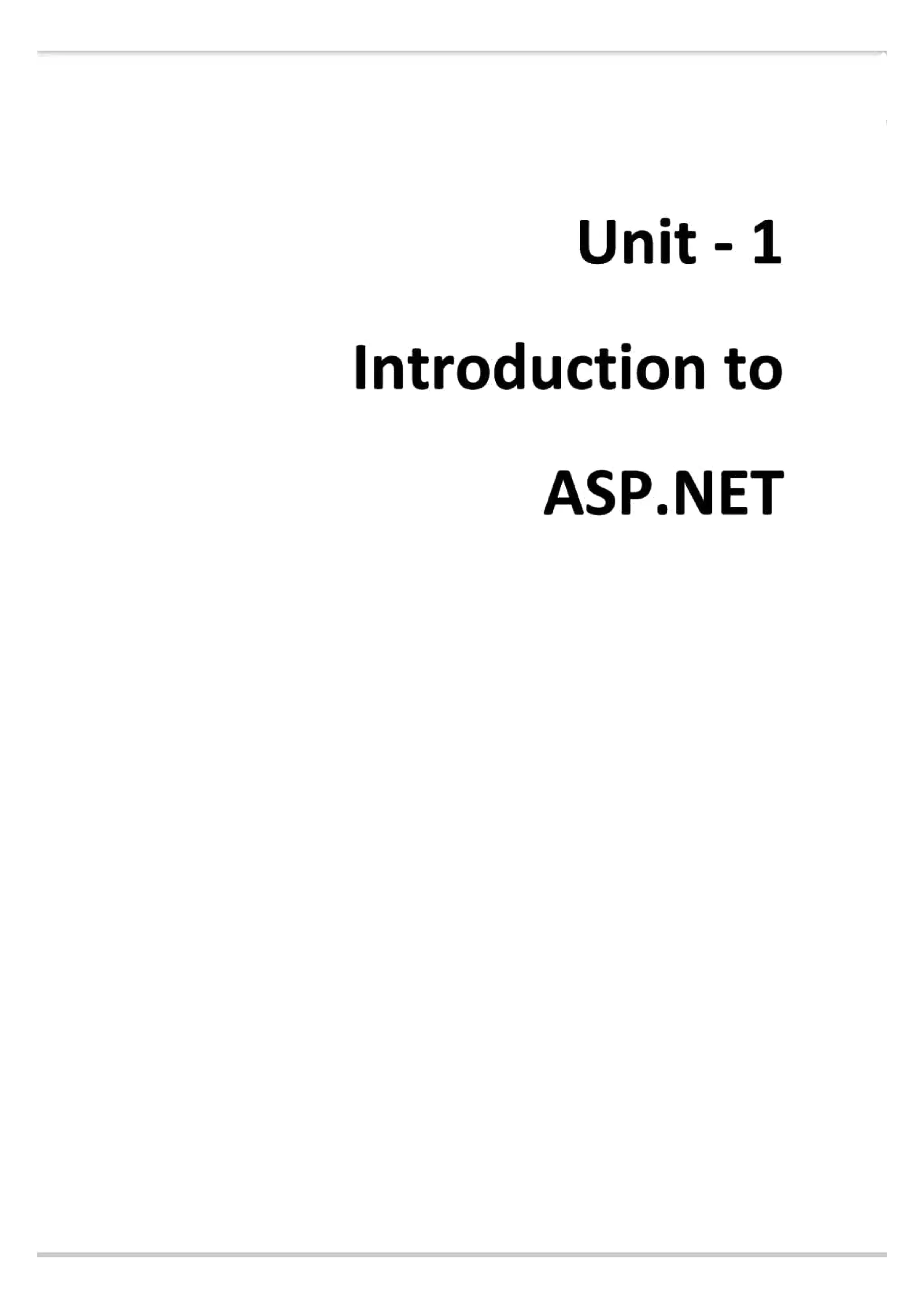
1.5.4 Methods:
A method is a block of code which only runs when it is called. They are used to perform
certain actions, and they are also known as functions of the class.
For Example:
14.
Unit-1Introduction toASP.NET 13
publicClass student
public int roll_no-1;
public string name="Yash
public void display()
Console.Writeline(myStud.rollno);
Console.Writeline(mystud.name);
static void Main(stringl] args)
student myStud newstudent();
myStud.display(l
1.5.5 Events:
Events allows objects to perform an actions whenever some specific action takes place.
For example, when we click a button, a click event occurs and we can handle that event
with event handler.
1.5.6 Objects:
It is a basic unit of OOP which represents real time entity. They are called instances of
classes which defines the data & behavior of all the instances of that type.
For Example:
student myStud = new student()
1.5.7 Constructor:
A constructor is a special method used to initialize objects. Main advantage of a
constructor is that it is called when an object of a class is created. Basically, it is used to
set the initial values of the fields of the class.
For Example:
public class student
15.
14 Unit-1 IntroductiontoASP.NET
I/fields
publicint roll_no;
public string name;
public student() // Constructor
roll
no=1;
name="Yash";
static void Main(stringl args)
student myStud = new student(}; // This will call the constructor
Console.WritelLinefmyStud.rollno;
Console.Writeline(myStud.name);
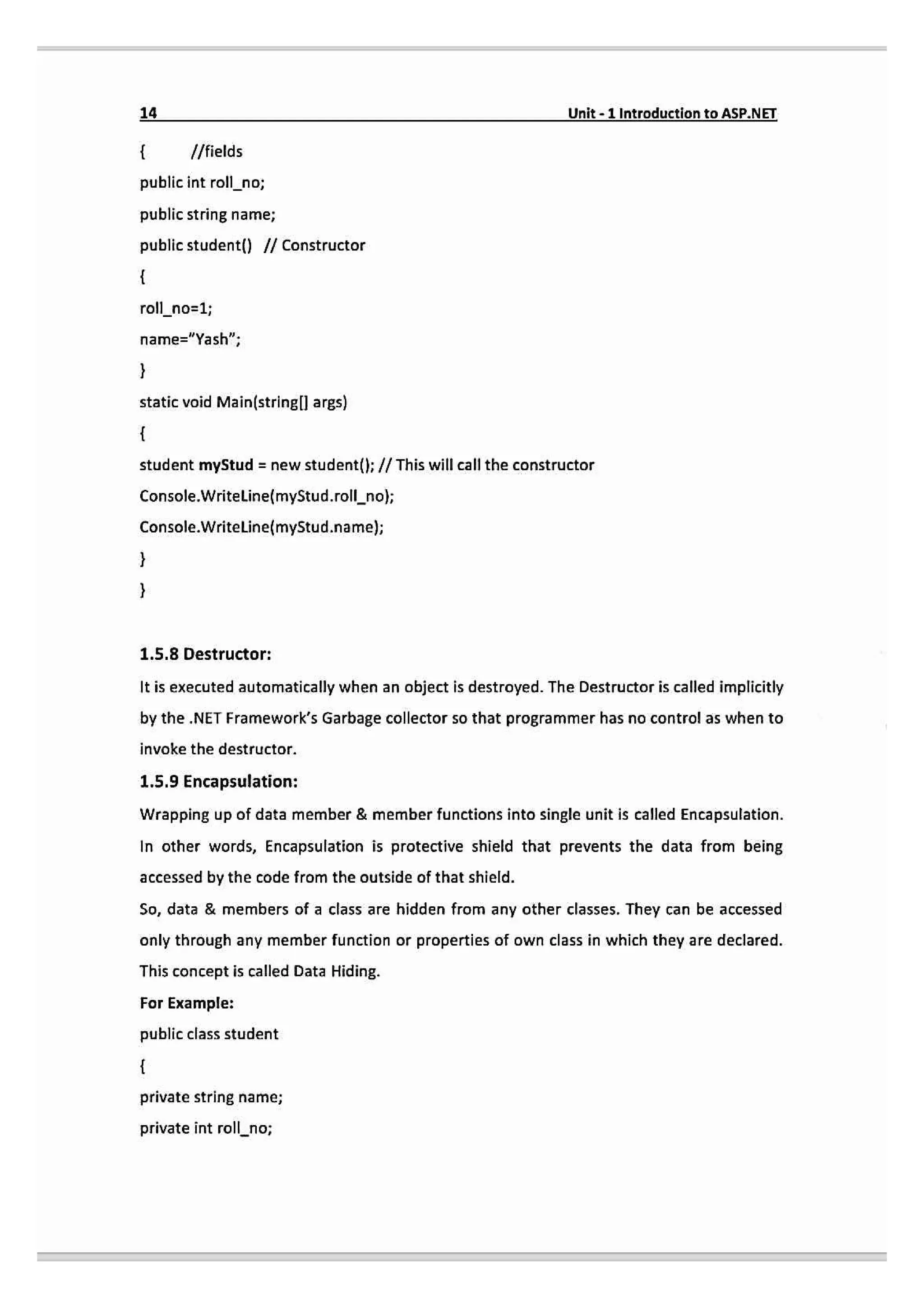
1.5.8 Destructor:
It is executed automatically when an abject is destroyed. The Destructor is called implicitly
by the .NET Framework's Garbage collector so that programmer has no control as when to
invoke the destructor.
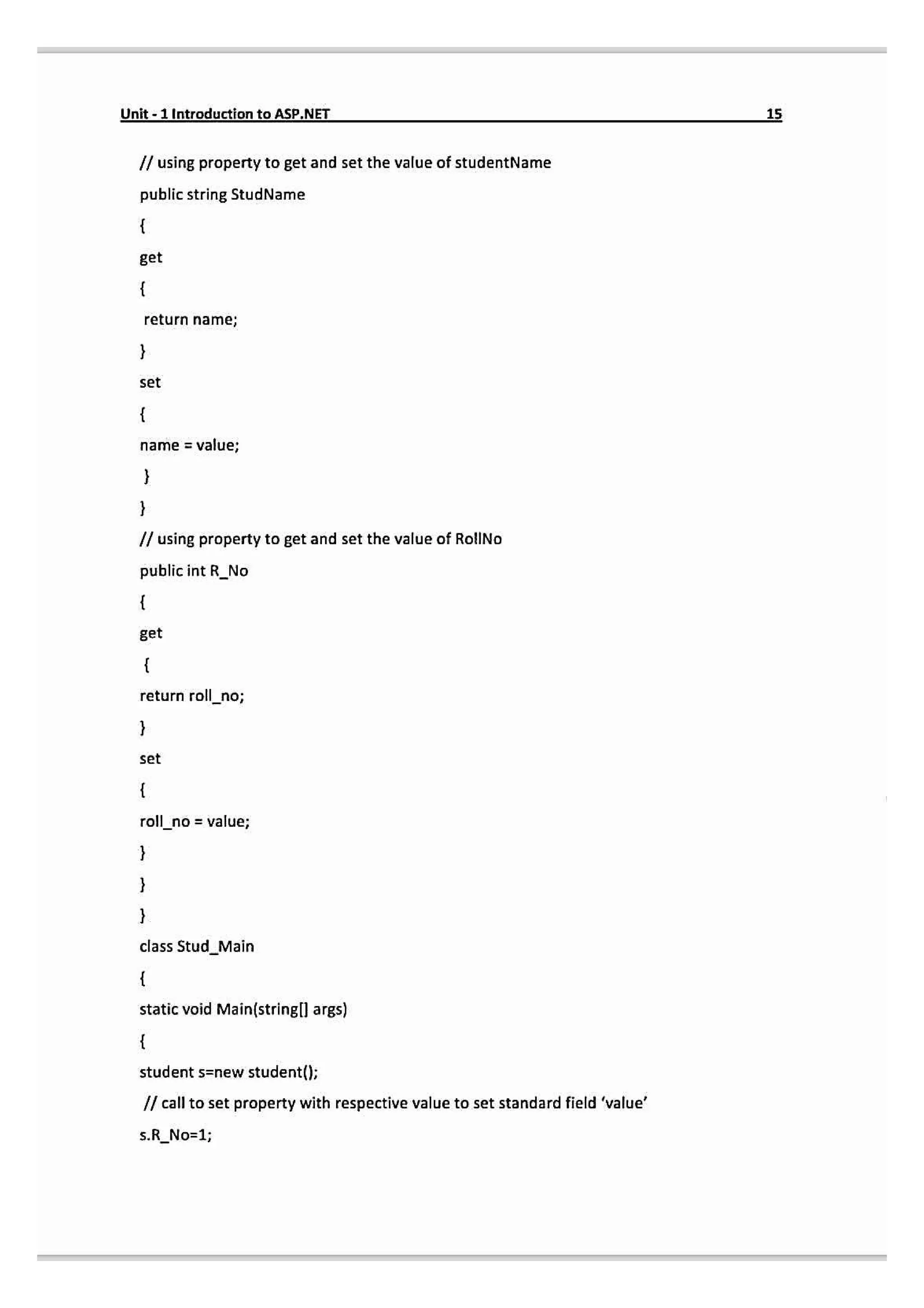
1.5.9 Encapsulation:
Wrapping up of data member & member functions into single unit is called Encapsulation.
In other words, Encapsulation is protective shield that prevents the data from being
accessed by the code from the outside of that shield.
So, data & members of a class are hidden from any other classes. They can be accessed
only through any member function or properties of own class in which they are declared.
This concept is called Data Hiding.
For Example:
public class student
private string name;
private int rollno;
16.
Unit-1 Introduction toASP.NET
15
/ using property to get and set the value of studentName
public string StudName
get
return name;
set
name = value;
I/ using property to get and set the value of RolINo
public int R_No
get
return roll_no;
set
roll no = value;
class StudMain
static void Main(string[l args)
student s=new student();
I call to set property with respective value to set standard field 'value'
s.R_No=1;
17.
16 Unit-1 IntroductiontoASP.NET
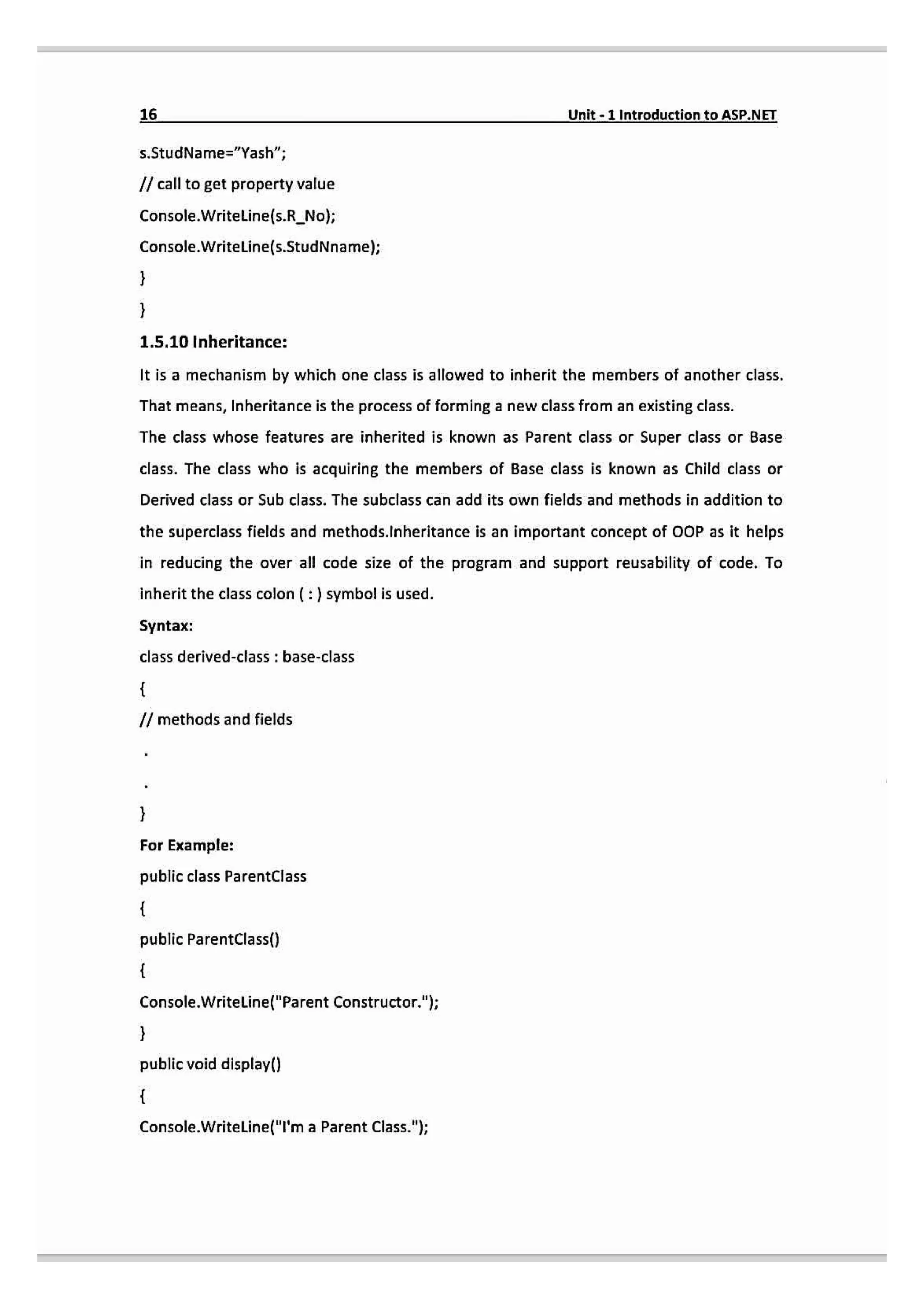
s.StudName="Yash";
/ call to get property value
Console.Writeline(s.R_No);
Console.Writeline(s.StudNname);
1.5.10 Inheritance:
It is a mechanism by which one class is allowed to inherit the members of another class.
That means, Inheritance is the process of forming a new class from an existing class.
The class whose features are inherited is known as Parent class or Super class or Base
class. The class who is acquiring the members of Base class is known as Child class or
Derived class or Sub class. The subclass can add its own fields and methods in addition to
the superclass fields and methods.lnheritance is an important concept of OOP as it helps
in reducing the over all code size of the program and support reusability of code. To
inheritthe class colon (:) symbol is used.
Syntax:
class derived-class: base-class
Imethodsand fields
For Example:
public class ParentClass
public ParentClass()
Console.Writeline("Parent Constructor.");
public void display()
Console.Writeline("T'ma Parent Class.");
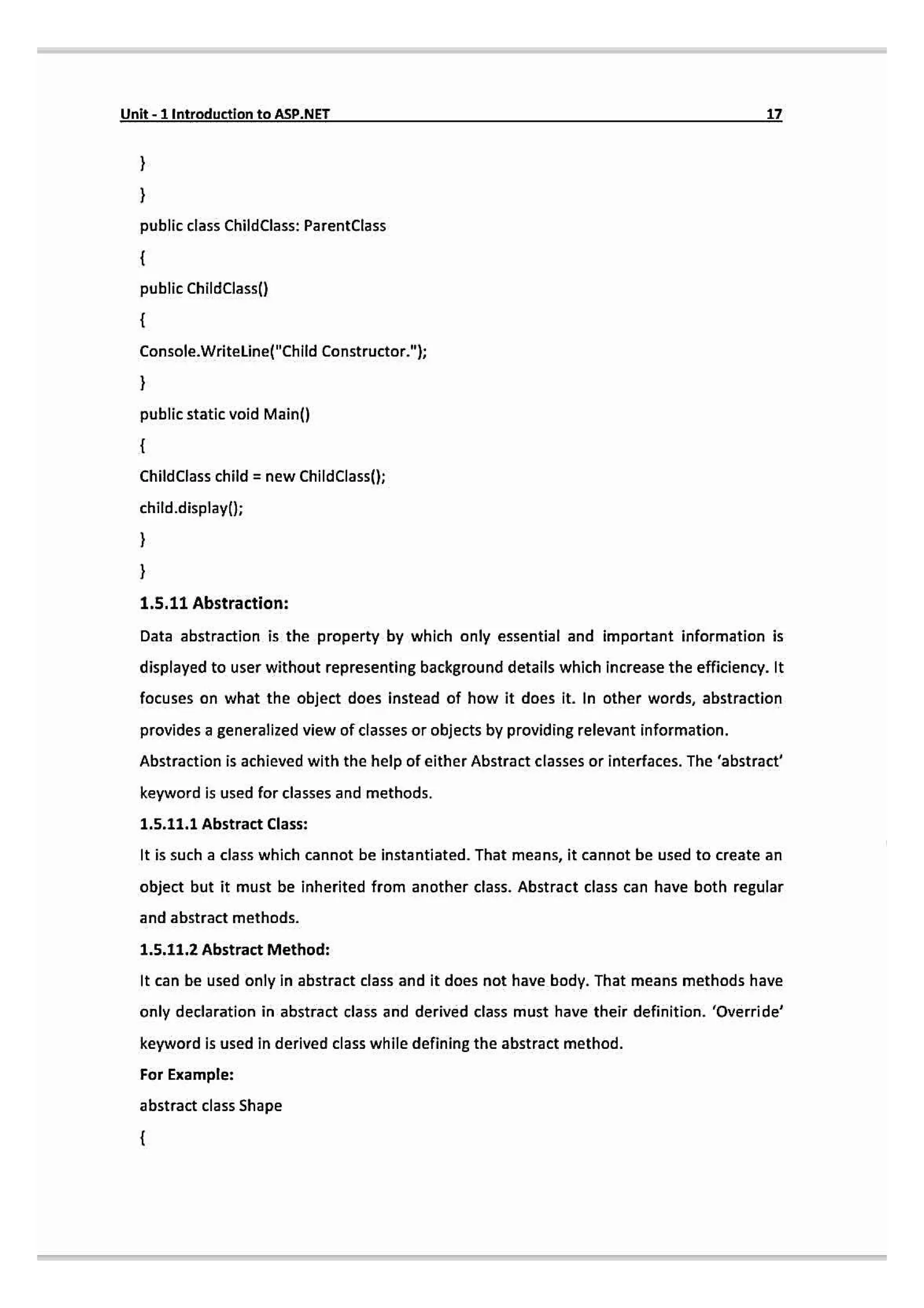
18.
Unit-1 Introduction toASP.NET 17
public class ChildClass: ParentClass
public ChildClass()
Console.Writeline("Child Constructor.";
public static void Main()
ChildClass child = new ChildClass();
child.display0;
1.5.11 Abstraction:
Data abstraction is the property by which only essential and important information is
displayed to user without representing background details which increase the efficiency. It
focuses on what the object does instead of how it does it. In other words, abstraction
provides a generalized view of classes or objects by providing relevant information.
Abstraction is achieved with the help of either Abstract classes or interfaces. The 'abstract
keyword is used for classes and methods.
1.5.11.1 Abstract Class:
It is such a class which cannot be instantiated. That means, it cannot be used to create an
object but it must be inherited from another class. Abstract class can have both regular
and abstract methods.
1.5.11.2 Abstract Method:
It can be used only in abstract class and it does not have body. That means methods have
only declaration in abstract class and derived class must have their definition. 'Override'
keyword is used in derived class while defining the abstract method.
For Example:
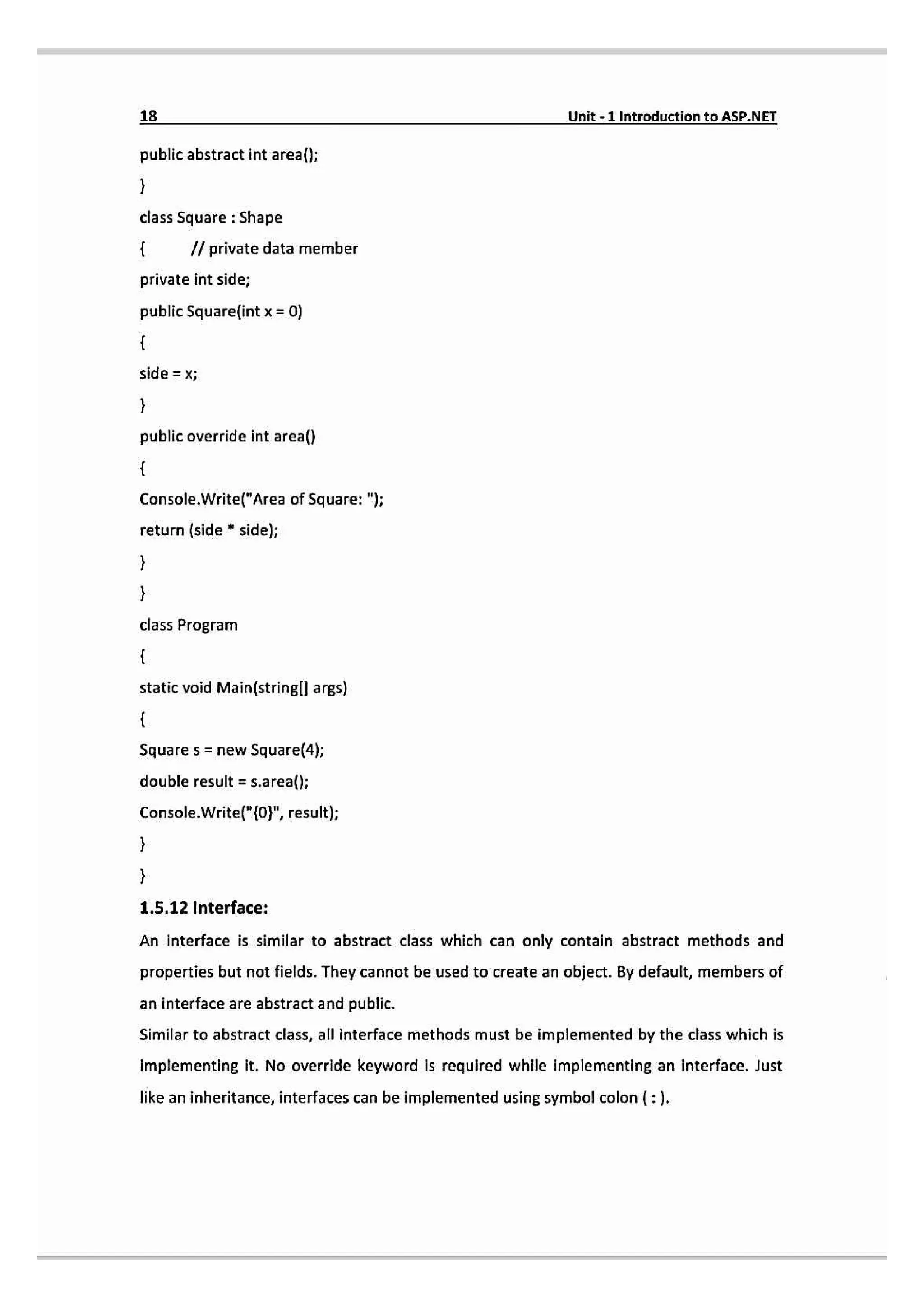
abstract class Shape
19.
18 Unit-1 Introductionto ASP.NET
public abstract int area();
class Square: Shape
Il private data member
private int side;
public Squarelint x = 0)
sid
X
public override int area()
Console.Write("Area of Square: ");
return (side * side);
class Program
static void Main(stringll args)
Square s = new Square(4);
double result = s.area()
Console.Write/"{0", result);
1.5.12 Interface:
An interface is similar to abstract class which can only contain abstract methods and
properties but not fields. They cannot be used to create an object. By default, members of
an interface are abstract and public.
Similar to abstract class, all interface methods must be implemented by the class which is
implementing it. No override keyword is required while implementing an interface. Just
like an inheritance,interfaces can be implemented using symbolcolon (:).
20.
Unit-1IntroductiontoASP.NET
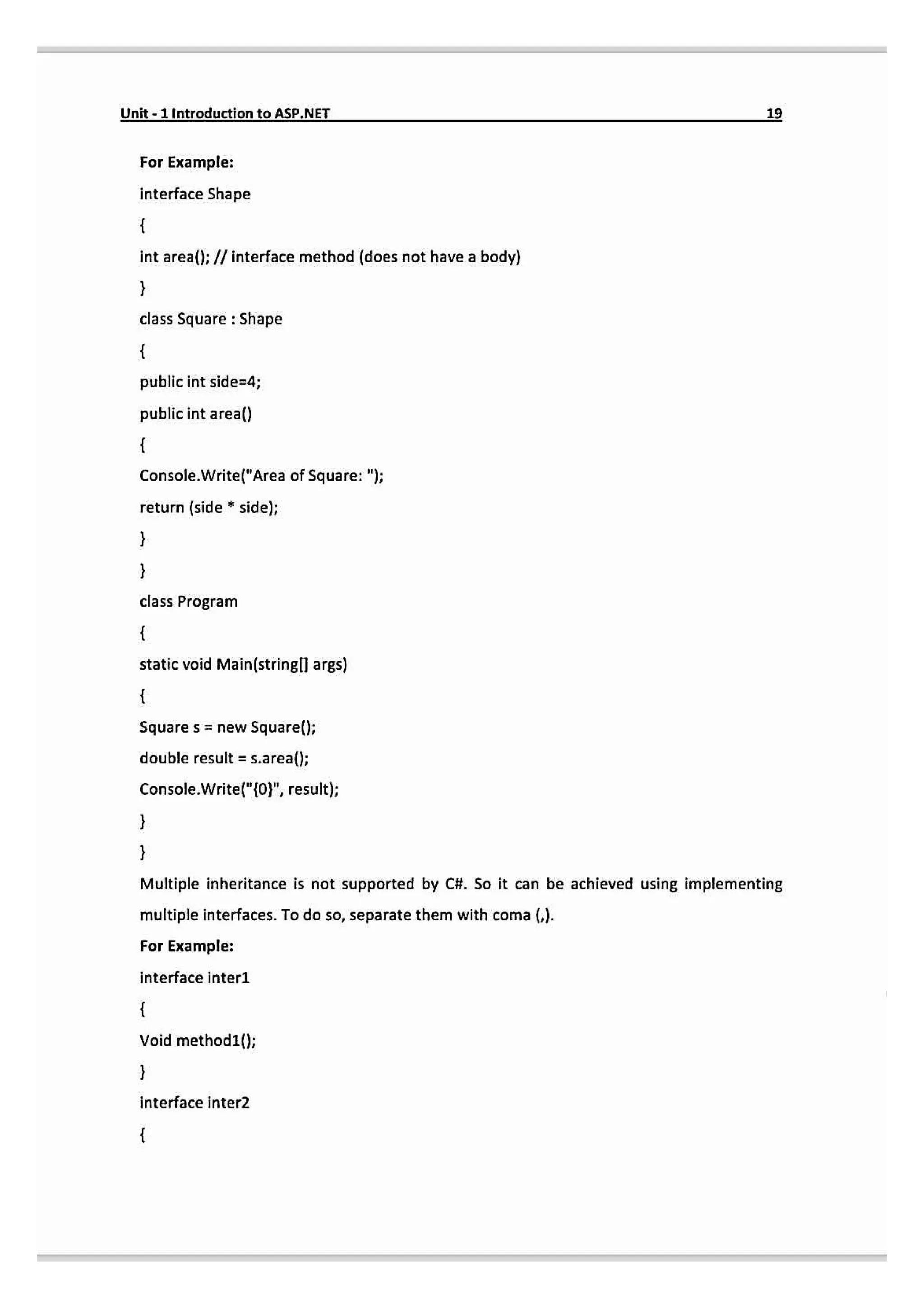
For Example:
interface Shape
intarea(): // interface method (does not have a body)
class Square : Shape
public int side=4;
public int area()
Console.Write("Area of Square: ");
return (side sidel;
class Program
static void Main(stringl args)
Square s newSquaref();
double result = s.area();
Console.Write("10", resut);
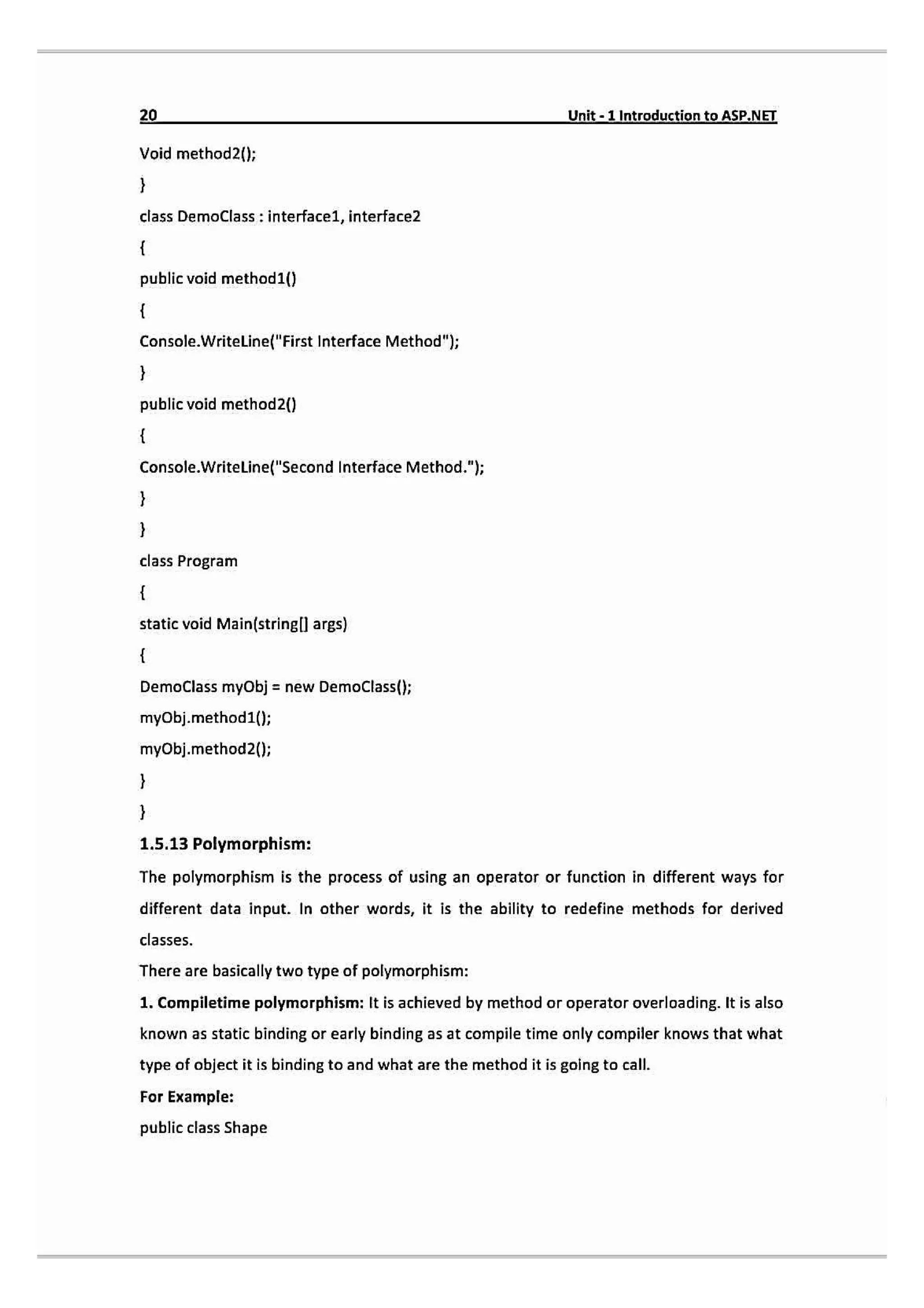
Multiple inheritance is not supported by C#. So it can be achieved using implementing
multiple interfaces. To do so, separate them with coma ().
For Example:
interface inter1
Void method1(};
interface inter2
21.
20 Unit-1 IntroductiontoASP.NEI
Void method2(};
class DemoClass: interface1, interface2
public void method1()
Console.Writeline("First Interface Method");
public void method2()
Console.WriteLine("Second Interface Method.");
class Program
static void Main(stringll args)
DemoClass myObj= new DemoClass();
myObj.method1();
myObj.method2();
1.5.13 Polymorphism:
The polymorphism is the process of using an operator or function in different ways for
different data input. In other words, it is the ability to redefine methods for derived
classes.
There are basically two type of polymorphism:
1. Compiletime polymorphism: It is achieved by method or operator overloading. t is also
known as static binding or early binding as at compile time only compiler knows that what
type of object it is binding to and what are the method it is going to call.
For Example:
public class Shape
22.
Unit-1 Introduction toASP.NET
publicint Areafint a, int b)
return a b;
public double Arealint a, int b, int c)
return a *b*c;
class Program
static void Main(stringl args)
Shape s new Shape()
double result = s.Area(4,5);
Console.Write("10}", result);
result=s.Areal4,5,2);
Console.Write("[0}", result);
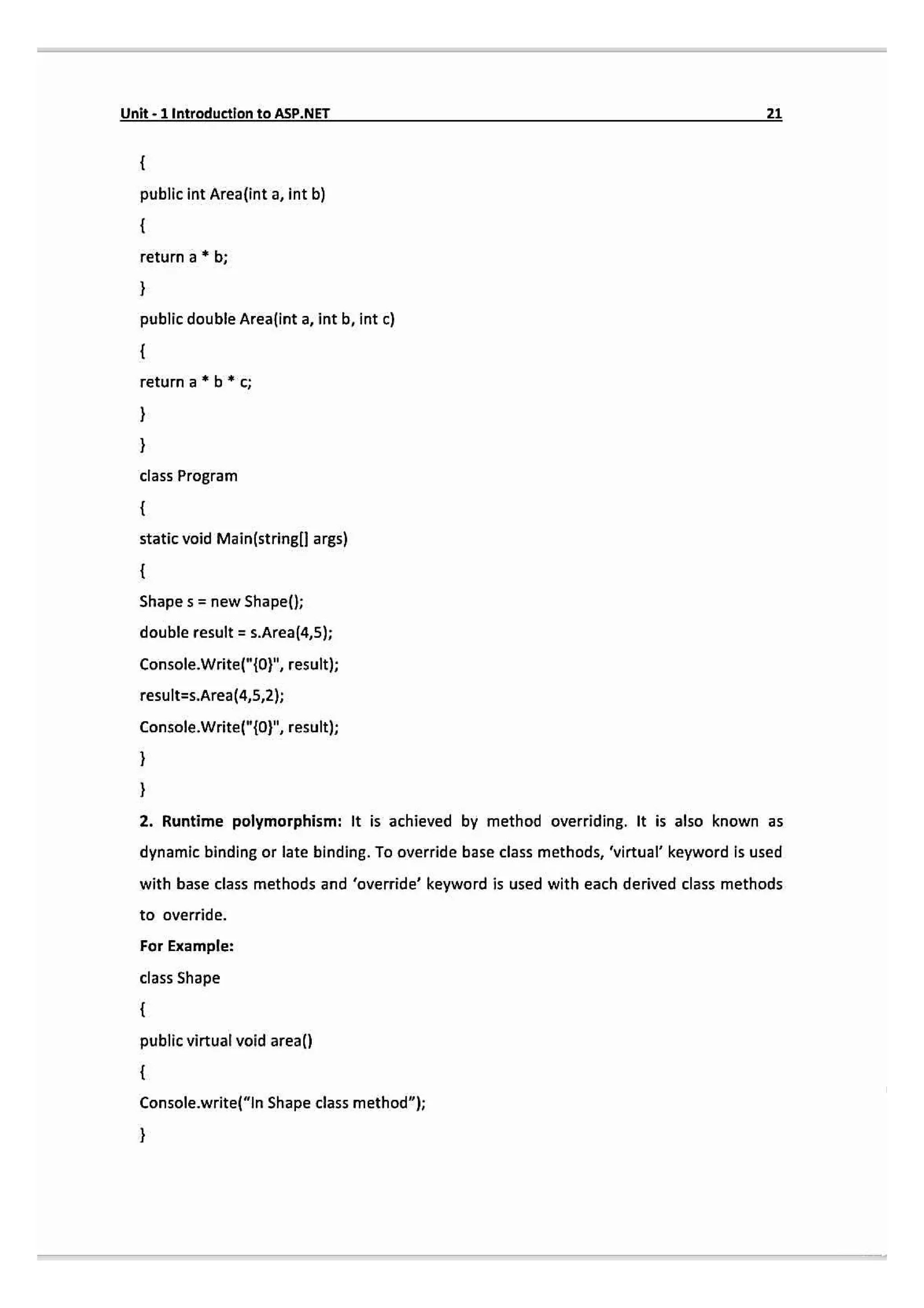
2. Runtime polymorphism: It is achieved by method overriding. It is also known as
dynamic binding or late binding. To override base class methods, 'virtual keyword is used
with base class methods and 'override' keyword is used with each derived class methods
to override.
For Example:
class Shape
public virtual void area()
Console.write("In Shape class method");
23.
22 Unit-1 IntroductiontoASP.NET
classCircle:Shape
public override void area()
Console.Write("In Circle class method");
class Triangle: Shape
public override void area(
Console.Write("ln Triagle class method ");
class Program
static void Main(stringll args)
Shape sh= newShape(
sh.area();
Circle c new Circlel);
C.area();
Triangle t new Triangle();
t.area()
1.6 Event Driven Programming:
When something specific has occurred in significance for system hardware or software is
call an Event. In other words, Event is a notification that something has occurred and
detected by the program. A segment of code that is executed in response to an event is
called an event handler.
24.
Unit-1Introductionto ASP.NET 23
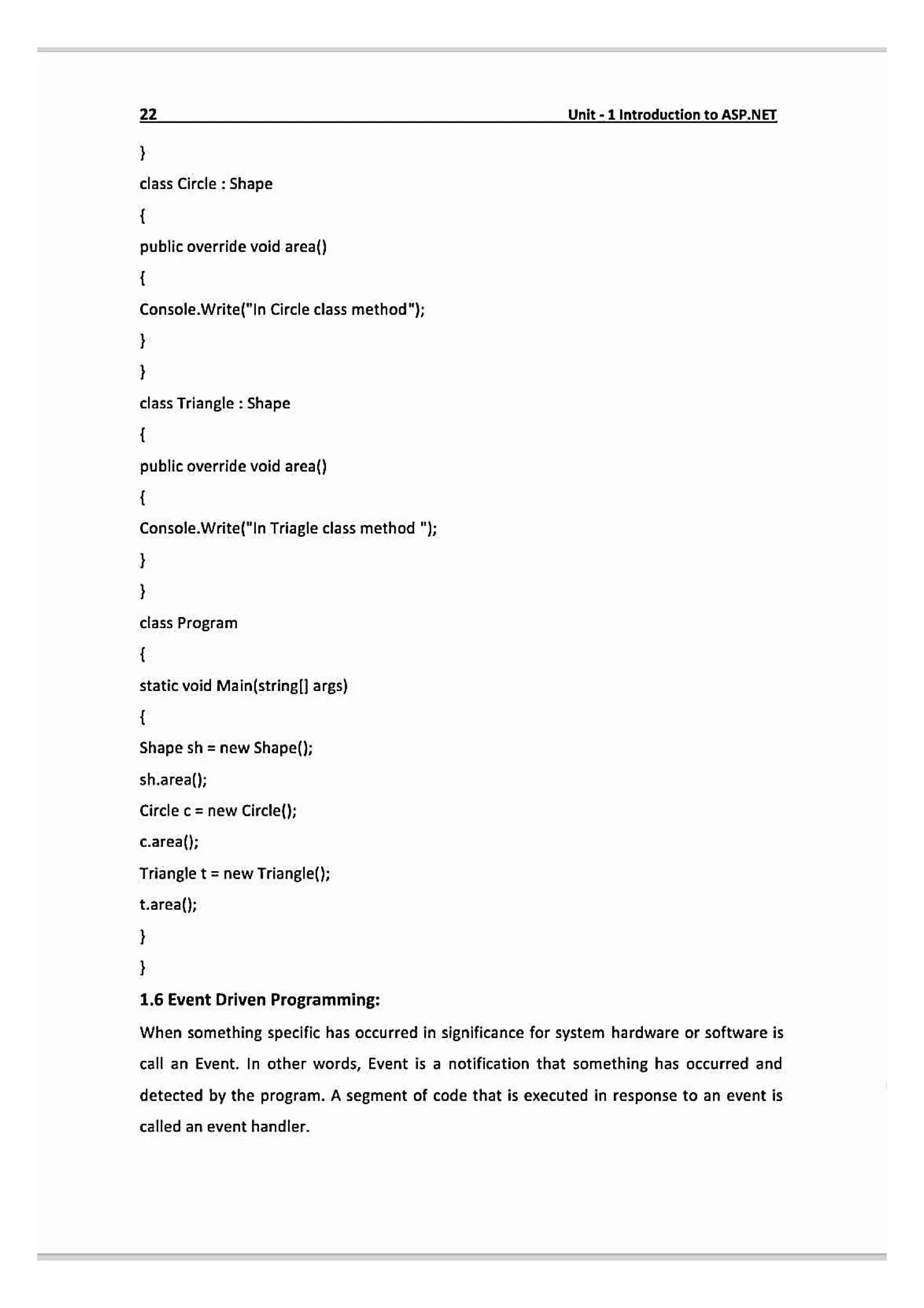
Anevent driven programming is a programming approach in which the flow of the
program is determined by an event like button clicked, text change etc. That means it
enables you to write code that will execute in response to events raised by particular user
action.
ASP.NET works like as follow:
1. When first time page is executed, it will create the page and the control objects
along with the code initialization is executed and page is provided.
2. Any event can be triggered as some action is performed by thee user when the
page is served.
3. If any event generates the postback of the form than ASP.NET reponds the page
by recreating it.
4 Then it will raises the appropriate event which has triggered the postback.
5. Last, modified page is provided to HTML and served to the client.
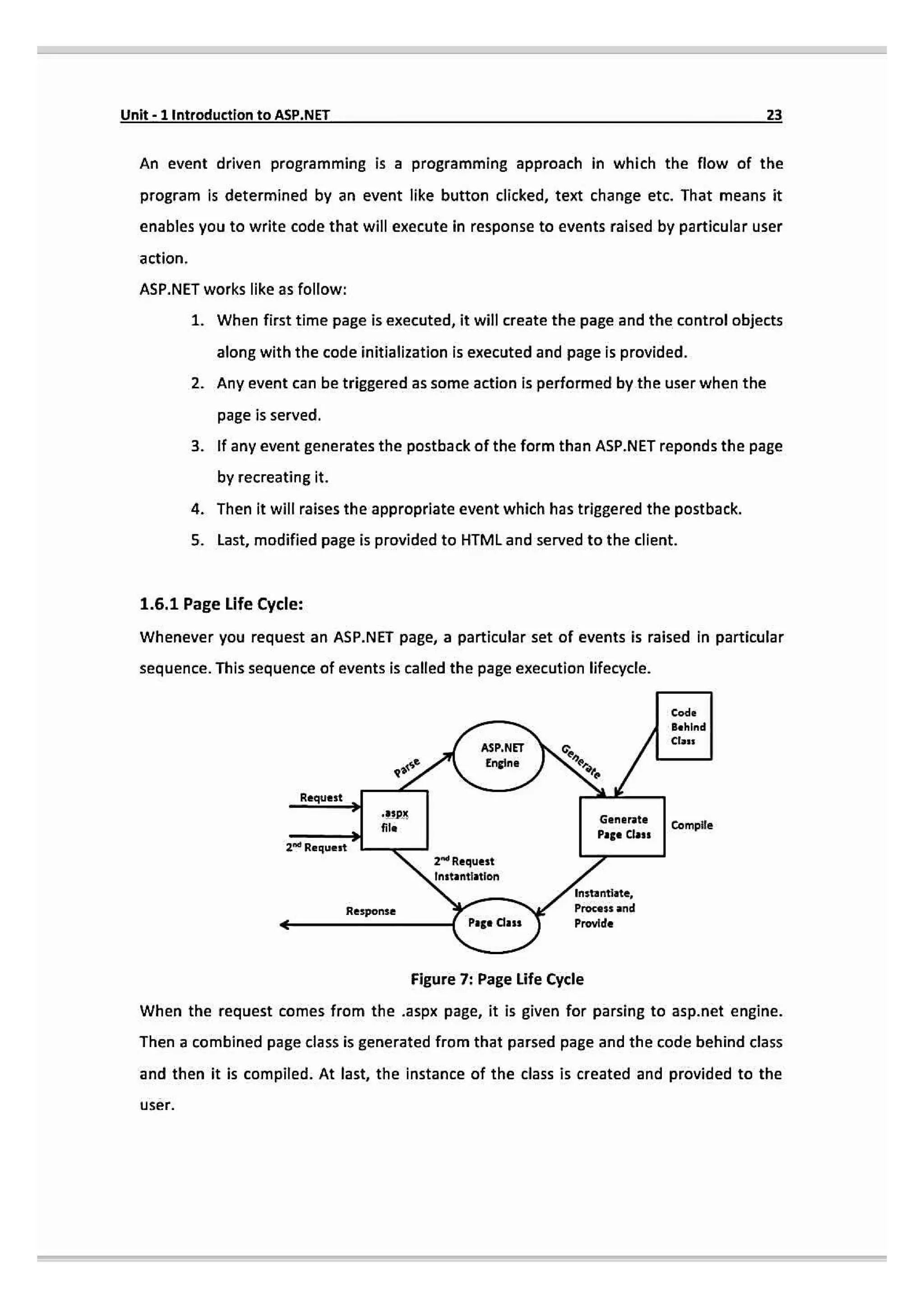
1.6.1 Page Life Cycle:
Whenever you request an ASP.NET page, a particular set of events is raised in particular
sequence. This sequence of events is called the page execution lifecycle.
Code
Behind
Clas
NET Generate
Engine
Parse
Reques
spx Generate Compile
Page Class
Request
2d Request
nstantiation
nstantiate,
Process and
Response
Page Class Provide
Figure 7: Page Life Cycle
When the request comes from the .aspx page, it is given for parsing to asp.net engine.
Then a combined page class is generated from that parsed page and the code behind class
and then it is compiled. At last, the instance of the class is created and provided to the
user.
25.
24 Unit-1 IntroductiontoASP.NET
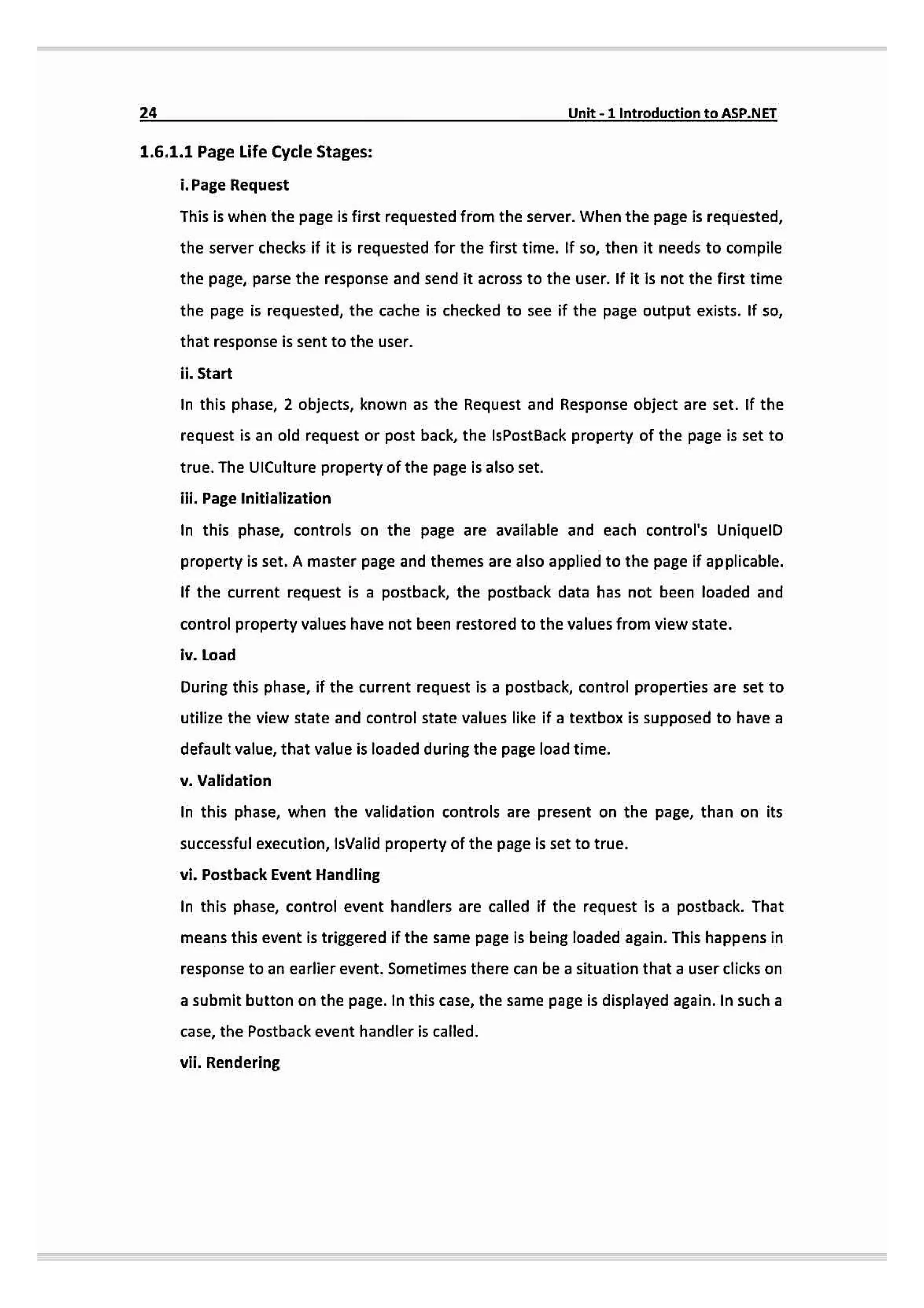
1.6.1.1 Page Life Cycle Stages:
i. Page Request
This is when the page is first requested from the server. When the page is requested,
the server checks if it is requested for the first time. If so, then it needs to compile
the page, parse the response and send it across to the user. If it is not the first time
the page is requested, the cache is checked to see if the page output exists. If so,
that response is sent to the user.
ii. Start
In this phase, 2 objects, known as the Request and Response object are set. If the
request is an old request or post back, the IsPostBack property of the page is set to
true. The UICulture property of the page is also set.
ilil. Page Initialization
In this phase, controls on the page are available and each control's UniquelD
property is set. A master page and themes are also applied to the page if applicable.
If the current request is a postback, the postback data has not been loaded and
control property values have not been restored to the values from view state.
iv. Load
During this phase, if the current request is a postback, control properties are set to
utilize the view state and control state values like if a textbox is supposed to have a
default value, that value is loaded during the page load time.
v.Validation
In this phase, when the validation controls are present on the page, than on its
successful execution, IsValid property of the page is set to true.
vi. Posthack Event Handling
In this phase, control event handlers are called if the request is a postback. That
means this event is triggered if the same page is being loaded again. This happens in
response to an earlier event. Sometimes there can be a situation that a user clicks on
a submit button on the page. In this case,the same page is displayed again. In sucha
case, the Postback event handler is called.
vii. Rendering
26.
Unit-1Introductionto ASP.NET
Before thisphase, view state is saved for the page and all controls. During this stage,
the page calls the Render() method for each control and writes its output to the
OutputStream object of the page's Response property.
vili. Unload
The unload method takes after the page is fully loaded and is ready to terminate. At
this point, rendered page is sent to the client and page properties such as Response
and Request are unloaded and clean-up is done.
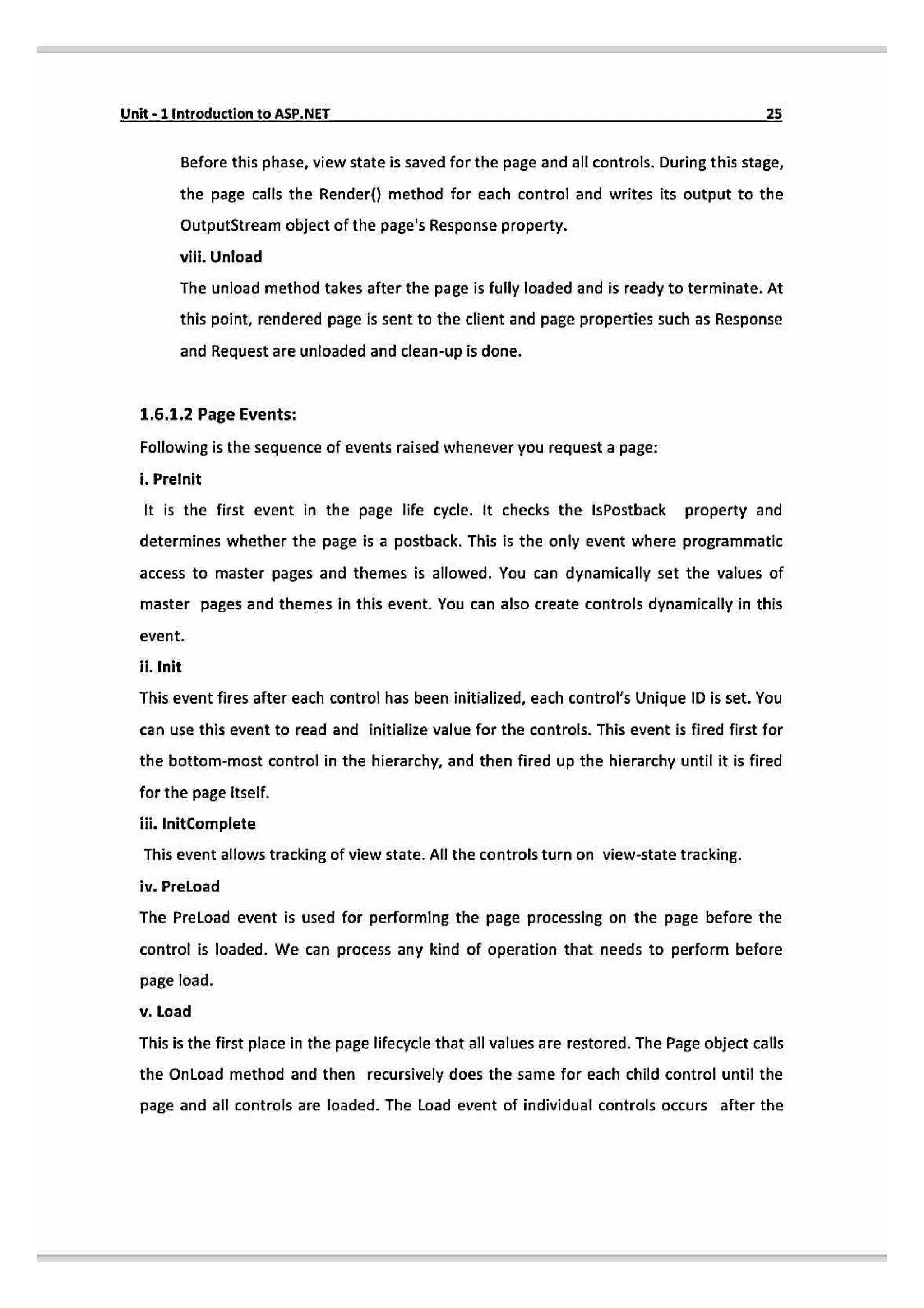
1.6.1.2 Page Events:
Following is the sequence of events raised whenever you request a page:
i. Prelnit
It is the first event in the page life cycle. It checks the IsPostback property and
determines whether the page is a postback. This is the only event where programmatic
access to master pages and themes is allowed. You can dynamically set the values of
master pages and themes in this event. You can also create controls dynamically in this
event.
.Init
This event fires after each control has been initialized, each control's Unique ID is set. You
can use this event to read and initialize value for the controls. This event is fired first for
the bottom-most control in the hierarchy, and then fired up the hierarchy until it is fired
for the page itself.
ii. InitComplete
This event allows tracking of view state. All the controls turn on view-state tracking
iv. PreLoad
The PreLoad event is used for performing the page processing on the page before the
control is loaded. We can process any kind of operation that needs to perform before
page load.
v. Load
This is the first place in the page lifecycle that all values are restored. The Page object calls
the OnLoad method and then recursively does the same for each child control until the
page and all controls are loaded. The Load event of individual controls occurs after the
27.
26 Unit-1 Introductionto ASP.NET
Load event of the page. This event is use to set the properties of the controls and it can
also be used to establish database connection.
vi. ControlEvents
These events are used to handle specific control events, such as a Button control's Click
event.
vii. PreRender
This event occurs just before the output is provided. By handling this event, pages and
controls can perform any updates before the output is provided.
vii. PreRenderComplete
As the PreRender event is recursively fired for all child controls, this event ensures the
completion of the pre-rendering phase.
ix. SaveStateComplete
In this event, state of control on the page is saved. Personalization, control state and view
state information is saved.
x. Unload
This is the last phase of the page life cycle. It raises the UnLoad event for all the controls
recursively and for the page itself. It is useful for final cleanup such as closing database
connection or any other requested specific tasks.
28.
Unit-1Introduction to ASP.NET
27
Questions:
Q-1.Explain .NET Framework 2.0
Q-2. What is Compile Code? List out its benefits.
Q-3. What is the difference between Code Behind and Inline Coding?
Q-4. Explain CLR in detail.
Q-5. Explain Object Oriented Concepts.
Q.6 Explain ASP.NET Page Life Cycle.
![10- Unit-1 IntroductiontoASP.NEI
vii. COM Marshaller: It allows communication between the application and
COM Objects.
vii. Class Library Support: It provides Base Class Library classes when
application need at execution time.
1.5 Object Oriented Concepts:
Object Oriented Programming (OOP) is a programming model where programs are
organized around objects, data field and methods which interact to design applications
and computer programs.
1.5.1 Class:
A class is a user-defined prototype from which objects are created. A class contains fields
& methods known as member function into single unit.
Syntax:
Access Modifier) <Class name> [:Base Class|Eimplements interface names]
[Statements
Here, access modifiers are Public, Private, Protected and internal.
For Example:
Public class student
fields, variables, methods, properties /
1.5.2 Fields:
Variables declare inside a class are called fields that can be accessed by creating an object
of the class and by using the dot syntax ().
For Example:
Public Class student
Public int roll_no=1;
Public string name="Yash;
static void Main(stringll args)](https://image.slidesharecdn.com/asp-250923164304-c3a57826/75/ASP-Net-Unisususuususuudddususueueueueyyst-1-pdf-11-2048.jpg)
![Unit-1Introduction toASP.NET 13
public Class student
public int roll_no-1;
public string name="Yash
public void display()
Console.Writeline(myStud.rollno);
Console.Writeline(mystud.name);
static void Main(stringl] args)
student myStud newstudent();
myStud.display(l
1.5.5 Events:
Events allows objects to perform an actions whenever some specific action takes place.
For example, when we click a button, a click event occurs and we can handle that event
with event handler.
1.5.6 Objects:
It is a basic unit of OOP which represents real time entity. They are called instances of
classes which defines the data & behavior of all the instances of that type.
For Example:
student myStud = new student()
1.5.7 Constructor:
A constructor is a special method used to initialize objects. Main advantage of a
constructor is that it is called when an object of a class is created. Basically, it is used to
set the initial values of the fields of the class.
For Example:
public class student](https://image.slidesharecdn.com/asp-250923164304-c3a57826/75/ASP-Net-Unisususuususuudddususueueueueyyst-1-pdf-14-2048.jpg)