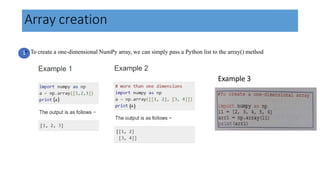
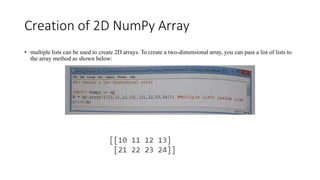
NumPy arrays can be created from Python lists by passing the list to the np.array() method. NumPy arrays differ from lists in that elements are stored contiguously in memory without comma separators. Multi-dimensional arrays can be created from nested lists. NumPy array attributes like shape and ndim provide information about array dimensions and elements. Individual elements can be accessed using indexes, and whole arrays or subsets of arrays can undergo vectorized operations for efficient processing.


![• We can easily make out the difference between a list and an array
representation in Python. In list, elements are separated by a comma,
whereas an array is like a collection of elements without a comma
separator in between.
import numpy as np
lst = [1,2, 3,4]
a=np.array (lst)
print(lst)
print (a)
a
[1, 2, 3, 4]
[1 2 3 4]
array([1, 2, 3, 4])](https://image.slidesharecdn.com/arraycreation-220822161726-b5da5cb8/85/arraycreation-pptx-3-320.jpg)
![2
fromstring() We can also create one-dimensional array from String.
[1 2 10 12]](https://image.slidesharecdn.com/arraycreation-220822161726-b5da5cb8/85/arraycreation-pptx-4-320.jpg)
![Dimension
NumPy Arrays provides the ndim attribute that returns an integer that
tells us how many dimensions the array have
import numpy as np
a = np.array(42)
b = np.array([1,2,3,4,5])
c = np.array([[1,2,3], [4,5,6]])
print("Dimension of array a is:", a.ndim)
print("Dimension of array b is:",b.ndim)
print("Dimension of array c is:",c.ndim)](https://image.slidesharecdn.com/arraycreation-220822161726-b5da5cb8/85/arraycreation-pptx-6-320.jpg)
![Access Array Elements
• Array element can be accessed by referring to its index
number.
• The indexes in NumPy arrays start with 0, meaning that the
first element has index 0, and the second has index 1 etc.
Get third and fourth
elements from the array and
add them.
import numpy as np
arr = np.array([1,2,3,4])
print("The first element is :", arr[0])
print("The 2nd element is :",arr[1])
print("Sum of 3rd and 4th elements are :",arr[2] + arr[3])](https://image.slidesharecdn.com/arraycreation-220822161726-b5da5cb8/85/arraycreation-pptx-7-320.jpg)
![• To access elements from 2-D arrays we can use comma
separated integers representing the dimension and the
index of the element.
import numpy as np
arr = np.array([[1,2,3,4,5], [6,7,8,9,10]])
print('2nd element on 1st dim: ', arr[0, 1])#Access the 2nd element on 1st dim:
print('5th element on 2nd dim: ', arr[1, 4])#Access the 5th element on 2nd dim:
print('Last element from 2nd dim: ', arr[1, -1])#Use negative indexing to access an array from the end.
Ouput: 10
Example
arrayname [ rownum, columnnum ]](https://image.slidesharecdn.com/arraycreation-220822161726-b5da5cb8/85/arraycreation-pptx-8-320.jpg)
![Output: NumPy arrays have an attribute called shape that returns a tuple with each
index having the number of corresponding elements.
import numpy as np
arr = np.array([[1, 2, 3, 4], [5, 6, 7, 8]])
print(arr.shape)
Output: (2, 4), which means that the array has 2 dimensions,
and each dimension has 4 elements.](https://image.slidesharecdn.com/arraycreation-220822161726-b5da5cb8/85/arraycreation-pptx-9-320.jpg)



![NUMPY [Autosaved] .pptx](https://cdn.slidesharecdn.com/ss_thumbnails/numpyautosaved-240106041504-989a0cc3-thumbnail.jpg?width=640&height=640&fit=bounds)


