© by 3Pworx and GPI Consult – all rights reserved. Confidential – no passing on to third parties
10. Primavera Community Day
München - 15.02.2017
Project Archivation
Archivierung von Projektplänen
mit Werkzeugen der Software Entwickelung
© by 3Pworx and GPI Consult – all rights reserved. Confidential – no passing on to third parties
Innovative and Smart Way for Archiving,
Versioning and Control of ORACLE-Primavera
Project Data
GPI Consult – Gunther Pippèrr 3Pworx – Andreas Hock
Folie 3
© by 3Pworx and GPI Consult – all rights reserved. Confidential – no passing on to third parties
• Archive, Backup and Restoration of Projects Plans – Use
Cases (Examples)
 1. Restoring of logical failures in project plans
 2. If a user does mistakes - for example schedule a plan with
the wrong project data without a new baseline before - you
can restore the plan from the day before
 3. Excel Import or Global Change fails completely
Oracle Primavera P6 – Archiving project plans
Better Archiving and Control of Oracle Primavera Project Plans –
Customer Benefits (1)
Smart Restoration and Versioning of Project Plans
Avoid the restore of the full Primavera DB if only one plan was corrupted!
Folie 4
© by 3Pworx and GPI Consult – all rights reserved. Confidential – no passing on to third parties
Better Fulfillment of your compliance and project
standards and rules, Improvement of Change
Management, etc.
• Easy-to-Use solution to Archive of all changed Project
Plans each day
 Store all historical versions of a project plan
 Only the changed plans will be saved every day
Oracle Primavera P6 – Archiving project plans
Better Archiving and Control of Oracle Primavera Project Plans – Customer
Benefits (2)
Clever Verification of Changes during the Life Time of the Project Plans
Folie 5
© by 3Pworx and GPI Consult – all rights reserved. Confidential – no passing on to third parties
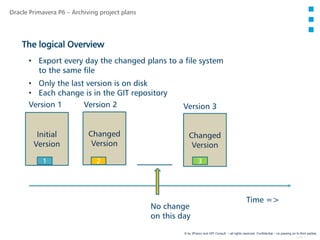
Initial
Version
Oracle Primavera P6 – Archiving project plans
The logical Overview
Time =>
Changed
Version
Changed
Version
No change
on this day
Version 2 Version 3Version 1
• Export every day the changed plans to a file system
to the same file
• Only the last version is on disk
• Each change is in the GIT repository
1 2 3
Folie 6
© by 3Pworx and GPI Consult – all rights reserved. Confidential – no passing on to third parties
Initial
Version
Oracle Primavera P6 – Archiving project plans
The logical Overview with a Version Control System
Time =>
Initial
Version
Only the
Change
Head
Version
No change
on this day
1 2 3
Version 1 Version 2 Version 3
In the Repository:
1
2
3
Only the change
will be stored!
• Export every day the changed plans to a file system
to the same file
• Only the last version is on disk
• Each change is in the GIT repository
Head Version
Version 2
Version 1
Folie 7
© by 3Pworx and GPI Consult – all rights reserved. Confidential – no passing on to third parties
GIT
Local
Version System
Oracle Primavera P6 – Archiving project plans
The technical Architecture - Solution Footprint
Primavera
Project Database
Oracle
Primavera EPPM
Server
Primavera
Jobs
*.xer
Primavera Project Plans
GIT gitlab
WWW Server
Primavera Environment Directory Structure organised by EPS
Version Control Repository
Version Control
WEB Interface
GIT
Central
Version System
Scripts
Add-on -
Connector
Folie 8
© by 3Pworx and GPI Consult – all rights reserved. Confidential – no passing on to third parties
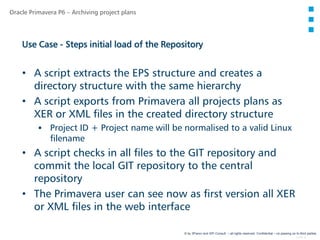
• A script extracts the EPS structure and creates a
directory structure with the same hierarchy
• A script exports from Primavera all projects plans as
XER or XML files in the created directory structure
 Project ID + Project name will be normalised to a valid Linux
filename
• A script checks in all files to the GIT repository and
commit the local GIT repository to the central
repository
• The Primavera user can see now as first version all XER
or XML files in the web interface
Oracle Primavera P6 – Archiving project plans
Use Case - Steps initial load of the Repository
Folie 9
© by 3Pworx and GPI Consult – all rights reserved. Confidential – no passing on to third parties
• A script reads the EPS structure and creates directories
if missing
• Script export from Primavera of all changed projects
from last run as XER/XML files in the created directory
structure and overwrite the existing file
• A script checks now only all changed files to the GIT
repository and commit the local GIT repository to the
central repository
• The Primavera user can see now all changed versions
for all XER files in the web interface
Oracle Primavera P6 – Archiving project plans
Use Case - Steps daily load of the Repository
Folie 10
© by 3Pworx and GPI Consult – all rights reserved. Confidential – no passing on to third parties
• Search over the GITLab Web Interface the last valid
version of the plan
• Download the Primavera project plan from the GITLab
web interface as *.XER or *.XML File
• Import the XER/XML File to a merge the data back into
the project in the Primavera environment or create a
new Project and
 OR
• Check the diffs on the Files and fix the changes or
issues
Oracle Primavera P6 – Archiving project plans
Use Case - Restore Project Files
Folie 11
© by 3Pworx and GPI Consult – all rights reserved. Confidential – no passing on to third parties
• Export project to your local repository
Oracle Primavera P6 – Archiving project plans
Use Case - Example how to archive (1)
Folie 12
© by 3Pworx and GPI Consult – all rights reserved. Confidential – no passing on to third parties
• Add to local repository and commit the changes
• Add/push the values to the remote repository
• Change the plan and export/commit/push again
to have two versions
Oracle Primavera P6 – Archiving project plans
Use Case - Example how to archive (2)
Folie 13
© by 3Pworx and GPI Consult – all rights reserved. Confidential – no passing on to third parties
Oracle Primavera P6 – Archiving project plans
Use SourceTree as graphical Interface
https://www.sourcetreeapp.com/
Folie 14
© by 3Pworx and GPI Consult – all rights reserved. Confidential – no passing on to third parties
• Show the different project version of the XER Files over
the browser
Oracle Primavera P6 – Archiving project plans
Use Case - Example how to archive (3)
Use a local Editor to visualise the differences in the files:
Folie 15
© by 3Pworx and GPI Consult – all rights reserved. Confidential – no passing on to third parties
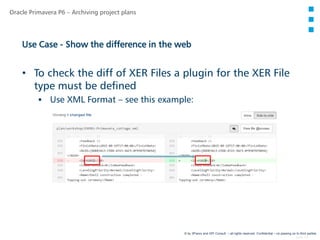
• To check the diff of XER Files a plugin for the XER File
type must be defined
 Use XML Format – see this example:
Oracle Primavera P6 – Archiving project plans
Use Case - Show the difference in the web
Folie 16
© by 3Pworx and GPI Consult – all rights reserved. Confidential – no passing on to third parties
• Hardware Requirements
 Linux VM Server for the GitLab Server with enough disk space
for the remote repository
 Windows Server for the scripting of the export with enough
disk space the local repository
• Software Requirements
 PPM – Primavera SDK and pure SQL on the Primavera
Database
· New User with read rights to the primavera tables + some admin
tables
 EPPM - P6 Integration API – Call via Java RMI Server Methods
· Configuration of the Primavera Application Server necessary
Oracle Primavera P6 – Archiving project plans
IT Requirements (Example Configuration – Only for Illustration)
Folie 17
© by 3Pworx and GPI Consult – all rights reserved. Confidential – no passing on to third parties
• Check which Software technologies can be used in the customer
environment
 Primavera Windows SDK or Java P6 Integration API
• Outline and prototyping of needed functional & technical design
(e.g. via interviews, workshops), create customer solution footprint
• Calculate the necessary size for the repository from the existing plan
volumes
• Deploying Server and Client hardware
 Setup of the GIT repositories and the GITLab Webserver
 Setup of the SDK or the Java Api
Oracle Primavera P6 – Archiving project plans
Customer Implementation Plan (Draft) - (1)
Folie 18
© by 3Pworx and GPI Consult – all rights reserved. Confidential – no passing on to third parties
• Implementing and testing the export scripts, interfaces or modules
• Initial Load and implement solution / first system set-up
• Add Use Cases e.g. Setup of the daily archiving process
• Documentation, prototyping in pilot project to adapt to customer
requirements and needs, roll-out and hand over to the local IT,
Project operation team, PMO for go-live
Oracle Primavera P6 – Archiving project plans
Customer Implementation Plan (Draft) –(2)
Folie 19
© by 3Pworx and GPI Consult – all rights reserved. Confidential – no passing on to third parties
Oracle Primavera P6 – Archiving project plans
Questions?
Folie 20
© by 3Pworx and GPI Consult – all rights reserved. Confidential – no passing on to third parties
 Contact Information:
3Pworx GmbH – Andreas Hock
Consulting for Process and Project Management
Landshuter Allee 8-10
80637 Munich, Germany
Telephone: +49 (0)89 - 44 23 86 52
Mobile: +49 (0)163 - 8 20 60 17
E-Mail: Andreas.Hock@3Pworx.com
http://www.3Pworx.com
GPI Consult – Gunther Pippèrr
Database software development
Schwanthalerstr. 82
80336 Munich, Germany
Telephone: +49 (0)89 - 53 026 418
Mobile: +49 (0)171 – 80 65 113
E-Mail: Gunther@pipperr.de
http://www.pipperr.de

Archiving Oracle Primavera project plans with software development tools

  • 1.
    © by 3Pworxand GPI Consult – all rights reserved. Confidential – no passing on to third parties 10. Primavera Community Day München - 15.02.2017 Project Archivation Archivierung von Projektplänen mit Werkzeugen der Software Entwickelung
  • 2.
    © by 3Pworxand GPI Consult – all rights reserved. Confidential – no passing on to third parties Innovative and Smart Way for Archiving, Versioning and Control of ORACLE-Primavera Project Data GPI Consult – Gunther Pippèrr 3Pworx – Andreas Hock
  • 3.
    Folie 3 © by3Pworx and GPI Consult – all rights reserved. Confidential – no passing on to third parties • Archive, Backup and Restoration of Projects Plans – Use Cases (Examples)  1. Restoring of logical failures in project plans  2. If a user does mistakes - for example schedule a plan with the wrong project data without a new baseline before - you can restore the plan from the day before  3. Excel Import or Global Change fails completely Oracle Primavera P6 – Archiving project plans Better Archiving and Control of Oracle Primavera Project Plans – Customer Benefits (1) Smart Restoration and Versioning of Project Plans Avoid the restore of the full Primavera DB if only one plan was corrupted!
  • 4.
    Folie 4 © by3Pworx and GPI Consult – all rights reserved. Confidential – no passing on to third parties Better Fulfillment of your compliance and project standards and rules, Improvement of Change Management, etc. • Easy-to-Use solution to Archive of all changed Project Plans each day  Store all historical versions of a project plan  Only the changed plans will be saved every day Oracle Primavera P6 – Archiving project plans Better Archiving and Control of Oracle Primavera Project Plans – Customer Benefits (2) Clever Verification of Changes during the Life Time of the Project Plans
  • 5.
    Folie 5 © by3Pworx and GPI Consult – all rights reserved. Confidential – no passing on to third parties Initial Version Oracle Primavera P6 – Archiving project plans The logical Overview Time => Changed Version Changed Version No change on this day Version 2 Version 3Version 1 • Export every day the changed plans to a file system to the same file • Only the last version is on disk • Each change is in the GIT repository 1 2 3
  • 6.
    Folie 6 © by3Pworx and GPI Consult – all rights reserved. Confidential – no passing on to third parties Initial Version Oracle Primavera P6 – Archiving project plans The logical Overview with a Version Control System Time => Initial Version Only the Change Head Version No change on this day 1 2 3 Version 1 Version 2 Version 3 In the Repository: 1 2 3 Only the change will be stored! • Export every day the changed plans to a file system to the same file • Only the last version is on disk • Each change is in the GIT repository Head Version Version 2 Version 1
  • 7.
    Folie 7 © by3Pworx and GPI Consult – all rights reserved. Confidential – no passing on to third parties GIT Local Version System Oracle Primavera P6 – Archiving project plans The technical Architecture - Solution Footprint Primavera Project Database Oracle Primavera EPPM Server Primavera Jobs *.xer Primavera Project Plans GIT gitlab WWW Server Primavera Environment Directory Structure organised by EPS Version Control Repository Version Control WEB Interface GIT Central Version System Scripts Add-on - Connector
  • 8.
    Folie 8 © by3Pworx and GPI Consult – all rights reserved. Confidential – no passing on to third parties • A script extracts the EPS structure and creates a directory structure with the same hierarchy • A script exports from Primavera all projects plans as XER or XML files in the created directory structure  Project ID + Project name will be normalised to a valid Linux filename • A script checks in all files to the GIT repository and commit the local GIT repository to the central repository • The Primavera user can see now as first version all XER or XML files in the web interface Oracle Primavera P6 – Archiving project plans Use Case - Steps initial load of the Repository
  • 9.
    Folie 9 © by3Pworx and GPI Consult – all rights reserved. Confidential – no passing on to third parties • A script reads the EPS structure and creates directories if missing • Script export from Primavera of all changed projects from last run as XER/XML files in the created directory structure and overwrite the existing file • A script checks now only all changed files to the GIT repository and commit the local GIT repository to the central repository • The Primavera user can see now all changed versions for all XER files in the web interface Oracle Primavera P6 – Archiving project plans Use Case - Steps daily load of the Repository
  • 10.
    Folie 10 © by3Pworx and GPI Consult – all rights reserved. Confidential – no passing on to third parties • Search over the GITLab Web Interface the last valid version of the plan • Download the Primavera project plan from the GITLab web interface as *.XER or *.XML File • Import the XER/XML File to a merge the data back into the project in the Primavera environment or create a new Project and  OR • Check the diffs on the Files and fix the changes or issues Oracle Primavera P6 – Archiving project plans Use Case - Restore Project Files
  • 11.
    Folie 11 © by3Pworx and GPI Consult – all rights reserved. Confidential – no passing on to third parties • Export project to your local repository Oracle Primavera P6 – Archiving project plans Use Case - Example how to archive (1)
  • 12.
    Folie 12 © by3Pworx and GPI Consult – all rights reserved. Confidential – no passing on to third parties • Add to local repository and commit the changes • Add/push the values to the remote repository • Change the plan and export/commit/push again to have two versions Oracle Primavera P6 – Archiving project plans Use Case - Example how to archive (2)
  • 13.
    Folie 13 © by3Pworx and GPI Consult – all rights reserved. Confidential – no passing on to third parties Oracle Primavera P6 – Archiving project plans Use SourceTree as graphical Interface https://www.sourcetreeapp.com/
  • 14.
    Folie 14 © by3Pworx and GPI Consult – all rights reserved. Confidential – no passing on to third parties • Show the different project version of the XER Files over the browser Oracle Primavera P6 – Archiving project plans Use Case - Example how to archive (3) Use a local Editor to visualise the differences in the files:
  • 15.
    Folie 15 © by3Pworx and GPI Consult – all rights reserved. Confidential – no passing on to third parties • To check the diff of XER Files a plugin for the XER File type must be defined  Use XML Format – see this example: Oracle Primavera P6 – Archiving project plans Use Case - Show the difference in the web
  • 16.
    Folie 16 © by3Pworx and GPI Consult – all rights reserved. Confidential – no passing on to third parties • Hardware Requirements  Linux VM Server for the GitLab Server with enough disk space for the remote repository  Windows Server for the scripting of the export with enough disk space the local repository • Software Requirements  PPM – Primavera SDK and pure SQL on the Primavera Database · New User with read rights to the primavera tables + some admin tables  EPPM - P6 Integration API – Call via Java RMI Server Methods · Configuration of the Primavera Application Server necessary Oracle Primavera P6 – Archiving project plans IT Requirements (Example Configuration – Only for Illustration)
  • 17.
    Folie 17 © by3Pworx and GPI Consult – all rights reserved. Confidential – no passing on to third parties • Check which Software technologies can be used in the customer environment  Primavera Windows SDK or Java P6 Integration API • Outline and prototyping of needed functional & technical design (e.g. via interviews, workshops), create customer solution footprint • Calculate the necessary size for the repository from the existing plan volumes • Deploying Server and Client hardware  Setup of the GIT repositories and the GITLab Webserver  Setup of the SDK or the Java Api Oracle Primavera P6 – Archiving project plans Customer Implementation Plan (Draft) - (1)
  • 18.
    Folie 18 © by3Pworx and GPI Consult – all rights reserved. Confidential – no passing on to third parties • Implementing and testing the export scripts, interfaces or modules • Initial Load and implement solution / first system set-up • Add Use Cases e.g. Setup of the daily archiving process • Documentation, prototyping in pilot project to adapt to customer requirements and needs, roll-out and hand over to the local IT, Project operation team, PMO for go-live Oracle Primavera P6 – Archiving project plans Customer Implementation Plan (Draft) –(2)
  • 19.
    Folie 19 © by3Pworx and GPI Consult – all rights reserved. Confidential – no passing on to third parties Oracle Primavera P6 – Archiving project plans Questions?
  • 20.
    Folie 20 © by3Pworx and GPI Consult – all rights reserved. Confidential – no passing on to third parties  Contact Information: 3Pworx GmbH – Andreas Hock Consulting for Process and Project Management Landshuter Allee 8-10 80637 Munich, Germany Telephone: +49 (0)89 - 44 23 86 52 Mobile: +49 (0)163 - 8 20 60 17 E-Mail: Andreas.Hock@3Pworx.com http://www.3Pworx.com GPI Consult – Gunther Pippèrr Database software development Schwanthalerstr. 82 80336 Munich, Germany Telephone: +49 (0)89 - 53 026 418 Mobile: +49 (0)171 – 80 65 113 E-Mail: Gunther@pipperr.de http://www.pipperr.de