Name : Kavaiya Ankit
Roll No : MA053
Apache Cordova Index
 Introduction
 Apache Cordova – What it is ?
 Apache Cordova –Platforms
 Cordova Architecture
 How to install Apache Cordova
 Apache Cordova Android Platform Guide
 cordova Android Platform Installing the requirements.
 Development using Cordova
 Advantages
 Disadvantages
 Conclusion
 References
Apache Cordova 2
Introduction
 Developed as PhoneGap
 PhoneGap Given to Apache
 Renamed Cordoba
 Apache Cordova is a popular mobile application
development framework originally created by Nitobi.
 Adobe Systems purchased Nitobi in 2011, rebranded it
as PhoneGap, and later released an open source
version of the software called Apache Cordova.
Apache Cordova 3
Apache Cordova – What is it ?
 A mobile development framework
 Cross platform development
 Uses HTML, CSS, Javascript
 Implement applications as web pages
 Access native functionality via Javascript API's
 Released via Apache V2 License
Apache Cordova 4
Apache Cordova - Platforms
• Apache Cordova is available for
- Amazon fireos
- Android
- Blackberry 10
- Firefox OS
- IOS
- Ubuntu
- Windows Phone 7
- Windows Phone 8
- Windows 8
- Tizen
Apache Cordova 5
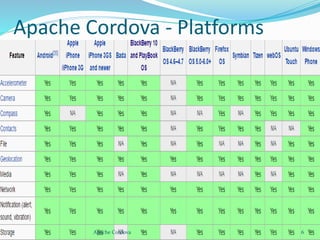
Apache Cordova - Platforms
Apache Cordova 6
Apache Cordova - Platforms
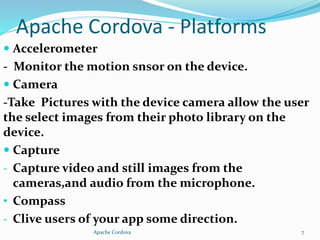
 Accelerometer
- Monitor the motion snsor on the device.
 Camera
-Take Pictures with the device camera allow the user
the select images from their photo library on the
device.
 Capture
- Capture video and still images from the
cameras,and audio from the microphone.
• Compass
- Clive users of your app some direction.
Apache Cordova 7
Apache Cordova - Platforms
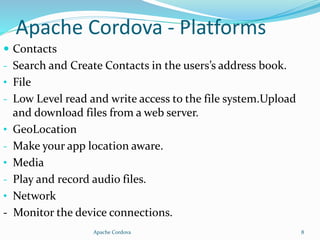
 Contacts
- Search and Create Contacts in the users’s address book.
• File
- Low Level read and write access to the file system.Upload
and download files from a web server.
• GeoLocation
- Make your app location aware.
• Media
- Play and record audio files.
• Network
- Monitor the device connections.
Apache Cordova 8
Apache Cordova - Platforms
 Notification
- Access to vibration,beep and alerts.
• Storage
- Persistent data store in webstorage.
Apache Cordova 9
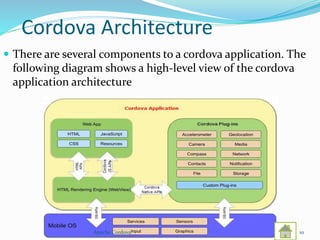
Cordova Architecture
 There are several components to a cordova application. The
following diagram shows a high-level view of the cordova
application architecture
Apache Cordova 10
How to Install Apache Cordova
 How to install apache cordova?
- Cordova command-line runs on Node.js and is available on
NPM.
- Follow Platform Specific Guides to install additional platform
dependencies.Open a command prompt or Terminal (CMD)
and type npm install –g cordova. About few minit this
platform downloaded.
• Additional platform in Cordova
- Android,ios,Ubuntu,Blackberry 10,Windows etc.
Apache Cordova 11
In Apache Cordova Android
Platform Guide
• Requirement and Support
- Cordova for Android requires the Android SDK which can be
installed on OS X, Linux or Windows.
- See the Android SDK's System Requirements.
- Cordova's latest Android package supports up to
Android API- Level 23.
- The supported Android API-Levels for the past few cordova-
android releases can be found in this table:
Apache Cordova 12
In Apache Cordova Android
Platform Guide
• Notes
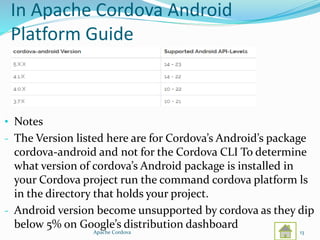
- The Version listed here are for Cordova’s Android’s package
cordova-android and not for the Cordova CLI To determine
what version of cordova’s Android package is installed in
your Cordova project run the command cordova platform ls
in the directory that holds your project.
- Android version become unsupported by cordova as they dip
below 5% on Google’s distribution dashboard
Apache Cordova 13
In Apache Cordova Android
Platform Installing the Requirements
 Java Development Kit (JDK)
- Install Java Development Kit (JDK)7 or later
- When installing on Windows you also need to set
JAVA_HOME Environment Variable according to your JDK
installation path .
• Android SDK
- Install the Android Stand-alone SDK Tools or Android
Studio.Procced with Android Studio if you plan on developing
new Cordova for Android Plugins or using native tools to run
and debug Android Platform .Otherwise the Android Stand-
alone SDK Tools are enough to build and deplay Android
applications,
Apache Cordova 14
In Apache Cordova Android
Platform Installing the Requirements
 Adding SDK Packages
- After installing the Android SDK you must also install the
packages for whatever API Level you wish to target it is
recommended that you install the highest SDK version that
your version of cordova-android supports
- Open Android SDK manager and make sure the following
are installing
1 Set the JAVA_HOME environment variable to the location
of your JDK installation.
2 Set the ANDROID_HOME environment vatiable to the
location of your Android SDK installation.
Apache Cordova 15
In Apache Cordova Android
Platform Installing the Requirements
3 It also recommended that you add the Android SDK’s
tools and platform-tools directories to your PATH.
• Windows
- In the set the path off SDK same as above JDK
installation path.
Apache Cordova 16
Development using Cordova
 Tools For the Development
- Any HTML & JS editor
- Platform SDK e.g, Andriod SDK,Android SDT,BB SDT,
Xcode,Visual Studio Mobile.
- Platform Emulator (usually provide along with SDK)
- JS/HTML GUI Mobile framework e.g, Jquery
- Browser e.g, Firefox with Bugzilla extension,Chrome Browser
Apache Cordova 17
Advantages
 Any One language are you easily converted application like
ios,Android etc.
 Development any one language that you are easily
development and easy to convert other os.
 Time less.
 One time development and easy to conver other of language
and not development to the other os and time less and don’t
west to the money.
 Easy to implementation to the other os.
 This is Open Source that any one can use to the as.
 PhoneGap Framework easily to the use in this kind of the
platform.
Apache Cordova 18
Disadvantages
 Deveopment to the application or website same rules of
apache cordova and use to the cordova api use to the
development.
 Few Platform Same Function not Working in Apache
Cordova e.g, Apple iphone 3gs compass function is not
working and Blackberry os 4.6-4.7 not supported
camera,contacts,file etc.
Apache Cordova 19
Conclusion
 This platform use for the all of the any kind of application
development any of the platform are you easily development.
 Any One language are you master development to the project
easily built to the other language using Cordova.
Apache Cordova 20
References
 http://www.apachecordova.com
 http://www. Wikipedia.com
Apache Cordova 21
Apache Cordova 22
Apache Cordova 23

Apache cordova

  • 1.
    Name : KavaiyaAnkit Roll No : MA053
  • 2.
    Apache Cordova Index Introduction  Apache Cordova – What it is ?  Apache Cordova –Platforms  Cordova Architecture  How to install Apache Cordova  Apache Cordova Android Platform Guide  cordova Android Platform Installing the requirements.  Development using Cordova  Advantages  Disadvantages  Conclusion  References Apache Cordova 2
  • 3.
    Introduction  Developed asPhoneGap  PhoneGap Given to Apache  Renamed Cordoba  Apache Cordova is a popular mobile application development framework originally created by Nitobi.  Adobe Systems purchased Nitobi in 2011, rebranded it as PhoneGap, and later released an open source version of the software called Apache Cordova. Apache Cordova 3
  • 4.
    Apache Cordova –What is it ?  A mobile development framework  Cross platform development  Uses HTML, CSS, Javascript  Implement applications as web pages  Access native functionality via Javascript API's  Released via Apache V2 License Apache Cordova 4
  • 5.
    Apache Cordova -Platforms • Apache Cordova is available for - Amazon fireos - Android - Blackberry 10 - Firefox OS - IOS - Ubuntu - Windows Phone 7 - Windows Phone 8 - Windows 8 - Tizen Apache Cordova 5
  • 6.
    Apache Cordova -Platforms Apache Cordova 6
  • 7.
    Apache Cordova -Platforms  Accelerometer - Monitor the motion snsor on the device.  Camera -Take Pictures with the device camera allow the user the select images from their photo library on the device.  Capture - Capture video and still images from the cameras,and audio from the microphone. • Compass - Clive users of your app some direction. Apache Cordova 7
  • 8.
    Apache Cordova -Platforms  Contacts - Search and Create Contacts in the users’s address book. • File - Low Level read and write access to the file system.Upload and download files from a web server. • GeoLocation - Make your app location aware. • Media - Play and record audio files. • Network - Monitor the device connections. Apache Cordova 8
  • 9.
    Apache Cordova -Platforms  Notification - Access to vibration,beep and alerts. • Storage - Persistent data store in webstorage. Apache Cordova 9
  • 10.
    Cordova Architecture  Thereare several components to a cordova application. The following diagram shows a high-level view of the cordova application architecture Apache Cordova 10
  • 11.
    How to InstallApache Cordova  How to install apache cordova? - Cordova command-line runs on Node.js and is available on NPM. - Follow Platform Specific Guides to install additional platform dependencies.Open a command prompt or Terminal (CMD) and type npm install –g cordova. About few minit this platform downloaded. • Additional platform in Cordova - Android,ios,Ubuntu,Blackberry 10,Windows etc. Apache Cordova 11
  • 12.
    In Apache CordovaAndroid Platform Guide • Requirement and Support - Cordova for Android requires the Android SDK which can be installed on OS X, Linux or Windows. - See the Android SDK's System Requirements. - Cordova's latest Android package supports up to Android API- Level 23. - The supported Android API-Levels for the past few cordova- android releases can be found in this table: Apache Cordova 12
  • 13.
    In Apache CordovaAndroid Platform Guide • Notes - The Version listed here are for Cordova’s Android’s package cordova-android and not for the Cordova CLI To determine what version of cordova’s Android package is installed in your Cordova project run the command cordova platform ls in the directory that holds your project. - Android version become unsupported by cordova as they dip below 5% on Google’s distribution dashboard Apache Cordova 13
  • 14.
    In Apache CordovaAndroid Platform Installing the Requirements  Java Development Kit (JDK) - Install Java Development Kit (JDK)7 or later - When installing on Windows you also need to set JAVA_HOME Environment Variable according to your JDK installation path . • Android SDK - Install the Android Stand-alone SDK Tools or Android Studio.Procced with Android Studio if you plan on developing new Cordova for Android Plugins or using native tools to run and debug Android Platform .Otherwise the Android Stand- alone SDK Tools are enough to build and deplay Android applications, Apache Cordova 14
  • 15.
    In Apache CordovaAndroid Platform Installing the Requirements  Adding SDK Packages - After installing the Android SDK you must also install the packages for whatever API Level you wish to target it is recommended that you install the highest SDK version that your version of cordova-android supports - Open Android SDK manager and make sure the following are installing 1 Set the JAVA_HOME environment variable to the location of your JDK installation. 2 Set the ANDROID_HOME environment vatiable to the location of your Android SDK installation. Apache Cordova 15
  • 16.
    In Apache CordovaAndroid Platform Installing the Requirements 3 It also recommended that you add the Android SDK’s tools and platform-tools directories to your PATH. • Windows - In the set the path off SDK same as above JDK installation path. Apache Cordova 16
  • 17.
    Development using Cordova Tools For the Development - Any HTML & JS editor - Platform SDK e.g, Andriod SDK,Android SDT,BB SDT, Xcode,Visual Studio Mobile. - Platform Emulator (usually provide along with SDK) - JS/HTML GUI Mobile framework e.g, Jquery - Browser e.g, Firefox with Bugzilla extension,Chrome Browser Apache Cordova 17
  • 18.
    Advantages  Any Onelanguage are you easily converted application like ios,Android etc.  Development any one language that you are easily development and easy to convert other os.  Time less.  One time development and easy to conver other of language and not development to the other os and time less and don’t west to the money.  Easy to implementation to the other os.  This is Open Source that any one can use to the as.  PhoneGap Framework easily to the use in this kind of the platform. Apache Cordova 18
  • 19.
    Disadvantages  Deveopment tothe application or website same rules of apache cordova and use to the cordova api use to the development.  Few Platform Same Function not Working in Apache Cordova e.g, Apple iphone 3gs compass function is not working and Blackberry os 4.6-4.7 not supported camera,contacts,file etc. Apache Cordova 19
  • 20.
    Conclusion  This platformuse for the all of the any kind of application development any of the platform are you easily development.  Any One language are you master development to the project easily built to the other language using Cordova. Apache Cordova 20
  • 21.
  • 22.
  • 23.