Baltimore MuleSoft Meetup
Anypoint Code Builder
AGENDA
● Introductions
● Design an api
● Implement an api
● Develop an integration
Organizers
Speakers
Shyam Raj Prasad
● Working as Engineering Leader at Tricon
Infotech Private Limited.
● 13+ years of Total Experience.
● 5+ years experience in Mulesoft.
● Certified MuleSoft Developer and Architect.
● MuleSoft Mentor
● Patna MuleSoft Meetup Leader
● Top Contributors of MuleSoft Help Forum
● Founder of DataWeave Fun
Anypoint Code Builder
What is Anypoint Code Builder
● Anypoint Code Builder is an integrated development environment (IDE) that enables
developers to design, build, test, and deploy APIs and integrations from their web
browser or desktop.
● Anypoint Code Builder has the power and flexibility of Visual Studio Code (VS Code)
combined with the new Anypoint Extension Pack that provides a modern integration
developer experience. The IDE has an easy-to-use customizable interface, syntax
highlighting, debugging tools, and seamless integration with external tools like
version control.
● Anypoint Code Builder can be spun up in minutes using your favorite browser or, if
you prefer, you can use your existing desktop instance of VS Code. Just log in to your
Anypoint Platform account and you’re ready to design APIs using OAS, implement
APIs using the graphical editor, test your implementations with the debugger, and
deploy them with a few simple clicks.
How Anypoint Code Builder Improves Developer
Productivity
Anypoint Code Builder provides these productivity features.
● A browser-based IDE to allow you to work from anywhere
● Visual Studio Code extensions
● A graphical user interface to define your integration flows
● A central palette to quickly access commonly used commands
● Code snippets to promote best practices and accelerate development
● Linting support for validation
● An interactive debugger
Key Features of Anypoint Code Builder
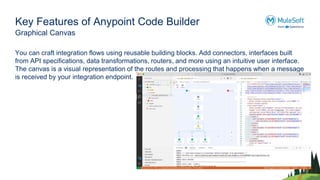
Graphical Canvas
You can craft integration flows using reusable building blocks. Add connectors, interfaces built
from API specifications, data transformations, routers, and more using an intuitive user interface.
The canvas is a visual representation of the routes and processing that happens when a message
is received by your integration endpoint.
Key Features of Anypoint Code Builder
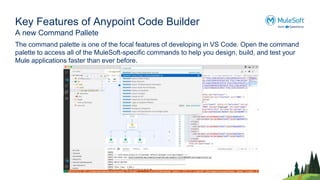
A new Command Pallete
The command palette is one of the focal features of developing in VS Code. Open the command
palette to access all of the MuleSoft-specific commands to help you design, build, and test your
Mule applications faster than ever before.
Key Features of Anypoint Code Builder
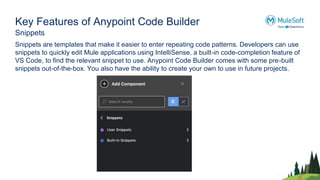
Snippets
Snippets are templates that make it easier to enter repeating code patterns. Developers can use
snippets to quickly edit Mule applications using IntelliSense, a built-in code-completion feature of
VS Code, to find the relevant snippet to use. Anypoint Code Builder comes with some pre-built
snippets out-of-the-box. You also have the ability to create your own to use in future projects.
Key Features of Anypoint Code Builder
DataWeave
DataWeave is a programming language designed by MuleSoft. It’s used for accessing and
transforming data that travels through a Mule application. Anypoint Code Builder provides the
ability to interact with DataWeave libraries and preview the transformation live.
Demo
Networking time
Thank You

Anypoint Code Builder

  • 1.
  • 2.
    AGENDA ● Introductions ● Designan api ● Implement an api ● Develop an integration
  • 3.
  • 4.
    Speakers Shyam Raj Prasad ●Working as Engineering Leader at Tricon Infotech Private Limited. ● 13+ years of Total Experience. ● 5+ years experience in Mulesoft. ● Certified MuleSoft Developer and Architect. ● MuleSoft Mentor ● Patna MuleSoft Meetup Leader ● Top Contributors of MuleSoft Help Forum ● Founder of DataWeave Fun
  • 5.
  • 6.
    What is AnypointCode Builder ● Anypoint Code Builder is an integrated development environment (IDE) that enables developers to design, build, test, and deploy APIs and integrations from their web browser or desktop. ● Anypoint Code Builder has the power and flexibility of Visual Studio Code (VS Code) combined with the new Anypoint Extension Pack that provides a modern integration developer experience. The IDE has an easy-to-use customizable interface, syntax highlighting, debugging tools, and seamless integration with external tools like version control. ● Anypoint Code Builder can be spun up in minutes using your favorite browser or, if you prefer, you can use your existing desktop instance of VS Code. Just log in to your Anypoint Platform account and you’re ready to design APIs using OAS, implement APIs using the graphical editor, test your implementations with the debugger, and deploy them with a few simple clicks.
  • 7.
    How Anypoint CodeBuilder Improves Developer Productivity Anypoint Code Builder provides these productivity features. ● A browser-based IDE to allow you to work from anywhere ● Visual Studio Code extensions ● A graphical user interface to define your integration flows ● A central palette to quickly access commonly used commands ● Code snippets to promote best practices and accelerate development ● Linting support for validation ● An interactive debugger
  • 8.
    Key Features ofAnypoint Code Builder Graphical Canvas You can craft integration flows using reusable building blocks. Add connectors, interfaces built from API specifications, data transformations, routers, and more using an intuitive user interface. The canvas is a visual representation of the routes and processing that happens when a message is received by your integration endpoint.
  • 9.
    Key Features ofAnypoint Code Builder A new Command Pallete The command palette is one of the focal features of developing in VS Code. Open the command palette to access all of the MuleSoft-specific commands to help you design, build, and test your Mule applications faster than ever before.
  • 10.
    Key Features ofAnypoint Code Builder Snippets Snippets are templates that make it easier to enter repeating code patterns. Developers can use snippets to quickly edit Mule applications using IntelliSense, a built-in code-completion feature of VS Code, to find the relevant snippet to use. Anypoint Code Builder comes with some pre-built snippets out-of-the-box. You also have the ability to create your own to use in future projects.
  • 11.
    Key Features ofAnypoint Code Builder DataWeave DataWeave is a programming language designed by MuleSoft. It’s used for accessing and transforming data that travels through a Mule application. Anypoint Code Builder provides the ability to interact with DataWeave libraries and preview the transformation live.
  • 13.
  • 14.
  • 15.