Mobile Programming
Kalmesh Nyamagoudar
9th August 2013
Why Mobile sites/apps??
§  Users carry the device wherever they go
§  Better interaction with users
§  Great monetization benefits
09/08/132Yahoo! Confidential & Proprietary.
Issues
§  Smaller screens
§  Limited computing power
§  Limited network connectivity
Smart Phones
10/08/133Yahoo! Confidential & Proprietary.
§  iPhone : What I do
§  Android : What we will talk today….
§  Windows 8 : Hidden gem
§  ….
§  ….
§  ….
Installations
10/08/134Yahoo! Confidential & Proprietary.
§  JDK : http://jdk7.java.net/
§  ADT : http://developer.android.com/sdk/index.html
›  Installs both eclipse and android SDK
§  Create AVD : Android Virtual Device
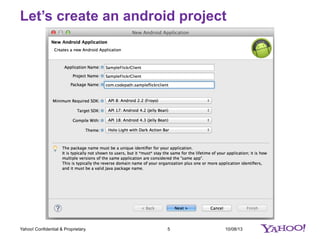
Let’s create an android project
10/08/135Yahoo! Confidential & Proprietary.
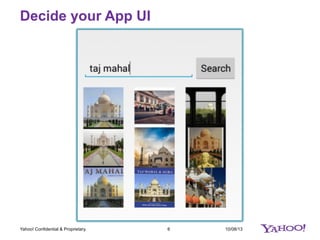
Decide your App UI
10/08/136Yahoo! Confidential & Proprietary.
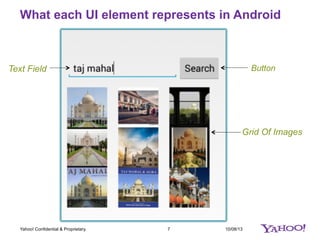
What each UI element represents in Android
10/08/137Yahoo! Confidential & Proprietary.
Text Field Button
Grid Of Images
Go to Eclipse : Things to do
10/08/138Yahoo! Confidential & Proprietary.
§  Create all the UI elements(TextField, Button, GridView)
›  Give ids to all UI elements
›  Create a variable for each UI element
›  Connect each variable with its corresponding UI element
10/08/139Yahoo! Confidential & Proprietary.
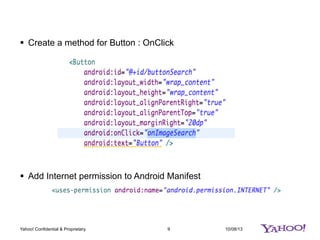
§  Create a method for Button : OnClick
§  Add Internet permission to Android Manifest
10/08/1310Yahoo! Confidential & Proprietary.
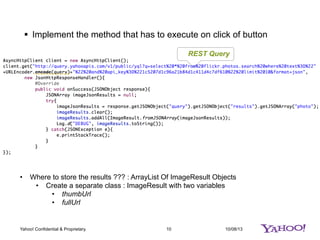
§  Implement the method that has to execute on click of button
REST Query
•  Where to store the results ??? : ArrayList Of ImageResult Objects
•  Create a separate class : ImageResult with two variables
•  thumbUrl
•  fullUrl
10/08/1311Yahoo! Confidential & Proprietary.
§  Run your code once on Emulator
›  Check the output on LogCat’s DEBUG section
›  URLs of image results are printed
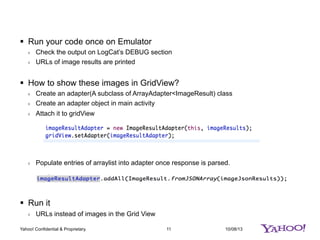
§  How to show these images in GridView?
›  Create an adapter(A subclass of ArrayAdapter<ImageResult) class
›  Create an adapter object in main activity
›  Attach it to gridView
›  Populate entries of arraylist into adapter once response is parsed.
§  Run it
›  URLs instead of images in the Grid View
Adding Images to GridView
10/08/1312Yahoo! Confidential & Proprietary.
§  Create a new layout (Android XML file)
›  Add a SmartImageView to the new layout created
§  Change the name of layout in adapter
›  Dear adapter, please make use of SmartImageView whenever you try to display
something
§  How to load the url into image view??
›  Job of adapter
10/08/1313Yahoo! Confidential & Proprietary.
§  ~~ Launching another screen(activity)
›  Demo : YahooImageSearch
§  Google Image Search
›  Demo : GridImageSearch
§  ListView Instead of a GridView??
›  Demo : YahooExtendedAnswersClient
§  Oauth?? My Images from Flickr??
›  Scribe.jar
›  https://github.com/thecodepath/android-rest-client-template
›  Demo : FlickrClient

HackU 2013 : Introduction to Android programming

  • 1.
  • 2.
    Why Mobile sites/apps?? § Users carry the device wherever they go §  Better interaction with users §  Great monetization benefits 09/08/132Yahoo! Confidential & Proprietary. Issues §  Smaller screens §  Limited computing power §  Limited network connectivity
  • 3.
    Smart Phones 10/08/133Yahoo! Confidential& Proprietary. §  iPhone : What I do §  Android : What we will talk today…. §  Windows 8 : Hidden gem §  …. §  …. §  ….
  • 4.
    Installations 10/08/134Yahoo! Confidential &Proprietary. §  JDK : http://jdk7.java.net/ §  ADT : http://developer.android.com/sdk/index.html ›  Installs both eclipse and android SDK §  Create AVD : Android Virtual Device
  • 5.
    Let’s create anandroid project 10/08/135Yahoo! Confidential & Proprietary.
  • 6.
    Decide your AppUI 10/08/136Yahoo! Confidential & Proprietary.
  • 7.
    What each UIelement represents in Android 10/08/137Yahoo! Confidential & Proprietary. Text Field Button Grid Of Images
  • 8.
    Go to Eclipse: Things to do 10/08/138Yahoo! Confidential & Proprietary. §  Create all the UI elements(TextField, Button, GridView) ›  Give ids to all UI elements ›  Create a variable for each UI element ›  Connect each variable with its corresponding UI element
  • 9.
    10/08/139Yahoo! Confidential &Proprietary. §  Create a method for Button : OnClick §  Add Internet permission to Android Manifest
  • 10.
    10/08/1310Yahoo! Confidential &Proprietary. §  Implement the method that has to execute on click of button REST Query •  Where to store the results ??? : ArrayList Of ImageResult Objects •  Create a separate class : ImageResult with two variables •  thumbUrl •  fullUrl
  • 11.
    10/08/1311Yahoo! Confidential &Proprietary. §  Run your code once on Emulator ›  Check the output on LogCat’s DEBUG section ›  URLs of image results are printed §  How to show these images in GridView? ›  Create an adapter(A subclass of ArrayAdapter<ImageResult) class ›  Create an adapter object in main activity ›  Attach it to gridView ›  Populate entries of arraylist into adapter once response is parsed. §  Run it ›  URLs instead of images in the Grid View
  • 12.
    Adding Images toGridView 10/08/1312Yahoo! Confidential & Proprietary. §  Create a new layout (Android XML file) ›  Add a SmartImageView to the new layout created §  Change the name of layout in adapter ›  Dear adapter, please make use of SmartImageView whenever you try to display something §  How to load the url into image view?? ›  Job of adapter
  • 13.
    10/08/1313Yahoo! Confidential &Proprietary. §  ~~ Launching another screen(activity) ›  Demo : YahooImageSearch §  Google Image Search ›  Demo : GridImageSearch §  ListView Instead of a GridView?? ›  Demo : YahooExtendedAnswersClient §  Oauth?? My Images from Flickr?? ›  Scribe.jar ›  https://github.com/thecodepath/android-rest-client-template ›  Demo : FlickrClient