Translating Idea into Action
Management Consulting
Smart Data collection at Fingertip…
fieldMaster
• Data for greater insight
• Comparison between the systems
• Digital form features
• fieldMaster & fieldServer
• The Process
Digital Surveys
• The Process
• Screen shots
• Areas of Application
• About us
• Our Role & Financials
• Advantages
• A Case Study
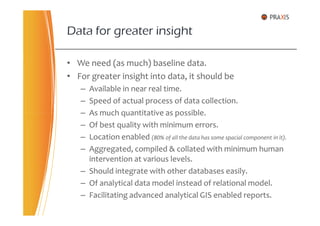
• We need (as much) baseline data.
• For greater insight into data, it should be
– Available in near real time.
– Speed of actual process of data collection.
– As much quantitative as possible.
Data for greater insight
– As much quantitative as possible.
– Of best quality with minimum errors.
– Location enabled (80% of all the data has some spacial component in it).
– Aggregated, compiled & collated with minimum human
intervention at various levels.
– Should integrate with other databases easily.
– Of analytical data model instead of relational model.
– Facilitating advanced analytical GIS enabled reports.
We achieve this by
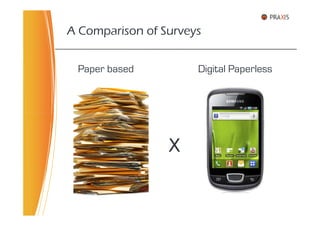
A Comparison of Surveys
Paper based Digital Paperless
X
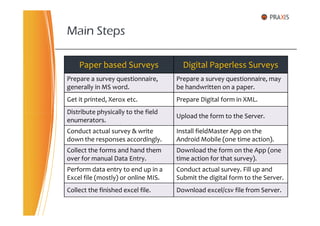
Main Steps
Paper based Surveys Digital Paperless Surveys
Prepare a survey questionnaire,
generally in MS word.
Prepare a survey questionnaire, may
be handwritten on a paper.
Get it printed, Xerox etc. Prepare Digital form in XML.
Distribute physically to the field
Upload the form to the Server.
Distribute physically to the field
enumerators.
Upload the form to the Server.
Conduct actual survey & write
down the responses accordingly.
Install fieldMaster App on the
Android Mobile (one time action).
Collect the forms and hand them
over for manual Data Entry.
Download the form on the App (one
time action for that survey).
Perform data entry to end up in a
Excel file (mostly) or online MIS.
Conduct actual survey. Fill up and
Submit the digital form to the Server.
Collect the finished excel file. Download excel/csv file from Server.
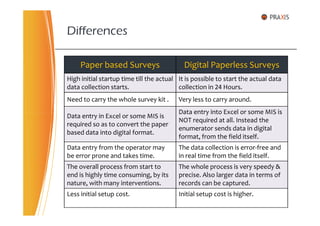
Differences
Paper based Surveys Digital Paperless Surveys
High initial startup time till the actual
data collection starts.
It is possible to start the actual data
collection in 24 Hours.
Need to carry the whole survey kit . Very less to carry around.
Data entry in Excel or some MIS is
Data entry into Excel or some MIS is
Data entry in Excel or some MIS is
required so as to convert the paper
based data into digital format.
Data entry into Excel or some MIS is
NOT required at all. Instead the
enumerator sends data in digital
format, from the field itself.
Data entry from the operator may
be error prone and takes time.
The data collection is error-free and
in real time from the field itself.
The overall process from start to
end is highly time consuming, by its
nature, with many interventions.
The whole process is very speedy &
precise. Also larger data in terms of
records can be captured.
Less initial setup cost. Initial setup cost is higher.
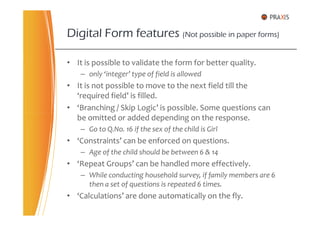
• It is possible to validate the form for better quality.
– only ‘integer’ type of field is allowed
• It is not possible to move to the next field till the
‘required field’ is filled.
• ‘Branching / Skip Logic’ is possible. Some questions can
be omitted or added depending on the response.
Digital Form features (Not possible in paper forms)
be omitted or added depending on the response.
– Go to Q.No. 16 if the sex of the child is Girl
• ‘Constraints’ can be enforced on questions.
– Age of the child should be between 6 & 14
• ‘Repeat Groups’ can be handled more effectively.
– While conducting household survey, if family members are 6
then a set of questions is repeated 6 times.
• ‘Calculations’ are done automatically on the fly.
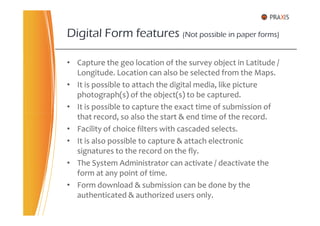
• Capture the geo location of the survey object in Latitude /
Longitude. Location can also be selected from the Maps.
• It is possible to attach the digital media, like picture
photograph(s) of the object(s) to be captured.
• It is possible to capture the exact time of submission of
that record, so also the start & end time of the record.
Digital Form features (Not possible in paper forms)
that record, so also the start & end time of the record.
• Facility of choice filters with cascaded selects.
• It is also possible to capture & attach electronic
signatures to the record on the fly.
• The System Administrator can activate / deactivate the
form at any point of time.
• Form download & submission can be done by the
authenticated & authorized users only.
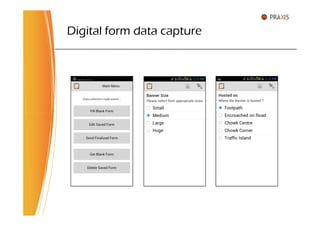
• fieldMaster is an Android App facilitating downloading, filling
up & submission of the digital forms to the fieldServer.
• fieldMaster can held any number of digital forms with it.
• There is a facility to mark the form as finalized. The incomplete
form can be filled later and sent to the fieldServer.
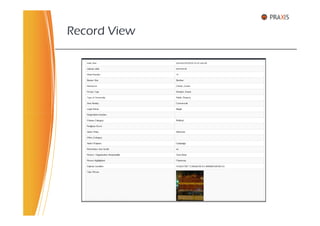
• Along with other attribute data of the object, from a variety of
fieldMaster
• Along with other attribute data of the object, from a variety of
question types, it captures,
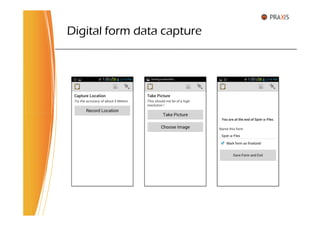
– The location in latitude & longitude
– The picture photograph(s)
– The exact time of data capture & data submission
• The digital form presents all those standard features as text
field, date and time, integer, radio buttons, check boxes etc.
• It is possible to name or tag the Form for better search.
• Forms can be sent online instantly or offline in bulk.
• There is a centralized server to collect & store all the requisite
information and is available to the Android mobile clients 24X7.
• The server can host any number of Digital Forms at a time.
• The server presents a Web based interface to the user, with
authentication and authorization, for data security & analysis.
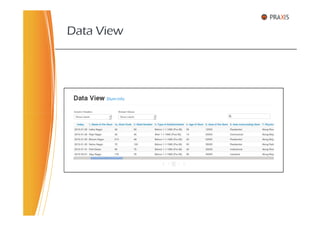
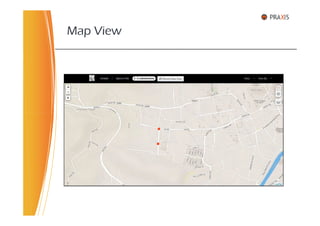
• It provides basic reports in table, chart & map formats, based
fieldServer
• It provides basic reports in table, chart & map formats, based
on user defined criteria.
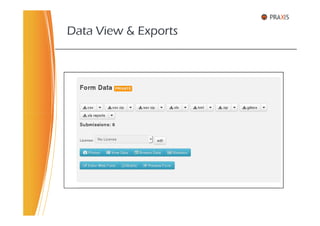
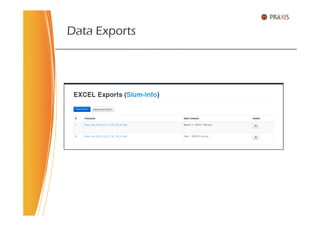
• For a digital form, The server can export the record sets in
standard formats like csv, kml & xlsx. These can be imported in
to other standards based software for further analysis.
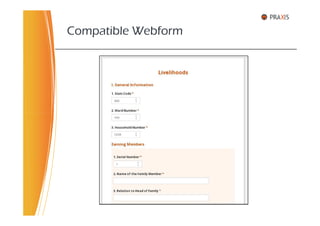
• The sever facilitates web based form for data entry via
Internet, exactly compatible with the digital form.
• Every record, once received, can be forwarded to external
server through REST. Also, the server itself provides data end
points through robust APIs.
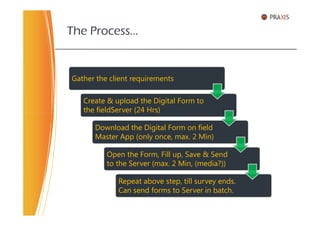
The Process…
Gather the client requirements
Create & upload the Digital Form to
the fieldServer (24 Hrs)the fieldServer (24 Hrs)
Download the Digital Form on field
Master App (only once, max. 2 Min)
Open the Form, Fill up, Save & Send
to the Server (max. 2 Min, (media?))
Repeat above step, till survey ends.
Can send forms to Server in batch.
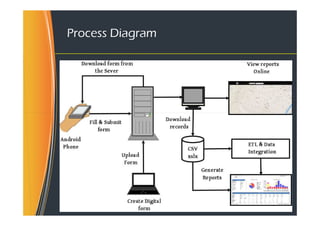
Process Diagram
Data Exports & Analysis Tools
GIS
Digital form data capture
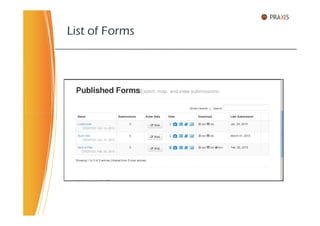
List of Forms
Data View & Exports
Data View
Record View
Map View
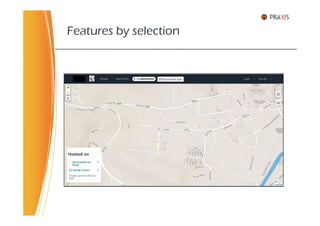
Features by selection
Compatible Webform
Data Exports
• Urban Development
• Rural Development
• Agriculture
• Health
• Education
Usefulness to Govt. Departments
• Education
• Environment & Pollution
• Water & Sanitation
• Revenue Department
• Various Government & Development Schemes
• Beneficiary Registration & Tracking
• Monitoring & Evaluation
• Data collection of various Urban features & facilities
• Slum, Household & Livelihood surveys in City
• Village Development Plan & Microplanning
• School infrastructure & sanitation survey
• Location based survey of Farm Ponds
A few areas of Application …
• Location based survey of Farm Ponds
• Agriculture produce data collection & analysis
• Monitoring Air & Water pollution
• Disaster Management & Preparedness plans
• Rapid field surveys of agri farms after natural distress
• Beneficiary registration & tracking system
• Energy mapping for unconventional energy resources.
• Over 15 years of experience in Linux & various Open
Source Software.
• Has been working for State & Centre Government
agencies, schemes & projects for past 8 years.
• Worked as MIS GIS Expert at State Level Technical Cell for
Dept. of Housing, for Rajiv Awas Yojana for 10 months.
About myself..
Dept. of Housing, for Rajiv Awas Yojana for 10 months.
• Previously working as Senior System Analyst & Associate
Professor at YASHADA, Pune, for about 5 years.
• Submitted no of Concept Notes to Govt on various topics.
Extensive experience in assessment, evaluation, installation,
deployment, configuration, customization, implementation,
administration, training, maintainence & support of
diversified applications and systems.
• CMDB, IT Assets & Infrastructure Management
• IT Helpdesk Management
• e-Learning Systems
• Intranet & Web Development
• Email, Messaging & Groupware
Functional Competencies
• Email, Messaging & Groupware
• Geographic Information System
• Knowledge Management Systems
• Project Management
• ETL, Data Integration & Analytics
• MIS, ERP, CRM
• Firewall, VPN, Router & Proxy Servers
• GIS MIS Integration
• Programming : PHP, C++, Java, Python, jQuery, HTML, CSS,
JavaScript, Web services
• Databases : MySQL, PostgreSQL, Firebird
• Intranet / Web : Moodle, Joomla, Drupal, Wordpress, Alfresco,
Liferay, eXo Portal
• Email : Zimbra email, messaging & groupware
• VoIP : Elastix, Asterix
Technical Skills
• VoIP : Elastix, Asterix
• BI : iReport, Jasper Reports Server
• ETL : Talend Studio, Pentaho Data Integration
• GIS : QGIS, GRASS, Map Server, Geo Server, Open Layers
• Media : Web Conferencing, Screen Casting, Video Streaming
• Other Misc : Redmine, Process Maker, Lime Survey
• Network : DHCP, DNS, FTP, SSH, PPP, IpSec, VPN, LDAP
• Systems : IpCop & Endian Firewall Proxy, ISPConfig, CMDB
• Linux : CentOS Linux Administration, Webmin
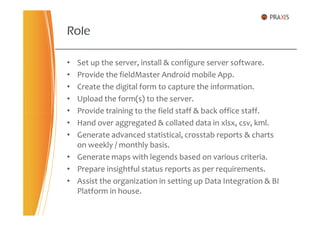
• Set up the server, install & configure server software.
• Provide the fieldMaster Android mobile App.
• Create the digital form to capture the information.
• Upload the form(s) to the server.
• Provide training to the field staff & back office staff.
Role
• Provide training to the field staff & back office staff.
• Hand over aggregated & collated data in xlsx, csv, kml.
• Generate advanced statistical, crosstab reports & charts
on weekly / monthly basis.
• Generate maps with legends based on various criteria.
• Prepare insightful status reports as per requirements.
• Assist the organization in setting up Data Integration & BI
Platform in house.
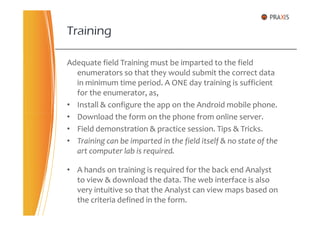
Adequate field Training must be imparted to the field
enumerators so that they would submit the correct data
in minimum time period. A ONE day training is sufficient
for the enumerator, as,
• Install & configure the app on the Android mobile phone.
• Download the form on the phone from online server.
Training
• Download the form on the phone from online server.
• Field demonstration & practice session. Tips & Tricks.
• Training can be imparted in the field itself & no state of the
art computer lab is required.
• A hands on training is required for the back end Analyst
to view & download the data. The web interface is also
very intuitive so that the Analyst can view maps based on
the criteria defined in the form.
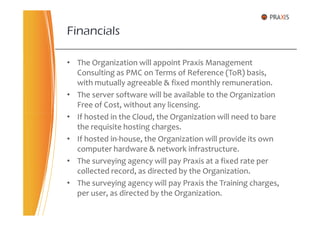
• The Organization will appoint Praxis Management
Consulting as PMC on Terms of Reference (ToR) basis,
with mutually agreeable & fixed monthly remuneration.
• The server software will be available to the Organization
Free of Cost, without any licensing.
• If hosted in the Cloud, the Organization will need to bare
Financials
• If hosted in the Cloud, the Organization will need to bare
the requisite hosting charges.
• If hosted in-house, the Organization will provide its own
computer hardware & network infrastructure.
• The surveying agency will pay Praxis at a fixed rate per
collected record, as directed by the Organization.
• The surveying agency will pay Praxis the Training charges,
per user, as directed by the Organization.
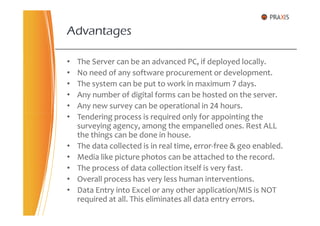
• The Server can be an advanced PC, if deployed locally.
• No need of any software procurement or development.
• The system can be put to work in maximum 7 days.
• Any number of digital forms can be hosted on the server.
• Any new survey can be operational in 24 hours.
• Tendering process is required only for appointing the
Advantages
• Tendering process is required only for appointing the
surveying agency, among the empanelled ones. Rest ALL
the things can be done in house.
• The data collected is in real time, error-free & geo enabled.
• Media like picture photos can be attached to the record.
• The process of data collection itself is very fast.
• Overall process has very less human interventions.
• Data Entry into Excel or any other application/MIS is NOT
required at all. This eliminates all data entry errors.
The system itself is ‘multi tenant’. One organization may
have several departments. The forms & users can be
assigned to departments & projects.
• The Divisional Commissioner’s office
Prospective Organizations
• The Divisional Commissioner’s office
• District Collector’s office
• Municipal Corporation
• Zilla Parishad
• Various government departments through respective
Nodal Agencies
• Various state Authorities & Corporations
Recently in NEWS
• Government to conduct detail survey of the families
of the farmers who committed suicides.
• Also will gather information whether various
government schemes have reached to them.
• To decide the ready reckoner rates of a particular
area, government to launch a new programme.area, government to launch a new programme.
• Government to build 5000 farm ponds in the state
every year to combat draught.
• Hon High court ordered ban on Ganesh Pendals
those encroach roads & foot paths.
• Western Railways attempt to conduct survey on
new Bombardier trains failed. Also not willing to get
it done through m-Indicator mobile App.
Praxis Management Consulting,
C/2, Kamdhenu Riddhi, Lane No. 4,
Thank You
Contact us
C/2, Kamdhenu Riddhi, Lane No. 4,
Mahatma Society, Kothrud, Pune – 411038.
Web : http://www.praxis.org.in
email : info@praxis.org.in
Cell : 91-9923429150

Android mobile based Field Data Collection

  • 1.
    Translating Idea intoAction Management Consulting Smart Data collection at Fingertip… fieldMaster
  • 2.
    • Data forgreater insight • Comparison between the systems • Digital form features • fieldMaster & fieldServer • The Process Digital Surveys • The Process • Screen shots • Areas of Application • About us • Our Role & Financials • Advantages • A Case Study
  • 3.
    • We need(as much) baseline data. • For greater insight into data, it should be – Available in near real time. – Speed of actual process of data collection. – As much quantitative as possible. Data for greater insight – As much quantitative as possible. – Of best quality with minimum errors. – Location enabled (80% of all the data has some spacial component in it). – Aggregated, compiled & collated with minimum human intervention at various levels. – Should integrate with other databases easily. – Of analytical data model instead of relational model. – Facilitating advanced analytical GIS enabled reports.
  • 4.
  • 5.
    A Comparison ofSurveys Paper based Digital Paperless X
  • 6.
    Main Steps Paper basedSurveys Digital Paperless Surveys Prepare a survey questionnaire, generally in MS word. Prepare a survey questionnaire, may be handwritten on a paper. Get it printed, Xerox etc. Prepare Digital form in XML. Distribute physically to the field Upload the form to the Server. Distribute physically to the field enumerators. Upload the form to the Server. Conduct actual survey & write down the responses accordingly. Install fieldMaster App on the Android Mobile (one time action). Collect the forms and hand them over for manual Data Entry. Download the form on the App (one time action for that survey). Perform data entry to end up in a Excel file (mostly) or online MIS. Conduct actual survey. Fill up and Submit the digital form to the Server. Collect the finished excel file. Download excel/csv file from Server.
  • 7.
    Differences Paper based SurveysDigital Paperless Surveys High initial startup time till the actual data collection starts. It is possible to start the actual data collection in 24 Hours. Need to carry the whole survey kit . Very less to carry around. Data entry in Excel or some MIS is Data entry into Excel or some MIS is Data entry in Excel or some MIS is required so as to convert the paper based data into digital format. Data entry into Excel or some MIS is NOT required at all. Instead the enumerator sends data in digital format, from the field itself. Data entry from the operator may be error prone and takes time. The data collection is error-free and in real time from the field itself. The overall process from start to end is highly time consuming, by its nature, with many interventions. The whole process is very speedy & precise. Also larger data in terms of records can be captured. Less initial setup cost. Initial setup cost is higher.
  • 8.
    • It ispossible to validate the form for better quality. – only ‘integer’ type of field is allowed • It is not possible to move to the next field till the ‘required field’ is filled. • ‘Branching / Skip Logic’ is possible. Some questions can be omitted or added depending on the response. Digital Form features (Not possible in paper forms) be omitted or added depending on the response. – Go to Q.No. 16 if the sex of the child is Girl • ‘Constraints’ can be enforced on questions. – Age of the child should be between 6 & 14 • ‘Repeat Groups’ can be handled more effectively. – While conducting household survey, if family members are 6 then a set of questions is repeated 6 times. • ‘Calculations’ are done automatically on the fly.
  • 9.
    • Capture thegeo location of the survey object in Latitude / Longitude. Location can also be selected from the Maps. • It is possible to attach the digital media, like picture photograph(s) of the object(s) to be captured. • It is possible to capture the exact time of submission of that record, so also the start & end time of the record. Digital Form features (Not possible in paper forms) that record, so also the start & end time of the record. • Facility of choice filters with cascaded selects. • It is also possible to capture & attach electronic signatures to the record on the fly. • The System Administrator can activate / deactivate the form at any point of time. • Form download & submission can be done by the authenticated & authorized users only.
  • 10.
    • fieldMaster isan Android App facilitating downloading, filling up & submission of the digital forms to the fieldServer. • fieldMaster can held any number of digital forms with it. • There is a facility to mark the form as finalized. The incomplete form can be filled later and sent to the fieldServer. • Along with other attribute data of the object, from a variety of fieldMaster • Along with other attribute data of the object, from a variety of question types, it captures, – The location in latitude & longitude – The picture photograph(s) – The exact time of data capture & data submission • The digital form presents all those standard features as text field, date and time, integer, radio buttons, check boxes etc. • It is possible to name or tag the Form for better search. • Forms can be sent online instantly or offline in bulk.
  • 11.
    • There isa centralized server to collect & store all the requisite information and is available to the Android mobile clients 24X7. • The server can host any number of Digital Forms at a time. • The server presents a Web based interface to the user, with authentication and authorization, for data security & analysis. • It provides basic reports in table, chart & map formats, based fieldServer • It provides basic reports in table, chart & map formats, based on user defined criteria. • For a digital form, The server can export the record sets in standard formats like csv, kml & xlsx. These can be imported in to other standards based software for further analysis. • The sever facilitates web based form for data entry via Internet, exactly compatible with the digital form. • Every record, once received, can be forwarded to external server through REST. Also, the server itself provides data end points through robust APIs.
  • 12.
    The Process… Gather theclient requirements Create & upload the Digital Form to the fieldServer (24 Hrs)the fieldServer (24 Hrs) Download the Digital Form on field Master App (only once, max. 2 Min) Open the Form, Fill up, Save & Send to the Server (max. 2 Min, (media?)) Repeat above step, till survey ends. Can send forms to Server in batch.
  • 13.
  • 14.
    Data Exports &Analysis Tools GIS
  • 15.
  • 16.
  • 17.
  • 18.
    Data View &Exports
  • 19.
  • 20.
  • 21.
  • 22.
  • 23.
  • 24.
  • 25.
    • Urban Development •Rural Development • Agriculture • Health • Education Usefulness to Govt. Departments • Education • Environment & Pollution • Water & Sanitation • Revenue Department • Various Government & Development Schemes • Beneficiary Registration & Tracking • Monitoring & Evaluation
  • 26.
    • Data collectionof various Urban features & facilities • Slum, Household & Livelihood surveys in City • Village Development Plan & Microplanning • School infrastructure & sanitation survey • Location based survey of Farm Ponds A few areas of Application … • Location based survey of Farm Ponds • Agriculture produce data collection & analysis • Monitoring Air & Water pollution • Disaster Management & Preparedness plans • Rapid field surveys of agri farms after natural distress • Beneficiary registration & tracking system • Energy mapping for unconventional energy resources.
  • 27.
    • Over 15years of experience in Linux & various Open Source Software. • Has been working for State & Centre Government agencies, schemes & projects for past 8 years. • Worked as MIS GIS Expert at State Level Technical Cell for Dept. of Housing, for Rajiv Awas Yojana for 10 months. About myself.. Dept. of Housing, for Rajiv Awas Yojana for 10 months. • Previously working as Senior System Analyst & Associate Professor at YASHADA, Pune, for about 5 years. • Submitted no of Concept Notes to Govt on various topics. Extensive experience in assessment, evaluation, installation, deployment, configuration, customization, implementation, administration, training, maintainence & support of diversified applications and systems.
  • 28.
    • CMDB, ITAssets & Infrastructure Management • IT Helpdesk Management • e-Learning Systems • Intranet & Web Development • Email, Messaging & Groupware Functional Competencies • Email, Messaging & Groupware • Geographic Information System • Knowledge Management Systems • Project Management • ETL, Data Integration & Analytics • MIS, ERP, CRM • Firewall, VPN, Router & Proxy Servers • GIS MIS Integration
  • 29.
    • Programming :PHP, C++, Java, Python, jQuery, HTML, CSS, JavaScript, Web services • Databases : MySQL, PostgreSQL, Firebird • Intranet / Web : Moodle, Joomla, Drupal, Wordpress, Alfresco, Liferay, eXo Portal • Email : Zimbra email, messaging & groupware • VoIP : Elastix, Asterix Technical Skills • VoIP : Elastix, Asterix • BI : iReport, Jasper Reports Server • ETL : Talend Studio, Pentaho Data Integration • GIS : QGIS, GRASS, Map Server, Geo Server, Open Layers • Media : Web Conferencing, Screen Casting, Video Streaming • Other Misc : Redmine, Process Maker, Lime Survey • Network : DHCP, DNS, FTP, SSH, PPP, IpSec, VPN, LDAP • Systems : IpCop & Endian Firewall Proxy, ISPConfig, CMDB • Linux : CentOS Linux Administration, Webmin
  • 30.
    • Set upthe server, install & configure server software. • Provide the fieldMaster Android mobile App. • Create the digital form to capture the information. • Upload the form(s) to the server. • Provide training to the field staff & back office staff. Role • Provide training to the field staff & back office staff. • Hand over aggregated & collated data in xlsx, csv, kml. • Generate advanced statistical, crosstab reports & charts on weekly / monthly basis. • Generate maps with legends based on various criteria. • Prepare insightful status reports as per requirements. • Assist the organization in setting up Data Integration & BI Platform in house.
  • 31.
    Adequate field Trainingmust be imparted to the field enumerators so that they would submit the correct data in minimum time period. A ONE day training is sufficient for the enumerator, as, • Install & configure the app on the Android mobile phone. • Download the form on the phone from online server. Training • Download the form on the phone from online server. • Field demonstration & practice session. Tips & Tricks. • Training can be imparted in the field itself & no state of the art computer lab is required. • A hands on training is required for the back end Analyst to view & download the data. The web interface is also very intuitive so that the Analyst can view maps based on the criteria defined in the form.
  • 32.
    • The Organizationwill appoint Praxis Management Consulting as PMC on Terms of Reference (ToR) basis, with mutually agreeable & fixed monthly remuneration. • The server software will be available to the Organization Free of Cost, without any licensing. • If hosted in the Cloud, the Organization will need to bare Financials • If hosted in the Cloud, the Organization will need to bare the requisite hosting charges. • If hosted in-house, the Organization will provide its own computer hardware & network infrastructure. • The surveying agency will pay Praxis at a fixed rate per collected record, as directed by the Organization. • The surveying agency will pay Praxis the Training charges, per user, as directed by the Organization.
  • 33.
    • The Servercan be an advanced PC, if deployed locally. • No need of any software procurement or development. • The system can be put to work in maximum 7 days. • Any number of digital forms can be hosted on the server. • Any new survey can be operational in 24 hours. • Tendering process is required only for appointing the Advantages • Tendering process is required only for appointing the surveying agency, among the empanelled ones. Rest ALL the things can be done in house. • The data collected is in real time, error-free & geo enabled. • Media like picture photos can be attached to the record. • The process of data collection itself is very fast. • Overall process has very less human interventions. • Data Entry into Excel or any other application/MIS is NOT required at all. This eliminates all data entry errors.
  • 34.
    The system itselfis ‘multi tenant’. One organization may have several departments. The forms & users can be assigned to departments & projects. • The Divisional Commissioner’s office Prospective Organizations • The Divisional Commissioner’s office • District Collector’s office • Municipal Corporation • Zilla Parishad • Various government departments through respective Nodal Agencies • Various state Authorities & Corporations
  • 35.
    Recently in NEWS •Government to conduct detail survey of the families of the farmers who committed suicides. • Also will gather information whether various government schemes have reached to them. • To decide the ready reckoner rates of a particular area, government to launch a new programme.area, government to launch a new programme. • Government to build 5000 farm ponds in the state every year to combat draught. • Hon High court ordered ban on Ganesh Pendals those encroach roads & foot paths. • Western Railways attempt to conduct survey on new Bombardier trains failed. Also not willing to get it done through m-Indicator mobile App.
  • 36.
    Praxis Management Consulting, C/2,Kamdhenu Riddhi, Lane No. 4, Thank You Contact us C/2, Kamdhenu Riddhi, Lane No. 4, Mahatma Society, Kothrud, Pune – 411038. Web : http://www.praxis.org.in email : info@praxis.org.in Cell : 91-9923429150