Android Fundamentals
Mohammad Tarek
Software Developer - eSpace
+20-111-863-1732
/bntarek
mohammad.bn.tarek@gmail.com
Android Versions
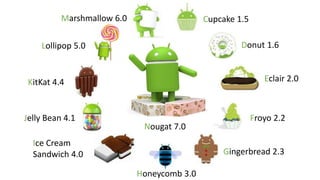
Cupcake 1.5
Donut 1.6
Eclair 2.0
Froyo 2.2
Gingerbread 2.3
Honeycomb 3.0
Ice Cream
Sandwich 4.0
Jelly Bean 4.1
KitKat 4.4
Lollipop 5.0
Marshmallow 6.0
Nougat 7.0
Views
TextView, ImageView, Button
Views
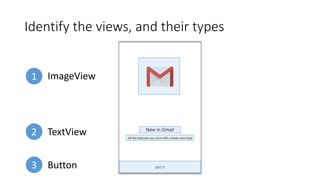
Identify the views, and their types
1
2
3
ImageView
TextView
Button
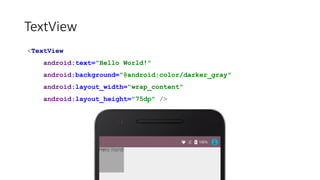
TextView
<TextView
android:text="Hello World!"
android:background="@android:color/darker_gray"
android:layout_width="150dp"
android:layout_height="75dp" />
TextView
<TextView
android:text="Hello World!"
android:background="@android:color/darker_gray"
android:layout_width="wrap_content"
android:layout_height="75dp" />
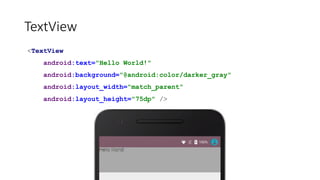
TextView
<TextView
android:text="Hello World!"
android:background="@android:color/darker_gray"
android:layout_width="match_parent"
android:layout_height="75dp" />
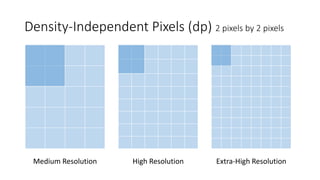
Density-Independent Pixels (dp) 2 pixels by 2 pixels
Medium Resolution High Resolution Extra-High Resolution
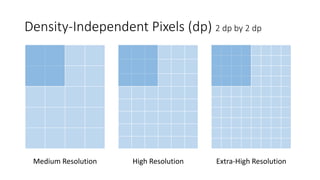
Density-Independent Pixels (dp) 2 dp by 2 dp
Medium Resolution High Resolution Extra-High Resolution
TextView
<TextView
android:text="Hello World!"
android:background="@android:color/darker_gray"
android:layout_width="wrap_content"
android:layout_height="75dp"
android:textSize="28sp"
android:textColor="#123456" />
ImageView
<ImageView
android:src="@drawable/robot"
android:layout_width="wrap_content"
android:layout_height="wrap_content"
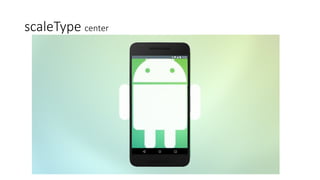
android:scaleType="center" />
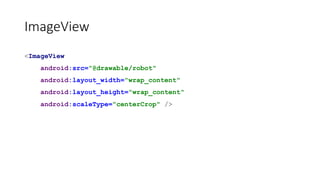
ImageView
<ImageView
android:src="@drawable/robot"
android:layout_width="wrap_content"
android:layout_height="wrap_content"
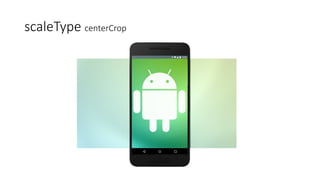
android:scaleType="centerCrop" />
scaleType center
scaleType centerCrop
ViewGroups
LinearLayout, RelativeLayout
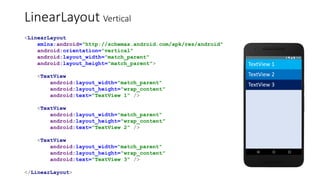
LinearLayout Vertical
<LinearLayout
xmlns:android="http://schemas.android.com/apk/res/android"
android:orientation="vertical"
android:layout_width="match_parent"
android:layout_height="match_parent">
<TextView
android:layout_width="match_parent"
android:layout_height="wrap_content"
android:text="TextView 1" />
<TextView
android:layout_width="match_parent"
android:layout_height="wrap_content"
android:text="TextView 2" />
<TextView
android:layout_width="match_parent"
android:layout_height="wrap_content"
android:text="TextView 3" />
</LinearLayout>
TextView 1
TextView 2
TextView 3
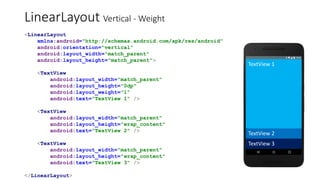
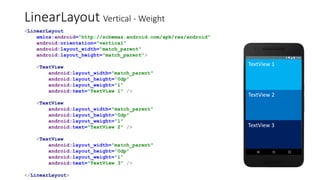
LinearLayout Vertical - Weight
<LinearLayout
xmlns:android="http://schemas.android.com/apk/res/android"
android:orientation="vertical"
android:layout_width="match_parent"
android:layout_height="match_parent">
<TextView
android:layout_width="match_parent"
android:layout_height="0dp"
android:layout_weight="1"
android:text="TextView 1" />
<TextView
android:layout_width="match_parent"
android:layout_height="wrap_content"
android:text="TextView 2" />
<TextView
android:layout_width="match_parent"
android:layout_height="wrap_content"
android:text="TextView 3" />
</LinearLayout>
TextView 1
TextView 2
TextView 3
LinearLayout Vertical - Weight
<LinearLayout
xmlns:android="http://schemas.android.com/apk/res/android"
android:orientation="vertical"
android:layout_width="match_parent"
android:layout_height="match_parent">
<TextView
android:layout_width="match_parent"
android:layout_height="0dp"
android:layout_weight="1"
android:text="TextView 1" />
<TextView
android:layout_width="match_parent"
android:layout_height="0dp"
android:layout_weight="1"
android:text="TextView 2" />
<TextView
android:layout_width="match_parent"
android:layout_height="0dp"
android:layout_weight="1"
android:text="TextView 3" />
</LinearLayout>
TextView 1
TextView 2
TextView 3
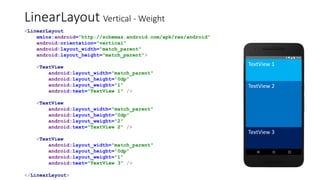
LinearLayout Vertical - Weight
<LinearLayout
xmlns:android="http://schemas.android.com/apk/res/android"
android:orientation="vertical"
android:layout_width="match_parent"
android:layout_height="match_parent">
<TextView
android:layout_width="match_parent"
android:layout_height="0dp"
android:layout_weight="1"
android:text="TextView 1" />
<TextView
android:layout_width="match_parent"
android:layout_height="0dp"
android:layout_weight="2"
android:text="TextView 2" />
<TextView
android:layout_width="match_parent"
android:layout_height="0dp"
android:layout_weight="1"
android:text="TextView 3" />
</LinearLayout>
TextView 1
TextView 2
TextView 3
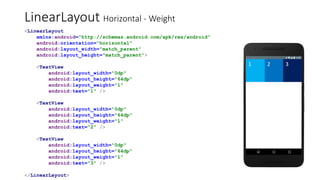
LinearLayout Horizontal - Weight
<LinearLayout
xmlns:android="http://schemas.android.com/apk/res/android"
android:orientation="horizontal"
android:layout_width="match_parent"
android:layout_height="match_parent">
<TextView
android:layout_width="0dp"
android:layout_height="64dp"
android:layout_weight="1"
android:text="1" />
<TextView
android:layout_width="0dp"
android:layout_height="64dp"
android:layout_weight="1"
android:text="2" />
<TextView
android:layout_width="0dp"
android:layout_height="64dp"
android:layout_weight="1"
android:text="3" />
</LinearLayout>
1 2 3
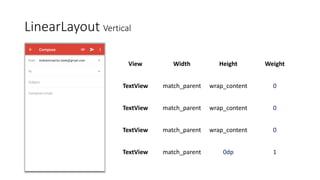
LinearLayout Vertical
View Width Height Weight
TextView match_parent wrap_content 0
TextView match_parent 0dp 1
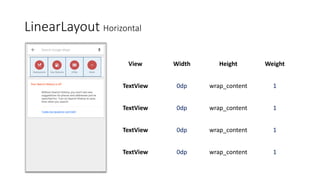
LinearLayout Horizontal
View Width Height Weight
TextView 0dp wrap_content 1
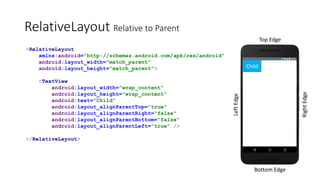
RelativeLayout Relative to Parent
Top Edge
Bottom Edge
RightEdge
LeftEdge
<RelativeLayout
xmlns:android="http://schemas.android.com/apk/res/android"
android:layout_width="match_parent"
android:layout_height="match_parent">
<TextView
android:layout_width="wrap_content"
android:layout_height="wrap_content"
android:text="Child"
android:layout_alignParentTop="true"
android:layout_alignParentRight="false"
android:layout_alignParentBottom="false"
android:layout_alignParentLeft="true" />
</RelativeLayout>
Child
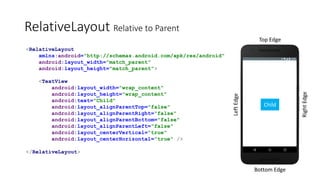
RelativeLayout Relative to Parent
Top Edge
Bottom Edge
RightEdge
LeftEdge
<RelativeLayout
xmlns:android="http://schemas.android.com/apk/res/android"
android:layout_width="match_parent"
android:layout_height="match_parent">
<TextView
android:layout_width="wrap_content"
android:layout_height="wrap_content"
android:text="Child"
android:layout_alignParentTop="false"
android:layout_alignParentRight="false"
android:layout_alignParentBottom="false"
android:layout_alignParentLeft="false"
android:layout_centerVertical="true"
android:layout_centerHorizontal="true" />
</RelativeLayout>
Child
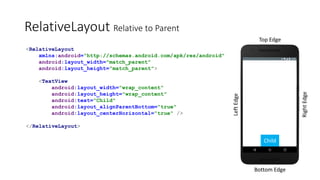
RelativeLayout Relative to Parent
Top Edge
Bottom Edge
RightEdge
LeftEdge
<RelativeLayout
xmlns:android="http://schemas.android.com/apk/res/android"
android:layout_width="match_parent"
android:layout_height="match_parent">
<TextView
android:layout_width="wrap_content"
android:layout_height="wrap_content"
android:text="Child"
android:layout_alignParentBottom="true"
android:layout_centerHorizontal="true" />
</RelativeLayout>
Child
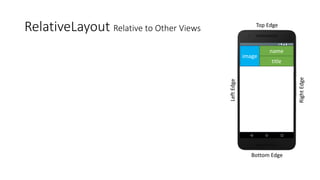
RelativeLayout Relative to Other Views Top Edge
Bottom Edge
RightEdge
LeftEdge
image
name
title
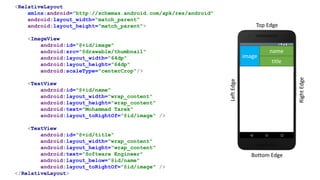
RelativeLayout Relative to Other Views Top Edge
Bottom Edge
RightEdge
LeftEdge
<RelativeLayout
xmlns:android="http://schemas.android.com/apk/res/android"
android:layout_width="match_parent"
android:layout_height="match_parent">
<ImageView
android:id="@+id/image"
android:src="@drawable/thumbnail"
android:layout_width="64dp"
android:layout_height="64dp"
android:scaleType="centerCrop"/>
<TextView
android:id="@+id/name"
android:layout_width="wrap_content"
android:layout_height="wrap_content"
android:text="Mohammad Tarek"
android:layout_toRightOf="@id/image" />
<TextView
android:id="@+id/title"
android:layout_width="wrap_content"
android:layout_height="wrap_content"
android:text="Software Engineer"
android:layout_below="@id/name"
android:layout_toRightOf="@id/image" />
</RelativeLayout>
image
name
title
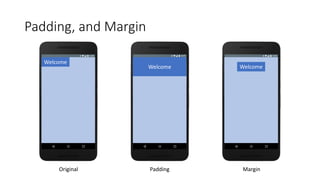
Padding, and Margin
Padding, and Margin
Welcome
Welcome Welcome
Original Padding Margin
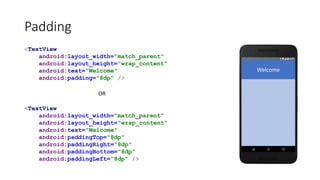
Padding
<TextView
android:layout_width="match_parent"
android:layout_height="wrap_content"
android:text="Welcome"
android:padding="8dp" />
<TextView
android:layout_width="match_parent"
android:layout_height="wrap_content"
android:text="Welcome"
android:paddingTop="8dp"
android:paddingRight="8dp"
android:paddingBottom="8dp"
android:paddingLeft="8dp" />
Welcome
OR
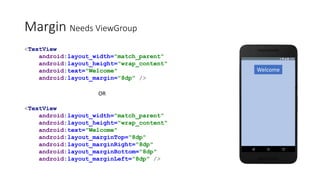
Margin Needs ViewGroup
<TextView
android:layout_width="match_parent"
android:layout_height="wrap_content"
android:text="Welcome"
android:layout_margin="8dp" />
<TextView
android:layout_width="match_parent"
android:layout_height="wrap_content"
android:text="Welcome"
android:layout_marginTop="8dp"
android:layout_marginRight="8dp"
android:layout_marginBottom="8dp"
android:layout_marginLeft="8dp" />
OR
Welcome
DEMO
Any Questions?
Many Thanks!

Android Fundamentals