ABSTRACT
› SDTM Fundamentals
–3 Key Building Blocks
› Data Class
– 3 General Observation Data Classes
› Variable Roles
– 5 Main Roles
› Core Variables
– 3 Core Categories
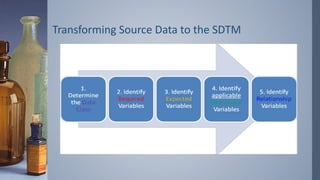
› Transforming Source Data to the SDTM
– 5 Critical Steps
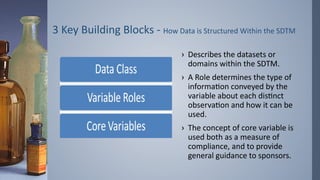
3 Key BuildingBlocks - How Data is Structured Within the SDTM
› Describes the datasets or
domains within the SDTM.
› A Role determines the type of
information conveyed by the
variable about each distinct
observation and how it can be
used.
› The concept of core variable is
used both as a measure of
compliance, and to provide
general guidance to sponsors.
6.
3 General ObservationData Class
› The Interventions General Observation Class captures
investigational, therapeutic and other treatments that are
administered to the subject (with some actual or expected
physiological effect) either as specified by the study protocol (e.g.,
exposure to study drug), coincident with the study assessment
period (e.g., concomitant medications), or self - administered by
the subject (such as use of alcohol, tobacco, or caffeine).
› Includes Concomitant Medications – CM, Exposure – EX,
Substance Use – SU.
› Defined in Section 6.1.
7.
3 General ObservationData Class
› The Events General Observation Class captures planned protocol
milestones such as randomization and study completion, and
occurrences, conditions, or incidents independent of planned
study evaluations occurring during the trial (e.g., adverse events)
or prior to the trial (e.g., medical history).
› Includes Adverse Events – AE, Medical History – MH,
Clinical Events – CE, Disposition – DS, Protocol Deviations – DV.
› Defined in Section 6.2.
8.
3 General ObservationData Class
› The Finding General Observation Class captures the observations
resulting from planned evaluations to address specific tests or
questions such as laboratory tests, ECG testing, and questions
listed on questionnaires.
› Includes ECG Test Results – EG, Laboratory Test Results – LB,
Questionnaires – QS, Vital Signs – VS, Microbiology Specimen –
MB, PK Concentrations – PC, Inclusion/Exclusion Criterion Not Met
– IE, Physical Examination – PE, Subject Characteristics – SC, Drug
Accountability – DA, Microbiology Susceptibility Test – MS, PK
Parameters – PP.
› Defined in Section 6.3.
9.
Finding About
› FindingAbout Events or Interventions is a specialization of the
Finding General Observation Class. As such, it shares all qualities
and conventions of Findings observations but is specialized by
the addition of the – OBJ variable.
› Includes Finding About – FA, Skin Response – SR.
› Defined in Section 6.4.
10.
Special-Purpose Datasets
› Special-PurposeDomains is defined as a collection of logically
related observations with a common topic. The logic of the
relationship may pertain to the scientific subject matter of the
data or to its role in the trial. Each domain is represented by a
single dataset.
› Includes Demographics – DM, Subject Elements – SE, Comments-
CO, Subject Visits – SV.
› Defined in Section 5.
11.
Special-Purpose Datasets
› TrialDesign Model Domains represents information about the
study design but do not contain subject data.
› Includes Trail Arms – TA, Trial Elements – TE, Trail Visits – TV, Trail
Summary – TS, Trail Inclusion/Exclusion Criteria – TI.
› Defined in Section 7.
12.
Special-Purpose Datasets
› RelationshipDatasets
› All relationships make use of the standard domain identifiers,
STUDYID, DOMAIN, and USUBJID. In addition, the variables
IDVAR and IDVARVAL are used for identifying the record-level
merge/join keys. These keys are used to tie information together
by linking records.
› Includes Related Records – RELREC, Supplemental Qualifiers –
SUPPQUAL or Multiple SUPP.
› Defined in Section 8.
13.
Variable Roles
› Identifiervariables, such as those that identify the study, subject,
domain, and sequence number of the record.
› Topic variables, which specify the focus of the observation (such
as the name of a lab test).
› Timing variables, which describe the timing of the observation
(such as start date and end date).
14.
Variable Roles
› Qualifiervariables, which include additional illustrative text or
numeric values that describe the results or additional traits of
the observation (such as units or descriptive adjectives).
› Rule variables, which express an algorithm or executable method
to define start, end, and branching or looping conditions in the
Trial Design model.
15.
Core Variables
› ARequired variable is any variable that is basic to the identification
of a data record (i.e., essential key variables and a topic variable) or is
necessary to make the record meaningful. Required variables must
always be included in the dataset and cannot be null for any record.
› An Expected variable is any variable necessary to make a record
useful in the context of a specific domain. Expected variables may
contain some null values, but in most cases will not contain null
values for every record. When no data has been collected for an
expected variable, however, a null column must still be included in
the dataset, and a comment must be included in the define.xml to
state that data was not collected.
16.
Core Variables
› APermissible variable should be used in a domain as
appropriate when collected or derived. Except where restricted
by specific domain assumptions, any SDTM Timing and Identifier
variables, and any Qualifier variables from the same general
observation class are permissible for use in a domain based on
that general observation class. The Sponsor can decide whether
a Permissible variable should be included as a column when all
values for that variable are null. The sponsor does not have the
discretion to exclude permissible variables when they contain
data.
Transforming Source Datato the SDTM
› Step 1: Determine the Data Class.
A simple approach to determining the Data Class is to select key
words from the CRF page, and search the SDTMIG. For example, a
simple search on the text ‘Adverse Events’ or ‘Signs and
Symptoms’ will indicate immediately that they are within the
Events Class. However, if it is not immediately obvious from a key
word search, you need to consider the content of the data,
alongside the descriptions within the SDTMIG for ‘Guidelines for
determining the general observation class’.
20.
Transforming Source Datato the SDTM
› Step 2: Identify the Required Variables.
Once the Data Class has been determined, identifying the
required variables is a straightforward look – up of the SDTMIG.
To start with, STUDYID, DOMAIN, USUBJID, and – SEQ are all
required within the General Observation Classes. Then using the
Domain model definition select other required variables (for
example within Events these are – TERM, – DECOD, within
Interventions –TRT, and within Findings – TEST – TESTCD.)
21.
Transforming Source Datato the SDTM
› Step 3: Identify the Expected Variables.
Follow same process as step 2, except now looking for expected
variables. You should now have the minimum set of variables for
your domain.
22.
Transforming Source Datato the SDTM
› Step 4: Identify the Permissible Variables.
For permissible variables, as opposed to identify what all the
permissible variables are, instead look ate your source data to
identify what has been captured, but not yet mapped to a
required/expected variable in Step 2 & 3 above.
23.
Transforming Source Datato the SDTM
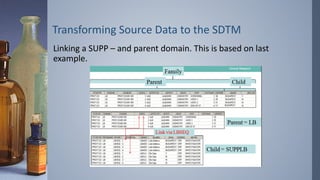
› Step 5: Identify the Relationship Variables.
There may then be variables that are captured, however do not fit
into the required, expected or permissible core set of variables.
These remaining variables would be mapped to a related domain
(such as CO or SUPP –).
24.
Transforming Source Datato the SDTM
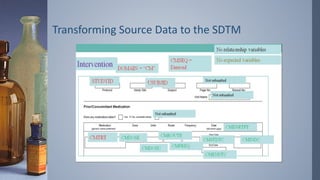
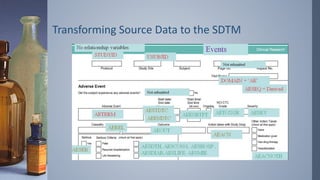
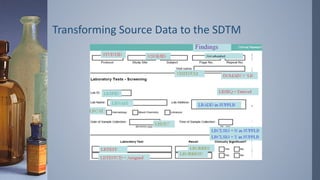
› Examples of an Intervention, Event and Finding respectively.
› Step 1: Data Class
› Step 2: Required
› Step 3: Expected
› Step 4: Permissible
› Step 5: Relationship
CDISC SDTM Compliance
›Once you have gone followed the 5-step thinking process, you are
now ready to start physically mapping to SDTM.
› However, once you have completed your mapping, how will you
confirm that the SDTM datasets you have produced actually
conform to the SDTMIG?
› Conformance with the SDTMIG Domain Models is minimally
indicated by:
Following the complete metadata structure for data domains
Following SDTMIG domain models wherever applicable
31.
CDISC SDTM Compliance
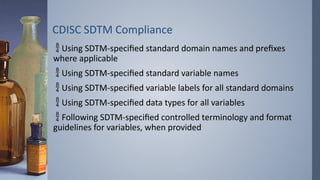
Using SDTM-specified standard domain names and prefixes
where applicable
Using SDTM-specified standard variable names
Using SDTM-specified variable labels for all standard domains
Using SDTM-specified data types for all variables
Following SDTM-specified controlled terminology and format
guidelines for variables, when provided
32.
CDISC SDTM Compliance
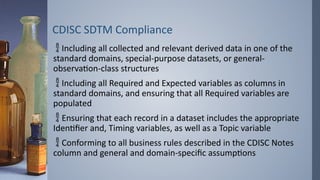
Including all collected and relevant derived data in one of the
standard domains, special-purpose datasets, or general-
observation-class structures
Including all Required and Expected variables as columns in
standard domains, and ensuring that all Required variables are
populated
Ensuring that each record in a dataset includes the appropriate
Identifier and, Timing variables, as well as a Topic variable
Conforming to all business rules described in the CDISC Notes
column and general and domain-specific assumptions
33.
CDISC SDTM Compliance
›There are a number of ways to validate SDTM mappings, but one
of the tools most frequently used is Pinnacle 21.
› The Pinnacle 21 provides a method for checking conformance
and compliance of mappings against the SDTM Implementation
Guide.
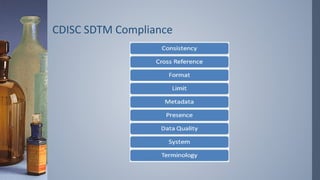
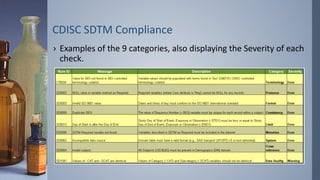
› Pinnacle 21 defines issues with 3 severities and 9 categories.
34.
CDISC SDTM Compliance
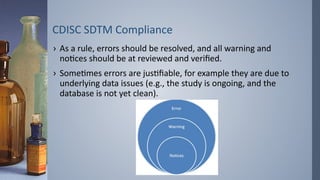
›As a rule, errors should be resolved, and all warning and
notices should be at reviewed and verified.
› Sometimes errors are justifiable, for example they are due to
underlying data issues (e.g., the study is ongoing, and the
database is not yet clean).