Amazon AWS
Layman introduction

I spent a few days getting around my hands with Amazon
WebServices :
Just sharing what I understood if it may help beginners

Parashar
What is Amazon Web Services ?
AWS
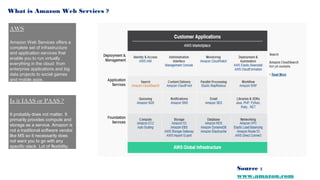
Amazon Web Services offers a
complete set of infrastructure
and application services that
enable you to run virtually
everything in the cloud: from
enterprise applications and big
data projects to social games
and mobile apps.

Is it IAAS or PAAS ?
It probably does not matter. It
primarily provides compute and
storage as a service. Amazon is
not a traditional software vendor
like MS so it necessarily does
not want you to go with any
specific stack. Lot of flexibility.

Source :
www.amazon.com
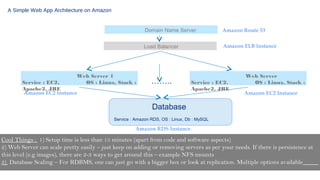
A Simple Web App Architecture on Amazon
Domain Name Server
Load Balancer

Web Server 1
OS : Linux, Stack :

Service : EC2,
Apache2, JRE
Amazon EC2 Instance

Amazon Route 53
Amazon ELB Instance

……..

Service : EC2,
Apache2, JRE

Web Server
OS : Linux, Stack :
Amazon EC2 Instance

Database
Service : Amazon RDS, OS : Linux, Db : MySQL

Amazon RDS Instance

Cool Things : 1) Setup time is less than 15 minutes (apart from code and software aspects)
2) Web Server can scale pretty easily – just keep on adding or removing servers as per your needs. If there is persistence at
this level (e.g images), there are 2-3 ways to get around this – example NFS mounts
3) Database Scaling – For RDBMS, one can just go with a bigger box or look at replication. Multiple options available
Building Blocks

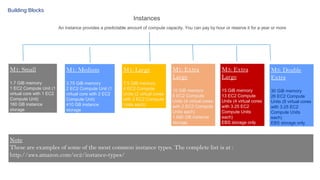
Instances
An instance provides a predictable amount of compute capacity. You can pay by hour or reserve it for a year or more

M1: Small

M1: Medium

M1: Large

1.7 GiB memory
1 EC2 Compute Unit (1
virtual core with 1 EC2
Compute Unit)
160 GB instance
storage

3.75 GiB memory
2 EC2 Compute Unit (1
virtual core with 2 EC2
Compute Unit)
410 GB instance
storage

7.5 GiB memory
4 EC2 Compute
Units (2 virtual cores
with 2 EC2 Compute
Units each)

M1: Extra
Large

M3: Extra
Large

M3: Double
Extra

15 GiB memory
8 EC2 Compute
Units (4 virtual cores
with 2 EC2 Compute
Units each)
1,690 GB instance
storage

15 GiB memory
13 EC2 Compute
Units (4 virtual cores
with 3.25 EC2
Compute Units
each)
EBS storage only

30 GiB memory
26 EC2 Compute
Units (8 virtual cores
with 3.25 EC2
Compute Units
each)
EBS storage only

Note
These are examples of some of the most common instance types. The complete list is at :
http://aws.amazon.com/ec2/instance-types/
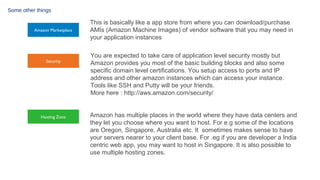
Some other things

Amazon Marketplace

Security

Hosting Zone

This is basically like a app store from where you can download/purchase
AMIs (Amazon Machine Images) of vendor software that you may need in
your application instances
You are expected to take care of application level security mostly but
Amazon provides you most of the basic building blocks and also some
specific domain level certifications. You setup access to ports and IP
address and other amazon instances which can access your instance.
Tools like SSH and Putty will be your friends.
More here : http://aws.amazon.com/security/
Amazon has multiple places in the world where they have data centers and
they let you choose where you want to host. For e.g some of the locations
are Oregon, Singapore, Australia etc. It sometimes makes sense to have
your servers nearer to your client base. For .eg if you are developer a India
centric web app, you may want to host in Singapore. It is also possible to
use multiple hosting zones.
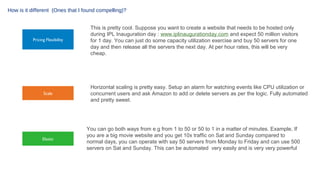
How is it different (Ones that I found compelling)?

Pricing Flexibility

Scale

Elastic

This is pretty cool. Suppose you want to create a website that needs to be hosted only
during IPL Inauguration day : www.iplinaugurationday.com and expect 50 million visitors
for 1 day. You can just do some capacity utilization exercise and buy 50 servers for one
day and then release all the servers the next day. At per hour rates, this will be very
cheap.

Horizontal scaling is pretty easy. Setup an alarm for watching events like CPU utilization or
concurrent users and ask Amazon to add or delete servers as per the logic. Fully automated
and pretty sweet.

You can go both ways from e.g from 1 to 50 or 50 to 1 in a matter of minutes. Example, If
you are a big movie website and you get 10x traffic on Sat and Sunday compared to
normal days, you can operate with say 50 servers from Monday to Friday and can use 500
servers on Sat and Sunday. This can be automated very easily and is very very powerful
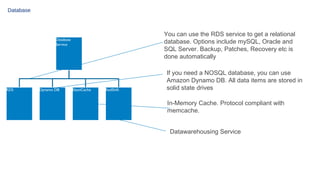
Database

You can use the RDS service to get a relational
database. Options include mySQL, Oracle and
SQL Server. Backup, Patches, Recovery etc is
done automatically

Database
Service

RDS

Dynamo DB

ElastiCache

RedShift

If you need a NOSQL database, you can use
Amazon Dynamo DB. All data items are stored in
solid state drives
In-Memory Cache. Protocol compliant with
memcache.
Datawarehousing Service
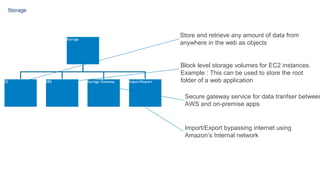
Storage

Store and retrieve any amount of data from
anywhere in the web as objects

Storage

S3

EBS

Storage Gateway

Import/Export

Block level storage volumes for EC2 instances.
Example : This can be used to store the root
folder of a web application

Secure gateway service for data tranfser between
AWS and on-premise apps

Import/Export bypassing internet using
Amazon’s Internal network
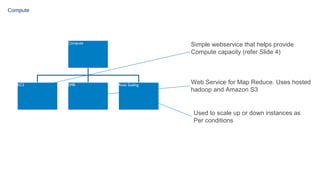
Compute

Compute

EC2

EMR

Simple webservice that helps provide
Compute capacity (refer Slide 4)

Auto Scaling

Web Service for Map Reduce. Uses hosted
hadoop and Amazon S3

Used to scale up or down instances as
Per conditions
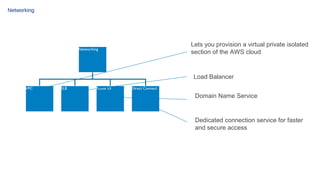
Networking

Lets you provision a virtual private isolated
section of the AWS cloud

Networking

Load Balancer
VPC

ELB

Route 53

Direct Connect

Domain Name Service

Dedicated connection service for faster
and secure access
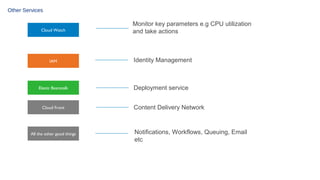
Other Services

Cloud Watch

IAM

Elastic Beanstalk

Cloud Front

All the other good things

Monitor key parameters e.g CPU utilization
and take actions

Identity Management

Deployment service
Content Delivery Network

Notifications, Workflows, Queuing, Email
etc
Conclusion

Its not cool because of the things it does but because of the ease with which you can you do these
things (read right click) ..If you have a bad deployment architecture, no problem, you can deploy a
completely new one pretty quickly, (maybe within minutes). Try it, there is also a free tier.

Amazon web services : Layman Introduction

  • 1.
    Amazon AWS Layman introduction Ispent a few days getting around my hands with Amazon WebServices : Just sharing what I understood if it may help beginners Parashar
  • 2.
    What is AmazonWeb Services ? AWS Amazon Web Services offers a complete set of infrastructure and application services that enable you to run virtually everything in the cloud: from enterprise applications and big data projects to social games and mobile apps. Is it IAAS or PAAS ? It probably does not matter. It primarily provides compute and storage as a service. Amazon is not a traditional software vendor like MS so it necessarily does not want you to go with any specific stack. Lot of flexibility. Source : www.amazon.com
  • 3.
    A Simple WebApp Architecture on Amazon Domain Name Server Load Balancer Web Server 1 OS : Linux, Stack : Service : EC2, Apache2, JRE Amazon EC2 Instance Amazon Route 53 Amazon ELB Instance …….. Service : EC2, Apache2, JRE Web Server OS : Linux, Stack : Amazon EC2 Instance Database Service : Amazon RDS, OS : Linux, Db : MySQL Amazon RDS Instance Cool Things : 1) Setup time is less than 15 minutes (apart from code and software aspects) 2) Web Server can scale pretty easily – just keep on adding or removing servers as per your needs. If there is persistence at this level (e.g images), there are 2-3 ways to get around this – example NFS mounts 3) Database Scaling – For RDBMS, one can just go with a bigger box or look at replication. Multiple options available
  • 4.
    Building Blocks Instances An instanceprovides a predictable amount of compute capacity. You can pay by hour or reserve it for a year or more M1: Small M1: Medium M1: Large 1.7 GiB memory 1 EC2 Compute Unit (1 virtual core with 1 EC2 Compute Unit) 160 GB instance storage 3.75 GiB memory 2 EC2 Compute Unit (1 virtual core with 2 EC2 Compute Unit) 410 GB instance storage 7.5 GiB memory 4 EC2 Compute Units (2 virtual cores with 2 EC2 Compute Units each) M1: Extra Large M3: Extra Large M3: Double Extra 15 GiB memory 8 EC2 Compute Units (4 virtual cores with 2 EC2 Compute Units each) 1,690 GB instance storage 15 GiB memory 13 EC2 Compute Units (4 virtual cores with 3.25 EC2 Compute Units each) EBS storage only 30 GiB memory 26 EC2 Compute Units (8 virtual cores with 3.25 EC2 Compute Units each) EBS storage only Note These are examples of some of the most common instance types. The complete list is at : http://aws.amazon.com/ec2/instance-types/
  • 5.
    Some other things AmazonMarketplace Security Hosting Zone This is basically like a app store from where you can download/purchase AMIs (Amazon Machine Images) of vendor software that you may need in your application instances You are expected to take care of application level security mostly but Amazon provides you most of the basic building blocks and also some specific domain level certifications. You setup access to ports and IP address and other amazon instances which can access your instance. Tools like SSH and Putty will be your friends. More here : http://aws.amazon.com/security/ Amazon has multiple places in the world where they have data centers and they let you choose where you want to host. For e.g some of the locations are Oregon, Singapore, Australia etc. It sometimes makes sense to have your servers nearer to your client base. For .eg if you are developer a India centric web app, you may want to host in Singapore. It is also possible to use multiple hosting zones.
  • 6.
    How is itdifferent (Ones that I found compelling)? Pricing Flexibility Scale Elastic This is pretty cool. Suppose you want to create a website that needs to be hosted only during IPL Inauguration day : www.iplinaugurationday.com and expect 50 million visitors for 1 day. You can just do some capacity utilization exercise and buy 50 servers for one day and then release all the servers the next day. At per hour rates, this will be very cheap. Horizontal scaling is pretty easy. Setup an alarm for watching events like CPU utilization or concurrent users and ask Amazon to add or delete servers as per the logic. Fully automated and pretty sweet. You can go both ways from e.g from 1 to 50 or 50 to 1 in a matter of minutes. Example, If you are a big movie website and you get 10x traffic on Sat and Sunday compared to normal days, you can operate with say 50 servers from Monday to Friday and can use 500 servers on Sat and Sunday. This can be automated very easily and is very very powerful
  • 7.
    Database You can usethe RDS service to get a relational database. Options include mySQL, Oracle and SQL Server. Backup, Patches, Recovery etc is done automatically Database Service RDS Dynamo DB ElastiCache RedShift If you need a NOSQL database, you can use Amazon Dynamo DB. All data items are stored in solid state drives In-Memory Cache. Protocol compliant with memcache. Datawarehousing Service
  • 8.
    Storage Store and retrieveany amount of data from anywhere in the web as objects Storage S3 EBS Storage Gateway Import/Export Block level storage volumes for EC2 instances. Example : This can be used to store the root folder of a web application Secure gateway service for data tranfser between AWS and on-premise apps Import/Export bypassing internet using Amazon’s Internal network
  • 9.
    Compute Compute EC2 EMR Simple webservice thathelps provide Compute capacity (refer Slide 4) Auto Scaling Web Service for Map Reduce. Uses hosted hadoop and Amazon S3 Used to scale up or down instances as Per conditions
  • 10.
    Networking Lets you provisiona virtual private isolated section of the AWS cloud Networking Load Balancer VPC ELB Route 53 Direct Connect Domain Name Service Dedicated connection service for faster and secure access
  • 11.
    Other Services Cloud Watch IAM ElasticBeanstalk Cloud Front All the other good things Monitor key parameters e.g CPU utilization and take actions Identity Management Deployment service Content Delivery Network Notifications, Workflows, Queuing, Email etc
  • 12.
    Conclusion Its not coolbecause of the things it does but because of the ease with which you can you do these things (read right click) ..If you have a bad deployment architecture, no problem, you can deploy a completely new one pretty quickly, (maybe within minutes). Try it, there is also a free tier.