Operating on a budget:
                   Ubuntu for libraries
                             Nicole c. engard
                           http://web2learning.net


Wednesday, June 30, 2010
Operating on a budget

                   • Ubuntu is an open source operating system
                   • based on the linux framework
                   • available for download for free
                   • install on as many machines as you want
                           • no extra licensing fees


Wednesday, June 30, 2010
what is open source

                   • open source software is software that comes with
                     the freedom to use, modify, improve upon and
                     redistribute for any purpose
                   • open source is developed in a collaborative
                     manner, usually over the internet


Wednesday, June 30, 2010
why open source

                   • not just because of our shrinking budgets
                    • because libraries are about openness, why
                       isn’t our software?
                           • because libraries are about sharing and so is
                             open source
                           • because libraries are about communities and
                             so is open source


Wednesday, June 30, 2010
why ubuntu
                   • “I am what I am because of who we all are”
                   • easy to install
                    • Jessamyn installs ubuntu:   vimeo.com/4169783

                   • easy to use
                   • well supported & documented
                   • available in many languages
                   • lots of additional software options

Wednesday, June 30, 2010
what’s in ubuntu
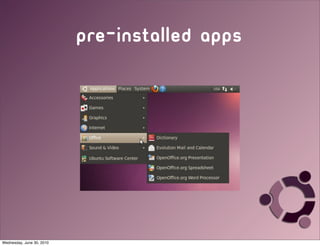
                   • Comes with a complete office suite
                    • openoffice.org
                   • web browser pre-installed
                    • firefox.com
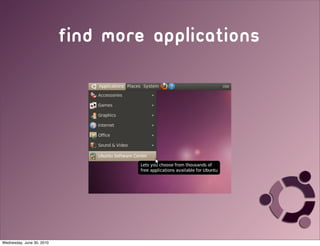
                   • easy to find additional applications
                    • help.ubuntu.com/community/Applications


Wednesday, June 30, 2010
securing ubuntu

                   • we need to have a secure operating system
                     on our public machines
                   • ubuntu has a lot of security already built in
                   • learn how to set up your workstations for
                     the public from librarian Kevin Smith
                           •   http://ashkev.weblogs.us/archives/478


Wednesday, June 30, 2010
find more applications


Wednesday, June 30, 2010
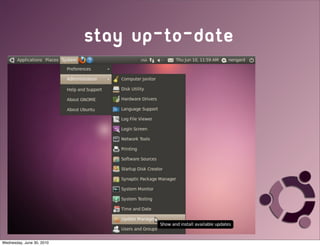
stay up-to-date


Wednesday, June 30, 2010
pre-installed apps


Wednesday, June 30, 2010
Office Suite

                   • Openoffice.org is over twenty years
                   • can handle all of your office operations
                           • word processing, spreadsheets, databases,
                             presentations
                   • cross platform support
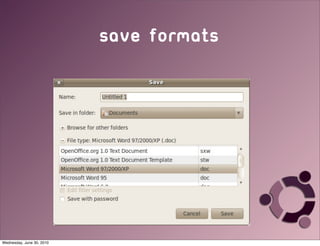
                    • will open and save in one of many other
                       formats including Microsoft


Wednesday, June 30, 2010
Save formats


Wednesday, June 30, 2010
Let’s take a look


Wednesday, June 30, 2010
Thank you
                                             Nicole C. engard
                               practical open source software for libraries
                                  http://opensource.web2learning.net
                           director of open source education, bywater solutions
                                          nengard@gmail.com


Wednesday, June 30, 2010

Operating on a Budget: Ubuntu for Libraries

  • 1.
    Operating on abudget: Ubuntu for libraries Nicole c. engard http://web2learning.net Wednesday, June 30, 2010
  • 2.
    Operating on abudget • Ubuntu is an open source operating system • based on the linux framework • available for download for free • install on as many machines as you want • no extra licensing fees Wednesday, June 30, 2010
  • 3.
    what is opensource • open source software is software that comes with the freedom to use, modify, improve upon and redistribute for any purpose • open source is developed in a collaborative manner, usually over the internet Wednesday, June 30, 2010
  • 4.
    why open source • not just because of our shrinking budgets • because libraries are about openness, why isn’t our software? • because libraries are about sharing and so is open source • because libraries are about communities and so is open source Wednesday, June 30, 2010
  • 5.
    why ubuntu • “I am what I am because of who we all are” • easy to install • Jessamyn installs ubuntu: vimeo.com/4169783 • easy to use • well supported & documented • available in many languages • lots of additional software options Wednesday, June 30, 2010
  • 6.
    what’s in ubuntu • Comes with a complete office suite • openoffice.org • web browser pre-installed • firefox.com • easy to find additional applications • help.ubuntu.com/community/Applications Wednesday, June 30, 2010
  • 7.
    securing ubuntu • we need to have a secure operating system on our public machines • ubuntu has a lot of security already built in • learn how to set up your workstations for the public from librarian Kevin Smith • http://ashkev.weblogs.us/archives/478 Wednesday, June 30, 2010
  • 8.
  • 9.
  • 10.
  • 11.
    Office Suite • Openoffice.org is over twenty years • can handle all of your office operations • word processing, spreadsheets, databases, presentations • cross platform support • will open and save in one of many other formats including Microsoft Wednesday, June 30, 2010
  • 12.
  • 13.
    Let’s take alook Wednesday, June 30, 2010
  • 14.
    Thank you Nicole C. engard practical open source software for libraries http://opensource.web2learning.net director of open source education, bywater solutions nengard@gmail.com Wednesday, June 30, 2010