AI from Space using
Azure
Christos Charmatzis
@christoscharmatzis
https://tageoforce.com
Athens, December 2019
Global AI Bootcamp
2019
Agenda
• Introduce ourselves
• Few things about AI
• Earth Observation Data and where to find
them
• Choosing the right way with the right tools
• Going to Azure for full power
• Conclusions
Few things
about me
• Project manager @TA-Geoforce
• GIS Specialist 10+ years
• AI professional
• Open Source enthusiasm
• Piano player
Chopin – Heroic Polonaise
Source:
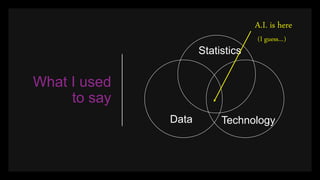
What I used
to say
Data
Statistics
Technology
A.I. is here
(I guess…)
What’s AI for
me
AI Knowledge
Data
All of us
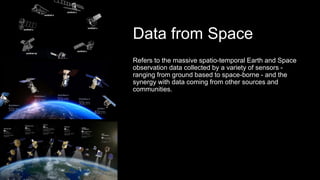
Data from Space
Refers to the massive spatio-temporal Earth and Space
observation data collected by a variety of sensors -
ranging from ground based to space-borne - and the
synergy with data coming from other sources and
communities.
Earth
Observation
Data
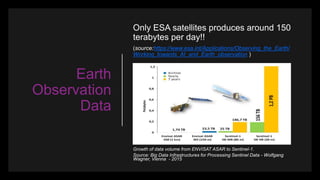
Only ESA satellites produces around 150
terabytes per day!!
(source:https://www.esa.int/Applications/Observing_the_Earth/
Working_towards_AI_and_Earth_observation )
Growth of data volume from ENVISAT ASAR to Sentinel-1.
Source: Big Data Infrastructures for Processing Sentinel Data - Wolfgang
Wagner, Vienna - 2015
Did you know that Azure has an Open
Data Catalogue?
• MODIS
• NAIP
• NOAA Global Forecast System (GFS)
• Harmonized Landsat Sentinel-2
• NOAA Integrated Surface Data (ISD)
• Daymet
And the best part is that are FREE OF
CHARGE!
https://azure.microsoft.com/en-
us/services/open-datasets/catalog
The 1st step
of AI project
1. Talk with the client about the goal of the
AI project.
2. Split the question that needs to be
answered in small questions.
3. Form the Team
4. Search for datasets
You just hit
the wall
The problem in every single
AI project is
ONE (1) WRANGLING with the
DATA.
One solution, just visualize them!
Use ready examples
Spatial data
are special
data?
Tensorflow and Pytorch are specialized
Deep Learning frameworks, that are
developed for specific needs. E.g. Image
recognition
Things don’t go well when you try to use
them outside their comfort zone.
My favorite deep
learning
framework
Raster Vision is an open source framework for Python
developers building computer vision models on satellite,
aerial, and other large imagery sets (including oblique
drone imagery)
https://rastervision.io/
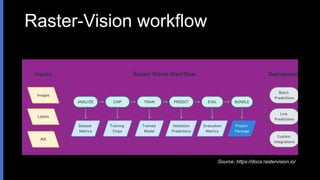
Raster-Vision workflow
Source: https://docs.rastervision.io/
Processing
power catch
CPU cost
Chip Classification < Object Detection < Semantic
Segmentation
Source: https://docs.rastervision.io/
Spatial Data
vs Big Data
All depends on the question:
- If you are studying (labeling) small features
(e.g. roofs, cars, parking places) you are
OK!!! There is nothing to worry about Big
Data.
- If you are studying (labeling) large features
(e.g. lakes, oil spills, forests)
You are in Big (Trouble) Data!!!!
The Don’t’s
1. Never use Windows, always Linux
2. Don’t use the CPU versions, always the
GPU
3. Never run it in your local computer.
- Bonus –
4. Don’t go to your supervisor for a new
Alienware laptop…. ;-)
If not local,
then what?
Good choice (generally)
Azure Machine Learning and
good match with VS Code.
If you are working in special
stuff (as we always do) use
Azure Batch.
2nd step
dockerize
everything
//requirements.txt
azure
azure-storage
azure-storage-blob
#Dockerfile
FROM ta-geoforce/raster-vision:pytorch-0.10
COPY requirements.txt /
RUN pip install -r /requirements.txt
COPY ./experiment/tiny_spacenet.py /
ENV PATH=$PATH:/src
ENV PYTHONPATH /src
ADD ./ /src
WORKDIR /src/
Write
experiments
> python src/tiny_spacenet.py run local -- base_uri 
data --root_uri results
The result
output
Source: https://docs.rastervision.io/
Build & run
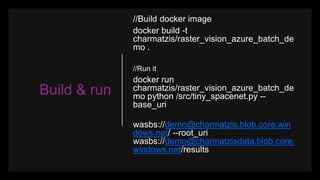
//Build docker image
docker build -t
charmatzis/raster_vision_azure_batch_de
mo .
//Run it
docker run
charmatzis/raster_vision_azure_batch_de
mo python /src/tiny_spacenet.py --
base_uri
wasbs://demo@charmatzis.blob.core.win
dows.net/ --root_uri
wasbs://demo@charmatzisdata.blob.core.
windows.net/results
Move
images to
Azure with 3
simple
moves
• Azure Container Registry
docker login
athensaibootcampdemo.azurecr.io
• Tag your docker container
docker tag
charmatzis/raster_vision_azure_batch_demo:lat
est
athensaibootcampdemo.azurecr.io/charmatzis/
raster_vision_azure_batch_demo :latest
• Upload it to ACR
docker push athensaibootcampdemo.azurecr.io/
athensaibootcampdemo /
raster_vision_azure_batch_demo :latest
Run it on Azure Batch
Run it on Azure Batch…
But how?
• It connects to your container registry and uses those docker images
• Create a Pool if it doesn’t exist yet. Here, you can configure which kind of
VMs and how many of them you want in your pool. And more importantly,
you can specify that it are Low Prio VMs, which are cheap.
• Create a Job within the Pool
• Create a separate task to process each year of data. In a real-life situation,
you would have a task for each day of data.
$Pricing$
https://azure.microsoft.com/en-us/pricing/details/batch/
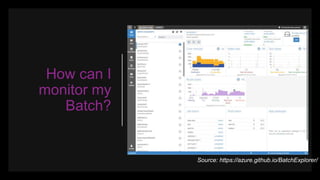
How can I
monitor my
Batch?
Source: https://azure.github.io/BatchExplorer/
Conclusions
• If you have normal experiments, use Azure
Machine Learning
• If you are working in some crazy stuff go
straight to Azure Batch using containers.
• Also use as simple storage as possible (Blob)
• Be patient, things never work by themselves.
(Bonus)
• Never, use your laptop for deep learning…
Thank U
&
Questions
https://github.com/TA-Geoforce/GlobalAIBootcamp2019

AI from Space using Azure

  • 1.
    AI from Spaceusing Azure Christos Charmatzis @christoscharmatzis https://tageoforce.com Athens, December 2019 Global AI Bootcamp 2019
  • 2.
    Agenda • Introduce ourselves •Few things about AI • Earth Observation Data and where to find them • Choosing the right way with the right tools • Going to Azure for full power • Conclusions
  • 3.
    Few things about me •Project manager @TA-Geoforce • GIS Specialist 10+ years • AI professional • Open Source enthusiasm • Piano player Chopin – Heroic Polonaise Source:
  • 4.
    What I used tosay Data Statistics Technology A.I. is here (I guess…)
  • 5.
    What’s AI for me AIKnowledge Data All of us
  • 6.
    Data from Space Refersto the massive spatio-temporal Earth and Space observation data collected by a variety of sensors - ranging from ground based to space-borne - and the synergy with data coming from other sources and communities.
  • 7.
    Earth Observation Data Only ESA satellitesproduces around 150 terabytes per day!! (source:https://www.esa.int/Applications/Observing_the_Earth/ Working_towards_AI_and_Earth_observation ) Growth of data volume from ENVISAT ASAR to Sentinel-1. Source: Big Data Infrastructures for Processing Sentinel Data - Wolfgang Wagner, Vienna - 2015
  • 8.
    Did you knowthat Azure has an Open Data Catalogue? • MODIS • NAIP • NOAA Global Forecast System (GFS) • Harmonized Landsat Sentinel-2 • NOAA Integrated Surface Data (ISD) • Daymet And the best part is that are FREE OF CHARGE! https://azure.microsoft.com/en- us/services/open-datasets/catalog
  • 9.
    The 1st step ofAI project 1. Talk with the client about the goal of the AI project. 2. Split the question that needs to be answered in small questions. 3. Form the Team 4. Search for datasets
  • 10.
    You just hit thewall The problem in every single AI project is ONE (1) WRANGLING with the DATA. One solution, just visualize them!
  • 11.
  • 12.
    Spatial data are special data? Tensorflowand Pytorch are specialized Deep Learning frameworks, that are developed for specific needs. E.g. Image recognition Things don’t go well when you try to use them outside their comfort zone.
  • 13.
    My favorite deep learning framework RasterVision is an open source framework for Python developers building computer vision models on satellite, aerial, and other large imagery sets (including oblique drone imagery) https://rastervision.io/
  • 14.
  • 15.
    Processing power catch CPU cost ChipClassification < Object Detection < Semantic Segmentation Source: https://docs.rastervision.io/
  • 16.
    Spatial Data vs BigData All depends on the question: - If you are studying (labeling) small features (e.g. roofs, cars, parking places) you are OK!!! There is nothing to worry about Big Data. - If you are studying (labeling) large features (e.g. lakes, oil spills, forests) You are in Big (Trouble) Data!!!!
  • 17.
    The Don’t’s 1. Neveruse Windows, always Linux 2. Don’t use the CPU versions, always the GPU 3. Never run it in your local computer. - Bonus – 4. Don’t go to your supervisor for a new Alienware laptop…. ;-)
  • 18.
    If not local, thenwhat? Good choice (generally) Azure Machine Learning and good match with VS Code. If you are working in special stuff (as we always do) use Azure Batch.
  • 19.
    2nd step dockerize everything //requirements.txt azure azure-storage azure-storage-blob #Dockerfile FROM ta-geoforce/raster-vision:pytorch-0.10 COPYrequirements.txt / RUN pip install -r /requirements.txt COPY ./experiment/tiny_spacenet.py / ENV PATH=$PATH:/src ENV PYTHONPATH /src ADD ./ /src WORKDIR /src/
  • 20.
    Write experiments > python src/tiny_spacenet.pyrun local -- base_uri data --root_uri results
  • 21.
  • 22.
    Build & run //Builddocker image docker build -t charmatzis/raster_vision_azure_batch_de mo . //Run it docker run charmatzis/raster_vision_azure_batch_de mo python /src/tiny_spacenet.py -- base_uri wasbs://demo@charmatzis.blob.core.win dows.net/ --root_uri wasbs://demo@charmatzisdata.blob.core. windows.net/results
  • 23.
    Move images to Azure with3 simple moves • Azure Container Registry docker login athensaibootcampdemo.azurecr.io • Tag your docker container docker tag charmatzis/raster_vision_azure_batch_demo:lat est athensaibootcampdemo.azurecr.io/charmatzis/ raster_vision_azure_batch_demo :latest • Upload it to ACR docker push athensaibootcampdemo.azurecr.io/ athensaibootcampdemo / raster_vision_azure_batch_demo :latest
  • 24.
    Run it onAzure Batch
  • 25.
    Run it onAzure Batch… But how? • It connects to your container registry and uses those docker images • Create a Pool if it doesn’t exist yet. Here, you can configure which kind of VMs and how many of them you want in your pool. And more importantly, you can specify that it are Low Prio VMs, which are cheap. • Create a Job within the Pool • Create a separate task to process each year of data. In a real-life situation, you would have a task for each day of data.
  • 26.
  • 27.
    How can I monitormy Batch? Source: https://azure.github.io/BatchExplorer/
  • 28.
    Conclusions • If youhave normal experiments, use Azure Machine Learning • If you are working in some crazy stuff go straight to Azure Batch using containers. • Also use as simple storage as possible (Blob) • Be patient, things never work by themselves. (Bonus) • Never, use your laptop for deep learning…
  • 29.

Editor's Notes

  • #2 Welcome to the 1st Global AI Bootcamp 2019 in Athens. Title of the presentation is “AI from Space using Azure”. I am Christos Charmatzis and this is the center of our galaxy as the Hubble Space Telescope, the Spitzer Space Telescope, and the Chandra X-ray Observatory have producted. [click]
  • #3 Introduce ourselves Few things about AI Earth Observation Data and where to find them Choosing the right way with the right tools Going to Azure for full power Conclusions
  • #4 Project manager @TA-Geoforce a new establish company in Big Data analytics, AI solutions, Spatial Intelligence Solutions. GIS Specialist 10+ years AI professional Open Source enthusiasm Piano player Chopin – Heroic Polonaise
  • #5 We all have here this so many times from so many people, ( I tell that because it’s nice to remember the high skills that we Data Scientists have!!!!) that if we have 3 sets (circles) which are Data, Statistics and Technology [click] AI is the common space between them. [click] I guess and I say I guess because now days AI is more a brand name, that a scientific definition. [click]
  • #6 What’s AI for me We can represent the whole process with an experiment bottle that we insert data in the form of liquids. Attention, usually on element is not enough to get something, so we need more ingredients. The AI is the bubbles or gas that gets out for experiment bottle and almost is equal with knowledge. But to happen all that we need heat and the heat is all of us that we add energy to system so we can have fire.
  • #7 Data from Space Refers to the massive spatio-temporal Earth and Space observation data collected by a variety of sensors - ranging from ground based to space-borne - and the synergy with data coming from other sources and communities. In the three images we see the satellite from ESA top, WorldView middle (with resolution 30cm), and Airbus
  • #8 Data from Space Only ESA satellites produces around 150 terabytes per day!! Sentinel 1 has reached 1,2 PB in 2015 data.
  • #9 Azure has an open data catalogue with big datasets, you can find this catalogue here https://azure.microsoft.com/en-us/services/open-datasets/catalog Did you know that 6 from 27 (22.2%) are earth observation and every day refresh data? [go to https://azure.microsoft.com/en-us/services/open-datasets/catalog ]
  • #10 Talk with the client about the goal of the AI project. Split the question that needs to be answered in small questions. Form the Team Search for datasets
  • #11 The problem in every single AI project is ONE (1) WRANGLING with the DATA. One solution, just visualize them!
  • #12 Use ready examples [Go to VS code AzureNotebooks-blob-storage-modis.ipynb] Then [go to https://azure.microsoft.com/en-us/services/open-datasets/catalog/modis/ ]
  • #13 Spatial data are special data? Tensorflow and Pytorch are specialized Deep Learning frameworks, that are developed for specific needs. E.g. Image recognition Things don’t go well when you try to use them outside their comfort zone.
  • #14 My favorite deep learning framework Raster Vision is an open source framework for Python developers building computer vision models on satellite, aerial, and other large imagery sets (including oblique drone imagery) [Go to https://rastervision.io/]
  • #15 The process of running experiments includes executing workflows that perform the following commands: ANALYZE: Gather dataset-level statistics and metrics for use in downstream processes. CHIP: Create training chips from a variety of image and label sources. TRAIN: Train a model using a variety of “backends” such as TensorFlow or Keras. PREDICT: Make predictions using trained models on validation and test data. EVAL: Derive evaluation metrics such as F1 score, precision and recall against the model’s predictions on validation datasets. BUNDLE: Bundle the trained model into a Predict Package, which can be deployed in batch processes, live servers, and other workflows.
  • #16 Processing power catch Chip classification < Object detection < Semantic classification
  • #17 Spatial Data vs Big Data All depends on the question: - If you are studying (labeling) small features (e.g. roofs, cars, parking places) you are OK!!! There is nothing to worry about Big Data. If you are studying (labeling) large features (e.g. lakes, oil spills, forests) You are in Big (Trouble) Data!!!!
  • #18 The Don’t’s Never use Windows, always Linux Don’t use the CPU versions, always the GPU Never run it in your local computer. Bonus – 4. Don’t go to your supervisor for a new Alienware laptop…. ;-)
  • #19 If not local, then what? Good choice (generally) Azure Machine Learning and good match with VS Code. If you are working in special stuff (as we always do) use Azure Batch. Spoiler: It is too cheap 0.30Euro/hour [Go to VS Soce to show machine Learning extension]
  • #21 Write experiments SEMANTIC_SEGMENTATION for buildings in Las Vegas [Go to VS code tiny_spacenet.py ] [Go to Qgis] Then [Go to https://docs.rastervision.io/en/0.10/quickstart.html#seeing-results]
  • #22 In the bundle folder there is a predict_package.zip Which include the features that are used for the model and the model
  • #23 Pro Tip: Use the most simple type of storage This means go for blog storage…. It save time!!!!
  • #24 1st move Azure Container Registry – login in your azure container resources 2nd move Tag your docker container – tage your container in the azure container resource 3rd move Upload it to ACR – docker push First time it take a lot of time since it move GB to azure, then changes takes secs
  • #25 Run it on Azure Batch Three choices Use azure CLI Use .Net Use Python We use Python The only you need is a config file to add the credentials and a python script with the functions - create_pool - create_job - add_task wait_for_tasks_to_complete [Go to VS code run_on_azure_batch.py]
  • #26 - It connects to your container registry and uses those docker images - Create a Pool if it doesn’t exist yet. Here, you can configure which kind of VMs and how many of them you want in your pool. And more importantly, you can specify that it are Low Prio VMs, which are cheap. - Create a Job within the Pool - Create a separate task to process each year of data. In a real-life situation, you would have a task for each day of data.
  • #27 NC-series with K80 (up) and NCsv2-series P100 down Starts from 0.18/hour and 0.36/hour Low-priority VMs and Spot VMs Azure Batch has supported low-priority VMs since 2017, but is being updated to support spot VMs. Spot VMs are very similar to low-priority VMs, but instead of a fixed price, the price can vary and a maximum price can optionally be specified to limit the price paid for spot VMs. 80% off!!! https://azure.microsoft.com/en-us/pricing/details/batch/
  • #28 How can I monitor my batch Azure Batch Explorer You can monitor
  • #29 - If you have normal experiments, use Azure Machine Learning - If you are working in some crazy stuff go straight to Azure Batch using containers. Also use as simple storage as possible (Blob) Be patient, things never work by themselves. - Never, use your laptop for deep learning…