Using the California After
School Program Quality Self
Assessment Tool
QuickTime™ and a
decompressor
are needed to see this picture.
Promoting Continuous Quality Improvement
For After School Programs
Today’s Goals
• Learn about the origins of the CA After
School Program Quality Self
Assessment (QSA) Tool.
• Review content of the QSA Tool, User’s
Guide, and how to use each resource.
• Explore the QSA Tool and strategize
how it might be used in your program.
About the QSA Tool
• Available online at
www.afterschoolnetwork.org/qsatool
• Origins
• You are in control of how you use it
• Not mandatory, not an external evaluation
tool
• Part of a staff directed process to improve
program quality.
Overview of the QSA Tool
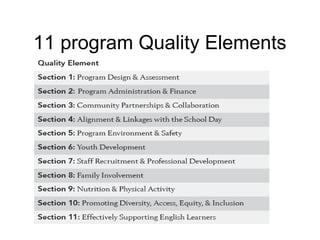
• 11 quality elements including two new quality
elements.
• Increased Point-of-service (site level) focus
(esp. Program Environment and Safety, Youth Development, Family Involvement,
Nutrition and Physical Activity, Promoting Diversity, and Supporting Els)
• Revised with input from multiple CA and National
Experts and Stakeholders.
• New layout allows users to provide examples of each
indicator in their program.
11 program Quality Elements
Overview of the QSA Tool
• Description of program
element
• Description of indicators
• Rank each indicator 1
- 4 based on scale
• Provide examples of
how these indicators
play out in your
program
• Record action planning
ideas and assistance
that may be needed
QSA User’s Guide
• Intended use of the tool (p. 3 and 5)
• Quick Guide (p. 7)
• Survey to Discussion Method (p. 8)
• Consensus based discussion (p. 10)
• Issue Diagnosis Guide (p. 16)
• Action Planning (p. 19)
• Requesting Technical Assistance (p. 21)
Dig in to the tool
• In separate groups you will take on one
section of the tool.
• You will have the chance to see the
work that others have done following
your exploration of a section
Other Uses of the Tool
• Illustrate what the program is doing well
• Begin conversations with Teachers,
Schools and Program Administration
• See how QSA Data compares with
other assessments such as youth and
parent surveys
Thanks for doing what you do!
QuickTime™ and a
decompressor
are needed to see this picture.
We are here to help
www.afterschoolnetwork.org

Afterschool Program Quality Self Assessment Tool Usage

  • 1.
    Using the CaliforniaAfter School Program Quality Self Assessment Tool QuickTime™ and a decompressor are needed to see this picture. Promoting Continuous Quality Improvement For After School Programs
  • 2.
    Today’s Goals • Learnabout the origins of the CA After School Program Quality Self Assessment (QSA) Tool. • Review content of the QSA Tool, User’s Guide, and how to use each resource. • Explore the QSA Tool and strategize how it might be used in your program.
  • 3.
    About the QSATool • Available online at www.afterschoolnetwork.org/qsatool • Origins • You are in control of how you use it • Not mandatory, not an external evaluation tool • Part of a staff directed process to improve program quality.
  • 4.
    Overview of theQSA Tool • 11 quality elements including two new quality elements. • Increased Point-of-service (site level) focus (esp. Program Environment and Safety, Youth Development, Family Involvement, Nutrition and Physical Activity, Promoting Diversity, and Supporting Els) • Revised with input from multiple CA and National Experts and Stakeholders. • New layout allows users to provide examples of each indicator in their program.
  • 5.
  • 6.
    Overview of theQSA Tool • Description of program element • Description of indicators • Rank each indicator 1 - 4 based on scale • Provide examples of how these indicators play out in your program • Record action planning ideas and assistance that may be needed
  • 7.
    QSA User’s Guide •Intended use of the tool (p. 3 and 5) • Quick Guide (p. 7) • Survey to Discussion Method (p. 8) • Consensus based discussion (p. 10) • Issue Diagnosis Guide (p. 16) • Action Planning (p. 19) • Requesting Technical Assistance (p. 21)
  • 8.
    Dig in tothe tool • In separate groups you will take on one section of the tool. • You will have the chance to see the work that others have done following your exploration of a section
  • 9.
    Other Uses ofthe Tool • Illustrate what the program is doing well • Begin conversations with Teachers, Schools and Program Administration • See how QSA Data compares with other assessments such as youth and parent surveys
  • 10.
    Thanks for doingwhat you do! QuickTime™ and a decompressor are needed to see this picture. We are here to help www.afterschoolnetwork.org