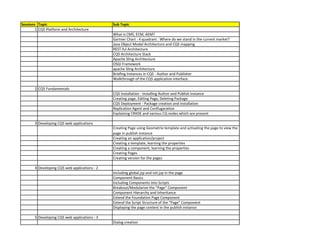
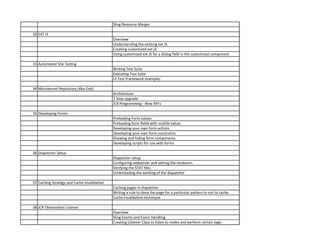
Sessions Topic Sub Topic
1 CQ5 Platform and Architecture
What is CMS, ECM, AEM?
Gartner Chart : 4 quadrant : Where do we stand in the current market?
Java Object Model Architecture and CQ5 mapping
REST-ful Architecture
CQ5 Architecture Stack
Apache Sling Architecture
OSGI Framework
apache Sling Architecture
Briefing Instances in CQ5 - Author and Publisher
Walkthrough of the CQ5 application interface.
2 CQ5 Fundamentals
CQ5 Installation - Installing Author and Publish instance
Creating page, Editing Page, Deleting Package
CQ5 Deployment - Package creation and installation
Replication Agent and Confiugaration
Explaining CRXDE and various CQ nodes which are present
3 Developing CQ5 web applications
Creating Page using Geometrix template and activating the page to view the
page in publish instance
Creating an application/project
Creating a template, learning the properties
Creating a component, learning the properties
Creating Pages
Creating version for the pages
4 Developing CQ5 web applications - 2
Including global.jsp and init.jsp in the page
Component Basics
Including Components into Scripts
Breakout/Modularize the “Page” Component
Component Hierarchy and Inheritance
Extend the Foundation Page Component
Extend the Script Structure of the “Page” Component
Displaying the page content in the publish instance
5 Developing CQ5 web applications - 3
Dialog creation
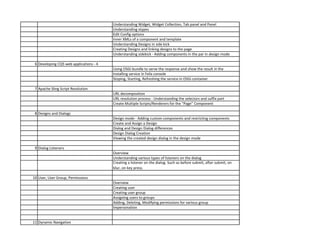
Understanding Widget, Widget Collection, Tab panel and Panel
Understanding xtypes
Edit Config options
Inner XMLs of a component and template
Understanding Designs in side kick
Creating Designs and linking designs to the page
Understanding sidekick - Adding components in the par in design mode
6 Developing CQ5 web applications - 4
Using OSGI bundle to serve the response and show the result in the
Installing service in Felix console
Stoping, Starting, Refreshing the service in OSGi container
7 Apache Sling Script Resolution
URL decomposition
URL resolution process - Understanding the selectors and suffix part
Create Multiple Scripts/Renderers for the “Page” Component
8 Designs and Dialogs
Design mode - Adding custom components and restricting components
Create and Assign a Design
Dialog and Design Dialog differences
Design Dialog Creation
Viewing the created design dialog in the design mode
9 Dialog Listeners
Overview
Understanding various types of listeners on the dialog
Creating a listener on the dialog. Such as before submit, after submit, on
blur, on key press.
10 User, User Group, Permissions
Overview
Creating user
Creating user group
Assigning users to groups
Adding, Deleting, Modifying permissions for various group
Impersonation
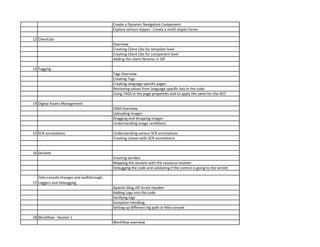
11 Dynamic Navigation
Create a Dynamic Navigation Component
Explore various xtypes - Create a multi xtypes forms
12 ClientLibs
Overview
Creating Client Libs for template level
Creating Client Libs for component level
Adding the client libraries in JSP
13 Tagging
Tags Overview
Creating Tags
Creating language specific pages
Retrieving values from language specific key in the code
Using TAGS in the page properties and to apply the same for the SEO
14 Digital Assets Management
DAM Overview
Uploading images
Dragging and dropping images
Understanding image renditions
15 SCR annotations Understanding various SCR annotations
Creating classes with SCR annotations
16 Servlets
Creating servlets
Mapping the servlets with the resource resolver
Debugging the code and validating if the control is going to the servlet
17
Felix console changes and walkthrough,
Loggers and Debugging
Apache Sling JSP Script Handler
Adding Logs into the code
Verifying logs
Exception Handling
Setting up different log path in felix console
18 Workflow - Session 1
Workflow overview
Understanding existing workflows
Understanding various components in an worflow
Workflow packages
19 Workflow - Session 2
Mapping workflow step with a user group and users
Verifying inbox with the mail and taking necessary steps
Creating workflow with various components
Creating workflow instances
Creating workflow process step
20 JCR APIs
JCR Structure
Writing code programatically to perform query and get the results from a
Understanding the query option in the CRXDE for SQL and XPATH type
21 Internationalization
Internationalization Overview
Creating i18n nodes
Coding in Java to get the i18n node values and render the values in the
frontend.
Language Copy - Multi Site Manager Functionality
22 Schedulers
Overview of Sling Scheduling
Writing Scheduler
Understanding the quartz scheduler expressions
23 Brackets Installation and Configuration What is brackets?
What can be done in brackets?
How to configure brackets to connect with AEM instance?
Basic coding in brackets.
Importing the changes from AEM to Local machine through brackets.
Exporting the changes from local to AEM through brackets.
24 AEM 6 Touch optimized Based UI Highlights
Layer Switcher
Editing Features = Editor Frame
Customer Page = Content Frame
Asset Finder Group
Side Panel
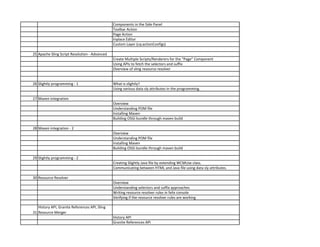
Components in the Side Panel
Toolbar Action
Page Action
Inplace Editor
Custom Layer (cq:actionConfigs)
25 Apache Sling Script Resolution - Advanced
Create Multiple Scripts/Renderers for the “Page” Component
Using APIs to fetch the selectors and suffix
Overview of sling resource resolver
26 Slightly programming - 1 What is slightly?
Using various data sly attributes in the programming.
27 Maven integration
Overview
Understanding POM file
Installing Maven
Building OSGi bundle through maven build
28 Maven integration - 2
Overview
Understanding POM file
Installing Maven
Building OSGi bundle through maven build
29 Slightly programming - 2
Creating Slightly Java file by extending WCMUse class.
Communicating between HTML and Java file using data sly attributes.
30 Resource Resolver
Overview
Understanding selectors and suffix approaches
Writing resource resolver rules in felix console
Verifying if the resource resolver rules are working
31
History API, Granite References API, Sling
Resource Merger
History API
Granite References API
Sling Resource Merger
32 EXT JS
Overview
Understanding the existing ext JS
Creating customized ext JS
Using customized ext JS for a dialog field in the customized component.
33 Automated Site Testing
Writing Test Suite
Executing Test Suite
UI Test Framework examples
34 Microkernel Repository (Aka Oak)
Architecture
2 Step upgrade
JCR Programming - New API's
35 Developing Forms
Preloading Form values
Preloading form fields with multile values
Developing your own form actions
Developing your own form constraints
Showing and hiding form components
Developing scripts for use with forms
36 Dispatcher Setup
Dispatcher setup
Configuring webserver and setting the renderers
Verifying the STAT files
Understading the working of the dispatcher
37 Caching Strategy and Cache Invalidation
Caching pages in dispatcher
Writing a rule to deny the page for a particular pattern to not to cache
Cache invalidation technique
38 JCR Observation Listener
Overview
Sling Events and Event Handling
Creating Listener Class to listen to nodes and perform certain logic
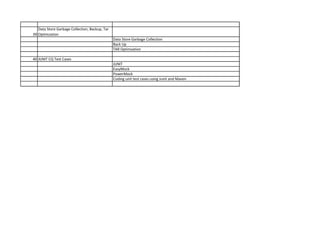
39
Data Store Garbage Collection, Backup, Tar
Optimzation
Data Store Garbage Collection
Back Up
TAR Optimzation
40 JUNIT CQ Test Cases
JUNIT
EasyMock
PowerMock
Coding unit test cases using Junit and Maven

AEM 6.X (With Basics) Training Syllabus

  • 1.
    Sessions Topic SubTopic 1 CQ5 Platform and Architecture What is CMS, ECM, AEM? Gartner Chart : 4 quadrant : Where do we stand in the current market? Java Object Model Architecture and CQ5 mapping REST-ful Architecture CQ5 Architecture Stack Apache Sling Architecture OSGI Framework apache Sling Architecture Briefing Instances in CQ5 - Author and Publisher Walkthrough of the CQ5 application interface. 2 CQ5 Fundamentals CQ5 Installation - Installing Author and Publish instance Creating page, Editing Page, Deleting Package CQ5 Deployment - Package creation and installation Replication Agent and Confiugaration Explaining CRXDE and various CQ nodes which are present 3 Developing CQ5 web applications Creating Page using Geometrix template and activating the page to view the page in publish instance Creating an application/project Creating a template, learning the properties Creating a component, learning the properties Creating Pages Creating version for the pages 4 Developing CQ5 web applications - 2 Including global.jsp and init.jsp in the page Component Basics Including Components into Scripts Breakout/Modularize the “Page” Component Component Hierarchy and Inheritance Extend the Foundation Page Component Extend the Script Structure of the “Page” Component Displaying the page content in the publish instance 5 Developing CQ5 web applications - 3 Dialog creation
  • 2.
    Understanding Widget, WidgetCollection, Tab panel and Panel Understanding xtypes Edit Config options Inner XMLs of a component and template Understanding Designs in side kick Creating Designs and linking designs to the page Understanding sidekick - Adding components in the par in design mode 6 Developing CQ5 web applications - 4 Using OSGI bundle to serve the response and show the result in the Installing service in Felix console Stoping, Starting, Refreshing the service in OSGi container 7 Apache Sling Script Resolution URL decomposition URL resolution process - Understanding the selectors and suffix part Create Multiple Scripts/Renderers for the “Page” Component 8 Designs and Dialogs Design mode - Adding custom components and restricting components Create and Assign a Design Dialog and Design Dialog differences Design Dialog Creation Viewing the created design dialog in the design mode 9 Dialog Listeners Overview Understanding various types of listeners on the dialog Creating a listener on the dialog. Such as before submit, after submit, on blur, on key press. 10 User, User Group, Permissions Overview Creating user Creating user group Assigning users to groups Adding, Deleting, Modifying permissions for various group Impersonation 11 Dynamic Navigation
  • 3.
    Create a DynamicNavigation Component Explore various xtypes - Create a multi xtypes forms 12 ClientLibs Overview Creating Client Libs for template level Creating Client Libs for component level Adding the client libraries in JSP 13 Tagging Tags Overview Creating Tags Creating language specific pages Retrieving values from language specific key in the code Using TAGS in the page properties and to apply the same for the SEO 14 Digital Assets Management DAM Overview Uploading images Dragging and dropping images Understanding image renditions 15 SCR annotations Understanding various SCR annotations Creating classes with SCR annotations 16 Servlets Creating servlets Mapping the servlets with the resource resolver Debugging the code and validating if the control is going to the servlet 17 Felix console changes and walkthrough, Loggers and Debugging Apache Sling JSP Script Handler Adding Logs into the code Verifying logs Exception Handling Setting up different log path in felix console 18 Workflow - Session 1 Workflow overview
  • 4.
    Understanding existing workflows Understandingvarious components in an worflow Workflow packages 19 Workflow - Session 2 Mapping workflow step with a user group and users Verifying inbox with the mail and taking necessary steps Creating workflow with various components Creating workflow instances Creating workflow process step 20 JCR APIs JCR Structure Writing code programatically to perform query and get the results from a Understanding the query option in the CRXDE for SQL and XPATH type 21 Internationalization Internationalization Overview Creating i18n nodes Coding in Java to get the i18n node values and render the values in the frontend. Language Copy - Multi Site Manager Functionality 22 Schedulers Overview of Sling Scheduling Writing Scheduler Understanding the quartz scheduler expressions 23 Brackets Installation and Configuration What is brackets? What can be done in brackets? How to configure brackets to connect with AEM instance? Basic coding in brackets. Importing the changes from AEM to Local machine through brackets. Exporting the changes from local to AEM through brackets. 24 AEM 6 Touch optimized Based UI Highlights Layer Switcher Editing Features = Editor Frame Customer Page = Content Frame Asset Finder Group Side Panel
  • 5.
    Components in theSide Panel Toolbar Action Page Action Inplace Editor Custom Layer (cq:actionConfigs) 25 Apache Sling Script Resolution - Advanced Create Multiple Scripts/Renderers for the “Page” Component Using APIs to fetch the selectors and suffix Overview of sling resource resolver 26 Slightly programming - 1 What is slightly? Using various data sly attributes in the programming. 27 Maven integration Overview Understanding POM file Installing Maven Building OSGi bundle through maven build 28 Maven integration - 2 Overview Understanding POM file Installing Maven Building OSGi bundle through maven build 29 Slightly programming - 2 Creating Slightly Java file by extending WCMUse class. Communicating between HTML and Java file using data sly attributes. 30 Resource Resolver Overview Understanding selectors and suffix approaches Writing resource resolver rules in felix console Verifying if the resource resolver rules are working 31 History API, Granite References API, Sling Resource Merger History API Granite References API
  • 6.
    Sling Resource Merger 32EXT JS Overview Understanding the existing ext JS Creating customized ext JS Using customized ext JS for a dialog field in the customized component. 33 Automated Site Testing Writing Test Suite Executing Test Suite UI Test Framework examples 34 Microkernel Repository (Aka Oak) Architecture 2 Step upgrade JCR Programming - New API's 35 Developing Forms Preloading Form values Preloading form fields with multile values Developing your own form actions Developing your own form constraints Showing and hiding form components Developing scripts for use with forms 36 Dispatcher Setup Dispatcher setup Configuring webserver and setting the renderers Verifying the STAT files Understading the working of the dispatcher 37 Caching Strategy and Cache Invalidation Caching pages in dispatcher Writing a rule to deny the page for a particular pattern to not to cache Cache invalidation technique 38 JCR Observation Listener Overview Sling Events and Event Handling Creating Listener Class to listen to nodes and perform certain logic
  • 7.
    39 Data Store GarbageCollection, Backup, Tar Optimzation Data Store Garbage Collection Back Up TAR Optimzation 40 JUNIT CQ Test Cases JUNIT EasyMock PowerMock Coding unit test cases using Junit and Maven