



Advanced Manufacturing
Planning
William NOLIS (wno) • Functional consultant
2019
EXPERIENCE
Introduction1
Tools to plan your production
Demo
Conclusion
Q & A
2
3
4
5
Introduction1
What’s new ?
● Subcontracting (Talk @ 17.30 - Theatre)
● Master Production Schedule (MPS)
● Flexible Bills of Materials
● Alternative Work Center
● Plan Orders
● MO cancelation
● Google Slides integration
Tools to plan your
production2
Master Production Schedule (MPS)
● Re-designed Master Production Schedule
● Easier to use
● More flexibility
● Allows you to add more products
● More detailed information available
● Tool that allow you to do a real follow-up of your
replenishment
● Integrated with Odoo Apps
● Supports Multi-Warehouse
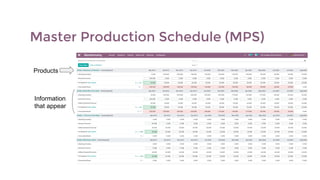
Master Production Schedule (MPS)
Products
Information
that appear
Master Production Schedule (MPS)
You can add new products directly
in the MPS.
You’ll have to define a Safety Stock
Target, a minimum and a maximum
to replenish.
You can also decide the
information you make to
make appear on your MPS
via the “Rows” menu.
Master Production Schedule (MPS)
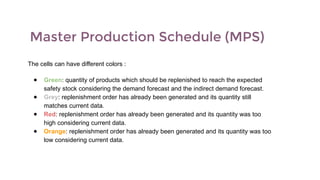
The cells can have different colors :
● Green: quantity of products which should be replenished to reach the expected
safety stock considering the demand forecast and the indirect demand forecast.
● Grey: replenishment order has already been generated and its quantity still
matches current data.
● Red: replenishment order has already been generated and its quantity was too
high considering current data.
● Orange: replenishment order has already been generated and its quantity was too
low considering current data.
Flexible Bills of Materials (BoMs)
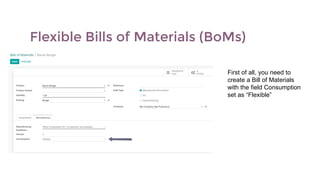
First of all, you need to
create a Bill of Materials
with the field Consumption
set as “Flexible”
Flexible Bills of Materials (BoMs)
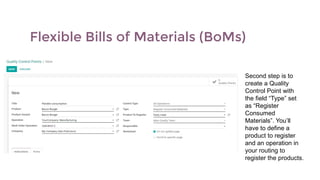
Second step is to
create a Quality
Control Point with
the field “Type” set
as “Register
Consumed
Materials”. You’ll
have to define a
product to register
and an operation in
your routing to
register the products.
Flexible Bills of Materials (BoMs)
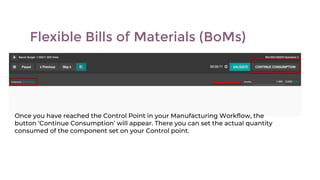
Once you have reached the Control Point in your Manufacturing Workflow, the
button ‘Continue Consumption’ will appear. There you can set the actual quantity
consumed of the component set on your Control point.
Flexible Bills of Materials (BoMs)
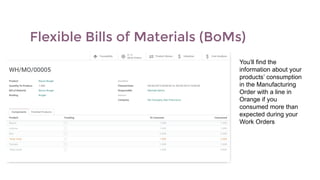
You’ll find the
information about your
products’ consumption
in the Manufacturing
Order with a line in
Orange if you
consumed more than
expected during your
Work Orders
Alternative Work Centers
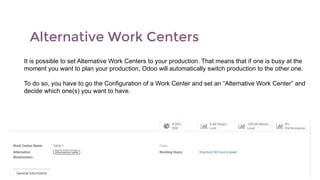
It is possible to set Alternative Work Centers to your production. That means that if one is busy at the
moment you want to plan your production, Odoo will automatically switch production to the other one.
To do so, you have to go the Configuration of a Work Center and set an “Alternative Work Center” and
decide which one(s) you want to have.
Alternative Work Centers
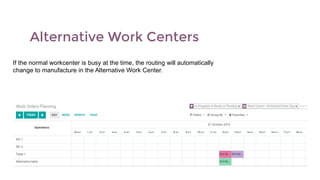
If the normal workcenter is busy at the time, the routing will automatically
change to manufacture in the Alternative Work Center.
Planification of Manufacturing Orders
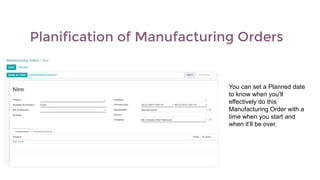
You can set a Planned date
to know when you’ll
effectively do this
Manufacturing Order with a
time when you start and
when it’ll be over.
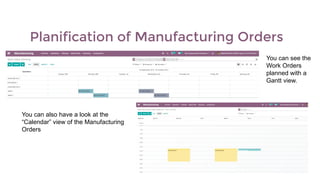
Planification of Manufacturing Orders
You can see the
Work Orders
planned with a
Gantt view.
You can also have a look at the
“Calendar” view of the Manufacturing
Orders
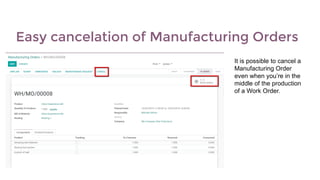
Easy cancelation of Manufacturing Orders
It is possible to cancel a
Manufacturing Order
even when you’re in the
middle of the production
of a Work Order.
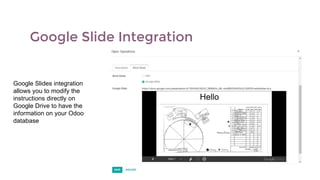
Google Slide Integration
Google Slides integration
allows you to modify the
instructions directly on
Google Drive to have the
information on your Odoo
database
Demo3
Conclusion4
Conclusion
● Odoo helps you plan your production more easily than
ever
● Total integration with your other workflows
● User friendly interface
● Total control over your production from the planification
to the reporting
Q&A5
Thank you.
#odooexperience
William NOLIS (wno) • Functional consultant
2019
EXPERIENCE

Advanced Manufacturing Planning

  • 1.
    Advanced Manufacturing Planning William NOLIS(wno) • Functional consultant 2019 EXPERIENCE
  • 2.
    Introduction1 Tools to planyour production Demo Conclusion Q & A 2 3 4 5
  • 3.
  • 4.
    What’s new ? ●Subcontracting (Talk @ 17.30 - Theatre) ● Master Production Schedule (MPS) ● Flexible Bills of Materials ● Alternative Work Center ● Plan Orders ● MO cancelation ● Google Slides integration
  • 5.
    Tools to planyour production2
  • 6.
    Master Production Schedule(MPS) ● Re-designed Master Production Schedule ● Easier to use ● More flexibility ● Allows you to add more products ● More detailed information available ● Tool that allow you to do a real follow-up of your replenishment ● Integrated with Odoo Apps ● Supports Multi-Warehouse
  • 7.
    Master Production Schedule(MPS) Products Information that appear
  • 8.
    Master Production Schedule(MPS) You can add new products directly in the MPS. You’ll have to define a Safety Stock Target, a minimum and a maximum to replenish. You can also decide the information you make to make appear on your MPS via the “Rows” menu.
  • 9.
    Master Production Schedule(MPS) The cells can have different colors : ● Green: quantity of products which should be replenished to reach the expected safety stock considering the demand forecast and the indirect demand forecast. ● Grey: replenishment order has already been generated and its quantity still matches current data. ● Red: replenishment order has already been generated and its quantity was too high considering current data. ● Orange: replenishment order has already been generated and its quantity was too low considering current data.
  • 10.
    Flexible Bills ofMaterials (BoMs) First of all, you need to create a Bill of Materials with the field Consumption set as “Flexible”
  • 11.
    Flexible Bills ofMaterials (BoMs) Second step is to create a Quality Control Point with the field “Type” set as “Register Consumed Materials”. You’ll have to define a product to register and an operation in your routing to register the products.
  • 12.
    Flexible Bills ofMaterials (BoMs) Once you have reached the Control Point in your Manufacturing Workflow, the button ‘Continue Consumption’ will appear. There you can set the actual quantity consumed of the component set on your Control point.
  • 13.
    Flexible Bills ofMaterials (BoMs) You’ll find the information about your products’ consumption in the Manufacturing Order with a line in Orange if you consumed more than expected during your Work Orders
  • 14.
    Alternative Work Centers Itis possible to set Alternative Work Centers to your production. That means that if one is busy at the moment you want to plan your production, Odoo will automatically switch production to the other one. To do so, you have to go the Configuration of a Work Center and set an “Alternative Work Center” and decide which one(s) you want to have.
  • 15.
    Alternative Work Centers Ifthe normal workcenter is busy at the time, the routing will automatically change to manufacture in the Alternative Work Center.
  • 16.
    Planification of ManufacturingOrders You can set a Planned date to know when you’ll effectively do this Manufacturing Order with a time when you start and when it’ll be over.
  • 17.
    Planification of ManufacturingOrders You can see the Work Orders planned with a Gantt view. You can also have a look at the “Calendar” view of the Manufacturing Orders
  • 18.
    Easy cancelation ofManufacturing Orders It is possible to cancel a Manufacturing Order even when you’re in the middle of the production of a Work Order.
  • 19.
    Google Slide Integration GoogleSlides integration allows you to modify the instructions directly on Google Drive to have the information on your Odoo database
  • 20.
  • 21.
  • 22.
    Conclusion ● Odoo helpsyou plan your production more easily than ever ● Total integration with your other workflows ● User friendly interface ● Total control over your production from the planification to the reporting
  • 23.
  • 24.
    Thank you. #odooexperience William NOLIS(wno) • Functional consultant 2019 EXPERIENCE