Buddha Institute Of Technology,
Gida, Gorakhpur
PRESENTATION ON ADVANCE JAVA
Dhananjay Prajapati
(1452510903)
Department of
Computer science and Eng.
4th year
Email – dhananjayprajapati689@gmail.com
Content
1. Introduction
2. Collection
3. Multithreading
4. Java - Networking
5. AWT
6. Swing
7. JDBC
8. JSP
9. Applet
Introduction
• Java programming language was originally developed by Sun Microsystems which was initiated by
James Gosling and released in 1995 as core component of Sun Microsystems' Java platform (Java
1.0 [J2SE]).
• The latest release of the Java Standard Edition is Java SE 8. With the advancement of Java and its
widespread popularity, multiple configurations were built to suit various types of platforms. For
example: J2EE for Enterprise Applications, J2ME for Mobile Applications.
• The new J2 versions were renamed as Java SE, Java EE, and Java ME respectively. Java is guaranteed
to be Write Once, Run Anywhere.
• Java is −
• Object Oriented − In Java, everything is an Object. Java can be easily extended since it is based on
the Object model.
• Platform Independent − it is not compiled into platform specific machine, rather into platform
independent byte code. This byte code is distributed over the web and interpreted by the Virtual
Machine (JVM) on whichever platform it is being run on.
• Simple − Java is designed to be easy to learn. If you understand the basic concept of OOP Java, it
would be easy to master.
• Secure − With Java's secure feature it enables to develop virus-free, tamper-free systems.
Authentication techniques are based on public-key encryption.
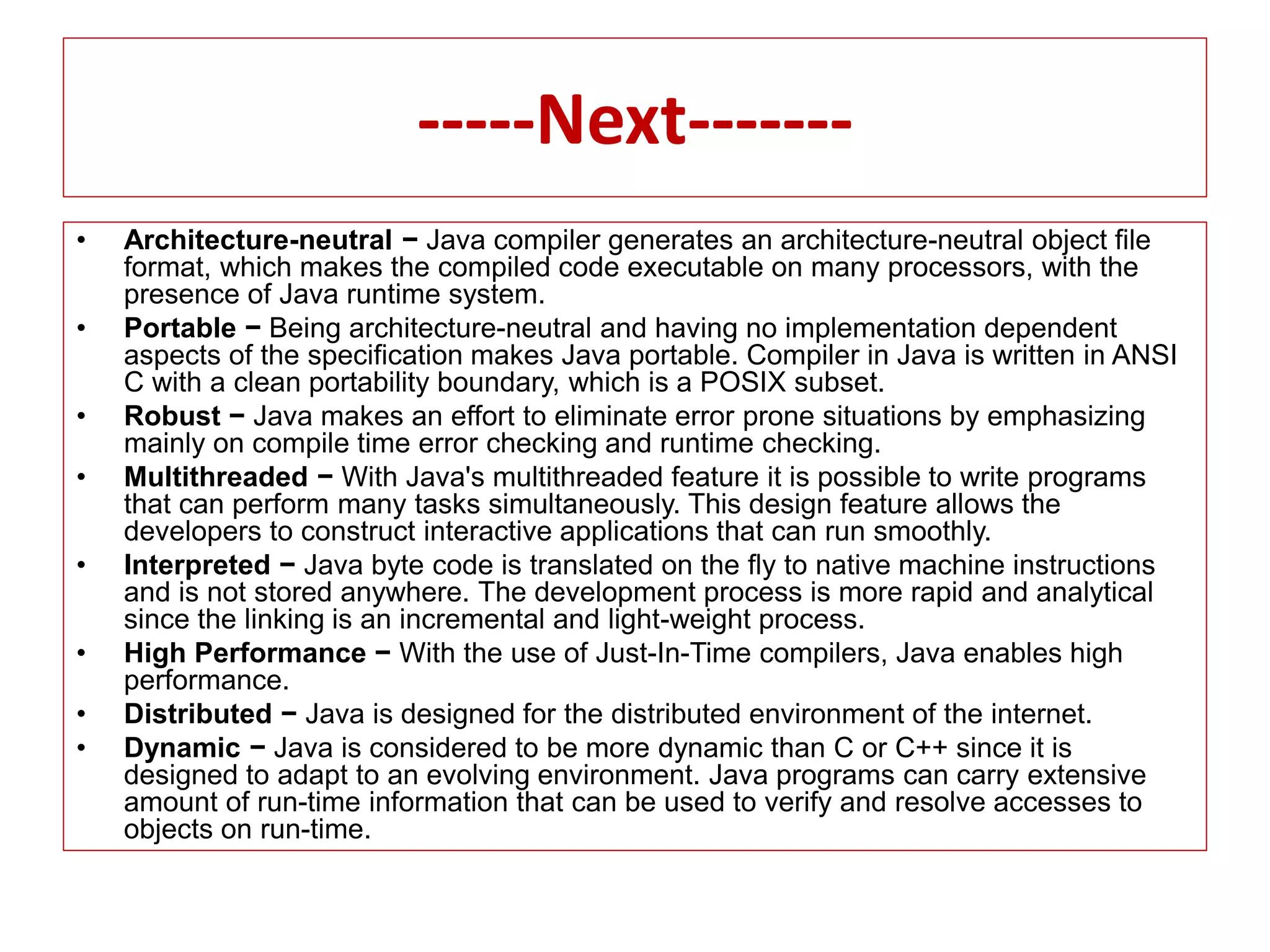
-----Next-------
• Architecture-neutral − Java compiler generates an architecture-neutral object file
format, which makes the compiled code executable on many processors, with the
presence of Java runtime system.
• Portable − Being architecture-neutral and having no implementation dependent
aspects of the specification makes Java portable. Compiler in Java is written in ANSI
C with a clean portability boundary, which is a POSIX subset.
• Robust − Java makes an effort to eliminate error prone situations by emphasizing
mainly on compile time error checking and runtime checking.
• Multithreaded − With Java's multithreaded feature it is possible to write programs
that can perform many tasks simultaneously. This design feature allows the
developers to construct interactive applications that can run smoothly.
• Interpreted − Java byte code is translated on the fly to native machine instructions
and is not stored anywhere. The development process is more rapid and analytical
since the linking is an incremental and light-weight process.
• High Performance − With the use of Just-In-Time compilers, Java enables high
performance.
• Distributed − Java is designed for the distributed environment of the internet.
• Dynamic − Java is considered to be more dynamic than C or C++ since it is
designed to adapt to an evolving environment. Java programs can carry extensive
amount of run-time information that can be used to verify and resolve accesses to
objects on run-time.
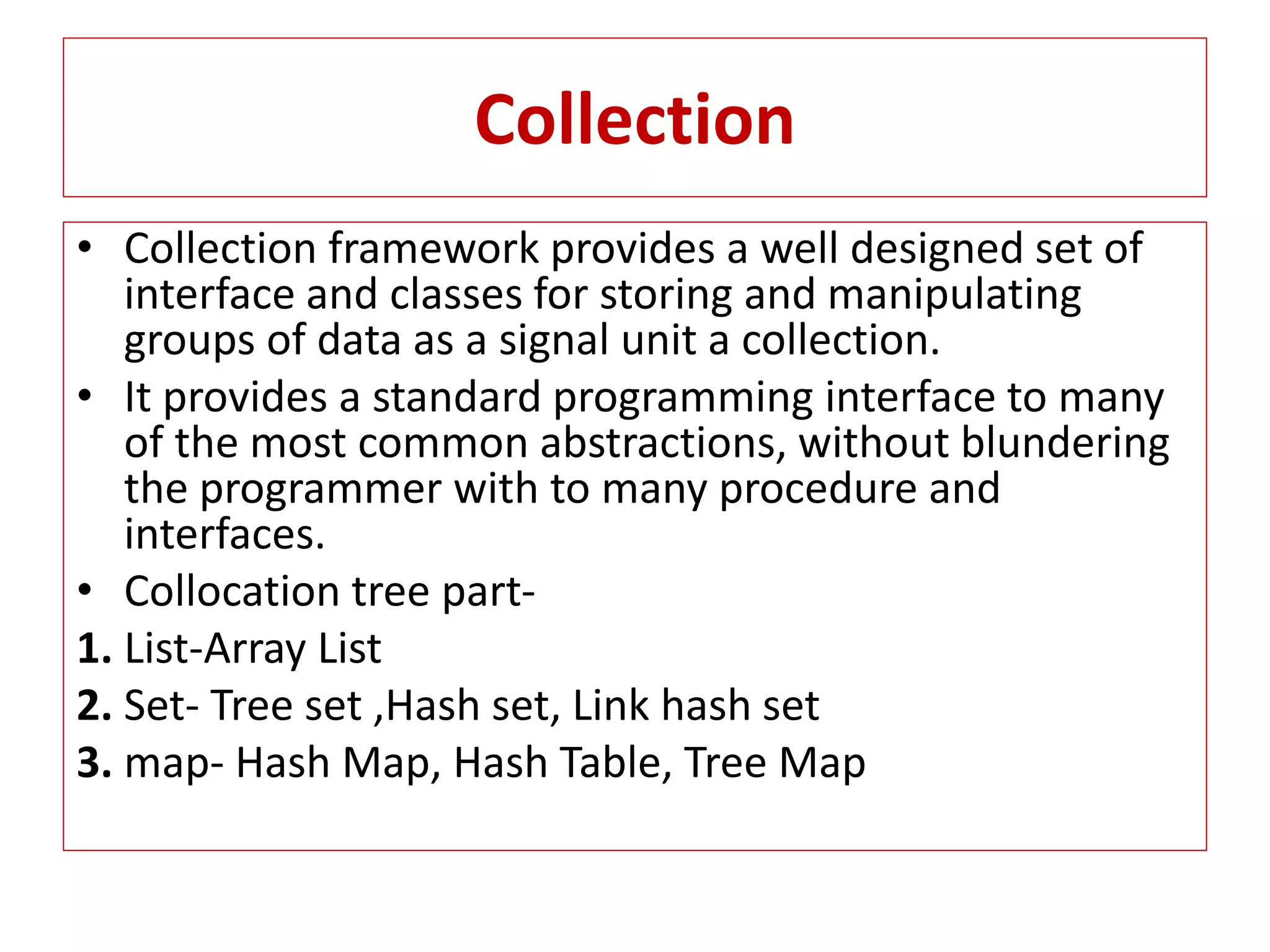
Collection
• Collection framework provides a well designed set of
interface and classes for storing and manipulating
groups of data as a signal unit a collection.
• It provides a standard programming interface to many
of the most common abstractions, without blundering
the programmer with to many procedure and
interfaces.
• Collocation tree part-
1. List-Array List
2. Set- Tree set ,Hash set, Link hash set
3. map- Hash Map, Hash Table, Tree Map
Multithreading
• Java is multithreaded programming language
which means we can develop multithreaded
program using java. A multithreaded program
contains two or more parts that can ran
concurrently and each part can handle
different task at the same time making
optimal use of the available resources
specially when your computer has multiple
CPU.
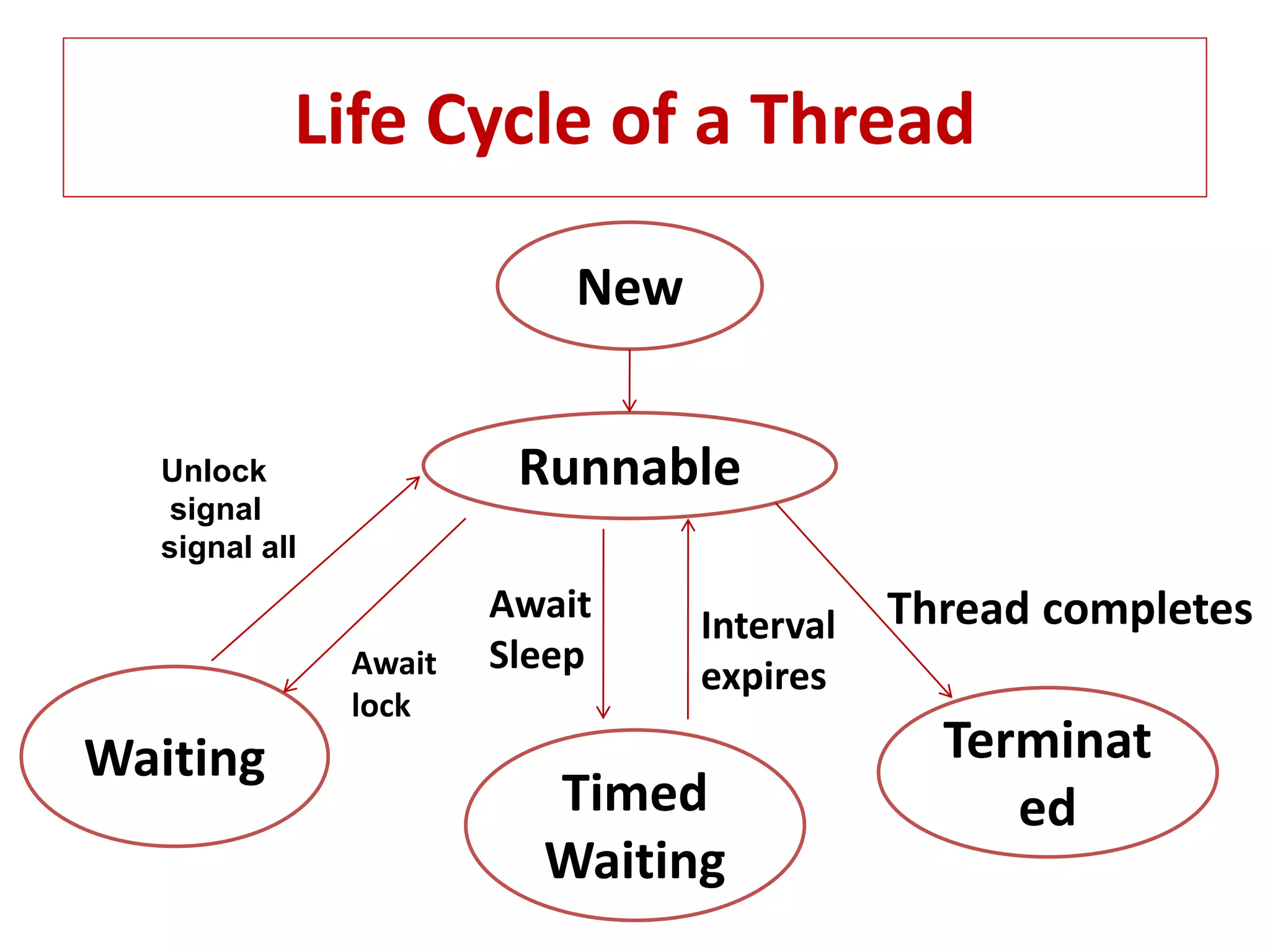
Life Cycle of a Thread
New
Terminat
ed
Runnable
Timed
Waiting
Waiting
Thread completesInterval
expires
Await
SleepAwait
lock
Unlock
signal
signal all
Java-Networking
The term Network programming refers to
writing programs that execute across multiple
devices(Computers), In which the devices are all
connected to each other using a networks.
The Java net package of the J2se API contains a
collection of classes and interfaces that provide
the low-level communication details, allowing
you to write programs that focuses on solving
problem at hand.
The java net package provides support for the
two common network protocols.
Networks Protocols
TCP- TCP stands for transmission control protocol,
which allows for reliable communication between
two application. TCP is typically used over the
Internet Protocol, which is referred to as TCP/IP.
UDP- UDP stands for User Datagram Protocol, a
connection-less protocol that allows for packets of
data to be transmitters between application.
Socket programming- This is most widely used
concept in networking and it has been explained in
very details.
URL Processing- This would be covered
separately. Click here to learn about URL
Processing in java language
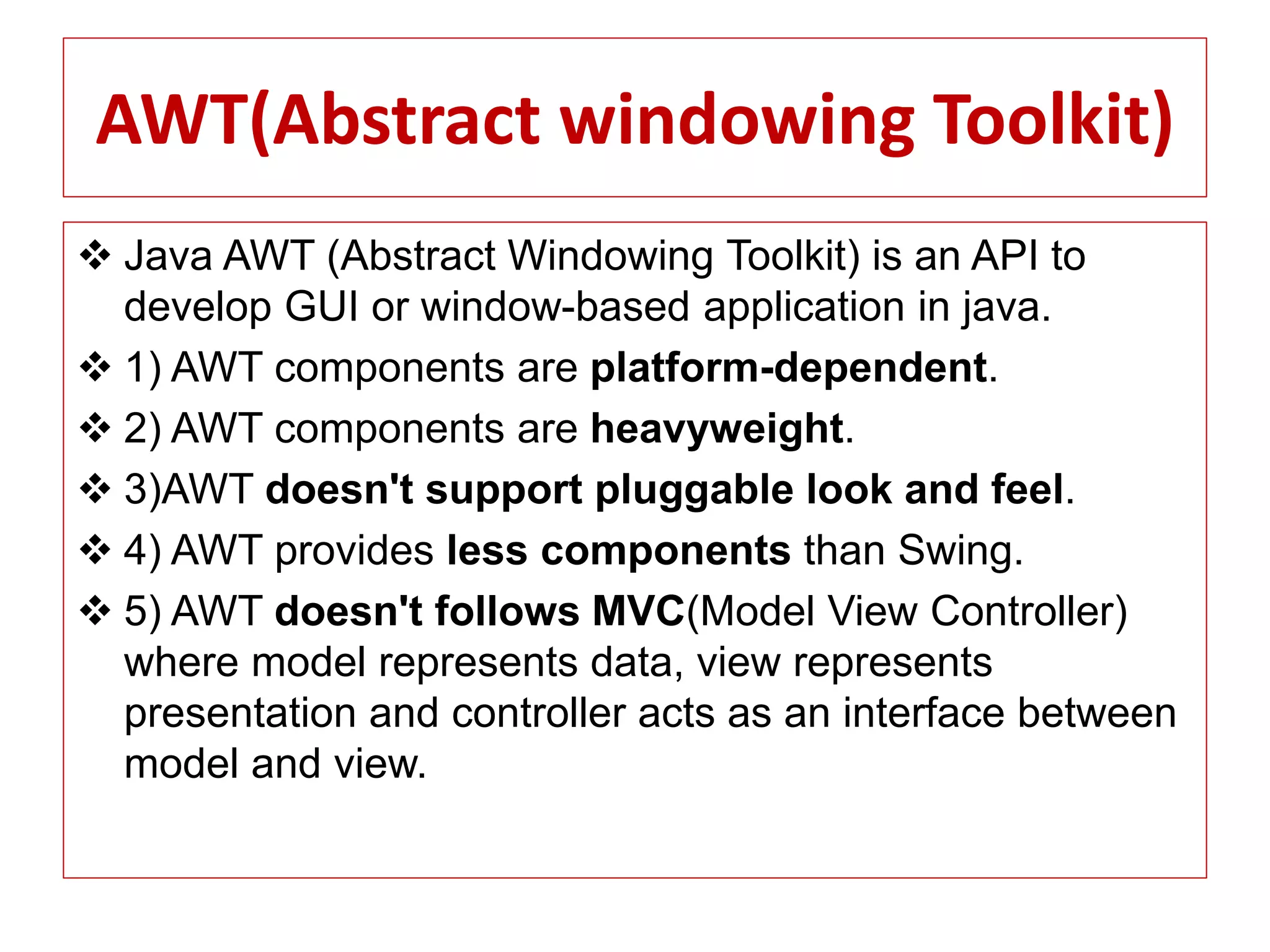
AWT(Abstract windowing Toolkit)
 Java AWT (Abstract Windowing Toolkit) is an API to
develop GUI or window-based application in java.
 1) AWT components are platform-dependent.
 2) AWT components are heavyweight.
 3)AWT doesn't support pluggable look and feel.
 4) AWT provides less components than Swing.
 5) AWT doesn't follows MVC(Model View Controller)
where model represents data, view represents
presentation and controller acts as an interface between
model and view.
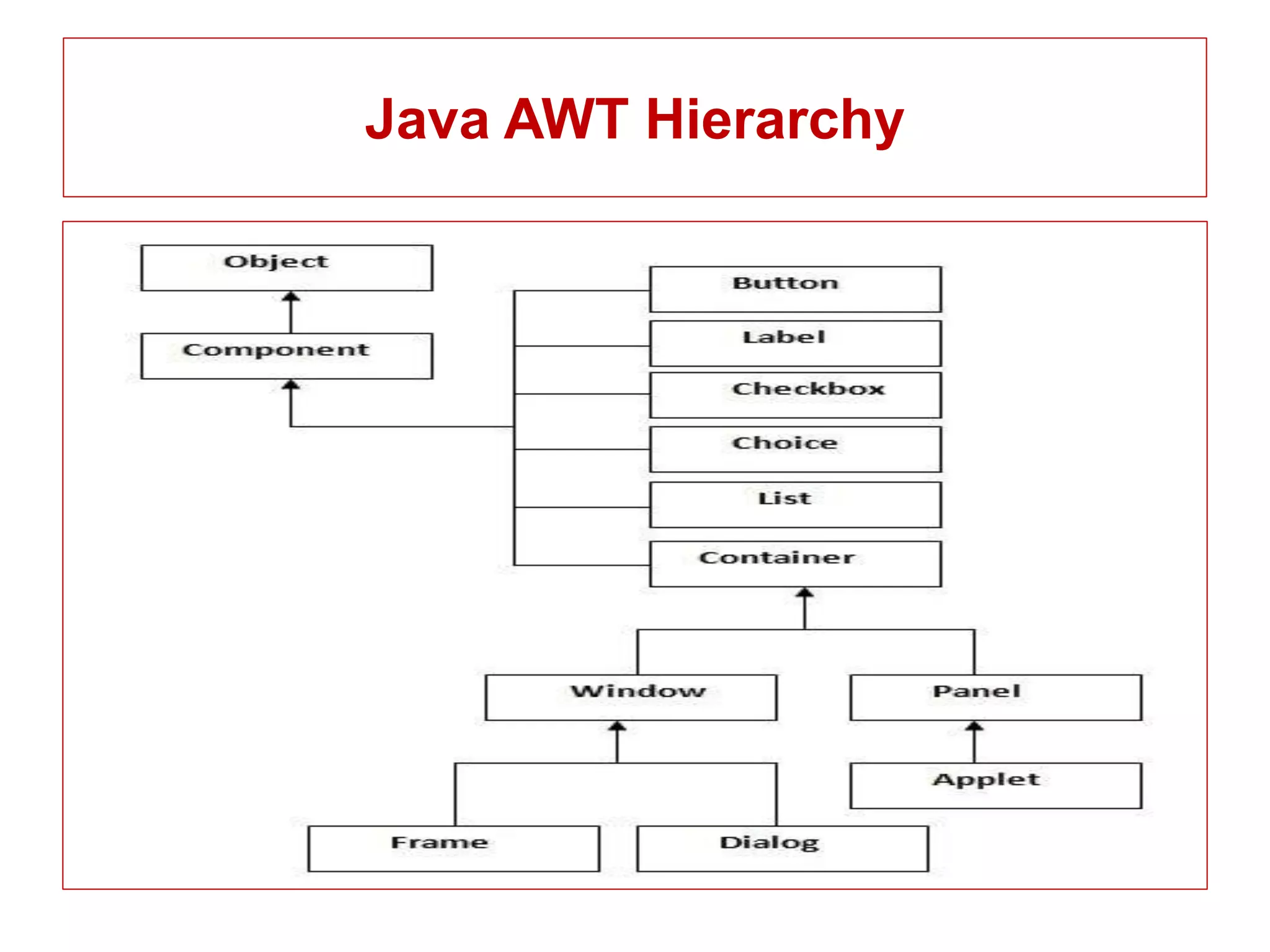
Java AWT Hierarchy
AWT Program
• import java.awt.*;
• class First extends Frame
• {
• First()
• {
• Button b=new Button("click me");
• b.setBounds(30,100,80,30); // setting button position
• add(b); //adding button into frame
• setSize(300,300); //frame size 300 width and 300 height
• setLayout(null); //no layout manager
• setVisible(true); //now frame will be visible, by default not visible
• }
• public static void main(String args[]){
• First f=new First();
• }}
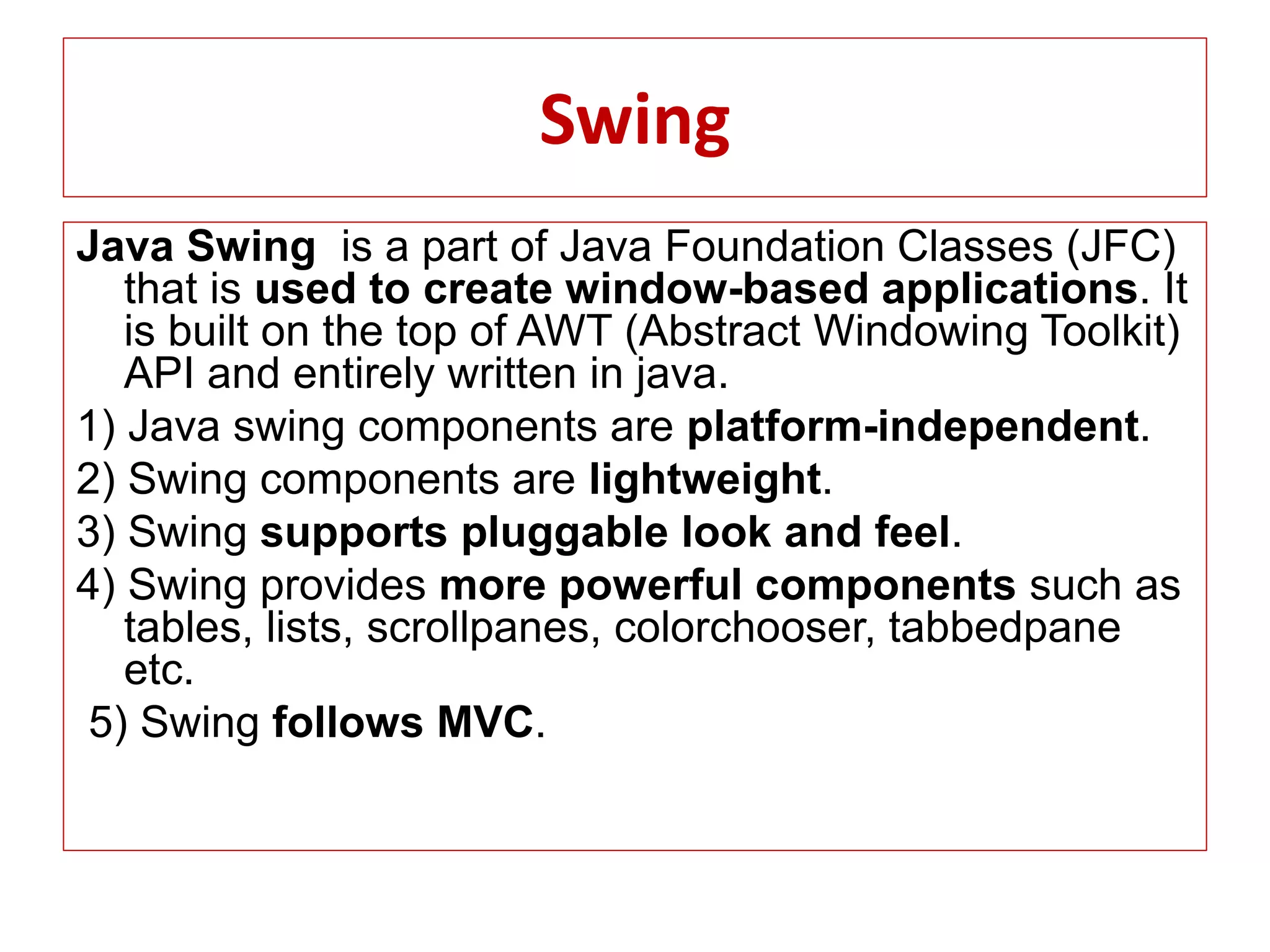
Swing
Java Swing is a part of Java Foundation Classes (JFC)
that is used to create window-based applications. It
is built on the top of AWT (Abstract Windowing Toolkit)
API and entirely written in java.
1) Java swing components are platform-independent.
2) Swing components are lightweight.
3) Swing supports pluggable look and feel.
4) Swing provides more powerful components such as
tables, lists, scrollpanes, colorchooser, tabbedpane
etc.
5) Swing follows MVC.
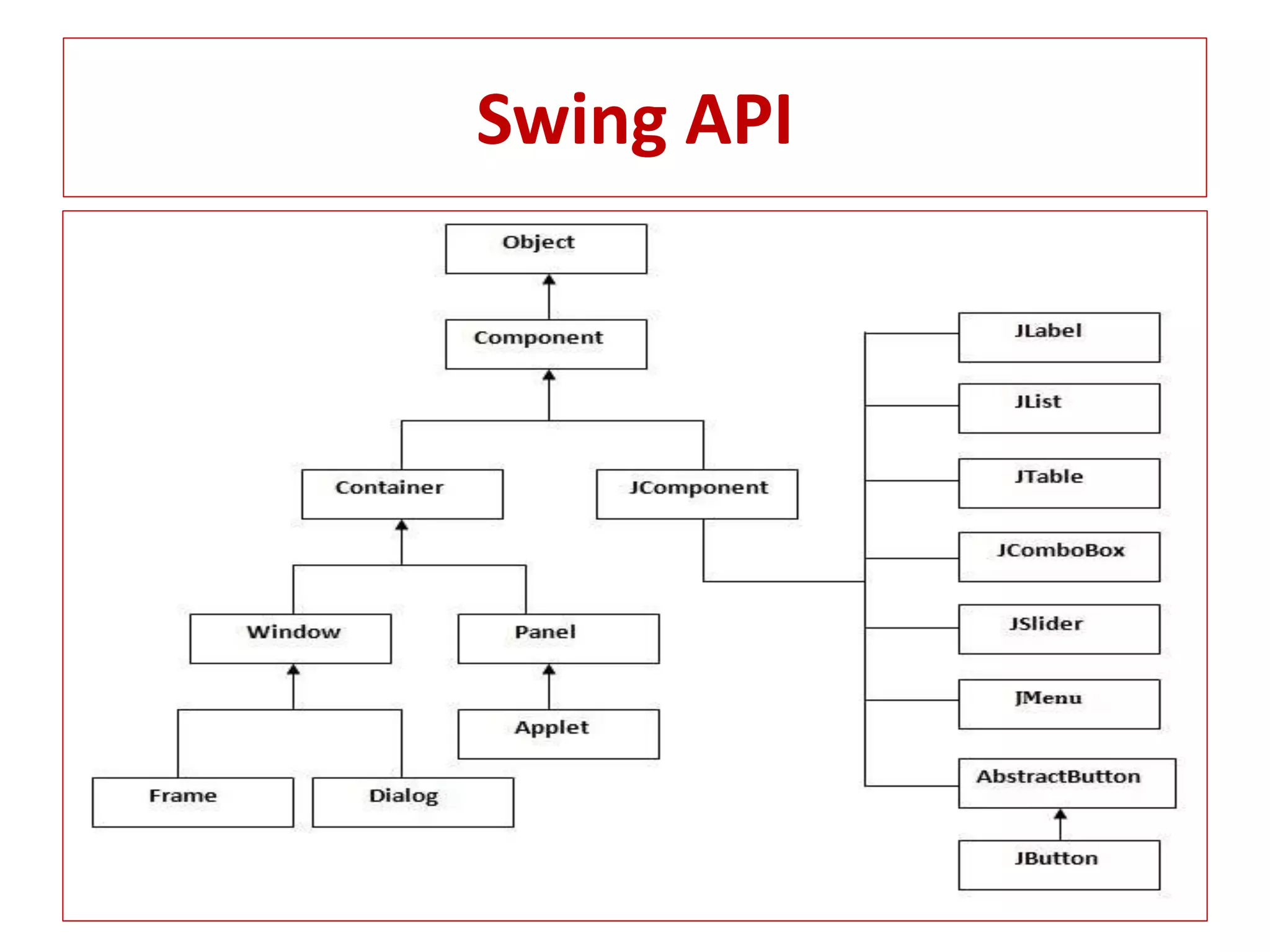
Swing API
Swing Program
Simple Java Swing Example
import javax.swing.*;
public class FirstSwingExample
{
public static void main(String[] args)
{
JFrame f=new JFrame(); //creating instance of JFrame
JButton b=new JButton("click"); //creating instance of JButton
b.setBounds(130,100,100, 40); //x axis, y axis, width, height
f.add(b); //adding button in JFrame
f.setSize(400,500); //400 width and 500 height
f.setLayout(null); //using no layout managers
f.setVisible(true); //making the frame visible
}
}
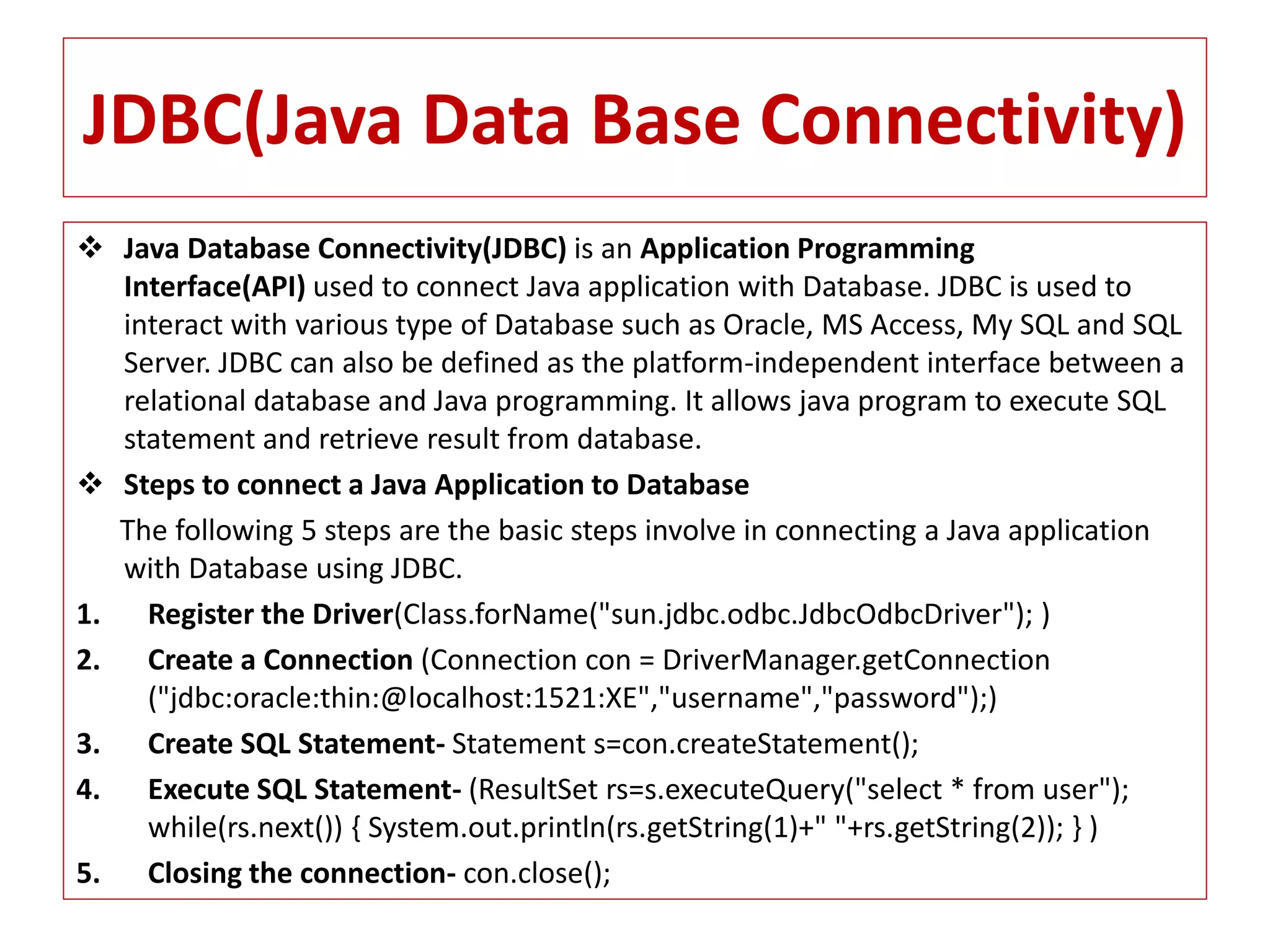
JDBC(Java Data Base Connectivity)
 Java Database Connectivity(JDBC) is an Application Programming
Interface(API) used to connect Java application with Database. JDBC is used to
interact with various type of Database such as Oracle, MS Access, My SQL and SQL
Server. JDBC can also be defined as the platform-independent interface between a
relational database and Java programming. It allows java program to execute SQL
statement and retrieve result from database.
 Steps to connect a Java Application to Database
The following 5 steps are the basic steps involve in connecting a Java application
with Database using JDBC.
1. Register the Driver(Class.forName("sun.jdbc.odbc.JdbcOdbcDriver"); )
2. Create a Connection (Connection con = DriverManager.getConnection
("jdbc:oracle:thin:@localhost:1521:XE","username","password");)
3. Create SQL Statement- Statement s=con.createStatement();
4. Execute SQL Statement- (ResultSet rs=s.executeQuery("select * from user");
while(rs.next()) { System.out.println(rs.getString(1)+" "+rs.getString(2)); } )
5. Closing the connection- con.close();
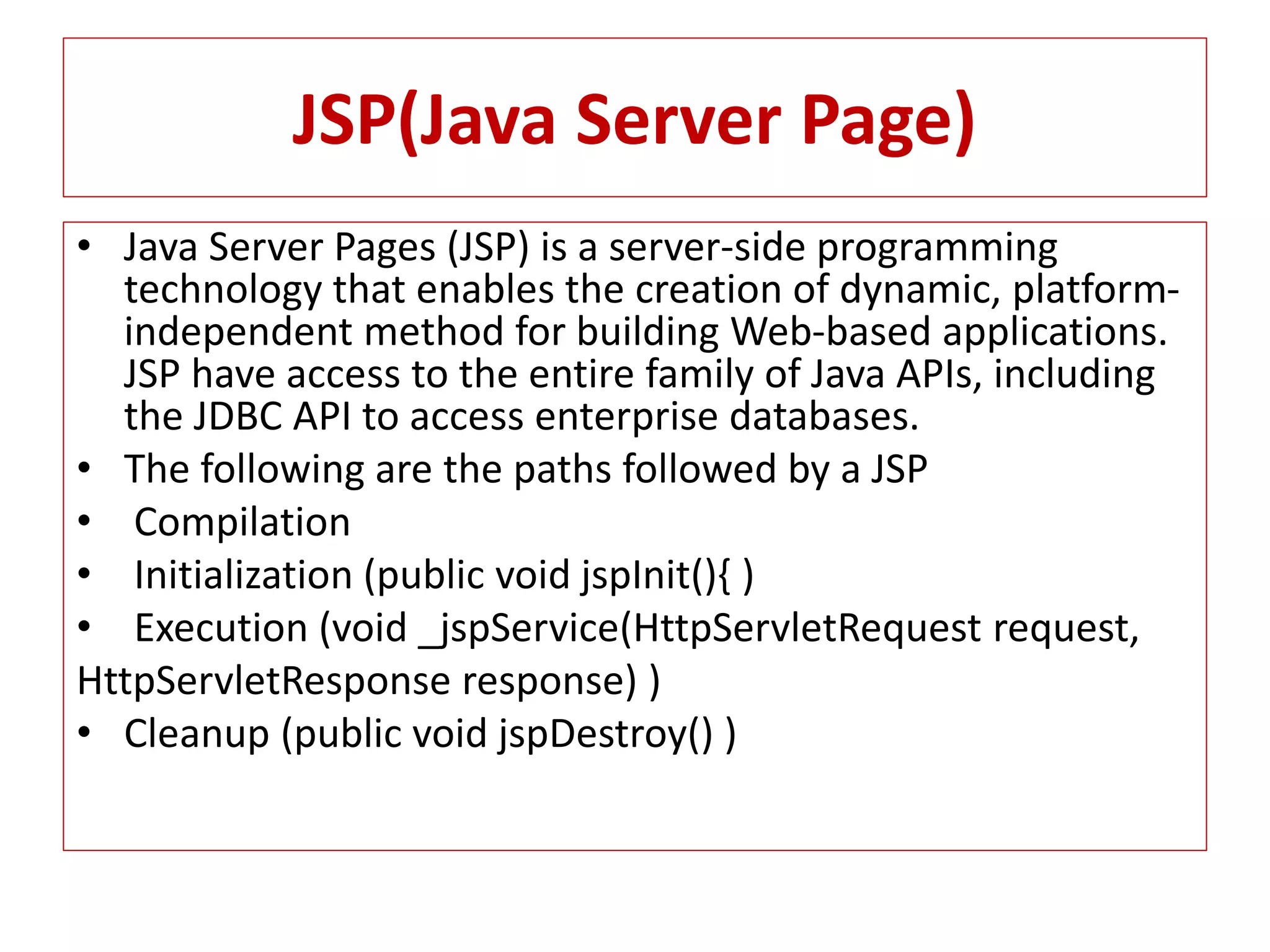
JSP(Java Server Page)
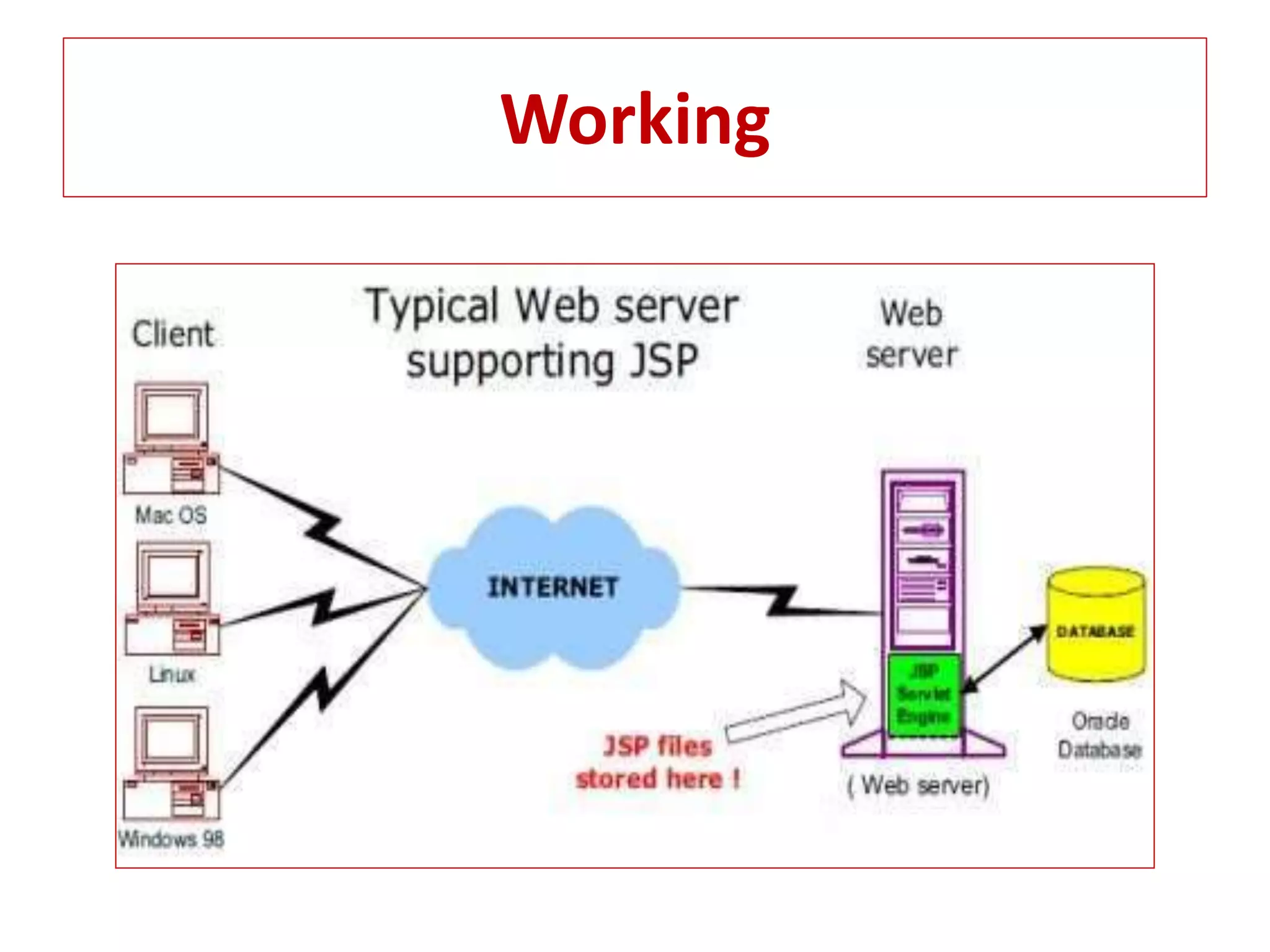
• Java Server Pages (JSP) is a server-side programming
technology that enables the creation of dynamic, platform-
independent method for building Web-based applications.
JSP have access to the entire family of Java APIs, including
the JDBC API to access enterprise databases.
• The following are the paths followed by a JSP
• Compilation
• Initialization (public void jspInit(){ )
• Execution (void _jspService(HttpServletRequest request,
HttpServletResponse response) )
• Cleanup (public void jspDestroy() )
Working
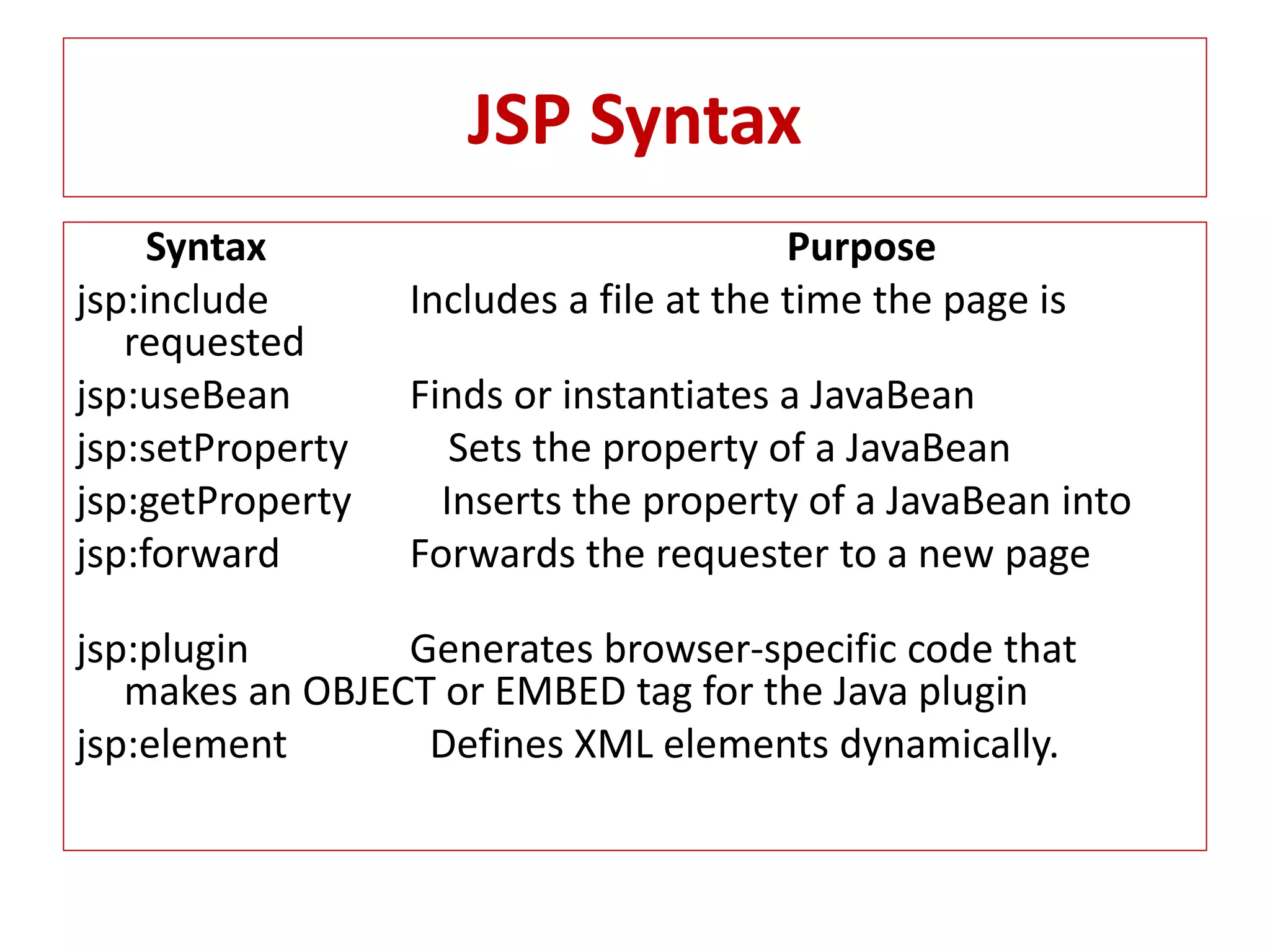
JSP Syntax
Syntax Purpose
jsp:include Includes a file at the time the page is
requested
jsp:useBean Finds or instantiates a JavaBean
jsp:setProperty Sets the property of a JavaBean
jsp:getProperty Inserts the property of a JavaBean into
jsp:forward Forwards the requester to a new page
jsp:plugin Generates browser-specific code that
makes an OBJECT or EMBED tag for the Java plugin
jsp:element Defines XML elements dynamically.
Applets
Applet is a special type of program that is embedded in
the webpage to generate the dynamic content. It runs
inside the browser and works at client side.
• Lifecycle of Java Applet
1.public void init(): is used to initialized the Applet. It is
invoked only once.
2.public void start(): is invoked after the init() method or
browser is maximized. It is used to start the Applet.
3.public void stop(): is used to stop the Applet. It is
invoked when Applet is stop or browser is minimized.
4.public void destroy(): is used to destroy the Applet. It is
invoked only once.
Program Applet
• import java.applet.Applet;
• import java.awt.Graphics;
• public class First extends Applet
• {
• public void paint(Graphics g)
• {
• g.drawString("welcome",150,150);
• }
• }
• Note: class must be public because its object is created by Java Plug in software
that resides on the browser.
• myapplet.html
• <html>
• <body>
• <applet code="First.class" width="300" height="300">
• </applet>
• </body>
• </html>

Advance java prasentation

  • 1.
    Buddha Institute OfTechnology, Gida, Gorakhpur PRESENTATION ON ADVANCE JAVA Dhananjay Prajapati (1452510903) Department of Computer science and Eng. 4th year Email – dhananjayprajapati689@gmail.com
  • 2.
    Content 1. Introduction 2. Collection 3.Multithreading 4. Java - Networking 5. AWT 6. Swing 7. JDBC 8. JSP 9. Applet
  • 3.
    Introduction • Java programminglanguage was originally developed by Sun Microsystems which was initiated by James Gosling and released in 1995 as core component of Sun Microsystems' Java platform (Java 1.0 [J2SE]). • The latest release of the Java Standard Edition is Java SE 8. With the advancement of Java and its widespread popularity, multiple configurations were built to suit various types of platforms. For example: J2EE for Enterprise Applications, J2ME for Mobile Applications. • The new J2 versions were renamed as Java SE, Java EE, and Java ME respectively. Java is guaranteed to be Write Once, Run Anywhere. • Java is − • Object Oriented − In Java, everything is an Object. Java can be easily extended since it is based on the Object model. • Platform Independent − it is not compiled into platform specific machine, rather into platform independent byte code. This byte code is distributed over the web and interpreted by the Virtual Machine (JVM) on whichever platform it is being run on. • Simple − Java is designed to be easy to learn. If you understand the basic concept of OOP Java, it would be easy to master. • Secure − With Java's secure feature it enables to develop virus-free, tamper-free systems. Authentication techniques are based on public-key encryption.
  • 4.
    -----Next------- • Architecture-neutral −Java compiler generates an architecture-neutral object file format, which makes the compiled code executable on many processors, with the presence of Java runtime system. • Portable − Being architecture-neutral and having no implementation dependent aspects of the specification makes Java portable. Compiler in Java is written in ANSI C with a clean portability boundary, which is a POSIX subset. • Robust − Java makes an effort to eliminate error prone situations by emphasizing mainly on compile time error checking and runtime checking. • Multithreaded − With Java's multithreaded feature it is possible to write programs that can perform many tasks simultaneously. This design feature allows the developers to construct interactive applications that can run smoothly. • Interpreted − Java byte code is translated on the fly to native machine instructions and is not stored anywhere. The development process is more rapid and analytical since the linking is an incremental and light-weight process. • High Performance − With the use of Just-In-Time compilers, Java enables high performance. • Distributed − Java is designed for the distributed environment of the internet. • Dynamic − Java is considered to be more dynamic than C or C++ since it is designed to adapt to an evolving environment. Java programs can carry extensive amount of run-time information that can be used to verify and resolve accesses to objects on run-time.
  • 5.
    Collection • Collection frameworkprovides a well designed set of interface and classes for storing and manipulating groups of data as a signal unit a collection. • It provides a standard programming interface to many of the most common abstractions, without blundering the programmer with to many procedure and interfaces. • Collocation tree part- 1. List-Array List 2. Set- Tree set ,Hash set, Link hash set 3. map- Hash Map, Hash Table, Tree Map
  • 6.
    Multithreading • Java ismultithreaded programming language which means we can develop multithreaded program using java. A multithreaded program contains two or more parts that can ran concurrently and each part can handle different task at the same time making optimal use of the available resources specially when your computer has multiple CPU.
  • 7.
    Life Cycle ofa Thread New Terminat ed Runnable Timed Waiting Waiting Thread completesInterval expires Await SleepAwait lock Unlock signal signal all
  • 8.
    Java-Networking The term Networkprogramming refers to writing programs that execute across multiple devices(Computers), In which the devices are all connected to each other using a networks. The Java net package of the J2se API contains a collection of classes and interfaces that provide the low-level communication details, allowing you to write programs that focuses on solving problem at hand. The java net package provides support for the two common network protocols.
  • 9.
    Networks Protocols TCP- TCPstands for transmission control protocol, which allows for reliable communication between two application. TCP is typically used over the Internet Protocol, which is referred to as TCP/IP. UDP- UDP stands for User Datagram Protocol, a connection-less protocol that allows for packets of data to be transmitters between application. Socket programming- This is most widely used concept in networking and it has been explained in very details. URL Processing- This would be covered separately. Click here to learn about URL Processing in java language
  • 10.
    AWT(Abstract windowing Toolkit) Java AWT (Abstract Windowing Toolkit) is an API to develop GUI or window-based application in java.  1) AWT components are platform-dependent.  2) AWT components are heavyweight.  3)AWT doesn't support pluggable look and feel.  4) AWT provides less components than Swing.  5) AWT doesn't follows MVC(Model View Controller) where model represents data, view represents presentation and controller acts as an interface between model and view.
  • 11.
  • 12.
    AWT Program • importjava.awt.*; • class First extends Frame • { • First() • { • Button b=new Button("click me"); • b.setBounds(30,100,80,30); // setting button position • add(b); //adding button into frame • setSize(300,300); //frame size 300 width and 300 height • setLayout(null); //no layout manager • setVisible(true); //now frame will be visible, by default not visible • } • public static void main(String args[]){ • First f=new First(); • }}
  • 13.
    Swing Java Swing isa part of Java Foundation Classes (JFC) that is used to create window-based applications. It is built on the top of AWT (Abstract Windowing Toolkit) API and entirely written in java. 1) Java swing components are platform-independent. 2) Swing components are lightweight. 3) Swing supports pluggable look and feel. 4) Swing provides more powerful components such as tables, lists, scrollpanes, colorchooser, tabbedpane etc. 5) Swing follows MVC.
  • 14.
  • 15.
    Swing Program Simple JavaSwing Example import javax.swing.*; public class FirstSwingExample { public static void main(String[] args) { JFrame f=new JFrame(); //creating instance of JFrame JButton b=new JButton("click"); //creating instance of JButton b.setBounds(130,100,100, 40); //x axis, y axis, width, height f.add(b); //adding button in JFrame f.setSize(400,500); //400 width and 500 height f.setLayout(null); //using no layout managers f.setVisible(true); //making the frame visible } }
  • 16.
    JDBC(Java Data BaseConnectivity)  Java Database Connectivity(JDBC) is an Application Programming Interface(API) used to connect Java application with Database. JDBC is used to interact with various type of Database such as Oracle, MS Access, My SQL and SQL Server. JDBC can also be defined as the platform-independent interface between a relational database and Java programming. It allows java program to execute SQL statement and retrieve result from database.  Steps to connect a Java Application to Database The following 5 steps are the basic steps involve in connecting a Java application with Database using JDBC. 1. Register the Driver(Class.forName("sun.jdbc.odbc.JdbcOdbcDriver"); ) 2. Create a Connection (Connection con = DriverManager.getConnection ("jdbc:oracle:thin:@localhost:1521:XE","username","password");) 3. Create SQL Statement- Statement s=con.createStatement(); 4. Execute SQL Statement- (ResultSet rs=s.executeQuery("select * from user"); while(rs.next()) { System.out.println(rs.getString(1)+" "+rs.getString(2)); } ) 5. Closing the connection- con.close();
  • 17.
    JSP(Java Server Page) •Java Server Pages (JSP) is a server-side programming technology that enables the creation of dynamic, platform- independent method for building Web-based applications. JSP have access to the entire family of Java APIs, including the JDBC API to access enterprise databases. • The following are the paths followed by a JSP • Compilation • Initialization (public void jspInit(){ ) • Execution (void _jspService(HttpServletRequest request, HttpServletResponse response) ) • Cleanup (public void jspDestroy() )
  • 18.
  • 19.
    JSP Syntax Syntax Purpose jsp:includeIncludes a file at the time the page is requested jsp:useBean Finds or instantiates a JavaBean jsp:setProperty Sets the property of a JavaBean jsp:getProperty Inserts the property of a JavaBean into jsp:forward Forwards the requester to a new page jsp:plugin Generates browser-specific code that makes an OBJECT or EMBED tag for the Java plugin jsp:element Defines XML elements dynamically.
  • 20.
    Applets Applet is aspecial type of program that is embedded in the webpage to generate the dynamic content. It runs inside the browser and works at client side. • Lifecycle of Java Applet 1.public void init(): is used to initialized the Applet. It is invoked only once. 2.public void start(): is invoked after the init() method or browser is maximized. It is used to start the Applet. 3.public void stop(): is used to stop the Applet. It is invoked when Applet is stop or browser is minimized. 4.public void destroy(): is used to destroy the Applet. It is invoked only once.
  • 21.
    Program Applet • importjava.applet.Applet; • import java.awt.Graphics; • public class First extends Applet • { • public void paint(Graphics g) • { • g.drawString("welcome",150,150); • } • } • Note: class must be public because its object is created by Java Plug in software that resides on the browser. • myapplet.html • <html> • <body> • <applet code="First.class" width="300" height="300"> • </applet> • </body> • </html>