About trust.salesforce.com :
Explained
#SalesforceSaturday
What is Salesforce Saturday?
Started by Stephanie Herrera in Austin, Texas.
Every Saturday we will meet either online or offline to discuss, learn about
Salesforce, helping each other learning new stuff, sharing knowledge.
Stephanie Herrera
Founder of #SalesforceSaturday
Salesforce MVP
Follow her on Twitter: @steph_herrera_
Who am I?
Vetriselvan Manoharan
Member of Kerala and Chennai Developer Group
Certified Salesforce Developer
Working as Salesforce Developer at Dazeworks
FB Group Admin for Salesforce Developer Network
Follow me on
Twitter: @devhari3
Facebook: https://www.facebook.com/vetri.manoharan.7
Keep Tweeting
Keep tweeting about the happenings on
#SalesforceSaturday
#SFKeralaDUG
What is trust.salesforce.com?
How do we know about our Salesforce instance performance and scheduled
maintenance status?
Well, you can get those information from trust.salesforce.com
Trust.salesforce.com is a community provided by Salesforce to know the real
time system status, performance and security.
What is trust.salesforce.com?
On this community you can find
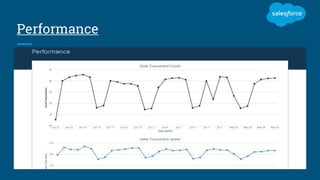
Live & recent system performance data
Planned maintenance information
Security details like threats, recent email threats
What is trust.salesforce.com?
What is Salesforce Instances?
Salesforce Instances
Salesforce instance is basically the database server from where your org is
being accessed
Salesforce has different instances
NA(na1, na2…) - North America
EU(eu1,eu2..) – EMEA (Europe, Middle East and Africa)
AP(ap1,ap2..) - APAC (Asia, Pacific)
CS(cs1,cs2..) - Sandbox
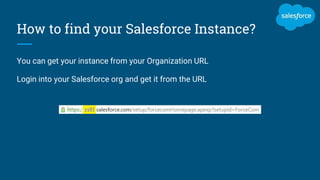
How to find your Salesforce Instance?
You can get your instance from your Organization URL
Login into your Salesforce org and get it from the URL
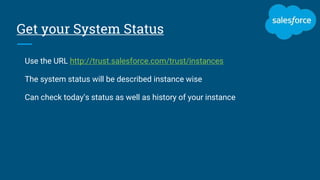
Get your System Status
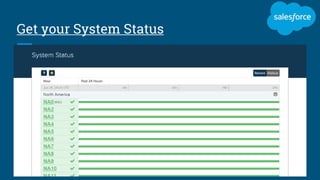
Use the URL http://trust.salesforce.com/trust/instances
The system status will be described instance wise
Can check today’s status as well as history of your instance
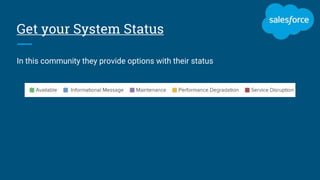
Get your System Status
In this community they provide options with their status
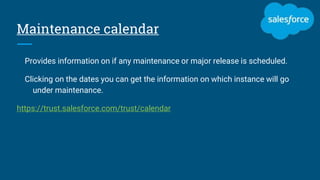
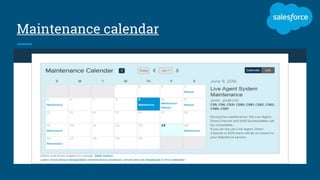
Maintenance calendar
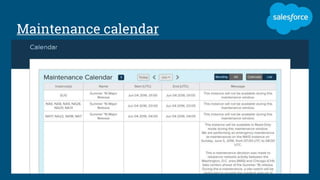
Provides information on if any maintenance or major release is scheduled.
Clicking on the dates you can get the information on which instance will go
under maintenance.
https://trust.salesforce.com/trust/calendar
Maintenance calendar
Performance
Thank you
Thank you for attending the session!!
Follow me on
Facebook: https://www.facebook.com/vetri.manoharan.7
Twitter: https://twitter.com/devhari3
Linkedin: https://in.linkedin.com/in/vetrimanoharan
Join Salesforce Developer Network :
https://www.facebook.com/groups/882720791856988/

About trust.salesforce.com explained

  • 1.
  • 2.
    What is SalesforceSaturday? Started by Stephanie Herrera in Austin, Texas. Every Saturday we will meet either online or offline to discuss, learn about Salesforce, helping each other learning new stuff, sharing knowledge. Stephanie Herrera Founder of #SalesforceSaturday Salesforce MVP Follow her on Twitter: @steph_herrera_
  • 3.
    Who am I? VetriselvanManoharan Member of Kerala and Chennai Developer Group Certified Salesforce Developer Working as Salesforce Developer at Dazeworks FB Group Admin for Salesforce Developer Network Follow me on Twitter: @devhari3 Facebook: https://www.facebook.com/vetri.manoharan.7
  • 4.
    Keep Tweeting Keep tweetingabout the happenings on #SalesforceSaturday #SFKeralaDUG
  • 5.
    What is trust.salesforce.com? Howdo we know about our Salesforce instance performance and scheduled maintenance status? Well, you can get those information from trust.salesforce.com Trust.salesforce.com is a community provided by Salesforce to know the real time system status, performance and security.
  • 6.
    What is trust.salesforce.com? Onthis community you can find Live & recent system performance data Planned maintenance information Security details like threats, recent email threats
  • 7.
    What is trust.salesforce.com? Whatis Salesforce Instances?
  • 8.
    Salesforce Instances Salesforce instanceis basically the database server from where your org is being accessed Salesforce has different instances NA(na1, na2…) - North America EU(eu1,eu2..) – EMEA (Europe, Middle East and Africa) AP(ap1,ap2..) - APAC (Asia, Pacific) CS(cs1,cs2..) - Sandbox
  • 9.
    How to findyour Salesforce Instance? You can get your instance from your Organization URL Login into your Salesforce org and get it from the URL
  • 10.
    Get your SystemStatus Use the URL http://trust.salesforce.com/trust/instances The system status will be described instance wise Can check today’s status as well as history of your instance
  • 11.
  • 12.
    Get your SystemStatus In this community they provide options with their status
  • 13.
    Maintenance calendar Provides informationon if any maintenance or major release is scheduled. Clicking on the dates you can get the information on which instance will go under maintenance. https://trust.salesforce.com/trust/calendar
  • 14.
  • 15.
  • 16.
  • 17.
    Thank you Thank youfor attending the session!!
  • 18.
    Follow me on Facebook:https://www.facebook.com/vetri.manoharan.7 Twitter: https://twitter.com/devhari3 Linkedin: https://in.linkedin.com/in/vetrimanoharan Join Salesforce Developer Network : https://www.facebook.com/groups/882720791856988/