Investing in Your  Entertainment Upgrading to HDTV
Introduction What is an HDTV?..................................................................1 Available Models…...…………………………………………...2-3 Technology Glossary……………………………………………4-6 Choosing the Right Television………………………………..7-13 Purchasing Your HDTV Available Retailers.............................................................13-14 Questions to Ask…………………………………………………15 Protection Plans  ………………………………………………...17 Accessories……………………………………………………….19 Installation & Available Resources Consider Your Options...........................................................20 Self Installation……..…………………………………………...21 Cable & Satellite.……………………………………………….. 22 Table of Contents
What is an HDTV? HDTV stands for High Definition Television. A High Definition Television is a digital format for broadcasting and viewing TV programming. There are many benefits to owning or purchasing an HDTV. Several of those benefits include the following: Digital audio Wider viewing area Increased quality DVD playback Amazing vivid detail Digital superiority  Progressive scanning Elimination of ghost images ezinearticles.com 1
Available Models 2 There are several models of HDTV’s available, including the following:  3D :  A 3D television is a TV that employs techniques of 3D presentation display. This particular model uses 3D display to create realistic viewing. 3D TV’s are the newest model of television, however, limited 3D content is available.  DLP :  DLP stands for digital light processing. DLP models are often considerably cheaper than LCD and plasma displays, light sources are more easily replaceable, tend to have fewer problems with display and screen, and are often lighter in weight.
Available Models LCD :  LCD stands for liquid-crystal display television. These television sets use LCD technology to produce images and are normally lighter and thinner than other HDTV models. LED :  LED stands for light emitting diode. LED TV’s are LCD televisions that use LED backlighting rather than fluorescent lights, making it a cost effective and energy efficient alternative. Plasma :  Plasma TV’s are best for a theater style set up, for example a room with limited light exposure, especially windows and fluorescent bulbs. Also, plasma TV’s are susceptible screen and display problems. 3
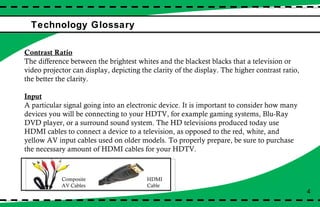
Technology Glossary  4 Contrast Ratio The difference between the brightest whites and the blackest blacks that a television or video projector can display, depicting the clarity of the display. The higher contrast ratio, the better the clarity.  Input A particular signal going into an electronic device. It is important to consider how many devices you will be connecting to your HDTV, for example gaming systems, Blu-Ray DVD player, or a surround sound system. The HD televisions produced today use HDMI cables to connect a device to a television, as opposed to the red, white, and yellow AV input cables used on older models. To properly prepare, be sure to purchase the necessary amount of HDMI cables for your HDTV.  Composite AV Cables HDMI  Cable
Technology Glossary  Screen Refresh Rate The pace or the speed of how quickly the television transitions from picture to picture: the higher the refresh rate, the clearer the transition between images. This is an important component to consider if you frequently view sports on television. Screen Resolution By definition, screen resolution is the resolution measured in pixels per inch: the higher the resolution, the better quality the picture. The highest screen resolutions available are 720p and 1080p. 1080p provides more clarity than 720p and has more pixels for better resolution.  5
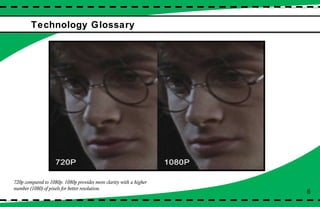
Technology Glossary  6 720p compared to 1080p. 1080p provides more clarity with a higher number (1080) of pixels for better resolution.
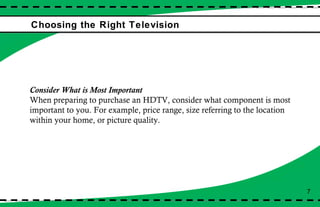
Choosing the Right Television 7 Consider What is Most Important When preparing to purchase an HDTV, consider what component is most important to you. For example, price range, size referring to the location within your home, or picture quality.
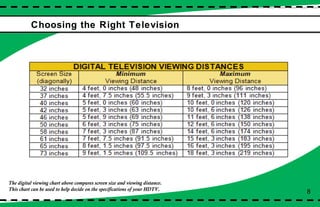
Choosing the Right Television 8 The digital viewing chart above compares screen size and viewing distance.  This chart can be used to help decide on the specifications of your HDTV.
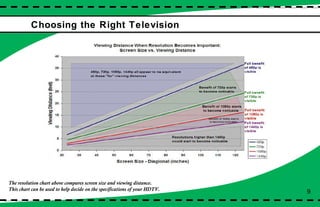
Choosing the Right Television The resolution chart above compares screen size and viewing distance.  This chart can be used to help decide on the specifications of your HDTV. 9
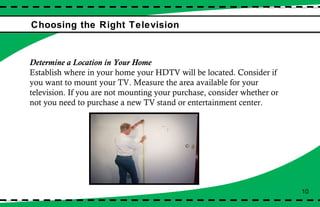
Choosing the Right Television Determine a Location in Your Home Establish where in your home your HDTV will be located. Consider if you want to mount your TV. Measure the area available for your television. If you are not mounting your purchase, consider whether or not you need to purchase a new TV stand or entertainment center. 10
Choosing the Right Television Compare Prices First establish how much money you are willing to spend, keeping in mind a ceiling price of the most money you wish to spend.  *Note: Using the Internet or newspaper ads to compare prices is often the most easy and effective way to compare prices from several different suppliers. 11
Choosing the Right Television Conduct Research on Different Models After establishing the location and size, determine the variable of your price range, start conducting research online, advertisements in newspapers, or by calling local electronic providers. Be sure to take into account all specifications of your new purchase. 12
Choosing the Right Television Determine Where You Will Purchase Your HDTV Decide whether you would like to purchase online or at a retailer. We recommend going to different stores and comparing between different televisions. Consider suppliers such as Best Buy, Wal-Mart, Sears, Target, and Kmart. 13
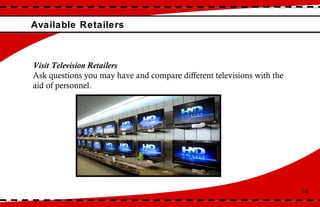
Available Retailers 14 Visit Television Retailers Ask questions you may have and compare different televisions with the aid of personnel.
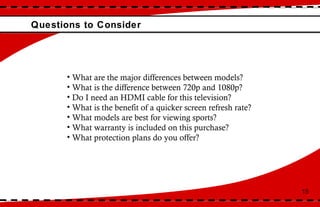
Questions to Consider 15 What are the major differences between models? What is the difference between 720p and 1080p? Do I need an HDMI cable for this television? What is the benefit of a quicker screen refresh rate? What models are best for viewing sports?  What warranty is included on this purchase? What protection plans do you offer?
Purchasing Your HDTV 16 Choose Your HDTV! After careful consideration, research, and once your questions have been answered, choose the HD television that suits your needs best.
Protection Plans Available 17 Ask About Protection Plans When checking out at your retailer of choice, inquire on extended warranties and protection plans. It is important to consider that the one-year warranty provided only cover’s faults of the manufacturer.
Delivery & Installation 18 Ask About Delivery and Installation  Inquire on the option of having your purchase delivered and installed professionally.  Ask about how much it will cost or if it is included.  How quickly will it be delivered and installed?  If you bring it home with you, when is the possible for you to get  installed?  *Note: Recommend that you should have professional help to have it mounted.
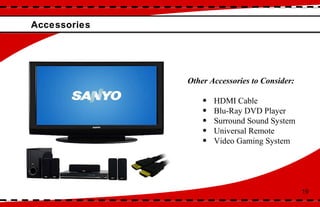
Accessories  Other Accessories to Consider: HDMI Cable Blu-Ray DVD Player Surround Sound System Universal Remote Video Gaming System 19
Delivery and Installation Ask About Delivery and Installation  Inquire on the option of having your purchase delivered and installed professionally.  Ask about how much it will cost or if it is included.  How quickly will it be delivered and installed?  If you bring it home with you, when is the possible for you to get  installed?  *Note: Recommend professional delivery and installation and  strongly recommend if you are having your purchase wall mounted. 20
Self Installation 21 Have assistance, refer to instruction manual, and follow each step carefully. If you need further assistance, especially if you are wall-mounting your HDTV, refer to the following website  www.digitallanding.com/TV-HDTV1  for help.
Cable & Satellite 22 Contact your local cable service provider to set up your cable on your new purchase. Cable providers will most times set up your cable for you.

AARP Pamphlete

  • 1.
    Investing in Your Entertainment Upgrading to HDTV
  • 2.
    Introduction What isan HDTV?..................................................................1 Available Models…...…………………………………………...2-3 Technology Glossary……………………………………………4-6 Choosing the Right Television………………………………..7-13 Purchasing Your HDTV Available Retailers.............................................................13-14 Questions to Ask…………………………………………………15 Protection Plans ………………………………………………...17 Accessories……………………………………………………….19 Installation & Available Resources Consider Your Options...........................................................20 Self Installation……..…………………………………………...21 Cable & Satellite.……………………………………………….. 22 Table of Contents
  • 3.
    What is anHDTV? HDTV stands for High Definition Television. A High Definition Television is a digital format for broadcasting and viewing TV programming. There are many benefits to owning or purchasing an HDTV. Several of those benefits include the following: Digital audio Wider viewing area Increased quality DVD playback Amazing vivid detail Digital superiority Progressive scanning Elimination of ghost images ezinearticles.com 1
  • 4.
    Available Models 2There are several models of HDTV’s available, including the following: 3D : A 3D television is a TV that employs techniques of 3D presentation display. This particular model uses 3D display to create realistic viewing. 3D TV’s are the newest model of television, however, limited 3D content is available. DLP : DLP stands for digital light processing. DLP models are often considerably cheaper than LCD and plasma displays, light sources are more easily replaceable, tend to have fewer problems with display and screen, and are often lighter in weight.
  • 5.
    Available Models LCD: LCD stands for liquid-crystal display television. These television sets use LCD technology to produce images and are normally lighter and thinner than other HDTV models. LED : LED stands for light emitting diode. LED TV’s are LCD televisions that use LED backlighting rather than fluorescent lights, making it a cost effective and energy efficient alternative. Plasma : Plasma TV’s are best for a theater style set up, for example a room with limited light exposure, especially windows and fluorescent bulbs. Also, plasma TV’s are susceptible screen and display problems. 3
  • 6.
    Technology Glossary 4 Contrast Ratio The difference between the brightest whites and the blackest blacks that a television or video projector can display, depicting the clarity of the display. The higher contrast ratio, the better the clarity. Input A particular signal going into an electronic device. It is important to consider how many devices you will be connecting to your HDTV, for example gaming systems, Blu-Ray DVD player, or a surround sound system. The HD televisions produced today use HDMI cables to connect a device to a television, as opposed to the red, white, and yellow AV input cables used on older models. To properly prepare, be sure to purchase the necessary amount of HDMI cables for your HDTV. Composite AV Cables HDMI Cable
  • 7.
    Technology Glossary Screen Refresh Rate The pace or the speed of how quickly the television transitions from picture to picture: the higher the refresh rate, the clearer the transition between images. This is an important component to consider if you frequently view sports on television. Screen Resolution By definition, screen resolution is the resolution measured in pixels per inch: the higher the resolution, the better quality the picture. The highest screen resolutions available are 720p and 1080p. 1080p provides more clarity than 720p and has more pixels for better resolution. 5
  • 8.
    Technology Glossary 6 720p compared to 1080p. 1080p provides more clarity with a higher number (1080) of pixels for better resolution.
  • 9.
    Choosing the RightTelevision 7 Consider What is Most Important When preparing to purchase an HDTV, consider what component is most important to you. For example, price range, size referring to the location within your home, or picture quality.
  • 10.
    Choosing the RightTelevision 8 The digital viewing chart above compares screen size and viewing distance. This chart can be used to help decide on the specifications of your HDTV.
  • 11.
    Choosing the RightTelevision The resolution chart above compares screen size and viewing distance. This chart can be used to help decide on the specifications of your HDTV. 9
  • 12.
    Choosing the RightTelevision Determine a Location in Your Home Establish where in your home your HDTV will be located. Consider if you want to mount your TV. Measure the area available for your television. If you are not mounting your purchase, consider whether or not you need to purchase a new TV stand or entertainment center. 10
  • 13.
    Choosing the RightTelevision Compare Prices First establish how much money you are willing to spend, keeping in mind a ceiling price of the most money you wish to spend. *Note: Using the Internet or newspaper ads to compare prices is often the most easy and effective way to compare prices from several different suppliers. 11
  • 14.
    Choosing the RightTelevision Conduct Research on Different Models After establishing the location and size, determine the variable of your price range, start conducting research online, advertisements in newspapers, or by calling local electronic providers. Be sure to take into account all specifications of your new purchase. 12
  • 15.
    Choosing the RightTelevision Determine Where You Will Purchase Your HDTV Decide whether you would like to purchase online or at a retailer. We recommend going to different stores and comparing between different televisions. Consider suppliers such as Best Buy, Wal-Mart, Sears, Target, and Kmart. 13
  • 16.
    Available Retailers 14Visit Television Retailers Ask questions you may have and compare different televisions with the aid of personnel.
  • 17.
    Questions to Consider15 What are the major differences between models? What is the difference between 720p and 1080p? Do I need an HDMI cable for this television? What is the benefit of a quicker screen refresh rate? What models are best for viewing sports? What warranty is included on this purchase? What protection plans do you offer?
  • 18.
    Purchasing Your HDTV16 Choose Your HDTV! After careful consideration, research, and once your questions have been answered, choose the HD television that suits your needs best.
  • 19.
    Protection Plans Available17 Ask About Protection Plans When checking out at your retailer of choice, inquire on extended warranties and protection plans. It is important to consider that the one-year warranty provided only cover’s faults of the manufacturer.
  • 20.
    Delivery & Installation18 Ask About Delivery and Installation Inquire on the option of having your purchase delivered and installed professionally. Ask about how much it will cost or if it is included. How quickly will it be delivered and installed? If you bring it home with you, when is the possible for you to get installed? *Note: Recommend that you should have professional help to have it mounted.
  • 21.
    Accessories OtherAccessories to Consider: HDMI Cable Blu-Ray DVD Player Surround Sound System Universal Remote Video Gaming System 19
  • 22.
    Delivery and InstallationAsk About Delivery and Installation Inquire on the option of having your purchase delivered and installed professionally. Ask about how much it will cost or if it is included. How quickly will it be delivered and installed? If you bring it home with you, when is the possible for you to get installed? *Note: Recommend professional delivery and installation and strongly recommend if you are having your purchase wall mounted. 20
  • 23.
    Self Installation 21Have assistance, refer to instruction manual, and follow each step carefully. If you need further assistance, especially if you are wall-mounting your HDTV, refer to the following website www.digitallanding.com/TV-HDTV1 for help.
  • 24.
    Cable & Satellite22 Contact your local cable service provider to set up your cable on your new purchase. Cable providers will most times set up your cable for you.