A Tour of Data Science
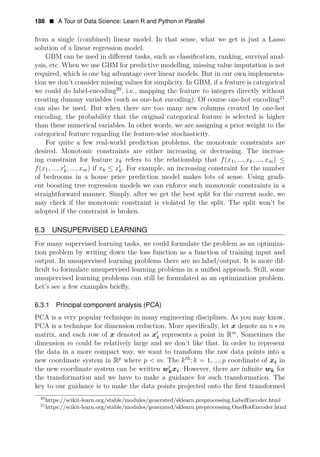
Chapman & Hall/CRC Big Data Series
Series Editor: Sanjay Ranka
A Tour of Data Science
Learn R and Python in Parallel
Nailong Zhang
Big Data Computing
A Guide for Business and Technology Managers
Vivek Kale
Big Data Management and Processing
Kuan-Ching Li, Hai Jiang, Albert Y. Zomaya
Frontiers in Data Science
Matthias Dehmer, Frank Emmert-Streib
High Performance Computing for Big Data
Methodologies and Applications
Chao Wang
Big Data Analytics
Tools and Technology for Effective Planning
Arun K. Somani, Ganesh Chandra Deka
Smart Data
State-of-the-Art Perspectives in Computing and Applications
Kuan-Ching Li, Qingchen Zhang, Laurence T. Yang, Beniamino Di Martino
Internet of Things and Secure Smart Environments
Successes and Pitfalls
Uttam Ghosh, Danda B. Rawat, Raja Datta, Al-Sakib Khan Pathan
For more information on this series please visit: https://www.crcpress.com/Chapman--HallCRC-Big-Data-
Series/book-series/CRCBIGDATSER
A Tour of Data Science
Learn R and Python in Parallel
Nailong Zhang
First edition published 2021
by CRC Press
6000 Broken Sound Parkway NW, Suite 300, Boca Raton, FL 33487-2742
and by CRC Press
2 Park Square, Milton Park, Abingdon, Oxon, OX14 4RN
© 2021 Taylor & Francis Group, LLC
CRC Press is an imprint of Taylor & Francis Group, LLC
Reasonable efforts have been made to publish reliable data and information, but the author and publisher cannot as­
sume responsibility for the validity of all materials or the consequences of their use. The authors and publishers have
attempted to trace the copyright holders of all material reproduced in this publication and apologize to copyright holders
if permission to publish in this form has not been obtained. If any copyright material has not been acknowledged please
write and let us know so we may rectify in any future reprint.
Except as permitted under U.S. Copyright Law, no part of this book may be reprinted, reproduced, transmitted, or
utilized in any form by any electronic, mechanical, or other means, now known or hereafter invented, including pho­
tocopying, microfilming, and recording, or in any information storage or retrieval system, without written permission
from the publishers.
For permission to photocopy or use material electronically from this work, access www. copyright.com or contact the
Copyright Clearance Center, Inc. (CCC), 222 Rosewood Drive, Danvers, MA 01923, 978-750-8400. For works that are
not available on CCC please contact mpkbookspermissions@tandf.co.uk
Trademark notice: Product or corporate names may be trademarks or registered trademarks and are used only for
identification and explanation without intent to infringe.
Library of Congress Cataloging-in-Publication Data
Names: Zhang, Nailong, author.
Title: A tour of data science : learn R and Python in parallel / Nailong Zhang.
Description: First edition. | Abingdon, Oxon ; Boca Raton, FL : CRC Press,
2021. | Series: Chapman & Hall/CRC data science series | Includes
bibliographical references and index.
Identifiers: LCCN 2020025166 | ISBN 9780367895860 (paperback) | ISBN
9780367897062 (hardback) | ISBN 9781003020646 (ebook)
Subjects: LCSH: Data mining. | R (Computer program language) | Python
(Computer programlanguage)
Classification: LCC QA76.9.D343 Z458 2021 | DDC 006.3/12--dc23
LC record available at https://lccn.loc.gov/2020025166
ISBN: 9780367895860 (hbk)
Typeset in Computer Modern font
by Cenveo Publisher Services
To my parents
vii
Contents
Preface
0.1
0.2
Chapter
ASSUMPTIONS ABOUT THE READER’S BACKGROUND
BOOK OVERVIEW
1 • Introduction to R/Python Programming
ix
ix
ix
1
1.1
1.2
1.3
1.4
1.5
1.6
1.7
1.8
Chapter
CALCULATOR
VARIABLE AND TYPE
FUNCTIONS
CONTROL FLOWS
SOME BUILT-IN DATA STRUCTURES
REVISIT OF VARIABLES
OBJECT-ORIENTED PROGRAMMING (OOP)
MISCELLANEOUS
2 • More on R/Python Programming
IN R/PYTHON
1
3
4
6
9
21
30
35
37
2.1
2.2
2.3
2.4
2.5
2.6
2.7
2.8
2.9
Chapter
WORK WITH R/PYTHON SCRIPTS
DEBUGGING IN R/PYTHON
BENCHMARKING
VECTORIZATION
EMBARRASSINGLY PARALLELISM IN R/PYTHON
EVALUATION STRATEGY
SPEED UP WITH C/C++ IN R/PYTHON
A FIRST IMPRESSION OF FUNCTIONAL PROGRAMMING
MISCELLANEOUS
3 • data.table and pandas
37
40
47
49
57
61
63
65
69
71
3.1
3.2
SQL
GET STARTED WITH DATA.TABLE AND PANDAS
71
74
viii • Contents
3.3
3.4
3.5
3.6
Chapter
INDEXING & SELECTING DATA
ADD/REMOVE/UPDATE
GROUP BY
JOIN
4 • Random Variables, Distributions & Linear Regression
76
86
91
93
99
4.1
4.2
4.3
4.4
4.5
4.6
4.7
4.8
Chapter
A REFRESHER ON DISTRIBUTIONS
INVERSION SAMPLING & REJECTION
JOINT DISTRIBUTION & COPULA
FIT A DISTRIBUTION
CONFIDENCE INTERVAL
HYPOTHESIS TESTING
BASICS OF LINEAR REGRESSION
RIDGE REGRESSION
5 • Optimization in Practice
SAMPLING
99
102
106
110
111
114
122
127
133
5.1
5.2
5.3
5.4
5.5
5.6
Chapter
CONVEXITY
GRADIENT DESCENT
ROOT-FINDING
GENERAL PURPOSE MINIMIZATION TOOLS IN
LINEAR PROGRAMMING
MISCELLANEOUS
6 • Machine Learning - A gentle introduction
R/PYTHON
133
134
141
143
149
153
161
6.1 SUPERVISED LEARNING
6.2 GRADIENT BOOSTING MACHINE
6.3 UNSUPERVISED LEARNING
6.4 REINFORCEMENT LEARNING
6.5 DEEP Q-NETWORKS
6.6 COMPUTATIONAL DIFFERENTIATION
6.7 MISCELLANEOUS
Bibliography
Index
161
169
188
195
197
200
202
203
205
Preface
0.1 ASSUMPTIONS ABOUT THE READER’S BACKGROUND
It is hard to give a clear definition of data science because it is not clear where the bor­
der is. Actually, many data scientists are working in different industries with different
skill sets. Generally speaking, data science requires broad knowledge in statistics, ma­
chine learning, optimization and programming. It is impossible to cover even one of
these four areas in depth in a short book, and it is also beyond the scope of this book.
However, I think it might be useful to have a book that talks about data science with
a broad range of topics and a moderate amount of technical detail. And that is one of
the motivations for writing this book. I chose to make the book short with minimum
mathematical theories introduced, and hope reading through the book could help the
readers get a sense of what data science is about.
I assume the readers have basic knowledge in statistics and linear algebra, and
calculus, such as normal distribution, sample size, gradient, matrix inversion, etc.
Previous programming knowledge is not required. However, as the title of the book
says, we will learn R and Python in parallel, if you’re already familiar with either R
or Python it would help learning the other based on side-by-side comparison.
Besides the comparison of the two popular languages used in data science, this
book also focuses on the translation from mathematical models to codes. In the
book, the audience could find applications/implementations of some important al­
gorithms from scratch, such as maximum likelihood estimation, inversion sampling,
copula simulation, simulated annealing, bootstrapping, linear regression (lasso/ridge
regression), logistic regression, gradient boosting trees, etc.
0.2 BOOK OVERVIEW
The book consists of six chapters designed to introduce core ideas in data science.
Chapter 1: Introduction to R/Python Programming - R and Python are
the two most popular programming languages used in data science. In this chapter,
we go through the basics of R and Python programming in parallel with examples.
Specifically, the topics of this chapter include variable, type, function, control flow,
data structures, and object-oriented programming. The chapter is designed for both
beginners and intermediate audience.
Chapter 2: More on R/Python Programming - Following the first chapter,
the topics of this chapter include debugging, vectorization, parallelism, working with
C++ in R/Python, and functional programming. These topics are chosen to help
the audience to get familiar with some intermediate/advanced topics in R/Python
ix
x • Preface
programming. Mastering these topics will greatly help with coding skills. Like the first
chapter, in this chapter, I try to emphasize the differences between R and Python
with coding examples.
Chapter 3: data.table and pandas - In the first two chapters, we focus on
general-purpose programming techniques. In this chapter, we introduce the very ba­
sics of data science, i.e., data manipulation. For the audience with little experience
in data science, we start from a brief introduction to SQL. The major part of this
chapter focuses on the two widely used data.frame packages, i.e., data.table in R and
pandas in Python. Side-by-side examples using the two packages not only enables the
audience to learn basic usages of these tools but also can be used as a quick reference
manual.
Chapter 4: Random Variables, Distributions & Linear Regression - In
this chapter, we focus on statistics and linear regression, which is the foundation of
data science. To better follow this chapter, I recommend any introductory level statis­
tics course as a prerequisite. The topics of this chapter include random variable sam­
pling methods, distribution fitting, joint distribution/copula simulation, confidence
interval calculation, and hypothesis testing. In later sections, we also talk about lin­
ear regression models from scratch. Many textbooks introduce the theories behind
linear regressions but still don’t help much on the implementation. We will see how
the linear regression is implemented as a toy example in both R and Python with the
help of linear algebra. I will also show how the basic linear regression model can be
used for L2 penalized linear regression, i.e., ridge regression.
Chapter 5: Optimization in Practice - Most machine learning models rely
on optimization algorithms. In this chapter, we give a brief introduction to optimiza­
tion. Specifically, we will talk about convexity, gradient descent, general-purpose op­
timization tools in R and Python, linear programming and metaheuristic algorithms,
etc. Based on these techniques, we will see coding examples about maximum likeli­
hood estimation, linear regression, logistic regression, portfolio construction, traveling
salesman problem.
Chapter 6: Machine Learning – A gentle introduction - Machine learning
is a huge topic. In this chapter, I try to give a very short and gentle introduction to
machine learning. It starts with a brief introduction of supervised learning, unsuper­
vised learning and reinforcement learning, respectively. For supervised learning, we
will see the gradient boosting regression with a pure Python implementation from
scratch, from which the audience could learn the translation from the mathematical
models to object-oriented programs. For unsupervised learning, the finite Gaussian
mixture model and PCA are discussed. And for reinforcement learning, we will also
use a simple game as an example to show the usage of deep Q-networks. The goal
of this chapter is two-fold. First, I would like to give the audience an impression of
what machine learning looks like. Second, reading the code snippets in this chapter
could help the audience review/recap the topics in previous chapters.
Inthis chapter, I will give an introduction to general R and Python programming
in a parallel fashion.
1.1 CALCULATOR
R and Python are general-purpose programming languages that can be used for
writing softwares in a variety of domains. But for now, let us start with using them
as basic calculators. The first thing is to have them installed. R1
and Python2
can be
downloaded from their official website. In this book, I will be using R 3.5 and Python
3.7.
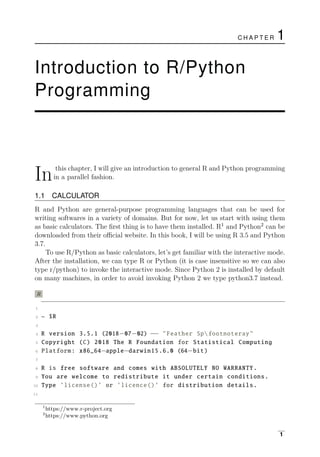
To use R/Python as basic calculators, let’s get familiar with the interactive mode.
After the installation, we can type R or Python (it is case insensitive so we can also
type r/python) to invoke the interactive mode. Since Python 2 is installed by default
on many machines, in order to avoid invoking Python 2 we type python3.7 instead.
R
1
2 ~ $R
3
4 R version 3.5.1 (2018−07−02) −− "Feather Spfootnoteray"
5 Copyright (C) 2018 The R Foundation for Statistical Computing
6 Platform: x86_64−apple−darwin15.6.0 (64−bit)
7
8 R is free software and comes with ABSOLUTELY NO WARRANTY.
9 You are welcome to redistribute it under certain conditions.
10 Type ’license()’ or ’licence()’ for distribution details.
11
1
https://www.r-project.org
2
https://www.python.org
1
C H A P T E R 1
Introduction to R/Python
Programming
2 • A Tour of Data Science: Learn R and Python in Parallel
12 Natural language support but running in an English locale
13
14 R is a collaborative project with many contributors.
15 Type ’contributors()’ for more information and
16 ’citation()’ on how to cite R or R packages in publications.
17
18 Type ’demo()’ for some demos, ’help()’ for on−line help, or
19 ’help.start()’ for an HTML browser interface to help.
20 Type ’q()’ to quit R.
21
22 >
Python
1 ~ $python3.7
2 Python 3.7.1 (default , Nov 6 2018, 18:45:35)
3 [Clang 10.0.0 (clang −1000.11.45.5)] on darwin
4 Type "help", "copyright", "credits" or "license" for more
information.
5 >>>
The messages displayed by invoking the interactive mode depend on both the
version of R/Python installed and the machine. Thus, you may see different messages
on your local machine. As the messages said, to quit R we can type q(). There are 3
options prompted by asking the user if the workspace should be saved or not. Since
we just want to use R as a basic calculator, we quit without saving workspace.
To quit Python, we can simply type exit().
R
1 > q()
2 Save workspace image? [y/n/c]: n
3 ~ $
Once we are inside the interactive mode, we can use R/Python as a calculator.
R
1 > 1+1
2 [1] 2
3 > 2∗3+5
4 [1] 11
5 > log(2)
Introduction to R/Python Programming • 3
6 [1] 0.6931472
7 > exp(0)
8 [1] 1
Python
1 >>> 1+1
2 2
3 >>> 2∗3+5
4 11
5 >>> log(2)
6 Traceback (most recent call last):
7 File "<stdin>", line 1, in <module >
8 NameError: name ’log’ is not defined
9 >>> exp(0)
10 Traceback (most recent call last):
11 File "<stdin>", line 1, in <module >
12 NameError: name ’exp’ is not defined
From the code snippet above, R is working as a calculator perfectly. However,
errors are raised when we call log(2) and exp(2) in Python. The error messages are
self-explanatory - log function and exp function don’t exist in the current Python
environment. In fact, log function and exp function are defined in the math module in
Python. A module3
is a file consisting of Python code. When we invoke the interactive
mode of Python, a few built-in modules are loaded into the current environment by
default. But the math module is not included in these built-in modules. That explains
why we got the NameError when we try to use the functions defined in the math
module. To resolve the issue, we should first load the functions to use by using the
import statement as follows.
Python
1 >>> from math import log, exp
2 >>> log(2)
3 0.6931471805599453
4 >>> exp(0)
5 1.0
1.2 VARIABLE AND TYPE
In the previous section we have seen how to use R/Python as calculators. Now, let’s
see how to write real programs. First, let’s define some variables.
3
https://docs.python.org/3/tutorial/modules.html
4 • A Tour of Data Science: Learn R and Python in Parallel
R Python
1 > a=2 1 >>> a=2
2 > b=5.0 2 >>> b=5.0
3 > x=’hello world’ 3 >>> x=’hello world’
4 > a 4 >>> a
5 [1] 2 5 2
6 > b 6 >>> b
7 [1] 5 7 5.0
8 > x 8 >>> x
9 [1] "hello world" 9 ’hello world’
10 > e=a∗2+b 10 >>> e=a∗2+b
11 > e 11 >>> e
12 [1] 9 12 9.0
Here, we defined 4 different variables a, b, x, e. To get the type of each variable,
we can utilize the function typeof() in R and type() in Python, respectively.
R Python
1 > typeof(x) 1 >>> type(x)
2 [1] "character" 2 <class ’str’>
3 > typeof(e) 3 >>> type(e)
4 [1] "double" 4 <class ’float’>
The type of x in R is called character, and in Python is called str.
1.3 FUNCTIONS
We have seen two functions log and exp when we use R/Python as calculators.
A function is a block of code which performs a specific task. A major purpose of
wrapping a block of code into a function is to reuse the code.
It is simple to define functions in R/Python.
R Python
1 > fun1=function(x){return(x 1 >>> def fun1(x):
∗x)} 2 ... return x ote
2
∗x # n the
> fun1 indentation
3 function(x){return(x∗x)} 3 ...
4 > fun1(2) 4 >>> fun1(2)
5 [1] 4 5 4
Here, we defined a function fun1 in R/Python. This function takes x as input and
returns the square of x. When we call a function, we simply type the function name
Introduction to R/Python Programming • 5
followed by the input argument inside a pair of parentheses. It is worth noting that
input or output are not required to define a function. For example, we can define a
function fun2 to print Hello World! without input and output.
One major difference between R and Python codes is that Python codes are
structured with indentation. Each logical line of R/Python code belongs to a certain
group. In R, we use {} to determine the grouping of statements. However, in Python
we use leading whitespace (spaces and tabs) at the beginning of a logical line to
compute the indentation level of the line, which is used to determine the statements’
grouping. Let’s see what happens if we remove the leading whitespace in the Python
function above.
Python
1 >>> def fun1(x):
2 ... return x∗x # note the indentation
3 File "<stdin>", line 2
4 return x∗x # note the indentation
5 ^
6 IndentationError: expected an indented block
We got an IndentationError because of missing indentation.
R Python
1 > fun2=function(){print(’ 1 >>> def fun2(): print(’Hello
Hello World!’)} World!’)
2 > fun2() 2 ...
3 [1] "Hello World!" 3 >>> fun2()
4 Hello World!
Let’s go back to fun1 and have a closer look at the return. In Python, if we
want to return something we have to use the keyword return explicitly. return in
R is a function but it is not a function in Python and that is why no parenthesis
follows return in Python. In R, return is not required even though we need to return
something from the function. Instead, we can just put the variables to return in the
last line of the function defined in R. That being said, we can define fun1 as follows.
R
1 > fun1=function(x){x∗x}
Sometimes we want to give a default value to an argument for a function, and
both R and Python allow functions to have default values.
R Python
6 • A Tour of Data Science: Learn R and Python in Parallel
1 > log_fun = 1 >>> def log_fun(x, base=2):
function(x, base=2){ 2 ...
2 + return(log(x, base)) return math.log(x, base)
3 + } 3 ...
4 > log_fun(5, base=2) 4 >>> log_fun(5,2)
5 [1] 2.321928 5 2.321928094887362
6 > log_fun(5, 2) 6 >>> log_fun(5, base=2)
7 [1] 2.321928 7 2.321928094887362
8 > log_fun(base=2, 5) 8 >>> log_fun(base=2, 5)
9 [1] 2.321928 9 File "<stdin>", line 1
10 > 10 SyntaxError: positional
argument follows keyword
argument
In Python we have to put the arguments with default values at the end, which
is not required in R. However, from a readability perspective, it is always better to
put them at the end. You may have noticed the error message above about positional
argument. In Python there are two types of arguments, i.e., positional arguments
and keyword arguments. Simply speaking, a keyword argument must be preceded
by an identifier, e.g., base in the example above. And positional arguments refer to
non-keyword arguments.
1.4 CONTROL FLOWS
To implement a complex logic in R/Python, we may need control flows.
1.4.1 If/else
Let’s define a function to return the absolute value of input.
R Python
1 > fun3=function(x){ 1 >>> def fun3(x):
2 + if (x>=0){ 2 ... if x>=0:
3 + return(x)} 3 ... return x
4 + else{ 4 ... else:
5 + return( x)}
6
− 5 ... return x
+ } 6
−
...
7 > fun3(2.5) 7 >>> fun3(2.5)
8 [1] 2.5 8 2.5
9 > fun3(−2.5) 9 >>> fun3(
10
−2.5)
[1] 2.5 10 2.5
The code snippet above shows how to use if/else in R/Python. The subtle
Introduction to R/Python Programming • 7
difference between R and Python is that the condition after if must be embraced by
parenthesis in R but it is optional in Python.
We can also put if after else. But in Python, we use elif as a shortcut.
R Python
1 > fun4=function(x){ 1 >>> def fun4(x):
2 + if (x==0){ 2 ... if x==0:
3 + print(’zero’)} 3 ... print(’zero’)
4 + else if (x>0){ 4 ... elif x>0:
5 + print(’positive’)} 5 ... print(’positive’)
6 + else{ 6 ... else:
7 + print(’negative’)} 7 ... print(’negative’)
8 + } 8 ...
9 > fun4(0) 9 >>> fun4(0)
10 [1] "zero" 10 zero
11 > fun4(1) 11 >>> fun4(1)
12 [1] "positive" 12 positive
13 > fun4(−1) 13 >>> fun4(
14
−1)
[1] "negative" 14 negative
1.4.2 For loop
Similar to the usage of if in R, we also have to use parenthesis after the keyword for
in R. But in Python there should be no parenthesis after for.
R Python
1 > for (i in 1:3){print(i)} 1 >>> for i in
range(1,4):print(i)
2 [1] 1
2
3 [1] 2
...
3 1
4 [1] 3
4 2
5 3
There is something more interesting than the for loop itself in the snippets above.
In the R code, the expression 1:3 creates a vector with elements 1, 2 and 3. In the
Python code, we use the range() function for the first time. Let’s have a look at
them.
R Python
1 > typeof(1:3) 1 >>> type(range(1,4))
2 [1] "integer" 2 <class ’range’>
range() function returns a range type object, which represents an immutable
8 • A Tour of Data Science: Learn R and Python in Parallel
sequence of numbers. range() function can take three arguments, i.e., range(start,
stop, step). However, start and step are both optional. It’s critical to keep in mind
that the stop argument that defines the upper limit of the sequence is exclusive. And
that is why in order to loop through 1 to 3 we have to pass 4 as the stop argument
to range() function. The step argument specifies how much to increase from one
number to the next. The default values of start and step are 0 and 1, respectively.
1.4.3 While loop
R Python
1 > i=1 1 >>> i=1
2 > while (i<=3){ 2 >>> while i<=3:
3 + print(i) 3 ... print(i)
4 + i=i+1 4 ... i+=1
5 + } 5 ...
6 [1] 1 6 1
7 [1] 2 7 2
8 [1] 3 8 3
You may have noticed that in Python we can do i+=1 to add 1 to i, which is not
feasible in R by default. Both for loop and while loop can be nested.
1.4.4 Break/continue
Break/continue helps if we want to break the for/while loop earlier, or to skip a
specific iteration. In R, the keyword for continue is called next, in contrast to continue
in Python. The difference between break and continue is that calling break would
exit the innermost loop (when there are nested loops, only the innermost loop is
affected); while calling continue would just skip the current iteration and continue
the loop if not finished.
R Python
1 > for (i in 1:3){ 1 >>> for i in range(1,4):
2 + print(i) 2 ... print(i)
3 + if (i==1) break 3 ... if i==1: break
4 + } 4 ...
5 [1] 1 5 1
6 > for (i in 1:3){ 6 >>> for i in range(1,4):
7 + if (i==2){next} 7 ... if i==2: continue
8 + print(i) 8 ... print(i)
9 + } 9 ...
10 [1] 1 10 1
11 [1] 3 11 3
Introduction to R/Python Programming • 9
1.5 SOME BUILT-IN DATA STRUCTURES
In the previous sections, we haven’t seen much difference between R and Python.
However, regarding the built-in data structures, there are some significant differences
we will see in this section.
1.5.1 Vector in R and list in Python
In R, we can use function c() to create a vector; A vector is a sequence of elements
with the same type. In Python, we can use [] to create a list, which is also a sequence
of elements. But the elements in a list don’t need to have the same type. To get the
number of elements in a vector in R, we use the function length(); and to get the
number of elements in a list in Python, we use the function len().
R Python
1 > x=c(1,2,5,6) 1 >>> x=[1,2,5,6]
2 > y=c(’hello’,’world’,’!’) 2 >>> y=[’hello’,’world’,’!’]
3 > x 3 >>> x
4 [1] 1 2 5 6 4 [1, 2, 5, 6]
5 > y 5 >>> y
6 [1] "hello" "world" "!" 6 [’hello’, ’world’, ’!’]
7 > length(x) 7 >>> len(x)
8 [1] 4 8 4
9 > z=c(1,’hello’) 9 >>> z=[1,’hello’]
10 > z 10 >>> z
11 [1] "1" "hello" 11 [1, ’hello’]
In the code snippet above, the first element in the variable z in R is coerced from
1 (numeric) to "1" (character) since the elements must have the same type.
To access a specific element from a vector or list, we could use []. In R, sequence
types are indexed beginning with the one subscript. In contrast, sequence types in
Python are indexed beginning with the zero subscript.
R Python
1 > x=c(1,2,5,6) 1 >>> x=[1,2,5,6]
2 > x[1] 2 >>> x[1]
3 [1] 1 3 2
4 >>> x[0]
5 1
What if the index to access is out of boundary?
10 • A Tour of Data Science: Learn R and Python in Parallel
R Python
1 > x=c(1,2,5,6) 1 >>> x=[1,2,5,6]
2 > x[−1] 2 >>> x[−1]
3 [1] 2 5 6 3 6
4 > x[0] 4 >>> x[len(x)+1]
5 numeric(0) 5 Traceback (most recent call
6 > x[length(x)+1] last):
7 [1] NA 6 File "<stdin>", line 1,
in <module >
8 > length(numeric(0))
7 IndexError:
9 [1] 0 list index out of range
10 > length(NA)
11 [1] 1
In Python, negative index number means indexing from the end of the list. Thus,
x[−1] points to the last element and x[−2] points to the second-last element of
the list. But R doesn’t support indexing with negative numbers in the same way as
Python. Specifically, in R x[−index] returns a new vector with x[index] excluded.
When we try to access with an index out of boundary, Python would throw an
IndexError. The behavior of R when indexing out of boundary is more interesting.
First, when we try to access x[0] in R we get a numeric(0) whose length is also
0. Since its length is 0, numeric(0) can be interpreted as an empty numeric vector.
When we try to access x[length(x)+1] we get an NA. In R, there are also NaN and
NULL.
NaN means "Not A Number" and it can be verified by checking its type - "double".
0/0 would result in an NaN in R. NA in R generally represents missing values. And
NULL represents a NULL (empty) object. To check if a value is NA, NaN or NULL, we
can use is.na(), is.nan() or is.null, respectively.
R Python
1 > typeof(NA) 1 >>> type(None)
2 [1] "logical" 2 <class ’NoneType’>
3 > typeof(NaN) 3 >>> None is None
4 [1] "double" 4 True
5 > typeof(NULL) 5 >>> 1 == None
6 [1] "NULL" 6 False
7 > is.na(NA)
8 [1] TRUE
9 > is.null(NULL)
10 [1] TRUE
11 > is.nan(NaN)
In Python, there is no built-in NA or NaN. The counterpart of NULL in Python is
Introduction to R/Python Programming • 11
None. In Python, we can use the is keyword or == to check if a value is equal to
None.
From the code snippet above, we also notice that in R the boolean type value
is written as "TRUE/FALSE", compared with "True/False" in Python. Although in
R "TRUE/FALSE" can also be abbreviated as "T/F", I don’t recommend using the
abbreviation.
There is one interesting fact that we can’t add a NULL to a vector in R, but it is
feasible to add a None to a list in Python.
R Python
1 > x=c(1,NA,NaN,NULL) 1 >>> x=[1,None]
2 > x 2 >>> x
3 [1] 1 NA NaN 3 [1, None]
4 > length(x) 4 >>> len(x)
5 [1] 3 5 2
Sometimes we want to create a vector/list with replicated elements, for example,
a vector/list with all elements equal to 0.
R Python
1 > x=rep(0, 10) 1 >>> x=[0]
2
∗10
> x 2 >>> x
3 [1] 0 0 0 0 0 0 0 0 0 0 3 [0, 0, 0, 0, 0, 0, 0, 0, 0,
4 > y=rep(c(0,1), 5) 0]
5 > y 4 >>> y=[0, 1]∗5
6 [1] 0 1 0 1 0 1 0 1 0 1 5 >>> y
6 [0, 1, 0, 1, 0, 1, 0, 1, 0,
1]
When we use the ∗ operator to make replicates of a list, there is one caveat - if
the element inside the list is mutable then the replicated elements point to the same
memory address. As a consequence, if one element is mutated other elements are also
affected.
Python
1 >>> x=[0] # x is a list which is mutable
2 >>> y=[x]∗5 # each element in y points to x
3 >>> y
4 [[0], [0], [0], [0], [0]]
5 >>> y[2]=2 # we point y[2] to 2 but x is not mutated
6 >>> y
7 [[0], [0], 2, [0], [0]]
8 >>> y[1][0]=−1 # we mutate x by changing y[1][0] from 0 to −1
12 • A Tour of Data Science: Learn R and Python in Parallel
9 >>> y
10 [[−1], [−1], 2, [−1], [−1]]
11 >>> x
12 [−1]
How to get a list with replicated elements but pointing to different memory ad­
dresses?
Python
1 >>> x=[0]
2 >>> y=[x[:] for _ in range(5)] # [:] makes a copy of the list x;
another solution is [list(x) for _ in range(5)]
3 >>> y
4 [[0], [0], [0], [0], [0]]
5 >>> y[0][0]=2
6 >>> y
7 [[2], [0], [0], [0], [0]]
Besides accessing a specific element from a vector/list, we may also need to do
slicing, i.e., to select a subset of the vector/list. There are two basic approaches of
slicing:
• Integer-based
R
1 > x=c(1,2,3,4,5,6)
2 > x[2:4]
3 [1] 2 3 4
4 > x[c(1,2,5)] # a vector of indices
5 [1] 1 2 5
6 > x[seq(1,5,2)] # seq creates a vector to be used as
indices
7 [1] 1 3 5
Python
1 >>> x=[1,2,3,4,5,6]
2 >>> x[1:4] # x[start:end] start is inclusive but end is
exclusive
3 [2, 3, 4]
4 >>> x[0:5:2] # x[start:end:step]
5 [1, 3, 5]
Introduction to R/Python Programming • 13
The code snippet above uses hash character # for comments in both R and
Python. Everything after # on the same line would be treated as comment (not
executable). In the R code, we also used the function seq() to create a vector.
When I see a function that I haven’t seen before, I might either google it or
use the built-in helper mechanism. Specifically, in R use ? and in Python use
help().
R Python
1 > ?seq 1 >>> help(print)
• Condition-based
Condition-based slicing means to select a subset of the elements which satisfy
certain conditions. In R, it is quite straightforward by using a boolean vector
whose length is the same as the vector to be sliced.
R
1 > x=c(1,2,5,5,6,6)
2 > x[x %% 2==1] # %% is the modulo operator in R; we select
the odd elements
3 [1] 1 5 5
4 > x %% 2==1 # results in a boolean vector with the same
length as x
5 [1] TRUE FALSE TRUE TRUE FALSE FALSE
The condition-based slicing in Python is quite different from that in R. The
prerequisite is list comprehension which provides a concise way to create new
lists in Python. For example, let’s create a list of squares of another list.
Python
1 >>> x=[1,2,5,5,6,6]
2 >>> [e∗∗2 for e in x] # ∗∗ is the exponent operator , i.e.,
x∗∗y means x to the power of y
3 [1, 4, 25, 25, 36, 36]
We can also use if statement with list comprehension to filter a list to achieve
list slicing.
Python
14 • A Tour of Data Science: Learn R and Python in Parallel
1 >>> x=[1,2,5,5,6,6]
2 >>> [e for e in x if e%2==1] # % is the modulo operator in
Python
3 [1, 5, 5]
It is also common to use if/else with list comprehension to achieve more
complex operations. For example, given a list x, let’s create a new list y so
that the non-negative elements in x are squared and the negative elements are
replaced by 0s.
Python
1 >>> x=[1,−1,0,2,5,−3]
2 >>> [e∗∗2 if e>=0 else 0 for e in x]
3 [1, 0, 0, 4, 25, 0]
The example above shows the power of list comprehension. To use if with list
comprehension, the if statement should be placed in the end after the for loop
statement; but to use if/else with list comprehension, the if/else statement
should be placed before the for loop statement.
We can also modify the value of an element in a vector/list variable.
R Python
1 > x=c(1,2,3) 1 >>> x=[1,2,3]
2 > x[1]= 1 2 >>> x[0]= 1
3
− −
> x 3 >>> x
4 [1] −1 2 3 4 [−1, 2, 3]
Two or multiple vectors/lists can be concatenated easily.
R Python
1 > x=c(1,2) 1 >>> x=[1,2]
2 > y=c(3,4) 2 >>> y=[3,4]
3 > z=c(5,6,7,8) 3 >>> z=[5,6,7,8]
4 > c(x,y,z) 4 >>> x+y+z
5 [1] 1 2 3 4 5 6 7 8 5 [1, 2, 3, 4, 5, 6, 7, 8]
As the list structure in Python is mutable, there are many things we can do with
list.
Introduction to R/Python Programming • 15
Python
1 >>> x=[1,2,3]
2 >>> x.append(4) # append a single value to the list x
3 >>> x
4 [1, 2, 3, 4]
5 >>> y=[5,6]
6 >>> x.extend(y) # extend list y to x
7 >>> x
8 [1, 2, 3, 4, 5, 6]
9 >>> last=x.pop() # pop the last element from x
10 >>> last
11 6
12 >>> x
13 [1, 2, 3, 4, 5]
I like the list structure in Python much more than the vector structure in R. list
in Python has a lot more useful features which can be found from the python official
documentation4
.
1.5.2 Array
Array is one of the most important data structures in scientific programming. In R,
there is also an object type "matrix", but according to my own experience, we can
almost ignore its existence and use array instead. We can definitely use list as array
in Python, but lots of linear algebra operations are not supported for the list type.
Fortunately, there is a Python package numpy off the shelf.
R
1 > x=1:12
2 > array1=array(x, c(4,3)) # convert vector x to a 4 rows ∗ 3
cols array
3 > array1
4 [,1] [,2] [,3]
5 [1,] 1 5 9
6 [2,] 2 6 10
7 [3,] 3 7 11
8 [4,] 4 8 12
9 > y=1:6
10 > array2=array(y, c(3,2)) # convert vector y to a 3 rows ∗ 2
cols array
11 > array2
12 [,1] [,2]
4
https://docs.python.org/3/tutorial/datastructures.html
16 • A Tour of Data Science: Learn R and Python in Parallel
13 [1,] 1 4
14 [2,] 2 5
15 [3,] 3 6
16 > array3 = array1 %∗% array2 # %∗% is the matrix multiplication
operator
17 > array3
18 [,1] [,2]
19 [1,] 38 83
20 [2,] 44 98
21 [3,] 50 113
22 [4,] 56 128
23 > dim(array3) # get the dimension of array3
24 [1] 4 2
Python
1 >>> import numpy as np # we import the numpy module and alias it
as np
2 >>> array1=np.reshape(list(range(1,13)),(4,3)) # convert a list
to a 2d np.array
3 >>> array1
4 array([[ 1, 2, 3],
5 [ 4, 5, 6],
6 [ 7, 8, 9],
7 [10, 11, 12]])
8 >>> type(array1)
9 <class ’numpy.ndarray’>
10 >>> array2=np.reshape(list(range(1,7)),(3,2))
11 >>> array2
12 array([[1, 2],
13 [3, 4],
14 [5, 6]])
15 >>> array3=np.dot(array1, array2) # matrix multiplication using
np.dot()
16 >>> array3
17 array([[ 22, 28],
18 [ 49, 64],
19 [ 76, 100],
20 [103, 136]])
21 >>> array3.shape # get the shape(dimension) of array3
22 (4, 2)
You may have noticed that the results of the R code snippet and Python code
snippet are different. The reason is that in R the conversion from a vector to an array
Introduction to R/Python Programming • 17
is by-column; but in numpy the reshape from a list to a 2D numpy.array is by-row.
There are two ways to reshape a list to a 2D numpy.array by column.
Python
1 >>> array1=np.reshape(list(range(1,13)),(4,3),order=’F’) # use
order=’F’
2 >>> array1
3 array([[ 1, 5, 9],
4 [ 2, 6, 10],
5 [ 3, 7, 11],
6 [ 4, 8, 12]])
7 >>> array2=np.reshape(list(range(1,7)),(2,3)).T # use .T to
transpose an array
8 >>> array2
9 array([[1, 4],
10 [2, 5],
11 [3, 6]])
12 >>> np.dot(array1 , array2) # now we get the same result as using
R
13 array([[ 38, 83],
14 [ 44, 98],
15 [ 50, 113],
16 [ 56, 128]])
To learn more about numpy, the official website5
has great documentation/tutori­
als.
The term broadcasting describes how arrays with different shapes are handled
during arithmetic operations. A simple example of broadcasting is given below.
R Python
1 > x = c(1, 2, 3) 1 >>> import numpy as np
2 > x+1 2 >>> x = np.array([1, 2, 3])
3 [1] 2 3 4 3 >>> x + 1
4 array([2, 3, 4])
However, the broadcasting rules in R and Python are not exactly the same.
R Python
1 > x = array(c(1:6), c(3,2)) 1 >>> import numpy as np
2 > y = c(1, 2, 3) 2 >>> x = np.array([[1, 2],
3 > z = c(1, 2) [3, 4], [5, 6]])
5
http://www.numpy.org
18 • A Tour of Data Science: Learn R and Python in Parallel
4 # point−wise multiplication 3 >>> y = np.array([1, 2, 3])
5 > x ∗ y 4 >>> z = np.array([1, 2])
6 [,1] [,2] 5 >>> # point−wise
multiplication
7 [1,] 1 4
6 >>> x y
8 [2,] 4 10
7
∗
Traceback (most recent call
9 [3,] 9 18
last):
10 > x∗z
8 File "<stdin>", line 1,
11 [,1] [,2] in <module >
12 [1,] 1 8 9 ValueError: operands could
13 not
[2,] 4 5 be broadcast together
with shapes (3,2) (3,)
14 [3,] 3 12
10 >>> x ∗ z
11 array([[ 1, 4],
12 [ 3, 8],
13 [ 5, 12]])
From the R code, we see the broadcasting in R is like recycling along with the
column. In Python, when the two arrays have different dimensions, the one with fewer
dimensions is padded with ones on its leading side. According to this rule, when we
do x ∗ y, the dimension of x is (3, 2) but the dimension of y is 3. Thus, the dimension
of y is padded to (1, 3), which explains what happens when x ∗ y.
1.5.3 List in R and dictionary in Python
Yes, in R there is also an object type called list. The major difference between a
vector and a list in R is that a list could contain different types of elements. list in R
supports integer-based accessing using [[]] (compared to [] for vector).
R
1 > x=list(1,’hello world!’)
2 > x
3 [[1]]
4 [1] 1
5
6 [[2]]
7 [1] "hello world!"
8
9 > x[[1]]
10 [1] 1
11 > x[[2]]
12 [1] "hello world!"
13 > length(x)
14 [1] 2
Introduction to R/Python Programming • 19
list in R could be named and support accessing by name via either [[]] or $
operator. But vector in R can also be named and support accessing by name.
R
1 > x=c(’a’=1,’b’=2)
2 > names(x)
3 [1] "a" "b"
4 > x[’b’]
5 b
6 2
7 > l=list(’a’=1,’b’=2)
8 > l[[’b’]]
9 [1] 2
10 > l$b
11 [1] 2
12 > names(l)
13 [1] "a" "b"
However, elements in list in Python can’t be named as R. If we need the feature
of accessing by name in Python, we can use the dictionary structure. If you used
Java before, you may consider dictionary in Python as the counterpart of HashMap
in Java. Essentially, a dictionary in Python is a collection of key:value pairs.
Python
1 >>> x={’a’:1,’b’:2} # {key:value} pairs
2 >>> x
3 {’a’: 1, ’b’: 2}
4 >>> x[’a’]
5 1
6 >>> x[’b’]
7 2
8 >>> len(x) # number of key:value pairs
9 2
10 >>> x.pop(’a’) # remove the key ’a’ and we get its value 1
11 1
12 >>> x
13 {’b’: 2}
Unlike dictionary in Python, list in R doesn’t support the pop() operation. Thus,
in order to modify a list in R, a new one must be created explicitly or implicitly.
20 • A Tour of Data Science: Learn R and Python in Parallel
1.5.4 data.frame, data.table and pandas
data.frame is a built-in type in R for data manipulation. In Python, there is no
such built-in data structure since Python is a more general-purpose programming
language. The solution for data.frame in Python is the pandas6
module.
Before we dive into data.frame, you may be curious as to why we need it. In other
words, why can’t we just use vector, list, array/matrix and dictionary for all data
manipulation tasks? I would say yes - data.frame is not a must-have feature for most
of ETL (extraction, transformation and Load) operations. But data.frame provides a
very intuitive way for us to understand the structured dataset. A data.frame is usually
flat with 2 dimensions, i.e., row and column. The row dimension is across multiple
observations and the column dimension is across multiple attributes/features. If you
are familiar with relational database, a data.frame can be viewed as a table.
Let’s see an example of using data.frame to represent employees’ information in
a company.
R
1 > employee_df = data.
frame(name=c("A", "B", "C
"),department=c("
Engineering","Operations
","Sales"))
2 > employee_df
3 name department
4 1 A Engineering
5 2 B Operations
6 3 C Sales
Python
1 >>> import pandas as pd
2 >>> employee_df=pd.DataFrame
({’name’:[’A’,’B’,’C’],’
department’:["Engineering
","Operations","Sales"]})
3 >>> employee_df
4 name department
5 0 A Engineering
6 1 B Operations
7 2 C Sales
There are quite a few ways to create data.frame. The most commonly used one
is to create data.frame object from array/matrix. We may also need to convert a
numeric data.frame to an array/matrix.
R
1 > x=array(rnorm(12), c(3,4))
2 > x
3 [,1] [,2] [,3] [,4]
4 [1,] −0.8101246 −0.8594136 −2.260810 0.5727590
5 [2,] −0.9175476 0.1345982 1.067628 −0.7643533
6 [3,] 0.7865971 −1.9046711 −0.154928 −0.6807527
7 > random_df=as.data.frame(x)
8 > random_df
9 V1 V2 V3 V4
10 1 −0.8101246 −0.8594136 −2.260810 0.5727590
6
https://pandas.pydata.org/
Introduction to R/Python Programming • 21
11 2 −0.9175476 0.1345982 1.067628 −0.7643533
12 3 0.7865971 −1.9046711 −0.154928 −0.6807527
13 > data.matrix(random_df)
14 V1 V2 V3 V4
15 [1,] −0.8101246 −0.8594136 −2.260810 0.5727590
16 [2,] −0.9175476 0.1345982 1.067628 −0.7643533
17 [3,] 0.7865971 −1.9046711 −0.154928 −0.6807527
Python
1 >>> import numpy as np
2 >>> import pandas as pd
3 >>> x=np.random.normal(size=(3,4))
4 >>> x
5 array([[−0.54164878, −0.14285267, −0.39835535, −0.81522719],
6 [ 0.01540508, 0.63556266, 0.16800583, 0.17594448],
7 [−1.21598262, 0.52860817, −0.61757696, 0.18445057]])
8 >>> random_df = pd.DataFrame(x)
9 >>> random_df
10 0 1 2 3
11 0 −0.541649 −0.142853 −0.398355 −0.815227
12 1 0.015405 0.635563 0.168006 0.175944
13 2 −1.215983 0.528608 −0.617577 0.184451
14 >>> np.asarray(random_df)
15 array([[−0.54164878, −0.14285267, −0.39835535, −0.81522719],
16 [ 0.01540508, 0.63556266, 0.16800583, 0.17594448],
17 [−1.21598262, 0.52860817, −0.61757696, 0.18445057]])
In general, operations on an array/matrix are much faster than those on a data
frame. In R, we may use the built-in function data.matrix to convert a data.frame
to an array/matrix. In Python, we could use the function asarray in numpy module.
Although data.frame is a built-in type, it is not quite efficient for many operations.
I would suggest using data.table7
whenever possible. 8
dplyr is also a very popular
package in R for data manipulation. Many good resources are available online to
learn data.table and pandas.
1.6 REVISIT OF VARIABLES
We have talked about variables and functions so far. When a function has a name,
its name is also a valid variable. After all, what is a variable?
In mathematics, a variable is a symbol that represents an element, and we do
7
https://cran.r-project.org/web/packages/data.table/index.html
8
https://dplyr.tidyverse.org/
22 • A Tour of Data Science: Learn R and Python in Parallel
not care whether we conceptualize a variable in our mind, or write it down on paper.
However, in programming a variable is not only a symbol. We have to understand
that a variable is a name given to a memory location in computer systems. When we
run x = 2 in R or Python, somewhere in memory has the value 2, and the variable
(name) points to this memory address. If we further run y = x, the variable y points
to the same memory location pointed to by (x). What if we run x=3? It doesn’t
modify the memory which stores the value 2. Instead, somewhere in the memory now
has the value 3 and this memory location has a name x. And the variable y is not
affected at all, as well as the memory location it points to.
1.6.1 Mutability
Almost everything in R or Python is an object, including these data structures we
introduced in previous sections. Mutability is a property of objects, not variables,
because a variable is just a name.
A list in Python is mutable, meaning that we could change the elements stored in
the list object without copying the list object from one memory location to another.
We can use the id function in Python to check the memory location for a variable.
In the code below, we modified the first element of the list object with name x. And
since Python list is mutable, the memory address of the list doesn’t change.
Python
1 >>> x=list(range(1,1001)) # list() convert a range object to a
list
2 >>> hex(id(x)) # print the memory address of x
3 ’0x10592d908’
4 >>> x[0]=1.0 # from integer to float
5 >>> hex(id(x))
6 ’0x10592d908’
Is there any immutable data structure in Python? Yes, for example tuple is im­
mutable, which contains a sequence of elements. The element accessing and subset
slicing of tuple follows the same rules as list in Python.
Python
1 >>> x=(1,2,3,) # use () to create a tuple in Python, it is
better to always put a comma in the end
2 >>> type(x)
3 <class ’tuple’>
4 >>> len(x)
5 3
6 >>> x[0]
7 1
8 >>> x[0]=−1
Introduction to R/Python Programming • 23
9 Traceback (most recent call last):
10 File "<stdin>", line 1, in <module >
11 TypeError: ’tuple’ object does not support item assignment
If we have two Python variables pointed to the same memory, when we modify
the memory via one variable the other is also affected as we expect (see the example
below).
Python
1 >>> x=[1,2,3]
2 >>> id(x)
3 4535423616
4 >>> x[0]=0
5 >>> x=[1,2,3]
6 >>> y=x
7 >>> id(x)
8 4535459104
9 >>> id(y)
10 4535459104
11 >>> x[0]=0
12 >>> id(x)
13 4535459104
14 >>> id(y)
15 4535459104
16 >>> x
17 [0, 2, 3]
18 >>> y
19 [0, 2, 3]
In contrast, the mutability of vector in R is more complex and sometimes con­
fusing. First, let’s see the behavior when there is a single name given to the vector
object stored in memory.
R
1 > a=c(1,2,3)
2 > .Internal(inspect(a))
3 @7fe94408f3c8 14 REALSXP g0c3 [NAM(1)] (len=3, tl=0) 1,2,3
4 > a[1]=0
5 > .Internal(inspect(a))
6 @7fe94408f3c8 14 REALSXP g0c3 [NAM(1)] (len=3, tl=0) 0,2,3
It is clear in this case the vector object is mutable since the memory address
24 • A Tour of Data Science: Learn R and Python in Parallel
doesn’t change after the modification. What if there is an additional name given to
the memory?
R
1 > a=c(1,2,3)
2 > b=a
3 > .Internal(inspect(a))
4 @7fe94408f238 14 REALSXP g0c3 [NAM(2)] (len=3, tl=0) 1,2,3
5 > .Internal(inspect(b))
6 @7fe94408f238 14 REALSXP g0c3 [NAM(2)] (len=3, tl=0) 1,2,3
7 > a[1]=0
8 > .Internal(inspect(a))
9 @7fe94408f0a8 14 REALSXP g0c3 [NAM(1)] (len=3, tl=0) 0,2,3
10 > .Internal(inspect(b))
11 @7fe94408f238 14 REALSXP g0c3 [NAM(2)] (len=3, tl=0) 1,2,3
12 > a
13 [1] 0 2 3
14 > b
15 [1] 1 2 3
Before the modification, both variable a and b point to the same vector object in
the memory. But surprisingly, after the modification the memory address of variable
a also changed, which is called "copy on modify" in R. And because of this unique
behavior, the modification of a doesn’t affect the object stored in the old memory
and thus the vector object is immutable in this case. The mutability of R list is
similar to that of R vector.
1.6.2 Variable as function argument
Most functions/methods in R and Python take some variables as argument. What
happens when we pass the variables into a function?
In Python, the variable, i.e., the name of the object, is passed into a function. If
the variable points to an immutable object, any modification to the variable, i.e., the
name, doesn’t persist. However, when the variable points to a mutable object, the
modification of the object stored in memory persists. Let’s see the examples below.
Python Python
1 >>> def g(x): 1 >>> def f(x):
2 ... print(id(x)) 2 ... id(x)
3 ... x−=1 3 ... x[0] =1
−
4 ... print(id(x)) 4 ... id(x)
5 ... print(x) 5 >>> a=[1,2,3]
6 >>> a=1 6 >>> id(a)
7 >>> id(a) 7 4535423616
Introduction to R/Python Programming • 25
8 4531658512 8 >>> f(a)
9 >>> g(a) 9 4535423616
10 4531658512 10 4535423616
11 4531658480 11 >>> a
12 0 12 [0, 2, 3]
13 >>> a
14 1
We see that the object is passed into function by its name. If the object is im­
mutable, a new copy is created in memory when any modification is made to the
original object. When the object is immutable, no new copy is made and thus the
change persists out of the function.
In R, the passed object is always copied on a modification inside the function,
and thus no modification can be made to the original object in memory.
R
1 > f=function(x){
2 + print(.Internal(inspect(x)))
3 + x[1]=x[1] 1
4
−
+ print(.Internal(inspect(x)))
5 + print(x)
6 + }
7 >
8 > a=c(1,2,3)
9 > .Internal(inspect(a))
10 @7fe945538688 14 REALSXP g0c3 [NAM(1)] (len=3, tl=0) 1,2,3
11 > f(a)
12 @7fe945538688 14 REALSXP g0c3 [NAM(3)] (len=3, tl=0) 1,2,3
13 [1] 1 2 3
14 @7fe945538598 14 REALSXP g0c3 [NAM(1)] (len=3, tl=0) 0,2,3
15 [1] 0 2 3
16 [1] 0 2 3
17 > a
18 [1] 1 2 3
People may argue that R functions are not as flexible as Python functions. How­
ever, it makes more sense to do functional programming in R since we usually can’t
modify objects passed into a function.
1.6.3 Scope of variables
What is the scope of a variable and why does it matter? Let’s first have a look at the
code snippets below.
26 • A Tour of Data Science: Learn R and Python in Parallel
R Python
1 > x=1 1 >>> x=1
2 > var_func_1 = 2 >>>
function(){print(x)} def var_func_1():print(x)
3 > var_func_1() 3 >>> var_func_1()
4 [1] 1 4 1
5 > var_func_2 = function(){x= 5 >>> def var_func_2():x+=1
x+1; print(x)} 6 ...
6 > var_func_2() 7 >>> var_func_2()
7 [1] 2 8 Traceback (most recent call
8 > x last):
9 [1] 1 9 File "<stdin>", line 1,
in <module >
10 File "<stdin>", line 1,
in var_func_2
11 UnboundLocalError: local
variable ’x
’ referenced before
assignment
The results of the code above seem strange before knowing the concept of variable
scope. Inside a function, a variable may refer to a function argument/parameter or
it could be formally declared inside the function which is called a local variable. But
in the code above, x is neither a function argument nor a local variable. How does
the print() function know what the identifier x points to?
The scope of a variable determines where the variable is available/accessible (can
be referenced). Both R and Python apply lexical/static scoping for variables, which
set the scope of a variable based on the structure of the program. In static scoping,
when an ’unknown’ variable is referenced, the function will try to find it from the
most closely enclosing block. That explains how the print() function could find the
variable x.
In the R code above, x=x+1 the first x is a local variable created by the = operator;
the second x is referenced inside the function so the static scoping rule applies. As
a result, a local variable x which is equal to 2 is created, which is independent with
the x outside of the function var_func_2(). However, in Python when a variable is
assigned a value in a statement, the variable would be treated as a local variable and
that explains the UnboundLocalError.
Is it possible to change a variable inside a function which is declared outside the
function without passing it as an argument? Based on the static scoping rule only,
it’s impossible. But there are workarounds in both R/Python. In R, we need the help
of environment; and in Python we can use the keyword global.
So what is an environment in R? An environment is a place where objects are
stored. When we invoke the interactive R session, an environment named .GlobalEnv
is created automatically. We can also use the function environment() to get the
Introduction to R/Python Programming • 27
present environment. The ls() function can take an environment as the argument to
list all objects inside the environment.
R
1 $r
2 > typeof(.GlobalEnv)
3 [1] "environment"
4 > environment()
5 <environment: R_GlobalEnv >
6 > x=1
7 > ls(environment())
8 [1] "x"
9 > env_func_1=function(x){
10 + y=x+1
11 + print(environment())
12 + ls(environment())
13 + }
14 > env_func_1(2)
15 <environment: 0x7fc59d165a20 >
16 [1] "x" "y"
17 > env_func_2=function(){print(environment())}
18 > env_func_2()
19 <environment: 0x7fc59d16f520 >
The above code shows that each function has its own environment containing
all function arguments and local variables declared inside the function. In order to
change a variable declared outside of a function, we need the access of the environment
enclosing the variable to change. There is a function parent_env(e) that returns the
parent environment of the given environment e in R. Using this function, we are
able to change the value of x declared in .GlobalEnv inside a function which is also
declared in .GlobalEnv. The global keyword in Python works in a totally different
way, which is simple but less flexible.
R Python
1 > x=1 1 >>> def env_func_3():
2 > env_func_3=function(){ 2 ... global x
3 + cur_env=environment() 3 ... x = 2
4 + par_env= 4 ...
parent.env(cur_env) 5 >>> x=1
5 + par_env$x=2
6 >>> env_func_3()
6 + }
7 >>> x
7 > env_func_3()
8 2
8 > x
9 [1] 2
28 • A Tour of Data Science: Learn R and Python in Parallel
I seldom use the global keyword in Python, if ever. But the environment in R
could be very handy on some occasions. In R, environment could be used as a purely
mutable version of the list data structure. Let’s use the R function tracemem to trace
the copy of an object. It is worth nothing that tracemem can’t trace R functions.
R R
1 # list is not purely mutable 1 # environment is purely
2 > x=list(1) mutable
2 > x=new.env()
3 > tracemem(x)
3 > x
4 [1] "<0x7f829183f6f8 >"
4 <environment: 0x7f8290aee7e8
5 > x$a=2
>
6 > tracemem(x)
5 > x$a=2
7 [1] "<0x7f828f4d05c8 >"
6 > x
7 <environment: 0x7f8290aee7e8
>
Actually, the object of an R6 class type is also an environment.
R
1 > # load the Complex class that we defined in chapter 1
2 > x = Complex$new(1,2)
3 > typeof(x)
4 [1] "environment"
In Python, we can assign values to multiple variables in one line.
Python Python
1 >>> x,y = 1,2 1 >>> x,y=(1,2)
2 >>> x 2 >>> print(x,y)
3 1 3 1 2
4 >>> y 4 >>> (x,y)=(1,2)
5 2 5 >>> print(x,y)
6 1 2
7 >>> [x,y]=(1,2)
8 >>> print(x,y)
9 1 2
Even though in the left snippet above there aren’t parentheses embracing 1, 2
after the = operator, a tuple is created first and then the tuple is unpacked and
assigned to x, y. Such a mechanism doesn’t exist in R, but we can define our own
multiple assignment operator with the help of environment.
Introduction to R/Python Programming • 29
R chapter1/multi_assignment.R
1 ‘%=%‘ = function(left, right) {
2 # we require the RHS to be a list strictly
3 stopifnot(is.list(right))
4 # dest_env is the desitination environment enclosing the
variables on LHS
5 dest_env = parent.env(environment())
6 left = substitute(left)
7
8 recursive_assign = function(left, right, dest_env) {
9 if (length(left) == 1) {
10 assign(x = deparse(left),
11 value = right,
12 envir = dest_env)
13 return()
14 }
15 if (length(left) != length(right) + 1) {
16 stop("LHS and RHS must have the same shapes")
17 }
18
19 for (i in 2:length(left)) {
20 recursive_assign(left[[i]], right[[i − 1]], dest_env)
21 }
22 }
23
24 recursive_assign(left, right, dest_env)
25 }
Before going more deeply into the script, first let’s see the usage of the multiple
assignment operator we defined.
R
1 > source(’multi_assignment.R’)
2 > c(x,y,z) %=% list(1,"Hello World!",c(2,3))
3 > x
4 [1] 1
5 > y
6 [1] "Hello World!"
7 > z
8 [1] 2 3
9 > list(a,b) %=% list(1,as.Date(’2019−01−01’))
10 > a
11 [1] 1
12 > b
30 • A Tour of Data Science: Learn R and Python in Parallel
13 [1] "2019−01−01"
In the %=% operator defined above, we used two functions substitute, deparse
which are very powerful but less known by R novices. To better understand these
functions as well as some other less known R functions, the Rchaeology9
tutorial is
worth reading.
It is also interesting to see that we defined the function recursive_assign inside
the %=% function. Both R and Python support the concept of first class functions.
More specifically, a function in R/Python is an object, which can be
1. stored as a variable;
2. passed as a function argument;
3. returned from a function.
The essential idea behind the recursive_assign function is a depth-first search
(DFS), which is a fundamental graph traversing algorithm10
. In the context of the
recursive_assign function, we use DFS to traverse the parse tree of the left argu­
ment created by calling substitute(left).
1.7 OBJECT-ORIENTED PROGRAMMING (OOP) IN R/PYTHON
All the codes we wrote above follow the procedural programming paradigm11
. We
can also do functional programming (FP) and OOP in R/Python. In this section,
let’s focus on OOP in R/Python.
Class is the key concept in OOP. In R there are two commonly used built-in
systems to define classes, i.e., S3 and S4. In addition, there is an external package
R612
which defines R6 classes. S3 is a light-weight system but its style is quite different
from OOP in many other programming languages. S4 system follows the principles
of modern object-oriented programming much better than S3. However, the usage of
S4 classes is quite tedious. I would ignore S3/S4 and introduce R6, which is closer to
the class in Python.
Let’s build a class in R/Python to represent complex numbers.
R
1 > library(R6) # load the R6 package
2 >
3 > Complex = R6Class("Complex",
4 + public = list( # only elements declared in this list are
accessible by the object of this class
9
https://cran.r-project.org/web/packages/rockchalk/vignettes/Rchaeology.pdf
10
https://en.wikipedia.org/wiki/Depth-first_search
11
https://en.wikipedia.org/wiki/Comparison_of_programming_paradigms
12
https://cran.r-project.org/web/packages/R6/index.html
Introduction to R/Python Programming • 31
5 + real = NULL,
6 + imag = NULL,
7 + # the initialize function would be called automatically when
we create an object of the class
8 + initialize = function(real, imag){
9 + # call functions to change real and imag values
10 + self$set_real(real)
11 + self$set_imag(imag)
12 + },
13 + # define a function to change the real value
14 + set_real = function(real){
15 + self$real=real
16 + },
17 + # define a function to change the imag value
18 + set_imag = function(imag){
19 + self$imag = imag
20 + },
21 + # override print function
22 + print = function(){
23 + cat(paste0(as.character(self$real),’+’,as.character(self$
imag),’j’),’n’)
24 + }
25 + )
26 + )
27 > # let’s create a complex number object based on the Complex
class we defined above using the new function
28 > x = Complex$new(1,2)
29 > x
30 1+2j
31 > x$real # the public attributes of x could be accessed by $
operator
32 [1] 1
Python
1 >>> class Complex:
2 ... # the __init__ function would be called automatically when
we create an object of the class
3 ... def __init__(self, real, imag):
4 ... self.real = real
5 ... self.imag = imag
6
7 ... def __repr__(self):
8 ... return "{0}+{1}j".format(self.real, self.imag)
32 • A Tour of Data Science: Learn R and Python in Parallel
9 ...
10 >>> x = Complex(1,2)
11 >>> x
12 1+2j
13 >>> x.real # different from the $ operator in R, here we use .
to access the attribute of an object
14 1
By overriding the print function in the R6 class, we can have the object printed
in the format of real+imag j. To achieve the same effect in Python, we override the
method __repr__. In Python, we refer to the functions defined in classes as methods.
And overriding a method means changing the implementation of a method provided
by one of its ancestors. To understand the concept of ancestors in OOP, one needs
to understand the concept of inheritance13
.
You may be curious about the double underscore surrounding the methods, such
as __init__ and __repr__. These methods are well-known as special methods14
. In
the definition of the special method __repr__ in the Python code, the format method
of str object15
is used.
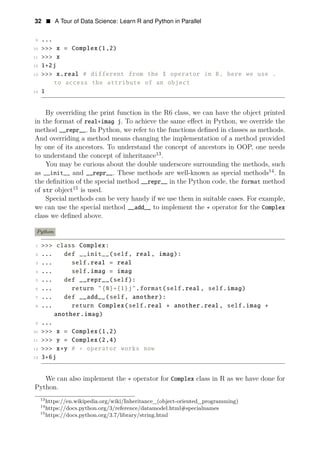
Special methods can be very handy if we use them in suitable cases. For example,
we can use the special method __add__ to implement the + operator for the Complex
class we defined above.
Python
1 >>> class Complex:
2 ... def __init__(self, real, imag):
3 ... self.real = real
4 ... self.imag = imag
5 ... def __repr__(self):
6 ... return "{0}+{1}j".format(self.real, self.imag)
7 ... def __add__(self, another):
8 ... return Complex(self.real + another.real, self.imag +
another.imag)
9 ...
10 >>> x = Complex(1,2)
11 >>> y = Complex(2,4)
12 >>> x+y # + operator works now
13 3+6j
We can also implement the + operator for Complex class in R as we have done for
Python.
13
https://en.wikipedia.org/wiki/Inheritance_(object-oriented_programming)
14
https://docs.python.org/3/reference/datamodel.html#specialnames
15
https://docs.python.org/3.7/library/string.html
Introduction to R/Python Programming • 33
R
1 > ‘+.Complex ‘ = function(x, y){
2 + Complex$new(x$real+y$real, x$imag+y$imag)
3 + }
4 > x=Complex$new(1,2)
5 > y=Complex$new(2,4)
6 > x+y
7 3+6j
The most interesting part of the code above is ‘+.Complex‘. First, why do we use
‘‘ to quote the function name? Before getting into this question, let’s have a look at
the Python 3’s variable naming rules16
.
1 Within the ASCII range (U+0001..U+007F), the valid characters
for identifiers (also referred to as names) are the same as
in Python 2.x: the uppercase and lowercase letters A through
Z, the underscore _ and, except for the first character ,
the digits 0 through 9.
According to the rule, we can’t declare a variable with name 2x. Compared
with Python, in R we can also use . in the variable names17
. However, there is a
workaround to use invalid variable names in R with the help of ‘‘.
R
1 > 2x = 5
2 Error: unexpected symbol in
"2x"
3 > .x = 3
4 > .x
5 [1] 3
6 > ‘+2x%‘ = 0
7 > ‘+2x%‘
8 [1] 0
Python
1 >>> 2x = 5
2 File "<stdin>", line 1
3 2x = 5
4 ^
5 SyntaxError: invalid syntax
6 >>> .x = 3
7 File "<stdin>", line 1
8 .x = 3
9 ^
10 SyntaxError: invalid syntax
Now it is clear the usage of ‘‘ in ‘+.Complex‘ is to define a function with invalid
name. Placing .Complex after + is related to S3 method dispatching, which will not
be discussed here.
16
https://docs.python.org/3.3/reference/lexical_analysis.html
17
https://cran.r-project.org/doc/manuals/r-release/R-lang.html#Identifiers
34 • A Tour of Data Science: Learn R and Python in Parallel
1.7.1 Member accessibility in Python
In some programming languages the members (variable or methods) of a class can be
declared with access modifiers which specify the accessibility or scope of a member.
In Python, class members don’t have explicit access modifiers, but it is still possible
to specify the accessibility. By default, the class member can be accessed inside or
outside the class definition. If the name of the member starts with a single underscore,
the member should not be accessed outside the class definition by convention, but
it is not enforced. If the name of the member starts with double underscore, the
member name is mangled and thus the member can’t be accessed by its original
member outside the class definition. But inside the class definition these variables
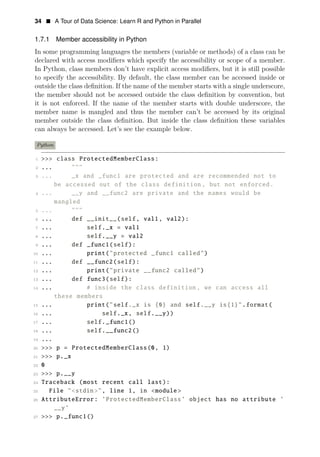
can always be accessed. Let’s see the example below.
Python
1 >>> class ProtectedMemberClass:
2 ... """
3 ... _x and _func1 are protected and are recommended not to
be accessed out of the class definition , but not enforced.
4 ... __y and __func2 are private and the names would be
mangled
5 ... """
6 ... def __init__(self, val1, val2):
7 ... self._x = val1
8 ... self.__y = val2
9 ... def _func1(self):
10 ... print("protected _func1 called")
11 ... def __func2(self):
12 ... print("private __func2 called")
13 ... def func3(self):
14 ... # inside the class definition , we can access all
these members
15 ... print("self._x is {0} and self.__y is{1}".format(
16 ... self._x, self.__y))
17 ... self._func1()
18 ... self.__func2()
19 ...
20 >>> p = ProtectedMemberClass(0, 1)
21 >>> p._x
22 0
23 >>> p.__y
24 Traceback (most recent call last):
25 File "<stdin>", line 1, in <module >
26 AttributeError: ’ProtectedMemberClass’ object has no attribute ’
__y’
27 >>> p._func1()
Introduction to R/Python Programming • 35
28 protected _func1 called
29 >>> p.__func2()
30 Traceback (most recent call last):
31 File "<stdin>", line 1, in <module >
32 AttributeError: ’ProtectedMemberClass’ object has no attribute ’
__func2’
33 >>> p.func3()
34 self._x is 0 and self.__y is1
35 protected _func1 called
36 private __func2 called
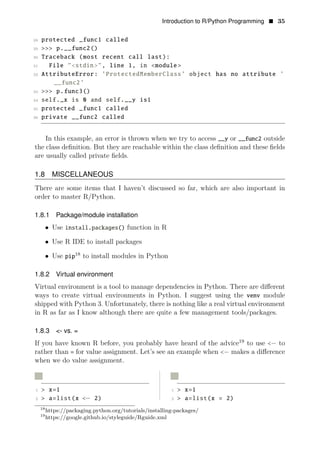
In this example, an error is thrown when we try to access __y or __func2 outside
the class definition. But they are reachable within the class definition and these fields
are usually called private fields.
1.8 MISCELLANEOUS
There are some items that I haven’t discussed so far, which are also important in
order to master R/Python.
1.8.1 Package/module installation
• Use install.packages() function in R
• Use R IDE to install packages
• Use 18
pip to install modules in Python
1.8.2 Virtual environment
Virtual environment is a tool to manage dependencies in Python. There are different
ways to create virtual environments in Python. I suggest using the venv module
shipped with Python 3. Unfortunately, there is nothing like a real virtual environment
in R as far as I know although there are quite a few management tools/packages.
1.8.3 <- vs. =
If you have known R before, you probably have heard of the advice19
to use <− to
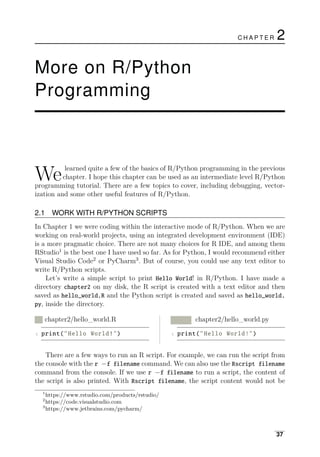
rather than = for value assignment. Let’s see an example when <− makes a difference
when we do value assignment.
R R
1 > x=1 1 > x=1
2 > a=list(x <− 2) 2 > a=list(x = 2)
18
https://packaging.python.org/tutorials/installing-packages/
19
https://google.github.io/styleguide/Rguide.xml
36 • A Tour of Data Science: Learn R and Python in Parallel
3 > a 3 > a
4 [[1]] 4 $x
5 [1] 2 5 [1] 2
6 6
7 > x 7 > x
8 [1] 2 8 [1] 1
We learned quite a few of the basics of R/Python programming in the previous
chapter. I hope this chapter can be used as an intermediate level R/Python
programming tutorial. There are a few topics to cover, including debugging, vector­
ization and some other useful features of R/Python.
2.1 WORK WITH R/PYTHON SCRIPTS
In Chapter 1 we were coding within the interactive mode of R/Python. When we are
working on real-world projects, using an integrated development environment (IDE)
is a more pragmatic choice. There are not many choices for R IDE, and among them
RStudio1
is the best one I have used so far. As for Python, I would recommend either
Visual Studio Code2
or PyCharm3
. But of course, you could use any text editor to
write R/Python scripts.
Let’s write a simple script to print Hello World! in R/Python. I have made a
directory chapter2 on my disk, the R script is created with a text editor and then
saved as hello_world.R and the Python script is created and saved as hello_world.
py, inside the directory.
R chapter2/hello_world.R Python chapter2/hello_world.py
1 print("Hello World!") 1 print("Hello World!")
There are a few ways to run an R script. For example, we can run the script from
the console with the r −f filename command. We can also use the Rscript filename
command from the console. If we use r −f filename to run a script, the content of
the script is also printed. With Rscript filename, the script content would not be
1
https://www.rstudio.com/products/rstudio/
2
https://code.visualstudio.com
3
https://www.jetbrains.com/pycharm/
37
C H A P T E R 2
More on R/Python
Programming
38 • A Tour of Data Science: Learn R and Python in Parallel
printed. Also, we can open the R interactive session and use the source() function.
As for the Python script, we can run it from the console.
R Python
1 chapter2 $ls 1 chapter2 $ls
2 hello_world.R hello_world.py 2 hello_world.R hello_world.py
3 chapter2 $r −f hello_world.R 3
4 > print("Hello World!") 4 chapter2 $python3.7
5 [1] "Hello World!" hello_world.py
6 5 Hello World!
7 chapter2 $r
8 > source(’hello_world.R’)
9 [1] "Hello World!"
Below is another example of scripts, in which we first create a function to print a
triangle and then call the function for printing.
R chapter2/print_triangle.R Python chapter2/print_triangle.py
1 # define a function to print 1 # define a function to print
triangle triangle
2 print_triangle = 2 def print_triangle(n):
function(n){ 3 for i in range(n+1):
3 for (i in 1:n){
4 print(" " i)
4 print(strrep("∗",i))
∗ ∗
5 # now we call the function
5 }
6 print_triangle(5)
6 }
7 # call the function for
printing
8 print_triangle(5)
Let’s run these two scripts to see the results.
R Python
1 chapter2 1 chapter2 $python
$Rscript print_triangle.R print_triangle.py
2 [1] "∗"
2
3 [1] "∗∗"
3
4 [1] "∗∗∗"
∗
4
5 [1] "∗∗∗∗"
∗∗
5
6 [1] "∗∗∗∗∗"
∗∗∗
6 ∗∗∗∗
7 ∗∗∗∗∗
The major reason for using scripts is that we don’t want to limit ourselves by using
More on R/Python Programming • 39
R/Python as basic calculators. In a script, we can put as many lines of R/Python
code as we need. In Python, a script is also referred to as module. It is common to
see a project consisting of multiple scripts to better organize the code structure. For
example, in a data science project, data loading/cleaning functions could be organized
inside one script, and model building functions could be organized in another script.
Model testing/validation can also have its own script. It is also valid to put different
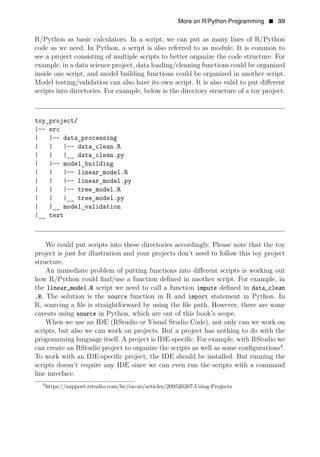
scripts into directories. For example, below is the directory structure of a toy project.
toy_project/
|-- src
| |-- data_processing
| | |-- data_clean.R
| | |__ data_clean.py
| |-- model_building
| | |-- linear_model.R
| | |-- linear_model.py
| | |-- tree_model.R
| | |__ tree_model.py
| |__ model_validation
|__ test
We could put scripts into these directories accordingly. Please note that the toy
project is just for illustration and your projects don’t need to follow this toy project
structure.
An immediate problem of putting functions into different scripts is working out
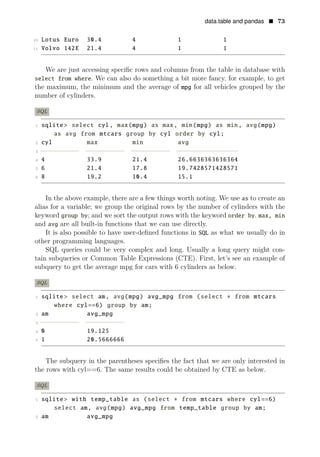
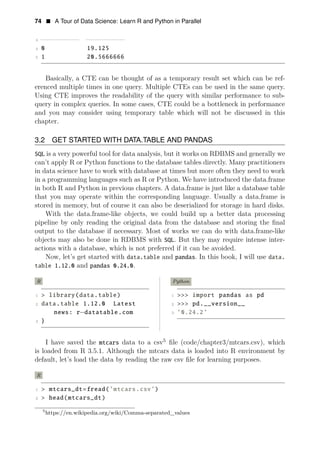
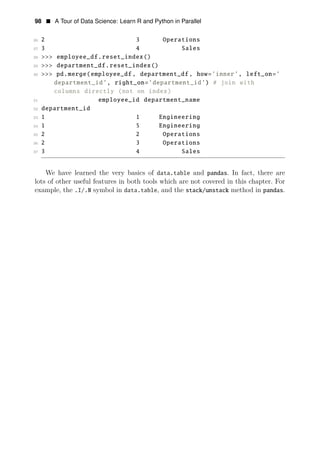
how R/Python could find/use a function defined in another script. For example, in
the linear_model.R script we need to call a function impute defined in data_clean
.R. The solution is the source function in R and import statement in Python. In
R, sourcing a file is straightforward by using the file path. However, there are some
caveats using source in Python, which are out of this book’s scope.
When we use an IDE (RStudio or Visual Studio Code), not only can we work on
scripts, but also we can work on projects. But a project has nothing to do with the
programming language itself. A project is IDE-specific. For example, with RStudio we
can create an RStudio project to organize the scripts as well as some configurations4
.
To work with an IDE-specific project, the IDE should be installed. But running the
scripts doesn’t require any IDE since we can even run the scripts with a command
line interface.
4
https://support.rstudio.com/hc/en-us/articles/200526207-Using-Projects
In R, there is a function browser() which interrupts the execution and allows the
inspection of the current environment. Similarly, there is a module pdb in Python that
provides more debugging features. We will only focus on the basic usages of browser
() and the set_trace() function in pdb module. The essential difference between
debugging using print() and browser() and set_trace() is that the latter function
allows us to debug in an interactive mode.
Let’s write a function which takes a sorted vector/list v and a target value x as
input and returns the leftmost index pos of the sorted vector/list so that v[pos]>=x.
Since v is already sorted, we may simply loop through it from left to right to find
pos.
R chapter2/find_pos.R Python chapter2/find_pos.py
1 find_pos=function(v,x){ 1 def find_pos(v,x):
2 for (i in 1:length(v)){ 2 for i in range(len(v)):
3 if (v[i]>=x){ 3 if v[i]>=x:
4 return(i) 4 return i
5 } 5
6 } 6 v=[1,2,5,10]
7 } 7 print(find_pos(v,
8
−1))
8 print(find_pos(v,4))
9 v=c(1,2,5,10) 9 print(find_pos(v,11))
10 print(find_pos(v,−1))
11 print(find_pos(v,4))
12 print(find_pos(v,11))
5
https://docs.python.org/3/library/logging.html
40 • A Tour of Data Science: Learn R and Python in Parallel
2.2 DEBUGGING IN R/PYTHON
Debugging is one of the most important aspects of programming. What is debugging
in programming? The programs we write might include errors/bugs and debugging is
a step-by-step process to find and remove the errors/bugs in order to get the desired
results.
If you are smart enough or the bugs are evident enough then you can debug the
program on your mind without using a computer at all. But in general we need some
tools/techniques to help us with debugging.
2.2.1 Print
Most programming languages provide the functionality of printing, which is a natural
way of debugging. By trying to place print statements at different positions we may
finally catch the bugs. When I use print to debug, it’s feeling like playing the game
of Minesweeper. In Python, there is a module called logging5
which could be used
for debugging like the print function, but in a more elegant fashion.
2.2.2 Browser in R and pdb in Python
More on R/Python Programming • 41
Now let’s run these two scripts.
R Python
1 chapter2 $r 1 chapter2 $python3.7 find_pos
2 > source(’find_pos.R’) .py
3 [1] 1 2 0
4 [1] 3 3 2
5 NULL 4 None
When x=11, the function returns NULL in R and None in Python because there is no
such element in v larger than x. The implementation above is trivial, but not efficient.
If you have some background in data structures and algorithms, you probably know
this question can be solved by binary search. The essential idea of binary search
comes from the concept of divide-and-conquer6
. Since v is already sorted, we may
divide it into two partitions by cutting it from the middle, and then we get the left
partition and the right partition. v is sorted implying that both the left partition and
the right partition are also sorted. If the target value x is larger than the rightmost
element in the left partition, we can just discard the left partition and search x within
the right partition. Otherwise, we can discard the right partition and search x within
the left partition. Once we have determined which partition to search, we may apply
the idea recursively so that in each step we reduce the size of v by half. If the length
of v is denoted as n, in terms of big 7
O notation , the run time complexity of binary
search is O(log n), compared with O(n) of the for-loop implementation.
The code below implements the binary search solution to our question. (It is more
intuitive to do it with recursion but here I write it with iteration since tail recursion
optimization8
in R/Python is not supported.)
R chapter2/find_binary_search_buggy.R
1 binary_search_buggy=function(v, x){
2 start = 1
3 end = length(v)
4 while (start<end){
5 mid = (start+end) %/% 2 # %/% is the floor division operator
6 if (v[mid]>=x){
7 end = mid
8 }else{
9 start = mid+1
10 }
11 }
6
https://en.wikipedia.org/wiki/Divide-and-conquer_algorithm
7
https://en.wikipedia.org/wiki/Big_O_notation
8
https://en.wikipedia.org/wiki/Tail_call
42 • A Tour of Data Science: Learn R and Python in Parallel
12 return(start)
13 }
14 v=c(1,2,5,10)
15 print(binary_search_buggy(v,−1))
16 print(binary_search_buggy(v,5))
17 print(binary_search_buggy(v,11))
Python chapter2/find_binary_search_buggy.py
1 def binary_search_buggy(v, x):
2 start, end = 0, len(v)−1
3 while start<end:
4 mid = (start+end)//2 # // is the floor division operator
5 if v[mid]>=x:
6 end = mid
7 else:
8 start = mid+1
9 return start
10
11 v=[1,2,5,10]
12 print(binary_search_buggy(v,−1))
13 print(binary_search_buggy(v,5))
14 print(binary_search_buggy(v,11))
Now let’s run these two binary_search scripts.
R Python
1 chapter2 $r 1 chapter2 $python3.7
2 > source(’ binary_search_buggy.py
binary_search_buggy.R’) 2 0
3 [1] 1
3 2
4 [1] 3
4 3
5 [1] 4
The binary search solutions don’t work as expected when x=11. We write two new
scripts.
R chapter2/find_binary_search_buggy_debug.R
1 binary_search_buggy=function(v, x){
2 browser()
3 start = 1
4 end = length(v)
5 while (start<end){
More on R/Python Programming • 43
6 mid = (start+end)
7 if (v[mid]>=x){
8 end = mid
9 }else{
10 start = mid+1
11 }
12 }
13 return(start)
14 }
15 v=c(1,2,5,10)
16 print(binary_search_buggy(v, 11))
Python chapter2/find_binary_search_buggy_debug.py
1 from pdb import set_trace
2 def binary_search_buggy(v, x):
3 set_trace()
4 start, end = 0, len(v)−1
5 while start<end:
6 mid = (start+end)//2
7 if v[mid]>=x:
8 end = mid
9 else:
10 start = mid+1
11 return start
12
13 v=[1,2,5,10]
14 print(binary_search_buggy(v,11))
Let’s try to debug the programs with the help of browser() and set_trace().
R
1 > source(’binary_search_buggy_debug.R’)
2 Called from: binary_search_buggy(v, 11)
3 Browse[1]> ls()
4 [1] "v" "x"
5 Browse[1]> n
6 debug at binary_search_buggy_debug.R#3: start = 1
7 Browse[2]> n
8 debug at binary_search_buggy_debug.R#4: end = length(v)
9 Browse[2]> n
10 debug at binary_search_buggy_debug.R#5: while (start < end) {
11 mid = (start + end)%/%2
44 • A Tour of Data Science: Learn R and Python in Parallel
12 if (v[mid] >= x) {
13 end = mid
14 }
15 else {
16 start = mid + 1
17 }
18 }
19 Browse[2]> n
20 debug at binary_search_buggy_debug.R#6: mid = (start + end)%/%2
21 Browse[2]> n
22 debug at binary_search_buggy_debug.R#7: if (v[mid] >= x) {
23 end = mid
24 } else {
25 start = mid + 1
26 }
27 Browse[2]> n
28 debug at binary_search_buggy_debug.R#10: start = mid + 1
29 Browse[2]> n
30 debug at binary_search_buggy_debug.R#5: (while) start < end
31 Browse[2]> n
32 debug at binary_search_buggy_debug.R#6: mid = (start + end)%/%2
33 Browse[2]> n
34 debug at binary_search_buggy_debug.R#7: if (v[mid] >= x) {
35 end = mid
36 } else {
37 start = mid + 1
38 }
39 Browse[2]> n
40 debug at binary_search_buggy_debug.R#10: start = mid + 1
41 Browse[2]> n
42 debug at binary_search_buggy_debug.R#5: (while) start < end
43 Browse[2]> start
44 [1] 4
45 Browse[2]> n
46 debug at binary_search_buggy_debug.R#13: return(start)
47 Browse[2]> n
48 [1] 4
In the R code snippet above, we placed the browser() function on the top of
the function binary_search_buggy. Then when we call the function we enter into the
debugging environment. By calling ls() we see all variables in the current debugging
scope, i.e., v, x. Typing n will evaluate the next statement. After typing n a few
times, we finally exit from the while loop because start = 4 such that start < end
More on R/Python Programming • 45
is FALSE. As a result, the function just returns the value of start, i.e., 4. To exit from
the debugging environment, we can type Q; to continue the execution we can type c.
The root cause is that we didn’t deal with the corner case when the target value
x is larger than the last/largest element in v correctly.
Let’s debug the Python function using pdb module.
Python
1 chapter2 $python3.7 binary_search_buggy_debug.py
2 > chapter2/binary_search_buggy_debug.py(4)binary_search_buggy()
3 −> start,end = 0,len(v)−1
4 (Pdb) n
5 > chapter2/binary_search_buggy_debug.py(5)binary_search_buggy()
6 −> while start<end:
7 (Pdb) l
8 1 from pdb import set_trace
9 2 def binary_search_buggy(v,x):
10 3 set_trace()
11 4 start,end = 0,len(v)−1
12 5 −> while start<end:
13 6 mid = (start+end)//2
14 7 if v[mid]>=x:
15 8 end = mid
16 9 else:
17 10 start = mid+1
18 11 return start
19 (Pdb) b 7
20 Breakpoint 1 at chapter2/binary_search_buggy_debug.py:7
21 (Pdb) c
22 > chapter2/binary_search_buggy_debug.py(7)binary_search_buggy()
23 −> if v[mid]>=x:
24 (Pdb) c
25 > chapter2/binary_search_buggy_debug.py(7)binary_search_buggy()
26 −> if v[mid]>=x:
27 (Pdb) mid
28 2
29 (Pdb) n
30 > chapter2/binary_search_buggy_debug.py(10)binary_search_buggy()
31 −> start = mid+1
32 (Pdb) n
33 > chapter2/binary_search_buggy_debug.py(5)binary_search_buggy()
34 −> while start<end:
35 (Pdb) start
36 3
37 (Pdb) n
46 • A Tour of Data Science: Learn R and Python in Parallel
38 > chapter2/binary_search_buggy_debug.py(11)binary_search_buggy()
39 −> return start
Similar to R, command n would evaluate the next statement in pdb. Typing com­
mand l would show the current line of current execution. Command b line_number
would set the corresponding line as a break point; and c would continue the execution
until the next breakpoint (if it exists).
In R, besides the browser() function there are a pair of functions debug()and
undebug() which are also very handy when we try to debug a function; especially
when the function is wrapped in a package. More specifically, the debug function will
invoke the debugging environment whenever we call the function to debug. See the
example below which explains how we invoke the debugging environment for the sd
function (standard deviation calculation).
R
1 > x=c(1,1,2)
2 > debug(sd)
3 > sd(x)
4 debugging in: sd(x)
5 debug: sqrt(var(if (is.vector(x) || is.factor(x)) x else as.
double(x),
6 na.rm = na.rm))
7 Browse[2]> ls()
8 [1] "na.rm" "x"
9 Browse[2]> Q
10 > undebug(sd)
11 > sd(x)
12 [1] 0.5773503
The binary_search solutions are fixed below.
R chapter2/find_binary_search.R
1 binary_search=function(v,x){
2 if (x>v[length(v)]){return(NULL)}
3 start = 1
4 end = length(v)
5 while (start<end){
6 mid = (start+end)
7 if (v[mid]>=x){
8 end = mid
9 }else{
10 start = mid+1
11 }
More on R/Python Programming • 47
12 }
13 return(start)
14 }
Python chapter2/find_binary_search.py
1 def binary_search(v, x):
2 if x>v[−1]: return
3 start, end = 0, len(v)−1
4 while start<end:
5 mid = (start+end)//2
6 if v[mid]>=x:
7 end = mid
8 else:
9 start = mid+1
10 return start
2.3 BENCHMARKING
By benchmarking, I mean measuring the entire operation time of a piece of program.
There is another term called profiling which is related to benchmarking. But profiling
is more complex since it commonly aims at understanding the behavior of the program
and optimizing the program in terms of time elapsed during the operation.
In R, I like using the microbenchmark package. And in Python, timeit module is
a good tool to use when we want to benchmark small bits of Python code.
As mentioned before, the run time complexity of binary search is better than that
of a for-loop search. We can do benchmarking to compare the two algorithms.
R chapter2/benchmark.R
1 library(microbenchmark)
2 source(’binary_search.R’)
3 source(’find_pos.R’)
4
5 v=1:10000
6
7 # call each function 1000 times;
8 # each time we randomly select an integer as the target value
9
10 # for−loop solution
11 set.seed(2019)
12 print(microbenchmark(find_pos(v, sample(10000,1)),times=1000))
13 # binary−search solution
48 • A Tour of Data Science: Learn R and Python in Parallel
14 set.seed(2019)
15 print(microbenchmark(binary_search(v, sample(10000,1)),times
=1000))
In the R code above, times=1000 means we want to call the function 1000 times
in the benchmarking process. The sample() function is used to draw samples from
a set of elements. Specifically, we pass the argument 1 to sample() to draw a single
element. It’s the first time we use set.seed() function in this book. In R/Python,
we draw random numbers based on the pseudorandom number generator (PRNG)
algorithm9
. The sequence of numbers generated by PRNG is completed determined
by an initial value, i.e., the seed. Whenever a program involves the usage of PRNG,
it is better to set the seed in order to get replicable results (see the example below).
R R
1 > set.seed(2019) 1
2 > rnorm(1) 2 > set.seed(2019)
3 [1] 0.7385227 3 > rnorm(1)
4 > set.seed(2019) 4 [1] 0.7385227
5 > rnorm(1) 5 > rnorm(1)
6 [1] 0.7385227 6 [1] −0.5147605
Now let’s run the R script to see the benchmarking result.
R
1 > source(’benchmark.R’)
2 Unit: microseconds
3 expr min lq mean median
uq max
4 find_pos(v, sample(10000, 1)) 3.96 109.5385 207.6627 207.5565
307.8875 536.171
5 neval
6 1000
7 Unit: microseconds
8 expr min lq mean median
uq max
9 binary_search(v, sample(10000, 1)) 5.898 6.3325 14.2159 6.6115
7.3635 6435.57
10 neval
11 1000
9
https://en.wikipedia.org/wiki/Pseudorandom_number_generator
More on R/Python Programming • 49
The binary_search solution is much more efficient based on the benchmarking
result. Doing the same benchmarking in Python is a bit complicated.
Python chapter2/benchmark.py
1 from binary_search import binary_search
2 from find_pos import find_pos
3 import timeit
4 import random
5
6 v=list(range(1,10001))
7
8 def test_for_loop(n):
9 random.seed(2019)
10 for _ in range(n):
11 find_pos(v, random.randint(1,10000))
12
13 def test_bs(n):
14 random.seed(2019)
15 for _ in range(n):
16 binary_search(v, random.randint(1,10000))
17
18 # for−loop solution
19 print(timeit.timeit(’test_for_loop(1000)’,setup=’from __main__
import test_for_loop’,number=1))
20 # binary_search solution
21 print(timeit.timeit(’test_bs(1000)’,setup=’from __main__ import
test_bs’,number=1))
The most interesting part of the Python code above is from __main__ import.
Let’s ignore it for now; we will revisit it later.
Below is the benchmarking result in Python (the unit is second).
Python
1 chapter2 $python3 benchmark.py
2 0.284618441
3 0.00396658900000002
2.4 VECTORIZATION
In parallel computing, automatic vectorization10
means a program in a scalar imple­
mentation is converted to a vector implementation which processes multiple pairs of
10
https://en.wikipedia.org/wiki/Automatic_vectorization
50 • A Tour of Data Science: Learn R and Python in Parallel
operands simultaneously by compilers that feature auto-vectorization. For example,
let’s calculate the element-wise sum of two arrays x and y of the same length in C
programming language.
1 int x[4] = {1,2,3,4};
2 int y[4] = {0,1,2,3};
3 int z[4];
4 for (int i=0;i<4;i++){
5 z[i]=x[i]+y[i];
6 }
The C code above might be vectorized by the compiler so that the actual number
of iterations performed could be less than 4. If 4 pairs of operands are processed
at once, there would be only 1 iteration. Automatic vectorization may make the
program run much faster in some languages like C. However, when we talk about
vectorization in R/Python, it is different from automatic vectorization. Vectorization
in R/Python usually refers to the human effort paid to avoid for-loops. First, let’s
see some examples of how for-loops may slow your programs in R/Python.
R
chapter2/vectorization_1.R
1 library(microbenchmark)
2
3 # generate n standard normal r.v
4 rnorm_loop = function(n){
5 x=rep(0,n)
6 for (i in 1:n) {x[i]=rnorm(1)}
7 }
8
9 rnorm_vec = function(n){
10 x=rnorm(n)
11 }
12
13 n=100
14 # for loop
15 print(microbenchmark(rnorm_loop(n),times=1000))
16 # vectorize
17 print(microbenchmark(rnorm_vec(n),times=1000))
Running the R code produces the following result on my local machine.
R
1 > source(’vectorization_1.R’)
More on R/Python Programming • 51
2 Unit: microseconds
3 expr min lq mean median uq max
neval
4 rnorm_loop(n) 131.622 142.699 248.7603 145.3995 270.212 16355.6
1000
5 Unit: microseconds
6 expr min lq mean median uq max neval
7 rnorm_vec(n) 6.696 7.128 10.87463 7.515 8.291 2422.338 1000
Python
1 import timeit
2 import numpy as np
3
4 def rnorm_for_loop(n):
5 x=[0]∗n # create a list with n 0s
6 np.random.seed(2019)
7 for _ in range(n):
8 np.random.normal(0,1,1)
9
10 def rnorm_vec(n):
11 np.random.seed(2019)
12 x = np.random.normal(0,1,n)
13
14 print("for loop")
15 print(f’{timeit.timeit("rnorm_for_loop(100)",setup="from
__main__ import rnorm_for_loop",number=1000):.6f} seconds’)
16 print("vectorized")
17 print(f’{timeit.timeit("rnorm_vec(100)",setup="from __main__
import rnorm_vec",number=1000):.6f} seconds’)
Please note that in this Python example we are using the random submodule of
numpy module instead of the built-in random module since random module doesn’t
provide the vectorized version of random number generation function. Running the
Python code results in the following on my local machine.
Python
1 chapter2 $python3.7 vectorization_1.py
2 for loop
3 0.258466 seconds
4 vectorized
5 0.008213 seconds
52 • A Tour of Data Science: Learn R and Python in Parallel
Also, the timeit.timeit measures the total time to run the main statements
number times, but not the average time per run.
In either R or Python, the vectorized version of random normal random variable
(r.v.) is significantly faster than the scalar version. It is worth noting the usage of
the print(f’’) statement in the Python code, which is different from the way that
we print the object of Complex class in Chapter 1. In the code above, we use the
11
f−string which is a literal string prefaced with ’f’ containing expressions inside
{} which would be replaced with their values. f−string is a feature introduced since
Python 3.6.
It’s also worth noting that lots of built-in functions in R are already vectorized,
such as the basic arithmetic operators, comparison operators, ifelse(), element-wise
logical operators &,|. But the logical operators &&, || are not vectorized.
In addition to vectorization, there are also some built-in functions which may help
to avoid the usages of for-loops. For example, in R we might be able to use the apply
family of functions to replace for-loops; and in Python the map() function can also
be useful. In the Python pandas module, there are also many usages of map/apply
methods. But in general the usage of apply/map functions has little or nothing to
do with performance improvement. However, appropriate usages of such functions
may help with the readability of the program. Compared with the apply family of
functions in R, I think the do.call() function is more useful in practice. We will
spend some time in do.call() later.
Application - Biham–Middleton–Levine (BML) traffic model
Considering the importance of vectorization in scientific programming, let’s try to get more
familiar with vectorization thorough 12
the Biham–Middleton–Levine (BML) traffic model . The
BML model is very important in modern studies of traffic flow since it exhibits a sharp phase
transition from free flowing status to a fully jammed status. A simplified BML model could be
characterized as follows:
• Initialized on a 2-D lattice, each site of which is either empty or occupied by a colored particle (blue
or red);
• Particles are distributed randomly through the initialization according to a uniform distribution; the
two colors of particles are equally distributed.
• On even time steps, all blue particles attempt to move one site up and an attempt fails if the site to
occupy is not empty;
• On Odd time steps, all red particles attempt to move one site right and an attempt fails if the site to
occupy is not empty;
• The lattice is assumed periodic which means when a particle moves out of the lattice, it will move
into the lattice from the opposite side.
11
https://www.python.org/dev/peps/pep-0498/
12
https://en.wikipedia.org/wiki/Biham-Middleton-Levine_traffic_model
More on R/Python Programming • 53
The BML model specified above is implemented in both R/Python as follows to
illustrate the usage of vectorization.
R chapter2/BML.R
1 library(R6)
2 BML = R6Class(
3 "BML",
4 public = list(
5 # alpha is the parameter of the uniform distribution to
control particle distribution ’s density
6 # m∗n is the dimension of the lattice
7 alpha = NULL,
8 m = NULL,
9 n = NULL,
10 lattice = NULL,
11 initialize = function(alpha, m, n) {
12 self$alpha = alpha
13 self$m = m
14 self$n = n
15 self$initialize_lattice()
16 },
17 initialize_lattice = function() {
18 # 0 −> empty site
19 # 1 −> blue particle
20 # 2 −> red particle
21 u = runif(self$m ∗ self$n)
22 # the usage of L is to make sure the elements in particles
are of type integer;
23 # otherwise they would be created as double
24 particles = rep(0L, self$m ∗ self$n)
25 # doing inverse transform sampling
26 particles[(u > self$alpha) &
27 (u <= (self$alpha + 1.0) / 2)] = 1L
28 particles[u > (self$alpha + 1.0) / 2] = 2L
29 self$lattice = array(particles , c(self$m, self$n))
30 },
31 odd_step = function() {
32 blue.index = which(self$lattice == 1L, arr.ind = TRUE)
33 # make a copy of the index
34 blue.up.index = blue.index
35 # blue particles move 1 site up
36 blue.up.index[, 1] = blue.index[, 1] − 1L
37 # periodic boundary condition
38 blue.up.index[blue.up.index[, 1] == 0L, 1] = self$m
54 • A Tour of Data Science: Learn R and Python in Parallel
39 # find which moves are feasible
40 blue.movable = self$lattice[blue.up.index] == 0L
41 # move blue particles one site up
42 # drop=FALSE prevents the 2D array degenerates to 1D array
43 self$lattice[blue.up.index[blue.movable , , drop = FALSE]]
= 1L
44 self$lattice[blue.index[blue.movable , , drop = FALSE]] = 0
L
45 },
46 even_step = function() {
47 red.index = which(self$lattice == 2L, arr.ind = TRUE)
48 # make a copy of the index
49 red.right.index = red.index
50 # red particles move 1 site right
51 red.right.index[, 2] = red.index[, 2] + 1L
52 # periodic boundary condition
53 red.right.index[red.right.index[, 2] == (self$n + 1L), 2]
= 1
54 # find which moves are feasible
55 red.movable = self$lattice[red.right.index] == 0L
56 # move red particles one site right
57 self$lattice[red.right.index[red.movable , , drop = FALSE]]
= 2L
58 self$lattice[red.index[red.movable , , drop = FALSE]] = 0L
59 }
60 )
61 )
Now we can create a simple BML system on a 5 × 5 lattice using the R code
above.
R
1 > source(’BML.R’)
2 > set.seed(2019)
3 > bml=BML$new(0.4,5,5)
4 > bml$lattice
5 [,1] [,2] [,3] [,4] [,5]
6 [1,] 2 0 2 1 1
7 [2,] 2 2 1 0 1
8 [3,] 0 0 0 2 2
9 [4,] 1 0 0 0 0
10 [5,] 0 1 1 1 0
11 > bml$odd_step()
12 > bml$lattice
More on R/Python Programming • 55
13 [,1] [,2] [,3] [,4] [,5]
14 [1,] 2 0 2 1 0
15 [2,] 2 2 1 0 1
16 [3,] 1 0 0 2 2
17 [4,] 0 1 1 1 0
18 [5,] 0 0 0 0 1
19 > bml$even_step()
20 > bml$lattice
21 [,1] [,2] [,3] [,4] [,5]
22 [1,] 0 2 2 1 0
23 [2,] 2 2 1 0 1
24 [3,] 1 0 0 2 2
25 [4,] 0 1 1 1 0
26 [5,] 0 0 0 0 1
In the initialization step, we used the inversion sampling approach13
to generate
the status of each site. Inversion sampling method is a basic but powerful approach
to generate r.v. from any probability distribution given its cumulative distribution
function (CDF). We will talk more about sampling technique in Chapter 4.
Python
1 import numpy as np
2
3 class BML:
4 def __init__(self, alpha, m, n):
5 self.alpha = alpha
6 self.shape = (m, n)
7 self.initialize_lattice()
8
9 def initialize_lattice(self):
10 u = np.random.uniform(0.0, 1.0, self.shape)
11 # instead of using default list, we use np.array to
create the lattice
12 self.lattice = np.zeros_like(u, dtype=int)
13 # the parentheses below can’t be ignored
14 self.lattice[(u > self.alpha) & (u <= (1.0+self.alpha)
/2.0)] = 1
15 self.lattice[u > (self.alpha+1.0)/2.0] = 2
16
17 def odd_step(self):
18 # please note that np.where returns a tuple which is
immutable
13
https://en.wikipedia.org/wiki/Inverse_transform_sampling
56 • A Tour of Data Science: Learn R and Python in Parallel
19 blue_index = np.where(self.lattice == 1)
20 blue_index_i = blue_index[0] − 1
21 blue_index_i[blue_index_i < 0] = self.shape[0]−1
22 blue_movable = self.lattice[(blue_index_i , blue_index
[1])] == 0
23 self.lattice[(blue_index_i[blue_movable],
24 blue_index[1][blue_movable])] = 1
25 self.lattice[(blue_index[0][blue_movable],
26 blue_index[1][blue_movable])] = 0
27
28 def even_step(self):
29 red_index = np.where(self.lattice == 2)
30 red_index_j = red_index[1] + 1
31 red_index_j[red_index_j == self.shape[1]] = 0
32 red_movable = self.lattice[(red_index[0], red_index_j)]
== 0
33 self.lattice[(red_index[0][red_movable],
34 red_index_j[red_movable])] = 2
35 self.lattice[(red_index[0][red_movable],
36 red_index[1][red_movable])] = 0
The Python implementation is also given.
R
1 >>> import numpy as np
2 >>> np.random.seed(2019)
3 >>> from BML import BML
4 >>> bml=BML(0.4,5,5)
5 >>> bml.lattice
6 array([[2, 0, 1, 1, 2],
7 [0, 2, 2, 2, 1],
8 [1, 0, 0, 2, 0],
9 [2, 0, 1, 0, 2],
10 [1, 1, 0, 2, 1]])
11 >>> bml.odd_step()
12 >>> bml.lattice
13 array([[2, 0, 0, 1, 2],
14 [1, 2, 2, 2, 1],
15 [0, 0, 1, 2, 0],
16 [2, 1, 0, 0, 2],
17 [1, 0, 1, 2, 1]])
18 >>> bml.even_step()
19 >>> bml.lattice
20 array([[0, 2, 0, 1, 2],
More on R/Python Programming • 57
21 [1, 2, 2, 2, 1],
22 [0, 0, 1, 0, 2],
23 [2, 1, 0, 0, 2],
24 [1, 0, 1, 2, 1]])
Please note that although we have imported numpy in BML.py, we import it again
in the code above in order to set the random seed. If we change the line to from
BML import ∗, we don’t need to import numpy again. But it is not recommended to
import ∗ from a module.
2.5 EMBARRASSINGLY PARALLELISM IN R/PYTHON
According to the explanation in wikipedia14
, single-threading is the processing of one
command at a time, and its opposite is multithreading. A process is the instance of a
computer program executed by one or many threads15
. Multithreading is not the same
as parallelism. In a single processor environment, the processor can switch execution
between threads, which results in concurrent execution. However, it is possible a
process with multithreads runs on a multiprocessor environment and each of the
threads on a separate processor, which results in parallel execution.
Both R and Python are single-threaded. In Python, there is a threading pack­
age16
, which supports multithreading on a single core. It may suit some specific tasks.
For example, in web scraping multithreading on a single core may be able to speed
up the program if the download time is in excess of the CPU processing time.
Now let’s talk about embarrassingly parallelism by multiprocessing. An embar­
rassingly parallel problem is one where little or no effort is needed to separate the
problem into a number of parallel tasks17
. In R there are various packages sup­
porting multiprocessing on multiple CPU cores, for example, the parallel package,
which is my favorite one. In Python, there are also some available modules, such as
multiprocessing, joblib and concurrent.futures.
Let’s see an application of embarrassingly parallelism to calculate π using Monte
Carlo simulation18
.
Application - Monte Carlo simulation to estimate π via parallelization
Monte Carlo simulation provides a simple and straightforward way to estimate π. We know
the area of a circle with radius 1 is just π. Thus, we can convert the original problem of π
calculation to a new problem, i.e., how to calculate the area of a circle with radius 1. We
also know the area of a square with side length 2 is equal to 4. Thus, π can be calculated
as 4rc/s where rc/s denotes the ratio of areas of a circle with radius 1 and a square with
side length 2. Now the problem is how to calculate the ratio rc/s? When we randomly throw
14
https://en.wikipedia.org/wiki/Thread_(computing)
15
https://en.wikipedia.org/wiki/Process_(computing)
16
https://docs.python.org/3.7/library/threading.html
17
https://en.wikipedia.org/wiki/Embarrassingly_parallel
18
https://en.wikipedia.org/wiki/Monte_Carlo_method
58 • A Tour of Data Science: Learn R and Python in Parallel
Figure 2.1: Generate points within a square and count how many times these points
fall into the inscribed circle
n points into the square and m of these points fall into the inscribed circle (see Figure 2.1),
then we can estimate the ratio as m/n. As a result, a natural estimate of π is 4m/n. This
problem is an embarrassingly parallel problem by its nature. Let’s see how we implement the
idea in R/Python.
R chapter2/pi.R
1 library(parallel)
2 count_inside_point = function(n){
3 m = 0
4 for (i in 1:n){
5 p_x = runif(1, −1, 1)
6 p_y = runif(1, −1, 1)
7 if (p_x^2 + p_y^2 <=1){
8 m = m+1
9 }
10 }
11 m
12 }
13
14 # now let’s use the mcapply for parallelization
15 generate_points_parallel = function(n){
16 # detectCores() returns the number of cores available
17 # we assign the task to each core
18 unlist(mclapply(X = rep(n %/% detectCores(), detectCores()),
FUN=count_inside_point))
19 }
20
21 # now let’s use vectorization
22 generate_points_vectorized = function(n){
More on R/Python Programming • 59
23 p = array(runif(n∗2,−1,1), c(n,2))
24 sum((p[,1]^2+p[,2]^2) <=1)
25 }
26
27 pi_naive = function(n) cat(’naive: pi −’, 4∗count_inside_point(n
)/n, ’n’)
28
29 pi_parallel = function(n) cat(’parallel: pi −’, 4∗sum(
generate_points_parallel(n))/n, ’n’)
30
31 pi_vectorized = function(n) cat(’vectorized: pi −’, 4∗sum(
generate_points_vectorized(n))/n, ’n’)
In the above R code snippet, we use the function mclapply which is not currently
available on some operation systems19
. When it is not available, we may consider
using parLapply instead.
Python chapter2/pi.py
1 # now let’s try the parallel approach
2 # each process uses the same seed, which is not desired
3 def generate_points_parallel(n):
4 pool = mp.Pool()
5 # we ask each process to generate n//mp.cpu_count() points
6 return pool.map(count_inside_point , [n//mp.cpu_count()]∗mp.
cpu_count())
7
8 # set seed for each process
9 # first, let’s define a helper function
10 def helper(args):
11 n, s = args
12 seed(s)
13 return count_inside_point(n)
14
15 def generate_points_parallel_set_seed(n):
16 pool = mp.Pool() # we can also specify the number of
processes by Pool(number)
17 # we ask each process to generate n//mp.cpu_count() points
18 return pool.map(helper , list(zip([n//mp.cpu_count()]∗mp.
cpu_count(),range(mp.cpu_count()))))
19
20 # another optimization via vectorization
21 def generate_points_vectorized(n):
19
https://stat.ethz.ch/R-manual/R-devel/library/parallel/doc/parallel.pdf
60 • A Tour of Data Science: Learn R and Python in Parallel
22 p = uniform(−1, 1, size=(n,2))
23 return np.sum(np.linalg.norm(p, axis=1) <= 1)
24
25 def pi_naive(n):
26 print(f’pi: {count_inside_point(n)/n∗4:.6f}’)
27
28 def pi_parallel(n):
29 print(f’pi: {sum(generate_points_parallel_set_seed(n))/n
∗4:.6f}’)
30
31 def pi_vectorized(n):
32 print(f’pi: {generate_points_vectorized(n)/n∗4:.6f}’)
In the above Python code snippet, we defined a function generate_points_parallel
which returns a list containing the numbers of inside points. But the problem with
this function is that each process in the pool shares the same random state. As a re­
sult, we will obtain a list of duplicated numbers by calling this function. To overcome
the issue, we defined another function generate_points_parallel_set_seed. Let’s see
the results of our estimation for π running on a laptop.
R
1 > source(’pi.R’)
2 > system.time(pi_naive(1e6))
3 naive: pi − 3.144592
4 user system elapsed
5 8.073 1.180 9.333
6 > system.time(pi_parallel(1e6))
7 parallel: pi − 3.1415
8 user system elapsed
9 4.107 0.560 4.833
10 > system.time(pi_vectorized(1e6))
11 vectorized: pi − 3.141224
12 user system elapsed
13 0.180 0.031 0.214
Python
1 >>> import timeit
2 >>> from pi import pi_naive , pi_parallel , pi_vectorized
3 >>> print(f’naive − {timeit.timeit("pi_naive(1000000)",setup="
from __main__ import pi_naive",number=1):.6f} seconds’)
4 pi: 3.141056
5 naive − 4.363822 seconds
More on R/Python Programming • 61
6 >>> print(f’parallel − {timeit.timeit("pi_parallel(1000000)",
setup="from __main__ import pi_parallel",number=1):.6f}
seconds’)
7 pi: 3.141032
8 parallel − 2.204697 seconds
9 >>> print(f’vectorized − {timeit.timeit("pi_vectorized(1000000)
",setup="from __main__ import pi_vectorized",number=1):.6f}
seconds’)
10 pi: 3.139936
11 vectorized − 0.148950 seconds
We see the winner in this example is vectorization, and the parallel solution is
better than the naive solution. However, when the problem cannot be vectorized we
may use parallelization to achieve better performance.
2.6 EVALUATION STRATEGY
R is a lazy programming language since it uses lazy evaluation by default [13]. Lazy
evaluation strategy delays the evaluation of an expression until its value is needed.
When an expression in R is evaluated, it follows an outermost reduction order in gen­
eral. But Python is not a lazy programming language and the expression in Python
follows an innermost reduction order. The code snippets below illustrate the inner­
most reduction vs. outermost reduction.
R Python
1 > divide = function(x, y){ 1 >>> def divide(x, y):
stopifnot(y!=0);return(x return x/y
/y)} 2 >>> def power(x, p):
1
2 > power = return if p==0
function(x, p){ else x p
if (p==0) 1 else x^p}
3 >>> power(
∗∗
divide(1,0),0)
3 > power(divide(1,0),2)
4 Traceback (most recent call
4 Error in divide(1, 0) : y !
= 0 last):
is not TRUE
5 > power(divide(1,0),0) 5 File "<stdin>", line 1,
6 [1] 1 in <module >
6 File "<stdin>", line 1,
in divide
7 ZeroDivisionError: division
by zero
Because of the outermost reduction order, the R code snippet evaluates the func­
tion power first and since if the second argument is 0 the first argument is not required
to evaluate. Thus, the function call returns 1. But the Python code snippet first eval­
uates the function call of divide and an exception is raised because of division by
zero.
Although Python is an eager language, it is possible to simulate the lazy eval­
62 • A Tour of Data Science: Learn R and Python in Parallel
uation behavior. For example, the code inside a generator20
is evaluated when the
generator is consumed but not evaluated when it is created. We can create a sequence
of Fibonacci numbers with the help of generator.
Python
1 >>> def fib():
2 ... ’’’
3 ... a generator to create Fibonacci numbers less than 10
4 ... ’’’
5 ... a, b = 0, 1
6 ... while a<10:
7 ... a, b = b, a+b
8 ... yield a
9 ...
10 >>> f = fib()
11 >>> print(f)
12 <generator object fib at 0x116dfc570 >
13 >>> for e in f: print(e)
14 ...
15 1
16 1
17 2
18 3
19 5
20 8
21 13
22 >>>
In the code snippet above, we create a generator which generates the sequence of
Fibonacci numbers less than 10. When the generator is created, the sequence is not
generated immediately. When we consume the generator in a loop, each element is
then generated as needed. It is also common to consume the generator with the next
function.
Python
1 >>> f = fib()
2 >>> next(f)
3 1
4 >>> next(f)
5 1
6 >>> next(f)
7 2
20
https://www.python.org/dev/peps/pep-0255
The purpose of this section is not to teach C/C++. If you know how to write C/C++
then it may help to improve the performance of R/Python program.
It is recommended to use vectorization technique to speed up your program when­
ever possible. But what if it’s infeasible to vectorize the algorithm? One potential
option is to use C/C++ in the R/Python code. According to my limited experience,
it is much easier to use C/C++ in R with the help of Rcpp package than in Python.
In Python, more options are available but not as straightforward as the solution of
Rcpp. In this section, let’s use 21
Cython .
Actually, Cython itself is a programming language written in Python and C. In
Rcpp we can write C++ code directly and use it in native R code. With the help of
Cython, we can write python-like code which is able to be compiled to C or C++
and automatically wrapped into python-importable modules. Cython could also wrap
independent C or C++ code into python-importable modules.
Let’s see how to calculate Fibonacci numbers with these tools. The first step is
to install Rcpp package in R and the Cython module (use pip) in Python. Once they
are installed, we can write the code in C++ directly for R. As for Cython, we write
the python-like code which will be compiled to C/C++ later.
R chapter2/Fibonacci.cpp Python chapter2/Fibonacci.pyx
1 #include <Rcpp.h> 1 #!python
2 using namespace Rcpp; 2 #cython: language_level=3
3 3
4 // [[Rcpp::export]] 4 cdef int Fibonacci_c(int n):
5 int Fibonacci(int n) { 5 if n==1 or n==2:
6 if (n==1 or n==2){ 6 return 1
7 return 1; 7 return Fibonacci_c(n−1)
8 } + Fibonacci_c(n
9
−2)
return Fibonacci(n−1)+ 8
Fibonacci(n−2); 9 def Fibonacci_static(n):
10 } 10 return Fibonacci_c(n)
11
12 def Fibonacci(n):
13 if n==1 or n==2:
14 return 1
21
https://en.wikipedia.org/wiki/Cython
More on R/Python Programming • 63
8 >>> next(f)
9 3
10 >>> next(f)
11 5
2.7 SPEED UP WITH C/C++ IN R/PYTHON
64 • A Tour of Data Science: Learn R and Python in Parallel
15 return Fibonacci(n−1) +
Fibonacci(n−2)
It’s worth noting the extension of the Cython file above is pyx, not py. And in
Fibonacci.pyx, the function we defined follows the native Python syntax. But in
Cython we can add static typing declarations which are often helpful to improve the
performance, although not it’s mandatory. The keyword cdef makes the function
Fibonacci_c invisible to Python and thus we have to define the Fibonacci_static
function as a wrapper which can be imported into Python. The function Fibonacci
is not static typed for benchmarking.
Let’s also implement the same functions in native R/Python for benchmarking
purposes.
R chapter2/Fibonacci.R Python chapter2/Fibonacci.py
1 Fibonacci_native = 1 def Fibonacci_native(n):
function(n){ 2 if n==1 or n==2:
2 if (n==1 || n==2){
3 return 1
3 1
4 return Fibonacci_native(
4 }else {
n
1)
−1) +
5 Fibonacci_native(n− +
Fibonacci_native(n 2)
Fibonacci_native(n
−
−2)
6 }
7 }
Now let’s compare the performance of different implementations.
R
1 > library(microbenchmark)
2 > library(Rcpp)
3 > source(’Fibonacci_native}.R’)
4 > sourceCpp(’Fibonacci.cpp’)
5 > # the native implementation in R
6 > microbenchmark(Fibonacci_native(20), times=1000)
7 Unit: milliseconds
8 expr min lq mean median
uq max
9 Fibonacci_native(20) 3.917138 4.056468 4.456824 4.190078
4.462815 26.30846
10 neval
11 1000
12 > the C++ implementation
13 > microbenchmark(Fibonacci(20), times=1000)
14 Unit: microseconds
More on R/Python Programming • 65
15 expr min lq mean median uq max
neval
16 Fibonacci(20) 14.251 14.482 15.81708 14.582 14.731 775.095
1000
The native implementation in R is much slower than the C++ implementation
(see the difference of units).
Python
1 >>> import pyximport
2 >>> pyximport.install()
3 (None, <pyximport.pyximport.PyxImporter object at 0x1056f9f98 >)
4 >>> from Fibonacci import Fibonacci_static , Fibonacci
5 >>> from Fibonacci_native import Fibonacci_native
6 >>> import timeit
7 >>> print(f’{timeit.timeit("Fibonacci_native(20)",setup="from
__main__ import Fibonacci_native",number=1000):.6f} seconds’
)
8 1.927359 seconds
9 >>> print(f’{timeit.timeit("Fibonacci(20)",setup="from __main__
import Fibonacci",number=1000):.6f} seconds’)
10 0.316726 seconds
11 >>> print(f’{timeit.timeit("Fibonacci_static(20)",setup="from
__main__ import Fibonacci_static",number=1000):.6f} seconds’
)
12 0.012741 seconds
The results show the static typed implementation is the fastest, and the native
implementation in pure Python is the slowest. Again the time measured by timeit.
timeit is the total time to run the main statement 1000 times. The average time per
run of Fibonacci_static function is close to the average time per run of Fibonacci
in R.
2.8 A FIRST IMPRESSION OF FUNCTIONAL PROGRAMMING
Functional (programming) languages define programs as mathematical functions and
treat them as first-class22
. In pure functional programming, a function takes input and
returns output without making any side effect. A side effect means a state variable
outside the function is modified. For example, printing the value of a variable inside
a function is a side effect.
Both R and Python are not purely functional languages per se, although R be­
haves more functionally than Python [5]. If you wonder why the return function
22
https://en.wikipedia.org/wiki/List_of_programming_languages_by_type#Functional_languages
66 • A Tour of Data Science: Learn R and Python in Parallel
could be ignored to return a value in an R function, now you get the explanation —
a function should return the output automatically from an FP perspective.
I don’t think it makes any sense to debate whether we should choose OOP or
FP using R/Python. And both languages support multiple programming paradigms
(FP, OOP, etc.). If you want to do purist FP, neither R nor Python would be the
best choice. For example, purist FP should avoid loop because loop always involves
an iteration counter whose value changes over iterations, which is obviously a side
effect. Thus, recursion is very important in FP. But tail recursion optimization is not
supported in R and Python although it can be implemented via trampoline23
.
Let’s introduce a few tools that could help to get a first impression of FP in R
and Python.
2.8.1 Anonymous function
We have seen anonymous functions before. Anonymous functions don’t have names
given to them. They are commonly used in FP. To recap, let’s see how to define a
useless anonymous function.
R Python
1 > function(x) x x
2
∗ 1 >>> lambda x: x∗∗2
function(x) x∗x 2 <function <
lambda> at 0x1033d5510 >
Usually, we define anonymous functions because we want to pass them to other
functions. And thus, the functions defined above are useless as they are not passed to
any other function and after the definition they are deleted automatically from the
memory.
Of course, we can assign names to the anonymous functions — but what is the
point to naming anonymous functions?
R Python
1 > f1 = function(x) x∗x 1 >>> f1 = lambda x: x 2
2
∗∗
> f1 2 >>> f1(2)
3 function(x) x∗x 3 4
2.8.2 Map
Map could be used to avoid loops. The first argument to map is a function.
In R, we use Map which is shipped with base R; and in Python we use map which
is also a built-in function.
23
https://en.wikipedia.org/wiki/Tail_call#Through_trampolining
More on R/Python Programming • 67
R Python
1 > Map(function(x) x x, 1 >>> map(
c(1:3))
∗
lambda e: e∗∗2, [1,2,3])
2 [[1]] 2 <map object at 0x1033e3160 >
3 [1] 1 3 >>> list(map(
2
4 lambda x: x , [1,2,3]))
4 [1, 4, 9]
∗∗
5 [[2]]
5 >>> list(map(lambda x, y: x
6 [1] 4
∗
y, [1,2,3], [4,5,6]))
7
6 [4, 10, 18]
8 [[3]]
9 [1] 9
10 > Map(function(x, y) x y,
c(1:3), c(4:6))
∗
11 [[1]]
12 [1] 4
13
14 [[2]]
15 [1] 10
16
17 [[3]]
18 [1] 18
There are a few things to note from the code snippets above. First, the returned
value from Map in R is a list rather than a vector. That is because Map is just a wrapper
of mapply function in R, and the SIMPLIFY argument is set to FALSE. If we want to
get a vector value returned, just use mapply instead.
R
1 > mapply(function(x, y) x∗y, c(1:3), c(4:6), SIMPLIFY=TRUE)
2 [1] 4 10 18
The returned value from map in Python is a map object which is an iterator. The
generator function we have seen before is also an iterator. To use an iterator, we
could convert it to a list, or get the next value using the next function, or just use a
for loop.
Python
1 >>> # use next on an iterator
2 >>> o=map(lambda x, y: x∗y, [1,2,3], [4,5,6])
3 >>> next(o)
4 4
5 >>> next(o)
6 10
68 • A Tour of Data Science: Learn R and Python in Parallel
7 >>> o=map(lambda x, y: x∗y, [1,2,3], [4,5,6])
8 >>> # use for loop on an iterator
9 >>> for e in o:print(e)
10 ...
11 4
12 10
13 18
14 >>> # convert an iterator to a list
15 >>> o=map(lambda x, y: x∗y, [1,2,3], [4,5,6])
16 >>> list(o)
17 [4, 10, 18]
2.8.3 Filter
Similar to map, the first argument to Filter in R and filter in Python is also a
function. This function is used to get the elements which satisfy a certain condition
specified in the first argument. For example, we can use it to get the even numbers.
R Python
1 > Filter(function(x) x 1 >>> list(filter(
%%2==0, c(0:10)) lambda e: e%2==0,
range(11)))
2 [1] 0 2 4 6 8 10
2 [0, 2, 4, 6, 8, 10]
2.8.4 Reduce
Reduce behaves a bit differently from Map and Filter. The first argument is a function
with exactly two arguments. The second argument is a sequence, on each element of
which the first function argument will be applied from left to right. And there is one
optional argument called initializer. When the initializer is provided, it will be used
as the first argument of the function argument of Reduce. The examples below depict
how it works.
R
1 > Reduce(function(x, y) x+2
∗y, c(1,2,3))
2 [1] 11
3 > Reduce(function(x, y) x+2
∗y, c(1,2,3), 1)
4 [1] 13
Python
1 >>> from functools import
reduce
2 >>> reduce(lambda x, y:x+2∗y
, [1,2,3])
3 11
4 >>> reduce(
lambda x, y:x+2∗y,
range(1,4), 1)
5 13
Please note that in order to use reduce in Python, we have to import it from the
functools module.
More on R/Python Programming • 69
Utilizing these functions flexibly may help to make the code more concise, at the
cost of readability.
2.9 MISCELLANEOUS
We have introduced the basics of R/Python programming so far. There is much more
to learn in becoming an advanced user of R/Python. For example, the appropriate
usages of iterator, generator, decorator could improve both the conciseness and
readability of your Python code. The generator24
is commonly seen in machine learn­
ing programs to prepare training/testing samples. decorator is a kind of syntactic
sugar to allow the modification of a function’s behavior in a simple way. In R there
are no built-in iterator, generator, decorator, but you may find some third-party
libraries to mimic these features; or you may try to implement your own.
One advantage of Python over R is that there are some built-in modules con­
taining high-performance data structures or commonly used algorithms implemented
efficiently. For example, I enjoy using the deque structure in the Python collections
module25
, but there is no built-in counterpart in R. We have written our own binary
search algorithm earlier in this chapter, which can also be replaced by the functions
in the built-in module bisect26
in Python.
Another important aspect of programming is testing. Unit testing is a typical
software testing method that is commonly adopted in practice. In R there are two
third-party packages testthat and RUnit. In Python, the built-in unittest is quite
powerful. Also, the third-party module pytest27
is very popular.
24
https://docs.python.org/3/howto/functional.html
25
https://docs.python.org/3/library/collections.html
26
https://docs.python.org/3.7/library/bisect.html
27
https://docs.pytest.org/en/latest/
Upon receiving feedback and requests from readers on the first few chap­
ters, I decided to devote a whole chapter to the introduction of data
.table and pandas. Of course, there are many other great data analysis tools in both
R and Python. For example, many R users like using dplyr to build up data analysis
pipelines. The performance of data.table is superior and that is the main reason I
feel there is no need to use other tools for the same tasks in R. But if you are a big fan
of the pipe operator %>% you may use data.table and dplyr together. Regarding the
big data ecosystem, Apache Spark has API in both R and Python. Recently, there
are also some emerging projects aiming at better usability and performance, such as
1
Apache Arrow , 2
Modin .
3.1 SQL
Similar to the previous chapters, I will introduce the tools side by side. However,
I feel before diving into the world of data.table and pandas, it is better to talk a
little bit about 3
SQL . SQL is a Query language designed for managing data in relational
database management system (RDBMS). Some of the most popular RDBMSs include
MS SQL Server, MySQL, PostgreSQL, etc. Different RDBMSs may use SQL languages
with major or subtle differences.
If you have never used RDBMS you may wonder why we need it.
• first, we need a system to store the data;
• second, we also need a system that allows us to easily access, manage and
update the data.
In this chapter, we will use the public mtcars dataset as an example. This dataset
was available in R4
and originally it was reported in [11].
Let’s assume there is a table mtcars in a database (I’m using sqlite3 in this book)
and see some simple tasks we can do with SQL queries.
1
https://arrow.apache.org
2
https://github.com/modin-project/modin
3
https://en.wikipedia.org/wiki/SQL
4
https://stat.ethz.ch/R-manual/R-devel/library/datasets/html/mtcars.html
C H A P T E R 3
data.table and pandas
71
72 • A Tour of Data Science: Learn R and Python in Parallel
Table 3.1: Partial mtcars data loaded from R 3.5.1
name mpg cyl disp hp drat wt qsec vs am gear carb
Mazda RX4 21.00 6.00 160.00 110.00 3.90 2.62 16.46 0.00 1.00 4.00 4.00
Datsun 710 22.80 4.00 108.00 93.00 3.85 2.32 18.61 1.00 1.00 4.00 1.00
Valiant 18.10 6.00 225.00 105.00 2.76 3.46 20.22 1.00 0.00 3.00 1.00
Duster 360 14.30 8.00 360.00 245.00 3.21 3.57 15.84 0.00 0.00 3.00 4.00
Merc 240D 24.40 4.00 146.70 62.00 3.69 3.19 20.00 1.00 0.00 4.00 2.00
Merc 230 22.80 4.00 140.80 95.00 3.92 3.15 22.90 1.00 0.00 4.00 2.00
Merc 280 19.20 6.00 167.60 123.00 3.92 3.44 18.30 1.00 0.00 4.00 4.00
Merc 280C 17.80 6.00 167.60 123.00 3.92 3.44 18.90 1.00 0.00 4.00 4.00
Merc 450SE 16.40 8.00 275.80 180.00 3.07 4.07 17.40 0.00 0.00 3.00 3.00
SQL
1 sqlite > select ∗ from mtcars limit 2;
2 name,mpg,cyl,disp,hp,drat,wt,qsec,vs,am,gear,carb
3 "Mazda RX4",21,6,160,110,3.9,2.62,16.46,0,1,4,4
4 "Mazda RX4 Wag" ,21,6,160,110,3.9,2.875,17.02,0,1,4,4
In the example above, I select two rows from the table using the syntax select
from. The keyword limit in sqlite specifies the number of rows to return. In other
RDBMSs, we may need to use top instead. It is straightforward to select on conditions
with the where keyword.
SQL
1 sqlite > select mpg,cyl from mtcars where name = ’Mazda RX4 Wag’;
2 mpg,cyl
3 21,6
We can definitely use more conditions with the where clause.
SQL
1 sqlite> .mode column −− make the output aligned; and yes we use
’−−’ to start comment in many SQL languages
2 sqlite > select name, mpg, cyl,vs,am from mtcars where vs=1 and
am=1;
3 name mpg cyl vs am
4 −−
−
−
−
−
−
−
−
− −
−
−
−
−
−
−
−
−
− −
−
−
−
−
−
−
−
−
− −
−
−
−
−
−
−
−
−
− −
−
−
−
−
−
−
−
−
−
5 Datsun 710 22.8 4 1 1
6 Fiat 128 32.4 4 1 1
7 Honda Civi 30.4 4 1 1
8 Toyota Cor 33.9 4 1 1
9 Fiat X1−9 27.3 4 1 1
data.table and pandas • 73
10 Lotus Euro 30.4 4 1 1
11 Volvo 142E 21.4 4 1 1
We are just accessing specific rows and columns from the table in database with
select from where. We can also do something a bit more fancy, for example, to get
the maximum, the minimum and the average of mpg for all vehicles grouped by the
number of cylinders.
SQL
1 sqlite > select cyl, max(mpg) as max, min(mpg) as min, avg(mpg)
as avg from mtcars group by cyl order by cyl;
2 cyl max min avg
3 −−
−
−
−
−
−
−
−
− −
−
−
−
−
−
−
−
−
− −
−
−
−
−
−
−
−
−
− −
−
−
−
−
−
−
−
−
−
−
−
−
−
−
−
4 4 33.9 21.4 26.6636363636364
5 6 21.4 17.8 19.7428571428571
6 8 19.2 10.4 15.1
In the above example, there are a few things worth noting. We use as to create an
alias for a variable; we group the original rows by the number of cylinders with the
keyword group by; and we sort the output rows with the keyword order by. max, min
and avg are all built-in functions that we can use directly.
It is also possible to have user-defined functions in SQL as what we usually do in
other programming languages.
SQL queries could be very complex and long. Usually a long query might con­
tain subqueries or Common Table Expressions (CTE). First, let’s see an example of
subquery to get the average mpg for cars with 6 cylinders as below.
SQL
1 sqlite > select am, avg(mpg) avg_mpg from (select ∗ from mtcars
where cyl==6) group by am;
2 am avg_mpg
3 −−
−
−
−
−
−
−
−
− −
−
−
−
−
−
−
−
−
−
4 0 19.125
5 1 20.5666666
The subquery in the parentheses specifies the fact that we are only interested in
the rows with cyl==6. The same results could be obtained by CTE as below.
SQL
1 sqlite> with temp_table as (select ∗ from mtcars where cyl==6)
select am, avg(mpg) avg_mpg from temp_table group by am;
2 am avg_mpg
74 • A Tour of Data Science: Learn R and Python in Parallel
3 −−
−
−
−
−
−
−
−
− −
−
−
−
−
−
−
−
−
−
4 0 19.125
5 1 20.5666666
Basically, a CTE can be thought of as a temporary result set which can be ref­
erenced multiple times in one query. Multiple CTEs can be used in the same query.
Using CTE improves the readability of the query with similar performance to sub-
query in complex queries. In some cases, CTE could be a bottleneck in performance
and you may consider using temporary table which will not be discussed in this
chapter.
3.2 GET STARTED WITH DATA.TABLE AND PANDAS
SQL is a very powerful tool for data analysis, but it works on RDBMS and generally we
can’t apply R or Python functions to the database tables directly. Many practitioners
in data science have to work with database at times but more often they need to work
in a programming languages such as R or Python. We have introduced the data.frame
in both R and Python in previous chapters. A data.frame is just like a database table
that you may operate within the corresponding language. Usually a data.frame is
stored in memory, but of course it can also be deserialized for storage in hard disks.
With the data.frame-like objects, we could build up a better data processing
pipeline by only reading the original data from the database and storing the final
output to the database if necessary. Most of works we can do with data.frame-like
objects may also be done in RDBMS with SQL. But they may require intense inter­
actions with a database, which is not preferred if it can be avoided.
Now, let’s get started with data.table and pandas. In this book, I will use data.
table 1.12.0 and pandas 0.24.0.
R
1 > library(data.table)
2 data.table 1.12.0 Latest
news: r−datatable.com
3 }
Python
1 >>> import pandas as pd
2 >>> pd.__version__
3 ’0.24.2’
I have saved the mtcars data to a csv5
file (code/chapter3/mtcars.csv), which
is loaded from R 3.5.1. Although the mtcars data is loaded into R environment by
default, let’s load the data by reading the raw csv file for learning purposes.
R
1 > mtcars_dt=fread(’mtcars.csv’)
2 > head(mtcars_dt)
5
https://en.wikipedia.org/wiki/Comma-separated_values
data.table and pandas • 75
3 name mpg cyl disp hp drat wt qsec vs am
gear carb
4 1: Mazda RX4 21.0 6 160 110 3.90 2.620 16.46 0 1
4 4
5 2: Mazda RX4 Wag 21.0 6 160 110 3.90 2.875 17.02 0 1
4 4
6 3: Datsun 710 22.8 4 108 93 3.85 2.320 18.61 1 1
4 1
7 4: Hornet 4 Drive 21.4 6 258 110 3.08 3.215 19.44 1 0
3 1
8 5: Hornet Sportabout 18.7 8 360 175 3.15 3.440 17.02 0 0
3 2
9 6: Valiant 18.1 6 225 105 2.76 3.460 20.22 1 0
3 1
Python
1 >>> import pandas as pd
2 >>> mtcars_df=pd.read_csv(’mtcars.csv’)
3 >>> mtcars_df.head(5)
4 name mpg cyl disp hp ... qsec vs am
gear carb
5 0 Mazda RX4 21.0 6 160.0 110 ... 16.46 0 1
4 4
6 1 Mazda RX4 Wag 21.0 6 160.0 110 ... 17.02 0 1
4 4
7 2 Datsun 710 22.8 4 108.0 93 ... 18.61 1 1
4 1
8 3 Hornet 4 Drive 21.4 6 258.0 110 ... 19.44 1 0
3 1
9 4 Hornet Sportabout 18.7 8 360.0 175 ... 17.02 0 0
3 2
10
11 [5 rows x 12 columns]
The type of mtcars_dt is data.table, not data.frame. Here we use the fread
function from data.table to read a file and the output type is a data.table directly.
Regarding reading csv in R, a very good package is readr for very large files, but the
output has a data.frame type. In practice, it is very common to convert a data.frame
to data.table with the function as.data.table.
76 • A Tour of Data Science: Learn R and Python in Parallel
3.3 INDEXING & SELECTING DATA
Before introducing the indexing rules in data.table and pandas, it’s better to under­
stand the key in data.table and the index in pandas.
What is the key in a data.table? We have talked about RDBMS and SQL in the
previous section. With select from where we can easily access specific rows satisfying
certain conditions. When the database table is too large, a database index is used to
improve the performance of data retrieval operations. Essentially, a database index
is a data structure, and to maintain the data structure, additional cost (for example,
space) may be required. The reason to use key in data.table and index in pandas is
very similar. Now let’s see how to set key and index.
R
1 > setkey(mtcars_dt ,name)
2 > key(mtcars_dt)
3 [1] "name"
4 > head(mtcars_dt ,5)
5 name mpg cyl disp hp drat wt qsec vs am
gear carb
6 1: AMC Javelin 15.2 8 304 150 3.15 3.435 17.30 0 0
3 2
7 2: Cadillac Fleetwood 10.4 8 472 205 2.93 5.250 17.98 0 0
3 4
8 3: Camaro Z28 13.3 8 350 245 3.73 3.840 15.41 0 0
3 4
9 4: Chrysler Imperial 14.7 8 440 230 3.23 5.345 17.42 0 0
3 4
10 5: Datsun 710 22.8 4 108 93 3.85 2.320 18.61 1 1
4 1
Python
1 >>> mtcars_df.set_index(’name’,inplace=True)
2 >>> mtcars_df.index.name
3 ’name’
4 >>> mtcars_df.head(5)
5 mpg cyl disp hp drat ... qsec vs
am gear carb
6 name ...
7 Mazda RX4 21.0 6 160.0 110 3.90 ... 16.46 0
1 4 4
8 Mazda RX4 Wag 21.0 6 160.0 110 3.90 ... 17.02 0
1 4 4
9 Datsun 710 22.8 4 108.0 93 3.85 ... 18.61 1
1 4 1
data.table and pandas • 77
10 Hornet 4 Drive 21.4 6 258.0 110 3.08 ... 19.44 1
0 3 1
11 Hornet Sportabout 18.7 8 360.0 175 3.15 ... 17.02 0
0 3 2
There are quite a few things worth noting from the above code snippets. When
we use the setkey function the quotes for the column name is optional. So setkey(
mtcars_dt, name) is equivalent to setkey(mtcars_dt, ’name’). But in pandas, quotes
are required. The effect of setkey is in place, which means no copies of the data are
made at all. But in pandas, by default set_index set the index on a copy of the data
and the modified copy is returned. Thus, in order to make the effect in place, we have
set the argument inplace=True explicitly. Another difference is that setkey would
sort the original data in place automatically but set_index does not. It’s also worth
noting every pandas data.frame has an index; and by default it is numpy.arange(n)
where n is the number of rows. But there is no default key in a data.table.
In the above example, we only use a single column as the key/index. It is possible
to use multiple columns as well.
R Python
1 > setkeyv(mtcars_dt ,c(’cyl’, 1 >>> mtcars_df.set_index([’
’gear’)) cyl’,’gear’],inplace=
True)
2 > key(mtcars_dt)
2
3 [1]
>>> mtcars_df.index.names
"cyl" "gear"
3 FrozenList([’cyl’, ’gear’])
To use multiple columns as the key in data.table, we use the function setkeyv. It
is also interesting that we have to use index.names rather than index.name to get the
multiple column names of the index (which is called MultiIndex) in pandas. There
are duplicated combinations of (cyl, gear) in the data, which implies key or index
could be duplicated.
Once the key/index set, we can access rows with given indices fast.
R
1 > mtcars_dt[’Merc 230’]
2 name mpg cyl disp hp drat wt qsec vs am gear carb
3 1: Merc 230 22.8 4 140.8 95 3.92 3.15 22.9 1 0 4 2
4 > mtcars_dt[c(’Merc 230’,’Camaro Z28’)] # multiple values of a
single index
5 name mpg cyl disp hp drat wt qsec vs am gear carb
6 1: Merc 230 22.8 4 140.8 95 3.92 3.15 22.90 1 0 4 2
7 2: Camaro Z28 13.3 8 350.0 245 3.73 3.84 15.41 0 0 3 4
8 > setkeyv(mtcars_dt ,c(’cyl’,’gear’))
9 > mtcars_dt[.(6,4)] # work with key vector using .()
78 • A Tour of Data Science: Learn R and Python in Parallel
10 name mpg cyl disp hp drat wt qsec vs am gear
carb
11 1: Mazda RX4 21.0 6 160.0 110 3.90 2.620 16.46 0 1 4
4
12 2: Mazda RX4 Wag 21.0 6 160.0 110 3.90 2.875 17.02 0 1 4
4
13 3: Merc 280 19.2 6 167.6 123 3.92 3.440 18.30 1 0 4
4
14 4: Merc 280C 17.8 6 167.6 123 3.92 3.440 18.90 1 0 4
4
15 > mtcars_dt[.(c(6,8),c(4,3))] # key vector with multiple values
16 name mpg cyl disp hp drat wt qsec vs
am gear carb
17 1: Mazda RX4 21.0 6 160.0 110 3.90 2.620 16.46 0
1 4 4
18 2: Mazda RX4 Wag 21.0 6 160.0 110 3.90 2.875 17.02 0
1 4 4
19 3: Merc 280 19.2 6 167.6 123 3.92 3.440 18.30 1
0 4 4
20 4: Merc 280C 17.8 6 167.6 123 3.92 3.440 18.90 1
0 4 4
21 5: AMC Javelin 15.2 8 304.0 150 3.15 3.435 17.30 0
0 3 2
22 6: Cadillac Fleetwood 10.4 8 472.0 205 2.93 5.250 17.98 0
0 3 4
23 7: Camaro Z28 13.3 8 350.0 245 3.73 3.840 15.41 0
0 3 4
24 8: Chrysler Imperial 14.7 8 440.0 230 3.23 5.345 17.42 0
0 3 4
25 9: Dodge Challenger 15.5 8 318.0 150 2.76 3.520 16.87 0
0 3 2
26 10: Duster 360 14.3 8 360.0 245 3.21 3.570 15.84 0
0 3 4
27 11: Hornet Sportabout 18.7 8 360.0 175 3.15 3.440 17.02 0
0 3 2
28 12: Lincoln Continental 10.4 8 460.0 215 3.00 5.424 17.82 0
0 3 4
29 13: Merc 450SE 16.4 8 275.8 180 3.07 4.070 17.40 0
0 3 3
30 14: Merc 450SL 17.3 8 275.8 180 3.07 3.730 17.60 0
0 3 3
31 15: Merc 450SLC 15.2 8 275.8 180 3.07 3.780 18.00 0
0 3 3
32 16: Pontiac Firebird 19.2 8 400.0 175 3.08 3.845 17.05 0
0 3 2
data.table and pandas • 79
Here is a bit of explanation for the code above. We can simply use [] to access the
rows with the specified key values if the key has a character type. But if the key has a
numeric type, list() is required to enclose the key values. In data.table, .() is just
an alias of list(), which means we would get the same results with mtcars_dt[list
(6,4)]. Of course, we can use also do mtcars_dt[.(’Merc 230’)] which is equivalent
to mtcars_dt[.(’Merc 230’)].
Python
1 >>> mtcars_df.loc[’Merc 230’]
2 mpg 22.80
3 cyl 4.00
4 disp 140.80
5 hp 95.00
6 drat 3.92
7 wt 3.15
8 qsec 22.90
9 vs 1.00
10 am 0.00
11 gear 4.00
12 carb 2.00
13 Name: Merc 230, dtype: float64
14 >>> mtcars_df.loc[[’Merc 230’,’Camaro Z28’]] # multiple values
of a single index
15 mpg cyl disp hp drat wt qsec vs am
gear carb
16 name
17 Merc 230 22.8 4 140.8 95 3.92 3.15 22.90 1 0
4 2
18 Camaro Z28 13.3 8 350.0 245 3.73 3.84 15.41 0 0
3 4
19
20 mtcars_df.set_index([’cyl’,’gear’],inplace=True)
21 >>> mtcars_df.loc[(6,4)] # work with MultiIndex using ()
22 mpg disp hp drat wt qsec vs am carb
23 cyl gear
24 6 4 21.0 160.0 110 3.90 2.620 16.46 0 1 4
25 4 21.0 160.0 110 3.90 2.875 17.02 0 1 4
26 4 19.2 167.6 123 3.92 3.440 18.30 1 0 4
27 4 17.8 167.6 123 3.92 3.440 18.90 1 0 4
28 >>> # you may notice that the name column disappeared; that
would be explained later
80 • A Tour of Data Science: Learn R and Python in Parallel
29 >>> mtcars_df.loc[[(6,4) ,(8,3)]] # MultiIndex with multiple
values
30 mpg disp hp drat wt qsec vs am carb
31 cyl gear
32 6 4 21.0 160.0 110 3.90 2.620 16.46 0 1 4
33 4 21.0 160.0 110 3.90 2.875 17.02 0 1 4
34 4 19.2 167.6 123 3.92 3.440 18.30 1 0 4
35 4 17.8 167.6 123 3.92 3.440 18.90 1 0 4
36 8 3 18.7 360.0 175 3.15 3.440 17.02 0 0 2
37 3 14.3 360.0 245 3.21 3.570 15.84 0 0 4
38 3 16.4 275.8 180 3.07 4.070 17.40 0 0 3
39 3 17.3 275.8 180 3.07 3.730 17.60 0 0 3
40 3 15.2 275.8 180 3.07 3.780 18.00 0 0 3
41 3 10.4 472.0 205 2.93 5.250 17.98 0 0 4
42 3 10.4 460.0 215 3.00 5.424 17.82 0 0 4
43 3 14.7 440.0 230 3.23 5.345 17.42 0 0 4
44 3 15.5 318.0 150 2.76 3.520 16.87 0 0 2
45 3 15.2 304.0 150 3.15 3.435 17.30 0 0 2
46 3 13.3 350.0 245 3.73 3.840 15.41 0 0 4
47 3 19.2 400.0 175 3.08 3.845 17.05 0 0 2
Compared to data.table, we need to use the loc method when accessing rows
based on index. The loc method also takes boolean conditions.
Python
1 >>> mtcars_df.loc[mtcars_df.mpg >30] # select the vehicles with
mpg>30
2 mpg disp hp drat wt qsec vs am carb
3 cyl gear
4 4 4 32.4 78.7 66 4.08 2.200 19.47 1 1 1
5 4 30.4 75.7 52 4.93 1.615 18.52 1 1 2
6 4 33.9 71.1 65 4.22 1.835 19.90 1 1 1
7 5 30.4 95.1 113 3.77 1.513 16.90 1 1 2
When using boolean conditions, loc could be ignored for convenience.
Python
1 >>> mtcars_df[mtcars_df.mpg>30] # ignore loc with boolean
conditions
2 mpg disp hp drat wt qsec vs am carb
3 cyl gear
4 4 4 32.4 78.7 66 4.08 2.200 19.47 1 1 1
5 4 30.4 75.7 52 4.93 1.615 18.52 1 1 2
data.table and pandas • 81
6 4 33.9 71.1 65 4.22 1.835 19.90 1 1 1
7 5 30.4 95.1 113 3.77 1.513 16.90 1 1 2
If the key/index is not needed, we can remove the key or reset the index. For
data.table we can set a new key to override the existing one which then becomes
a column. But in pandas, set_index method removes the existing index which also
disappears from the data.frame.
R
1 > key(mtcars_dt)
2 [1] "cyl" "gear"
3 > setkey(mtcars_dt , NULL) # remove the existing key
4 > key(mtcars_dt)
5 NULL
6 > setkey(mtcars_dt , ’gear’)
7 > key(mtcars_dt)
8 [1] "gear"
9 > setkey(mtcars_dt , ’name’) # override the existing key
10 > key(mtcars_dt)
11 [1] "name"
Python
1 >>> mtcars_df.index.names
2 FrozenList([’cyl’, ’gear’])
3 >>> mtcars_df.reset_index(inplace=True) # remove the existing
index
4 >>> mtcars_df.index.names
5 FrozenList([None])
6 >>> mtcars_df.set_index([’gear’], inplace=True)
7 >>> mtcars_df.index.name
8 ’gear’
9 >>> mtcars_df.columns # list all columns
10 Index([’cyl’, ’name’, ’mpg’, ’disp’, ’hp’, ’drat’, ’wt’, ’qsec’,
’vs’, ’am’,
11 ’carb’],
12 dtype=’object’)
13 >>> mtcars_df.set_index(’name’, inplace=True)
14 >>> mtcars_df.columns # the name column disappears
15 Index([’cyl’, ’mpg’, ’disp’, ’hp’, ’drat’, ’wt’, ’qsec’, ’vs’, ’
am’, ’carb’], dtype=’object’)
16 >>>
82 • A Tour of Data Science: Learn R and Python in Parallel
In Chapter 1, we introduced integer-based indexing for list/vector. It is also ap­
plicable to data frame and data.table.
R
1 > mtcars_dt=fread(’mtcars.csv’)
2 > mtcars_dt[c(1,2,6),]
3 name mpg cyl disp hp drat wt qsec vs am gear
carb
4 1: Mazda RX4 21.0 6 160 110 3.90 2.620 16.46 0 1 4
4
5 2: Mazda RX4 Wag 21.0 6 160 110 3.90 2.875 17.02 0 1 4
4
6 3: Valiant 18.1 6 225 105 2.76 3.460 20.22 1 0 3
1
Python
1 >>> mtcars_df=pd.read_csv(’mtcars.csv’)
2 >>> mtcars_df.iloc[[0,1,5]] # again, indices in python are zero−
based.
3 name mpg cyl disp hp ... qsec vs am
gear carb
4 0 Mazda RX4 21.0 6 160.0 110 ... 16.46 0 1
4 4
5 1 Mazda RX4 Wag 21.0 6 160.0 110 ... 17.02 0 1
4 4
6 5 Valiant 18.1 6 225.0 105 ... 20.22 1 0
3 1
So far we have seen how to access specific rows. What about columns? Accessing
columns in data.table and pandas is quite straightforward. For data.table, we can
use $ sign to access a single column or a vector to specify multiple columns inside [].
For data.frame in pandas, we can use . to access a single column or a list to specify
multiple columns inside [].
R Python
1 > head(mtcars_dt$mpg,5) # 1 >>> mtcars_df.iloc[0:5].mpg.
access a single column values
2 [1] 21.0 21.0 22.8 21.4
2 array([21. , 21. , 22.8,
18.7}
21.4, 18.7])
3 > mtcars_dt[1:5,c(’mpg’,’
3 Name: mpg, dtype: float64
gear’)]
4 mpg gear 4 >>> mtcars_df[[’mpg’,’gear
’]].head(5)
data.table and pandas • 83
5 1: 21.0 4 5 mpg gear
6 2: 21.0 4 6 0 21.0 4
7 3: 22.8 4 7 1 21.0 4
8 4: 21.4 3 8 2 22.8 4
9 5: 18.7 3 9 3 21.4 3
10 4 18.7 3
In addition to passing a vector to access multiple columns in data.table, we can
also use the .(variable_1,variable_2,...).
R
1 > mtcars_dt[1:5,.(mpg,cyl,hp)] # without quotes for variables
2 mpg cyl hp
3 1: 21.5 4 97
4 2: 22.8 4 93
5 3: 24.4 4 62
6 4: 22.8 4 95
7 5: 32.4 4 66
It is also possible to do integer-based columns slicing.
R Python
1 > mtcars_dt[1:5,c(2,5,6)] # 1 >>> mtcars_df.iloc
the 2nd, the 5th and the [0:5,[1,4,5]] # the 2nd,
6th column
the 5th and the 6th
2 mpg hp drat column
3 1: 21.0 110 3.90 2 mpg hp drat
4 21.0 110 3.90 3
2: 0 21.0 110 3.90
5 3: 22.8 93 3.85 4 1 21.0 110 3.90
6 4: 21.4 110 3.08 5 2 22.8 93 3.85
7 5: 18.7 175 3.15 6 3 21.4 110 3.08
7 4 18.7 175 3.15
To access specific rows and specific columns, there are two strategies:
1. select rows and then select columns in a chain;
2. select rows and columns simultaneously.
Let’s see some examples.
R
1 > mtcars_dt=fread(’mtcars.csv’)
2 > setkey(mtcars_dt ,’gear’)
84 • A Tour of Data Science: Learn R and Python in Parallel
3 > mtcars_dt[.(6),c(’mpg’,’cyl’,’hp’)] # use strategy 2;
4 mpg cyl hp
5 1: 21.4 6 110
6 2: 18.1 6 105
7 3: 21.0 6 110
8 4: 21.0 6 110
9 5: 19.2 6 123
10 6: 17.8 6 123
11 7: 19.7 6 175
12 > mtcars_dt[.(6)][,c(’mpg’,’cyl’,’hp’)] # use strategy 1;
13 mpg cyl hp
14 1: 21.4 6 110
15 2: 18.1 6 105
16 3: 21.0 6 110
17 4: 21.0 6 110
18 5: 19.2 6 123
19 6: 17.8 6 123
20 7: 19.7 6 175
Python
1 >>> mtcars_df=pd.read_csv(’mtcars.csv’)
2 >>> mtcars_df.set_index(’cyl’, inplace=True)
3 >>> mtcars_df.loc[6,[’mpg’,’hp’]] # use strategy 2; we can’t
list the index as a normal column; while a key in data.table
is still a normal column
4 mpg hp
5 cyl
6 6 21.0 110
7 6 21.0 110
8 6 21.4 110
9 6 18.1 105
10 6 19.2 123
11 6 17.8 123
12 6 19.7 175
13 >>> mtcars_df.loc[6][[’mpg’,’hp’]] # us strategy 1
14 mpg hp
15 cyl
16 6 21.0 110
17 6 21.0 110
18 6 21.4 110
19 6 18.1 105
20 6 19.2 123
21 6 17.8 123
data.table and pandas • 85
22 6 19.7 175
As we have seen, using the setkey function for data.table sorts the data.table
automatically. However, sorting is not always desired. In data.table, there is another
function setindex/setindexv which has similar effects to setkey/setkeyv but doesn’t
sort the data.table. In addition, one data.table could have multiple indices, but it
cannot have multiple keys.
R
1 > setindex(mtcars_dt ,’cyl’)
2 > head(mtcars_dt ,5) # not sorted by the index
3 name mpg cyl disp hp drat wt qsec vs am
gear carb
4 1: Mazda RX4 21.0 6 160 110 3.90 2.620 16.46 0 1
4 4
5 2: Mazda RX4 Wag 21.0 6 160 110 3.90 2.875 17.02 0 1
4 4
6 3: Datsun 710 22.8 4 108 93 3.85 2.320 18.61 1 1
4 1
7 4: Hornet 4 Drive 21.4 6 258 110 3.08 3.215 19.44 1 0
3 1
8 5: Hornet Sportabout 18.7 8 360 175 3.15 3.440 17.02 0 0
3 2
9 > mtcars_dt[.(6), on=’cyl’] # we use on to specify the index
10 name mpg cyl disp hp drat wt qsec vs am gear
carb
11 1: Mazda RX4 21.0 6 160.0 110 3.90 2.620 16.46 0 1 4
4
12 2: Mazda RX4 Wag 21.0 6 160.0 110 3.90 2.875 17.02 0 1 4
4
13 3: Hornet 4 Drive 21.4 6 258.0 110 3.08 3.215 19.44 1 0 3
1
14 4: Valiant 18.1 6 225.0 105 2.76 3.460 20.22 1 0 3
1
15 5: Merc 280 19.2 6 167.6 123 3.92 3.440 18.30 1 0 4
4
16 6: Merc 280C 17.8 6 167.6 123 3.92 3.440 18.90 1 0 4
4
17 7: Ferrari Dino 19.7 6 145.0 175 3.62 2.770 15.50 0 1 5
6
18 > setindexv(mtcars_dt ,c(’cyl’,’gear’))
19 > mtcars_dt[.(6,3),on=c(’cyl’,’gear’)]
20 name mpg cyl disp hp drat wt qsec vs am gear
carb
86 • A Tour of Data Science: Learn R and Python in Parallel
21 1: Hornet 4 Drive 21.4 6 258 110 3.08 3.215 19.44 1 0 3
1
22 2: Valiant 18.1 6 225 105 2.76 3.460 20.22 1 0 3
1
23
24 > mtcars_dt[.(4),on=’cyl’] # the index ’cyl’ still works after
set c(’cyl’,’gear’) as indexv
25 name mpg cyl disp hp drat wt qsec vs am
gear carb
26 1: Datsun 710 22.8 4 108.0 93 3.85 2.320 18.61 1 1
4 1
27 2: Merc 240D 24.4 4 146.7 62 3.69 3.190 20.00 1 0
4 2
28 3: Merc 230 22.8 4 140.8 95 3.92 3.150 22.90 1 0
4 2
29 4: Fiat 128 32.4 4 78.7 66 4.08 2.200 19.47 1 1
4 1
30 5: Honda Civic 30.4 4 75.7 52 4.93 1.615 18.52 1 1
4 2
31 6: Toyota Corolla 33.9 4 71.1 65 4.22 1.835 19.90 1 1
4 1
32 7: Toyota Corona 21.5 4 120.1 97 3.70 2.465 20.01 1 0
3 1
33 8: Fiat X1−9 27.3 4 79.0 66 4.08 1.935 18.90 1 1
4 1
34 9: Porsche 914−2 26.0 4 120.3 91 4.43 2.140 16.70 0 1
5 2
35 10: Lotus Europa 30.4 4 95.1 113 3.77 1.513 16.90 1 1
5 2
36 11: Volvo 142E 21.4 4 121.0 109 4.11 2.780 18.60 1 1
4 2
3.4 ADD/REMOVE/UPDATE
First, let’s see how to delete a single column.
R Python
1 > mtcars_dt=fread(’mtcars. 1 >>> mtcars_df=pd.read_csv(’
csv’) mtcars.csv’)
2 > ’cyl’ %in% 2 >>> ’cyl’
colnames(mtcars_dt) in mtcars_df.columns
3 [1] TRUE 3 True
4 > mtcars_dt$cyl=NULL # 4 >>> mtcars_df.drop(columns=[
method 1 ’cyl’],inplace=True)
data.table and pandas • 87
5 > ’cyl’ %in% 5 >>> ’cyl’
colnames(mtcars_dt) in mtcars_df.columns
6 [1] FALSE 6 False
7 > mtcars_dt=fread(’mtcars.
csv’)
8 > mtcars_dt[,cyl:=NULL] #
method 2
9 > ’cyl’ %in%
colnames(mtcars_dt)
10 [1] FALSE
The := operator in data.table can be used to add/remove/update columns, by
reference. Thus, when we use := no copies of the data are created. Getting familiar
with this operator is critical to mastering data.table. Next, let’s see how to delete
multiple columns at the same time.
R Python
1 > mtcars_dt=fread(’mtcars. 1 >>> mtcars_df=pd.read_csv(’
csv’) mtcars.csv’)
2 > mtcars_dt[,c(’cyl’,’hp’):= 2 >>> mtcars_df.drop(columns=[
NULL] ’cyl’,’hp’],inplace=True)
3 > c(’cyl’,’hp’) %in% 3 >>> [e in mtcars_df.columns
colnames(mtcars_dt) for e in [’cyl’,’hp’]]
4 [1] FALSE FALSE 4 [False, False]
The interesting fact of the code above is that in R the %in% function is vectorized,
but the in function in Python is not.
Adding a single column to an existing data.table or DataFrame is as straightfor­
ward as removing.
R
1 > mtcars_dt$new_col=1 # method 1
2 > head(mtcars_dt , 2)
3 name mpg disp drat wt qsec vs am gear carb
new_col
4 1: Mazda RX4 21.0 160 3.90 2.620 16.46 0 1 4 4
1
5 2: Mazda RX4 Wag 21.0 160 3.90 2.875 17.02 0 1 4 4
1
6 > mtcars_dt$new_col=NULL
7 > mtcars_dt[, new_col:=1] # method 2
8 > head(mtcars_dt , 2)
9 name mpg disp drat wt qsec vs am gear carb
new_col
10 1: Mazda RX4 21 160 3.9 2.620 16.46 0 1 4 4
1
88 • A Tour of Data Science: Learn R and Python in Parallel
11 2: Mazda RX4 Wag 21 160 3.9 2.875 17.02 0 1 4 4
1
Python
1 >>> mtcars_df[’new_col’]=1
2 >>> mtcars_df.head(2)
3 name mpg disp drat wt qsec vs am gear
carb new_col
4 0 Mazda RX4 21.0 160.0 3.9 2.620 16.46 0 1 4
4 1
5 1 Mazda RX4 Wag 21.0 160.0 3.9 2.875 17.02 0 1 4
4 1
Adding multiple columns is a bit tricky compared with adding a single column.
R
1 > mtcars_dt=fread(’mtcars.csv’)
2 > mtcars_dt[, ‘:=‘(nc1=1,nc2=2)]
3 > head(mtcars_dt , 2)
4 name mpg cyl disp hp drat wt qsec vs am gear
carb nc1 nc2
5 1: Mazda RX4 21 6 160 110 3.9 2.620 16.46 0 1 4
4 1 2
6 2: Mazda RX4 Wag 21 6 160 110 3.9 2.875 17.02 0 1 4
4 1 2
Python
1 >>> mtcars_df=mtcars_df.assign(∗∗{’nc1’:1, ’nc2’:2})
2 >>> mtcars_df.head(2)
3 name mpg cyl disp hp ... am gear carb
nc1 nc2
4 0 Mazda RX4 21.0 6 160.0 110 ... 1 4 4
1 2
5 1 Mazda RX4 Wag 21.0 6 160.0 110 ... 1 4 4
1 2
6
7 [2 rows x 14 columns]
In the R code, we use ‘:=‘ to create multiple columns. In the Python code, we
put the new columns into a dictionary and use the assign function with the dictionary
data.table and pandas • 89
unpacking operator ∗∗. To learn the dictionary unpacking operator, please refer to
official document6
. The assign method of a DataFrame doesn’t have inplace argument
so we need to assign the modified DataFrame to the original one explicitly.
Now let’s see how to update values. We can update the entire column or just the
column on specific rows.
R
1 > mtcars_dt=fread(’mtcars.csv’)
2 > mtcars_dt[, ‘:=‘(nc1=1, nc2=2)]
3 > mtcars_dt[, nc1:=10] # update the entire column c1
4 > head(mtcars_dt ,2)
5 name mpg cyl disp hp drat wt qsec vs am gear
carb nc1 nc2
6 1: Mazda RX4 21 6 160 110 3.9 2.620 16.46 0 1 4
4 10 2
7 2: Mazda RX4 Wag 21 6 160 110 3.9 2.875 17.02 0 1 4
4 10 2
8 > mtcars_dt[cyl==6, nc1:=3] # update the nc1 for rows with cyl=6
9 > head(mtcars_dt ,2)
10 name mpg cyl disp hp drat wt qsec vs am gear
carb nc1 nc2
11 1: Mazda RX4 21 6 160 110 3.9 2.620 16.46 0 1 4
4 3 2
12 2: Mazda RX4 Wag 21 6 160 110 3.9 2.875 17.02 0 1 4
4 3 2
Python
1 >>> mtcars_df=pd.read_csv(’mtcars.csv’)
2 >>> mtcars_df=mtcars_df.assign(∗∗{’nc1’:1,’nc2’:2})
3 >>> mtcars_df[’nc1’]=10
4 >>> mtcars_df.head(2)
5 name mpg cyl disp hp ... am gear carb
nc1 nc2
6 0 Mazda RX4 21.0 6 160.0 110 ... 1 4 4
10 2
7 1 Mazda RX4 Wag 21.0 6 160.0 110 ... 1 4 4
10 2
8
9 [2 rows x 14 columns]
10 >>> mtcars_df.loc[mtcars_df.cyl==6,’nc1’]=3
11 >>> mtcars_df.head(2)
6
https://www.python.org/dev/peps/pep-0448
90 • A Tour of Data Science: Learn R and Python in Parallel
12 name mpg cyl disp hp ... am gear carb
nc1 nc2
13 0 Mazda RX4 21.0 6 160.0 110 ... 1 4 4
3 2
14 1 Mazda RX4 Wag 21.0 6 160.0 110 ... 1 4 4
3 2
15
16 [2 rows x 14 columns]
We can also combine the technique of rows indexing with column update.
R
1 > mtcars_dt=fread(’mtcars.csv’)
2 > setkey(mtcars_dt ,’cyl’)
3 > mtcars_dt[,‘:=‘(nc1=1,nc2=2)]
4 > mtcars_dt[.(4),nc2:=4] # change nc2 for rows with cyl=4
5 > head(mtcars_dt ,2)
6 name mpg cyl disp hp drat wt qsec vs am gear carb
nc1 nc2
7 1: Datsun 710 22.8 4 108.0 93 3.85 2.32 18.61 1 1 4 1
1 4
8 2: Merc 240D 24.4 4 146.7 62 3.69 3.19 20.00 1 0 4 2
1 4
Python
1 >>> mtcars_df=pd.read_csv(’mtcars.csv’)
2 >>> mtcars_df.set_index(’cyl’, inplace=True)
3 >>> mtcars_df=mtcars_df.assign(∗∗{’nc1’:1,’nc2’:2})
4 >>> mtcars_df.loc[4, ’nc2’]=4 # change nc2 for rows with cyl=4
5 >>> mtcars_df.loc[4].head(2)
6 name mpg disp hp drat ... am gear carb nc1
nc2
7 cyl ...
8 4 Datsun 710 22.8 108.0 93 3.85 ... 1 4 1 1
4
9 4 Merc 240D 24.4 146.7 62 3.69 ... 0 4 2 1
4
In addition to :=, we can also use set function to modify values in a data.table.
When used properly, the performance gain could be significant. Let’s use a fictional
case.
data.table and pandas • 91
R
1 > arr=array(0, c(1000,1000)) # create a big array
2 > dt=data.table(arr) # create a data.table based on the array
3 > system.time(for (i in 1:nrow(arr)) arr[i,1L] = i) # modify the
array
4 user system elapsed
5 0.003 0.000 0.003
6 > system.time(for (i in 1:nrow(arr)) dt[i,V1:=i]) # use := for
data.table
7 user system elapsed
8 1.499 0.017 0.383
9 > system.time(for (i in 1:nrow(arr)) set(dt,i,2L,i)) # use set
for data.table
10 user system elapsed
11 0.003 0.000 0.003
We see that updating the values with the set function in this example is as fast
as updating the values in an array.
3.5 GROUP BY
At the beginning of this chapter, we saw an example with group by in SQL query.
group by is a very powerful operation, and it is also available in data.table and
pandas. Let’s try to get the average mpg grouped by cyl.
R Python
1 > mtcars_dt[, mean(mpg), 1 >>> mtcars_df.groupby(’cyl
by=cyl] ’).mpg.mean()
2 cyl V1 2 cyl
3 1: 6 19.74286 3 4 26.663636
4 2: 4 26.66364 4 6 19.742857
5 3: 8 15.10000 5 8 15.100000
6 > # it works well but it’s 6 Name: mpg, dtype: float64
better to give it a name 7 >>> mtcars_df.groupby(’cyl
7 > mtcars_dt[, .(mean_mpg= ’).mpg.mean().reset_index
mean(mpg)), by=cyl] # ().rename(columns={’mpg’:
with the .() or list()
’mean_mpg’})
8 cyl mean_mpg
8 cyl mean_mpg
9 1: 6 19.74286
9 0 4 26.663636
10 2: 4 26.66364
10 1 6 19.742857
11 3: 8 15.10000
11 2 8 15.100000
Group by also works on multiple columns.
92 • A Tour of Data Science: Learn R and Python in Parallel
R Python
1 > mtcars_dt[,.(mean_mpg= 1 >>> mtcars_df.groupby([’cyl
mean(mpg)), ’, ’gear’]).mpg.mean().
by=.(cyl, gear)] # by=c(’ reset_index().rename(
cyl’, ’gear’) also works
columns={’mpg’:’mean_mpg
2 cyl gear mean_mpg
’})
3 1: 6 4 19.750 2 cyl gear mean_mpg
4 2: 4 4 26.925 3 0 4 3 21.500
5 3: 6 3 19.750 4 1 4 4 26.925
6 4: 8 3 15.050 5 2 4 5 28.200
7 5: 4 3 21.500 6 3 6 3 19.750
8 6: 4 5 28.200 7 4 6 4 19.750
9 7: 8 5 15.400 8 5 6 5 19.700
10 8: 6 5 19.700 9 6 8 3 15.050
10 7 8 5 15.400
We can also create multiple columns with group by. My feeling is data.table is
more expressive.
R
1 > mtcars_dt[,.(mean_mpg=mean(mpg), max_hp=max(hp)), by=.(cyl,
gear)]
2 cyl gear mean_mpg max_hp
3 1: 6 4 19.750 123
4 2: 4 4 26.925 109
5 3: 6 3 19.750 110
6 4: 8 3 15.050 245
7 5: 4 3 21.500 97
8 6: 4 5 28.200 113
9 7: 8 5 15.400 335
10 8: 6 5 19.700 175
Python
1 >>> mtcars_df.groupby([’cyl’,’gear’]).apply(lambda e:pd.Series({
’mean_mpg’:e.mpg.mean(), ’max_hp’:e.hp.max()}))
2 mean_mpg max_hp
3 cyl gear
4 4 3 21.500 97.0
5 4 26.925 109.0
6 5 28.200 113.0
7 6 3 19.750 110.0
8 4 19.750 123.0
data.table and pandas • 93
9 5 19.700 175.0
10 8 3 15.050 245.0
11 5 15.400 335.0
In data.table, there is also a keyword called keyby which enables group by and
sort operations together.
R
1 > mtcars_dt[,.(mean_mpg=mean(mpg),max_hp=max(hp)), keyby=.(cyl,
gear)]
2 cyl gear mean_mpg max_hp
3 1: 4 3 21.500 97
4 2: 4 4 26.925 109
5 3: 4 5 28.200 113
6 4: 6 3 19.750 110
7 5: 6 4 19.750 123
8 6: 6 5 19.700 175
9 7: 8 3 15.050 245
10 8: 8 5 15.400 335
It is even possible to add expressions after the by keyword.
R
1 > mtcars_dt[,.(mean_mpg=mean(mpg),max_hp=max(hp)), by=.(cyl==8,
gear==4)]
2 cyl gear mean_mpg max_hp
3 1: FALSE TRUE 24.53333 123
4 2: FALSE FALSE 22.85000 175
5 3: TRUE FALSE 15.10000 335
3.6 JOIN
7
Join combines columns from one or more tables for RDBMSs. We also have the Join
operation available in data.table and pandas. We only talk about three different types
of joins here, i.e., inner join, left join, and right join. Left join and right join are also
referred to as outer join.
Let’s make two tables to join.
R
7
https://en.wikipedia.org/wiki/Join_(SQL)
94 • A Tour of Data Science: Learn R and Python in Parallel
Figure 3.1: Inner join, left (outer) join and right (outer) join
1 > department_dt=data.table(department_id=c(1, 2, 3),
department_name=c("Engineering","Operations","Sales"))
2 > department_dt
3 department_id department_name
4 1: 1 Engineering
5 2: 2 Operations
6 3: 3 Sales
7 > employee_dt=data.table(employee_id=c(1,2,3,4,5,6),
department_id=c(1,2,2,3,1,4))
8 > employee_dt
9 employee_id department_id
10 1: 1 1
11 2: 2 2
12 3: 3 2
13 4: 4 3
14 5: 5 1
15 6: 6 4
Python
1 >>> department_df=pd.DataFrame({’department_id’:[1,2,3],’
department_name’:["Engineering","Operations","Sales"]})
2 >>> department_df
3 department_id department_name
4 0 1 Engineering
5 1 2 Operations
6 2 3 Sales
7 >>> employee_df=pd.DataFrame({’employee_id’:[1,2,3,4,5,6],’
department_id’:[1,2,2,3,1,4]})
8 >>> employee_df
9 employee_id department_id
10 0 1 1
11 1 2 2
12 2 3 2
data.table and pandas • 95
13 3 4 3
14 4 5 1
15 5 6 4
We can join tables with or without the help of index/key. In general, joining on
index/key is more fast. Thus, I recommend always to set key/index for join operations.
R
1 > setkey(employee_dt , ’department_id’)
2 > setkey(department_dt , ’department_id’)
3 > department_dt[employee_dt] # employee_dt left join
department_dt
4 department_id department_name employee_id
5 1: 1 Engineering 1
6 2: 1 Engineering 5
7 3: 2 Operations 2
8 4: 2 Operations 3
9 5: 3 Sales 4
10 6: 4 <NA> 6
11 > department_dt[employee_dt , nomatch=0] # employee_dt left join
department_dt
12 department_id department_name employee_id
13 1: 1 Engineering 1
14 2: 1 Engineering 5
15 3: 2 Operations 2
16 4: 2 Operations 3
17 5: 3 Sales 4
18 > employee_dt[department_dt] # employee_dt right join
department_dt
19 employee_id department_id department_name
20 1: 1 1 Engineering
21 2: 5 1 Engineering
22 3: 2 2 Operations
23 4: 3 2 Operations
24 5: 4 3 Sales
To join data.table A and B, the syntax A[B] and B[A] only work when the keys of
A and B are set. The function merge from data.table package works with or without
key.
R
1 > # merge function works with keys
96 • A Tour of Data Science: Learn R and Python in Parallel
2 > merge(employee_dt ,department_dt , all.x=FALSE, all.y=FALSE) #
inner join
3 department_id employee_id department_name
4 1: 1 1 Engineering
5 2: 1 5 Engineering
6 3: 2 2 Operations
7 4: 2 3 Operations
8 5: 3 4 Sales
9 > merge(employee_dt , department_dt , all.x=TRUE, all.y=FALSE) #
employee_dt left join department_dt
10 department_id employee_id department_name
11 1: 1 1 Engineering
12 2: 1 5 Engineering
13 3: 2 2 Operations
14 4: 2 3 Operations
15 5: 3 4 Sales
16 6: 4 6 <NA>
17 > merge(employee_dt , department_dt , all.x=FALSE, all.y=TRUE) #
employee_dt right join department_dt
18 department_id employee_id department_name
19 1: 1 1 Engineering
20 2: 1 5 Engineering
21 3: 2 2 Operations
22 4: 2 3 Operations
23 5: 3 4 Sales
24 > # merge function works without keys
25 > setkey(employee_dt , NULL)
26 > setkey(department_dt , NULL)
27 > department_dt[employee_dt]
28 Error in ‘[.data.table ‘(department_dt , employee_dt) :
29 When i is a data.table (or character vector), the columns to
join by must be specified either using ’on=’ argument (see
?data.table) or by keying x (i.e. sorted, and, marked as
sorted, see ?setkey). Keyed joins might have further speed
benefits on very large data due to x being sorted in RAM.
30
31 > merge(employee_dt , department_dt , all.x=FALSE, all.y=FALSE, by
.x=’department_id’, by.y=’department_id’)
32 department_id employee_id department_name
33 1: 1 1 Engineering
34 2: 1 5 Engineering
35 3: 2 2 Operations
36 4: 2 3 Operations
37 5: 3 4 Sales
38 >
data.table and pandas • 97
Table 3.2: Syntax of join in data.table
type syntax 1 syntax 2
A inner join B A[B, nomatch=0] or
B[A, nomatch=0]
merge(A, B, all.x=FALSE, all.y=FALSE)
A left join B B[A] merge(A, B, all.x=TRUE, all.y=FALSE)
B right join A A[B] merge(A, B, all.x=FALSE, all.y=TRUE)
The join operations for data.table are summarized in Table 3.2.
In pandas, there are also different ways to join DataFrame. Let’s just focus on
the basic method with the merge function (other methods may also be based on this
function).
Python
1 >>> department_df.set_index(’department_id’, inplace=True)
2 >>> employee_df.set_index(’department_id’, inplace=True)
3 >>> pd.merge(employee_df , department_df , how=’inner’, left_index
=True, right_index=True) # inner join on index
4 employee_id department_name
5 department_id
6 1 1 Engineering
7 1 5 Engineering
8 2 2 Operations
9 2 3 Operations
10 3 4 Sales
11 >>> pd.merge(employee_df , department_df , how=’left’, left_index=
True, right_index=True) # left join on index
12 employee_id department_name
13 department_id
14 1 1 Engineering
15 1 5 Engineering
16 2 2 Operations
17 2 3 Operations
18 3 4 Sales
19 4 6 NaN
20 >>> pd.merge(employee_df , department_df , how=’right’, left_index
=True, right_index=True) # right join on index
21 employee_id department_name
22 department_id
23 1 1 Engineering
24 1 5 Engineering
25 2 2 Operations
98 • A Tour of Data Science: Learn R and Python in Parallel
26 2 3 Operations
27 3 4 Sales
28 >>> employee_df.reset_index()
29 >>> department_df.reset_index()
30 >>> pd.merge(employee_df , department_df , how=’inner’, left_on=’
department_id’, right_on=’department_id’) # join with
columns directly (not on index)
31 employee_id department_name
32 department_id
33 1 1 Engineering
34 1 5 Engineering
35 2 2 Operations
36 2 3 Operations
37 3 4 Sales
We have learned the very basics of data.table and pandas. In fact, there are
lots of other useful features in both tools which are not covered in this chapter. For
example, the .I/.N symbol in data.table, and the stack/unstack method in pandas.
C H A P T E R 4
Random Variables,
Distributions & Linear
Regression
We will see a few topics related to random variables (r.v.) and distributions
in this chapter. Based on the concepts of random variables, we will further
introduce linear regression models.
4.1 A REFRESHER ON DISTRIBUTIONS
Distributions describe the random phenomenon in terms of probabilities. Distribu­
tions are connected to random variables. A random variable is specified by its dis­
tribution. We know an r.v. can be either discrete or continuous. The number of calls
received by a call center is an example of discrete r.v., and the amount of time taken
to read this book is a continuous random variable.
There are infinite numbers of distributions. Many important distributions fall
into some distribution families (i.e., a parametric set of probability distributions
of a certain form). For example, the multivariate normal distribution belongs to
exponential distribution family1
.
Cumulative distribution function (CDF) specifies how a real-valued random vari­
able X is distributed, i.e.,
FX(x) = P(X ≤ x). (4.1)
It is worth noting that CDF is always monotonic.
When the derivative of CDF exists, we call the derivative of F the probability
density function (PDF) which is denoted by the lower case fX. PDF is associated
with continuous random variables. For discrete random variables, the counterpart of
PDF is called probability mass function (PMF). PMF gives the probability that a
1
https://en.wikipedia.org/wiki/Exponential_family
99
100 • A Tour of Data Science: Learn R and Python in Parallel
random variable is equal to some value, but PDF does not represent probabilities
directly.
The quantile function is the inverse of CDF, i.e.,
QX(p) = inf{x ∈ R : p ≤ FX(x)}. (4.2)
PDF, CDF and quantile functions are all heavily used in quantitative analysis.
In R and Python, we can find a number of functions to evaluate these functions. The
best known distribution should be univariate normal/Gaussian distribution. Let’s use
Gaussian random variables for illustration.
R
1 > # for reproducibility
2 > set.seed(42)
3 > # draw samples
4 > x = rnorm(10, mean=0, sd=2)
5 > print(x)
6 [1] 2.7419169 −1.1293963 0.7262568 1.2657252 0.8085366
7 [6] −0.2122490 3.0230440 −0.1893181 4.0368474 −0.1254282
8 > print(mean(x))
9 [1] 1.094594
10 > print(sd(x))
11 [1] 1.670898
12 > # evaluate PDF
13 > d = dnorm(x, mean=0, sd=2)
14 > print(d)
15 [1] 0.07793741 0.17007297 0.18674395 0.16327110 0.18381928
16 [6] 0.19835103 0.06364496 0.19857948 0.02601446 0.19907926
17 > # evalute CDF
18 > p = pnorm(x, mean=0, sd=2)
19 > print(p)
20 [1] 0.9148060 0.2861395 0.6417455 0.7365883 0.6569923 0.4577418
21 [7] 0.9346722 0.4622928 0.9782264 0.4749971
22 > # evaluate quantile
23 > q = qnorm(p, mean=0, sd=2)
24 > print(q)
25 [1] 2.7419169 −1.1293963 0.7262568 1.2657252 0.8085366
26 [6] −0.2122490 3.0230440 −0.1893181 4.0368474 −0.1254282
We see that qnorm(pnorm(x)) = x. In Python, we use the functions in numpy and
scipy.stats for the same purpose.
Python
Random Variables, Distributions & Linear Regression • 101
1 >>> import scipy.stats
2 >>> import numpy as np
3 >>> import scipy.stats
4 >>> np.random.seed(42)
5 >>> x = np.random.normal(loc=0.0, scale=2.0, size=10)
6 >>> print(x)
7 [ 0.99342831 −0.2765286 1.29537708 3.04605971 −0.46830675
−0.46827391
8 3.15842563 1.53486946 −0.93894877 1.08512009]
9 >>> norm = scipy.stats.norm(loc=0.0, scale=2.0)
10 >>> d = norm.pdf(x)
11 >>> print(d)
12 [0.17632116 0.19757358 0.16172856 0.06254333 0.19407713
0.19407788
13 0.05732363 0.1485901 0.17865677 0.17217026]
14 >>> p = norm.cdf(x)
15 >>> print(p)
16 [0.69030468 0.44501577 0.74140679 0.93612438 0.40743296
0.40743933
17 0.94285637 0.77858846 0.31936529 0.70628362]
18 >>> q = norm.ppf(p) # ppf is the quantile function
19 >>> print(q)
20 [ 0.99342831 −0.2765286 1.29537708 3.04605971 −0.46830675
−0.46827391
21 3.15842563 1.53486946 −0.93894877 1.08512009]
A random variable could also be multivariate. In fact, the univariate normal
distribution is a special case of multivariate normal distribution whose PDF is given
in
1 1
p(x; μ, Σ) = exp(− ( 1
x − μ)T
Σ−
(x − μ
(2 ) 2 Σ 1/2
))
π m/ 2
, (4.3)
| |
where μ is the mean and Σ is the covariance matrix of the random variable x.
Sampling from distributions are involved in many algorithms, such as Monte
Carlo simulation. First, let’s see a simple example in which we draw samples from a
3-dimensional normal distribution.
R Python
1 > library(mvtnorm) 1 >>> from scipy.stats import
2 > mu = c(1, 2) multivariate_normal
array mvn
= ( as
3 > cov
2 >>> mu = np.array([1,2])
c(1.0, 0.5, 0.5, 2.0),
c(2, 2))
102 • A Tour of Data Science: Learn R and Python in Parallel
4 > set.seed(42) 3 >>> cov = np.array([[1,
5 > x = rmvnorm(n = 1, 0.5],[0.5, 2]])
mean = mu, sigma = cov) 4 >>> mvn.random_state.seed
6 > print(x)
(42)
7 [,1] [,2]
5 >>> dist = mvn(mean = mu,
8 [1,] 2.221431 1.498778
cov = cov)
9 > d = dmvnorm(x,
6 >>> x = dist.rvs(size=1)
mean = mu, sigma = cov)
7 >>> print(x)
10 > print(d)
[1.16865045 2.72887797]
11 [1] 0.04007949 8
9 >>>
− d = dist.pdf(x)
12 > p = pmvnorm(lower= Inf,
upper = x[1,], 10 >>> print(d)
mean = mu, sigma = cov) 11 0.10533537790438291
13 > print(p)
12 >>> p = dist.cdf(x)
14 [1] 0.344201
13 >>> print(p)
15 attr(,"error")
14 0.44523665187828293
16 [1] 1e 15
17
−
attr(,"msg")
18 [1] "Normal Completion"
Please note in the example above, we do not calculate the quantiles. For multi-
variable distributions, the quantiles are not necessarily fixed points.
4.2 INVERSION SAMPLING & REJECTION SAMPLING
4.2.1 Inversion sampling
Sampling from the Gaussian or other famous distributions could be as simple as just
calling a function. What if we want to draw samples from any distribution with its
CDF? Inversion sampling is a generic solution. The key idea of inversion sampling
is that FX(x) always follows a uniform distribution between 0 and 1. There are two
steps in drawing a sample with the inversion sampling approach.
1. draw independent and identical (i.i.d.) distribution random variables u1, ..., un
which are uniformly distributed from 0 to 1;
2. calculate the quantiles q1, ..., qn for u1, ..., un based on the CDF, and return
q1, ..., qn as the desired samples to draw.
Let’s see how to use the inversion sampling technique to sample from exponential
distribution with CDF f −λx
X(x; λ) = 1 − e .
R Python
1 > n=1000 1 >>> import numpy as np
2 > set.seed(42) 2 >>> np.random.seed(42)
3 > # step 1, draw from 3 >>> n=1000
uniform dist
Random Variables, Distributions & Linear Regression • 103
4 > u = runif(n=n, min=0, 4 >>> # step 1, generate from
max=1) uniform(0,1)
5 > # step 2, calculate the 5 ... u = np.random.uniform(
quantiles low=0, high=1, size=n)
6 > lambda = 2.0
6 >>> # step 2, calculate the
7 > x = qexp(u, rate = lambda) quantile
8 > # the mean is close to 1/ 7 ... lamb = 2.0
lambda 8 >>> q = u)/lamb
9 > mean(x)
9
−np.log(1−
>>> np.mean(q)
10 [1] 0.4818323
10 0.4862529739826122
In the above R implementation, we used the built-in quantile function in step
2; however, for many distributions there are no built-in quantile functions available
and thus we need to specify the quantile function ourselves (illustrated in the Python
implementation).
4.2.2 Rejection sampling
Rejection sampling is also a basic algorithm to draw samples for a random variable X
given its PDF fX. The basic idea of rejection sampling is to draw samples for a random
variable Y with PDF fY and accept the samples with probability fX(x)/(MfY (x)).
M is selected such that fX(x)/(MfY (x)) ≤ 1. If the sample generated is rejected,
the sampling procedure is repeated until an acceptance. More theoretical details
of rejection sampling can be found from wikipedia2
. The distribution fY is called
proposal distribution.
Let’s try to draw samples from an exponential distribution truncated between 0
and b. The PDF of this random variable is specified by fX(x; λ, b) = λe−λx
/(1−e−λb
).
A naive approach is to sample from the untruncated exponential distribution and
only accept samples smaller than b, which is implemented as follows.
R Python
1 n=1000 1 import numpy as np
2 set.seed(42) 2 np.random.seed(42)
3 lambda = 1.0 3 lamb, b = 1.0, 2.0
4 b = 2.0 4 n=1000
5 x = rep(0, n) 5 x = []
6 i = 0 6 i = 0
7 while (i<n){ 7 while i<n:
8 y = rexp(n = 1, rate = 8 y = np.random.exponential(
lambda) scale = lamb, size = 1)
9 if (y<=b) { 9 if y<=b:
10 i=i+1 10 x.append(y[0])
11 x[i] = y 11 i+=1
12 }
2
https://en.wikipedia.org/wiki/Rejection_sampling
104 • A Tour of Data Science: Learn R and Python in Parallel
13 }
After running the code snippets above, we have the samples stored in x from the
truncated exponential distribution.
Now let’s use the rejection sampling technique for this task. Since we want to
sample the random variable between 0 and b, one natural choice of the proposal
distribution fY is a uniform distribution between 0 and b and we choose M = bλ/(1−
−λx
e−λb
). As a result, the acceptance probability fX(x)/(MfY (x)) becomes e .
R
1 n=1000
2 set.seed(42)
3 lambda = 1.0
4 b = 2.0
5 x = rep(0, n)
6 i = 0
7 while (i<n){
8 # sample from the proposal
distribution
9 y = runif(1, min = 0,
max = b)
10 # calculate the acceptance
probability
11 p = exp(−lambda∗y)
12 if (runif(1)<=p) {
13 i=i+1
14 x[i] = y
15 }
16 }
Python
1 import numpy as np
2 np.random.seed(42)
3 lamb, b = 1.0, 2.0
4 n = 1000
5 x = []
6 i = 0
7 while i < n:
8 # sample from the
proposal distribution
9 y = np.random.uniform(
low=0, high=b)
10 # calculate the
acceptance
probability
11 p = np.exp(−lamb∗y)
12 if p >= np.random.
uniform():
13 x.append(y)
14 i += 1
We have seen the basic examples on how to draw samples with inversion samples
and truncated samples. Now let’s work on a more challenging problem.
Application - Draw samples from a sphere
Without loss of generality, let’s consider a unit sphere, i.e., the radius r = 1. We want to
draw i.i.d. points from a unit sphere.
Random Variables, Distributions & Linear Regression • 105
y
z
P
φ
θ
x
The problem appears simple at first glance - we could utilize the spherical coordinates sys­
tem and draw samples for φ and θ. Now the question is how to sample for φ and θ. A
straightforward idea is to draw independent and uniform samples φ from 0 to 2π and θ from
0 to π, respectively. However, this idea is incorrect which will be analyzed below.
Let’s use fP (φ, θ) to denote the PDF of the joint distribution of (φ, θ). We integrate this PDF,
then
1 =
2π π 2π π
fP (φ, θ)dφdθ = fΦ(φ)fΘ|Φ(θ|φ)dφdθ. (4.4)
0 0 0 0
If we enforce Φ has a uniform distribution between 0 and 2π, then fΦ(φ) = 1/2π, and
π
1 = fΘ|Φ(θ|φ)dθ. (4.5)
0
One solution to (4.5) is fΘ|Φ(θ|φ) = sin(θ)/2.
Thus, we could generate the samples of Φ from the uniform distribution and the samples of
Θ from the distribution whose PDF is sin(φ)/2. Sampling for Φ is trivial, but how about Θ?
We could use the inversion sampling technique. The CDF of Θ is (1−cos(θ))/2; 0 ≤ θ ≤ π,
and the quantile function is QΘ(p) = arccos(1 − 2p).
The implementation of sampling from unit sphere is implemented below.
R Python
1 n=2000 1 import numpy as np
2 set.seed(42) 2 np.random.seed(42)
3 # sample phi 3 n = 2000
4 phi = runif(n, min = 0, 4 # sample phi
max = 2∗pi) 5 phi = np.random.uniform(low
5 # sample theta by inversion
=0, high=2 np pi, size=n)
cdf
∗ .
6 u = runif(n, min = 0, 6 # sample theta by inversion
max = 1) cdf
7
7 theta = acos(1−2∗u) u = np.random.uniform(low=0,
high=1, size=n)
106 • A Tour of Data Science: Learn R and Python in Parallel
Figure 4.1: Uniform samples from a unit sphere
8 # now we calculate the 8 theta = np.arccos(1−2∗u)
Cartesian coordinates 9 # we calculate the Cartesian
9 x = sin(theta)∗cos(phi) coordinates
10 y = sin(theta)∗sin(phi) 10 x = np.sin(theta)∗np.cos(phi
11 z = cos(theta) )
11 y = np.sin(theta)∗np.sin(phi
)
12 z = np.cos(theta)
There are also other solutions to this problem, which won’t be discussed in this
book. A related problem is to draw samples inside a sphere. We could solve the inside
sphere sampling problem with a similar approach, or by using the rejection sampling
approach, i.e., sampling from a cube with acceptance ratio π/6.
4.3 JOINT DISTRIBUTION & COPULA
We are not trying to introduce these concepts from scratch. This section is more like
a recap.
In the previous section, we saw the PDF for multivariate normal distribution
Random Variables, Distributions & Linear Regression • 107
in (4.3). A multivariate distribution is also called joint distribution, since the mul­
tivariate random variable can be viewed as a joint of multiple univariate random
variables. Joint PDF gives the probability density of a set of random variables. Some­
times we may only be interested in the probability distribution of a single random
variable from a set. And that distribution is called marginal distribution. The PDF
of a marginal distribution can be obtained by integrating the joint PDF over all
the other random variables. For example, the integral of (4.3) gives the PDF of a
univariate normal distribution.
The joint distribution is the distribution about the whole population. In the con­
text of a bivariate Gaussian random variable (X1, X2), the joint PDF fX1,X2 (x1, x2)
specifies the probability density for all pairs of (X1, X2) in the 2-dimension plane.
The marginal distribution of X1 is still about the whole population because we are
not ruling out any points from the support of the distribution function. Sometimes
we are interested in a subpopulation only, for example, the subset of (X1, X2) where
X2 = 2 or X2 > 5. We can use conditional distribution to describe the probability
distribution of a subpopulation. To denote conditional distribution, the symbol | is fre­
quently used. We use fX1|X2=0(x1|x2) to represent the distribution of X1 conditional
on X2 = 0. By the rule of conditional probability P(A|B) = P(A, B)/P(B), the cal­
culation fX1|X2
(x1|x2) is straightforward, i.e., fX1|X2
(x1|x2) = fX1,X2 (x1, x2)/fX2 (x2).
The most well-known joint distribution is the multivariate Gaussian distribution.
Multivariate Gaussian distribution has many important and useful properties. For
example, given the observation of (X1, ..., Xk) from (X1, ..., Xm), (Xk + 1, ..., Xm) is
still following a multivariate Gaussian distribution, which is essential to Gaussian
process regression3
.
We have seen the extension from univariate Gaussian distribution to multivari­
ate Gaussian distribution, but how about other distributions? For example, what
is the joint distribution for two univariate exponential distribution? We could use
copula4
for such a purpose. For the random variable (X1, ..., Xm), let (U1, ..., Um) =
(FX1 (X1), ..., FXm (Xm)) where FXk
is the CDF of Xk. We know Uk is following a
uniform distribution. Let C(U1, ..., Um) denote the joint CDF of (U1, ..., Um) and the
CDF is called copula.
There are different copula functions, and one commonly used is the Gaussian
copula. The standard Gaussian copula is specified as below.
1 1
CGauss
Σ (u1, ..., um) = ΦΣ(Φ−
(u1), ..., Φ−
(um)), (4.6)
where Φ denotes the CDF of the standard Gaussian distribution, and ΦΣ denotes the
CDF of a multivariate Gaussian distribution with mean 0 and correlation matrix Σ.
Let’s see an example to draw samples from a bivariate exponential distribution
constructed via Gaussian copula. The basic idea of sampling multivariate random
variables via copula is to sample U1, ..., Um first and then transform it to the desired
random variables.
3
http://www.gaussianprocess.org/gpml/chapters/RW2.pdf
4
https://en.wikipedia.org/wiki/Copula_(probability_theory)
108 • A Tour of Data Science: Learn R and Python in Parallel
R
1 > library(mvtnorm)
2 > n = 10000
3 > set.seed(42)
4 > rates = c(1.0, 2.0)
5 > mu = c(0, 0)
6 > rho = 0.6
7 > correlation = array(c(1, rho, rho, 1), c(2, 2))
8 > # sample R from multivariate Gaussian
9 > r = rmvnorm(n = n, mean = mu, sigma = correlation)
10 > # generate U
11 > u = pnorm(r)
12 > # calculate the quantile for X
13 > x1 = qexp(u[, 1], rate = rates[1])
14 > x2 = qexp(u[, 2], rate = rates[2])
15 > x = cbind(x1, x2)
16 > cor(x)
17 x1 x2
18 x1 1.0000000 0.5476137
19 x2 0.5476137 1.0000000
20 > apply(x, mean, MARGIN = 2)
21 x1 x2
22 0.9934398 0.4990758
Python
1 >>> import numpy as np
2 >>> from scipy.stats import multivariate_normal as mvn
3 >>> from scipy.stats import norm
4 >>> mu = np.array([0, 0])
5 >>> rho = 0.6
6 >>> cov = np.array([[1, rho],[rho, 1]])
7 >>> mvn.random_state.seed(42)
8 >>> n = 10000
9 >>> uvn = norm(loc=0.0, scale=1.0)
10 >>> dist = mvn(mean = mu, cov = cov)
11 >>> rates = [1.0, 2.0]
12 >>> # sample R from multivariate Gaussian
13 ... r = dist.rvs(size=n)
14 >>> # generate U
15 ... u = uvn.cdf(r)
16 >>> # calculate the quantile for X
17 ... def qexp(u, rate): return −np.log(1−u)/rate
18 ...
Random Variables, Distributions & Linear Regression • 109
Figure 4.2: Samples from a bivariate exponential distribution constructed via Gaus­
sian copula
19 >>> x1 = qexp(u[:, 0], rate = rates[0])
20 >>> x2 = qexp(u[:, 1], rate = rates[1])
21 >>> x = np.column_stack((x1, x2))
22 >>> np.corrcoef(x.T)
23 array([[1. , 0.57359023],
24 [0.57359023, 1. ]])
25 >>> np.mean(x, axis=0)
26 array([0.99768825, 0.50319692])
We plot 2000 samples generated from the bivariate exponential distribution con­
structed via copula in Figure 4.2.
With the help of copula, we can even construct joint distribution with marginals
from different distributions. For example, let’s make a joint distribution of a uniform
distributed random variable and an exponential distributed random variable.
R
1 > library(mvtnorm)
2 > n = 10000
3 > set.seed(42)
4 > mu = c(0, 0)
5 > rho = 0.6
6 > correlation = array(c(1, rho, rho, 1), c(2, 2))
7 > # sample R from multivariate Gaussian
8 > r = rmvnorm(n = n, mean = mu, sigma = correlation)
9 > # generate U
10 > u = pnorm(r)
110 • A Tour of Data Science: Learn R and Python in Parallel
Figure 4.3: Samples from a joint distribution of a uniform marginal and an exponential
marginal
11 > # calculate the quantile for X
12 > # X1 ~ exp(1.0); X2 ~ unif(0, 2)
13 > x1 = qexp(u[, 1], rate = 1.0)
14 > x2 = qunif(u[, 2], min = 0, max = 2)
15 > cor(x1, x2)
16 [1] 0.5220363
4.4 FIT A DISTRIBUTION
Statistics is used to solved real-world problems with data. In many cases we may have
a collection of observations for a random variable and want to know the distribution
which the observations follow. In fact, there are two questions involved in the process
of fitting a distribution. First, which distribution to fit? And second, given the distri­
bution, how to estimate the parameters. These two questions are essentially the same
questions that we have to answer in supervised learning. In supervised learning, we
need to choose a model and estimate the parameters (if the model has parameters).
We can also refer to these two questions as model selection and model fitting. Usually,
model selection is done based on the model fitting.
Two widely-used methods in distribution fitting are method of moments and the
maximum likelihood method. In this section we will see the method of moments. The
maximum likelihood method will be introduced in Chapter 6. The kth
moment of
a random variable is defined as μk = E(xk
). If there are m parameters, usually we
derive the first m theoretical moments in terms of the parameters, and by equating
n k
these theoretical moments to the sample moments μ̂k = 1/n 1 xi we will get the
estimate.
Let’s take the univariate Gaussian distribution as an example. We want to esti­
Random Variables, Distributions & Linear Regression • 111
mate the mean μ and variance 2
σ . The first and second theoretical moments are μ and
2 2
μ + σ . Thus, the estimate and 2
μ̂ 2 2
σ̂ are 1/n n n n
1 xi and 1/n 1 xi − (1/n 1 xi) =
1/n n
1 (xi − μ̂)2
. The code snippets below show the implementation.
R Python
1 > set.seed(42) 1 >>> import numpy as np
2 > n = 1000 2 >>> np.random.seed(42)
3 > mu = 2.5 3 >>> n = 1000
4 > var = 1.6 4 >>> mu, var = 2.5, 1.6
5 > x = rnorm(n, mu, 5 >>> x = np.random.normal
sqrt(var)) (2.5, 1.6 0.5, size=n)
6 > mu_est = mean(x)
∗∗
6 >>> mu_est = np.mean(x)
7 > var_est =
7 >>> var_est = np.mean((x
mean((x mu_est)^2)
−
8 > mu_est) 2)
print(mu_est
−
) ∗∗
9 >>> print(mu_est)
[1] 2.467334 8
10 > print(var_est) 9 2.524453331300827
10 >>> print(var_est)
11 [1] 1.60647
11 1.5326479835704276
We could also fit another distribution to the data generated from a normal distri­
bution. But which one is better? One answer is to compare the likelihood functions
evaluated at the fitted parameters and choose the one that gives the larger likelihood
value.
Please note that different methods to fit a distribution may lead to different
parameter estimates. For example, the estimate of population variance using the
maximum likelihood method is different from that using the moments method. Ac­
tually, the estimator for population mean is biased using the methods method but
the estimator using the maximum likelihood method is unbiased.
4.5 CONFIDENCE INTERVAL
In the previous section we have seen the parameter estimation of a distribution. How­
ever, the parameter estimates from either the method of moments or the maximum
likelihood estimation are not the exact values of the unknown parameters. There are
uncertainties associated with distribution fitting because the data to which the dis­
tribution is fit usually is just a random sample rather than a population. Suppose
we could repeat the distribution fitting process m times and each time we collect
a random sample of size n (i.e., a collection of n observations for the random vari­
able of interest), then we will get n estimates of the distribution parameters. Which
estimate is the best to use? In fact, all these n estimates are observations of the esti­
mator random variable. Estimator is a function of the random sample, and itself is a
random variable. For example, eq1 is an estimator for the μ parameter in a Gaussian
distribution.
112 • A Tour of Data Science: Learn R and Python in Parallel
4.5.1 Central limit theorem
Now we know when we fit a distribution, the parameter estimates are not the exact
values of the unknown parameters. The question is how to quantify the uncertainties?
To answer this question, we better know the distribution of the estimator. In the
example of the Gaussian distribution, what distribution does the estimator μ̂ follow?
It is straightforward to see that the estimator is still following a Gaussian distribution
since each Xi is following a Gaussian distribution (sum of independent Gaussian
random variables still follows a Gaussian distribution). But what if Xi is from an
arbitrary distribution? We may still derive an exact distribution of the sample mean μ̂
for an arbitrary distribution, but sometimes the derivation may not be easy. A simple
idea is to use the central limit theorem (CLT), which states that the distribution of
the mean of a random sample from a population with finite variance is approximately
√
normally distributed when the sample size is large enough. More specifically, n(X
¯ −
d
μ)/σ −
→ N(0, 1) where μ and σ are the population mean and standard deviation,
respectively. Sometimes we do not have the actual value of the population standard
√
deviation and the sample standard deviation S can be used instead and thus n(X
¯ −
d
μ)/S −
→ N(0, 1).
We know if Z is a Gaussian random variable, P(−Z(1+α)/2 < Z ≤ Z(1+α)/2) = α
√
where Zu denotes the quantile of u. By CLT, P(−Z(1+α)/2 ≤ n(X
¯ − μ)/S ≤
√
Z(1+α)/2) = α, which further leads to P(X
¯ − Z(1+α)/2S/ n ≤ μ ≤ X
¯ +
√ √
¯
Z(1+α)/2S/ n) = α. The interval X ± Z(1+α)/2S/ n is called an α confidence in­
terval (CI) for the population mean μ. For example, since Z(1+0.95)/2 = 1.96 the 95%
√
¯
CI is constructed as X
√
± 1.96S/ n. Of course, if we know the exact value of σ, we
could use X
¯ ± 1.96σ/ n instead.
We show an example for the confidence interval calculation of population mean
in normal distribution.
R
1 > set.seed(42)
2 > n = 1000
3 > mu = 2.5
4 > var = 1.6
5 > x = rnorm(n, mu, sqrt(var))
6 > mu_est = mean(x)
7 > # we can also calculate S with sd(x) in R
8 > S = sqrt(sum((x − mu_est) ^ 2) / (n − 1))
9 > alpha = 0.95
10 > Z_alpha = qnorm((1 + alpha) / 2)
11 > CI = c(mu_est − Z_alpha ∗ S / sqrt(n), mu_est + Z_alpha ∗ S /
sqrt(n))
12 > print(CI)
13 [1] 2.388738 2.545931
Random Variables, Distributions & Linear Regression • 113
Python
1 >>> import numpy as np
2 >>> import scipy
3 >>> np.random.seed(42)
4 >>> n = 1000
5 >>> mu, var = 2.5, 1.6
6 >>> norm = scipy.stats.norm(loc=0, scale=1)
7 >>> x = np.random.normal(mu, var∗∗0.5, size=n)
8 >>> mu_est = np.mean(x)
9 >>> S = np.sqrt(np.sum((x mu_est) 2)/(n 1))
10
− ∗∗ −
>>> alpha = 0.95
11 >>> Z_alpha = norm.ppf((1+alpha)/2)
12 >>> CI = [mu_est − Z_alpha∗S/np.sqrt(n), mu_est + Z_alpha∗S/np.
sqrt(n)]
13 >>> print(CI)
14 [2.4476842124240363, 2.6012224501776178]
The interpretation of CI is tricky. A 95% CI does not mean the probability that
the constructed CI contains the true population mean is 0.95. Actually, a constructed
CI again is a random variable because the CI is created based on each random
sample collected. Following the classic explanation from textbooks, when we repeat
the procedures to create CI multiple times, the probability that the true parameter
falls into the CI is equal to α. Let’s do an example to see that point.
R
1 > set.seed(42)
2 > B = 1000
3 > n = 1000
4 > mu = 2.5
5 > var = 1.6
6 > alpha = 0.95
7 > Z_alpha = qnorm((1 + alpha) / 2)
8 > coverage = rep(0, B)
9 > for (i in 1:B) {
10 + x = rnorm(n, mu, sqrt(var))
11 + mu_est = mean(x)
12 + S = sqrt(sum((x − mu_est) ^ 2) / (n − 1))
13 + CI = c(mu_est − Z_alpha ∗ S / sqrt(n), mu_est + Z_alpha ∗ S
/ sqrt(n))
14 + coverage[i] = (mu >= CI[1]) && (mu <= CI[2])
15 + }
16 > # the coverage probability should be close to alpha
17 > print(mean(coverage))
18 [1] 0.941
114 • A Tour of Data Science: Learn R and Python in Parallel
4.5.2 Bootstrap
So far we have seen how to create the CI for sample mean. What if we are inter­
ested in quantifying the uncertainty of other parameters, for example, the variance
of a random variable? If we estimate these parameters with the maximum likelihood
method, we can still construct the CI in a similar approach with the large sample
theory. However, we will not discuss it in this book. Alternatively, we could use the
bootstrap technique.
Bootstrap is simple yet powerful. It is a simulation-based technique. If we want
to estimate a quantity θ, first we write the estimator for θ as a function of a random
sample i.e., θ̂ = g(X1, ..., Xn). Next, we just draw a random sample and calculate
ˆ θ(1)
θ̂(B)
θ and repeat this process B times to get a collection of θ̂ denoted as ˆ , ..., .
From these simulated θ̂, we could simply use the percentile θ̂(1−α)/2 and θ̂(1+α)/2 to
construct the α CI. There are also other variants of the bootstrapping method with
similar ideas.
Let’s try to use bootstrap to construct a 95% CI for the population variance of a
Gaussian distributed random variable.
R
1 > set.seed(42)
2 > B = 1000
3 > n = 1000
4 > mu = 2.5
5 > var = 1.6
6 > alpha = 0.95
7 > Z_alpha = qnorm((1 + alpha) / 2)
8 > var_sample = rep(0, B)
9 > for (i in 1:B) {
10 + x = rnorm(n, mu, sqrt(var))
11 + var_sample[i] = sum((x−mean(x))^2)/(n−1)
12 + }
13 > quantile(var_sample , c((1−alpha)/2, (1+alpha)/2))
14 2.5% 97.5%
15 1.466778 1.738675
4.6 HYPOTHESIS TESTING
We have talked about confidence interval, which is used to quantify the uncertainty
in parameter estimation. The root cause of uncertainty in parameter estimation is
that we do the inference based on random samples. Hypothesis testing is another
technique related to confidence interval calculation.
Random Variables, Distributions & Linear Regression • 115
A hypothesis test is an assertion about populations based on random samples.
The assertion could be for a single population or multiple populations. When we
collect a random sample, we may try to use the random sample as evidence to judge
the hypothesis. Usually a hypothesis testing consists of two hypotheses.
• H0: the null hypothesis;
• H1: the alternative hypothesis.
When we perform a hypothesis testing, there are two possible outcomes, i.e., a)
reject H0 if the evidence is likely to support the alternative hypothesis, and b) do
not reject H0 because of insufficient evidence.
The key point to understand in hypothesis testing is the significant level, which is
usually denoted as α. When the null hypothesis is true, the rejection of null hypothesis
is called type I error. And the significance level is the probability of committing a type
I error. When the alternative hypothesis is true, the acceptance of null hypothesis is
called type II error. And the probability of committing a type II error is denoted as
β. 1 − β is called the power of a test.
To conduct a hypothesis testing, there are a few steps to follow. First we have
to specify the null and alternative hypotheses, and the significance level. Next, we
calculate the test statistic based on the data collected. Finally, we calculate the p-
value. If the p-value is smaller than the significance level, we reject the null hypothesis;
otherwise we accept it. Some books may describe a procedure to compare the test
statistic with a critic region, which is essentially the same as the p-value approach.
The real challenge to conduct a hypothesis testing is to calculate the p-value, whose
calculation depends on which hypothesis test to use. Please note that the p-value
itself is a random variable since it is calculated from the random sample. And when
the null hypothesis is true, the distribution of p-value is uniform from 0 to 1.
p-value is also a conditional probability. A major misinterpretation about p-value
is that it is the conditional probability that given the observed data the null hy­
pothesis is true. Actually, p-value is the probability of the observation given the null
hypothesis is true.
For many reasons, we will not go in-depth into the calculation of p-values in this
book. But the basic idea is to figure out the statistical distribution of the test statistic.
Let’s skip all the theories behind and go to the tools in R/Python.
4.6.1 One-sample t test
Probably one-sample t test is the most basic and useful hypothesis tests. It can
determine if the sample mean is statistically different from a hypothesized population
mean for continuous random variables. To use one-sample t test some assumptions
are usually required. For example, the observations should be independent. Another
assumption is the normality, i.e., the population should be normal distributed or
approximately normal distributed. The normality assumption is controversial but it
is beyond the scope of this book.
In one-sample t test, the alternative hypothesis could be two-sided, or one-sided.
116 • A Tour of Data Science: Learn R and Python in Parallel
A two-sided H1 does not specify if the population mean is greater or smaller than the
hypothesized population mean. In contrast, a one-sided H1 specifies the direction.
Now let’s see how to perform one-sample t test in R/Python.
R
1 > set.seed(42)
2 > n = 50
3 > mu = 2.5
4 > sigma = 1.0
5 > # set the significance level
6 > alpha = 0.05
7 > # sample 50 independent observations from a normal
distribution
8 > x = rnorm(n, mu, sigma)
9 > mu_test = 2.5
10 >
11 > # first, let’s do two−sided t test
12 > # H0: the population mean is equal to mu_test
13 > # H1: the population mean is not equal to mu_test
14 > t1 = t.test(x, alternative = "two.sided", mu = mu_test)
15 > print(t1)
16
17 One Sample t−test
18
19 data: x
20 t = −0.21906, df = 49, p−value = 0.8275
21 alternative hypothesis: true mean is not equal to 2.5
22 95 percent confidence interval:
23 2.137082 2.791574
24 sample estimates:
25 mean of x
26 2.464328
27
28 > # based on the p−value (> alpha), we accept the null
hypothesis stated above
29 > t1$value
30 NULL
31 >
32 > # next, let’s do a one−sided t test
33 > # H0: the population mean is equal to mu_test
34 > # H1: the population mean is greater than mu_test
35 > t2 = t.test(x, alternative = "greater", mu = mu_test)
36 > print(t2)
37
Random Variables, Distributions & Linear Regression • 117
38 One Sample t−test
39
40 data: x
41 t = −0.21906, df = 49, p−value = 0.5862
42 alternative hypothesis: true mean is greater than 2.5
43 95 percent confidence interval:
44 2.191313 Inf
45 sample estimates:
46 mean of x
47 2.464328
48
49 > # based on the p−value (> alpha), we accept the null
hypothesis stated above
50 > t2$p.value
51 [1] 0.5862418
52 >
53 > # let’s change mu_test and perform a one−sided test again
54 > mu_tes_new = 2.0
55 > t3 = t.test(x, alternative = "greater", mu = mu_tes_new)
56 > print(t3)
57
58 One Sample t−test
59
60 data: x
61 t = 2.8514, df = 49, p−value = 0.003177
62 alternative hypothesis: true mean is greater than 2
63 95 percent confidence interval:
64 2.191313 Inf
65 sample estimates:
66 mean of x
67 2.464328
68
69 > # based on the p−value (< alpha), we reject the null
hypothesis stated above, i.e., we conclude the population
mean is greater than 2.
70 > t3$p.value
71 [1] 0.003177329
Python
1 >>> import numpy as np
2 >>> from scipy.stats import ttest_1samp
3 >>> np.random.seed(42)
4 >>> n = 50
118 • A Tour of Data Science: Learn R and Python in Parallel
5 >>> mu, sigma = 2.5, 1.0
6 >>> # generate 50 independent samples from a normal distribution
7 ... x = np.random.normal(mu, sigma, size=n)
8 >>> alpha = 0.05
9 >>> mu_test = 2.5
10 >>> # H0: population mean equals mu_test
11 ... # H1: population mean does not equal to mu_test
12 ... # perform a two−sided t test
13 ... t1 = ttest_1samp(x, mu_test)
14 >>> # based on the p−value (> alpha), we accept the null
hypothesis stated aboveprint(t1.pvalue)
15 ... print(t1.pvalue)
16 0.09403837414922567
In the R code snippet we show both one-sided and two-sided one-sample t tests.
However, we only show a two-sided test in the Python program. It is feasible to
perform a one-sided test in an indirect manner with the same function, but I don’t
think it’s worth discussing here. For hypothesis testing, it seems R is a better choice
than Python.
4.6.2 Two-sample t test
Two-sample t test is a bit more complex than one-sample t test. There are two types
of t tests commonly used in practice, i.e., paired t test and unpaired t test. In paired t
test, the samples are paired together. For example, we may want to know if there is a
significant difference in human blood pressures in morning and in evening. Hypothesis
testing may help. To do so, we may conduct an experiment and collect the blood
pressures in morning and in evening from a number of participants, respectively. Let
Xi denote the morning blood pressure and Yi denote the evening blood pressure of
participant i. We should pair Xi and Yi since the pair is measured from the same
person. Then the paired t test can be used to compare the population means. The
null hypothesis usually states that the difference of two population means is equal
to a hypothesized value. Just like the one-sample t test, we could do a one-sided or
two-sided paired t test.
Now let’s see how to do paired t test in R/Python.
R
1 > library(mvtnorm)
2 > set.seed(42)
3 > n = 50
4 > # we sample from a bivariate normal distribution
5 > mu = c(2.0, 1.0)
6 > sigma = diag(c(1.0, 1.5))
7 > # significance level
Random Variables, Distributions & Linear Regression • 119
8 > alpha = 0.95
9 > # sample 50 independent observations from the normal
distribution
10 > mu_diff = 1.2
11 > x = rmvnorm(n, mu, sigma)
12 >
13 > # first, let’s do a two−sided t test
14 > # H0: the population means’ difference is equal to mu_diff
15 > # H1: the population means’ difference is not equal to mu_diff
16 > t.test(x=x[,1], y=x[,2], mu=mu_diff , paired = TRUE,
alternative = "two.sided")
17
18 Paired t−test
19
20 data: x[, 1] and x[, 2]
21 t = −0.86424, df = 49, p−value = 0.3917
22 alternative hypothesis: true difference in means is not equal to
1.2
23 95 percent confidence interval:
24 0.5417625 1.4623353
25 sample estimates:
26 mean of the differences
27 1.002049
28
29 > # we can’t reject H0 based on the fact p value>alpha
30
−
>
31 > # next, let’s do an one−sided t test
32 > # H0: the population means’ difference is equal to mu_diff
33 > # H1: the population means’ difference is less than mu_diff
34 > t.test(x=x[,1], y=x[,2], mu=mu_diff , paired = TRUE,
alternative = "less")
35
36 Paired t−test
37
38 data: x[, 1] and x[, 2]
39 t = −0.86424, df = 49, p−value = 0.1958
40 alternative hypothesis: true difference in means is less than
1.2
41 95 percent confidence interval:
42 −Inf 1.386057
43 sample estimates:
44 mean of the differences
45 1.002049
46
47 > # we can’t reject H0 based on the fact p−value>alpha
120 • A Tour of Data Science: Learn R and Python in Parallel
Paired t test can also be done in Python, but we will not show the examples.
Unpaired t test is also about two population means’ difference, but the samples
are not paired. For example, we may want to study if the average blood pressure of
men is higher than that of women. In the unpaired t test, we also have to specify if
we assume the two populations have equal variance or not.
R
1 > set.seed(42)
2 > n = 50
3 > alpha = 0.05
4 > mu1 = 2.0
5 > mu2 = 1.0
6 > sigma1 = 1.0
7 > sigma2 = 1.5
8 > # generate two samples independently
9 > x1 = rnorm(n, mu1, sigma1)
10 > x2 = rnorm(n, mu2, sigma2)
11 > # first, let’s do a two sided t test
12
−
> # assume equal variance for the two populations
13 > mu_diff = 0.5
14 > # H0: the population means’ difference is equal to mu_diff
15 > # H1: the population means’ difference is not equal to mu_diff
16 > t.test(x1, x2, alternative = "two.sided", mu = mu_diff , paired
= FALSE, var.equal = TRUE)
17
18 Two Sample t−test
19
20 data: x1 and x2
21 t = 1.2286, df = 98, p−value = 0.2222
22 alternative hypothesis: true difference in means is not equal to
0.5
23 95 percent confidence interval:
24 0.3072577 1.3192945
25 sample estimates:
26 mean of x mean of y
27 1.964328 1.151052
28
29 > # we accept the null hypothesis since p−value>alpha
30 >
31 > # now, we don’t assume the equal variance
32 > t.test(x1, x2, alternative = "two.sided", mu = mu_diff , paired
= FALSE, var.equal = FALSE)
Random Variables, Distributions & Linear Regression • 121
33
34 Welch Two Sample t−test
35
36 data: x1 and x2
37 t = 1.2286, df = 94.78, p−value = 0.2223
38 alternative hypothesis: true difference in means is not equal to
0.5
39 95 percent confidence interval:
40 0.3070428 1.3195094
41 sample estimates:
42 mean of x mean of y
43 1.964328 1.151052
44
45 > # there is no big change for p−value, we also accept the null
hypothesis since p−value>alpha
46 >
47 > # let’s try a one sided test without equal variance
48 > # H0: the population means’ difference is equal to mu_diff
49 > # H1: the population means’ difference larger than mu_diff
50 > t.test(x1, x2, alternative = "less", mu = mu_diff , paired =
FALSE, var.equal = FALSE)
51
52 Welch Two Sample t test
53
−
54 data: x1 and x2
55 t = 1.2286, df = 94.78, p−value = 0.8889
56 alternative hypothesis: true difference in means is less than
0.5
57 95 percent confidence interval:
58 −Inf 1.236837
59 sample estimates:
60 mean of x mean of y
61 1.964328 1.151052
62
63 > # we accept the null hypothesis since p−value>alpha
There are many other important hypothesis tests, such as the chi-squared test5
,
likelihood-ratio test6
.
5
https://en.wikipedia.org/wiki/Chi-squared_test
6
https://en.wikipedia.org/wiki/Likelihood-ratio_test
122 • A Tour of Data Science: Learn R and Python in Parallel
4.7 BASICS OF LINEAR REGRESSION
There are numerous books available on the theory of linear regression, for example,
[9] and [10]. So what is the purpose in writing a few sections about these models
in another book on data science? Many audiences would be interested in how to
implement their own regression models rather than using the off-the-shelf software
packages. By the end of this chapter, we will build up our own linear regression models
in R/Python. We will also see how to reuse some functions in different regressions,
such as linear regression, and those regressions with L2 penalties.
We start from the matrix form of linear regression.
y = Xβ + E, (4.7)
where the column vector y contains n observations on the dependent variable, X is a
n×(p+1) matrix (n > p) of independent variables with constant vector 1 in the first
column, β is a column vector of unknown population parameters to estimate based
on the data, and E is the error term (or noise). For the sake of illustration, (4.7) can
be extended as in
⎡
y1
⎤
1 X11 X21 Xp1 β0 E1
· · ·
⎢
⎢y2
⎥
1 X X X
⎥ 12 22 2 β1 E2
. =
⎡
⎢
⎢
· · ·
.
p
⎤ ⎡ ⎤ ⎡
. . . . +
⎤
⎢
.
⎥ ⎢ . . (4.8)
. . . . .
⎢
.
⎥ ⎢
. . . . .
yn 1 X1n X2n Xpn
⎥
⎥
⎥
⎢
⎢
⎥ ⎢
⎢
.
.
⎥
⎥ ⎢
.
.
⎥
· · · βp
⎥ ⎢
⎢
⎥
⎥
⎥ ⎢
En
⎥
⎣ ⎦ ⎣ ⎦ ⎣ ⎦ ⎣ ⎦
We apply the ordinary least squares (OLS)7
approach to estimate the model pa­
rameter β since it requires fewer assumptions than other estimation methods such as
maximum likelihood estimation8
. Suppose the estimated model parameter is denoted
as β̂; we define the residual vector of the system as e = y ˆ
ˆ
− Xβ. The idea of OLS is
to find β which can minimize the sum of squared residuals (SSR), i.e.,
min e1
e (4.9)
β̂
Now the question is how to solve the optimization problem (4.8). First, let’s
expand the SSR.
e1
e = (y − Xβ̂)1
(y ˆ
− Xβ)
(4.10)
= y1
y − 2β̂1
X1
y + β̂1
X1
Xβ̂
The first- and second-order derivatives are calculated as follows
⎧
∂e e
ˆ =
⎨ ˆ
−2X1
y + 2X1
Xβ
∂β
2
∂ e e
(4.11)
= 2X
ˆ
1
X.
∂β∂β̂
⎩
7
https://en.wikipedia.org/wiki/Ordinary_least_squares
8
https://en.wikipedia.org/wiki/Maximum_likelihood_estimation
Random Variables, Distributions & Linear Regression • 123
We see that the second-order derivative is positive semidefinite which implies the
SSR in OLS is a convex function (see Section 3.1.4 in [3]) and for an unconstrained
convex optimization problem, the necessary as well as sufficient condition for optimal­
ity is that the first-order derivative equals 0 (see Section 4.2.3 in [3]). Optimization
of convex function is very important in machine learning. Actually, the parameter
estimations of many machine learning models are convex optimization problems.
Based on the analysis above, the solution of (4.9) is given in (4.12).
1
β̂ = (X1
X)−
X1
y (4.12)
Now it seems we are ready to write our own linear regression model in R/Python.
The solution in (4.12) involves matrix transportation, multiplication and inversion,
all of which are supported in both R and Python. In Python, we can use the numpy
module for the matrix operations.
However, in practice we don’t solve linear regression with (4.12) directly. Why?
Let’s see an example with
1e + 6 −1
x = .
−1 1e − 6
R
1 > x=array(
c(10^6,−1,−1,10^−6),
c(2,2))
2 > # solve() would return the
inverse matrix
3 > solve(t(x) %∗% x)
4 Error in solve.default(
t(x) %∗% x) :
5 system is computationally
singular: reciprocal
condition number =
2.22044e−28
Python
1 >>> import numpy as np
2 >>> x=np.array([[1e6
,−1],[−1,1e−6]])
3 >>> np.linalg.inv(np.dot(x.
transpose(),x))
4 array([[4.50359963e+03,
4.50359963e+09],
5 [4.50359963e+09,
4.50359963e+15]])
The R code above throws an error because of the singularity of X1
X. It’s in­
teresting that the corresponding Python code doesn’t behave in the same way as R,
which has been reported as an issue on github9
.
When the matrix X1
X is singular, how to solve the OLS problem? In this book,
we will focus on the QR decomposition based solution. Singular value decomposition
(SVD) can also be used to solve OLS, which will not be covered in this book.
In linear algebra, a QR decomposition10
of matrix X would factorize X into a
product, i.e., X = QR where Q are orthogonal matrices and R is an upper triangular
matrix. Since the matrix Q is orthogonal (Q1
= Q−1
), we have
9
https://github.com/numpy/numpy/issues/10471
10
https://en.wikipedia.org/wiki/QR_decomposition
124 • A Tour of Data Science: Learn R and Python in Parallel
ˆ 1
β = (X1
X)−
X1
y
= (R1
Q1 1
QR)−
R1
Q1
y
(4.13)
= (R1
R)−1
R1
Q1
y
= R−1
Q1
y
Now we are ready to write our simple R/Python functions for linear regression
with the help of QR decomposition according to (4.13).
R chapter4/qr_solver.R Python chapter4/qr_solver.py
1 qr_solver=function(x,y){ 1 import numpy as np
2 qr.coef(qr(x),y) 2
3 } 3 def qr_solver(x,y):
4 q,r=np.linalg.qr(x)
5 p = np.dot(q.T,y)
6 return np.dot(np.linalg.
inv(r),p)
Of course, we don’t need to implement our own OLS solvers in a production
environment; but if you do, still you may find some well-written and well-tested
functions such as np.linalg.lstsq to save time and effort from doing it from scratch.
Ok, now we have finished the training part of a linear regression model in both R
and Python. After we train a model we want to use it, i.e., to make predictions based
on the model. For most machine learning models, training is much more complex than
prediction (exceptions include Lazy-learning models such as KNN). Let’s continue
developing our own linear regression model by including the prediction function and
enclose everything in an object.
R chapter4/linear_regression.R
1
2 library(R6)
3 LR = R6Class(
4 "LR",
5 public = list(
6 coef = NULL,
7 initialize = function() {
8
9 },
10 fit = function(x, y) {
11 self$qr_solver(cbind(1, x), y)
12 },
13 qr_solver = function(x, y) {
Random Variables, Distributions & Linear Regression • 125
14 self$coef = qr.coef(qr(x), y)
15 },
16 predict = function(new_x) {
17 cbind(1, new_x) %∗% self$coef
18 }
19 )
20 )
Python chapter4/linear_regression.py
1 import numpy as np
2
3 class LR:
4 def __init__(self):
5 self.coef = None
6
7 def qr_solver(self, x, y):
8 q, r = np.linalg.qr(x)
9 p = np.dot(q.T, y)
10 return np.dot(np.linalg.inv(r), p)
11
12 def fit(self, x, y):
13 self.coef = self.qr_solver(np.hstack((np.ones((x.shape
[0], 1)), x)), y)
14
15 def predict(self, x):
16 return np.dot(np.hstack((np.ones((x.shape[0], 1)), x)),
self.coef)
Now let’s try to use our linear regression model to solve a real regression problem
with the Boston dataset11
, and check the results.
R
1 > source(’linear_regression.R’)
2 >
3 > library(MASS) # load Boston data from this package
4 >
5 > lr = LR$new()
6 > # −i means excluding the ith column from the data.frame
7 > lr$fit(data.matrix(Boston[,−ncol(Boston)]),Boston$medv)
8 > print(lr$coef)
11
https://www.cs.toronto.edu/ delve/data/boston/bostonDetail.html
126 • A Tour of Data Science: Learn R and Python in Parallel
9 crim zn indus
chas
10 3.645949e+01 −1.080114e−01 4.642046e−02 2.055863e−02
2.686734e+00
11 nox rm age dis
rad
12 −1.776661e+01 3.809865e+00 6.922246e−04 −1.475567e+00
3.060495e−01
13 tax ptratio black lstat
14 −1.233459e−02 −9.527472e−01 9.311683e−03 −5.247584e−01
15 > # let’s make prediction on the same data
16 > pred=lr$predict(data.matrix(Boston[,−ncol(Boston)]))
17 > print(pred[1:5])
18 [1] 30.00384 25.02556 30.56760 28.60704 27.94352
19 >
20 > # compare it with the R built−in linear regression model
21 > rlm = lm(medv ~ ., data=Boston)
22 > print(rlm$coef)
23 (Intercept) crim zn indus
chas
24 3.645949e+01 −1.080114e−01 4.642046e−02 2.055863e−02
2.686734e+00
25 nox rm age dis
rad
26 −1.776661e+01 3.809865e+00 6.922246e−04 −1.475567e+00
3.060495e 01
27
−
tax ptratio black lstat
28 −1.233459e−02 −9.527472e−01 9.311683e−03 −5.247584e−01
29 > print(rlm$fitted[1:5])
30 1 2 3 4 5
31 30.00384 25.02556 30.56760 28.60704 27.94352
Python
1 >>> from sklearn.datasets import load_boston
2 >>> from linear_regression import LR
3 >>> boston = load_boston()
4 >>> X, y = boston.data, boston.target
5 >>> # first, let’s run our own linear regression
6 ... lr = LR()
7 >>> lr.fit(X, y)
8 >>> print(lr.coef)
9 [ 3.64594884e+01
10
−1.08011358e−01 4.64204584e−02 2.05586264e−02
2.68673382e+00 −1.77666112e+01 3.80986521e+00 6.92224640e−04
Random Variables, Distributions & Linear Regression • 127
11 −1.47556685e+00 3.06049479e−01 −1.23345939e−02 −9.52747232e−01
12 9.31168327e−03 −5.24758378e−01]
13 >>> print(lr.predict(X)[:5])
14 [30.00384338 25.02556238 30.56759672 28.60703649 27.94352423]
15 >>>
16 >>> # now, use sklearn’s linear regression model
17 ... from sklearn.linear_model import LinearRegression
18 >>> reg = LinearRegression().fit(X, y)
19 >>> print(reg.coef_)
20 [−1.08011358e−01 4.64204584e−02 2.05586264e−02 2.68673382e+00
21 −1.77666112e+01 3.80986521e+00 6.92224640e−04 −1.47556685e+00
22 3.06049479e−01 −1.23345939e−02 −9.52747232e−01 9.31168327e−03
23 −5.24758378e−01]
24 >>> print(reg.predict(X)[:5])
25 [30.00384338 25.02556238 30.56759672 28.60703649 27.94352423]
The results from our own linear regression models are almost identical to the
results from lm() function or the sklearn.linear_model module, which means we
have done a great job so far.
4.8 RIDGE REGRESSION
What is the problem of solving linear regression model specified by (4.9)? There is
nothing wrong at all with that approach. But I would like to cite my favorite quote —
"Essentially, all models are wrong, but some are useful"12
. (4.9) provides one solution
to model (4.7). There are some alternative solutions, such as lasso regression and
ridge regression. In this section, let’s focus on ridge regression.
What is ridge regression? Ridge regression doesn’t change the model itself. In­
stead, it changes the way to estimate model parameters. By naive OLS, we minimize
the SSR directly. In ridge regression, we change the objective function (which is
commonly called loss function in machine learning models) by adding an additional
penalty
1
min e e + λβ1
β. (4.14)
β̂
The optimization problem (4.14) is still an unconstrained optimization problem
and it is convex. It can also be formulated as a constrained convex optimization
problem as
min e1
e
β̂ (4.15)
subject to β1
β ≤ t.
12
https://en.wikipedia.org/wiki/All_models_are_wrong
128 • A Tour of Data Science: Learn R and Python in Parallel
The theory behind ridge regression can be found from The Elements of Statistical
Learning [9]. Let’s turn our attention to the implementation of ridge regression. The
solution to (4.15) can be obtained in the same way as the solution to (4.9), i.e.,
ˆ 1
β = (X1
X + λI)−
X1
y. (4.16)
Again, in practice we don’t use (4.16) to implement ridge regression for the same
reasons that we don’t use (4.12) to solve linear regression without penalty.
Actually, we don’t need new techniques to solve (4.14). Let’s make some trans­
formation on the objective function in (4.14):
n p
1 2 2
e e + λβ1
β = (yi
i
− x1
iβ) +
√
(0 − λβi) (4.17)
=1 i=1
, where xi = [1, X1i, X2i, ..., Xpi]1
.
Let’s define an augmented dataset:
⎡
1 X11 X21 Xp1 y1
· · ·
⎢ 1 X12 X22 · · · Xp2
⎤ ⎡
y2
⎢
. . . . .
⎤
⎢
. . . . . .
. . . . .
⎢ .
.
⎢
⎥ ⎢
1 X1n X2n · · · X
⎥
⎥
pn
⎥
⎢
⎢
⎥
⎥
Xλ =
⎢
⎢√
λ 0 0 · · · 0
⎥ ⎢ ⎥
√
λ
⎥
⎥
⎥ y
⎢
⎢
⎢ n
, yλ =
⎥
⎥
⎢
⎢ ⎢
0
⎥
⎥
⎥
. (4.18)
⎢
⎥
⎥
⎢
0 0 0
⎢ · · · 0
⎢
0 0
√
⎢
⎢
λ
. . .
· · · 0
⎥ ⎢
0
⎥
⎢
. . . . . .
.. .
⎥
⎥
⎥
⎢
⎢
⎢
⎥
⎥ ⎢
⎢
⎥
⎢
⎢
. . . .
⎥ .
.
⎥
⎥
0 0
√
0 λ 0
⎥
⎥
0
⎥
⎣ ⎦ ⎣
If we regress yλ on Xλ, the OLS solution is just what we are looking
⎦
for. However,
usually the penalty is not applied on the intercept. Thus, we modify yλ and Xλ to
⎡
1 X11 X21 · · · Xp1
1 X12 X22 · · · X
⎤ ⎡
y1
⎢
⎢
.
p2 y2
. . . .
. . . . .
⎥
⎥
⎢
⎢
.
⎤
⎢
. . . . . .
.
1 X1n X2n Xpn
⎥ ⎢
yn
⎥
⎥
⎥
Xλ =
⎢
⎢
⎢
⎢ · · ·
√ = (4.19)
0
⎥
⎥
⎢
⎥
⎥
⎥
⎢
⎢ ⎥
⎢
⎢0
,
λ 0
yλ .
· · · 0
√
⎢
⎢
0 0 λ · · · 0
⎥
⎥ ⎢ ⎥
. . . . .
. . . . .
⎥
⎥
⎢
⎢
0
⎥
⎥
⎢
.
.
⎢
⎢
. . . . .
⎥
⎢
⎢
.
⎥
⎥
0 0 0 0
√
λ
⎥
⎥
⎢
⎢
⎥
⎥ ⎢
0
⎥
⎥
⎣
Now we are ready to implement our own ridge
⎦
regression
⎣
mo
⎦
del based on the
description above. It is also common to normalize13
the independent variables before
applying ridge regression to make different variables in the same order of magnitude.
R chapter4/linear_regression_ridge.R
13
https://en.wikipedia.org/wiki/Normalization_(statistics)
Random Variables, Distributions & Linear Regression • 129
1 library(R6)
2 LR_Ridge = R6Class(
3 "LR_Ridge",
4 public = list(
5 coef = NULL,
6 mu = NULL,
7 sd = NULL,
8 lambda = NULL,
9 initialize = function(lambda) {
10 self$lambda = lambda
11 },
12 scale = function(x) {
13 self$mu = apply(x, 2, mean)
14 self$sd = apply(x, 2, function(e) {
15 sqrt((length(e) − 1) / length(e)) ∗ sd(e)
16 })
17 },
18 transform = function(x) {
19 return(t((t(x) − self$mu) / self$sd))
20 },
21 fit = function(x, y) {
22 self$scale(x)
23 x_transformed = self$transform(x)
24 x_lambda = rbind(x_transformed , diag(rep(sqrt(self$lambda)
, ncol(x))))
25 y_lambda = c(y, rep(0, ncol(x)))
26 self$qr_solver(cbind(c(rep(1, nrow(
27 x
28 )), rep(0, ncol(
29 x
30 ))), x_lambda), y_lambda)
31 },
32 qr_solver = function(x, y) {
33 self$coef = qr.coef(qr(x), y)
34 },
35 predict = function(new_x) {
36 new_x_transformed = self$transform(new_x)
37 cbind(rep(1, nrow(new_x)), new_x_transformed) %∗% self$
coef
38 }
39 )
40 )
130 • A Tour of Data Science: Learn R and Python in Parallel
Python chapter4/linear_regression_ridge.py
1 import numpy as np
2 from sklearn.preprocessing import StandardScaler
3
4
5 class LR_Ridge:
6 def __init__(self, l):
7 self.l = l
8 self.coef = None
9 self.scaler = StandardScaler()
10
11 def qr_solver(self, x, y):
12 q, r = np.linalg.qr(x)
13 p = np.dot(q.T, y)
14 return np.dot(np.linalg.inv(r), p)
15
16 def fit(self, x, y):
17 x_transformed = self.scaler.fit_transform(x)
18 x_lambda = np.vstack(
19 (x_transformed , np.diag([self.l∗∗0.5]∗x.shape[1])))
20 x_lambda = np.hstack(
21 (np.vstack((np.ones((x.shape[0], 1)), np.zeros((x.
shape[1], 1)))), x_lambda))
22 y_lambda = np.hstack((y, np.zeros((x.shape[1],))))
23 self.coef = self.qr_solver(x_lambda , y_lambda)
24
25 def predict(self, x):
26 new_x_transformed = self.scaler.transform(x)
27 new_x_transformed = np.hstack(
28 (np.ones((x.shape[0],1)), new_x_transformed)
29 )
30 return np.dot(new_x_transformed , self.coef)
In R, we implement our own scaler; but in the Python implementation, we use
StandardScaler from sklearn.preprocessing module, which is very handy. Please
pay attention to how we calculate the standard deviation14
in R - we are using the
formula of population standard deviation rather than the formula of sample standard
deviation. Actually it doesn’t matter which formula we use to calculate the standard
deviation. I made the choice to use population standard deviation formula in order
to generate consistent result of the StandardScaler since StandardScaler uses the
formula of population standard deviation.
The selection of best λ requires solving the OLS problem repeatedly with different
14
https://en.wikipedia.org/wiki/Standard_deviation
Random Variables, Distributions & Linear Regression • 131
values of λ, which implies the QR decomposition procedure would be called multiple
times. Using SVD decomposition could be more efficient in terms of selection of best
λ. But it won’t be covered in the current version of this book.
We are ready to run our own ridge regression on the Boston dataset.
R
1 > source(’linear_regression_ridge.R’)
2 >
3 > library(MASS) # load Boston data from this package
4 >
5 > # let’s try lmabda = 0.5
6 > ridge = LR_Ridge$new(0.5)
7 > ridge$fit(data.matrix(Boston[,−ncol(Boston)]),Boston$medv)
8 > print(ridge$coef)
9 crim zn indus chas
nox
10 22.53280632 −0.92396151 1.07393055 0.12895159 0.68346136
−2.04275750
11 rm age dis rad tax
ptratio
12 2.67854971 0.01627328 −3.09063352 2.62636926 −2.04312573
−2.05646414
13 black lstat
14 0.84905910 −3.73711409
15 > # let’s make prediction on the same data
16 > pred=ridge$predict(data.matrix(Boston[,−ncol(Boston)]))
17 > print(pred[1:5])
18 [1] 30.01652 25.02429 30.56839 28.61521 27.95385
Python
1 >>> from sklearn.datasets import load_boston
2 >>> from linear_regression_ridge import LR_Ridge
3 >>>
4 >>> boston = load_boston()
5 >>> X, y = boston.data, boston.target
6 >>> # first, let’s run our own linear regression
7 ...
8 >>> ridge = LR_Ridge(0.5)
9 >>> ridge.fit(X, y)
10 >>> print(ridge.coef)
11 [ 2.25328063e+01 −9.23961511e−01 1.07393055e+00 1.28951591e−01
12 6.83461360e−01 −2.04275750e+00 2.67854971e+00 1.62732755e−02
13 −3.09063352e+00 2.62636926e+00 −2.04312573e+00 −2.05646414e+00
132 • A Tour of Data Science: Learn R and Python in Parallel
14 8.49059103e−01 −3.73711409e+00]
15 >>> print(ridge.predict(X)[:5])
16 [30.01652397 25.02429359 30.56839459 28.61520864 27.95385422]
It’s exciting to see the outputs from R and Python are quite consistent.
Linear regression is not as simple as it seems. To learn more about it, I recommend
reading [10].
C H A P T E R 5
Optimization in Practice
We talk about mathematical optimization in this chapter. Mathematical op­
timization is the selection of a best element from some set of available
alternatives. Why do we talk about optimization in this book on data science? Data
science is used to help make better decisions, and so is optimization. Operations re­
search, with optimization at its core, is a discipline that deals with the application
of advanced analytical methods to make better decisions1
. I always feel data science
and operations research are greatly intertwined. The training of a variety of (super­
vised) machine learning models is to minimize the loss functions, which is essentially
an optimization problem. In optimization, the loss functions are usually referred as
objective functions.
Mathematical optimization is a very broad field and we ignore its theories in this
book and only touch some of the simplest applications. Actually, in Chapter 4 we
have seen one of its important applications in linear regression.
5.1 CONVEXITY
The importance of convexity cannot be overestimated. A convex optimization prob­
lem [3] has the following form
max f0(x)
x
(5.1)
subject to fi(x) ≤ bi; i = 1, ..., m,
where the vector x ∈ Rn
represents the decision variable; fi; i = 1, ..., m are convex
functions (Rn
→ R). A function fi is convex if
fi(αx + (1 − α)y) ≤ αfi(x) + (1 − α)fi(y), (5.2)
for all x, y ∈ Rn
, and all α ∈ R with 0 ≤ α ≤ 1. (5.1) implies that a convex
optimization problem requires both the objective function and the set of feasible
solutions to be convex. Why do we care about the convexity? Because a convex
optimization problem has a very nice property - a local minimum (which is minimal
1
https://en.wikipedia.org/wiki/Operations_research
133
134 • A Tour of Data Science: Learn R and Python in Parallel
Figure 5.1: A non-convex function f. Its local optimum f(x2) is a global optimum,
but the local optimum f(x1) is not
Figure 5.2: Apply gradient descent step by step for minimization
among a neighboring set of candidate solutions) is also a global minimum (which
is the minimal solution among all feasible solutions). Thus, if we can find a local
minimum we get the global minimum for convex optimization problems.
Many methods/tools we will introduce in the following sections won’t throw an
error if you feed them a non-convex objective function; but the solution returned by
these numerical optimization methods is not necessary to be a global optimum. For
example, the algorithm may get trapped in a local optimum.
5.2 GRADIENT DESCENT
What is the most commonly used optimization algorithm in machine learning? Prob­
ably the answer is gradient descent (and its variants). The gradient descent is also
an iterative method, and in step i the update of x follows
(k+1) (k)
− γ∇f( (
x k)
x = x ), (5.3)
where f is the objective function and γ is called the step size or learning rate. Start
(0)
),
from an initial value x0 and follow (5.3); we will have a monotonic sequence f(x
f(x(1)
), ..., f(x(n)
) in the sense that f(x(k)
) >= f(x(k+1)
). When the problem is
convex, f(x(i)
) converges to the global minimum (see Figure 5.2).
Many machine learning models can be solved by the gradient descent algorithm,
for example, the linear regression (with or without penalty) introduced in Chapter
Optimization in Practice • 135
4. Let’s see how to use the vanilla (standard) gradient descent method in the linear
regression that we introduced in Chapter 4.
According to the gradient derived in (4.11), the update for the parameters be­
comes:
β̂(k+1) ˆ β(k)
).
= β(k)
+ 2γX1
(y − X ˆ (5.4)
R chapter5/linear_regression_gradient_descent.R
1 library(R6)
2 LR_GD = R6Class(
3 "LR_GD",
4 public = list(
5 coef = NULL,
6 learning_rate = NULL,
7 x = NULL,
8 y = NULL,
9 seed = NULL,
10 initialize = function(x, y, learning_rate = 0.001, seed =
42) {
11 # we add 1s to x
12 self$x = cbind(1, x)
13 self$y = y
14 self$seed = seed
15 set.seed(self$seed)
16 # we use a fixed learning rate here, but it can also be
adaptive
17 self$learning_rate = learning_rate
18 # let’s initialize the coef
19 self$coef = runif(ncol(self$x))
20 },
21 fit = function(max_iteration = 1000) {
22 for (i in 1:max_iteration) {
23 self$update()
24 }
25 },
26 gradient = function() {
27 y_hat = self$predict(self$x)
28 # we normalize the gradient by the sample size
29 − 2 ∗ (t(self$x) %∗% (self$y − y_hat)) / nrow(self$x)
30 },
31 update = function() {
32 self$coef = self$coef − self$learning_rate ∗ self$gradient
()
33 },
136 • A Tour of Data Science: Learn R and Python in Parallel
34 predict = function(new_x) {
35 new_x %∗% self$coef
36 }
37 )
38 )
Accordingly, we have the Python implementation as follows.
Python chapter5/linear_regression_gradient_descent.py
1 class LR_GD:
2 """
3 linear regression with vanilla gradient descent
4 """
5
6 def __init__(self, x, y, learning_rate=0.005, seed=42):
7 # we put 1s in the first column of x
8 self.x = np.hstack((np.ones((x.shape[0], 1)), x))
9 self.y = y[:, None]
10 self.seed = seed
11 np.random.seed(self.seed)
12 self.coef = np.random.uniform(size=(self.x.shape[1], 1))
13 self.learning_rate = learning_rate
14
15 def predict(self, new_x):
16 # let’s use @ for matrix multiplication
17 return new_x @ self.coef
18
19 def gradient(self):
20 y_hat = self.predict(self.x)
21 return −2.0∗self.x.T @ (self.y−y_hat)/self.x.shape[0]
22
23 def update(self):
24 self.coef −= self.learning_rate∗self.gradient()
25
26 def fit(self, max_iteration=1000):
27 for _ in range(max_iteration):
28 self.update()
Let’s use simulated dataset to test our algorithm.
R Python
1 > source(’gradient_descent.R 1 >>> from gradient_descent
’) import LR_GD
Optimization in Practice • 137
2 > n = 1000 2 >>> import numpy as np
3 > set.seed(42) 3 >>> n = 1000
4 > x = cbind(rnorm(n), 4 >>> np.random.seed(42)
runif(n)) 5 >>> x = np.column_stack((np.
5 > b = 6 # intercept
random.normal(size=n), np
6 > coef = c(2, 3)
.random.uniform(size=n)))
7 > err = runif(n, 0, 0.2)
6 >>> b = 6 # intercept
8 > y = x %∗% coef + b + err
7 >>> coef = np.array([2, 3])
9 > lr_gd = LR_GD
8 >>> err = np.random.uniform(
$new(x = x, y = y,
size=n, low=0, high=0.2)
learning_rate = 0.05)
9 >>> y = x @ coef + b +
10 > lr_gd err
$fit(1000)
,
> >>> lr_gd = LR_GD(x=x y=y,
11 lr_gd$coef 10
learning_rate=0.05)
12 [,1]
13 [1,] it
6.106233 11 >>> lr_gd.f (1000)
rint(lr_gd.coef)
14 2,] >>> p
[ 2.001042 12
15 [3,] 2.992593 13 [[6.09887817]
14 [2.00028507]
15 [2.99996673]]
The results show that our implementation of gradient descent update works well
on the simulated dataset for linear regression.
However, when the loss function is non-differentiable, the vanilla gradient descent
algorithm (4.11) cannot be used. In Chapter 5, we added the 2
L norm (also referred
to as Euclidean norm2
) of β to the loss function to get the ridge regression. What if
we change the 2
L norm to 1
L norm in (4.14)?
p
min e1
e + λ |βi|, (5.5)
β̂ i=1
where λ > 0.
Solving the optimization problem specified in (5.5), we will get the Lasso solution
of linear regression. Lasso is not a specific type of machine learning model. Actually,
Lasso refers to least absolute shrinkage and selection operator. It is a method that
performs both variable selection and regularization. What does variable selection
mean? When we build up a machine learning model, we may collect as many data
points (also called features, or independent variables) as possible. However, if only a
subset of these data points are relevant for the task, we may need to select the subset
explicitly for some reasons. First, it’s possible to reduce the cost (time or money)
to collect/process these irrelevant variables. Second, adding irrelevant variables into
some machine learning models may impact the model performance. But why? Let’s
take linear regression as an example. Including an irrelevant variable into a linear
regression model is usually referred to as model misspecification. (Of course, omitting
a relevant variable also results in a misspecified model.) In theory, the estimator of
2
https://en.wikipedia.org/wiki/Norm_(mathematics)
138 • A Tour of Data Science: Learn R and Python in Parallel
coefficients is still unbiased (θ̂ is an unbiased estimator of θ if E(θ̂) = θ) when
an irrelevant variable is included. But in practice, when the irrelevant variable has
non-zero sample correlation coefficient with these relevant variables or the response
variable y, the estimate of coefficient may get changed. In addition, the estimator of
coefficients is inefficient3
. Thus, it’s better to select the relevant variables for a linear
regression.
The Lasso solution is very important in machine learning because of its sparsity,
which results in the automated variable selection. As for why the Lasso solution is
sparse, the theoretical explanation could be found from [9]. Let’s focus on how to solve
it. Apparently, gradient descent algorithm cannot be applied directly to solve (5.5)
although it is still a convex optimization problem since the regularized loss function
is non-differentiable because of ||.
Proximal gradient is one of the algorithms that can be used to solve (5.5) is
called proximal gradient descent [14]. Let’s skip the theory of proximal methods and
the tedious linear algebra, and jump to the solution directly. By proximal gradient
descent, the update is given as follows in each iteration
(k+1)
=
β Sλγ( (
β i)
− 2γ∇(e1
e)))
(5.6)
= Sλγ( (
β i)
+ 2γX1
(y − (
Xβ i)
)),
where Sθ(·) is called soft-thresholding operator given by
zi − θ zi > θ;
[Sθ(z)]i =
⎧
⎪
⎨
0 |zi| ≤ θ; (5.7)
zi + θ zi < −θ.
⎪
⎩
Now we are ready to implement the Lasso solution of linear regression via (5.7).
Similar to ridge regression, we don’t want to put penalty on the intercept, and a
natural estimate of the intercept is the mean of response, i.e., ȳ. The learning rate γ in
each update could be fixed or adapted (change over iterations). In the implementation
below, we use the largest eigenvalue of X1
X as the fixed learning rate.
R chapter5/lasso.R
1 library(R6)
2
3 # soft−thresholding operator
4 sto = function(z, theta){
5 sign(z)∗pmax(abs(z)−rep(theta,length(z)), 0.0)
6 }
7
8 Lasso = R6Class(
9 "LassoLinearRegression",
10 public = list(
3
https://en.wikipedia.org/wiki/Efficient_estimator
Optimization in Practice • 139
11 intercept = 0,
12 beta = NULL,
13 lambda = NULL,
14 mu = NULL,
15 sd = NULL,
16 initialize = function(lambda) {
17 self$lambda = lambda
18 },
19 scale = function(x) {
20 self$mu = apply(x, 2, mean)
21 self$sd = apply(x, 2, function(e) {
22 sqrt((length(e)−1) / length(e))∗sd(e)
23 })
24 },
25 transform = function(x) t((t(x) − self$mu) / self$sd),
26 fit = function(x, y, max_iter=100) {
27 if (!is.matrix(x)) x = data.matrix(x)
28 self$scale(x)
29 x_transformed = self$transform(x)
30 self$intercept = mean(y)
31 y_centered = y − self$intercept
32 gamma = 1/(eigen(t(x_transformed) %∗% x_transformed , only.
values=TRUE)$values[1])
33 beta = rep(0, ncol(x))
34 for (i in 1:max_iter){
35 nabla = − t(x_transformed) %∗% (y_centered −
x_transformed %∗% beta)
36 z = beta − 2∗gamma∗nabla
37 print(z)
38 beta = sto(z, self$lambda∗gamma)
39 }
40 self$beta = beta
41 },
42 predict = function(new_x) {
43 if (!is.matrix(new_x)) new_x = data.matrix(new_x)
44 self$transform(new_x) %∗% self$beta + self$intercept
45 }
46 )
47 )
Python chapter5/lasso.py
1
2 import numpy as np
140 • A Tour of Data Science: Learn R and Python in Parallel
3 from sklearn.preprocessing import StandardScaler
4
5 def sto(z, theta):
6 return np.sign(z)∗np.maximum(np.abs(z)−np.full(len(z),theta)
, 0.0)
7
8 class Lasso:
9 def __init__(self, l):
10 self.l = l # l is lambda
11 self.intercept = 0.0
12 self.beta = None
13 self.scaler = StandardScaler()
14
15 def fit(self, x, y, max_iter=100):
16 self.intercept = np.mean(y)
17 y_centered = y−self.intercept
18 x_transformed = self.scaler.fit_transform(x)
19 gamma = 1.0/np.linalg.eig(x_transformed.T.dot(
x_transformed))[0].max()
20 beta = np.zeros(x_transformed.shape[1])
21 for _ in range(max_iter):
22 nabla = − np.dot(x_transformed.T, y_centered−np.dot(
x_transformed , beta))
23 z = beta − 2∗gamma∗nabla
24 beta = sto(z, self.l∗gamma)
25 print(z)
26 self.beta = beta
27
28 def predict(self, new_x):
29 new_x_transformed = self.scaler.transform(new_x)
30 return np.dot(new_x_transformed , self.beta) + self.
intercept
Now, let’s see the application of our own Lasso solution of linear regression on
the Boston house-prices dataset.
R
1 > source(’lasso.R’)
2 > library(MASS)
3 > lr = Lasso$new(200)
4 > lr$fit(data.matrix(Boston[,−ncol(Boston)]), Boston$medv, 100)
5 > print(lr$beta)
6 [,1]
7 crim −0.34604592
Optimization in Practice • 141
8 zn 0.38537301
9 indus −0.03155016
10 chas 0.61871441
11 nox −1.08927715
12 rm 2.96073304
13 age 0.00000000
14 dis −1.74602943
15 rad 0.02111245
16 tax 0.00000000
17 ptratio −1.77697602
18 black 0.67323937
19 lstat −3.71677103
Python
1 >>> from lasso import Lasso
2 >>> from sklearn.datasets import load_boston
3 >>> boston = load_boston()
4 >>> X, y = boston.data, boston.target
5 >>> lr = Lasso(200.0)
6 >>> lr.fit(X, y, max_iter=100)
7 >>> lr.beta
8 array([−0.34604592, 0.38537301, −0.03155016, 0.61871441,
9
−1.08927715,
2.96073304, −0. , −1.74602943, 0.02111245, −0.
,
10 −1.77697602, 0.67323937, −3.71677103])
In the example above, we set the λ = 200.0 arbitrarily. The results show that the
coefficients of age and tax are zero. In practice, the selection of λ is usually done by
cross-validation which will be introduced later in this book. If you have used the off-
the-shelf Lasso solvers in R/Python you may wonder why the λ used in this example
is so big. One major reason is that in our implementation the first item in the loss
function, i.e., e1
e is not scaled by the number of observations.
In practice, one challenge to apply Lasso regression is the selection of parameter
λ. We will talk about that in Chapter 6 in more detail. The basic idea is to select
the best λ to minimize the prediction error on the unseen data.
5.3 ROOT-FINDING
There is a close relation between optimization and root-finding. To find the roots of
f(x) = 0, we may try to minimize 2
f (x) alternatively. Under specific conditions, to
minimize f(x) we may try to solve the root-finding problem of f1
(x) = 0 (e.g., see
142 • A Tour of Data Science: Learn R and Python in Parallel
linear regression in Chapter 5). Various root-finding methods are available in both R
and Python.
Let’s see an application of root-finding in finance.
Application - Internal rate of return
Internal rate of return(IRR) is a measure to estimate an investment’s potential profitability.
In fact, it is a discount rate which makes the net present value (NPV) of all future cashflows
(positive for inflow and negative for outflow) equal to zero. Given the discount rate r, NPV is
calculated as
T
Ci/(1 + r)t
, (5.8)
t=0
where Ci denotes the cashflow and t denotes the duration from time 0. Thus, we can solve
the IRR by finding the root of NPV.
Let’s try to solve IRR in R/Python.
R chapter5/xirr.R
1 NPV = function(cashflow_dates , cashflow_amounts , discount_rate){
2 stopifnot(length(cashflow_dates)==length(cashflow_amounts))
3 days_in_year = 365 # we assume there are 365 days in each year
4 times= as.numeric(difftime(cashflow_dates , cashflow_dates[1],
units="days"))/days_in_year
5 sum(cashflow_amounts/(1.0+discount_rate)^times)
6 }
7 # we name this function as ’xirr’ to follow the convention of MS
Excel
8 xirr = function(cashflow_dates , cashflow_amounts){
9 # we use uniroot function in R for root−finding
10 uniroot(f=function(x) NPV(cashflow_dates ,cashflow_amounts ,x),
interval= c(−1,100))$root
11 }
Python chapter5/xirr.py
1 from datetime import datetime
2 from scipy.optimize import root
3 def NPV(cashflow_dates , cashflow_amounts , discount_rate):
4 assert len(cashflow_dates)==len(cashflow_amounts), "
inconsistent lengths of cashflows dates and amounts"
5 days_in_year=365.0
Optimization in Practice • 143
6 times = [(e−cashflow_dates[0]).days/days_in_year for e in
cashflow_dates]
7 return sum(cashflow_amounts[i]/(1.0+discount_rate)∗∗e for i,e
in enumerate(times))
8 def xirr(cashflow_dates , cashflow_amounts):
9 # we use the scipy.optimize.root function to find the root
10 return root(fun=lambda x:NPV(cashflow_dates ,cashflow_amounts ,x
),x0=[0.0]).x
R Python
1 > source(’xirr.R’) 1 >>> from xirr import xirr
2 > cashflow_dates = c( 2 >>> from datetime
as.Date(’2010−01−01’), import datetime
as.Date(’2010 06 01’), 3 >>> cashflow_dates=[datetime
as.Date(’2012
−
01
−
− −01’))
(2010,1,1), datetime
3 > cashflow_amounts =
c(−1000, 200, 1000) (2010,6,1), datetime
4 > xirr(cashflow_dates , (2012,1,1)]
cashflow_amounts) 4 >>> cashflow_amounts=[ 1000,
5 [1] 0.1120706
−
200, 1000]
5 >>> xirr(cashflow_dates ,
cashflow_amounts)
6 array([0.1120734])
Please note the R function uniroot works on one-dimensional functions only,
while scipy.optimize.root function also works on multi-dimensional functions. scipy
.optimize.root requires an initial guess for the solution, but uniroot does not. To
find roots of multi-dimensional functions in R, the optim function introduced in the
next section can also be used. Also, the package rootSolve could be useful. There are
other useful features from both functions; for example, we can control the tolerance
for termination.
5.4 GENERAL PURPOSE MINIMIZATION TOOLS IN R/PYTHON
Implementing our own algorithms from scratch could be fun and may help us better
understand how the algorithms work, but they may not be always efficient and stable.
There are established packages ready to use for many algorithms. For general pur­
pose minimization problems, we can use the optim function in R and scipy.optimize
.minimize function in Python as a black box. Various optimization algorithms have
been implemented as the workhorse of these two functions. Some of these optimiza­
tion algorithms (e.g., Quasi-Newton methods4
) require the gradients, and some are
derivate-free (e.g., Nelder–Mead method5
). First, let’s see a simple example.
4
https://en.wikipedia.org/wiki/Quasi-Newton_method
5
https://en.wikipedia.org/wiki/Nelder-Mead_method
144 • A Tour of Data Science: Learn R and Python in Parallel
Application - Maximum likelihood estimation of normal distribution
Maximum likelihood 6
estimation (MLE) is a very important topic in statistics. I will give a
very brief introduction of what MLE is. To understand MLE, first we need to understand
the likelihood function. Simply speaking, the likelihood function L(θ|x) is a function of the
unknown parameters θ to describe the probability or odds of obtaining the observed data x
(x is a realization of random variable X). For example, when the random variable X follows a
continuous probability distribution with probability density function (pdf) fθ, L(θ|x) = fθ(x).
It’s common to observe a random sample consisting of multiple independent observations
rather than a single observation. In that case, the likelihood function is
n
L(θ|x) = fθ(xi). (5.9)
i=1
Given the observed data and a model on which the data are generated, we may minimize the
corresponding likelihood function to estimate the model parameters. There are some nice
properties of MLE, such as its consistency and efficiency. To better understand MLE and its
properties, I recommend reading [4].
In practice, it’s common to minimize the logarithm of the likelihood function, i.e.,
the log-likelihood function. When X ∼ N(μ, 2
σ ), the pdf of X is given as below
1 ( )2 2 2
f( 2
x|(μ, σ )) = √ e− x−μ / σ
. (5.10)
σ 2π
Taking the logarithm, the log-likelihood function is equal to
n
n 1
L( 2
θ|x) = − log(2π)
2
− n log σ − (
2
xi − μ) .
2 (5.11)
σ i=1
Since the first item in (5.11) is a constant, we can simply set the log-likelihood
function to
1 n
L( 2
θ|x) = −n log σ − (xi − μ) .
2 (5.12)
2σ i=1
It’s worth noting (5.12) is convex. Let’s implement the MLE for normal distribu­
tion in R/Python.
R chapter5/normal_mle.R
1 log_lik = function(theta, x){
2 mu = theta[1]
3 sigma = theta[2]
6
https://en.wikipedia.org/wiki/Maximum_likelihood_estimation
Optimization in Practice • 145
4 # we return the negative log−likelihood since optim is for
minimization
5 −(−length(x)∗log(sigma) − 0.5/sigma^2∗sum((x−mu)^2))
6 }
7
8 normal_mle = function(x){
9 # par=c(0,1) as the initial values
10 # lower=c(−Inf, 1e−6) for the lower bounds
11 optim(par=c(0, 1), fn=log_lik , x=x, lower=c(−Inf, 1e−6),
method="L−BFGS−B")$par
12 }
Python chapter5/normal_mle.py
1 from scipy.optimize import minimize
2 from numpy.random import normal
3 from math import log
4
5 def log_lik(theta, x):
6 mu = theta[0]
7 sigma = theta[1]
8 # return the negative log−likelihood for minimization
9 return −(−len(x)∗log(sigma) − 0.5/sigma∗∗2∗sum((e−mu)∗∗2 for e
in x))
10
11 def normal_mle(x):
12 return minimize(fun=lambda e:log_lik(e,x),x0=[0,1],method=’L−
BFGS−B’,bounds=((None,None),(1e−6,None))).x
There is no bound set for the mean parameter μ, while we need to set the lower
bound for the standard deviation σ. We chose ’L-BFGS-B’ as the optimization algo­
rithm in this example, which requires the gradient of the objective function. When the
gradient function is not provided, the gradient is estimated in the numeric approach.
In general, providing the gradient function may speed up the work. ’L-BFGS-B’ is
a quasi-Newton method. Newton method requires the Hessian matrix for optimiza­
tion, but the calculation of Hessian matrix may be expensive or even unavailable
in some cases. The quasi-Newton methods approximate the Hessian matrix of the
objective function instead of calculation. Now let’s use these functions to estimate
the parameters of normal distribution.
R Python
1 > source(’normal_mle.R’) 1 >>> from numpy.random
import seed, normal
146 • A Tour of Data Science: Learn R and Python in Parallel
2 > n=100 # generate a random 2 >>> from normal_mle
sample with size = 100 import normal_mle.R
3 > set.seed(42) 3 >>> seed(42)
4 > x=rnorm(n, mean=1.5, 4 >>> n=100
sd=0.8) 5 >>> x=normal(1.5, 0.8, n)
5 > normal_mle(x) 6 >>> normal_mle(x)
6 [1] 1.5260111 0.8289101 7 array([1.41692178,
0.72289325])
Let’s see another application of the general purpose minimization - logistic re­
gression.
Application - Logistic regression
We have seen how linear regression works in Chapter 4. Logistic regression works similarly
to linear regression. The major difference is that logistic regression is used in a classification
problem. Classification means to identify to which of a set of categories a new observation
belongs. Among classification problems, if each observation belongs to one of two disjoint
categories, it is a binary classification problem. Binary classification has lots of real-world
applications, such as spam email filter, loan default prediction, and sentiment analysis.
In logistic regression, the prediction output of an observation is the probability that the ob­
servation falls into a specific category. Let X represent a n × (p + 1) matrix (n > p) of
independent variables (predictor) with constant vector 1 in the first column, and y repre­
sent a column vector of the response variable (target). Please note y is a binary vector, i.e.,
yi ∈ {0, 1}. Formally, a logistic regression is specified as
1
Pr(yi = 1|xi, β) = ,
x
(5.13)
1 + − i
e β
where xi = [1, X1i, X2i, ..., Xpi] , and β denotes the parameter of the logistic model.
What does (5.13) mean? It implies the response variable yi given xi and β follows a
Bernoulli distribution. More specifically, yi ∼ Bern(1/(1 + exp(−xiβ))). Based on the
assumption that the observations are independent, the log-likelihood function is
n
( 1
L β|X, y) = log
(
Pr(yi = 1|xi, β)yi
Pr(y y
i = 0|xi, β) − i
i=1
n
)
=
(
yi log Pr(yi = 1|xi, β) + (1 − yi) log Pr(yi = 0|xi, β)
)
(5.14)
i=1
n
= yixiβ x
− log(1 + e β
i ) .
i=1
( )
Given the log-likelihood function, we can get the maximum likelihood estimate
of logistic regression by minimizing (5.14) which is also convex. The minimization
can be done similarly to linear regression via the iteratively re-weighted least square
method (IRLS) [9]. However, in this section we will not use the IRLS method and
Optimization in Practice • 147
instead let’s use the optim function and scipy.optimize.minimize function in R and
Python, respectively.
R chapter5/logistic_regression.R
1 library(R6)
2
3 LogisticRegression = R6Class(
4 "LogisticRegression",
5 public = list(
6 coef = NULL,
7 initialize = function() {
8 },
9 sigmoid = function(x) {
10 1.0/(1.0 + exp(−x))
11 },
12 log_lik = function(beta, x, y) {
13 linear = x %∗% beta
14 ll = sum(linear ∗ y) − sum(log(1 + exp(linear)))
15 return(−ll) # return negative log−likelihood
16 },
17 fit = function(x, y) {
18 if (!is.matrix(x)) x = data.matrix(x)
19 self$coef = optim(par=rep(0, 1+ncol(x)), fn=self$log_lik ,
x=cbind(1, x), y=y, method="L−BFGS−B")$par
20 },
21 predict = function(new_x) {
22 if (!is.matrix(new_x)) new_x = data.matrix(new_x)
23 linear = cbind(1, new_x) %∗% self$coef
24 self$sigmoid(linear)
25 }
26 )
27 )
Python chapter5/logistic_regression.py
1 import numpy as np
2 from scipy.optimize import minimize
3
4 class LogisticRegression:
5 def __init__(self):
6 self.coef = None
7
8 # we use ’_’ as the prefix of the method name to indicate
the method is private
148 • A Tour of Data Science: Learn R and Python in Parallel
9 def _sigmoid(self, x):
10 return 1.0/(1 + np.exp(−x))
11
12 def _log_lik(self, beta, x, y):
13 linear = np.dot(x, beta)
14 ll = np.sum(linear.dot(y)) − np.sum(np.log(1.0+np.exp(
linear)))
15 return −ll
16
17 def fit(self, x, y):
18 self.coef = minimize(fun=self._log_lik , args=(np.insert(
x, 0, 1.0, axis=1),y), method=’L−BFGS−B’, x0=np.
zeros(1+x.shape[1])).x
19
20 def predict(self, new_x):
21 linear = np.insert(new_x, 0, 1.0, axis=1) # add 1 to
new_x
22 return self._sigmoid(linear)
Now let’s see how to use our own logistic regression. We use the banknote dataset7
in this example. In the banknote dataset, there are four different predictors extracted
from the image of a banknote, which are used to predict if a banknote is genuine or
forged.
R
1 > library(Metrics)
2 > banknote_data = read.csv(’data_banknote_authentication.txt’,
header = FALSE)
3 > colnames(banknote_data) = c(’variance’, ’skewness’, ’curtosis’
, ’entropy’, ’class’)
4 >
5 > lr=LogisticRegression$new()
6 > lr$fit(banknote_data[,1:4], banknote_data$class)
7 > print(lr$coef)
8 [1] 7.3216635 −7.8590497 −4.1907866 −5.2872185 −0.6052346
9 > print(lr$predict(banknote_data[,1:4])[1:5]) # see the first 5
predictions
10 [1] 4.071505e−19 6.741755e 22 2.187781e 10 1.604733e 16
11
− − −
[5] 4.579230e−01
Python
7
https://archive.ics.uci.edu/ml/datasets/banknote+authentication
Optimization in Practice • 149
1 >>> from sklearn.metrics import log_loss
2 >>> from logistic_regression import LogisticRegression
3 >>> banknote_data=pd.read_csv(’data_banknote_authentication.txt’
,header=None)
4 >>> from logistic_regression import LogisticRegression
5 >>> lr=LogisticRegression()
6 >>> lr.fit(banknote_data.iloc[:,0:4].values ,banknote_data.iloc
[:,4])
7 >>> print(lr.coef)
8 [ 7.32157876 −7.8591774 −4.19090781 −5.28734934 −0.60536929]
9 >>> lr.predict(banknote_data.iloc[:,0:4].values)[:5] # predict
the probabilities of y=1
10 array([4.06674238e−19, 6.73409431e−22, 2.18663270e−10,
1.60365564e−16,
11 4.57910123e−01])
The above implementation of logistic regression works well. But it is only a ped­
agogical toy to illustrate what a logistic regression is and how it can be solved with
general purpose optimization tool. In practice, there are fast and stable off-the-shelf
software tools to choose. It’s also worth noting most of the iterative optimization
algorithms allow to specify the max number of iterations as well as the tolerance.
Sometimes it’s helpful to tune these parameters.
In practice, the penalized ( 1 2
L , L ) versions of logistic regression are more com­
monly used than the vanilla logistic regression we introduced above.
5.5 LINEAR PROGRAMMING
In linear programming (LP)8
both the objective function and the constraints are
linear. LP can be expressed as follows,
max c1
x
x
(5.15)
subject to Ax ≤ b,
where the vector x represents the decision variable; A is a matrix, b and c are vectors.
We can do minimization instead of maximization in practice. Also, it’s completely
valid to have equality constraints for LP problems. All LP problems can be con­
verted into the form of (5.15). For example, the equality constraint Cx = d can be
transformed to inequality constraints Cx ≤ d and −Cx ≤ −d.
Every LP problem falls into three categories:
1. infeasible - no solution that satisfies all constraints exists;
8
https://en.wikipedia.org/wiki/Linear_programming
150 • A Tour of Data Science: Learn R and Python in Parallel
Table 5.1: Available investment opportunities
investment vintage maturity rate of return (annualized)
A year 1 year 2 0.08
B year 2 year 5 0.12
C year 3 year 5 0.16
D year 1 year 4 0.14
2. unbounded - for every feasible solution, there exists another feasible solution
that improves the objective function;
3. having an optimal solution - a unique maximum (or minimum) value of the
objective function exists.
When an LP problem has an optimal solution, there might be different sets of
decision variables that lead to the same optimal value of the objective function. LP
problems are also convex problems [3]. The algorithms to solve LP problems have
been well-studied. The basic and popular algorithm is Dantzig’s simplex method
which was invented in 1947 [7]. More recent interior point methods have better worst-
case complexity than the simplex method. In R/Python, we can find packages that
implement both algorithms.
LP has been extensively used in business, economics, and some engineering prob­
lems. First, let’s see a simple application of LP in regression analysis.
Application - Portfolio construction
Let’s assume there are 4 different investment opportunities, A, B, C, and D, listed in Table ??.
There is no intermediate payment between the vintage year and the maturity year. Payments
received on maturity can be reinvested. We also assume the risk-free rate is 0. The goal is
to construct a portfolio using these investment opportunities with $10,000 at year 1 so that
the net asset value at year 5 is maximized.
Let x1, x2, x3 and x4 denote the amount to invest in each investment opportunity; and let
x0 denote the cash not invested in year 1. The problem can be formulated as
max + (1 + 0 08) + (1 + 0 12)3
+ (1 + 0 16)2
+ (1 + 0 14)3
x0 x1 . −x2 − x3 x2 . x3 . x4 .
x
subject to x0 + x1 + x4 = 10000; (5.16)
x0 + x1(1 + 0.08) ≥ x2 + x3;
xi ≥ 0; i = 0, ..., 4.
In Python, there are quite a few tools that can be used to solve LP, such as
Optimization in Practice • 151
9
ortools , 10
scipy.optimize.linprog , and 11
CVXPY . We will show the solution using
12
in Python and
ortools lpSolve in R.
R chapter5/portfolio_construction.R
1 library(lpSolve)
2
3 total = 10000.0
4 rate_of_return = c(0, 0.08, 0.12, 0.16, 0.14)
5 # define the objective function
6 f.obj = c(1, 1+rate_of_return[2], −1+(1+rate_of_return[3])^3,
−1+(1+rate_of_return[4])^2, (1+rate_of_return[5])^3)
7 # define the constraints
8 f.con = t(array(c(1, 1, 0, 0, 1, 1, 1+rate_of_return[2], −1, −1,
0), c(5, 2)))
9 # define the direction in the constraints
10 f.dir = c("=", ">=")
11 # define the right hand side of the constraints
12 f.rhs = c(total, 0)
13
14 solution = lp("max", f.obj, f.con, f.dir, f.rhs)
15 cat(’x:’, solution$solution , ’n’)
16 cat(’obj:’, solution$objval , ’n’)
Python chapter5/portfolio_construction.py
1 from ortools.linear_solver import pywraplp
2
3 total = 10000.0
4 rate_of_return = [0.0, 0.08, 0.12, 0.16, 0.14]
5 solver=pywraplp.Solver(’PortfolioConstruction’,pywraplp.Solver.
GLOP_LINEAR_PROGRAMMING)
6
7 # create the variables
8 x=[None]∗5
9 for i in range(5):
10 x[i]=solver.NumVar(0.0, solver.infinity(), ’x’+str(i))
11
12 # create the constraints
13 constraints = [None]∗2
14 # set the equality constraint
9
https://developers.google.com/optimization/
10
https://scipy.org/
11
https://www.cvxpy.org/
12
https://cran.r-project.org/web/packages/lpSolve/lpSolve.pdf
152 • A Tour of Data Science: Learn R and Python in Parallel
15 constraints[0] = solver.Constraint(total, total)
16 constraints[0].SetCoefficient(x[0], 1.0)
17 constraints[0].SetCoefficient(x[1], 1.0)
18 constraints[0].SetCoefficient(x[4], 1.0)
19 # set the inequality constraint
20 constraints[1] = solver.Constraint(0.0, solver.infinity())
21 constraints[1].SetCoefficient(x[0], 1.0)
22 constraints[1].SetCoefficient(x[1], 1.0+rate_of_return[1])
23 constraints[1].SetCoefficient(x[2], −1.0)
24 constraints[1].SetCoefficient(x[3], −1.0)
25
26 # set objective function
27 objective = solver.Objective()
28 objective.SetCoefficient(x[0], 1.0)
29 objective.SetCoefficient(x[1], 1.0+rate_of_return[1])
30 objective.SetCoefficient(x[2], −1.0+(1+rate_of_return[2])∗∗3)
31 objective.SetCoefficient(x[3], −1.0+(1+rate_of_return[3])∗∗2)
32 objective.SetCoefficient(x[4], (1+rate_of_return[4]) 3)
33
∗∗
# we want to maximize the objective function
34 objective.SetMaximization()
35 status = solver.Solve()
36 if status == solver.OPTIMAL:
37 sol = [e.solution_value() for e in x]
38 print("x: {0}".format(sol))
39 print("objective: {0}".format(objective.Value()))
Now let’s run our code to get the results.
R Python
1 > source(’ 1 chapter5 $python3.7
portfolio_construction.R portfolio_construction.py
’)
2 x: [0.0, 10800.0,
x: 0 10000.0,
10000 10800 0 0 2
0.0,
3 obj: 15173.22 0.0]
3 objective:
15173.222400000004
We see that the optimal portfolio allocation results in a net asset value of 15173.22
in year 5. You may notice that the Python solution is lengthy compared to the R
solution. That is because the ortools interface in Python is in an OOP fashion and
we add the constraint one by one. But for lpSolve, we utilize the compact matrix
form (5.15) to specify an LP problem. In ortools, we specify the bounds of a decision
variable during its declaration. In lpSolve, all decisions are non-negative by default.
LP also has applications in machine learning; for example, least absolute devia­
Optimization in Practice • 153
tions (LAD) regression13
can be solved by LP. LAD regression is just another type
of linear regression. The major difference between LAD regression and the linear re­
gression we introduced in Chapter 4 is that the loss function to minimize in LAD is
the sum of the absolute values of the residuals rather than the SSR loss.
5.6 MISCELLANEOUS
5.6.1 Stochasticity
The update schedule of gradient descent is straightforward. But what to do if the
dataset is too big to fit into memory? That is a valid question, especially in the era
of big data. There is a naive and brilliant solution - we can take a random sample
from all the observations and only evaluate the loss function on the random sample in
each iteration. Actually, this variant of gradient descent algorithm is called stochastic
gradient descent.
5.6.2 Coordinate descent
You may wonder that if we can randomly take a subset from all the observations,
can we also just take a subset of the variables x? Yes, and sometimes it is quite
useful. For example, in coordinate descent, in each iteration we can update a single
coordinate xj
rather than the entire x. Coordinate descent has been widely applied
for the Lasso solution of the generalized linear models [8].
5.6.3 Newton method
Newton method looks similar to gradient descent, but it requires the Hessian matrix
of the objective function (see (5.17)). In theory, the convergence of Newton method
is faster than the gradient descent algorithm. But not all differentiable objective
functions have second-order derivatives; and the evaluation of Hessian matrix may
also be computationally expensive.
(k+1)
x = (
x k) (k)
)
−1
γH(x f( (
x k)
) (5.17)
− ∇
We have seen the proximal gradient descent method for Lasso. Actually, the
second-order derivatives can also be incorporated into the proximal gradient descent
method, which leads to the proximal Newton method.
5.6.4 Constrained optimization
In general, constrained optimization has the following form.
max f(x)
x
subject to gi(x) ≤ bi; i = 1, ..., m, (5.18)
hi(x) = cj; j = 1, ..., k,
13
https://en.wikipedia.org/wiki/Least_absolute_deviations
154 • A Tour of Data Science: Learn R and Python in Parallel
where gi is the inequality constraint and hi is the equality constraint, both of which
could be linear or nonlinear. A constrained optimization problem may or may not
be convex. Although there are some tools existing in R/Python for constrained op­
timization, they may fail if you just throw the problem into the tools. It is better
to understand the very basic theories for constrained optimization problems, such as
the Lagrangian, and the Karush-Kuhn-Tucker (KKT) conditions [3].
5.6.5 Quadratic programming
Quadratic programming (QP)14
is also commonly seen in machine learning. For ex­
ample, the optimization problems in vanilla linear regression, ridge linear regression
and Lasso solution of linear regression all fall into the QP category. To see why the
Lasso solution of linear regression is also QP, let’s convert the optimization problem
from the unconstrained form (5.5) to the constrained form (5.19) similar to the ridge
regression.
min e1
e
β̂
p (5.19)
subject to λ |βi| ≤ t.
i=1
The || operator in the constraint in (5.19) can be eliminated by expanding the
constraint to 2p
linear constraints.
min e1
e
β̂
subject to
λβ1 + λβ2 + ...+λβn ≤ t (5.20)
−λβ1 + λβ2 + ...+λβn ≤ t
...
λβ1 λβ2 ... λβn t.
− − − − ≤
It is clear the problem specified in (5.20) is a QP problem. The optimization of
support vector machine (SVM) can also be formulated as a QP problem.
In R and Python, there are solvers15
designed specifically for QP problems, which
can be used as a black box.
5.6.6 Metaheuristic optimization
Some optimization algorithms are specific to problems. For example, simplex method
is mostly used for linear programming problems. In contrast, metaheuristic opti­
mization algorithms are not problem-specific. Actually, metaheuristic algorithms are
14
https://en.wikipedia.org/wiki/Quadratic_programming
15
https://cran.r-project.org/web/views/Optimization.html, https://cvxopt.org
Optimization in Practice • 155
strategies to guide the search process for the solutions. There is a wide variety of meta­
heuristic algorithms in the literature, and one of my favorites is simulated annealing
(SA) [16]. SA algorithm can be used for both continuous and discrete optimization
problems (or hybrid, such as mixed integer programming16
). The optim function in R
has the SA algorithm implemented (set method = ’SANN’) for general purpose min­
imization with continuous variables. For discrete optimization problems, it usually
requires customized implementation. The pseudocode of SA is given as follows.
• define the cooling schedule Tk, an energy function E, and initial solution s0
• for k = 1, ..., m
– pick a random neighbor sk based on sk−1
– calculate the energy change δ = E(sk) − E(sk−1)
– calculate the acceptance probability P = e−δ/Tk
– if P < random(0, 1), sk = sk−1
• return sm.
Let’s see how we can apply SA for the famous traveling salesman problem.
Application - Traveling salesman problem
Given a list of cities, what is the shortest route that visits each city once and returns to
the original city? This combinatorial optimization problem is the traveling salesman problem
(TSP). When there are K cities, the number of feasible solutions is equal to (K − 1)!/2. It
is difficult to enumerate and evaluate all solutions for a large number of cities. SA algorithm
fits this problem quite well.
Let’s consider a problem with only 10 cities. To apply the SA algorithm, we need to determine
a cooling schedule. For simplicity, we chose Tk = T0αk
. As for the energy function, the
length of the route is a natural choice. For many problems, the challenge to apply SA is how
to generate new solutions from the incumbent. And most of the time there are various ways
to do that, but some may not be efficient. In this TSP problem, we adopt a simple strategy,
i.e., randomly select two different cities from the current route and switch them. If the switch
results in a shorter route we would accept the switch; if the new route is longer, we still could
accept the switch with the acceptance probability.
The implementation of SA with this simple strategy is implemented in both
R/Python as follows.
R chapter5/TSP.R
1 library(R6)
2
3 TSP = R6Class(
16
https://en.wikipedia.org/wiki/Integer_programming
156 • A Tour of Data Science: Learn R and Python in Parallel
Figure 5.3: TSP with 10 cities represented by blue dots
4 "TSP",
5 public = list(
6 cities = NULL,
7 distance = NULL,
8 initialize = function(cities, seed = 42) {
9 set.seed(seed)
10 self$cities = cities
11 self$distance = as.matrix(dist(cities))
12 },
13 calculate_length = function(path) {
14 l = 0.0
15 for (i in 2:length(path)) l = l+self$distance[path[i−1],
path[i]]
16 l + self$distance[path[1],path[length(path)]]
17 },
18 accept = function(T_k, energy_old , energy_new) {
19 delta = energy_new − energy_old
20 p = exp(−delta/T_k)
21 p>=runif(1)
22 },
23 solve = function(T_0, alpha, max_iter) {
24 T_k = T_0
25 # create the initial solution s0
26 s = sample(nrow(self$distance), nrow(self$distance),
replace=FALSE)
27 length_old = self$calculate_length(s)
28 for (i in 1:max_iter){
Optimization in Practice • 157
29 T_k = T_k∗alpha
30 # we randomly exchange 2 cities in the route
31 candidates = sample(nrow(self$distance), 2, replace=
FALSE)
32 temp = s[candidates[1]]
33 s[candidates[1]] = s[candidates[2]]
34 s[candidates[2]] = temp
35 length_new = self$calculate_length(s)
36 # check if we accept or reject the exchange
37 if (self$accept(T_k, length_old , length_new)){
38 # accept
39 length_old = length_new
40 }else{
41 # reject
42 s[candidates[2]] = s[candidates[1]]
43 s[candidates[1]] = temp
44 }
45 }
46 if (s[1]==1) return(list(’s’=s,’length’=length_old))
47 start = which(s==1)
48 s_reordered = c(s[start:length(s)], s[1:start−1])
49 list(’s’=s_reordered ,’length’=length_old)
50 }
51 )
52 )
Python chapter5/TSP.py
1 import numpy as np
2 from scipy.spatial.distance import cdist
3
4 class TSP:
5 def __init__(self, cities, seed=42):
6 np.random.seed(seed)
7 self.cities = cities
8 # let’s calculate the pairwise distance
9 self.distance = cdist(cities, cities)
10
11 def calculate_length(self, path):
12 l = 0.0
13 for i in range(1, len(path)):
14 l += self.distance[path[i−1], path[i]]
15 return l + self.distance[path[−1], path[0]]
16
158 • A Tour of Data Science: Learn R and Python in Parallel
17 def accept(self, T_k, energy_old , energy_new):
18 delta = energy_new − energy_old
19 p = np.exp(−delta/T_k)
20 return p >= np.random.uniform(low=0.0, high=1.0, size=1)
[0]
21
22 def solve(self, T_0, alpha, max_iter):
23 T_k = T_0
24 # let’s create an initial solution s0
25 s = np.random.permutation(len(self.cities))
26 length_old = self.calculate_length(s)
27 for i in range(max_iter):
28 T_k ∗= alpha
29 # we randomly choose 2 cities and exchange their
positions in the route
30 pos_1, pos_2 = np.random.choice(len(s), 2, replace=
False)
31 s[pos_1], s[pos_2] = s[pos_2], s[pos_1]
32 length_new = self.calculate_length(s)
33 # check if we want to accept the new solution or not
34 if self.accept(T_k, length_old , length_new):
35 # we accept the solution and update the old
energy
36 length_old = length_new
37 else:
38 # we reject the solution and reverse the switch
39 s[pos_1], s[pos_2] = s[pos_2], s[pos_1]
40 # let’s reorder the result
41 if s[0] == 0:
42 return s, length_old
43 start = np.argwhere(s == 0)[0, 0]
44 return np.hstack((s[start:], s[:start])), length_old
Let’s run our TSP solver to see the results.
R Python
1 > cities = read.csv(’ 1 >>> from TSP import TSP
chapter5/cities.csv’) 2 >>> cities = pd.read_csv(’
2 > cities = cities[,c(’x’,’y chapter5/cities.csv’)
’)] 3 >>> cities = list(
3 > tsp = TSP$new(cities) zip(cities.x, cities.y))
4 > tsp$solve(2000,0.99,2000) 4 >>> tsp = TSP(cities)
5 $s 5 >>> tsp.solve(2000, 0.99,
6 [1] 1 3 2 10 5 6 9 4 2000)
7 8 6 (array([1, 2, 0, 7, 6, 3, 8,
Optimization in Practice • 159
Figure 5.4: Route found by our TSP solver
7 5, 4, 9]),
8 $length 47.372551972154646)
9 [1] 47.37255
In the implementation above, we set the initial temperature to 2000, the cooling
rate α to 0.99. After 2000 iterations, we get the same routes from both implementa­
tions. In practice, it’s common to see metaheuristic algorithms get trapped in local
optimums.
C H A P T E R 6
Machine Learning - A gentle
introduction
Machinelearning is such a huge topic that we will only touch on it
a bit in this book. There are different learning paradigms.
Basically, supervised learning refers to the learning task in which we have input
data and output data and the purpose is to learn a functional map from the input data
to the output data. In contrast to supervised learning, there is unsupervised learning
in which only the input data is available. In addition to supervised/unsupervised
learning, there are also other learning paradigms, such as reinforcement learning1
and transfer learning2
.
There is no strict distinction between different learning paradigms. For exam­
ple, semi-supervised learning3
falls between supervised learning and unsupervised
learning, and supervised learning paradigms can also be found inside some modern
reinforcement learning algorithms.
6.1 SUPERVISED LEARNING
In this book, we have talked about quite a few supervised learning models, such as
linear regression and its variants, logistic regression. We will also spend some effort
in tree-based models in this chapter. There are many other interesting supervised
learning models that we don’t cover in this book, such as support vector machine4
,
linear discriminant analysis5
. Almost all well-known supervised learning models’ im­
plementations can be found online and I recommend learning from reading the source
code. As for the usage, there is an abundance of off-the-shelf options in both R and
Python. Algorithm-wise, my favorite supervised learning models include linear mod­
els, gradient boosting trees, and (deep) neural network models. Linear models are
simple with great interpretability; and it is rare if gradient boosting tree models or
1
https://en.wikipedia.org/wiki/Reinforcement_learning
2
https://en.wikipedia.org/wiki/Transfer_learning
3
https://en.wikipedia.org/wiki/Semi-supervised_learning
4
https://en.wikipedia.org/wiki/Support-vector_machine
5
https://en.wikipedia.org/wiki/Linear_discriminant_analysis
161
162 • A Tour of Data Science: Learn R and Python in Parallel
deep neural network models cannot match the prediction accuracy of other models
for a specific problem.
6.1.1 Population & random sample
A population is a complete set of elements of interest for a specific problem. It is
usually defined by the researcher of the problem. A population can be either finite
or infinite. For example, if we define the set of real numbers as our population, it is
infinite. But if we are only interested in the integers between 1 and 100, then we get
a finite population.
A random sample is a set of elements selected from a population. The size of a
random sample could be larger than the population since an element can be taken
multiple times. Why do we care about random samples? Because we are interested
in the population from which the random sample is taken, and the random sample
could help to make inference on the population.
In supervised learning, each element in the population has a set of attributes
which are usually called features or covariates, as well as a label. For example, a
bank may use the mortgage applicant’s personal information (FICO score, years of
employment, debt to income ratio, etc.) as the covariates, and the status of the
mortgage (default, or paid off) as the label. A model can be used to predict the final
status of the mortgage for a new applicant, and such kinds of models are classification
models. When a mortgage is in default status, the applicant may have already made
payments partially. Thus, a model to predict the amount of loss for the bank is also
useful, and such kinds of models are regression models.
But why do we need supervised learning? If we know the labels of the entire
population, nothing is needed to learn. All we need is a database table or a dictionary
(HashMap) for lookup. The issue is that many problems in the real world don’t allow
us to have the labels of the entire population. And thus, we need to learn or infer
based on the random sample collected from the unknown population.
6.1.2 Universal approximation
The universal approximation theorem says that a single hidden layer neural network
can approximate any continuous functions (Rn
→ R) with sufficient number of
neurons under mild assumptions on the activation function (for example, the sigmoid
activation function) [1]. There are also other universal approximators, such as the
decision trees.
Not all machine learning models can approximate universally, for example, the
linear regression without polynomial items. If we have the data from the entire pop­
ulation, we may fit the population with a universal approximator. But as we have
discussed earlier, when the entire population is available there is no need to fit a
machine learning model for prediction. But if only a random sample is available, is a
universal approximator still the best choice? It depends.
Machine Learning - A gentle introduction • 163
Figure 6.1: A random sample from a population follows a linear model (the dashed
line) is overfit by the solid curve
Figure 6.2: k fold cross-validation
6.1.3 Overfitting & cross-validation
One of the risks of fitting a random sample with a predictive model is overfitting (see
Figure 6.1). Using universal approximators as the predictive model may even amplify
such risk.
To mediate the risk of overfitting, we usually use cross-validation to assess how
accurately a predictive model is able to predict for unseen data. The following steps
specify how to perform a cross-validation.
• divide the training data into k partitions randomly
• for i = 1, ..., k
– train a model using all partitions except partition i
– record the prediction accuracy of the trained model on partition i
• calculate the average prediction accuracy.
Cross-validation can also be considered as a metaheuristic algorithm since it is
not problem-specific because it doesn’t matter what type of predictive models we use.
There are some ready-to-use tools in R and Python modules for cross-validation.
164 • A Tour of Data Science: Learn R and Python in Parallel
But for pedagogical purposes, let’s do it step by step. We do the cross validation
using the Lasso regression we built in a previous chapter on the Boston dataset.
R
1 source(’../chapter5/lasso.R’)
2
3 library(caret)
4 library(MASS)
5 library(Metrics) # we use the rmse function from this package
6 k = 5
7
8 set.seed(42)
9 # if we set returnTrain = TRUE, we get the indices for train
partition
10 test_indices = createFolds(Boston$medv, k = k, list = TRUE,
returnTrain = FALSE)
11 scores = rep(NA, k)
12
13 for (i in 1:k){
14 lr = Lasso$new(200)
15 # we exclude the indices for test partition and train the
model
16 lr$fit(data.matrix(Boston[−test_indices[[i]], −ncol(Boston)]),
Boston$medv[−test_indices[[i]]], 100)
17 y_hat = lr$predict(data.matrix(Boston[test_indices[[i]], −ncol
(Boston)]))
18 scores[i] = rmse(Boston$medv[test_indices[[i]]], y_hat)
19 }
20 print(mean(scores))
Python
1 import sys
2 sys.path.append("..")
3
4 from sklearn.metrics import mean_squared_error
5 from sklearn.datasets import load_boston
6 from sklearn.model_selection import KFold
7 from chapter5.lasso import Lasso
8
9
10 boston = load_boston()
11 X, y = boston.data, boston.target
12
Machine Learning - A gentle introduction • 165
13 # create the partitions with k=5
14 k = 5
15 kf = KFold(n_splits=k)
16 # create a placeholder for the rmse on each test partition
17 scores = []
18
19 for train_index , test_index in kf.split(X):
20 X_train , X_test = X[train_index], X[test_index]
21 y_train , y_test = y[train_index], y[test_index]
22 # let’s train the model on the train partitions
23 lr = Lasso(200.0)
24 lr.fit(X_train , y_train , max_iter=100)
25 # now test on the test partition
26 y_hat = lr.predict(X_test)
27 # we calculate the root of mean squared error (rmse)
28 rmse = mean_squared_error(y_test , y_hat) ∗∗ 0.5
29 scores.append(rmse)
30
31 # average rmse from 5−fold cross−validation
32 print(sum(scores)/k)
Run the code snippets; we have the 5-fold cross-validation accuracy as follows.
R Python
1 chapter6 $r −f cv.R 1 chapter6 $python3.7 cv.py
2 [1] 4.978324 2 5.702339699398128
We add the line sys.path.append("..") in the Python code, otherwise it would
throw an error because of the import mechanism6
.
6.1.4 Evaluation metrics
In the example above, we measure the root of mean squared error (RMSE) as the
accuracy of the linear regression model. There are various metrics to evaluate the
accuracy of predictive models.
• Metrics for regression
For regression models, RMSE, mean absolute error (MAE)7
and mean absolute
percentage error (MAPE)8
are some of the commonly-used evaluation metrics.
You may have heard of the coefficient of determination ( 2
R or adjusted 2
R ) in
statistics. But from a predictive modelling perspective, 2
R is not a metric that
6
https://docs.python.org/3/reference/import.html
7
https://en.wikipedia.org/wiki/Mean_absolute_error
8
https://en.wikipedia.org/wiki/Mean_absolute_percentage_error
166 • A Tour of Data Science: Learn R and Python in Parallel
Table 6.1: Some metrics for regression models
metric formula
RMSE
n
i=1
(ŷi−yi)2
n
MAE
n
i=1
|ŷi−yi|
n
MAPE 1
n
n
i=1
ŷi−yi
yi
evaluates the predictive power of the model since its calculation is based on the
training data. But what we are actually interested in is the model performance
on the unseen data. In statistics, goodness of fit is a term to describe how good
a model fits the observations, and R2
is one of these measures for goodness of
fit. In predictive modelling, we care more about the error of the model on the
unseen data, which is called generalization error. But of course, it is possible
to calculate the counterpart of R2
on testing data.
• Metrics for classification
The most intuitive metric for classification models is the accuracy, which is the
percentage of corrected classified instances. To calculate the accuracy, we need
to label each instance to classify. Recall the logistic regression we introduced
in Chapter 5, the direct output of a logistic regression are probabilities rather
than labels. In that case, we need to convert the probability output to the label
for accuracy calculation. For example, let’s consider a classification problem
where the possible labels of each instance are 0, 1, 2 and 3. If the predictive
probabilities of each label are 0.2, 0.25, 0.5, 0.05 for label 0, 1, 2 and 3, respec­
tively, then the predictive label is 2 since its corresponding probability is the
largest.
But actually we don’t always care about the labels of an instance. For example,
a classification model for mortgage default built in a bank may only be used to
calculate the expected monetary loss. Another example is the recommendation
system that predicts the probabilities which are used for ranking of items. In
that case, the model performance could be evaluated by logloss, AUC, etc., using
the output probabilities directly. We have seen in Chapter 5 the loss function
of logistic regression is the log-likelihood function.
Actually, logloss is just the average evaluated log-likelihood on the testing
data, and thus it can also be used for classification models with more than 2
classes (labels) because likelihood function is not restricted to Bernoulli dis­
tribution (extended Bernoulli distribution is called categorical distribution9
).
Another name for logloss is cross−entropy loss.
In practice, AUC (Area Under the ROC Curve) is a very popular evaluation
metric for binary-class classification problems. AUC is bounded between 0 and
1. A perfect model leads to an AUC equal to 1. If a model’s predictions are
9
https://en.wikipedia.org/wiki/Categorical_distribution
Machine Learning - A gentle introduction • 167
100% wrong, the resulting AUC is equal to 0. But if we know a binary-class
classification model always results in 100% wrong predictions, we can instead
use 1−ŷ as the corrected prediction and as a result we will get a perfect model
and the AUC based on the corrected prediction becomes 1. Actually, a model
using a completely random guess as the prediction leads to an AUC equal to
0.5. Thus, in practice the evaluated AUC is usually between 0.5 and 1.
There are also many other metrics, such as recalls, precisions, and F1 score10
.
The selection of evaluation metrics in predictive modelling is important but also
subjective. Sometimes we may also need to define a customized evaluation metric.
Many evaluation metrics can be found from the R package Metrics and the
Python module sklearn.metrics.
R Python
1 > set.seed(42) 1 >>> import numpy as np
2 > # regression metrics 2 >>> from sklearn.metrics
import mean_squared_error
3 > y = rnorm(n = 10,
, mean_absolute_error ,
mean = 10, sd = 2)
4 > y log_loss , roc_auc_score
5 [1] 12.741917 3
8.870604 >>> np.random.seed(42)
10.726257 11.265725 4 >>> # regression metrics
10.808537 9.787751 5 ...
6 [7] 13.023044 9.810682 6 >>> y = np.random.normal(10,
14.036847 9.874572 2, 10)
7 > # we use random numbers as 7 >>> y_hat = np.random.normal
the predictions (10.5, 2.2, 10)
8 > y_hat = rnorm(n = 10, 8 >>> mean_squared_error(y,
mean = 10.5, sd = 2.2)
y_hat) 0.5 #
9 > y_hat rmse
∗∗
10 [1] 13.370713 15.530620 9 3.0668667318485165
7.444506 9.886665 10 >>> mean_absolute_error(y,
10.206693 11.899091 y_hat) #
mae
11 [7] 9.874644 4.655798 11 2.1355703394788237
5.130973 13.404249 12 >>> # let’s define mape
12 > since it’s not available
13 > rmse(actual = y, predicted 13 ...
= y_hat) 14 >>> def mape(y, y_hat):
return np.mean(np.
14 [1] 4.364646 abs(y y_hat)/y_hat)
15 > mae(actual = y, predicted 15 ...
−
= y_hat) 16 >>> mape(y, y_hat)
16 [1] 3.540164 17 0.292059554974094
17 > mape(actual = y, predicted 18 >>> # classification metrics
= y_hat) 19 >>> y = np.random.binomial
18 [1] 0.3259014 (1, 0.25, 10)
10
https://en.wikipedia.org/wiki/Precision_and_recall
168 • A Tour of Data Science: Learn R and Python in Parallel
19 > # classification metrics 20 >>> y_hat = np.random.
20 > y = rbinom(n = 10, size = uniform(0, 1, 10)
1, prob=0.25) 21 >>> log_loss(y, y_hat)
21 > y 22 0.47071363776285635
22 [1] 0 0 0 1 0 1 1 0 1 0 23 >>> roc_auc_score(y, y_hat)
y_hat = runif(10, # auc
23 > 0, 1)
24 0.8095238095238095
24 > logLoss(y, y_hat)
25 [1] 0.4553994
26 > auc(y, y_hat)
27 [1] 0.8333333
6.1.5 Feature engineering & embedding
According to the explanation of feature engineering11
on wikipedia, feature engineer­
ing is the process to use domain knowledge to create new features based on existing
features. In reality, it is not rare to see feature engineering leads to better prediction
accuracy. And sometimes I use feature engineering too. But I think feature engi­
neering will be less and less useful in the future as the machine learning algorithms
become more and more intelligent.
Let’s consider three features x1, x2 and x3 and assume the actual model is spec­
ified as y = f(x1, g(x2, x3)). After all, y is still a function of x1, x2 and x3, and
we can write it as y = h(x1, x2, x3). Thus, even without creating the new feature
x4 = g(x2, x3) explicitly, a universal approximator should be able to learn (i.e., ap­
proximate) the function h from the data ideally. This idea is also supported by the
Kolmogorov–Arnold representation theorem12
which says any continuous real-valued
multivariate functions can be written as a finite composition of continuous functions
of a single variable.
2m m
) =
f(x1, ..., xm Φq
q=0 p
φq,p(xp) . (6.1)
=1
( )
As of today, since the machine learning algorithms are not that intelligent, it is
worth trying feature engineering especially when domain knowledge is available.
If you are familiar with dimension reduction, embedding can be considered as
something similar. Dimension reduction aims at reducing the dimension of X. It
sounds interesting and promising if we can transform the high-dimensional dataset
into a low-dimensional dataset and feed the dataset in a low dimension space to the
machine learning model. However, this may not be a good idea in general. For exam­
ple, in supervised learning it is not guaranteed that the low-dimensional predictors
will keep all the information related to the response variable. Actually, many machine
learning models are capable of handling the high-dimensional predictors directly.
Embedding transforms the features into a new space, which usually has a lower
11
https://en.wikipedia.org/wiki/Feature_engineering
12
https://en.wikipedia.org/wiki/Kolmogorov-Arnold_representation_theorem
Machine Learning - A gentle introduction • 169
dimension. But generally embedding is not done by the traditional dimension re­
duction techniques (for example, principal component analysis). In natural language
processing, a word can be embedded into a vector space by word2vec [12] (or other
techniques). When an instance is associated with an image, we may consider using
the penultimate layer’s output from a (deep) neural network-based image classifica­
tion model to encode/embed the image into a space with lower dimension. It is also
popular to use embedding layers for embedding.
6.1.6 Collinearity
Collinearity is one of the cliches in machine learning. For non-linear models, collinear­
ity is usually not a problem. For linear models, I recommend reading this discussion13
to see when it is not a problem.
6.1.7 Feature selection & parameter tuning
We have seen how the Lasso solutions of linear models can be used for feature se­
lection in Chapter 6. What about non-linear models? There are some model-specific
techniques for feature selection. Also, there is a metaheuristic approach to select
features - cross-validation. Specifically, we can try different combinations of the fea­
tures and use cross-validation to select the set of features which results in the best
cross-validation evaluation metric. However, the major problem of this approach is
its efficiency. When the number of features is too large, it is impossible to try all the
different combinations with limited computational resources. Thus, it is better to use
the model-specific feature selection techniques in practice.
To tune model parameters, such as the λ in Lasso, we can also use cross-validation.
But again, the efficiency is our major concern.
Can we have feature selection and parameter tuning done automatically? Actually,
automated machine learning14
has been a hot research topic in both academia and
industry. With the advance of machine learning theories, more intelligent algorithms
will be available which require less and less work on feature engineering and parameter
tuning (or neural network architecture searching).
6.2 GRADIENT BOOSTING MACHINE
In this section we will talk about one of the greatest supervised learning models ­
gradient boosting machine.
6.2.1 Decision tree
A decision tree consists of a bunch of nodes. In a decision tree there is a node with
no parent nodes, which is called root node. The node without any children is called
leaf node.
The length (number of nodes) of the longest path from the root node to a leaf
13
https://statisticalhorizons.com/multicollinearity
14
https://en.wikipedia.org/wiki/Automated_machine_learning
170 • A Tour of Data Science: Learn R and Python in Parallel
node 0
node 1
node 3 node 4
node 2
node 5
node 7 node 8
node 6
Figure 6.3: A single decision tree
node is called the depth of the tree. For example, the depth of the tree above is 4.
Each leaf node has a label. In regression tasks, the label is a real number, and in
classification tasks the label could be a real number which is used to get the class
indirectly (for example, fed into a sigmoid function to get the probability), or an
integer representing the predicted class directly.
Each node except the leaves in a decision tree is associated with a splitting rule.
These splitting rules determine to which leaf an instance belongs. A rule is just a
function taking a feature as input and returns true or false as output. For example, a
rule on the root could be x1 < 0 and if it is true, we go to the left node; otherwise we
go to the right node. Once we arrive at a leaf, we can get the predicted value based
on the label of the leaf.
To get a closer look, let’s try to implement a binary tree structure for regression
tasks in R/Python from scratch.
Let’s implement the binary tree as a recursive data structure, which is composed
partially of similar instances of the same data structure. More specifically, a binary
tree can be decomposed into three components, i.e., its root node, the left subtree
under the root, and the right subtree of the root. To define a binary (decision) tree, we
only need to define these three components. And to define the left and right subtrees,
this decomposition is applied recursively until the leaves.
Now we have the big picture on how to define a binary tree. However, to make the
binary tree a decision tree, we also need to define the splitting rules. For simplicity,
we assume there is no missing value in our data and all variables are numeric. Then
a splitting rule of a node is composed of two components, i.e., the variable to split
on, and the corresponding breakpoint for splitting.
There is one more component we need to define in a decision tree; that is, the
prediction method which takes an instance as input and returns the prediction.
Now we are ready to define our binary decision tree.
R chapter6/tree.R
1 library(R6)
2 Tree = R6Class(
Machine Learning - A gentle introduction • 171
3 "Tree",
4 public = list(
5 left = NULL,
6 right = NULL,
7 variable_id = NULL,
8 break_point = NULL,
9 val = NULL,
10 initialize = function(left, right, variable_id , break_point ,
val) {
11 self$left = left
12 self$right = right
13 self$variable_id = variable_id
14 self$break_point = break_point
15 self$val = val
16 },
17 is_leaf = function() {
18 is.null(self$left) && is.null(self$right)
19 },
20 depth = function() {
21 if (self$is_leaf()) {
22 1
23 } else if (is.null(self$left)) {
24 1 + self$right$depth()
25 } else if (is.null(self$right)) {
26 1 + self$left$depth()
27 } else{
28 1 + max(self$left$depth(), self$right$depth())
29 }
30 },
31 predict_single = function(x) {
32 # if x is a vector
33 if (self$is_leaf()) {
34 self$val
35 } else{
36 if (x[self$variable_id] < self$break_point) {
37 self$left$predict_single(x)
38 } else{
39 self$right$predict_single(x)
40 }
41 }
42 },
43 predict = function(x) {
44 # if x is an array
45 preds = rep(0.0, nrow(x))
46 for (i in 1:nrow(x)) {
172 • A Tour of Data Science: Learn R and Python in Parallel
47 preds[i] = self$predict_single(x[i, ])
48 }
49 preds
50 },
51 print = function() {
52 # we can call print(tree), similar to the special method
in Python
53 cat("variable_id:", self$variable_id , "n")
54 cat("break at:", self$break_point , "n")
55 cat("is_leaf:", self$is_leaf(), "n")
56 cat("val:", self$val, "n")
57 cat("depth:", self$depth(), "n")
58 invisible(self)
59 }
60 )
61 )
Python chapter6/tree.py
1 class Tree:
2 def __init__(self, left, right, variable_id , break_point ,
val):
3 self.left = left
4 self.right = right
5 self.variable_id = variable_id
6 self.break_point = break_point
7 self.val = val
8
9 @property
10 def is_leaf(self):
11 return self.left is None and self.right is None
12
13 def _predict_single(self, x):
14 if self.is_leaf:
15 return self.val
16 if x[self.variable_id] < self.break_point:
17 return self.left._predict_single(x)
18 else:
19 return self.right._predict_single(x)
20
21 def predict(self, x):
22 return [self._predict_single(e) for e in x]
23
24 @property
Machine Learning - A gentle introduction • 173
25 def depth(self):
26 if self.is_leaf:
27 return 1
28 elif self.left is None:
29 return 1 + self.right.depth
30 elif self.right is None:
31 return 1 + self.left.depth
32 return 1 + max(self.left.depth, self.right.depth)
33
34 def __repr__(self):
35 return "variable_id: {0}nbreak_at: {1}nval: {2}
nis_leaf: {3}nheight: {4}".format(
36 self.variable_id , self.break_point , self.val, self.
is_leaf , self.depth)
You may have noticed the usage @property in our Python implementation. It
is one of the built-in decorators in Python. We won’t talk too much of decorators.
Basically, adding this decorator makes the method depth behave like a property, in
the sense that we can call self.depth instead of self.depth() to get the depth.
In the R implementation, the invisible(self) is returned in the print method
which seems strange. It is an issue of R6 class due to the S3 dispatch mechanism which
is not introduced in this book15
.
The above implementation doesn’t involve the training or fitting of the decision
tree. In this book, we won’t talk about how to fit a traditional decision tree model
due to its limited usage in the context of modern machine learning. Let’s see how to
use the decision tree structures we defined above by creating a pseudo decision tree
illustrated below.
node 0 splitting rule if x2 < 3.2 -> left otherwise -> right
node 1 splitting rule if x1 < 10.5 -> left otherwise -> right node 2
node 3 with value = 2.4 node 4 with value = 4.5
R Python
1 > source(’tree.R’) 1 >>> from tree import Tree
2 > node_2 = Tree$new(NULL, 2 >>> node_2 = Tree(None, None
NULL, NULL, NULL, 0.6) , None, None, 0.6)
3 > node_3 = Tree$new(NULL,
NULL, NULL, NULL, 2.4)
15
https://github.com/r-lib/R6/issues/140
174 • A Tour of Data Science: Learn R and Python in Parallel
4 > node_4 = Tree$new(NULL, 3 >>> node_3 = Tree(None, None
NULL, NULL, NULL, 4.5) , None, None, 2.4)
5 > node_1 = Tree$new(node_3 ,
4 >>> node_4 = Tree(None, None
node_4 , 1, 10.5,
, None, None, 4.5)
NULL)
> node_0 = Tree$new(node_1 , 5
6 >>> node_1 = Tree(node_3,
node_2 , 2, node_4, )
3. 0, 10.5,
2, None
NULL) 6 >>> node_0 = Tree(node_1,
7 > print(node_0) node_2, 1, 3.2, None)
8 variable_id: 2 7 >>>
9 break at: 3.2 8 >>> print(node_0)
10 is_leaf: FALSE 9 variable_id: 1
11 val: 10 break_at: 3.2
12 depth: 3 11 val: None
13 > print(node_4) 12 is_leaf: False
14 variable_id: 13 depth: 3
15 break at: 14 >>> print(node_4)
16 is_leaf: TRUE 15 variable_id: None
17 val: 4.5 16 break_at: None
18 depth: 1 17 val: 4.5
19 > x = array(c(10, 0.5), 18 is_leaf: True
c(1, 2))
19
20 > node_0$predict(x)
depth: 1
20 >>> x = [[10, 0.5]]
21 [1] 2.4
21 >>> node_0.predict(x)
22 [2.4]
It’s worth noting decision trees can approximate universally.
6.2.2 Tree growing in gradient boosting machine
What is a gradient boosting machine (GBM) (or gradient boosting regression)? Es­
sentially, a GBM is just a forest of decision trees. If you have heard of random forest
(RF), you may know that a random forest is also a bunch of trees. What is the
difference between a GBM and RF?
Looking at the fitted trees from RF and GBM, there is no way to tell if the trees
are fitted by an RF or a GBM. The major difference is how these trees are trained,
rather than the trees themselves. A minor difference is how these trees are used for
prediction. In many RF implementations, the prediction for an instance is the average
prediction of each tree within the forest. If it is a classification task, there are two
ways to get the final prediction — (a) predict the class with majority voting directly,
i.e., the predicted class is the one with highest frequency among the predicted classes
of all trees; (b) predict the probability based on the frequencies, for example, if among
five trees there are three trees output class 1 then the predicted probability of class 1
is equal to 3/5. In many GBM implementations, the prediction (for regression tasks)
is the sum of the predictions of individual trees.
GBM fits trees sequentially, but RF fits trees independently. The obvious advan­
Machine Learning - A gentle introduction • 175
tage of fitting trees independently is that it can be done in parallel. But accuracy-wise,
GBM usually performs better according to my limited experience.
We have seen the structure of a single decision tree in GBM. Now it’s time to see
how to get these trees fitted in GBM. Let’s start from the first tree.
To grow a tree, we start from its root node. In GBM fitting, usually we pre­
determine a maximum depth d for each tree to grow. And the final tree’s depth may
be equal to or less than the maximum depth d. At a high level, the tree is grown in
a recursive fashion. Specifically, first we attempt to split the current node and if the
splitting improves the performance we grow the left subtree and the right subtree
under the root node. When we grow the left subtree, its maximum depth is d − 1,
and the same applies to the right subtree. We can define a tree grow function for such
purpose which takes a root node Noderoot (it is also a leaf) as input. The pseudo code
of a tree grow function is illustrated below.
• if d > 1:
– call split function on Noderoot
– if true is returned:
∗ call grow function on the empty Nodeleft with d − 1 maximum depth
∗ call grow function on the empty Noderight with d−1 maximum depth
• return
In fact, the algorithm of tree growing is just a DFS algorithm.
To complete the pseudo algorithm above, we need to have a split function which
takes a leaf node as input and returns a boolean value as output. If true is returned,
we will do the splitting, i.e., to grow the left/right subtree. So now the challenge is
how to define the split function, which requires the understanding of the theories
behind GBM.
6.2.3 Optimization of GBM
Similar to other regression models we have seen so far, GBM with K trees has a loss
function which is defined below.
n
L = (yi − ŷi)2
, (6.2)
i=1
where
K
ŷi = ft(xi). (6.3)
t=1
ft denotes the prediction of tth
tree in the forest. As we mentioned previously, the
fitting is done sequentially. When we fit the tth
tree, all the previous t − 1 trees are
fixed. And the loss function for fitting the tth
tree is given below.
176 • A Tour of Data Science: Learn R and Python in Parallel
n t 1
L(t)
−
= ( i) − ft( 2
yi − fl(x xi)) (6.4)
i=1 l=1
In practice, a regularized loss function (6.5) is used instead of (6.3) to reduce
overfitting.
n t 1
L(t)
−
= (yi − fl(xi) − ft(xi))2
+ Φ(ft). (6.5)
i=1 l=1
Let’s follow the paper [6] and use the number of leaves as well as the L2 penalty
of the values (also called weights) of the leaves for regularization. The loss function
then becomes
n t 1 T
L(t)
−
1
i
= (yi
=1
− fl(xi)
l=1
− 2
f ( 2
t xi)) + γT + λ ωj , (6.6)
2 j=1
where ωj is the value associated with the jth leaf of the current tree.
Again, we get an optimization problem, i.e., to minimize the loss function (6.6).
The minimization problem can also be viewed as a quadratic programming problem.
However, it seems different from the other optimization problems we have seen before,
in the sense that the decision tree ft is a non-parametric model. A model is non-
parametric if the model structure is learned from the data rather than pre-determined.
A common approach used in GBM is the second-order approximation. By second-
order approximation, the loss function becomes
n t 1 n T
L(t)
−
1 1
≈ (yi − fl(xi))2
+ ( (x ) + 2
gift i
2
hift(xi)2
) + γT +
2
λ ωj , (6.7)
i=1 l=1 i=1 j=1
where t−1
gi = 2(ft(xi)+ l=1 fl(xi)−yi) and hi = 2 are the first- and the second-order
derivatives of the function ( t−1
yi − l=1 fl(xi) − ft(xi))2
with respect to the function
ft(xi).
Let’s implement the function to calculate g and h and put them into util.py.
Python chapter6/util.py
1 import numpy as np
2
3 def gh_lm(actual , pred):
4 ’’’
5 gradient and hessian for linear regression loss
6 ’’’
7 return 2∗(pred−actual), 2.0
Since the first item is a constant, let’s ignore it.
Machine Learning - A gentle introduction • 177
n
t 1 1 T
L( )
≈ (gift(xi) + hift( 2
x ) ) + γT +
2 2
2
i λ ωj . (6.8)
i=1 j=1
Let’s think of the prediction of an instance of the current tree. The training data,
i.e., instances fall under the leaves of a tree. Thus, the prediction of an instance is the
value ω associated with the corresponding leaf that the instance belongs to. Based
on this fact, the loss function can be further rewritten as follows.
T
1
L(t)
≈ (ωj gi + 2
2
ωj ( hi + λ)) + γT. (6.9)
j=1 i∈Ij i∈Ij
When the structure of the tree is fixed the loss function (6.9) is a quadratic convex
function of ωj, and the optimal solution can be obtained by setting the derivative to
zero.
ωj = −
i g
∈Ij i
(6.10)
i Ij
h
∈ i + λ
Plugging (6.10) into the loss function results in the minimal loss of the current
tree structure
1 T (
−
2
i∈Ij
gi)
+
i hi +
γT. (6.11)
2 λ
j=1 ∈Ij
Now let’s go back to the split function required in the tree grow function discussed
previously. How to determine if we need a splitting on a leaf? (6.11) gives the solution
— we can calculate the loss reduction by splitting which is given below
1 ( 2 2
i Ileft
gi) ( 2
∈
+
i∈Iright
gi) (
− i I g
∈ i)
λ λ
− γ. (6.12)
2 i h + λ h + h +
∈Ileft i i∈Iright i i∈I i
If the loss reduction is positive, the split function returns true; otherwise it returns
false.
So far, we have a few ingredients ready to implement our own GBM, which are
listed below:
• the structure of a single decision tree in the forest, i.e., the Tree class defined;
• the node splitting mechanism, i.e., (6.12);
• the tree growing mechanism, i.e., the pseudo algorithm with the leaf value
calculation (6.10).
However, there are a few additional items we need to go through before the
implementation.
In Chapter 6, we have seen how stochasticity works in iterative optimization al­
gorithms. The stochasticity technique is very important in the optimization of GBM.
178 • A Tour of Data Science: Learn R and Python in Parallel
More specifically, we apply the stochasticity both instance-wise and feature-wise.
Instance-wise, when we fit a new tree, we randomly get a subsample from the train­
ing sample. And feature-wise, we randomly select a few features/variables when we fit
a new tree. The stochasticity technique could help to reduce overfitting. The extent
of the stochasticity can be controlled by arguments.
Like the gradient decent algorithm, in GBM there is also a learning rate parameter
which scales the values of the leaves after a tree is fitted.
In practice, we may also not want to have too few instances under a leaf, to reduce
potential overfitting. When there are two few instances under a leaf, we may just stop
the splitting process.
Now we have almost all the ingredients to make a working GBM. Let’s define the
split_node function in the code snippet below.
Python chapter6/grow.py
1 from tree import Tree
2 import numpy as np
3 import pdb
4
5
6 def split_node(f_in_tree , x_in_node , x_val_sorted ,
x_index_sorted , g_tilde , h_tilde , lam, gamma, min_instances)
:
7 ’’’
8 f_in_tree: a list of booleans indicating which variable/
feature is selected in the tree
9 x_in_ndoe: a list of booleans indicating which instance is
used in the tree
10 x_val_sorted: a nested list, x_val_sorted[feature index] is
a list of instance values
11 x_index_sorted: a nested list, x_index_sorted[feature index]
is a list of instance indexes
12 g_tilde: first order derivative
13 h_tilde: second order derivative
14 lam: lambda for regularization
15 gamma: gamma for regularization
16 min_instances: the minimal number of instances under a leaf
17 at the beginning we assume all instances are on the right
18 ’’’
19 if sum(x_in_node) < min_instances:
20 return False, None, None, None, None, None, None
21 best_break = 0.0
22 best_feature , best_location = 0, 0
23 ncol, nrow = len(f_in_tree), len(x_in_node)
24 g, h = 0.0, 0.0
Machine Learning - A gentle introduction • 179
25 for i, e in enumerate(x_in_node):
26 if e:
27 g += g_tilde[i]
28 h += h_tilde[i]
29 base_score = g∗g/(h+lam)
30 score_reduction = np.inf
31
−
best_w_left , best_w_right = None, None
32 for k in range(ncol):
33 if f_in_tree[k]:
34 # if the feature is selected for this tree
35 best_n_left_k = 0
36 n_left_k = 0
37 # feature is in the current tree
38 g_left , h_left = 0.0, 0.0
39 g_right , h_right = g−g_left , h−h_left
40 # score reduction for current feature k
41 score_reduction_k = −np.inf
42 for i in range(nrow):
43 # for each in sample , we try to split on it
44 index = x_index_sorted[k][i]
45 if x_in_node[index]:
46 n_left_k += 1
47 best_n_left_k += 1
48 g_left += g_tilde[index]
49 g_right = g−g_left
50 h_left += h_tilde[index]
51 h_right = h−h_left
52 # new score reduction
53 score_reduction_k_i = g_left∗g_left/(h_left+
lam) + 
54 (g_right∗g_right)/(h_right+lam)−
base_score
55 if score_reduction_k <= score_reduction_k_i:
56 best_n_left_k = n_left_k
57 best_break_k = x_val_sorted[k][i]
58 best_location_k = i
59 score_reduction_k = score_reduction_k_i
60 w_left_k = −g_left/(h_left+lam)
61 w_right_k = −g_right/(h_right+lam)
62
63 # if the score reduction on feature k is a better
candidate
64 if score_reduction_k >= score_reduction:
65 score_reduction = score_reduction_k
66 best_feature = k
180 • A Tour of Data Science: Learn R and Python in Parallel
67 best_break = best_break_k
68 best_location = best_location_k
69 best_w_left = w_left_k
70 best_w_right = w_right_k
71 return 0.5∗score_reduction >= gamma, best_feature ,
best_break , best_location , best_w_left , best_w_right ,
score_reduction
72
73
74 def grow_tree(current_tree , f_in_tree , x_in_node , max_depth ,
x_val_sorted , x_index_sorted , y, g_tilde , h_tilde , eta, lam,
gamma, min_instances):
75 ’’’
76 current_tree: the current tree to grow, i.e., a node
77 f_in_tree , x_in_node , x_val_sorted , x_index_sorted: see
split_node function
78 max_depth: maximinum depth to grow
79 eta: learning rate
80 y: the response variable
81 ’’’
82 nrow = len(y)
83 if max_depth == 0:
84 return
85 # check if we need a split
86 do_split , best_feature , best_break , best_location , w_left ,
w_right , _ = split_node(
87 f_in_tree , x_in_node , x_val_sorted , x_index_sorted ,
g_tilde , h_tilde , lam, gamma, min_instances)
88
89 if do_split:
90 # update the value/weight with the learning rate eta
91 w_left_scaled = w_left∗eta
92 w_right_scaled = w_right∗eta
93 current_tree.variable_id = best_feature
94 current_tree.break_point = best_break
95 current_tree.val = None
96
97 # initialize the left subtree
98 current_tree.left = Tree(None, None, None, None,
w_left_scaled)
99 # initialize the right subtree
100 current_tree.right = Tree(None, None, None, None,
w_right_scaled)
101 # update if an instance is in left or right
102 x_in_left_node = [False]∗len(x_in_node)
Machine Learning - A gentle introduction • 181
103 x_in_right_node = [False]∗len(x_in_node)
104 for i in range(nrow):
105 index = x_index_sorted[best_feature][i]
106 if x_in_node[index]:
107 if i <= best_location:
108 x_in_left_node[index] = True
109 else:
110 x_in_right_node[index] = True
111 # recursively grow its left subtree
112 grow_tree(current_tree.left, f_in_tree , x_in_left_node ,
max_depth−1,
113 x_val_sorted , x_index_sorted , y, g_tilde ,
h_tilde , eta, lam, gamma, min_instances)
114 # recursively grow its right subtree
115 grow_tree(current_tree.right, f_in_tree , x_in_right_node
, max_depth−1,
116 x_val_sorted , x_index_sorted , y, g_tilde ,
h_tilde , eta, lam, gamma, min_instances)
117 else:
118 # current node is a leaf, so we update the value/weight
of the leaf
119 g, h = 0.0, 0.0
120 for i, e in enumerate(x_in_node):
121 if e:
122 g += g_tilde[i]
123 h += h_tilde[i]
124 w_left_scaled = −g/(h+lam)∗eta
125 current_tree.val = w_left_scaled
And the implementation of the GBM class is given below.
Python chapter6/gbm.py
1 from tree import Tree
2 from grow import grow_tree , split_node
3 from utils import gh_lm, rmse
4 import numpy as np
5
6
7 class GBM:
8 def __init__(self, x_train , y_train , depth, eta, lam, gamma,
sub_sample , sub_feature , min_instances=2):
9 ’’’
10 x_train , y_train: training data
11 depth: maximum depth of each tree
182 • A Tour of Data Science: Learn R and Python in Parallel
12 eta: learning rate
13 lam and gamma: regularization parameters
14 sub_sample: control the instance−wise stochasticity
15 sub_feature: control the feature−wise stochasticity
16 min_instances: control the mimimum number of instances
under a leaf
17 ’’’
18 self.n = len(x_train)
19 self.m = len(x_train[0])
20 self.x_train = x_train
21 self.y_train = y_train
22 self.x_test , self.y_test = None, None
23 self.depth = depth
24 self.eta = eta
25 self.lam = lam
26 self.gamma = gamma
27 self.sub_sample = sub_sample
28 self.sub_feature = sub_feature
29 self.min_instances = min_instances
30
31 self.y_tilde = [0]∗len(y_train)
32 self.g_tilde , self.h_tilde = [0] ∗ 
33 len(self.y_tilde), [0] len(self.y_tilde)
34
∗
for i in range(len(self.y_tilde)):
35 self.g_tilde[i], self.h_tilde[i] = gh_lm(
36 y_train[i], self.y_tilde[i])
37 x_columns = x_train.transpose()
38 self.nf = min(self.m, max(1, int(sub_feature∗self.m)))
39 self.x_val_sorted = np.sort(x_columns)
40 self.x_index_sorted = np.argsort(x_columns)
41 self.forest = []
42
43 def set_test_data(self, x_test , y_test):
44 self.x_test = x_test
45 self.y_test = y_test
46
47 def predict(self, x_new):
48 y_hat = np.array([0.0]∗len(x_new))
49 for tree in self.forest:
50 y_hat += np.array(tree.predict(x_new))
51 return y_hat
52
53 def fit(self, max_tree , seed=42):
54 np.random.seed(seed)
55 self.forest = []
Machine Learning - A gentle introduction • 183
56 i = 0
57 while i < max_tree:
58 # let’s fit tree i
59 # instance−wise stochasticity
60 x_in_node = np.random.choice([True, False], self.n,
p=[
61 self.sub_sample , 1−self
.sub_sample])
62 # feature−wise stochasticity
63 f_in_tree_ = np.random.choice(
64 range(self.m), self.nf, replace=False)
65 f_in_tree = np.array([False]∗self.m)
66 for e in f_in_tree_:
67 f_in_tree[e] = True
68 del f_in_tree_
69 # initialize the root of this tree
70 root = Tree(None, None, None, None, None)
71 # grow the tree from root
72 grow_tree(root, f_in_tree , x_in_node , self.depth−1,
self.x_val_sorted ,
73 self.x_index_sorted , self.y_train , self.
g_tilde , self.h_tilde , self.eta, self.
lam, self.gamma, self.min_instances)
74 if root is not None:
75 i += 1
76 self.forest.append(root)
77 else:
78 next
79 for j in range(self.n):
80 self.y_tilde[j] += self.forest[−1].
_predict_single(
81 self.x_train[j])
82 self.g_tilde[j], self.h_tilde[j] = gh_lm(
83 self.y_train[j], self.y_tilde[j])
84 if self.x_test is not None:
85 # test on the testing instances
86 y_hat = self.predict(self.x_test)
87 print("iter: {0:>4} rmse: {1:1.6f}".format(
88 i, rmse(self.y_test , y_hat)))
Now let’s see the performance of our GBM implemented from scratch.
Python chapter6/test_gbm.py
1 from gbm import GBM
184 • A Tour of Data Science: Learn R and Python in Parallel
2 import numpy as np
3 from sklearn import datasets
4 from sklearn.utils import shuffle
5
6
7 def get_boston_data(seed=42):
8 boston = datasets.load_boston()
9 X, y = shuffle(boston.data, boston.target , random_state=seed
)
10 X = X.astype(np.float32)
11 offset = int(X.shape[0] ∗ 0.8)
12 X_train , y_train = X[:offset], y[:offset]
13 X_test , y_test = X[offset:], y[offset:]
14 return X_train , y_train , X_test, y_test
15
16 if __name__ == "__main__":
17 X_train , y_train , X_test, y_test = get_boston_data(42)
18 gbm = GBM(X_train , y_train , depth=6, eta=0.05, lam=1.0,
19 gamma=1, sub_sample=0.5, sub_feature=0.7)
20 gbm.set_test_data(X_test , y_test)
21 gbm.fit(max_tree=200)
Running the code above, we have output as below.
Python
1 chapter6 $python3.7 test_gbm.py
2 iter: 1 rmse: 23.063019
3 iter: 2 rmse: 21.997972
4 iter: 3 rmse: 21.026602
5 iter: 4 rmse: 20.043397
6 iter: 5 rmse: 19.210746
7 ...
8 iter: 196 rmse: 2.560747
9 iter: 197 rmse: 2.544847
10 iter: 198 rmse: 2.541102
11 iter: 199 rmse: 2.537366
12 iter: 200 rmse: 2.535143
We don’t implement the model in R, but it is not difficult to do based on the
Python implementation above.
GBM can be used with various loss functions, and the major difference is the
implementation of the first-/second-order derivatives, i.e., g and h.
Regardless of the performance, there are two major missing features in our im­
plementation: a) cross-validation and b) early stopping. We have talked about cross­
Machine Learning - A gentle introduction • 185
validation, but what is early stopping? It is a very useful technique in GBM. Usually,
the cross-validated loss decreases when we add new trees at the beginning and at
a certain point, the loss may increase when more trees are fitted (due to overfit­
ting). Thus, we may select the best number of trees based on the cross-validated loss.
Specifically, stop the fitting process when the cross-validated loss doesn’t decrease.
In practice, we don’t want to stop the fitting immediately when the cross-validated
loss starts increasing. Instead, we specify a number of trees, e.g., 50, as a buffer, after
which the fitting process should stop if cross-validated loss doesn’t decrease.
Early stopping is also used in other machine learning models, for example, neural
network. Ideally, we would like to have early stopping based on the cross-validated
loss. But when the training process is time-consuming, it’s fine to use the loss on a
testing dateset16
.
The commonly used GBM packages include XGBoost17
, LightGBM18
and CatBoost
19
. Let’s see how to use XGBoost for the same regression task on the Boston dataset.
R chapter6/xgb.R
1 library(xgboost)
2 library(MASS)
3 library(Metrics)
4 set.seed(42)
5 train_index = sample(nrow(Boston), floor(0.8 ∗ nrow(Boston)),
replace = FALSE)
6 Boston = data.matrix(Boston)
7 target_col = which(colnames(Boston) == ’medv’)
8 X_train = Boston[train_index , −target_col]
9 y_train = Boston[train_index , target_col]
10 X_test = Boston[−train_index , −target_col]
11 y_test = Boston[−train_index , target_col]
12 # prepare the data for training and testing
13 dTrain = xgb.DMatrix(X_train , label = y_train)
14 dTest = xgb.DMatrix(X_test)
15 params = list(
16 "booster" = "gbtree",
17 "objective" = "reg:linear",
18 "eta" = 0.1,
19 "max_depth" = 5,
20 "subsample" = 0.6,
21 "colsample_bytree" = 0.8,
22 "min_child_weight" = 2
23 )
16
https://en.wikipedia.org/wiki/Early_stopping
17
https://github.com/dmlc/xgboost
18
https://github.com/microsoft/LightGBM
19
https://github.com/catboost/catboost
186 • A Tour of Data Science: Learn R and Python in Parallel
24 # run the cross−validation
25 hist = xgb.cv(
26 params = params,
27 data = dTrain ,
28 nrounds = 500,
29 early_stopping_rounds = 50,
30 metrics = ’rmse’,
31 nfold = 5,
32 verbose = FALSE
33 )
34 # since we have the best number of trees from cv, let’s train
the model with this number of trees
35 model = xgb.train(params , nrounds = hist$best_iteration , data =
dTrain)
36 pred = predict(model, dTest)
37
38 cat(
39 "rmse on testing instances is",
40 rmse(y_test, pred),
41 "with",
42 hist$best_iteration ,
43 "trees"
44 )
Python chapter6/xgb.py
1 import xgboost as xgb
2 from sklearn import datasets
3 from sklearn.utils import shuffle
4 from sklearn.metrics import mean_squared_error
5 import numpy as np
6
7 seed = 42
8 boston = datasets.load_boston()
9 X, y = shuffle(boston.data, boston.target , random_state=seed)
10 X = X.astype(np.float32)
11 offset = int(X.shape[0] ∗ 0.8)
12 X_train , y_train = X[:offset], y[:offset]
13 X_test , y_test = X[offset:], y[offset:]
14
15 params = {’booster’: ’gbtree’, ’objective’: ’reg:linear’, ’
learning_rate’: 0.1,
16 ’max_depth’: 5, ’subsample’: 0.6, ’colsample_bytree’:
0.8, ’min_child_weight’: 2}
Machine Learning - A gentle introduction • 187
17
18 # prepare the data for training and testing
19 dtrain = xgb.DMatrix(data=X_train , label=y_train , missing=None)
20 dtest = xgb.DMatrix(X_test)
21
22 # run 5−fold cross−validation with maximum 1000 trees, and try
to minimize the metric rmse
23 # early stopping 50 trees
24 hist = xgb.cv(params , dtrain=dtrain , nfold=5,
25 metrics=[’rmse’], num_boost_round=1000, maximize=
False, early_stopping_rounds=50)
26
27 # find the best number of trees from the cross−validation
history
28 best_number_trees = hist[’test−rmse−mean’].idxmin()
29
30 # since we have the best number of trees from cv, let’s train
the model with this number of trees
31 model = xgb.train(params , dtrain , num_boost_round=
best_number_trees)
32 pred = model.predict(dtest)
33 print(
34 f"rmse on testing instances is {mean_squared_error(pred,
y_test)∗∗0.5:.6f} with {best_number_trees} trees")
The parameters subsample and colsample_bytree control the stochasticity, within
the range of [0, 1]. If we set these two parameters to 1, then all instances and all
features are selected for fitting every tree.
The two code snippets illustrate a minimal workflow of fitting a GBM model.
First, we conduct (hyper) parameter tuning (such as learning rate, number of trees,
regularization parameters, stochasticity parameters) with cross-validation, and next
we train the model with the tuned parameters.
Running the code snippets, we have the following results.
R Python
1 > source(’xgb.R’) 1 chapter6 $python3.7 xgb.py
2 rmse on testing instances 2 rmse on testing instances is
is 2.632298 with 83 trees 2.736038 with 179 trees
In XGBoost, we could also use linear regression models as the booster (or base
learner) instead of decision trees. However, when ’booster’:’gblinear’ is used, the
sum of the prediction from all boosters in the model is equivalent to the prediction
188 • A Tour of Data Science: Learn R and Python in Parallel
from a single (combined) linear model. In that sense, what we get is just a Lasso
solution of a linear regression model.
GBM can be used in different tasks, such as classification, ranking, survival anal­
ysis, etc. When we use GBM for predictive modelling, missing value imputation is not
required, which is one big advantage over linear models. But in our own implementa­
tion we don’t consider missing values for simplicity. In GBM, if a feature is categorical
we could do label-encoding20
, i.e., mapping the feature to integers directly without
creating dummy variables (such as one-hot encoding). Of course one-hot encoding21
can also be used. But when there are too many new columns created by one-hot
encoding, the probability that the original categorical feature is selected is higher
than these numerical variables. In other words, we are assigning a prior weight to the
categorical feature regarding the feature-wise stochasticity.
For quite a few real-world prediction problems, the monotonic constraints are
desired. Monotonic constraints are either increasing or decreasing. The increas­
ing constraint for feature xk refers to the relationship that f(x1, ..., xk, ..., xm) ≤
f(x1, ..., xk
1
, ..., xm) if xk ≤ x1
k. For example, an increasing constraint for the number
of bedrooms in a house price prediction model makes lots of sense. Using gradi­
ent boosting tree regression models we can enforce such monotonic constraints in a
straightforward manner. Simply, after we get the best split for the current node, we
may check if the monotonic constraint is violated by the split. The split won’t be
adopted if the constraint is broken.
6.3 UNSUPERVISED LEARNING
For many supervised learning tasks, we could formulate the problem as an optimiza­
tion problem by writing down the loss function as a function of training input and
output. In unsupervised learning problems there are no label/output. It is more dif­
ficult to formulate unsupervised learning problems in a unified approach. Still, some
unsupervised learning problems can still be formulated as an optimization problem.
Let’s see a few examples briefly.
6.3.1 Principal component analysis (PCA)
PCA is a very popular technique in many engineering disciplines. As you may know,
PCA is a technique for dimension reduction. More specifically, let x denote an n ∗ m
matrix, and each row of x denoted as x1
i represents a point in Rm
. Sometimes the
dimension m could be relatively large and we don’t like that. In order to represent
the data in a more compact way, we want to transform the raw data points into a
new coordinate system in Rp
where p < m. The kth
; k = 1, ..., p coordinate of xi in
the new coordinate system can be written w1
kxi. However, there are infinite wk
the transformation and we have to make a guidance for such transformation. The
key to our guidance is to make the data points projected onto the first transformed
20
https://scikit-learn.org/stable/modules/generated/sklearn.preprocessing.LabelEncoder.html
21
https://scikit-learn.org/stable/modules/generated/sklearn.preprocessing.OneHotEncoder.html
for
�
Machine Learning - A gentle introduction • 189
Figure 6.4: Original vs. transformed data points via PCA
1
coordinate have the largest variance, and w1xi is called the first principal component.
And we can find the remaining transformations and principal components iteratively.
So now we see how the PCA is formulated as an optimization problem. However,
under the above setting, there are infinite solutions for wk. We usually add a con­
straint on wk in PCA, i.e., |wk| = 1. The solution to this optimization problem is
surprisingly elegant - the optimal wk is the eigenvectors of the covariance matrix of
x. Now let’s try to conduct a PCA with eigen decomposition (it can also be done
with other decompositions).
R
1 > set.seed(42)
2 > n = 1000
3 > # we simulate some data points on a 2d plane
4 > x1 = rexp(n)
5 > x2 = x1∗3 + rnorm(n, 12, 2)
6 > x = cbind(x1, x2)
7 > # total marginal variance
8 > sum(diag(cov(x)))
9 [1] 15.54203
10 > pca_vectors = eigen(cov(x))$vectors
11 > # find the projection on the new coordinate system
12 > z = x %∗% pca_vectors
13 > # total marginal variance after transformation
14 > sum(diag(cov(z)))
15 [1] 15.54203
In fact, it does not matter if the raw data points are centered or not if the eigen
decomposition is on the covariance matrix. If you prefer to decompose x x directly,
190 • A Tour of Data Science: Learn R and Python in Parallel
centering is a necessary step. Many times, we don’t want to perform PCA in this way
since there are a lot of functions/packages available in both R and Python.
6.3.2 Mixture model
In previous chapters we have seen how to fit a distribution to data. What if the
data points actually come from multiple distributions, for example, a mixture of two
Gaussian distributions. If we know from which distribution each observed data point
comes from it is not difficult to estimate the parameters. But in some situations it is
impossible to tell the actual distribution a point is sampled from. Usually, a mixture
of multiple distributions can be estimated by the maximum likelihood method. We
can derive the likelihood function of the observed data points and then we have an
optimization problem.
Suppose we have a random size with sample size n, and each sample xi; i =
1, ..., n is from one of the K multivariate Gaussian distributions. The kth
distribution
is denoted as Nk(μk, Σk). We want to estimate the parameters in these Gaussian
distributions.
As we discussed in Chapter 4, there are two commonly used approaches for distri­
bution fitting, i.e., method of moments and maximum likelihood estimation. In this
case, we use the maximum likelihood estimation because the likelihood function can
be easily derived as below.
n K
P = πkf(xi|μk, Σk), (6.13)
i=1 k=1
where πk represents the probability that a randomly selected data point belongs to
distribution k. And thus, the log-likelihood function becomes:
n K
L = log( πkf(xi|μk, Σk)). (6.14)
i=1 k=1
Let’s try to implement the above idea in R with the optim function.
R
1 > library(mvtnorm)
2 > set.seed(42)
3 > n = 1000
4 > # 60% samples are from distribution 1 and the remainings are
from distribution 2
5 > p = 0.6
6 > n1 = n ∗ p
7 > n2 = n − n1
8 > mu1 = c(−1, −1)
9 > mu2 = c(1, 1)
10 > sigma1 = array(c(1, 0.5, 0.5, 1), c(2, 2))
11 > sigma2 = array(c(1, −0.2, −0.2, 1), c(2, 2))
Machine Learning - A gentle introduction • 191
12 > x1 = rmvnorm(n = n1, mean = mu1, sigma = sigma1)
13 > x2 = rmvnorm(n = n2, mean = mu2, sigma = sigma2)
14 > x = rbind(x1, x2)
15 > # let’s permute x
16 > x_permuted = x[sample(n), ]
17 >
18 >
19 > log_lik = function(theta, x) {
20 + # theta is a vector of length 9
21 + # first let’s reparametrize the parameters
22 + mu1 = theta[1:2]
23 + mu2 = theta[3:4]
24 + sigma1 = array(c(theta[5], theta[6], theta[6], theta[5]), c
(2, 2))
25 + sigma2 = array(c(theta[7], theta[8], theta[8], theta[7]), c
(2, 2))
26 + pi_1 = theta[9]
27 + pi_2 = 1 − pi_1
28 + # we return the negative log−likelihood
29 + − sum(log(pi_1 ∗ dmvnorm(x, mu1, sigma1) + pi_2 ∗ dmvnorm(x,
mu2, sigma2)))
30 + }
31 >
32 > gaussian_mixture_mle = function(x) {
33 + # par as the initial values
34 + optim(
35 + par = c(0, 0, 0, 0, 1, 0, 1, 0, 0.5),
36 + fn = log_lik ,
37 + x = x,
38 + method = "L−BFGS−B",
39 + control = list(trace = 1, maxit = 1000)
40 + )$par
41 + }
42 > res = gaussian_mixture_mle(x_permuted)
43 iter 10 value 3299.463920
44 final value 3299.463917
45 converged
46 > mu1_hat = res[1:2]
47 > mu2_hat = res[3:4]
48 > sigma1_hat = array(c(res[5], res[6], res[6], res[5]), c(2, 2))
49 > sigma2_hat = array(c(res[7], res[8], res[8], res[7]), c(2, 2))
50 > pi = res[9]
51 > print(mu1_hat)
52 [1] −0.2221727 −0.2171368
53 > print(mu2_hat)
192 • A Tour of Data Science: Learn R and Python in Parallel
54 [1] −0.2221727 −0.2171368
55 > print(sigma1_hat)
56 [,1] [,2]
57 [1,] 1.986965 1.196158
58 [2,] 1.196158 1.986965
59 > print(sigma2_hat)
60 [,1] [,2]
61 [1,] 1.986965 1.196158
62 [2,] 1.196158 1.986965
63 > print(pi)
64 [1] 0.5
The estimates of parameters are not satisfactory, why? Remember we have empha­
sized the importance of convexity in Chapter 6. Actually, the log-likelihood function
given in (6.14) is not convex. For non-convex problems, the optim function may not
converge. In practice, EM algorithm22
is frequently applied for mixture model.
The theory of EM algorithm is out of the scope of this book. Let’s have a look
at the implementation for this specific problem. Basically, there are two steps, i.e.,
E-step and M-step which run in an iterative fashion. In the tth
E-step, we update
the membership probability wi,k that represents the probability that xi belongs to
distribution k, based on the current parameter estimates as follows.
(t)
(
(t)
Σ
(t)
(t) αk f xi|μk , k )
wi,k = .
K (t)
(
(
Σ
(
|
t) t)
(6.15)
k=1 αk f xi μk , k )
And in the tth
M-step, for each k we update the parameters as follows.
n (t)
(t+1)
=
i=1 wi,k
αk
n
(t+1)
μk =
n (t)
i=1 wi,kxi
(6.16)
n (t)
i=1 wi,k
(t+1)
n (t) (t) (t)
i=1 wi,k(xi − μk )(xi − μk )1
Σk =
The Python code below implements the
n (t)
i=1 wi,k
above EM update schedule for a Gaussian
mixture model.
Python chapter6/gmm.py
1 import numpy as np
2
3 class GaussianMixture:
22
https://en.wikipedia.org/wiki/Expectation-maximization_algorithm
Machine Learning - A gentle introduction • 193
4 """
5 X − n∗m array
6 K − the number of distributions/clusters
7 seed − random seed for reproducibility
8 """
9
10 def __init__(self, X, K):
11 self.X = X
12 self.K = K
13 self.n, self.p = X.shape
14 self.mu_list = [np.random.uniform(−1, 1, self.p)
15 for _ in range(self.K)]
16 self.sigma_list = [np.diag([1.0]∗self.p) for _ in range(
self.K)]
17 self.alphas = np.ones(self.K)/self.K
18
19 def E_step(self):
20 # first, we update the membership weight for each data
point, i.e., which distribution x_i belongs to
21 # we compute the pdf for each data point and each
distribution , stored in w(i,j)
22 pdf_list = np.zeros((self.n, self.K))
23 c = (2∗np.pi)∗∗(self.p/2)
24 for i in range(self.K):
25 x_centered = self.X − self.mu_list[i]
26 sigma_inversed = np.linalg.inv(self.sigma_list[i])
27 sigma_det = np.sqrt(np.linalg.det(self.sigma_list[i
]))
28 for j in range(self.n):
29 pdf_list[j, i] = 1.0/(c∗sigma_det)∗
30 np.exp(−0.5 ∗ x_centered[j, :][None, :] @
sigma_inversed @ x_centered[j, :][:,
None])
31 # we calculate the posterior probability
32 posterior_prob = pdf_list∗self.alphas
33 # now let’s update the memembership probability
34 w = posterior_prob/np.sum(posterior_prob , axis=1)[:,
None]
35 return w
36
37 def M_step(self, w):
38 # we update the mu and sigma based on the updated weight
from the E step
39 for i in range(self.K):
40 self.alphas[i] = np.mean(w[:, i])
194 • A Tour of Data Science: Learn R and Python in Parallel
41 self.mu_list[i] = np.sum(
42 self.X∗w[:, i][:, None], axis=0)/np.sum(w[:, i])
43 x_centered = self.X − self.mu_list[i]
44 self.sigma_list[i] = x_centered.transpose() @ (
45 x_centered∗w[:, i][:, None])/np.sum(w[:, i])
46
47 def fit(self, maxit=100, verbose=False):
48 for _ in range(maxit):
49 w = self.E_step()
50 self.M_step(w)
51 if verbose:
52 print("mu: {}".format(self.mu_list))
53 print("sigma: {}".format(self.sigma_list))
54
55 def __repr__(self):
56 return "mu: {}n, sigma: {}n, alpha: {}n".format(self.
mu_list , self.sigma_list , self.alphas)
For space-saving, we use a third-party package in R rather than implementing
from scratch.
R
1 > library(mixtools)
2 > fit = mvnormalmixEM(x_permuted , maxit = 1000, k = 2)
3 number of iterations= 278
4 > summary(fit)
5 summary of mvnormalmixEM object:
6 comp 1 comp 2
7 lambda 0.669674 0.330326
8 mu1 −0.893166 −0.859121
9 mu2 1.137988 1.084453
10 loglik at estimate: −3211.291
11 > print(fit$sigma)
12 [[1]]
13 [,1] [,2]
14 [1,] 1.1086853 0.6670415
15 [2,] 0.6670415 1.2275707
16
17 [[2]]
18 [,1] [,2]
19 [1,] 0.9821523 −0.3748227
20 [2,] −0.3748227 1.0194300
21
22 # let’s also infer the distribution for each data point
Machine Learning - A gentle introduction • 195
Figure 6.5: Data points clustered by a Gaussian mixture model
23 z = as.integer(
24 fit$lambda[1] ∗ dmvnorm(x_permuted , fit$mu[[1]], fit$sigma
[[1]]) > fit$lambda[2] ∗
25 dmvnorm(x_permuted , fit$mu[[2]], fit$sigma[[2]])
26 ) + 1
In the above code, zi represents the membership probability. We plot the data
points with their clusters in Figure 6.5.
6.3.3 Clustering
Clustering is the task of grouping similar objects together. Actually in the example
above we have used the Gaussian mixture model for clustering. There are many
clustering algorithms and one of the most famous clustering algorithms might be
23
K-means .
6.4 REINFORCEMENT LEARNING
Different from supervised/unsupervised learning, reinforcement learning (RL) is try­
ing to learn a strategy which is used for decision-making. AlphaGo24
and OpenAI
Five25
are two of the most famous use cases in the real world. There are many good
23
https://en.wikipedia.org/wiki/K-means_clustering
24
https://deepmind.com/research/case-studies/alphago-the-story-so-far
25
https://openai.com/projects/five
196 • A Tour of Data Science: Learn R and Python in Parallel
resources for learning RL (for example, see [15]), and it is impossible to give an in-
depth introduction on RL in this short section. But we could learn from a specific
example for a first impression.
Application - A simple game
Let’s play a hypothetical game, in which the player is asked to make a sequence of decisions.
Each time, the decision is to choose one number from 1 and 2. If number 1 is chosen, the
next decision-making time would be 1 time unit later and number 2 is chosen, the next
decision-making time would be 2 time units later. No matter which number is chosen, the
player always get $1 as the reward immediately. The game would end in 100 time units, and
the goal is to collect as many rewards as possible.
The game seems very simple and the best strategy is to choose number 1 in
each step. This problem cannot be solved by supervised or unsupervised learning
techniques. And one obvious distinction in this problem is that we don’t have any
training data to learn from. This problem falls into the agent-environment interaction
paradigm.
agent
environment
In step t, the agent takes an action and the action a(t)
in turn would have an effect
(t+1)
on the environment. As a result, the state of the environment goes from s(t)
to s
and returns a reward r(t+1)
to the agent. Usually, the goal in RL is to pick up actions so
m
that the cumulative reward t=0 r(t+1)
is maximized. When m → ∞, the cumulative
reward may not be bounded. In that case, the future reward can be discounted by
∞
λ ∈ [0, 1] and we want to maximize t=0 λt
r(t+1)
. And in the following step, the agent
would pick up the next action a(t+1)
based on the information collected. In general,
the environment state and reward at step t are random variables. If the probability
distribution of the next state and reward only depends on the current environment
state and the action picked up, the Markov property holds which results in a Markov
decision process (MDP). A majority of RL studies focus on Markov decision process
MDP.
With the advance of deep learning, deep learning-based RL has made signifi­
cant progress recently. Many DRL algorithms have been developed, such as deep
Q-networks (DQN) algorithm which we will discuss in more detail in the next sec­
tion.
As we mentioned, usually there are no data to learn in RL. Both supervised and
unsupervised learning need data to perform optimization on some objective functions.
So does RL, in a different approach. RL can also be viewed as a simulation-based
optimization approach, because RL runs simulations for the agent-environment in­
teraction.
Machine Learning - A gentle introduction • 197
There are many RL algorithms available online. In the next section we will have
a look at the DQN algorithm.
6.5 DEEP Q-NETWORKS
To introduce DQN we first define an action-value function Qπ(s, a) and the optimal
action-value function Q∗
(s, a). The action-value function is defined as
π
Qπ(s, a) = E[R|s, a, π], (6.17)
where R denotes the random cumulative (discounted) rewards to obtain if the agents
start from state s and take the action a and then always follow the policy (strategy)
π.
Based on the definition of the action-value function, the optimal action-value
function is defined as
Q∗
(s, a) = Qπ(s, a). (6.18)
π
The optimal action-value function represents the optimal expected cumulative
(discounted) rewards to obtain if the agent starts from state s, action a. If we know the
exact optimal action-value function, it is easy to derive the optimal policy π - we can
just choose the action that maximizes Q∗
(s, a). But how to get the optimal action­
π
value function is the key problem. And DQN aims at approximating the optimal
action-value function by (deep) neural networks. Let Q(s, a; θ) denote the neural
networks parameterized by θ.
Compared with the vanilla DQN, double DQN is more commonly used due to its
advantages. The training of these neural networks is still done in a supervised man­
ner, i.e., specify a loss function and update the parameters based on gradient-based
methods. An important idea to improve the performance of DQN is the experience
replay which is a brilliant idea and worth learning, but we will not cover it here.
Let’s see how to do RL in practice. Although there are some RL tools in R, I
recommend using Python because there are many mature tools in the deep learning
ecosystem. To find the optimal strategy of the game we discussed in the previous sec­
tion, we will use two packages, i.e., gym26
and stable_baselines27
. The gym package
helps us define the environment and the stable_baselines package contains func­
tionalities for building the DQN agent.
In gym there is a class Env based on which we can define our own environment
class. More specifically, our environment class has to have three methods customized
to fit the problem, i.e., the __init__ method, the reset method and the step method.
The reset method specifies how to reset the environment before we start the learning.
The step method specifies how the environment reacts to the action and it should
return the next state and the reward. Also, step method should return if the current
game is finished or not. Regarding our game, the state that the agent observes in
each step could be the current time in the game, and the reward is always 1. If the
26
https://gym.openai.com
27
https://stable-baselines.readthedocs.io/en/master
198 • A Tour of Data Science: Learn R and Python in Parallel
current environment time is greater than the time horizon, the game is finished. We
could define the environment class in the following code snippet.
Python chapter6/game_env.py
1 import numpy as np
2 from gym import Env, spaces
3
4 class GameEnv(Env):
5 """
6 H: the finite horizon of the game to specify
7 """
8 def __init__(self, H):
9 self.H = H
10 # there are two actions available − 0 and 1, thus we use
a discrete(2) space
11 self.action_space = spaces.Discrete(2)
12 # the observation/state has a single dimension to
reflect the current environment time
13 self.observation_space = spaces.Box(low=np.array([0]),
high=np.array([self.H]))
14 self.current_time = 0.0
15
16 def reset(self):
17 self.current_time = 0.0
18 return np.array([self.current_time])
19
20 def step(self, action):
21 if action == 0:
22 self.current_time += 1.0
23 elif action == 1:
24 self.current_time += 2.0
25 done = self.current_time >= self.H
26 reward = 1
27 info = {}
28 return np.array([self.current_time]), reward , done, info
And the code below shows how to use a DQN agent to play the game with the
help of the stable_baselines package.
Python chapter6/game_env_run.py
1 import numpy as np
2 from game_env_run import GameEnv
3 from stable_baselines import DQN
4 from stable_baselines.common.vec_env import DummyVecEnv
Machine Learning - A gentle introduction • 199
5 from stable_baselines.deepq.policies import MlpPolicy
6
7 if __name__ == "__main__":
8 # the horizon of the game is 100 time units
9 H = 100
10 # create the instance of our game environment
11 env = GameEnv(H)
12 env.reset()
13 # create the DQN agent with MlpPolicy which is a predefined
neural network and our env instance
14 model = DQN(MlpPolicy , env, gamma=1.0, verbose=0)
15 # let’s train the model with 20000 timesteps
16 model.learn(total_timesteps=20000)
17
18 # now let’s test our agent with 1000 games
19 n = 1000
20 env.reset()
21 r, a = [], []
22 for _ in range(n):
23 current_r = 0.0
24 obs = env.reset()
25 done = False
26 while not done:
27 action , _ = model.predict(obs)
28 obs, rewards , done, _ = env.step(action)
29 current_r += rewards
30 a.append(action)
31 r.append(current_r)
32 print("the average cumulative rewards from {0} games is {1}"
.format(
33 n, np.mean(r)))
By running the code above, we have the following output.
Python
1 chapter6 $python3.7 game_env_run.py
2 the average cumulative rewards from 1000 games is 100.0
In the game we discussed above, the environment does not have stochasticity
and the optimal policy does not depend on the environment’s state at all as it is
a simplified example to illustrate the usage of the tools. The real-world problems
are usually much more complicated than the example, but we could follow the same
procedure, i.e., define the environment for the problem and then build the agent for
learning.
200 • A Tour of Data Science: Learn R and Python in Parallel
6.6 COMPUTATIONAL DIFFERENTIATION
In Chapter 6 we talked about the gradient-based optimization algorithms, such as the
vanilla gradient descent. We implemented the gradient descent method for linear re­
gression. If you have used modern machine learning frameworks such as TensorFlow28
and PyTorch29
, you may remember in TensorFlow there is no need to define the gradi­
ent update step manually and instead the framework handled the update magically.
That is because these frameworks have automatic differentiation implemented.
It is worth distinguishing numerical differentiation, symbolic differentiation and
automatic differentiation. Symbolic differentiation30
aims at finding the derivative
of a given formula with respect to a specified variable. It takes a symbolic formula
as input and also returns a symbolic formula. For example, by using symbolic dif­
ferentiation we could simplify ∂(x2
+ y2
)/∂x to 2x. Numerical differentiation is of­
ten used when the expression/formula of the function is unknown (or in a black
box, for example, a computer program). Compared with symbolic differentiation,
numerical differentiation and automatic differentiation try to evaluate the deriva­
tive of a function at a fixed point. For example, we may want to know the value of
∂f(x, y)/∂x when x = x0; y = y0. The most basic formula for numerical differentiation
is limh→0(f(x + h)) − f(x))/h. In implementation, this limit could be approximated
by setting h to a very small value, for example 1e − 6. Automatic differentiation also
aims at finding the numerical values of derivatives, in a more efficient approach based
on chain rule. However, unlike the numerical differentiation, automatic differentia­
tion requires the exact function formula/structure. Also, automatic differentiation
does not need the approximation for the limit which is done in numerical differenti­
ation. At the lowest level, it evaluates the derivatives based on symbolic rules. Thus
automatic differentiation is partly symbolic and partly numerical [2].
Let’s see an example of how to do symbolic differentiation in R and Python.
R
1 > D(expression(x^2 + y^2), "
x")
2 2 ∗ x
Python
1 >>> import sympy
2 >>> x = sym.Symbol(’x’)
3 >>> y = sym.Symbol(’y’)
4 >>> f = x∗∗2 + y∗∗2
5 >>> sym.diff(f, x)
6 2∗x
It’s worth noting there are many other symbolic operations we could do in
R/Python, for example, symbolic integration.
Automatic differentiation is extremely important in modern machine learning.
Many deep learning models can be viewed as function compositions. Let’s take a
two-hidden layer neural network illustrated below as an example. Let x denote the
28
https://www.tensorflow.org/
29
https://pytorch.org/
30
https://www.cs.utexas.edu/users/novak/asg-symdif.html
Machine Learning - A gentle introduction • 201
Figure 6.6: A neural network with two hidden layers f and g
input and fu, gv denote the first and second hidden layer, respectively. The output
y is written as y = gv(fu(x)). The learning task is to estimate the parameters u, v
in these hidden layers (see, Figure 6.6). If we use the gradient descent approach for
the parameter estimation, the evaluation of gradients for both u and v should be
calculated. However, there might be overlapped operations if we simply perform two
numerical differentiation operations independently. By utilizing automatic differenti­
ation technique, it is possible to reduce the computational complexity.
Let’s see how we could utilize the automatic differentiation to simplify our linear
regression implementation.
Python chapter6/linear_regression_ad.py
1 from autograd import grad
2 import autograd.numpy as np
3
4 class LR_AD:
5 """
6 linear regression using automatic differentiation from
autograd
7 """
8 def __init__(self, x, y, learning_rate=0.005, seed=42):
9 self.seed = seed
10 self.learning_rate = learning_rate
11 self.x = np.hstack((np.ones((x.shape[0], 1)), x))
12 self.y = y
13 self.coef = None
14
15 def loss(self):
16 def loss_with_coef(coef):
17 y_hat = self.x @ coef
18 err = self.y − y_hat
19 return err @ err.T / self.x.shape[0]
20 # return the loss function with respect to the coef
21 return loss_with_coef
202 • A Tour of Data Science: Learn R and Python in Parallel
22
23 def fit(self, max_iteration=1000):
24 # create the gradient function with the help of
automatic differentiation
25 grad_func = grad(self.loss())
26 coef = np.random.uniform(size=(self.x.shape[1]))
27 for _ in range(max_iteration):
28 coef −= self.learning_rate∗grad_func(coef)
29 self.coef = coef
In the implementation above, we use autograd.numpy to replace the ordinary numpy
package in order to perform automatic differentiation on the functions of interest.
In the loss method, we return a function loss_with_coef which captures the data
required for the computation. This type of function is also called closure31
.
6.7 MISCELLANEOUS
In this chapter, we have talked about machine learning in a superficial manner. We
have seen some implementation of machine learning algorithms from scratch through
out this book, which is mainly for teaching and illustration purposes. When we work
on real-world data science projects we usually prefer to use the robust off-the-shelf
machine learning libraries unless there is a need to customize the existing models or
even to invent new models. In both R and Python, there are many such tools ready
to use. Particularly, the CRAN task view32
provides an up-to-date review of machine
learning tools in R.
Many popular machine learning tools have API available in both languages. There
also exist some tools for interoperability between Python and R. These tools allow
us to use R in Python and vice versa, for example, the 33
reticulate library in R.
It is worth noting that machine learning is not only about the learning theories.
It is also an engineering problem indeed.
31
https://en.wikipedia.org/wiki/Closure_(computer_programming)
32
https://cran.r-project.org/web/views/MachineLearning.html
33
https://rstudio.github.io/reticulate
Bibliography
[1] Andrew R Barron. Universal approximation bounds for superpositions of a
sigmoidal function. IEEE Transactions on Information Theory, 39(3):930–945,
1993.
[2] Atılım Günes Baydin, Barak A Pearlmutter, Alexey Andreyevich Radul, and
Jeffrey Mark Siskind. Automatic differentiation in machine learning: a survey.
The Journal of Machine Learning Research, 18(1):5595–5637, 2017.
[3] Stephen Boyd and Lieven Vandenberghe. Convex optimization. Cambridge Uni­
versity Press, 2004.
[4] George Casella and Roger L Berger. Statistical inference, volume 2. Duxbury
Pacific Grove, CA, 2002.
[5] John M Chambers et al. Object-oriented programming, functional programming
and r. Statistical Science, 29(2):167–180, 2014.
[6] Tianqi Chen and Carlos Guestrin. Xgboost: A scalable tree boosting system.
In Proceedings of the 22nd acm sigkdd international conference on knowledge
discovery and data mining, pages 785–794. ACM, 2016.
[7] George Dantzig. Linear programming and extensions. Princeton University
Press, 2016.
[8] Jerome Friedman, Trevor Hastie, and Rob Tibshirani. glmnet: Lasso and elastic-
net regularized generalized linear models. R package version, 1(4), 2009.
[9] Jerome Friedman, Trevor Hastie, and Robert Tibshirani. The elements of statis­
tical learning. Springer series in statistics New York, NY, USA:, second edition,
2009.
[10] William H Greene. Econometric analysis. Pearson Education India, 2003.
[11] Harold V Henderson and Paul F Velleman. Building multiple regression models
interactively. Biometrics, pages 391–411, 1981.
[12] Tomas Mikolov, Kai Chen, Greg Corrado, and Jeffrey Dean. Efficient estimation
of word representations in vector space. arXiv preprint arXiv:1301.3781, 2013.
[13] Floréal Morandat, Brandon Hill, Leo Osvald, and Jan Vitek. Evaluating the
design of the r language. In European Conference on Object-Oriented Program­
ming, pages 104–131. Springer, 2012.
203
204 • Bibliography
[14] Neal Parikh, Stephen Boyd, et al. Proximal algorithms. Foundations and Trends
in Optimization, 1(3):127–239, 2014.
[15] Richard S Sutton and Andrew G Barto. Reinforcement learning: An introduction.
MIT Press, 2018.
[16] Peter JM Van Laarhoven and Emile HL Aarts. Simulated annealing. In Simulated
annealing: Theory and applications, pages 7–15. Springer, 1987.
Index
t test, 118
anonymous function, 66
Array, 15
AUC, 166
automatic differentiation, 200
benchmark, 47
binary search, 41
BML traffic model, 52
bootstrap, 114
broadcasting, 17
browser(), 40
CDF, 99
central limit theorem, 112
closure, 202
clustering, 195
collinearity, 169
confidence interval, 111
control flow, 6
convexity, 133
coordinate descent, 153
copula, 106
cross-validation, 163
Cython, 64
data.frame, 20
data.table, 74
debug, 40
decision tree, 169
Deep Q-Networks, 197
distribution fitting, 110
EM algorithm, 192
evaluation strategy, 61
feature engineering, 169
feature selection, 169
functional programming, 65
functions, 4
Gaussian mixture model, 190
gradient boosting machine, 169
gradient descent, 134
group by, 91
hypothesis testing, 114
indexing, 76
internal rate of return, 142
inversion sampling, 102
join, 93
lasso regression, 137
linear programming, 149
list, 18
logistic regression, 146
logloss, 166
MAE, 165
map, 66
MAPE, 165
Maximum likelihood estimation, 144
member accessibility, 34
method of moments, 110
Monte Carlo simulation, 57
mutability of object, 22
NA, 10
NaN, 10
Newton method, 153
None, 11
NULL, 10
numerical differentiation, 200
numpy, 15
object-oriented programming, 30
overfitting, 163
pandas, 74
parallelism, 57
205
206 • Index
parameter tuning, 169
PCA, 188
pdb, 40
PDF, 99
portfolio construction, 150
QR decomposition, 123
quantile, 100
random sample, 162
Rcpp, 63
reduce, 68
reinforcement learning, 195
rejection sampling, 103
ridge regression, 127
RMSE, 165
root-finding, 141
sample from sphere, 104
scope of variable, 25
script, 37
simulated annealing, 155
slicing, 12
soft-thresholding operator, 138
SQL, 71
stochasticity, 153
supervised learning, 161
symbolic differentiation, 200
timeit, 49
traveling salesman problem, 155
type, 3
universal approximation, 162
variable, 3, 21
vector, 9
vectorization, 49
XGBoost, 185

##a-tour-of-data-science-learn-r-and-python-in-parallel-1st-edition-.pdf

  • 2.
    A Tour ofData Science
  • 3.
    Chapman & Hall/CRCBig Data Series Series Editor: Sanjay Ranka A Tour of Data Science Learn R and Python in Parallel Nailong Zhang Big Data Computing A Guide for Business and Technology Managers Vivek Kale Big Data Management and Processing Kuan-Ching Li, Hai Jiang, Albert Y. Zomaya Frontiers in Data Science Matthias Dehmer, Frank Emmert-Streib High Performance Computing for Big Data Methodologies and Applications Chao Wang Big Data Analytics Tools and Technology for Effective Planning Arun K. Somani, Ganesh Chandra Deka Smart Data State-of-the-Art Perspectives in Computing and Applications Kuan-Ching Li, Qingchen Zhang, Laurence T. Yang, Beniamino Di Martino Internet of Things and Secure Smart Environments Successes and Pitfalls Uttam Ghosh, Danda B. Rawat, Raja Datta, Al-Sakib Khan Pathan For more information on this series please visit: https://www.crcpress.com/Chapman--HallCRC-Big-Data- Series/book-series/CRCBIGDATSER
  • 4.
    A Tour ofData Science Learn R and Python in Parallel Nailong Zhang
  • 5.
    First edition published2021 by CRC Press 6000 Broken Sound Parkway NW, Suite 300, Boca Raton, FL 33487-2742 and by CRC Press 2 Park Square, Milton Park, Abingdon, Oxon, OX14 4RN © 2021 Taylor & Francis Group, LLC CRC Press is an imprint of Taylor & Francis Group, LLC Reasonable efforts have been made to publish reliable data and information, but the author and publisher cannot as­ sume responsibility for the validity of all materials or the consequences of their use. The authors and publishers have attempted to trace the copyright holders of all material reproduced in this publication and apologize to copyright holders if permission to publish in this form has not been obtained. If any copyright material has not been acknowledged please write and let us know so we may rectify in any future reprint. Except as permitted under U.S. Copyright Law, no part of this book may be reprinted, reproduced, transmitted, or utilized in any form by any electronic, mechanical, or other means, now known or hereafter invented, including pho­ tocopying, microfilming, and recording, or in any information storage or retrieval system, without written permission from the publishers. For permission to photocopy or use material electronically from this work, access www. copyright.com or contact the Copyright Clearance Center, Inc. (CCC), 222 Rosewood Drive, Danvers, MA 01923, 978-750-8400. For works that are not available on CCC please contact mpkbookspermissions@tandf.co.uk Trademark notice: Product or corporate names may be trademarks or registered trademarks and are used only for identification and explanation without intent to infringe. Library of Congress Cataloging-in-Publication Data Names: Zhang, Nailong, author. Title: A tour of data science : learn R and Python in parallel / Nailong Zhang. Description: First edition. | Abingdon, Oxon ; Boca Raton, FL : CRC Press, 2021. | Series: Chapman & Hall/CRC data science series | Includes bibliographical references and index. Identifiers: LCCN 2020025166 | ISBN 9780367895860 (paperback) | ISBN 9780367897062 (hardback) | ISBN 9781003020646 (ebook) Subjects: LCSH: Data mining. | R (Computer program language) | Python (Computer programlanguage) Classification: LCC QA76.9.D343 Z458 2021 | DDC 006.3/12--dc23 LC record available at https://lccn.loc.gov/2020025166 ISBN: 9780367895860 (hbk) Typeset in Computer Modern font by Cenveo Publisher Services
  • 6.
  • 8.
    vii Contents Preface 0.1 0.2 Chapter ASSUMPTIONS ABOUT THEREADER’S BACKGROUND BOOK OVERVIEW 1 • Introduction to R/Python Programming ix ix ix 1 1.1 1.2 1.3 1.4 1.5 1.6 1.7 1.8 Chapter CALCULATOR VARIABLE AND TYPE FUNCTIONS CONTROL FLOWS SOME BUILT-IN DATA STRUCTURES REVISIT OF VARIABLES OBJECT-ORIENTED PROGRAMMING (OOP) MISCELLANEOUS 2 • More on R/Python Programming IN R/PYTHON 1 3 4 6 9 21 30 35 37 2.1 2.2 2.3 2.4 2.5 2.6 2.7 2.8 2.9 Chapter WORK WITH R/PYTHON SCRIPTS DEBUGGING IN R/PYTHON BENCHMARKING VECTORIZATION EMBARRASSINGLY PARALLELISM IN R/PYTHON EVALUATION STRATEGY SPEED UP WITH C/C++ IN R/PYTHON A FIRST IMPRESSION OF FUNCTIONAL PROGRAMMING MISCELLANEOUS 3 • data.table and pandas 37 40 47 49 57 61 63 65 69 71 3.1 3.2 SQL GET STARTED WITH DATA.TABLE AND PANDAS 71 74
  • 9.
    viii • Contents 3.3 3.4 3.5 3.6 Chapter INDEXING& SELECTING DATA ADD/REMOVE/UPDATE GROUP BY JOIN 4 • Random Variables, Distributions & Linear Regression 76 86 91 93 99 4.1 4.2 4.3 4.4 4.5 4.6 4.7 4.8 Chapter A REFRESHER ON DISTRIBUTIONS INVERSION SAMPLING & REJECTION JOINT DISTRIBUTION & COPULA FIT A DISTRIBUTION CONFIDENCE INTERVAL HYPOTHESIS TESTING BASICS OF LINEAR REGRESSION RIDGE REGRESSION 5 • Optimization in Practice SAMPLING 99 102 106 110 111 114 122 127 133 5.1 5.2 5.3 5.4 5.5 5.6 Chapter CONVEXITY GRADIENT DESCENT ROOT-FINDING GENERAL PURPOSE MINIMIZATION TOOLS IN LINEAR PROGRAMMING MISCELLANEOUS 6 • Machine Learning - A gentle introduction R/PYTHON 133 134 141 143 149 153 161 6.1 SUPERVISED LEARNING 6.2 GRADIENT BOOSTING MACHINE 6.3 UNSUPERVISED LEARNING 6.4 REINFORCEMENT LEARNING 6.5 DEEP Q-NETWORKS 6.6 COMPUTATIONAL DIFFERENTIATION 6.7 MISCELLANEOUS Bibliography Index 161 169 188 195 197 200 202 203 205
  • 10.
    Preface 0.1 ASSUMPTIONS ABOUTTHE READER’S BACKGROUND It is hard to give a clear definition of data science because it is not clear where the bor­ der is. Actually, many data scientists are working in different industries with different skill sets. Generally speaking, data science requires broad knowledge in statistics, ma­ chine learning, optimization and programming. It is impossible to cover even one of these four areas in depth in a short book, and it is also beyond the scope of this book. However, I think it might be useful to have a book that talks about data science with a broad range of topics and a moderate amount of technical detail. And that is one of the motivations for writing this book. I chose to make the book short with minimum mathematical theories introduced, and hope reading through the book could help the readers get a sense of what data science is about. I assume the readers have basic knowledge in statistics and linear algebra, and calculus, such as normal distribution, sample size, gradient, matrix inversion, etc. Previous programming knowledge is not required. However, as the title of the book says, we will learn R and Python in parallel, if you’re already familiar with either R or Python it would help learning the other based on side-by-side comparison. Besides the comparison of the two popular languages used in data science, this book also focuses on the translation from mathematical models to codes. In the book, the audience could find applications/implementations of some important al­ gorithms from scratch, such as maximum likelihood estimation, inversion sampling, copula simulation, simulated annealing, bootstrapping, linear regression (lasso/ridge regression), logistic regression, gradient boosting trees, etc. 0.2 BOOK OVERVIEW The book consists of six chapters designed to introduce core ideas in data science. Chapter 1: Introduction to R/Python Programming - R and Python are the two most popular programming languages used in data science. In this chapter, we go through the basics of R and Python programming in parallel with examples. Specifically, the topics of this chapter include variable, type, function, control flow, data structures, and object-oriented programming. The chapter is designed for both beginners and intermediate audience. Chapter 2: More on R/Python Programming - Following the first chapter, the topics of this chapter include debugging, vectorization, parallelism, working with C++ in R/Python, and functional programming. These topics are chosen to help the audience to get familiar with some intermediate/advanced topics in R/Python ix
  • 11.
    x • Preface programming.Mastering these topics will greatly help with coding skills. Like the first chapter, in this chapter, I try to emphasize the differences between R and Python with coding examples. Chapter 3: data.table and pandas - In the first two chapters, we focus on general-purpose programming techniques. In this chapter, we introduce the very ba­ sics of data science, i.e., data manipulation. For the audience with little experience in data science, we start from a brief introduction to SQL. The major part of this chapter focuses on the two widely used data.frame packages, i.e., data.table in R and pandas in Python. Side-by-side examples using the two packages not only enables the audience to learn basic usages of these tools but also can be used as a quick reference manual. Chapter 4: Random Variables, Distributions & Linear Regression - In this chapter, we focus on statistics and linear regression, which is the foundation of data science. To better follow this chapter, I recommend any introductory level statis­ tics course as a prerequisite. The topics of this chapter include random variable sam­ pling methods, distribution fitting, joint distribution/copula simulation, confidence interval calculation, and hypothesis testing. In later sections, we also talk about lin­ ear regression models from scratch. Many textbooks introduce the theories behind linear regressions but still don’t help much on the implementation. We will see how the linear regression is implemented as a toy example in both R and Python with the help of linear algebra. I will also show how the basic linear regression model can be used for L2 penalized linear regression, i.e., ridge regression. Chapter 5: Optimization in Practice - Most machine learning models rely on optimization algorithms. In this chapter, we give a brief introduction to optimiza­ tion. Specifically, we will talk about convexity, gradient descent, general-purpose op­ timization tools in R and Python, linear programming and metaheuristic algorithms, etc. Based on these techniques, we will see coding examples about maximum likeli­ hood estimation, linear regression, logistic regression, portfolio construction, traveling salesman problem. Chapter 6: Machine Learning – A gentle introduction - Machine learning is a huge topic. In this chapter, I try to give a very short and gentle introduction to machine learning. It starts with a brief introduction of supervised learning, unsuper­ vised learning and reinforcement learning, respectively. For supervised learning, we will see the gradient boosting regression with a pure Python implementation from scratch, from which the audience could learn the translation from the mathematical models to object-oriented programs. For unsupervised learning, the finite Gaussian mixture model and PCA are discussed. And for reinforcement learning, we will also use a simple game as an example to show the usage of deep Q-networks. The goal of this chapter is two-fold. First, I would like to give the audience an impression of what machine learning looks like. Second, reading the code snippets in this chapter could help the audience review/recap the topics in previous chapters.
  • 12.
    Inthis chapter, Iwill give an introduction to general R and Python programming in a parallel fashion. 1.1 CALCULATOR R and Python are general-purpose programming languages that can be used for writing softwares in a variety of domains. But for now, let us start with using them as basic calculators. The first thing is to have them installed. R1 and Python2 can be downloaded from their official website. In this book, I will be using R 3.5 and Python 3.7. To use R/Python as basic calculators, let’s get familiar with the interactive mode. After the installation, we can type R or Python (it is case insensitive so we can also type r/python) to invoke the interactive mode. Since Python 2 is installed by default on many machines, in order to avoid invoking Python 2 we type python3.7 instead. R 1 2 ~ $R 3 4 R version 3.5.1 (2018−07−02) −− "Feather Spfootnoteray" 5 Copyright (C) 2018 The R Foundation for Statistical Computing 6 Platform: x86_64−apple−darwin15.6.0 (64−bit) 7 8 R is free software and comes with ABSOLUTELY NO WARRANTY. 9 You are welcome to redistribute it under certain conditions. 10 Type ’license()’ or ’licence()’ for distribution details. 11 1 https://www.r-project.org 2 https://www.python.org 1 C H A P T E R 1 Introduction to R/Python Programming
  • 13.
    2 • ATour of Data Science: Learn R and Python in Parallel 12 Natural language support but running in an English locale 13 14 R is a collaborative project with many contributors. 15 Type ’contributors()’ for more information and 16 ’citation()’ on how to cite R or R packages in publications. 17 18 Type ’demo()’ for some demos, ’help()’ for on−line help, or 19 ’help.start()’ for an HTML browser interface to help. 20 Type ’q()’ to quit R. 21 22 > Python 1 ~ $python3.7 2 Python 3.7.1 (default , Nov 6 2018, 18:45:35) 3 [Clang 10.0.0 (clang −1000.11.45.5)] on darwin 4 Type "help", "copyright", "credits" or "license" for more information. 5 >>> The messages displayed by invoking the interactive mode depend on both the version of R/Python installed and the machine. Thus, you may see different messages on your local machine. As the messages said, to quit R we can type q(). There are 3 options prompted by asking the user if the workspace should be saved or not. Since we just want to use R as a basic calculator, we quit without saving workspace. To quit Python, we can simply type exit(). R 1 > q() 2 Save workspace image? [y/n/c]: n 3 ~ $ Once we are inside the interactive mode, we can use R/Python as a calculator. R 1 > 1+1 2 [1] 2 3 > 2∗3+5 4 [1] 11 5 > log(2)
  • 14.
    Introduction to R/PythonProgramming • 3 6 [1] 0.6931472 7 > exp(0) 8 [1] 1 Python 1 >>> 1+1 2 2 3 >>> 2∗3+5 4 11 5 >>> log(2) 6 Traceback (most recent call last): 7 File "<stdin>", line 1, in <module > 8 NameError: name ’log’ is not defined 9 >>> exp(0) 10 Traceback (most recent call last): 11 File "<stdin>", line 1, in <module > 12 NameError: name ’exp’ is not defined From the code snippet above, R is working as a calculator perfectly. However, errors are raised when we call log(2) and exp(2) in Python. The error messages are self-explanatory - log function and exp function don’t exist in the current Python environment. In fact, log function and exp function are defined in the math module in Python. A module3 is a file consisting of Python code. When we invoke the interactive mode of Python, a few built-in modules are loaded into the current environment by default. But the math module is not included in these built-in modules. That explains why we got the NameError when we try to use the functions defined in the math module. To resolve the issue, we should first load the functions to use by using the import statement as follows. Python 1 >>> from math import log, exp 2 >>> log(2) 3 0.6931471805599453 4 >>> exp(0) 5 1.0 1.2 VARIABLE AND TYPE In the previous section we have seen how to use R/Python as calculators. Now, let’s see how to write real programs. First, let’s define some variables. 3 https://docs.python.org/3/tutorial/modules.html
  • 15.
    4 • ATour of Data Science: Learn R and Python in Parallel R Python 1 > a=2 1 >>> a=2 2 > b=5.0 2 >>> b=5.0 3 > x=’hello world’ 3 >>> x=’hello world’ 4 > a 4 >>> a 5 [1] 2 5 2 6 > b 6 >>> b 7 [1] 5 7 5.0 8 > x 8 >>> x 9 [1] "hello world" 9 ’hello world’ 10 > e=a∗2+b 10 >>> e=a∗2+b 11 > e 11 >>> e 12 [1] 9 12 9.0 Here, we defined 4 different variables a, b, x, e. To get the type of each variable, we can utilize the function typeof() in R and type() in Python, respectively. R Python 1 > typeof(x) 1 >>> type(x) 2 [1] "character" 2 <class ’str’> 3 > typeof(e) 3 >>> type(e) 4 [1] "double" 4 <class ’float’> The type of x in R is called character, and in Python is called str. 1.3 FUNCTIONS We have seen two functions log and exp when we use R/Python as calculators. A function is a block of code which performs a specific task. A major purpose of wrapping a block of code into a function is to reuse the code. It is simple to define functions in R/Python. R Python 1 > fun1=function(x){return(x 1 >>> def fun1(x): ∗x)} 2 ... return x ote 2 ∗x # n the > fun1 indentation 3 function(x){return(x∗x)} 3 ... 4 > fun1(2) 4 >>> fun1(2) 5 [1] 4 5 4 Here, we defined a function fun1 in R/Python. This function takes x as input and returns the square of x. When we call a function, we simply type the function name
  • 16.
    Introduction to R/PythonProgramming • 5 followed by the input argument inside a pair of parentheses. It is worth noting that input or output are not required to define a function. For example, we can define a function fun2 to print Hello World! without input and output. One major difference between R and Python codes is that Python codes are structured with indentation. Each logical line of R/Python code belongs to a certain group. In R, we use {} to determine the grouping of statements. However, in Python we use leading whitespace (spaces and tabs) at the beginning of a logical line to compute the indentation level of the line, which is used to determine the statements’ grouping. Let’s see what happens if we remove the leading whitespace in the Python function above. Python 1 >>> def fun1(x): 2 ... return x∗x # note the indentation 3 File "<stdin>", line 2 4 return x∗x # note the indentation 5 ^ 6 IndentationError: expected an indented block We got an IndentationError because of missing indentation. R Python 1 > fun2=function(){print(’ 1 >>> def fun2(): print(’Hello Hello World!’)} World!’) 2 > fun2() 2 ... 3 [1] "Hello World!" 3 >>> fun2() 4 Hello World! Let’s go back to fun1 and have a closer look at the return. In Python, if we want to return something we have to use the keyword return explicitly. return in R is a function but it is not a function in Python and that is why no parenthesis follows return in Python. In R, return is not required even though we need to return something from the function. Instead, we can just put the variables to return in the last line of the function defined in R. That being said, we can define fun1 as follows. R 1 > fun1=function(x){x∗x} Sometimes we want to give a default value to an argument for a function, and both R and Python allow functions to have default values. R Python
  • 17.
    6 • ATour of Data Science: Learn R and Python in Parallel 1 > log_fun = 1 >>> def log_fun(x, base=2): function(x, base=2){ 2 ... 2 + return(log(x, base)) return math.log(x, base) 3 + } 3 ... 4 > log_fun(5, base=2) 4 >>> log_fun(5,2) 5 [1] 2.321928 5 2.321928094887362 6 > log_fun(5, 2) 6 >>> log_fun(5, base=2) 7 [1] 2.321928 7 2.321928094887362 8 > log_fun(base=2, 5) 8 >>> log_fun(base=2, 5) 9 [1] 2.321928 9 File "<stdin>", line 1 10 > 10 SyntaxError: positional argument follows keyword argument In Python we have to put the arguments with default values at the end, which is not required in R. However, from a readability perspective, it is always better to put them at the end. You may have noticed the error message above about positional argument. In Python there are two types of arguments, i.e., positional arguments and keyword arguments. Simply speaking, a keyword argument must be preceded by an identifier, e.g., base in the example above. And positional arguments refer to non-keyword arguments. 1.4 CONTROL FLOWS To implement a complex logic in R/Python, we may need control flows. 1.4.1 If/else Let’s define a function to return the absolute value of input. R Python 1 > fun3=function(x){ 1 >>> def fun3(x): 2 + if (x>=0){ 2 ... if x>=0: 3 + return(x)} 3 ... return x 4 + else{ 4 ... else: 5 + return( x)} 6 − 5 ... return x + } 6 − ... 7 > fun3(2.5) 7 >>> fun3(2.5) 8 [1] 2.5 8 2.5 9 > fun3(−2.5) 9 >>> fun3( 10 −2.5) [1] 2.5 10 2.5 The code snippet above shows how to use if/else in R/Python. The subtle
  • 18.
    Introduction to R/PythonProgramming • 7 difference between R and Python is that the condition after if must be embraced by parenthesis in R but it is optional in Python. We can also put if after else. But in Python, we use elif as a shortcut. R Python 1 > fun4=function(x){ 1 >>> def fun4(x): 2 + if (x==0){ 2 ... if x==0: 3 + print(’zero’)} 3 ... print(’zero’) 4 + else if (x>0){ 4 ... elif x>0: 5 + print(’positive’)} 5 ... print(’positive’) 6 + else{ 6 ... else: 7 + print(’negative’)} 7 ... print(’negative’) 8 + } 8 ... 9 > fun4(0) 9 >>> fun4(0) 10 [1] "zero" 10 zero 11 > fun4(1) 11 >>> fun4(1) 12 [1] "positive" 12 positive 13 > fun4(−1) 13 >>> fun4( 14 −1) [1] "negative" 14 negative 1.4.2 For loop Similar to the usage of if in R, we also have to use parenthesis after the keyword for in R. But in Python there should be no parenthesis after for. R Python 1 > for (i in 1:3){print(i)} 1 >>> for i in range(1,4):print(i) 2 [1] 1 2 3 [1] 2 ... 3 1 4 [1] 3 4 2 5 3 There is something more interesting than the for loop itself in the snippets above. In the R code, the expression 1:3 creates a vector with elements 1, 2 and 3. In the Python code, we use the range() function for the first time. Let’s have a look at them. R Python 1 > typeof(1:3) 1 >>> type(range(1,4)) 2 [1] "integer" 2 <class ’range’> range() function returns a range type object, which represents an immutable
  • 19.
    8 • ATour of Data Science: Learn R and Python in Parallel sequence of numbers. range() function can take three arguments, i.e., range(start, stop, step). However, start and step are both optional. It’s critical to keep in mind that the stop argument that defines the upper limit of the sequence is exclusive. And that is why in order to loop through 1 to 3 we have to pass 4 as the stop argument to range() function. The step argument specifies how much to increase from one number to the next. The default values of start and step are 0 and 1, respectively. 1.4.3 While loop R Python 1 > i=1 1 >>> i=1 2 > while (i<=3){ 2 >>> while i<=3: 3 + print(i) 3 ... print(i) 4 + i=i+1 4 ... i+=1 5 + } 5 ... 6 [1] 1 6 1 7 [1] 2 7 2 8 [1] 3 8 3 You may have noticed that in Python we can do i+=1 to add 1 to i, which is not feasible in R by default. Both for loop and while loop can be nested. 1.4.4 Break/continue Break/continue helps if we want to break the for/while loop earlier, or to skip a specific iteration. In R, the keyword for continue is called next, in contrast to continue in Python. The difference between break and continue is that calling break would exit the innermost loop (when there are nested loops, only the innermost loop is affected); while calling continue would just skip the current iteration and continue the loop if not finished. R Python 1 > for (i in 1:3){ 1 >>> for i in range(1,4): 2 + print(i) 2 ... print(i) 3 + if (i==1) break 3 ... if i==1: break 4 + } 4 ... 5 [1] 1 5 1 6 > for (i in 1:3){ 6 >>> for i in range(1,4): 7 + if (i==2){next} 7 ... if i==2: continue 8 + print(i) 8 ... print(i) 9 + } 9 ... 10 [1] 1 10 1 11 [1] 3 11 3
  • 20.
    Introduction to R/PythonProgramming • 9 1.5 SOME BUILT-IN DATA STRUCTURES In the previous sections, we haven’t seen much difference between R and Python. However, regarding the built-in data structures, there are some significant differences we will see in this section. 1.5.1 Vector in R and list in Python In R, we can use function c() to create a vector; A vector is a sequence of elements with the same type. In Python, we can use [] to create a list, which is also a sequence of elements. But the elements in a list don’t need to have the same type. To get the number of elements in a vector in R, we use the function length(); and to get the number of elements in a list in Python, we use the function len(). R Python 1 > x=c(1,2,5,6) 1 >>> x=[1,2,5,6] 2 > y=c(’hello’,’world’,’!’) 2 >>> y=[’hello’,’world’,’!’] 3 > x 3 >>> x 4 [1] 1 2 5 6 4 [1, 2, 5, 6] 5 > y 5 >>> y 6 [1] "hello" "world" "!" 6 [’hello’, ’world’, ’!’] 7 > length(x) 7 >>> len(x) 8 [1] 4 8 4 9 > z=c(1,’hello’) 9 >>> z=[1,’hello’] 10 > z 10 >>> z 11 [1] "1" "hello" 11 [1, ’hello’] In the code snippet above, the first element in the variable z in R is coerced from 1 (numeric) to "1" (character) since the elements must have the same type. To access a specific element from a vector or list, we could use []. In R, sequence types are indexed beginning with the one subscript. In contrast, sequence types in Python are indexed beginning with the zero subscript. R Python 1 > x=c(1,2,5,6) 1 >>> x=[1,2,5,6] 2 > x[1] 2 >>> x[1] 3 [1] 1 3 2 4 >>> x[0] 5 1 What if the index to access is out of boundary?
  • 21.
    10 • ATour of Data Science: Learn R and Python in Parallel R Python 1 > x=c(1,2,5,6) 1 >>> x=[1,2,5,6] 2 > x[−1] 2 >>> x[−1] 3 [1] 2 5 6 3 6 4 > x[0] 4 >>> x[len(x)+1] 5 numeric(0) 5 Traceback (most recent call 6 > x[length(x)+1] last): 7 [1] NA 6 File "<stdin>", line 1, in <module > 8 > length(numeric(0)) 7 IndexError: 9 [1] 0 list index out of range 10 > length(NA) 11 [1] 1 In Python, negative index number means indexing from the end of the list. Thus, x[−1] points to the last element and x[−2] points to the second-last element of the list. But R doesn’t support indexing with negative numbers in the same way as Python. Specifically, in R x[−index] returns a new vector with x[index] excluded. When we try to access with an index out of boundary, Python would throw an IndexError. The behavior of R when indexing out of boundary is more interesting. First, when we try to access x[0] in R we get a numeric(0) whose length is also 0. Since its length is 0, numeric(0) can be interpreted as an empty numeric vector. When we try to access x[length(x)+1] we get an NA. In R, there are also NaN and NULL. NaN means "Not A Number" and it can be verified by checking its type - "double". 0/0 would result in an NaN in R. NA in R generally represents missing values. And NULL represents a NULL (empty) object. To check if a value is NA, NaN or NULL, we can use is.na(), is.nan() or is.null, respectively. R Python 1 > typeof(NA) 1 >>> type(None) 2 [1] "logical" 2 <class ’NoneType’> 3 > typeof(NaN) 3 >>> None is None 4 [1] "double" 4 True 5 > typeof(NULL) 5 >>> 1 == None 6 [1] "NULL" 6 False 7 > is.na(NA) 8 [1] TRUE 9 > is.null(NULL) 10 [1] TRUE 11 > is.nan(NaN) In Python, there is no built-in NA or NaN. The counterpart of NULL in Python is
  • 22.
    Introduction to R/PythonProgramming • 11 None. In Python, we can use the is keyword or == to check if a value is equal to None. From the code snippet above, we also notice that in R the boolean type value is written as "TRUE/FALSE", compared with "True/False" in Python. Although in R "TRUE/FALSE" can also be abbreviated as "T/F", I don’t recommend using the abbreviation. There is one interesting fact that we can’t add a NULL to a vector in R, but it is feasible to add a None to a list in Python. R Python 1 > x=c(1,NA,NaN,NULL) 1 >>> x=[1,None] 2 > x 2 >>> x 3 [1] 1 NA NaN 3 [1, None] 4 > length(x) 4 >>> len(x) 5 [1] 3 5 2 Sometimes we want to create a vector/list with replicated elements, for example, a vector/list with all elements equal to 0. R Python 1 > x=rep(0, 10) 1 >>> x=[0] 2 ∗10 > x 2 >>> x 3 [1] 0 0 0 0 0 0 0 0 0 0 3 [0, 0, 0, 0, 0, 0, 0, 0, 0, 4 > y=rep(c(0,1), 5) 0] 5 > y 4 >>> y=[0, 1]∗5 6 [1] 0 1 0 1 0 1 0 1 0 1 5 >>> y 6 [0, 1, 0, 1, 0, 1, 0, 1, 0, 1] When we use the ∗ operator to make replicates of a list, there is one caveat - if the element inside the list is mutable then the replicated elements point to the same memory address. As a consequence, if one element is mutated other elements are also affected. Python 1 >>> x=[0] # x is a list which is mutable 2 >>> y=[x]∗5 # each element in y points to x 3 >>> y 4 [[0], [0], [0], [0], [0]] 5 >>> y[2]=2 # we point y[2] to 2 but x is not mutated 6 >>> y 7 [[0], [0], 2, [0], [0]] 8 >>> y[1][0]=−1 # we mutate x by changing y[1][0] from 0 to −1
  • 23.
    12 • ATour of Data Science: Learn R and Python in Parallel 9 >>> y 10 [[−1], [−1], 2, [−1], [−1]] 11 >>> x 12 [−1] How to get a list with replicated elements but pointing to different memory ad­ dresses? Python 1 >>> x=[0] 2 >>> y=[x[:] for _ in range(5)] # [:] makes a copy of the list x; another solution is [list(x) for _ in range(5)] 3 >>> y 4 [[0], [0], [0], [0], [0]] 5 >>> y[0][0]=2 6 >>> y 7 [[2], [0], [0], [0], [0]] Besides accessing a specific element from a vector/list, we may also need to do slicing, i.e., to select a subset of the vector/list. There are two basic approaches of slicing: • Integer-based R 1 > x=c(1,2,3,4,5,6) 2 > x[2:4] 3 [1] 2 3 4 4 > x[c(1,2,5)] # a vector of indices 5 [1] 1 2 5 6 > x[seq(1,5,2)] # seq creates a vector to be used as indices 7 [1] 1 3 5 Python 1 >>> x=[1,2,3,4,5,6] 2 >>> x[1:4] # x[start:end] start is inclusive but end is exclusive 3 [2, 3, 4] 4 >>> x[0:5:2] # x[start:end:step] 5 [1, 3, 5]
  • 24.
    Introduction to R/PythonProgramming • 13 The code snippet above uses hash character # for comments in both R and Python. Everything after # on the same line would be treated as comment (not executable). In the R code, we also used the function seq() to create a vector. When I see a function that I haven’t seen before, I might either google it or use the built-in helper mechanism. Specifically, in R use ? and in Python use help(). R Python 1 > ?seq 1 >>> help(print) • Condition-based Condition-based slicing means to select a subset of the elements which satisfy certain conditions. In R, it is quite straightforward by using a boolean vector whose length is the same as the vector to be sliced. R 1 > x=c(1,2,5,5,6,6) 2 > x[x %% 2==1] # %% is the modulo operator in R; we select the odd elements 3 [1] 1 5 5 4 > x %% 2==1 # results in a boolean vector with the same length as x 5 [1] TRUE FALSE TRUE TRUE FALSE FALSE The condition-based slicing in Python is quite different from that in R. The prerequisite is list comprehension which provides a concise way to create new lists in Python. For example, let’s create a list of squares of another list. Python 1 >>> x=[1,2,5,5,6,6] 2 >>> [e∗∗2 for e in x] # ∗∗ is the exponent operator , i.e., x∗∗y means x to the power of y 3 [1, 4, 25, 25, 36, 36] We can also use if statement with list comprehension to filter a list to achieve list slicing. Python
  • 25.
    14 • ATour of Data Science: Learn R and Python in Parallel 1 >>> x=[1,2,5,5,6,6] 2 >>> [e for e in x if e%2==1] # % is the modulo operator in Python 3 [1, 5, 5] It is also common to use if/else with list comprehension to achieve more complex operations. For example, given a list x, let’s create a new list y so that the non-negative elements in x are squared and the negative elements are replaced by 0s. Python 1 >>> x=[1,−1,0,2,5,−3] 2 >>> [e∗∗2 if e>=0 else 0 for e in x] 3 [1, 0, 0, 4, 25, 0] The example above shows the power of list comprehension. To use if with list comprehension, the if statement should be placed in the end after the for loop statement; but to use if/else with list comprehension, the if/else statement should be placed before the for loop statement. We can also modify the value of an element in a vector/list variable. R Python 1 > x=c(1,2,3) 1 >>> x=[1,2,3] 2 > x[1]= 1 2 >>> x[0]= 1 3 − − > x 3 >>> x 4 [1] −1 2 3 4 [−1, 2, 3] Two or multiple vectors/lists can be concatenated easily. R Python 1 > x=c(1,2) 1 >>> x=[1,2] 2 > y=c(3,4) 2 >>> y=[3,4] 3 > z=c(5,6,7,8) 3 >>> z=[5,6,7,8] 4 > c(x,y,z) 4 >>> x+y+z 5 [1] 1 2 3 4 5 6 7 8 5 [1, 2, 3, 4, 5, 6, 7, 8] As the list structure in Python is mutable, there are many things we can do with list.
  • 26.
    Introduction to R/PythonProgramming • 15 Python 1 >>> x=[1,2,3] 2 >>> x.append(4) # append a single value to the list x 3 >>> x 4 [1, 2, 3, 4] 5 >>> y=[5,6] 6 >>> x.extend(y) # extend list y to x 7 >>> x 8 [1, 2, 3, 4, 5, 6] 9 >>> last=x.pop() # pop the last element from x 10 >>> last 11 6 12 >>> x 13 [1, 2, 3, 4, 5] I like the list structure in Python much more than the vector structure in R. list in Python has a lot more useful features which can be found from the python official documentation4 . 1.5.2 Array Array is one of the most important data structures in scientific programming. In R, there is also an object type "matrix", but according to my own experience, we can almost ignore its existence and use array instead. We can definitely use list as array in Python, but lots of linear algebra operations are not supported for the list type. Fortunately, there is a Python package numpy off the shelf. R 1 > x=1:12 2 > array1=array(x, c(4,3)) # convert vector x to a 4 rows ∗ 3 cols array 3 > array1 4 [,1] [,2] [,3] 5 [1,] 1 5 9 6 [2,] 2 6 10 7 [3,] 3 7 11 8 [4,] 4 8 12 9 > y=1:6 10 > array2=array(y, c(3,2)) # convert vector y to a 3 rows ∗ 2 cols array 11 > array2 12 [,1] [,2] 4 https://docs.python.org/3/tutorial/datastructures.html
  • 27.
    16 • ATour of Data Science: Learn R and Python in Parallel 13 [1,] 1 4 14 [2,] 2 5 15 [3,] 3 6 16 > array3 = array1 %∗% array2 # %∗% is the matrix multiplication operator 17 > array3 18 [,1] [,2] 19 [1,] 38 83 20 [2,] 44 98 21 [3,] 50 113 22 [4,] 56 128 23 > dim(array3) # get the dimension of array3 24 [1] 4 2 Python 1 >>> import numpy as np # we import the numpy module and alias it as np 2 >>> array1=np.reshape(list(range(1,13)),(4,3)) # convert a list to a 2d np.array 3 >>> array1 4 array([[ 1, 2, 3], 5 [ 4, 5, 6], 6 [ 7, 8, 9], 7 [10, 11, 12]]) 8 >>> type(array1) 9 <class ’numpy.ndarray’> 10 >>> array2=np.reshape(list(range(1,7)),(3,2)) 11 >>> array2 12 array([[1, 2], 13 [3, 4], 14 [5, 6]]) 15 >>> array3=np.dot(array1, array2) # matrix multiplication using np.dot() 16 >>> array3 17 array([[ 22, 28], 18 [ 49, 64], 19 [ 76, 100], 20 [103, 136]]) 21 >>> array3.shape # get the shape(dimension) of array3 22 (4, 2) You may have noticed that the results of the R code snippet and Python code snippet are different. The reason is that in R the conversion from a vector to an array
  • 28.
    Introduction to R/PythonProgramming • 17 is by-column; but in numpy the reshape from a list to a 2D numpy.array is by-row. There are two ways to reshape a list to a 2D numpy.array by column. Python 1 >>> array1=np.reshape(list(range(1,13)),(4,3),order=’F’) # use order=’F’ 2 >>> array1 3 array([[ 1, 5, 9], 4 [ 2, 6, 10], 5 [ 3, 7, 11], 6 [ 4, 8, 12]]) 7 >>> array2=np.reshape(list(range(1,7)),(2,3)).T # use .T to transpose an array 8 >>> array2 9 array([[1, 4], 10 [2, 5], 11 [3, 6]]) 12 >>> np.dot(array1 , array2) # now we get the same result as using R 13 array([[ 38, 83], 14 [ 44, 98], 15 [ 50, 113], 16 [ 56, 128]]) To learn more about numpy, the official website5 has great documentation/tutori­ als. The term broadcasting describes how arrays with different shapes are handled during arithmetic operations. A simple example of broadcasting is given below. R Python 1 > x = c(1, 2, 3) 1 >>> import numpy as np 2 > x+1 2 >>> x = np.array([1, 2, 3]) 3 [1] 2 3 4 3 >>> x + 1 4 array([2, 3, 4]) However, the broadcasting rules in R and Python are not exactly the same. R Python 1 > x = array(c(1:6), c(3,2)) 1 >>> import numpy as np 2 > y = c(1, 2, 3) 2 >>> x = np.array([[1, 2], 3 > z = c(1, 2) [3, 4], [5, 6]]) 5 http://www.numpy.org
  • 29.
    18 • ATour of Data Science: Learn R and Python in Parallel 4 # point−wise multiplication 3 >>> y = np.array([1, 2, 3]) 5 > x ∗ y 4 >>> z = np.array([1, 2]) 6 [,1] [,2] 5 >>> # point−wise multiplication 7 [1,] 1 4 6 >>> x y 8 [2,] 4 10 7 ∗ Traceback (most recent call 9 [3,] 9 18 last): 10 > x∗z 8 File "<stdin>", line 1, 11 [,1] [,2] in <module > 12 [1,] 1 8 9 ValueError: operands could 13 not [2,] 4 5 be broadcast together with shapes (3,2) (3,) 14 [3,] 3 12 10 >>> x ∗ z 11 array([[ 1, 4], 12 [ 3, 8], 13 [ 5, 12]]) From the R code, we see the broadcasting in R is like recycling along with the column. In Python, when the two arrays have different dimensions, the one with fewer dimensions is padded with ones on its leading side. According to this rule, when we do x ∗ y, the dimension of x is (3, 2) but the dimension of y is 3. Thus, the dimension of y is padded to (1, 3), which explains what happens when x ∗ y. 1.5.3 List in R and dictionary in Python Yes, in R there is also an object type called list. The major difference between a vector and a list in R is that a list could contain different types of elements. list in R supports integer-based accessing using [[]] (compared to [] for vector). R 1 > x=list(1,’hello world!’) 2 > x 3 [[1]] 4 [1] 1 5 6 [[2]] 7 [1] "hello world!" 8 9 > x[[1]] 10 [1] 1 11 > x[[2]] 12 [1] "hello world!" 13 > length(x) 14 [1] 2
  • 30.
    Introduction to R/PythonProgramming • 19 list in R could be named and support accessing by name via either [[]] or $ operator. But vector in R can also be named and support accessing by name. R 1 > x=c(’a’=1,’b’=2) 2 > names(x) 3 [1] "a" "b" 4 > x[’b’] 5 b 6 2 7 > l=list(’a’=1,’b’=2) 8 > l[[’b’]] 9 [1] 2 10 > l$b 11 [1] 2 12 > names(l) 13 [1] "a" "b" However, elements in list in Python can’t be named as R. If we need the feature of accessing by name in Python, we can use the dictionary structure. If you used Java before, you may consider dictionary in Python as the counterpart of HashMap in Java. Essentially, a dictionary in Python is a collection of key:value pairs. Python 1 >>> x={’a’:1,’b’:2} # {key:value} pairs 2 >>> x 3 {’a’: 1, ’b’: 2} 4 >>> x[’a’] 5 1 6 >>> x[’b’] 7 2 8 >>> len(x) # number of key:value pairs 9 2 10 >>> x.pop(’a’) # remove the key ’a’ and we get its value 1 11 1 12 >>> x 13 {’b’: 2} Unlike dictionary in Python, list in R doesn’t support the pop() operation. Thus, in order to modify a list in R, a new one must be created explicitly or implicitly.
  • 31.
    20 • ATour of Data Science: Learn R and Python in Parallel 1.5.4 data.frame, data.table and pandas data.frame is a built-in type in R for data manipulation. In Python, there is no such built-in data structure since Python is a more general-purpose programming language. The solution for data.frame in Python is the pandas6 module. Before we dive into data.frame, you may be curious as to why we need it. In other words, why can’t we just use vector, list, array/matrix and dictionary for all data manipulation tasks? I would say yes - data.frame is not a must-have feature for most of ETL (extraction, transformation and Load) operations. But data.frame provides a very intuitive way for us to understand the structured dataset. A data.frame is usually flat with 2 dimensions, i.e., row and column. The row dimension is across multiple observations and the column dimension is across multiple attributes/features. If you are familiar with relational database, a data.frame can be viewed as a table. Let’s see an example of using data.frame to represent employees’ information in a company. R 1 > employee_df = data. frame(name=c("A", "B", "C "),department=c(" Engineering","Operations ","Sales")) 2 > employee_df 3 name department 4 1 A Engineering 5 2 B Operations 6 3 C Sales Python 1 >>> import pandas as pd 2 >>> employee_df=pd.DataFrame ({’name’:[’A’,’B’,’C’],’ department’:["Engineering ","Operations","Sales"]}) 3 >>> employee_df 4 name department 5 0 A Engineering 6 1 B Operations 7 2 C Sales There are quite a few ways to create data.frame. The most commonly used one is to create data.frame object from array/matrix. We may also need to convert a numeric data.frame to an array/matrix. R 1 > x=array(rnorm(12), c(3,4)) 2 > x 3 [,1] [,2] [,3] [,4] 4 [1,] −0.8101246 −0.8594136 −2.260810 0.5727590 5 [2,] −0.9175476 0.1345982 1.067628 −0.7643533 6 [3,] 0.7865971 −1.9046711 −0.154928 −0.6807527 7 > random_df=as.data.frame(x) 8 > random_df 9 V1 V2 V3 V4 10 1 −0.8101246 −0.8594136 −2.260810 0.5727590 6 https://pandas.pydata.org/
  • 32.
    Introduction to R/PythonProgramming • 21 11 2 −0.9175476 0.1345982 1.067628 −0.7643533 12 3 0.7865971 −1.9046711 −0.154928 −0.6807527 13 > data.matrix(random_df) 14 V1 V2 V3 V4 15 [1,] −0.8101246 −0.8594136 −2.260810 0.5727590 16 [2,] −0.9175476 0.1345982 1.067628 −0.7643533 17 [3,] 0.7865971 −1.9046711 −0.154928 −0.6807527 Python 1 >>> import numpy as np 2 >>> import pandas as pd 3 >>> x=np.random.normal(size=(3,4)) 4 >>> x 5 array([[−0.54164878, −0.14285267, −0.39835535, −0.81522719], 6 [ 0.01540508, 0.63556266, 0.16800583, 0.17594448], 7 [−1.21598262, 0.52860817, −0.61757696, 0.18445057]]) 8 >>> random_df = pd.DataFrame(x) 9 >>> random_df 10 0 1 2 3 11 0 −0.541649 −0.142853 −0.398355 −0.815227 12 1 0.015405 0.635563 0.168006 0.175944 13 2 −1.215983 0.528608 −0.617577 0.184451 14 >>> np.asarray(random_df) 15 array([[−0.54164878, −0.14285267, −0.39835535, −0.81522719], 16 [ 0.01540508, 0.63556266, 0.16800583, 0.17594448], 17 [−1.21598262, 0.52860817, −0.61757696, 0.18445057]]) In general, operations on an array/matrix are much faster than those on a data frame. In R, we may use the built-in function data.matrix to convert a data.frame to an array/matrix. In Python, we could use the function asarray in numpy module. Although data.frame is a built-in type, it is not quite efficient for many operations. I would suggest using data.table7 whenever possible. 8 dplyr is also a very popular package in R for data manipulation. Many good resources are available online to learn data.table and pandas. 1.6 REVISIT OF VARIABLES We have talked about variables and functions so far. When a function has a name, its name is also a valid variable. After all, what is a variable? In mathematics, a variable is a symbol that represents an element, and we do 7 https://cran.r-project.org/web/packages/data.table/index.html 8 https://dplyr.tidyverse.org/
  • 33.
    22 • ATour of Data Science: Learn R and Python in Parallel not care whether we conceptualize a variable in our mind, or write it down on paper. However, in programming a variable is not only a symbol. We have to understand that a variable is a name given to a memory location in computer systems. When we run x = 2 in R or Python, somewhere in memory has the value 2, and the variable (name) points to this memory address. If we further run y = x, the variable y points to the same memory location pointed to by (x). What if we run x=3? It doesn’t modify the memory which stores the value 2. Instead, somewhere in the memory now has the value 3 and this memory location has a name x. And the variable y is not affected at all, as well as the memory location it points to. 1.6.1 Mutability Almost everything in R or Python is an object, including these data structures we introduced in previous sections. Mutability is a property of objects, not variables, because a variable is just a name. A list in Python is mutable, meaning that we could change the elements stored in the list object without copying the list object from one memory location to another. We can use the id function in Python to check the memory location for a variable. In the code below, we modified the first element of the list object with name x. And since Python list is mutable, the memory address of the list doesn’t change. Python 1 >>> x=list(range(1,1001)) # list() convert a range object to a list 2 >>> hex(id(x)) # print the memory address of x 3 ’0x10592d908’ 4 >>> x[0]=1.0 # from integer to float 5 >>> hex(id(x)) 6 ’0x10592d908’ Is there any immutable data structure in Python? Yes, for example tuple is im­ mutable, which contains a sequence of elements. The element accessing and subset slicing of tuple follows the same rules as list in Python. Python 1 >>> x=(1,2,3,) # use () to create a tuple in Python, it is better to always put a comma in the end 2 >>> type(x) 3 <class ’tuple’> 4 >>> len(x) 5 3 6 >>> x[0] 7 1 8 >>> x[0]=−1
  • 34.
    Introduction to R/PythonProgramming • 23 9 Traceback (most recent call last): 10 File "<stdin>", line 1, in <module > 11 TypeError: ’tuple’ object does not support item assignment If we have two Python variables pointed to the same memory, when we modify the memory via one variable the other is also affected as we expect (see the example below). Python 1 >>> x=[1,2,3] 2 >>> id(x) 3 4535423616 4 >>> x[0]=0 5 >>> x=[1,2,3] 6 >>> y=x 7 >>> id(x) 8 4535459104 9 >>> id(y) 10 4535459104 11 >>> x[0]=0 12 >>> id(x) 13 4535459104 14 >>> id(y) 15 4535459104 16 >>> x 17 [0, 2, 3] 18 >>> y 19 [0, 2, 3] In contrast, the mutability of vector in R is more complex and sometimes con­ fusing. First, let’s see the behavior when there is a single name given to the vector object stored in memory. R 1 > a=c(1,2,3) 2 > .Internal(inspect(a)) 3 @7fe94408f3c8 14 REALSXP g0c3 [NAM(1)] (len=3, tl=0) 1,2,3 4 > a[1]=0 5 > .Internal(inspect(a)) 6 @7fe94408f3c8 14 REALSXP g0c3 [NAM(1)] (len=3, tl=0) 0,2,3 It is clear in this case the vector object is mutable since the memory address
  • 35.
    24 • ATour of Data Science: Learn R and Python in Parallel doesn’t change after the modification. What if there is an additional name given to the memory? R 1 > a=c(1,2,3) 2 > b=a 3 > .Internal(inspect(a)) 4 @7fe94408f238 14 REALSXP g0c3 [NAM(2)] (len=3, tl=0) 1,2,3 5 > .Internal(inspect(b)) 6 @7fe94408f238 14 REALSXP g0c3 [NAM(2)] (len=3, tl=0) 1,2,3 7 > a[1]=0 8 > .Internal(inspect(a)) 9 @7fe94408f0a8 14 REALSXP g0c3 [NAM(1)] (len=3, tl=0) 0,2,3 10 > .Internal(inspect(b)) 11 @7fe94408f238 14 REALSXP g0c3 [NAM(2)] (len=3, tl=0) 1,2,3 12 > a 13 [1] 0 2 3 14 > b 15 [1] 1 2 3 Before the modification, both variable a and b point to the same vector object in the memory. But surprisingly, after the modification the memory address of variable a also changed, which is called "copy on modify" in R. And because of this unique behavior, the modification of a doesn’t affect the object stored in the old memory and thus the vector object is immutable in this case. The mutability of R list is similar to that of R vector. 1.6.2 Variable as function argument Most functions/methods in R and Python take some variables as argument. What happens when we pass the variables into a function? In Python, the variable, i.e., the name of the object, is passed into a function. If the variable points to an immutable object, any modification to the variable, i.e., the name, doesn’t persist. However, when the variable points to a mutable object, the modification of the object stored in memory persists. Let’s see the examples below. Python Python 1 >>> def g(x): 1 >>> def f(x): 2 ... print(id(x)) 2 ... id(x) 3 ... x−=1 3 ... x[0] =1 − 4 ... print(id(x)) 4 ... id(x) 5 ... print(x) 5 >>> a=[1,2,3] 6 >>> a=1 6 >>> id(a) 7 >>> id(a) 7 4535423616
  • 36.
    Introduction to R/PythonProgramming • 25 8 4531658512 8 >>> f(a) 9 >>> g(a) 9 4535423616 10 4531658512 10 4535423616 11 4531658480 11 >>> a 12 0 12 [0, 2, 3] 13 >>> a 14 1 We see that the object is passed into function by its name. If the object is im­ mutable, a new copy is created in memory when any modification is made to the original object. When the object is immutable, no new copy is made and thus the change persists out of the function. In R, the passed object is always copied on a modification inside the function, and thus no modification can be made to the original object in memory. R 1 > f=function(x){ 2 + print(.Internal(inspect(x))) 3 + x[1]=x[1] 1 4 − + print(.Internal(inspect(x))) 5 + print(x) 6 + } 7 > 8 > a=c(1,2,3) 9 > .Internal(inspect(a)) 10 @7fe945538688 14 REALSXP g0c3 [NAM(1)] (len=3, tl=0) 1,2,3 11 > f(a) 12 @7fe945538688 14 REALSXP g0c3 [NAM(3)] (len=3, tl=0) 1,2,3 13 [1] 1 2 3 14 @7fe945538598 14 REALSXP g0c3 [NAM(1)] (len=3, tl=0) 0,2,3 15 [1] 0 2 3 16 [1] 0 2 3 17 > a 18 [1] 1 2 3 People may argue that R functions are not as flexible as Python functions. How­ ever, it makes more sense to do functional programming in R since we usually can’t modify objects passed into a function. 1.6.3 Scope of variables What is the scope of a variable and why does it matter? Let’s first have a look at the code snippets below.
  • 37.
    26 • ATour of Data Science: Learn R and Python in Parallel R Python 1 > x=1 1 >>> x=1 2 > var_func_1 = 2 >>> function(){print(x)} def var_func_1():print(x) 3 > var_func_1() 3 >>> var_func_1() 4 [1] 1 4 1 5 > var_func_2 = function(){x= 5 >>> def var_func_2():x+=1 x+1; print(x)} 6 ... 6 > var_func_2() 7 >>> var_func_2() 7 [1] 2 8 Traceback (most recent call 8 > x last): 9 [1] 1 9 File "<stdin>", line 1, in <module > 10 File "<stdin>", line 1, in var_func_2 11 UnboundLocalError: local variable ’x ’ referenced before assignment The results of the code above seem strange before knowing the concept of variable scope. Inside a function, a variable may refer to a function argument/parameter or it could be formally declared inside the function which is called a local variable. But in the code above, x is neither a function argument nor a local variable. How does the print() function know what the identifier x points to? The scope of a variable determines where the variable is available/accessible (can be referenced). Both R and Python apply lexical/static scoping for variables, which set the scope of a variable based on the structure of the program. In static scoping, when an ’unknown’ variable is referenced, the function will try to find it from the most closely enclosing block. That explains how the print() function could find the variable x. In the R code above, x=x+1 the first x is a local variable created by the = operator; the second x is referenced inside the function so the static scoping rule applies. As a result, a local variable x which is equal to 2 is created, which is independent with the x outside of the function var_func_2(). However, in Python when a variable is assigned a value in a statement, the variable would be treated as a local variable and that explains the UnboundLocalError. Is it possible to change a variable inside a function which is declared outside the function without passing it as an argument? Based on the static scoping rule only, it’s impossible. But there are workarounds in both R/Python. In R, we need the help of environment; and in Python we can use the keyword global. So what is an environment in R? An environment is a place where objects are stored. When we invoke the interactive R session, an environment named .GlobalEnv is created automatically. We can also use the function environment() to get the
  • 38.
    Introduction to R/PythonProgramming • 27 present environment. The ls() function can take an environment as the argument to list all objects inside the environment. R 1 $r 2 > typeof(.GlobalEnv) 3 [1] "environment" 4 > environment() 5 <environment: R_GlobalEnv > 6 > x=1 7 > ls(environment()) 8 [1] "x" 9 > env_func_1=function(x){ 10 + y=x+1 11 + print(environment()) 12 + ls(environment()) 13 + } 14 > env_func_1(2) 15 <environment: 0x7fc59d165a20 > 16 [1] "x" "y" 17 > env_func_2=function(){print(environment())} 18 > env_func_2() 19 <environment: 0x7fc59d16f520 > The above code shows that each function has its own environment containing all function arguments and local variables declared inside the function. In order to change a variable declared outside of a function, we need the access of the environment enclosing the variable to change. There is a function parent_env(e) that returns the parent environment of the given environment e in R. Using this function, we are able to change the value of x declared in .GlobalEnv inside a function which is also declared in .GlobalEnv. The global keyword in Python works in a totally different way, which is simple but less flexible. R Python 1 > x=1 1 >>> def env_func_3(): 2 > env_func_3=function(){ 2 ... global x 3 + cur_env=environment() 3 ... x = 2 4 + par_env= 4 ... parent.env(cur_env) 5 >>> x=1 5 + par_env$x=2 6 >>> env_func_3() 6 + } 7 >>> x 7 > env_func_3() 8 2 8 > x 9 [1] 2
  • 39.
    28 • ATour of Data Science: Learn R and Python in Parallel I seldom use the global keyword in Python, if ever. But the environment in R could be very handy on some occasions. In R, environment could be used as a purely mutable version of the list data structure. Let’s use the R function tracemem to trace the copy of an object. It is worth nothing that tracemem can’t trace R functions. R R 1 # list is not purely mutable 1 # environment is purely 2 > x=list(1) mutable 2 > x=new.env() 3 > tracemem(x) 3 > x 4 [1] "<0x7f829183f6f8 >" 4 <environment: 0x7f8290aee7e8 5 > x$a=2 > 6 > tracemem(x) 5 > x$a=2 7 [1] "<0x7f828f4d05c8 >" 6 > x 7 <environment: 0x7f8290aee7e8 > Actually, the object of an R6 class type is also an environment. R 1 > # load the Complex class that we defined in chapter 1 2 > x = Complex$new(1,2) 3 > typeof(x) 4 [1] "environment" In Python, we can assign values to multiple variables in one line. Python Python 1 >>> x,y = 1,2 1 >>> x,y=(1,2) 2 >>> x 2 >>> print(x,y) 3 1 3 1 2 4 >>> y 4 >>> (x,y)=(1,2) 5 2 5 >>> print(x,y) 6 1 2 7 >>> [x,y]=(1,2) 8 >>> print(x,y) 9 1 2 Even though in the left snippet above there aren’t parentheses embracing 1, 2 after the = operator, a tuple is created first and then the tuple is unpacked and assigned to x, y. Such a mechanism doesn’t exist in R, but we can define our own multiple assignment operator with the help of environment.
  • 40.
    Introduction to R/PythonProgramming • 29 R chapter1/multi_assignment.R 1 ‘%=%‘ = function(left, right) { 2 # we require the RHS to be a list strictly 3 stopifnot(is.list(right)) 4 # dest_env is the desitination environment enclosing the variables on LHS 5 dest_env = parent.env(environment()) 6 left = substitute(left) 7 8 recursive_assign = function(left, right, dest_env) { 9 if (length(left) == 1) { 10 assign(x = deparse(left), 11 value = right, 12 envir = dest_env) 13 return() 14 } 15 if (length(left) != length(right) + 1) { 16 stop("LHS and RHS must have the same shapes") 17 } 18 19 for (i in 2:length(left)) { 20 recursive_assign(left[[i]], right[[i − 1]], dest_env) 21 } 22 } 23 24 recursive_assign(left, right, dest_env) 25 } Before going more deeply into the script, first let’s see the usage of the multiple assignment operator we defined. R 1 > source(’multi_assignment.R’) 2 > c(x,y,z) %=% list(1,"Hello World!",c(2,3)) 3 > x 4 [1] 1 5 > y 6 [1] "Hello World!" 7 > z 8 [1] 2 3 9 > list(a,b) %=% list(1,as.Date(’2019−01−01’)) 10 > a 11 [1] 1 12 > b
  • 41.
    30 • ATour of Data Science: Learn R and Python in Parallel 13 [1] "2019−01−01" In the %=% operator defined above, we used two functions substitute, deparse which are very powerful but less known by R novices. To better understand these functions as well as some other less known R functions, the Rchaeology9 tutorial is worth reading. It is also interesting to see that we defined the function recursive_assign inside the %=% function. Both R and Python support the concept of first class functions. More specifically, a function in R/Python is an object, which can be 1. stored as a variable; 2. passed as a function argument; 3. returned from a function. The essential idea behind the recursive_assign function is a depth-first search (DFS), which is a fundamental graph traversing algorithm10 . In the context of the recursive_assign function, we use DFS to traverse the parse tree of the left argu­ ment created by calling substitute(left). 1.7 OBJECT-ORIENTED PROGRAMMING (OOP) IN R/PYTHON All the codes we wrote above follow the procedural programming paradigm11 . We can also do functional programming (FP) and OOP in R/Python. In this section, let’s focus on OOP in R/Python. Class is the key concept in OOP. In R there are two commonly used built-in systems to define classes, i.e., S3 and S4. In addition, there is an external package R612 which defines R6 classes. S3 is a light-weight system but its style is quite different from OOP in many other programming languages. S4 system follows the principles of modern object-oriented programming much better than S3. However, the usage of S4 classes is quite tedious. I would ignore S3/S4 and introduce R6, which is closer to the class in Python. Let’s build a class in R/Python to represent complex numbers. R 1 > library(R6) # load the R6 package 2 > 3 > Complex = R6Class("Complex", 4 + public = list( # only elements declared in this list are accessible by the object of this class 9 https://cran.r-project.org/web/packages/rockchalk/vignettes/Rchaeology.pdf 10 https://en.wikipedia.org/wiki/Depth-first_search 11 https://en.wikipedia.org/wiki/Comparison_of_programming_paradigms 12 https://cran.r-project.org/web/packages/R6/index.html
  • 42.
    Introduction to R/PythonProgramming • 31 5 + real = NULL, 6 + imag = NULL, 7 + # the initialize function would be called automatically when we create an object of the class 8 + initialize = function(real, imag){ 9 + # call functions to change real and imag values 10 + self$set_real(real) 11 + self$set_imag(imag) 12 + }, 13 + # define a function to change the real value 14 + set_real = function(real){ 15 + self$real=real 16 + }, 17 + # define a function to change the imag value 18 + set_imag = function(imag){ 19 + self$imag = imag 20 + }, 21 + # override print function 22 + print = function(){ 23 + cat(paste0(as.character(self$real),’+’,as.character(self$ imag),’j’),’n’) 24 + } 25 + ) 26 + ) 27 > # let’s create a complex number object based on the Complex class we defined above using the new function 28 > x = Complex$new(1,2) 29 > x 30 1+2j 31 > x$real # the public attributes of x could be accessed by $ operator 32 [1] 1 Python 1 >>> class Complex: 2 ... # the __init__ function would be called automatically when we create an object of the class 3 ... def __init__(self, real, imag): 4 ... self.real = real 5 ... self.imag = imag 6 7 ... def __repr__(self): 8 ... return "{0}+{1}j".format(self.real, self.imag)
  • 43.
    32 • ATour of Data Science: Learn R and Python in Parallel 9 ... 10 >>> x = Complex(1,2) 11 >>> x 12 1+2j 13 >>> x.real # different from the $ operator in R, here we use . to access the attribute of an object 14 1 By overriding the print function in the R6 class, we can have the object printed in the format of real+imag j. To achieve the same effect in Python, we override the method __repr__. In Python, we refer to the functions defined in classes as methods. And overriding a method means changing the implementation of a method provided by one of its ancestors. To understand the concept of ancestors in OOP, one needs to understand the concept of inheritance13 . You may be curious about the double underscore surrounding the methods, such as __init__ and __repr__. These methods are well-known as special methods14 . In the definition of the special method __repr__ in the Python code, the format method of str object15 is used. Special methods can be very handy if we use them in suitable cases. For example, we can use the special method __add__ to implement the + operator for the Complex class we defined above. Python 1 >>> class Complex: 2 ... def __init__(self, real, imag): 3 ... self.real = real 4 ... self.imag = imag 5 ... def __repr__(self): 6 ... return "{0}+{1}j".format(self.real, self.imag) 7 ... def __add__(self, another): 8 ... return Complex(self.real + another.real, self.imag + another.imag) 9 ... 10 >>> x = Complex(1,2) 11 >>> y = Complex(2,4) 12 >>> x+y # + operator works now 13 3+6j We can also implement the + operator for Complex class in R as we have done for Python. 13 https://en.wikipedia.org/wiki/Inheritance_(object-oriented_programming) 14 https://docs.python.org/3/reference/datamodel.html#specialnames 15 https://docs.python.org/3.7/library/string.html
  • 44.
    Introduction to R/PythonProgramming • 33 R 1 > ‘+.Complex ‘ = function(x, y){ 2 + Complex$new(x$real+y$real, x$imag+y$imag) 3 + } 4 > x=Complex$new(1,2) 5 > y=Complex$new(2,4) 6 > x+y 7 3+6j The most interesting part of the code above is ‘+.Complex‘. First, why do we use ‘‘ to quote the function name? Before getting into this question, let’s have a look at the Python 3’s variable naming rules16 . 1 Within the ASCII range (U+0001..U+007F), the valid characters for identifiers (also referred to as names) are the same as in Python 2.x: the uppercase and lowercase letters A through Z, the underscore _ and, except for the first character , the digits 0 through 9. According to the rule, we can’t declare a variable with name 2x. Compared with Python, in R we can also use . in the variable names17 . However, there is a workaround to use invalid variable names in R with the help of ‘‘. R 1 > 2x = 5 2 Error: unexpected symbol in "2x" 3 > .x = 3 4 > .x 5 [1] 3 6 > ‘+2x%‘ = 0 7 > ‘+2x%‘ 8 [1] 0 Python 1 >>> 2x = 5 2 File "<stdin>", line 1 3 2x = 5 4 ^ 5 SyntaxError: invalid syntax 6 >>> .x = 3 7 File "<stdin>", line 1 8 .x = 3 9 ^ 10 SyntaxError: invalid syntax Now it is clear the usage of ‘‘ in ‘+.Complex‘ is to define a function with invalid name. Placing .Complex after + is related to S3 method dispatching, which will not be discussed here. 16 https://docs.python.org/3.3/reference/lexical_analysis.html 17 https://cran.r-project.org/doc/manuals/r-release/R-lang.html#Identifiers
  • 45.
    34 • ATour of Data Science: Learn R and Python in Parallel 1.7.1 Member accessibility in Python In some programming languages the members (variable or methods) of a class can be declared with access modifiers which specify the accessibility or scope of a member. In Python, class members don’t have explicit access modifiers, but it is still possible to specify the accessibility. By default, the class member can be accessed inside or outside the class definition. If the name of the member starts with a single underscore, the member should not be accessed outside the class definition by convention, but it is not enforced. If the name of the member starts with double underscore, the member name is mangled and thus the member can’t be accessed by its original member outside the class definition. But inside the class definition these variables can always be accessed. Let’s see the example below. Python 1 >>> class ProtectedMemberClass: 2 ... """ 3 ... _x and _func1 are protected and are recommended not to be accessed out of the class definition , but not enforced. 4 ... __y and __func2 are private and the names would be mangled 5 ... """ 6 ... def __init__(self, val1, val2): 7 ... self._x = val1 8 ... self.__y = val2 9 ... def _func1(self): 10 ... print("protected _func1 called") 11 ... def __func2(self): 12 ... print("private __func2 called") 13 ... def func3(self): 14 ... # inside the class definition , we can access all these members 15 ... print("self._x is {0} and self.__y is{1}".format( 16 ... self._x, self.__y)) 17 ... self._func1() 18 ... self.__func2() 19 ... 20 >>> p = ProtectedMemberClass(0, 1) 21 >>> p._x 22 0 23 >>> p.__y 24 Traceback (most recent call last): 25 File "<stdin>", line 1, in <module > 26 AttributeError: ’ProtectedMemberClass’ object has no attribute ’ __y’ 27 >>> p._func1()
  • 46.
    Introduction to R/PythonProgramming • 35 28 protected _func1 called 29 >>> p.__func2() 30 Traceback (most recent call last): 31 File "<stdin>", line 1, in <module > 32 AttributeError: ’ProtectedMemberClass’ object has no attribute ’ __func2’ 33 >>> p.func3() 34 self._x is 0 and self.__y is1 35 protected _func1 called 36 private __func2 called In this example, an error is thrown when we try to access __y or __func2 outside the class definition. But they are reachable within the class definition and these fields are usually called private fields. 1.8 MISCELLANEOUS There are some items that I haven’t discussed so far, which are also important in order to master R/Python. 1.8.1 Package/module installation • Use install.packages() function in R • Use R IDE to install packages • Use 18 pip to install modules in Python 1.8.2 Virtual environment Virtual environment is a tool to manage dependencies in Python. There are different ways to create virtual environments in Python. I suggest using the venv module shipped with Python 3. Unfortunately, there is nothing like a real virtual environment in R as far as I know although there are quite a few management tools/packages. 1.8.3 <- vs. = If you have known R before, you probably have heard of the advice19 to use <− to rather than = for value assignment. Let’s see an example when <− makes a difference when we do value assignment. R R 1 > x=1 1 > x=1 2 > a=list(x <− 2) 2 > a=list(x = 2) 18 https://packaging.python.org/tutorials/installing-packages/ 19 https://google.github.io/styleguide/Rguide.xml
  • 47.
    36 • ATour of Data Science: Learn R and Python in Parallel 3 > a 3 > a 4 [[1]] 4 $x 5 [1] 2 5 [1] 2 6 6 7 > x 7 > x 8 [1] 2 8 [1] 1
  • 48.
    We learned quitea few of the basics of R/Python programming in the previous chapter. I hope this chapter can be used as an intermediate level R/Python programming tutorial. There are a few topics to cover, including debugging, vector­ ization and some other useful features of R/Python. 2.1 WORK WITH R/PYTHON SCRIPTS In Chapter 1 we were coding within the interactive mode of R/Python. When we are working on real-world projects, using an integrated development environment (IDE) is a more pragmatic choice. There are not many choices for R IDE, and among them RStudio1 is the best one I have used so far. As for Python, I would recommend either Visual Studio Code2 or PyCharm3 . But of course, you could use any text editor to write R/Python scripts. Let’s write a simple script to print Hello World! in R/Python. I have made a directory chapter2 on my disk, the R script is created with a text editor and then saved as hello_world.R and the Python script is created and saved as hello_world. py, inside the directory. R chapter2/hello_world.R Python chapter2/hello_world.py 1 print("Hello World!") 1 print("Hello World!") There are a few ways to run an R script. For example, we can run the script from the console with the r −f filename command. We can also use the Rscript filename command from the console. If we use r −f filename to run a script, the content of the script is also printed. With Rscript filename, the script content would not be 1 https://www.rstudio.com/products/rstudio/ 2 https://code.visualstudio.com 3 https://www.jetbrains.com/pycharm/ 37 C H A P T E R 2 More on R/Python Programming
  • 49.
    38 • ATour of Data Science: Learn R and Python in Parallel printed. Also, we can open the R interactive session and use the source() function. As for the Python script, we can run it from the console. R Python 1 chapter2 $ls 1 chapter2 $ls 2 hello_world.R hello_world.py 2 hello_world.R hello_world.py 3 chapter2 $r −f hello_world.R 3 4 > print("Hello World!") 4 chapter2 $python3.7 5 [1] "Hello World!" hello_world.py 6 5 Hello World! 7 chapter2 $r 8 > source(’hello_world.R’) 9 [1] "Hello World!" Below is another example of scripts, in which we first create a function to print a triangle and then call the function for printing. R chapter2/print_triangle.R Python chapter2/print_triangle.py 1 # define a function to print 1 # define a function to print triangle triangle 2 print_triangle = 2 def print_triangle(n): function(n){ 3 for i in range(n+1): 3 for (i in 1:n){ 4 print(" " i) 4 print(strrep("∗",i)) ∗ ∗ 5 # now we call the function 5 } 6 print_triangle(5) 6 } 7 # call the function for printing 8 print_triangle(5) Let’s run these two scripts to see the results. R Python 1 chapter2 1 chapter2 $python $Rscript print_triangle.R print_triangle.py 2 [1] "∗" 2 3 [1] "∗∗" 3 4 [1] "∗∗∗" ∗ 4 5 [1] "∗∗∗∗" ∗∗ 5 6 [1] "∗∗∗∗∗" ∗∗∗ 6 ∗∗∗∗ 7 ∗∗∗∗∗ The major reason for using scripts is that we don’t want to limit ourselves by using
  • 50.
    More on R/PythonProgramming • 39 R/Python as basic calculators. In a script, we can put as many lines of R/Python code as we need. In Python, a script is also referred to as module. It is common to see a project consisting of multiple scripts to better organize the code structure. For example, in a data science project, data loading/cleaning functions could be organized inside one script, and model building functions could be organized in another script. Model testing/validation can also have its own script. It is also valid to put different scripts into directories. For example, below is the directory structure of a toy project. toy_project/ |-- src | |-- data_processing | | |-- data_clean.R | | |__ data_clean.py | |-- model_building | | |-- linear_model.R | | |-- linear_model.py | | |-- tree_model.R | | |__ tree_model.py | |__ model_validation |__ test We could put scripts into these directories accordingly. Please note that the toy project is just for illustration and your projects don’t need to follow this toy project structure. An immediate problem of putting functions into different scripts is working out how R/Python could find/use a function defined in another script. For example, in the linear_model.R script we need to call a function impute defined in data_clean .R. The solution is the source function in R and import statement in Python. In R, sourcing a file is straightforward by using the file path. However, there are some caveats using source in Python, which are out of this book’s scope. When we use an IDE (RStudio or Visual Studio Code), not only can we work on scripts, but also we can work on projects. But a project has nothing to do with the programming language itself. A project is IDE-specific. For example, with RStudio we can create an RStudio project to organize the scripts as well as some configurations4 . To work with an IDE-specific project, the IDE should be installed. But running the scripts doesn’t require any IDE since we can even run the scripts with a command line interface. 4 https://support.rstudio.com/hc/en-us/articles/200526207-Using-Projects
  • 51.
    In R, thereis a function browser() which interrupts the execution and allows the inspection of the current environment. Similarly, there is a module pdb in Python that provides more debugging features. We will only focus on the basic usages of browser () and the set_trace() function in pdb module. The essential difference between debugging using print() and browser() and set_trace() is that the latter function allows us to debug in an interactive mode. Let’s write a function which takes a sorted vector/list v and a target value x as input and returns the leftmost index pos of the sorted vector/list so that v[pos]>=x. Since v is already sorted, we may simply loop through it from left to right to find pos. R chapter2/find_pos.R Python chapter2/find_pos.py 1 find_pos=function(v,x){ 1 def find_pos(v,x): 2 for (i in 1:length(v)){ 2 for i in range(len(v)): 3 if (v[i]>=x){ 3 if v[i]>=x: 4 return(i) 4 return i 5 } 5 6 } 6 v=[1,2,5,10] 7 } 7 print(find_pos(v, 8 −1)) 8 print(find_pos(v,4)) 9 v=c(1,2,5,10) 9 print(find_pos(v,11)) 10 print(find_pos(v,−1)) 11 print(find_pos(v,4)) 12 print(find_pos(v,11)) 5 https://docs.python.org/3/library/logging.html 40 • A Tour of Data Science: Learn R and Python in Parallel 2.2 DEBUGGING IN R/PYTHON Debugging is one of the most important aspects of programming. What is debugging in programming? The programs we write might include errors/bugs and debugging is a step-by-step process to find and remove the errors/bugs in order to get the desired results. If you are smart enough or the bugs are evident enough then you can debug the program on your mind without using a computer at all. But in general we need some tools/techniques to help us with debugging. 2.2.1 Print Most programming languages provide the functionality of printing, which is a natural way of debugging. By trying to place print statements at different positions we may finally catch the bugs. When I use print to debug, it’s feeling like playing the game of Minesweeper. In Python, there is a module called logging5 which could be used for debugging like the print function, but in a more elegant fashion. 2.2.2 Browser in R and pdb in Python
  • 52.
    More on R/PythonProgramming • 41 Now let’s run these two scripts. R Python 1 chapter2 $r 1 chapter2 $python3.7 find_pos 2 > source(’find_pos.R’) .py 3 [1] 1 2 0 4 [1] 3 3 2 5 NULL 4 None When x=11, the function returns NULL in R and None in Python because there is no such element in v larger than x. The implementation above is trivial, but not efficient. If you have some background in data structures and algorithms, you probably know this question can be solved by binary search. The essential idea of binary search comes from the concept of divide-and-conquer6 . Since v is already sorted, we may divide it into two partitions by cutting it from the middle, and then we get the left partition and the right partition. v is sorted implying that both the left partition and the right partition are also sorted. If the target value x is larger than the rightmost element in the left partition, we can just discard the left partition and search x within the right partition. Otherwise, we can discard the right partition and search x within the left partition. Once we have determined which partition to search, we may apply the idea recursively so that in each step we reduce the size of v by half. If the length of v is denoted as n, in terms of big 7 O notation , the run time complexity of binary search is O(log n), compared with O(n) of the for-loop implementation. The code below implements the binary search solution to our question. (It is more intuitive to do it with recursion but here I write it with iteration since tail recursion optimization8 in R/Python is not supported.) R chapter2/find_binary_search_buggy.R 1 binary_search_buggy=function(v, x){ 2 start = 1 3 end = length(v) 4 while (start<end){ 5 mid = (start+end) %/% 2 # %/% is the floor division operator 6 if (v[mid]>=x){ 7 end = mid 8 }else{ 9 start = mid+1 10 } 11 } 6 https://en.wikipedia.org/wiki/Divide-and-conquer_algorithm 7 https://en.wikipedia.org/wiki/Big_O_notation 8 https://en.wikipedia.org/wiki/Tail_call
  • 53.
    42 • ATour of Data Science: Learn R and Python in Parallel 12 return(start) 13 } 14 v=c(1,2,5,10) 15 print(binary_search_buggy(v,−1)) 16 print(binary_search_buggy(v,5)) 17 print(binary_search_buggy(v,11)) Python chapter2/find_binary_search_buggy.py 1 def binary_search_buggy(v, x): 2 start, end = 0, len(v)−1 3 while start<end: 4 mid = (start+end)//2 # // is the floor division operator 5 if v[mid]>=x: 6 end = mid 7 else: 8 start = mid+1 9 return start 10 11 v=[1,2,5,10] 12 print(binary_search_buggy(v,−1)) 13 print(binary_search_buggy(v,5)) 14 print(binary_search_buggy(v,11)) Now let’s run these two binary_search scripts. R Python 1 chapter2 $r 1 chapter2 $python3.7 2 > source(’ binary_search_buggy.py binary_search_buggy.R’) 2 0 3 [1] 1 3 2 4 [1] 3 4 3 5 [1] 4 The binary search solutions don’t work as expected when x=11. We write two new scripts. R chapter2/find_binary_search_buggy_debug.R 1 binary_search_buggy=function(v, x){ 2 browser() 3 start = 1 4 end = length(v) 5 while (start<end){
  • 54.
    More on R/PythonProgramming • 43 6 mid = (start+end) 7 if (v[mid]>=x){ 8 end = mid 9 }else{ 10 start = mid+1 11 } 12 } 13 return(start) 14 } 15 v=c(1,2,5,10) 16 print(binary_search_buggy(v, 11)) Python chapter2/find_binary_search_buggy_debug.py 1 from pdb import set_trace 2 def binary_search_buggy(v, x): 3 set_trace() 4 start, end = 0, len(v)−1 5 while start<end: 6 mid = (start+end)//2 7 if v[mid]>=x: 8 end = mid 9 else: 10 start = mid+1 11 return start 12 13 v=[1,2,5,10] 14 print(binary_search_buggy(v,11)) Let’s try to debug the programs with the help of browser() and set_trace(). R 1 > source(’binary_search_buggy_debug.R’) 2 Called from: binary_search_buggy(v, 11) 3 Browse[1]> ls() 4 [1] "v" "x" 5 Browse[1]> n 6 debug at binary_search_buggy_debug.R#3: start = 1 7 Browse[2]> n 8 debug at binary_search_buggy_debug.R#4: end = length(v) 9 Browse[2]> n 10 debug at binary_search_buggy_debug.R#5: while (start < end) { 11 mid = (start + end)%/%2
  • 55.
    44 • ATour of Data Science: Learn R and Python in Parallel 12 if (v[mid] >= x) { 13 end = mid 14 } 15 else { 16 start = mid + 1 17 } 18 } 19 Browse[2]> n 20 debug at binary_search_buggy_debug.R#6: mid = (start + end)%/%2 21 Browse[2]> n 22 debug at binary_search_buggy_debug.R#7: if (v[mid] >= x) { 23 end = mid 24 } else { 25 start = mid + 1 26 } 27 Browse[2]> n 28 debug at binary_search_buggy_debug.R#10: start = mid + 1 29 Browse[2]> n 30 debug at binary_search_buggy_debug.R#5: (while) start < end 31 Browse[2]> n 32 debug at binary_search_buggy_debug.R#6: mid = (start + end)%/%2 33 Browse[2]> n 34 debug at binary_search_buggy_debug.R#7: if (v[mid] >= x) { 35 end = mid 36 } else { 37 start = mid + 1 38 } 39 Browse[2]> n 40 debug at binary_search_buggy_debug.R#10: start = mid + 1 41 Browse[2]> n 42 debug at binary_search_buggy_debug.R#5: (while) start < end 43 Browse[2]> start 44 [1] 4 45 Browse[2]> n 46 debug at binary_search_buggy_debug.R#13: return(start) 47 Browse[2]> n 48 [1] 4 In the R code snippet above, we placed the browser() function on the top of the function binary_search_buggy. Then when we call the function we enter into the debugging environment. By calling ls() we see all variables in the current debugging scope, i.e., v, x. Typing n will evaluate the next statement. After typing n a few times, we finally exit from the while loop because start = 4 such that start < end
  • 56.
    More on R/PythonProgramming • 45 is FALSE. As a result, the function just returns the value of start, i.e., 4. To exit from the debugging environment, we can type Q; to continue the execution we can type c. The root cause is that we didn’t deal with the corner case when the target value x is larger than the last/largest element in v correctly. Let’s debug the Python function using pdb module. Python 1 chapter2 $python3.7 binary_search_buggy_debug.py 2 > chapter2/binary_search_buggy_debug.py(4)binary_search_buggy() 3 −> start,end = 0,len(v)−1 4 (Pdb) n 5 > chapter2/binary_search_buggy_debug.py(5)binary_search_buggy() 6 −> while start<end: 7 (Pdb) l 8 1 from pdb import set_trace 9 2 def binary_search_buggy(v,x): 10 3 set_trace() 11 4 start,end = 0,len(v)−1 12 5 −> while start<end: 13 6 mid = (start+end)//2 14 7 if v[mid]>=x: 15 8 end = mid 16 9 else: 17 10 start = mid+1 18 11 return start 19 (Pdb) b 7 20 Breakpoint 1 at chapter2/binary_search_buggy_debug.py:7 21 (Pdb) c 22 > chapter2/binary_search_buggy_debug.py(7)binary_search_buggy() 23 −> if v[mid]>=x: 24 (Pdb) c 25 > chapter2/binary_search_buggy_debug.py(7)binary_search_buggy() 26 −> if v[mid]>=x: 27 (Pdb) mid 28 2 29 (Pdb) n 30 > chapter2/binary_search_buggy_debug.py(10)binary_search_buggy() 31 −> start = mid+1 32 (Pdb) n 33 > chapter2/binary_search_buggy_debug.py(5)binary_search_buggy() 34 −> while start<end: 35 (Pdb) start 36 3 37 (Pdb) n
  • 57.
    46 • ATour of Data Science: Learn R and Python in Parallel 38 > chapter2/binary_search_buggy_debug.py(11)binary_search_buggy() 39 −> return start Similar to R, command n would evaluate the next statement in pdb. Typing com­ mand l would show the current line of current execution. Command b line_number would set the corresponding line as a break point; and c would continue the execution until the next breakpoint (if it exists). In R, besides the browser() function there are a pair of functions debug()and undebug() which are also very handy when we try to debug a function; especially when the function is wrapped in a package. More specifically, the debug function will invoke the debugging environment whenever we call the function to debug. See the example below which explains how we invoke the debugging environment for the sd function (standard deviation calculation). R 1 > x=c(1,1,2) 2 > debug(sd) 3 > sd(x) 4 debugging in: sd(x) 5 debug: sqrt(var(if (is.vector(x) || is.factor(x)) x else as. double(x), 6 na.rm = na.rm)) 7 Browse[2]> ls() 8 [1] "na.rm" "x" 9 Browse[2]> Q 10 > undebug(sd) 11 > sd(x) 12 [1] 0.5773503 The binary_search solutions are fixed below. R chapter2/find_binary_search.R 1 binary_search=function(v,x){ 2 if (x>v[length(v)]){return(NULL)} 3 start = 1 4 end = length(v) 5 while (start<end){ 6 mid = (start+end) 7 if (v[mid]>=x){ 8 end = mid 9 }else{ 10 start = mid+1 11 }
  • 58.
    More on R/PythonProgramming • 47 12 } 13 return(start) 14 } Python chapter2/find_binary_search.py 1 def binary_search(v, x): 2 if x>v[−1]: return 3 start, end = 0, len(v)−1 4 while start<end: 5 mid = (start+end)//2 6 if v[mid]>=x: 7 end = mid 8 else: 9 start = mid+1 10 return start 2.3 BENCHMARKING By benchmarking, I mean measuring the entire operation time of a piece of program. There is another term called profiling which is related to benchmarking. But profiling is more complex since it commonly aims at understanding the behavior of the program and optimizing the program in terms of time elapsed during the operation. In R, I like using the microbenchmark package. And in Python, timeit module is a good tool to use when we want to benchmark small bits of Python code. As mentioned before, the run time complexity of binary search is better than that of a for-loop search. We can do benchmarking to compare the two algorithms. R chapter2/benchmark.R 1 library(microbenchmark) 2 source(’binary_search.R’) 3 source(’find_pos.R’) 4 5 v=1:10000 6 7 # call each function 1000 times; 8 # each time we randomly select an integer as the target value 9 10 # for−loop solution 11 set.seed(2019) 12 print(microbenchmark(find_pos(v, sample(10000,1)),times=1000)) 13 # binary−search solution
  • 59.
    48 • ATour of Data Science: Learn R and Python in Parallel 14 set.seed(2019) 15 print(microbenchmark(binary_search(v, sample(10000,1)),times =1000)) In the R code above, times=1000 means we want to call the function 1000 times in the benchmarking process. The sample() function is used to draw samples from a set of elements. Specifically, we pass the argument 1 to sample() to draw a single element. It’s the first time we use set.seed() function in this book. In R/Python, we draw random numbers based on the pseudorandom number generator (PRNG) algorithm9 . The sequence of numbers generated by PRNG is completed determined by an initial value, i.e., the seed. Whenever a program involves the usage of PRNG, it is better to set the seed in order to get replicable results (see the example below). R R 1 > set.seed(2019) 1 2 > rnorm(1) 2 > set.seed(2019) 3 [1] 0.7385227 3 > rnorm(1) 4 > set.seed(2019) 4 [1] 0.7385227 5 > rnorm(1) 5 > rnorm(1) 6 [1] 0.7385227 6 [1] −0.5147605 Now let’s run the R script to see the benchmarking result. R 1 > source(’benchmark.R’) 2 Unit: microseconds 3 expr min lq mean median uq max 4 find_pos(v, sample(10000, 1)) 3.96 109.5385 207.6627 207.5565 307.8875 536.171 5 neval 6 1000 7 Unit: microseconds 8 expr min lq mean median uq max 9 binary_search(v, sample(10000, 1)) 5.898 6.3325 14.2159 6.6115 7.3635 6435.57 10 neval 11 1000 9 https://en.wikipedia.org/wiki/Pseudorandom_number_generator
  • 60.
    More on R/PythonProgramming • 49 The binary_search solution is much more efficient based on the benchmarking result. Doing the same benchmarking in Python is a bit complicated. Python chapter2/benchmark.py 1 from binary_search import binary_search 2 from find_pos import find_pos 3 import timeit 4 import random 5 6 v=list(range(1,10001)) 7 8 def test_for_loop(n): 9 random.seed(2019) 10 for _ in range(n): 11 find_pos(v, random.randint(1,10000)) 12 13 def test_bs(n): 14 random.seed(2019) 15 for _ in range(n): 16 binary_search(v, random.randint(1,10000)) 17 18 # for−loop solution 19 print(timeit.timeit(’test_for_loop(1000)’,setup=’from __main__ import test_for_loop’,number=1)) 20 # binary_search solution 21 print(timeit.timeit(’test_bs(1000)’,setup=’from __main__ import test_bs’,number=1)) The most interesting part of the Python code above is from __main__ import. Let’s ignore it for now; we will revisit it later. Below is the benchmarking result in Python (the unit is second). Python 1 chapter2 $python3 benchmark.py 2 0.284618441 3 0.00396658900000002 2.4 VECTORIZATION In parallel computing, automatic vectorization10 means a program in a scalar imple­ mentation is converted to a vector implementation which processes multiple pairs of 10 https://en.wikipedia.org/wiki/Automatic_vectorization
  • 61.
    50 • ATour of Data Science: Learn R and Python in Parallel operands simultaneously by compilers that feature auto-vectorization. For example, let’s calculate the element-wise sum of two arrays x and y of the same length in C programming language. 1 int x[4] = {1,2,3,4}; 2 int y[4] = {0,1,2,3}; 3 int z[4]; 4 for (int i=0;i<4;i++){ 5 z[i]=x[i]+y[i]; 6 } The C code above might be vectorized by the compiler so that the actual number of iterations performed could be less than 4. If 4 pairs of operands are processed at once, there would be only 1 iteration. Automatic vectorization may make the program run much faster in some languages like C. However, when we talk about vectorization in R/Python, it is different from automatic vectorization. Vectorization in R/Python usually refers to the human effort paid to avoid for-loops. First, let’s see some examples of how for-loops may slow your programs in R/Python. R chapter2/vectorization_1.R 1 library(microbenchmark) 2 3 # generate n standard normal r.v 4 rnorm_loop = function(n){ 5 x=rep(0,n) 6 for (i in 1:n) {x[i]=rnorm(1)} 7 } 8 9 rnorm_vec = function(n){ 10 x=rnorm(n) 11 } 12 13 n=100 14 # for loop 15 print(microbenchmark(rnorm_loop(n),times=1000)) 16 # vectorize 17 print(microbenchmark(rnorm_vec(n),times=1000)) Running the R code produces the following result on my local machine. R 1 > source(’vectorization_1.R’)
  • 62.
    More on R/PythonProgramming • 51 2 Unit: microseconds 3 expr min lq mean median uq max neval 4 rnorm_loop(n) 131.622 142.699 248.7603 145.3995 270.212 16355.6 1000 5 Unit: microseconds 6 expr min lq mean median uq max neval 7 rnorm_vec(n) 6.696 7.128 10.87463 7.515 8.291 2422.338 1000 Python 1 import timeit 2 import numpy as np 3 4 def rnorm_for_loop(n): 5 x=[0]∗n # create a list with n 0s 6 np.random.seed(2019) 7 for _ in range(n): 8 np.random.normal(0,1,1) 9 10 def rnorm_vec(n): 11 np.random.seed(2019) 12 x = np.random.normal(0,1,n) 13 14 print("for loop") 15 print(f’{timeit.timeit("rnorm_for_loop(100)",setup="from __main__ import rnorm_for_loop",number=1000):.6f} seconds’) 16 print("vectorized") 17 print(f’{timeit.timeit("rnorm_vec(100)",setup="from __main__ import rnorm_vec",number=1000):.6f} seconds’) Please note that in this Python example we are using the random submodule of numpy module instead of the built-in random module since random module doesn’t provide the vectorized version of random number generation function. Running the Python code results in the following on my local machine. Python 1 chapter2 $python3.7 vectorization_1.py 2 for loop 3 0.258466 seconds 4 vectorized 5 0.008213 seconds
  • 63.
    52 • ATour of Data Science: Learn R and Python in Parallel Also, the timeit.timeit measures the total time to run the main statements number times, but not the average time per run. In either R or Python, the vectorized version of random normal random variable (r.v.) is significantly faster than the scalar version. It is worth noting the usage of the print(f’’) statement in the Python code, which is different from the way that we print the object of Complex class in Chapter 1. In the code above, we use the 11 f−string which is a literal string prefaced with ’f’ containing expressions inside {} which would be replaced with their values. f−string is a feature introduced since Python 3.6. It’s also worth noting that lots of built-in functions in R are already vectorized, such as the basic arithmetic operators, comparison operators, ifelse(), element-wise logical operators &,|. But the logical operators &&, || are not vectorized. In addition to vectorization, there are also some built-in functions which may help to avoid the usages of for-loops. For example, in R we might be able to use the apply family of functions to replace for-loops; and in Python the map() function can also be useful. In the Python pandas module, there are also many usages of map/apply methods. But in general the usage of apply/map functions has little or nothing to do with performance improvement. However, appropriate usages of such functions may help with the readability of the program. Compared with the apply family of functions in R, I think the do.call() function is more useful in practice. We will spend some time in do.call() later. Application - Biham–Middleton–Levine (BML) traffic model Considering the importance of vectorization in scientific programming, let’s try to get more familiar with vectorization thorough 12 the Biham–Middleton–Levine (BML) traffic model . The BML model is very important in modern studies of traffic flow since it exhibits a sharp phase transition from free flowing status to a fully jammed status. A simplified BML model could be characterized as follows: • Initialized on a 2-D lattice, each site of which is either empty or occupied by a colored particle (blue or red); • Particles are distributed randomly through the initialization according to a uniform distribution; the two colors of particles are equally distributed. • On even time steps, all blue particles attempt to move one site up and an attempt fails if the site to occupy is not empty; • On Odd time steps, all red particles attempt to move one site right and an attempt fails if the site to occupy is not empty; • The lattice is assumed periodic which means when a particle moves out of the lattice, it will move into the lattice from the opposite side. 11 https://www.python.org/dev/peps/pep-0498/ 12 https://en.wikipedia.org/wiki/Biham-Middleton-Levine_traffic_model
  • 64.
    More on R/PythonProgramming • 53 The BML model specified above is implemented in both R/Python as follows to illustrate the usage of vectorization. R chapter2/BML.R 1 library(R6) 2 BML = R6Class( 3 "BML", 4 public = list( 5 # alpha is the parameter of the uniform distribution to control particle distribution ’s density 6 # m∗n is the dimension of the lattice 7 alpha = NULL, 8 m = NULL, 9 n = NULL, 10 lattice = NULL, 11 initialize = function(alpha, m, n) { 12 self$alpha = alpha 13 self$m = m 14 self$n = n 15 self$initialize_lattice() 16 }, 17 initialize_lattice = function() { 18 # 0 −> empty site 19 # 1 −> blue particle 20 # 2 −> red particle 21 u = runif(self$m ∗ self$n) 22 # the usage of L is to make sure the elements in particles are of type integer; 23 # otherwise they would be created as double 24 particles = rep(0L, self$m ∗ self$n) 25 # doing inverse transform sampling 26 particles[(u > self$alpha) & 27 (u <= (self$alpha + 1.0) / 2)] = 1L 28 particles[u > (self$alpha + 1.0) / 2] = 2L 29 self$lattice = array(particles , c(self$m, self$n)) 30 }, 31 odd_step = function() { 32 blue.index = which(self$lattice == 1L, arr.ind = TRUE) 33 # make a copy of the index 34 blue.up.index = blue.index 35 # blue particles move 1 site up 36 blue.up.index[, 1] = blue.index[, 1] − 1L 37 # periodic boundary condition 38 blue.up.index[blue.up.index[, 1] == 0L, 1] = self$m
  • 65.
    54 • ATour of Data Science: Learn R and Python in Parallel 39 # find which moves are feasible 40 blue.movable = self$lattice[blue.up.index] == 0L 41 # move blue particles one site up 42 # drop=FALSE prevents the 2D array degenerates to 1D array 43 self$lattice[blue.up.index[blue.movable , , drop = FALSE]] = 1L 44 self$lattice[blue.index[blue.movable , , drop = FALSE]] = 0 L 45 }, 46 even_step = function() { 47 red.index = which(self$lattice == 2L, arr.ind = TRUE) 48 # make a copy of the index 49 red.right.index = red.index 50 # red particles move 1 site right 51 red.right.index[, 2] = red.index[, 2] + 1L 52 # periodic boundary condition 53 red.right.index[red.right.index[, 2] == (self$n + 1L), 2] = 1 54 # find which moves are feasible 55 red.movable = self$lattice[red.right.index] == 0L 56 # move red particles one site right 57 self$lattice[red.right.index[red.movable , , drop = FALSE]] = 2L 58 self$lattice[red.index[red.movable , , drop = FALSE]] = 0L 59 } 60 ) 61 ) Now we can create a simple BML system on a 5 × 5 lattice using the R code above. R 1 > source(’BML.R’) 2 > set.seed(2019) 3 > bml=BML$new(0.4,5,5) 4 > bml$lattice 5 [,1] [,2] [,3] [,4] [,5] 6 [1,] 2 0 2 1 1 7 [2,] 2 2 1 0 1 8 [3,] 0 0 0 2 2 9 [4,] 1 0 0 0 0 10 [5,] 0 1 1 1 0 11 > bml$odd_step() 12 > bml$lattice
  • 66.
    More on R/PythonProgramming • 55 13 [,1] [,2] [,3] [,4] [,5] 14 [1,] 2 0 2 1 0 15 [2,] 2 2 1 0 1 16 [3,] 1 0 0 2 2 17 [4,] 0 1 1 1 0 18 [5,] 0 0 0 0 1 19 > bml$even_step() 20 > bml$lattice 21 [,1] [,2] [,3] [,4] [,5] 22 [1,] 0 2 2 1 0 23 [2,] 2 2 1 0 1 24 [3,] 1 0 0 2 2 25 [4,] 0 1 1 1 0 26 [5,] 0 0 0 0 1 In the initialization step, we used the inversion sampling approach13 to generate the status of each site. Inversion sampling method is a basic but powerful approach to generate r.v. from any probability distribution given its cumulative distribution function (CDF). We will talk more about sampling technique in Chapter 4. Python 1 import numpy as np 2 3 class BML: 4 def __init__(self, alpha, m, n): 5 self.alpha = alpha 6 self.shape = (m, n) 7 self.initialize_lattice() 8 9 def initialize_lattice(self): 10 u = np.random.uniform(0.0, 1.0, self.shape) 11 # instead of using default list, we use np.array to create the lattice 12 self.lattice = np.zeros_like(u, dtype=int) 13 # the parentheses below can’t be ignored 14 self.lattice[(u > self.alpha) & (u <= (1.0+self.alpha) /2.0)] = 1 15 self.lattice[u > (self.alpha+1.0)/2.0] = 2 16 17 def odd_step(self): 18 # please note that np.where returns a tuple which is immutable 13 https://en.wikipedia.org/wiki/Inverse_transform_sampling
  • 67.
    56 • ATour of Data Science: Learn R and Python in Parallel 19 blue_index = np.where(self.lattice == 1) 20 blue_index_i = blue_index[0] − 1 21 blue_index_i[blue_index_i < 0] = self.shape[0]−1 22 blue_movable = self.lattice[(blue_index_i , blue_index [1])] == 0 23 self.lattice[(blue_index_i[blue_movable], 24 blue_index[1][blue_movable])] = 1 25 self.lattice[(blue_index[0][blue_movable], 26 blue_index[1][blue_movable])] = 0 27 28 def even_step(self): 29 red_index = np.where(self.lattice == 2) 30 red_index_j = red_index[1] + 1 31 red_index_j[red_index_j == self.shape[1]] = 0 32 red_movable = self.lattice[(red_index[0], red_index_j)] == 0 33 self.lattice[(red_index[0][red_movable], 34 red_index_j[red_movable])] = 2 35 self.lattice[(red_index[0][red_movable], 36 red_index[1][red_movable])] = 0 The Python implementation is also given. R 1 >>> import numpy as np 2 >>> np.random.seed(2019) 3 >>> from BML import BML 4 >>> bml=BML(0.4,5,5) 5 >>> bml.lattice 6 array([[2, 0, 1, 1, 2], 7 [0, 2, 2, 2, 1], 8 [1, 0, 0, 2, 0], 9 [2, 0, 1, 0, 2], 10 [1, 1, 0, 2, 1]]) 11 >>> bml.odd_step() 12 >>> bml.lattice 13 array([[2, 0, 0, 1, 2], 14 [1, 2, 2, 2, 1], 15 [0, 0, 1, 2, 0], 16 [2, 1, 0, 0, 2], 17 [1, 0, 1, 2, 1]]) 18 >>> bml.even_step() 19 >>> bml.lattice 20 array([[0, 2, 0, 1, 2],
  • 68.
    More on R/PythonProgramming • 57 21 [1, 2, 2, 2, 1], 22 [0, 0, 1, 0, 2], 23 [2, 1, 0, 0, 2], 24 [1, 0, 1, 2, 1]]) Please note that although we have imported numpy in BML.py, we import it again in the code above in order to set the random seed. If we change the line to from BML import ∗, we don’t need to import numpy again. But it is not recommended to import ∗ from a module. 2.5 EMBARRASSINGLY PARALLELISM IN R/PYTHON According to the explanation in wikipedia14 , single-threading is the processing of one command at a time, and its opposite is multithreading. A process is the instance of a computer program executed by one or many threads15 . Multithreading is not the same as parallelism. In a single processor environment, the processor can switch execution between threads, which results in concurrent execution. However, it is possible a process with multithreads runs on a multiprocessor environment and each of the threads on a separate processor, which results in parallel execution. Both R and Python are single-threaded. In Python, there is a threading pack­ age16 , which supports multithreading on a single core. It may suit some specific tasks. For example, in web scraping multithreading on a single core may be able to speed up the program if the download time is in excess of the CPU processing time. Now let’s talk about embarrassingly parallelism by multiprocessing. An embar­ rassingly parallel problem is one where little or no effort is needed to separate the problem into a number of parallel tasks17 . In R there are various packages sup­ porting multiprocessing on multiple CPU cores, for example, the parallel package, which is my favorite one. In Python, there are also some available modules, such as multiprocessing, joblib and concurrent.futures. Let’s see an application of embarrassingly parallelism to calculate π using Monte Carlo simulation18 . Application - Monte Carlo simulation to estimate π via parallelization Monte Carlo simulation provides a simple and straightforward way to estimate π. We know the area of a circle with radius 1 is just π. Thus, we can convert the original problem of π calculation to a new problem, i.e., how to calculate the area of a circle with radius 1. We also know the area of a square with side length 2 is equal to 4. Thus, π can be calculated as 4rc/s where rc/s denotes the ratio of areas of a circle with radius 1 and a square with side length 2. Now the problem is how to calculate the ratio rc/s? When we randomly throw 14 https://en.wikipedia.org/wiki/Thread_(computing) 15 https://en.wikipedia.org/wiki/Process_(computing) 16 https://docs.python.org/3.7/library/threading.html 17 https://en.wikipedia.org/wiki/Embarrassingly_parallel 18 https://en.wikipedia.org/wiki/Monte_Carlo_method
  • 69.
    58 • ATour of Data Science: Learn R and Python in Parallel Figure 2.1: Generate points within a square and count how many times these points fall into the inscribed circle n points into the square and m of these points fall into the inscribed circle (see Figure 2.1), then we can estimate the ratio as m/n. As a result, a natural estimate of π is 4m/n. This problem is an embarrassingly parallel problem by its nature. Let’s see how we implement the idea in R/Python. R chapter2/pi.R 1 library(parallel) 2 count_inside_point = function(n){ 3 m = 0 4 for (i in 1:n){ 5 p_x = runif(1, −1, 1) 6 p_y = runif(1, −1, 1) 7 if (p_x^2 + p_y^2 <=1){ 8 m = m+1 9 } 10 } 11 m 12 } 13 14 # now let’s use the mcapply for parallelization 15 generate_points_parallel = function(n){ 16 # detectCores() returns the number of cores available 17 # we assign the task to each core 18 unlist(mclapply(X = rep(n %/% detectCores(), detectCores()), FUN=count_inside_point)) 19 } 20 21 # now let’s use vectorization 22 generate_points_vectorized = function(n){
  • 70.
    More on R/PythonProgramming • 59 23 p = array(runif(n∗2,−1,1), c(n,2)) 24 sum((p[,1]^2+p[,2]^2) <=1) 25 } 26 27 pi_naive = function(n) cat(’naive: pi −’, 4∗count_inside_point(n )/n, ’n’) 28 29 pi_parallel = function(n) cat(’parallel: pi −’, 4∗sum( generate_points_parallel(n))/n, ’n’) 30 31 pi_vectorized = function(n) cat(’vectorized: pi −’, 4∗sum( generate_points_vectorized(n))/n, ’n’) In the above R code snippet, we use the function mclapply which is not currently available on some operation systems19 . When it is not available, we may consider using parLapply instead. Python chapter2/pi.py 1 # now let’s try the parallel approach 2 # each process uses the same seed, which is not desired 3 def generate_points_parallel(n): 4 pool = mp.Pool() 5 # we ask each process to generate n//mp.cpu_count() points 6 return pool.map(count_inside_point , [n//mp.cpu_count()]∗mp. cpu_count()) 7 8 # set seed for each process 9 # first, let’s define a helper function 10 def helper(args): 11 n, s = args 12 seed(s) 13 return count_inside_point(n) 14 15 def generate_points_parallel_set_seed(n): 16 pool = mp.Pool() # we can also specify the number of processes by Pool(number) 17 # we ask each process to generate n//mp.cpu_count() points 18 return pool.map(helper , list(zip([n//mp.cpu_count()]∗mp. cpu_count(),range(mp.cpu_count())))) 19 20 # another optimization via vectorization 21 def generate_points_vectorized(n): 19 https://stat.ethz.ch/R-manual/R-devel/library/parallel/doc/parallel.pdf
  • 71.
    60 • ATour of Data Science: Learn R and Python in Parallel 22 p = uniform(−1, 1, size=(n,2)) 23 return np.sum(np.linalg.norm(p, axis=1) <= 1) 24 25 def pi_naive(n): 26 print(f’pi: {count_inside_point(n)/n∗4:.6f}’) 27 28 def pi_parallel(n): 29 print(f’pi: {sum(generate_points_parallel_set_seed(n))/n ∗4:.6f}’) 30 31 def pi_vectorized(n): 32 print(f’pi: {generate_points_vectorized(n)/n∗4:.6f}’) In the above Python code snippet, we defined a function generate_points_parallel which returns a list containing the numbers of inside points. But the problem with this function is that each process in the pool shares the same random state. As a re­ sult, we will obtain a list of duplicated numbers by calling this function. To overcome the issue, we defined another function generate_points_parallel_set_seed. Let’s see the results of our estimation for π running on a laptop. R 1 > source(’pi.R’) 2 > system.time(pi_naive(1e6)) 3 naive: pi − 3.144592 4 user system elapsed 5 8.073 1.180 9.333 6 > system.time(pi_parallel(1e6)) 7 parallel: pi − 3.1415 8 user system elapsed 9 4.107 0.560 4.833 10 > system.time(pi_vectorized(1e6)) 11 vectorized: pi − 3.141224 12 user system elapsed 13 0.180 0.031 0.214 Python 1 >>> import timeit 2 >>> from pi import pi_naive , pi_parallel , pi_vectorized 3 >>> print(f’naive − {timeit.timeit("pi_naive(1000000)",setup=" from __main__ import pi_naive",number=1):.6f} seconds’) 4 pi: 3.141056 5 naive − 4.363822 seconds
  • 72.
    More on R/PythonProgramming • 61 6 >>> print(f’parallel − {timeit.timeit("pi_parallel(1000000)", setup="from __main__ import pi_parallel",number=1):.6f} seconds’) 7 pi: 3.141032 8 parallel − 2.204697 seconds 9 >>> print(f’vectorized − {timeit.timeit("pi_vectorized(1000000) ",setup="from __main__ import pi_vectorized",number=1):.6f} seconds’) 10 pi: 3.139936 11 vectorized − 0.148950 seconds We see the winner in this example is vectorization, and the parallel solution is better than the naive solution. However, when the problem cannot be vectorized we may use parallelization to achieve better performance. 2.6 EVALUATION STRATEGY R is a lazy programming language since it uses lazy evaluation by default [13]. Lazy evaluation strategy delays the evaluation of an expression until its value is needed. When an expression in R is evaluated, it follows an outermost reduction order in gen­ eral. But Python is not a lazy programming language and the expression in Python follows an innermost reduction order. The code snippets below illustrate the inner­ most reduction vs. outermost reduction. R Python 1 > divide = function(x, y){ 1 >>> def divide(x, y): stopifnot(y!=0);return(x return x/y /y)} 2 >>> def power(x, p): 1 2 > power = return if p==0 function(x, p){ else x p if (p==0) 1 else x^p} 3 >>> power( ∗∗ divide(1,0),0) 3 > power(divide(1,0),2) 4 Traceback (most recent call 4 Error in divide(1, 0) : y ! = 0 last): is not TRUE 5 > power(divide(1,0),0) 5 File "<stdin>", line 1, 6 [1] 1 in <module > 6 File "<stdin>", line 1, in divide 7 ZeroDivisionError: division by zero Because of the outermost reduction order, the R code snippet evaluates the func­ tion power first and since if the second argument is 0 the first argument is not required to evaluate. Thus, the function call returns 1. But the Python code snippet first eval­ uates the function call of divide and an exception is raised because of division by zero. Although Python is an eager language, it is possible to simulate the lazy eval­
  • 73.
    62 • ATour of Data Science: Learn R and Python in Parallel uation behavior. For example, the code inside a generator20 is evaluated when the generator is consumed but not evaluated when it is created. We can create a sequence of Fibonacci numbers with the help of generator. Python 1 >>> def fib(): 2 ... ’’’ 3 ... a generator to create Fibonacci numbers less than 10 4 ... ’’’ 5 ... a, b = 0, 1 6 ... while a<10: 7 ... a, b = b, a+b 8 ... yield a 9 ... 10 >>> f = fib() 11 >>> print(f) 12 <generator object fib at 0x116dfc570 > 13 >>> for e in f: print(e) 14 ... 15 1 16 1 17 2 18 3 19 5 20 8 21 13 22 >>> In the code snippet above, we create a generator which generates the sequence of Fibonacci numbers less than 10. When the generator is created, the sequence is not generated immediately. When we consume the generator in a loop, each element is then generated as needed. It is also common to consume the generator with the next function. Python 1 >>> f = fib() 2 >>> next(f) 3 1 4 >>> next(f) 5 1 6 >>> next(f) 7 2 20 https://www.python.org/dev/peps/pep-0255
  • 74.
    The purpose ofthis section is not to teach C/C++. If you know how to write C/C++ then it may help to improve the performance of R/Python program. It is recommended to use vectorization technique to speed up your program when­ ever possible. But what if it’s infeasible to vectorize the algorithm? One potential option is to use C/C++ in the R/Python code. According to my limited experience, it is much easier to use C/C++ in R with the help of Rcpp package than in Python. In Python, more options are available but not as straightforward as the solution of Rcpp. In this section, let’s use 21 Cython . Actually, Cython itself is a programming language written in Python and C. In Rcpp we can write C++ code directly and use it in native R code. With the help of Cython, we can write python-like code which is able to be compiled to C or C++ and automatically wrapped into python-importable modules. Cython could also wrap independent C or C++ code into python-importable modules. Let’s see how to calculate Fibonacci numbers with these tools. The first step is to install Rcpp package in R and the Cython module (use pip) in Python. Once they are installed, we can write the code in C++ directly for R. As for Cython, we write the python-like code which will be compiled to C/C++ later. R chapter2/Fibonacci.cpp Python chapter2/Fibonacci.pyx 1 #include <Rcpp.h> 1 #!python 2 using namespace Rcpp; 2 #cython: language_level=3 3 3 4 // [[Rcpp::export]] 4 cdef int Fibonacci_c(int n): 5 int Fibonacci(int n) { 5 if n==1 or n==2: 6 if (n==1 or n==2){ 6 return 1 7 return 1; 7 return Fibonacci_c(n−1) 8 } + Fibonacci_c(n 9 −2) return Fibonacci(n−1)+ 8 Fibonacci(n−2); 9 def Fibonacci_static(n): 10 } 10 return Fibonacci_c(n) 11 12 def Fibonacci(n): 13 if n==1 or n==2: 14 return 1 21 https://en.wikipedia.org/wiki/Cython More on R/Python Programming • 63 8 >>> next(f) 9 3 10 >>> next(f) 11 5 2.7 SPEED UP WITH C/C++ IN R/PYTHON
  • 75.
    64 • ATour of Data Science: Learn R and Python in Parallel 15 return Fibonacci(n−1) + Fibonacci(n−2) It’s worth noting the extension of the Cython file above is pyx, not py. And in Fibonacci.pyx, the function we defined follows the native Python syntax. But in Cython we can add static typing declarations which are often helpful to improve the performance, although not it’s mandatory. The keyword cdef makes the function Fibonacci_c invisible to Python and thus we have to define the Fibonacci_static function as a wrapper which can be imported into Python. The function Fibonacci is not static typed for benchmarking. Let’s also implement the same functions in native R/Python for benchmarking purposes. R chapter2/Fibonacci.R Python chapter2/Fibonacci.py 1 Fibonacci_native = 1 def Fibonacci_native(n): function(n){ 2 if n==1 or n==2: 2 if (n==1 || n==2){ 3 return 1 3 1 4 return Fibonacci_native( 4 }else { n 1) −1) + 5 Fibonacci_native(n− + Fibonacci_native(n 2) Fibonacci_native(n − −2) 6 } 7 } Now let’s compare the performance of different implementations. R 1 > library(microbenchmark) 2 > library(Rcpp) 3 > source(’Fibonacci_native}.R’) 4 > sourceCpp(’Fibonacci.cpp’) 5 > # the native implementation in R 6 > microbenchmark(Fibonacci_native(20), times=1000) 7 Unit: milliseconds 8 expr min lq mean median uq max 9 Fibonacci_native(20) 3.917138 4.056468 4.456824 4.190078 4.462815 26.30846 10 neval 11 1000 12 > the C++ implementation 13 > microbenchmark(Fibonacci(20), times=1000) 14 Unit: microseconds
  • 76.
    More on R/PythonProgramming • 65 15 expr min lq mean median uq max neval 16 Fibonacci(20) 14.251 14.482 15.81708 14.582 14.731 775.095 1000 The native implementation in R is much slower than the C++ implementation (see the difference of units). Python 1 >>> import pyximport 2 >>> pyximport.install() 3 (None, <pyximport.pyximport.PyxImporter object at 0x1056f9f98 >) 4 >>> from Fibonacci import Fibonacci_static , Fibonacci 5 >>> from Fibonacci_native import Fibonacci_native 6 >>> import timeit 7 >>> print(f’{timeit.timeit("Fibonacci_native(20)",setup="from __main__ import Fibonacci_native",number=1000):.6f} seconds’ ) 8 1.927359 seconds 9 >>> print(f’{timeit.timeit("Fibonacci(20)",setup="from __main__ import Fibonacci",number=1000):.6f} seconds’) 10 0.316726 seconds 11 >>> print(f’{timeit.timeit("Fibonacci_static(20)",setup="from __main__ import Fibonacci_static",number=1000):.6f} seconds’ ) 12 0.012741 seconds The results show the static typed implementation is the fastest, and the native implementation in pure Python is the slowest. Again the time measured by timeit. timeit is the total time to run the main statement 1000 times. The average time per run of Fibonacci_static function is close to the average time per run of Fibonacci in R. 2.8 A FIRST IMPRESSION OF FUNCTIONAL PROGRAMMING Functional (programming) languages define programs as mathematical functions and treat them as first-class22 . In pure functional programming, a function takes input and returns output without making any side effect. A side effect means a state variable outside the function is modified. For example, printing the value of a variable inside a function is a side effect. Both R and Python are not purely functional languages per se, although R be­ haves more functionally than Python [5]. If you wonder why the return function 22 https://en.wikipedia.org/wiki/List_of_programming_languages_by_type#Functional_languages
  • 77.
    66 • ATour of Data Science: Learn R and Python in Parallel could be ignored to return a value in an R function, now you get the explanation — a function should return the output automatically from an FP perspective. I don’t think it makes any sense to debate whether we should choose OOP or FP using R/Python. And both languages support multiple programming paradigms (FP, OOP, etc.). If you want to do purist FP, neither R nor Python would be the best choice. For example, purist FP should avoid loop because loop always involves an iteration counter whose value changes over iterations, which is obviously a side effect. Thus, recursion is very important in FP. But tail recursion optimization is not supported in R and Python although it can be implemented via trampoline23 . Let’s introduce a few tools that could help to get a first impression of FP in R and Python. 2.8.1 Anonymous function We have seen anonymous functions before. Anonymous functions don’t have names given to them. They are commonly used in FP. To recap, let’s see how to define a useless anonymous function. R Python 1 > function(x) x x 2 ∗ 1 >>> lambda x: x∗∗2 function(x) x∗x 2 <function < lambda> at 0x1033d5510 > Usually, we define anonymous functions because we want to pass them to other functions. And thus, the functions defined above are useless as they are not passed to any other function and after the definition they are deleted automatically from the memory. Of course, we can assign names to the anonymous functions — but what is the point to naming anonymous functions? R Python 1 > f1 = function(x) x∗x 1 >>> f1 = lambda x: x 2 2 ∗∗ > f1 2 >>> f1(2) 3 function(x) x∗x 3 4 2.8.2 Map Map could be used to avoid loops. The first argument to map is a function. In R, we use Map which is shipped with base R; and in Python we use map which is also a built-in function. 23 https://en.wikipedia.org/wiki/Tail_call#Through_trampolining
  • 78.
    More on R/PythonProgramming • 67 R Python 1 > Map(function(x) x x, 1 >>> map( c(1:3)) ∗ lambda e: e∗∗2, [1,2,3]) 2 [[1]] 2 <map object at 0x1033e3160 > 3 [1] 1 3 >>> list(map( 2 4 lambda x: x , [1,2,3])) 4 [1, 4, 9] ∗∗ 5 [[2]] 5 >>> list(map(lambda x, y: x 6 [1] 4 ∗ y, [1,2,3], [4,5,6])) 7 6 [4, 10, 18] 8 [[3]] 9 [1] 9 10 > Map(function(x, y) x y, c(1:3), c(4:6)) ∗ 11 [[1]] 12 [1] 4 13 14 [[2]] 15 [1] 10 16 17 [[3]] 18 [1] 18 There are a few things to note from the code snippets above. First, the returned value from Map in R is a list rather than a vector. That is because Map is just a wrapper of mapply function in R, and the SIMPLIFY argument is set to FALSE. If we want to get a vector value returned, just use mapply instead. R 1 > mapply(function(x, y) x∗y, c(1:3), c(4:6), SIMPLIFY=TRUE) 2 [1] 4 10 18 The returned value from map in Python is a map object which is an iterator. The generator function we have seen before is also an iterator. To use an iterator, we could convert it to a list, or get the next value using the next function, or just use a for loop. Python 1 >>> # use next on an iterator 2 >>> o=map(lambda x, y: x∗y, [1,2,3], [4,5,6]) 3 >>> next(o) 4 4 5 >>> next(o) 6 10
  • 79.
    68 • ATour of Data Science: Learn R and Python in Parallel 7 >>> o=map(lambda x, y: x∗y, [1,2,3], [4,5,6]) 8 >>> # use for loop on an iterator 9 >>> for e in o:print(e) 10 ... 11 4 12 10 13 18 14 >>> # convert an iterator to a list 15 >>> o=map(lambda x, y: x∗y, [1,2,3], [4,5,6]) 16 >>> list(o) 17 [4, 10, 18] 2.8.3 Filter Similar to map, the first argument to Filter in R and filter in Python is also a function. This function is used to get the elements which satisfy a certain condition specified in the first argument. For example, we can use it to get the even numbers. R Python 1 > Filter(function(x) x 1 >>> list(filter( %%2==0, c(0:10)) lambda e: e%2==0, range(11))) 2 [1] 0 2 4 6 8 10 2 [0, 2, 4, 6, 8, 10] 2.8.4 Reduce Reduce behaves a bit differently from Map and Filter. The first argument is a function with exactly two arguments. The second argument is a sequence, on each element of which the first function argument will be applied from left to right. And there is one optional argument called initializer. When the initializer is provided, it will be used as the first argument of the function argument of Reduce. The examples below depict how it works. R 1 > Reduce(function(x, y) x+2 ∗y, c(1,2,3)) 2 [1] 11 3 > Reduce(function(x, y) x+2 ∗y, c(1,2,3), 1) 4 [1] 13 Python 1 >>> from functools import reduce 2 >>> reduce(lambda x, y:x+2∗y , [1,2,3]) 3 11 4 >>> reduce( lambda x, y:x+2∗y, range(1,4), 1) 5 13 Please note that in order to use reduce in Python, we have to import it from the functools module.
  • 80.
    More on R/PythonProgramming • 69 Utilizing these functions flexibly may help to make the code more concise, at the cost of readability. 2.9 MISCELLANEOUS We have introduced the basics of R/Python programming so far. There is much more to learn in becoming an advanced user of R/Python. For example, the appropriate usages of iterator, generator, decorator could improve both the conciseness and readability of your Python code. The generator24 is commonly seen in machine learn­ ing programs to prepare training/testing samples. decorator is a kind of syntactic sugar to allow the modification of a function’s behavior in a simple way. In R there are no built-in iterator, generator, decorator, but you may find some third-party libraries to mimic these features; or you may try to implement your own. One advantage of Python over R is that there are some built-in modules con­ taining high-performance data structures or commonly used algorithms implemented efficiently. For example, I enjoy using the deque structure in the Python collections module25 , but there is no built-in counterpart in R. We have written our own binary search algorithm earlier in this chapter, which can also be replaced by the functions in the built-in module bisect26 in Python. Another important aspect of programming is testing. Unit testing is a typical software testing method that is commonly adopted in practice. In R there are two third-party packages testthat and RUnit. In Python, the built-in unittest is quite powerful. Also, the third-party module pytest27 is very popular. 24 https://docs.python.org/3/howto/functional.html 25 https://docs.python.org/3/library/collections.html 26 https://docs.python.org/3.7/library/bisect.html 27 https://docs.pytest.org/en/latest/
  • 82.
    Upon receiving feedbackand requests from readers on the first few chap­ ters, I decided to devote a whole chapter to the introduction of data .table and pandas. Of course, there are many other great data analysis tools in both R and Python. For example, many R users like using dplyr to build up data analysis pipelines. The performance of data.table is superior and that is the main reason I feel there is no need to use other tools for the same tasks in R. But if you are a big fan of the pipe operator %>% you may use data.table and dplyr together. Regarding the big data ecosystem, Apache Spark has API in both R and Python. Recently, there are also some emerging projects aiming at better usability and performance, such as 1 Apache Arrow , 2 Modin . 3.1 SQL Similar to the previous chapters, I will introduce the tools side by side. However, I feel before diving into the world of data.table and pandas, it is better to talk a little bit about 3 SQL . SQL is a Query language designed for managing data in relational database management system (RDBMS). Some of the most popular RDBMSs include MS SQL Server, MySQL, PostgreSQL, etc. Different RDBMSs may use SQL languages with major or subtle differences. If you have never used RDBMS you may wonder why we need it. • first, we need a system to store the data; • second, we also need a system that allows us to easily access, manage and update the data. In this chapter, we will use the public mtcars dataset as an example. This dataset was available in R4 and originally it was reported in [11]. Let’s assume there is a table mtcars in a database (I’m using sqlite3 in this book) and see some simple tasks we can do with SQL queries. 1 https://arrow.apache.org 2 https://github.com/modin-project/modin 3 https://en.wikipedia.org/wiki/SQL 4 https://stat.ethz.ch/R-manual/R-devel/library/datasets/html/mtcars.html C H A P T E R 3 data.table and pandas 71
  • 83.
    72 • ATour of Data Science: Learn R and Python in Parallel Table 3.1: Partial mtcars data loaded from R 3.5.1 name mpg cyl disp hp drat wt qsec vs am gear carb Mazda RX4 21.00 6.00 160.00 110.00 3.90 2.62 16.46 0.00 1.00 4.00 4.00 Datsun 710 22.80 4.00 108.00 93.00 3.85 2.32 18.61 1.00 1.00 4.00 1.00 Valiant 18.10 6.00 225.00 105.00 2.76 3.46 20.22 1.00 0.00 3.00 1.00 Duster 360 14.30 8.00 360.00 245.00 3.21 3.57 15.84 0.00 0.00 3.00 4.00 Merc 240D 24.40 4.00 146.70 62.00 3.69 3.19 20.00 1.00 0.00 4.00 2.00 Merc 230 22.80 4.00 140.80 95.00 3.92 3.15 22.90 1.00 0.00 4.00 2.00 Merc 280 19.20 6.00 167.60 123.00 3.92 3.44 18.30 1.00 0.00 4.00 4.00 Merc 280C 17.80 6.00 167.60 123.00 3.92 3.44 18.90 1.00 0.00 4.00 4.00 Merc 450SE 16.40 8.00 275.80 180.00 3.07 4.07 17.40 0.00 0.00 3.00 3.00 SQL 1 sqlite > select ∗ from mtcars limit 2; 2 name,mpg,cyl,disp,hp,drat,wt,qsec,vs,am,gear,carb 3 "Mazda RX4",21,6,160,110,3.9,2.62,16.46,0,1,4,4 4 "Mazda RX4 Wag" ,21,6,160,110,3.9,2.875,17.02,0,1,4,4 In the example above, I select two rows from the table using the syntax select from. The keyword limit in sqlite specifies the number of rows to return. In other RDBMSs, we may need to use top instead. It is straightforward to select on conditions with the where keyword. SQL 1 sqlite > select mpg,cyl from mtcars where name = ’Mazda RX4 Wag’; 2 mpg,cyl 3 21,6 We can definitely use more conditions with the where clause. SQL 1 sqlite> .mode column −− make the output aligned; and yes we use ’−−’ to start comment in many SQL languages 2 sqlite > select name, mpg, cyl,vs,am from mtcars where vs=1 and am=1; 3 name mpg cyl vs am 4 −− − − − − − − − − − − − − − − − − − − − − − − − − − − − − − − − − − − − − − − − − − − − − − − − − 5 Datsun 710 22.8 4 1 1 6 Fiat 128 32.4 4 1 1 7 Honda Civi 30.4 4 1 1 8 Toyota Cor 33.9 4 1 1 9 Fiat X1−9 27.3 4 1 1
  • 84.
    data.table and pandas• 73 10 Lotus Euro 30.4 4 1 1 11 Volvo 142E 21.4 4 1 1 We are just accessing specific rows and columns from the table in database with select from where. We can also do something a bit more fancy, for example, to get the maximum, the minimum and the average of mpg for all vehicles grouped by the number of cylinders. SQL 1 sqlite > select cyl, max(mpg) as max, min(mpg) as min, avg(mpg) as avg from mtcars group by cyl order by cyl; 2 cyl max min avg 3 −− − − − − − − − − − − − − − − − − − − − − − − − − − − − − − − − − − − − − − − − − − − − − 4 4 33.9 21.4 26.6636363636364 5 6 21.4 17.8 19.7428571428571 6 8 19.2 10.4 15.1 In the above example, there are a few things worth noting. We use as to create an alias for a variable; we group the original rows by the number of cylinders with the keyword group by; and we sort the output rows with the keyword order by. max, min and avg are all built-in functions that we can use directly. It is also possible to have user-defined functions in SQL as what we usually do in other programming languages. SQL queries could be very complex and long. Usually a long query might con­ tain subqueries or Common Table Expressions (CTE). First, let’s see an example of subquery to get the average mpg for cars with 6 cylinders as below. SQL 1 sqlite > select am, avg(mpg) avg_mpg from (select ∗ from mtcars where cyl==6) group by am; 2 am avg_mpg 3 −− − − − − − − − − − − − − − − − − − − 4 0 19.125 5 1 20.5666666 The subquery in the parentheses specifies the fact that we are only interested in the rows with cyl==6. The same results could be obtained by CTE as below. SQL 1 sqlite> with temp_table as (select ∗ from mtcars where cyl==6) select am, avg(mpg) avg_mpg from temp_table group by am; 2 am avg_mpg
  • 85.
    74 • ATour of Data Science: Learn R and Python in Parallel 3 −− − − − − − − − − − − − − − − − − − − 4 0 19.125 5 1 20.5666666 Basically, a CTE can be thought of as a temporary result set which can be ref­ erenced multiple times in one query. Multiple CTEs can be used in the same query. Using CTE improves the readability of the query with similar performance to sub- query in complex queries. In some cases, CTE could be a bottleneck in performance and you may consider using temporary table which will not be discussed in this chapter. 3.2 GET STARTED WITH DATA.TABLE AND PANDAS SQL is a very powerful tool for data analysis, but it works on RDBMS and generally we can’t apply R or Python functions to the database tables directly. Many practitioners in data science have to work with database at times but more often they need to work in a programming languages such as R or Python. We have introduced the data.frame in both R and Python in previous chapters. A data.frame is just like a database table that you may operate within the corresponding language. Usually a data.frame is stored in memory, but of course it can also be deserialized for storage in hard disks. With the data.frame-like objects, we could build up a better data processing pipeline by only reading the original data from the database and storing the final output to the database if necessary. Most of works we can do with data.frame-like objects may also be done in RDBMS with SQL. But they may require intense inter­ actions with a database, which is not preferred if it can be avoided. Now, let’s get started with data.table and pandas. In this book, I will use data. table 1.12.0 and pandas 0.24.0. R 1 > library(data.table) 2 data.table 1.12.0 Latest news: r−datatable.com 3 } Python 1 >>> import pandas as pd 2 >>> pd.__version__ 3 ’0.24.2’ I have saved the mtcars data to a csv5 file (code/chapter3/mtcars.csv), which is loaded from R 3.5.1. Although the mtcars data is loaded into R environment by default, let’s load the data by reading the raw csv file for learning purposes. R 1 > mtcars_dt=fread(’mtcars.csv’) 2 > head(mtcars_dt) 5 https://en.wikipedia.org/wiki/Comma-separated_values
  • 86.
    data.table and pandas• 75 3 name mpg cyl disp hp drat wt qsec vs am gear carb 4 1: Mazda RX4 21.0 6 160 110 3.90 2.620 16.46 0 1 4 4 5 2: Mazda RX4 Wag 21.0 6 160 110 3.90 2.875 17.02 0 1 4 4 6 3: Datsun 710 22.8 4 108 93 3.85 2.320 18.61 1 1 4 1 7 4: Hornet 4 Drive 21.4 6 258 110 3.08 3.215 19.44 1 0 3 1 8 5: Hornet Sportabout 18.7 8 360 175 3.15 3.440 17.02 0 0 3 2 9 6: Valiant 18.1 6 225 105 2.76 3.460 20.22 1 0 3 1 Python 1 >>> import pandas as pd 2 >>> mtcars_df=pd.read_csv(’mtcars.csv’) 3 >>> mtcars_df.head(5) 4 name mpg cyl disp hp ... qsec vs am gear carb 5 0 Mazda RX4 21.0 6 160.0 110 ... 16.46 0 1 4 4 6 1 Mazda RX4 Wag 21.0 6 160.0 110 ... 17.02 0 1 4 4 7 2 Datsun 710 22.8 4 108.0 93 ... 18.61 1 1 4 1 8 3 Hornet 4 Drive 21.4 6 258.0 110 ... 19.44 1 0 3 1 9 4 Hornet Sportabout 18.7 8 360.0 175 ... 17.02 0 0 3 2 10 11 [5 rows x 12 columns] The type of mtcars_dt is data.table, not data.frame. Here we use the fread function from data.table to read a file and the output type is a data.table directly. Regarding reading csv in R, a very good package is readr for very large files, but the output has a data.frame type. In practice, it is very common to convert a data.frame to data.table with the function as.data.table.
  • 87.
    76 • ATour of Data Science: Learn R and Python in Parallel 3.3 INDEXING & SELECTING DATA Before introducing the indexing rules in data.table and pandas, it’s better to under­ stand the key in data.table and the index in pandas. What is the key in a data.table? We have talked about RDBMS and SQL in the previous section. With select from where we can easily access specific rows satisfying certain conditions. When the database table is too large, a database index is used to improve the performance of data retrieval operations. Essentially, a database index is a data structure, and to maintain the data structure, additional cost (for example, space) may be required. The reason to use key in data.table and index in pandas is very similar. Now let’s see how to set key and index. R 1 > setkey(mtcars_dt ,name) 2 > key(mtcars_dt) 3 [1] "name" 4 > head(mtcars_dt ,5) 5 name mpg cyl disp hp drat wt qsec vs am gear carb 6 1: AMC Javelin 15.2 8 304 150 3.15 3.435 17.30 0 0 3 2 7 2: Cadillac Fleetwood 10.4 8 472 205 2.93 5.250 17.98 0 0 3 4 8 3: Camaro Z28 13.3 8 350 245 3.73 3.840 15.41 0 0 3 4 9 4: Chrysler Imperial 14.7 8 440 230 3.23 5.345 17.42 0 0 3 4 10 5: Datsun 710 22.8 4 108 93 3.85 2.320 18.61 1 1 4 1 Python 1 >>> mtcars_df.set_index(’name’,inplace=True) 2 >>> mtcars_df.index.name 3 ’name’ 4 >>> mtcars_df.head(5) 5 mpg cyl disp hp drat ... qsec vs am gear carb 6 name ... 7 Mazda RX4 21.0 6 160.0 110 3.90 ... 16.46 0 1 4 4 8 Mazda RX4 Wag 21.0 6 160.0 110 3.90 ... 17.02 0 1 4 4 9 Datsun 710 22.8 4 108.0 93 3.85 ... 18.61 1 1 4 1
  • 88.
    data.table and pandas• 77 10 Hornet 4 Drive 21.4 6 258.0 110 3.08 ... 19.44 1 0 3 1 11 Hornet Sportabout 18.7 8 360.0 175 3.15 ... 17.02 0 0 3 2 There are quite a few things worth noting from the above code snippets. When we use the setkey function the quotes for the column name is optional. So setkey( mtcars_dt, name) is equivalent to setkey(mtcars_dt, ’name’). But in pandas, quotes are required. The effect of setkey is in place, which means no copies of the data are made at all. But in pandas, by default set_index set the index on a copy of the data and the modified copy is returned. Thus, in order to make the effect in place, we have set the argument inplace=True explicitly. Another difference is that setkey would sort the original data in place automatically but set_index does not. It’s also worth noting every pandas data.frame has an index; and by default it is numpy.arange(n) where n is the number of rows. But there is no default key in a data.table. In the above example, we only use a single column as the key/index. It is possible to use multiple columns as well. R Python 1 > setkeyv(mtcars_dt ,c(’cyl’, 1 >>> mtcars_df.set_index([’ ’gear’)) cyl’,’gear’],inplace= True) 2 > key(mtcars_dt) 2 3 [1] >>> mtcars_df.index.names "cyl" "gear" 3 FrozenList([’cyl’, ’gear’]) To use multiple columns as the key in data.table, we use the function setkeyv. It is also interesting that we have to use index.names rather than index.name to get the multiple column names of the index (which is called MultiIndex) in pandas. There are duplicated combinations of (cyl, gear) in the data, which implies key or index could be duplicated. Once the key/index set, we can access rows with given indices fast. R 1 > mtcars_dt[’Merc 230’] 2 name mpg cyl disp hp drat wt qsec vs am gear carb 3 1: Merc 230 22.8 4 140.8 95 3.92 3.15 22.9 1 0 4 2 4 > mtcars_dt[c(’Merc 230’,’Camaro Z28’)] # multiple values of a single index 5 name mpg cyl disp hp drat wt qsec vs am gear carb 6 1: Merc 230 22.8 4 140.8 95 3.92 3.15 22.90 1 0 4 2 7 2: Camaro Z28 13.3 8 350.0 245 3.73 3.84 15.41 0 0 3 4 8 > setkeyv(mtcars_dt ,c(’cyl’,’gear’)) 9 > mtcars_dt[.(6,4)] # work with key vector using .()
  • 89.
    78 • ATour of Data Science: Learn R and Python in Parallel 10 name mpg cyl disp hp drat wt qsec vs am gear carb 11 1: Mazda RX4 21.0 6 160.0 110 3.90 2.620 16.46 0 1 4 4 12 2: Mazda RX4 Wag 21.0 6 160.0 110 3.90 2.875 17.02 0 1 4 4 13 3: Merc 280 19.2 6 167.6 123 3.92 3.440 18.30 1 0 4 4 14 4: Merc 280C 17.8 6 167.6 123 3.92 3.440 18.90 1 0 4 4 15 > mtcars_dt[.(c(6,8),c(4,3))] # key vector with multiple values 16 name mpg cyl disp hp drat wt qsec vs am gear carb 17 1: Mazda RX4 21.0 6 160.0 110 3.90 2.620 16.46 0 1 4 4 18 2: Mazda RX4 Wag 21.0 6 160.0 110 3.90 2.875 17.02 0 1 4 4 19 3: Merc 280 19.2 6 167.6 123 3.92 3.440 18.30 1 0 4 4 20 4: Merc 280C 17.8 6 167.6 123 3.92 3.440 18.90 1 0 4 4 21 5: AMC Javelin 15.2 8 304.0 150 3.15 3.435 17.30 0 0 3 2 22 6: Cadillac Fleetwood 10.4 8 472.0 205 2.93 5.250 17.98 0 0 3 4 23 7: Camaro Z28 13.3 8 350.0 245 3.73 3.840 15.41 0 0 3 4 24 8: Chrysler Imperial 14.7 8 440.0 230 3.23 5.345 17.42 0 0 3 4 25 9: Dodge Challenger 15.5 8 318.0 150 2.76 3.520 16.87 0 0 3 2 26 10: Duster 360 14.3 8 360.0 245 3.21 3.570 15.84 0 0 3 4 27 11: Hornet Sportabout 18.7 8 360.0 175 3.15 3.440 17.02 0 0 3 2 28 12: Lincoln Continental 10.4 8 460.0 215 3.00 5.424 17.82 0 0 3 4 29 13: Merc 450SE 16.4 8 275.8 180 3.07 4.070 17.40 0 0 3 3 30 14: Merc 450SL 17.3 8 275.8 180 3.07 3.730 17.60 0 0 3 3 31 15: Merc 450SLC 15.2 8 275.8 180 3.07 3.780 18.00 0 0 3 3 32 16: Pontiac Firebird 19.2 8 400.0 175 3.08 3.845 17.05 0 0 3 2
  • 90.
    data.table and pandas• 79 Here is a bit of explanation for the code above. We can simply use [] to access the rows with the specified key values if the key has a character type. But if the key has a numeric type, list() is required to enclose the key values. In data.table, .() is just an alias of list(), which means we would get the same results with mtcars_dt[list (6,4)]. Of course, we can use also do mtcars_dt[.(’Merc 230’)] which is equivalent to mtcars_dt[.(’Merc 230’)]. Python 1 >>> mtcars_df.loc[’Merc 230’] 2 mpg 22.80 3 cyl 4.00 4 disp 140.80 5 hp 95.00 6 drat 3.92 7 wt 3.15 8 qsec 22.90 9 vs 1.00 10 am 0.00 11 gear 4.00 12 carb 2.00 13 Name: Merc 230, dtype: float64 14 >>> mtcars_df.loc[[’Merc 230’,’Camaro Z28’]] # multiple values of a single index 15 mpg cyl disp hp drat wt qsec vs am gear carb 16 name 17 Merc 230 22.8 4 140.8 95 3.92 3.15 22.90 1 0 4 2 18 Camaro Z28 13.3 8 350.0 245 3.73 3.84 15.41 0 0 3 4 19 20 mtcars_df.set_index([’cyl’,’gear’],inplace=True) 21 >>> mtcars_df.loc[(6,4)] # work with MultiIndex using () 22 mpg disp hp drat wt qsec vs am carb 23 cyl gear 24 6 4 21.0 160.0 110 3.90 2.620 16.46 0 1 4 25 4 21.0 160.0 110 3.90 2.875 17.02 0 1 4 26 4 19.2 167.6 123 3.92 3.440 18.30 1 0 4 27 4 17.8 167.6 123 3.92 3.440 18.90 1 0 4 28 >>> # you may notice that the name column disappeared; that would be explained later
  • 91.
    80 • ATour of Data Science: Learn R and Python in Parallel 29 >>> mtcars_df.loc[[(6,4) ,(8,3)]] # MultiIndex with multiple values 30 mpg disp hp drat wt qsec vs am carb 31 cyl gear 32 6 4 21.0 160.0 110 3.90 2.620 16.46 0 1 4 33 4 21.0 160.0 110 3.90 2.875 17.02 0 1 4 34 4 19.2 167.6 123 3.92 3.440 18.30 1 0 4 35 4 17.8 167.6 123 3.92 3.440 18.90 1 0 4 36 8 3 18.7 360.0 175 3.15 3.440 17.02 0 0 2 37 3 14.3 360.0 245 3.21 3.570 15.84 0 0 4 38 3 16.4 275.8 180 3.07 4.070 17.40 0 0 3 39 3 17.3 275.8 180 3.07 3.730 17.60 0 0 3 40 3 15.2 275.8 180 3.07 3.780 18.00 0 0 3 41 3 10.4 472.0 205 2.93 5.250 17.98 0 0 4 42 3 10.4 460.0 215 3.00 5.424 17.82 0 0 4 43 3 14.7 440.0 230 3.23 5.345 17.42 0 0 4 44 3 15.5 318.0 150 2.76 3.520 16.87 0 0 2 45 3 15.2 304.0 150 3.15 3.435 17.30 0 0 2 46 3 13.3 350.0 245 3.73 3.840 15.41 0 0 4 47 3 19.2 400.0 175 3.08 3.845 17.05 0 0 2 Compared to data.table, we need to use the loc method when accessing rows based on index. The loc method also takes boolean conditions. Python 1 >>> mtcars_df.loc[mtcars_df.mpg >30] # select the vehicles with mpg>30 2 mpg disp hp drat wt qsec vs am carb 3 cyl gear 4 4 4 32.4 78.7 66 4.08 2.200 19.47 1 1 1 5 4 30.4 75.7 52 4.93 1.615 18.52 1 1 2 6 4 33.9 71.1 65 4.22 1.835 19.90 1 1 1 7 5 30.4 95.1 113 3.77 1.513 16.90 1 1 2 When using boolean conditions, loc could be ignored for convenience. Python 1 >>> mtcars_df[mtcars_df.mpg>30] # ignore loc with boolean conditions 2 mpg disp hp drat wt qsec vs am carb 3 cyl gear 4 4 4 32.4 78.7 66 4.08 2.200 19.47 1 1 1 5 4 30.4 75.7 52 4.93 1.615 18.52 1 1 2
  • 92.
    data.table and pandas• 81 6 4 33.9 71.1 65 4.22 1.835 19.90 1 1 1 7 5 30.4 95.1 113 3.77 1.513 16.90 1 1 2 If the key/index is not needed, we can remove the key or reset the index. For data.table we can set a new key to override the existing one which then becomes a column. But in pandas, set_index method removes the existing index which also disappears from the data.frame. R 1 > key(mtcars_dt) 2 [1] "cyl" "gear" 3 > setkey(mtcars_dt , NULL) # remove the existing key 4 > key(mtcars_dt) 5 NULL 6 > setkey(mtcars_dt , ’gear’) 7 > key(mtcars_dt) 8 [1] "gear" 9 > setkey(mtcars_dt , ’name’) # override the existing key 10 > key(mtcars_dt) 11 [1] "name" Python 1 >>> mtcars_df.index.names 2 FrozenList([’cyl’, ’gear’]) 3 >>> mtcars_df.reset_index(inplace=True) # remove the existing index 4 >>> mtcars_df.index.names 5 FrozenList([None]) 6 >>> mtcars_df.set_index([’gear’], inplace=True) 7 >>> mtcars_df.index.name 8 ’gear’ 9 >>> mtcars_df.columns # list all columns 10 Index([’cyl’, ’name’, ’mpg’, ’disp’, ’hp’, ’drat’, ’wt’, ’qsec’, ’vs’, ’am’, 11 ’carb’], 12 dtype=’object’) 13 >>> mtcars_df.set_index(’name’, inplace=True) 14 >>> mtcars_df.columns # the name column disappears 15 Index([’cyl’, ’mpg’, ’disp’, ’hp’, ’drat’, ’wt’, ’qsec’, ’vs’, ’ am’, ’carb’], dtype=’object’) 16 >>>
  • 93.
    82 • ATour of Data Science: Learn R and Python in Parallel In Chapter 1, we introduced integer-based indexing for list/vector. It is also ap­ plicable to data frame and data.table. R 1 > mtcars_dt=fread(’mtcars.csv’) 2 > mtcars_dt[c(1,2,6),] 3 name mpg cyl disp hp drat wt qsec vs am gear carb 4 1: Mazda RX4 21.0 6 160 110 3.90 2.620 16.46 0 1 4 4 5 2: Mazda RX4 Wag 21.0 6 160 110 3.90 2.875 17.02 0 1 4 4 6 3: Valiant 18.1 6 225 105 2.76 3.460 20.22 1 0 3 1 Python 1 >>> mtcars_df=pd.read_csv(’mtcars.csv’) 2 >>> mtcars_df.iloc[[0,1,5]] # again, indices in python are zero− based. 3 name mpg cyl disp hp ... qsec vs am gear carb 4 0 Mazda RX4 21.0 6 160.0 110 ... 16.46 0 1 4 4 5 1 Mazda RX4 Wag 21.0 6 160.0 110 ... 17.02 0 1 4 4 6 5 Valiant 18.1 6 225.0 105 ... 20.22 1 0 3 1 So far we have seen how to access specific rows. What about columns? Accessing columns in data.table and pandas is quite straightforward. For data.table, we can use $ sign to access a single column or a vector to specify multiple columns inside []. For data.frame in pandas, we can use . to access a single column or a list to specify multiple columns inside []. R Python 1 > head(mtcars_dt$mpg,5) # 1 >>> mtcars_df.iloc[0:5].mpg. access a single column values 2 [1] 21.0 21.0 22.8 21.4 2 array([21. , 21. , 22.8, 18.7} 21.4, 18.7]) 3 > mtcars_dt[1:5,c(’mpg’,’ 3 Name: mpg, dtype: float64 gear’)] 4 mpg gear 4 >>> mtcars_df[[’mpg’,’gear ’]].head(5)
  • 94.
    data.table and pandas• 83 5 1: 21.0 4 5 mpg gear 6 2: 21.0 4 6 0 21.0 4 7 3: 22.8 4 7 1 21.0 4 8 4: 21.4 3 8 2 22.8 4 9 5: 18.7 3 9 3 21.4 3 10 4 18.7 3 In addition to passing a vector to access multiple columns in data.table, we can also use the .(variable_1,variable_2,...). R 1 > mtcars_dt[1:5,.(mpg,cyl,hp)] # without quotes for variables 2 mpg cyl hp 3 1: 21.5 4 97 4 2: 22.8 4 93 5 3: 24.4 4 62 6 4: 22.8 4 95 7 5: 32.4 4 66 It is also possible to do integer-based columns slicing. R Python 1 > mtcars_dt[1:5,c(2,5,6)] # 1 >>> mtcars_df.iloc the 2nd, the 5th and the [0:5,[1,4,5]] # the 2nd, 6th column the 5th and the 6th 2 mpg hp drat column 3 1: 21.0 110 3.90 2 mpg hp drat 4 21.0 110 3.90 3 2: 0 21.0 110 3.90 5 3: 22.8 93 3.85 4 1 21.0 110 3.90 6 4: 21.4 110 3.08 5 2 22.8 93 3.85 7 5: 18.7 175 3.15 6 3 21.4 110 3.08 7 4 18.7 175 3.15 To access specific rows and specific columns, there are two strategies: 1. select rows and then select columns in a chain; 2. select rows and columns simultaneously. Let’s see some examples. R 1 > mtcars_dt=fread(’mtcars.csv’) 2 > setkey(mtcars_dt ,’gear’)
  • 95.
    84 • ATour of Data Science: Learn R and Python in Parallel 3 > mtcars_dt[.(6),c(’mpg’,’cyl’,’hp’)] # use strategy 2; 4 mpg cyl hp 5 1: 21.4 6 110 6 2: 18.1 6 105 7 3: 21.0 6 110 8 4: 21.0 6 110 9 5: 19.2 6 123 10 6: 17.8 6 123 11 7: 19.7 6 175 12 > mtcars_dt[.(6)][,c(’mpg’,’cyl’,’hp’)] # use strategy 1; 13 mpg cyl hp 14 1: 21.4 6 110 15 2: 18.1 6 105 16 3: 21.0 6 110 17 4: 21.0 6 110 18 5: 19.2 6 123 19 6: 17.8 6 123 20 7: 19.7 6 175 Python 1 >>> mtcars_df=pd.read_csv(’mtcars.csv’) 2 >>> mtcars_df.set_index(’cyl’, inplace=True) 3 >>> mtcars_df.loc[6,[’mpg’,’hp’]] # use strategy 2; we can’t list the index as a normal column; while a key in data.table is still a normal column 4 mpg hp 5 cyl 6 6 21.0 110 7 6 21.0 110 8 6 21.4 110 9 6 18.1 105 10 6 19.2 123 11 6 17.8 123 12 6 19.7 175 13 >>> mtcars_df.loc[6][[’mpg’,’hp’]] # us strategy 1 14 mpg hp 15 cyl 16 6 21.0 110 17 6 21.0 110 18 6 21.4 110 19 6 18.1 105 20 6 19.2 123 21 6 17.8 123
  • 96.
    data.table and pandas• 85 22 6 19.7 175 As we have seen, using the setkey function for data.table sorts the data.table automatically. However, sorting is not always desired. In data.table, there is another function setindex/setindexv which has similar effects to setkey/setkeyv but doesn’t sort the data.table. In addition, one data.table could have multiple indices, but it cannot have multiple keys. R 1 > setindex(mtcars_dt ,’cyl’) 2 > head(mtcars_dt ,5) # not sorted by the index 3 name mpg cyl disp hp drat wt qsec vs am gear carb 4 1: Mazda RX4 21.0 6 160 110 3.90 2.620 16.46 0 1 4 4 5 2: Mazda RX4 Wag 21.0 6 160 110 3.90 2.875 17.02 0 1 4 4 6 3: Datsun 710 22.8 4 108 93 3.85 2.320 18.61 1 1 4 1 7 4: Hornet 4 Drive 21.4 6 258 110 3.08 3.215 19.44 1 0 3 1 8 5: Hornet Sportabout 18.7 8 360 175 3.15 3.440 17.02 0 0 3 2 9 > mtcars_dt[.(6), on=’cyl’] # we use on to specify the index 10 name mpg cyl disp hp drat wt qsec vs am gear carb 11 1: Mazda RX4 21.0 6 160.0 110 3.90 2.620 16.46 0 1 4 4 12 2: Mazda RX4 Wag 21.0 6 160.0 110 3.90 2.875 17.02 0 1 4 4 13 3: Hornet 4 Drive 21.4 6 258.0 110 3.08 3.215 19.44 1 0 3 1 14 4: Valiant 18.1 6 225.0 105 2.76 3.460 20.22 1 0 3 1 15 5: Merc 280 19.2 6 167.6 123 3.92 3.440 18.30 1 0 4 4 16 6: Merc 280C 17.8 6 167.6 123 3.92 3.440 18.90 1 0 4 4 17 7: Ferrari Dino 19.7 6 145.0 175 3.62 2.770 15.50 0 1 5 6 18 > setindexv(mtcars_dt ,c(’cyl’,’gear’)) 19 > mtcars_dt[.(6,3),on=c(’cyl’,’gear’)] 20 name mpg cyl disp hp drat wt qsec vs am gear carb
  • 97.
    86 • ATour of Data Science: Learn R and Python in Parallel 21 1: Hornet 4 Drive 21.4 6 258 110 3.08 3.215 19.44 1 0 3 1 22 2: Valiant 18.1 6 225 105 2.76 3.460 20.22 1 0 3 1 23 24 > mtcars_dt[.(4),on=’cyl’] # the index ’cyl’ still works after set c(’cyl’,’gear’) as indexv 25 name mpg cyl disp hp drat wt qsec vs am gear carb 26 1: Datsun 710 22.8 4 108.0 93 3.85 2.320 18.61 1 1 4 1 27 2: Merc 240D 24.4 4 146.7 62 3.69 3.190 20.00 1 0 4 2 28 3: Merc 230 22.8 4 140.8 95 3.92 3.150 22.90 1 0 4 2 29 4: Fiat 128 32.4 4 78.7 66 4.08 2.200 19.47 1 1 4 1 30 5: Honda Civic 30.4 4 75.7 52 4.93 1.615 18.52 1 1 4 2 31 6: Toyota Corolla 33.9 4 71.1 65 4.22 1.835 19.90 1 1 4 1 32 7: Toyota Corona 21.5 4 120.1 97 3.70 2.465 20.01 1 0 3 1 33 8: Fiat X1−9 27.3 4 79.0 66 4.08 1.935 18.90 1 1 4 1 34 9: Porsche 914−2 26.0 4 120.3 91 4.43 2.140 16.70 0 1 5 2 35 10: Lotus Europa 30.4 4 95.1 113 3.77 1.513 16.90 1 1 5 2 36 11: Volvo 142E 21.4 4 121.0 109 4.11 2.780 18.60 1 1 4 2 3.4 ADD/REMOVE/UPDATE First, let’s see how to delete a single column. R Python 1 > mtcars_dt=fread(’mtcars. 1 >>> mtcars_df=pd.read_csv(’ csv’) mtcars.csv’) 2 > ’cyl’ %in% 2 >>> ’cyl’ colnames(mtcars_dt) in mtcars_df.columns 3 [1] TRUE 3 True 4 > mtcars_dt$cyl=NULL # 4 >>> mtcars_df.drop(columns=[ method 1 ’cyl’],inplace=True)
  • 98.
    data.table and pandas• 87 5 > ’cyl’ %in% 5 >>> ’cyl’ colnames(mtcars_dt) in mtcars_df.columns 6 [1] FALSE 6 False 7 > mtcars_dt=fread(’mtcars. csv’) 8 > mtcars_dt[,cyl:=NULL] # method 2 9 > ’cyl’ %in% colnames(mtcars_dt) 10 [1] FALSE The := operator in data.table can be used to add/remove/update columns, by reference. Thus, when we use := no copies of the data are created. Getting familiar with this operator is critical to mastering data.table. Next, let’s see how to delete multiple columns at the same time. R Python 1 > mtcars_dt=fread(’mtcars. 1 >>> mtcars_df=pd.read_csv(’ csv’) mtcars.csv’) 2 > mtcars_dt[,c(’cyl’,’hp’):= 2 >>> mtcars_df.drop(columns=[ NULL] ’cyl’,’hp’],inplace=True) 3 > c(’cyl’,’hp’) %in% 3 >>> [e in mtcars_df.columns colnames(mtcars_dt) for e in [’cyl’,’hp’]] 4 [1] FALSE FALSE 4 [False, False] The interesting fact of the code above is that in R the %in% function is vectorized, but the in function in Python is not. Adding a single column to an existing data.table or DataFrame is as straightfor­ ward as removing. R 1 > mtcars_dt$new_col=1 # method 1 2 > head(mtcars_dt , 2) 3 name mpg disp drat wt qsec vs am gear carb new_col 4 1: Mazda RX4 21.0 160 3.90 2.620 16.46 0 1 4 4 1 5 2: Mazda RX4 Wag 21.0 160 3.90 2.875 17.02 0 1 4 4 1 6 > mtcars_dt$new_col=NULL 7 > mtcars_dt[, new_col:=1] # method 2 8 > head(mtcars_dt , 2) 9 name mpg disp drat wt qsec vs am gear carb new_col 10 1: Mazda RX4 21 160 3.9 2.620 16.46 0 1 4 4 1
  • 99.
    88 • ATour of Data Science: Learn R and Python in Parallel 11 2: Mazda RX4 Wag 21 160 3.9 2.875 17.02 0 1 4 4 1 Python 1 >>> mtcars_df[’new_col’]=1 2 >>> mtcars_df.head(2) 3 name mpg disp drat wt qsec vs am gear carb new_col 4 0 Mazda RX4 21.0 160.0 3.9 2.620 16.46 0 1 4 4 1 5 1 Mazda RX4 Wag 21.0 160.0 3.9 2.875 17.02 0 1 4 4 1 Adding multiple columns is a bit tricky compared with adding a single column. R 1 > mtcars_dt=fread(’mtcars.csv’) 2 > mtcars_dt[, ‘:=‘(nc1=1,nc2=2)] 3 > head(mtcars_dt , 2) 4 name mpg cyl disp hp drat wt qsec vs am gear carb nc1 nc2 5 1: Mazda RX4 21 6 160 110 3.9 2.620 16.46 0 1 4 4 1 2 6 2: Mazda RX4 Wag 21 6 160 110 3.9 2.875 17.02 0 1 4 4 1 2 Python 1 >>> mtcars_df=mtcars_df.assign(∗∗{’nc1’:1, ’nc2’:2}) 2 >>> mtcars_df.head(2) 3 name mpg cyl disp hp ... am gear carb nc1 nc2 4 0 Mazda RX4 21.0 6 160.0 110 ... 1 4 4 1 2 5 1 Mazda RX4 Wag 21.0 6 160.0 110 ... 1 4 4 1 2 6 7 [2 rows x 14 columns] In the R code, we use ‘:=‘ to create multiple columns. In the Python code, we put the new columns into a dictionary and use the assign function with the dictionary
  • 100.
    data.table and pandas• 89 unpacking operator ∗∗. To learn the dictionary unpacking operator, please refer to official document6 . The assign method of a DataFrame doesn’t have inplace argument so we need to assign the modified DataFrame to the original one explicitly. Now let’s see how to update values. We can update the entire column or just the column on specific rows. R 1 > mtcars_dt=fread(’mtcars.csv’) 2 > mtcars_dt[, ‘:=‘(nc1=1, nc2=2)] 3 > mtcars_dt[, nc1:=10] # update the entire column c1 4 > head(mtcars_dt ,2) 5 name mpg cyl disp hp drat wt qsec vs am gear carb nc1 nc2 6 1: Mazda RX4 21 6 160 110 3.9 2.620 16.46 0 1 4 4 10 2 7 2: Mazda RX4 Wag 21 6 160 110 3.9 2.875 17.02 0 1 4 4 10 2 8 > mtcars_dt[cyl==6, nc1:=3] # update the nc1 for rows with cyl=6 9 > head(mtcars_dt ,2) 10 name mpg cyl disp hp drat wt qsec vs am gear carb nc1 nc2 11 1: Mazda RX4 21 6 160 110 3.9 2.620 16.46 0 1 4 4 3 2 12 2: Mazda RX4 Wag 21 6 160 110 3.9 2.875 17.02 0 1 4 4 3 2 Python 1 >>> mtcars_df=pd.read_csv(’mtcars.csv’) 2 >>> mtcars_df=mtcars_df.assign(∗∗{’nc1’:1,’nc2’:2}) 3 >>> mtcars_df[’nc1’]=10 4 >>> mtcars_df.head(2) 5 name mpg cyl disp hp ... am gear carb nc1 nc2 6 0 Mazda RX4 21.0 6 160.0 110 ... 1 4 4 10 2 7 1 Mazda RX4 Wag 21.0 6 160.0 110 ... 1 4 4 10 2 8 9 [2 rows x 14 columns] 10 >>> mtcars_df.loc[mtcars_df.cyl==6,’nc1’]=3 11 >>> mtcars_df.head(2) 6 https://www.python.org/dev/peps/pep-0448
  • 101.
    90 • ATour of Data Science: Learn R and Python in Parallel 12 name mpg cyl disp hp ... am gear carb nc1 nc2 13 0 Mazda RX4 21.0 6 160.0 110 ... 1 4 4 3 2 14 1 Mazda RX4 Wag 21.0 6 160.0 110 ... 1 4 4 3 2 15 16 [2 rows x 14 columns] We can also combine the technique of rows indexing with column update. R 1 > mtcars_dt=fread(’mtcars.csv’) 2 > setkey(mtcars_dt ,’cyl’) 3 > mtcars_dt[,‘:=‘(nc1=1,nc2=2)] 4 > mtcars_dt[.(4),nc2:=4] # change nc2 for rows with cyl=4 5 > head(mtcars_dt ,2) 6 name mpg cyl disp hp drat wt qsec vs am gear carb nc1 nc2 7 1: Datsun 710 22.8 4 108.0 93 3.85 2.32 18.61 1 1 4 1 1 4 8 2: Merc 240D 24.4 4 146.7 62 3.69 3.19 20.00 1 0 4 2 1 4 Python 1 >>> mtcars_df=pd.read_csv(’mtcars.csv’) 2 >>> mtcars_df.set_index(’cyl’, inplace=True) 3 >>> mtcars_df=mtcars_df.assign(∗∗{’nc1’:1,’nc2’:2}) 4 >>> mtcars_df.loc[4, ’nc2’]=4 # change nc2 for rows with cyl=4 5 >>> mtcars_df.loc[4].head(2) 6 name mpg disp hp drat ... am gear carb nc1 nc2 7 cyl ... 8 4 Datsun 710 22.8 108.0 93 3.85 ... 1 4 1 1 4 9 4 Merc 240D 24.4 146.7 62 3.69 ... 0 4 2 1 4 In addition to :=, we can also use set function to modify values in a data.table. When used properly, the performance gain could be significant. Let’s use a fictional case.
  • 102.
    data.table and pandas• 91 R 1 > arr=array(0, c(1000,1000)) # create a big array 2 > dt=data.table(arr) # create a data.table based on the array 3 > system.time(for (i in 1:nrow(arr)) arr[i,1L] = i) # modify the array 4 user system elapsed 5 0.003 0.000 0.003 6 > system.time(for (i in 1:nrow(arr)) dt[i,V1:=i]) # use := for data.table 7 user system elapsed 8 1.499 0.017 0.383 9 > system.time(for (i in 1:nrow(arr)) set(dt,i,2L,i)) # use set for data.table 10 user system elapsed 11 0.003 0.000 0.003 We see that updating the values with the set function in this example is as fast as updating the values in an array. 3.5 GROUP BY At the beginning of this chapter, we saw an example with group by in SQL query. group by is a very powerful operation, and it is also available in data.table and pandas. Let’s try to get the average mpg grouped by cyl. R Python 1 > mtcars_dt[, mean(mpg), 1 >>> mtcars_df.groupby(’cyl by=cyl] ’).mpg.mean() 2 cyl V1 2 cyl 3 1: 6 19.74286 3 4 26.663636 4 2: 4 26.66364 4 6 19.742857 5 3: 8 15.10000 5 8 15.100000 6 > # it works well but it’s 6 Name: mpg, dtype: float64 better to give it a name 7 >>> mtcars_df.groupby(’cyl 7 > mtcars_dt[, .(mean_mpg= ’).mpg.mean().reset_index mean(mpg)), by=cyl] # ().rename(columns={’mpg’: with the .() or list() ’mean_mpg’}) 8 cyl mean_mpg 8 cyl mean_mpg 9 1: 6 19.74286 9 0 4 26.663636 10 2: 4 26.66364 10 1 6 19.742857 11 3: 8 15.10000 11 2 8 15.100000 Group by also works on multiple columns.
  • 103.
    92 • ATour of Data Science: Learn R and Python in Parallel R Python 1 > mtcars_dt[,.(mean_mpg= 1 >>> mtcars_df.groupby([’cyl mean(mpg)), ’, ’gear’]).mpg.mean(). by=.(cyl, gear)] # by=c(’ reset_index().rename( cyl’, ’gear’) also works columns={’mpg’:’mean_mpg 2 cyl gear mean_mpg ’}) 3 1: 6 4 19.750 2 cyl gear mean_mpg 4 2: 4 4 26.925 3 0 4 3 21.500 5 3: 6 3 19.750 4 1 4 4 26.925 6 4: 8 3 15.050 5 2 4 5 28.200 7 5: 4 3 21.500 6 3 6 3 19.750 8 6: 4 5 28.200 7 4 6 4 19.750 9 7: 8 5 15.400 8 5 6 5 19.700 10 8: 6 5 19.700 9 6 8 3 15.050 10 7 8 5 15.400 We can also create multiple columns with group by. My feeling is data.table is more expressive. R 1 > mtcars_dt[,.(mean_mpg=mean(mpg), max_hp=max(hp)), by=.(cyl, gear)] 2 cyl gear mean_mpg max_hp 3 1: 6 4 19.750 123 4 2: 4 4 26.925 109 5 3: 6 3 19.750 110 6 4: 8 3 15.050 245 7 5: 4 3 21.500 97 8 6: 4 5 28.200 113 9 7: 8 5 15.400 335 10 8: 6 5 19.700 175 Python 1 >>> mtcars_df.groupby([’cyl’,’gear’]).apply(lambda e:pd.Series({ ’mean_mpg’:e.mpg.mean(), ’max_hp’:e.hp.max()})) 2 mean_mpg max_hp 3 cyl gear 4 4 3 21.500 97.0 5 4 26.925 109.0 6 5 28.200 113.0 7 6 3 19.750 110.0 8 4 19.750 123.0
  • 104.
    data.table and pandas• 93 9 5 19.700 175.0 10 8 3 15.050 245.0 11 5 15.400 335.0 In data.table, there is also a keyword called keyby which enables group by and sort operations together. R 1 > mtcars_dt[,.(mean_mpg=mean(mpg),max_hp=max(hp)), keyby=.(cyl, gear)] 2 cyl gear mean_mpg max_hp 3 1: 4 3 21.500 97 4 2: 4 4 26.925 109 5 3: 4 5 28.200 113 6 4: 6 3 19.750 110 7 5: 6 4 19.750 123 8 6: 6 5 19.700 175 9 7: 8 3 15.050 245 10 8: 8 5 15.400 335 It is even possible to add expressions after the by keyword. R 1 > mtcars_dt[,.(mean_mpg=mean(mpg),max_hp=max(hp)), by=.(cyl==8, gear==4)] 2 cyl gear mean_mpg max_hp 3 1: FALSE TRUE 24.53333 123 4 2: FALSE FALSE 22.85000 175 5 3: TRUE FALSE 15.10000 335 3.6 JOIN 7 Join combines columns from one or more tables for RDBMSs. We also have the Join operation available in data.table and pandas. We only talk about three different types of joins here, i.e., inner join, left join, and right join. Left join and right join are also referred to as outer join. Let’s make two tables to join. R 7 https://en.wikipedia.org/wiki/Join_(SQL)
  • 105.
    94 • ATour of Data Science: Learn R and Python in Parallel Figure 3.1: Inner join, left (outer) join and right (outer) join 1 > department_dt=data.table(department_id=c(1, 2, 3), department_name=c("Engineering","Operations","Sales")) 2 > department_dt 3 department_id department_name 4 1: 1 Engineering 5 2: 2 Operations 6 3: 3 Sales 7 > employee_dt=data.table(employee_id=c(1,2,3,4,5,6), department_id=c(1,2,2,3,1,4)) 8 > employee_dt 9 employee_id department_id 10 1: 1 1 11 2: 2 2 12 3: 3 2 13 4: 4 3 14 5: 5 1 15 6: 6 4 Python 1 >>> department_df=pd.DataFrame({’department_id’:[1,2,3],’ department_name’:["Engineering","Operations","Sales"]}) 2 >>> department_df 3 department_id department_name 4 0 1 Engineering 5 1 2 Operations 6 2 3 Sales 7 >>> employee_df=pd.DataFrame({’employee_id’:[1,2,3,4,5,6],’ department_id’:[1,2,2,3,1,4]}) 8 >>> employee_df 9 employee_id department_id 10 0 1 1 11 1 2 2 12 2 3 2
  • 106.
    data.table and pandas• 95 13 3 4 3 14 4 5 1 15 5 6 4 We can join tables with or without the help of index/key. In general, joining on index/key is more fast. Thus, I recommend always to set key/index for join operations. R 1 > setkey(employee_dt , ’department_id’) 2 > setkey(department_dt , ’department_id’) 3 > department_dt[employee_dt] # employee_dt left join department_dt 4 department_id department_name employee_id 5 1: 1 Engineering 1 6 2: 1 Engineering 5 7 3: 2 Operations 2 8 4: 2 Operations 3 9 5: 3 Sales 4 10 6: 4 <NA> 6 11 > department_dt[employee_dt , nomatch=0] # employee_dt left join department_dt 12 department_id department_name employee_id 13 1: 1 Engineering 1 14 2: 1 Engineering 5 15 3: 2 Operations 2 16 4: 2 Operations 3 17 5: 3 Sales 4 18 > employee_dt[department_dt] # employee_dt right join department_dt 19 employee_id department_id department_name 20 1: 1 1 Engineering 21 2: 5 1 Engineering 22 3: 2 2 Operations 23 4: 3 2 Operations 24 5: 4 3 Sales To join data.table A and B, the syntax A[B] and B[A] only work when the keys of A and B are set. The function merge from data.table package works with or without key. R 1 > # merge function works with keys
  • 107.
    96 • ATour of Data Science: Learn R and Python in Parallel 2 > merge(employee_dt ,department_dt , all.x=FALSE, all.y=FALSE) # inner join 3 department_id employee_id department_name 4 1: 1 1 Engineering 5 2: 1 5 Engineering 6 3: 2 2 Operations 7 4: 2 3 Operations 8 5: 3 4 Sales 9 > merge(employee_dt , department_dt , all.x=TRUE, all.y=FALSE) # employee_dt left join department_dt 10 department_id employee_id department_name 11 1: 1 1 Engineering 12 2: 1 5 Engineering 13 3: 2 2 Operations 14 4: 2 3 Operations 15 5: 3 4 Sales 16 6: 4 6 <NA> 17 > merge(employee_dt , department_dt , all.x=FALSE, all.y=TRUE) # employee_dt right join department_dt 18 department_id employee_id department_name 19 1: 1 1 Engineering 20 2: 1 5 Engineering 21 3: 2 2 Operations 22 4: 2 3 Operations 23 5: 3 4 Sales 24 > # merge function works without keys 25 > setkey(employee_dt , NULL) 26 > setkey(department_dt , NULL) 27 > department_dt[employee_dt] 28 Error in ‘[.data.table ‘(department_dt , employee_dt) : 29 When i is a data.table (or character vector), the columns to join by must be specified either using ’on=’ argument (see ?data.table) or by keying x (i.e. sorted, and, marked as sorted, see ?setkey). Keyed joins might have further speed benefits on very large data due to x being sorted in RAM. 30 31 > merge(employee_dt , department_dt , all.x=FALSE, all.y=FALSE, by .x=’department_id’, by.y=’department_id’) 32 department_id employee_id department_name 33 1: 1 1 Engineering 34 2: 1 5 Engineering 35 3: 2 2 Operations 36 4: 2 3 Operations 37 5: 3 4 Sales 38 >
  • 108.
    data.table and pandas• 97 Table 3.2: Syntax of join in data.table type syntax 1 syntax 2 A inner join B A[B, nomatch=0] or B[A, nomatch=0] merge(A, B, all.x=FALSE, all.y=FALSE) A left join B B[A] merge(A, B, all.x=TRUE, all.y=FALSE) B right join A A[B] merge(A, B, all.x=FALSE, all.y=TRUE) The join operations for data.table are summarized in Table 3.2. In pandas, there are also different ways to join DataFrame. Let’s just focus on the basic method with the merge function (other methods may also be based on this function). Python 1 >>> department_df.set_index(’department_id’, inplace=True) 2 >>> employee_df.set_index(’department_id’, inplace=True) 3 >>> pd.merge(employee_df , department_df , how=’inner’, left_index =True, right_index=True) # inner join on index 4 employee_id department_name 5 department_id 6 1 1 Engineering 7 1 5 Engineering 8 2 2 Operations 9 2 3 Operations 10 3 4 Sales 11 >>> pd.merge(employee_df , department_df , how=’left’, left_index= True, right_index=True) # left join on index 12 employee_id department_name 13 department_id 14 1 1 Engineering 15 1 5 Engineering 16 2 2 Operations 17 2 3 Operations 18 3 4 Sales 19 4 6 NaN 20 >>> pd.merge(employee_df , department_df , how=’right’, left_index =True, right_index=True) # right join on index 21 employee_id department_name 22 department_id 23 1 1 Engineering 24 1 5 Engineering 25 2 2 Operations
  • 109.
    98 • ATour of Data Science: Learn R and Python in Parallel 26 2 3 Operations 27 3 4 Sales 28 >>> employee_df.reset_index() 29 >>> department_df.reset_index() 30 >>> pd.merge(employee_df , department_df , how=’inner’, left_on=’ department_id’, right_on=’department_id’) # join with columns directly (not on index) 31 employee_id department_name 32 department_id 33 1 1 Engineering 34 1 5 Engineering 35 2 2 Operations 36 2 3 Operations 37 3 4 Sales We have learned the very basics of data.table and pandas. In fact, there are lots of other useful features in both tools which are not covered in this chapter. For example, the .I/.N symbol in data.table, and the stack/unstack method in pandas.
  • 110.
    C H AP T E R 4 Random Variables, Distributions & Linear Regression We will see a few topics related to random variables (r.v.) and distributions in this chapter. Based on the concepts of random variables, we will further introduce linear regression models. 4.1 A REFRESHER ON DISTRIBUTIONS Distributions describe the random phenomenon in terms of probabilities. Distribu­ tions are connected to random variables. A random variable is specified by its dis­ tribution. We know an r.v. can be either discrete or continuous. The number of calls received by a call center is an example of discrete r.v., and the amount of time taken to read this book is a continuous random variable. There are infinite numbers of distributions. Many important distributions fall into some distribution families (i.e., a parametric set of probability distributions of a certain form). For example, the multivariate normal distribution belongs to exponential distribution family1 . Cumulative distribution function (CDF) specifies how a real-valued random vari­ able X is distributed, i.e., FX(x) = P(X ≤ x). (4.1) It is worth noting that CDF is always monotonic. When the derivative of CDF exists, we call the derivative of F the probability density function (PDF) which is denoted by the lower case fX. PDF is associated with continuous random variables. For discrete random variables, the counterpart of PDF is called probability mass function (PMF). PMF gives the probability that a 1 https://en.wikipedia.org/wiki/Exponential_family 99
  • 111.
    100 • ATour of Data Science: Learn R and Python in Parallel random variable is equal to some value, but PDF does not represent probabilities directly. The quantile function is the inverse of CDF, i.e., QX(p) = inf{x ∈ R : p ≤ FX(x)}. (4.2) PDF, CDF and quantile functions are all heavily used in quantitative analysis. In R and Python, we can find a number of functions to evaluate these functions. The best known distribution should be univariate normal/Gaussian distribution. Let’s use Gaussian random variables for illustration. R 1 > # for reproducibility 2 > set.seed(42) 3 > # draw samples 4 > x = rnorm(10, mean=0, sd=2) 5 > print(x) 6 [1] 2.7419169 −1.1293963 0.7262568 1.2657252 0.8085366 7 [6] −0.2122490 3.0230440 −0.1893181 4.0368474 −0.1254282 8 > print(mean(x)) 9 [1] 1.094594 10 > print(sd(x)) 11 [1] 1.670898 12 > # evaluate PDF 13 > d = dnorm(x, mean=0, sd=2) 14 > print(d) 15 [1] 0.07793741 0.17007297 0.18674395 0.16327110 0.18381928 16 [6] 0.19835103 0.06364496 0.19857948 0.02601446 0.19907926 17 > # evalute CDF 18 > p = pnorm(x, mean=0, sd=2) 19 > print(p) 20 [1] 0.9148060 0.2861395 0.6417455 0.7365883 0.6569923 0.4577418 21 [7] 0.9346722 0.4622928 0.9782264 0.4749971 22 > # evaluate quantile 23 > q = qnorm(p, mean=0, sd=2) 24 > print(q) 25 [1] 2.7419169 −1.1293963 0.7262568 1.2657252 0.8085366 26 [6] −0.2122490 3.0230440 −0.1893181 4.0368474 −0.1254282 We see that qnorm(pnorm(x)) = x. In Python, we use the functions in numpy and scipy.stats for the same purpose. Python
  • 112.
    Random Variables, Distributions& Linear Regression • 101 1 >>> import scipy.stats 2 >>> import numpy as np 3 >>> import scipy.stats 4 >>> np.random.seed(42) 5 >>> x = np.random.normal(loc=0.0, scale=2.0, size=10) 6 >>> print(x) 7 [ 0.99342831 −0.2765286 1.29537708 3.04605971 −0.46830675 −0.46827391 8 3.15842563 1.53486946 −0.93894877 1.08512009] 9 >>> norm = scipy.stats.norm(loc=0.0, scale=2.0) 10 >>> d = norm.pdf(x) 11 >>> print(d) 12 [0.17632116 0.19757358 0.16172856 0.06254333 0.19407713 0.19407788 13 0.05732363 0.1485901 0.17865677 0.17217026] 14 >>> p = norm.cdf(x) 15 >>> print(p) 16 [0.69030468 0.44501577 0.74140679 0.93612438 0.40743296 0.40743933 17 0.94285637 0.77858846 0.31936529 0.70628362] 18 >>> q = norm.ppf(p) # ppf is the quantile function 19 >>> print(q) 20 [ 0.99342831 −0.2765286 1.29537708 3.04605971 −0.46830675 −0.46827391 21 3.15842563 1.53486946 −0.93894877 1.08512009] A random variable could also be multivariate. In fact, the univariate normal distribution is a special case of multivariate normal distribution whose PDF is given in 1 1 p(x; μ, Σ) = exp(− ( 1 x − μ)T Σ− (x − μ (2 ) 2 Σ 1/2 )) π m/ 2 , (4.3) | | where μ is the mean and Σ is the covariance matrix of the random variable x. Sampling from distributions are involved in many algorithms, such as Monte Carlo simulation. First, let’s see a simple example in which we draw samples from a 3-dimensional normal distribution. R Python 1 > library(mvtnorm) 1 >>> from scipy.stats import 2 > mu = c(1, 2) multivariate_normal array mvn = ( as 3 > cov 2 >>> mu = np.array([1,2]) c(1.0, 0.5, 0.5, 2.0), c(2, 2))
  • 113.
    102 • ATour of Data Science: Learn R and Python in Parallel 4 > set.seed(42) 3 >>> cov = np.array([[1, 5 > x = rmvnorm(n = 1, 0.5],[0.5, 2]]) mean = mu, sigma = cov) 4 >>> mvn.random_state.seed 6 > print(x) (42) 7 [,1] [,2] 5 >>> dist = mvn(mean = mu, 8 [1,] 2.221431 1.498778 cov = cov) 9 > d = dmvnorm(x, 6 >>> x = dist.rvs(size=1) mean = mu, sigma = cov) 7 >>> print(x) 10 > print(d) [1.16865045 2.72887797] 11 [1] 0.04007949 8 9 >>> − d = dist.pdf(x) 12 > p = pmvnorm(lower= Inf, upper = x[1,], 10 >>> print(d) mean = mu, sigma = cov) 11 0.10533537790438291 13 > print(p) 12 >>> p = dist.cdf(x) 14 [1] 0.344201 13 >>> print(p) 15 attr(,"error") 14 0.44523665187828293 16 [1] 1e 15 17 − attr(,"msg") 18 [1] "Normal Completion" Please note in the example above, we do not calculate the quantiles. For multi- variable distributions, the quantiles are not necessarily fixed points. 4.2 INVERSION SAMPLING & REJECTION SAMPLING 4.2.1 Inversion sampling Sampling from the Gaussian or other famous distributions could be as simple as just calling a function. What if we want to draw samples from any distribution with its CDF? Inversion sampling is a generic solution. The key idea of inversion sampling is that FX(x) always follows a uniform distribution between 0 and 1. There are two steps in drawing a sample with the inversion sampling approach. 1. draw independent and identical (i.i.d.) distribution random variables u1, ..., un which are uniformly distributed from 0 to 1; 2. calculate the quantiles q1, ..., qn for u1, ..., un based on the CDF, and return q1, ..., qn as the desired samples to draw. Let’s see how to use the inversion sampling technique to sample from exponential distribution with CDF f −λx X(x; λ) = 1 − e . R Python 1 > n=1000 1 >>> import numpy as np 2 > set.seed(42) 2 >>> np.random.seed(42) 3 > # step 1, draw from 3 >>> n=1000 uniform dist
  • 114.
    Random Variables, Distributions& Linear Regression • 103 4 > u = runif(n=n, min=0, 4 >>> # step 1, generate from max=1) uniform(0,1) 5 > # step 2, calculate the 5 ... u = np.random.uniform( quantiles low=0, high=1, size=n) 6 > lambda = 2.0 6 >>> # step 2, calculate the 7 > x = qexp(u, rate = lambda) quantile 8 > # the mean is close to 1/ 7 ... lamb = 2.0 lambda 8 >>> q = u)/lamb 9 > mean(x) 9 −np.log(1− >>> np.mean(q) 10 [1] 0.4818323 10 0.4862529739826122 In the above R implementation, we used the built-in quantile function in step 2; however, for many distributions there are no built-in quantile functions available and thus we need to specify the quantile function ourselves (illustrated in the Python implementation). 4.2.2 Rejection sampling Rejection sampling is also a basic algorithm to draw samples for a random variable X given its PDF fX. The basic idea of rejection sampling is to draw samples for a random variable Y with PDF fY and accept the samples with probability fX(x)/(MfY (x)). M is selected such that fX(x)/(MfY (x)) ≤ 1. If the sample generated is rejected, the sampling procedure is repeated until an acceptance. More theoretical details of rejection sampling can be found from wikipedia2 . The distribution fY is called proposal distribution. Let’s try to draw samples from an exponential distribution truncated between 0 and b. The PDF of this random variable is specified by fX(x; λ, b) = λe−λx /(1−e−λb ). A naive approach is to sample from the untruncated exponential distribution and only accept samples smaller than b, which is implemented as follows. R Python 1 n=1000 1 import numpy as np 2 set.seed(42) 2 np.random.seed(42) 3 lambda = 1.0 3 lamb, b = 1.0, 2.0 4 b = 2.0 4 n=1000 5 x = rep(0, n) 5 x = [] 6 i = 0 6 i = 0 7 while (i<n){ 7 while i<n: 8 y = rexp(n = 1, rate = 8 y = np.random.exponential( lambda) scale = lamb, size = 1) 9 if (y<=b) { 9 if y<=b: 10 i=i+1 10 x.append(y[0]) 11 x[i] = y 11 i+=1 12 } 2 https://en.wikipedia.org/wiki/Rejection_sampling
  • 115.
    104 • ATour of Data Science: Learn R and Python in Parallel 13 } After running the code snippets above, we have the samples stored in x from the truncated exponential distribution. Now let’s use the rejection sampling technique for this task. Since we want to sample the random variable between 0 and b, one natural choice of the proposal distribution fY is a uniform distribution between 0 and b and we choose M = bλ/(1− −λx e−λb ). As a result, the acceptance probability fX(x)/(MfY (x)) becomes e . R 1 n=1000 2 set.seed(42) 3 lambda = 1.0 4 b = 2.0 5 x = rep(0, n) 6 i = 0 7 while (i<n){ 8 # sample from the proposal distribution 9 y = runif(1, min = 0, max = b) 10 # calculate the acceptance probability 11 p = exp(−lambda∗y) 12 if (runif(1)<=p) { 13 i=i+1 14 x[i] = y 15 } 16 } Python 1 import numpy as np 2 np.random.seed(42) 3 lamb, b = 1.0, 2.0 4 n = 1000 5 x = [] 6 i = 0 7 while i < n: 8 # sample from the proposal distribution 9 y = np.random.uniform( low=0, high=b) 10 # calculate the acceptance probability 11 p = np.exp(−lamb∗y) 12 if p >= np.random. uniform(): 13 x.append(y) 14 i += 1 We have seen the basic examples on how to draw samples with inversion samples and truncated samples. Now let’s work on a more challenging problem. Application - Draw samples from a sphere Without loss of generality, let’s consider a unit sphere, i.e., the radius r = 1. We want to draw i.i.d. points from a unit sphere.
  • 116.
    Random Variables, Distributions& Linear Regression • 105 y z P φ θ x The problem appears simple at first glance - we could utilize the spherical coordinates sys­ tem and draw samples for φ and θ. Now the question is how to sample for φ and θ. A straightforward idea is to draw independent and uniform samples φ from 0 to 2π and θ from 0 to π, respectively. However, this idea is incorrect which will be analyzed below. Let’s use fP (φ, θ) to denote the PDF of the joint distribution of (φ, θ). We integrate this PDF, then 1 = 2π π 2π π fP (φ, θ)dφdθ = fΦ(φ)fΘ|Φ(θ|φ)dφdθ. (4.4) 0 0 0 0 If we enforce Φ has a uniform distribution between 0 and 2π, then fΦ(φ) = 1/2π, and π 1 = fΘ|Φ(θ|φ)dθ. (4.5) 0 One solution to (4.5) is fΘ|Φ(θ|φ) = sin(θ)/2. Thus, we could generate the samples of Φ from the uniform distribution and the samples of Θ from the distribution whose PDF is sin(φ)/2. Sampling for Φ is trivial, but how about Θ? We could use the inversion sampling technique. The CDF of Θ is (1−cos(θ))/2; 0 ≤ θ ≤ π, and the quantile function is QΘ(p) = arccos(1 − 2p). The implementation of sampling from unit sphere is implemented below. R Python 1 n=2000 1 import numpy as np 2 set.seed(42) 2 np.random.seed(42) 3 # sample phi 3 n = 2000 4 phi = runif(n, min = 0, 4 # sample phi max = 2∗pi) 5 phi = np.random.uniform(low 5 # sample theta by inversion =0, high=2 np pi, size=n) cdf ∗ . 6 u = runif(n, min = 0, 6 # sample theta by inversion max = 1) cdf 7 7 theta = acos(1−2∗u) u = np.random.uniform(low=0, high=1, size=n)
  • 117.
    106 • ATour of Data Science: Learn R and Python in Parallel Figure 4.1: Uniform samples from a unit sphere 8 # now we calculate the 8 theta = np.arccos(1−2∗u) Cartesian coordinates 9 # we calculate the Cartesian 9 x = sin(theta)∗cos(phi) coordinates 10 y = sin(theta)∗sin(phi) 10 x = np.sin(theta)∗np.cos(phi 11 z = cos(theta) ) 11 y = np.sin(theta)∗np.sin(phi ) 12 z = np.cos(theta) There are also other solutions to this problem, which won’t be discussed in this book. A related problem is to draw samples inside a sphere. We could solve the inside sphere sampling problem with a similar approach, or by using the rejection sampling approach, i.e., sampling from a cube with acceptance ratio π/6. 4.3 JOINT DISTRIBUTION & COPULA We are not trying to introduce these concepts from scratch. This section is more like a recap. In the previous section, we saw the PDF for multivariate normal distribution
  • 118.
    Random Variables, Distributions& Linear Regression • 107 in (4.3). A multivariate distribution is also called joint distribution, since the mul­ tivariate random variable can be viewed as a joint of multiple univariate random variables. Joint PDF gives the probability density of a set of random variables. Some­ times we may only be interested in the probability distribution of a single random variable from a set. And that distribution is called marginal distribution. The PDF of a marginal distribution can be obtained by integrating the joint PDF over all the other random variables. For example, the integral of (4.3) gives the PDF of a univariate normal distribution. The joint distribution is the distribution about the whole population. In the con­ text of a bivariate Gaussian random variable (X1, X2), the joint PDF fX1,X2 (x1, x2) specifies the probability density for all pairs of (X1, X2) in the 2-dimension plane. The marginal distribution of X1 is still about the whole population because we are not ruling out any points from the support of the distribution function. Sometimes we are interested in a subpopulation only, for example, the subset of (X1, X2) where X2 = 2 or X2 > 5. We can use conditional distribution to describe the probability distribution of a subpopulation. To denote conditional distribution, the symbol | is fre­ quently used. We use fX1|X2=0(x1|x2) to represent the distribution of X1 conditional on X2 = 0. By the rule of conditional probability P(A|B) = P(A, B)/P(B), the cal­ culation fX1|X2 (x1|x2) is straightforward, i.e., fX1|X2 (x1|x2) = fX1,X2 (x1, x2)/fX2 (x2). The most well-known joint distribution is the multivariate Gaussian distribution. Multivariate Gaussian distribution has many important and useful properties. For example, given the observation of (X1, ..., Xk) from (X1, ..., Xm), (Xk + 1, ..., Xm) is still following a multivariate Gaussian distribution, which is essential to Gaussian process regression3 . We have seen the extension from univariate Gaussian distribution to multivari­ ate Gaussian distribution, but how about other distributions? For example, what is the joint distribution for two univariate exponential distribution? We could use copula4 for such a purpose. For the random variable (X1, ..., Xm), let (U1, ..., Um) = (FX1 (X1), ..., FXm (Xm)) where FXk is the CDF of Xk. We know Uk is following a uniform distribution. Let C(U1, ..., Um) denote the joint CDF of (U1, ..., Um) and the CDF is called copula. There are different copula functions, and one commonly used is the Gaussian copula. The standard Gaussian copula is specified as below. 1 1 CGauss Σ (u1, ..., um) = ΦΣ(Φ− (u1), ..., Φ− (um)), (4.6) where Φ denotes the CDF of the standard Gaussian distribution, and ΦΣ denotes the CDF of a multivariate Gaussian distribution with mean 0 and correlation matrix Σ. Let’s see an example to draw samples from a bivariate exponential distribution constructed via Gaussian copula. The basic idea of sampling multivariate random variables via copula is to sample U1, ..., Um first and then transform it to the desired random variables. 3 http://www.gaussianprocess.org/gpml/chapters/RW2.pdf 4 https://en.wikipedia.org/wiki/Copula_(probability_theory)
  • 119.
    108 • ATour of Data Science: Learn R and Python in Parallel R 1 > library(mvtnorm) 2 > n = 10000 3 > set.seed(42) 4 > rates = c(1.0, 2.0) 5 > mu = c(0, 0) 6 > rho = 0.6 7 > correlation = array(c(1, rho, rho, 1), c(2, 2)) 8 > # sample R from multivariate Gaussian 9 > r = rmvnorm(n = n, mean = mu, sigma = correlation) 10 > # generate U 11 > u = pnorm(r) 12 > # calculate the quantile for X 13 > x1 = qexp(u[, 1], rate = rates[1]) 14 > x2 = qexp(u[, 2], rate = rates[2]) 15 > x = cbind(x1, x2) 16 > cor(x) 17 x1 x2 18 x1 1.0000000 0.5476137 19 x2 0.5476137 1.0000000 20 > apply(x, mean, MARGIN = 2) 21 x1 x2 22 0.9934398 0.4990758 Python 1 >>> import numpy as np 2 >>> from scipy.stats import multivariate_normal as mvn 3 >>> from scipy.stats import norm 4 >>> mu = np.array([0, 0]) 5 >>> rho = 0.6 6 >>> cov = np.array([[1, rho],[rho, 1]]) 7 >>> mvn.random_state.seed(42) 8 >>> n = 10000 9 >>> uvn = norm(loc=0.0, scale=1.0) 10 >>> dist = mvn(mean = mu, cov = cov) 11 >>> rates = [1.0, 2.0] 12 >>> # sample R from multivariate Gaussian 13 ... r = dist.rvs(size=n) 14 >>> # generate U 15 ... u = uvn.cdf(r) 16 >>> # calculate the quantile for X 17 ... def qexp(u, rate): return −np.log(1−u)/rate 18 ...
  • 120.
    Random Variables, Distributions& Linear Regression • 109 Figure 4.2: Samples from a bivariate exponential distribution constructed via Gaus­ sian copula 19 >>> x1 = qexp(u[:, 0], rate = rates[0]) 20 >>> x2 = qexp(u[:, 1], rate = rates[1]) 21 >>> x = np.column_stack((x1, x2)) 22 >>> np.corrcoef(x.T) 23 array([[1. , 0.57359023], 24 [0.57359023, 1. ]]) 25 >>> np.mean(x, axis=0) 26 array([0.99768825, 0.50319692]) We plot 2000 samples generated from the bivariate exponential distribution con­ structed via copula in Figure 4.2. With the help of copula, we can even construct joint distribution with marginals from different distributions. For example, let’s make a joint distribution of a uniform distributed random variable and an exponential distributed random variable. R 1 > library(mvtnorm) 2 > n = 10000 3 > set.seed(42) 4 > mu = c(0, 0) 5 > rho = 0.6 6 > correlation = array(c(1, rho, rho, 1), c(2, 2)) 7 > # sample R from multivariate Gaussian 8 > r = rmvnorm(n = n, mean = mu, sigma = correlation) 9 > # generate U 10 > u = pnorm(r)
  • 121.
    110 • ATour of Data Science: Learn R and Python in Parallel Figure 4.3: Samples from a joint distribution of a uniform marginal and an exponential marginal 11 > # calculate the quantile for X 12 > # X1 ~ exp(1.0); X2 ~ unif(0, 2) 13 > x1 = qexp(u[, 1], rate = 1.0) 14 > x2 = qunif(u[, 2], min = 0, max = 2) 15 > cor(x1, x2) 16 [1] 0.5220363 4.4 FIT A DISTRIBUTION Statistics is used to solved real-world problems with data. In many cases we may have a collection of observations for a random variable and want to know the distribution which the observations follow. In fact, there are two questions involved in the process of fitting a distribution. First, which distribution to fit? And second, given the distri­ bution, how to estimate the parameters. These two questions are essentially the same questions that we have to answer in supervised learning. In supervised learning, we need to choose a model and estimate the parameters (if the model has parameters). We can also refer to these two questions as model selection and model fitting. Usually, model selection is done based on the model fitting. Two widely-used methods in distribution fitting are method of moments and the maximum likelihood method. In this section we will see the method of moments. The maximum likelihood method will be introduced in Chapter 6. The kth moment of a random variable is defined as μk = E(xk ). If there are m parameters, usually we derive the first m theoretical moments in terms of the parameters, and by equating n k these theoretical moments to the sample moments μ̂k = 1/n 1 xi we will get the estimate. Let’s take the univariate Gaussian distribution as an example. We want to esti­
  • 122.
    Random Variables, Distributions& Linear Regression • 111 mate the mean μ and variance 2 σ . The first and second theoretical moments are μ and 2 2 μ + σ . Thus, the estimate and 2 μ̂ 2 2 σ̂ are 1/n n n n 1 xi and 1/n 1 xi − (1/n 1 xi) = 1/n n 1 (xi − μ̂)2 . The code snippets below show the implementation. R Python 1 > set.seed(42) 1 >>> import numpy as np 2 > n = 1000 2 >>> np.random.seed(42) 3 > mu = 2.5 3 >>> n = 1000 4 > var = 1.6 4 >>> mu, var = 2.5, 1.6 5 > x = rnorm(n, mu, 5 >>> x = np.random.normal sqrt(var)) (2.5, 1.6 0.5, size=n) 6 > mu_est = mean(x) ∗∗ 6 >>> mu_est = np.mean(x) 7 > var_est = 7 >>> var_est = np.mean((x mean((x mu_est)^2) − 8 > mu_est) 2) print(mu_est − ) ∗∗ 9 >>> print(mu_est) [1] 2.467334 8 10 > print(var_est) 9 2.524453331300827 10 >>> print(var_est) 11 [1] 1.60647 11 1.5326479835704276 We could also fit another distribution to the data generated from a normal distri­ bution. But which one is better? One answer is to compare the likelihood functions evaluated at the fitted parameters and choose the one that gives the larger likelihood value. Please note that different methods to fit a distribution may lead to different parameter estimates. For example, the estimate of population variance using the maximum likelihood method is different from that using the moments method. Ac­ tually, the estimator for population mean is biased using the methods method but the estimator using the maximum likelihood method is unbiased. 4.5 CONFIDENCE INTERVAL In the previous section we have seen the parameter estimation of a distribution. How­ ever, the parameter estimates from either the method of moments or the maximum likelihood estimation are not the exact values of the unknown parameters. There are uncertainties associated with distribution fitting because the data to which the dis­ tribution is fit usually is just a random sample rather than a population. Suppose we could repeat the distribution fitting process m times and each time we collect a random sample of size n (i.e., a collection of n observations for the random vari­ able of interest), then we will get n estimates of the distribution parameters. Which estimate is the best to use? In fact, all these n estimates are observations of the esti­ mator random variable. Estimator is a function of the random sample, and itself is a random variable. For example, eq1 is an estimator for the μ parameter in a Gaussian distribution.
  • 123.
    112 • ATour of Data Science: Learn R and Python in Parallel 4.5.1 Central limit theorem Now we know when we fit a distribution, the parameter estimates are not the exact values of the unknown parameters. The question is how to quantify the uncertainties? To answer this question, we better know the distribution of the estimator. In the example of the Gaussian distribution, what distribution does the estimator μ̂ follow? It is straightforward to see that the estimator is still following a Gaussian distribution since each Xi is following a Gaussian distribution (sum of independent Gaussian random variables still follows a Gaussian distribution). But what if Xi is from an arbitrary distribution? We may still derive an exact distribution of the sample mean μ̂ for an arbitrary distribution, but sometimes the derivation may not be easy. A simple idea is to use the central limit theorem (CLT), which states that the distribution of the mean of a random sample from a population with finite variance is approximately √ normally distributed when the sample size is large enough. More specifically, n(X ¯ − d μ)/σ − → N(0, 1) where μ and σ are the population mean and standard deviation, respectively. Sometimes we do not have the actual value of the population standard √ deviation and the sample standard deviation S can be used instead and thus n(X ¯ − d μ)/S − → N(0, 1). We know if Z is a Gaussian random variable, P(−Z(1+α)/2 < Z ≤ Z(1+α)/2) = α √ where Zu denotes the quantile of u. By CLT, P(−Z(1+α)/2 ≤ n(X ¯ − μ)/S ≤ √ Z(1+α)/2) = α, which further leads to P(X ¯ − Z(1+α)/2S/ n ≤ μ ≤ X ¯ + √ √ ¯ Z(1+α)/2S/ n) = α. The interval X ± Z(1+α)/2S/ n is called an α confidence in­ terval (CI) for the population mean μ. For example, since Z(1+0.95)/2 = 1.96 the 95% √ ¯ CI is constructed as X √ ± 1.96S/ n. Of course, if we know the exact value of σ, we could use X ¯ ± 1.96σ/ n instead. We show an example for the confidence interval calculation of population mean in normal distribution. R 1 > set.seed(42) 2 > n = 1000 3 > mu = 2.5 4 > var = 1.6 5 > x = rnorm(n, mu, sqrt(var)) 6 > mu_est = mean(x) 7 > # we can also calculate S with sd(x) in R 8 > S = sqrt(sum((x − mu_est) ^ 2) / (n − 1)) 9 > alpha = 0.95 10 > Z_alpha = qnorm((1 + alpha) / 2) 11 > CI = c(mu_est − Z_alpha ∗ S / sqrt(n), mu_est + Z_alpha ∗ S / sqrt(n)) 12 > print(CI) 13 [1] 2.388738 2.545931
  • 124.
    Random Variables, Distributions& Linear Regression • 113 Python 1 >>> import numpy as np 2 >>> import scipy 3 >>> np.random.seed(42) 4 >>> n = 1000 5 >>> mu, var = 2.5, 1.6 6 >>> norm = scipy.stats.norm(loc=0, scale=1) 7 >>> x = np.random.normal(mu, var∗∗0.5, size=n) 8 >>> mu_est = np.mean(x) 9 >>> S = np.sqrt(np.sum((x mu_est) 2)/(n 1)) 10 − ∗∗ − >>> alpha = 0.95 11 >>> Z_alpha = norm.ppf((1+alpha)/2) 12 >>> CI = [mu_est − Z_alpha∗S/np.sqrt(n), mu_est + Z_alpha∗S/np. sqrt(n)] 13 >>> print(CI) 14 [2.4476842124240363, 2.6012224501776178] The interpretation of CI is tricky. A 95% CI does not mean the probability that the constructed CI contains the true population mean is 0.95. Actually, a constructed CI again is a random variable because the CI is created based on each random sample collected. Following the classic explanation from textbooks, when we repeat the procedures to create CI multiple times, the probability that the true parameter falls into the CI is equal to α. Let’s do an example to see that point. R 1 > set.seed(42) 2 > B = 1000 3 > n = 1000 4 > mu = 2.5 5 > var = 1.6 6 > alpha = 0.95 7 > Z_alpha = qnorm((1 + alpha) / 2) 8 > coverage = rep(0, B) 9 > for (i in 1:B) { 10 + x = rnorm(n, mu, sqrt(var)) 11 + mu_est = mean(x) 12 + S = sqrt(sum((x − mu_est) ^ 2) / (n − 1)) 13 + CI = c(mu_est − Z_alpha ∗ S / sqrt(n), mu_est + Z_alpha ∗ S / sqrt(n)) 14 + coverage[i] = (mu >= CI[1]) && (mu <= CI[2]) 15 + } 16 > # the coverage probability should be close to alpha 17 > print(mean(coverage)) 18 [1] 0.941
  • 125.
    114 • ATour of Data Science: Learn R and Python in Parallel 4.5.2 Bootstrap So far we have seen how to create the CI for sample mean. What if we are inter­ ested in quantifying the uncertainty of other parameters, for example, the variance of a random variable? If we estimate these parameters with the maximum likelihood method, we can still construct the CI in a similar approach with the large sample theory. However, we will not discuss it in this book. Alternatively, we could use the bootstrap technique. Bootstrap is simple yet powerful. It is a simulation-based technique. If we want to estimate a quantity θ, first we write the estimator for θ as a function of a random sample i.e., θ̂ = g(X1, ..., Xn). Next, we just draw a random sample and calculate ˆ θ(1) θ̂(B) θ and repeat this process B times to get a collection of θ̂ denoted as ˆ , ..., . From these simulated θ̂, we could simply use the percentile θ̂(1−α)/2 and θ̂(1+α)/2 to construct the α CI. There are also other variants of the bootstrapping method with similar ideas. Let’s try to use bootstrap to construct a 95% CI for the population variance of a Gaussian distributed random variable. R 1 > set.seed(42) 2 > B = 1000 3 > n = 1000 4 > mu = 2.5 5 > var = 1.6 6 > alpha = 0.95 7 > Z_alpha = qnorm((1 + alpha) / 2) 8 > var_sample = rep(0, B) 9 > for (i in 1:B) { 10 + x = rnorm(n, mu, sqrt(var)) 11 + var_sample[i] = sum((x−mean(x))^2)/(n−1) 12 + } 13 > quantile(var_sample , c((1−alpha)/2, (1+alpha)/2)) 14 2.5% 97.5% 15 1.466778 1.738675 4.6 HYPOTHESIS TESTING We have talked about confidence interval, which is used to quantify the uncertainty in parameter estimation. The root cause of uncertainty in parameter estimation is that we do the inference based on random samples. Hypothesis testing is another technique related to confidence interval calculation.
  • 126.
    Random Variables, Distributions& Linear Regression • 115 A hypothesis test is an assertion about populations based on random samples. The assertion could be for a single population or multiple populations. When we collect a random sample, we may try to use the random sample as evidence to judge the hypothesis. Usually a hypothesis testing consists of two hypotheses. • H0: the null hypothesis; • H1: the alternative hypothesis. When we perform a hypothesis testing, there are two possible outcomes, i.e., a) reject H0 if the evidence is likely to support the alternative hypothesis, and b) do not reject H0 because of insufficient evidence. The key point to understand in hypothesis testing is the significant level, which is usually denoted as α. When the null hypothesis is true, the rejection of null hypothesis is called type I error. And the significance level is the probability of committing a type I error. When the alternative hypothesis is true, the acceptance of null hypothesis is called type II error. And the probability of committing a type II error is denoted as β. 1 − β is called the power of a test. To conduct a hypothesis testing, there are a few steps to follow. First we have to specify the null and alternative hypotheses, and the significance level. Next, we calculate the test statistic based on the data collected. Finally, we calculate the p- value. If the p-value is smaller than the significance level, we reject the null hypothesis; otherwise we accept it. Some books may describe a procedure to compare the test statistic with a critic region, which is essentially the same as the p-value approach. The real challenge to conduct a hypothesis testing is to calculate the p-value, whose calculation depends on which hypothesis test to use. Please note that the p-value itself is a random variable since it is calculated from the random sample. And when the null hypothesis is true, the distribution of p-value is uniform from 0 to 1. p-value is also a conditional probability. A major misinterpretation about p-value is that it is the conditional probability that given the observed data the null hy­ pothesis is true. Actually, p-value is the probability of the observation given the null hypothesis is true. For many reasons, we will not go in-depth into the calculation of p-values in this book. But the basic idea is to figure out the statistical distribution of the test statistic. Let’s skip all the theories behind and go to the tools in R/Python. 4.6.1 One-sample t test Probably one-sample t test is the most basic and useful hypothesis tests. It can determine if the sample mean is statistically different from a hypothesized population mean for continuous random variables. To use one-sample t test some assumptions are usually required. For example, the observations should be independent. Another assumption is the normality, i.e., the population should be normal distributed or approximately normal distributed. The normality assumption is controversial but it is beyond the scope of this book. In one-sample t test, the alternative hypothesis could be two-sided, or one-sided.
  • 127.
    116 • ATour of Data Science: Learn R and Python in Parallel A two-sided H1 does not specify if the population mean is greater or smaller than the hypothesized population mean. In contrast, a one-sided H1 specifies the direction. Now let’s see how to perform one-sample t test in R/Python. R 1 > set.seed(42) 2 > n = 50 3 > mu = 2.5 4 > sigma = 1.0 5 > # set the significance level 6 > alpha = 0.05 7 > # sample 50 independent observations from a normal distribution 8 > x = rnorm(n, mu, sigma) 9 > mu_test = 2.5 10 > 11 > # first, let’s do two−sided t test 12 > # H0: the population mean is equal to mu_test 13 > # H1: the population mean is not equal to mu_test 14 > t1 = t.test(x, alternative = "two.sided", mu = mu_test) 15 > print(t1) 16 17 One Sample t−test 18 19 data: x 20 t = −0.21906, df = 49, p−value = 0.8275 21 alternative hypothesis: true mean is not equal to 2.5 22 95 percent confidence interval: 23 2.137082 2.791574 24 sample estimates: 25 mean of x 26 2.464328 27 28 > # based on the p−value (> alpha), we accept the null hypothesis stated above 29 > t1$value 30 NULL 31 > 32 > # next, let’s do a one−sided t test 33 > # H0: the population mean is equal to mu_test 34 > # H1: the population mean is greater than mu_test 35 > t2 = t.test(x, alternative = "greater", mu = mu_test) 36 > print(t2) 37
  • 128.
    Random Variables, Distributions& Linear Regression • 117 38 One Sample t−test 39 40 data: x 41 t = −0.21906, df = 49, p−value = 0.5862 42 alternative hypothesis: true mean is greater than 2.5 43 95 percent confidence interval: 44 2.191313 Inf 45 sample estimates: 46 mean of x 47 2.464328 48 49 > # based on the p−value (> alpha), we accept the null hypothesis stated above 50 > t2$p.value 51 [1] 0.5862418 52 > 53 > # let’s change mu_test and perform a one−sided test again 54 > mu_tes_new = 2.0 55 > t3 = t.test(x, alternative = "greater", mu = mu_tes_new) 56 > print(t3) 57 58 One Sample t−test 59 60 data: x 61 t = 2.8514, df = 49, p−value = 0.003177 62 alternative hypothesis: true mean is greater than 2 63 95 percent confidence interval: 64 2.191313 Inf 65 sample estimates: 66 mean of x 67 2.464328 68 69 > # based on the p−value (< alpha), we reject the null hypothesis stated above, i.e., we conclude the population mean is greater than 2. 70 > t3$p.value 71 [1] 0.003177329 Python 1 >>> import numpy as np 2 >>> from scipy.stats import ttest_1samp 3 >>> np.random.seed(42) 4 >>> n = 50
  • 129.
    118 • ATour of Data Science: Learn R and Python in Parallel 5 >>> mu, sigma = 2.5, 1.0 6 >>> # generate 50 independent samples from a normal distribution 7 ... x = np.random.normal(mu, sigma, size=n) 8 >>> alpha = 0.05 9 >>> mu_test = 2.5 10 >>> # H0: population mean equals mu_test 11 ... # H1: population mean does not equal to mu_test 12 ... # perform a two−sided t test 13 ... t1 = ttest_1samp(x, mu_test) 14 >>> # based on the p−value (> alpha), we accept the null hypothesis stated aboveprint(t1.pvalue) 15 ... print(t1.pvalue) 16 0.09403837414922567 In the R code snippet we show both one-sided and two-sided one-sample t tests. However, we only show a two-sided test in the Python program. It is feasible to perform a one-sided test in an indirect manner with the same function, but I don’t think it’s worth discussing here. For hypothesis testing, it seems R is a better choice than Python. 4.6.2 Two-sample t test Two-sample t test is a bit more complex than one-sample t test. There are two types of t tests commonly used in practice, i.e., paired t test and unpaired t test. In paired t test, the samples are paired together. For example, we may want to know if there is a significant difference in human blood pressures in morning and in evening. Hypothesis testing may help. To do so, we may conduct an experiment and collect the blood pressures in morning and in evening from a number of participants, respectively. Let Xi denote the morning blood pressure and Yi denote the evening blood pressure of participant i. We should pair Xi and Yi since the pair is measured from the same person. Then the paired t test can be used to compare the population means. The null hypothesis usually states that the difference of two population means is equal to a hypothesized value. Just like the one-sample t test, we could do a one-sided or two-sided paired t test. Now let’s see how to do paired t test in R/Python. R 1 > library(mvtnorm) 2 > set.seed(42) 3 > n = 50 4 > # we sample from a bivariate normal distribution 5 > mu = c(2.0, 1.0) 6 > sigma = diag(c(1.0, 1.5)) 7 > # significance level
  • 130.
    Random Variables, Distributions& Linear Regression • 119 8 > alpha = 0.95 9 > # sample 50 independent observations from the normal distribution 10 > mu_diff = 1.2 11 > x = rmvnorm(n, mu, sigma) 12 > 13 > # first, let’s do a two−sided t test 14 > # H0: the population means’ difference is equal to mu_diff 15 > # H1: the population means’ difference is not equal to mu_diff 16 > t.test(x=x[,1], y=x[,2], mu=mu_diff , paired = TRUE, alternative = "two.sided") 17 18 Paired t−test 19 20 data: x[, 1] and x[, 2] 21 t = −0.86424, df = 49, p−value = 0.3917 22 alternative hypothesis: true difference in means is not equal to 1.2 23 95 percent confidence interval: 24 0.5417625 1.4623353 25 sample estimates: 26 mean of the differences 27 1.002049 28 29 > # we can’t reject H0 based on the fact p value>alpha 30 − > 31 > # next, let’s do an one−sided t test 32 > # H0: the population means’ difference is equal to mu_diff 33 > # H1: the population means’ difference is less than mu_diff 34 > t.test(x=x[,1], y=x[,2], mu=mu_diff , paired = TRUE, alternative = "less") 35 36 Paired t−test 37 38 data: x[, 1] and x[, 2] 39 t = −0.86424, df = 49, p−value = 0.1958 40 alternative hypothesis: true difference in means is less than 1.2 41 95 percent confidence interval: 42 −Inf 1.386057 43 sample estimates: 44 mean of the differences 45 1.002049 46 47 > # we can’t reject H0 based on the fact p−value>alpha
  • 131.
    120 • ATour of Data Science: Learn R and Python in Parallel Paired t test can also be done in Python, but we will not show the examples. Unpaired t test is also about two population means’ difference, but the samples are not paired. For example, we may want to study if the average blood pressure of men is higher than that of women. In the unpaired t test, we also have to specify if we assume the two populations have equal variance or not. R 1 > set.seed(42) 2 > n = 50 3 > alpha = 0.05 4 > mu1 = 2.0 5 > mu2 = 1.0 6 > sigma1 = 1.0 7 > sigma2 = 1.5 8 > # generate two samples independently 9 > x1 = rnorm(n, mu1, sigma1) 10 > x2 = rnorm(n, mu2, sigma2) 11 > # first, let’s do a two sided t test 12 − > # assume equal variance for the two populations 13 > mu_diff = 0.5 14 > # H0: the population means’ difference is equal to mu_diff 15 > # H1: the population means’ difference is not equal to mu_diff 16 > t.test(x1, x2, alternative = "two.sided", mu = mu_diff , paired = FALSE, var.equal = TRUE) 17 18 Two Sample t−test 19 20 data: x1 and x2 21 t = 1.2286, df = 98, p−value = 0.2222 22 alternative hypothesis: true difference in means is not equal to 0.5 23 95 percent confidence interval: 24 0.3072577 1.3192945 25 sample estimates: 26 mean of x mean of y 27 1.964328 1.151052 28 29 > # we accept the null hypothesis since p−value>alpha 30 > 31 > # now, we don’t assume the equal variance 32 > t.test(x1, x2, alternative = "two.sided", mu = mu_diff , paired = FALSE, var.equal = FALSE)
  • 132.
    Random Variables, Distributions& Linear Regression • 121 33 34 Welch Two Sample t−test 35 36 data: x1 and x2 37 t = 1.2286, df = 94.78, p−value = 0.2223 38 alternative hypothesis: true difference in means is not equal to 0.5 39 95 percent confidence interval: 40 0.3070428 1.3195094 41 sample estimates: 42 mean of x mean of y 43 1.964328 1.151052 44 45 > # there is no big change for p−value, we also accept the null hypothesis since p−value>alpha 46 > 47 > # let’s try a one sided test without equal variance 48 > # H0: the population means’ difference is equal to mu_diff 49 > # H1: the population means’ difference larger than mu_diff 50 > t.test(x1, x2, alternative = "less", mu = mu_diff , paired = FALSE, var.equal = FALSE) 51 52 Welch Two Sample t test 53 − 54 data: x1 and x2 55 t = 1.2286, df = 94.78, p−value = 0.8889 56 alternative hypothesis: true difference in means is less than 0.5 57 95 percent confidence interval: 58 −Inf 1.236837 59 sample estimates: 60 mean of x mean of y 61 1.964328 1.151052 62 63 > # we accept the null hypothesis since p−value>alpha There are many other important hypothesis tests, such as the chi-squared test5 , likelihood-ratio test6 . 5 https://en.wikipedia.org/wiki/Chi-squared_test 6 https://en.wikipedia.org/wiki/Likelihood-ratio_test
  • 133.
    122 • ATour of Data Science: Learn R and Python in Parallel 4.7 BASICS OF LINEAR REGRESSION There are numerous books available on the theory of linear regression, for example, [9] and [10]. So what is the purpose in writing a few sections about these models in another book on data science? Many audiences would be interested in how to implement their own regression models rather than using the off-the-shelf software packages. By the end of this chapter, we will build up our own linear regression models in R/Python. We will also see how to reuse some functions in different regressions, such as linear regression, and those regressions with L2 penalties. We start from the matrix form of linear regression. y = Xβ + E, (4.7) where the column vector y contains n observations on the dependent variable, X is a n×(p+1) matrix (n > p) of independent variables with constant vector 1 in the first column, β is a column vector of unknown population parameters to estimate based on the data, and E is the error term (or noise). For the sake of illustration, (4.7) can be extended as in ⎡ y1 ⎤ 1 X11 X21 Xp1 β0 E1 · · · ⎢ ⎢y2 ⎥ 1 X X X ⎥ 12 22 2 β1 E2 . = ⎡ ⎢ ⎢ · · · . p ⎤ ⎡ ⎤ ⎡ . . . . + ⎤ ⎢ . ⎥ ⎢ . . (4.8) . . . . . ⎢ . ⎥ ⎢ . . . . . yn 1 X1n X2n Xpn ⎥ ⎥ ⎥ ⎢ ⎢ ⎥ ⎢ ⎢ . . ⎥ ⎥ ⎢ . . ⎥ · · · βp ⎥ ⎢ ⎢ ⎥ ⎥ ⎥ ⎢ En ⎥ ⎣ ⎦ ⎣ ⎦ ⎣ ⎦ ⎣ ⎦ We apply the ordinary least squares (OLS)7 approach to estimate the model pa­ rameter β since it requires fewer assumptions than other estimation methods such as maximum likelihood estimation8 . Suppose the estimated model parameter is denoted as β̂; we define the residual vector of the system as e = y ˆ ˆ − Xβ. The idea of OLS is to find β which can minimize the sum of squared residuals (SSR), i.e., min e1 e (4.9) β̂ Now the question is how to solve the optimization problem (4.8). First, let’s expand the SSR. e1 e = (y − Xβ̂)1 (y ˆ − Xβ) (4.10) = y1 y − 2β̂1 X1 y + β̂1 X1 Xβ̂ The first- and second-order derivatives are calculated as follows ⎧ ∂e e ˆ = ⎨ ˆ −2X1 y + 2X1 Xβ ∂β 2 ∂ e e (4.11) = 2X ˆ 1 X. ∂β∂β̂ ⎩ 7 https://en.wikipedia.org/wiki/Ordinary_least_squares 8 https://en.wikipedia.org/wiki/Maximum_likelihood_estimation
  • 134.
    Random Variables, Distributions& Linear Regression • 123 We see that the second-order derivative is positive semidefinite which implies the SSR in OLS is a convex function (see Section 3.1.4 in [3]) and for an unconstrained convex optimization problem, the necessary as well as sufficient condition for optimal­ ity is that the first-order derivative equals 0 (see Section 4.2.3 in [3]). Optimization of convex function is very important in machine learning. Actually, the parameter estimations of many machine learning models are convex optimization problems. Based on the analysis above, the solution of (4.9) is given in (4.12). 1 β̂ = (X1 X)− X1 y (4.12) Now it seems we are ready to write our own linear regression model in R/Python. The solution in (4.12) involves matrix transportation, multiplication and inversion, all of which are supported in both R and Python. In Python, we can use the numpy module for the matrix operations. However, in practice we don’t solve linear regression with (4.12) directly. Why? Let’s see an example with 1e + 6 −1 x = . −1 1e − 6 R 1 > x=array( c(10^6,−1,−1,10^−6), c(2,2)) 2 > # solve() would return the inverse matrix 3 > solve(t(x) %∗% x) 4 Error in solve.default( t(x) %∗% x) : 5 system is computationally singular: reciprocal condition number = 2.22044e−28 Python 1 >>> import numpy as np 2 >>> x=np.array([[1e6 ,−1],[−1,1e−6]]) 3 >>> np.linalg.inv(np.dot(x. transpose(),x)) 4 array([[4.50359963e+03, 4.50359963e+09], 5 [4.50359963e+09, 4.50359963e+15]]) The R code above throws an error because of the singularity of X1 X. It’s in­ teresting that the corresponding Python code doesn’t behave in the same way as R, which has been reported as an issue on github9 . When the matrix X1 X is singular, how to solve the OLS problem? In this book, we will focus on the QR decomposition based solution. Singular value decomposition (SVD) can also be used to solve OLS, which will not be covered in this book. In linear algebra, a QR decomposition10 of matrix X would factorize X into a product, i.e., X = QR where Q are orthogonal matrices and R is an upper triangular matrix. Since the matrix Q is orthogonal (Q1 = Q−1 ), we have 9 https://github.com/numpy/numpy/issues/10471 10 https://en.wikipedia.org/wiki/QR_decomposition
  • 135.
    124 • ATour of Data Science: Learn R and Python in Parallel ˆ 1 β = (X1 X)− X1 y = (R1 Q1 1 QR)− R1 Q1 y (4.13) = (R1 R)−1 R1 Q1 y = R−1 Q1 y Now we are ready to write our simple R/Python functions for linear regression with the help of QR decomposition according to (4.13). R chapter4/qr_solver.R Python chapter4/qr_solver.py 1 qr_solver=function(x,y){ 1 import numpy as np 2 qr.coef(qr(x),y) 2 3 } 3 def qr_solver(x,y): 4 q,r=np.linalg.qr(x) 5 p = np.dot(q.T,y) 6 return np.dot(np.linalg. inv(r),p) Of course, we don’t need to implement our own OLS solvers in a production environment; but if you do, still you may find some well-written and well-tested functions such as np.linalg.lstsq to save time and effort from doing it from scratch. Ok, now we have finished the training part of a linear regression model in both R and Python. After we train a model we want to use it, i.e., to make predictions based on the model. For most machine learning models, training is much more complex than prediction (exceptions include Lazy-learning models such as KNN). Let’s continue developing our own linear regression model by including the prediction function and enclose everything in an object. R chapter4/linear_regression.R 1 2 library(R6) 3 LR = R6Class( 4 "LR", 5 public = list( 6 coef = NULL, 7 initialize = function() { 8 9 }, 10 fit = function(x, y) { 11 self$qr_solver(cbind(1, x), y) 12 }, 13 qr_solver = function(x, y) {
  • 136.
    Random Variables, Distributions& Linear Regression • 125 14 self$coef = qr.coef(qr(x), y) 15 }, 16 predict = function(new_x) { 17 cbind(1, new_x) %∗% self$coef 18 } 19 ) 20 ) Python chapter4/linear_regression.py 1 import numpy as np 2 3 class LR: 4 def __init__(self): 5 self.coef = None 6 7 def qr_solver(self, x, y): 8 q, r = np.linalg.qr(x) 9 p = np.dot(q.T, y) 10 return np.dot(np.linalg.inv(r), p) 11 12 def fit(self, x, y): 13 self.coef = self.qr_solver(np.hstack((np.ones((x.shape [0], 1)), x)), y) 14 15 def predict(self, x): 16 return np.dot(np.hstack((np.ones((x.shape[0], 1)), x)), self.coef) Now let’s try to use our linear regression model to solve a real regression problem with the Boston dataset11 , and check the results. R 1 > source(’linear_regression.R’) 2 > 3 > library(MASS) # load Boston data from this package 4 > 5 > lr = LR$new() 6 > # −i means excluding the ith column from the data.frame 7 > lr$fit(data.matrix(Boston[,−ncol(Boston)]),Boston$medv) 8 > print(lr$coef) 11 https://www.cs.toronto.edu/ delve/data/boston/bostonDetail.html
  • 137.
    126 • ATour of Data Science: Learn R and Python in Parallel 9 crim zn indus chas 10 3.645949e+01 −1.080114e−01 4.642046e−02 2.055863e−02 2.686734e+00 11 nox rm age dis rad 12 −1.776661e+01 3.809865e+00 6.922246e−04 −1.475567e+00 3.060495e−01 13 tax ptratio black lstat 14 −1.233459e−02 −9.527472e−01 9.311683e−03 −5.247584e−01 15 > # let’s make prediction on the same data 16 > pred=lr$predict(data.matrix(Boston[,−ncol(Boston)])) 17 > print(pred[1:5]) 18 [1] 30.00384 25.02556 30.56760 28.60704 27.94352 19 > 20 > # compare it with the R built−in linear regression model 21 > rlm = lm(medv ~ ., data=Boston) 22 > print(rlm$coef) 23 (Intercept) crim zn indus chas 24 3.645949e+01 −1.080114e−01 4.642046e−02 2.055863e−02 2.686734e+00 25 nox rm age dis rad 26 −1.776661e+01 3.809865e+00 6.922246e−04 −1.475567e+00 3.060495e 01 27 − tax ptratio black lstat 28 −1.233459e−02 −9.527472e−01 9.311683e−03 −5.247584e−01 29 > print(rlm$fitted[1:5]) 30 1 2 3 4 5 31 30.00384 25.02556 30.56760 28.60704 27.94352 Python 1 >>> from sklearn.datasets import load_boston 2 >>> from linear_regression import LR 3 >>> boston = load_boston() 4 >>> X, y = boston.data, boston.target 5 >>> # first, let’s run our own linear regression 6 ... lr = LR() 7 >>> lr.fit(X, y) 8 >>> print(lr.coef) 9 [ 3.64594884e+01 10 −1.08011358e−01 4.64204584e−02 2.05586264e−02 2.68673382e+00 −1.77666112e+01 3.80986521e+00 6.92224640e−04
  • 138.
    Random Variables, Distributions& Linear Regression • 127 11 −1.47556685e+00 3.06049479e−01 −1.23345939e−02 −9.52747232e−01 12 9.31168327e−03 −5.24758378e−01] 13 >>> print(lr.predict(X)[:5]) 14 [30.00384338 25.02556238 30.56759672 28.60703649 27.94352423] 15 >>> 16 >>> # now, use sklearn’s linear regression model 17 ... from sklearn.linear_model import LinearRegression 18 >>> reg = LinearRegression().fit(X, y) 19 >>> print(reg.coef_) 20 [−1.08011358e−01 4.64204584e−02 2.05586264e−02 2.68673382e+00 21 −1.77666112e+01 3.80986521e+00 6.92224640e−04 −1.47556685e+00 22 3.06049479e−01 −1.23345939e−02 −9.52747232e−01 9.31168327e−03 23 −5.24758378e−01] 24 >>> print(reg.predict(X)[:5]) 25 [30.00384338 25.02556238 30.56759672 28.60703649 27.94352423] The results from our own linear regression models are almost identical to the results from lm() function or the sklearn.linear_model module, which means we have done a great job so far. 4.8 RIDGE REGRESSION What is the problem of solving linear regression model specified by (4.9)? There is nothing wrong at all with that approach. But I would like to cite my favorite quote — "Essentially, all models are wrong, but some are useful"12 . (4.9) provides one solution to model (4.7). There are some alternative solutions, such as lasso regression and ridge regression. In this section, let’s focus on ridge regression. What is ridge regression? Ridge regression doesn’t change the model itself. In­ stead, it changes the way to estimate model parameters. By naive OLS, we minimize the SSR directly. In ridge regression, we change the objective function (which is commonly called loss function in machine learning models) by adding an additional penalty 1 min e e + λβ1 β. (4.14) β̂ The optimization problem (4.14) is still an unconstrained optimization problem and it is convex. It can also be formulated as a constrained convex optimization problem as min e1 e β̂ (4.15) subject to β1 β ≤ t. 12 https://en.wikipedia.org/wiki/All_models_are_wrong
  • 139.
    128 • ATour of Data Science: Learn R and Python in Parallel The theory behind ridge regression can be found from The Elements of Statistical Learning [9]. Let’s turn our attention to the implementation of ridge regression. The solution to (4.15) can be obtained in the same way as the solution to (4.9), i.e., ˆ 1 β = (X1 X + λI)− X1 y. (4.16) Again, in practice we don’t use (4.16) to implement ridge regression for the same reasons that we don’t use (4.12) to solve linear regression without penalty. Actually, we don’t need new techniques to solve (4.14). Let’s make some trans­ formation on the objective function in (4.14): n p 1 2 2 e e + λβ1 β = (yi i − x1 iβ) + √ (0 − λβi) (4.17) =1 i=1 , where xi = [1, X1i, X2i, ..., Xpi]1 . Let’s define an augmented dataset: ⎡ 1 X11 X21 Xp1 y1 · · · ⎢ 1 X12 X22 · · · Xp2 ⎤ ⎡ y2 ⎢ . . . . . ⎤ ⎢ . . . . . . . . . . . ⎢ . . ⎢ ⎥ ⎢ 1 X1n X2n · · · X ⎥ ⎥ pn ⎥ ⎢ ⎢ ⎥ ⎥ Xλ = ⎢ ⎢√ λ 0 0 · · · 0 ⎥ ⎢ ⎥ √ λ ⎥ ⎥ ⎥ y ⎢ ⎢ ⎢ n , yλ = ⎥ ⎥ ⎢ ⎢ ⎢ 0 ⎥ ⎥ ⎥ . (4.18) ⎢ ⎥ ⎥ ⎢ 0 0 0 ⎢ · · · 0 ⎢ 0 0 √ ⎢ ⎢ λ . . . · · · 0 ⎥ ⎢ 0 ⎥ ⎢ . . . . . . .. . ⎥ ⎥ ⎥ ⎢ ⎢ ⎢ ⎥ ⎥ ⎢ ⎢ ⎥ ⎢ ⎢ . . . . ⎥ . . ⎥ ⎥ 0 0 √ 0 λ 0 ⎥ ⎥ 0 ⎥ ⎣ ⎦ ⎣ If we regress yλ on Xλ, the OLS solution is just what we are looking ⎦ for. However, usually the penalty is not applied on the intercept. Thus, we modify yλ and Xλ to ⎡ 1 X11 X21 · · · Xp1 1 X12 X22 · · · X ⎤ ⎡ y1 ⎢ ⎢ . p2 y2 . . . . . . . . . ⎥ ⎥ ⎢ ⎢ . ⎤ ⎢ . . . . . . . 1 X1n X2n Xpn ⎥ ⎢ yn ⎥ ⎥ ⎥ Xλ = ⎢ ⎢ ⎢ ⎢ · · · √ = (4.19) 0 ⎥ ⎥ ⎢ ⎥ ⎥ ⎥ ⎢ ⎢ ⎥ ⎢ ⎢0 , λ 0 yλ . · · · 0 √ ⎢ ⎢ 0 0 λ · · · 0 ⎥ ⎥ ⎢ ⎥ . . . . . . . . . . ⎥ ⎥ ⎢ ⎢ 0 ⎥ ⎥ ⎢ . . ⎢ ⎢ . . . . . ⎥ ⎢ ⎢ . ⎥ ⎥ 0 0 0 0 √ λ ⎥ ⎥ ⎢ ⎢ ⎥ ⎥ ⎢ 0 ⎥ ⎥ ⎣ Now we are ready to implement our own ridge ⎦ regression ⎣ mo ⎦ del based on the description above. It is also common to normalize13 the independent variables before applying ridge regression to make different variables in the same order of magnitude. R chapter4/linear_regression_ridge.R 13 https://en.wikipedia.org/wiki/Normalization_(statistics)
  • 140.
    Random Variables, Distributions& Linear Regression • 129 1 library(R6) 2 LR_Ridge = R6Class( 3 "LR_Ridge", 4 public = list( 5 coef = NULL, 6 mu = NULL, 7 sd = NULL, 8 lambda = NULL, 9 initialize = function(lambda) { 10 self$lambda = lambda 11 }, 12 scale = function(x) { 13 self$mu = apply(x, 2, mean) 14 self$sd = apply(x, 2, function(e) { 15 sqrt((length(e) − 1) / length(e)) ∗ sd(e) 16 }) 17 }, 18 transform = function(x) { 19 return(t((t(x) − self$mu) / self$sd)) 20 }, 21 fit = function(x, y) { 22 self$scale(x) 23 x_transformed = self$transform(x) 24 x_lambda = rbind(x_transformed , diag(rep(sqrt(self$lambda) , ncol(x)))) 25 y_lambda = c(y, rep(0, ncol(x))) 26 self$qr_solver(cbind(c(rep(1, nrow( 27 x 28 )), rep(0, ncol( 29 x 30 ))), x_lambda), y_lambda) 31 }, 32 qr_solver = function(x, y) { 33 self$coef = qr.coef(qr(x), y) 34 }, 35 predict = function(new_x) { 36 new_x_transformed = self$transform(new_x) 37 cbind(rep(1, nrow(new_x)), new_x_transformed) %∗% self$ coef 38 } 39 ) 40 )
  • 141.
    130 • ATour of Data Science: Learn R and Python in Parallel Python chapter4/linear_regression_ridge.py 1 import numpy as np 2 from sklearn.preprocessing import StandardScaler 3 4 5 class LR_Ridge: 6 def __init__(self, l): 7 self.l = l 8 self.coef = None 9 self.scaler = StandardScaler() 10 11 def qr_solver(self, x, y): 12 q, r = np.linalg.qr(x) 13 p = np.dot(q.T, y) 14 return np.dot(np.linalg.inv(r), p) 15 16 def fit(self, x, y): 17 x_transformed = self.scaler.fit_transform(x) 18 x_lambda = np.vstack( 19 (x_transformed , np.diag([self.l∗∗0.5]∗x.shape[1]))) 20 x_lambda = np.hstack( 21 (np.vstack((np.ones((x.shape[0], 1)), np.zeros((x. shape[1], 1)))), x_lambda)) 22 y_lambda = np.hstack((y, np.zeros((x.shape[1],)))) 23 self.coef = self.qr_solver(x_lambda , y_lambda) 24 25 def predict(self, x): 26 new_x_transformed = self.scaler.transform(x) 27 new_x_transformed = np.hstack( 28 (np.ones((x.shape[0],1)), new_x_transformed) 29 ) 30 return np.dot(new_x_transformed , self.coef) In R, we implement our own scaler; but in the Python implementation, we use StandardScaler from sklearn.preprocessing module, which is very handy. Please pay attention to how we calculate the standard deviation14 in R - we are using the formula of population standard deviation rather than the formula of sample standard deviation. Actually it doesn’t matter which formula we use to calculate the standard deviation. I made the choice to use population standard deviation formula in order to generate consistent result of the StandardScaler since StandardScaler uses the formula of population standard deviation. The selection of best λ requires solving the OLS problem repeatedly with different 14 https://en.wikipedia.org/wiki/Standard_deviation
  • 142.
    Random Variables, Distributions& Linear Regression • 131 values of λ, which implies the QR decomposition procedure would be called multiple times. Using SVD decomposition could be more efficient in terms of selection of best λ. But it won’t be covered in the current version of this book. We are ready to run our own ridge regression on the Boston dataset. R 1 > source(’linear_regression_ridge.R’) 2 > 3 > library(MASS) # load Boston data from this package 4 > 5 > # let’s try lmabda = 0.5 6 > ridge = LR_Ridge$new(0.5) 7 > ridge$fit(data.matrix(Boston[,−ncol(Boston)]),Boston$medv) 8 > print(ridge$coef) 9 crim zn indus chas nox 10 22.53280632 −0.92396151 1.07393055 0.12895159 0.68346136 −2.04275750 11 rm age dis rad tax ptratio 12 2.67854971 0.01627328 −3.09063352 2.62636926 −2.04312573 −2.05646414 13 black lstat 14 0.84905910 −3.73711409 15 > # let’s make prediction on the same data 16 > pred=ridge$predict(data.matrix(Boston[,−ncol(Boston)])) 17 > print(pred[1:5]) 18 [1] 30.01652 25.02429 30.56839 28.61521 27.95385 Python 1 >>> from sklearn.datasets import load_boston 2 >>> from linear_regression_ridge import LR_Ridge 3 >>> 4 >>> boston = load_boston() 5 >>> X, y = boston.data, boston.target 6 >>> # first, let’s run our own linear regression 7 ... 8 >>> ridge = LR_Ridge(0.5) 9 >>> ridge.fit(X, y) 10 >>> print(ridge.coef) 11 [ 2.25328063e+01 −9.23961511e−01 1.07393055e+00 1.28951591e−01 12 6.83461360e−01 −2.04275750e+00 2.67854971e+00 1.62732755e−02 13 −3.09063352e+00 2.62636926e+00 −2.04312573e+00 −2.05646414e+00
  • 143.
    132 • ATour of Data Science: Learn R and Python in Parallel 14 8.49059103e−01 −3.73711409e+00] 15 >>> print(ridge.predict(X)[:5]) 16 [30.01652397 25.02429359 30.56839459 28.61520864 27.95385422] It’s exciting to see the outputs from R and Python are quite consistent. Linear regression is not as simple as it seems. To learn more about it, I recommend reading [10].
  • 144.
    C H AP T E R 5 Optimization in Practice We talk about mathematical optimization in this chapter. Mathematical op­ timization is the selection of a best element from some set of available alternatives. Why do we talk about optimization in this book on data science? Data science is used to help make better decisions, and so is optimization. Operations re­ search, with optimization at its core, is a discipline that deals with the application of advanced analytical methods to make better decisions1 . I always feel data science and operations research are greatly intertwined. The training of a variety of (super­ vised) machine learning models is to minimize the loss functions, which is essentially an optimization problem. In optimization, the loss functions are usually referred as objective functions. Mathematical optimization is a very broad field and we ignore its theories in this book and only touch some of the simplest applications. Actually, in Chapter 4 we have seen one of its important applications in linear regression. 5.1 CONVEXITY The importance of convexity cannot be overestimated. A convex optimization prob­ lem [3] has the following form max f0(x) x (5.1) subject to fi(x) ≤ bi; i = 1, ..., m, where the vector x ∈ Rn represents the decision variable; fi; i = 1, ..., m are convex functions (Rn → R). A function fi is convex if fi(αx + (1 − α)y) ≤ αfi(x) + (1 − α)fi(y), (5.2) for all x, y ∈ Rn , and all α ∈ R with 0 ≤ α ≤ 1. (5.1) implies that a convex optimization problem requires both the objective function and the set of feasible solutions to be convex. Why do we care about the convexity? Because a convex optimization problem has a very nice property - a local minimum (which is minimal 1 https://en.wikipedia.org/wiki/Operations_research 133
  • 145.
    134 • ATour of Data Science: Learn R and Python in Parallel Figure 5.1: A non-convex function f. Its local optimum f(x2) is a global optimum, but the local optimum f(x1) is not Figure 5.2: Apply gradient descent step by step for minimization among a neighboring set of candidate solutions) is also a global minimum (which is the minimal solution among all feasible solutions). Thus, if we can find a local minimum we get the global minimum for convex optimization problems. Many methods/tools we will introduce in the following sections won’t throw an error if you feed them a non-convex objective function; but the solution returned by these numerical optimization methods is not necessary to be a global optimum. For example, the algorithm may get trapped in a local optimum. 5.2 GRADIENT DESCENT What is the most commonly used optimization algorithm in machine learning? Prob­ ably the answer is gradient descent (and its variants). The gradient descent is also an iterative method, and in step i the update of x follows (k+1) (k) − γ∇f( ( x k) x = x ), (5.3) where f is the objective function and γ is called the step size or learning rate. Start (0) ), from an initial value x0 and follow (5.3); we will have a monotonic sequence f(x f(x(1) ), ..., f(x(n) ) in the sense that f(x(k) ) >= f(x(k+1) ). When the problem is convex, f(x(i) ) converges to the global minimum (see Figure 5.2). Many machine learning models can be solved by the gradient descent algorithm, for example, the linear regression (with or without penalty) introduced in Chapter
  • 146.
    Optimization in Practice• 135 4. Let’s see how to use the vanilla (standard) gradient descent method in the linear regression that we introduced in Chapter 4. According to the gradient derived in (4.11), the update for the parameters be­ comes: β̂(k+1) ˆ β(k) ). = β(k) + 2γX1 (y − X ˆ (5.4) R chapter5/linear_regression_gradient_descent.R 1 library(R6) 2 LR_GD = R6Class( 3 "LR_GD", 4 public = list( 5 coef = NULL, 6 learning_rate = NULL, 7 x = NULL, 8 y = NULL, 9 seed = NULL, 10 initialize = function(x, y, learning_rate = 0.001, seed = 42) { 11 # we add 1s to x 12 self$x = cbind(1, x) 13 self$y = y 14 self$seed = seed 15 set.seed(self$seed) 16 # we use a fixed learning rate here, but it can also be adaptive 17 self$learning_rate = learning_rate 18 # let’s initialize the coef 19 self$coef = runif(ncol(self$x)) 20 }, 21 fit = function(max_iteration = 1000) { 22 for (i in 1:max_iteration) { 23 self$update() 24 } 25 }, 26 gradient = function() { 27 y_hat = self$predict(self$x) 28 # we normalize the gradient by the sample size 29 − 2 ∗ (t(self$x) %∗% (self$y − y_hat)) / nrow(self$x) 30 }, 31 update = function() { 32 self$coef = self$coef − self$learning_rate ∗ self$gradient () 33 },
  • 147.
    136 • ATour of Data Science: Learn R and Python in Parallel 34 predict = function(new_x) { 35 new_x %∗% self$coef 36 } 37 ) 38 ) Accordingly, we have the Python implementation as follows. Python chapter5/linear_regression_gradient_descent.py 1 class LR_GD: 2 """ 3 linear regression with vanilla gradient descent 4 """ 5 6 def __init__(self, x, y, learning_rate=0.005, seed=42): 7 # we put 1s in the first column of x 8 self.x = np.hstack((np.ones((x.shape[0], 1)), x)) 9 self.y = y[:, None] 10 self.seed = seed 11 np.random.seed(self.seed) 12 self.coef = np.random.uniform(size=(self.x.shape[1], 1)) 13 self.learning_rate = learning_rate 14 15 def predict(self, new_x): 16 # let’s use @ for matrix multiplication 17 return new_x @ self.coef 18 19 def gradient(self): 20 y_hat = self.predict(self.x) 21 return −2.0∗self.x.T @ (self.y−y_hat)/self.x.shape[0] 22 23 def update(self): 24 self.coef −= self.learning_rate∗self.gradient() 25 26 def fit(self, max_iteration=1000): 27 for _ in range(max_iteration): 28 self.update() Let’s use simulated dataset to test our algorithm. R Python 1 > source(’gradient_descent.R 1 >>> from gradient_descent ’) import LR_GD
  • 148.
    Optimization in Practice• 137 2 > n = 1000 2 >>> import numpy as np 3 > set.seed(42) 3 >>> n = 1000 4 > x = cbind(rnorm(n), 4 >>> np.random.seed(42) runif(n)) 5 >>> x = np.column_stack((np. 5 > b = 6 # intercept random.normal(size=n), np 6 > coef = c(2, 3) .random.uniform(size=n))) 7 > err = runif(n, 0, 0.2) 6 >>> b = 6 # intercept 8 > y = x %∗% coef + b + err 7 >>> coef = np.array([2, 3]) 9 > lr_gd = LR_GD 8 >>> err = np.random.uniform( $new(x = x, y = y, size=n, low=0, high=0.2) learning_rate = 0.05) 9 >>> y = x @ coef + b + 10 > lr_gd err $fit(1000) , > >>> lr_gd = LR_GD(x=x y=y, 11 lr_gd$coef 10 learning_rate=0.05) 12 [,1] 13 [1,] it 6.106233 11 >>> lr_gd.f (1000) rint(lr_gd.coef) 14 2,] >>> p [ 2.001042 12 15 [3,] 2.992593 13 [[6.09887817] 14 [2.00028507] 15 [2.99996673]] The results show that our implementation of gradient descent update works well on the simulated dataset for linear regression. However, when the loss function is non-differentiable, the vanilla gradient descent algorithm (4.11) cannot be used. In Chapter 5, we added the 2 L norm (also referred to as Euclidean norm2 ) of β to the loss function to get the ridge regression. What if we change the 2 L norm to 1 L norm in (4.14)? p min e1 e + λ |βi|, (5.5) β̂ i=1 where λ > 0. Solving the optimization problem specified in (5.5), we will get the Lasso solution of linear regression. Lasso is not a specific type of machine learning model. Actually, Lasso refers to least absolute shrinkage and selection operator. It is a method that performs both variable selection and regularization. What does variable selection mean? When we build up a machine learning model, we may collect as many data points (also called features, or independent variables) as possible. However, if only a subset of these data points are relevant for the task, we may need to select the subset explicitly for some reasons. First, it’s possible to reduce the cost (time or money) to collect/process these irrelevant variables. Second, adding irrelevant variables into some machine learning models may impact the model performance. But why? Let’s take linear regression as an example. Including an irrelevant variable into a linear regression model is usually referred to as model misspecification. (Of course, omitting a relevant variable also results in a misspecified model.) In theory, the estimator of 2 https://en.wikipedia.org/wiki/Norm_(mathematics)
  • 149.
    138 • ATour of Data Science: Learn R and Python in Parallel coefficients is still unbiased (θ̂ is an unbiased estimator of θ if E(θ̂) = θ) when an irrelevant variable is included. But in practice, when the irrelevant variable has non-zero sample correlation coefficient with these relevant variables or the response variable y, the estimate of coefficient may get changed. In addition, the estimator of coefficients is inefficient3 . Thus, it’s better to select the relevant variables for a linear regression. The Lasso solution is very important in machine learning because of its sparsity, which results in the automated variable selection. As for why the Lasso solution is sparse, the theoretical explanation could be found from [9]. Let’s focus on how to solve it. Apparently, gradient descent algorithm cannot be applied directly to solve (5.5) although it is still a convex optimization problem since the regularized loss function is non-differentiable because of ||. Proximal gradient is one of the algorithms that can be used to solve (5.5) is called proximal gradient descent [14]. Let’s skip the theory of proximal methods and the tedious linear algebra, and jump to the solution directly. By proximal gradient descent, the update is given as follows in each iteration (k+1) = β Sλγ( ( β i) − 2γ∇(e1 e))) (5.6) = Sλγ( ( β i) + 2γX1 (y − ( Xβ i) )), where Sθ(·) is called soft-thresholding operator given by zi − θ zi > θ; [Sθ(z)]i = ⎧ ⎪ ⎨ 0 |zi| ≤ θ; (5.7) zi + θ zi < −θ. ⎪ ⎩ Now we are ready to implement the Lasso solution of linear regression via (5.7). Similar to ridge regression, we don’t want to put penalty on the intercept, and a natural estimate of the intercept is the mean of response, i.e., ȳ. The learning rate γ in each update could be fixed or adapted (change over iterations). In the implementation below, we use the largest eigenvalue of X1 X as the fixed learning rate. R chapter5/lasso.R 1 library(R6) 2 3 # soft−thresholding operator 4 sto = function(z, theta){ 5 sign(z)∗pmax(abs(z)−rep(theta,length(z)), 0.0) 6 } 7 8 Lasso = R6Class( 9 "LassoLinearRegression", 10 public = list( 3 https://en.wikipedia.org/wiki/Efficient_estimator
  • 150.
    Optimization in Practice• 139 11 intercept = 0, 12 beta = NULL, 13 lambda = NULL, 14 mu = NULL, 15 sd = NULL, 16 initialize = function(lambda) { 17 self$lambda = lambda 18 }, 19 scale = function(x) { 20 self$mu = apply(x, 2, mean) 21 self$sd = apply(x, 2, function(e) { 22 sqrt((length(e)−1) / length(e))∗sd(e) 23 }) 24 }, 25 transform = function(x) t((t(x) − self$mu) / self$sd), 26 fit = function(x, y, max_iter=100) { 27 if (!is.matrix(x)) x = data.matrix(x) 28 self$scale(x) 29 x_transformed = self$transform(x) 30 self$intercept = mean(y) 31 y_centered = y − self$intercept 32 gamma = 1/(eigen(t(x_transformed) %∗% x_transformed , only. values=TRUE)$values[1]) 33 beta = rep(0, ncol(x)) 34 for (i in 1:max_iter){ 35 nabla = − t(x_transformed) %∗% (y_centered − x_transformed %∗% beta) 36 z = beta − 2∗gamma∗nabla 37 print(z) 38 beta = sto(z, self$lambda∗gamma) 39 } 40 self$beta = beta 41 }, 42 predict = function(new_x) { 43 if (!is.matrix(new_x)) new_x = data.matrix(new_x) 44 self$transform(new_x) %∗% self$beta + self$intercept 45 } 46 ) 47 ) Python chapter5/lasso.py 1 2 import numpy as np
  • 151.
    140 • ATour of Data Science: Learn R and Python in Parallel 3 from sklearn.preprocessing import StandardScaler 4 5 def sto(z, theta): 6 return np.sign(z)∗np.maximum(np.abs(z)−np.full(len(z),theta) , 0.0) 7 8 class Lasso: 9 def __init__(self, l): 10 self.l = l # l is lambda 11 self.intercept = 0.0 12 self.beta = None 13 self.scaler = StandardScaler() 14 15 def fit(self, x, y, max_iter=100): 16 self.intercept = np.mean(y) 17 y_centered = y−self.intercept 18 x_transformed = self.scaler.fit_transform(x) 19 gamma = 1.0/np.linalg.eig(x_transformed.T.dot( x_transformed))[0].max() 20 beta = np.zeros(x_transformed.shape[1]) 21 for _ in range(max_iter): 22 nabla = − np.dot(x_transformed.T, y_centered−np.dot( x_transformed , beta)) 23 z = beta − 2∗gamma∗nabla 24 beta = sto(z, self.l∗gamma) 25 print(z) 26 self.beta = beta 27 28 def predict(self, new_x): 29 new_x_transformed = self.scaler.transform(new_x) 30 return np.dot(new_x_transformed , self.beta) + self. intercept Now, let’s see the application of our own Lasso solution of linear regression on the Boston house-prices dataset. R 1 > source(’lasso.R’) 2 > library(MASS) 3 > lr = Lasso$new(200) 4 > lr$fit(data.matrix(Boston[,−ncol(Boston)]), Boston$medv, 100) 5 > print(lr$beta) 6 [,1] 7 crim −0.34604592
  • 152.
    Optimization in Practice• 141 8 zn 0.38537301 9 indus −0.03155016 10 chas 0.61871441 11 nox −1.08927715 12 rm 2.96073304 13 age 0.00000000 14 dis −1.74602943 15 rad 0.02111245 16 tax 0.00000000 17 ptratio −1.77697602 18 black 0.67323937 19 lstat −3.71677103 Python 1 >>> from lasso import Lasso 2 >>> from sklearn.datasets import load_boston 3 >>> boston = load_boston() 4 >>> X, y = boston.data, boston.target 5 >>> lr = Lasso(200.0) 6 >>> lr.fit(X, y, max_iter=100) 7 >>> lr.beta 8 array([−0.34604592, 0.38537301, −0.03155016, 0.61871441, 9 −1.08927715, 2.96073304, −0. , −1.74602943, 0.02111245, −0. , 10 −1.77697602, 0.67323937, −3.71677103]) In the example above, we set the λ = 200.0 arbitrarily. The results show that the coefficients of age and tax are zero. In practice, the selection of λ is usually done by cross-validation which will be introduced later in this book. If you have used the off- the-shelf Lasso solvers in R/Python you may wonder why the λ used in this example is so big. One major reason is that in our implementation the first item in the loss function, i.e., e1 e is not scaled by the number of observations. In practice, one challenge to apply Lasso regression is the selection of parameter λ. We will talk about that in Chapter 6 in more detail. The basic idea is to select the best λ to minimize the prediction error on the unseen data. 5.3 ROOT-FINDING There is a close relation between optimization and root-finding. To find the roots of f(x) = 0, we may try to minimize 2 f (x) alternatively. Under specific conditions, to minimize f(x) we may try to solve the root-finding problem of f1 (x) = 0 (e.g., see
  • 153.
    142 • ATour of Data Science: Learn R and Python in Parallel linear regression in Chapter 5). Various root-finding methods are available in both R and Python. Let’s see an application of root-finding in finance. Application - Internal rate of return Internal rate of return(IRR) is a measure to estimate an investment’s potential profitability. In fact, it is a discount rate which makes the net present value (NPV) of all future cashflows (positive for inflow and negative for outflow) equal to zero. Given the discount rate r, NPV is calculated as T Ci/(1 + r)t , (5.8) t=0 where Ci denotes the cashflow and t denotes the duration from time 0. Thus, we can solve the IRR by finding the root of NPV. Let’s try to solve IRR in R/Python. R chapter5/xirr.R 1 NPV = function(cashflow_dates , cashflow_amounts , discount_rate){ 2 stopifnot(length(cashflow_dates)==length(cashflow_amounts)) 3 days_in_year = 365 # we assume there are 365 days in each year 4 times= as.numeric(difftime(cashflow_dates , cashflow_dates[1], units="days"))/days_in_year 5 sum(cashflow_amounts/(1.0+discount_rate)^times) 6 } 7 # we name this function as ’xirr’ to follow the convention of MS Excel 8 xirr = function(cashflow_dates , cashflow_amounts){ 9 # we use uniroot function in R for root−finding 10 uniroot(f=function(x) NPV(cashflow_dates ,cashflow_amounts ,x), interval= c(−1,100))$root 11 } Python chapter5/xirr.py 1 from datetime import datetime 2 from scipy.optimize import root 3 def NPV(cashflow_dates , cashflow_amounts , discount_rate): 4 assert len(cashflow_dates)==len(cashflow_amounts), " inconsistent lengths of cashflows dates and amounts" 5 days_in_year=365.0
  • 154.
    Optimization in Practice• 143 6 times = [(e−cashflow_dates[0]).days/days_in_year for e in cashflow_dates] 7 return sum(cashflow_amounts[i]/(1.0+discount_rate)∗∗e for i,e in enumerate(times)) 8 def xirr(cashflow_dates , cashflow_amounts): 9 # we use the scipy.optimize.root function to find the root 10 return root(fun=lambda x:NPV(cashflow_dates ,cashflow_amounts ,x ),x0=[0.0]).x R Python 1 > source(’xirr.R’) 1 >>> from xirr import xirr 2 > cashflow_dates = c( 2 >>> from datetime as.Date(’2010−01−01’), import datetime as.Date(’2010 06 01’), 3 >>> cashflow_dates=[datetime as.Date(’2012 − 01 − − −01’)) (2010,1,1), datetime 3 > cashflow_amounts = c(−1000, 200, 1000) (2010,6,1), datetime 4 > xirr(cashflow_dates , (2012,1,1)] cashflow_amounts) 4 >>> cashflow_amounts=[ 1000, 5 [1] 0.1120706 − 200, 1000] 5 >>> xirr(cashflow_dates , cashflow_amounts) 6 array([0.1120734]) Please note the R function uniroot works on one-dimensional functions only, while scipy.optimize.root function also works on multi-dimensional functions. scipy .optimize.root requires an initial guess for the solution, but uniroot does not. To find roots of multi-dimensional functions in R, the optim function introduced in the next section can also be used. Also, the package rootSolve could be useful. There are other useful features from both functions; for example, we can control the tolerance for termination. 5.4 GENERAL PURPOSE MINIMIZATION TOOLS IN R/PYTHON Implementing our own algorithms from scratch could be fun and may help us better understand how the algorithms work, but they may not be always efficient and stable. There are established packages ready to use for many algorithms. For general pur­ pose minimization problems, we can use the optim function in R and scipy.optimize .minimize function in Python as a black box. Various optimization algorithms have been implemented as the workhorse of these two functions. Some of these optimiza­ tion algorithms (e.g., Quasi-Newton methods4 ) require the gradients, and some are derivate-free (e.g., Nelder–Mead method5 ). First, let’s see a simple example. 4 https://en.wikipedia.org/wiki/Quasi-Newton_method 5 https://en.wikipedia.org/wiki/Nelder-Mead_method
  • 155.
    144 • ATour of Data Science: Learn R and Python in Parallel Application - Maximum likelihood estimation of normal distribution Maximum likelihood 6 estimation (MLE) is a very important topic in statistics. I will give a very brief introduction of what MLE is. To understand MLE, first we need to understand the likelihood function. Simply speaking, the likelihood function L(θ|x) is a function of the unknown parameters θ to describe the probability or odds of obtaining the observed data x (x is a realization of random variable X). For example, when the random variable X follows a continuous probability distribution with probability density function (pdf) fθ, L(θ|x) = fθ(x). It’s common to observe a random sample consisting of multiple independent observations rather than a single observation. In that case, the likelihood function is n L(θ|x) = fθ(xi). (5.9) i=1 Given the observed data and a model on which the data are generated, we may minimize the corresponding likelihood function to estimate the model parameters. There are some nice properties of MLE, such as its consistency and efficiency. To better understand MLE and its properties, I recommend reading [4]. In practice, it’s common to minimize the logarithm of the likelihood function, i.e., the log-likelihood function. When X ∼ N(μ, 2 σ ), the pdf of X is given as below 1 ( )2 2 2 f( 2 x|(μ, σ )) = √ e− x−μ / σ . (5.10) σ 2π Taking the logarithm, the log-likelihood function is equal to n n 1 L( 2 θ|x) = − log(2π) 2 − n log σ − ( 2 xi − μ) . 2 (5.11) σ i=1 Since the first item in (5.11) is a constant, we can simply set the log-likelihood function to 1 n L( 2 θ|x) = −n log σ − (xi − μ) . 2 (5.12) 2σ i=1 It’s worth noting (5.12) is convex. Let’s implement the MLE for normal distribu­ tion in R/Python. R chapter5/normal_mle.R 1 log_lik = function(theta, x){ 2 mu = theta[1] 3 sigma = theta[2] 6 https://en.wikipedia.org/wiki/Maximum_likelihood_estimation
  • 156.
    Optimization in Practice• 145 4 # we return the negative log−likelihood since optim is for minimization 5 −(−length(x)∗log(sigma) − 0.5/sigma^2∗sum((x−mu)^2)) 6 } 7 8 normal_mle = function(x){ 9 # par=c(0,1) as the initial values 10 # lower=c(−Inf, 1e−6) for the lower bounds 11 optim(par=c(0, 1), fn=log_lik , x=x, lower=c(−Inf, 1e−6), method="L−BFGS−B")$par 12 } Python chapter5/normal_mle.py 1 from scipy.optimize import minimize 2 from numpy.random import normal 3 from math import log 4 5 def log_lik(theta, x): 6 mu = theta[0] 7 sigma = theta[1] 8 # return the negative log−likelihood for minimization 9 return −(−len(x)∗log(sigma) − 0.5/sigma∗∗2∗sum((e−mu)∗∗2 for e in x)) 10 11 def normal_mle(x): 12 return minimize(fun=lambda e:log_lik(e,x),x0=[0,1],method=’L− BFGS−B’,bounds=((None,None),(1e−6,None))).x There is no bound set for the mean parameter μ, while we need to set the lower bound for the standard deviation σ. We chose ’L-BFGS-B’ as the optimization algo­ rithm in this example, which requires the gradient of the objective function. When the gradient function is not provided, the gradient is estimated in the numeric approach. In general, providing the gradient function may speed up the work. ’L-BFGS-B’ is a quasi-Newton method. Newton method requires the Hessian matrix for optimiza­ tion, but the calculation of Hessian matrix may be expensive or even unavailable in some cases. The quasi-Newton methods approximate the Hessian matrix of the objective function instead of calculation. Now let’s use these functions to estimate the parameters of normal distribution. R Python 1 > source(’normal_mle.R’) 1 >>> from numpy.random import seed, normal
  • 157.
    146 • ATour of Data Science: Learn R and Python in Parallel 2 > n=100 # generate a random 2 >>> from normal_mle sample with size = 100 import normal_mle.R 3 > set.seed(42) 3 >>> seed(42) 4 > x=rnorm(n, mean=1.5, 4 >>> n=100 sd=0.8) 5 >>> x=normal(1.5, 0.8, n) 5 > normal_mle(x) 6 >>> normal_mle(x) 6 [1] 1.5260111 0.8289101 7 array([1.41692178, 0.72289325]) Let’s see another application of the general purpose minimization - logistic re­ gression. Application - Logistic regression We have seen how linear regression works in Chapter 4. Logistic regression works similarly to linear regression. The major difference is that logistic regression is used in a classification problem. Classification means to identify to which of a set of categories a new observation belongs. Among classification problems, if each observation belongs to one of two disjoint categories, it is a binary classification problem. Binary classification has lots of real-world applications, such as spam email filter, loan default prediction, and sentiment analysis. In logistic regression, the prediction output of an observation is the probability that the ob­ servation falls into a specific category. Let X represent a n × (p + 1) matrix (n > p) of independent variables (predictor) with constant vector 1 in the first column, and y repre­ sent a column vector of the response variable (target). Please note y is a binary vector, i.e., yi ∈ {0, 1}. Formally, a logistic regression is specified as 1 Pr(yi = 1|xi, β) = , x (5.13) 1 + − i e β where xi = [1, X1i, X2i, ..., Xpi] , and β denotes the parameter of the logistic model. What does (5.13) mean? It implies the response variable yi given xi and β follows a Bernoulli distribution. More specifically, yi ∼ Bern(1/(1 + exp(−xiβ))). Based on the assumption that the observations are independent, the log-likelihood function is n ( 1 L β|X, y) = log ( Pr(yi = 1|xi, β)yi Pr(y y i = 0|xi, β) − i i=1 n ) = ( yi log Pr(yi = 1|xi, β) + (1 − yi) log Pr(yi = 0|xi, β) ) (5.14) i=1 n = yixiβ x − log(1 + e β i ) . i=1 ( ) Given the log-likelihood function, we can get the maximum likelihood estimate of logistic regression by minimizing (5.14) which is also convex. The minimization can be done similarly to linear regression via the iteratively re-weighted least square method (IRLS) [9]. However, in this section we will not use the IRLS method and
  • 158.
    Optimization in Practice• 147 instead let’s use the optim function and scipy.optimize.minimize function in R and Python, respectively. R chapter5/logistic_regression.R 1 library(R6) 2 3 LogisticRegression = R6Class( 4 "LogisticRegression", 5 public = list( 6 coef = NULL, 7 initialize = function() { 8 }, 9 sigmoid = function(x) { 10 1.0/(1.0 + exp(−x)) 11 }, 12 log_lik = function(beta, x, y) { 13 linear = x %∗% beta 14 ll = sum(linear ∗ y) − sum(log(1 + exp(linear))) 15 return(−ll) # return negative log−likelihood 16 }, 17 fit = function(x, y) { 18 if (!is.matrix(x)) x = data.matrix(x) 19 self$coef = optim(par=rep(0, 1+ncol(x)), fn=self$log_lik , x=cbind(1, x), y=y, method="L−BFGS−B")$par 20 }, 21 predict = function(new_x) { 22 if (!is.matrix(new_x)) new_x = data.matrix(new_x) 23 linear = cbind(1, new_x) %∗% self$coef 24 self$sigmoid(linear) 25 } 26 ) 27 ) Python chapter5/logistic_regression.py 1 import numpy as np 2 from scipy.optimize import minimize 3 4 class LogisticRegression: 5 def __init__(self): 6 self.coef = None 7 8 # we use ’_’ as the prefix of the method name to indicate the method is private
  • 159.
    148 • ATour of Data Science: Learn R and Python in Parallel 9 def _sigmoid(self, x): 10 return 1.0/(1 + np.exp(−x)) 11 12 def _log_lik(self, beta, x, y): 13 linear = np.dot(x, beta) 14 ll = np.sum(linear.dot(y)) − np.sum(np.log(1.0+np.exp( linear))) 15 return −ll 16 17 def fit(self, x, y): 18 self.coef = minimize(fun=self._log_lik , args=(np.insert( x, 0, 1.0, axis=1),y), method=’L−BFGS−B’, x0=np. zeros(1+x.shape[1])).x 19 20 def predict(self, new_x): 21 linear = np.insert(new_x, 0, 1.0, axis=1) # add 1 to new_x 22 return self._sigmoid(linear) Now let’s see how to use our own logistic regression. We use the banknote dataset7 in this example. In the banknote dataset, there are four different predictors extracted from the image of a banknote, which are used to predict if a banknote is genuine or forged. R 1 > library(Metrics) 2 > banknote_data = read.csv(’data_banknote_authentication.txt’, header = FALSE) 3 > colnames(banknote_data) = c(’variance’, ’skewness’, ’curtosis’ , ’entropy’, ’class’) 4 > 5 > lr=LogisticRegression$new() 6 > lr$fit(banknote_data[,1:4], banknote_data$class) 7 > print(lr$coef) 8 [1] 7.3216635 −7.8590497 −4.1907866 −5.2872185 −0.6052346 9 > print(lr$predict(banknote_data[,1:4])[1:5]) # see the first 5 predictions 10 [1] 4.071505e−19 6.741755e 22 2.187781e 10 1.604733e 16 11 − − − [5] 4.579230e−01 Python 7 https://archive.ics.uci.edu/ml/datasets/banknote+authentication
  • 160.
    Optimization in Practice• 149 1 >>> from sklearn.metrics import log_loss 2 >>> from logistic_regression import LogisticRegression 3 >>> banknote_data=pd.read_csv(’data_banknote_authentication.txt’ ,header=None) 4 >>> from logistic_regression import LogisticRegression 5 >>> lr=LogisticRegression() 6 >>> lr.fit(banknote_data.iloc[:,0:4].values ,banknote_data.iloc [:,4]) 7 >>> print(lr.coef) 8 [ 7.32157876 −7.8591774 −4.19090781 −5.28734934 −0.60536929] 9 >>> lr.predict(banknote_data.iloc[:,0:4].values)[:5] # predict the probabilities of y=1 10 array([4.06674238e−19, 6.73409431e−22, 2.18663270e−10, 1.60365564e−16, 11 4.57910123e−01]) The above implementation of logistic regression works well. But it is only a ped­ agogical toy to illustrate what a logistic regression is and how it can be solved with general purpose optimization tool. In practice, there are fast and stable off-the-shelf software tools to choose. It’s also worth noting most of the iterative optimization algorithms allow to specify the max number of iterations as well as the tolerance. Sometimes it’s helpful to tune these parameters. In practice, the penalized ( 1 2 L , L ) versions of logistic regression are more com­ monly used than the vanilla logistic regression we introduced above. 5.5 LINEAR PROGRAMMING In linear programming (LP)8 both the objective function and the constraints are linear. LP can be expressed as follows, max c1 x x (5.15) subject to Ax ≤ b, where the vector x represents the decision variable; A is a matrix, b and c are vectors. We can do minimization instead of maximization in practice. Also, it’s completely valid to have equality constraints for LP problems. All LP problems can be con­ verted into the form of (5.15). For example, the equality constraint Cx = d can be transformed to inequality constraints Cx ≤ d and −Cx ≤ −d. Every LP problem falls into three categories: 1. infeasible - no solution that satisfies all constraints exists; 8 https://en.wikipedia.org/wiki/Linear_programming
  • 161.
    150 • ATour of Data Science: Learn R and Python in Parallel Table 5.1: Available investment opportunities investment vintage maturity rate of return (annualized) A year 1 year 2 0.08 B year 2 year 5 0.12 C year 3 year 5 0.16 D year 1 year 4 0.14 2. unbounded - for every feasible solution, there exists another feasible solution that improves the objective function; 3. having an optimal solution - a unique maximum (or minimum) value of the objective function exists. When an LP problem has an optimal solution, there might be different sets of decision variables that lead to the same optimal value of the objective function. LP problems are also convex problems [3]. The algorithms to solve LP problems have been well-studied. The basic and popular algorithm is Dantzig’s simplex method which was invented in 1947 [7]. More recent interior point methods have better worst- case complexity than the simplex method. In R/Python, we can find packages that implement both algorithms. LP has been extensively used in business, economics, and some engineering prob­ lems. First, let’s see a simple application of LP in regression analysis. Application - Portfolio construction Let’s assume there are 4 different investment opportunities, A, B, C, and D, listed in Table ??. There is no intermediate payment between the vintage year and the maturity year. Payments received on maturity can be reinvested. We also assume the risk-free rate is 0. The goal is to construct a portfolio using these investment opportunities with $10,000 at year 1 so that the net asset value at year 5 is maximized. Let x1, x2, x3 and x4 denote the amount to invest in each investment opportunity; and let x0 denote the cash not invested in year 1. The problem can be formulated as max + (1 + 0 08) + (1 + 0 12)3 + (1 + 0 16)2 + (1 + 0 14)3 x0 x1 . −x2 − x3 x2 . x3 . x4 . x subject to x0 + x1 + x4 = 10000; (5.16) x0 + x1(1 + 0.08) ≥ x2 + x3; xi ≥ 0; i = 0, ..., 4. In Python, there are quite a few tools that can be used to solve LP, such as
  • 162.
    Optimization in Practice• 151 9 ortools , 10 scipy.optimize.linprog , and 11 CVXPY . We will show the solution using 12 in Python and ortools lpSolve in R. R chapter5/portfolio_construction.R 1 library(lpSolve) 2 3 total = 10000.0 4 rate_of_return = c(0, 0.08, 0.12, 0.16, 0.14) 5 # define the objective function 6 f.obj = c(1, 1+rate_of_return[2], −1+(1+rate_of_return[3])^3, −1+(1+rate_of_return[4])^2, (1+rate_of_return[5])^3) 7 # define the constraints 8 f.con = t(array(c(1, 1, 0, 0, 1, 1, 1+rate_of_return[2], −1, −1, 0), c(5, 2))) 9 # define the direction in the constraints 10 f.dir = c("=", ">=") 11 # define the right hand side of the constraints 12 f.rhs = c(total, 0) 13 14 solution = lp("max", f.obj, f.con, f.dir, f.rhs) 15 cat(’x:’, solution$solution , ’n’) 16 cat(’obj:’, solution$objval , ’n’) Python chapter5/portfolio_construction.py 1 from ortools.linear_solver import pywraplp 2 3 total = 10000.0 4 rate_of_return = [0.0, 0.08, 0.12, 0.16, 0.14] 5 solver=pywraplp.Solver(’PortfolioConstruction’,pywraplp.Solver. GLOP_LINEAR_PROGRAMMING) 6 7 # create the variables 8 x=[None]∗5 9 for i in range(5): 10 x[i]=solver.NumVar(0.0, solver.infinity(), ’x’+str(i)) 11 12 # create the constraints 13 constraints = [None]∗2 14 # set the equality constraint 9 https://developers.google.com/optimization/ 10 https://scipy.org/ 11 https://www.cvxpy.org/ 12 https://cran.r-project.org/web/packages/lpSolve/lpSolve.pdf
  • 163.
    152 • ATour of Data Science: Learn R and Python in Parallel 15 constraints[0] = solver.Constraint(total, total) 16 constraints[0].SetCoefficient(x[0], 1.0) 17 constraints[0].SetCoefficient(x[1], 1.0) 18 constraints[0].SetCoefficient(x[4], 1.0) 19 # set the inequality constraint 20 constraints[1] = solver.Constraint(0.0, solver.infinity()) 21 constraints[1].SetCoefficient(x[0], 1.0) 22 constraints[1].SetCoefficient(x[1], 1.0+rate_of_return[1]) 23 constraints[1].SetCoefficient(x[2], −1.0) 24 constraints[1].SetCoefficient(x[3], −1.0) 25 26 # set objective function 27 objective = solver.Objective() 28 objective.SetCoefficient(x[0], 1.0) 29 objective.SetCoefficient(x[1], 1.0+rate_of_return[1]) 30 objective.SetCoefficient(x[2], −1.0+(1+rate_of_return[2])∗∗3) 31 objective.SetCoefficient(x[3], −1.0+(1+rate_of_return[3])∗∗2) 32 objective.SetCoefficient(x[4], (1+rate_of_return[4]) 3) 33 ∗∗ # we want to maximize the objective function 34 objective.SetMaximization() 35 status = solver.Solve() 36 if status == solver.OPTIMAL: 37 sol = [e.solution_value() for e in x] 38 print("x: {0}".format(sol)) 39 print("objective: {0}".format(objective.Value())) Now let’s run our code to get the results. R Python 1 > source(’ 1 chapter5 $python3.7 portfolio_construction.R portfolio_construction.py ’) 2 x: [0.0, 10800.0, x: 0 10000.0, 10000 10800 0 0 2 0.0, 3 obj: 15173.22 0.0] 3 objective: 15173.222400000004 We see that the optimal portfolio allocation results in a net asset value of 15173.22 in year 5. You may notice that the Python solution is lengthy compared to the R solution. That is because the ortools interface in Python is in an OOP fashion and we add the constraint one by one. But for lpSolve, we utilize the compact matrix form (5.15) to specify an LP problem. In ortools, we specify the bounds of a decision variable during its declaration. In lpSolve, all decisions are non-negative by default. LP also has applications in machine learning; for example, least absolute devia­
  • 164.
    Optimization in Practice• 153 tions (LAD) regression13 can be solved by LP. LAD regression is just another type of linear regression. The major difference between LAD regression and the linear re­ gression we introduced in Chapter 4 is that the loss function to minimize in LAD is the sum of the absolute values of the residuals rather than the SSR loss. 5.6 MISCELLANEOUS 5.6.1 Stochasticity The update schedule of gradient descent is straightforward. But what to do if the dataset is too big to fit into memory? That is a valid question, especially in the era of big data. There is a naive and brilliant solution - we can take a random sample from all the observations and only evaluate the loss function on the random sample in each iteration. Actually, this variant of gradient descent algorithm is called stochastic gradient descent. 5.6.2 Coordinate descent You may wonder that if we can randomly take a subset from all the observations, can we also just take a subset of the variables x? Yes, and sometimes it is quite useful. For example, in coordinate descent, in each iteration we can update a single coordinate xj rather than the entire x. Coordinate descent has been widely applied for the Lasso solution of the generalized linear models [8]. 5.6.3 Newton method Newton method looks similar to gradient descent, but it requires the Hessian matrix of the objective function (see (5.17)). In theory, the convergence of Newton method is faster than the gradient descent algorithm. But not all differentiable objective functions have second-order derivatives; and the evaluation of Hessian matrix may also be computationally expensive. (k+1) x = ( x k) (k) ) −1 γH(x f( ( x k) ) (5.17) − ∇ We have seen the proximal gradient descent method for Lasso. Actually, the second-order derivatives can also be incorporated into the proximal gradient descent method, which leads to the proximal Newton method. 5.6.4 Constrained optimization In general, constrained optimization has the following form. max f(x) x subject to gi(x) ≤ bi; i = 1, ..., m, (5.18) hi(x) = cj; j = 1, ..., k, 13 https://en.wikipedia.org/wiki/Least_absolute_deviations
  • 165.
    154 • ATour of Data Science: Learn R and Python in Parallel where gi is the inequality constraint and hi is the equality constraint, both of which could be linear or nonlinear. A constrained optimization problem may or may not be convex. Although there are some tools existing in R/Python for constrained op­ timization, they may fail if you just throw the problem into the tools. It is better to understand the very basic theories for constrained optimization problems, such as the Lagrangian, and the Karush-Kuhn-Tucker (KKT) conditions [3]. 5.6.5 Quadratic programming Quadratic programming (QP)14 is also commonly seen in machine learning. For ex­ ample, the optimization problems in vanilla linear regression, ridge linear regression and Lasso solution of linear regression all fall into the QP category. To see why the Lasso solution of linear regression is also QP, let’s convert the optimization problem from the unconstrained form (5.5) to the constrained form (5.19) similar to the ridge regression. min e1 e β̂ p (5.19) subject to λ |βi| ≤ t. i=1 The || operator in the constraint in (5.19) can be eliminated by expanding the constraint to 2p linear constraints. min e1 e β̂ subject to λβ1 + λβ2 + ...+λβn ≤ t (5.20) −λβ1 + λβ2 + ...+λβn ≤ t ... λβ1 λβ2 ... λβn t. − − − − ≤ It is clear the problem specified in (5.20) is a QP problem. The optimization of support vector machine (SVM) can also be formulated as a QP problem. In R and Python, there are solvers15 designed specifically for QP problems, which can be used as a black box. 5.6.6 Metaheuristic optimization Some optimization algorithms are specific to problems. For example, simplex method is mostly used for linear programming problems. In contrast, metaheuristic opti­ mization algorithms are not problem-specific. Actually, metaheuristic algorithms are 14 https://en.wikipedia.org/wiki/Quadratic_programming 15 https://cran.r-project.org/web/views/Optimization.html, https://cvxopt.org
  • 166.
    Optimization in Practice• 155 strategies to guide the search process for the solutions. There is a wide variety of meta­ heuristic algorithms in the literature, and one of my favorites is simulated annealing (SA) [16]. SA algorithm can be used for both continuous and discrete optimization problems (or hybrid, such as mixed integer programming16 ). The optim function in R has the SA algorithm implemented (set method = ’SANN’) for general purpose min­ imization with continuous variables. For discrete optimization problems, it usually requires customized implementation. The pseudocode of SA is given as follows. • define the cooling schedule Tk, an energy function E, and initial solution s0 • for k = 1, ..., m – pick a random neighbor sk based on sk−1 – calculate the energy change δ = E(sk) − E(sk−1) – calculate the acceptance probability P = e−δ/Tk – if P < random(0, 1), sk = sk−1 • return sm. Let’s see how we can apply SA for the famous traveling salesman problem. Application - Traveling salesman problem Given a list of cities, what is the shortest route that visits each city once and returns to the original city? This combinatorial optimization problem is the traveling salesman problem (TSP). When there are K cities, the number of feasible solutions is equal to (K − 1)!/2. It is difficult to enumerate and evaluate all solutions for a large number of cities. SA algorithm fits this problem quite well. Let’s consider a problem with only 10 cities. To apply the SA algorithm, we need to determine a cooling schedule. For simplicity, we chose Tk = T0αk . As for the energy function, the length of the route is a natural choice. For many problems, the challenge to apply SA is how to generate new solutions from the incumbent. And most of the time there are various ways to do that, but some may not be efficient. In this TSP problem, we adopt a simple strategy, i.e., randomly select two different cities from the current route and switch them. If the switch results in a shorter route we would accept the switch; if the new route is longer, we still could accept the switch with the acceptance probability. The implementation of SA with this simple strategy is implemented in both R/Python as follows. R chapter5/TSP.R 1 library(R6) 2 3 TSP = R6Class( 16 https://en.wikipedia.org/wiki/Integer_programming
  • 167.
    156 • ATour of Data Science: Learn R and Python in Parallel Figure 5.3: TSP with 10 cities represented by blue dots 4 "TSP", 5 public = list( 6 cities = NULL, 7 distance = NULL, 8 initialize = function(cities, seed = 42) { 9 set.seed(seed) 10 self$cities = cities 11 self$distance = as.matrix(dist(cities)) 12 }, 13 calculate_length = function(path) { 14 l = 0.0 15 for (i in 2:length(path)) l = l+self$distance[path[i−1], path[i]] 16 l + self$distance[path[1],path[length(path)]] 17 }, 18 accept = function(T_k, energy_old , energy_new) { 19 delta = energy_new − energy_old 20 p = exp(−delta/T_k) 21 p>=runif(1) 22 }, 23 solve = function(T_0, alpha, max_iter) { 24 T_k = T_0 25 # create the initial solution s0 26 s = sample(nrow(self$distance), nrow(self$distance), replace=FALSE) 27 length_old = self$calculate_length(s) 28 for (i in 1:max_iter){
  • 168.
    Optimization in Practice• 157 29 T_k = T_k∗alpha 30 # we randomly exchange 2 cities in the route 31 candidates = sample(nrow(self$distance), 2, replace= FALSE) 32 temp = s[candidates[1]] 33 s[candidates[1]] = s[candidates[2]] 34 s[candidates[2]] = temp 35 length_new = self$calculate_length(s) 36 # check if we accept or reject the exchange 37 if (self$accept(T_k, length_old , length_new)){ 38 # accept 39 length_old = length_new 40 }else{ 41 # reject 42 s[candidates[2]] = s[candidates[1]] 43 s[candidates[1]] = temp 44 } 45 } 46 if (s[1]==1) return(list(’s’=s,’length’=length_old)) 47 start = which(s==1) 48 s_reordered = c(s[start:length(s)], s[1:start−1]) 49 list(’s’=s_reordered ,’length’=length_old) 50 } 51 ) 52 ) Python chapter5/TSP.py 1 import numpy as np 2 from scipy.spatial.distance import cdist 3 4 class TSP: 5 def __init__(self, cities, seed=42): 6 np.random.seed(seed) 7 self.cities = cities 8 # let’s calculate the pairwise distance 9 self.distance = cdist(cities, cities) 10 11 def calculate_length(self, path): 12 l = 0.0 13 for i in range(1, len(path)): 14 l += self.distance[path[i−1], path[i]] 15 return l + self.distance[path[−1], path[0]] 16
  • 169.
    158 • ATour of Data Science: Learn R and Python in Parallel 17 def accept(self, T_k, energy_old , energy_new): 18 delta = energy_new − energy_old 19 p = np.exp(−delta/T_k) 20 return p >= np.random.uniform(low=0.0, high=1.0, size=1) [0] 21 22 def solve(self, T_0, alpha, max_iter): 23 T_k = T_0 24 # let’s create an initial solution s0 25 s = np.random.permutation(len(self.cities)) 26 length_old = self.calculate_length(s) 27 for i in range(max_iter): 28 T_k ∗= alpha 29 # we randomly choose 2 cities and exchange their positions in the route 30 pos_1, pos_2 = np.random.choice(len(s), 2, replace= False) 31 s[pos_1], s[pos_2] = s[pos_2], s[pos_1] 32 length_new = self.calculate_length(s) 33 # check if we want to accept the new solution or not 34 if self.accept(T_k, length_old , length_new): 35 # we accept the solution and update the old energy 36 length_old = length_new 37 else: 38 # we reject the solution and reverse the switch 39 s[pos_1], s[pos_2] = s[pos_2], s[pos_1] 40 # let’s reorder the result 41 if s[0] == 0: 42 return s, length_old 43 start = np.argwhere(s == 0)[0, 0] 44 return np.hstack((s[start:], s[:start])), length_old Let’s run our TSP solver to see the results. R Python 1 > cities = read.csv(’ 1 >>> from TSP import TSP chapter5/cities.csv’) 2 >>> cities = pd.read_csv(’ 2 > cities = cities[,c(’x’,’y chapter5/cities.csv’) ’)] 3 >>> cities = list( 3 > tsp = TSP$new(cities) zip(cities.x, cities.y)) 4 > tsp$solve(2000,0.99,2000) 4 >>> tsp = TSP(cities) 5 $s 5 >>> tsp.solve(2000, 0.99, 6 [1] 1 3 2 10 5 6 9 4 2000) 7 8 6 (array([1, 2, 0, 7, 6, 3, 8,
  • 170.
    Optimization in Practice• 159 Figure 5.4: Route found by our TSP solver 7 5, 4, 9]), 8 $length 47.372551972154646) 9 [1] 47.37255 In the implementation above, we set the initial temperature to 2000, the cooling rate α to 0.99. After 2000 iterations, we get the same routes from both implementa­ tions. In practice, it’s common to see metaheuristic algorithms get trapped in local optimums.
  • 172.
    C H AP T E R 6 Machine Learning - A gentle introduction Machinelearning is such a huge topic that we will only touch on it a bit in this book. There are different learning paradigms. Basically, supervised learning refers to the learning task in which we have input data and output data and the purpose is to learn a functional map from the input data to the output data. In contrast to supervised learning, there is unsupervised learning in which only the input data is available. In addition to supervised/unsupervised learning, there are also other learning paradigms, such as reinforcement learning1 and transfer learning2 . There is no strict distinction between different learning paradigms. For exam­ ple, semi-supervised learning3 falls between supervised learning and unsupervised learning, and supervised learning paradigms can also be found inside some modern reinforcement learning algorithms. 6.1 SUPERVISED LEARNING In this book, we have talked about quite a few supervised learning models, such as linear regression and its variants, logistic regression. We will also spend some effort in tree-based models in this chapter. There are many other interesting supervised learning models that we don’t cover in this book, such as support vector machine4 , linear discriminant analysis5 . Almost all well-known supervised learning models’ im­ plementations can be found online and I recommend learning from reading the source code. As for the usage, there is an abundance of off-the-shelf options in both R and Python. Algorithm-wise, my favorite supervised learning models include linear mod­ els, gradient boosting trees, and (deep) neural network models. Linear models are simple with great interpretability; and it is rare if gradient boosting tree models or 1 https://en.wikipedia.org/wiki/Reinforcement_learning 2 https://en.wikipedia.org/wiki/Transfer_learning 3 https://en.wikipedia.org/wiki/Semi-supervised_learning 4 https://en.wikipedia.org/wiki/Support-vector_machine 5 https://en.wikipedia.org/wiki/Linear_discriminant_analysis 161
  • 173.
    162 • ATour of Data Science: Learn R and Python in Parallel deep neural network models cannot match the prediction accuracy of other models for a specific problem. 6.1.1 Population & random sample A population is a complete set of elements of interest for a specific problem. It is usually defined by the researcher of the problem. A population can be either finite or infinite. For example, if we define the set of real numbers as our population, it is infinite. But if we are only interested in the integers between 1 and 100, then we get a finite population. A random sample is a set of elements selected from a population. The size of a random sample could be larger than the population since an element can be taken multiple times. Why do we care about random samples? Because we are interested in the population from which the random sample is taken, and the random sample could help to make inference on the population. In supervised learning, each element in the population has a set of attributes which are usually called features or covariates, as well as a label. For example, a bank may use the mortgage applicant’s personal information (FICO score, years of employment, debt to income ratio, etc.) as the covariates, and the status of the mortgage (default, or paid off) as the label. A model can be used to predict the final status of the mortgage for a new applicant, and such kinds of models are classification models. When a mortgage is in default status, the applicant may have already made payments partially. Thus, a model to predict the amount of loss for the bank is also useful, and such kinds of models are regression models. But why do we need supervised learning? If we know the labels of the entire population, nothing is needed to learn. All we need is a database table or a dictionary (HashMap) for lookup. The issue is that many problems in the real world don’t allow us to have the labels of the entire population. And thus, we need to learn or infer based on the random sample collected from the unknown population. 6.1.2 Universal approximation The universal approximation theorem says that a single hidden layer neural network can approximate any continuous functions (Rn → R) with sufficient number of neurons under mild assumptions on the activation function (for example, the sigmoid activation function) [1]. There are also other universal approximators, such as the decision trees. Not all machine learning models can approximate universally, for example, the linear regression without polynomial items. If we have the data from the entire pop­ ulation, we may fit the population with a universal approximator. But as we have discussed earlier, when the entire population is available there is no need to fit a machine learning model for prediction. But if only a random sample is available, is a universal approximator still the best choice? It depends.
  • 174.
    Machine Learning -A gentle introduction • 163 Figure 6.1: A random sample from a population follows a linear model (the dashed line) is overfit by the solid curve Figure 6.2: k fold cross-validation 6.1.3 Overfitting & cross-validation One of the risks of fitting a random sample with a predictive model is overfitting (see Figure 6.1). Using universal approximators as the predictive model may even amplify such risk. To mediate the risk of overfitting, we usually use cross-validation to assess how accurately a predictive model is able to predict for unseen data. The following steps specify how to perform a cross-validation. • divide the training data into k partitions randomly • for i = 1, ..., k – train a model using all partitions except partition i – record the prediction accuracy of the trained model on partition i • calculate the average prediction accuracy. Cross-validation can also be considered as a metaheuristic algorithm since it is not problem-specific because it doesn’t matter what type of predictive models we use. There are some ready-to-use tools in R and Python modules for cross-validation.
  • 175.
    164 • ATour of Data Science: Learn R and Python in Parallel But for pedagogical purposes, let’s do it step by step. We do the cross validation using the Lasso regression we built in a previous chapter on the Boston dataset. R 1 source(’../chapter5/lasso.R’) 2 3 library(caret) 4 library(MASS) 5 library(Metrics) # we use the rmse function from this package 6 k = 5 7 8 set.seed(42) 9 # if we set returnTrain = TRUE, we get the indices for train partition 10 test_indices = createFolds(Boston$medv, k = k, list = TRUE, returnTrain = FALSE) 11 scores = rep(NA, k) 12 13 for (i in 1:k){ 14 lr = Lasso$new(200) 15 # we exclude the indices for test partition and train the model 16 lr$fit(data.matrix(Boston[−test_indices[[i]], −ncol(Boston)]), Boston$medv[−test_indices[[i]]], 100) 17 y_hat = lr$predict(data.matrix(Boston[test_indices[[i]], −ncol (Boston)])) 18 scores[i] = rmse(Boston$medv[test_indices[[i]]], y_hat) 19 } 20 print(mean(scores)) Python 1 import sys 2 sys.path.append("..") 3 4 from sklearn.metrics import mean_squared_error 5 from sklearn.datasets import load_boston 6 from sklearn.model_selection import KFold 7 from chapter5.lasso import Lasso 8 9 10 boston = load_boston() 11 X, y = boston.data, boston.target 12
  • 176.
    Machine Learning -A gentle introduction • 165 13 # create the partitions with k=5 14 k = 5 15 kf = KFold(n_splits=k) 16 # create a placeholder for the rmse on each test partition 17 scores = [] 18 19 for train_index , test_index in kf.split(X): 20 X_train , X_test = X[train_index], X[test_index] 21 y_train , y_test = y[train_index], y[test_index] 22 # let’s train the model on the train partitions 23 lr = Lasso(200.0) 24 lr.fit(X_train , y_train , max_iter=100) 25 # now test on the test partition 26 y_hat = lr.predict(X_test) 27 # we calculate the root of mean squared error (rmse) 28 rmse = mean_squared_error(y_test , y_hat) ∗∗ 0.5 29 scores.append(rmse) 30 31 # average rmse from 5−fold cross−validation 32 print(sum(scores)/k) Run the code snippets; we have the 5-fold cross-validation accuracy as follows. R Python 1 chapter6 $r −f cv.R 1 chapter6 $python3.7 cv.py 2 [1] 4.978324 2 5.702339699398128 We add the line sys.path.append("..") in the Python code, otherwise it would throw an error because of the import mechanism6 . 6.1.4 Evaluation metrics In the example above, we measure the root of mean squared error (RMSE) as the accuracy of the linear regression model. There are various metrics to evaluate the accuracy of predictive models. • Metrics for regression For regression models, RMSE, mean absolute error (MAE)7 and mean absolute percentage error (MAPE)8 are some of the commonly-used evaluation metrics. You may have heard of the coefficient of determination ( 2 R or adjusted 2 R ) in statistics. But from a predictive modelling perspective, 2 R is not a metric that 6 https://docs.python.org/3/reference/import.html 7 https://en.wikipedia.org/wiki/Mean_absolute_error 8 https://en.wikipedia.org/wiki/Mean_absolute_percentage_error
  • 177.
    166 • ATour of Data Science: Learn R and Python in Parallel Table 6.1: Some metrics for regression models metric formula RMSE n i=1 (ŷi−yi)2 n MAE n i=1 |ŷi−yi| n MAPE 1 n n i=1 ŷi−yi yi evaluates the predictive power of the model since its calculation is based on the training data. But what we are actually interested in is the model performance on the unseen data. In statistics, goodness of fit is a term to describe how good a model fits the observations, and R2 is one of these measures for goodness of fit. In predictive modelling, we care more about the error of the model on the unseen data, which is called generalization error. But of course, it is possible to calculate the counterpart of R2 on testing data. • Metrics for classification The most intuitive metric for classification models is the accuracy, which is the percentage of corrected classified instances. To calculate the accuracy, we need to label each instance to classify. Recall the logistic regression we introduced in Chapter 5, the direct output of a logistic regression are probabilities rather than labels. In that case, we need to convert the probability output to the label for accuracy calculation. For example, let’s consider a classification problem where the possible labels of each instance are 0, 1, 2 and 3. If the predictive probabilities of each label are 0.2, 0.25, 0.5, 0.05 for label 0, 1, 2 and 3, respec­ tively, then the predictive label is 2 since its corresponding probability is the largest. But actually we don’t always care about the labels of an instance. For example, a classification model for mortgage default built in a bank may only be used to calculate the expected monetary loss. Another example is the recommendation system that predicts the probabilities which are used for ranking of items. In that case, the model performance could be evaluated by logloss, AUC, etc., using the output probabilities directly. We have seen in Chapter 5 the loss function of logistic regression is the log-likelihood function. Actually, logloss is just the average evaluated log-likelihood on the testing data, and thus it can also be used for classification models with more than 2 classes (labels) because likelihood function is not restricted to Bernoulli dis­ tribution (extended Bernoulli distribution is called categorical distribution9 ). Another name for logloss is cross−entropy loss. In practice, AUC (Area Under the ROC Curve) is a very popular evaluation metric for binary-class classification problems. AUC is bounded between 0 and 1. A perfect model leads to an AUC equal to 1. If a model’s predictions are 9 https://en.wikipedia.org/wiki/Categorical_distribution
  • 178.
    Machine Learning -A gentle introduction • 167 100% wrong, the resulting AUC is equal to 0. But if we know a binary-class classification model always results in 100% wrong predictions, we can instead use 1−ŷ as the corrected prediction and as a result we will get a perfect model and the AUC based on the corrected prediction becomes 1. Actually, a model using a completely random guess as the prediction leads to an AUC equal to 0.5. Thus, in practice the evaluated AUC is usually between 0.5 and 1. There are also many other metrics, such as recalls, precisions, and F1 score10 . The selection of evaluation metrics in predictive modelling is important but also subjective. Sometimes we may also need to define a customized evaluation metric. Many evaluation metrics can be found from the R package Metrics and the Python module sklearn.metrics. R Python 1 > set.seed(42) 1 >>> import numpy as np 2 > # regression metrics 2 >>> from sklearn.metrics import mean_squared_error 3 > y = rnorm(n = 10, , mean_absolute_error , mean = 10, sd = 2) 4 > y log_loss , roc_auc_score 5 [1] 12.741917 3 8.870604 >>> np.random.seed(42) 10.726257 11.265725 4 >>> # regression metrics 10.808537 9.787751 5 ... 6 [7] 13.023044 9.810682 6 >>> y = np.random.normal(10, 14.036847 9.874572 2, 10) 7 > # we use random numbers as 7 >>> y_hat = np.random.normal the predictions (10.5, 2.2, 10) 8 > y_hat = rnorm(n = 10, 8 >>> mean_squared_error(y, mean = 10.5, sd = 2.2) y_hat) 0.5 # 9 > y_hat rmse ∗∗ 10 [1] 13.370713 15.530620 9 3.0668667318485165 7.444506 9.886665 10 >>> mean_absolute_error(y, 10.206693 11.899091 y_hat) # mae 11 [7] 9.874644 4.655798 11 2.1355703394788237 5.130973 13.404249 12 >>> # let’s define mape 12 > since it’s not available 13 > rmse(actual = y, predicted 13 ... = y_hat) 14 >>> def mape(y, y_hat): return np.mean(np. 14 [1] 4.364646 abs(y y_hat)/y_hat) 15 > mae(actual = y, predicted 15 ... − = y_hat) 16 >>> mape(y, y_hat) 16 [1] 3.540164 17 0.292059554974094 17 > mape(actual = y, predicted 18 >>> # classification metrics = y_hat) 19 >>> y = np.random.binomial 18 [1] 0.3259014 (1, 0.25, 10) 10 https://en.wikipedia.org/wiki/Precision_and_recall
  • 179.
    168 • ATour of Data Science: Learn R and Python in Parallel 19 > # classification metrics 20 >>> y_hat = np.random. 20 > y = rbinom(n = 10, size = uniform(0, 1, 10) 1, prob=0.25) 21 >>> log_loss(y, y_hat) 21 > y 22 0.47071363776285635 22 [1] 0 0 0 1 0 1 1 0 1 0 23 >>> roc_auc_score(y, y_hat) y_hat = runif(10, # auc 23 > 0, 1) 24 0.8095238095238095 24 > logLoss(y, y_hat) 25 [1] 0.4553994 26 > auc(y, y_hat) 27 [1] 0.8333333 6.1.5 Feature engineering & embedding According to the explanation of feature engineering11 on wikipedia, feature engineer­ ing is the process to use domain knowledge to create new features based on existing features. In reality, it is not rare to see feature engineering leads to better prediction accuracy. And sometimes I use feature engineering too. But I think feature engi­ neering will be less and less useful in the future as the machine learning algorithms become more and more intelligent. Let’s consider three features x1, x2 and x3 and assume the actual model is spec­ ified as y = f(x1, g(x2, x3)). After all, y is still a function of x1, x2 and x3, and we can write it as y = h(x1, x2, x3). Thus, even without creating the new feature x4 = g(x2, x3) explicitly, a universal approximator should be able to learn (i.e., ap­ proximate) the function h from the data ideally. This idea is also supported by the Kolmogorov–Arnold representation theorem12 which says any continuous real-valued multivariate functions can be written as a finite composition of continuous functions of a single variable. 2m m ) = f(x1, ..., xm Φq q=0 p φq,p(xp) . (6.1) =1 ( ) As of today, since the machine learning algorithms are not that intelligent, it is worth trying feature engineering especially when domain knowledge is available. If you are familiar with dimension reduction, embedding can be considered as something similar. Dimension reduction aims at reducing the dimension of X. It sounds interesting and promising if we can transform the high-dimensional dataset into a low-dimensional dataset and feed the dataset in a low dimension space to the machine learning model. However, this may not be a good idea in general. For exam­ ple, in supervised learning it is not guaranteed that the low-dimensional predictors will keep all the information related to the response variable. Actually, many machine learning models are capable of handling the high-dimensional predictors directly. Embedding transforms the features into a new space, which usually has a lower 11 https://en.wikipedia.org/wiki/Feature_engineering 12 https://en.wikipedia.org/wiki/Kolmogorov-Arnold_representation_theorem
  • 180.
    Machine Learning -A gentle introduction • 169 dimension. But generally embedding is not done by the traditional dimension re­ duction techniques (for example, principal component analysis). In natural language processing, a word can be embedded into a vector space by word2vec [12] (or other techniques). When an instance is associated with an image, we may consider using the penultimate layer’s output from a (deep) neural network-based image classifica­ tion model to encode/embed the image into a space with lower dimension. It is also popular to use embedding layers for embedding. 6.1.6 Collinearity Collinearity is one of the cliches in machine learning. For non-linear models, collinear­ ity is usually not a problem. For linear models, I recommend reading this discussion13 to see when it is not a problem. 6.1.7 Feature selection & parameter tuning We have seen how the Lasso solutions of linear models can be used for feature se­ lection in Chapter 6. What about non-linear models? There are some model-specific techniques for feature selection. Also, there is a metaheuristic approach to select features - cross-validation. Specifically, we can try different combinations of the fea­ tures and use cross-validation to select the set of features which results in the best cross-validation evaluation metric. However, the major problem of this approach is its efficiency. When the number of features is too large, it is impossible to try all the different combinations with limited computational resources. Thus, it is better to use the model-specific feature selection techniques in practice. To tune model parameters, such as the λ in Lasso, we can also use cross-validation. But again, the efficiency is our major concern. Can we have feature selection and parameter tuning done automatically? Actually, automated machine learning14 has been a hot research topic in both academia and industry. With the advance of machine learning theories, more intelligent algorithms will be available which require less and less work on feature engineering and parameter tuning (or neural network architecture searching). 6.2 GRADIENT BOOSTING MACHINE In this section we will talk about one of the greatest supervised learning models ­ gradient boosting machine. 6.2.1 Decision tree A decision tree consists of a bunch of nodes. In a decision tree there is a node with no parent nodes, which is called root node. The node without any children is called leaf node. The length (number of nodes) of the longest path from the root node to a leaf 13 https://statisticalhorizons.com/multicollinearity 14 https://en.wikipedia.org/wiki/Automated_machine_learning
  • 181.
    170 • ATour of Data Science: Learn R and Python in Parallel node 0 node 1 node 3 node 4 node 2 node 5 node 7 node 8 node 6 Figure 6.3: A single decision tree node is called the depth of the tree. For example, the depth of the tree above is 4. Each leaf node has a label. In regression tasks, the label is a real number, and in classification tasks the label could be a real number which is used to get the class indirectly (for example, fed into a sigmoid function to get the probability), or an integer representing the predicted class directly. Each node except the leaves in a decision tree is associated with a splitting rule. These splitting rules determine to which leaf an instance belongs. A rule is just a function taking a feature as input and returns true or false as output. For example, a rule on the root could be x1 < 0 and if it is true, we go to the left node; otherwise we go to the right node. Once we arrive at a leaf, we can get the predicted value based on the label of the leaf. To get a closer look, let’s try to implement a binary tree structure for regression tasks in R/Python from scratch. Let’s implement the binary tree as a recursive data structure, which is composed partially of similar instances of the same data structure. More specifically, a binary tree can be decomposed into three components, i.e., its root node, the left subtree under the root, and the right subtree of the root. To define a binary (decision) tree, we only need to define these three components. And to define the left and right subtrees, this decomposition is applied recursively until the leaves. Now we have the big picture on how to define a binary tree. However, to make the binary tree a decision tree, we also need to define the splitting rules. For simplicity, we assume there is no missing value in our data and all variables are numeric. Then a splitting rule of a node is composed of two components, i.e., the variable to split on, and the corresponding breakpoint for splitting. There is one more component we need to define in a decision tree; that is, the prediction method which takes an instance as input and returns the prediction. Now we are ready to define our binary decision tree. R chapter6/tree.R 1 library(R6) 2 Tree = R6Class(
  • 182.
    Machine Learning -A gentle introduction • 171 3 "Tree", 4 public = list( 5 left = NULL, 6 right = NULL, 7 variable_id = NULL, 8 break_point = NULL, 9 val = NULL, 10 initialize = function(left, right, variable_id , break_point , val) { 11 self$left = left 12 self$right = right 13 self$variable_id = variable_id 14 self$break_point = break_point 15 self$val = val 16 }, 17 is_leaf = function() { 18 is.null(self$left) && is.null(self$right) 19 }, 20 depth = function() { 21 if (self$is_leaf()) { 22 1 23 } else if (is.null(self$left)) { 24 1 + self$right$depth() 25 } else if (is.null(self$right)) { 26 1 + self$left$depth() 27 } else{ 28 1 + max(self$left$depth(), self$right$depth()) 29 } 30 }, 31 predict_single = function(x) { 32 # if x is a vector 33 if (self$is_leaf()) { 34 self$val 35 } else{ 36 if (x[self$variable_id] < self$break_point) { 37 self$left$predict_single(x) 38 } else{ 39 self$right$predict_single(x) 40 } 41 } 42 }, 43 predict = function(x) { 44 # if x is an array 45 preds = rep(0.0, nrow(x)) 46 for (i in 1:nrow(x)) {
  • 183.
    172 • ATour of Data Science: Learn R and Python in Parallel 47 preds[i] = self$predict_single(x[i, ]) 48 } 49 preds 50 }, 51 print = function() { 52 # we can call print(tree), similar to the special method in Python 53 cat("variable_id:", self$variable_id , "n") 54 cat("break at:", self$break_point , "n") 55 cat("is_leaf:", self$is_leaf(), "n") 56 cat("val:", self$val, "n") 57 cat("depth:", self$depth(), "n") 58 invisible(self) 59 } 60 ) 61 ) Python chapter6/tree.py 1 class Tree: 2 def __init__(self, left, right, variable_id , break_point , val): 3 self.left = left 4 self.right = right 5 self.variable_id = variable_id 6 self.break_point = break_point 7 self.val = val 8 9 @property 10 def is_leaf(self): 11 return self.left is None and self.right is None 12 13 def _predict_single(self, x): 14 if self.is_leaf: 15 return self.val 16 if x[self.variable_id] < self.break_point: 17 return self.left._predict_single(x) 18 else: 19 return self.right._predict_single(x) 20 21 def predict(self, x): 22 return [self._predict_single(e) for e in x] 23 24 @property
  • 184.
    Machine Learning -A gentle introduction • 173 25 def depth(self): 26 if self.is_leaf: 27 return 1 28 elif self.left is None: 29 return 1 + self.right.depth 30 elif self.right is None: 31 return 1 + self.left.depth 32 return 1 + max(self.left.depth, self.right.depth) 33 34 def __repr__(self): 35 return "variable_id: {0}nbreak_at: {1}nval: {2} nis_leaf: {3}nheight: {4}".format( 36 self.variable_id , self.break_point , self.val, self. is_leaf , self.depth) You may have noticed the usage @property in our Python implementation. It is one of the built-in decorators in Python. We won’t talk too much of decorators. Basically, adding this decorator makes the method depth behave like a property, in the sense that we can call self.depth instead of self.depth() to get the depth. In the R implementation, the invisible(self) is returned in the print method which seems strange. It is an issue of R6 class due to the S3 dispatch mechanism which is not introduced in this book15 . The above implementation doesn’t involve the training or fitting of the decision tree. In this book, we won’t talk about how to fit a traditional decision tree model due to its limited usage in the context of modern machine learning. Let’s see how to use the decision tree structures we defined above by creating a pseudo decision tree illustrated below. node 0 splitting rule if x2 < 3.2 -> left otherwise -> right node 1 splitting rule if x1 < 10.5 -> left otherwise -> right node 2 node 3 with value = 2.4 node 4 with value = 4.5 R Python 1 > source(’tree.R’) 1 >>> from tree import Tree 2 > node_2 = Tree$new(NULL, 2 >>> node_2 = Tree(None, None NULL, NULL, NULL, 0.6) , None, None, 0.6) 3 > node_3 = Tree$new(NULL, NULL, NULL, NULL, 2.4) 15 https://github.com/r-lib/R6/issues/140
  • 185.
    174 • ATour of Data Science: Learn R and Python in Parallel 4 > node_4 = Tree$new(NULL, 3 >>> node_3 = Tree(None, None NULL, NULL, NULL, 4.5) , None, None, 2.4) 5 > node_1 = Tree$new(node_3 , 4 >>> node_4 = Tree(None, None node_4 , 1, 10.5, , None, None, 4.5) NULL) > node_0 = Tree$new(node_1 , 5 6 >>> node_1 = Tree(node_3, node_2 , 2, node_4, ) 3. 0, 10.5, 2, None NULL) 6 >>> node_0 = Tree(node_1, 7 > print(node_0) node_2, 1, 3.2, None) 8 variable_id: 2 7 >>> 9 break at: 3.2 8 >>> print(node_0) 10 is_leaf: FALSE 9 variable_id: 1 11 val: 10 break_at: 3.2 12 depth: 3 11 val: None 13 > print(node_4) 12 is_leaf: False 14 variable_id: 13 depth: 3 15 break at: 14 >>> print(node_4) 16 is_leaf: TRUE 15 variable_id: None 17 val: 4.5 16 break_at: None 18 depth: 1 17 val: 4.5 19 > x = array(c(10, 0.5), 18 is_leaf: True c(1, 2)) 19 20 > node_0$predict(x) depth: 1 20 >>> x = [[10, 0.5]] 21 [1] 2.4 21 >>> node_0.predict(x) 22 [2.4] It’s worth noting decision trees can approximate universally. 6.2.2 Tree growing in gradient boosting machine What is a gradient boosting machine (GBM) (or gradient boosting regression)? Es­ sentially, a GBM is just a forest of decision trees. If you have heard of random forest (RF), you may know that a random forest is also a bunch of trees. What is the difference between a GBM and RF? Looking at the fitted trees from RF and GBM, there is no way to tell if the trees are fitted by an RF or a GBM. The major difference is how these trees are trained, rather than the trees themselves. A minor difference is how these trees are used for prediction. In many RF implementations, the prediction for an instance is the average prediction of each tree within the forest. If it is a classification task, there are two ways to get the final prediction — (a) predict the class with majority voting directly, i.e., the predicted class is the one with highest frequency among the predicted classes of all trees; (b) predict the probability based on the frequencies, for example, if among five trees there are three trees output class 1 then the predicted probability of class 1 is equal to 3/5. In many GBM implementations, the prediction (for regression tasks) is the sum of the predictions of individual trees. GBM fits trees sequentially, but RF fits trees independently. The obvious advan­
  • 186.
    Machine Learning -A gentle introduction • 175 tage of fitting trees independently is that it can be done in parallel. But accuracy-wise, GBM usually performs better according to my limited experience. We have seen the structure of a single decision tree in GBM. Now it’s time to see how to get these trees fitted in GBM. Let’s start from the first tree. To grow a tree, we start from its root node. In GBM fitting, usually we pre­ determine a maximum depth d for each tree to grow. And the final tree’s depth may be equal to or less than the maximum depth d. At a high level, the tree is grown in a recursive fashion. Specifically, first we attempt to split the current node and if the splitting improves the performance we grow the left subtree and the right subtree under the root node. When we grow the left subtree, its maximum depth is d − 1, and the same applies to the right subtree. We can define a tree grow function for such purpose which takes a root node Noderoot (it is also a leaf) as input. The pseudo code of a tree grow function is illustrated below. • if d > 1: – call split function on Noderoot – if true is returned: ∗ call grow function on the empty Nodeleft with d − 1 maximum depth ∗ call grow function on the empty Noderight with d−1 maximum depth • return In fact, the algorithm of tree growing is just a DFS algorithm. To complete the pseudo algorithm above, we need to have a split function which takes a leaf node as input and returns a boolean value as output. If true is returned, we will do the splitting, i.e., to grow the left/right subtree. So now the challenge is how to define the split function, which requires the understanding of the theories behind GBM. 6.2.3 Optimization of GBM Similar to other regression models we have seen so far, GBM with K trees has a loss function which is defined below. n L = (yi − ŷi)2 , (6.2) i=1 where K ŷi = ft(xi). (6.3) t=1 ft denotes the prediction of tth tree in the forest. As we mentioned previously, the fitting is done sequentially. When we fit the tth tree, all the previous t − 1 trees are fixed. And the loss function for fitting the tth tree is given below.
  • 187.
    176 • ATour of Data Science: Learn R and Python in Parallel n t 1 L(t) − = ( i) − ft( 2 yi − fl(x xi)) (6.4) i=1 l=1 In practice, a regularized loss function (6.5) is used instead of (6.3) to reduce overfitting. n t 1 L(t) − = (yi − fl(xi) − ft(xi))2 + Φ(ft). (6.5) i=1 l=1 Let’s follow the paper [6] and use the number of leaves as well as the L2 penalty of the values (also called weights) of the leaves for regularization. The loss function then becomes n t 1 T L(t) − 1 i = (yi =1 − fl(xi) l=1 − 2 f ( 2 t xi)) + γT + λ ωj , (6.6) 2 j=1 where ωj is the value associated with the jth leaf of the current tree. Again, we get an optimization problem, i.e., to minimize the loss function (6.6). The minimization problem can also be viewed as a quadratic programming problem. However, it seems different from the other optimization problems we have seen before, in the sense that the decision tree ft is a non-parametric model. A model is non- parametric if the model structure is learned from the data rather than pre-determined. A common approach used in GBM is the second-order approximation. By second- order approximation, the loss function becomes n t 1 n T L(t) − 1 1 ≈ (yi − fl(xi))2 + ( (x ) + 2 gift i 2 hift(xi)2 ) + γT + 2 λ ωj , (6.7) i=1 l=1 i=1 j=1 where t−1 gi = 2(ft(xi)+ l=1 fl(xi)−yi) and hi = 2 are the first- and the second-order derivatives of the function ( t−1 yi − l=1 fl(xi) − ft(xi))2 with respect to the function ft(xi). Let’s implement the function to calculate g and h and put them into util.py. Python chapter6/util.py 1 import numpy as np 2 3 def gh_lm(actual , pred): 4 ’’’ 5 gradient and hessian for linear regression loss 6 ’’’ 7 return 2∗(pred−actual), 2.0 Since the first item is a constant, let’s ignore it.
  • 188.
    Machine Learning -A gentle introduction • 177 n t 1 1 T L( ) ≈ (gift(xi) + hift( 2 x ) ) + γT + 2 2 2 i λ ωj . (6.8) i=1 j=1 Let’s think of the prediction of an instance of the current tree. The training data, i.e., instances fall under the leaves of a tree. Thus, the prediction of an instance is the value ω associated with the corresponding leaf that the instance belongs to. Based on this fact, the loss function can be further rewritten as follows. T 1 L(t) ≈ (ωj gi + 2 2 ωj ( hi + λ)) + γT. (6.9) j=1 i∈Ij i∈Ij When the structure of the tree is fixed the loss function (6.9) is a quadratic convex function of ωj, and the optimal solution can be obtained by setting the derivative to zero. ωj = − i g ∈Ij i (6.10) i Ij h ∈ i + λ Plugging (6.10) into the loss function results in the minimal loss of the current tree structure 1 T ( − 2 i∈Ij gi) + i hi + γT. (6.11) 2 λ j=1 ∈Ij Now let’s go back to the split function required in the tree grow function discussed previously. How to determine if we need a splitting on a leaf? (6.11) gives the solution — we can calculate the loss reduction by splitting which is given below 1 ( 2 2 i Ileft gi) ( 2 ∈ + i∈Iright gi) ( − i I g ∈ i) λ λ − γ. (6.12) 2 i h + λ h + h + ∈Ileft i i∈Iright i i∈I i If the loss reduction is positive, the split function returns true; otherwise it returns false. So far, we have a few ingredients ready to implement our own GBM, which are listed below: • the structure of a single decision tree in the forest, i.e., the Tree class defined; • the node splitting mechanism, i.e., (6.12); • the tree growing mechanism, i.e., the pseudo algorithm with the leaf value calculation (6.10). However, there are a few additional items we need to go through before the implementation. In Chapter 6, we have seen how stochasticity works in iterative optimization al­ gorithms. The stochasticity technique is very important in the optimization of GBM.
  • 189.
    178 • ATour of Data Science: Learn R and Python in Parallel More specifically, we apply the stochasticity both instance-wise and feature-wise. Instance-wise, when we fit a new tree, we randomly get a subsample from the train­ ing sample. And feature-wise, we randomly select a few features/variables when we fit a new tree. The stochasticity technique could help to reduce overfitting. The extent of the stochasticity can be controlled by arguments. Like the gradient decent algorithm, in GBM there is also a learning rate parameter which scales the values of the leaves after a tree is fitted. In practice, we may also not want to have too few instances under a leaf, to reduce potential overfitting. When there are two few instances under a leaf, we may just stop the splitting process. Now we have almost all the ingredients to make a working GBM. Let’s define the split_node function in the code snippet below. Python chapter6/grow.py 1 from tree import Tree 2 import numpy as np 3 import pdb 4 5 6 def split_node(f_in_tree , x_in_node , x_val_sorted , x_index_sorted , g_tilde , h_tilde , lam, gamma, min_instances) : 7 ’’’ 8 f_in_tree: a list of booleans indicating which variable/ feature is selected in the tree 9 x_in_ndoe: a list of booleans indicating which instance is used in the tree 10 x_val_sorted: a nested list, x_val_sorted[feature index] is a list of instance values 11 x_index_sorted: a nested list, x_index_sorted[feature index] is a list of instance indexes 12 g_tilde: first order derivative 13 h_tilde: second order derivative 14 lam: lambda for regularization 15 gamma: gamma for regularization 16 min_instances: the minimal number of instances under a leaf 17 at the beginning we assume all instances are on the right 18 ’’’ 19 if sum(x_in_node) < min_instances: 20 return False, None, None, None, None, None, None 21 best_break = 0.0 22 best_feature , best_location = 0, 0 23 ncol, nrow = len(f_in_tree), len(x_in_node) 24 g, h = 0.0, 0.0
  • 190.
    Machine Learning -A gentle introduction • 179 25 for i, e in enumerate(x_in_node): 26 if e: 27 g += g_tilde[i] 28 h += h_tilde[i] 29 base_score = g∗g/(h+lam) 30 score_reduction = np.inf 31 − best_w_left , best_w_right = None, None 32 for k in range(ncol): 33 if f_in_tree[k]: 34 # if the feature is selected for this tree 35 best_n_left_k = 0 36 n_left_k = 0 37 # feature is in the current tree 38 g_left , h_left = 0.0, 0.0 39 g_right , h_right = g−g_left , h−h_left 40 # score reduction for current feature k 41 score_reduction_k = −np.inf 42 for i in range(nrow): 43 # for each in sample , we try to split on it 44 index = x_index_sorted[k][i] 45 if x_in_node[index]: 46 n_left_k += 1 47 best_n_left_k += 1 48 g_left += g_tilde[index] 49 g_right = g−g_left 50 h_left += h_tilde[index] 51 h_right = h−h_left 52 # new score reduction 53 score_reduction_k_i = g_left∗g_left/(h_left+ lam) + 54 (g_right∗g_right)/(h_right+lam)− base_score 55 if score_reduction_k <= score_reduction_k_i: 56 best_n_left_k = n_left_k 57 best_break_k = x_val_sorted[k][i] 58 best_location_k = i 59 score_reduction_k = score_reduction_k_i 60 w_left_k = −g_left/(h_left+lam) 61 w_right_k = −g_right/(h_right+lam) 62 63 # if the score reduction on feature k is a better candidate 64 if score_reduction_k >= score_reduction: 65 score_reduction = score_reduction_k 66 best_feature = k
  • 191.
    180 • ATour of Data Science: Learn R and Python in Parallel 67 best_break = best_break_k 68 best_location = best_location_k 69 best_w_left = w_left_k 70 best_w_right = w_right_k 71 return 0.5∗score_reduction >= gamma, best_feature , best_break , best_location , best_w_left , best_w_right , score_reduction 72 73 74 def grow_tree(current_tree , f_in_tree , x_in_node , max_depth , x_val_sorted , x_index_sorted , y, g_tilde , h_tilde , eta, lam, gamma, min_instances): 75 ’’’ 76 current_tree: the current tree to grow, i.e., a node 77 f_in_tree , x_in_node , x_val_sorted , x_index_sorted: see split_node function 78 max_depth: maximinum depth to grow 79 eta: learning rate 80 y: the response variable 81 ’’’ 82 nrow = len(y) 83 if max_depth == 0: 84 return 85 # check if we need a split 86 do_split , best_feature , best_break , best_location , w_left , w_right , _ = split_node( 87 f_in_tree , x_in_node , x_val_sorted , x_index_sorted , g_tilde , h_tilde , lam, gamma, min_instances) 88 89 if do_split: 90 # update the value/weight with the learning rate eta 91 w_left_scaled = w_left∗eta 92 w_right_scaled = w_right∗eta 93 current_tree.variable_id = best_feature 94 current_tree.break_point = best_break 95 current_tree.val = None 96 97 # initialize the left subtree 98 current_tree.left = Tree(None, None, None, None, w_left_scaled) 99 # initialize the right subtree 100 current_tree.right = Tree(None, None, None, None, w_right_scaled) 101 # update if an instance is in left or right 102 x_in_left_node = [False]∗len(x_in_node)
  • 192.
    Machine Learning -A gentle introduction • 181 103 x_in_right_node = [False]∗len(x_in_node) 104 for i in range(nrow): 105 index = x_index_sorted[best_feature][i] 106 if x_in_node[index]: 107 if i <= best_location: 108 x_in_left_node[index] = True 109 else: 110 x_in_right_node[index] = True 111 # recursively grow its left subtree 112 grow_tree(current_tree.left, f_in_tree , x_in_left_node , max_depth−1, 113 x_val_sorted , x_index_sorted , y, g_tilde , h_tilde , eta, lam, gamma, min_instances) 114 # recursively grow its right subtree 115 grow_tree(current_tree.right, f_in_tree , x_in_right_node , max_depth−1, 116 x_val_sorted , x_index_sorted , y, g_tilde , h_tilde , eta, lam, gamma, min_instances) 117 else: 118 # current node is a leaf, so we update the value/weight of the leaf 119 g, h = 0.0, 0.0 120 for i, e in enumerate(x_in_node): 121 if e: 122 g += g_tilde[i] 123 h += h_tilde[i] 124 w_left_scaled = −g/(h+lam)∗eta 125 current_tree.val = w_left_scaled And the implementation of the GBM class is given below. Python chapter6/gbm.py 1 from tree import Tree 2 from grow import grow_tree , split_node 3 from utils import gh_lm, rmse 4 import numpy as np 5 6 7 class GBM: 8 def __init__(self, x_train , y_train , depth, eta, lam, gamma, sub_sample , sub_feature , min_instances=2): 9 ’’’ 10 x_train , y_train: training data 11 depth: maximum depth of each tree
  • 193.
    182 • ATour of Data Science: Learn R and Python in Parallel 12 eta: learning rate 13 lam and gamma: regularization parameters 14 sub_sample: control the instance−wise stochasticity 15 sub_feature: control the feature−wise stochasticity 16 min_instances: control the mimimum number of instances under a leaf 17 ’’’ 18 self.n = len(x_train) 19 self.m = len(x_train[0]) 20 self.x_train = x_train 21 self.y_train = y_train 22 self.x_test , self.y_test = None, None 23 self.depth = depth 24 self.eta = eta 25 self.lam = lam 26 self.gamma = gamma 27 self.sub_sample = sub_sample 28 self.sub_feature = sub_feature 29 self.min_instances = min_instances 30 31 self.y_tilde = [0]∗len(y_train) 32 self.g_tilde , self.h_tilde = [0] ∗ 33 len(self.y_tilde), [0] len(self.y_tilde) 34 ∗ for i in range(len(self.y_tilde)): 35 self.g_tilde[i], self.h_tilde[i] = gh_lm( 36 y_train[i], self.y_tilde[i]) 37 x_columns = x_train.transpose() 38 self.nf = min(self.m, max(1, int(sub_feature∗self.m))) 39 self.x_val_sorted = np.sort(x_columns) 40 self.x_index_sorted = np.argsort(x_columns) 41 self.forest = [] 42 43 def set_test_data(self, x_test , y_test): 44 self.x_test = x_test 45 self.y_test = y_test 46 47 def predict(self, x_new): 48 y_hat = np.array([0.0]∗len(x_new)) 49 for tree in self.forest: 50 y_hat += np.array(tree.predict(x_new)) 51 return y_hat 52 53 def fit(self, max_tree , seed=42): 54 np.random.seed(seed) 55 self.forest = []
  • 194.
    Machine Learning -A gentle introduction • 183 56 i = 0 57 while i < max_tree: 58 # let’s fit tree i 59 # instance−wise stochasticity 60 x_in_node = np.random.choice([True, False], self.n, p=[ 61 self.sub_sample , 1−self .sub_sample]) 62 # feature−wise stochasticity 63 f_in_tree_ = np.random.choice( 64 range(self.m), self.nf, replace=False) 65 f_in_tree = np.array([False]∗self.m) 66 for e in f_in_tree_: 67 f_in_tree[e] = True 68 del f_in_tree_ 69 # initialize the root of this tree 70 root = Tree(None, None, None, None, None) 71 # grow the tree from root 72 grow_tree(root, f_in_tree , x_in_node , self.depth−1, self.x_val_sorted , 73 self.x_index_sorted , self.y_train , self. g_tilde , self.h_tilde , self.eta, self. lam, self.gamma, self.min_instances) 74 if root is not None: 75 i += 1 76 self.forest.append(root) 77 else: 78 next 79 for j in range(self.n): 80 self.y_tilde[j] += self.forest[−1]. _predict_single( 81 self.x_train[j]) 82 self.g_tilde[j], self.h_tilde[j] = gh_lm( 83 self.y_train[j], self.y_tilde[j]) 84 if self.x_test is not None: 85 # test on the testing instances 86 y_hat = self.predict(self.x_test) 87 print("iter: {0:>4} rmse: {1:1.6f}".format( 88 i, rmse(self.y_test , y_hat))) Now let’s see the performance of our GBM implemented from scratch. Python chapter6/test_gbm.py 1 from gbm import GBM
  • 195.
    184 • ATour of Data Science: Learn R and Python in Parallel 2 import numpy as np 3 from sklearn import datasets 4 from sklearn.utils import shuffle 5 6 7 def get_boston_data(seed=42): 8 boston = datasets.load_boston() 9 X, y = shuffle(boston.data, boston.target , random_state=seed ) 10 X = X.astype(np.float32) 11 offset = int(X.shape[0] ∗ 0.8) 12 X_train , y_train = X[:offset], y[:offset] 13 X_test , y_test = X[offset:], y[offset:] 14 return X_train , y_train , X_test, y_test 15 16 if __name__ == "__main__": 17 X_train , y_train , X_test, y_test = get_boston_data(42) 18 gbm = GBM(X_train , y_train , depth=6, eta=0.05, lam=1.0, 19 gamma=1, sub_sample=0.5, sub_feature=0.7) 20 gbm.set_test_data(X_test , y_test) 21 gbm.fit(max_tree=200) Running the code above, we have output as below. Python 1 chapter6 $python3.7 test_gbm.py 2 iter: 1 rmse: 23.063019 3 iter: 2 rmse: 21.997972 4 iter: 3 rmse: 21.026602 5 iter: 4 rmse: 20.043397 6 iter: 5 rmse: 19.210746 7 ... 8 iter: 196 rmse: 2.560747 9 iter: 197 rmse: 2.544847 10 iter: 198 rmse: 2.541102 11 iter: 199 rmse: 2.537366 12 iter: 200 rmse: 2.535143 We don’t implement the model in R, but it is not difficult to do based on the Python implementation above. GBM can be used with various loss functions, and the major difference is the implementation of the first-/second-order derivatives, i.e., g and h. Regardless of the performance, there are two major missing features in our im­ plementation: a) cross-validation and b) early stopping. We have talked about cross­
  • 196.
    Machine Learning -A gentle introduction • 185 validation, but what is early stopping? It is a very useful technique in GBM. Usually, the cross-validated loss decreases when we add new trees at the beginning and at a certain point, the loss may increase when more trees are fitted (due to overfit­ ting). Thus, we may select the best number of trees based on the cross-validated loss. Specifically, stop the fitting process when the cross-validated loss doesn’t decrease. In practice, we don’t want to stop the fitting immediately when the cross-validated loss starts increasing. Instead, we specify a number of trees, e.g., 50, as a buffer, after which the fitting process should stop if cross-validated loss doesn’t decrease. Early stopping is also used in other machine learning models, for example, neural network. Ideally, we would like to have early stopping based on the cross-validated loss. But when the training process is time-consuming, it’s fine to use the loss on a testing dateset16 . The commonly used GBM packages include XGBoost17 , LightGBM18 and CatBoost 19 . Let’s see how to use XGBoost for the same regression task on the Boston dataset. R chapter6/xgb.R 1 library(xgboost) 2 library(MASS) 3 library(Metrics) 4 set.seed(42) 5 train_index = sample(nrow(Boston), floor(0.8 ∗ nrow(Boston)), replace = FALSE) 6 Boston = data.matrix(Boston) 7 target_col = which(colnames(Boston) == ’medv’) 8 X_train = Boston[train_index , −target_col] 9 y_train = Boston[train_index , target_col] 10 X_test = Boston[−train_index , −target_col] 11 y_test = Boston[−train_index , target_col] 12 # prepare the data for training and testing 13 dTrain = xgb.DMatrix(X_train , label = y_train) 14 dTest = xgb.DMatrix(X_test) 15 params = list( 16 "booster" = "gbtree", 17 "objective" = "reg:linear", 18 "eta" = 0.1, 19 "max_depth" = 5, 20 "subsample" = 0.6, 21 "colsample_bytree" = 0.8, 22 "min_child_weight" = 2 23 ) 16 https://en.wikipedia.org/wiki/Early_stopping 17 https://github.com/dmlc/xgboost 18 https://github.com/microsoft/LightGBM 19 https://github.com/catboost/catboost
  • 197.
    186 • ATour of Data Science: Learn R and Python in Parallel 24 # run the cross−validation 25 hist = xgb.cv( 26 params = params, 27 data = dTrain , 28 nrounds = 500, 29 early_stopping_rounds = 50, 30 metrics = ’rmse’, 31 nfold = 5, 32 verbose = FALSE 33 ) 34 # since we have the best number of trees from cv, let’s train the model with this number of trees 35 model = xgb.train(params , nrounds = hist$best_iteration , data = dTrain) 36 pred = predict(model, dTest) 37 38 cat( 39 "rmse on testing instances is", 40 rmse(y_test, pred), 41 "with", 42 hist$best_iteration , 43 "trees" 44 ) Python chapter6/xgb.py 1 import xgboost as xgb 2 from sklearn import datasets 3 from sklearn.utils import shuffle 4 from sklearn.metrics import mean_squared_error 5 import numpy as np 6 7 seed = 42 8 boston = datasets.load_boston() 9 X, y = shuffle(boston.data, boston.target , random_state=seed) 10 X = X.astype(np.float32) 11 offset = int(X.shape[0] ∗ 0.8) 12 X_train , y_train = X[:offset], y[:offset] 13 X_test , y_test = X[offset:], y[offset:] 14 15 params = {’booster’: ’gbtree’, ’objective’: ’reg:linear’, ’ learning_rate’: 0.1, 16 ’max_depth’: 5, ’subsample’: 0.6, ’colsample_bytree’: 0.8, ’min_child_weight’: 2}
  • 198.
    Machine Learning -A gentle introduction • 187 17 18 # prepare the data for training and testing 19 dtrain = xgb.DMatrix(data=X_train , label=y_train , missing=None) 20 dtest = xgb.DMatrix(X_test) 21 22 # run 5−fold cross−validation with maximum 1000 trees, and try to minimize the metric rmse 23 # early stopping 50 trees 24 hist = xgb.cv(params , dtrain=dtrain , nfold=5, 25 metrics=[’rmse’], num_boost_round=1000, maximize= False, early_stopping_rounds=50) 26 27 # find the best number of trees from the cross−validation history 28 best_number_trees = hist[’test−rmse−mean’].idxmin() 29 30 # since we have the best number of trees from cv, let’s train the model with this number of trees 31 model = xgb.train(params , dtrain , num_boost_round= best_number_trees) 32 pred = model.predict(dtest) 33 print( 34 f"rmse on testing instances is {mean_squared_error(pred, y_test)∗∗0.5:.6f} with {best_number_trees} trees") The parameters subsample and colsample_bytree control the stochasticity, within the range of [0, 1]. If we set these two parameters to 1, then all instances and all features are selected for fitting every tree. The two code snippets illustrate a minimal workflow of fitting a GBM model. First, we conduct (hyper) parameter tuning (such as learning rate, number of trees, regularization parameters, stochasticity parameters) with cross-validation, and next we train the model with the tuned parameters. Running the code snippets, we have the following results. R Python 1 > source(’xgb.R’) 1 chapter6 $python3.7 xgb.py 2 rmse on testing instances 2 rmse on testing instances is is 2.632298 with 83 trees 2.736038 with 179 trees In XGBoost, we could also use linear regression models as the booster (or base learner) instead of decision trees. However, when ’booster’:’gblinear’ is used, the sum of the prediction from all boosters in the model is equivalent to the prediction
  • 199.
    188 • ATour of Data Science: Learn R and Python in Parallel from a single (combined) linear model. In that sense, what we get is just a Lasso solution of a linear regression model. GBM can be used in different tasks, such as classification, ranking, survival anal­ ysis, etc. When we use GBM for predictive modelling, missing value imputation is not required, which is one big advantage over linear models. But in our own implementa­ tion we don’t consider missing values for simplicity. In GBM, if a feature is categorical we could do label-encoding20 , i.e., mapping the feature to integers directly without creating dummy variables (such as one-hot encoding). Of course one-hot encoding21 can also be used. But when there are too many new columns created by one-hot encoding, the probability that the original categorical feature is selected is higher than these numerical variables. In other words, we are assigning a prior weight to the categorical feature regarding the feature-wise stochasticity. For quite a few real-world prediction problems, the monotonic constraints are desired. Monotonic constraints are either increasing or decreasing. The increas­ ing constraint for feature xk refers to the relationship that f(x1, ..., xk, ..., xm) ≤ f(x1, ..., xk 1 , ..., xm) if xk ≤ x1 k. For example, an increasing constraint for the number of bedrooms in a house price prediction model makes lots of sense. Using gradi­ ent boosting tree regression models we can enforce such monotonic constraints in a straightforward manner. Simply, after we get the best split for the current node, we may check if the monotonic constraint is violated by the split. The split won’t be adopted if the constraint is broken. 6.3 UNSUPERVISED LEARNING For many supervised learning tasks, we could formulate the problem as an optimiza­ tion problem by writing down the loss function as a function of training input and output. In unsupervised learning problems there are no label/output. It is more dif­ ficult to formulate unsupervised learning problems in a unified approach. Still, some unsupervised learning problems can still be formulated as an optimization problem. Let’s see a few examples briefly. 6.3.1 Principal component analysis (PCA) PCA is a very popular technique in many engineering disciplines. As you may know, PCA is a technique for dimension reduction. More specifically, let x denote an n ∗ m matrix, and each row of x denoted as x1 i represents a point in Rm . Sometimes the dimension m could be relatively large and we don’t like that. In order to represent the data in a more compact way, we want to transform the raw data points into a new coordinate system in Rp where p < m. The kth ; k = 1, ..., p coordinate of xi in the new coordinate system can be written w1 kxi. However, there are infinite wk the transformation and we have to make a guidance for such transformation. The key to our guidance is to make the data points projected onto the first transformed 20 https://scikit-learn.org/stable/modules/generated/sklearn.preprocessing.LabelEncoder.html 21 https://scikit-learn.org/stable/modules/generated/sklearn.preprocessing.OneHotEncoder.html for
  • 200.
    � Machine Learning -A gentle introduction • 189 Figure 6.4: Original vs. transformed data points via PCA 1 coordinate have the largest variance, and w1xi is called the first principal component. And we can find the remaining transformations and principal components iteratively. So now we see how the PCA is formulated as an optimization problem. However, under the above setting, there are infinite solutions for wk. We usually add a con­ straint on wk in PCA, i.e., |wk| = 1. The solution to this optimization problem is surprisingly elegant - the optimal wk is the eigenvectors of the covariance matrix of x. Now let’s try to conduct a PCA with eigen decomposition (it can also be done with other decompositions). R 1 > set.seed(42) 2 > n = 1000 3 > # we simulate some data points on a 2d plane 4 > x1 = rexp(n) 5 > x2 = x1∗3 + rnorm(n, 12, 2) 6 > x = cbind(x1, x2) 7 > # total marginal variance 8 > sum(diag(cov(x))) 9 [1] 15.54203 10 > pca_vectors = eigen(cov(x))$vectors 11 > # find the projection on the new coordinate system 12 > z = x %∗% pca_vectors 13 > # total marginal variance after transformation 14 > sum(diag(cov(z))) 15 [1] 15.54203 In fact, it does not matter if the raw data points are centered or not if the eigen decomposition is on the covariance matrix. If you prefer to decompose x x directly,
  • 201.
    190 • ATour of Data Science: Learn R and Python in Parallel centering is a necessary step. Many times, we don’t want to perform PCA in this way since there are a lot of functions/packages available in both R and Python. 6.3.2 Mixture model In previous chapters we have seen how to fit a distribution to data. What if the data points actually come from multiple distributions, for example, a mixture of two Gaussian distributions. If we know from which distribution each observed data point comes from it is not difficult to estimate the parameters. But in some situations it is impossible to tell the actual distribution a point is sampled from. Usually, a mixture of multiple distributions can be estimated by the maximum likelihood method. We can derive the likelihood function of the observed data points and then we have an optimization problem. Suppose we have a random size with sample size n, and each sample xi; i = 1, ..., n is from one of the K multivariate Gaussian distributions. The kth distribution is denoted as Nk(μk, Σk). We want to estimate the parameters in these Gaussian distributions. As we discussed in Chapter 4, there are two commonly used approaches for distri­ bution fitting, i.e., method of moments and maximum likelihood estimation. In this case, we use the maximum likelihood estimation because the likelihood function can be easily derived as below. n K P = πkf(xi|μk, Σk), (6.13) i=1 k=1 where πk represents the probability that a randomly selected data point belongs to distribution k. And thus, the log-likelihood function becomes: n K L = log( πkf(xi|μk, Σk)). (6.14) i=1 k=1 Let’s try to implement the above idea in R with the optim function. R 1 > library(mvtnorm) 2 > set.seed(42) 3 > n = 1000 4 > # 60% samples are from distribution 1 and the remainings are from distribution 2 5 > p = 0.6 6 > n1 = n ∗ p 7 > n2 = n − n1 8 > mu1 = c(−1, −1) 9 > mu2 = c(1, 1) 10 > sigma1 = array(c(1, 0.5, 0.5, 1), c(2, 2)) 11 > sigma2 = array(c(1, −0.2, −0.2, 1), c(2, 2))
  • 202.
    Machine Learning -A gentle introduction • 191 12 > x1 = rmvnorm(n = n1, mean = mu1, sigma = sigma1) 13 > x2 = rmvnorm(n = n2, mean = mu2, sigma = sigma2) 14 > x = rbind(x1, x2) 15 > # let’s permute x 16 > x_permuted = x[sample(n), ] 17 > 18 > 19 > log_lik = function(theta, x) { 20 + # theta is a vector of length 9 21 + # first let’s reparametrize the parameters 22 + mu1 = theta[1:2] 23 + mu2 = theta[3:4] 24 + sigma1 = array(c(theta[5], theta[6], theta[6], theta[5]), c (2, 2)) 25 + sigma2 = array(c(theta[7], theta[8], theta[8], theta[7]), c (2, 2)) 26 + pi_1 = theta[9] 27 + pi_2 = 1 − pi_1 28 + # we return the negative log−likelihood 29 + − sum(log(pi_1 ∗ dmvnorm(x, mu1, sigma1) + pi_2 ∗ dmvnorm(x, mu2, sigma2))) 30 + } 31 > 32 > gaussian_mixture_mle = function(x) { 33 + # par as the initial values 34 + optim( 35 + par = c(0, 0, 0, 0, 1, 0, 1, 0, 0.5), 36 + fn = log_lik , 37 + x = x, 38 + method = "L−BFGS−B", 39 + control = list(trace = 1, maxit = 1000) 40 + )$par 41 + } 42 > res = gaussian_mixture_mle(x_permuted) 43 iter 10 value 3299.463920 44 final value 3299.463917 45 converged 46 > mu1_hat = res[1:2] 47 > mu2_hat = res[3:4] 48 > sigma1_hat = array(c(res[5], res[6], res[6], res[5]), c(2, 2)) 49 > sigma2_hat = array(c(res[7], res[8], res[8], res[7]), c(2, 2)) 50 > pi = res[9] 51 > print(mu1_hat) 52 [1] −0.2221727 −0.2171368 53 > print(mu2_hat)
  • 203.
    192 • ATour of Data Science: Learn R and Python in Parallel 54 [1] −0.2221727 −0.2171368 55 > print(sigma1_hat) 56 [,1] [,2] 57 [1,] 1.986965 1.196158 58 [2,] 1.196158 1.986965 59 > print(sigma2_hat) 60 [,1] [,2] 61 [1,] 1.986965 1.196158 62 [2,] 1.196158 1.986965 63 > print(pi) 64 [1] 0.5 The estimates of parameters are not satisfactory, why? Remember we have empha­ sized the importance of convexity in Chapter 6. Actually, the log-likelihood function given in (6.14) is not convex. For non-convex problems, the optim function may not converge. In practice, EM algorithm22 is frequently applied for mixture model. The theory of EM algorithm is out of the scope of this book. Let’s have a look at the implementation for this specific problem. Basically, there are two steps, i.e., E-step and M-step which run in an iterative fashion. In the tth E-step, we update the membership probability wi,k that represents the probability that xi belongs to distribution k, based on the current parameter estimates as follows. (t) ( (t) Σ (t) (t) αk f xi|μk , k ) wi,k = . K (t) ( ( Σ ( | t) t) (6.15) k=1 αk f xi μk , k ) And in the tth M-step, for each k we update the parameters as follows. n (t) (t+1) = i=1 wi,k αk n (t+1) μk = n (t) i=1 wi,kxi (6.16) n (t) i=1 wi,k (t+1) n (t) (t) (t) i=1 wi,k(xi − μk )(xi − μk )1 Σk = The Python code below implements the n (t) i=1 wi,k above EM update schedule for a Gaussian mixture model. Python chapter6/gmm.py 1 import numpy as np 2 3 class GaussianMixture: 22 https://en.wikipedia.org/wiki/Expectation-maximization_algorithm
  • 204.
    Machine Learning -A gentle introduction • 193 4 """ 5 X − n∗m array 6 K − the number of distributions/clusters 7 seed − random seed for reproducibility 8 """ 9 10 def __init__(self, X, K): 11 self.X = X 12 self.K = K 13 self.n, self.p = X.shape 14 self.mu_list = [np.random.uniform(−1, 1, self.p) 15 for _ in range(self.K)] 16 self.sigma_list = [np.diag([1.0]∗self.p) for _ in range( self.K)] 17 self.alphas = np.ones(self.K)/self.K 18 19 def E_step(self): 20 # first, we update the membership weight for each data point, i.e., which distribution x_i belongs to 21 # we compute the pdf for each data point and each distribution , stored in w(i,j) 22 pdf_list = np.zeros((self.n, self.K)) 23 c = (2∗np.pi)∗∗(self.p/2) 24 for i in range(self.K): 25 x_centered = self.X − self.mu_list[i] 26 sigma_inversed = np.linalg.inv(self.sigma_list[i]) 27 sigma_det = np.sqrt(np.linalg.det(self.sigma_list[i ])) 28 for j in range(self.n): 29 pdf_list[j, i] = 1.0/(c∗sigma_det)∗ 30 np.exp(−0.5 ∗ x_centered[j, :][None, :] @ sigma_inversed @ x_centered[j, :][:, None]) 31 # we calculate the posterior probability 32 posterior_prob = pdf_list∗self.alphas 33 # now let’s update the memembership probability 34 w = posterior_prob/np.sum(posterior_prob , axis=1)[:, None] 35 return w 36 37 def M_step(self, w): 38 # we update the mu and sigma based on the updated weight from the E step 39 for i in range(self.K): 40 self.alphas[i] = np.mean(w[:, i])
  • 205.
    194 • ATour of Data Science: Learn R and Python in Parallel 41 self.mu_list[i] = np.sum( 42 self.X∗w[:, i][:, None], axis=0)/np.sum(w[:, i]) 43 x_centered = self.X − self.mu_list[i] 44 self.sigma_list[i] = x_centered.transpose() @ ( 45 x_centered∗w[:, i][:, None])/np.sum(w[:, i]) 46 47 def fit(self, maxit=100, verbose=False): 48 for _ in range(maxit): 49 w = self.E_step() 50 self.M_step(w) 51 if verbose: 52 print("mu: {}".format(self.mu_list)) 53 print("sigma: {}".format(self.sigma_list)) 54 55 def __repr__(self): 56 return "mu: {}n, sigma: {}n, alpha: {}n".format(self. mu_list , self.sigma_list , self.alphas) For space-saving, we use a third-party package in R rather than implementing from scratch. R 1 > library(mixtools) 2 > fit = mvnormalmixEM(x_permuted , maxit = 1000, k = 2) 3 number of iterations= 278 4 > summary(fit) 5 summary of mvnormalmixEM object: 6 comp 1 comp 2 7 lambda 0.669674 0.330326 8 mu1 −0.893166 −0.859121 9 mu2 1.137988 1.084453 10 loglik at estimate: −3211.291 11 > print(fit$sigma) 12 [[1]] 13 [,1] [,2] 14 [1,] 1.1086853 0.6670415 15 [2,] 0.6670415 1.2275707 16 17 [[2]] 18 [,1] [,2] 19 [1,] 0.9821523 −0.3748227 20 [2,] −0.3748227 1.0194300 21 22 # let’s also infer the distribution for each data point
  • 206.
    Machine Learning -A gentle introduction • 195 Figure 6.5: Data points clustered by a Gaussian mixture model 23 z = as.integer( 24 fit$lambda[1] ∗ dmvnorm(x_permuted , fit$mu[[1]], fit$sigma [[1]]) > fit$lambda[2] ∗ 25 dmvnorm(x_permuted , fit$mu[[2]], fit$sigma[[2]]) 26 ) + 1 In the above code, zi represents the membership probability. We plot the data points with their clusters in Figure 6.5. 6.3.3 Clustering Clustering is the task of grouping similar objects together. Actually in the example above we have used the Gaussian mixture model for clustering. There are many clustering algorithms and one of the most famous clustering algorithms might be 23 K-means . 6.4 REINFORCEMENT LEARNING Different from supervised/unsupervised learning, reinforcement learning (RL) is try­ ing to learn a strategy which is used for decision-making. AlphaGo24 and OpenAI Five25 are two of the most famous use cases in the real world. There are many good 23 https://en.wikipedia.org/wiki/K-means_clustering 24 https://deepmind.com/research/case-studies/alphago-the-story-so-far 25 https://openai.com/projects/five
  • 207.
    196 • ATour of Data Science: Learn R and Python in Parallel resources for learning RL (for example, see [15]), and it is impossible to give an in- depth introduction on RL in this short section. But we could learn from a specific example for a first impression. Application - A simple game Let’s play a hypothetical game, in which the player is asked to make a sequence of decisions. Each time, the decision is to choose one number from 1 and 2. If number 1 is chosen, the next decision-making time would be 1 time unit later and number 2 is chosen, the next decision-making time would be 2 time units later. No matter which number is chosen, the player always get $1 as the reward immediately. The game would end in 100 time units, and the goal is to collect as many rewards as possible. The game seems very simple and the best strategy is to choose number 1 in each step. This problem cannot be solved by supervised or unsupervised learning techniques. And one obvious distinction in this problem is that we don’t have any training data to learn from. This problem falls into the agent-environment interaction paradigm. agent environment In step t, the agent takes an action and the action a(t) in turn would have an effect (t+1) on the environment. As a result, the state of the environment goes from s(t) to s and returns a reward r(t+1) to the agent. Usually, the goal in RL is to pick up actions so m that the cumulative reward t=0 r(t+1) is maximized. When m → ∞, the cumulative reward may not be bounded. In that case, the future reward can be discounted by ∞ λ ∈ [0, 1] and we want to maximize t=0 λt r(t+1) . And in the following step, the agent would pick up the next action a(t+1) based on the information collected. In general, the environment state and reward at step t are random variables. If the probability distribution of the next state and reward only depends on the current environment state and the action picked up, the Markov property holds which results in a Markov decision process (MDP). A majority of RL studies focus on Markov decision process MDP. With the advance of deep learning, deep learning-based RL has made signifi­ cant progress recently. Many DRL algorithms have been developed, such as deep Q-networks (DQN) algorithm which we will discuss in more detail in the next sec­ tion. As we mentioned, usually there are no data to learn in RL. Both supervised and unsupervised learning need data to perform optimization on some objective functions. So does RL, in a different approach. RL can also be viewed as a simulation-based optimization approach, because RL runs simulations for the agent-environment in­ teraction.
  • 208.
    Machine Learning -A gentle introduction • 197 There are many RL algorithms available online. In the next section we will have a look at the DQN algorithm. 6.5 DEEP Q-NETWORKS To introduce DQN we first define an action-value function Qπ(s, a) and the optimal action-value function Q∗ (s, a). The action-value function is defined as π Qπ(s, a) = E[R|s, a, π], (6.17) where R denotes the random cumulative (discounted) rewards to obtain if the agents start from state s and take the action a and then always follow the policy (strategy) π. Based on the definition of the action-value function, the optimal action-value function is defined as Q∗ (s, a) = Qπ(s, a). (6.18) π The optimal action-value function represents the optimal expected cumulative (discounted) rewards to obtain if the agent starts from state s, action a. If we know the exact optimal action-value function, it is easy to derive the optimal policy π - we can just choose the action that maximizes Q∗ (s, a). But how to get the optimal action­ π value function is the key problem. And DQN aims at approximating the optimal action-value function by (deep) neural networks. Let Q(s, a; θ) denote the neural networks parameterized by θ. Compared with the vanilla DQN, double DQN is more commonly used due to its advantages. The training of these neural networks is still done in a supervised man­ ner, i.e., specify a loss function and update the parameters based on gradient-based methods. An important idea to improve the performance of DQN is the experience replay which is a brilliant idea and worth learning, but we will not cover it here. Let’s see how to do RL in practice. Although there are some RL tools in R, I recommend using Python because there are many mature tools in the deep learning ecosystem. To find the optimal strategy of the game we discussed in the previous sec­ tion, we will use two packages, i.e., gym26 and stable_baselines27 . The gym package helps us define the environment and the stable_baselines package contains func­ tionalities for building the DQN agent. In gym there is a class Env based on which we can define our own environment class. More specifically, our environment class has to have three methods customized to fit the problem, i.e., the __init__ method, the reset method and the step method. The reset method specifies how to reset the environment before we start the learning. The step method specifies how the environment reacts to the action and it should return the next state and the reward. Also, step method should return if the current game is finished or not. Regarding our game, the state that the agent observes in each step could be the current time in the game, and the reward is always 1. If the 26 https://gym.openai.com 27 https://stable-baselines.readthedocs.io/en/master
  • 209.
    198 • ATour of Data Science: Learn R and Python in Parallel current environment time is greater than the time horizon, the game is finished. We could define the environment class in the following code snippet. Python chapter6/game_env.py 1 import numpy as np 2 from gym import Env, spaces 3 4 class GameEnv(Env): 5 """ 6 H: the finite horizon of the game to specify 7 """ 8 def __init__(self, H): 9 self.H = H 10 # there are two actions available − 0 and 1, thus we use a discrete(2) space 11 self.action_space = spaces.Discrete(2) 12 # the observation/state has a single dimension to reflect the current environment time 13 self.observation_space = spaces.Box(low=np.array([0]), high=np.array([self.H])) 14 self.current_time = 0.0 15 16 def reset(self): 17 self.current_time = 0.0 18 return np.array([self.current_time]) 19 20 def step(self, action): 21 if action == 0: 22 self.current_time += 1.0 23 elif action == 1: 24 self.current_time += 2.0 25 done = self.current_time >= self.H 26 reward = 1 27 info = {} 28 return np.array([self.current_time]), reward , done, info And the code below shows how to use a DQN agent to play the game with the help of the stable_baselines package. Python chapter6/game_env_run.py 1 import numpy as np 2 from game_env_run import GameEnv 3 from stable_baselines import DQN 4 from stable_baselines.common.vec_env import DummyVecEnv
  • 210.
    Machine Learning -A gentle introduction • 199 5 from stable_baselines.deepq.policies import MlpPolicy 6 7 if __name__ == "__main__": 8 # the horizon of the game is 100 time units 9 H = 100 10 # create the instance of our game environment 11 env = GameEnv(H) 12 env.reset() 13 # create the DQN agent with MlpPolicy which is a predefined neural network and our env instance 14 model = DQN(MlpPolicy , env, gamma=1.0, verbose=0) 15 # let’s train the model with 20000 timesteps 16 model.learn(total_timesteps=20000) 17 18 # now let’s test our agent with 1000 games 19 n = 1000 20 env.reset() 21 r, a = [], [] 22 for _ in range(n): 23 current_r = 0.0 24 obs = env.reset() 25 done = False 26 while not done: 27 action , _ = model.predict(obs) 28 obs, rewards , done, _ = env.step(action) 29 current_r += rewards 30 a.append(action) 31 r.append(current_r) 32 print("the average cumulative rewards from {0} games is {1}" .format( 33 n, np.mean(r))) By running the code above, we have the following output. Python 1 chapter6 $python3.7 game_env_run.py 2 the average cumulative rewards from 1000 games is 100.0 In the game we discussed above, the environment does not have stochasticity and the optimal policy does not depend on the environment’s state at all as it is a simplified example to illustrate the usage of the tools. The real-world problems are usually much more complicated than the example, but we could follow the same procedure, i.e., define the environment for the problem and then build the agent for learning.
  • 211.
    200 • ATour of Data Science: Learn R and Python in Parallel 6.6 COMPUTATIONAL DIFFERENTIATION In Chapter 6 we talked about the gradient-based optimization algorithms, such as the vanilla gradient descent. We implemented the gradient descent method for linear re­ gression. If you have used modern machine learning frameworks such as TensorFlow28 and PyTorch29 , you may remember in TensorFlow there is no need to define the gradi­ ent update step manually and instead the framework handled the update magically. That is because these frameworks have automatic differentiation implemented. It is worth distinguishing numerical differentiation, symbolic differentiation and automatic differentiation. Symbolic differentiation30 aims at finding the derivative of a given formula with respect to a specified variable. It takes a symbolic formula as input and also returns a symbolic formula. For example, by using symbolic dif­ ferentiation we could simplify ∂(x2 + y2 )/∂x to 2x. Numerical differentiation is of­ ten used when the expression/formula of the function is unknown (or in a black box, for example, a computer program). Compared with symbolic differentiation, numerical differentiation and automatic differentiation try to evaluate the deriva­ tive of a function at a fixed point. For example, we may want to know the value of ∂f(x, y)/∂x when x = x0; y = y0. The most basic formula for numerical differentiation is limh→0(f(x + h)) − f(x))/h. In implementation, this limit could be approximated by setting h to a very small value, for example 1e − 6. Automatic differentiation also aims at finding the numerical values of derivatives, in a more efficient approach based on chain rule. However, unlike the numerical differentiation, automatic differentia­ tion requires the exact function formula/structure. Also, automatic differentiation does not need the approximation for the limit which is done in numerical differenti­ ation. At the lowest level, it evaluates the derivatives based on symbolic rules. Thus automatic differentiation is partly symbolic and partly numerical [2]. Let’s see an example of how to do symbolic differentiation in R and Python. R 1 > D(expression(x^2 + y^2), " x") 2 2 ∗ x Python 1 >>> import sympy 2 >>> x = sym.Symbol(’x’) 3 >>> y = sym.Symbol(’y’) 4 >>> f = x∗∗2 + y∗∗2 5 >>> sym.diff(f, x) 6 2∗x It’s worth noting there are many other symbolic operations we could do in R/Python, for example, symbolic integration. Automatic differentiation is extremely important in modern machine learning. Many deep learning models can be viewed as function compositions. Let’s take a two-hidden layer neural network illustrated below as an example. Let x denote the 28 https://www.tensorflow.org/ 29 https://pytorch.org/ 30 https://www.cs.utexas.edu/users/novak/asg-symdif.html
  • 212.
    Machine Learning -A gentle introduction • 201 Figure 6.6: A neural network with two hidden layers f and g input and fu, gv denote the first and second hidden layer, respectively. The output y is written as y = gv(fu(x)). The learning task is to estimate the parameters u, v in these hidden layers (see, Figure 6.6). If we use the gradient descent approach for the parameter estimation, the evaluation of gradients for both u and v should be calculated. However, there might be overlapped operations if we simply perform two numerical differentiation operations independently. By utilizing automatic differenti­ ation technique, it is possible to reduce the computational complexity. Let’s see how we could utilize the automatic differentiation to simplify our linear regression implementation. Python chapter6/linear_regression_ad.py 1 from autograd import grad 2 import autograd.numpy as np 3 4 class LR_AD: 5 """ 6 linear regression using automatic differentiation from autograd 7 """ 8 def __init__(self, x, y, learning_rate=0.005, seed=42): 9 self.seed = seed 10 self.learning_rate = learning_rate 11 self.x = np.hstack((np.ones((x.shape[0], 1)), x)) 12 self.y = y 13 self.coef = None 14 15 def loss(self): 16 def loss_with_coef(coef): 17 y_hat = self.x @ coef 18 err = self.y − y_hat 19 return err @ err.T / self.x.shape[0] 20 # return the loss function with respect to the coef 21 return loss_with_coef
  • 213.
    202 • ATour of Data Science: Learn R and Python in Parallel 22 23 def fit(self, max_iteration=1000): 24 # create the gradient function with the help of automatic differentiation 25 grad_func = grad(self.loss()) 26 coef = np.random.uniform(size=(self.x.shape[1])) 27 for _ in range(max_iteration): 28 coef −= self.learning_rate∗grad_func(coef) 29 self.coef = coef In the implementation above, we use autograd.numpy to replace the ordinary numpy package in order to perform automatic differentiation on the functions of interest. In the loss method, we return a function loss_with_coef which captures the data required for the computation. This type of function is also called closure31 . 6.7 MISCELLANEOUS In this chapter, we have talked about machine learning in a superficial manner. We have seen some implementation of machine learning algorithms from scratch through out this book, which is mainly for teaching and illustration purposes. When we work on real-world data science projects we usually prefer to use the robust off-the-shelf machine learning libraries unless there is a need to customize the existing models or even to invent new models. In both R and Python, there are many such tools ready to use. Particularly, the CRAN task view32 provides an up-to-date review of machine learning tools in R. Many popular machine learning tools have API available in both languages. There also exist some tools for interoperability between Python and R. These tools allow us to use R in Python and vice versa, for example, the 33 reticulate library in R. It is worth noting that machine learning is not only about the learning theories. It is also an engineering problem indeed. 31 https://en.wikipedia.org/wiki/Closure_(computer_programming) 32 https://cran.r-project.org/web/views/MachineLearning.html 33 https://rstudio.github.io/reticulate
  • 214.
    Bibliography [1] Andrew RBarron. Universal approximation bounds for superpositions of a sigmoidal function. IEEE Transactions on Information Theory, 39(3):930–945, 1993. [2] Atılım Günes Baydin, Barak A Pearlmutter, Alexey Andreyevich Radul, and Jeffrey Mark Siskind. Automatic differentiation in machine learning: a survey. The Journal of Machine Learning Research, 18(1):5595–5637, 2017. [3] Stephen Boyd and Lieven Vandenberghe. Convex optimization. Cambridge Uni­ versity Press, 2004. [4] George Casella and Roger L Berger. Statistical inference, volume 2. Duxbury Pacific Grove, CA, 2002. [5] John M Chambers et al. Object-oriented programming, functional programming and r. Statistical Science, 29(2):167–180, 2014. [6] Tianqi Chen and Carlos Guestrin. Xgboost: A scalable tree boosting system. In Proceedings of the 22nd acm sigkdd international conference on knowledge discovery and data mining, pages 785–794. ACM, 2016. [7] George Dantzig. Linear programming and extensions. Princeton University Press, 2016. [8] Jerome Friedman, Trevor Hastie, and Rob Tibshirani. glmnet: Lasso and elastic- net regularized generalized linear models. R package version, 1(4), 2009. [9] Jerome Friedman, Trevor Hastie, and Robert Tibshirani. The elements of statis­ tical learning. Springer series in statistics New York, NY, USA:, second edition, 2009. [10] William H Greene. Econometric analysis. Pearson Education India, 2003. [11] Harold V Henderson and Paul F Velleman. Building multiple regression models interactively. Biometrics, pages 391–411, 1981. [12] Tomas Mikolov, Kai Chen, Greg Corrado, and Jeffrey Dean. Efficient estimation of word representations in vector space. arXiv preprint arXiv:1301.3781, 2013. [13] Floréal Morandat, Brandon Hill, Leo Osvald, and Jan Vitek. Evaluating the design of the r language. In European Conference on Object-Oriented Program­ ming, pages 104–131. Springer, 2012. 203
  • 215.
    204 • Bibliography [14]Neal Parikh, Stephen Boyd, et al. Proximal algorithms. Foundations and Trends in Optimization, 1(3):127–239, 2014. [15] Richard S Sutton and Andrew G Barto. Reinforcement learning: An introduction. MIT Press, 2018. [16] Peter JM Van Laarhoven and Emile HL Aarts. Simulated annealing. In Simulated annealing: Theory and applications, pages 7–15. Springer, 1987.
  • 216.
    Index t test, 118 anonymousfunction, 66 Array, 15 AUC, 166 automatic differentiation, 200 benchmark, 47 binary search, 41 BML traffic model, 52 bootstrap, 114 broadcasting, 17 browser(), 40 CDF, 99 central limit theorem, 112 closure, 202 clustering, 195 collinearity, 169 confidence interval, 111 control flow, 6 convexity, 133 coordinate descent, 153 copula, 106 cross-validation, 163 Cython, 64 data.frame, 20 data.table, 74 debug, 40 decision tree, 169 Deep Q-Networks, 197 distribution fitting, 110 EM algorithm, 192 evaluation strategy, 61 feature engineering, 169 feature selection, 169 functional programming, 65 functions, 4 Gaussian mixture model, 190 gradient boosting machine, 169 gradient descent, 134 group by, 91 hypothesis testing, 114 indexing, 76 internal rate of return, 142 inversion sampling, 102 join, 93 lasso regression, 137 linear programming, 149 list, 18 logistic regression, 146 logloss, 166 MAE, 165 map, 66 MAPE, 165 Maximum likelihood estimation, 144 member accessibility, 34 method of moments, 110 Monte Carlo simulation, 57 mutability of object, 22 NA, 10 NaN, 10 Newton method, 153 None, 11 NULL, 10 numerical differentiation, 200 numpy, 15 object-oriented programming, 30 overfitting, 163 pandas, 74 parallelism, 57 205
  • 217.
    206 • Index parametertuning, 169 PCA, 188 pdb, 40 PDF, 99 portfolio construction, 150 QR decomposition, 123 quantile, 100 random sample, 162 Rcpp, 63 reduce, 68 reinforcement learning, 195 rejection sampling, 103 ridge regression, 127 RMSE, 165 root-finding, 141 sample from sphere, 104 scope of variable, 25 script, 37 simulated annealing, 155 slicing, 12 soft-thresholding operator, 138 SQL, 71 stochasticity, 153 supervised learning, 161 symbolic differentiation, 200 timeit, 49 traveling salesman problem, 155 type, 3 universal approximation, 162 variable, 3, 21 vector, 9 vectorization, 49 XGBoost, 185