A Related Matter:
Optimizing your webapp by using django-debug-toolbar,
select_related(), and prefetch_related()
Christopher Adams
DjangoCon 2024
github.com/adamsc64/a-related-matter
christopheradams.info
Christopher Adams
• Currently at GitHub, previously at Venmo
• @adamsc64
• I’m not Chris Adams (@acdha), who works at
Library of Congress
• Neither of us are “The Gentleman” Chris Adams
(90’s-era Professional Wrestler)
Django is great
But Django is really a set of tools
Tools are great
But tools can be used in good or bad ways
The Django ORM:
A set of tools
Manage your own
expectations for tools
• Many people approach a new tool with broad set
of expectations as to what the think it will do for
them.
• This may have little correlation with what the
project actually has implemented.
As amazing as it
would be if they did…
Unicorns don’t exist
The Django ORM:
An abstraction layer
Abstraction layers
• Great because they take us away from the
messy details
• Risky because they take us away from the
messy details
Don’t forget
You’re far from the ground
The QuerySet API
QuerySets are Lazy
QuerySets are
Immutable
Lazy: Does not evaluate
until it needs to
Immutable: Never
itself changes
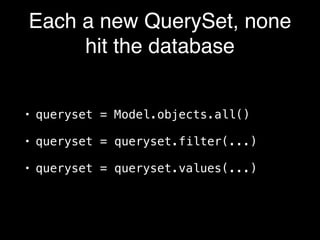
Each a new QuerySet, none
hit the database
• queryset = Model.objects.all()
• queryset = queryset.filter(...)
• queryset = queryset.values(...)
Hits the database
(QuerySet is “evaluated”):
• queryset = list(queryset)
• queryset = queryset[:]
• for model_object in queryset:
• if queryset:
Our app:
blogs hosting site
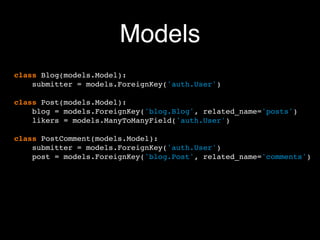
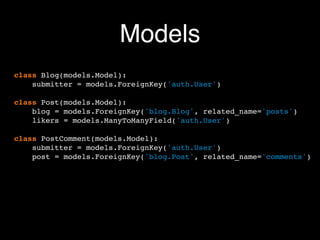
Models
class Blog(models.Model):
submitter = models.ForeignKey('auth.User')
class Post(models.Model):
blog = models.ForeignKey('blog.Blog', related_name='posts')
likers = models.ManyToManyField('auth.User')
class PostComment(models.Model):
submitter = models.ForeignKey('auth.User')
post = models.ForeignKey('blog.Post', related_name='comments')
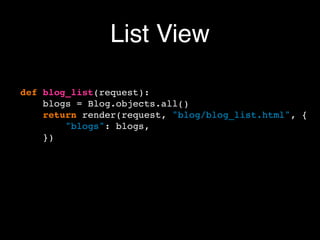
List View
def blog_list(request):
blogs = Blog.objects.all()
return render(request, "blog/blog_list.html", {
"blogs": blogs,
})
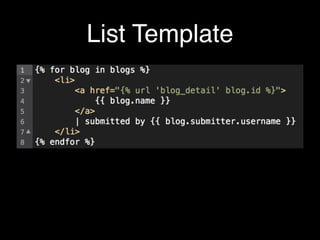
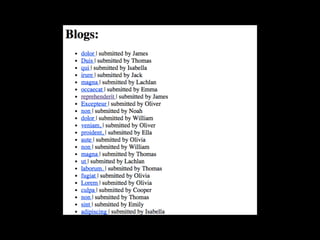
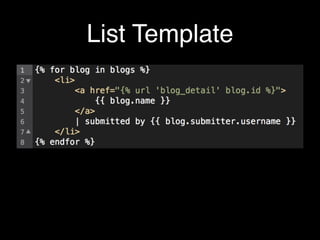
List Template
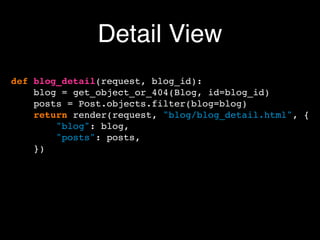
Detail View
def blog_detail(request, blog_id):
blog = get_object_or_404(Blog, id=blog_id)
posts = Post.objects.filter(blog=blog)
return render(request, "blog/blog_detail.html", {
"blog": blog,
"posts": posts,
})
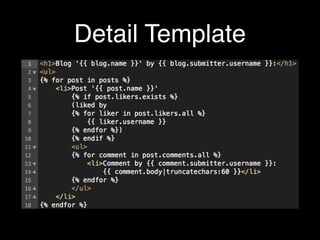
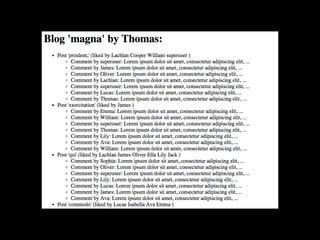
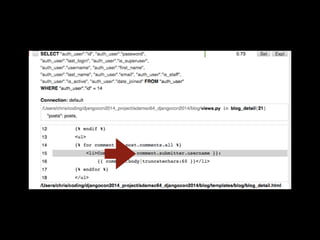
Detail Template
What SQL queries are
happening when I do
{action}?
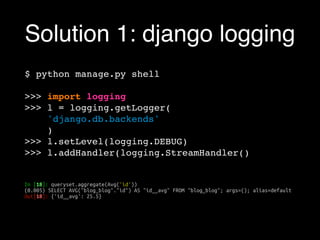
Solution 1: django logging
$ python manage.py shell
>>> import logging
>>> l = logging.getLogger(
'django.db.backends'
)
>>> l.setLevel(logging.DEBUG)
>>> l.addHandler(logging.StreamHandler()
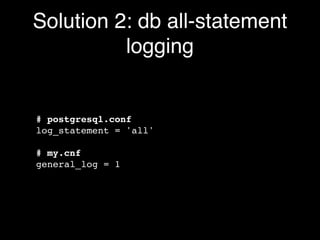
Solution 2: db all-statement
logging
# postgresql.conf
log_statement = 'all'
# my.cnf
general_log = 1
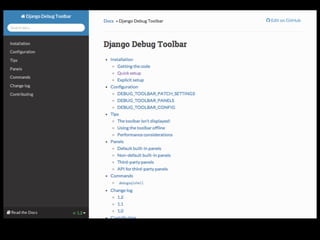
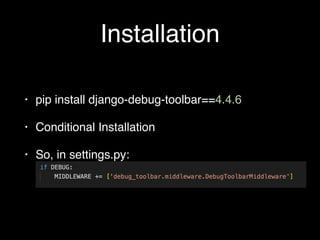
Installation
• pip install django-debug-toolbar==4.4.6
• Conditional Installation
• So, in settings.py:
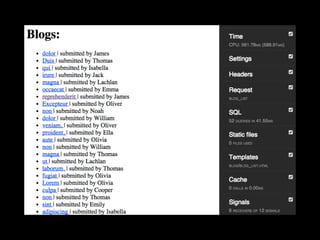
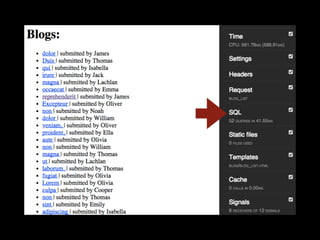
First view:
The blog list page
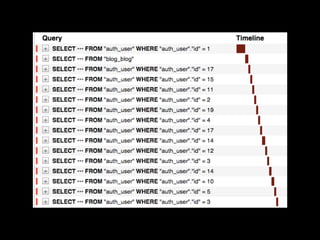
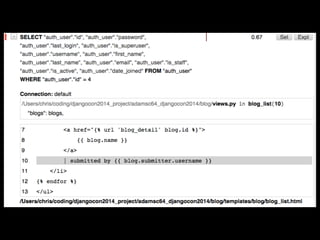
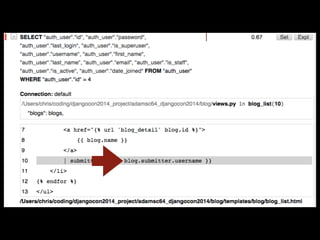
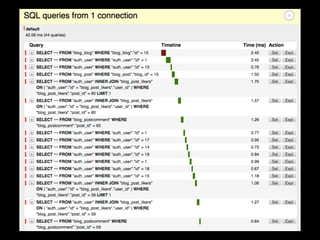
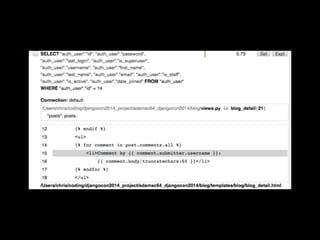
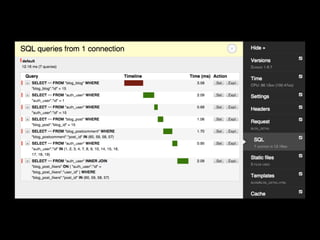
The N+1 Query Problem
• An N+1 query problem occurs when a system runs
one query to fetch a list of items (the "1"), and then
runs an additional query (the "N") for each item in
that list to fetch related data.
• This leads to inef
fi
cient performance, as it can
result in a large number of queries being executed
unnecessarily (each query has latency cost).
• It is unfortunately an easy bug to introduce using
ORM frameworks like Django or Rails.
List Template
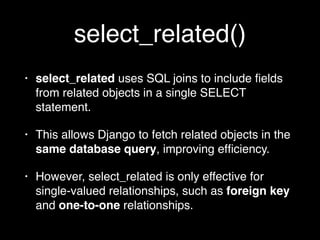
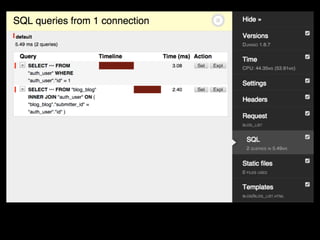
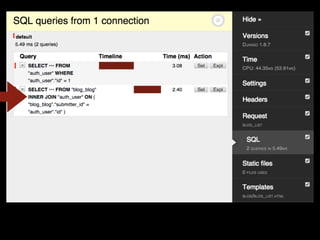
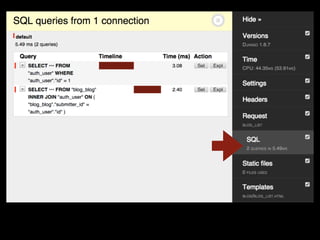
select_related()
• select_related uses SQL joins to include
fi
elds
from related objects in a single SELECT
statement.
• This allows Django to fetch related objects in the
same database query, improving ef
fi
ciency.
• However, select_related is only effective for
single-valued relationships, such as foreign key
and one-to-one relationships.
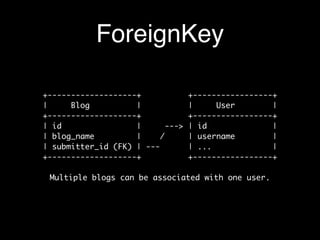
ForeignKey
+-------------------+ +-----------------+
| Blog | | User |
+-------------------+ +-----------------+
| id | ---> | id |
| blog_name | / | username |
| submitter_id (FK) | --- | ... |
+-------------------+ +-----------------+
Multiple blogs can be associated with one user.
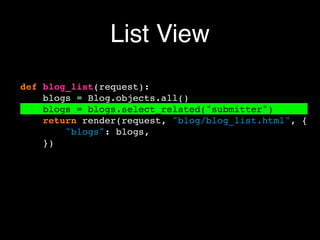
List View
def blog_list(request):
blogs = Blog.objects.all()
blogs = blogs.select_related("submitter")
return render(request, "blog/blog_list.html", {
"blogs": blogs,
})
Second view:
The blog detail page
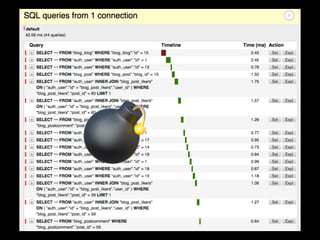
💣
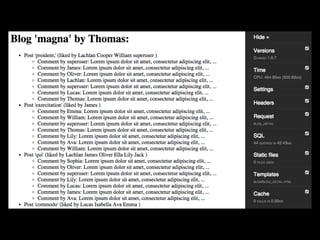
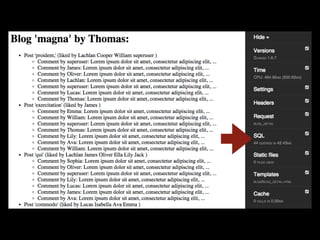
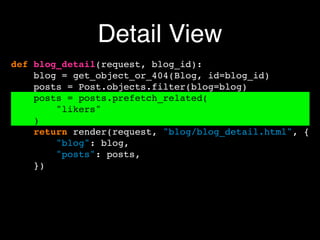
prefetch_related()
• prefetch_related is useful to ef
fi
ciently query on
many-to-many or "reverse" foreign key
relationships
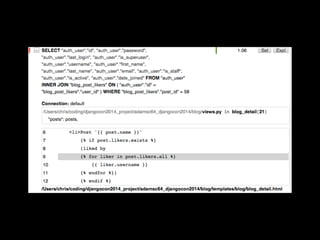
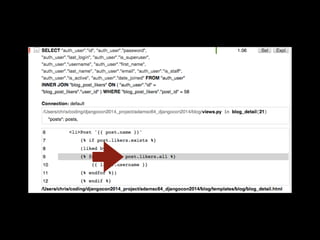
• Without this function, Django does a query for
each user who likes a comment, which causes an
N+1 problem.
• Using prefetch_related, Django fetches the posts,
then the users who like them in only two queries.
It then "links" them in Python.
Detail View
def blog_detail(request, blog_id):
blog = get_object_or_404(Blog, id=blog_id)
posts = Post.objects.filter(blog=blog)
posts = posts.prefetch_related(
"likers"
)
return render(request, "blog/blog_detail.html", {
"blog": blog,
"posts": posts,
})
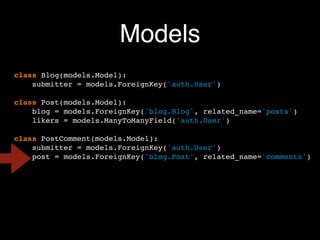
Models
class Blog(models.Model):
submitter = models.ForeignKey('auth.User')
class Post(models.Model):
blog = models.ForeignKey('blog.Blog', related_name='posts')
likers = models.ManyToManyField('auth.User')
class PostComment(models.Model):
submitter = models.ForeignKey('auth.User')
post = models.ForeignKey('blog.Post', related_name='comments')
Models
class Blog(models.Model):
submitter = models.ForeignKey('auth.User')
class Post(models.Model):
blog = models.ForeignKey('blog.Blog', related_name='posts')
likers = models.ManyToManyField('auth.User')
class PostComment(models.Model):
submitter = models.ForeignKey('auth.User')
post = models.ForeignKey('blog.Post', related_name='comments')
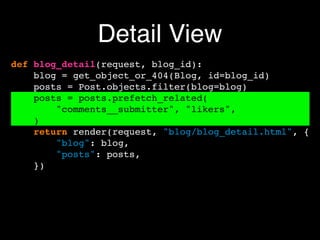
Detail View
def blog_detail(request, blog_id):
blog = get_object_or_404(Blog, id=blog_id)
posts = Post.objects.filter(blog=blog)
posts = posts.prefetch_related(
"comments__submitter", "likers",
)
return render(request, "blog/blog_detail.html", {
"blog": blog,
"posts": posts,
})
"comments__submitter"
• "comments": i.e., all the comments for each post.
• A reverse-relation: the related_name=
"comments" in the PostComment model
• For each comment, it also fetches the user
("__submitter") who made that comment.
• This prefetch instruction reduces queries and
makes the retrieval of related data more ef
fi
cient.
Summary
• The QuerySet API methods select_related() and
prefetch_related() implement best practices to
reduce unnecessary queries.
• Use select_related() for one-to-many or one-to-
one relations.
• Use prefetch_related() for many-to-many or
reverse foreign key relations.
Thanks!
Christopher Adams (@adamsc64)
github.com/adamsc64/a-related-matter
christopheradams.info

A Related Matter: Optimizing your webapp by using django-debug-toolbar, select_related(), and prefetch_related()

  • 1.
    A Related Matter: Optimizingyour webapp by using django-debug-toolbar, select_related(), and prefetch_related() Christopher Adams DjangoCon 2024 github.com/adamsc64/a-related-matter christopheradams.info
  • 2.
    Christopher Adams • Currentlyat GitHub, previously at Venmo • @adamsc64 • I’m not Chris Adams (@acdha), who works at Library of Congress • Neither of us are “The Gentleman” Chris Adams (90’s-era Professional Wrestler)
  • 4.
    Django is great ButDjango is really a set of tools
  • 5.
    Tools are great Buttools can be used in good or bad ways
  • 6.
    The Django ORM: Aset of tools
  • 7.
    Manage your own expectationsfor tools • Many people approach a new tool with broad set of expectations as to what the think it will do for them. • This may have little correlation with what the project actually has implemented.
  • 8.
    As amazing asit would be if they did…
  • 9.
  • 10.
    The Django ORM: Anabstraction layer
  • 11.
    Abstraction layers • Greatbecause they take us away from the messy details • Risky because they take us away from the messy details
  • 12.
  • 13.
  • 14.
  • 15.
  • 16.
    Lazy: Does notevaluate until it needs to
  • 17.
  • 18.
    Each a newQuerySet, none hit the database • queryset = Model.objects.all() • queryset = queryset.filter(...) • queryset = queryset.values(...)
  • 19.
    Hits the database (QuerySetis “evaluated”): • queryset = list(queryset) • queryset = queryset[:] • for model_object in queryset: • if queryset:
  • 20.
  • 21.
    Models class Blog(models.Model): submitter =models.ForeignKey('auth.User') class Post(models.Model): blog = models.ForeignKey('blog.Blog', related_name='posts') likers = models.ManyToManyField('auth.User') class PostComment(models.Model): submitter = models.ForeignKey('auth.User') post = models.ForeignKey('blog.Post', related_name='comments')
  • 22.
    List View def blog_list(request): blogs= Blog.objects.all() return render(request, "blog/blog_list.html", { "blogs": blogs, })
  • 23.
  • 25.
    Detail View def blog_detail(request,blog_id): blog = get_object_or_404(Blog, id=blog_id) posts = Post.objects.filter(blog=blog) return render(request, "blog/blog_detail.html", { "blog": blog, "posts": posts, })
  • 26.
  • 28.
    What SQL queriesare happening when I do {action}?
  • 29.
    Solution 1: djangologging $ python manage.py shell >>> import logging >>> l = logging.getLogger( 'django.db.backends' ) >>> l.setLevel(logging.DEBUG) >>> l.addHandler(logging.StreamHandler()
  • 30.
    Solution 2: dball-statement logging # postgresql.conf log_statement = 'all' # my.cnf general_log = 1
  • 32.
    Installation • pip installdjango-debug-toolbar==4.4.6 • Conditional Installation • So, in settings.py:
  • 33.
  • 37.
    The N+1 QueryProblem • An N+1 query problem occurs when a system runs one query to fetch a list of items (the "1"), and then runs an additional query (the "N") for each item in that list to fetch related data. • This leads to inef fi cient performance, as it can result in a large number of queries being executed unnecessarily (each query has latency cost). • It is unfortunately an easy bug to introduce using ORM frameworks like Django or Rails.
  • 40.
  • 41.
    select_related() • select_related usesSQL joins to include fi elds from related objects in a single SELECT statement. • This allows Django to fetch related objects in the same database query, improving ef fi ciency. • However, select_related is only effective for single-valued relationships, such as foreign key and one-to-one relationships.
  • 42.
    ForeignKey +-------------------+ +-----------------+ | Blog| | User | +-------------------+ +-----------------+ | id | ---> | id | | blog_name | / | username | | submitter_id (FK) | --- | ... | +-------------------+ +-----------------+ Multiple blogs can be associated with one user.
  • 43.
    List View def blog_list(request): blogs= Blog.objects.all() blogs = blogs.select_related("submitter") return render(request, "blog/blog_list.html", { "blogs": blogs, })
  • 47.
  • 51.
  • 54.
    prefetch_related() • prefetch_related isuseful to ef fi ciently query on many-to-many or "reverse" foreign key relationships • Without this function, Django does a query for each user who likes a comment, which causes an N+1 problem. • Using prefetch_related, Django fetches the posts, then the users who like them in only two queries. It then "links" them in Python.
  • 55.
    Detail View def blog_detail(request,blog_id): blog = get_object_or_404(Blog, id=blog_id) posts = Post.objects.filter(blog=blog) posts = posts.prefetch_related( "likers" ) return render(request, "blog/blog_detail.html", { "blog": blog, "posts": posts, })
  • 58.
    Models class Blog(models.Model): submitter =models.ForeignKey('auth.User') class Post(models.Model): blog = models.ForeignKey('blog.Blog', related_name='posts') likers = models.ManyToManyField('auth.User') class PostComment(models.Model): submitter = models.ForeignKey('auth.User') post = models.ForeignKey('blog.Post', related_name='comments')
  • 59.
    Models class Blog(models.Model): submitter =models.ForeignKey('auth.User') class Post(models.Model): blog = models.ForeignKey('blog.Blog', related_name='posts') likers = models.ManyToManyField('auth.User') class PostComment(models.Model): submitter = models.ForeignKey('auth.User') post = models.ForeignKey('blog.Post', related_name='comments')
  • 60.
    Detail View def blog_detail(request,blog_id): blog = get_object_or_404(Blog, id=blog_id) posts = Post.objects.filter(blog=blog) posts = posts.prefetch_related( "comments__submitter", "likers", ) return render(request, "blog/blog_detail.html", { "blog": blog, "posts": posts, })
  • 61.
    "comments__submitter" • "comments": i.e.,all the comments for each post. • A reverse-relation: the related_name= "comments" in the PostComment model • For each comment, it also fetches the user ("__submitter") who made that comment. • This prefetch instruction reduces queries and makes the retrieval of related data more ef fi cient.
  • 63.
    Summary • The QuerySetAPI methods select_related() and prefetch_related() implement best practices to reduce unnecessary queries. • Use select_related() for one-to-many or one-to- one relations. • Use prefetch_related() for many-to-many or reverse foreign key relations.
  • 64.