AutoCAD
Certification
exam
preparation
Complete
details
AutoCAD
Certification
exam guide
B Y : J A I P R A K A S H P A N D E Y | S O U R C E C A D
A complete guide about AutoCAD
certified user and professional
certification exams.
www.thesourcecad.com
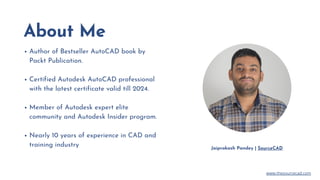
About Me
Author of Bestseller AutoCAD book by
Packt Publication.
Certified Autodesk AutoCAD professional
with the latest certificate valid till 2024.
Member of Autodesk expert elite
community and Autodesk Insider program.
Nearly 10 years of experience in CAD and
training industry Jaiprakash Pandey | SourceCAD
www.thesourcecad.com
Topics
KEY TOPICS MENTIONED IN
THIS PRESENTATION
Why you should consider getting certified
How to book the exam and pre-requisies
Certification exam syllabus
Certification exam question types
ACU exam syllabus
ACP exam syllabus
Exam best practices
www.thesourcecad.com
Get better career options
If you are a fresher certification will help you get new interviews
offers that will eventually convert into a better job.
Better chances of getting noticed among peers
If everyone is doing the same thing then how will you make
yourself stand out? Answer is certification.
Skills to handle complex tasks
A certifiied professional is better equipped to handle complex
tasks related to AutoCAD.
Why
Certification
M A K E Y O U R P R O F I L E
S T A N D O U T
www.thesourcecad.com
Certified
Professional badge
A T I N Y B A D G E M A K I N G A L L T H E
D I F F E R E N C E
After adding this certified professional badge to your
CV or Linkedin profile you will immediately stand out
from the rest and will attract high-quality offers from
employers.
www.thesourcecad.com
Certification exam
options
T W O O P T I O N S A V A I L A B L E
Online
Organised by Certiport in a controlled proctor-led exam
interface with access to only the exam interface.
Offline
At the testing center affiliated with Certiport. Locate the
nearest testing center here
https://www.certiport.com/locator
## There is no minimum eligibility criteria for the certification exam
www.thesourcecad.com
Certified User
exam
Certified
professional exam
Recommended for basic level users
Entry-level users with minimum of 150 hours of
working experience recommended
Basic topics from drawing, modification, annotation
and drawing management are part of the exam.
Recommended for advanced users
A minimum of 2 years or 400 hours of working
experience recommended
Basic as well as advance topics from AutoCAD as
included in exam objectives
www.thesourcecad.com
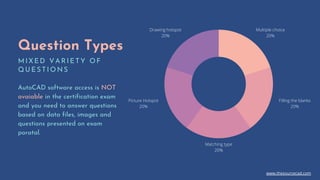
Question Types
M I X E D V A R I E T Y O F
Q U E S T I O N S
AutoCAD software access is NOT
avaiable in the certification exam
and you need to answer questions
based on data files, images and
questions presented on exam
poratal.
Multiple choice
20%
Filling the blanks
20%
Matching type
20%
Picture Hotspot
20%
Drawing hotspot
20%
www.thesourcecad.com
Key exam topics
T h e t o p i c s i n t h e c e r t i f i c a t i o n e x a m a r e
r e g u l a r b u t i n - d e p t h k n o w l e d g e i s r e q u i r e d t o
a n s w e r t h e s e .
www.thesourcecad.com
Best Practices
S O M E O F T H E B E S T P R A C T I C E S Y O U S H O U L D
F O L L O W F O R T H E E X A M
Avoid distraction Turn off Phone Answer all Questions Stable hardware
Study only topics
mentioned in the exam
syllabus, don’t distract
yourself by trying to learn
as much as possible. You
can always learn the
remaining topics later.
To avoid any problems
turn off your phone and
keep it away from your
exam area. A proctor may
invalidate your exam if
they find you near any
phone.
There is no negative
marking so answer all
questions even those you
don't know.
Ensure you have a good
microphone, webcam and
internet connection.
Proctor will monitor you
throughout the exam
duration with webcam.
www.thesourcecad.com
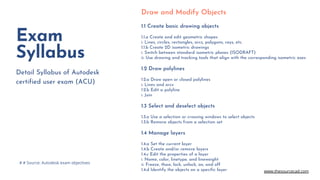
Draw and Modify Objects
1.1 Create basic drawing objects
1.1.a Create and edit geometric shapes
i. Lines, circles, rectangles, arcs, polygons, rays, etc.
1.1.b Create 2D isometric drawings
i. Switch between standard isometric planes (ISODRAFT)
ii. Use drawing and tracking tools that align with the corresponding isometric axes
1.2 Draw polylines
1.2.a Draw open or closed polylines
i. Lines and arcs
1.2.b Edit a polyline
i. Join
1.3 Select and deselect objects
1.3.a Use a selection or crossing windows to select objects
1.3.b Remove objects from a selection set
1.4 Manage layers
1.4.a Set the current layer
1.4.b Create and/or remove layers
1.4.c Edit the properties of a layer
i. Name, color, linetype, and lineweight
ii. Freeze, thaw, lock, unlock, on, and off
1.4.d Identify the objects on a specific layer
Exam
Syllabus
Detail Syllabus of Autodesk
certified user exam (ACU)
# # Source: Autodesk exam objectives
www.thesourcecad.com
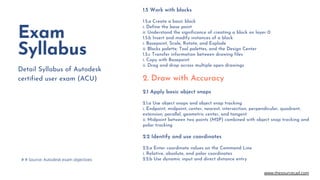
1.5 Work with blocks
1.5.a Create a basic block
i. Define the base point
ii. Understand the significance of creating a block on layer 0
1.5.b Insert and modify instances of a block
i. Basepoint, Scale, Rotate, and Explode
ii. Blocks palette, Tool palettes, and the Design Center
1.5.c Transfer information between drawing files
i. Copy with Basepoint
ii. Drag and drop across multiple open drawings
2. Draw with Accuracy
2.1 Apply basic object snaps
2.1.a Use object snaps and object snap tracking
i. Endpoint, midpoint, center, nearest, intersection, perpendicular, quadrant,
extension, parallel, geometric center, and tangent
ii. Midpoint between two points (M2P) combined with object snap tracking and
polar tracking
2.2 Identify and use coordinates
2.2.a Enter coordinate values on the Command Line
i. Relative, absolute, and polar coordinates
2.2.b Use dynamic input and direct distance entry
Exam
Syllabus
Detail Syllabus of Autodesk
certified user exam (ACU)
# # Source: Autodesk exam objectives
www.thesourcecad.com
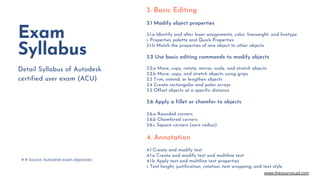
3. Basic Editing
3.1 Modify object properties
3.1.a Identify and alter layer assignments, color, lineweight, and linetype
i. Properties palette and Quick Properties
3.1.b Match the properties of one object to other objects
3.2 Use basic editing commands to modify objects
3.2.a Move, copy, rotate, mirror, scale, and stretch objects
3.2.b Move, copy, and stretch objects using grips
3.3 Trim, extend, or lengthen objects
3.4 Create rectangular and polar arrays
3.5 Offset objects at a specific distance
3.6 Apply a fillet or chamfer to objects
3.6.a Rounded corners
3.6.b Chamfered corners
3.6.c Square corners (zero radius)
4. Annotation
4.1 Create and modify text
4.1.a Create and modify text and multiline text
4.1.b Apply text and multiline text properties
i. Text height, justification, rotation, text wrapping, and text style
Exam
Syllabus
Detail Syllabus of Autodesk
certified user exam (ACU)
# # Source: Autodesk exam objectives
www.thesourcecad.com
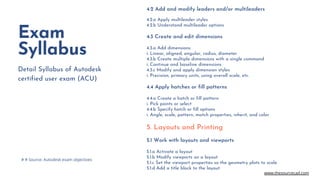
4.2 Add and modify leaders and/or multileaders
4.2.a Apply multileader styles
4.2.b Understand multileader options
4.3 Create and edit dimensions
4.3.a Add dimensions
i. Linear, aligned, angular, radius, diameter
4.3.b Create multiple dimensions with a single command
i. Continue and baseline dimensions
4.3.c Modify and apply dimension styles
i. Precision, primary units, using overall scale, etc.
4.4 Apply hatches or fill patterns
4.4.a Create a hatch or fill pattern
i. Pick points or select
4.4.b Specify hatch or fill options
i. Angle, scale, pattern, match properties, inherit, and color
5. Layouts and Printing
5.1 Work with layouts and viewports
5.1.a Activate a layout
5.1.b Modify viewports on a layout
5.1.c Set the viewport properties so the geometry plots to scale
5.1.d Add a title block to the layout
Exam
Syllabus
Detail Syllabus of Autodesk
certified user exam (ACU)
# # Source: Autodesk exam objectives
www.thesourcecad.com
Exam
Syllabus
Detail Syllabus of Autodesk
certified user exam (ACU)
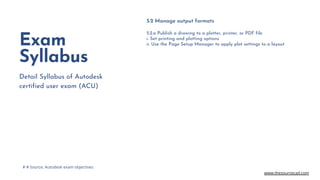
5.2 Manage output formats
5.2.a Publish a drawing to a plotter, printer, or PDF file
i. Set printing and plotting options
ii. Use the Page Setup Manager to apply plot settings to a layout
# # Source: Autodesk exam objectives
www.thesourcecad.com
Exam
Syllabus
Detail Syllabus of Autodesk
certified professional exam
(ACP)
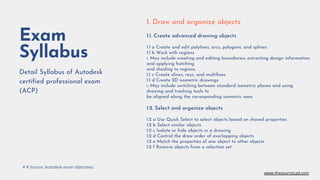
1. Draw and organize objects
1.1. Create advanced drawing objects
1.1 a Create and edit polylines, arcs, polygons, and splines
1.1 b Work with regions
i. May include creating and editing boundaries; extracting design information;
and applying hatching
and shading to regions.
1.1 c Create xlines, rays, and multilines
1.1 d Create 2D isometric drawings
i. May include switching between standard isometric planes and using
drawing and tracking tools to
be aligned along the corresponding isometric axes.
1.2. Select and organize objects
1.2 a Use Quick Select to select objects based on shared properties
1.2 b Select similar objects
1.2 c Isolate or hide objects in a drawing
1.2 d Control the draw order of overlapping objects
1.2 e Match the properties of one object to other objects
1.2 f Remove objects from a selection set
# # Source: Autodesk exam objectives
www.thesourcecad.com
Exam
Syllabus
Detail Syllabus of Autodesk
certified professional exam
(ACP)
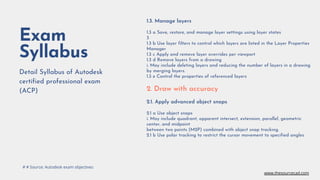
1.3. Manage layers
1.3 a Save, restore, and manage layer settings using layer states
3
1.3 b Use layer filters to control which layers are listed in the Layer Properties
Manager
1.3 c Apply and remove layer overrides per viewport
1.3 d Remove layers from a drawing
i. May include deleting layers and reducing the number of layers in a drawing
by merging layers.
1.3 e Control the properties of referenced layers
2. Draw with accuracy
2.1. Apply advanced object snaps
2.1 a Use object snaps
i. May include quadrant, apparent intersect, extension, parallel, geometric
center, and midpoint
between two points (M2P) combined with object snap tracking.
2.1 b Use polar tracking to restrict the cursor movement to specified angles
# # Source: Autodesk exam objectives
www.thesourcecad.com
Exam
Syllabus
Detail Syllabus of Autodesk
certified professional exam
(ACP)
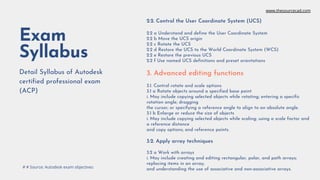
2.2. Control the User Coordinate System (UCS)
2.2 a Understand and define the User Coordinate System
2.2 b Move the UCS origin
2.2 c Rotate the UCS
2.2 d Restore the UCS to the World Coordinate System (WCS)
2.2 e Restore the previous UCS
2.2 f Use named UCS definitions and preset orientations
3. Advanced editing functions
3.1. Control rotate and scale options
3.1 a Rotate objects around a specified base point
i. May include copying selected objects while rotating; entering a specific
rotation angle; dragging
the cursor; or specifying a reference angle to align to an absolute angle.
3.1 b Enlarge or reduce the size of objects
i. May include copying selected objects while scaling; using a scale factor and
a reference distance
and copy options; and reference points.
3.2. Apply array techniques
3.2 a Work with arrays
i. May include creating and editing rectangular, polar, and path arrays;
replacing items in an array;
and understanding the use of associative and non-associative arrays.
# # Source: Autodesk exam objectives
www.thesourcecad.com
Exam
Syllabus
Detail Syllabus of Autodesk
certified professional exam
(ACP)
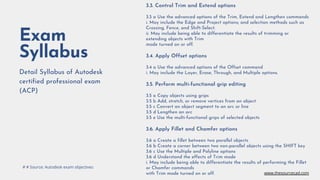
3.3. Control Trim and Extend options
3.3 a Use the advanced options of the Trim, Extend and Lengthen commands
i. May include the Edge and Project options; and selection methods such as
Crossing, Fence, and Shift-Select.
ii. May include being able to differentiate the results of trimming or
extending objects with Trim
mode turned on or off.
3.4. Apply Offset options
3.4 a Use the advanced options of the Offset command
i. May include the Layer, Erase, Through, and Multiple options.
3.5. Perform multi-functional grip editing
3.5 a Copy objects using grips
3.5 b Add, stretch, or remove vertices from an object
3.5 c Convert an object segment to an arc or line
3.5 d Lengthen an arc
3.5 e Use the multi-functional grips of selected objects
3.6. Apply Fillet and Chamfer options
3.6 a Create a fillet between two parallel objects
3.6 b Create a corner between two non-parallel objects using the SHIFT key
3.6 c Use the Multiple and Polyline options
3.6 d Understand the effects of Trim mode
i. May include being able to differentiate the results of performing the Fillet
or Chamfer commands
with Trim mode turned on or off.
# # Source: Autodesk exam objectives
www.thesourcecad.com
Exam
Syllabus
Detail Syllabus of Autodesk
certified professional exam
(ACP)
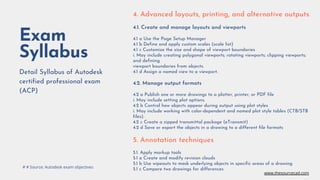
4. Advanced layouts, printing, and alternative outputs
4.1. Create and manage layouts and viewports
4.1 a Use the Page Setup Manager
4.1 b Define and apply custom scales (scale list)
4.1 c Customize the size and shape of viewport boundaries
i. May include creating polygonal viewports; rotating viewports; clipping viewports;
and defining
viewport boundaries from objects.
4.1 d Assign a named view to a viewport.
4.2. Manage output formats
4.2 a Publish one or more drawings to a plotter, printer, or PDF file
i. May include setting plot options.
4.2 b Control how objects appear during output using plot styles
i. May include working with color-dependent and named plot style tables (CTB/STB
files).
4.2 c Create a zipped transmittal package (eTransmit)
4.2 d Save or export the objects in a drawing to a different file formats
5. Annotation techniques
5.1. Apply markup tools
5.1 a Create and modify revision clouds
5.1 b Use wipeouts to mask underlying objects in specific areas of a drawing
5.1 c Compare two drawings for differences
# # Source: Autodesk exam objectives
www.thesourcecad.com
Exam
Syllabus
Detail Syllabus of Autodesk
certified professional exam
(ACP)
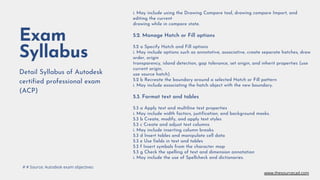
i. May include using the Drawing Compare tool, drawing compare Import, and
editing the current
drawing while in compare state.
5.2. Manage Hatch or Fill options
5.2 a Specify Hatch and Fill options
i. May include options such as annotative, associative, create separate hatches, draw
order, origin
transparency, island detection, gap tolerance, set origin, and inherit properties (use
current origin,
use source hatch).
5.2 b Recreate the boundary around a selected Hatch or Fill pattern
i. May include associating the hatch object with the new boundary.
5.3. Format text and tables
5.3 a Apply text and multiline text properties
i. May include width factors, justification, and background masks.
5.3 b Create, modify, and apply text styles
5.3 c Create and adjust text columns
i. May include inserting column breaks.
5.3 d Insert tables and manipulate cell data
5.3 e Use fields in text and tables
5.3 f Insert symbols from the character map
5.3 g Check the spelling of text and dimension annotation
i. May include the use of Spellcheck and dictionaries.
# # Source: Autodesk exam objectives
www.thesourcecad.com
Exam
Syllabus
Detail Syllabus of Autodesk
certified professional exam
(ACP)
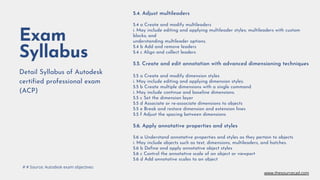
5.4. Adjust multileaders
5.4 a Create and modify multileaders
i. May include editing and applying multileader styles; multileaders with custom
blocks; and
understanding multileader options.
5.4 b Add and remove leaders
5.4 c Align and collect leaders
5.5. Create and edit annotation with advanced dimensioning techniques
5.5 a Create and modify dimension styles
i. May include editing and applying dimension styles.
5.5 b Create multiple dimensions with a single command
i. May include continue and baseline dimensions.
5.5 c Set the dimension layer
5.5 d Associate or re-associate dimensions to objects
5.5 e Break and restore dimension and extension lines
5.5 f Adjust the spacing between dimensions
5.6. Apply annotative properties and styles
5.6 a Understand annotative properties and styles as they pertain to objects
i. May include objects such as text, dimensions, multileaders, and hatches.
5.6 b Define and apply annotative object styles
5.6 c Control the annotative scale of an object or viewport
5.6 d Add annotative scales to an object
# # Source: Autodesk exam objectives
www.thesourcecad.com
Exam
Syllabus
Detail Syllabus of Autodesk
certified professional exam
(ACP)
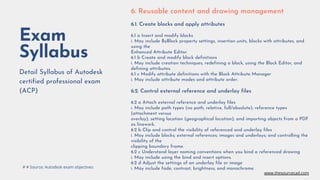
6. Reusable content and drawing management
6.1. Create blocks and apply attributes
6.1 a Insert and modify blocks
i. May include ByBlock property settings, insertion units, blocks with attributes, and
using the
Enhanced Attribute Editor.
6.1 b Create and modify block definitions
i. May include creation techniques, redefining a block, using the Block Editor, and
defining attributes.
6.1 c Modify attribute definitions with the Block Attribute Manager
i. May include attribute modes and attribute order.
6.2. Control external reference and underlay files
6.2 a Attach external reference and underlay files
i. May include path types (no path, relative, full/absolute); reference types
(attachment versus
overlay); setting location (geographical location); and importing objects from a PDF
as linework.
6.2 b Clip and control the visibility of referenced and underlay files
i. May include blocks; external references; images and underlays; and controlling the
visibility of the
clipping boundary frame.
6.2 c Understand layer naming conventions when you bind a referenced drawing
i. May include using the bind and insert options.
6.2 d Adjust the settings of an underlay file or image
i. May include fade, contrast, brightness, and monochrome.
# # Source: Autodesk exam objectives
www.thesourcecad.com
Exam
Syllabus
Detail Syllabus of Autodesk
certified professional exam
(ACP)
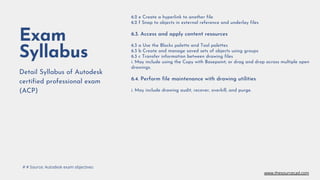
6.2 e Create a hyperlink to another file
6.2 f Snap to objects in external reference and underlay files
6.3. Access and apply content resources
6.3 a Use the Blocks palette and Tool palettes
6.3 b Create and manage saved sets of objects using groups
6.3 c Transfer information between drawing files
i. May include using the Copy with Basepoint; or drag and drop across multiple open
drawings.
6.4. Perform file maintenance with drawing utilities
i. May include drawing audit, recover, overkill, and purge.
# # Source: Autodesk exam objectives
www.thesourcecad.com
Check the course
An investment in
knowledge always pays
the best interest.
Benjamin Franklin
Prepare for AutoCAD certification exam with video lessons, practice
tests and mock exam supported by a mentor on SourceCAD
Questions?
I hope you learned something new, feel
free to share your questions on
admin@thesourcecad.com
www.thesourcecad.com

A complete guide to AutoCAD certification exam preparation

  • 1.
  • 2.
    AutoCAD Certification exam guide B Y: J A I P R A K A S H P A N D E Y | S O U R C E C A D A complete guide about AutoCAD certified user and professional certification exams. www.thesourcecad.com
  • 3.
    About Me Author ofBestseller AutoCAD book by Packt Publication. Certified Autodesk AutoCAD professional with the latest certificate valid till 2024. Member of Autodesk expert elite community and Autodesk Insider program. Nearly 10 years of experience in CAD and training industry Jaiprakash Pandey | SourceCAD www.thesourcecad.com
  • 4.
    Topics KEY TOPICS MENTIONEDIN THIS PRESENTATION Why you should consider getting certified How to book the exam and pre-requisies Certification exam syllabus Certification exam question types ACU exam syllabus ACP exam syllabus Exam best practices www.thesourcecad.com
  • 5.
    Get better careeroptions If you are a fresher certification will help you get new interviews offers that will eventually convert into a better job. Better chances of getting noticed among peers If everyone is doing the same thing then how will you make yourself stand out? Answer is certification. Skills to handle complex tasks A certifiied professional is better equipped to handle complex tasks related to AutoCAD. Why Certification M A K E Y O U R P R O F I L E S T A N D O U T www.thesourcecad.com
  • 6.
    Certified Professional badge A TI N Y B A D G E M A K I N G A L L T H E D I F F E R E N C E After adding this certified professional badge to your CV or Linkedin profile you will immediately stand out from the rest and will attract high-quality offers from employers. www.thesourcecad.com
  • 7.
    Certification exam options T WO O P T I O N S A V A I L A B L E Online Organised by Certiport in a controlled proctor-led exam interface with access to only the exam interface. Offline At the testing center affiliated with Certiport. Locate the nearest testing center here https://www.certiport.com/locator ## There is no minimum eligibility criteria for the certification exam www.thesourcecad.com
  • 8.
    Certified User exam Certified professional exam Recommendedfor basic level users Entry-level users with minimum of 150 hours of working experience recommended Basic topics from drawing, modification, annotation and drawing management are part of the exam. Recommended for advanced users A minimum of 2 years or 400 hours of working experience recommended Basic as well as advance topics from AutoCAD as included in exam objectives www.thesourcecad.com
  • 9.
    Question Types M IX E D V A R I E T Y O F Q U E S T I O N S AutoCAD software access is NOT avaiable in the certification exam and you need to answer questions based on data files, images and questions presented on exam poratal. Multiple choice 20% Filling the blanks 20% Matching type 20% Picture Hotspot 20% Drawing hotspot 20% www.thesourcecad.com
  • 10.
    Key exam topics Th e t o p i c s i n t h e c e r t i f i c a t i o n e x a m a r e r e g u l a r b u t i n - d e p t h k n o w l e d g e i s r e q u i r e d t o a n s w e r t h e s e . www.thesourcecad.com
  • 11.
    Best Practices S OM E O F T H E B E S T P R A C T I C E S Y O U S H O U L D F O L L O W F O R T H E E X A M Avoid distraction Turn off Phone Answer all Questions Stable hardware Study only topics mentioned in the exam syllabus, don’t distract yourself by trying to learn as much as possible. You can always learn the remaining topics later. To avoid any problems turn off your phone and keep it away from your exam area. A proctor may invalidate your exam if they find you near any phone. There is no negative marking so answer all questions even those you don't know. Ensure you have a good microphone, webcam and internet connection. Proctor will monitor you throughout the exam duration with webcam. www.thesourcecad.com
  • 12.
    Draw and ModifyObjects 1.1 Create basic drawing objects 1.1.a Create and edit geometric shapes i. Lines, circles, rectangles, arcs, polygons, rays, etc. 1.1.b Create 2D isometric drawings i. Switch between standard isometric planes (ISODRAFT) ii. Use drawing and tracking tools that align with the corresponding isometric axes 1.2 Draw polylines 1.2.a Draw open or closed polylines i. Lines and arcs 1.2.b Edit a polyline i. Join 1.3 Select and deselect objects 1.3.a Use a selection or crossing windows to select objects 1.3.b Remove objects from a selection set 1.4 Manage layers 1.4.a Set the current layer 1.4.b Create and/or remove layers 1.4.c Edit the properties of a layer i. Name, color, linetype, and lineweight ii. Freeze, thaw, lock, unlock, on, and off 1.4.d Identify the objects on a specific layer Exam Syllabus Detail Syllabus of Autodesk certified user exam (ACU) # # Source: Autodesk exam objectives www.thesourcecad.com
  • 13.
    1.5 Work withblocks 1.5.a Create a basic block i. Define the base point ii. Understand the significance of creating a block on layer 0 1.5.b Insert and modify instances of a block i. Basepoint, Scale, Rotate, and Explode ii. Blocks palette, Tool palettes, and the Design Center 1.5.c Transfer information between drawing files i. Copy with Basepoint ii. Drag and drop across multiple open drawings 2. Draw with Accuracy 2.1 Apply basic object snaps 2.1.a Use object snaps and object snap tracking i. Endpoint, midpoint, center, nearest, intersection, perpendicular, quadrant, extension, parallel, geometric center, and tangent ii. Midpoint between two points (M2P) combined with object snap tracking and polar tracking 2.2 Identify and use coordinates 2.2.a Enter coordinate values on the Command Line i. Relative, absolute, and polar coordinates 2.2.b Use dynamic input and direct distance entry Exam Syllabus Detail Syllabus of Autodesk certified user exam (ACU) # # Source: Autodesk exam objectives www.thesourcecad.com
  • 14.
    3. Basic Editing 3.1Modify object properties 3.1.a Identify and alter layer assignments, color, lineweight, and linetype i. Properties palette and Quick Properties 3.1.b Match the properties of one object to other objects 3.2 Use basic editing commands to modify objects 3.2.a Move, copy, rotate, mirror, scale, and stretch objects 3.2.b Move, copy, and stretch objects using grips 3.3 Trim, extend, or lengthen objects 3.4 Create rectangular and polar arrays 3.5 Offset objects at a specific distance 3.6 Apply a fillet or chamfer to objects 3.6.a Rounded corners 3.6.b Chamfered corners 3.6.c Square corners (zero radius) 4. Annotation 4.1 Create and modify text 4.1.a Create and modify text and multiline text 4.1.b Apply text and multiline text properties i. Text height, justification, rotation, text wrapping, and text style Exam Syllabus Detail Syllabus of Autodesk certified user exam (ACU) # # Source: Autodesk exam objectives www.thesourcecad.com
  • 15.
    4.2 Add andmodify leaders and/or multileaders 4.2.a Apply multileader styles 4.2.b Understand multileader options 4.3 Create and edit dimensions 4.3.a Add dimensions i. Linear, aligned, angular, radius, diameter 4.3.b Create multiple dimensions with a single command i. Continue and baseline dimensions 4.3.c Modify and apply dimension styles i. Precision, primary units, using overall scale, etc. 4.4 Apply hatches or fill patterns 4.4.a Create a hatch or fill pattern i. Pick points or select 4.4.b Specify hatch or fill options i. Angle, scale, pattern, match properties, inherit, and color 5. Layouts and Printing 5.1 Work with layouts and viewports 5.1.a Activate a layout 5.1.b Modify viewports on a layout 5.1.c Set the viewport properties so the geometry plots to scale 5.1.d Add a title block to the layout Exam Syllabus Detail Syllabus of Autodesk certified user exam (ACU) # # Source: Autodesk exam objectives www.thesourcecad.com
  • 16.
    Exam Syllabus Detail Syllabus ofAutodesk certified user exam (ACU) 5.2 Manage output formats 5.2.a Publish a drawing to a plotter, printer, or PDF file i. Set printing and plotting options ii. Use the Page Setup Manager to apply plot settings to a layout # # Source: Autodesk exam objectives www.thesourcecad.com
  • 17.
    Exam Syllabus Detail Syllabus ofAutodesk certified professional exam (ACP) 1. Draw and organize objects 1.1. Create advanced drawing objects 1.1 a Create and edit polylines, arcs, polygons, and splines 1.1 b Work with regions i. May include creating and editing boundaries; extracting design information; and applying hatching and shading to regions. 1.1 c Create xlines, rays, and multilines 1.1 d Create 2D isometric drawings i. May include switching between standard isometric planes and using drawing and tracking tools to be aligned along the corresponding isometric axes. 1.2. Select and organize objects 1.2 a Use Quick Select to select objects based on shared properties 1.2 b Select similar objects 1.2 c Isolate or hide objects in a drawing 1.2 d Control the draw order of overlapping objects 1.2 e Match the properties of one object to other objects 1.2 f Remove objects from a selection set # # Source: Autodesk exam objectives www.thesourcecad.com
  • 18.
    Exam Syllabus Detail Syllabus ofAutodesk certified professional exam (ACP) 1.3. Manage layers 1.3 a Save, restore, and manage layer settings using layer states 3 1.3 b Use layer filters to control which layers are listed in the Layer Properties Manager 1.3 c Apply and remove layer overrides per viewport 1.3 d Remove layers from a drawing i. May include deleting layers and reducing the number of layers in a drawing by merging layers. 1.3 e Control the properties of referenced layers 2. Draw with accuracy 2.1. Apply advanced object snaps 2.1 a Use object snaps i. May include quadrant, apparent intersect, extension, parallel, geometric center, and midpoint between two points (M2P) combined with object snap tracking. 2.1 b Use polar tracking to restrict the cursor movement to specified angles # # Source: Autodesk exam objectives www.thesourcecad.com
  • 19.
    Exam Syllabus Detail Syllabus ofAutodesk certified professional exam (ACP) 2.2. Control the User Coordinate System (UCS) 2.2 a Understand and define the User Coordinate System 2.2 b Move the UCS origin 2.2 c Rotate the UCS 2.2 d Restore the UCS to the World Coordinate System (WCS) 2.2 e Restore the previous UCS 2.2 f Use named UCS definitions and preset orientations 3. Advanced editing functions 3.1. Control rotate and scale options 3.1 a Rotate objects around a specified base point i. May include copying selected objects while rotating; entering a specific rotation angle; dragging the cursor; or specifying a reference angle to align to an absolute angle. 3.1 b Enlarge or reduce the size of objects i. May include copying selected objects while scaling; using a scale factor and a reference distance and copy options; and reference points. 3.2. Apply array techniques 3.2 a Work with arrays i. May include creating and editing rectangular, polar, and path arrays; replacing items in an array; and understanding the use of associative and non-associative arrays. # # Source: Autodesk exam objectives www.thesourcecad.com
  • 20.
    Exam Syllabus Detail Syllabus ofAutodesk certified professional exam (ACP) 3.3. Control Trim and Extend options 3.3 a Use the advanced options of the Trim, Extend and Lengthen commands i. May include the Edge and Project options; and selection methods such as Crossing, Fence, and Shift-Select. ii. May include being able to differentiate the results of trimming or extending objects with Trim mode turned on or off. 3.4. Apply Offset options 3.4 a Use the advanced options of the Offset command i. May include the Layer, Erase, Through, and Multiple options. 3.5. Perform multi-functional grip editing 3.5 a Copy objects using grips 3.5 b Add, stretch, or remove vertices from an object 3.5 c Convert an object segment to an arc or line 3.5 d Lengthen an arc 3.5 e Use the multi-functional grips of selected objects 3.6. Apply Fillet and Chamfer options 3.6 a Create a fillet between two parallel objects 3.6 b Create a corner between two non-parallel objects using the SHIFT key 3.6 c Use the Multiple and Polyline options 3.6 d Understand the effects of Trim mode i. May include being able to differentiate the results of performing the Fillet or Chamfer commands with Trim mode turned on or off. # # Source: Autodesk exam objectives www.thesourcecad.com
  • 21.
    Exam Syllabus Detail Syllabus ofAutodesk certified professional exam (ACP) 4. Advanced layouts, printing, and alternative outputs 4.1. Create and manage layouts and viewports 4.1 a Use the Page Setup Manager 4.1 b Define and apply custom scales (scale list) 4.1 c Customize the size and shape of viewport boundaries i. May include creating polygonal viewports; rotating viewports; clipping viewports; and defining viewport boundaries from objects. 4.1 d Assign a named view to a viewport. 4.2. Manage output formats 4.2 a Publish one or more drawings to a plotter, printer, or PDF file i. May include setting plot options. 4.2 b Control how objects appear during output using plot styles i. May include working with color-dependent and named plot style tables (CTB/STB files). 4.2 c Create a zipped transmittal package (eTransmit) 4.2 d Save or export the objects in a drawing to a different file formats 5. Annotation techniques 5.1. Apply markup tools 5.1 a Create and modify revision clouds 5.1 b Use wipeouts to mask underlying objects in specific areas of a drawing 5.1 c Compare two drawings for differences # # Source: Autodesk exam objectives www.thesourcecad.com
  • 22.
    Exam Syllabus Detail Syllabus ofAutodesk certified professional exam (ACP) i. May include using the Drawing Compare tool, drawing compare Import, and editing the current drawing while in compare state. 5.2. Manage Hatch or Fill options 5.2 a Specify Hatch and Fill options i. May include options such as annotative, associative, create separate hatches, draw order, origin transparency, island detection, gap tolerance, set origin, and inherit properties (use current origin, use source hatch). 5.2 b Recreate the boundary around a selected Hatch or Fill pattern i. May include associating the hatch object with the new boundary. 5.3. Format text and tables 5.3 a Apply text and multiline text properties i. May include width factors, justification, and background masks. 5.3 b Create, modify, and apply text styles 5.3 c Create and adjust text columns i. May include inserting column breaks. 5.3 d Insert tables and manipulate cell data 5.3 e Use fields in text and tables 5.3 f Insert symbols from the character map 5.3 g Check the spelling of text and dimension annotation i. May include the use of Spellcheck and dictionaries. # # Source: Autodesk exam objectives www.thesourcecad.com
  • 23.
    Exam Syllabus Detail Syllabus ofAutodesk certified professional exam (ACP) 5.4. Adjust multileaders 5.4 a Create and modify multileaders i. May include editing and applying multileader styles; multileaders with custom blocks; and understanding multileader options. 5.4 b Add and remove leaders 5.4 c Align and collect leaders 5.5. Create and edit annotation with advanced dimensioning techniques 5.5 a Create and modify dimension styles i. May include editing and applying dimension styles. 5.5 b Create multiple dimensions with a single command i. May include continue and baseline dimensions. 5.5 c Set the dimension layer 5.5 d Associate or re-associate dimensions to objects 5.5 e Break and restore dimension and extension lines 5.5 f Adjust the spacing between dimensions 5.6. Apply annotative properties and styles 5.6 a Understand annotative properties and styles as they pertain to objects i. May include objects such as text, dimensions, multileaders, and hatches. 5.6 b Define and apply annotative object styles 5.6 c Control the annotative scale of an object or viewport 5.6 d Add annotative scales to an object # # Source: Autodesk exam objectives www.thesourcecad.com
  • 24.
    Exam Syllabus Detail Syllabus ofAutodesk certified professional exam (ACP) 6. Reusable content and drawing management 6.1. Create blocks and apply attributes 6.1 a Insert and modify blocks i. May include ByBlock property settings, insertion units, blocks with attributes, and using the Enhanced Attribute Editor. 6.1 b Create and modify block definitions i. May include creation techniques, redefining a block, using the Block Editor, and defining attributes. 6.1 c Modify attribute definitions with the Block Attribute Manager i. May include attribute modes and attribute order. 6.2. Control external reference and underlay files 6.2 a Attach external reference and underlay files i. May include path types (no path, relative, full/absolute); reference types (attachment versus overlay); setting location (geographical location); and importing objects from a PDF as linework. 6.2 b Clip and control the visibility of referenced and underlay files i. May include blocks; external references; images and underlays; and controlling the visibility of the clipping boundary frame. 6.2 c Understand layer naming conventions when you bind a referenced drawing i. May include using the bind and insert options. 6.2 d Adjust the settings of an underlay file or image i. May include fade, contrast, brightness, and monochrome. # # Source: Autodesk exam objectives www.thesourcecad.com
  • 25.
    Exam Syllabus Detail Syllabus ofAutodesk certified professional exam (ACP) 6.2 e Create a hyperlink to another file 6.2 f Snap to objects in external reference and underlay files 6.3. Access and apply content resources 6.3 a Use the Blocks palette and Tool palettes 6.3 b Create and manage saved sets of objects using groups 6.3 c Transfer information between drawing files i. May include using the Copy with Basepoint; or drag and drop across multiple open drawings. 6.4. Perform file maintenance with drawing utilities i. May include drawing audit, recover, overkill, and purge. # # Source: Autodesk exam objectives www.thesourcecad.com
  • 26.
    Check the course Aninvestment in knowledge always pays the best interest. Benjamin Franklin Prepare for AutoCAD certification exam with video lessons, practice tests and mock exam supported by a mentor on SourceCAD
  • 27.
    Questions? I hope youlearned something new, feel free to share your questions on admin@thesourcecad.com www.thesourcecad.com