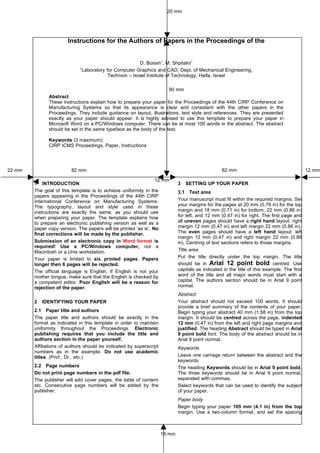
20 mm


                       Instructions for the Authors of Papers in the Proceedings of the


                                                            D. Bossin1, M. Shpitalni1
                             1
                                 Laboratory for Computer Graphics and CAD, Dept. of Mechanical Engineering,
                                             Technion – Israel Institute of Technology, Haifa, Israel

                                                                     90 mm
              Abstract
              These instructions explain how to prepare your paper for the Proceedings of the 44th CIRP Conference on
              Manufacturing Systems so that its appearance is clear and consistent with the other papers in the
              Proceedings. They include guidance on layout, illustrations, text style and references. They are presented
              exactly as your paper should appear. It is highly advised to use this template to prepare your paper in
              Microsoft Word on a PC/Windows computer. There can be at most 100 words in the abstract. The abstract
              should be set in the same typeface as the body of the text.

              Keywords (3 maximum):
              CIRP ICMS Proceedings, Paper, Instructions


22 mm                    82 mm                                                                    82 mm                                      12 mm

                                                                 12 mm
        1 INTRODUCTION                                                       3   SETTING UP YOUR PAPER
        The goal of this template is to achieve uniformity in the            3.1 Text area
        papers appearing in the Proceedings of the 44th CIRP
        International Conference on Manufacturing Systems.                   Your manuscript must fit within the required margins. Set
        The typography, layout and style used in these                       your margins for the pages at 20 mm (0.79 in) for the top
        instructions are exactly the same, as you should use                 margin and 18 mm (0.71 in) for bottom, 22 mm (0.86 in)
        when preparing your paper. The template explains how                 for left, and 12 mm (0.47 in) for right. The first page and
        to prepare an electronic publishing version as well as a             all uneven pages should have a right hand layout: right
        paper copy version. The papers will be printed ‘as is’. No           margin 12 mm (0.47 in) and left margin 22 mm (0.86 in).
        final corrections will be made by the publisher.                     The even pages should have a left hand layout: left
                                                                             margin 12 mm (0.47 in) and right margin 22 mm (0.86
        Submission of an electronic copy in Word format is                   in). Centring of text sections refers to those margins.
        required! Use a PC/Windows computer, not a
        Macintosh or a Unix workstation.                                     Title area
        Your paper is limited to six printed pages. Papers                   Put the title directly under the top margin. The title
        longer then 6 pages will be rejected.                                should be in Arial 12 point bold centred. Use
        The official language is English. If English is not your             capitals as indicated in the title of this example. The first
        mother tongue, make sure that the English is checked by              word of the title and all major words must start with a
        a competent editor. Poor English will be a reason for                capital. The authors section should be in Arial 9 point
        rejection of the paper.                                              normal.
                                                                             Abstract
        2   IDENTIFYING YOUR PAPER                                           Your abstract should not exceed 100 words. It should
                                                                             provide a brief summary of the contents of your paper.
        2.1 Paper title and authors                                          Begin typing your abstract 40 mm (1.58 in) from the top
        The paper title and authors should be exactly in the                 margin. It should be centred across the page, indented
        format as indicated in this template in order to maintain            12 mm (0.47 in) from the left and right page margins and
        uniformity throughout the Proceedings. Electronic                    justified. The heading Abstract should be typed in Arial
        publishing requires that you include the title and                   9 point bold font. The body of the abstract should be in
        authors section in the paper yourself.                               Arial 9 point normal.
        Affiliations of authors should be indicated by superscript           Keywords
        numbers as in the example. Do not use academic
        titles. (Prof., Dr., etc.)                                           Leave one carriage return between the abstract and the
                                                                             keywords
        2.2 Page numbers                                                     The heading Keywords should be in Arial 9 point bold.
        Do not print page numbers in the pdf file.                           The three keywords should be in Arial 9 point normal,
        The publisher will add cover pages, the table of content             separated with commas.
        etc. Consecutive page numbers will be added by the                   Select keywords that can be used to identify the subject
        publisher.                                                           of your paper.
                                                                             Paper body
                                                                             Begin typing your paper 105 mm (4.1 in) from the top
                                                                             margin. Use a two-column format, and set the spacing


                                                                     18 mm
between the columns at 12 mm (0.47 in), so that column              • Use a consistent spelling style throughout the paper
width is 82 mm (3.23 in).                                             (US or UK).
3.2 Font and line spacing                                           • Use single quotes.
Prepare the paper on a PC/Windows computer. Arial 9                 • Use %, not percent.
point font must be used. The general rule is: DO NOT                • Do not use ampersands (&) except as part of the
USE OTHER FONTS. (Also not in figures.)                               official name of an organization or company.
(Papers prepared on computers on which Arial is not
                                                                    • Keep hyphenation to a minimum. Do not hyphenate
available, must use Helvetica (or Geneva) 9 point or a
                                                                      ‘coordinate’ or ‘non’ words, such as ‘nonlinear’.
similar 9 point san serif font.)
The usage of wrong fonts will be a reason for                       • Do not end headings with full stops.
rejection. These instructions are printed in Arial 9                • Do not start headings at the foot of a column or with
point.                                                                only one line of text below; put the heading on the
The line spacing should be set at single spacing ‘at                  next column or page.
least 10 points’. Leave 3 points after each paragraph.              • Leave one character space after all punctuation.
Justify the text on both the left and the right
margins.                                                            4.3 Mathematic text and equations
                                                                    Equations should be justified to the left margin and
3.3 Headings and heading spacing                                    numbered at the right margin. Leave 6 points before and
We recommend using no more than three levels of                     6 points after the equation, as indicated in the Equation
headings, indicated in these instructions as Heading 1,             style on the Word template.
Heading 2 and Heading 3. The styles for these headings
are included in the Word template on the website and                x2 + y2 = 41                                                 (1)
are summarized in Table 1 below.
                                                                    For equation font sizes, use 9 point for full size, 7 point
Avoid loose Headings to appear at the bottom of a                   for subscript and superscript, and 5 point for sub-
page.                                                               subscript and sub-superscript.
    HEADING 1                                                       Use italics for variables (u); bold for vectors (no arrows)
To denote the major sections of your paper, use                     (u); bold italic for variable vectors (u) and capital bold
Heading 1. These sections should be numbered. For                   italic (U) for variable matrices. Use ith, jth, nth, not ith, jth,
example, Heading 1 is used for the following section                nth. The order of brackets should be {[()]}, except where
headings in these Instructions: INTRODUCTION, TEXT,                 brackets have special significance.
SUMMARY, etc.
                                                                    4.4 Lists
The style for Heading 1 is ARIAL 9 POINT BOLD ALL
                                                                    Single space list items with no extra space between the
CAPS with a 5 mm (0.2 in) hanging indent to
accommodate the number and 3 point spacing after the                lines. Mark each item with a solid bullet ‘•’ or with an
heading. In addition, leave one carriage return (in                 Arabic numeral followed by a full stop, e.g., 1. 2. 3. and
Normal style) before the heading. Begin typing the text in          so on. Be consistent in marking list items.
the line beneath the heading.                                       Refer to Section 4.1 for an example of a bulleted list.
                                                                    Following is an example of a numbered list:
Heading 2
                                                                    1. For complete or near complete sentences, begin with
To denote logical subsections of major sections, if any,                a capital letter and end with a full stop.
use Heading 2. Number the subsections accordingly. In
these instructions, for example, the subsections of                 2. For short phrases, start with lower case letters and
Section 3 are numbered 3.1, 3.2, 3.3, etc.                              end with semicolons.
The style for Heading 2 is Arial 9 point bold with a 7.5            3. Do not capitalize or punctuate single items.
mm (0.3 in) hanging indent to accommodate the number                4. Use a colon to introduce the list.
and 3 point spacing before and after the heading. Begin
typing the text in the line beneath the heading.                    5    FIGURES AND TABLES
Heading 3                                                           5.1 General appearance
To denote further divisions of a subsection, if relevant,           Make sure that all figures, tables, graphs and line
use Heading 3. These divisions are not numbered. The                drawings are clear and sharp and of the highest quality.
style for Heading 3 is Arial 9 point italic justified to the left   Lines should be thick enough to allow proper
margin, with 3 point spacing before and after the                   reproduction.
heading. Begin typing the text in the line beneath the
heading. The heading of this section (Heading 3) is an              Diagrams, graphics and photographs should be either in
example of the Heading 3 style.                                     gray scale or in colour of excellent quality with good
                                                                    contrast. Use RGB colours, not CMYK.
4   TEXT                                                            When preparing figures and tables, make sure that all
                                                                    lettering inside the figure is no smaller than the specified
4.1 Terminology and Symbols                                         size of the paper text; i.e., 9 point.
Authors should use SI units. The Symbol font should be
used for all symbols not in the Arial font.
4.2 Style
The following list summarizes several important points of
style to keep in mind when preparing your paper for the
Proceedings:
• Use bold for emphasis, but keep its use to a                                     (a)                      (b)
  minimum. Avoid using underlining in your paper.                       Figure 1: Example of picture scanned into the paper.
7 POSTPROCESSING OF ACCEPTED PAPERS
Take care that figures copied from other sources do                After review, the authors of accepted papers may
not contain Asian fonts! (Use Arial font type only.)               receive suggestions for improvements. Read the
                                                                   recommendations carefully, make the required changes
                                                                   and submit the revised manuscript.
5.2 Numbering, captions and positioning
Number figures and tables consecutively, e.g., Figure 1,           8 SUMMARY
Figure 2, Figure 3; Table 1, Table 2, Table 3. Use (a),            This paper summarized the instructions for preparing a
(b), (c) to distinguish individual subjects in a composite         paper for the Proceedings of 44th CIRP Conference on
figure. See Figures 1 and 2 for examples of figure and             Manufacturing Systems.
caption placement. Refer to Table 1 for an example of a
table centred across two columns.
                                                                   9 ACKNOWLEDGMENTS
Each figure and each table must have a caption.                    We extend our sincere thanks to all who contributed to
Captions should be centred at the foot of the figure and           preparing these instructions.
typed in the same 9 point font used in the paper. Begin
the caption with a capital letter and end with a full stop.
                                                                   10 REFERENCES
Always refer to figures as ‘Figure’ and not Fig. Leave
6 point spacing between the figure and the caption.                Relevant work must be cited in the reference list. List the
Place the figure or table on the text page as close to the         references at the end of the paper, in order of citation.
relevant citation as possible, ideally at the top or at the        Number the references chronologically: [1] [2] [3]. Cite
bottom of a column. If a figure or table is too large to fit       the references in the body of the paper using the number
into one column, it can be centred across both columns             in square brackets [1]. All references listed must be
at the top or the bottom of the page. Make sure that it            cited, and all cited references must be included in the
does not extend into the page margins. Do not wrap the             reference list.
text around the figures.                                           The reference list should be set in the same typeface as
                                                                   the body of the text. Use a hanging indent of 7.5 mm
                                                                   (0.3 in) to accommodate the numbers. Each citation
                     Number figures                                should be followed by a full stop. Use the style
                      consecutively                                ‘References’ on the Word template.
                                                                   The format for references is as follows:
                                                                   Last name, initial, year of publication, full paper title,
                     Use 9 point font                              journal name, volume, first and last page. Use only
                      size or larger                               common abbreviations in journal names.
                                                                   Here is an example of a reference list:
                                                                   [1] Krause, F.-L., Kimura, F., Kjellberg, T., Lu, S.C.-Y.,
                  Place figures at top
                                                                         1993, Product Modelling, Annals of the CIRP,
                  or bottom of column
                                                                         42/2:695-706.
            Figure 2: Diagram of the system.                       [2] Samet, H., 1990, Applications of Spatial Data
                                                                         Structure, Addison-Wesley, Reading, MA
6 PAPER SUBMISSION
Upload your read-to-print Word manuscript                     on
conference paper submission web site.


                                             HEADING 1                Heading 2                Heading 3
                       Font               Arial or Helvetica       Arial or Helvetica      Arial or Helvetica
                                                9 point                  9 point                 9 point
                       Style              BOLD ALL CAPS                  Bold                     Italic
                    Numbering                 1, 2, 3, ....        1.1, 1.2, 1.3, ...             None
                       Align                      Left                    left                     left
                     Spacing               Single-spaced,          Single-spaced,            Single-spaced,
                                           9 points before,        3 points before,          3 points before,
                                            3 points after          3 points after            3 points after
                                     Table 1: Example of table centred across two columns.

9 icms instructions_for_authors

  • 1.
    20 mm Instructions for the Authors of Papers in the Proceedings of the D. Bossin1, M. Shpitalni1 1 Laboratory for Computer Graphics and CAD, Dept. of Mechanical Engineering, Technion – Israel Institute of Technology, Haifa, Israel 90 mm Abstract These instructions explain how to prepare your paper for the Proceedings of the 44th CIRP Conference on Manufacturing Systems so that its appearance is clear and consistent with the other papers in the Proceedings. They include guidance on layout, illustrations, text style and references. They are presented exactly as your paper should appear. It is highly advised to use this template to prepare your paper in Microsoft Word on a PC/Windows computer. There can be at most 100 words in the abstract. The abstract should be set in the same typeface as the body of the text. Keywords (3 maximum): CIRP ICMS Proceedings, Paper, Instructions 22 mm 82 mm 82 mm 12 mm 12 mm 1 INTRODUCTION 3 SETTING UP YOUR PAPER The goal of this template is to achieve uniformity in the 3.1 Text area papers appearing in the Proceedings of the 44th CIRP International Conference on Manufacturing Systems. Your manuscript must fit within the required margins. Set The typography, layout and style used in these your margins for the pages at 20 mm (0.79 in) for the top instructions are exactly the same, as you should use margin and 18 mm (0.71 in) for bottom, 22 mm (0.86 in) when preparing your paper. The template explains how for left, and 12 mm (0.47 in) for right. The first page and to prepare an electronic publishing version as well as a all uneven pages should have a right hand layout: right paper copy version. The papers will be printed ‘as is’. No margin 12 mm (0.47 in) and left margin 22 mm (0.86 in). final corrections will be made by the publisher. The even pages should have a left hand layout: left margin 12 mm (0.47 in) and right margin 22 mm (0.86 Submission of an electronic copy in Word format is in). Centring of text sections refers to those margins. required! Use a PC/Windows computer, not a Macintosh or a Unix workstation. Title area Your paper is limited to six printed pages. Papers Put the title directly under the top margin. The title longer then 6 pages will be rejected. should be in Arial 12 point bold centred. Use The official language is English. If English is not your capitals as indicated in the title of this example. The first mother tongue, make sure that the English is checked by word of the title and all major words must start with a a competent editor. Poor English will be a reason for capital. The authors section should be in Arial 9 point rejection of the paper. normal. Abstract 2 IDENTIFYING YOUR PAPER Your abstract should not exceed 100 words. It should provide a brief summary of the contents of your paper. 2.1 Paper title and authors Begin typing your abstract 40 mm (1.58 in) from the top The paper title and authors should be exactly in the margin. It should be centred across the page, indented format as indicated in this template in order to maintain 12 mm (0.47 in) from the left and right page margins and uniformity throughout the Proceedings. Electronic justified. The heading Abstract should be typed in Arial publishing requires that you include the title and 9 point bold font. The body of the abstract should be in authors section in the paper yourself. Arial 9 point normal. Affiliations of authors should be indicated by superscript Keywords numbers as in the example. Do not use academic titles. (Prof., Dr., etc.) Leave one carriage return between the abstract and the keywords 2.2 Page numbers The heading Keywords should be in Arial 9 point bold. Do not print page numbers in the pdf file. The three keywords should be in Arial 9 point normal, The publisher will add cover pages, the table of content separated with commas. etc. Consecutive page numbers will be added by the Select keywords that can be used to identify the subject publisher. of your paper. Paper body Begin typing your paper 105 mm (4.1 in) from the top margin. Use a two-column format, and set the spacing 18 mm
  • 2.
    between the columnsat 12 mm (0.47 in), so that column • Use a consistent spelling style throughout the paper width is 82 mm (3.23 in). (US or UK). 3.2 Font and line spacing • Use single quotes. Prepare the paper on a PC/Windows computer. Arial 9 • Use %, not percent. point font must be used. The general rule is: DO NOT • Do not use ampersands (&) except as part of the USE OTHER FONTS. (Also not in figures.) official name of an organization or company. (Papers prepared on computers on which Arial is not • Keep hyphenation to a minimum. Do not hyphenate available, must use Helvetica (or Geneva) 9 point or a ‘coordinate’ or ‘non’ words, such as ‘nonlinear’. similar 9 point san serif font.) The usage of wrong fonts will be a reason for • Do not end headings with full stops. rejection. These instructions are printed in Arial 9 • Do not start headings at the foot of a column or with point. only one line of text below; put the heading on the The line spacing should be set at single spacing ‘at next column or page. least 10 points’. Leave 3 points after each paragraph. • Leave one character space after all punctuation. Justify the text on both the left and the right margins. 4.3 Mathematic text and equations Equations should be justified to the left margin and 3.3 Headings and heading spacing numbered at the right margin. Leave 6 points before and We recommend using no more than three levels of 6 points after the equation, as indicated in the Equation headings, indicated in these instructions as Heading 1, style on the Word template. Heading 2 and Heading 3. The styles for these headings are included in the Word template on the website and x2 + y2 = 41 (1) are summarized in Table 1 below. For equation font sizes, use 9 point for full size, 7 point Avoid loose Headings to appear at the bottom of a for subscript and superscript, and 5 point for sub- page. subscript and sub-superscript. HEADING 1 Use italics for variables (u); bold for vectors (no arrows) To denote the major sections of your paper, use (u); bold italic for variable vectors (u) and capital bold Heading 1. These sections should be numbered. For italic (U) for variable matrices. Use ith, jth, nth, not ith, jth, example, Heading 1 is used for the following section nth. The order of brackets should be {[()]}, except where headings in these Instructions: INTRODUCTION, TEXT, brackets have special significance. SUMMARY, etc. 4.4 Lists The style for Heading 1 is ARIAL 9 POINT BOLD ALL Single space list items with no extra space between the CAPS with a 5 mm (0.2 in) hanging indent to accommodate the number and 3 point spacing after the lines. Mark each item with a solid bullet ‘•’ or with an heading. In addition, leave one carriage return (in Arabic numeral followed by a full stop, e.g., 1. 2. 3. and Normal style) before the heading. Begin typing the text in so on. Be consistent in marking list items. the line beneath the heading. Refer to Section 4.1 for an example of a bulleted list. Following is an example of a numbered list: Heading 2 1. For complete or near complete sentences, begin with To denote logical subsections of major sections, if any, a capital letter and end with a full stop. use Heading 2. Number the subsections accordingly. In these instructions, for example, the subsections of 2. For short phrases, start with lower case letters and Section 3 are numbered 3.1, 3.2, 3.3, etc. end with semicolons. The style for Heading 2 is Arial 9 point bold with a 7.5 3. Do not capitalize or punctuate single items. mm (0.3 in) hanging indent to accommodate the number 4. Use a colon to introduce the list. and 3 point spacing before and after the heading. Begin typing the text in the line beneath the heading. 5 FIGURES AND TABLES Heading 3 5.1 General appearance To denote further divisions of a subsection, if relevant, Make sure that all figures, tables, graphs and line use Heading 3. These divisions are not numbered. The drawings are clear and sharp and of the highest quality. style for Heading 3 is Arial 9 point italic justified to the left Lines should be thick enough to allow proper margin, with 3 point spacing before and after the reproduction. heading. Begin typing the text in the line beneath the heading. The heading of this section (Heading 3) is an Diagrams, graphics and photographs should be either in example of the Heading 3 style. gray scale or in colour of excellent quality with good contrast. Use RGB colours, not CMYK. 4 TEXT When preparing figures and tables, make sure that all lettering inside the figure is no smaller than the specified 4.1 Terminology and Symbols size of the paper text; i.e., 9 point. Authors should use SI units. The Symbol font should be used for all symbols not in the Arial font. 4.2 Style The following list summarizes several important points of style to keep in mind when preparing your paper for the Proceedings: • Use bold for emphasis, but keep its use to a (a) (b) minimum. Avoid using underlining in your paper. Figure 1: Example of picture scanned into the paper.
  • 3.
    7 POSTPROCESSING OFACCEPTED PAPERS Take care that figures copied from other sources do After review, the authors of accepted papers may not contain Asian fonts! (Use Arial font type only.) receive suggestions for improvements. Read the recommendations carefully, make the required changes and submit the revised manuscript. 5.2 Numbering, captions and positioning Number figures and tables consecutively, e.g., Figure 1, 8 SUMMARY Figure 2, Figure 3; Table 1, Table 2, Table 3. Use (a), This paper summarized the instructions for preparing a (b), (c) to distinguish individual subjects in a composite paper for the Proceedings of 44th CIRP Conference on figure. See Figures 1 and 2 for examples of figure and Manufacturing Systems. caption placement. Refer to Table 1 for an example of a table centred across two columns. 9 ACKNOWLEDGMENTS Each figure and each table must have a caption. We extend our sincere thanks to all who contributed to Captions should be centred at the foot of the figure and preparing these instructions. typed in the same 9 point font used in the paper. Begin the caption with a capital letter and end with a full stop. 10 REFERENCES Always refer to figures as ‘Figure’ and not Fig. Leave 6 point spacing between the figure and the caption. Relevant work must be cited in the reference list. List the Place the figure or table on the text page as close to the references at the end of the paper, in order of citation. relevant citation as possible, ideally at the top or at the Number the references chronologically: [1] [2] [3]. Cite bottom of a column. If a figure or table is too large to fit the references in the body of the paper using the number into one column, it can be centred across both columns in square brackets [1]. All references listed must be at the top or the bottom of the page. Make sure that it cited, and all cited references must be included in the does not extend into the page margins. Do not wrap the reference list. text around the figures. The reference list should be set in the same typeface as the body of the text. Use a hanging indent of 7.5 mm (0.3 in) to accommodate the numbers. Each citation Number figures should be followed by a full stop. Use the style consecutively ‘References’ on the Word template. The format for references is as follows: Last name, initial, year of publication, full paper title, Use 9 point font journal name, volume, first and last page. Use only size or larger common abbreviations in journal names. Here is an example of a reference list: [1] Krause, F.-L., Kimura, F., Kjellberg, T., Lu, S.C.-Y., Place figures at top 1993, Product Modelling, Annals of the CIRP, or bottom of column 42/2:695-706. Figure 2: Diagram of the system. [2] Samet, H., 1990, Applications of Spatial Data Structure, Addison-Wesley, Reading, MA 6 PAPER SUBMISSION Upload your read-to-print Word manuscript on conference paper submission web site. HEADING 1 Heading 2 Heading 3 Font Arial or Helvetica Arial or Helvetica Arial or Helvetica 9 point 9 point 9 point Style BOLD ALL CAPS Bold Italic Numbering 1, 2, 3, .... 1.1, 1.2, 1.3, ... None Align Left left left Spacing Single-spaced, Single-spaced, Single-spaced, 9 points before, 3 points before, 3 points before, 3 points after 3 points after 3 points after Table 1: Example of table centred across two columns.