K TO 12 BASIC EDUCATION CURRICULUM
SENIOR HIGH SCHOOL – TECHNICAL-VOCATIONAL LIVELIHOOD TRACK INFORMATION AND COMMUNICATIONS TECHNOLOGY – COMPUTER
SYSTEMS SERVICING (NC II)
K to 12 ICT – Computer Systems Servicing (NC II) Curriculum Guide May 2016 *LO – Learning Outcome Page 14 of 32
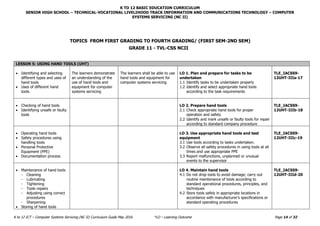
LESSON 5: USING HAND TOOLS (UHT)
 Identifying and selecting
different types and uses of
hand tools
 Uses of different hand
tools.
The learners demonstrate
an understanding of the
use of hand tools and
equipment for computer
systems servicing
The learners shall be able to use
hand tools and equipment for
computer systems servicing
LO 1. Plan and prepare for tasks to be
undertaken
1.1 Identify tasks to be undertaken properly
1.2 Identify and select appropriate hand tools
according to the task requirements
TLE_IACSS9-
12UHT-IIIa-17
 Checking of hand tools
 Identifying unsafe or faulty
tools
LO 2. Prepare hand tools
2.1 Check appropriate hand tools for proper
operation and safety
2.2 Identify and mark unsafe or faulty tools for repair
according to standard company procedure
TLE_IACSS9-
12UHT-IIIb-18
 Operating hand tools
 Safety procedures using
handling tools
 Personal Protective
Equipment (PPE)
 Documentation process
LO 3. Use appropriate hand tools and test
equipment
3.1 Use tools according to tasks undertaken.
3.2 Observe all safety procedures in using tools at all
times and use appropriate PPE
3.3 Report malfunctions, unplanned or unusual
events to the supervisor
TLE_IACSS9-
12UHT-IIIc-19
 Maintenance of hand tools
- Cleaning
- Lubricating
- Tightening
- Tools repairs
- Adjusting using correct
procedures
- Sharpening
 Storing of hand tools
LO 4. Maintain hand tools
4.1 Do not drop tools to avoid damage; carry out
routine maintenance of tools according to
standard operational procedures, principles, and
techniques
4.2 Store tools safely in appropriate locations in
accordance with manufacturer’s specifications or
standard operating procedures
TLE_IACSS9-
12UHT-IIId-20
TOPICS FROM FIRST GRADING TO FOURTH GRADING/ (FIRST SEM-2ND SEM)
GRADE 11 - TVL-CSS NCII
K TO 12 BASIC EDUCATION CURRICULUM
JUNIOR HIGH SCHOOL TECHNOLOGY AND LIVELIHOOD TRACK AND SENIOR HIGH SCHOOL – TECHNICAL-VOCATIONAL LIVELIHOOD TRACK
INFORMATION AND COMMUNICATIONS TECHNOLOGY – COMPUTER SYSTEMS SERVICING (NC II)
(640 hours)
K to 12 ICT – Computer Systems Servicing (NC II) Curriculum Guide May 2016 *LO – Learning Outcome Page 15 of 32
CONTENT CONTENT STANDARD PERFORMANCE STANDARD LEARNING COMPETENCIES CODES
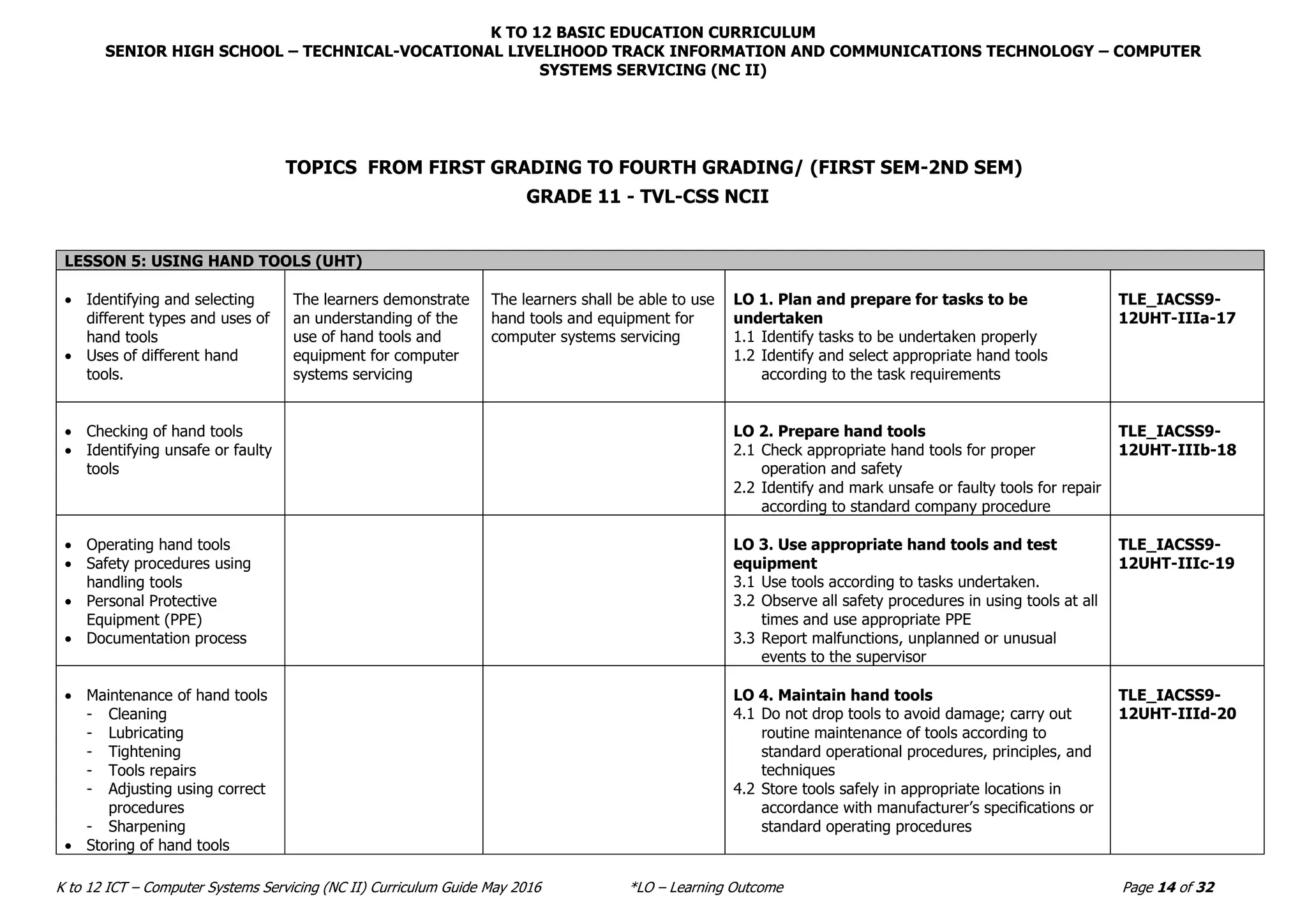
LESSON 6: TERMINATING AND CONNECTING ELECTRICAL WIRING AND ELECTRONICS CIRCUIT (TCEW)
 Material specification
- Assorted wires and
cables
 Task requirements
- Splicing
- Jointing
- Soldering
• Tools and equipment
- Pliers
- Cutters
- Screw driver
- Soldering gun
- Multitester
• OH&S guidelines and
procedures
 Electrical wiring diagram
 Electronics kit
The learners demonstrate
an understanding of
concepts and underlying
principles in terminating
and connecting electrical
wiring and electronics
circuits
The learner shall be able to
demonstrate proper termination
and connection of electrical
wiring and electronics circuits
LO 1. Plan and prepare for termination/
connection of electrical wiring/ electronics
circuits
1.1 Check materials according to specifications and
tasks
1.2 Select appropriate tools and equipment according
to task requirements
1.3 Follow planned task to ensure OHS guidelines
and procedure
1.4 Prepare electrical wiring/electronics circuits
correctly for connecting/terminating in
accordance with instruction and work site
procedures
TLE_IACSS9-
12TCEW-IIIe-f-
21
 OHS procedures
- Safety procedure in
using tools
- Appropriate PPE
 Methods in termination and
connections according to
job specification
- Clamping
- Pin connection
- Soldered joints
- Plugs
 Proper procedures in
adjusting accessories
- Brackets
- Clamps
 Confirmation of
termination/ connection in
accordance with the job
specification
LO 2: Terminate/connect electrical wiring/
electronic circuits
2.1 Observe safety procedures in using tools and use
appropriate personal protective equipment at all
times
2.2 Identify the tasks to be undertaken to work
safely in accordance with the workplace and
standard procedures
2.3 Use appropriate range of methods in
termination/connection in accordance to
specifications, manufacturer’s requirements, and
safety
2.4 Follow correct sequence of operation
2.5 Adjust used accessories
2.6 Confirm termination/connection in accordance
with job specification
TLE_IACSS9-
12TCEW-IIIg-i-
22
K TO 12 BASIC EDUCATION CURRICULUM
JUNIOR HIGH SCHOOL TECHNOLOGY AND LIVELIHOOD TRACK AND SENIOR HIGH SCHOOL – TECHNICAL-VOCATIONAL LIVELIHOOD TRACK
INFORMATION AND COMMUNICATIONS TECHNOLOGY – COMPUTER SYSTEMS SERVICING (NC II)
(640 hours)
K to 12 ICT – Computer Systems Servicing (NC II) Curriculum Guide May 2016 *LO – Learning Outcome Page 16 of 32
CONTENT CONTENT STANDARD PERFORMANCE STANDARD LEARNING COMPETENCIES CODES
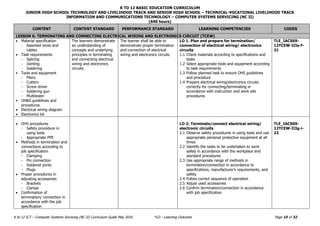
 Proper procedure in
conducting testing of
termination/connection of
electrical wiring/electronics
circuits
 Proper procedure in
checking wirings and
circuits using specified
testing procedures
 Protocol in responding to
unplanned conditions
LO 3: Test termination/connections of
electrical wiring/electronics circuits
3.1 Conduct complete testing of
termination/connection of electrical
wiring/electronics circuits in compliance with
specifications and regulations using appropriate
procedures and equipment
3.2 Check wirings and circuits using specified testing
procedures
3.3 Respond to unplanned events or conditions in
accordance with established procedures
TLE_IACSS9-
12TCEW-IIIi-j-
23
LESSON 7: TESTING ELECTRONIC COMPONENTS (TEC)
 Work instructions
 Job order
 Work coordination process
 Documentations and
interpretations of
data/testing criteria
 Testing criteria
- Controls
- Effectiveness
- Efficiency
- Bug detection
- Functionality, including
flow
- Interoperability
- Performance
- Reliability
- Operating parameters
The learners demonstrate
an understanding of
concepts and underlying
principles in testing
electronic components
The learners shall be able to test
electronic components
LO 1: Determine criteria for testing electronics
components
1.1 Obtain and clarify work instructions based on job
order or client requirements
1.2 Consult responsible person for effective and
proper work coordination
1.3 Obtain and interpret data sheets/application
notes based on manufacturer’s specifications
1.4 Define testing criteria to ensure that components
meet technical and quality requirements
1.5 Document and communicate testing criteria to
relevant personnel
TLE_IACSS9-
12TEC-IVa-c-24
 Testing methods for
electronic components
- Automated
- Debugging
- Inspection
- Platform testing
- Prototyping
 Testing strategies for
electronic components
LO 2: Plan an approach for components testing
2.1 Identify various testing methods based on types
of electronic components
2.2 Determine characteristics and appropriateness of
testing methods to be used during development
and on completion
2.3 Consider/select testing methods in relation to
appropriate testing strategy
TLE_IACSS9-
12TEC-IVc-e-25
K TO 12 BASIC EDUCATION CURRICULUM
JUNIOR HIGH SCHOOL TECHNOLOGY AND LIVELIHOOD TRACK AND SENIOR HIGH SCHOOL – TECHNICAL-VOCATIONAL LIVELIHOOD TRACK
INFORMATION AND COMMUNICATIONS TECHNOLOGY – COMPUTER SYSTEMS SERVICING (NC II)
(640 hours)
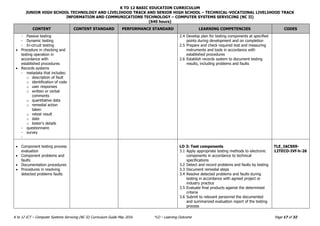
K to 12 ICT – Computer Systems Servicing (NC II) Curriculum Guide May 2016 *LO – Learning Outcome Page 17 of 32
CONTENT CONTENT STANDARD PERFORMANCE STANDARD LEARNING COMPETENCIES CODES
- Passive testing
- Dynamic testing
- In-circuit testing
 Procedure in checking and
testing operation in
accordance with
established procedures
 Records systems
- metadata that includes:
o description of fault
o identification of code
o user responses
o written or verbal
comments
o quantitative data
o remedial action
taken
o retest result
o date
o tester's details
- questionnaire
- survey
-
2.4 Develop plan for testing components at specified
points during development and on completion
2.5 Prepare and check required test and measuring
instruments and tools in accordance with
established procedures
2.6 Establish records system to document testing
results, including problems and faults
 Component testing process
evaluation
 Component problems and
faults
 Documentation procedures
 Procedures in resolving
detected problems faults
LO 3: Test components
3.1 Apply appropriate testing methods to electronic
components in accordance to technical
specifications
3.2 Detect and record problems and faults by testing
3.3 Document remedial steps
3.4 Resolve detected problems and faults during
testing in accordance with agreed project or
industry practice
3.5 Evaluate final products against the determined
criteria
3.6 Submit to relevant personnel the documented
and summarized evaluation report of the testing
process
TLE_IACSS9-
12TECO-IVf-h-26
K TO 12 BASIC EDUCATION CURRICULUM
JUNIOR HIGH SCHOOL TECHNOLOGY AND LIVELIHOOD TRACK AND SENIOR HIGH SCHOOL – TECHNICAL-VOCATIONAL LIVELIHOOD TRACK
INFORMATION AND COMMUNICATIONS TECHNOLOGY – COMPUTER SYSTEMS SERVICING (NC II)
(640 hours)
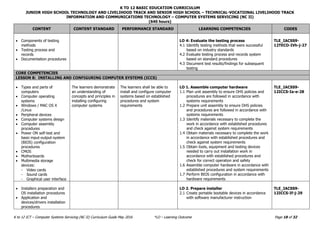
K to 12 ICT – Computer Systems Servicing (NC II) Curriculum Guide May 2016 *LO – Learning Outcome Page 18 of 32
CONTENT CONTENT STANDARD PERFORMANCE STANDARD LEARNING COMPETENCIES CODES
 Components of testing
methods
 Testing process and
records
 Documentation procedures
LO 4: Evaluate the testing process
4.1 Identify testing methods that were successful
based on industry standards
4.2 Evaluate testing process and records system
based on standard procedures
4.3 Document test results/findings for subsequent
testing
TLE_IACSS9-
12TECO-IVh-j-27
CORE COMPETENCIES
LESSON 8: INSTALLING AND CONFIGURING COMPUTER SYSTEMS (ICCS)
 Types and parts of
computers
 Computer operating
systems
 Windows / MAC OS X
/Linux
 Peripheral devices
 Computer systems design
 Computer assembly
procedures
 Power ON self-test and
basic-input-output-system
(BIOS) configuration
procedures
 CMOS
 Motherboards
 Multimedia storage
devices:
- Video cards
- Sound cards
- Graphical user interface
The learners demonstrate
an understanding of
concepts and principles in
installing configuring
computer systems
The learners shall be able to
install and configure computer
systems based on established
procedures and system
requirements
LO 1. Assemble computer hardware
1.1 Plan unit assembly to ensure OHS policies and
procedures are followed in accordance with
systems requirements
1.2 Prepare unit assembly to ensure OHS policies
and procedures are followed in accordance with
systems requirements
1.3 Identify materials necessary to complete the
work in accordance with established procedures
and check against system requirements
1.4 Obtain materials necessary to complete the work
in accordance with established procedures and
check against system requirements
1.5 Obtain tools, equipment and testing devices
needed to carry out installation work in
accordance with established procedures and
check for correct operation and safety
1.6 Assemble computer hardware in accordance with
established procedures and system requirements
1.7 Perform BIOS configuration in accordance with
hardware requirements
TLE_IACSS9-
12ICCS-Ia-e-28
 Installers preparation and
OS installation procedures
 Application and
devices/drivers installation
procedures
LO 2. Prepare installer
2.1 Create portable bootable devices in accordance
with software manufacturer instruction
TLE_IACSS9-
12ICCS-If-j-29
K TO 12 BASIC EDUCATION CURRICULUM
JUNIOR HIGH SCHOOL TECHNOLOGY AND LIVELIHOOD TRACK AND SENIOR HIGH SCHOOL – TECHNICAL-VOCATIONAL LIVELIHOOD TRACK
INFORMATION AND COMMUNICATIONS TECHNOLOGY – COMPUTER SYSTEMS SERVICING (NC II)
(640 hours)
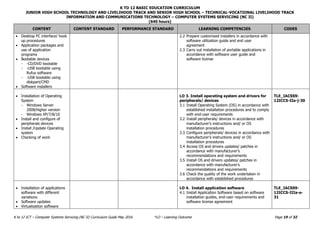
K to 12 ICT – Computer Systems Servicing (NC II) Curriculum Guide May 2016 *LO – Learning Outcome Page 19 of 32
CONTENT CONTENT STANDARD PERFORMANCE STANDARD LEARNING COMPETENCIES CODES
 Desktop PC interface/ hook
up procedures
 Application packages and
use of application
programs
 Bootable devices
- -CD/DVD bootable
- -USB bootable using
Rufus software
- -USB bootable using
diskpart/CMD
 Software installers
2.2 Prepare customized installers in accordance with
software utilization guide and end user
agreement
2.3 Carry out installation of portable applications in
accordance with software user guide and
software license
 Installation of Operating
System
- Windows Server
2008/higher version
- Windows XP/7/8/10
 Install and configure of
peripherals devices
 Install /Update Operating
system
 Checking of work
LO 3. Install operating system and drivers for
peripherals/ devices
3.1 Install Operating System (OS) in accordance with
established installation procedures and to comply
with end-user requirements
3.2 Install peripherals/ devices in accordance with
manufacturer’s instructions and/ or OS
installation procedures
3.3 Configure peripherals/ devices in accordance with
manufacturer’s instructions and/ or OS
installation procedures
3.4 Access OS and drivers updates/ patches in
accordance with manufacturer’s
recommendations and requirements
3.5 Install OS and drivers updates/ patches in
accordance with manufacturer’s
recommendations and requirements
3.6 Check the quality of the work undertaken in
accordance with established procedures
TLE_IACSS9-
12ICCS-IIa-j-30
 Installation of applications
software with different
variations
 Software updates
 Virtualization software
LO 4. Install application software
4.1 Install Application Software based on software
installation guides, end-user requirements and
software license agreement
TLE_IACSS9-
12ICCS-IIIa-e-
31
K TO 12 BASIC EDUCATION CURRICULUM
JUNIOR HIGH SCHOOL TECHNOLOGY AND LIVELIHOOD TRACK AND SENIOR HIGH SCHOOL – TECHNICAL-VOCATIONAL LIVELIHOOD TRACK
INFORMATION AND COMMUNICATIONS TECHNOLOGY – COMPUTER SYSTEMS SERVICING (NC II)
(640 hours)
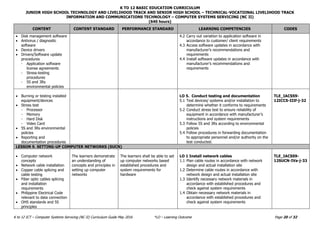
K to 12 ICT – Computer Systems Servicing (NC II) Curriculum Guide May 2016 *LO – Learning Outcome Page 20 of 32
CONTENT CONTENT STANDARD PERFORMANCE STANDARD LEARNING COMPETENCIES CODES
 Disk management software
 Antivirus / diagnostic
software
 Device drivers
 Drivers/Software update
procedures
- Application software
license agreements
- Stress-testing
procedures
- 5S and 3Rs
environmental policies
4.2 Carry out variation to application software in
accordance to customer/ client requirements
4.3 Access software updates in accordance with
manufacturer’s recommendations and
requirements
4.4 Install software updates in accordance with
manufacturer’s recommendations and
requirements
 Burning or testing installed
equipment/devices
 Stress test
- Processor
- Memory
- Hard Disk
- Video Card
 5S and 3Rs environmental
policies
 Reporting and
documentation procedures
LO 5. Conduct testing and documentation
5.1 Test devices/ systems and/or installation to
determine whether it conforms to requirements
5.2 Conduct stress test to ensure reliability of
equipment in accordance with manufacturer’s
instructions and system requirements
5.3 Follow 5S and 3Rs according to environmental
policies
5.4 Follow procedures in forwarding documentation
to appropriate personnel and/or authority on the
test conducted.
TLE_IACSS9-
12ICCS-IIIf-j-32
LESSON 9. SETTING-UP COMPUTER NETWORKS (SUCN)
 Computer network
concepts
 Network cable installation
 Copper cable splicing and
cable testing
 Fiber optic cables splicing
and installation
requirements
 Philippine Electrical Code
relevant to data connection
 OHS standards and 5S
principles
The learners demonstrate
an understanding of
concepts and principles in
setting up computer
networks
The learners shall be able to set
up computer networks based
established procedures and
system requirements for
hardware
LO 1 Install network cables
1.1 Plan cable routes in accordance with network
design and actual installation site
1.2 Determine cable routes in accordance with
network design and actual installation site
1.3 Identify necessary network materials in
accordance with established procedures and
check against system requirements
1.4 Obtain necessary network materials in
accordance with established procedures and
check against system requirements
TLE_IACSS9-
12SUCN-IVa-j-33
K TO 12 BASIC EDUCATION CURRICULUM
JUNIOR HIGH SCHOOL TECHNOLOGY AND LIVELIHOOD TRACK AND SENIOR HIGH SCHOOL – TECHNICAL-VOCATIONAL LIVELIHOOD TRACK
INFORMATION AND COMMUNICATIONS TECHNOLOGY – COMPUTER SYSTEMS SERVICING (NC II)
(640 hours)
K to 12 ICT – Computer Systems Servicing (NC II) Curriculum Guide May 2016 *LO – Learning Outcome Page 28 of 32
GLOSSARY
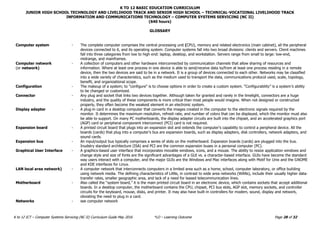
Computer system - The complete computer comprises the central processing unit (CPU), memory and related electronics (main cabinet), all the peripheral
devices connected to it, and its operating system. Computer systems fall into two broad divisions: clients and servers. Client machines
fall into three categories from low to high end: laptop, desktop, and workstation. Servers range from small to large: low-end,
midrange, and mainframes.
Computer network
(or network)
- A collection of computers and other hardware interconnected by communication channels that allow sharing of resources and
information. Where at least one process in one device is able to send/receive data to/from at least one process residing in a remote
device, then the two devices are said to be in a network. It is a group of devices connected to each other. Networks may be classified
into a wide variety of characteristics, such as the medium used to transport the data, communications protocol used, scale, topology,
benefit, and organizational scope.
Configuration - The makeup of a system; to "configure" is to choose options in order to create a custom system. “Configurability” is a system’s ability
to be changed or customized.
Connector - Any plug and socket that links two devices together. Although taken for granted and rarely in the limelight, connectors are a huge
industry, and the quality of these components is more critical than most people would imagine. When not designed or constructed
properly, they often become the weakest element in an electronic system.
Display adapter - A plug-in card in a desktop computer that converts the images created in the computer to the electronic signals required by the
monitor. It determines the maximum resolution, refresh rate, and number of colors that can be displayed, which the monitor must also
be able to support. On many PC motherboards, the display adapter circuits are built into the chipset, and an accelerated graphics port
(AGP) card or peripheral component interconnect (PCI) card is not required.
Expansion board - A printed circuit board that plugs into an expansion slot and extends the computer's capability to control a peripheral device. All the
boards (cards) that plug into a computer's bus are expansion boards, such as display adapters, disk controllers, network adapters, and
sound cards.
Expansion bus - An input/output bus typically comprises a series of slots on the motherboard. Expansion boards (cards) are plugged into the bus.
Inudstry standard architecture (ISA) and PCI are the common expansion buses in a personal computer (PC).
Graphical User Interface - A graphics-based user interface that incorporates movable windows, icons, and a mouse. The ability to resize application windows and
change style and size of fonts are the significant advantages of a GUI vs. a character-based interface. GUIs have become the standard
way users interact with a computer, and the major GUIs are the Windows and Mac interfaces along with Motif for Unix and the GNOME
and KDE interfaces for Linux.
LAN local area network) - A computer network that interconnects computers in a limited area such as a home, school, computer laboratory, or office building
using network media. The defining characteristics of LANs, in contrast to wide area networks (WANs), include their usually higher data-
transfer rates, smaller geographic area, and lack of a need for leased telecommunication lines.
Motherboard - Also called the “system board,” it is the main printed circuit board in an electronic device, which contains sockets that accept additional
boards. In a desktop computer, the motherboard contains the CPU, chipset, PCI bus slots, AGP slot, memory sockets, and controller
circuits for the keyboard, mouse, disks, and printer. It may also have built-in controllers for modem, sound, display and network,
obviating the need to plug in a card.
Networks - see computer network
K TO 12 BASIC EDUCATION CURRICULUM
JUNIOR HIGH SCHOOL TECHNOLOGY AND LIVELIHOOD TRACK AND SENIOR HIGH SCHOOL – TECHNICAL-VOCATIONAL LIVELIHOOD TRACK
INFORMATION AND COMMUNICATIONS TECHNOLOGY – COMPUTER SYSTEMS SERVICING (NC II)
(640 hours)
K to 12 ICT – Computer Systems Servicing (NC II) Curriculum Guide May 2016 *LO – Learning Outcome Page 29 of 32
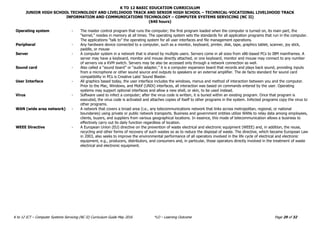
Operating system - The master control program that runs the computer; the first program loaded when the computer is turned on, its main part, the
“kernel,” resides in memory at all times. The operating system sets the standards for all application programs that run in the computer.
The applications “talk to” the operating system for all user interfaces and file management operations.
Peripheral - Any hardware device connected to a computer, such as a monitor, keyboard, printer, disk, tape, graphics tablet, scanner, joy stick,
paddle, or mouse
Server - A computer system in a network that is shared by multiple users. Servers come in all sizes from x86-based PCs to IBM mainframes. A
server may have a keyboard, monitor and mouse directly attached, or one keyboard, monitor and mouse may connect to any number
of servers via a KVM switch. Servers may be also be accessed only through a network connection as well.
Sound card - Also called a “sound board” or “audio adapter,” it is a computer expansion board that records and plays back sound, providing inputs
from a microphone or other sound source and outputs to speakers or an external amplifier. The de facto standard for sound card
compatibility in PCs is Creative Labs’ Sound Blaster.
User Interface - All graphics based today, the user interface includes the windows, menus and method of interaction between you and the computer.
Prior to the Mac, Windows, and Motif (UNIX) interfaces, all interaction was based on commands entered by the user. Operating
systems may support optional interfaces and allow a new shell, or skin, to be used instead.
Virus - Software used to infect a computer; after the virus code is written, it is buried within an existing program. Once that program is
executed, the virus code is activated and attaches copies of itself to other programs in the system. Infected programs copy the virus to
other programs.
WAN (wide area network) - A network that covers a broad area (i.e., any telecommunications network that links across metropolitan, regional, or national
boundaries) using private or public network transports. Business and government entities utilize WANs to relay data among employees,
clients, buyers, and suppliers from various geographical locations. In essence, this mode of telecommunication allows a business to
effectively carry out its daily function regardless of location.
WEEE Directive - A European Union (EU) directive on the prevention of waste electrical and electronic equipment (WEEE) and, in addition, the reuse,
recycling and other forms of recovery of such wastes so as to reduce the disposal of waste. The directive, which became European Law
in 2003, also seeks to improve the environmental performance of all operators involved in the life cycle of electrical and electronic
equipment, e.g., producers, distributors, and consumers and, in particular, those operators directly involved in the treatment of waste
electrical and electronic equipment.
K TO 12 BASIC EDUCATION CURRICULUM
JUNIOR HIGH SCHOOL TECHNOLOGY AND LIVELIHOOD TRACK AND SENIOR HIGH SCHOOL – TECHNICAL-VOCATIONAL LIVELIHOOD TRACK
INFORMATION AND COMMUNICATIONS TECHNOLOGY – COMPUTER SYSTEMS SERVICING (NC II)
(640 hours)
K to 12 ICT – Computer Systems Servicing (NC II) Curriculum Guide May 2016 *LO – Learning Outcome Page 30 of 32
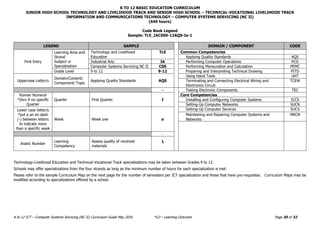
Code Book Legend
Sample: TLE_IACSS9-12AQS-Ia-1
LEGEND SAMPLE DOMAIN / COMPONENT CODE
First Entry
Learning Area and
Strand
Subject or
Specialization
Technology and Livelihood
Education
TLE Common Competencies
Applying Quality Standards AQS
Industrial Arts IA Performing Computer Operations PCO
Computer Systems Servicing NC II CSS Performing Mensuration and Calculation PEMC
Grade Level 9 to 12 9-12 Preparing and Interpreting Technical Drawing PITD
Uppercase Letter/s
Domain/Content/
Component/ Topic
Applying Quality Standards AQS
Using Hand Tools UHT
Terminating and Connecting Electrical Wiring and
Electronics Circuit
TCEW
- Testing Electronic Components TEC
Roman Numeral
*Zero if no specific
Quarter
Quarter First Quarter I
Core Competencies
Installing and Configuring Computer Systems ICCS
Setting-Up Computer Networks SUCN
Lower case letter/s
*put a an en dash
(-) between letters
to indicate more
than a specific week
Week Week one a
Setting-Up Computer Services SUCS
Maintaining and Repairing Computer Systems and
Networks
MRCN
-
Arabic Number
Learning
Competency
Assess quality of received
materials
1
Technology-Livelihood Education and Technical-Vocational Track specializations may be taken between Grades 9 to 12.
Schools may offer specializations from the four strands as long as the minimum number of hours for each specialization is met.
Please refer to the sample Curriculum Map on the next page for the number of semesters per ICT specialization and those that have pre-requisites. Curriculum Maps may be
modified according to specializations offered by a school.

619274722-ICT-Computer-Systems-Servicing-Grade-11-Topics.pdf

  • 1.
    K TO 12BASIC EDUCATION CURRICULUM SENIOR HIGH SCHOOL – TECHNICAL-VOCATIONAL LIVELIHOOD TRACK INFORMATION AND COMMUNICATIONS TECHNOLOGY – COMPUTER SYSTEMS SERVICING (NC II) K to 12 ICT – Computer Systems Servicing (NC II) Curriculum Guide May 2016 *LO – Learning Outcome Page 14 of 32 LESSON 5: USING HAND TOOLS (UHT)  Identifying and selecting different types and uses of hand tools  Uses of different hand tools. The learners demonstrate an understanding of the use of hand tools and equipment for computer systems servicing The learners shall be able to use hand tools and equipment for computer systems servicing LO 1. Plan and prepare for tasks to be undertaken 1.1 Identify tasks to be undertaken properly 1.2 Identify and select appropriate hand tools according to the task requirements TLE_IACSS9- 12UHT-IIIa-17  Checking of hand tools  Identifying unsafe or faulty tools LO 2. Prepare hand tools 2.1 Check appropriate hand tools for proper operation and safety 2.2 Identify and mark unsafe or faulty tools for repair according to standard company procedure TLE_IACSS9- 12UHT-IIIb-18  Operating hand tools  Safety procedures using handling tools  Personal Protective Equipment (PPE)  Documentation process LO 3. Use appropriate hand tools and test equipment 3.1 Use tools according to tasks undertaken. 3.2 Observe all safety procedures in using tools at all times and use appropriate PPE 3.3 Report malfunctions, unplanned or unusual events to the supervisor TLE_IACSS9- 12UHT-IIIc-19  Maintenance of hand tools - Cleaning - Lubricating - Tightening - Tools repairs - Adjusting using correct procedures - Sharpening  Storing of hand tools LO 4. Maintain hand tools 4.1 Do not drop tools to avoid damage; carry out routine maintenance of tools according to standard operational procedures, principles, and techniques 4.2 Store tools safely in appropriate locations in accordance with manufacturer’s specifications or standard operating procedures TLE_IACSS9- 12UHT-IIId-20 TOPICS FROM FIRST GRADING TO FOURTH GRADING/ (FIRST SEM-2ND SEM) GRADE 11 - TVL-CSS NCII
  • 2.
    K TO 12BASIC EDUCATION CURRICULUM JUNIOR HIGH SCHOOL TECHNOLOGY AND LIVELIHOOD TRACK AND SENIOR HIGH SCHOOL – TECHNICAL-VOCATIONAL LIVELIHOOD TRACK INFORMATION AND COMMUNICATIONS TECHNOLOGY – COMPUTER SYSTEMS SERVICING (NC II) (640 hours) K to 12 ICT – Computer Systems Servicing (NC II) Curriculum Guide May 2016 *LO – Learning Outcome Page 15 of 32 CONTENT CONTENT STANDARD PERFORMANCE STANDARD LEARNING COMPETENCIES CODES LESSON 6: TERMINATING AND CONNECTING ELECTRICAL WIRING AND ELECTRONICS CIRCUIT (TCEW)  Material specification - Assorted wires and cables  Task requirements - Splicing - Jointing - Soldering • Tools and equipment - Pliers - Cutters - Screw driver - Soldering gun - Multitester • OH&S guidelines and procedures  Electrical wiring diagram  Electronics kit The learners demonstrate an understanding of concepts and underlying principles in terminating and connecting electrical wiring and electronics circuits The learner shall be able to demonstrate proper termination and connection of electrical wiring and electronics circuits LO 1. Plan and prepare for termination/ connection of electrical wiring/ electronics circuits 1.1 Check materials according to specifications and tasks 1.2 Select appropriate tools and equipment according to task requirements 1.3 Follow planned task to ensure OHS guidelines and procedure 1.4 Prepare electrical wiring/electronics circuits correctly for connecting/terminating in accordance with instruction and work site procedures TLE_IACSS9- 12TCEW-IIIe-f- 21  OHS procedures - Safety procedure in using tools - Appropriate PPE  Methods in termination and connections according to job specification - Clamping - Pin connection - Soldered joints - Plugs  Proper procedures in adjusting accessories - Brackets - Clamps  Confirmation of termination/ connection in accordance with the job specification LO 2: Terminate/connect electrical wiring/ electronic circuits 2.1 Observe safety procedures in using tools and use appropriate personal protective equipment at all times 2.2 Identify the tasks to be undertaken to work safely in accordance with the workplace and standard procedures 2.3 Use appropriate range of methods in termination/connection in accordance to specifications, manufacturer’s requirements, and safety 2.4 Follow correct sequence of operation 2.5 Adjust used accessories 2.6 Confirm termination/connection in accordance with job specification TLE_IACSS9- 12TCEW-IIIg-i- 22
  • 3.
    K TO 12BASIC EDUCATION CURRICULUM JUNIOR HIGH SCHOOL TECHNOLOGY AND LIVELIHOOD TRACK AND SENIOR HIGH SCHOOL – TECHNICAL-VOCATIONAL LIVELIHOOD TRACK INFORMATION AND COMMUNICATIONS TECHNOLOGY – COMPUTER SYSTEMS SERVICING (NC II) (640 hours) K to 12 ICT – Computer Systems Servicing (NC II) Curriculum Guide May 2016 *LO – Learning Outcome Page 16 of 32 CONTENT CONTENT STANDARD PERFORMANCE STANDARD LEARNING COMPETENCIES CODES  Proper procedure in conducting testing of termination/connection of electrical wiring/electronics circuits  Proper procedure in checking wirings and circuits using specified testing procedures  Protocol in responding to unplanned conditions LO 3: Test termination/connections of electrical wiring/electronics circuits 3.1 Conduct complete testing of termination/connection of electrical wiring/electronics circuits in compliance with specifications and regulations using appropriate procedures and equipment 3.2 Check wirings and circuits using specified testing procedures 3.3 Respond to unplanned events or conditions in accordance with established procedures TLE_IACSS9- 12TCEW-IIIi-j- 23 LESSON 7: TESTING ELECTRONIC COMPONENTS (TEC)  Work instructions  Job order  Work coordination process  Documentations and interpretations of data/testing criteria  Testing criteria - Controls - Effectiveness - Efficiency - Bug detection - Functionality, including flow - Interoperability - Performance - Reliability - Operating parameters The learners demonstrate an understanding of concepts and underlying principles in testing electronic components The learners shall be able to test electronic components LO 1: Determine criteria for testing electronics components 1.1 Obtain and clarify work instructions based on job order or client requirements 1.2 Consult responsible person for effective and proper work coordination 1.3 Obtain and interpret data sheets/application notes based on manufacturer’s specifications 1.4 Define testing criteria to ensure that components meet technical and quality requirements 1.5 Document and communicate testing criteria to relevant personnel TLE_IACSS9- 12TEC-IVa-c-24  Testing methods for electronic components - Automated - Debugging - Inspection - Platform testing - Prototyping  Testing strategies for electronic components LO 2: Plan an approach for components testing 2.1 Identify various testing methods based on types of electronic components 2.2 Determine characteristics and appropriateness of testing methods to be used during development and on completion 2.3 Consider/select testing methods in relation to appropriate testing strategy TLE_IACSS9- 12TEC-IVc-e-25
  • 4.
    K TO 12BASIC EDUCATION CURRICULUM JUNIOR HIGH SCHOOL TECHNOLOGY AND LIVELIHOOD TRACK AND SENIOR HIGH SCHOOL – TECHNICAL-VOCATIONAL LIVELIHOOD TRACK INFORMATION AND COMMUNICATIONS TECHNOLOGY – COMPUTER SYSTEMS SERVICING (NC II) (640 hours) K to 12 ICT – Computer Systems Servicing (NC II) Curriculum Guide May 2016 *LO – Learning Outcome Page 17 of 32 CONTENT CONTENT STANDARD PERFORMANCE STANDARD LEARNING COMPETENCIES CODES - Passive testing - Dynamic testing - In-circuit testing  Procedure in checking and testing operation in accordance with established procedures  Records systems - metadata that includes: o description of fault o identification of code o user responses o written or verbal comments o quantitative data o remedial action taken o retest result o date o tester's details - questionnaire - survey - 2.4 Develop plan for testing components at specified points during development and on completion 2.5 Prepare and check required test and measuring instruments and tools in accordance with established procedures 2.6 Establish records system to document testing results, including problems and faults  Component testing process evaluation  Component problems and faults  Documentation procedures  Procedures in resolving detected problems faults LO 3: Test components 3.1 Apply appropriate testing methods to electronic components in accordance to technical specifications 3.2 Detect and record problems and faults by testing 3.3 Document remedial steps 3.4 Resolve detected problems and faults during testing in accordance with agreed project or industry practice 3.5 Evaluate final products against the determined criteria 3.6 Submit to relevant personnel the documented and summarized evaluation report of the testing process TLE_IACSS9- 12TECO-IVf-h-26
  • 5.
    K TO 12BASIC EDUCATION CURRICULUM JUNIOR HIGH SCHOOL TECHNOLOGY AND LIVELIHOOD TRACK AND SENIOR HIGH SCHOOL – TECHNICAL-VOCATIONAL LIVELIHOOD TRACK INFORMATION AND COMMUNICATIONS TECHNOLOGY – COMPUTER SYSTEMS SERVICING (NC II) (640 hours) K to 12 ICT – Computer Systems Servicing (NC II) Curriculum Guide May 2016 *LO – Learning Outcome Page 18 of 32 CONTENT CONTENT STANDARD PERFORMANCE STANDARD LEARNING COMPETENCIES CODES  Components of testing methods  Testing process and records  Documentation procedures LO 4: Evaluate the testing process 4.1 Identify testing methods that were successful based on industry standards 4.2 Evaluate testing process and records system based on standard procedures 4.3 Document test results/findings for subsequent testing TLE_IACSS9- 12TECO-IVh-j-27 CORE COMPETENCIES LESSON 8: INSTALLING AND CONFIGURING COMPUTER SYSTEMS (ICCS)  Types and parts of computers  Computer operating systems  Windows / MAC OS X /Linux  Peripheral devices  Computer systems design  Computer assembly procedures  Power ON self-test and basic-input-output-system (BIOS) configuration procedures  CMOS  Motherboards  Multimedia storage devices: - Video cards - Sound cards - Graphical user interface The learners demonstrate an understanding of concepts and principles in installing configuring computer systems The learners shall be able to install and configure computer systems based on established procedures and system requirements LO 1. Assemble computer hardware 1.1 Plan unit assembly to ensure OHS policies and procedures are followed in accordance with systems requirements 1.2 Prepare unit assembly to ensure OHS policies and procedures are followed in accordance with systems requirements 1.3 Identify materials necessary to complete the work in accordance with established procedures and check against system requirements 1.4 Obtain materials necessary to complete the work in accordance with established procedures and check against system requirements 1.5 Obtain tools, equipment and testing devices needed to carry out installation work in accordance with established procedures and check for correct operation and safety 1.6 Assemble computer hardware in accordance with established procedures and system requirements 1.7 Perform BIOS configuration in accordance with hardware requirements TLE_IACSS9- 12ICCS-Ia-e-28  Installers preparation and OS installation procedures  Application and devices/drivers installation procedures LO 2. Prepare installer 2.1 Create portable bootable devices in accordance with software manufacturer instruction TLE_IACSS9- 12ICCS-If-j-29
  • 6.
    K TO 12BASIC EDUCATION CURRICULUM JUNIOR HIGH SCHOOL TECHNOLOGY AND LIVELIHOOD TRACK AND SENIOR HIGH SCHOOL – TECHNICAL-VOCATIONAL LIVELIHOOD TRACK INFORMATION AND COMMUNICATIONS TECHNOLOGY – COMPUTER SYSTEMS SERVICING (NC II) (640 hours) K to 12 ICT – Computer Systems Servicing (NC II) Curriculum Guide May 2016 *LO – Learning Outcome Page 19 of 32 CONTENT CONTENT STANDARD PERFORMANCE STANDARD LEARNING COMPETENCIES CODES  Desktop PC interface/ hook up procedures  Application packages and use of application programs  Bootable devices - -CD/DVD bootable - -USB bootable using Rufus software - -USB bootable using diskpart/CMD  Software installers 2.2 Prepare customized installers in accordance with software utilization guide and end user agreement 2.3 Carry out installation of portable applications in accordance with software user guide and software license  Installation of Operating System - Windows Server 2008/higher version - Windows XP/7/8/10  Install and configure of peripherals devices  Install /Update Operating system  Checking of work LO 3. Install operating system and drivers for peripherals/ devices 3.1 Install Operating System (OS) in accordance with established installation procedures and to comply with end-user requirements 3.2 Install peripherals/ devices in accordance with manufacturer’s instructions and/ or OS installation procedures 3.3 Configure peripherals/ devices in accordance with manufacturer’s instructions and/ or OS installation procedures 3.4 Access OS and drivers updates/ patches in accordance with manufacturer’s recommendations and requirements 3.5 Install OS and drivers updates/ patches in accordance with manufacturer’s recommendations and requirements 3.6 Check the quality of the work undertaken in accordance with established procedures TLE_IACSS9- 12ICCS-IIa-j-30  Installation of applications software with different variations  Software updates  Virtualization software LO 4. Install application software 4.1 Install Application Software based on software installation guides, end-user requirements and software license agreement TLE_IACSS9- 12ICCS-IIIa-e- 31
  • 7.
    K TO 12BASIC EDUCATION CURRICULUM JUNIOR HIGH SCHOOL TECHNOLOGY AND LIVELIHOOD TRACK AND SENIOR HIGH SCHOOL – TECHNICAL-VOCATIONAL LIVELIHOOD TRACK INFORMATION AND COMMUNICATIONS TECHNOLOGY – COMPUTER SYSTEMS SERVICING (NC II) (640 hours) K to 12 ICT – Computer Systems Servicing (NC II) Curriculum Guide May 2016 *LO – Learning Outcome Page 20 of 32 CONTENT CONTENT STANDARD PERFORMANCE STANDARD LEARNING COMPETENCIES CODES  Disk management software  Antivirus / diagnostic software  Device drivers  Drivers/Software update procedures - Application software license agreements - Stress-testing procedures - 5S and 3Rs environmental policies 4.2 Carry out variation to application software in accordance to customer/ client requirements 4.3 Access software updates in accordance with manufacturer’s recommendations and requirements 4.4 Install software updates in accordance with manufacturer’s recommendations and requirements  Burning or testing installed equipment/devices  Stress test - Processor - Memory - Hard Disk - Video Card  5S and 3Rs environmental policies  Reporting and documentation procedures LO 5. Conduct testing and documentation 5.1 Test devices/ systems and/or installation to determine whether it conforms to requirements 5.2 Conduct stress test to ensure reliability of equipment in accordance with manufacturer’s instructions and system requirements 5.3 Follow 5S and 3Rs according to environmental policies 5.4 Follow procedures in forwarding documentation to appropriate personnel and/or authority on the test conducted. TLE_IACSS9- 12ICCS-IIIf-j-32 LESSON 9. SETTING-UP COMPUTER NETWORKS (SUCN)  Computer network concepts  Network cable installation  Copper cable splicing and cable testing  Fiber optic cables splicing and installation requirements  Philippine Electrical Code relevant to data connection  OHS standards and 5S principles The learners demonstrate an understanding of concepts and principles in setting up computer networks The learners shall be able to set up computer networks based established procedures and system requirements for hardware LO 1 Install network cables 1.1 Plan cable routes in accordance with network design and actual installation site 1.2 Determine cable routes in accordance with network design and actual installation site 1.3 Identify necessary network materials in accordance with established procedures and check against system requirements 1.4 Obtain necessary network materials in accordance with established procedures and check against system requirements TLE_IACSS9- 12SUCN-IVa-j-33
  • 8.
    K TO 12BASIC EDUCATION CURRICULUM JUNIOR HIGH SCHOOL TECHNOLOGY AND LIVELIHOOD TRACK AND SENIOR HIGH SCHOOL – TECHNICAL-VOCATIONAL LIVELIHOOD TRACK INFORMATION AND COMMUNICATIONS TECHNOLOGY – COMPUTER SYSTEMS SERVICING (NC II) (640 hours) K to 12 ICT – Computer Systems Servicing (NC II) Curriculum Guide May 2016 *LO – Learning Outcome Page 28 of 32 GLOSSARY Computer system - The complete computer comprises the central processing unit (CPU), memory and related electronics (main cabinet), all the peripheral devices connected to it, and its operating system. Computer systems fall into two broad divisions: clients and servers. Client machines fall into three categories from low to high end: laptop, desktop, and workstation. Servers range from small to large: low-end, midrange, and mainframes. Computer network (or network) - A collection of computers and other hardware interconnected by communication channels that allow sharing of resources and information. Where at least one process in one device is able to send/receive data to/from at least one process residing in a remote device, then the two devices are said to be in a network. It is a group of devices connected to each other. Networks may be classified into a wide variety of characteristics, such as the medium used to transport the data, communications protocol used, scale, topology, benefit, and organizational scope. Configuration - The makeup of a system; to "configure" is to choose options in order to create a custom system. “Configurability” is a system’s ability to be changed or customized. Connector - Any plug and socket that links two devices together. Although taken for granted and rarely in the limelight, connectors are a huge industry, and the quality of these components is more critical than most people would imagine. When not designed or constructed properly, they often become the weakest element in an electronic system. Display adapter - A plug-in card in a desktop computer that converts the images created in the computer to the electronic signals required by the monitor. It determines the maximum resolution, refresh rate, and number of colors that can be displayed, which the monitor must also be able to support. On many PC motherboards, the display adapter circuits are built into the chipset, and an accelerated graphics port (AGP) card or peripheral component interconnect (PCI) card is not required. Expansion board - A printed circuit board that plugs into an expansion slot and extends the computer's capability to control a peripheral device. All the boards (cards) that plug into a computer's bus are expansion boards, such as display adapters, disk controllers, network adapters, and sound cards. Expansion bus - An input/output bus typically comprises a series of slots on the motherboard. Expansion boards (cards) are plugged into the bus. Inudstry standard architecture (ISA) and PCI are the common expansion buses in a personal computer (PC). Graphical User Interface - A graphics-based user interface that incorporates movable windows, icons, and a mouse. The ability to resize application windows and change style and size of fonts are the significant advantages of a GUI vs. a character-based interface. GUIs have become the standard way users interact with a computer, and the major GUIs are the Windows and Mac interfaces along with Motif for Unix and the GNOME and KDE interfaces for Linux. LAN local area network) - A computer network that interconnects computers in a limited area such as a home, school, computer laboratory, or office building using network media. The defining characteristics of LANs, in contrast to wide area networks (WANs), include their usually higher data- transfer rates, smaller geographic area, and lack of a need for leased telecommunication lines. Motherboard - Also called the “system board,” it is the main printed circuit board in an electronic device, which contains sockets that accept additional boards. In a desktop computer, the motherboard contains the CPU, chipset, PCI bus slots, AGP slot, memory sockets, and controller circuits for the keyboard, mouse, disks, and printer. It may also have built-in controllers for modem, sound, display and network, obviating the need to plug in a card. Networks - see computer network
  • 9.
    K TO 12BASIC EDUCATION CURRICULUM JUNIOR HIGH SCHOOL TECHNOLOGY AND LIVELIHOOD TRACK AND SENIOR HIGH SCHOOL – TECHNICAL-VOCATIONAL LIVELIHOOD TRACK INFORMATION AND COMMUNICATIONS TECHNOLOGY – COMPUTER SYSTEMS SERVICING (NC II) (640 hours) K to 12 ICT – Computer Systems Servicing (NC II) Curriculum Guide May 2016 *LO – Learning Outcome Page 29 of 32 Operating system - The master control program that runs the computer; the first program loaded when the computer is turned on, its main part, the “kernel,” resides in memory at all times. The operating system sets the standards for all application programs that run in the computer. The applications “talk to” the operating system for all user interfaces and file management operations. Peripheral - Any hardware device connected to a computer, such as a monitor, keyboard, printer, disk, tape, graphics tablet, scanner, joy stick, paddle, or mouse Server - A computer system in a network that is shared by multiple users. Servers come in all sizes from x86-based PCs to IBM mainframes. A server may have a keyboard, monitor and mouse directly attached, or one keyboard, monitor and mouse may connect to any number of servers via a KVM switch. Servers may be also be accessed only through a network connection as well. Sound card - Also called a “sound board” or “audio adapter,” it is a computer expansion board that records and plays back sound, providing inputs from a microphone or other sound source and outputs to speakers or an external amplifier. The de facto standard for sound card compatibility in PCs is Creative Labs’ Sound Blaster. User Interface - All graphics based today, the user interface includes the windows, menus and method of interaction between you and the computer. Prior to the Mac, Windows, and Motif (UNIX) interfaces, all interaction was based on commands entered by the user. Operating systems may support optional interfaces and allow a new shell, or skin, to be used instead. Virus - Software used to infect a computer; after the virus code is written, it is buried within an existing program. Once that program is executed, the virus code is activated and attaches copies of itself to other programs in the system. Infected programs copy the virus to other programs. WAN (wide area network) - A network that covers a broad area (i.e., any telecommunications network that links across metropolitan, regional, or national boundaries) using private or public network transports. Business and government entities utilize WANs to relay data among employees, clients, buyers, and suppliers from various geographical locations. In essence, this mode of telecommunication allows a business to effectively carry out its daily function regardless of location. WEEE Directive - A European Union (EU) directive on the prevention of waste electrical and electronic equipment (WEEE) and, in addition, the reuse, recycling and other forms of recovery of such wastes so as to reduce the disposal of waste. The directive, which became European Law in 2003, also seeks to improve the environmental performance of all operators involved in the life cycle of electrical and electronic equipment, e.g., producers, distributors, and consumers and, in particular, those operators directly involved in the treatment of waste electrical and electronic equipment.
  • 10.
    K TO 12BASIC EDUCATION CURRICULUM JUNIOR HIGH SCHOOL TECHNOLOGY AND LIVELIHOOD TRACK AND SENIOR HIGH SCHOOL – TECHNICAL-VOCATIONAL LIVELIHOOD TRACK INFORMATION AND COMMUNICATIONS TECHNOLOGY – COMPUTER SYSTEMS SERVICING (NC II) (640 hours) K to 12 ICT – Computer Systems Servicing (NC II) Curriculum Guide May 2016 *LO – Learning Outcome Page 30 of 32 Code Book Legend Sample: TLE_IACSS9-12AQS-Ia-1 LEGEND SAMPLE DOMAIN / COMPONENT CODE First Entry Learning Area and Strand Subject or Specialization Technology and Livelihood Education TLE Common Competencies Applying Quality Standards AQS Industrial Arts IA Performing Computer Operations PCO Computer Systems Servicing NC II CSS Performing Mensuration and Calculation PEMC Grade Level 9 to 12 9-12 Preparing and Interpreting Technical Drawing PITD Uppercase Letter/s Domain/Content/ Component/ Topic Applying Quality Standards AQS Using Hand Tools UHT Terminating and Connecting Electrical Wiring and Electronics Circuit TCEW - Testing Electronic Components TEC Roman Numeral *Zero if no specific Quarter Quarter First Quarter I Core Competencies Installing and Configuring Computer Systems ICCS Setting-Up Computer Networks SUCN Lower case letter/s *put a an en dash (-) between letters to indicate more than a specific week Week Week one a Setting-Up Computer Services SUCS Maintaining and Repairing Computer Systems and Networks MRCN - Arabic Number Learning Competency Assess quality of received materials 1 Technology-Livelihood Education and Technical-Vocational Track specializations may be taken between Grades 9 to 12. Schools may offer specializations from the four strands as long as the minimum number of hours for each specialization is met. Please refer to the sample Curriculum Map on the next page for the number of semesters per ICT specialization and those that have pre-requisites. Curriculum Maps may be modified according to specializations offered by a school.