1
WARDRIVING
SUMY.V.S
ROLL NO:55
MCA B5
2
The Terminology History of
WarDriving
 The term WarDriving comes from
WarDialing, a term that was introduced
to the general public by Matthew
Broderick’s character, David Lightman, in
the 1983movie,WarGames.
3
 A WarDriver drives around an area,often
after mapping out a route first, to
determine all of the wireless access
points in that area. Once these access
points are discovered, a WarDriver uses
a software program or Web site to map
the results of his or her efforts.
4
 WarDriving became more well-known
when the process was automated by
Peter Shipley, a computer security
consultant in Berkeley, California. During
the fall of 2000, Shipley conducted an
18-month survey of wireless networks in
Berkeley, California and reported his
results at the annual DefCon hacker
conference in July 2001
5
WARDRIVING MANUAL
6
Definition
 WarDriving is the act of moving around a
specific area, mapping the population of
wireless access points for statistical
purposes.These statistics are then used
to raise awareness of the security
problems associated with these types of
networks.
7
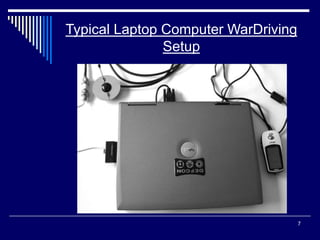
Typical Laptop Computer WarDriving
Setup
8
The PDA or Handheld Setup
9
Contents
 Etymology
 Mapping
 Antennas
 Piggybacking
 Legal considerations
 Tools used
10
Etymology
 Wardriving was named after the term
Wardialing.
 Warbiking involves searching for
wireless networks while on a moving
bicycle or a motorcycle.
 Warwalking is similar to Wardriving.
11
Mapping
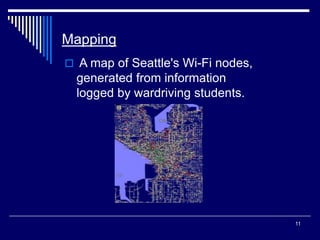
 A map of Seattle's Wi-Fi nodes,
generated from information
logged by wardriving students.
12
 Many wardrivers use GPS devises to
mesure the location of the network find
and log it on a website.
 One popular mapping utility that is used
to visualize wardriving data is called
StumbVerter.
 StumbVerter is a Windows program that
uses maps from Microsoft Map Point
2002 and imports wireless access point
data in wiscan formats.
13
Antennas
 Wireless access point receivers can be
modified to extend their ability for
picking up and connecting to wireless
access points.
 There are two main antenna behaviors:
1. Directional
2. Omni-directional
14
 Attaching an external antenna to a
wireless LAN card will require the use of
a cable called a pigtail (Positive, p.1). A
pigtail is usually a short 1 to 2 foot cable
that converts connectors from your
wireless LAN card’s proprietary
connector to a standard antenna
connector
15
Piggybacking
 Wardrivers are only out to log and collect
information about the wireless access
points (WAPs) they find while driving,
without using the networks' services.
 Connecting to the network and using its
services without explicit authorization is
referred to as piggybacking
16
Legal considerations
 Wardriving as a questionable activity
(typically from its association with
piggybacking), though, from a technical
viewpoint, everything is working as
designed: Access points must broadcast
identifying data accessible to anyone
with a suitable receiver.
17
 There are no laws that specifically prohibit or
allow wardriving, though many localities
have laws against unauthorized access of a
computer network
 Wardriving (with programs like Kismet or
KisMAC) does not communicate at all with
the network; merely logging its broadcast
address.
18
 The legality of active wardriving is less
certain, since the wardriver temporarily
becomes "associated" with the network,
even though no data is transferred.
19
Windows - Network Stumbler
(NetStumbler):
 NetStumbler is the easiest to setup and
most popular scanner used on the
Windows platform. NetStumbler
functions by emitting 802.11b probes
that ask wireless access points to
respond if they are nearby.
 NetStumbler supports Aironet-based
wireless LAN cards
20
 NetStumbler contains the following
features:
 Active scanning for wireless access points
 GPS support
 Logs access points to NS1, extended and
summary wi-scan, and plain text files
21
Pocket PC (PDA) - MiniStumbler
 MiniStumbler is a slimmed down version
of NetStumbler that operates on the
Pocket PC platform.
 MiniStumbler contains the following
features:
 Active scanning for wireless access points
 GPS support
 Logs access points to a NS1 file
22
Kismet
 Kismet does not send probe requests.
 Kismet requires that the wireless LAN
card be put into a monitor mode.
 Kismet functions on computers and
PDAs loaded with the Linux operating
system.
23
 Kismet contains the following features:
 Passive scanning for wireless access points.
 Detects “cloaked” access points.
 GPS support.
24
Conclusion
 Wardriving is an activity that many can
participate in with low cost and minimal
technical expertise. Wardrivers simply
record the name, location, and security
setting of your wireless access point and the
results of this activity point to a large
problem of insecure wireless access points.
25

5324358-WARDRIVING.ppt

  • 1.
  • 2.
    2 The Terminology Historyof WarDriving  The term WarDriving comes from WarDialing, a term that was introduced to the general public by Matthew Broderick’s character, David Lightman, in the 1983movie,WarGames.
  • 3.
    3  A WarDriverdrives around an area,often after mapping out a route first, to determine all of the wireless access points in that area. Once these access points are discovered, a WarDriver uses a software program or Web site to map the results of his or her efforts.
  • 4.
    4  WarDriving becamemore well-known when the process was automated by Peter Shipley, a computer security consultant in Berkeley, California. During the fall of 2000, Shipley conducted an 18-month survey of wireless networks in Berkeley, California and reported his results at the annual DefCon hacker conference in July 2001
  • 5.
  • 6.
    6 Definition  WarDriving isthe act of moving around a specific area, mapping the population of wireless access points for statistical purposes.These statistics are then used to raise awareness of the security problems associated with these types of networks.
  • 7.
    7 Typical Laptop ComputerWarDriving Setup
  • 8.
    8 The PDA orHandheld Setup
  • 9.
    9 Contents  Etymology  Mapping Antennas  Piggybacking  Legal considerations  Tools used
  • 10.
    10 Etymology  Wardriving wasnamed after the term Wardialing.  Warbiking involves searching for wireless networks while on a moving bicycle or a motorcycle.  Warwalking is similar to Wardriving.
  • 11.
    11 Mapping  A mapof Seattle's Wi-Fi nodes, generated from information logged by wardriving students.
  • 12.
    12  Many wardriversuse GPS devises to mesure the location of the network find and log it on a website.  One popular mapping utility that is used to visualize wardriving data is called StumbVerter.  StumbVerter is a Windows program that uses maps from Microsoft Map Point 2002 and imports wireless access point data in wiscan formats.
  • 13.
    13 Antennas  Wireless accesspoint receivers can be modified to extend their ability for picking up and connecting to wireless access points.  There are two main antenna behaviors: 1. Directional 2. Omni-directional
  • 14.
    14  Attaching anexternal antenna to a wireless LAN card will require the use of a cable called a pigtail (Positive, p.1). A pigtail is usually a short 1 to 2 foot cable that converts connectors from your wireless LAN card’s proprietary connector to a standard antenna connector
  • 15.
    15 Piggybacking  Wardrivers areonly out to log and collect information about the wireless access points (WAPs) they find while driving, without using the networks' services.  Connecting to the network and using its services without explicit authorization is referred to as piggybacking
  • 16.
    16 Legal considerations  Wardrivingas a questionable activity (typically from its association with piggybacking), though, from a technical viewpoint, everything is working as designed: Access points must broadcast identifying data accessible to anyone with a suitable receiver.
  • 17.
    17  There areno laws that specifically prohibit or allow wardriving, though many localities have laws against unauthorized access of a computer network  Wardriving (with programs like Kismet or KisMAC) does not communicate at all with the network; merely logging its broadcast address.
  • 18.
    18  The legalityof active wardriving is less certain, since the wardriver temporarily becomes "associated" with the network, even though no data is transferred.
  • 19.
    19 Windows - NetworkStumbler (NetStumbler):  NetStumbler is the easiest to setup and most popular scanner used on the Windows platform. NetStumbler functions by emitting 802.11b probes that ask wireless access points to respond if they are nearby.  NetStumbler supports Aironet-based wireless LAN cards
  • 20.
    20  NetStumbler containsthe following features:  Active scanning for wireless access points  GPS support  Logs access points to NS1, extended and summary wi-scan, and plain text files
  • 21.
    21 Pocket PC (PDA)- MiniStumbler  MiniStumbler is a slimmed down version of NetStumbler that operates on the Pocket PC platform.  MiniStumbler contains the following features:  Active scanning for wireless access points  GPS support  Logs access points to a NS1 file
  • 22.
    22 Kismet  Kismet doesnot send probe requests.  Kismet requires that the wireless LAN card be put into a monitor mode.  Kismet functions on computers and PDAs loaded with the Linux operating system.
  • 23.
    23  Kismet containsthe following features:  Passive scanning for wireless access points.  Detects “cloaked” access points.  GPS support.
  • 24.
    24 Conclusion  Wardriving isan activity that many can participate in with low cost and minimal technical expertise. Wardrivers simply record the name, location, and security setting of your wireless access point and the results of this activity point to a large problem of insecure wireless access points.
  • 25.