DATA BINDING
M I C R O S O F T B L A Z O R
INTR ODUC TION
o Data binding is a mechanism in Blazor that allows
you to establish a connection between the
application’s data and the User Interface
o Enables the successful data synchronization
o There are five main types of data binding:
o One-way data-binding
o Two-way data-binding
o Event Binding
o Form Binding
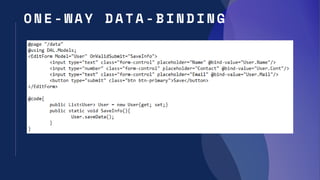
O N E - WAY DATA - BIN DING
o Provides one way communication between UI and code
o Does not allow dynamic changes based on changes in the code.
Whatever you state in your code will be reflected in your UI
o If user makes any update in UI, it does not propagate back to the
code
o There are two methods of one-way data-binding:
o Using @ syntax
o Using Bind Attribute
O N E - WAY DATA - BIN DING
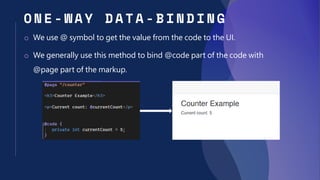
o We use @ symbol to get the value from the code to the UI.
o We generally use this method to bind @code part of the code with
@page part of the markup.
O N E - WAY DATA - BIN DING
o We use @bind-value attributes such as @bind-value and @bind-
values to save or fetch data from other components or resources.
o This can include saving the information into the database, getting
the information from the database, displaying the information
present inside the database.
O N E - WAY DATA - BIN DING
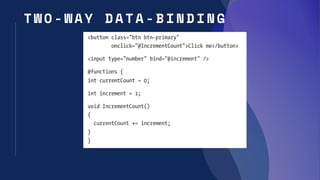
T W O - WAY DATA - BIN DING
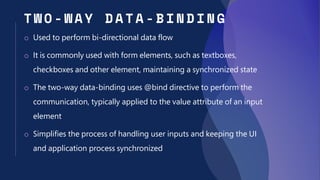
o Used to perform bi-directional data flow
o It is commonly used with form elements, such as textboxes,
checkboxes and other element, maintaining a synchronized state
o The two-way data-binding uses @bind directive to perform the
communication, typically applied to the value attribute of an input
element
o Simplifies the process of handling user inputs and keeping the UI
and application process synchronized
T W O - WAY DATA - BIN DING
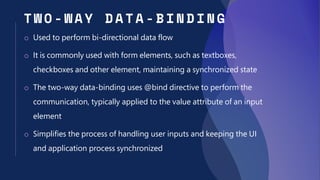
o Used to perform bi-directional data flow
o It is commonly used with form elements, such as textboxes,
checkboxes and other element, maintaining a synchronized state
o The two-way data-binding uses @bind directive to perform the
communication, typically applied to the value attribute of an input
element
o Simplifies the process of handling user inputs and keeping the UI
and application process synchronized
T W O - WAY DATA - BIN DING
EVEN T BI NDIN G
o Event binding refers to the process of associating C# methods with
multiple HTML events
o This mechanism enables you to handle events such as button
clicks, mouse movements, and keyboard inputs, making the web
application interactive and responsive
o This includes @onclick, @oninput, @onchange, @onmouseover
etc.
FORM BIN DING
o Form binding refers to the process of associating a Blazor
components with the HTML form and handling form submissions
o Uses the Blazor’s in-built feature “EditForm” that simplifies the
implementation of form-related functionality
o This also helps in form-related functionality, including model
binding, validation and event handling

#5 | Data Binding | Microsoft Blazor | Sameer Siddiqui

  • 1.
    DATA BINDING M IC R O S O F T B L A Z O R
  • 2.
    INTR ODUC TION oData binding is a mechanism in Blazor that allows you to establish a connection between the application’s data and the User Interface o Enables the successful data synchronization o There are five main types of data binding: o One-way data-binding o Two-way data-binding o Event Binding o Form Binding
  • 3.
    O N E- WAY DATA - BIN DING o Provides one way communication between UI and code o Does not allow dynamic changes based on changes in the code. Whatever you state in your code will be reflected in your UI o If user makes any update in UI, it does not propagate back to the code o There are two methods of one-way data-binding: o Using @ syntax o Using Bind Attribute
  • 4.
    O N E- WAY DATA - BIN DING o We use @ symbol to get the value from the code to the UI. o We generally use this method to bind @code part of the code with @page part of the markup.
  • 5.
    O N E- WAY DATA - BIN DING o We use @bind-value attributes such as @bind-value and @bind- values to save or fetch data from other components or resources. o This can include saving the information into the database, getting the information from the database, displaying the information present inside the database.
  • 6.
    O N E- WAY DATA - BIN DING
  • 7.
    T W O- WAY DATA - BIN DING o Used to perform bi-directional data flow o It is commonly used with form elements, such as textboxes, checkboxes and other element, maintaining a synchronized state o The two-way data-binding uses @bind directive to perform the communication, typically applied to the value attribute of an input element o Simplifies the process of handling user inputs and keeping the UI and application process synchronized
  • 8.
    T W O- WAY DATA - BIN DING o Used to perform bi-directional data flow o It is commonly used with form elements, such as textboxes, checkboxes and other element, maintaining a synchronized state o The two-way data-binding uses @bind directive to perform the communication, typically applied to the value attribute of an input element o Simplifies the process of handling user inputs and keeping the UI and application process synchronized
  • 9.
    T W O- WAY DATA - BIN DING
  • 10.
    EVEN T BINDIN G o Event binding refers to the process of associating C# methods with multiple HTML events o This mechanism enables you to handle events such as button clicks, mouse movements, and keyboard inputs, making the web application interactive and responsive o This includes @onclick, @oninput, @onchange, @onmouseover etc.
  • 11.
    FORM BIN DING oForm binding refers to the process of associating a Blazor components with the HTML form and handling form submissions o Uses the Blazor’s in-built feature “EditForm” that simplifies the implementation of form-related functionality o This also helps in form-related functionality, including model binding, validation and event handling