Data Binding
Data Binding
Data binding is the technique of linking properties of
two objects so that changes in one property are
automatically reflected in the other property. Data
binding is an integral part of the Model-View-
ViewModel (MVVM) application architecture.
Basic Bindings
Basic Bindings
A Xamarin.Forms data binding links a pair of
properties between two objects, at least one of which
is usually a user-interface object. These two objects
are called the target and the source:
• The target is the object (and property) on which the data binding is set.
• The source is the object (and property) referenced by the data binding.
Binding Mode
Binding Mode
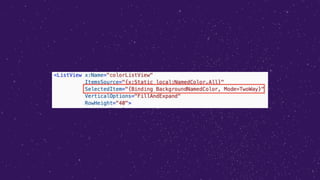
Allow to set the behavior of each data binding, the
available options in Xamarin.Forms are:
• Default
• TwoWay – data goes both ways between source and target
• OneWay – data goes from source to target
• OneWayToSource – data goes from target to source
• OneTime – data goes from source to target, but only when
the BindingContext changes (>=Xamarin.Forms 3.0)
**Each property has his own default binding mode**
String Formatting
String Formatting
Sometimes it's convenient to use data bindings to
display the string representation of an object or value.
For example, you might want to use a Label to display
the current value of a Slider. In this data binding,
the Slider is the source, and the target is
the Text property of the Label.
Binding Path
Binding Path
The Path property of the Binding class (or
the Path property of the Binding markup extension)
has been set to a single property. It's actually possible
to set Path to a sub-property (a property of a
property), or to a member of a collection.
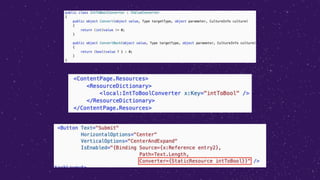
Binding Value Converters
Data bindings usually transfer data from a source
property to a target property, and in some cases from
the target property to the source property. This
transfer is straightforward when the source and target
properties are of the same type, or when one type can
be converted to the other type through an implicit
conversion. When that is not the case, a type
conversion must take place.
Relative Bindings
Relative Bindings
Relative bindings provide the ability to set the binding source
relative to the position of the binding target. They are created with
the RelativeSource markup extension, and set as
the Source property of a binding expression.
The RelativeSource markup extension is supported by
the RelativeSourceExtension class, which defines the following
properties:
• Mode
• AncestorLevel
• AncestorType
Relative Bindings
Modes:
• TemplatedParent indicates the element to which the template, in
which the bound element exists, is applied.
• Self indicates the element on which the binding is being set,
allowing you to bind one property of that element to another
property on the same element.
• FindAncestor indicates the ancestor in the visual tree of the
bound element.
• FindAncestorBindingContext indicates the BindingContext of the
ancestor in the visual tree of the bound element.
Binding Fallbacks
Binding Fallbacks
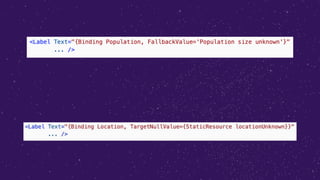
Sometimes data bindings fail, because the binding
source can't be resolved, or because the binding
succeeds but returns a nullvalue.
Two options are available:
• FallbackValue: allows a fallback value to be defined that will be
used when the binding source can't be resolved.
• TargetNullValue: allows a replacement value to be defined that
will be used when the binding source is resolved, but the value
is null.
Compiled Bindings
Compiled Bindings
Compiled bindings improve data binding performance in
Xamarin.Forms applications by resolving binding expressions at
compile-time rather than runtime. In addition, this compile-time
validation of binding expressions enables a better developer
troubleshooting experience because invalid bindings are reported
as build errors.
The process for using compiled bindings is to:
• Enable XAML compilation. For more information about XAML
compilation, see XAML Compilation.
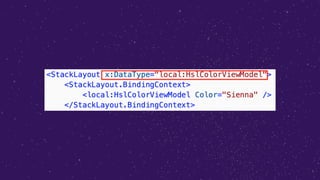
• Set an x:DataType attribute on a VisualElement to the type of the object
that the VisualElement and its children will bind to.
https://github.com/AlejandroRuiz/NetConfFocusXamarin

Data Binding for Xamarin Forms In-Depth

  • 3.
  • 4.
    Data Binding Data bindingis the technique of linking properties of two objects so that changes in one property are automatically reflected in the other property. Data binding is an integral part of the Model-View- ViewModel (MVVM) application architecture.
  • 5.
  • 6.
    Basic Bindings A Xamarin.Formsdata binding links a pair of properties between two objects, at least one of which is usually a user-interface object. These two objects are called the target and the source: • The target is the object (and property) on which the data binding is set. • The source is the object (and property) referenced by the data binding.
  • 8.
  • 9.
    Binding Mode Allow toset the behavior of each data binding, the available options in Xamarin.Forms are: • Default • TwoWay – data goes both ways between source and target • OneWay – data goes from source to target • OneWayToSource – data goes from target to source • OneTime – data goes from source to target, but only when the BindingContext changes (>=Xamarin.Forms 3.0) **Each property has his own default binding mode**
  • 11.
  • 12.
    String Formatting Sometimes it'sconvenient to use data bindings to display the string representation of an object or value. For example, you might want to use a Label to display the current value of a Slider. In this data binding, the Slider is the source, and the target is the Text property of the Label.
  • 14.
  • 15.
    Binding Path The Pathproperty of the Binding class (or the Path property of the Binding markup extension) has been set to a single property. It's actually possible to set Path to a sub-property (a property of a property), or to a member of a collection.
  • 17.
  • 18.
    Binding Value Converters Databindings usually transfer data from a source property to a target property, and in some cases from the target property to the source property. This transfer is straightforward when the source and target properties are of the same type, or when one type can be converted to the other type through an implicit conversion. When that is not the case, a type conversion must take place.
  • 20.
  • 21.
    Relative Bindings Relative bindingsprovide the ability to set the binding source relative to the position of the binding target. They are created with the RelativeSource markup extension, and set as the Source property of a binding expression. The RelativeSource markup extension is supported by the RelativeSourceExtension class, which defines the following properties: • Mode • AncestorLevel • AncestorType
  • 22.
    Relative Bindings Modes: • TemplatedParentindicates the element to which the template, in which the bound element exists, is applied. • Self indicates the element on which the binding is being set, allowing you to bind one property of that element to another property on the same element. • FindAncestor indicates the ancestor in the visual tree of the bound element. • FindAncestorBindingContext indicates the BindingContext of the ancestor in the visual tree of the bound element.
  • 24.
  • 25.
    Binding Fallbacks Sometimes databindings fail, because the binding source can't be resolved, or because the binding succeeds but returns a nullvalue. Two options are available: • FallbackValue: allows a fallback value to be defined that will be used when the binding source can't be resolved. • TargetNullValue: allows a replacement value to be defined that will be used when the binding source is resolved, but the value is null.
  • 27.
  • 28.
    Compiled Bindings Compiled bindingsimprove data binding performance in Xamarin.Forms applications by resolving binding expressions at compile-time rather than runtime. In addition, this compile-time validation of binding expressions enables a better developer troubleshooting experience because invalid bindings are reported as build errors. The process for using compiled bindings is to: • Enable XAML compilation. For more information about XAML compilation, see XAML Compilation. • Set an x:DataType attribute on a VisualElement to the type of the object that the VisualElement and its children will bind to.
  • 33.