BY- AMAN KUMAR JOSHI
COURSE- B.SC. IT
TOPIC- SEMINAR PRESENTATION ON HTML5
SEMESTER – FOURTH (4th)
 What Is HTML?
 Types of Tags in HTML.
 Some Basic Tags of HTML.
 HTML5.
 New Elements.
 Semantic Changes.
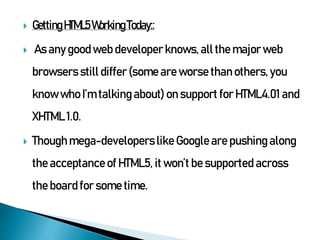
 Getting HTML5 working today.
 Conclusion.
 HTML is a computer language devised to allow website
creation
 Firstly mentioned on the Internet by Berners-Lee in late
1991.
 HTML stands for Hyper Text Markup Language .
• An HTML file is a text file containing small markup tags .
• The markup tags tell the Web browser how to display the
page .
• An HTML file must have an htm or html file extension
 Example : Simple HTML Page Example Explained The first
tag in your HTML document is <html>.
 HTML tags have two main types: block-level and
inline tags.
 Block-level elements take up the full available
space and always start a new line in the document.
Headings and paragraphs are a great example of
block tags.
 Inline elements only take up as much space as they
need and don’t start a new line on the page. They
usually serve to format the inner contents of block-
level elements. Links and emphasized strings are
good examples of inline tags.
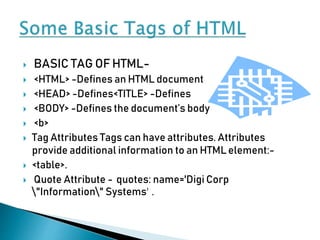
 BASIC TAG OF HTML-
 <HTML> -Defines an HTML document
 <HEAD> -Defines<TITLE> -Defines
 <BODY> -Defines the document’s body
 <b>
 Tag Attributes Tags can have attributes. Attributes
provide additional information to an HTMLelement:-
 <table>.
 Quote Attribute - quotes: name='Digi Corp
"Information" Systems' .
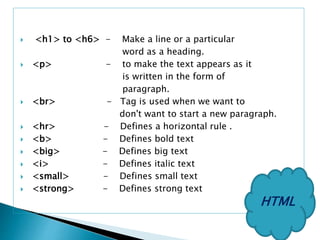
 <h1> to <h6> - Make a line or a particular
word as a heading.
 <p> - to make the text appears as it
is written in the form of
paragraph.
 <br> - Tag is used when we want to
don't want to start a new paragraph.
 <hr> - Defines a horizontal rule .
 <b> - Defines bold text
 <big> - Defines big text
 <i> - Defines italic text
 <small> - Defines small text
 <strong> - Defines strong text
HTML
 <sub> - Defines subscripted text
 <sup> - Defines superscripted text
 <ins> - Defines inserted text
 <del> - Defines deleted text
 <a> - Anchor tag to create a link to
another document.
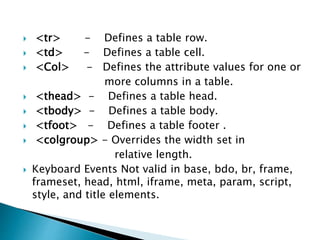
 <tr> - Defines a table row.
 <td> - Defines a table cell.
 <Col> - Defines the attribute values for one or
more columns in a table.
 <thead> - Defines a table head.
 <tbody> - Defines a table body.
 <tfoot> - Defines a table footer .
 <colgroup> - Overrides the width set in
relative length.
 Keyboard Events Not valid in base, bdo, br, frame,
frameset, head, html, iframe, meta, param, script,
style, and title elements.
*Written by Joshua Johnson, On 19th October 2009.
Filed in HTML, Web Standards.
 The next iteration of HTML has been met with
excitement by some, loathing by others and
confusion/fear by everyone else.
The main focus areas are :
1. New E lements
2. Semantic Changes
3. Getting it Working Today
HTML5 includes several new APIs that are integrated with some
of the new HTML5 elements.
 2Ddrawing APIwhichcanbeusedwith thenewcanvaselement.
 APIforplayingofvideoandaudio whichcanbeusedwith thenewvideoandaudio elements.
 AnAPIthatenablesofflineWebapplications.
 AnAPIthatallowsaWebapplication toregisteritselfforcertainprotocolsormediatypes.
 Drag&dropAPIincombination with a draggable attribute.
 Cross-documentmessaging.
New Elements in HTML5:
 HTML5introducesquiteafewnewelements.
 <article>Definesexternalcontent.
 <aside>Definessomecontentasidefromthearticleitisplaced in.
 <audio>Definessound, suchasmusicorotheraudiostreams.
 <canvas>Definesgraphic,suchasgraphsorotherimages.
 <command>Definesacommandbutton,likearadiobutton,acheckbox,ora
button.
 <datagrid> Defines a list of selectable data. The
datagrid is displayed as a tree-list
 <datalist> Defines a list of selectable data. Use this
element together with the input element, to make a
dropdown list for the input’s value
 <details> Defines details of an element, which the user
can see, and click to hide
 <dialog> - Defines a dialog, such as a
conversation .
 <nav> - Defines a section of navigation
links
 <nest> - Defines a nesting point in a data
template for child elements. Used together with
the elements <datatemplate> and <rule>
 <source> - Defines media resources for media
elements, such as video and audio
 <time> - Defines a time or a date, or both
 <video> - Defines video, such as a movie clip
or other video streams
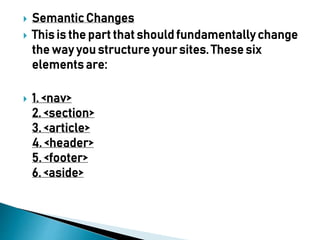
 Semantic Changes
 This is the part that should fundamentally change
the way you structure your sites. These six
elements are:
 1. <nav>
2. <section>
3. <article>
4. <header>
5. <footer>
6. <aside>
 Getting HTML5Working Today::
 As any goodweb developer knows, all the major web
browsers still differ (some are worse than others, you
know who I’m talking about) on support for HTML4.01 and
XHTML 1.0.
 Though mega-developers like Google are pushing along
the acceptance of HTML5, it won’t be supported across
the board for some time.
Conclusion –
 Introduced the new elements and APIs included in
HTML5.
 We also got a taste of the semantic changes to
come and the new structure our web pages should
take in the future.
 Finally, we learned that even though HTML5 isn’t
quite ready for the masses, we can still get our
grubby developer fingers on it and start
experimenting today.
Thank You!

4THseminar ppt on HTML-5.pptx

  • 1.
    BY- AMAN KUMARJOSHI COURSE- B.SC. IT TOPIC- SEMINAR PRESENTATION ON HTML5 SEMESTER – FOURTH (4th)
  • 2.
     What IsHTML?  Types of Tags in HTML.  Some Basic Tags of HTML.  HTML5.  New Elements.  Semantic Changes.  Getting HTML5 working today.  Conclusion.
  • 3.
     HTML isa computer language devised to allow website creation  Firstly mentioned on the Internet by Berners-Lee in late 1991.  HTML stands for Hyper Text Markup Language . • An HTML file is a text file containing small markup tags . • The markup tags tell the Web browser how to display the page . • An HTML file must have an htm or html file extension  Example : Simple HTML Page Example Explained The first tag in your HTML document is <html>.
  • 4.
     HTML tagshave two main types: block-level and inline tags.  Block-level elements take up the full available space and always start a new line in the document. Headings and paragraphs are a great example of block tags.  Inline elements only take up as much space as they need and don’t start a new line on the page. They usually serve to format the inner contents of block- level elements. Links and emphasized strings are good examples of inline tags.
  • 5.
     BASIC TAGOF HTML-  <HTML> -Defines an HTML document  <HEAD> -Defines<TITLE> -Defines  <BODY> -Defines the document’s body  <b>  Tag Attributes Tags can have attributes. Attributes provide additional information to an HTMLelement:-  <table>.  Quote Attribute - quotes: name='Digi Corp "Information" Systems' .
  • 6.
     <h1> to<h6> - Make a line or a particular word as a heading.  <p> - to make the text appears as it is written in the form of paragraph.  <br> - Tag is used when we want to don't want to start a new paragraph.  <hr> - Defines a horizontal rule .  <b> - Defines bold text  <big> - Defines big text  <i> - Defines italic text  <small> - Defines small text  <strong> - Defines strong text HTML
  • 7.
     <sub> -Defines subscripted text  <sup> - Defines superscripted text  <ins> - Defines inserted text  <del> - Defines deleted text  <a> - Anchor tag to create a link to another document.
  • 8.
     <tr> -Defines a table row.  <td> - Defines a table cell.  <Col> - Defines the attribute values for one or more columns in a table.  <thead> - Defines a table head.  <tbody> - Defines a table body.  <tfoot> - Defines a table footer .  <colgroup> - Overrides the width set in relative length.  Keyboard Events Not valid in base, bdo, br, frame, frameset, head, html, iframe, meta, param, script, style, and title elements.
  • 9.
    *Written by JoshuaJohnson, On 19th October 2009. Filed in HTML, Web Standards.  The next iteration of HTML has been met with excitement by some, loathing by others and confusion/fear by everyone else. The main focus areas are : 1. New E lements 2. Semantic Changes 3. Getting it Working Today
  • 10.
    HTML5 includes severalnew APIs that are integrated with some of the new HTML5 elements.  2Ddrawing APIwhichcanbeusedwith thenewcanvaselement.  APIforplayingofvideoandaudio whichcanbeusedwith thenewvideoandaudio elements.  AnAPIthatenablesofflineWebapplications.  AnAPIthatallowsaWebapplication toregisteritselfforcertainprotocolsormediatypes.  Drag&dropAPIincombination with a draggable attribute.  Cross-documentmessaging.
  • 11.
    New Elements inHTML5:  HTML5introducesquiteafewnewelements.  <article>Definesexternalcontent.  <aside>Definessomecontentasidefromthearticleitisplaced in.  <audio>Definessound, suchasmusicorotheraudiostreams.  <canvas>Definesgraphic,suchasgraphsorotherimages.  <command>Definesacommandbutton,likearadiobutton,acheckbox,ora button.
  • 12.
     <datagrid> Definesa list of selectable data. The datagrid is displayed as a tree-list  <datalist> Defines a list of selectable data. Use this element together with the input element, to make a dropdown list for the input’s value  <details> Defines details of an element, which the user can see, and click to hide
  • 13.
     <dialog> -Defines a dialog, such as a conversation .  <nav> - Defines a section of navigation links  <nest> - Defines a nesting point in a data template for child elements. Used together with the elements <datatemplate> and <rule>  <source> - Defines media resources for media elements, such as video and audio  <time> - Defines a time or a date, or both  <video> - Defines video, such as a movie clip or other video streams
  • 14.
     Semantic Changes This is the part that should fundamentally change the way you structure your sites. These six elements are:  1. <nav> 2. <section> 3. <article> 4. <header> 5. <footer> 6. <aside>
  • 15.
     Getting HTML5WorkingToday::  As any goodweb developer knows, all the major web browsers still differ (some are worse than others, you know who I’m talking about) on support for HTML4.01 and XHTML 1.0.  Though mega-developers like Google are pushing along the acceptance of HTML5, it won’t be supported across the board for some time.
  • 16.
    Conclusion –  Introducedthe new elements and APIs included in HTML5.  We also got a taste of the semantic changes to come and the new structure our web pages should take in the future.  Finally, we learned that even though HTML5 isn’t quite ready for the masses, we can still get our grubby developer fingers on it and start experimenting today.
  • 17.