Computer-Aided Drawing (CAD)
Graphic Communication
Knowledge & Interpretation
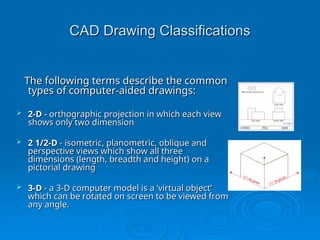
CAD Drawing Classifications
The following terms describe the common
types of computer-aided drawings:
 2-D
2-D - orthographic projection in which each view
- orthographic projection in which each view
shows only two dimension
 2 1/2-D
2 1/2-D - isometric, planometric, oblique and
- isometric, planometric, oblique and
perspective views which show all three
dimensions (length, breadth and height) on a
pictorial drawing
pictorial drawing
 3-D
3-D - a 3-D computer model is a ‘virtual object’
- a 3-D computer model is a ‘virtual object’
which can be rotated on screen to be viewed from
any angle.
any angle.
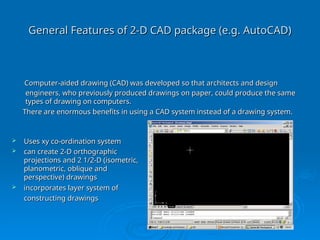
General Features of 2-D CAD package (e.g. AutoCAD)
 Uses xy co-ordination system
Uses xy co-ordination system
 can create 2-D orthographic
can create 2-D orthographic
projections and 2 1/2-D (isometric,
planometric, oblique and
perspective) drawings
 incorporates layer system of
incorporates layer system of
constructing drawings
Computer-aided drawing (CAD) was developed so that architects and design
engineers, who previously produced drawings on paper, could produce the same
types of drawing on computers.
There are enormous benefits in using a CAD system instead of a drawing system.
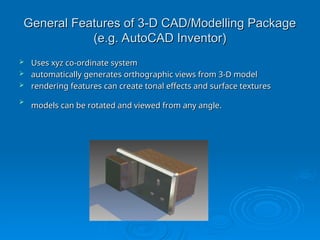
General Features of 3-D CAD/Modelling Package
(e.g. AutoCAD Inventor)
 Uses xyz co-ordinate system
Uses xyz co-ordinate system
 automatically generates orthographic views from 3-D model
automatically generates orthographic views from 3-D model
 rendering features can create tonal effects and surface textures
rendering features can create tonal effects and surface textures

models can be rotated and viewed from any angle.
3-D CAD Modelling
3-D CAD Modelling
The development of 3-D modelling software enables architects and
designers to create 3-D models of their designs. Previously, 3-D
models had to be ‘built’ from materials such as card, clay and
polystyrene blocks.
polystyrene blocks.
Advantages of 3-D computer modelling over traditional
‘built’ models:
‘built’ models:
 can be produced much more quickly
can be produced much more quickly
 can be modified very quickly
can be modified very quickly
 enable the designer to try colours and surface textures
enable the designer to try colours and surface textures
 can be used to test structural designs before they are built, e.g.
can be used to test structural designs before they are built, e.g.
bridges and buildings
 can be realistically rendered
can be realistically rendered
 take up less storage space than ‘built’ models
take up less storage space than ‘built’ models
 can be used to create realistic simulations and games.
can be used to create realistic simulations and games.
3-D Modelling
3-D Modelling
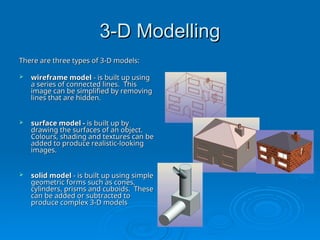
There are three types of 3-D models:
 wireframe model
wireframe model - is built up using
- is built up using
a series of connected lines. This
image can be simplified by removing
lines that are hidden.
 surface model -
surface model - is built up by
is built up by
drawing the surfaces of an object.
Colours, shading and textures can be
added to produce realistic-looking
images.
images.
 solid model
solid model - is built up using simple
- is built up using simple
geometric forms such as cones,
cylinders, prisms and cuboids. These
can be added or subtracted to
produce complex 3-D models
CAG – Animation & Simulation
Knowledge & Interpretation
Graphic Communication
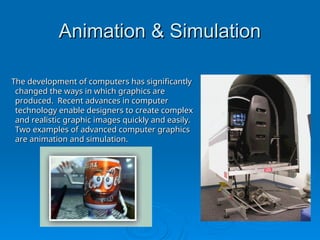
Animation & Simulation
The development of computers has significantly
changed the ways in which graphics are
produced. Recent advances in computer
technology enable designers to create complex
and realistic graphic images quickly and easily.
Two examples of advanced computer graphics
are animation and simulation.
Computer Animation
Computer Animation
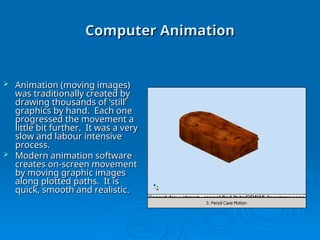
 Animation (moving images)
Animation (moving images)
was traditionally created by
drawing thousands of ‘still’
graphics by hand. Each one
progressed the movement a
little bit further. It was a very
slow and labour intensive
process.
process.
 Modern animation software
Modern animation software
creates on-screen movement
by moving graphic images
along plotted paths. It is
quick, smooth and realistic.
Computer Animation
Computer Animation
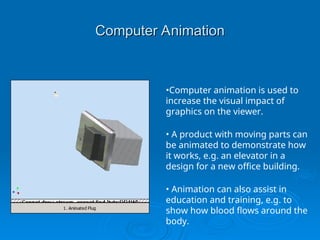
•Computer animation is used to
increase the visual impact of
graphics on the viewer.
• A product with moving parts can
be animated to demonstrate how
it works, e.g. an elevator in a
design for a new office building.
• Animation can also assist in
education and training, e.g. to
show how blood flows around the
body.
Computer Simulation
Computer Simulation
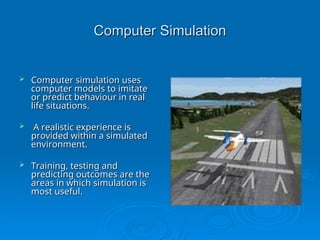
 Computer simulation uses
Computer simulation uses
computer models to imitate
or predict behaviour in real
life situations.
life situations.
 A realistic experience is
A realistic experience is
provided within a simulated
environment.
environment.
 Training, testing and
Training, testing and
predicting outcomes are the
areas in which simulation is
most useful.
most useful.
Computer Simulation
Computer Simulation
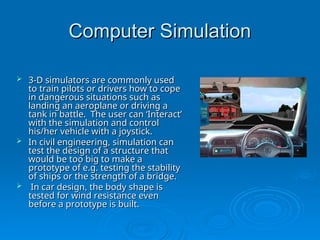
 3-D simulators are commonly used
3-D simulators are commonly used
to train pilots or drivers how to cope
in dangerous situations such as
landing an aeroplane or driving a
tank in battle. The user can ‘Interact’
with the simulation and control
his/her vehicle with a joystick.
 In civil engineering, simulation can
In civil engineering, simulation can
test the design of a structure that
would be too big to make a
prototype of e.g. testing the stability
of ships or the strength of a bridge.
 In car design, the body shape is
In car design, the body shape is
tested for wind resistance even
before a prototype is built.
Computer Simulation
Computer Simulation
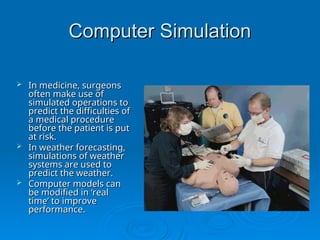
 In medicine, surgeons
In medicine, surgeons
often make use of
often make use of
simulated operations to
predict the difficulties of
a medical procedure
a medical procedure
before the patient is put
at risk.
at risk.
 In weather forecasting,
In weather forecasting,
simulations of weather
systems are used to
systems are used to
predict the weather.
 Computer models can
Computer models can
be modified in ‘real
time’ to improve
time’ to improve
performance.
performance.

3d_modelling (2).ppt design ppt fashion

  • 1.
    Computer-Aided Drawing (CAD) Computer-AidedDrawing (CAD) Graphic Communication Graphic Communication Knowledge & Interpretation Knowledge & Interpretation
  • 2.
    CAD Drawing Classifications CADDrawing Classifications The following terms describe the common The following terms describe the common types of computer-aided drawings: types of computer-aided drawings:  2-D 2-D - orthographic projection in which each view - orthographic projection in which each view shows only two dimension shows only two dimension  2 1/2-D 2 1/2-D - isometric, planometric, oblique and - isometric, planometric, oblique and perspective views which show all three perspective views which show all three dimensions (length, breadth and height) on a dimensions (length, breadth and height) on a pictorial drawing pictorial drawing  3-D 3-D - a 3-D computer model is a ‘virtual object’ - a 3-D computer model is a ‘virtual object’ which can be rotated on screen to be viewed from which can be rotated on screen to be viewed from any angle. any angle.
  • 3.
    General Features of2-D CAD package (e.g. AutoCAD) General Features of 2-D CAD package (e.g. AutoCAD)  Uses xy co-ordination system Uses xy co-ordination system  can create 2-D orthographic can create 2-D orthographic projections and 2 1/2-D (isometric, projections and 2 1/2-D (isometric, planometric, oblique and planometric, oblique and perspective) drawings perspective) drawings  incorporates layer system of incorporates layer system of constructing drawings constructing drawings Computer-aided drawing (CAD) was developed so that architects and design Computer-aided drawing (CAD) was developed so that architects and design engineers, who previously produced drawings on paper, could produce the same engineers, who previously produced drawings on paper, could produce the same types of drawing on computers. types of drawing on computers. There are enormous benefits in using a CAD system instead of a drawing system. There are enormous benefits in using a CAD system instead of a drawing system.
  • 4.
    General Features of3-D CAD/Modelling Package General Features of 3-D CAD/Modelling Package (e.g. AutoCAD Inventor) (e.g. AutoCAD Inventor)  Uses xyz co-ordinate system Uses xyz co-ordinate system  automatically generates orthographic views from 3-D model automatically generates orthographic views from 3-D model  rendering features can create tonal effects and surface textures rendering features can create tonal effects and surface textures  models can be rotated and viewed from any angle. models can be rotated and viewed from any angle.
  • 5.
    3-D CAD Modelling 3-DCAD Modelling The development of 3-D modelling software enables architects and The development of 3-D modelling software enables architects and designers to create 3-D models of their designs. Previously, 3-D designers to create 3-D models of their designs. Previously, 3-D models had to be ‘built’ from materials such as card, clay and models had to be ‘built’ from materials such as card, clay and polystyrene blocks. polystyrene blocks. Advantages of 3-D computer modelling over traditional Advantages of 3-D computer modelling over traditional ‘built’ models: ‘built’ models:  can be produced much more quickly can be produced much more quickly  can be modified very quickly can be modified very quickly  enable the designer to try colours and surface textures enable the designer to try colours and surface textures  can be used to test structural designs before they are built, e.g. can be used to test structural designs before they are built, e.g. bridges and buildings bridges and buildings  can be realistically rendered can be realistically rendered  take up less storage space than ‘built’ models take up less storage space than ‘built’ models  can be used to create realistic simulations and games. can be used to create realistic simulations and games.
  • 6.
    3-D Modelling 3-D Modelling Thereare three types of 3-D models: There are three types of 3-D models:  wireframe model wireframe model - is built up using - is built up using a series of connected lines. This a series of connected lines. This image can be simplified by removing image can be simplified by removing lines that are hidden. lines that are hidden.  surface model - surface model - is built up by is built up by drawing the surfaces of an object. drawing the surfaces of an object. Colours, shading and textures can be Colours, shading and textures can be added to produce realistic-looking added to produce realistic-looking images. images.  solid model solid model - is built up using simple - is built up using simple geometric forms such as cones, geometric forms such as cones, cylinders, prisms and cuboids. These cylinders, prisms and cuboids. These can be added or subtracted to can be added or subtracted to produce complex 3-D models produce complex 3-D models
  • 7.
    CAG – Animation& Simulation CAG – Animation & Simulation Knowledge & Interpretation Knowledge & Interpretation Graphic Communication Graphic Communication
  • 8.
    Animation & Simulation Animation& Simulation The development of computers has significantly The development of computers has significantly changed the ways in which graphics are changed the ways in which graphics are produced. Recent advances in computer produced. Recent advances in computer technology enable designers to create complex technology enable designers to create complex and realistic graphic images quickly and easily. and realistic graphic images quickly and easily. Two examples of advanced computer graphics Two examples of advanced computer graphics are animation and simulation. are animation and simulation.
  • 9.
    Computer Animation Computer Animation Animation (moving images) Animation (moving images) was traditionally created by was traditionally created by drawing thousands of ‘still’ drawing thousands of ‘still’ graphics by hand. Each one graphics by hand. Each one progressed the movement a progressed the movement a little bit further. It was a very little bit further. It was a very slow and labour intensive slow and labour intensive process. process.  Modern animation software Modern animation software creates on-screen movement creates on-screen movement by moving graphic images by moving graphic images along plotted paths. It is along plotted paths. It is quick, smooth and realistic. quick, smooth and realistic.
  • 10.
    Computer Animation Computer Animation •Computeranimation is used to increase the visual impact of graphics on the viewer. • A product with moving parts can be animated to demonstrate how it works, e.g. an elevator in a design for a new office building. • Animation can also assist in education and training, e.g. to show how blood flows around the body.
  • 11.
    Computer Simulation Computer Simulation Computer simulation uses Computer simulation uses computer models to imitate computer models to imitate or predict behaviour in real or predict behaviour in real life situations. life situations.  A realistic experience is A realistic experience is provided within a simulated provided within a simulated environment. environment.  Training, testing and Training, testing and predicting outcomes are the predicting outcomes are the areas in which simulation is areas in which simulation is most useful. most useful.
  • 12.
    Computer Simulation Computer Simulation 3-D simulators are commonly used 3-D simulators are commonly used to train pilots or drivers how to cope to train pilots or drivers how to cope in dangerous situations such as in dangerous situations such as landing an aeroplane or driving a landing an aeroplane or driving a tank in battle. The user can ‘Interact’ tank in battle. The user can ‘Interact’ with the simulation and control with the simulation and control his/her vehicle with a joystick. his/her vehicle with a joystick.  In civil engineering, simulation can In civil engineering, simulation can test the design of a structure that test the design of a structure that would be too big to make a would be too big to make a prototype of e.g. testing the stability prototype of e.g. testing the stability of ships or the strength of a bridge. of ships or the strength of a bridge.  In car design, the body shape is In car design, the body shape is tested for wind resistance even tested for wind resistance even before a prototype is built. before a prototype is built.
  • 13.
    Computer Simulation Computer Simulation In medicine, surgeons In medicine, surgeons often make use of often make use of simulated operations to simulated operations to predict the difficulties of predict the difficulties of a medical procedure a medical procedure before the patient is put before the patient is put at risk. at risk.  In weather forecasting, In weather forecasting, simulations of weather simulations of weather systems are used to systems are used to predict the weather. predict the weather.  Computer models can Computer models can be modified in ‘real be modified in ‘real time’ to improve time’ to improve performance. performance.