Overview
ERP Batch Management Capabilities
Jürgen Wettengl, Solution Management, Manufacturing, SAP AG
September 2009
© SAP 2009 / ERP Batch Management Overview 2009 – Juergen Wettengl Page 2
Agenda
Definition – What is a batch ?
Batch Level / Batch Number Assignment
Creating Batch Master and
Batch Specifications
Batch Status Management
Batch Determination
Batch Where Used List
Batch Work List
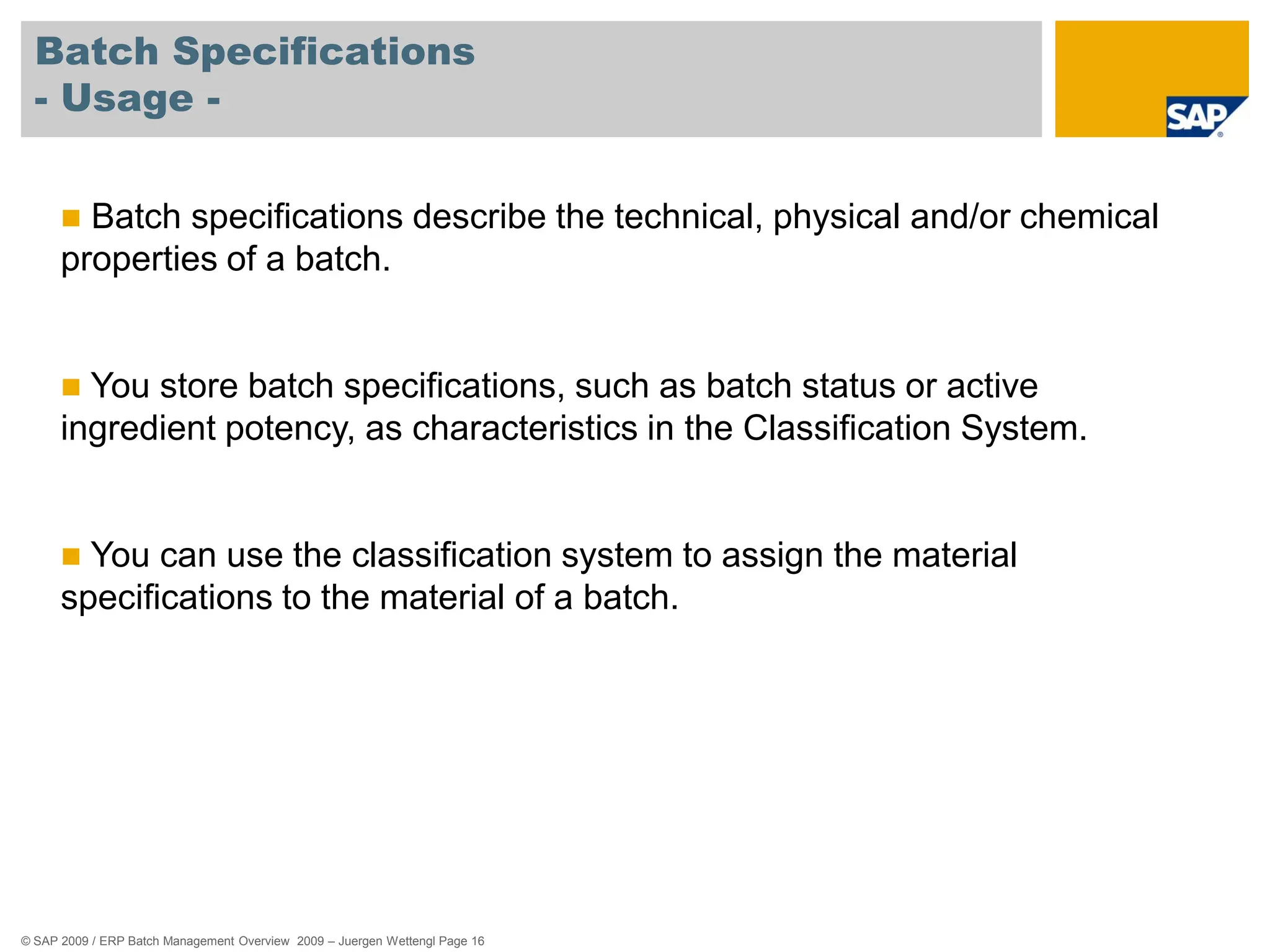
85%
alcohol
© SAP 2009 / ERP Batch Management Overview 2009 – Juergen Wettengl Page 3
Agenda
85%
alcohol
Batch Specific Unit of Measure
Shelf Life Expiration Date
Batch Information Cockpit
Batch Derivation
Traceability with Documentary Batches
Batch History
Work in Process Batches
© SAP 2009 / ERP Batch Management Overview 2009 – Juergen Wettengl Page 4
Definition – What is a batch ?
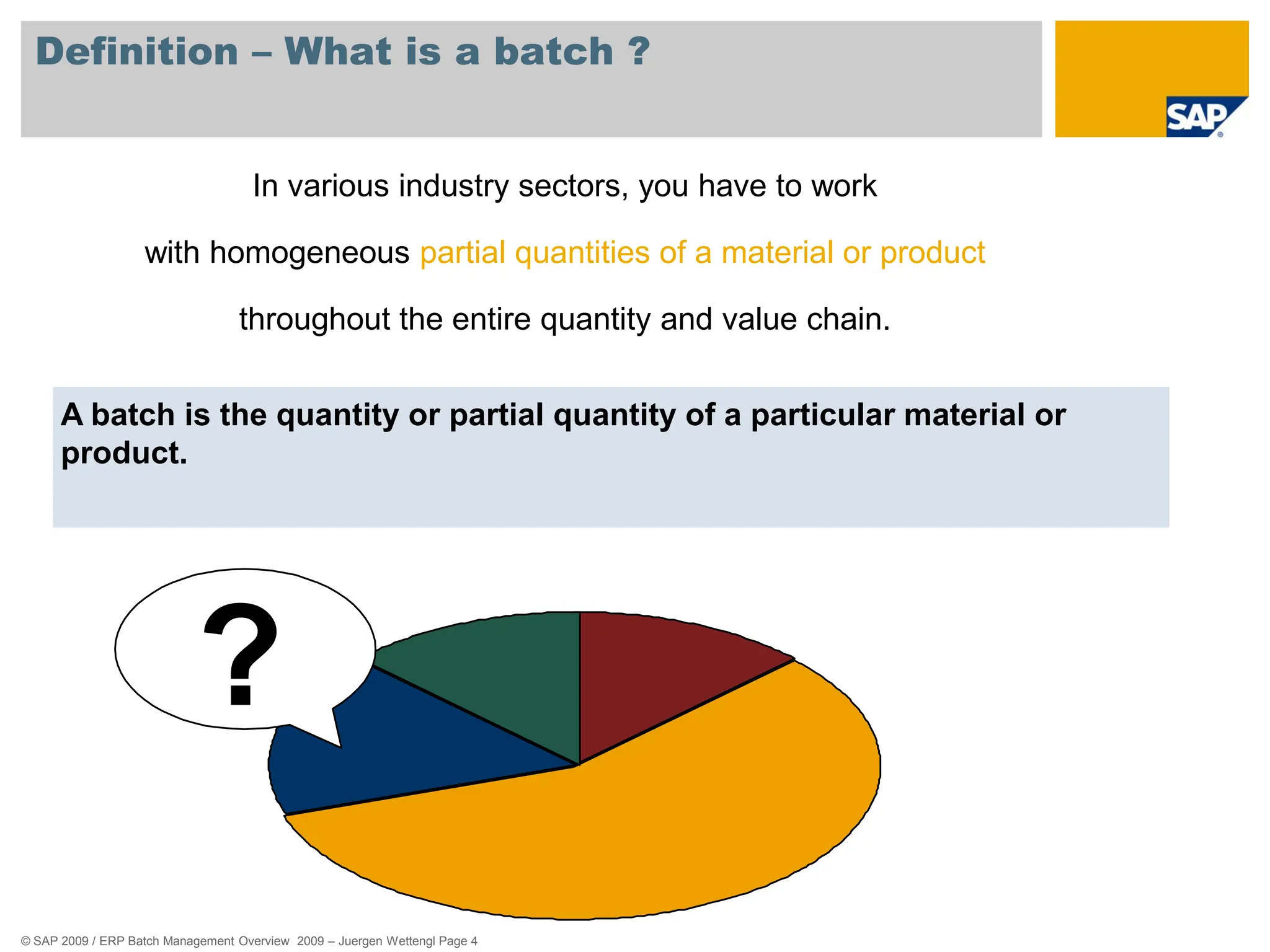
A batch is the quantity or partial quantity of a particular material or
product.
In various industry sectors, you have to work
with homogeneous partial quantities of a material or product
throughout the entire quantity and value chain.
?
© SAP 2009 / ERP Batch Management Overview 2009 – Juergen Wettengl Page 5
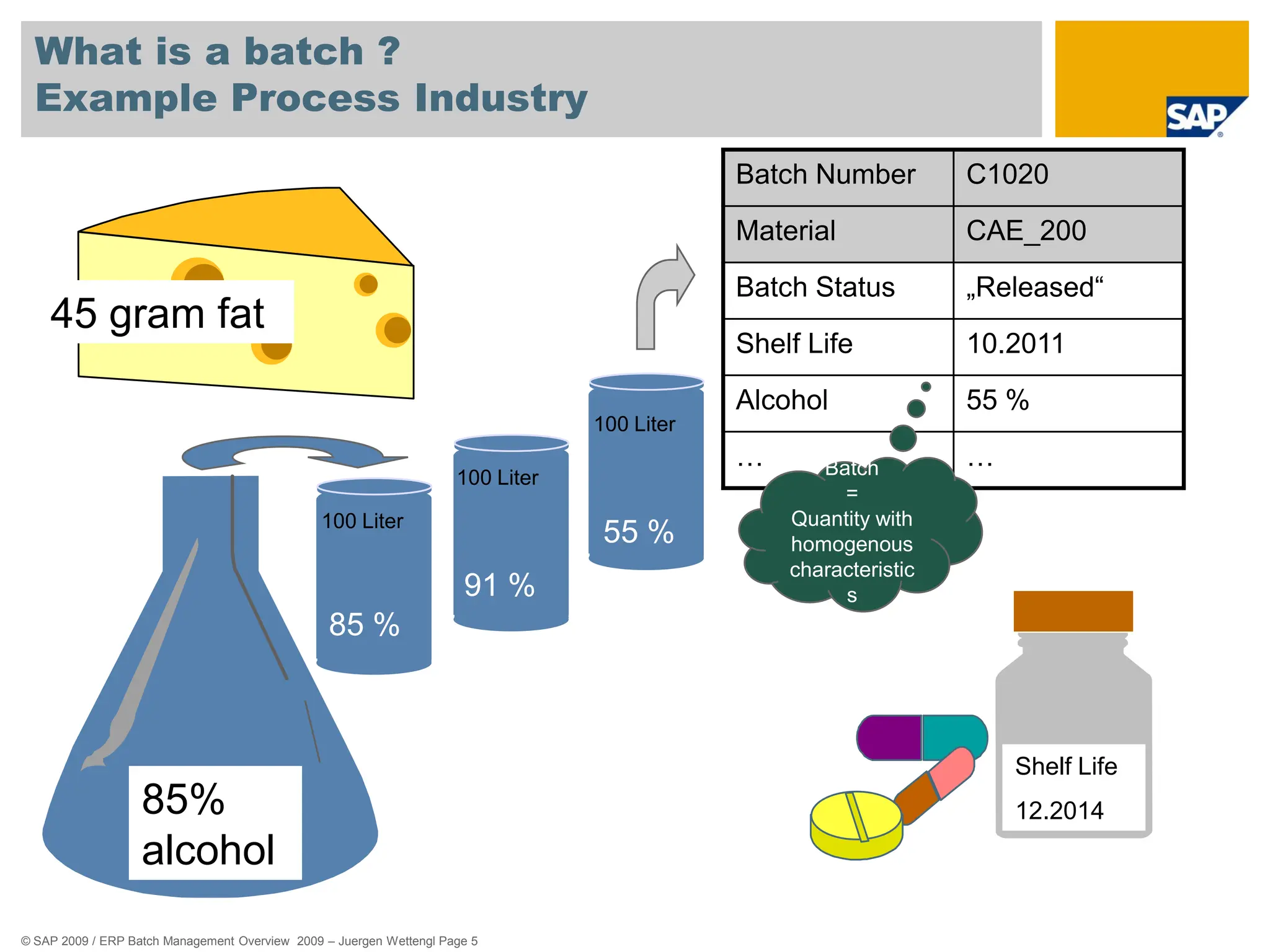
What is a batch ?
Example Process Industry
Physical
Quantity
500 Liter
Füllmenge:
500l
90%
85%
alcohol
45 gram fat
85 %
91 %
55 %
Shelf Life
12.2014
Batch Number C1020
Material CAE_200
Batch Status „Released“
Shelf Life 10.2011
Alcohol 55 %
… …
100 Liter
100 Liter
100 Liter
Batch
=
Quantity with
homogenous
characteristic
s
© SAP 2009 / ERP Batch Management Overview 2009 – Juergen Wettengl Page 6
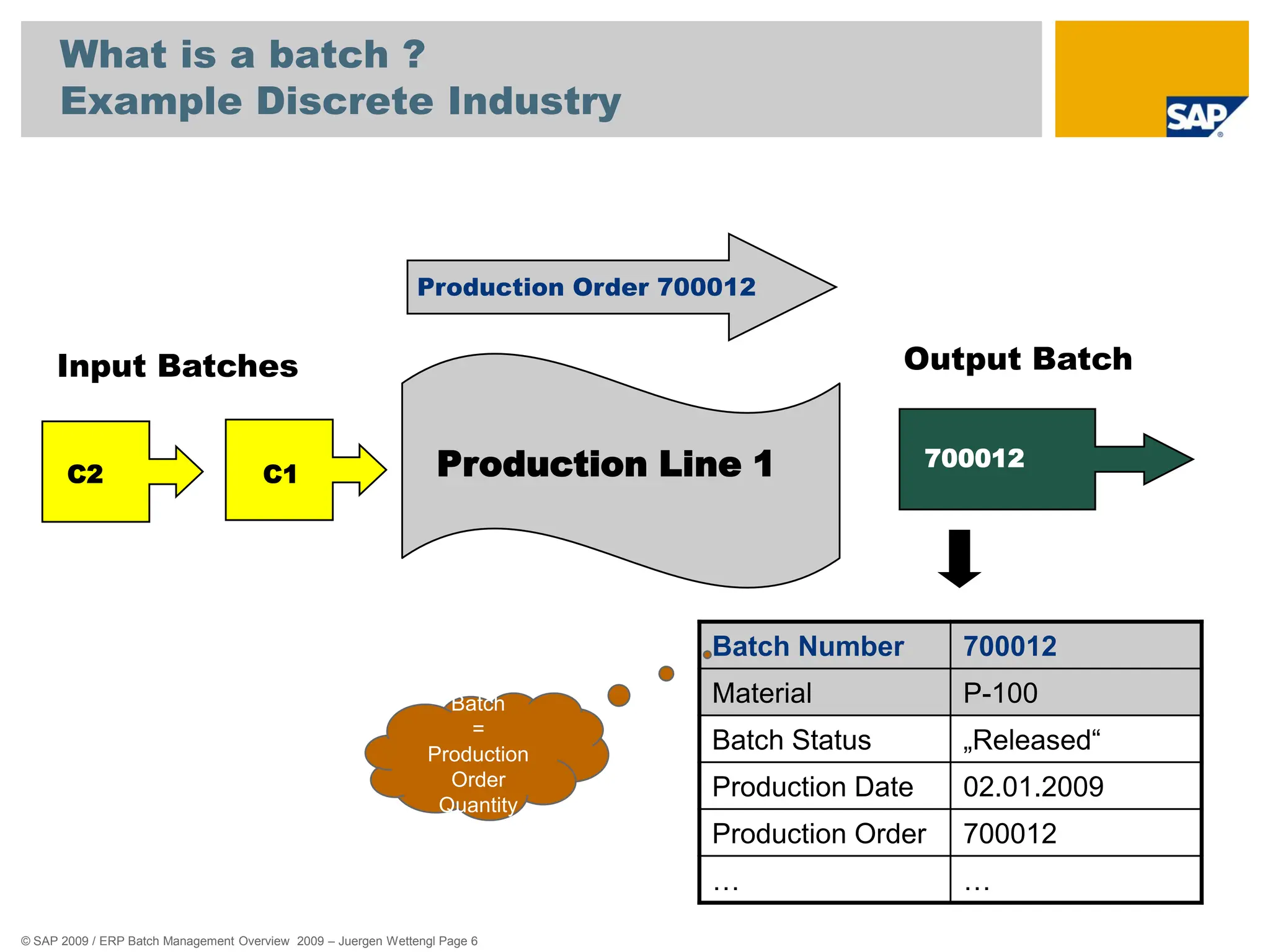
What is a batch ?
Example Discrete Industry
Production Line 1
C1
C2
Input Batches Output Batch
700012
Production Order 700012
Batch Number 700012
Material P-100
Batch Status „Released“
Production Date 02.01.2009
Production Order 700012
… …
Batch
=
Production
Order
Quantity
© SAP 2009 / ERP Batch Management Overview 2009 – Juergen Wettengl Page 7
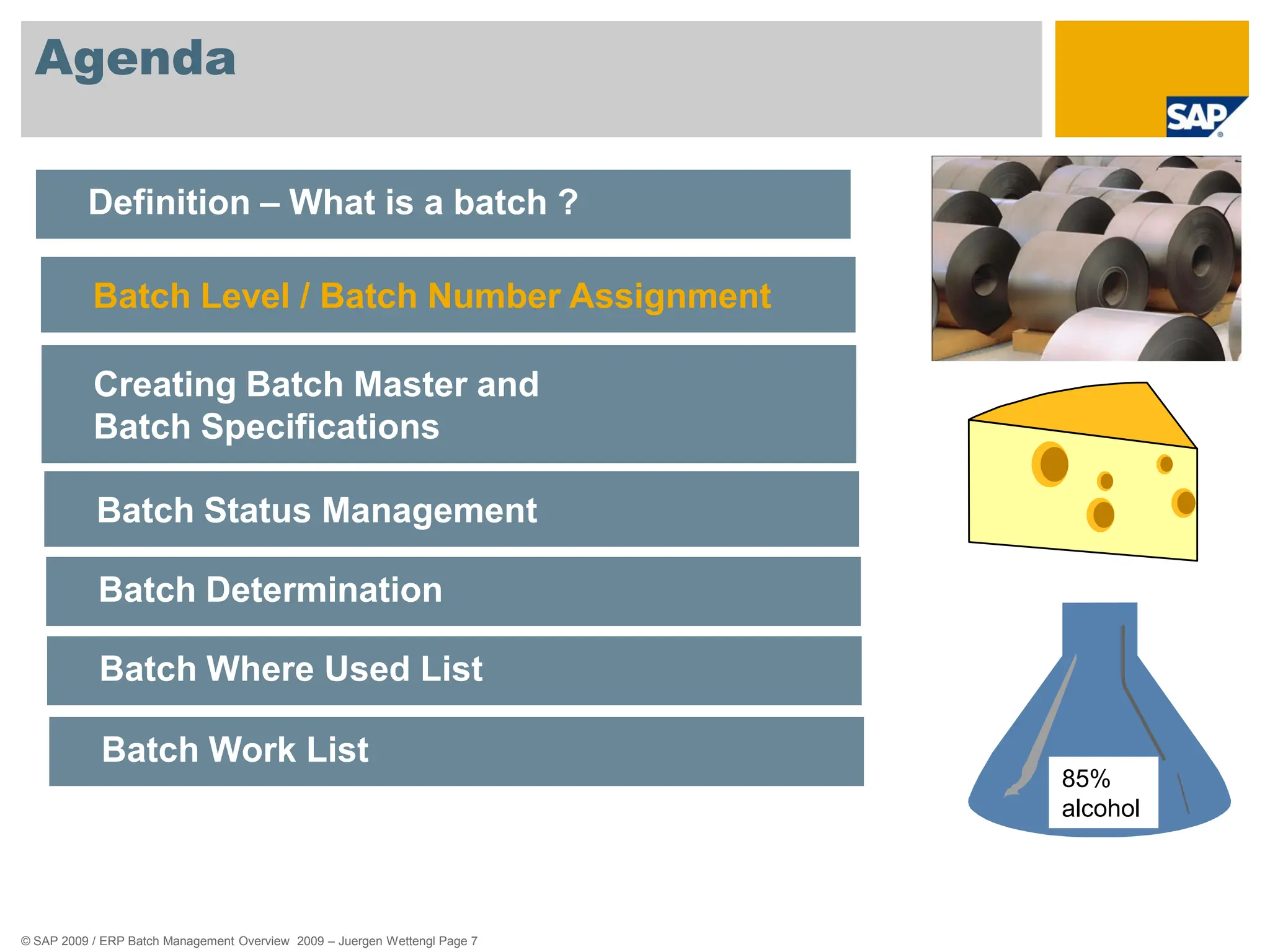
Agenda
Definition – What is a batch ?
Batch Level / Batch Number Assignment
Creating Batch Master and
Batch Specifications
Batch Status Management
Batch Determination
Batch Where Used List
Batch Work List
85%
alcohol
© SAP 2009 / ERP Batch Management Overview 2009 – Juergen Wettengl Page 8
Batch Level
- Usage -
 You can manage batches in different plants for many materials.
 For this reason, batches must be uniquely identifiable.
 You use the batch level to specify whether the batch number for a
material is unique in one plant, or in all plants.
© SAP 2009 / ERP Batch Management Overview 2009 – Juergen Wettengl Page 9
Batch Level
- Example -
 Plant Level:
The batch number is unique in connection with the plant and material.
 Material Level:
The batch number is unique in all plants in connection with the material.
 Client Level:
The batch number is unique in the whole client.
© SAP 2009 / ERP Batch Management Overview 2009 – Juergen Wettengl Page 10
Batch Number Assignment
- Usage -
 You use this function to assign a unique key to a batch.
 This batch number together with the material number and optionally
the plant identifies a batch in the SAP System.
 The Batch Level you choose determines the area in which the batch
number is unique.
© SAP 2009 / ERP Batch Management Overview 2009 – Juergen Wettengl Page 11
Batch Number Assignment
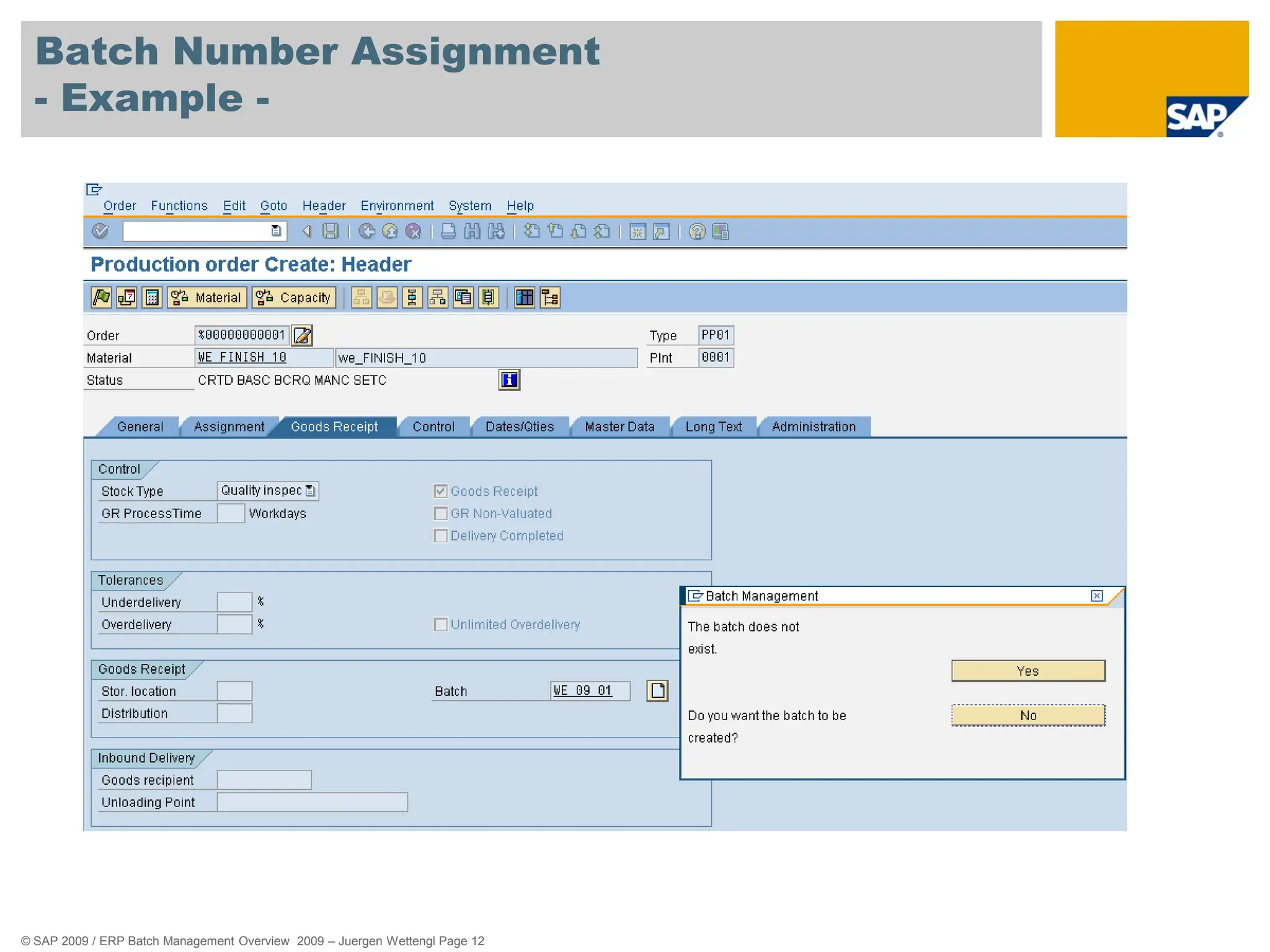
- Example -
You can assign the batch number manually or automatically as
different times, for example:
 During manual creation of a batch
 When carrying out goods movements, for example, goods receipt or
transfer posting
 During creation of a process or production order
 When a usage decision is made in quality management
 During quality analysis (due to aging, for example)
 When creating a purchase order
© SAP 2009 / ERP Batch Management Overview 2009 – Juergen Wettengl Page 12
Batch Number Assignment
- Example -
© SAP 2009 / ERP Batch Management Overview 2009 – Juergen Wettengl Page 13
Agenda
Definition – What is a batch ?
Batch Level / Batch Number Assignment
Creating Batch Master and
Batch Specifications
Batch Status Management
Batch Determination
Batch Where Used List
Batch Work List
85%
alcohol
© SAP 2009 / ERP Batch Management Overview 2009 – Juergen Wettengl Page 14
Creating Batch Master
- Usage -
 You use this function to enter batch data into a separate master
record.
 You can only create batches and batch master records for a material if
the material is to be handled in batches.
 To do this, you must set the Batch management indicator in the
material master record.
 You can create the batch master manaually or automatically.
© SAP 2009 / ERP Batch Management Overview 2009 – Juergen Wettengl Page 15
Creating Batch Master
- Example -
The system creates a batch master record in the background
automatically in the following procedures:
 The first time goods are received for a batch
 During creation of a process or production order
 When a usage decision is made in quality management
 During a recurring inspection
 For transfer postings (when you want to split a batch, for example)
 When creating a purchase order
© SAP 2009 / ERP Batch Management Overview 2009 – Juergen Wettengl Page 16
Batch Specifications
- Usage -
 Batch specifications describe the technical, physical and/or chemical
properties of a batch.
 You store batch specifications, such as batch status or active
ingredient potency, as characteristics in the Classification System.
 You can use the classification system to assign the material
specifications to the material of a batch.
© SAP 2009 / ERP Batch Management Overview 2009 – Juergen Wettengl Page 17
Batch Specifications
- Example -
Batches of car paint are specified by color value, viscosity and expiration
date.
You store the characteristics color value, viscosity and expiration date for
these properties in the classification system
and
assign the respective values to each individual batch.
© SAP 2009 / ERP Batch Management Overview 2009 – Juergen Wettengl Page 18
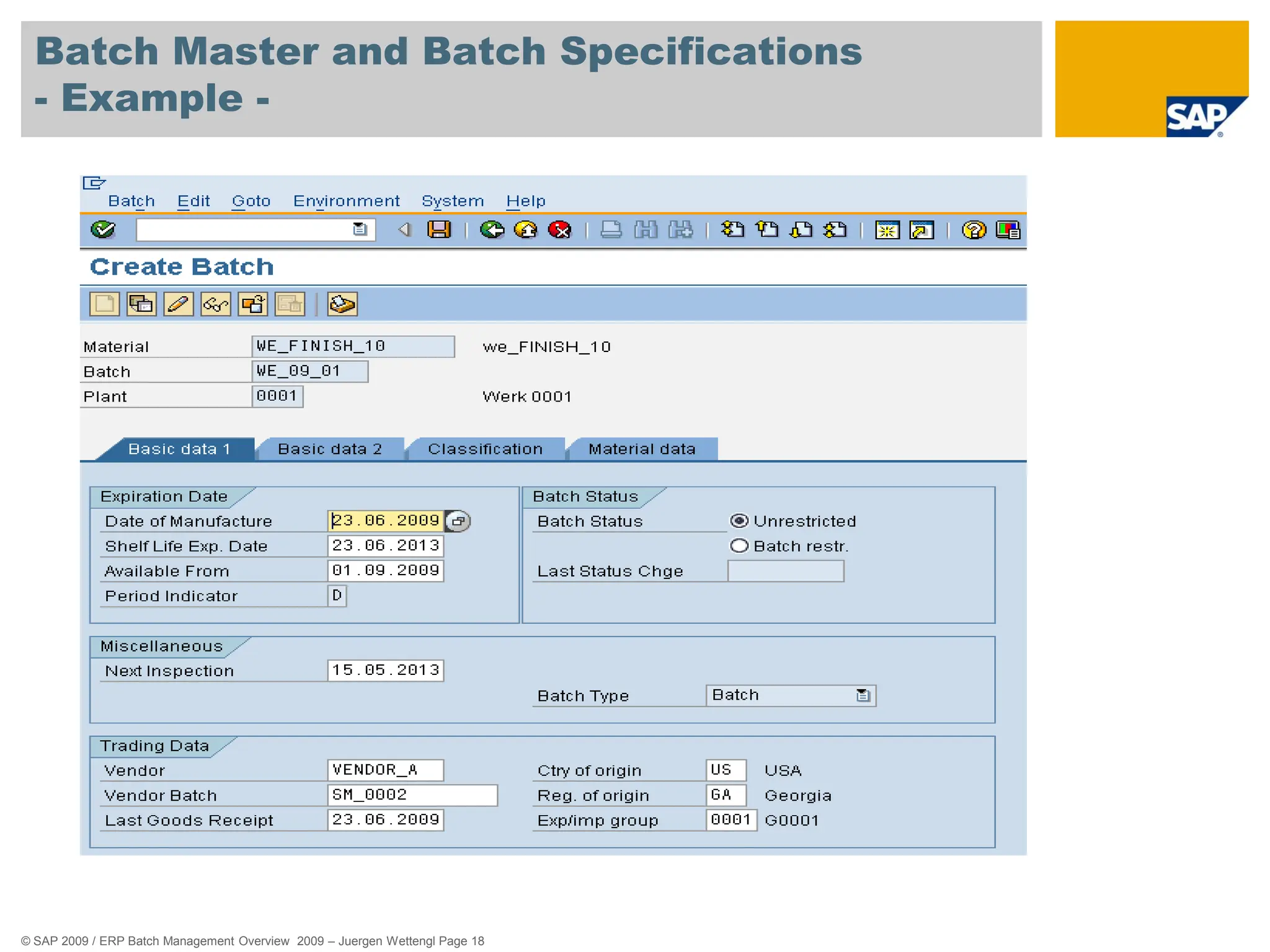
Batch Master and Batch Specifications
- Example -
© SAP 2009 / ERP Batch Management Overview 2009 – Juergen Wettengl Page 19
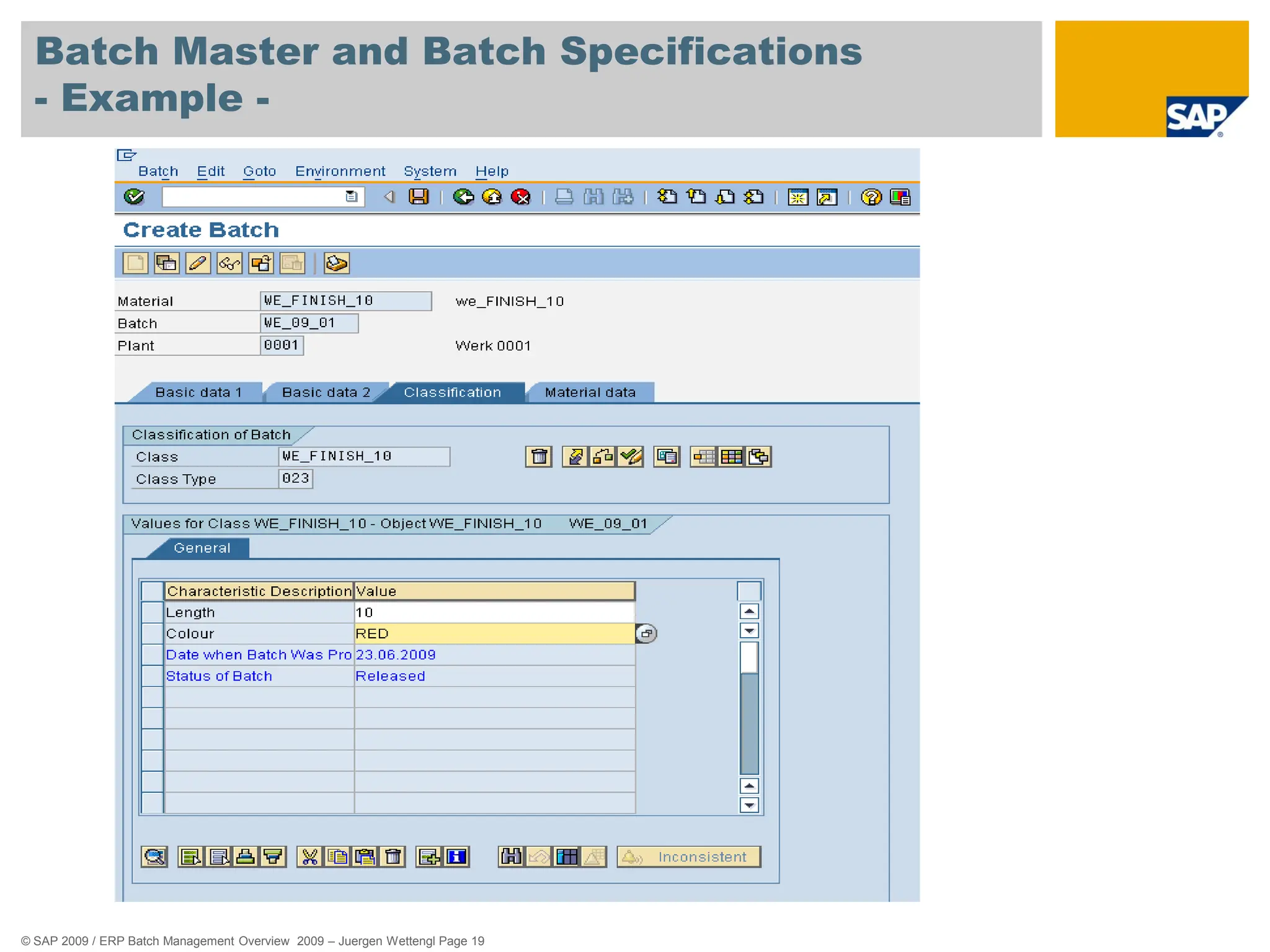
Batch Master and Batch Specifications
- Example -
© SAP 2009 / ERP Batch Management Overview 2009 – Juergen Wettengl Page 20
Agenda
Definition – What is a batch ?
Batch Level / Batch Number Assignment
Creating Batch Master and
Batch Specifications
Batch Status Management
Batch Determination
Batch Where Used List
Batch Work List
85%
alcohol
© SAP 2009 / ERP Batch Management Overview 2009 – Juergen Wettengl Page 21
Batch Status Management
- Usage -
 You use this component to indicate whether a batch is usable or not.
 This allows you to prevent goods movements for batches that are not
usable, as well as their delivery to customers and their use in
Production.
 You can use other characteristics that you have adapted to meet
your requirements to display in detail the differences between the two
statuses.
You can thereby specify for what type of usage a batch is released or
for what type it has not been released.
© SAP 2009 / ERP Batch Management Overview 2009 – Juergen Wettengl Page 22
Batch Status Management
- Example -
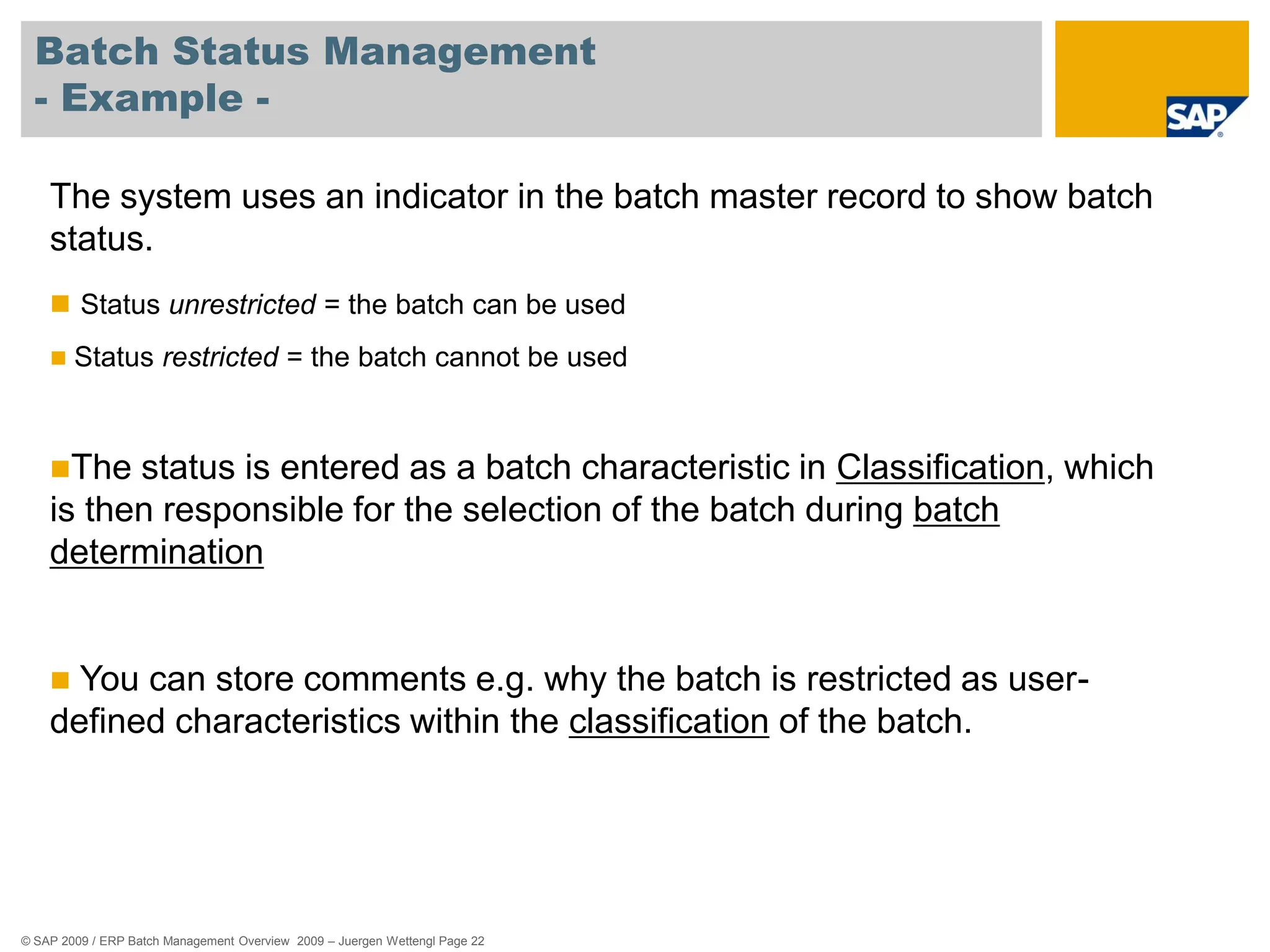
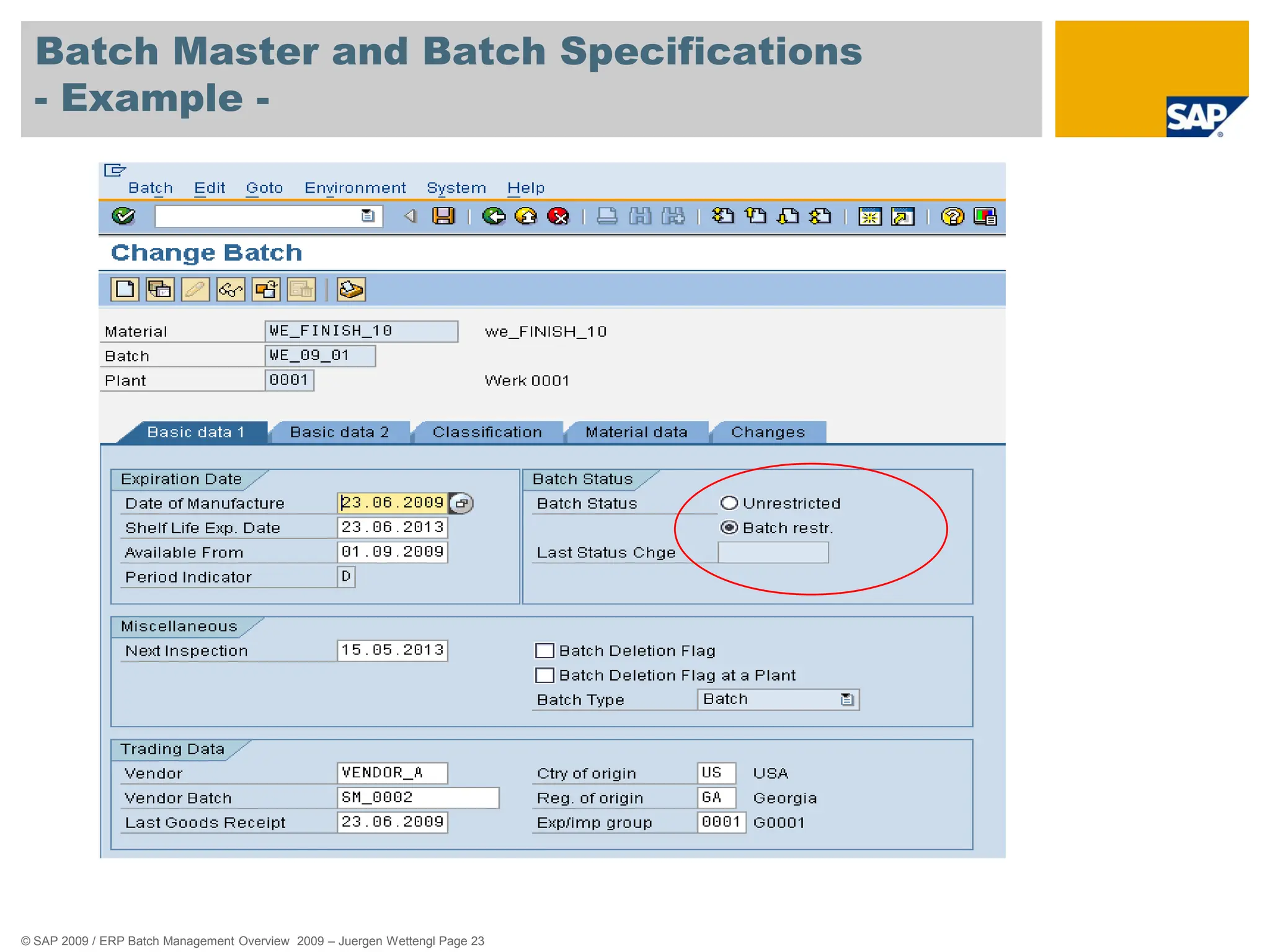
The system uses an indicator in the batch master record to show batch
status.
 Status unrestricted = the batch can be used
 Status restricted = the batch cannot be used
The status is entered as a batch characteristic in Classification, which
is then responsible for the selection of the batch during batch
determination
 You can store comments e.g. why the batch is restricted as user-
defined characteristics within the classification of the batch.
© SAP 2009 / ERP Batch Management Overview 2009 – Juergen Wettengl Page 23
Batch Master and Batch Specifications
- Example -
© SAP 2009 / ERP Batch Management Overview 2009 – Juergen Wettengl Page 24
Agenda
Definition – What is a batch ?
Batch Level / Batch Number Assignment
Creating Batch Master and
Batch Specifications
Batch Status Management
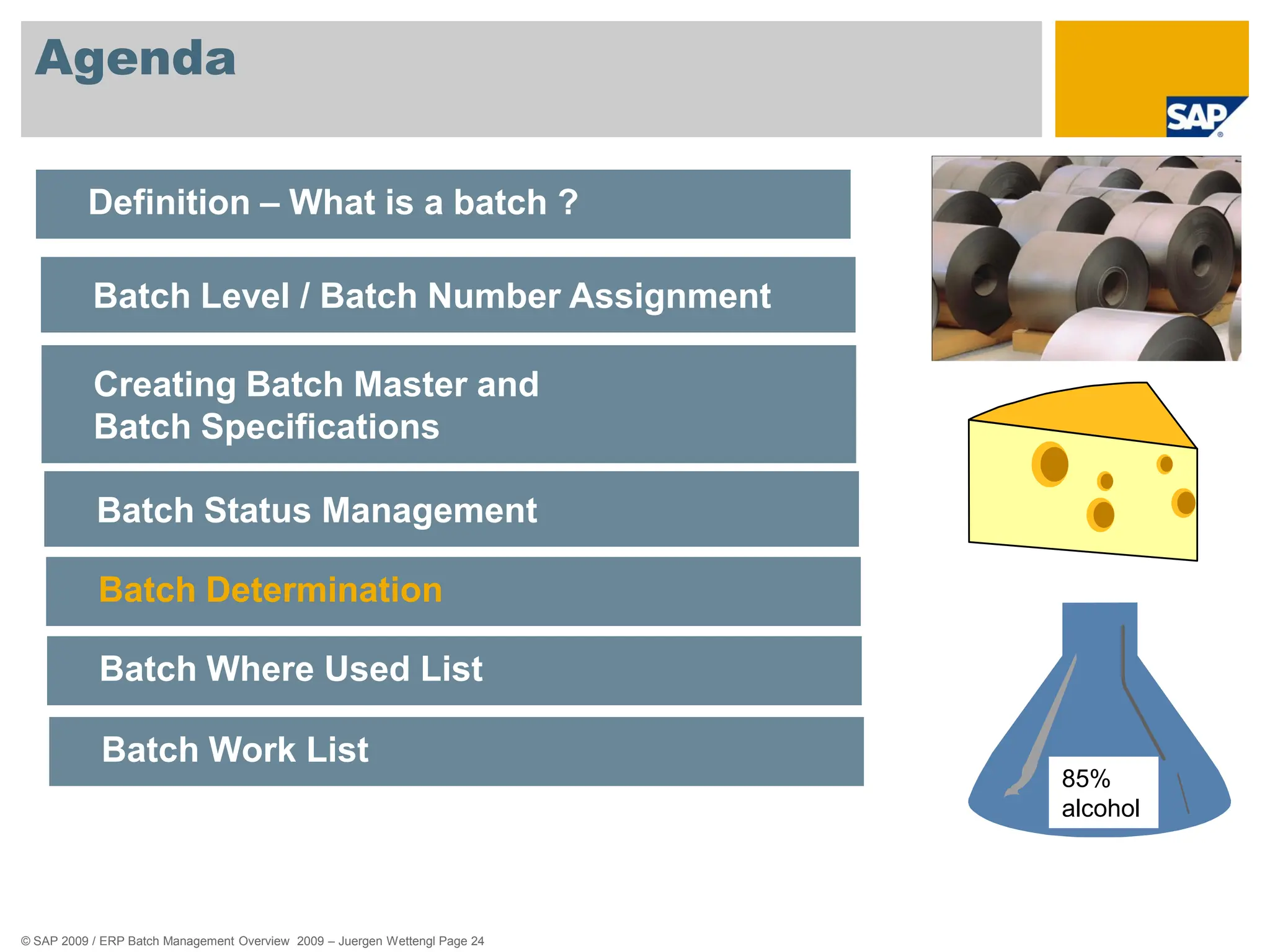
Batch Determination
Batch Where Used List
Batch Work List
85%
alcohol
© SAP 2009 / ERP Batch Management Overview 2009 – Juergen Wettengl Page 25
Batch Determination
- Usage -
 In the logistics process, that is from procurement to sales, you are
required to specify batches for individual business transactions.
 This allows you to prevent goods movements for batches that are not
usable, as well as their delivery to customers and their use in
Production.
 You can use batch characteristics that you have adapted to meet the
requirements to display in detail.
© SAP 2009 / ERP Batch Management Overview 2009 – Juergen Wettengl Page 26
Batch Determination
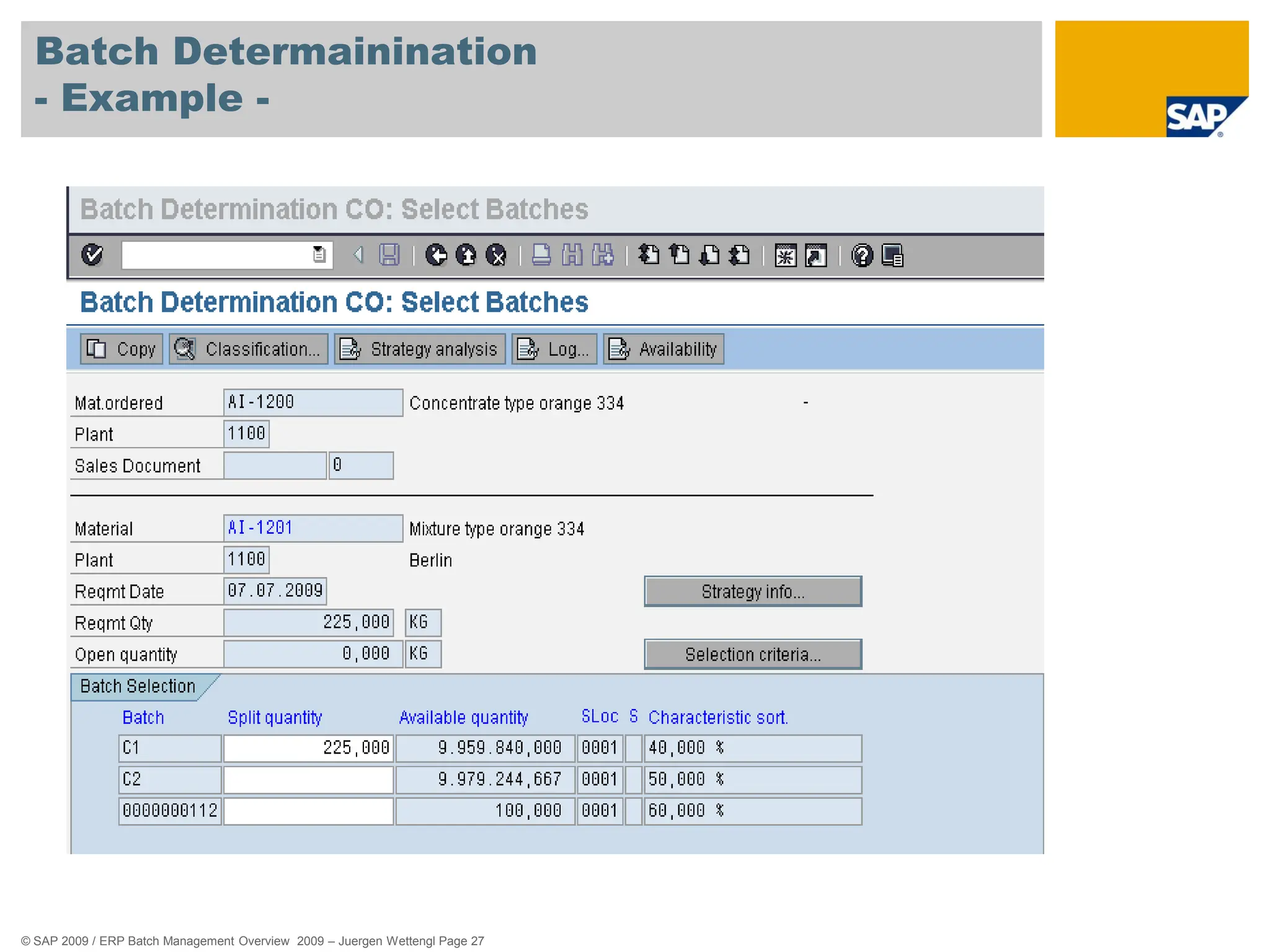
- Example -
 In Inventory Management (IM), you can use batch determination in goods
movements when you are dealing with a goods issue posting (for instance, a
consumption posting to a cost center), with a stock transfer or with a transfer posting.
 In Production (PP/PP-PI) you can use batch determination in production and process
orders and run schedule headers to find suitable material components for the product to
be produced, and to pick these from stock.
 In Sales and Distribution (SD), it is possible to determine batches that match
customer specifications. Batch determination can be triggered at two points in the
process, either when the sales order is entered, or when the delivery is created.
 In the Warehouse Management System (WM), batch determination is used to
optimize warehousing, for example, in view of stock removal strategies and
replenishment from stores.
© SAP 2009 / ERP Batch Management Overview 2009 – Juergen Wettengl Page 27
Batch Determainination
- Example -
© SAP 2009 / ERP Batch Management Overview 2009 – Juergen Wettengl Page 28
Agenda
Definition – What is a batch ?
Batch Level / Batch Number Assignment
Creating Batch Master and
Batch Specifications
Batch Status Management
Batch Determination
Batch Where Used List
Batch Work List
85%
alcohol
© SAP 2009 / ERP Batch Management Overview 2009 – Juergen Wettengl Page 29
Batch Where Used List
- Usage -
 This component determines how a batch is created and used in
Production Planning PP through various stages of production and
displays the result in a list.
 You can use this to find out:
 In which other batches a batch was used.
 From which other batches a batch was created.
 This is important in the case of complaints and questions about
product safety if the composition of semi-finished and finished products
has to be documented across all production levels.
© SAP 2009 / ERP Batch Management Overview 2009 – Juergen Wettengl Page 30
Batch Where Used List
- Usage -
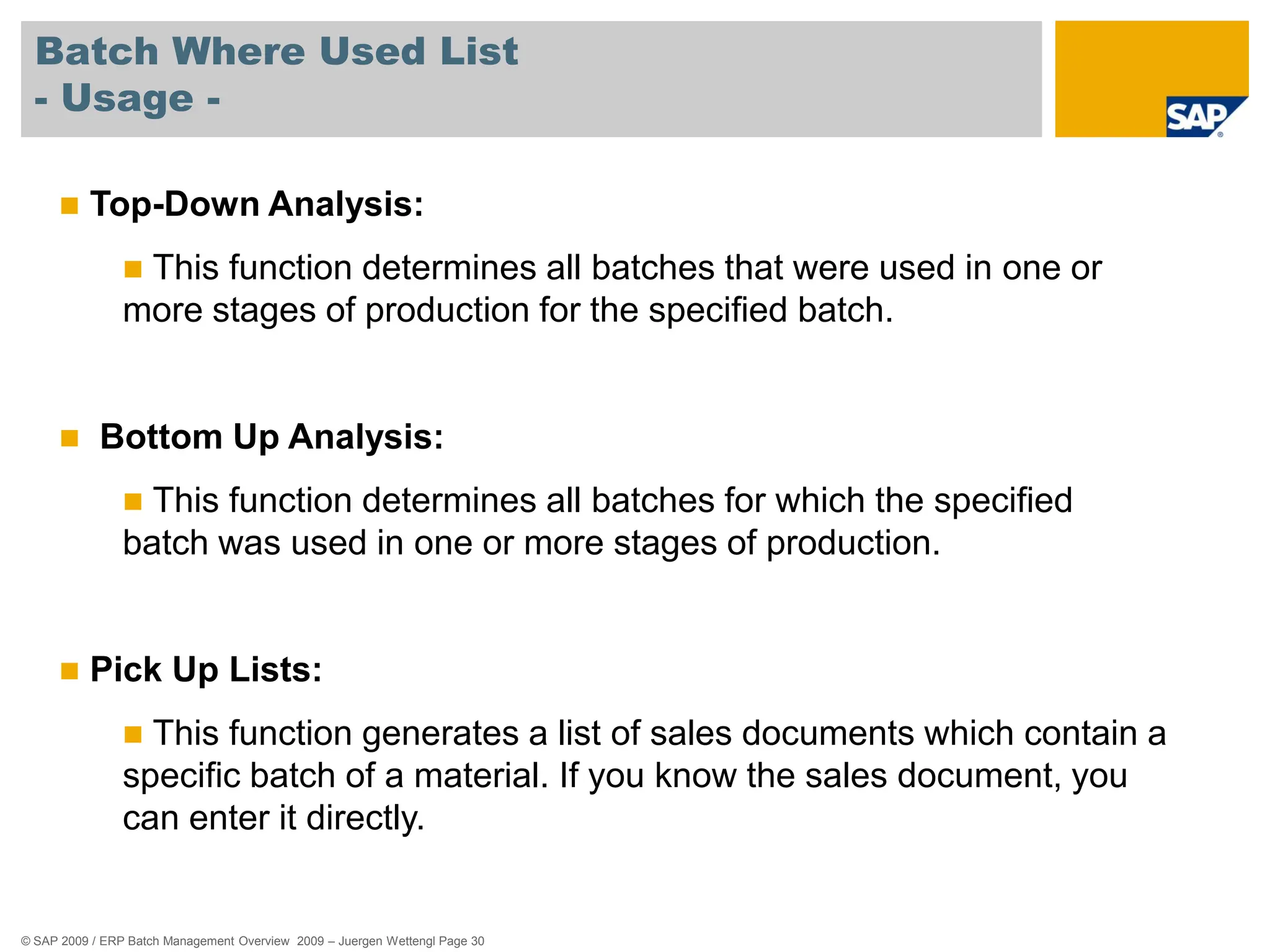
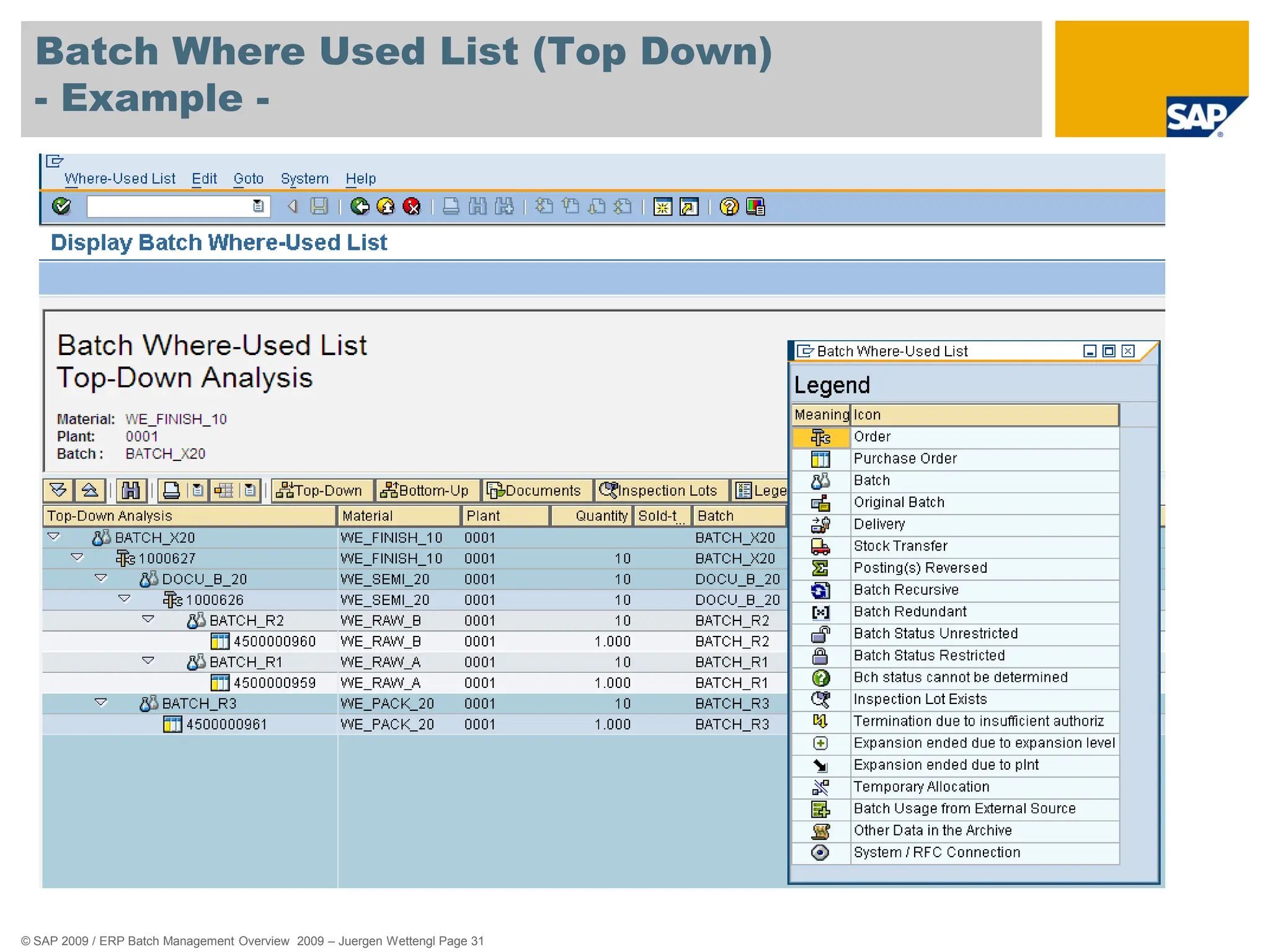
 Top-Down Analysis:
 This function determines all batches that were used in one or
more stages of production for the specified batch.
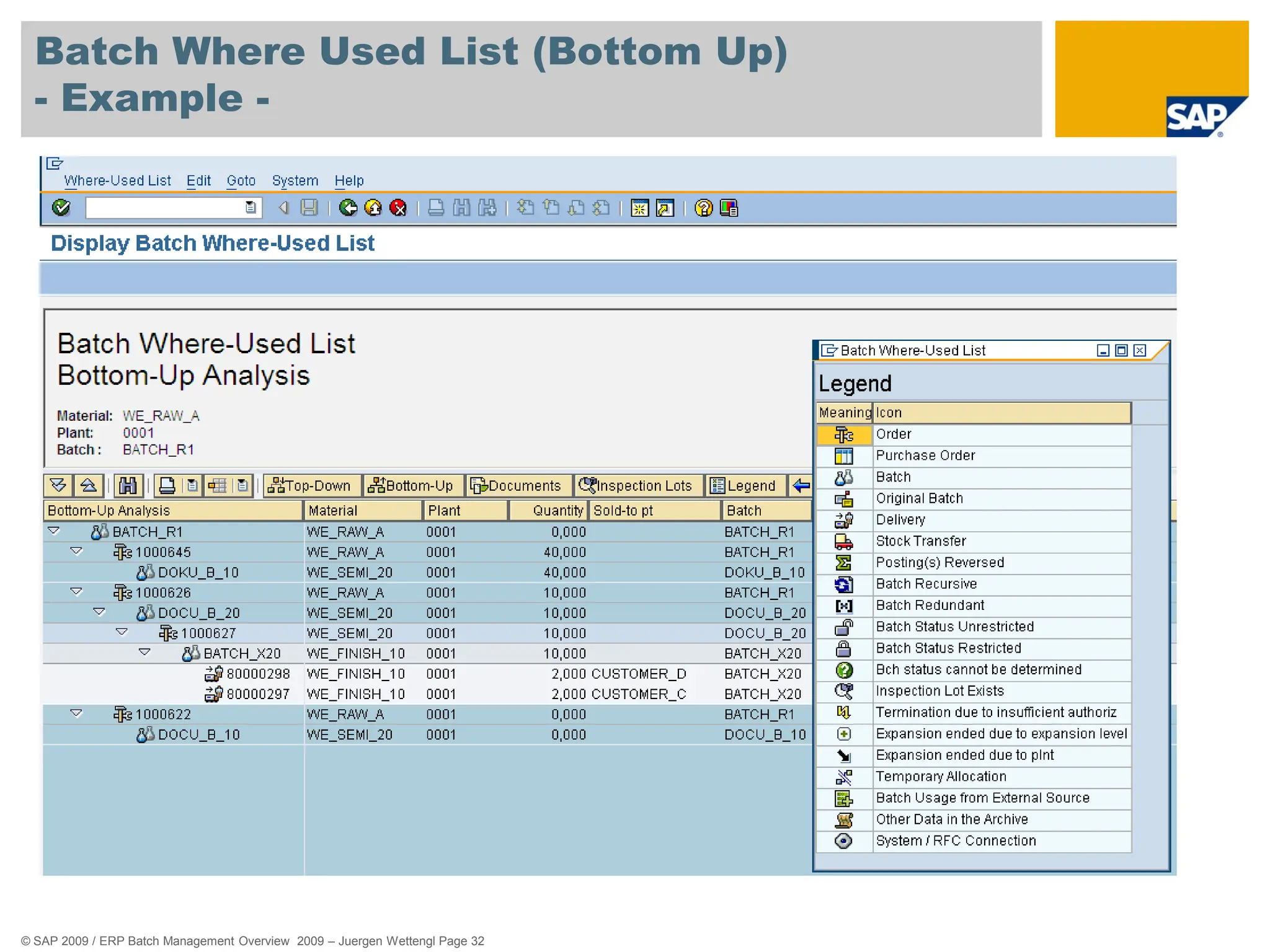
 Bottom Up Analysis:
 This function determines all batches for which the specified
batch was used in one or more stages of production.
 Pick Up Lists:
 This function generates a list of sales documents which contain a
specific batch of a material. If you know the sales document, you
can enter it directly.
© SAP 2009 / ERP Batch Management Overview 2009 – Juergen Wettengl Page 31
Batch Where Used List (Top Down)
- Example -
© SAP 2009 / ERP Batch Management Overview 2009 – Juergen Wettengl Page 32
Batch Where Used List (Bottom Up)
- Example -
© SAP 2009 / ERP Batch Management Overview 2009 – Juergen Wettengl Page 33
Agenda
Definition – What is a batch ?
Batch Level / Batch Number Assignment
Creating Batch Master and
Batch Specifications
Batch Status Management
Batch Determination
Batch Where Used List
Batch Work List
85%
alcohol
© SAP 2009 / ERP Batch Management Overview 2009 – Juergen Wettengl Page 34
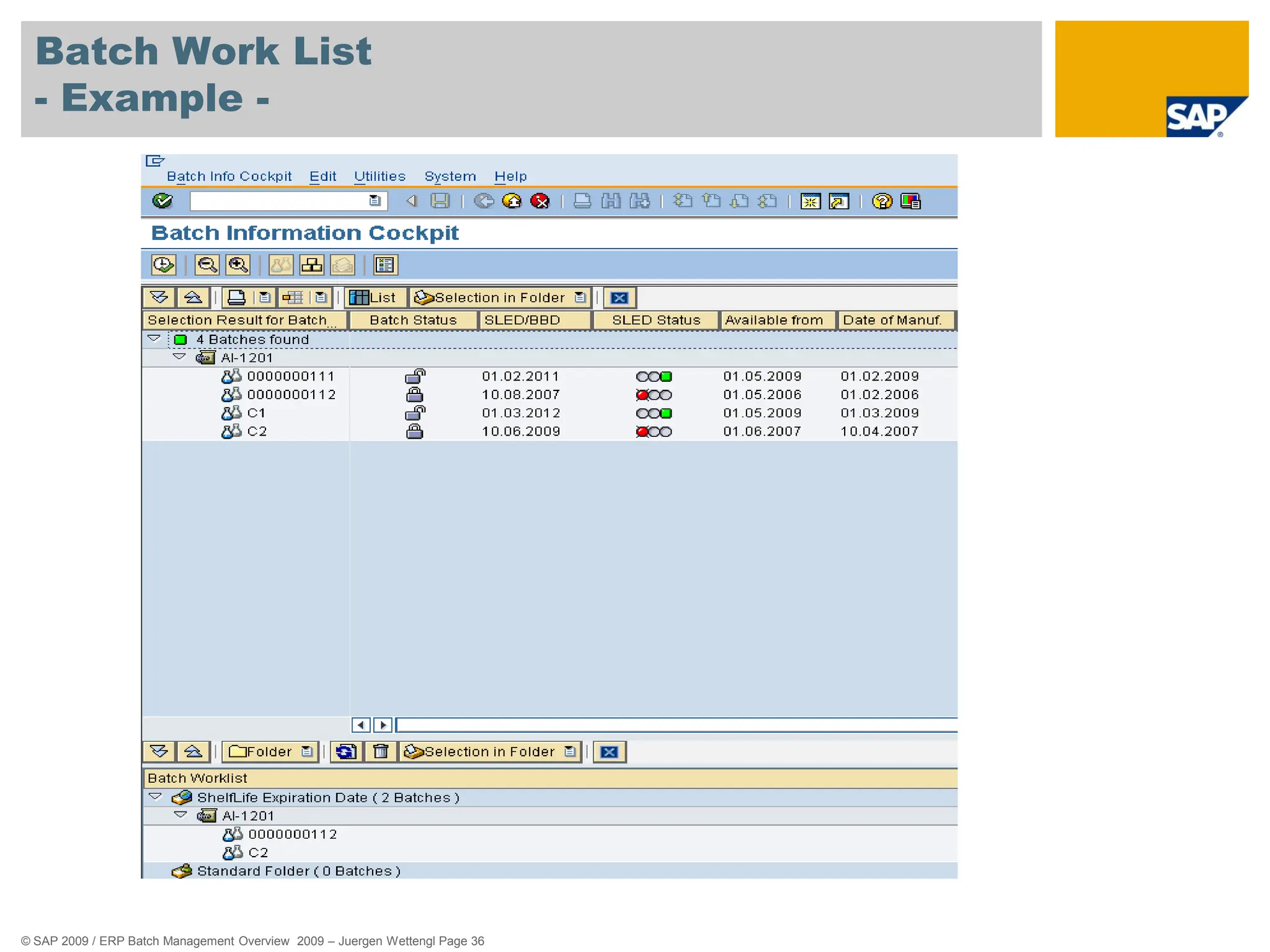
Batch Work List
- Usage -
 In a batch worklist, you can group batches together and display and
change their data.
 To obtain a better overview of your worklist, you can structure it using
worklist folders.
© SAP 2009 / ERP Batch Management Overview 2009 – Juergen Wettengl Page 35
Batch Work List
- Example -
 You can assign folders to as many users as you wish.
„Public“ Batch Worklist Folder:
 The contents of a folder marked as public can be displayed and processed by all
users assigned to it.
 „Private“ Batch Worklist Folder:
 A private folder can only be processed by the user assigned to it.
 If several users are assigned to a private folder, each of these users has their
own separate worklist folder with the same name. Each folder can only be viewed
and processed by the respective user.
© SAP 2009 / ERP Batch Management Overview 2009 – Juergen Wettengl Page 36
Batch Work List
- Example -
© SAP 2009 / ERP Batch Management Overview 2009 – Juergen Wettengl Page 37
Agenda
85%
alcohol
Batch Specific Unit of Measure
Shelf Life Expiration Date
Batch Information Cockpit
Batch Derivation
Traceability with Documentary Batches
Batch History
Work in Process Batches
© SAP 2009 / ERP Batch Management Overview 2009 – Juergen Wettengl Page 38
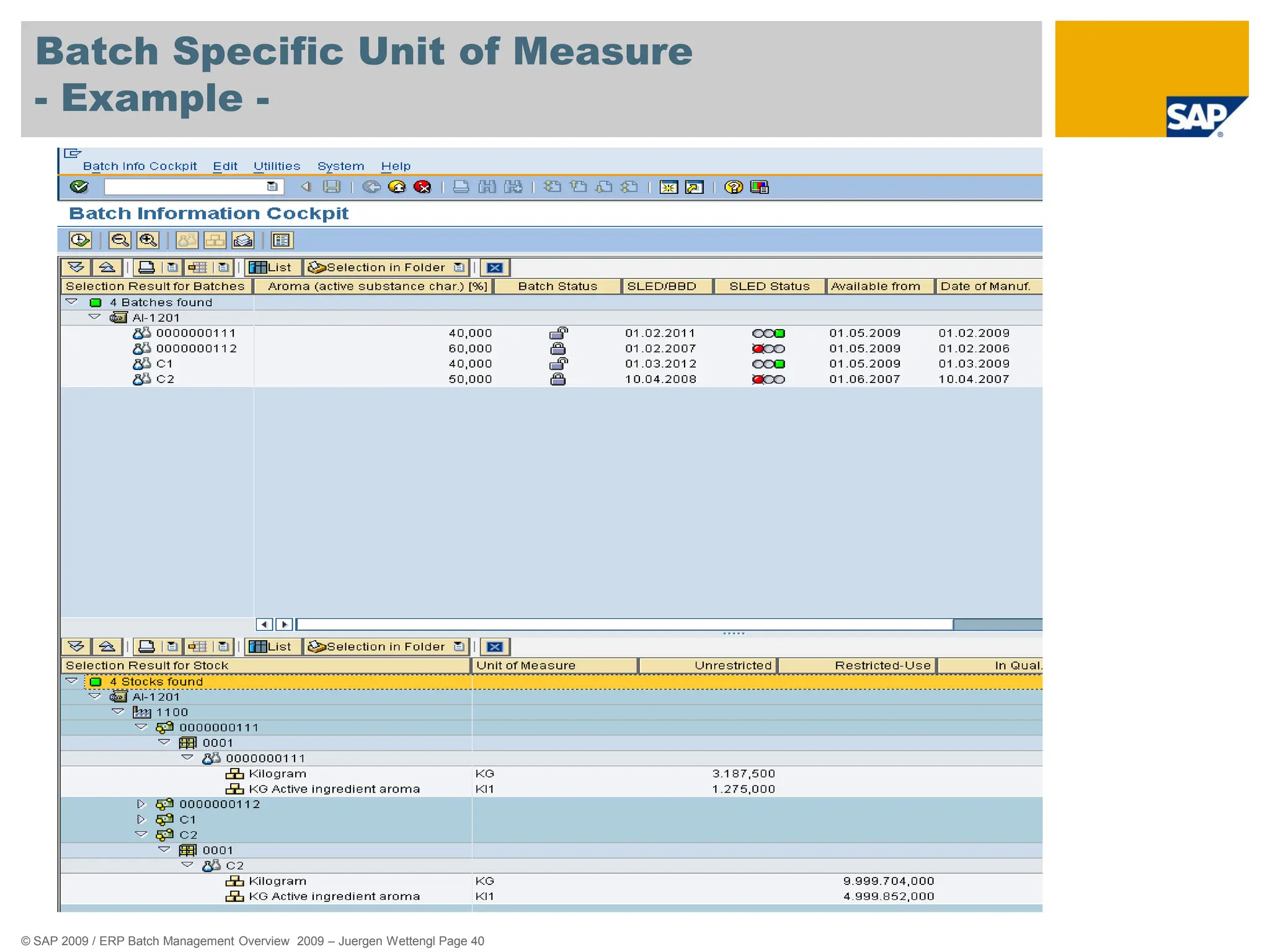
Batch Specific Unit of Measure
- Usage -
 In some industry sectors (for example, the pharmaceutical, chemical,
steel, or paper industry sectors), the composition or attributes of
products vary to some degree.
 Therefore, you cannot use a conversion factor to convert quantities
of these products into various units of measure.
 Instead, each batch has to be given an individual conversion factor.
© SAP 2009 / ERP Batch Management Overview 2009 – Juergen Wettengl Page 39
Batch Specific Unit of Measure
- Example -
 Pharmaceuticals/Chemicals/Foods (Active Ingredient Management)
 These material consist of one or more active ingredients, concentrates,
carrier materials, or impurities, and so on.
 The potency of the active ingredients varies from batch to batch.
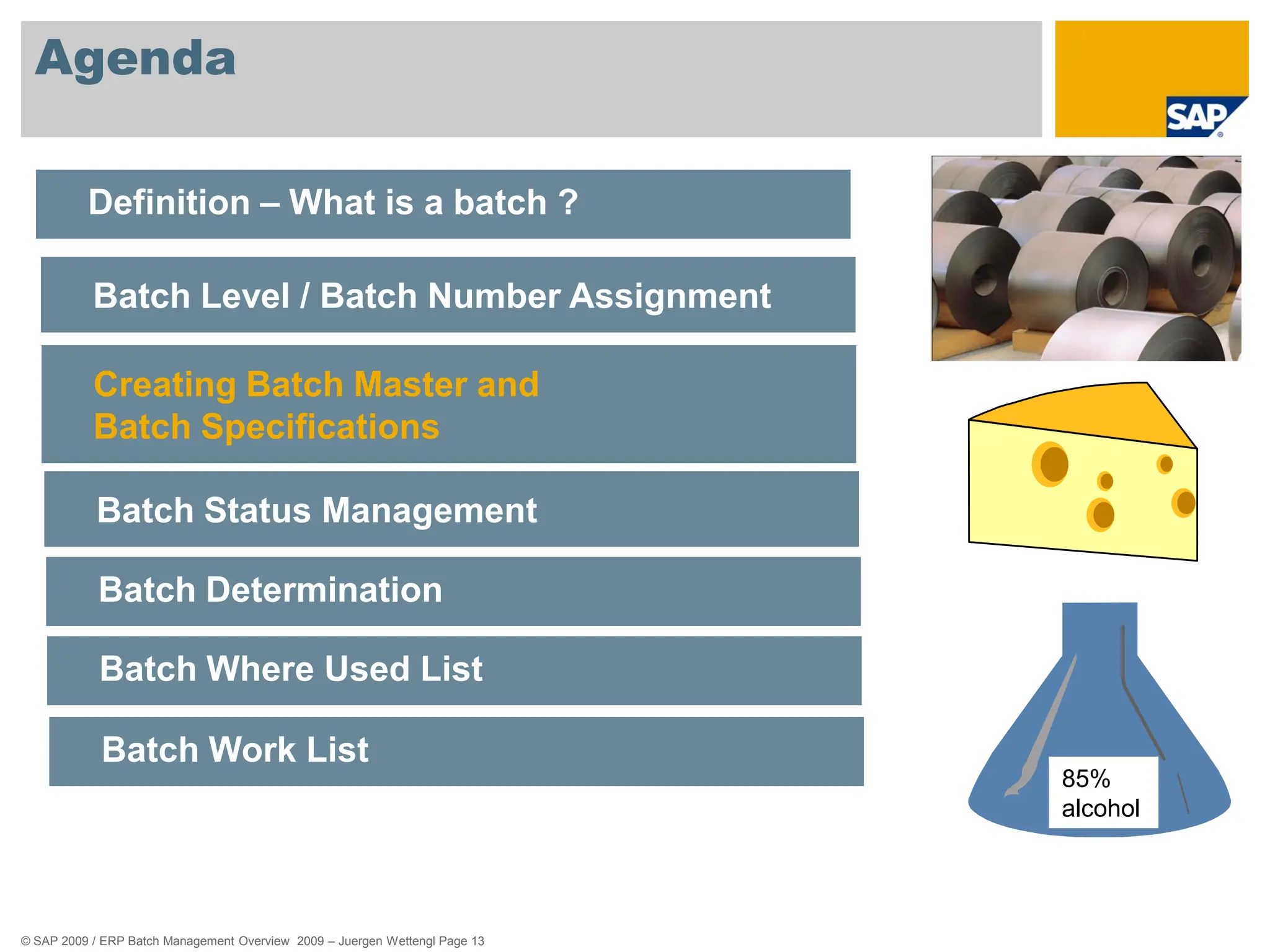
 Steel/Paper/Wood/Textiles
 These materials are handled in batches. Among other things, these batches
convey the product’s grade.
 There is a fixed relationship between the number of pieces and the weight of
each batch; the weight per piece.
 e.g. The quantity in the purchase order is listed in pieces, but billed in kilograms.
© SAP 2009 / ERP Batch Management Overview 2009 – Juergen Wettengl Page 40
Batch Specific Unit of Measure
- Example -
© SAP 2009 / ERP Batch Management Overview 2009 – Juergen Wettengl Page 41
Agenda
85%
alcohol
Batch Specific Unit of Measure
Shelf Life Expiration Date
Batch Information Cockpit
Batch Derivation
Traceability with Documentary Batches
Batch History
Work in Process Batches
© SAP 2009 / ERP Batch Management Overview 2009 – Juergen Wettengl Page 42
Shelf Life Expiration Date
- Usage -
 Batches of materials that may no longer be used or sold after a
certain time period are normally assigned a shelf life expiration date
(SLED).
 This function calculates the SLED from the total shelf life and the
production date during the following procedures:
 At goods receipt
 Upon automatic goods movements
© SAP 2009 / ERP Batch Management Overview 2009 – Juergen Wettengl Page 43
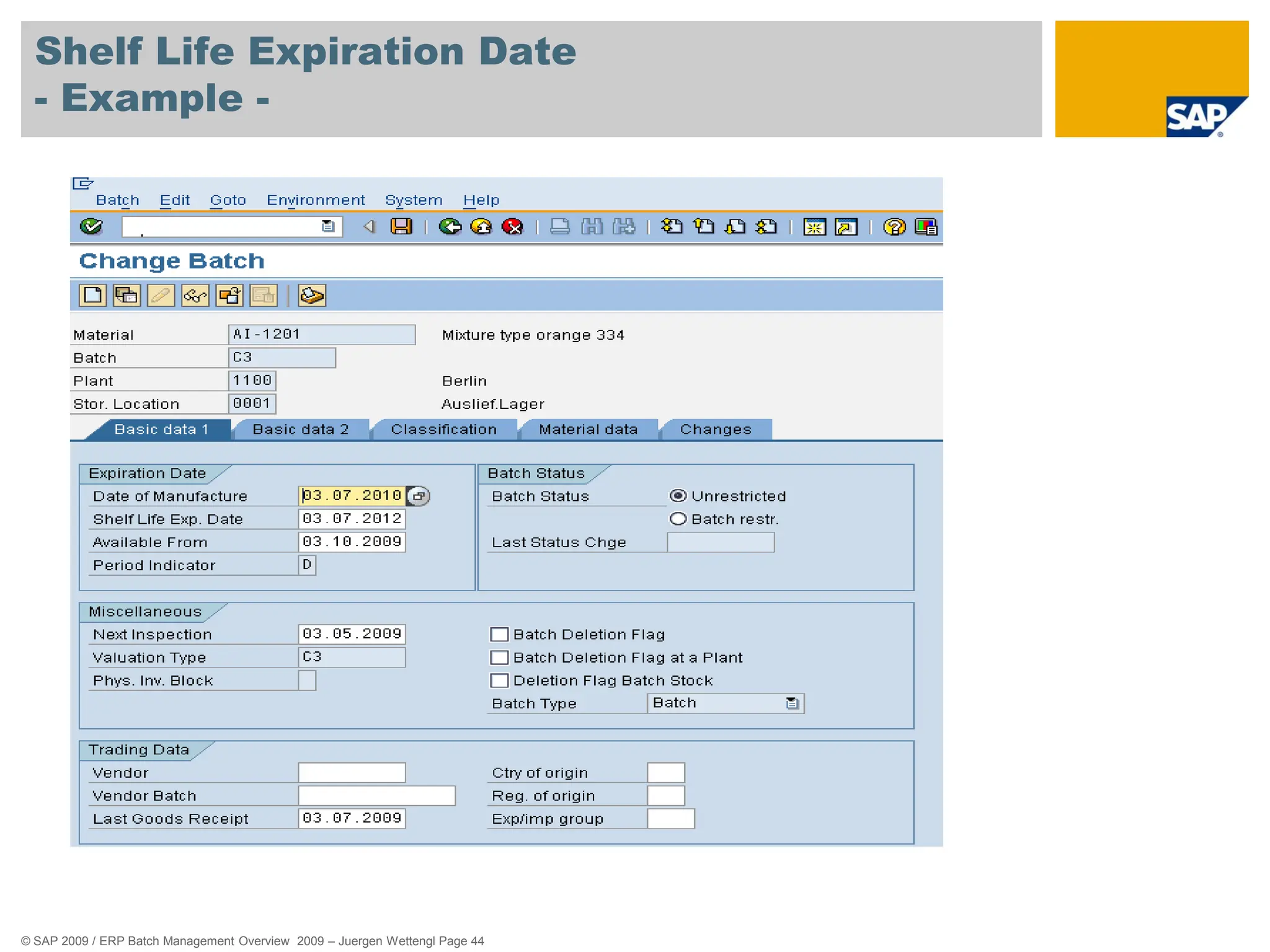
Shelf Life Expiration Date
- Example -
 Gourmet, a quiche manufacturer, produces quiches on 01.07. The
total shelf life of 50 days means the SLED would be 20.08.
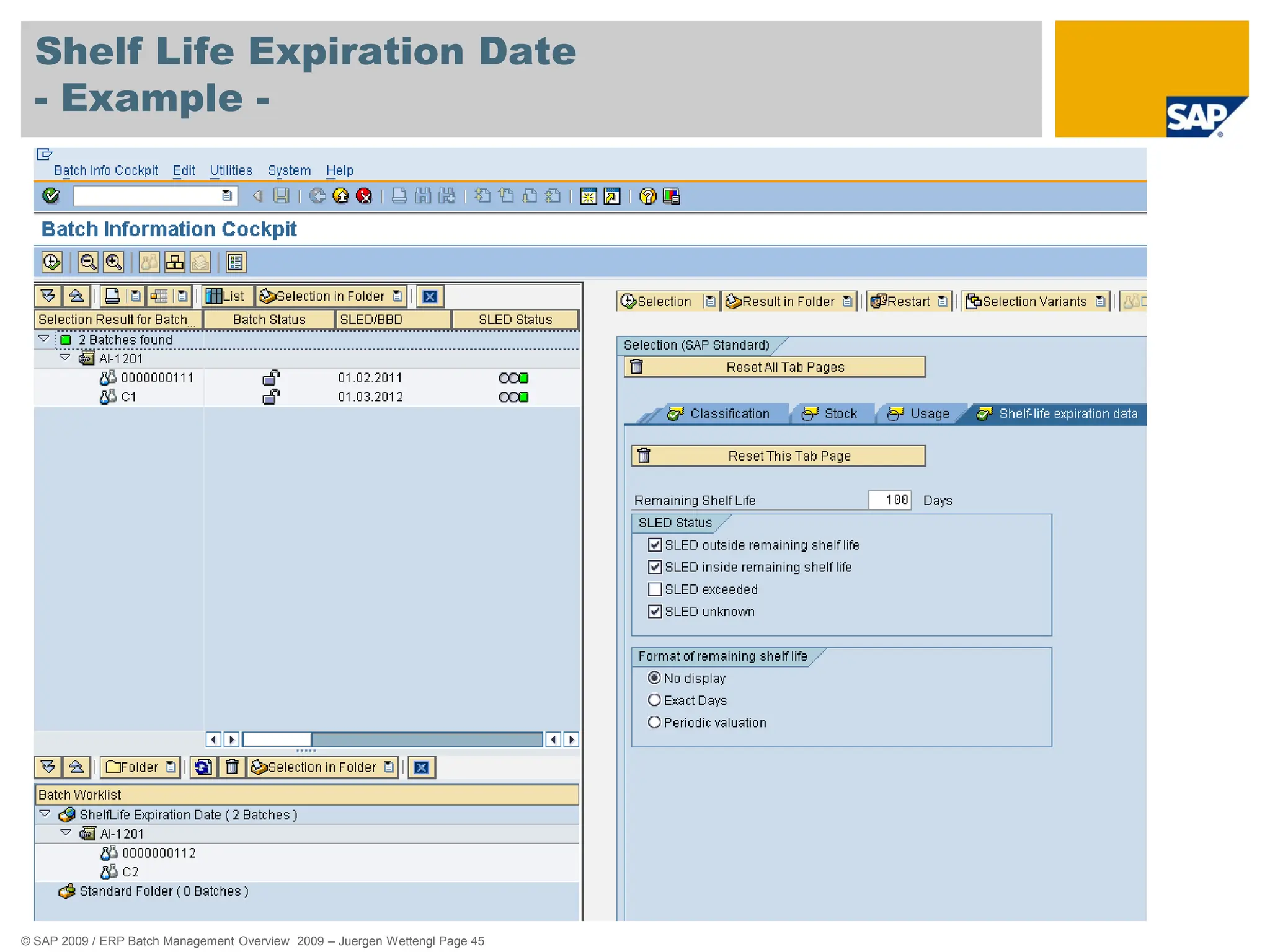
 In batch determination, you can use object dependencies to
dynamically determine a date (SLED) to be used as criteria for batch
determination.
 A customer specifies that the sherry trifle he obtains from a supplier must feature
a remaining shelf life of 14 days on the date of delivery. In this case, the supplier
uses the dynamic determination of the SLED during batch determination so that he
does not have to enter the selection criteria manually for each delivery.
© SAP 2009 / ERP Batch Management Overview 2009 – Juergen Wettengl Page 44
Shelf Life Expiration Date
- Example -
© SAP 2009 / ERP Batch Management Overview 2009 – Juergen Wettengl Page 45
Shelf Life Expiration Date
- Example -
© SAP 2009 / ERP Batch Management Overview 2009 – Juergen Wettengl Page 46
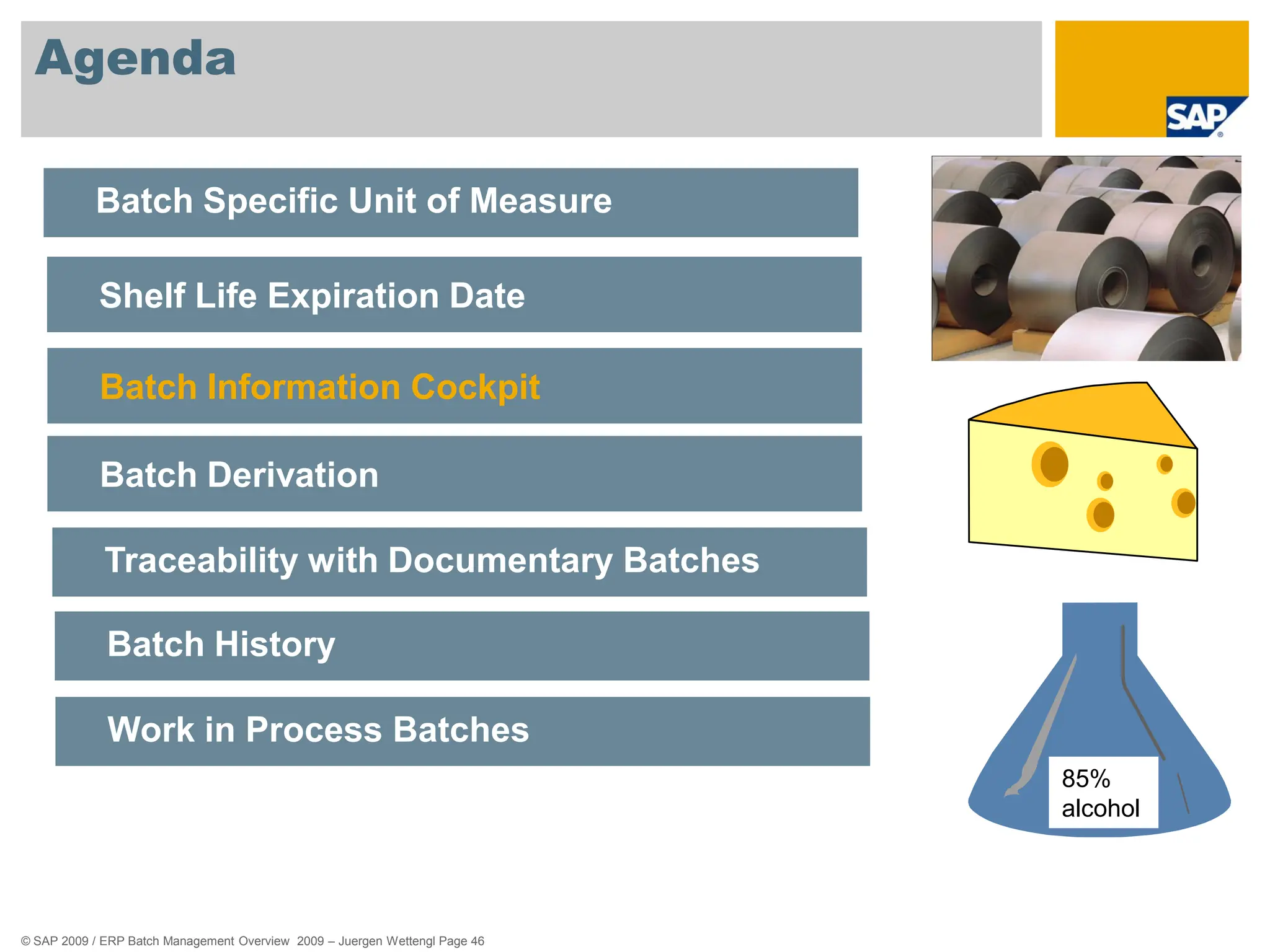
Agenda
85%
alcohol
Batch Specific Unit of Measure
Shelf Life Expiration Date
Batch Information Cockpit
Batch Derivation
Traceability with Documentary Batches
Batch History
Work in Process Batches
© SAP 2009 / ERP Batch Management Overview 2009 – Juergen Wettengl Page 47
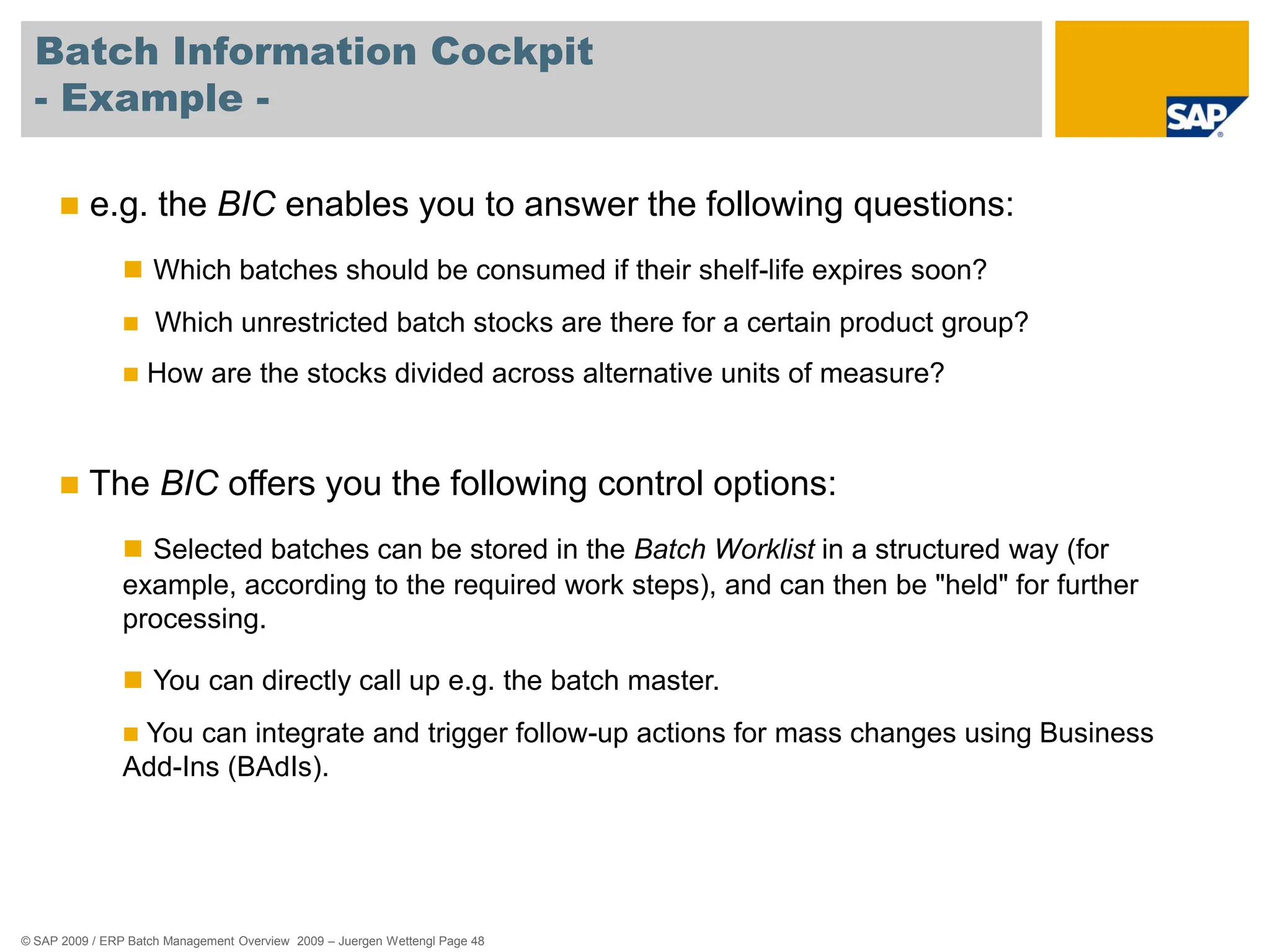
Batch Information Cockpit
- Usage -
 The Batch Information Cockpit (BIC) represents a central switching
point with wide-ranging options for analysis and control of batches.
 You can use the BIC to
 Select batches
 Display information relevant to batches
 Call up detail functions
 Trigger follow-up actions
© SAP 2009 / ERP Batch Management Overview 2009 – Juergen Wettengl Page 48
Batch Information Cockpit
- Example -
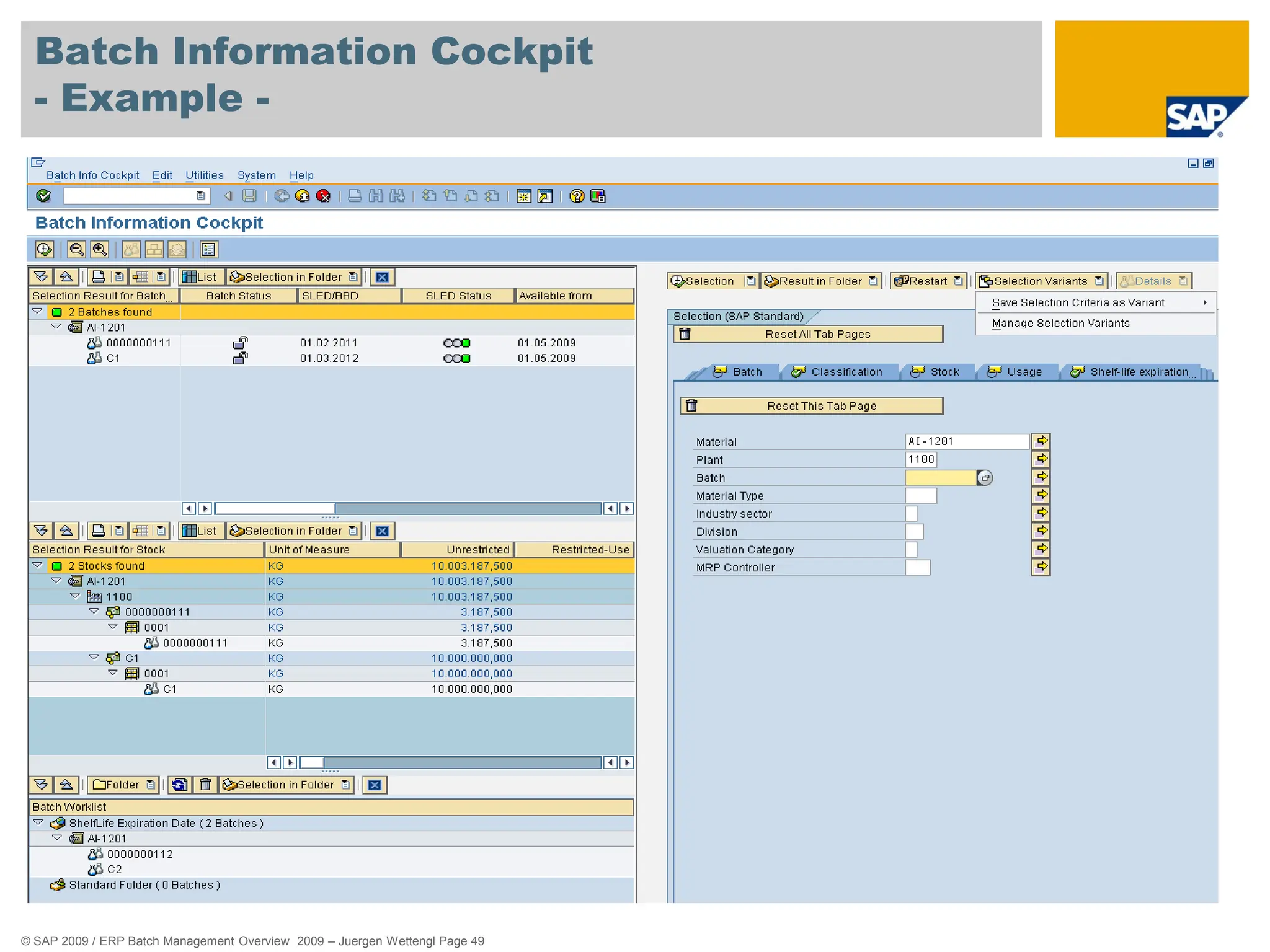
 e.g. the BIC enables you to answer the following questions:
 Which batches should be consumed if their shelf-life expires soon?
 Which unrestricted batch stocks are there for a certain product group?
 How are the stocks divided across alternative units of measure?
 The BIC offers you the following control options:
 Selected batches can be stored in the Batch Worklist in a structured way (for
example, according to the required work steps), and can then be "held" for further
processing.
 You can directly call up e.g. the batch master.
 You can integrate and trigger follow-up actions for mass changes using Business
Add-Ins (BAdIs).
© SAP 2009 / ERP Batch Management Overview 2009 – Juergen Wettengl Page 49
Batch Information Cockpit
- Example -
© SAP 2009 / ERP Batch Management Overview 2009 – Juergen Wettengl Page 50
Agenda
85%
alcohol
Batch Specific Unit of Measure
Shelf Life Expiration Date
Batch Information Cockpit
Batch Derivation
Traceability with Documentary Batches
Batch History
Work in Process Batches
© SAP 2009 / ERP Batch Management Overview 2009 – Juergen Wettengl Page 51
Batch Derivation
- Usage -
 This component enables you to derive batch master data and
classification data of the component batches for produced batches:
 Transfer
 Display for selection
 Display
 To be able to derive batch data, you must have set up the batch
where-used list.
 … only those component batches are included that were used in the produced
batch.
© SAP 2009 / ERP Batch Management Overview 2009 – Juergen Wettengl Page 52
Batch Derivation
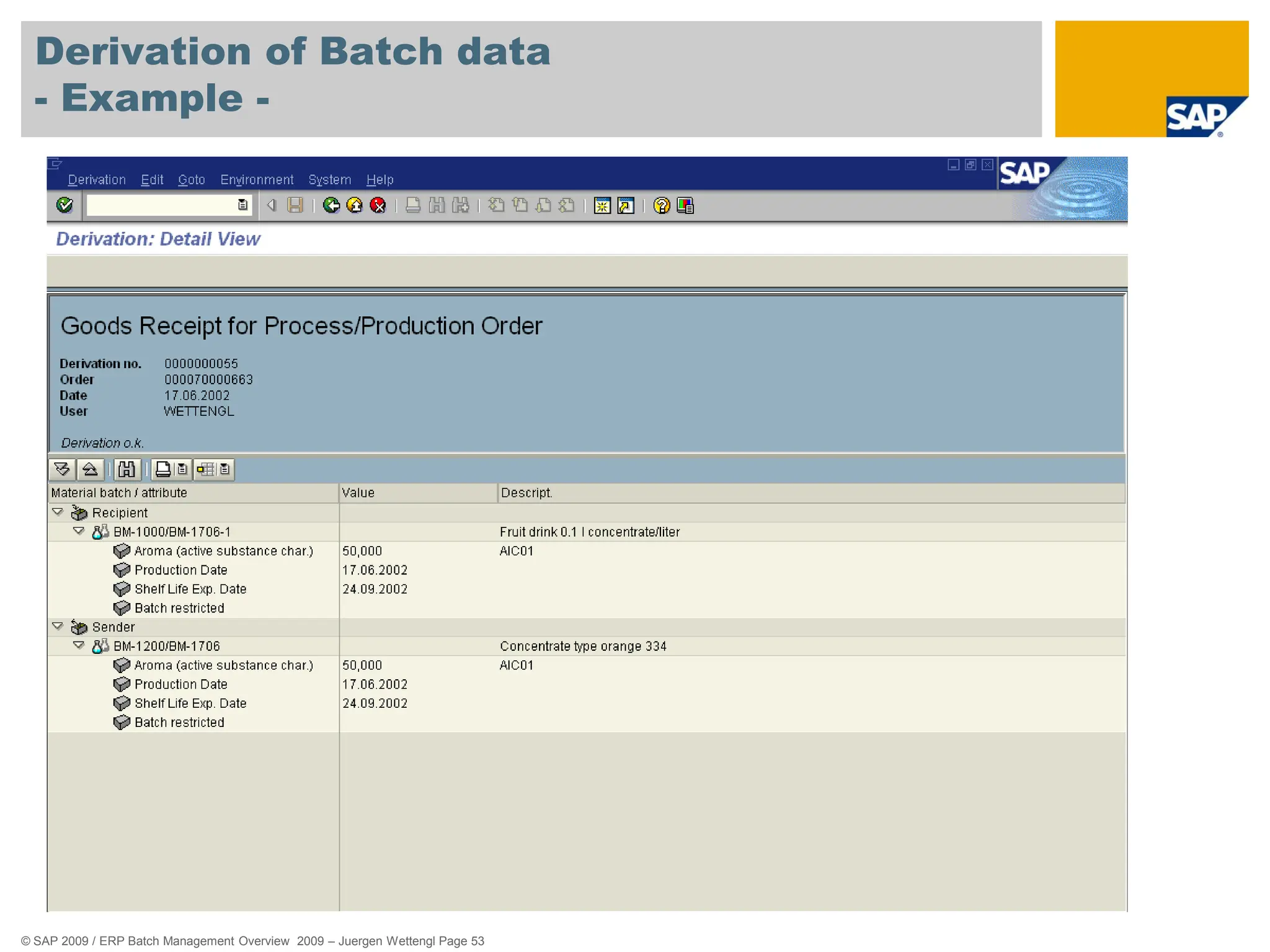
- Example -
 Filling / Packaging:
 A batch of a material is produced and is placed into various
containers, before the results of the quality check are available. If
the bulk batch is specified, these results should be transferred to
the container batches.
 The shelf life expiration date (SLED) of the unpacked material
(e.g. bulk material) should be transferred to the packed material.
© SAP 2009 / ERP Batch Management Overview 2009 – Juergen Wettengl Page 53
Derivation of Batch data
- Example -
© SAP 2009 / ERP Batch Management Overview 2009 – Juergen Wettengl Page 54
Agenda
85%
alcohol
Batch Specific Unit of Measure
Shelf Life Expiration Date
Batch Information Cockpit
Batch Derivation
Traceability with Documentary Batches
Batch History
Work in Process Batches
© SAP 2009 / ERP Batch Management Overview 2009 – Juergen Wettengl Page 55
Documentary Batches
- Usage -
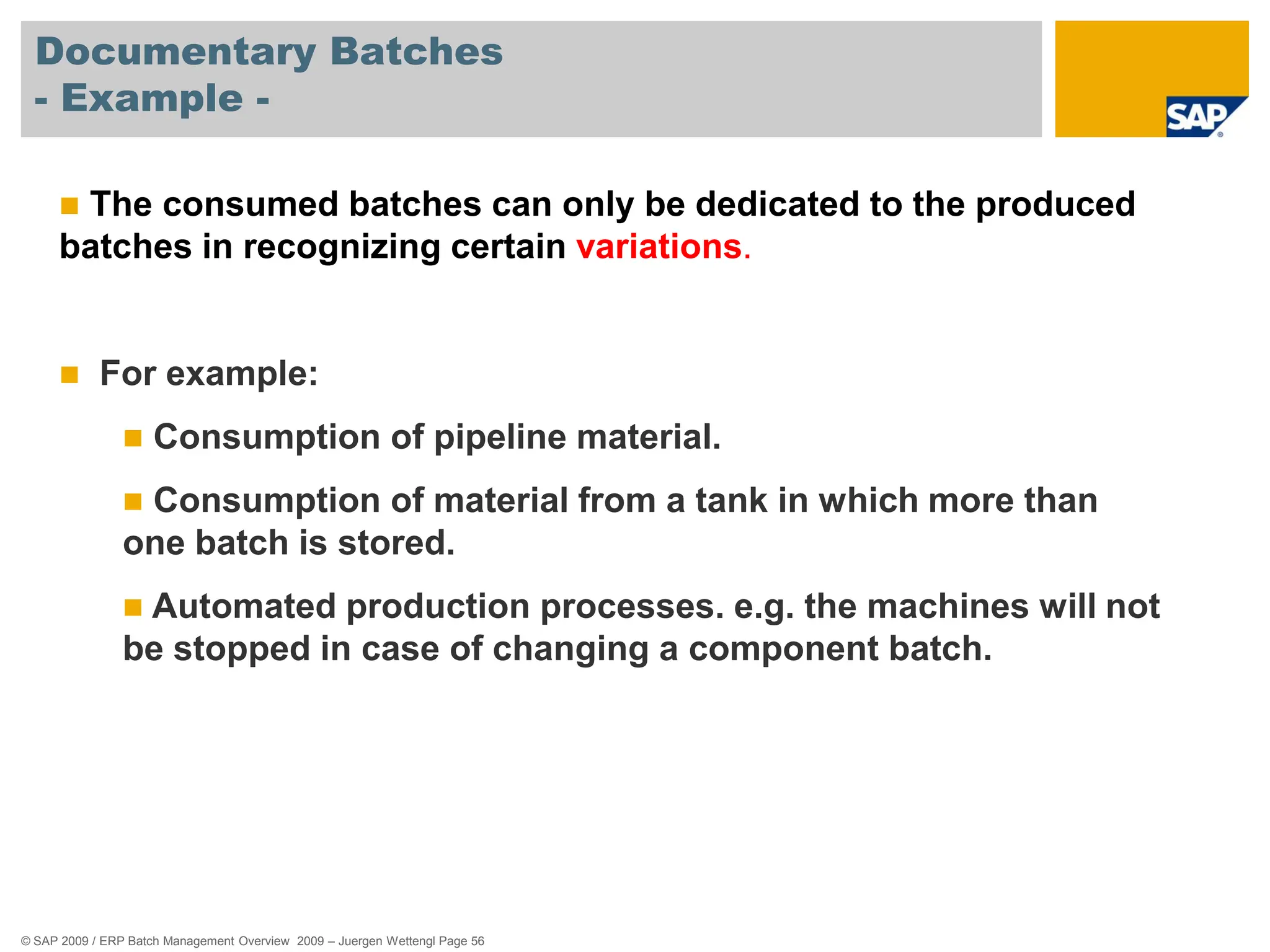
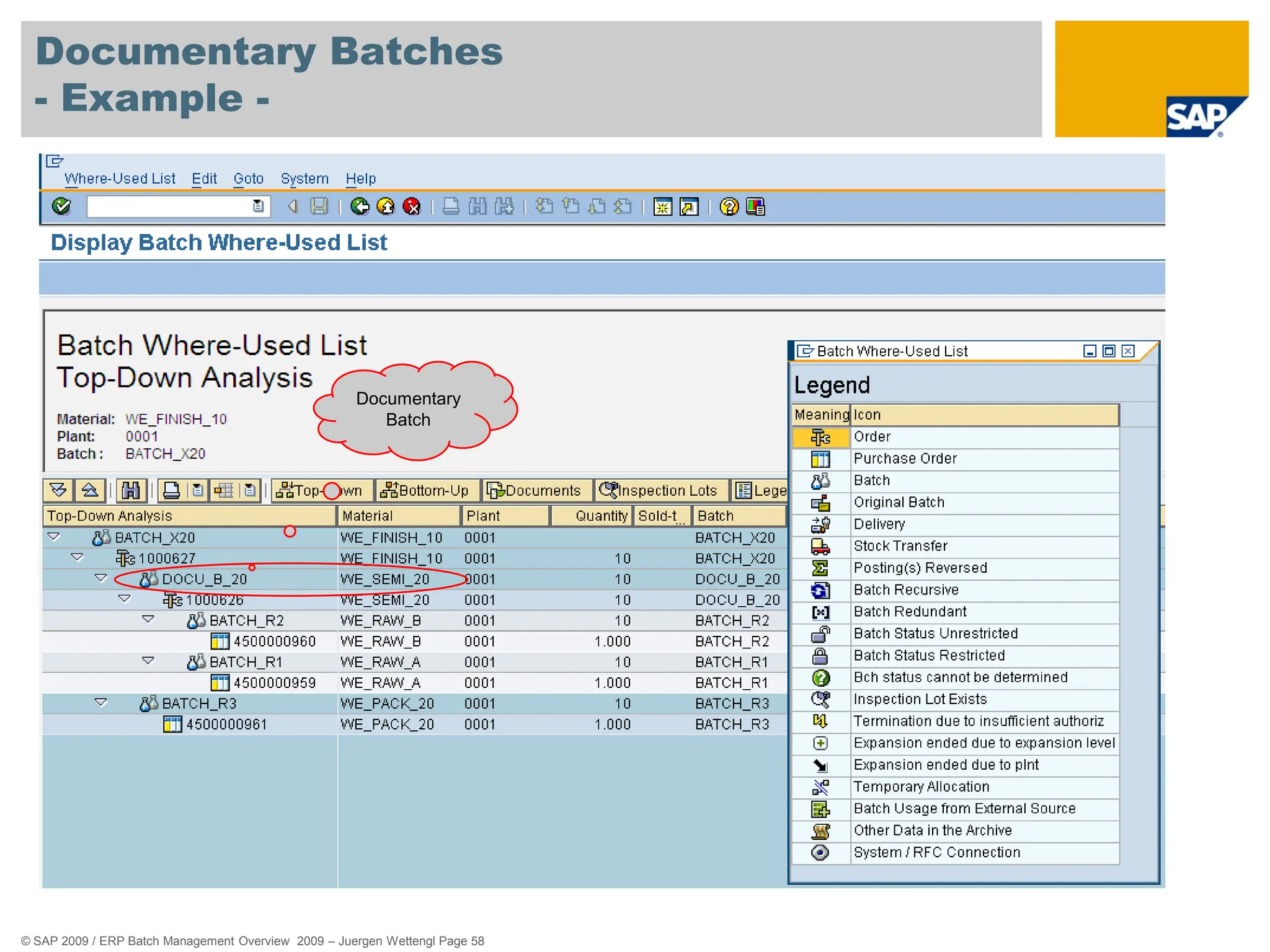
 You use documentary batches to ensure that partial stocks of a
material are traceable, without it being necessary to manage the
stock of the material in batches.
 This reduces the amount of effort involved in tracing where batches
have been used.
 In comparison to "real" batches, documentary batches have the
following advantages:
 A lower level of complexity
 Less effort involved in entering batches
 Lower costs for inventory management, physical inventory and confirmation
© SAP 2009 / ERP Batch Management Overview 2009 – Juergen Wettengl Page 56
Documentary Batches
- Example -
 The consumed batches can only be dedicated to the produced
batches in recognizing certain variations.
 For example:
 Consumption of pipeline material.
 Consumption of material from a tank in which more than
one batch is stored.
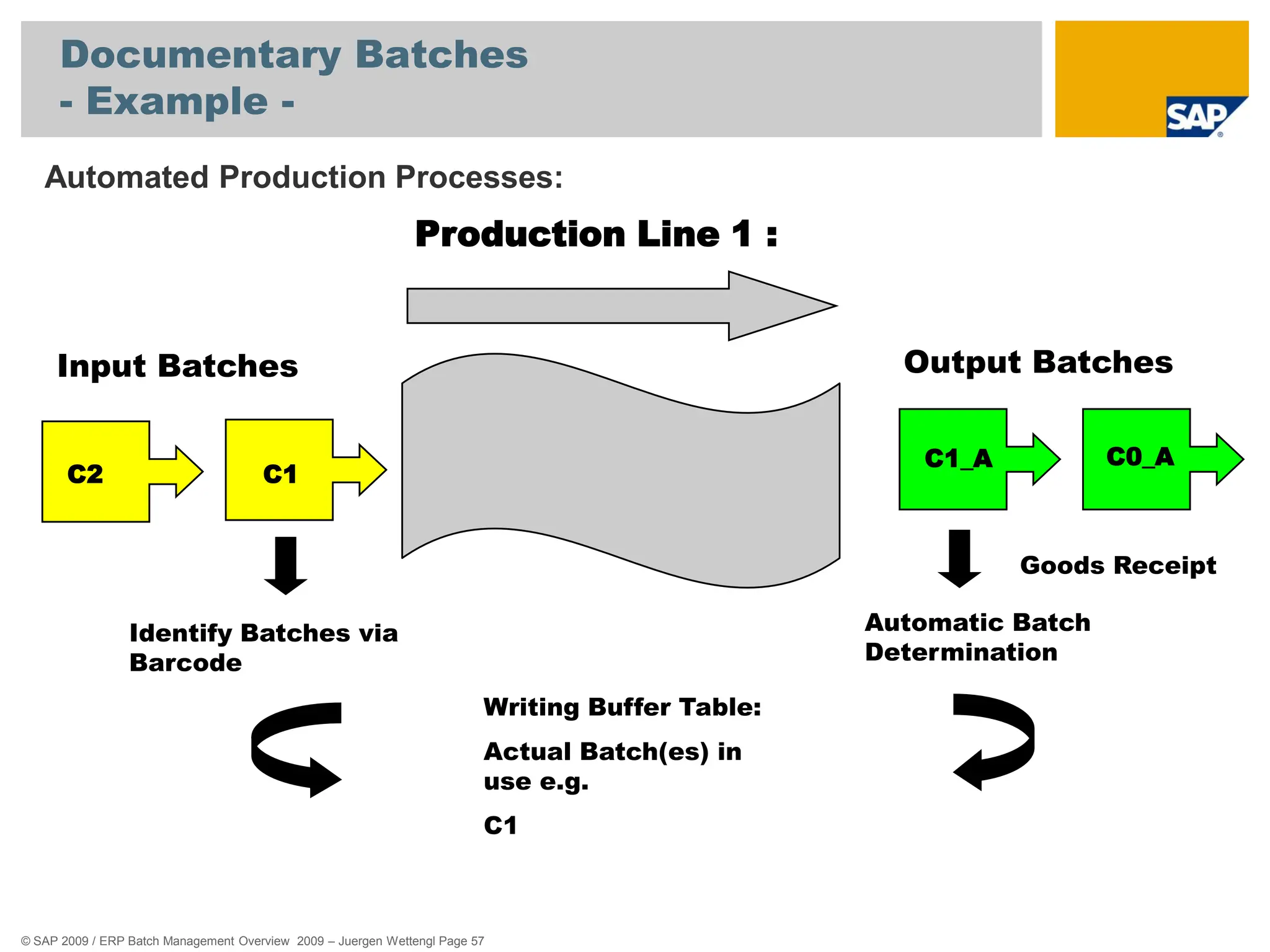
 Automated production processes. e.g. the machines will not
be stopped in case of changing a component batch.
© SAP 2009 / ERP Batch Management Overview 2009 – Juergen Wettengl Page 57
Documentary Batches
- Example -
Automated Production Processes:
Production Line 1 :
C1
C2
Identify Batches via
Barcode
Writing Buffer Table:
Actual Batch(es) in
use e.g.
C1
Input Batches Output Batches
C1_A
Goods Receipt
Automatic Batch
Determination
C0_A
© SAP 2009 / ERP Batch Management Overview 2009 – Juergen Wettengl Page 58
Documentary Batches
- Example -
Documentary
Batch
© SAP 2009 / ERP Batch Management Overview 2009 – Juergen Wettengl Page 59
Documentary Batches
- Example -
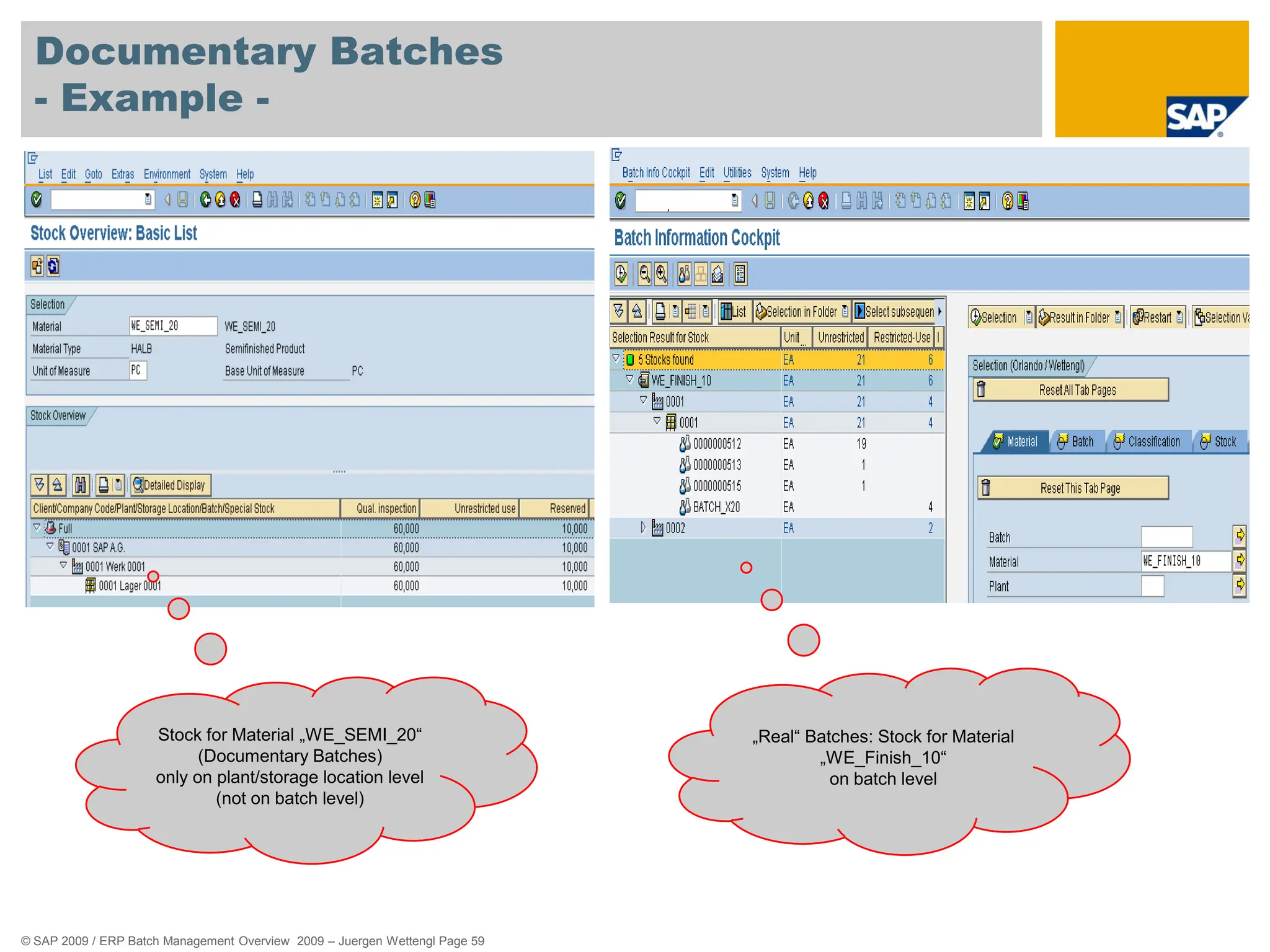
Stock for Material „WE_SEMI_20“
(Documentary Batches)
only on plant/storage location level
(not on batch level)
„Real“ Batches: Stock for Material
„WE_Finish_10“
on batch level
© SAP 2009 / ERP Batch Management Overview 2009 – Juergen Wettengl Page 60
Agenda
85%
alcohol
Batch Specific Unit of Measure
Shelf Life Expiration Date
Batch Information Cockpit
Batch Derivation
Traceability with Documentary Batches
Batch History
Work in Process Batches
© SAP 2009 / ERP Batch Management Overview 2009 – Juergen Wettengl Page 61
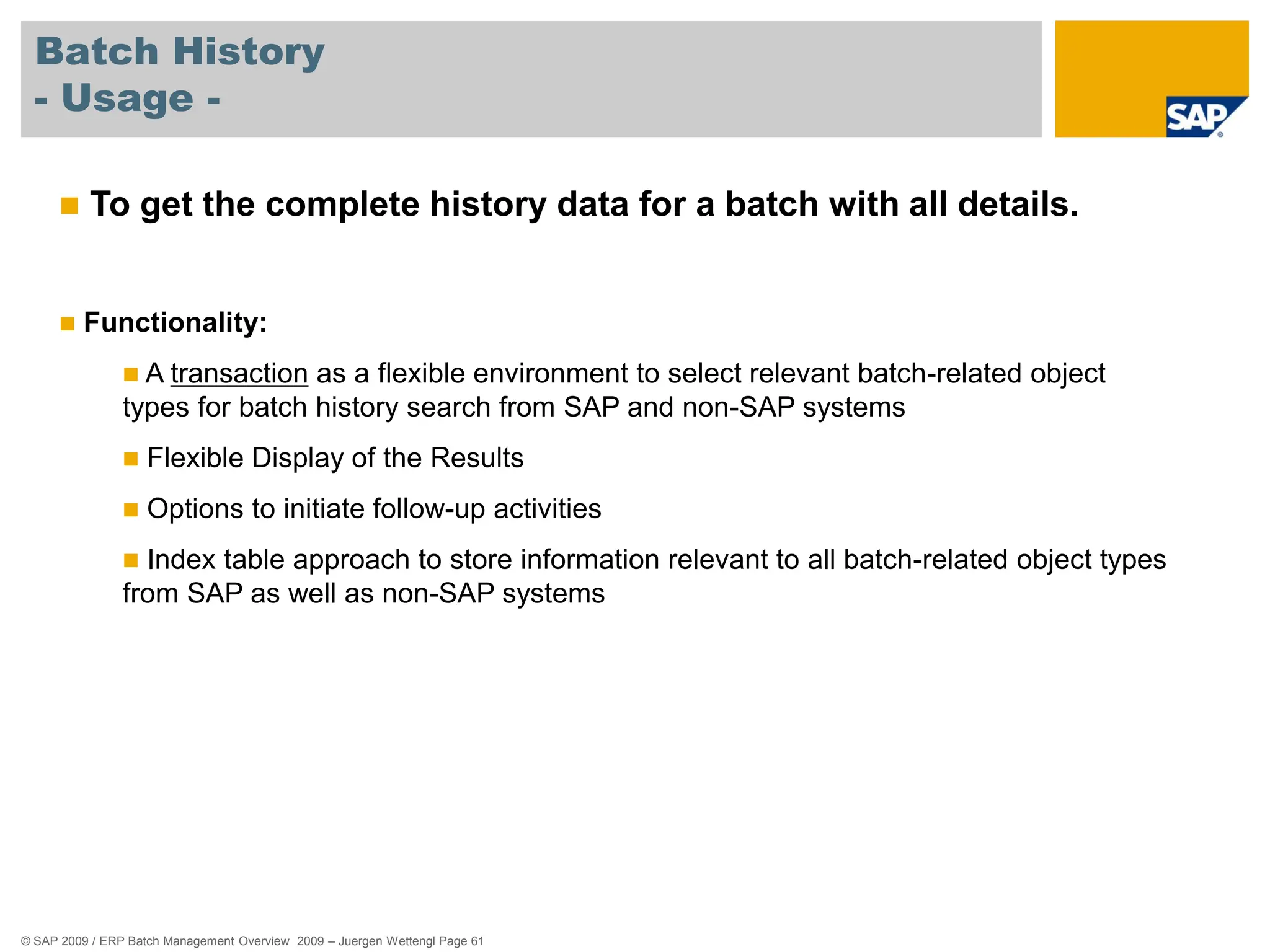
Batch History
- Usage -
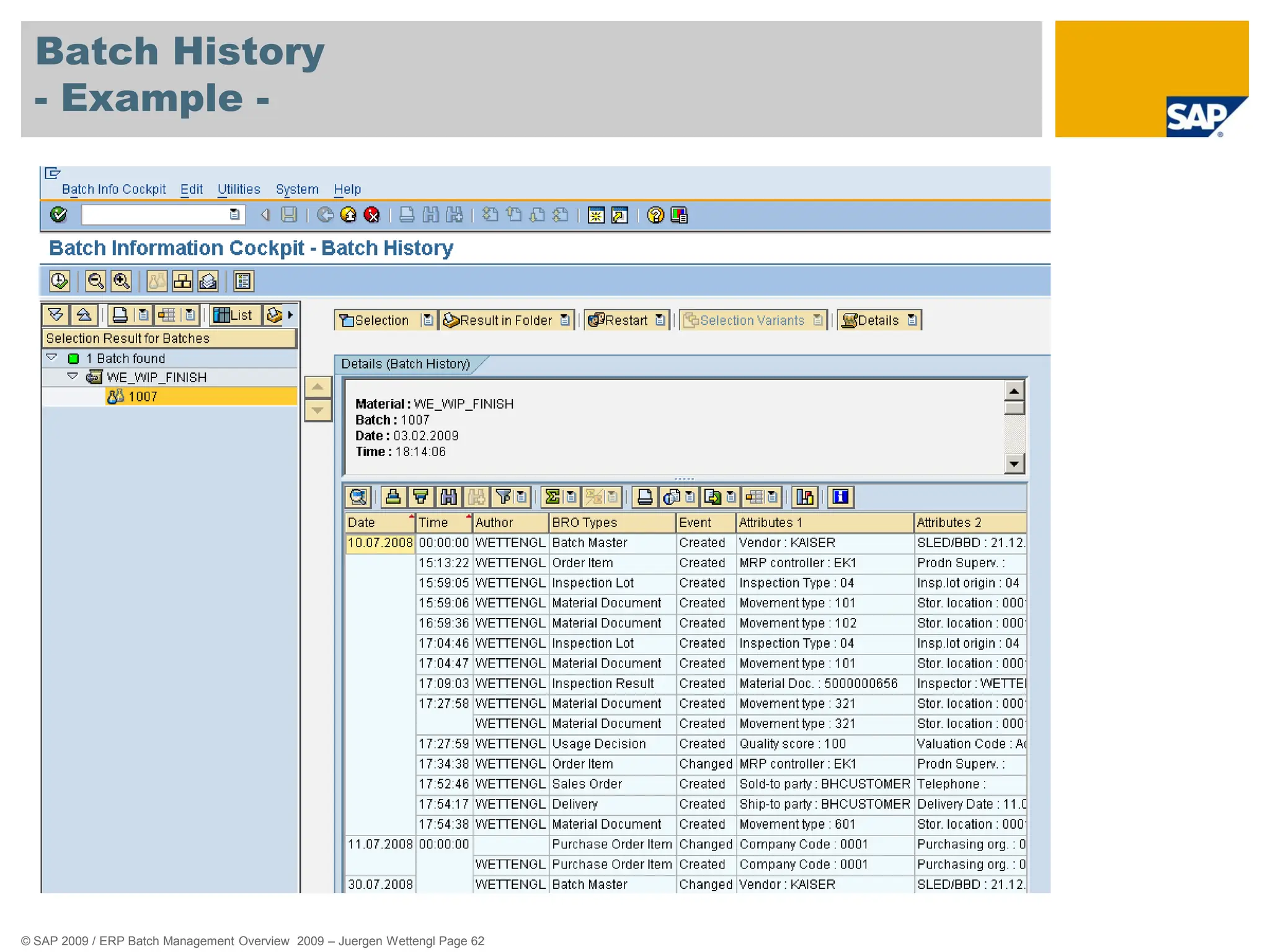
 To get the complete history data for a batch with all details.
 Functionality:
 A transaction as a flexible environment to select relevant batch-related object
types for batch history search from SAP and non-SAP systems
 Flexible Display of the Results
 Options to initiate follow-up activities
 Index table approach to store information relevant to all batch-related object types
from SAP as well as non-SAP systems
© SAP 2009 / ERP Batch Management Overview 2009 – Juergen Wettengl Page 62
Batch History
- Example -
© SAP 2009 / ERP Batch Management Overview 2009 – Juergen Wettengl Page 63
Agenda
85%
alcohol
Batch Specific Unit of Measure
Shelf Life Expiration Date
Batch Information Cockpit
Batch Derivation
Traceability with Documentary Batches
Batch History
Work in Process Batches
© SAP 2009 / ERP Batch Management Overview 2009 – Juergen Wettengl Page 64
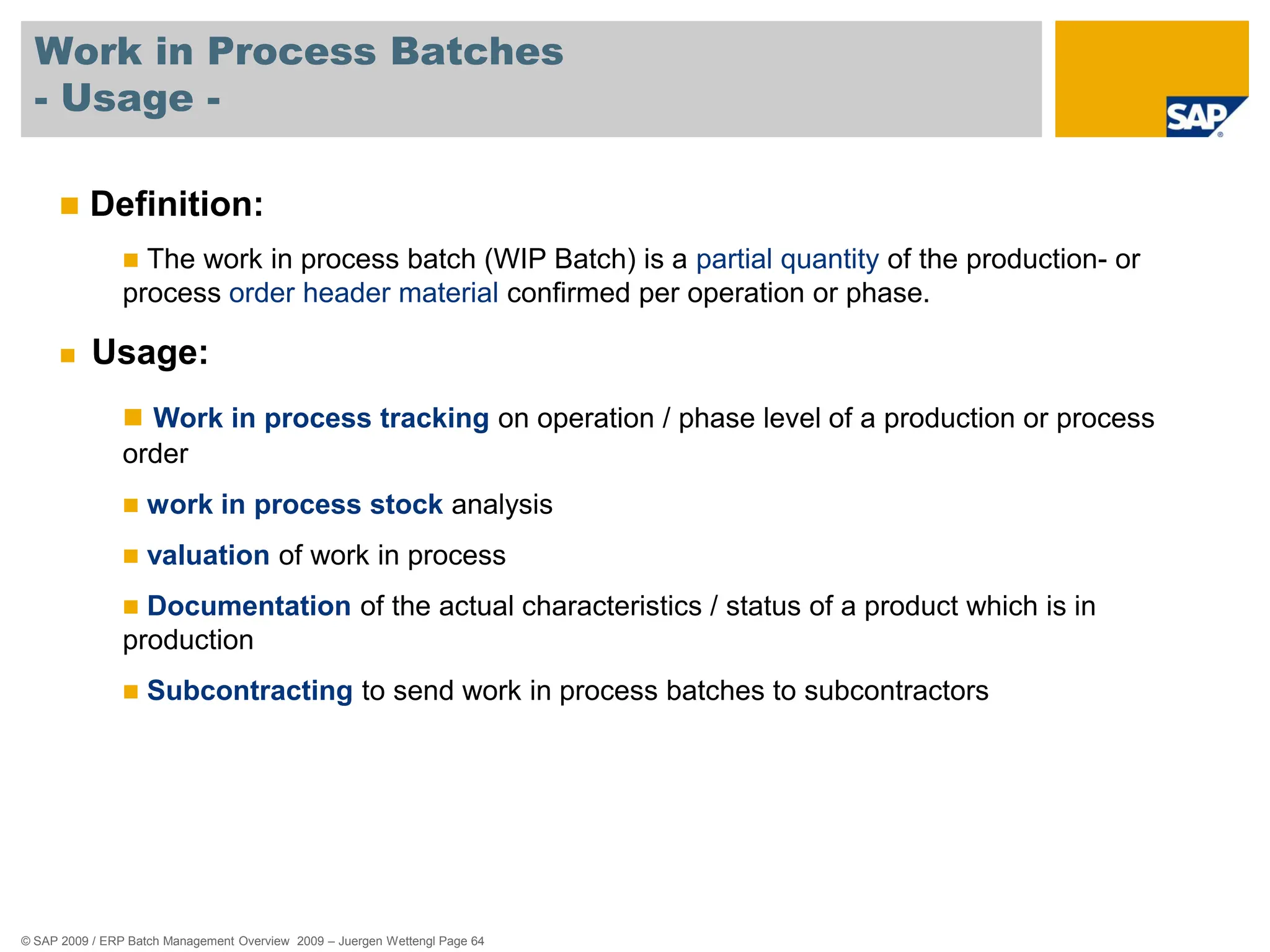
Work in Process Batches
- Usage -
 Definition:
 The work in process batch (WIP Batch) is a partial quantity of the production- or
process order header material confirmed per operation or phase.
 Usage:
 Work in process tracking on operation / phase level of a production or process
order
 work in process stock analysis
 valuation of work in process
 Documentation of the actual characteristics / status of a product which is in
production
 Subcontracting to send work in process batches to subcontractors
© SAP 2009 / ERP Batch Management Overview 2009 – Juergen Wettengl Page 65
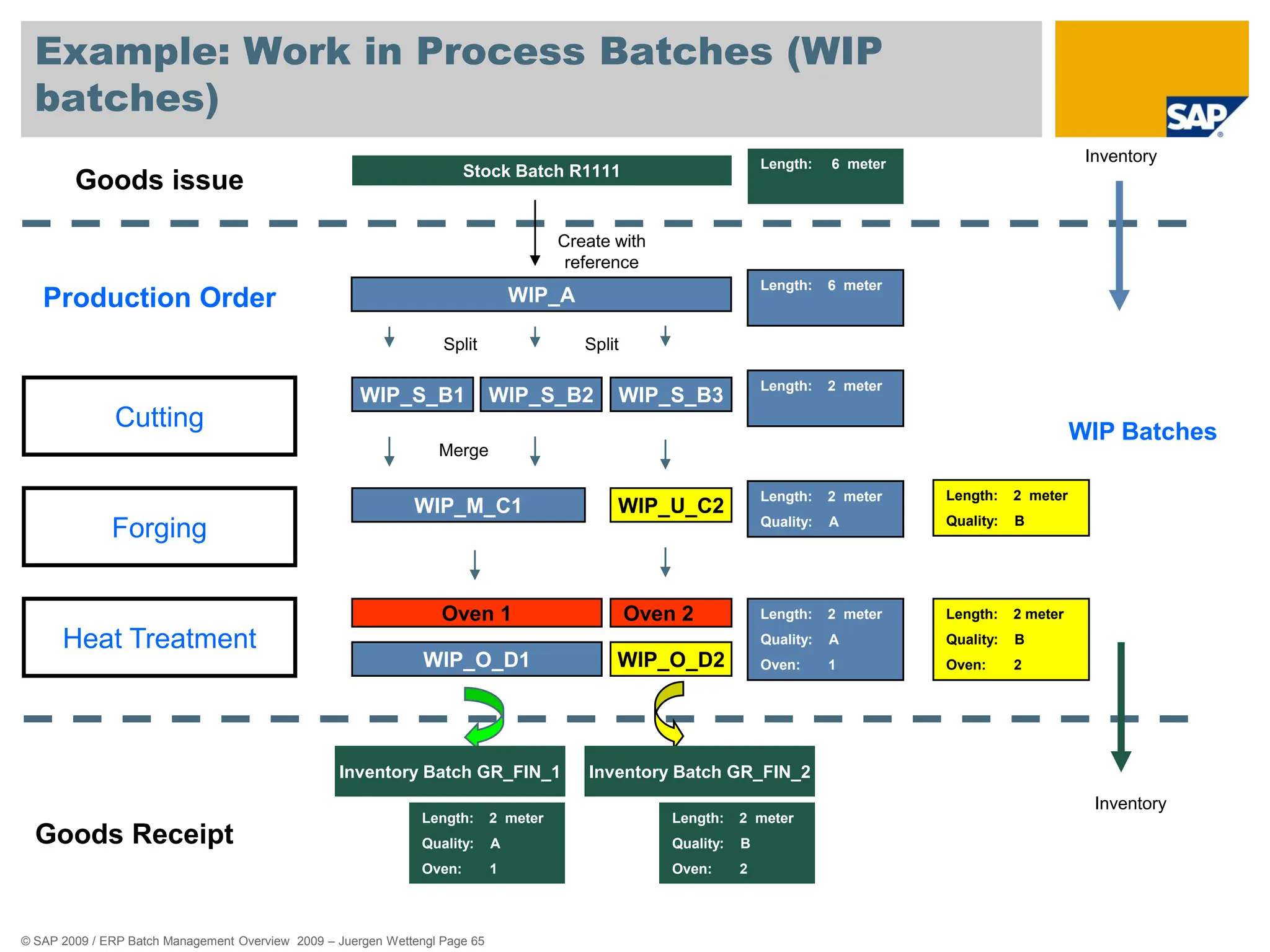
Example: Work in Process Batches (WIP
batches)
Goods issue Stock Batch R1111
Production Order
Cutting
Forging
Heat Treatment
Oven 1
WIP_S_B1 WIP_S_B2 WIP_S_B3
WIP_M_C1 WIP_U_C2
WIP_O_D1 WIP_O_D2
Oven 2
Goods Receipt
Length: 6 meter
Length: 2 meter
Length: 2 meter
Quality: A
Length: 2 meter
Quality: A
Oven: 1
Length: 2 meter
Quality: B
Oven: 2
Length: 2 meter
Quality: B
Oven: 2
Inventory Batch GR_FIN_1
Length: 2 meter
Quality: A
Oven: 1
Create with
reference
Inventory
Inventory
WIP Batches
Split
Merge
Length: 2 meter
Quality: B
Split
WIP_A
Length: 6 meter
Inventory Batch GR_FIN_2
© SAP 2009 / ERP Batch Management Overview 2009 – Juergen Wettengl Page 66
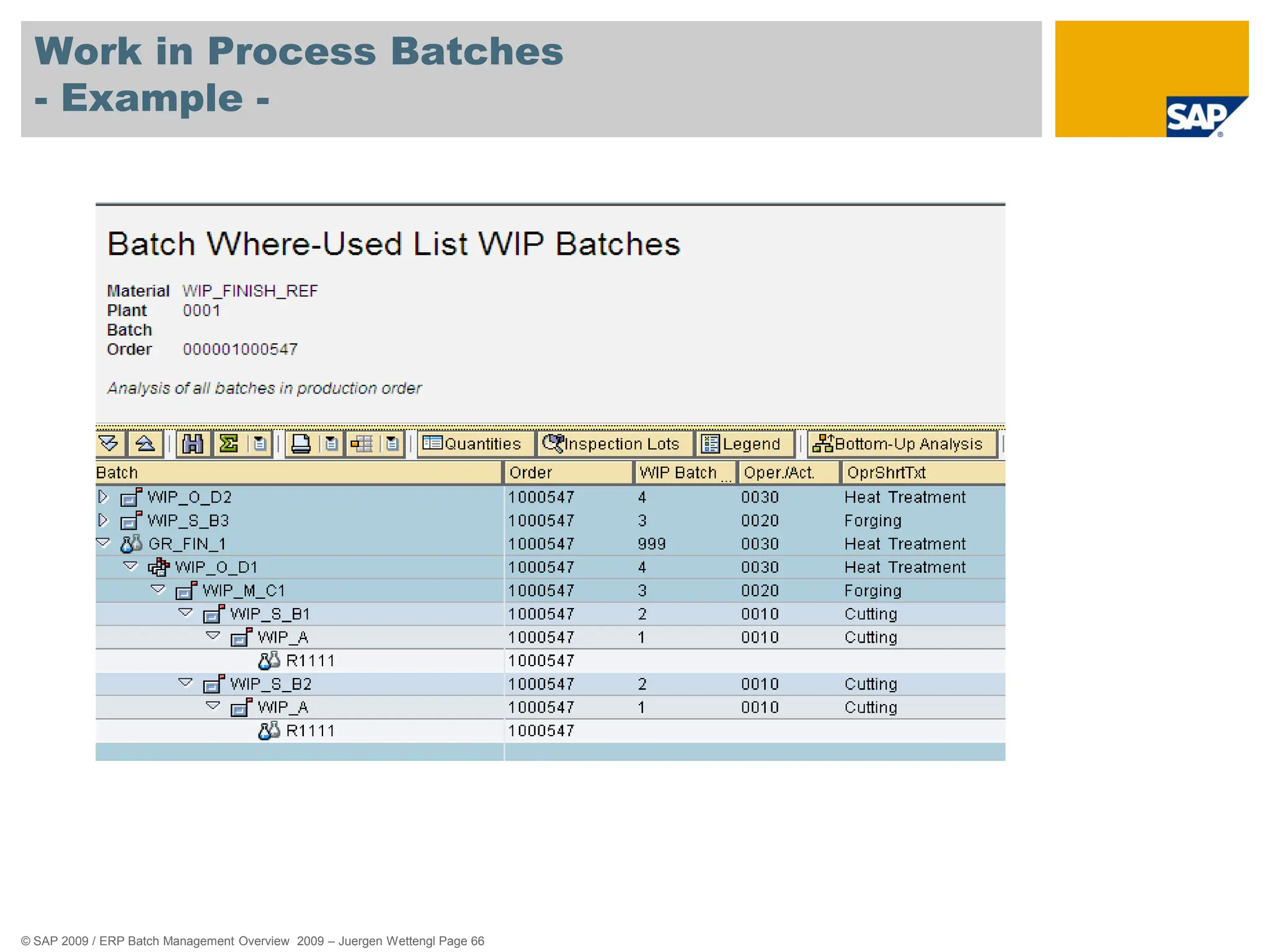
Work in Process Batches
- Example -

254523028Overview-Downview-Middl-pdf.pdf

  • 1.
    Overview ERP Batch ManagementCapabilities Jürgen Wettengl, Solution Management, Manufacturing, SAP AG September 2009
  • 2.
    © SAP 2009/ ERP Batch Management Overview 2009 – Juergen Wettengl Page 2 Agenda Definition – What is a batch ? Batch Level / Batch Number Assignment Creating Batch Master and Batch Specifications Batch Status Management Batch Determination Batch Where Used List Batch Work List 85% alcohol
  • 3.
    © SAP 2009/ ERP Batch Management Overview 2009 – Juergen Wettengl Page 3 Agenda 85% alcohol Batch Specific Unit of Measure Shelf Life Expiration Date Batch Information Cockpit Batch Derivation Traceability with Documentary Batches Batch History Work in Process Batches
  • 4.
    © SAP 2009/ ERP Batch Management Overview 2009 – Juergen Wettengl Page 4 Definition – What is a batch ? A batch is the quantity or partial quantity of a particular material or product. In various industry sectors, you have to work with homogeneous partial quantities of a material or product throughout the entire quantity and value chain. ?
  • 5.
    © SAP 2009/ ERP Batch Management Overview 2009 – Juergen Wettengl Page 5 What is a batch ? Example Process Industry Physical Quantity 500 Liter Füllmenge: 500l 90% 85% alcohol 45 gram fat 85 % 91 % 55 % Shelf Life 12.2014 Batch Number C1020 Material CAE_200 Batch Status „Released“ Shelf Life 10.2011 Alcohol 55 % … … 100 Liter 100 Liter 100 Liter Batch = Quantity with homogenous characteristic s
  • 6.
    © SAP 2009/ ERP Batch Management Overview 2009 – Juergen Wettengl Page 6 What is a batch ? Example Discrete Industry Production Line 1 C1 C2 Input Batches Output Batch 700012 Production Order 700012 Batch Number 700012 Material P-100 Batch Status „Released“ Production Date 02.01.2009 Production Order 700012 … … Batch = Production Order Quantity
  • 7.
    © SAP 2009/ ERP Batch Management Overview 2009 – Juergen Wettengl Page 7 Agenda Definition – What is a batch ? Batch Level / Batch Number Assignment Creating Batch Master and Batch Specifications Batch Status Management Batch Determination Batch Where Used List Batch Work List 85% alcohol
  • 8.
    © SAP 2009/ ERP Batch Management Overview 2009 – Juergen Wettengl Page 8 Batch Level - Usage -  You can manage batches in different plants for many materials.  For this reason, batches must be uniquely identifiable.  You use the batch level to specify whether the batch number for a material is unique in one plant, or in all plants.
  • 9.
    © SAP 2009/ ERP Batch Management Overview 2009 – Juergen Wettengl Page 9 Batch Level - Example -  Plant Level: The batch number is unique in connection with the plant and material.  Material Level: The batch number is unique in all plants in connection with the material.  Client Level: The batch number is unique in the whole client.
  • 10.
    © SAP 2009/ ERP Batch Management Overview 2009 – Juergen Wettengl Page 10 Batch Number Assignment - Usage -  You use this function to assign a unique key to a batch.  This batch number together with the material number and optionally the plant identifies a batch in the SAP System.  The Batch Level you choose determines the area in which the batch number is unique.
  • 11.
    © SAP 2009/ ERP Batch Management Overview 2009 – Juergen Wettengl Page 11 Batch Number Assignment - Example - You can assign the batch number manually or automatically as different times, for example:  During manual creation of a batch  When carrying out goods movements, for example, goods receipt or transfer posting  During creation of a process or production order  When a usage decision is made in quality management  During quality analysis (due to aging, for example)  When creating a purchase order
  • 12.
    © SAP 2009/ ERP Batch Management Overview 2009 – Juergen Wettengl Page 12 Batch Number Assignment - Example -
  • 13.
    © SAP 2009/ ERP Batch Management Overview 2009 – Juergen Wettengl Page 13 Agenda Definition – What is a batch ? Batch Level / Batch Number Assignment Creating Batch Master and Batch Specifications Batch Status Management Batch Determination Batch Where Used List Batch Work List 85% alcohol
  • 14.
    © SAP 2009/ ERP Batch Management Overview 2009 – Juergen Wettengl Page 14 Creating Batch Master - Usage -  You use this function to enter batch data into a separate master record.  You can only create batches and batch master records for a material if the material is to be handled in batches.  To do this, you must set the Batch management indicator in the material master record.  You can create the batch master manaually or automatically.
  • 15.
    © SAP 2009/ ERP Batch Management Overview 2009 – Juergen Wettengl Page 15 Creating Batch Master - Example - The system creates a batch master record in the background automatically in the following procedures:  The first time goods are received for a batch  During creation of a process or production order  When a usage decision is made in quality management  During a recurring inspection  For transfer postings (when you want to split a batch, for example)  When creating a purchase order
  • 16.
    © SAP 2009/ ERP Batch Management Overview 2009 – Juergen Wettengl Page 16 Batch Specifications - Usage -  Batch specifications describe the technical, physical and/or chemical properties of a batch.  You store batch specifications, such as batch status or active ingredient potency, as characteristics in the Classification System.  You can use the classification system to assign the material specifications to the material of a batch.
  • 17.
    © SAP 2009/ ERP Batch Management Overview 2009 – Juergen Wettengl Page 17 Batch Specifications - Example - Batches of car paint are specified by color value, viscosity and expiration date. You store the characteristics color value, viscosity and expiration date for these properties in the classification system and assign the respective values to each individual batch.
  • 18.
    © SAP 2009/ ERP Batch Management Overview 2009 – Juergen Wettengl Page 18 Batch Master and Batch Specifications - Example -
  • 19.
    © SAP 2009/ ERP Batch Management Overview 2009 – Juergen Wettengl Page 19 Batch Master and Batch Specifications - Example -
  • 20.
    © SAP 2009/ ERP Batch Management Overview 2009 – Juergen Wettengl Page 20 Agenda Definition – What is a batch ? Batch Level / Batch Number Assignment Creating Batch Master and Batch Specifications Batch Status Management Batch Determination Batch Where Used List Batch Work List 85% alcohol
  • 21.
    © SAP 2009/ ERP Batch Management Overview 2009 – Juergen Wettengl Page 21 Batch Status Management - Usage -  You use this component to indicate whether a batch is usable or not.  This allows you to prevent goods movements for batches that are not usable, as well as their delivery to customers and their use in Production.  You can use other characteristics that you have adapted to meet your requirements to display in detail the differences between the two statuses. You can thereby specify for what type of usage a batch is released or for what type it has not been released.
  • 22.
    © SAP 2009/ ERP Batch Management Overview 2009 – Juergen Wettengl Page 22 Batch Status Management - Example - The system uses an indicator in the batch master record to show batch status.  Status unrestricted = the batch can be used  Status restricted = the batch cannot be used The status is entered as a batch characteristic in Classification, which is then responsible for the selection of the batch during batch determination  You can store comments e.g. why the batch is restricted as user- defined characteristics within the classification of the batch.
  • 23.
    © SAP 2009/ ERP Batch Management Overview 2009 – Juergen Wettengl Page 23 Batch Master and Batch Specifications - Example -
  • 24.
    © SAP 2009/ ERP Batch Management Overview 2009 – Juergen Wettengl Page 24 Agenda Definition – What is a batch ? Batch Level / Batch Number Assignment Creating Batch Master and Batch Specifications Batch Status Management Batch Determination Batch Where Used List Batch Work List 85% alcohol
  • 25.
    © SAP 2009/ ERP Batch Management Overview 2009 – Juergen Wettengl Page 25 Batch Determination - Usage -  In the logistics process, that is from procurement to sales, you are required to specify batches for individual business transactions.  This allows you to prevent goods movements for batches that are not usable, as well as their delivery to customers and their use in Production.  You can use batch characteristics that you have adapted to meet the requirements to display in detail.
  • 26.
    © SAP 2009/ ERP Batch Management Overview 2009 – Juergen Wettengl Page 26 Batch Determination - Example -  In Inventory Management (IM), you can use batch determination in goods movements when you are dealing with a goods issue posting (for instance, a consumption posting to a cost center), with a stock transfer or with a transfer posting.  In Production (PP/PP-PI) you can use batch determination in production and process orders and run schedule headers to find suitable material components for the product to be produced, and to pick these from stock.  In Sales and Distribution (SD), it is possible to determine batches that match customer specifications. Batch determination can be triggered at two points in the process, either when the sales order is entered, or when the delivery is created.  In the Warehouse Management System (WM), batch determination is used to optimize warehousing, for example, in view of stock removal strategies and replenishment from stores.
  • 27.
    © SAP 2009/ ERP Batch Management Overview 2009 – Juergen Wettengl Page 27 Batch Determainination - Example -
  • 28.
    © SAP 2009/ ERP Batch Management Overview 2009 – Juergen Wettengl Page 28 Agenda Definition – What is a batch ? Batch Level / Batch Number Assignment Creating Batch Master and Batch Specifications Batch Status Management Batch Determination Batch Where Used List Batch Work List 85% alcohol
  • 29.
    © SAP 2009/ ERP Batch Management Overview 2009 – Juergen Wettengl Page 29 Batch Where Used List - Usage -  This component determines how a batch is created and used in Production Planning PP through various stages of production and displays the result in a list.  You can use this to find out:  In which other batches a batch was used.  From which other batches a batch was created.  This is important in the case of complaints and questions about product safety if the composition of semi-finished and finished products has to be documented across all production levels.
  • 30.
    © SAP 2009/ ERP Batch Management Overview 2009 – Juergen Wettengl Page 30 Batch Where Used List - Usage -  Top-Down Analysis:  This function determines all batches that were used in one or more stages of production for the specified batch.  Bottom Up Analysis:  This function determines all batches for which the specified batch was used in one or more stages of production.  Pick Up Lists:  This function generates a list of sales documents which contain a specific batch of a material. If you know the sales document, you can enter it directly.
  • 31.
    © SAP 2009/ ERP Batch Management Overview 2009 – Juergen Wettengl Page 31 Batch Where Used List (Top Down) - Example -
  • 32.
    © SAP 2009/ ERP Batch Management Overview 2009 – Juergen Wettengl Page 32 Batch Where Used List (Bottom Up) - Example -
  • 33.
    © SAP 2009/ ERP Batch Management Overview 2009 – Juergen Wettengl Page 33 Agenda Definition – What is a batch ? Batch Level / Batch Number Assignment Creating Batch Master and Batch Specifications Batch Status Management Batch Determination Batch Where Used List Batch Work List 85% alcohol
  • 34.
    © SAP 2009/ ERP Batch Management Overview 2009 – Juergen Wettengl Page 34 Batch Work List - Usage -  In a batch worklist, you can group batches together and display and change their data.  To obtain a better overview of your worklist, you can structure it using worklist folders.
  • 35.
    © SAP 2009/ ERP Batch Management Overview 2009 – Juergen Wettengl Page 35 Batch Work List - Example -  You can assign folders to as many users as you wish. „Public“ Batch Worklist Folder:  The contents of a folder marked as public can be displayed and processed by all users assigned to it.  „Private“ Batch Worklist Folder:  A private folder can only be processed by the user assigned to it.  If several users are assigned to a private folder, each of these users has their own separate worklist folder with the same name. Each folder can only be viewed and processed by the respective user.
  • 36.
    © SAP 2009/ ERP Batch Management Overview 2009 – Juergen Wettengl Page 36 Batch Work List - Example -
  • 37.
    © SAP 2009/ ERP Batch Management Overview 2009 – Juergen Wettengl Page 37 Agenda 85% alcohol Batch Specific Unit of Measure Shelf Life Expiration Date Batch Information Cockpit Batch Derivation Traceability with Documentary Batches Batch History Work in Process Batches
  • 38.
    © SAP 2009/ ERP Batch Management Overview 2009 – Juergen Wettengl Page 38 Batch Specific Unit of Measure - Usage -  In some industry sectors (for example, the pharmaceutical, chemical, steel, or paper industry sectors), the composition or attributes of products vary to some degree.  Therefore, you cannot use a conversion factor to convert quantities of these products into various units of measure.  Instead, each batch has to be given an individual conversion factor.
  • 39.
    © SAP 2009/ ERP Batch Management Overview 2009 – Juergen Wettengl Page 39 Batch Specific Unit of Measure - Example -  Pharmaceuticals/Chemicals/Foods (Active Ingredient Management)  These material consist of one or more active ingredients, concentrates, carrier materials, or impurities, and so on.  The potency of the active ingredients varies from batch to batch.  Steel/Paper/Wood/Textiles  These materials are handled in batches. Among other things, these batches convey the product’s grade.  There is a fixed relationship between the number of pieces and the weight of each batch; the weight per piece.  e.g. The quantity in the purchase order is listed in pieces, but billed in kilograms.
  • 40.
    © SAP 2009/ ERP Batch Management Overview 2009 – Juergen Wettengl Page 40 Batch Specific Unit of Measure - Example -
  • 41.
    © SAP 2009/ ERP Batch Management Overview 2009 – Juergen Wettengl Page 41 Agenda 85% alcohol Batch Specific Unit of Measure Shelf Life Expiration Date Batch Information Cockpit Batch Derivation Traceability with Documentary Batches Batch History Work in Process Batches
  • 42.
    © SAP 2009/ ERP Batch Management Overview 2009 – Juergen Wettengl Page 42 Shelf Life Expiration Date - Usage -  Batches of materials that may no longer be used or sold after a certain time period are normally assigned a shelf life expiration date (SLED).  This function calculates the SLED from the total shelf life and the production date during the following procedures:  At goods receipt  Upon automatic goods movements
  • 43.
    © SAP 2009/ ERP Batch Management Overview 2009 – Juergen Wettengl Page 43 Shelf Life Expiration Date - Example -  Gourmet, a quiche manufacturer, produces quiches on 01.07. The total shelf life of 50 days means the SLED would be 20.08.  In batch determination, you can use object dependencies to dynamically determine a date (SLED) to be used as criteria for batch determination.  A customer specifies that the sherry trifle he obtains from a supplier must feature a remaining shelf life of 14 days on the date of delivery. In this case, the supplier uses the dynamic determination of the SLED during batch determination so that he does not have to enter the selection criteria manually for each delivery.
  • 44.
    © SAP 2009/ ERP Batch Management Overview 2009 – Juergen Wettengl Page 44 Shelf Life Expiration Date - Example -
  • 45.
    © SAP 2009/ ERP Batch Management Overview 2009 – Juergen Wettengl Page 45 Shelf Life Expiration Date - Example -
  • 46.
    © SAP 2009/ ERP Batch Management Overview 2009 – Juergen Wettengl Page 46 Agenda 85% alcohol Batch Specific Unit of Measure Shelf Life Expiration Date Batch Information Cockpit Batch Derivation Traceability with Documentary Batches Batch History Work in Process Batches
  • 47.
    © SAP 2009/ ERP Batch Management Overview 2009 – Juergen Wettengl Page 47 Batch Information Cockpit - Usage -  The Batch Information Cockpit (BIC) represents a central switching point with wide-ranging options for analysis and control of batches.  You can use the BIC to  Select batches  Display information relevant to batches  Call up detail functions  Trigger follow-up actions
  • 48.
    © SAP 2009/ ERP Batch Management Overview 2009 – Juergen Wettengl Page 48 Batch Information Cockpit - Example -  e.g. the BIC enables you to answer the following questions:  Which batches should be consumed if their shelf-life expires soon?  Which unrestricted batch stocks are there for a certain product group?  How are the stocks divided across alternative units of measure?  The BIC offers you the following control options:  Selected batches can be stored in the Batch Worklist in a structured way (for example, according to the required work steps), and can then be "held" for further processing.  You can directly call up e.g. the batch master.  You can integrate and trigger follow-up actions for mass changes using Business Add-Ins (BAdIs).
  • 49.
    © SAP 2009/ ERP Batch Management Overview 2009 – Juergen Wettengl Page 49 Batch Information Cockpit - Example -
  • 50.
    © SAP 2009/ ERP Batch Management Overview 2009 – Juergen Wettengl Page 50 Agenda 85% alcohol Batch Specific Unit of Measure Shelf Life Expiration Date Batch Information Cockpit Batch Derivation Traceability with Documentary Batches Batch History Work in Process Batches
  • 51.
    © SAP 2009/ ERP Batch Management Overview 2009 – Juergen Wettengl Page 51 Batch Derivation - Usage -  This component enables you to derive batch master data and classification data of the component batches for produced batches:  Transfer  Display for selection  Display  To be able to derive batch data, you must have set up the batch where-used list.  … only those component batches are included that were used in the produced batch.
  • 52.
    © SAP 2009/ ERP Batch Management Overview 2009 – Juergen Wettengl Page 52 Batch Derivation - Example -  Filling / Packaging:  A batch of a material is produced and is placed into various containers, before the results of the quality check are available. If the bulk batch is specified, these results should be transferred to the container batches.  The shelf life expiration date (SLED) of the unpacked material (e.g. bulk material) should be transferred to the packed material.
  • 53.
    © SAP 2009/ ERP Batch Management Overview 2009 – Juergen Wettengl Page 53 Derivation of Batch data - Example -
  • 54.
    © SAP 2009/ ERP Batch Management Overview 2009 – Juergen Wettengl Page 54 Agenda 85% alcohol Batch Specific Unit of Measure Shelf Life Expiration Date Batch Information Cockpit Batch Derivation Traceability with Documentary Batches Batch History Work in Process Batches
  • 55.
    © SAP 2009/ ERP Batch Management Overview 2009 – Juergen Wettengl Page 55 Documentary Batches - Usage -  You use documentary batches to ensure that partial stocks of a material are traceable, without it being necessary to manage the stock of the material in batches.  This reduces the amount of effort involved in tracing where batches have been used.  In comparison to "real" batches, documentary batches have the following advantages:  A lower level of complexity  Less effort involved in entering batches  Lower costs for inventory management, physical inventory and confirmation
  • 56.
    © SAP 2009/ ERP Batch Management Overview 2009 – Juergen Wettengl Page 56 Documentary Batches - Example -  The consumed batches can only be dedicated to the produced batches in recognizing certain variations.  For example:  Consumption of pipeline material.  Consumption of material from a tank in which more than one batch is stored.  Automated production processes. e.g. the machines will not be stopped in case of changing a component batch.
  • 57.
    © SAP 2009/ ERP Batch Management Overview 2009 – Juergen Wettengl Page 57 Documentary Batches - Example - Automated Production Processes: Production Line 1 : C1 C2 Identify Batches via Barcode Writing Buffer Table: Actual Batch(es) in use e.g. C1 Input Batches Output Batches C1_A Goods Receipt Automatic Batch Determination C0_A
  • 58.
    © SAP 2009/ ERP Batch Management Overview 2009 – Juergen Wettengl Page 58 Documentary Batches - Example - Documentary Batch
  • 59.
    © SAP 2009/ ERP Batch Management Overview 2009 – Juergen Wettengl Page 59 Documentary Batches - Example - Stock for Material „WE_SEMI_20“ (Documentary Batches) only on plant/storage location level (not on batch level) „Real“ Batches: Stock for Material „WE_Finish_10“ on batch level
  • 60.
    © SAP 2009/ ERP Batch Management Overview 2009 – Juergen Wettengl Page 60 Agenda 85% alcohol Batch Specific Unit of Measure Shelf Life Expiration Date Batch Information Cockpit Batch Derivation Traceability with Documentary Batches Batch History Work in Process Batches
  • 61.
    © SAP 2009/ ERP Batch Management Overview 2009 – Juergen Wettengl Page 61 Batch History - Usage -  To get the complete history data for a batch with all details.  Functionality:  A transaction as a flexible environment to select relevant batch-related object types for batch history search from SAP and non-SAP systems  Flexible Display of the Results  Options to initiate follow-up activities  Index table approach to store information relevant to all batch-related object types from SAP as well as non-SAP systems
  • 62.
    © SAP 2009/ ERP Batch Management Overview 2009 – Juergen Wettengl Page 62 Batch History - Example -
  • 63.
    © SAP 2009/ ERP Batch Management Overview 2009 – Juergen Wettengl Page 63 Agenda 85% alcohol Batch Specific Unit of Measure Shelf Life Expiration Date Batch Information Cockpit Batch Derivation Traceability with Documentary Batches Batch History Work in Process Batches
  • 64.
    © SAP 2009/ ERP Batch Management Overview 2009 – Juergen Wettengl Page 64 Work in Process Batches - Usage -  Definition:  The work in process batch (WIP Batch) is a partial quantity of the production- or process order header material confirmed per operation or phase.  Usage:  Work in process tracking on operation / phase level of a production or process order  work in process stock analysis  valuation of work in process  Documentation of the actual characteristics / status of a product which is in production  Subcontracting to send work in process batches to subcontractors
  • 65.
    © SAP 2009/ ERP Batch Management Overview 2009 – Juergen Wettengl Page 65 Example: Work in Process Batches (WIP batches) Goods issue Stock Batch R1111 Production Order Cutting Forging Heat Treatment Oven 1 WIP_S_B1 WIP_S_B2 WIP_S_B3 WIP_M_C1 WIP_U_C2 WIP_O_D1 WIP_O_D2 Oven 2 Goods Receipt Length: 6 meter Length: 2 meter Length: 2 meter Quality: A Length: 2 meter Quality: A Oven: 1 Length: 2 meter Quality: B Oven: 2 Length: 2 meter Quality: B Oven: 2 Inventory Batch GR_FIN_1 Length: 2 meter Quality: A Oven: 1 Create with reference Inventory Inventory WIP Batches Split Merge Length: 2 meter Quality: B Split WIP_A Length: 6 meter Inventory Batch GR_FIN_2
  • 66.
    © SAP 2009/ ERP Batch Management Overview 2009 – Juergen Wettengl Page 66 Work in Process Batches - Example -