 UNIT I INTRODUCTION
Introduction to Mechatronics – Systems – Concepts of Mechatronics approach – Need for
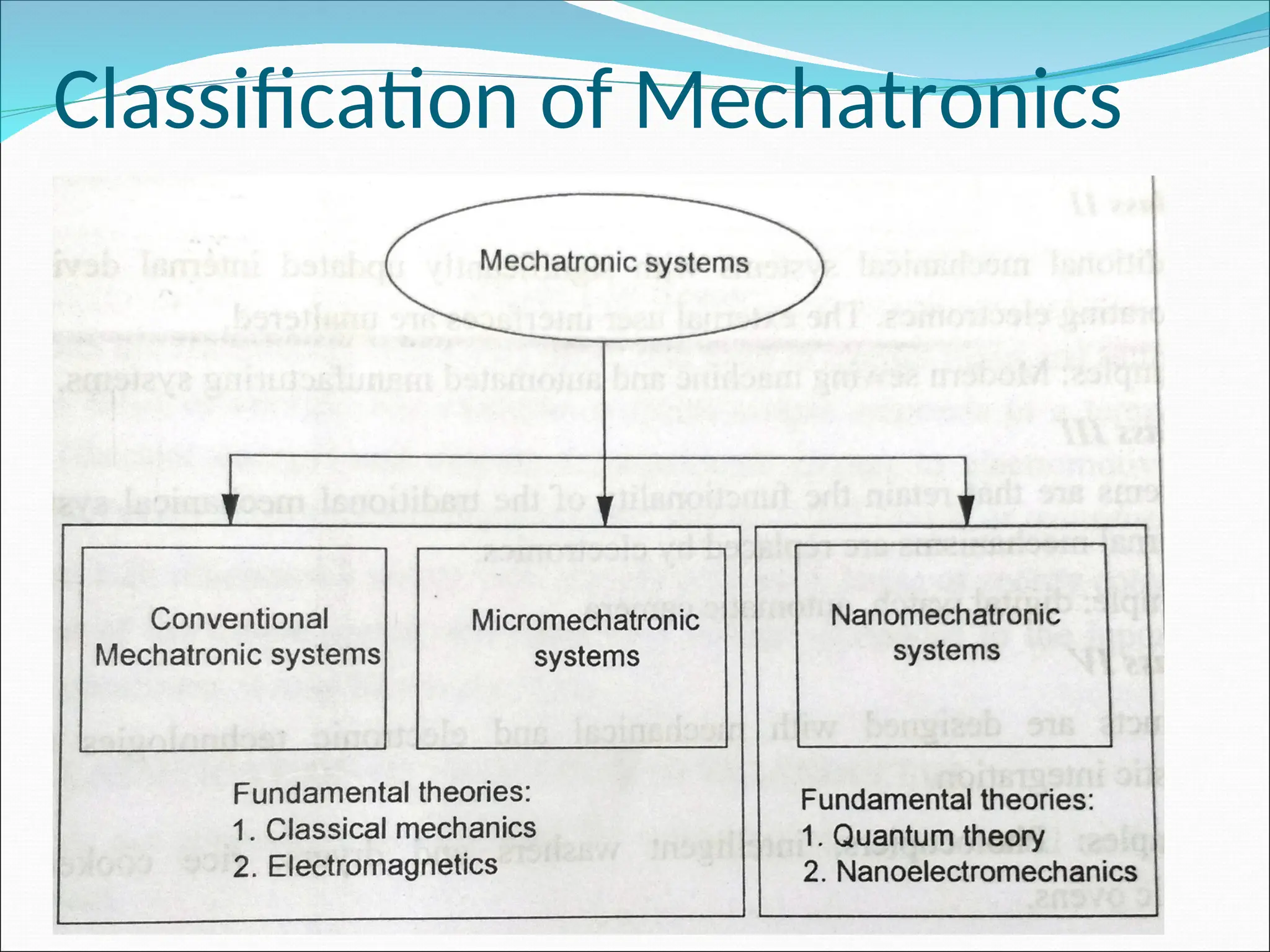
Mechatronics – Emerging areas of Mechatronics – Classification of Mechatronics. Sensors and
Transducers: Static and dynamic Characteristics of Sensor, Potentiometers – LVDT –
Capacitance sensors – Strain gauges – Eddy current sensor – Hall effect sensor – Temperature
sensors – Light sensors
 UNIT II 8085 MICROPROCESSOR AND 8051 MICROCONTROLLER
Introduction – Architecture of 8085 – Pin Configuration – Addressing Modes –Instruction set,
Timing diagram of 8085 – Concepts of 8051 microcontroller – Block diagram
 UNIT III PROGRAMMABLE PERIPHERAL INTERFACE
Introduction – Architecture of 8255, Keyboard interfacing, LED display –interfacing, ADC and DAC
interface– Traffic Control interface.
 UNIT IV PROGRAMMABLE LOGIC CONTROLLER
Introduction – Basic structure – Input and output processing – Programming – Mnemonics –
Timers, counters and internal relays – Data handling – Selection of PLC.
 UNIT V ACTUATORS AND MECHATRONIC SYSTEM DESIGN
Types of Stepper and Servo motors – Construction – Working Principle – Advantages and
Disadvantages. Design process-stages of design process – Traditional and Mechatronics design
concepts – Case studies of Mechatronics systems – Pick and place Robot – Engine
Management system – Automatic car park barrier.
INTRODUCTION
INTRODUCTION
 1969 -The ‘mechatronics’ word introduced by Tessturo
Mori. He was a senior engineer of Japanese company
Yaskawa Electric Corporation.
 1971 – the company was granted the trademark rights on
the word.
 1971- 80- mostly the servo technology is used in
mechatronics
 1981-90-IT introduced. Microprocessors were embedded
in Mechanical system.
 1991 -2000 – Communication technology was
added. Remote operation and robotics were
developed .
 1996 – 1st
journal IEEE on mechatronics was
released.
 After 2000, finds application in aerospace,
defence, bio-mechanics, automotive electronics,
banking(ATM) etc.,
DEFINITION
 Mechatronics is “ the synergistic
integration of mechanics and
mechanical engineering, Electronics,
computer technology, and IT to produce
or enhance products and system”
Graphical representation of
mechatronics
Elements of mechatronics system
 Actuators and sensors
 Actuators – pneumatic & Hydraulic actuator,
electromechanical actuators, electrical motor such as DC
motor, AC motor, stepper motor, servo motor & piezo
electric actuators
 Sensors – linear and rotational sensor, acceleration
sensor, force, torque and pressure sensor, temperature
sensor, proximity sensors, light sensors
 Signals and conditioning
 Two types: input and output
 Input signal conditioning devices: discrete circuits,
amplifiers, analog to digital(A/D) convertors, Digital to
Analog (D/A) convertors.
 Output signal conditioning devices: amplifiers, Digital to
Analog (D/A) convertors, display decoders (DD)
convertors, power transistors.
Elements of mechatronics system
 Digital logic systems
 Logic circuits, micro controllers, programmable
logic controllers(PLC), sequencing and timing
controls, control algorithm.
 Software and data acquisition systems
 Data logger, computer with plug in boards
 Computers and display devices
 LED, CRT, LCD, digital displays etc.,
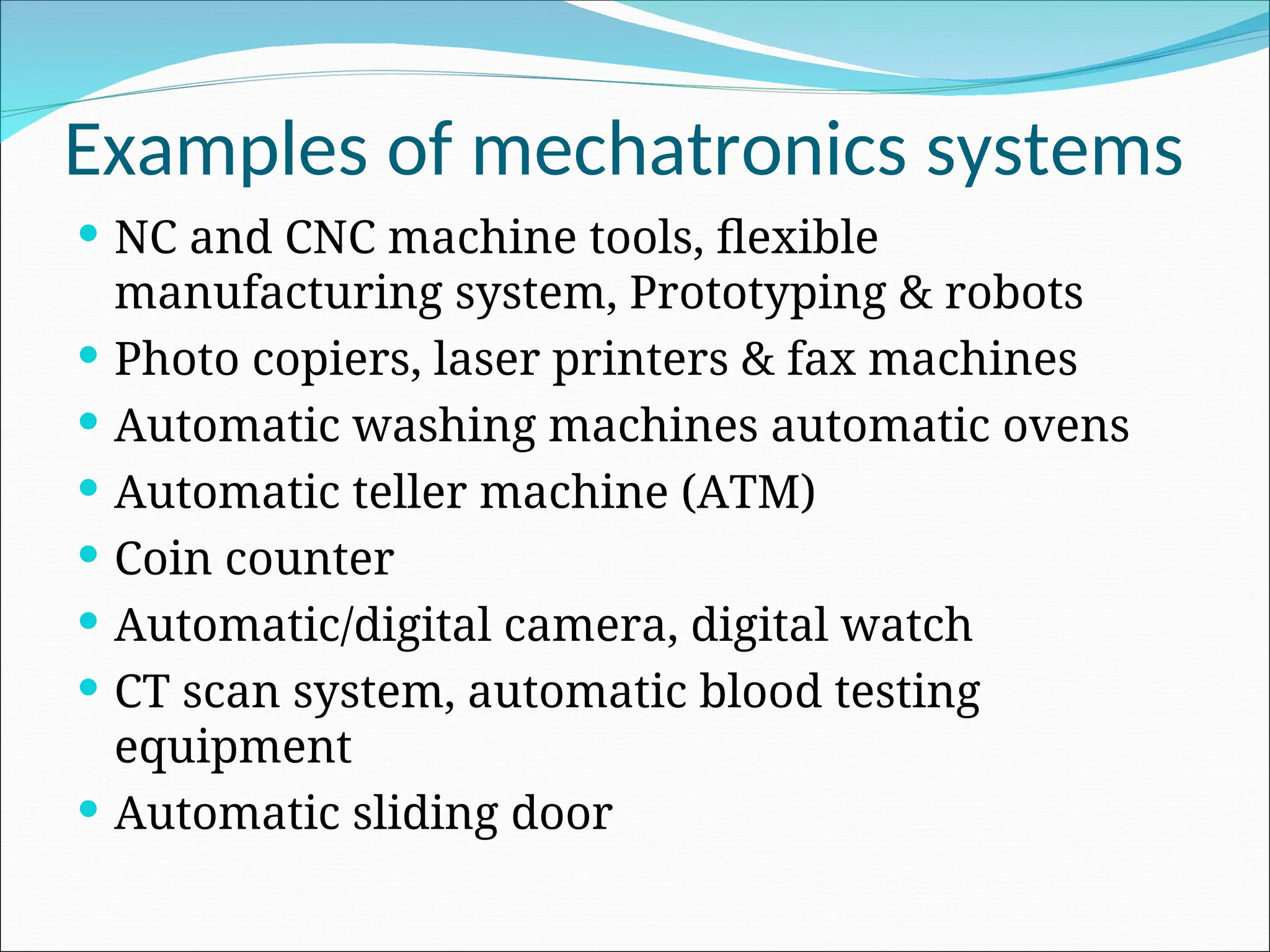
Examples of mechatronics systems
 NC and CNC machine tools, flexible
manufacturing system, Prototyping & robots
 Photo copiers, laser printers & fax machines
 Automatic washing machines automatic ovens
 Automatic teller machine (ATM)
 Coin counter
 Automatic/digital camera, digital watch
 CT scan system, automatic blood testing
equipment
 Automatic sliding door
Advantages of Mechatronics systems
 Cost effective and good quality products
 High degree of flexibility to modify or redesign
 Very good performance characteristics
 Wide area of applications
 Greater productivity in case of manufacturing
organization
 Posibility or remote controlling as well as
centralized monitoring and control
 Greater extend of machine utilization
Disadvantages of Mechatronics systems
 High initial cost
 Multi-disciplinary engineering background
required to design and implementation
 Need of highly trained workers
 Complexity in identification and correction of
problem in the system
System
Measurement system
Liquid level measurement system
Control systems
 A control system refers to a group of
physical component connected or
related in such a manner as to
command direct or regulate itself or
another system.
Cooling level control
system
Steering control system of an
Temperature and blood pressure
control system of human body
TYPES OF CONTROL SYSTEM
Open loop control system
Closed loop or feedback control
system
Open loop control system
 Open loop system are systems in which the
output of a system is not used as a variable to
control the system.
Element of open loop control systems
Bread toaster (open loop ) control
system
Closed loop control system
 Closed loop system uses on a feed back loop to
control the operation of the system.
Room heating (Closed loop) control system
Open loop system
 It does not uses feedback
 It is less accurate
 It is simple in
construction
 Presence of non-linearity
causes malfunctioning
 The response is slow
because manual control
 Easy maintenance
because of no complex
electronic circuit
 Cost is less
 Closed loop system
 It uses feedback
system
 It is more accurate
 It is complicated in
construction
 It perform accurately
even in presence of
non-linearity
 It perform task faster
than open loop
 It is difficult to
maintain and repair
 Cost is more
Automatic tank level control system
Sequential controllers
 A sequential control involve sequential
execution of well defined operations.
The working of modern
automatic washing machine is
 Step 1 : pre-wash cycle- (Cold water wash)
 Step 2: main wash cycle- (Hot water wash)
 Step 3: rinse cycle- (Number of preset time)
 Step 4: spin cycle- (Drain the water from
clothes)
Block diagram of automatic washing machine system
Elements of control system for an automatic camera
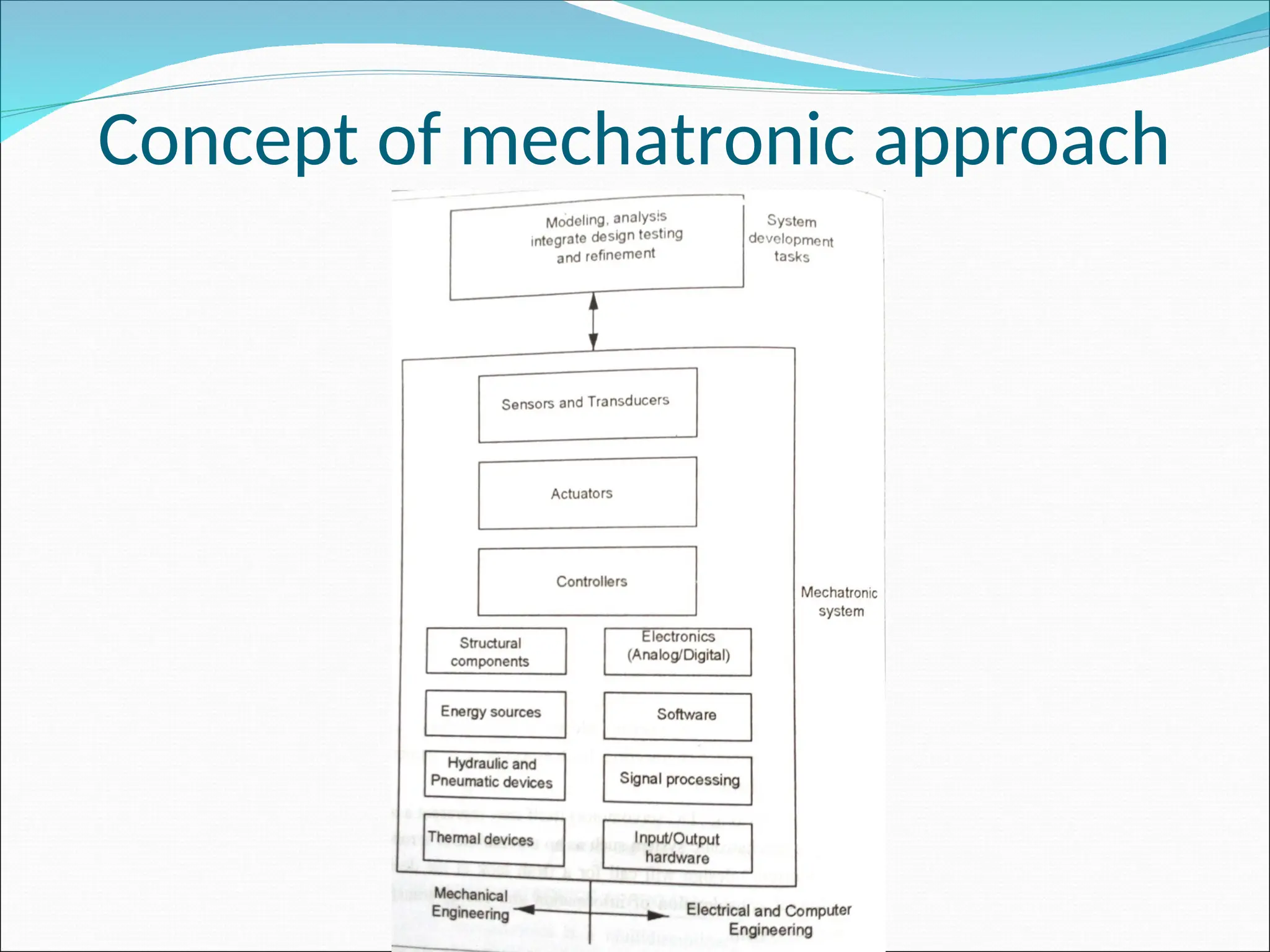
Concept of mechatronic approach
Emerging area of mechatronics
 Machine vision
 Automation and robotics
 Development of unmanned vehicles
 Design of subsystem for automotive engineering
 Sensing and control system
 Operation and maintenance of CNC machine
 Expert system and artificial intelligence
 Industrial electronics and consumer products
 Medical mechatronics and medical imaging systems
 Micro/nano mechatronics
 Computer integrated manufacturing (CIM) system
Need for mechatronics
 Dynamic market conditions
 Producing next generation products
 Integration of modern technologies in products
 Variety in product ranges
 Batch production runs
 Change in design perspective
 Product quality and consistency
 Ease of reconfiguration of the process
 Demand for increased flexibility
Classification of Mechatronics
Sensor
Sensor are devices which produce
a proportional output signal
(mechanical, electrical, magnetic
etc.,) when exposed to a physical
phenomenon (pressure,
temperature, displacement , force
etc.,).
Transducer
Transducer are devices which converts
an input of one form of energy in to an
output of another form of energy.
Performance terminology
• Static characteristics
– Static characteristics of an instrument are the
parameters which are more or less constant or
varying very slowly with time.
• Dynamic characteristics
– Sensors and actuators respond to inputs that
change with time. Dynamic characteristics of an
instrument are the parameters which are varying
with time.
Static characteristics
 Range – e.g.: a thermocouple may have a range
of -100 to 1000°C
 Span : maximum value of input – minimum
value of input
 Error : measured value – true input value
 Accuracy :
 Sensitivity: it is defined as the change in output
per change in input
Static characteristics
 Hysteresis: it is defined as the maximum
difference in output for a given input when this
value is approached from the opposite direction.
 Linearity: it is refer to the output that is
directly proportional to input over its entire
range.
Static characteristics
• Repeatability: it is defined as the ability of the
sensor to give same output reading when the
same input value is applied repeatedly under the
same operating conditions.
• Reproducibility: it is defined as the degree of
closeness among the repeated measurements of
the output for the same value of input under the
same operating conditions at different times.
Static characteristics
 Stability : it means the ability of the sensor to
indicate the same output over a period of time for
a constant input.
 Dead time: it is the time taken by the sensor
from the application of input to begin its
response and change.
 Resolution: it is defined as the smallest change
that can be detected by a sensor
Dynamic characteristics
 Response time
 Time constant
 Rise time
 Setting time
Displacement sensor
A displacement sensor is used to measure
travel range between where an object is and a
reference position. Displacement sensors can
be used for dimension measurement to
determine an object's height, thickness, and
width in addition to travel range.
Potentiometer sensor
Strain gauge sensor
Capacitive sensor
Inductive sensors (LVDT)
Potentiometer Displacement sensor
A potentiometer sensor measures the distance or displacement of an object in a linear
or rotary motion and converts it into an electrical signal.
Linear potentiometer
Potentiometer Displacement sensor
Rotary potentiometer
Potentiometer Displacement sensor
Potentiometer with voltage divider
Strain gauge Displacement sensor
strain gauges to measure the deformation of a beam under load, and to measure the
pressure /Force.
Strain gauge with Wheatstone bridge circuit
Capacitive displacement sensor
Capacitive displacement sensors operate by measuring changes in position.
Different form of capacitive sensor
Push – pull capacitive sensor
Capacitive proximity sensor
Inductive displacement sensor
Linear variable Differential Transformer (LVDT) -
to measure displacement.
Linear variable Differential Transformer (LVDT)
output
Rotary variable Differential Transformer (RVDT)
Position sensors
position sensor is used for a sensor that gives a measure of the distance between a
reference point and the current location of the target
 potentiometer
 Capacitive sensor
 Inductive sensor
 Hall effect sensors
 Photoelectric sensor
 Optical encoder
Hall effect sensors
Hall effect sensors leverage magnetic fields to determine factors such as positioning,
proximity, displacement, speed, and current.
Principle of Hall effect
Hall effect Sensor
Fluid level Hall effect Sensor
Temperature sensors
A temperature sensor is a device that is designed to measure the degree of hotness or
coolness in an object.
 Bimetallic strips
 Resistance temperature detectors (RTDs)
 Thermistors
 Thermocouples
 Thermodiodes and transistors
Bimetallic strips
A bimetallic strip is used to convert a temperature change into mechanical displacement
Resistance temperature
detectors (RTDs)
Thermistors
Bead type have platinum wire sintered in to a ceramic body
(bead)
Metalized surface contact thermistors are called chips or
flakes
Thermocouple
Light sensors
 Photo resistors
 Photodiode
 phototransistors
Photodiode
Phototransistors
Phototransistor light detector circuit
Proximity sensor
 Optical encoders
 Hall Effect sensors
 Capacitive sensors
 Eddy current proximity sensors
 Inductive proximity sensors
 Pneumatic proximity sensors
 Proximity switches
Eddy current proximity sensors
Selection of sensors
 Accuracy required
 Precision
 Sensitivity
 Operating range
 Resolution
 Speed range
 Reliability
 Calibration
 The nature of output
 Linearity
 Environmental
conditions
 Interfacing
 Size and weight
UNIT II
8085 MICROPROCESSOR AND
8051 MICROCONTROLLER
MICROPROCESSOR
• It is a semiconductor component that
incorporates the functions of a central
processing unit (CPU) on a single integrated
circuit (IC) . i.e., the central processing unit (CPU)
built on a single IC is called microprocessor.
MICROPROCESSOR
• It is multipurpose, programmable and clock
driven,
• Register based electronic device that reads
binary instructions from a storage device called
memory,
• Accept binary data as input, process the data
according to the instruction and provides
results as output.
Functional Block diagram of
Microprocessor
ALU
Register
Array
Control
Microprocessor
Functional Block diagram of
Microprocessor
• ALU (Arithmetic and Logic Unit)
– It carries out arithmetic and logic operations on 8
bit word.
– Arithmetic operation – addition, subtraction ,
multiplication , division etc.,
– Logic operation - AND,OR,EX-OR
– The content of accumulator and temporary
register are the input to the ALU.
– ALU output is stored in accumulator
• Register array
– Register is a storage unit within the
microprocessor used to store the data, address of
instruction of any program.
– Microprocessor contained 6 general purpose
register it has 8- bit memory
– Registers are B,C,D,E,H and L
– To hold 16-bit data a combination of two 8-bit
registers can be used.
– The combination of two 8-bit registers is known as
Register Pair (BC, DE and HL).
– These Registers are used to store data temporarily
during execution of the program.
• Control Unit
– The timing and control unit acts as the brain of a
computer.
– It controls all operations of the CPU.
– It controls input, output and all other devices
connected to the CPU.
Evolution of Microprocessor
• First generation Microprocessor
– 1st
Microprocessor, Intel 4004, a 4 bit PMOS
Microprocessor introduced in 1971 by the Intel
corporation, USA.
– It has limited memory
– An enhanced version of Intel 4004 is Intel 4040.
– e.g., Toshiba’s 73472, Rockwell International’s PPS-
4 National IMP-4 etc.,
Evolution of Microprocessor
• Second generation Microprocessor
– In 1972, Intel introduced 8- bit Microprocessor
named as Intel 8008, which also uses PMOS
technology.
– But this technology was slow and not compatible
with TTL logic
– In 1973, Intel introduced more powerful and fast
8- bit NMOS Microprocessor called Intel 8080
– Intel 8085 is the improved version of Intel 8080
• Third generation Microprocessor
– In 1978 Intel introduced a 16- bit Microprocessor
called Intel 8086.
– Other 16- bit Microprocessor are Intel 80186, Intel
80286, zilog’s z8000, Motorola’s 68000, 68010 etc.,
• Forth generation Microprocessor
– In 1985 Intel introduced a 32- bit Microprocessor
called Intel 60386
• Fifth generation Microprocessor
– Intel i860 is a 64 bit RISC microprocessor
Architecture of 8085
• Three main section
– ALU
– Timing and Control unit
– Set of register
ARCHITECTURE OF 8085
• ALU
– Addition, Subtraction, Logical AND,OR…etc
• Timing and Control Unit
– Controls the entire operation of the microprocessor
• Register
– 1- 8 bit Accumulator….i.e.-register A (ACC)
– 6-8 bit general purpose register (B,C,D,E,H & L)
– 1- 16 bit register –SP(Stack Pointer)
– 1 -16 bit –PC (Program Counter)
– Instruction register
– Temporary register
– Flag register
• Flag register
– Carry flag (CY) – it is set, If carry or borrow occurs
during the arithmetic operation.
– Parity flag (P) – it is set, if the result has even number
of it otherwise made 0.
– Auxiliary carry flag (AC) – Binary coded decimal
operations (BCD)
– Zero flag (z) – is set if the result becomes 0
– Sign flag (S) – is set if the result becomes –ve, if +ve, it
is set to 0
– 2 bit (don’t care )
Pin diagram
Signals in 8085
• 6 group of signals
• Address bus (A15-A8)-
– unidirectional
• Data bus (AD7-AD0)
– bi-directional both data and
address
• Control and Status signals
– ALE (Address Latch Enable)
– RD,WR,IO/M,S0,S1
• Power supply and Clock frequency
– VCC +5
– VSS-Ground
– X1,X2
– CLK
• Externally initiated signals
– INTR
– INTA
– TRAP
– RST 7.5,RST6.5,RST 5.5
– READY
– HOLD
– RESET IN
– RESET OUT
– HLDA
• Serial I/O Ports
– SID
– SOD
ADRESSING MODES IN 8085
• Direct addressing
• Register addressing
• Register indirect addressing
• Immediate addressing
• Implicit addressing
• Direct addressing
– LDA 240H (Load register A with the contents of
memory location 240FH)
– STA 2400H (Store the content of the accumulator
in the memory location 2400H)
• Register addressing
– MOV B, D (move the content of register D to
register B)
– INX H (increment the content of [H-L] register pair
• Register indirect addressing
– LXI H, 2500H (Load H-L pair with 2500H)
– MOV A, B (move the content of the memory
location, whose address is in H-L pair(H-L Pair) to
accumulator)
– HLT (halt)
• Immediate addressing
– MVI A, 05 (Move 05 in register A)
– 3E, 05 (the code format of an instruction)
• Implicit addressing
– There are certain instruction which operate the
content of the accumulator.
– Such instruction do not require the address of the
operand
– CMA
– RAL
– RAR
Instruction sets 8085
• Data transfer group
• Arithmetic group
• Logical group
• Branch group
• Stack, I/O and Machine control group
Data transfer group
• MOV r1,r2
• MOV r, M (Move the content of memory to register)
• MOV M, r
• MVI r1, data (Move Immediate DATA to register)
• MVI M, data
• LDA data (Load accumulator direct)
• STA addr (store accumulator direct)
• XCHG (exchange the content of H-L with D-E pair)
• LHLD addr (Load HL pair direct)
• SHLD addr (Store HL pair direct)
• STAX xp ( store accumulator Indirect)
Arithmetic group
• ADD r
• ADD M
• ADI data
• ADC r
• ADC M
• SUB r
• SUB M
• SUI data
• SBB r
• SBB M
• INR r
• INR M
• DCR r
• DCR M
Logical group
• ANA r
• ANA M
• ANI data
• ORA r
• ORA M
• ORI data
• XRA r
• XRA m
• XRI data
• CMA (complement acc)
• CMC(complement carry)
• CMP r (compare)
• CMP M
• CPI data
• RLC (rotate)
• RRC
• RAL
• RAR
Branch group
• Two branch instruction
–Conditional
• The conditional branch instructions
transfer the program to the specified
label when certain condition is satisfied
–Unconditional
• The Unconditional branch instructions
transfer the program to the specified
label when certain condition is not
satisfied
• Conditional jumb addr (label)
– If the condition is true and the program jumps to
the specified label, the execution of a conditional
jump takes 3 machine cycles and 10 states
– If the condition is not true, only two machine
cycles and 7 states are required for the execution
of the instruction.
– JZ addr (label) [jump if the result is zero]
[PC] address (label), jump if z=0
Machine cycle – 2/3
States – 7/10
Addressing mode – Immediate
Flags - None
– JNZ addr [ jump if the result is not zero]
[PC] address (label), jump if z=1
– JC addr [ jump if there is a carry ]
[PC] address (label), jump if CS = 1
– JNC addr [ jump if there is no carry ]
[PC] address (label), jump if CS = 0
– JP addr [ jump if the result is plus)
[PC] address (label), jump if S = 0
– JM addr [ jump if the result is minus)
[PC] address (label), jump if S = 1
– JPE addr [ jump if even parity)
[PC] address (label), jump if P = 0
– JPE addr [ jump if odd parity)
[PC] address (label), jump if P = 1
• CALL addr (label)
– Call the subroutine identified by the operand
– CC addr (call subroutine if carry status CS=1)
– CNC addr (call subroutine if carry status CS=0)
– CZ addr (call subroutine if result is zero)
– CNZ addr (call subroutine if result is not zero)
– CP addr (call subroutine if result is plus)
– CM addr (call subroutine if result is minus)
– CPE addr (call subroutine if even parity)
– CPOE addr (call subroutine if odd parity)
• Unconditional
– RET(Return from Subroutine)
– CALL addr
– RSTn (Restart)
Stack ,I/O and Machine control Group
• PUSH rp [push the content of register pair to stack)
• PUSH PSW [push the program status to word]
• POP rp [pop the content of register pair which
was saved from the stack]
• POP PSW
• IN PORT
• OUT PORT
• EI (enable interrupts)
• DI(disable interrupts)
• HLT (halt)
• NOP( notion oper)
• RIM(read interrupts mask)
• SIM (set interrupts mask)
SIM(Set Interrupts Mask)
RIM (Read Interrupts Mask)
Timing diagram of 8085
• Opcode fetch cycle (4T or 6T)
• Memory Read cycle (3T)
• Memory write cycle (3T)
• I/O read cycle (3T)
• I/O write cycle (3T)
• Interrupt acknowledge (6T or 12T)
• Bus idle cycle (2T or 3T)
Opcode fetch cycle
Memory Read cycle
Memory write cycle
I/O read cycle
I/O write cycle
Microcontroller
• A Microcontroller is a small computer on a
single integrated circuit containing a processor
core, memory and programmable
input/output peripherals.
Block diagram of 8051
Features Microcontroller
• 8 bit CPU
• On chip oscillator
• 4Kb of ROM
• 128 bytes of RAM
• 21 special functions register
• 32 I/O lines
• 64 KB address space for external data memory
• 64 KB address space for program memory
• 2 16-bit timer/counter
UNIT 3
PROGRAMMABLE PERIPERAL
INTERFACE
Introduction
• To communicate with the outside world,
microprocessor use peripherals (I/O devices)
• Input devices – Keyboards, A/D converters
etc.,
• Output devices – CRT, Printers, LEDs etc.,
• Peripherals are connected to the
microprocessors through electronic circuit
known as interfacing circuits.
Microprocessors unit with I/O devices
Input
peripherals
Output
peripherals
• Some of the general purpose interfacing devices
– I/O ports
– Programmable peripherals interface (PPI)
– DMA controllers
– Interrupt controller
• Some of the special purpose interfacing devices
– CRT controller
– Keyboard
– Display
– Floppy Disc controllers
Peripheral interfacing Chips are used
generation of I/O ports
• Programmable peripherals interface Inter 8255 (PPI)
• Programmable Interrupt controller (PIC) Intel 8259
• Programmable communication interface (PCI) Intel
8251
• Keyboard display Controller Intel 8279
• Programmable counter /Inverter timer Intel 8253
• A/D and D/A Converter Interfacing
Microprocessors unit with I/O devices
Peripheral
Interface
Display
Interface
Address Space Partitioning
• The Microprocessors uses 16 bit wide address
bus for addressing memories and I/O devices.
• Using 16 bit wide address bus, it can access 216
= 64k bytes of memory and I/O devices
• Two schemes for the allocation of addresses
to memories and I/O devices
– Memory mapped I/O
– I/O mapped I/O
Memory mapped I/O
• It has only one address space
• Address space is defined as the set of all possible
addresses that a microprocessor can generate
• Some addresses assigned to memories and Some
addresses to I/O devices
• Memory locations are assigned with addresses
from 8000 to 84FF
• I/O devices are assigned with addresses from
8500 to 85FF
I/O mapped I/O scheme
• In this scheme, addresses assigned to
memories locations can also be assigned to
I/O devices
• Since the same address may be assigned to
memories locations or an I/O devices
• The microprocessor has a signal to distinguish
whether the address on the address bus is for
memories locations or an I/O devices
I/O mapped I/O scheme
• When signal is high, then address on the address bus is
for an I/O devices
• When signal is low, then address on the address bus is
for memory locations
• Two extra instruction IN and OUT are used to address
I/O devices.
• The IN instruction is used to read the data of an input
devices.
• The OUT instruction is used to send the data of an
input devices.
• This scheme is suitable for a large system.
PROGRAMMABLE PERIPHERALS INTERFACE INTER 8255
(PPI)
Operating mode of 8255
• Bit Set Reset (BSR) Mode
• I/O Mode
Bit Set Reset (BSR) Mode
BSR control word format
I/O Mode
• The 8255 has the following 3 modes of
operation
– Mode 0 – Simple Input/output
– Mode 1 – Input / Output with the Handshake or
strobed
– Mode 2 – Bi-directional I/O
I/O Mode
Mode 0 – Simple Input/output
– Port A and port B are used as two simple 8-bit I/O
port
– Port C as two 4-bit port
• Features
– Outputs are latched
– Inputs are buffered not latched
– Ports do not have handshake or interrupt capability
I/O Mode
• Mode 1 – Input / Output with the Handshake
– Input or output data transfer is controlled by
handshaking signals.
– Handshaking signals are used to transfer data
between devices whose data transfer speeds are
not same.
– Port A and Port B are designed to operate with the
Port C.
– When Port A and Port B are programmed in Mode
1, 6 pins of port C is used for their control.
I/O Mode
• D0-D7 data bus
– bi directional, tri state data bus line
– It is used to transfer data and control word from
8085 to 8255
• RD (Read)
– When this pin is low, the CPU can read data in the
port or status word through the data buffer
• WR (write)
– When this pin is low, the CPU can write data in the
port or in the control register through the data buffer
I/O Mode
• Mode 2 – Bi-directional I/O
• Port A can be programmed to operate as a
bidirectional port.
• The mode 2 operation is only for port A
• When port A is programmed in Mode 2, the
Port B can be used in either Mode 1 or Mode
0.
• Mode 2 operation the port a is controlled by
PC3 to PC7 of port C.
PIN
DIAGRAM
OF 8255
PROGRAMMING and OPERATION of
8255
• Programming in MODE 0
• D7 –set to 1
• D6,D5,D2- all set to 0 –MODE 0
• D4,D3,D1 and D0- determine weather the
corresponding ports are to configured as input
or output
A B GROUP A GROUP B
D4 D3 D1 D0 PORT A PORTC U PORT B PORT C L
0 0 0 0 OUT OUT OUT OUT
0 0 0 1 OUT OUT OUT IP
0 0 1 0 OUT OUT IP OUT
0 0 1 1 OUT OUT IP IP
0 1 0 0 OUT IP OUT OUT
0 1 0 1 OUT IP OUT IP
0 1 1 0 OUT IP IP OUT
0 1 1 1 OUT IP IP IP
1 0 0 0 IP OUT OUT OUT
1 0 0 1 IP OUT OUT IP
1 0 1 0 IP OUT IP OUT
1 0 1 1 IP OUT IP IP
1 1 0 0 IP IP OUT OUT
1 1 0 1 IP IP OUT IP
1 1 1 0 IP IP IP OUT
1 1 1 1 IP IP IP IP
Programming in MODE 1
• IBF- input buffer full
• INTR- interrupt request
• INTE-interrupt enable
• OBF-output buffer full
• INTR-interrupt request
• INTE-interrupt enable
Programming in MODE 2
Interfacing cable
Basic Key operation
2 X 2 Key operation
Keyboard Microprocessor Interface software Flowchart
INTERFACING-keyboard
LED Operation
Microprocessor interface to LED
(Common anode)
Microprocessor interface to 7 segment LED
(Parallel)
Microprocessor interface to 7
segment LED (serial)
Serial interface of 7
segment LED to
Microprocessor
software flowchart
INTERFACE-LED display
ADC INTERFACE
BLOCK diagram of ADC 0808
PIN diagram of ADC 0808
DAC INTERFACE
Pin diagram of DAC
Pin diagram of DAC
INTERFACING diagram for DAC
TEMPERATURE CONTROL
• Temperature sensor –convert temp to
electrical signal by thermistor
• Transducer convert physical data into
electrical signal
• Physical data –temp, light, flow, speed etc…
• LM34 & LM35 –temperature sensor by
NATIONAL SEMICONDUCTOR CO-OPERATION
• LM34
• Output voltage is
linearly proportional to
Fahrenheit temp
• No external calibration
• 10mV for each degree
of Fahrenheit temp
• LM35
• Output voltage is
linearly proportional to
Celsius temp
• No external calibration
• 10mV for each degree
of Centigrate temp
STEPPER MOTOR CONTROL interface
• Digital motor used to translate electrical pulse
into mechanical movement
• Center tap winding connected to 12 V supply
• Motor can be excited by grounding four
terminals of the two windings
• ROTOR-Stepper motor has permanent magnet
rotor .It is also known as shaft
• STEP ANGLE-It is minimum degree of rotation
associated with a single step
Stepper Motor Interface
Excitation Table
Step X1 X2 X3 X4
1 0 1 0 1
2 1 0 0 1
3 1 0 1 0
4 0 1 1 0
1 0 1 0 1
Traffic Light Control System
• Allow traffic from W to E and E to W transition
for 20 seconds
• Give transition period of 5 seconds (yellow
bulbs ON)
• Allow traffic from N to s and S to n for 20
seconds
• Give transition period of 5 seconds (yellow
bulbs ON)
• Repeat the process
Traffic Light Control System
Interfacing diagram for Traffic Light
Control System
UNIT 4
PROGRAMMABLE LOGIC CONTROLLER
• A Programmable Logic Controller(PLC) is a
digital computer used for automation of
typically industrial electromechanical
processes, such as control of machinery on
factory assembly lines, amusement rides or
light fixtures.
Applications
• Automated manufacturing process equipment
and machinery
• Packaging and filling equipment
• Chemical mixing
• Conveyor systems and distillation etc.,
Features and specification
• They are rugged and designed to withstand
vibration, temperature, humidity and noise
• The interfacing for inputs and outputs is inside
the controller.
• They are easily programmed and have an
easily understood programming language.
• Programming is primarily concerned with logic
and switching operation.
Hardwired motor circuit
Hardwired motor circuit with PLC
Basic structure
• PLC is designed as a replacement for the
hardwired relay and timer logic, where PLC
provides ease and flexibility of control based
on programming and executive logical
instruction.
• The internal functions such as timers, counter
and shift registers making sophisticated
control possible using even the smallest PLC.
• PLC capable of performing function such as
– counting,
– logistics,
– numerical application,
– comparing and processing of signals.
• A PLC is divided in to 4 parts. They are
– Input/output module (I/O)
– Central processing Unit (CPU)
– Memory
– Programming unit
i) Input/output module (I/O)
• It is used to transfer the data between
external devices and CPU
• It is incorporated into PLC in two ways
I. Fixed I/O – it is a small unit that comes in one
piece with processor i.e., the I/O terminals
cannot be changed in fixed I/O
II. Modular I/O – it is packed together i.e., there are
several compartment of I/O module are plugged
together.
Central processing Unit (CPU)
• It is consisting of a microprocessor which
interrupts the input signal and carries out the
control actions according to the program stored in
the memory, communicating the decision as an
action signal to the output.
• It scan the total information package stored in the
memory and input and output devices
continuously.
• During the scan the CPU executes instruction
based on input data, sends appropriate output
responses to the output devices, updates data
acquisition systems and indicate condition
changes
• Scan time for larger unit depends on the size
of the memory and configuration of the
system
• Power supply unit is needed to convert the AC
voltage to the low DC voltage necessary for
the processor and to supply power to other
circuit in the input and output interface
module.
Memory Unit
• The memory in PLC stores the digital control
logic, the process program and the necessary
instruction to operate the system.
• The memory used in PLC are
• Non-volatile memory
• Volatile memory
• According to purpose of usage
• RAM –volatile memory
• ROM- permanent storage
Programming unit
• It is used to enter the required program into
the memory of the processor
• There are normally 3 approaches followed by
the program
– Use of hand held programmer
– Terminal with video display unit
– PC with appropriate software
Architecture
• Buses
– Data buses – it is used for communicating data b/n
elements
– Address buses-it is used to read the address of
locations for accessing stored data
– Control buses- it is used for internal control action
carried by the CPU
– System buses- it is used for communication b/n
Input/output ports and input/output units
• Memory
– RAM
– ROM
• PROM
• EPROM
• Electrically EPROM
Optoisolator
• Electrical connection from the external world
is usually by means of optoisolator
• When a digital pulses passes through the LED,
a pulse of Infrared radiation is produced.
• This pulses is detected by the phototransistor
and gives rise to a voltage in that circuit.
Optoisolator
Input channel with optoisolator
• Common input voltage is 5V and 24V
• Output voltage is 24V and 240V
• Output are often specified as being of
– Relay type
– Transistor type
– Triac type
Relay type of output
The relay type output is used for both ac and dc switching
Relay are slow to operate
Transistor type output
The transistor type output is used for dc switching
This give faster switching action
Triac type of output
The triac type output is used for switching AC voltages
Programming
• The programming of PLC is based on the
ladder diagram.
• Ladder diagram involve writing a program in a
similar maner to drawing a switching circuit.
Switch controlling Solenoid
e.g., solenoid valve
open to allow water
to enter a vessel
Ladder Diagram for
Switch Control
Temperature Control System
Logic functions
An AND System
An OR System
NOT System
NOR System
NAND System
XOR System
Cylinder Sequencing
A+, B+, A- and B-
List of Mnemonics used for the
Mitsubishi f Series PLC
Mnemonics for Logic system
Timer
Delay ON Timers:
• The term delay is used to indicate that this
timer burns on, after waiting for a fixed time
delay period.
• When there is an input, the timer is energized
and starts timing, after some pre-set value,
the timer contacts are closed to output.
• TON is used to denote ON-delay
Delay OFF Timers:
• OFF delay timers are maintained as ON for a
fixed time of delay period before turning off.
• TOF is used to denote OFF-delay.
Timer circuit programmed to cause an output to
go ON for 0.5s, then OFF for 0.5s, then OFF for
0.5s and so on
ON-OFF
cycle timer
Internal relay
COUNTERS
• Counters are used to count a specified
number of contact operation
Types of Counters:
• Up Counters
• Down Counters ns
Up Counters
• Up counters count up from the zero to pre –
set value
• The events are added until the pre – set value
is reached
• When the counter reaches the set value, its
contacts change state
Down Counters
• Down counters count down from the pre – set
value to zero
• The events are subtracted until the pre – set
value is reached
• When the counter reaches the Zero value, its
contacts change state
Counter
Master control relay
JUMP Instruction
Data handling
• Data movement
• Data comparison
• Arithmetic operation
• Code conversion
Data Movement
 Moving data from one memory location to
another
Arithmetic operation
• AND
• OR
• NOT
• EX-OR
• NAND
Code Conversions
• All the internal operations in the CPU of a PLC
are carried out through binary numbers.
• Most PLCs provide BCD-to-binary and binary-
to-BCD conversion for use.
• When a decimal (input) signal is given, BCD
conversion is used.
• Similarly, when a decimal output is required,
Decimal conversion is used.
• The data at the source address is in BCD and
converted to binary and placed at the
destination address.
Controlling the speed of motor
Selection of PLC
• System definition
• Choosing the I/O hardware
• I/O timing consideration
• Analog I/O module –resolution, voltage level
• Conversion speed
• Analog closed control
• Communication
• Counter, encoders and positioning
• Selecting suppliers
UNIT 5
ACTUATORS AND MECHATRONICS
SYSTEMS DESIGN
Stages in designing mechatronics system
Traditional design
Mechatronic design
Comparison of traditional and
mechatronics design
Traditional design
• It is based on a traditional
systems such as mechanical,
hydraulic and pneumatic
systems
• Less flexible
• Less accurate
• More complicate mechanism
in design
• It involve more components
and moving parts
Mechatronics design
• It is based on mechanical,
electronics, computer
technology and control
engineering.
• More flexible
• More accurate
• Less complicate mechanism
in design
• It involve fewer components
and moving parts
Electrical Motor
• A motor is nothing but an electro-mechanical
device that converts electrical energy to
mechanical energy.
• The very basic principal of functioning of an
electrical motor lies on the fact that force is
experienced in the direction perpendicular to
magnetic field and the current, when field and
current are made to interact with each other.
Classification or Types of Motor
Classification of motors
DC motors
• A DC motor is a device that converts
direct current (electrical energy) into
rotation of an element (mechanical
energy).
Brush type DC motor
• A typical brushed motor consists of an
armature coil, slip rings divided into two
parts, a pair of brushes and horse shoes
electromagnet.
• A simple DC motor has two field poles
namely a north pole and a south pole.
The magnetic lines of force extend across
the opening between the poles from
north to south.
• The coil is wound around a soft iron core
and is placed in between the magnet
poles. These electromagnets receive
electricity from an outside power source.
Advantages of brushed DC motor:
• The design of the brushed DC motor is quite
simple
• Controlling the speed of a Brush DC Motor is easy
• Very cost effective
Disadvantages of brushed DC motor:
• High maintenance
• Performance decreases with dust particles
• Less reliable in control at lower speeds
• The brushes wear off with usage
Brushless DC motor
• A brushless DC motor has a rotor with
permanent magnets and a stator with
windings. The rotor can be of ceramic
permanent magnet type.
• The brushes and commutator are
eliminated and the windings are
connected to the control electronics.
• The control electronics replace the
commutator and brushes and energize
the stator sequentially. Here the
conductor is fixed and the magnet
moves.
• The current supplied to the stator is
based on the position of rotor. It is
switched in sequence using transistors.
The position of the rotor is sensed by
Hall effect sensors. Thus a continuous
rotation is obtained.
Advantages of brushless DC motor:
• More precise due to computer control
• More efficient
• No sparking due to absence of brushes
• Less electrical noise
• No brushes to wear out
• Electromagnets are situated on the stator hence easy to cool
• Motor can operate at speeds above 10,000 rpm under loaded and
unloaded conditions
• Responsiveness and quick acceleration due to low rotor inertia
Disadvantages of brushless DC motor:
• Higher initial cost
• Complex due to presence of computer controller
• Brushless DC motor also requires additional system wiring in order to
power the electronic commutation circuitry
AC motors
• AC motors convert AC current into the rotation of
a mechanical element (mechanical energy).
• As in the case of DC motor, a current is passed
through the coil, generating a torque on the coil.
Typical components include a stator and a rotor.
• The main limitation of AC motors over DC motors
is that speed is more difficult to control in AC
motors. To overcome this limitation, AC motors
are equipped with variable frequency drives but
the improved speed control.
Synchronous motor
• A synchronous motor is an AC motor which runs at constant speed fixed
by frequency of the system.
• It requires direct current (DC) for excitation and has low starting torque,
and hence is suited for applications that start with a low load. It has two
basic electrical parts namely stator and rotor.
• The main difference between the synchronous motor and the induction
motor is that the rotor of the synchronous motor travels at the same
speed as the rotating magnet.
• The stator is given a three phase supply and as the polarity of the stator
progressively change the magnetic field rotates, the rotor will follow and
rotate with the magnetic field of the stator.
• 𝑁𝑠= 120 /
∗𝑓 𝑃
• Ns = Revolutions per minute
• P = Number of pole pairs
• f = Applied frequency
Induction motor
Rotor of an induction motor can be of two types:
• A squirrel-cage rotor consists of thick
conducting bars embedded in parallel slots.
The bars can be of copper or aluminum. These
bars are fitted at both ends by means end rings
as
• A wound rotor has a three-phase, double-layer,
distributed winding. The rotor is wound for as
many numbers of poles as the stator. The three
phases are wired internally and the other ends
are connected to slip-rings mounted on a shaft
with brushes resting on them.
Induction motors can be classified into two types:
• Single-phase induction motor: It has one stator
winding and a squirrel cage rotor. It operates
with a single-phase power supply and requires
a device to start the motor.
• Three-phase induction motor: The rotating
magnetic field is produced by the balanced
three-phase power supply. These motors can
have squirrel cage or wound rotors and are self-
starting.
Stepper motor
• A stepper motor is a pulse-driven motor that changes
the angular position of the rotor in steps. Due to this
nature of a stepper motor, it is widely used in low cost,
open loop position control systems.
Types of stepper motors:
1.Permanent Magnet
• Employ permanent magnet
• Low speed, relatively high torque
2. Variable Reluctance
• Does not have permanent magnet
• Low torque
Permanent magnet (PM) stepper
motor
• In this type of motor, the rotor is a
permanent magnet.
• Unlike the other stepping motors,
the PM motor rotor has no teeth
and is designed to be magnetized at
a right angle to its axis.
• Applying current to each phase in
sequence will cause the rotor to
rotate by adjusting to the changing
magnetic fields.
• Although it operates at fairly low
speed, the PM motor has a relatively
high torque characteristic. These are
low cost motors with typical step
angle ranging between 7.5⁰ to 15⁰.
Variable Reluctance Stepper Motor
• It has four rotor teeth, 90⁰ apart and
six stator poles, 60⁰ apart.
• Electromagnetic field is produced by
activating the stator coils in
sequence. It attracts the metal rotor.
• When the windings are energized in
a reoccurring sequence of 2, 3, 1,
and so on, the motor will rotate in a
30⁰ step angle.
• In the non-energized condition,
there is no magnetic flux in the air
gap, as the stator is an
electromagnet and the rotor is a
piece of soft iron; hence, there is no
detent torque.
Properties
• It can rotate in both directions
• It can move in precise angular movement
• It can sustain a holding torque at zero speed
• It can be controlled with digital circuits.
Step mode of stepper motors
• Full step mode – 200 steps/rev
• Half step mode – 400 steps/rev
• Micro step mode – 1/256 of a step or 50,000
steps / rev
Applications of stepper motors
• Floppy disc drive
• Positioning of print head
• NC and CNC machine tool slide drives
• Camera iris control mechanism
• Automatic teller machine
• Paper feed motors in typewriters and printers
Servo motors
• Fast response
• High accuracy
• Fast and accurate speed
• Very high starting torque
• Unattended control
• Direction control
• Remote operation
Applications
• Toy car for controlling direction of motion
• RC helicopter and planes
• Robotics
• CD/DVD Players
• CNC machine
Closed loop servo system
Servo motor control system
Case studies
• Pick and place robot
• Autonomous mobile robot
• Wireless surveillance balloon
• Engine management system
• Automatic car park barrier
Pick and place robot
Gripper mechanism of a robot
Microcontroller circuit for pick and place robot
Autonomous mobile robot
Elements of autonomous mobile
robot
Wireless surveillance balloon
Applications of wireless
surveillance Ballon
• Border security (TARS) in military
• Enhancing battle field situational awareness
• Coastal surveillance
• Platform for mounting telecommunication,
television, radio transmitters etc.,
• Aerial platform for scientific instrument
testing
Engine Management System
Basic components
• Electronic control unit
• Fuel delivery system
• Ignition system
• Various sensors
– Throttle position sensors
– Exhaust gas oxygen sensors
– Manifold absolute pressure sensors
– Temperature sensors
– Engine speed/Timing sensors
– Exhaust gas regulation sensors
– Mass sir flow sensors
Automatic car park barrier
THANK
YOU

20ME702-MECHATRONICS.ppt, ACADEMIC YEAR: 2024-25

  • 2.
     UNIT IINTRODUCTION Introduction to Mechatronics – Systems – Concepts of Mechatronics approach – Need for Mechatronics – Emerging areas of Mechatronics – Classification of Mechatronics. Sensors and Transducers: Static and dynamic Characteristics of Sensor, Potentiometers – LVDT – Capacitance sensors – Strain gauges – Eddy current sensor – Hall effect sensor – Temperature sensors – Light sensors  UNIT II 8085 MICROPROCESSOR AND 8051 MICROCONTROLLER Introduction – Architecture of 8085 – Pin Configuration – Addressing Modes –Instruction set, Timing diagram of 8085 – Concepts of 8051 microcontroller – Block diagram  UNIT III PROGRAMMABLE PERIPHERAL INTERFACE Introduction – Architecture of 8255, Keyboard interfacing, LED display –interfacing, ADC and DAC interface– Traffic Control interface.  UNIT IV PROGRAMMABLE LOGIC CONTROLLER Introduction – Basic structure – Input and output processing – Programming – Mnemonics – Timers, counters and internal relays – Data handling – Selection of PLC.  UNIT V ACTUATORS AND MECHATRONIC SYSTEM DESIGN Types of Stepper and Servo motors – Construction – Working Principle – Advantages and Disadvantages. Design process-stages of design process – Traditional and Mechatronics design concepts – Case studies of Mechatronics systems – Pick and place Robot – Engine Management system – Automatic car park barrier.
  • 3.
  • 5.
    INTRODUCTION  1969 -The‘mechatronics’ word introduced by Tessturo Mori. He was a senior engineer of Japanese company Yaskawa Electric Corporation.  1971 – the company was granted the trademark rights on the word.  1971- 80- mostly the servo technology is used in mechatronics  1981-90-IT introduced. Microprocessors were embedded in Mechanical system.
  • 6.
     1991 -2000– Communication technology was added. Remote operation and robotics were developed .  1996 – 1st journal IEEE on mechatronics was released.  After 2000, finds application in aerospace, defence, bio-mechanics, automotive electronics, banking(ATM) etc.,
  • 7.
    DEFINITION  Mechatronics is“ the synergistic integration of mechanics and mechanical engineering, Electronics, computer technology, and IT to produce or enhance products and system”
  • 8.
  • 11.
  • 12.
    Elements of mechatronicssystem  Actuators and sensors  Actuators – pneumatic & Hydraulic actuator, electromechanical actuators, electrical motor such as DC motor, AC motor, stepper motor, servo motor & piezo electric actuators  Sensors – linear and rotational sensor, acceleration sensor, force, torque and pressure sensor, temperature sensor, proximity sensors, light sensors  Signals and conditioning  Two types: input and output  Input signal conditioning devices: discrete circuits, amplifiers, analog to digital(A/D) convertors, Digital to Analog (D/A) convertors.  Output signal conditioning devices: amplifiers, Digital to Analog (D/A) convertors, display decoders (DD) convertors, power transistors.
  • 13.
    Elements of mechatronicssystem  Digital logic systems  Logic circuits, micro controllers, programmable logic controllers(PLC), sequencing and timing controls, control algorithm.  Software and data acquisition systems  Data logger, computer with plug in boards  Computers and display devices  LED, CRT, LCD, digital displays etc.,
  • 14.
    Examples of mechatronicssystems  NC and CNC machine tools, flexible manufacturing system, Prototyping & robots  Photo copiers, laser printers & fax machines  Automatic washing machines automatic ovens  Automatic teller machine (ATM)  Coin counter  Automatic/digital camera, digital watch  CT scan system, automatic blood testing equipment  Automatic sliding door
  • 22.
    Advantages of Mechatronicssystems  Cost effective and good quality products  High degree of flexibility to modify or redesign  Very good performance characteristics  Wide area of applications  Greater productivity in case of manufacturing organization  Posibility or remote controlling as well as centralized monitoring and control  Greater extend of machine utilization
  • 23.
    Disadvantages of Mechatronicssystems  High initial cost  Multi-disciplinary engineering background required to design and implementation  Need of highly trained workers  Complexity in identification and correction of problem in the system
  • 24.
  • 25.
  • 26.
    Control systems  Acontrol system refers to a group of physical component connected or related in such a manner as to command direct or regulate itself or another system.
  • 27.
  • 28.
    Temperature and bloodpressure control system of human body
  • 29.
    TYPES OF CONTROLSYSTEM Open loop control system Closed loop or feedback control system
  • 31.
    Open loop controlsystem  Open loop system are systems in which the output of a system is not used as a variable to control the system.
  • 32.
    Element of openloop control systems Bread toaster (open loop ) control system
  • 33.
    Closed loop controlsystem  Closed loop system uses on a feed back loop to control the operation of the system.
  • 34.
    Room heating (Closedloop) control system
  • 35.
    Open loop system It does not uses feedback  It is less accurate  It is simple in construction  Presence of non-linearity causes malfunctioning  The response is slow because manual control  Easy maintenance because of no complex electronic circuit  Cost is less  Closed loop system  It uses feedback system  It is more accurate  It is complicated in construction  It perform accurately even in presence of non-linearity  It perform task faster than open loop  It is difficult to maintain and repair  Cost is more
  • 36.
    Automatic tank levelcontrol system
  • 37.
    Sequential controllers  Asequential control involve sequential execution of well defined operations.
  • 38.
    The working ofmodern automatic washing machine is  Step 1 : pre-wash cycle- (Cold water wash)  Step 2: main wash cycle- (Hot water wash)  Step 3: rinse cycle- (Number of preset time)  Step 4: spin cycle- (Drain the water from clothes)
  • 39.
    Block diagram ofautomatic washing machine system
  • 40.
    Elements of controlsystem for an automatic camera
  • 41.
  • 42.
    Emerging area ofmechatronics  Machine vision  Automation and robotics  Development of unmanned vehicles  Design of subsystem for automotive engineering  Sensing and control system  Operation and maintenance of CNC machine  Expert system and artificial intelligence  Industrial electronics and consumer products  Medical mechatronics and medical imaging systems  Micro/nano mechatronics  Computer integrated manufacturing (CIM) system
  • 43.
    Need for mechatronics Dynamic market conditions  Producing next generation products  Integration of modern technologies in products  Variety in product ranges  Batch production runs  Change in design perspective  Product quality and consistency  Ease of reconfiguration of the process  Demand for increased flexibility
  • 44.
  • 46.
    Sensor Sensor are deviceswhich produce a proportional output signal (mechanical, electrical, magnetic etc.,) when exposed to a physical phenomenon (pressure, temperature, displacement , force etc.,).
  • 47.
    Transducer Transducer are deviceswhich converts an input of one form of energy in to an output of another form of energy.
  • 48.
    Performance terminology • Staticcharacteristics – Static characteristics of an instrument are the parameters which are more or less constant or varying very slowly with time. • Dynamic characteristics – Sensors and actuators respond to inputs that change with time. Dynamic characteristics of an instrument are the parameters which are varying with time.
  • 49.
    Static characteristics  Range– e.g.: a thermocouple may have a range of -100 to 1000°C  Span : maximum value of input – minimum value of input  Error : measured value – true input value  Accuracy :  Sensitivity: it is defined as the change in output per change in input
  • 50.
    Static characteristics  Hysteresis:it is defined as the maximum difference in output for a given input when this value is approached from the opposite direction.  Linearity: it is refer to the output that is directly proportional to input over its entire range.
  • 51.
    Static characteristics • Repeatability:it is defined as the ability of the sensor to give same output reading when the same input value is applied repeatedly under the same operating conditions. • Reproducibility: it is defined as the degree of closeness among the repeated measurements of the output for the same value of input under the same operating conditions at different times.
  • 52.
    Static characteristics  Stability: it means the ability of the sensor to indicate the same output over a period of time for a constant input.  Dead time: it is the time taken by the sensor from the application of input to begin its response and change.  Resolution: it is defined as the smallest change that can be detected by a sensor
  • 53.
    Dynamic characteristics  Responsetime  Time constant  Rise time  Setting time
  • 54.
    Displacement sensor A displacementsensor is used to measure travel range between where an object is and a reference position. Displacement sensors can be used for dimension measurement to determine an object's height, thickness, and width in addition to travel range. Potentiometer sensor Strain gauge sensor Capacitive sensor Inductive sensors (LVDT)
  • 55.
    Potentiometer Displacement sensor Apotentiometer sensor measures the distance or displacement of an object in a linear or rotary motion and converts it into an electrical signal. Linear potentiometer
  • 56.
  • 57.
  • 58.
    Strain gauge Displacementsensor strain gauges to measure the deformation of a beam under load, and to measure the pressure /Force. Strain gauge with Wheatstone bridge circuit
  • 60.
    Capacitive displacement sensor Capacitivedisplacement sensors operate by measuring changes in position. Different form of capacitive sensor
  • 61.
    Push – pullcapacitive sensor Capacitive proximity sensor
  • 62.
    Inductive displacement sensor Linearvariable Differential Transformer (LVDT) - to measure displacement.
  • 63.
    Linear variable DifferentialTransformer (LVDT) output
  • 64.
    Rotary variable DifferentialTransformer (RVDT)
  • 65.
    Position sensors position sensoris used for a sensor that gives a measure of the distance between a reference point and the current location of the target  potentiometer  Capacitive sensor  Inductive sensor  Hall effect sensors  Photoelectric sensor  Optical encoder
  • 66.
    Hall effect sensors Halleffect sensors leverage magnetic fields to determine factors such as positioning, proximity, displacement, speed, and current. Principle of Hall effect
  • 67.
  • 68.
    Fluid level Halleffect Sensor
  • 69.
    Temperature sensors A temperaturesensor is a device that is designed to measure the degree of hotness or coolness in an object.  Bimetallic strips  Resistance temperature detectors (RTDs)  Thermistors  Thermocouples  Thermodiodes and transistors
  • 70.
    Bimetallic strips A bimetallicstrip is used to convert a temperature change into mechanical displacement
  • 71.
  • 72.
    Thermistors Bead type haveplatinum wire sintered in to a ceramic body (bead) Metalized surface contact thermistors are called chips or flakes
  • 73.
  • 74.
    Light sensors  Photoresistors  Photodiode  phototransistors
  • 75.
  • 76.
  • 77.
    Proximity sensor  Opticalencoders  Hall Effect sensors  Capacitive sensors  Eddy current proximity sensors  Inductive proximity sensors  Pneumatic proximity sensors  Proximity switches
  • 78.
  • 79.
    Selection of sensors Accuracy required  Precision  Sensitivity  Operating range  Resolution  Speed range  Reliability  Calibration  The nature of output  Linearity  Environmental conditions  Interfacing  Size and weight
  • 80.
    UNIT II 8085 MICROPROCESSORAND 8051 MICROCONTROLLER
  • 81.
    MICROPROCESSOR • It isa semiconductor component that incorporates the functions of a central processing unit (CPU) on a single integrated circuit (IC) . i.e., the central processing unit (CPU) built on a single IC is called microprocessor.
  • 82.
    MICROPROCESSOR • It ismultipurpose, programmable and clock driven, • Register based electronic device that reads binary instructions from a storage device called memory, • Accept binary data as input, process the data according to the instruction and provides results as output.
  • 83.
    Functional Block diagramof Microprocessor ALU Register Array Control Microprocessor
  • 84.
    Functional Block diagramof Microprocessor • ALU (Arithmetic and Logic Unit) – It carries out arithmetic and logic operations on 8 bit word. – Arithmetic operation – addition, subtraction , multiplication , division etc., – Logic operation - AND,OR,EX-OR – The content of accumulator and temporary register are the input to the ALU. – ALU output is stored in accumulator
  • 85.
    • Register array –Register is a storage unit within the microprocessor used to store the data, address of instruction of any program. – Microprocessor contained 6 general purpose register it has 8- bit memory – Registers are B,C,D,E,H and L – To hold 16-bit data a combination of two 8-bit registers can be used. – The combination of two 8-bit registers is known as Register Pair (BC, DE and HL). – These Registers are used to store data temporarily during execution of the program.
  • 86.
    • Control Unit –The timing and control unit acts as the brain of a computer. – It controls all operations of the CPU. – It controls input, output and all other devices connected to the CPU.
  • 87.
    Evolution of Microprocessor •First generation Microprocessor – 1st Microprocessor, Intel 4004, a 4 bit PMOS Microprocessor introduced in 1971 by the Intel corporation, USA. – It has limited memory – An enhanced version of Intel 4004 is Intel 4040. – e.g., Toshiba’s 73472, Rockwell International’s PPS- 4 National IMP-4 etc.,
  • 88.
    Evolution of Microprocessor •Second generation Microprocessor – In 1972, Intel introduced 8- bit Microprocessor named as Intel 8008, which also uses PMOS technology. – But this technology was slow and not compatible with TTL logic – In 1973, Intel introduced more powerful and fast 8- bit NMOS Microprocessor called Intel 8080 – Intel 8085 is the improved version of Intel 8080
  • 89.
    • Third generationMicroprocessor – In 1978 Intel introduced a 16- bit Microprocessor called Intel 8086. – Other 16- bit Microprocessor are Intel 80186, Intel 80286, zilog’s z8000, Motorola’s 68000, 68010 etc., • Forth generation Microprocessor – In 1985 Intel introduced a 32- bit Microprocessor called Intel 60386 • Fifth generation Microprocessor – Intel i860 is a 64 bit RISC microprocessor
  • 90.
    Architecture of 8085 •Three main section – ALU – Timing and Control unit – Set of register
  • 91.
  • 92.
    • ALU – Addition,Subtraction, Logical AND,OR…etc • Timing and Control Unit – Controls the entire operation of the microprocessor • Register – 1- 8 bit Accumulator….i.e.-register A (ACC) – 6-8 bit general purpose register (B,C,D,E,H & L) – 1- 16 bit register –SP(Stack Pointer) – 1 -16 bit –PC (Program Counter) – Instruction register – Temporary register – Flag register
  • 93.
    • Flag register –Carry flag (CY) – it is set, If carry or borrow occurs during the arithmetic operation. – Parity flag (P) – it is set, if the result has even number of it otherwise made 0. – Auxiliary carry flag (AC) – Binary coded decimal operations (BCD) – Zero flag (z) – is set if the result becomes 0 – Sign flag (S) – is set if the result becomes –ve, if +ve, it is set to 0 – 2 bit (don’t care )
  • 94.
  • 95.
    Signals in 8085 •6 group of signals • Address bus (A15-A8)- – unidirectional • Data bus (AD7-AD0) – bi-directional both data and address • Control and Status signals – ALE (Address Latch Enable) – RD,WR,IO/M,S0,S1 • Power supply and Clock frequency – VCC +5 – VSS-Ground – X1,X2 – CLK
  • 96.
    • Externally initiatedsignals – INTR – INTA – TRAP – RST 7.5,RST6.5,RST 5.5 – READY – HOLD – RESET IN – RESET OUT – HLDA • Serial I/O Ports – SID – SOD
  • 97.
    ADRESSING MODES IN8085 • Direct addressing • Register addressing • Register indirect addressing • Immediate addressing • Implicit addressing
  • 98.
    • Direct addressing –LDA 240H (Load register A with the contents of memory location 240FH) – STA 2400H (Store the content of the accumulator in the memory location 2400H) • Register addressing – MOV B, D (move the content of register D to register B) – INX H (increment the content of [H-L] register pair
  • 99.
    • Register indirectaddressing – LXI H, 2500H (Load H-L pair with 2500H) – MOV A, B (move the content of the memory location, whose address is in H-L pair(H-L Pair) to accumulator) – HLT (halt) • Immediate addressing – MVI A, 05 (Move 05 in register A) – 3E, 05 (the code format of an instruction)
  • 100.
    • Implicit addressing –There are certain instruction which operate the content of the accumulator. – Such instruction do not require the address of the operand – CMA – RAL – RAR
  • 101.
    Instruction sets 8085 •Data transfer group • Arithmetic group • Logical group • Branch group • Stack, I/O and Machine control group
  • 102.
    Data transfer group •MOV r1,r2 • MOV r, M (Move the content of memory to register) • MOV M, r • MVI r1, data (Move Immediate DATA to register) • MVI M, data • LDA data (Load accumulator direct) • STA addr (store accumulator direct) • XCHG (exchange the content of H-L with D-E pair)
  • 103.
    • LHLD addr(Load HL pair direct) • SHLD addr (Store HL pair direct) • STAX xp ( store accumulator Indirect)
  • 104.
    Arithmetic group • ADDr • ADD M • ADI data • ADC r • ADC M • SUB r • SUB M • SUI data • SBB r • SBB M • INR r • INR M • DCR r • DCR M
  • 105.
    Logical group • ANAr • ANA M • ANI data • ORA r • ORA M • ORI data • XRA r • XRA m • XRI data • CMA (complement acc) • CMC(complement carry) • CMP r (compare) • CMP M • CPI data • RLC (rotate) • RRC • RAL • RAR
  • 106.
    Branch group • Twobranch instruction –Conditional • The conditional branch instructions transfer the program to the specified label when certain condition is satisfied –Unconditional • The Unconditional branch instructions transfer the program to the specified label when certain condition is not satisfied
  • 107.
    • Conditional jumbaddr (label) – If the condition is true and the program jumps to the specified label, the execution of a conditional jump takes 3 machine cycles and 10 states – If the condition is not true, only two machine cycles and 7 states are required for the execution of the instruction.
  • 108.
    – JZ addr(label) [jump if the result is zero] [PC] address (label), jump if z=0 Machine cycle – 2/3 States – 7/10 Addressing mode – Immediate Flags - None
  • 109.
    – JNZ addr[ jump if the result is not zero] [PC] address (label), jump if z=1 – JC addr [ jump if there is a carry ] [PC] address (label), jump if CS = 1 – JNC addr [ jump if there is no carry ] [PC] address (label), jump if CS = 0
  • 110.
    – JP addr[ jump if the result is plus) [PC] address (label), jump if S = 0 – JM addr [ jump if the result is minus) [PC] address (label), jump if S = 1 – JPE addr [ jump if even parity) [PC] address (label), jump if P = 0
  • 111.
    – JPE addr[ jump if odd parity) [PC] address (label), jump if P = 1 • CALL addr (label) – Call the subroutine identified by the operand – CC addr (call subroutine if carry status CS=1) – CNC addr (call subroutine if carry status CS=0) – CZ addr (call subroutine if result is zero) – CNZ addr (call subroutine if result is not zero) – CP addr (call subroutine if result is plus) – CM addr (call subroutine if result is minus) – CPE addr (call subroutine if even parity) – CPOE addr (call subroutine if odd parity)
  • 112.
    • Unconditional – RET(Returnfrom Subroutine) – CALL addr – RSTn (Restart)
  • 113.
    Stack ,I/O andMachine control Group • PUSH rp [push the content of register pair to stack) • PUSH PSW [push the program status to word] • POP rp [pop the content of register pair which was saved from the stack] • POP PSW • IN PORT • OUT PORT • EI (enable interrupts)
  • 114.
    • DI(disable interrupts) •HLT (halt) • NOP( notion oper) • RIM(read interrupts mask) • SIM (set interrupts mask)
  • 115.
  • 116.
  • 117.
    Timing diagram of8085 • Opcode fetch cycle (4T or 6T) • Memory Read cycle (3T) • Memory write cycle (3T) • I/O read cycle (3T) • I/O write cycle (3T) • Interrupt acknowledge (6T or 12T) • Bus idle cycle (2T or 3T)
  • 118.
  • 119.
  • 120.
  • 121.
  • 122.
  • 123.
    Microcontroller • A Microcontrolleris a small computer on a single integrated circuit containing a processor core, memory and programmable input/output peripherals.
  • 124.
  • 125.
    Features Microcontroller • 8bit CPU • On chip oscillator • 4Kb of ROM • 128 bytes of RAM • 21 special functions register • 32 I/O lines • 64 KB address space for external data memory • 64 KB address space for program memory • 2 16-bit timer/counter
  • 128.
  • 129.
    Introduction • To communicatewith the outside world, microprocessor use peripherals (I/O devices) • Input devices – Keyboards, A/D converters etc., • Output devices – CRT, Printers, LEDs etc., • Peripherals are connected to the microprocessors through electronic circuit known as interfacing circuits.
  • 130.
    Microprocessors unit withI/O devices Input peripherals Output peripherals
  • 131.
    • Some ofthe general purpose interfacing devices – I/O ports – Programmable peripherals interface (PPI) – DMA controllers – Interrupt controller • Some of the special purpose interfacing devices – CRT controller – Keyboard – Display – Floppy Disc controllers
  • 132.
    Peripheral interfacing Chipsare used generation of I/O ports • Programmable peripherals interface Inter 8255 (PPI) • Programmable Interrupt controller (PIC) Intel 8259 • Programmable communication interface (PCI) Intel 8251 • Keyboard display Controller Intel 8279 • Programmable counter /Inverter timer Intel 8253 • A/D and D/A Converter Interfacing
  • 133.
    Microprocessors unit withI/O devices Peripheral Interface Display Interface
  • 134.
    Address Space Partitioning •The Microprocessors uses 16 bit wide address bus for addressing memories and I/O devices. • Using 16 bit wide address bus, it can access 216 = 64k bytes of memory and I/O devices • Two schemes for the allocation of addresses to memories and I/O devices – Memory mapped I/O – I/O mapped I/O
  • 135.
    Memory mapped I/O •It has only one address space • Address space is defined as the set of all possible addresses that a microprocessor can generate • Some addresses assigned to memories and Some addresses to I/O devices • Memory locations are assigned with addresses from 8000 to 84FF • I/O devices are assigned with addresses from 8500 to 85FF
  • 136.
    I/O mapped I/Oscheme • In this scheme, addresses assigned to memories locations can also be assigned to I/O devices • Since the same address may be assigned to memories locations or an I/O devices • The microprocessor has a signal to distinguish whether the address on the address bus is for memories locations or an I/O devices
  • 137.
    I/O mapped I/Oscheme • When signal is high, then address on the address bus is for an I/O devices • When signal is low, then address on the address bus is for memory locations • Two extra instruction IN and OUT are used to address I/O devices. • The IN instruction is used to read the data of an input devices. • The OUT instruction is used to send the data of an input devices. • This scheme is suitable for a large system.
  • 138.
  • 139.
    Operating mode of8255 • Bit Set Reset (BSR) Mode • I/O Mode
  • 140.
    Bit Set Reset(BSR) Mode BSR control word format
  • 141.
    I/O Mode • The8255 has the following 3 modes of operation – Mode 0 – Simple Input/output – Mode 1 – Input / Output with the Handshake or strobed – Mode 2 – Bi-directional I/O
  • 142.
    I/O Mode Mode 0– Simple Input/output – Port A and port B are used as two simple 8-bit I/O port – Port C as two 4-bit port • Features – Outputs are latched – Inputs are buffered not latched – Ports do not have handshake or interrupt capability
  • 143.
    I/O Mode • Mode1 – Input / Output with the Handshake – Input or output data transfer is controlled by handshaking signals. – Handshaking signals are used to transfer data between devices whose data transfer speeds are not same. – Port A and Port B are designed to operate with the Port C. – When Port A and Port B are programmed in Mode 1, 6 pins of port C is used for their control.
  • 144.
    I/O Mode • D0-D7data bus – bi directional, tri state data bus line – It is used to transfer data and control word from 8085 to 8255 • RD (Read) – When this pin is low, the CPU can read data in the port or status word through the data buffer • WR (write) – When this pin is low, the CPU can write data in the port or in the control register through the data buffer
  • 145.
    I/O Mode • Mode2 – Bi-directional I/O • Port A can be programmed to operate as a bidirectional port. • The mode 2 operation is only for port A • When port A is programmed in Mode 2, the Port B can be used in either Mode 1 or Mode 0. • Mode 2 operation the port a is controlled by PC3 to PC7 of port C.
  • 146.
  • 148.
    PROGRAMMING and OPERATIONof 8255 • Programming in MODE 0 • D7 –set to 1 • D6,D5,D2- all set to 0 –MODE 0 • D4,D3,D1 and D0- determine weather the corresponding ports are to configured as input or output
  • 149.
    A B GROUPA GROUP B D4 D3 D1 D0 PORT A PORTC U PORT B PORT C L 0 0 0 0 OUT OUT OUT OUT 0 0 0 1 OUT OUT OUT IP 0 0 1 0 OUT OUT IP OUT 0 0 1 1 OUT OUT IP IP 0 1 0 0 OUT IP OUT OUT 0 1 0 1 OUT IP OUT IP 0 1 1 0 OUT IP IP OUT 0 1 1 1 OUT IP IP IP 1 0 0 0 IP OUT OUT OUT 1 0 0 1 IP OUT OUT IP 1 0 1 0 IP OUT IP OUT 1 0 1 1 IP OUT IP IP 1 1 0 0 IP IP OUT OUT 1 1 0 1 IP IP OUT IP 1 1 1 0 IP IP IP OUT 1 1 1 1 IP IP IP IP
  • 150.
  • 151.
    • IBF- inputbuffer full • INTR- interrupt request • INTE-interrupt enable • OBF-output buffer full • INTR-interrupt request • INTE-interrupt enable
  • 152.
  • 154.
  • 155.
  • 157.
    2 X 2Key operation
  • 158.
  • 159.
  • 162.
  • 164.
    Microprocessor interface toLED (Common anode)
  • 166.
    Microprocessor interface to7 segment LED (Parallel)
  • 167.
    Microprocessor interface to7 segment LED (serial)
  • 168.
    Serial interface of7 segment LED to Microprocessor software flowchart
  • 169.
  • 171.
  • 172.
  • 174.
  • 175.
  • 176.
  • 177.
  • 178.
  • 179.
    TEMPERATURE CONTROL • Temperaturesensor –convert temp to electrical signal by thermistor • Transducer convert physical data into electrical signal • Physical data –temp, light, flow, speed etc… • LM34 & LM35 –temperature sensor by NATIONAL SEMICONDUCTOR CO-OPERATION
  • 180.
    • LM34 • Outputvoltage is linearly proportional to Fahrenheit temp • No external calibration • 10mV for each degree of Fahrenheit temp • LM35 • Output voltage is linearly proportional to Celsius temp • No external calibration • 10mV for each degree of Centigrate temp
  • 182.
    STEPPER MOTOR CONTROLinterface • Digital motor used to translate electrical pulse into mechanical movement • Center tap winding connected to 12 V supply • Motor can be excited by grounding four terminals of the two windings • ROTOR-Stepper motor has permanent magnet rotor .It is also known as shaft • STEP ANGLE-It is minimum degree of rotation associated with a single step
  • 184.
  • 185.
    Excitation Table Step X1X2 X3 X4 1 0 1 0 1 2 1 0 0 1 3 1 0 1 0 4 0 1 1 0 1 0 1 0 1
  • 186.
    Traffic Light ControlSystem • Allow traffic from W to E and E to W transition for 20 seconds • Give transition period of 5 seconds (yellow bulbs ON) • Allow traffic from N to s and S to n for 20 seconds • Give transition period of 5 seconds (yellow bulbs ON) • Repeat the process
  • 187.
  • 188.
    Interfacing diagram forTraffic Light Control System
  • 190.
  • 191.
    PROGRAMMABLE LOGIC CONTROLLER •A Programmable Logic Controller(PLC) is a digital computer used for automation of typically industrial electromechanical processes, such as control of machinery on factory assembly lines, amusement rides or light fixtures.
  • 192.
    Applications • Automated manufacturingprocess equipment and machinery • Packaging and filling equipment • Chemical mixing • Conveyor systems and distillation etc.,
  • 193.
    Features and specification •They are rugged and designed to withstand vibration, temperature, humidity and noise • The interfacing for inputs and outputs is inside the controller. • They are easily programmed and have an easily understood programming language. • Programming is primarily concerned with logic and switching operation.
  • 194.
  • 195.
  • 196.
  • 197.
    • PLC isdesigned as a replacement for the hardwired relay and timer logic, where PLC provides ease and flexibility of control based on programming and executive logical instruction. • The internal functions such as timers, counter and shift registers making sophisticated control possible using even the smallest PLC.
  • 198.
    • PLC capableof performing function such as – counting, – logistics, – numerical application, – comparing and processing of signals. • A PLC is divided in to 4 parts. They are – Input/output module (I/O) – Central processing Unit (CPU) – Memory – Programming unit
  • 199.
    i) Input/output module(I/O) • It is used to transfer the data between external devices and CPU • It is incorporated into PLC in two ways I. Fixed I/O – it is a small unit that comes in one piece with processor i.e., the I/O terminals cannot be changed in fixed I/O II. Modular I/O – it is packed together i.e., there are several compartment of I/O module are plugged together.
  • 200.
    Central processing Unit(CPU) • It is consisting of a microprocessor which interrupts the input signal and carries out the control actions according to the program stored in the memory, communicating the decision as an action signal to the output. • It scan the total information package stored in the memory and input and output devices continuously. • During the scan the CPU executes instruction based on input data, sends appropriate output responses to the output devices, updates data acquisition systems and indicate condition changes
  • 201.
    • Scan timefor larger unit depends on the size of the memory and configuration of the system • Power supply unit is needed to convert the AC voltage to the low DC voltage necessary for the processor and to supply power to other circuit in the input and output interface module.
  • 202.
    Memory Unit • Thememory in PLC stores the digital control logic, the process program and the necessary instruction to operate the system. • The memory used in PLC are • Non-volatile memory • Volatile memory • According to purpose of usage • RAM –volatile memory • ROM- permanent storage
  • 203.
    Programming unit • Itis used to enter the required program into the memory of the processor • There are normally 3 approaches followed by the program – Use of hand held programmer – Terminal with video display unit – PC with appropriate software
  • 204.
  • 205.
    • Buses – Databuses – it is used for communicating data b/n elements – Address buses-it is used to read the address of locations for accessing stored data – Control buses- it is used for internal control action carried by the CPU – System buses- it is used for communication b/n Input/output ports and input/output units
  • 206.
    • Memory – RAM –ROM • PROM • EPROM • Electrically EPROM
  • 207.
    Optoisolator • Electrical connectionfrom the external world is usually by means of optoisolator • When a digital pulses passes through the LED, a pulse of Infrared radiation is produced. • This pulses is detected by the phototransistor and gives rise to a voltage in that circuit.
  • 208.
  • 209.
    Input channel withoptoisolator
  • 210.
    • Common inputvoltage is 5V and 24V • Output voltage is 24V and 240V • Output are often specified as being of – Relay type – Transistor type – Triac type
  • 211.
    Relay type ofoutput The relay type output is used for both ac and dc switching Relay are slow to operate
  • 212.
    Transistor type output Thetransistor type output is used for dc switching This give faster switching action
  • 213.
    Triac type ofoutput The triac type output is used for switching AC voltages
  • 214.
    Programming • The programmingof PLC is based on the ladder diagram. • Ladder diagram involve writing a program in a similar maner to drawing a switching circuit.
  • 218.
    Switch controlling Solenoid e.g.,solenoid valve open to allow water to enter a vessel Ladder Diagram for Switch Control
  • 219.
  • 220.
    Logic functions An ANDSystem An OR System
  • 221.
  • 222.
  • 223.
  • 224.
    List of Mnemonicsused for the Mitsubishi f Series PLC
  • 225.
  • 226.
  • 227.
  • 228.
    Delay ON Timers: •The term delay is used to indicate that this timer burns on, after waiting for a fixed time delay period. • When there is an input, the timer is energized and starts timing, after some pre-set value, the timer contacts are closed to output. • TON is used to denote ON-delay
  • 229.
    Delay OFF Timers: •OFF delay timers are maintained as ON for a fixed time of delay period before turning off. • TOF is used to denote OFF-delay.
  • 230.
    Timer circuit programmedto cause an output to go ON for 0.5s, then OFF for 0.5s, then OFF for 0.5s and so on ON-OFF cycle timer
  • 231.
  • 232.
    COUNTERS • Counters areused to count a specified number of contact operation Types of Counters: • Up Counters • Down Counters ns
  • 233.
    Up Counters • Upcounters count up from the zero to pre – set value • The events are added until the pre – set value is reached • When the counter reaches the set value, its contacts change state
  • 234.
    Down Counters • Downcounters count down from the pre – set value to zero • The events are subtracted until the pre – set value is reached • When the counter reaches the Zero value, its contacts change state
  • 235.
  • 236.
  • 237.
  • 238.
    Data handling • Datamovement • Data comparison • Arithmetic operation • Code conversion
  • 239.
    Data Movement  Movingdata from one memory location to another
  • 241.
    Arithmetic operation • AND •OR • NOT • EX-OR • NAND
  • 242.
    Code Conversions • Allthe internal operations in the CPU of a PLC are carried out through binary numbers. • Most PLCs provide BCD-to-binary and binary- to-BCD conversion for use. • When a decimal (input) signal is given, BCD conversion is used.
  • 243.
    • Similarly, whena decimal output is required, Decimal conversion is used. • The data at the source address is in BCD and converted to binary and placed at the destination address.
  • 244.
  • 245.
    Selection of PLC •System definition • Choosing the I/O hardware • I/O timing consideration • Analog I/O module –resolution, voltage level • Conversion speed • Analog closed control • Communication • Counter, encoders and positioning • Selecting suppliers
  • 246.
    UNIT 5 ACTUATORS ANDMECHATRONICS SYSTEMS DESIGN
  • 247.
    Stages in designingmechatronics system
  • 248.
  • 249.
  • 250.
    Comparison of traditionaland mechatronics design Traditional design • It is based on a traditional systems such as mechanical, hydraulic and pneumatic systems • Less flexible • Less accurate • More complicate mechanism in design • It involve more components and moving parts Mechatronics design • It is based on mechanical, electronics, computer technology and control engineering. • More flexible • More accurate • Less complicate mechanism in design • It involve fewer components and moving parts
  • 251.
    Electrical Motor • Amotor is nothing but an electro-mechanical device that converts electrical energy to mechanical energy. • The very basic principal of functioning of an electrical motor lies on the fact that force is experienced in the direction perpendicular to magnetic field and the current, when field and current are made to interact with each other.
  • 252.
  • 253.
  • 254.
    DC motors • ADC motor is a device that converts direct current (electrical energy) into rotation of an element (mechanical energy). Brush type DC motor • A typical brushed motor consists of an armature coil, slip rings divided into two parts, a pair of brushes and horse shoes electromagnet. • A simple DC motor has two field poles namely a north pole and a south pole. The magnetic lines of force extend across the opening between the poles from north to south. • The coil is wound around a soft iron core and is placed in between the magnet poles. These electromagnets receive electricity from an outside power source.
  • 255.
    Advantages of brushedDC motor: • The design of the brushed DC motor is quite simple • Controlling the speed of a Brush DC Motor is easy • Very cost effective Disadvantages of brushed DC motor: • High maintenance • Performance decreases with dust particles • Less reliable in control at lower speeds • The brushes wear off with usage
  • 256.
    Brushless DC motor •A brushless DC motor has a rotor with permanent magnets and a stator with windings. The rotor can be of ceramic permanent magnet type. • The brushes and commutator are eliminated and the windings are connected to the control electronics. • The control electronics replace the commutator and brushes and energize the stator sequentially. Here the conductor is fixed and the magnet moves. • The current supplied to the stator is based on the position of rotor. It is switched in sequence using transistors. The position of the rotor is sensed by Hall effect sensors. Thus a continuous rotation is obtained.
  • 257.
    Advantages of brushlessDC motor: • More precise due to computer control • More efficient • No sparking due to absence of brushes • Less electrical noise • No brushes to wear out • Electromagnets are situated on the stator hence easy to cool • Motor can operate at speeds above 10,000 rpm under loaded and unloaded conditions • Responsiveness and quick acceleration due to low rotor inertia Disadvantages of brushless DC motor: • Higher initial cost • Complex due to presence of computer controller • Brushless DC motor also requires additional system wiring in order to power the electronic commutation circuitry
  • 258.
    AC motors • ACmotors convert AC current into the rotation of a mechanical element (mechanical energy). • As in the case of DC motor, a current is passed through the coil, generating a torque on the coil. Typical components include a stator and a rotor. • The main limitation of AC motors over DC motors is that speed is more difficult to control in AC motors. To overcome this limitation, AC motors are equipped with variable frequency drives but the improved speed control.
  • 259.
    Synchronous motor • Asynchronous motor is an AC motor which runs at constant speed fixed by frequency of the system. • It requires direct current (DC) for excitation and has low starting torque, and hence is suited for applications that start with a low load. It has two basic electrical parts namely stator and rotor. • The main difference between the synchronous motor and the induction motor is that the rotor of the synchronous motor travels at the same speed as the rotating magnet. • The stator is given a three phase supply and as the polarity of the stator progressively change the magnetic field rotates, the rotor will follow and rotate with the magnetic field of the stator. • 𝑁𝑠= 120 / ∗𝑓 𝑃 • Ns = Revolutions per minute • P = Number of pole pairs • f = Applied frequency
  • 260.
    Induction motor Rotor ofan induction motor can be of two types: • A squirrel-cage rotor consists of thick conducting bars embedded in parallel slots. The bars can be of copper or aluminum. These bars are fitted at both ends by means end rings as • A wound rotor has a three-phase, double-layer, distributed winding. The rotor is wound for as many numbers of poles as the stator. The three phases are wired internally and the other ends are connected to slip-rings mounted on a shaft with brushes resting on them. Induction motors can be classified into two types: • Single-phase induction motor: It has one stator winding and a squirrel cage rotor. It operates with a single-phase power supply and requires a device to start the motor. • Three-phase induction motor: The rotating magnetic field is produced by the balanced three-phase power supply. These motors can have squirrel cage or wound rotors and are self- starting.
  • 261.
    Stepper motor • Astepper motor is a pulse-driven motor that changes the angular position of the rotor in steps. Due to this nature of a stepper motor, it is widely used in low cost, open loop position control systems. Types of stepper motors: 1.Permanent Magnet • Employ permanent magnet • Low speed, relatively high torque 2. Variable Reluctance • Does not have permanent magnet • Low torque
  • 262.
    Permanent magnet (PM)stepper motor • In this type of motor, the rotor is a permanent magnet. • Unlike the other stepping motors, the PM motor rotor has no teeth and is designed to be magnetized at a right angle to its axis. • Applying current to each phase in sequence will cause the rotor to rotate by adjusting to the changing magnetic fields. • Although it operates at fairly low speed, the PM motor has a relatively high torque characteristic. These are low cost motors with typical step angle ranging between 7.5⁰ to 15⁰.
  • 263.
    Variable Reluctance StepperMotor • It has four rotor teeth, 90⁰ apart and six stator poles, 60⁰ apart. • Electromagnetic field is produced by activating the stator coils in sequence. It attracts the metal rotor. • When the windings are energized in a reoccurring sequence of 2, 3, 1, and so on, the motor will rotate in a 30⁰ step angle. • In the non-energized condition, there is no magnetic flux in the air gap, as the stator is an electromagnet and the rotor is a piece of soft iron; hence, there is no detent torque.
  • 264.
    Properties • It canrotate in both directions • It can move in precise angular movement • It can sustain a holding torque at zero speed • It can be controlled with digital circuits.
  • 265.
    Step mode ofstepper motors • Full step mode – 200 steps/rev • Half step mode – 400 steps/rev • Micro step mode – 1/256 of a step or 50,000 steps / rev
  • 266.
    Applications of steppermotors • Floppy disc drive • Positioning of print head • NC and CNC machine tool slide drives • Camera iris control mechanism • Automatic teller machine • Paper feed motors in typewriters and printers
  • 267.
    Servo motors • Fastresponse • High accuracy • Fast and accurate speed • Very high starting torque • Unattended control • Direction control • Remote operation
  • 268.
    Applications • Toy carfor controlling direction of motion • RC helicopter and planes • Robotics • CD/DVD Players • CNC machine
  • 269.
  • 270.
  • 271.
    Case studies • Pickand place robot • Autonomous mobile robot • Wireless surveillance balloon • Engine management system • Automatic car park barrier
  • 272.
  • 273.
  • 274.
    Microcontroller circuit forpick and place robot
  • 275.
  • 276.
  • 277.
  • 278.
    Applications of wireless surveillanceBallon • Border security (TARS) in military • Enhancing battle field situational awareness • Coastal surveillance • Platform for mounting telecommunication, television, radio transmitters etc., • Aerial platform for scientific instrument testing
  • 279.
  • 280.
    Basic components • Electroniccontrol unit • Fuel delivery system • Ignition system • Various sensors – Throttle position sensors – Exhaust gas oxygen sensors – Manifold absolute pressure sensors – Temperature sensors – Engine speed/Timing sensors – Exhaust gas regulation sensors – Mass sir flow sensors
  • 281.
  • 282.