Copyright © 2016, Oracle and/or its affiliates. All rights reserved. |
MySQL Firewall
Add an extra layer of security
to your database server
Georgi “Joro” Kodinov
MySQL Server General Team Lead
Copyright © 2016, Oracle and/or its affiliates. All rights reserved. |
Georgi “Joro” Kodinov
MySQL @ Oracle
 Server General Team Lead
 Works on MySQL since 2006
 Specializes in:
 Security
 Client/server protocol
 Monitoring
 Loves history, diverse world cultures
 A devoted Formula 1 fan (Go, Massa !)
Copyright © 2016, Oracle and/or its affiliates. All rights reserved. |
Agenda
3
Why a MySQL Firewall ?
Firewall Architecture
Installation and setup
Operation
Q&A
Copyright © 2016, Oracle and/or its affiliates. All rights reserved. |
Why a MySQL Firewall ?
4
Copyright © 2016, Oracle and/or its affiliates. All rights reserved. |
Simple !
Make SQL injection attacks harder !
5
Copyright © 2016, Oracle and/or its affiliates. All rights reserved. |
“And it wouldn’t be a proper DBIR if we
didn’t raise a glass to one of the elder
statesmen of web application hacking,
SQL injection (SQLi)”
– http://www.verizonenterprise.com/verizon-insights-
lab/dbir/2016/
6
Copyright © 2016, Oracle and/or its affiliates. All rights reserved. |
Why a MySQL Firewall ?
• Better SQL applications security
– User accounts can execute only application SQL
• Defense in dept
– Extra layer, works with the other methods
• Minimum performance cost
– Takes advantage of the server’s SQL processor
• No need for application changes
– Works inside the server
7
Other reasons
Copyright © 2016, Oracle and/or its affiliates. All rights reserved. |
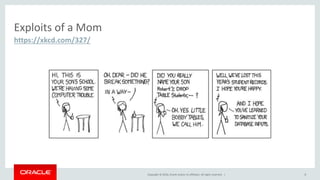
Exploits of a Mom
8
https://xkcd.com/327/
Copyright © 2016, Oracle and/or its affiliates. All rights reserved. |
MySQL Firewall Architecture
9
Copyright © 2016, Oracle and/or its affiliates. All rights reserved. |
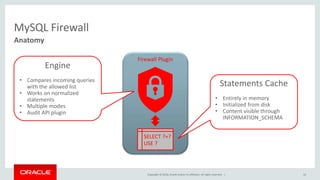
MySQL Firewall
10
Anatomy
Firewall Plugin
SELECT ?+?
USE ?
Engine
• Compares incoming queries
with the allowed list
• Works on normalized
statements
• Multiple modes
• Audit API plugin
Statements Cache
• Entirely in memory
• Initialized from disk
• Content visible through
INFORMATION_SCHEMA
Copyright © 2016, Oracle and/or its affiliates. All rights reserved. |
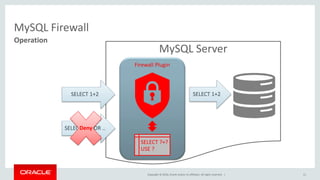
MySQL Server
MySQL Firewall
11
Operation
SELECT 1+2 SELECT 1+2
SELECT 1+2 OR ..Deny
Firewall Plugin
SELECT ?+?
USE ?
Copyright © 2016, Oracle and/or its affiliates. All rights reserved. |
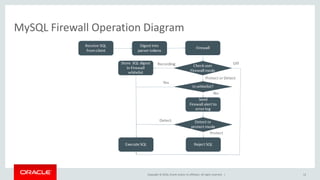
MySQL Firewall Operation Diagram
12
Copyright © 2016, Oracle and/or its affiliates. All rights reserved. |
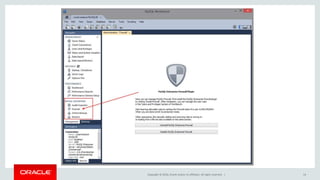
Installing The MySQL Firewall
13
Copyright © 2016, Oracle and/or its affiliates. All rights reserved. | 14
Copyright © 2016, Oracle and/or its affiliates. All rights reserved. |
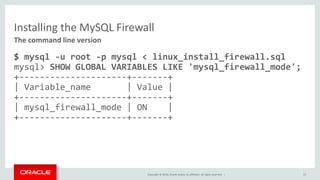
Installing the MySQL Firewall
$ mysql -u root -p mysql < linux_install_firewall.sql
mysql> SHOW GLOBAL VARIABLES LIKE 'mysql_firewall_mode';
+---------------------+-------+
| Variable_name | Value |
+---------------------+-------+
| mysql_firewall_mode | ON |
+---------------------+-------+
15
The command line version
Copyright © 2016, Oracle and/or its affiliates. All rights reserved. |
Operating the MySQL Firewall
Case study: adding firewall protection to a WordPress installation
16
Copyright © 2016, Oracle and/or its affiliates. All rights reserved. |
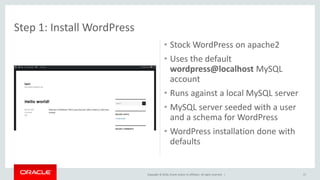
• Stock WordPress on apache2
• Uses the default
wordpress@localhost MySQL
account
• Runs against a local MySQL server
• MySQL server seeded with a user
and a schema for WordPress
• WordPress installation done with
defaults
17
Step 1: Install WordPress
Copyright © 2016, Oracle and/or its affiliates. All rights reserved. |
Step 2: Put the Firewall Into Recording Mode
• Command Line
– $mysql -u root -p –e "CALL mysql.sp_set_firewall_mode('wordpress@localhost', 'RECORDING');“
• Workbench
18
Copyright © 2016, Oracle and/or its affiliates. All rights reserved. |
Step 3: Accumulate White List Actions
• The non-trivial part !
• Click through all of the WordPress sequences that you want to be enabled
– This will generate the queries
• I have only clicked through saving a draft of a post
19
Copyright © 2016, Oracle and/or its affiliates. All rights reserved. |
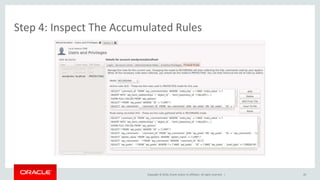
Step 4: Inspect The Accumulated Rules
20
Copyright © 2016, Oracle and/or its affiliates. All rights reserved. |
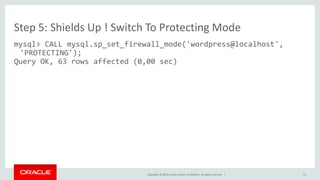
Step 5: Shields Up ! Switch To Protecting Mode
mysql> CALL mysql.sp_set_firewall_mode('wordpress@localhost',
'PROTECTING');
Query OK, 63 rows affected (0,00 sec)
21
Copyright © 2016, Oracle and/or its affiliates. All rights reserved. |
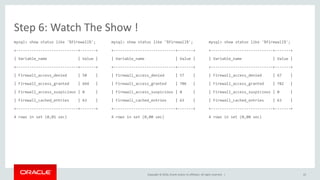
Step 6: Watch The Show !
mysql> show status like '%firewall%';
+----------------------------+-------+
| Variable_name | Value |
+----------------------------+-------+
| Firewall_access_denied | 50 |
| Firewall_access_granted | 664 |
| Firewall_access_suspicious | 0 |
| Firewall_cached_entries | 63 |
+----------------------------+-------+
4 rows in set (0,01 sec)
mysql> show status like '%firewall%';
+----------------------------+-------+
| Variable_name | Value |
+----------------------------+-------+
| Firewall_access_denied | 57 |
| Firewall_access_granted | 706 |
| Firewall_access_suspicious | 0 |
| Firewall_cached_entries | 63 |
+----------------------------+-------+
4 rows in set (0,00 sec)
mysql> show status like '%firewall%';
+----------------------------+-------+
| Variable_name | Value |
+----------------------------+-------+
| Firewall_access_denied | 67 |
| Firewall_access_granted | 782 |
| Firewall_access_suspicious | 0 |
| Firewall_cached_entries | 63 |
+----------------------------+-------+
4 rows in set (0,00 sec)
22
Copyright © 2016, Oracle and/or its affiliates. All rights reserved. |
What Does the Application Get ?
• $ client/mysql -u wordpress --protocol=tcp -p -e "select version()“
ERROR 1045 (28000) at line 1: Statement was blocked by Firewall
• [Mon Jun 20 13:23:00.091246 2016] [:error] [pid 31596] [client 127.0.0.1:40226]
WordPress database error Statement was blocked by Firewall for query SELECT *
FROM wp_users WHERE user_email = 'test@test.com' made by edit_user, email_exists,
get_user_by, WP_User::get_data_by, referer: http://localhost/blog/wp-admin/user-
new.php
• [Mon Jun 20 13:23:00.094753 2016] [:error] [pid 31596] [client 127.0.0.1:40226]
WordPress database error Statement was blocked by Firewall for query SELECT *
FROM wp_users WHERE user_email = 'test@test.com' made by edit_user,
wp_insert_user, email_exists, get_user_by, WP_User::get_data_by, referer:
http://localhost/blog/wp-admin/user-new.php
23
Copyright © 2016, Oracle and/or its affiliates. All rights reserved. |
MySQL Firewall Operation: What Else ?
• Can log suspicious queries (not in the whitelist) instead of/in addition to
blocking
• The mysql.mysql_firewall_* tables are not special tables.
– It’s just that the firewall reads them at installation time
– And the stored programs write the INFORMATION_SCHEMA tables into them
• Can reset the stats
– mysql_firewall_flush_status() resets the status variables
• Can manipulate rule-sets
– Aggregate, prune, edit etc
24
Copyright © 2016, Oracle and/or its affiliates. All rights reserved. |
Questions And Answers
Confidential – Oracle
25
Copyright © 2016, Oracle and/or its affiliates. All rights reserved. |
Safe Harbor Statement
The preceding is intended to outline our general product direction. It is intended for
information purposes only, and may not be incorporated into any contract. It is not a
commitment to deliver any material, code, or functionality, and should not be relied upon
in making purchasing decisions. The development, release, and timing of any features or
functionality described for Oracle’s products remains at the sole discretion of Oracle.
Confidential – Oracle
26
2016 oSC MySQL Firewall

2016 oSC MySQL Firewall

  • 1.
    Copyright © 2016,Oracle and/or its affiliates. All rights reserved. | MySQL Firewall Add an extra layer of security to your database server Georgi “Joro” Kodinov MySQL Server General Team Lead
  • 2.
    Copyright © 2016,Oracle and/or its affiliates. All rights reserved. | Georgi “Joro” Kodinov MySQL @ Oracle  Server General Team Lead  Works on MySQL since 2006  Specializes in:  Security  Client/server protocol  Monitoring  Loves history, diverse world cultures  A devoted Formula 1 fan (Go, Massa !)
  • 3.
    Copyright © 2016,Oracle and/or its affiliates. All rights reserved. | Agenda 3 Why a MySQL Firewall ? Firewall Architecture Installation and setup Operation Q&A
  • 4.
    Copyright © 2016,Oracle and/or its affiliates. All rights reserved. | Why a MySQL Firewall ? 4
  • 5.
    Copyright © 2016,Oracle and/or its affiliates. All rights reserved. | Simple ! Make SQL injection attacks harder ! 5
  • 6.
    Copyright © 2016,Oracle and/or its affiliates. All rights reserved. | “And it wouldn’t be a proper DBIR if we didn’t raise a glass to one of the elder statesmen of web application hacking, SQL injection (SQLi)” – http://www.verizonenterprise.com/verizon-insights- lab/dbir/2016/ 6
  • 7.
    Copyright © 2016,Oracle and/or its affiliates. All rights reserved. | Why a MySQL Firewall ? • Better SQL applications security – User accounts can execute only application SQL • Defense in dept – Extra layer, works with the other methods • Minimum performance cost – Takes advantage of the server’s SQL processor • No need for application changes – Works inside the server 7 Other reasons
  • 8.
    Copyright © 2016,Oracle and/or its affiliates. All rights reserved. | Exploits of a Mom 8 https://xkcd.com/327/
  • 9.
    Copyright © 2016,Oracle and/or its affiliates. All rights reserved. | MySQL Firewall Architecture 9
  • 10.
    Copyright © 2016,Oracle and/or its affiliates. All rights reserved. | MySQL Firewall 10 Anatomy Firewall Plugin SELECT ?+? USE ? Engine • Compares incoming queries with the allowed list • Works on normalized statements • Multiple modes • Audit API plugin Statements Cache • Entirely in memory • Initialized from disk • Content visible through INFORMATION_SCHEMA
  • 11.
    Copyright © 2016,Oracle and/or its affiliates. All rights reserved. | MySQL Server MySQL Firewall 11 Operation SELECT 1+2 SELECT 1+2 SELECT 1+2 OR ..Deny Firewall Plugin SELECT ?+? USE ?
  • 12.
    Copyright © 2016,Oracle and/or its affiliates. All rights reserved. | MySQL Firewall Operation Diagram 12
  • 13.
    Copyright © 2016,Oracle and/or its affiliates. All rights reserved. | Installing The MySQL Firewall 13
  • 14.
    Copyright © 2016,Oracle and/or its affiliates. All rights reserved. | 14
  • 15.
    Copyright © 2016,Oracle and/or its affiliates. All rights reserved. | Installing the MySQL Firewall $ mysql -u root -p mysql < linux_install_firewall.sql mysql> SHOW GLOBAL VARIABLES LIKE 'mysql_firewall_mode'; +---------------------+-------+ | Variable_name | Value | +---------------------+-------+ | mysql_firewall_mode | ON | +---------------------+-------+ 15 The command line version
  • 16.
    Copyright © 2016,Oracle and/or its affiliates. All rights reserved. | Operating the MySQL Firewall Case study: adding firewall protection to a WordPress installation 16
  • 17.
    Copyright © 2016,Oracle and/or its affiliates. All rights reserved. | • Stock WordPress on apache2 • Uses the default wordpress@localhost MySQL account • Runs against a local MySQL server • MySQL server seeded with a user and a schema for WordPress • WordPress installation done with defaults 17 Step 1: Install WordPress
  • 18.
    Copyright © 2016,Oracle and/or its affiliates. All rights reserved. | Step 2: Put the Firewall Into Recording Mode • Command Line – $mysql -u root -p –e "CALL mysql.sp_set_firewall_mode('wordpress@localhost', 'RECORDING');“ • Workbench 18
  • 19.
    Copyright © 2016,Oracle and/or its affiliates. All rights reserved. | Step 3: Accumulate White List Actions • The non-trivial part ! • Click through all of the WordPress sequences that you want to be enabled – This will generate the queries • I have only clicked through saving a draft of a post 19
  • 20.
    Copyright © 2016,Oracle and/or its affiliates. All rights reserved. | Step 4: Inspect The Accumulated Rules 20
  • 21.
    Copyright © 2016,Oracle and/or its affiliates. All rights reserved. | Step 5: Shields Up ! Switch To Protecting Mode mysql> CALL mysql.sp_set_firewall_mode('wordpress@localhost', 'PROTECTING'); Query OK, 63 rows affected (0,00 sec) 21
  • 22.
    Copyright © 2016,Oracle and/or its affiliates. All rights reserved. | Step 6: Watch The Show ! mysql> show status like '%firewall%'; +----------------------------+-------+ | Variable_name | Value | +----------------------------+-------+ | Firewall_access_denied | 50 | | Firewall_access_granted | 664 | | Firewall_access_suspicious | 0 | | Firewall_cached_entries | 63 | +----------------------------+-------+ 4 rows in set (0,01 sec) mysql> show status like '%firewall%'; +----------------------------+-------+ | Variable_name | Value | +----------------------------+-------+ | Firewall_access_denied | 57 | | Firewall_access_granted | 706 | | Firewall_access_suspicious | 0 | | Firewall_cached_entries | 63 | +----------------------------+-------+ 4 rows in set (0,00 sec) mysql> show status like '%firewall%'; +----------------------------+-------+ | Variable_name | Value | +----------------------------+-------+ | Firewall_access_denied | 67 | | Firewall_access_granted | 782 | | Firewall_access_suspicious | 0 | | Firewall_cached_entries | 63 | +----------------------------+-------+ 4 rows in set (0,00 sec) 22
  • 23.
    Copyright © 2016,Oracle and/or its affiliates. All rights reserved. | What Does the Application Get ? • $ client/mysql -u wordpress --protocol=tcp -p -e "select version()“ ERROR 1045 (28000) at line 1: Statement was blocked by Firewall • [Mon Jun 20 13:23:00.091246 2016] [:error] [pid 31596] [client 127.0.0.1:40226] WordPress database error Statement was blocked by Firewall for query SELECT * FROM wp_users WHERE user_email = 'test@test.com' made by edit_user, email_exists, get_user_by, WP_User::get_data_by, referer: http://localhost/blog/wp-admin/user- new.php • [Mon Jun 20 13:23:00.094753 2016] [:error] [pid 31596] [client 127.0.0.1:40226] WordPress database error Statement was blocked by Firewall for query SELECT * FROM wp_users WHERE user_email = 'test@test.com' made by edit_user, wp_insert_user, email_exists, get_user_by, WP_User::get_data_by, referer: http://localhost/blog/wp-admin/user-new.php 23
  • 24.
    Copyright © 2016,Oracle and/or its affiliates. All rights reserved. | MySQL Firewall Operation: What Else ? • Can log suspicious queries (not in the whitelist) instead of/in addition to blocking • The mysql.mysql_firewall_* tables are not special tables. – It’s just that the firewall reads them at installation time – And the stored programs write the INFORMATION_SCHEMA tables into them • Can reset the stats – mysql_firewall_flush_status() resets the status variables • Can manipulate rule-sets – Aggregate, prune, edit etc 24
  • 25.
    Copyright © 2016,Oracle and/or its affiliates. All rights reserved. | Questions And Answers Confidential – Oracle 25
  • 26.
    Copyright © 2016,Oracle and/or its affiliates. All rights reserved. | Safe Harbor Statement The preceding is intended to outline our general product direction. It is intended for information purposes only, and may not be incorporated into any contract. It is not a commitment to deliver any material, code, or functionality, and should not be relied upon in making purchasing decisions. The development, release, and timing of any features or functionality described for Oracle’s products remains at the sole discretion of Oracle. Confidential – Oracle 26

Editor's Notes

  • #7 Verizon’s 2016 Data Breach Investigations Report